My Haas Bienvenue,
!
Haas Tooling MyHaas/HaasConnect Se connecter S’inscrire Haas Tooling MyHaas/HaasConnect Se déconnecter Bienvenue, Mes machines Dernière activité Mes devis Mon compte Mes utilisateurs Se déconnecter
Trouver votre distributeur
  1. Sélectionner la langue
    1. English
    2. Deutsch
    3. Español - España
    4. Español - México
    5. Français
    6. Italiano
    7. Português
    8. Český
    9. Dansk
    10. Nederlands
    11. Magyar
    12. Polski
    13. Svenska
    14. Türkçe
    15. 中文
    16. Suomi
    17. Norsk
    18. الإنجليزية
    19. български
    20. Hrvatski
    21. Ελληνικά
    22. Română
    23. Slovenský
    24. Slovenščina
    25. 한국어
    26. 日本語
    27. Українська
  • machines Menu principal
    • Fraiseuses verticales
      Fraiseuses verticales
      Fraiseuses verticales Afficher tout
      • Fraiseuses verticales
      • Série VF
      • Machines universelles
      • Série VR
      • Machine à prismes VP-5
      • Centres d’usinage à broche verticale avec changeur de palettes
      • Mini Mills
      • Machines pour l'industrie du moule
      • Centres de perçage à grande vitesse
      • Série perçage-taraudage-fraisage
      • Fraiseuses d’atelier verticales
      • Pocket Mill
      • Fraiseuses compactes
      • Série Portique
      • Détoureuses de plaques SR
      • CUV Extra-Large
      • Fraiseuses colonne double
      • Machines 3+2 axes
    • Solutions multi-axes
      Solutions multi-axes
      Solutions multi-axes Afficher tout
      • Solutions multi-axes
      • Tours à axe Y
      • Fraiseuses à 5 axes
    • Tours
      Tours
      Tours Afficher tout
      • Tours
      • Série ST
      • Double-broche
      • Série à glissières prismatiques
      • Tours d’outilleur
      • Tour à décolleter
      • Tour de poche
      • Ravitailleurs de barres Haas
    • Fraiseuses horizontales
      Fraiseuses horizontales
      Fraiseuses horizontales Afficher tout
      • Fraiseuses horizontales
      • Cône 50
      • Cône de broche 40
    • Tables rotatives et indexeurs/diviseurs
      Tables rotatives et indexeurs/diviseurs
      Tables rotatives et indexeurs/diviseurs Afficher tout
      • Tables rotatives et indexeurs/diviseurs
      • Tables rotatives
      • Diviseur
      • Produits rotatifs à 5 axes
      • Diviseurs extra-larges
    • Systèmes d’automatisation
      Systèmes d’automatisation
      Systèmes d’automatisation Afficher tout
      • Systèmes d’automatisation
      • Automatisation de fraiseuse
      • Tour et automatisation
      • Chargeurs automatiques de pièces
      • Modèles d’automatisation
    • Machines de bureau
      Machines de bureau
      Machines de bureau Afficher tout
      • Machines de bureau
      • Fraiseuse de bureau
      • Tour de bureau
      • Simulateur de commande, standard
      • Simulateur de commande, Premium
    • Équipement d’atelier
      Équipement d’atelier
      Équipement d’atelier Afficher tout
      • Équipement d’atelier
      • Fraiseuse à console
      • Tours manuels Haas
      • Scies Haas
    • Machines de fabrication
      Machines de fabrication
      Machines de fabrication Afficher tout
      • Machines de fabrication
      • Machine de découpe à laser
      • Presses plieuses CNC
    • LIENS RAPIDES Séries spéciales  Séries spéciales 
      SÉRIE UE SÉRIE UE CONFIGURATION ET PRIX | LISTE DE PRIX CONFIGURATION ET PRIX | LISTE DE PRIX Les nouvelles machines en stock Les nouvelles machines en stock NOUVEAUTÉS NOUVEAUTÉS VOTRE PREMIER CNC VOTRE PREMIER CNC
      OUTILS D'ACHAT
      • Configuration et Prix d’une machine Haas
      • Liste des tarifs
      • Stock disponible
      • Financement CNCA
      VOUS SOUHAITEZ PARLER À UN AGENT ?

      Un magasin d’usine Haas (HFO) peut répondre à vos questions et vous présenter les meilleures options.

      CONTACT YOUR DISTRIBUTOR >
  • Options Menu principal
    • Product Image Broche
      Broche
      Broche Afficher tout
      • Broche
    • Product Image Changeurs d’outils
      Changeurs d’outils
      Changeurs d’outils Afficher tout
      • Changeurs d’outils
    • Product Image 4e et 5e axes
      4e et 5e axes
      4e et 5e axes Afficher tout
      • 4e et 5e axes
    • Product Image Tourelles et outil Tournant
      Tourelles et outil Tournant
      Tourelles et outil Tournant Afficher tout
      • Tourelles et outil Tournant
    • Product Image Palpage
      Palpage
      Palpage Afficher tout
      • Palpage
    • Gestion des copeaux et du liquide de coupe Haas Gestion des copeaux et du liquide de coupe
      Gestion des copeaux et du liquide de coupe
      Gestion des copeaux et du liquide de coupe Afficher tout
      • Gestion des copeaux et du liquide de coupe
    • La commande Haas La commande Haas
      La commande Haas
      La commande Haas Afficher tout
      • La commande Haas
    • Product Image Options de produit
      Options de produit
      Options de produit Afficher tout
      • Options de produit
    • Product Image Outillage et montages d’outillages de fixation
      Outillage et montages d’outillages de fixation
      Outillage et montages d’outillages de fixation Afficher tout
      • Outillage et montages d’outillages de fixation
    • Product Image Dispositifs de serrage de pièces
      Dispositifs de serrage de pièces
      Dispositifs de serrage de pièces Afficher tout
      • Dispositifs de serrage de pièces
    • Product Image Solutions à 5 axes
      Solutions à 5 axes
      Solutions à 5 axes Afficher tout
      • Solutions à 5 axes
      • 5 Easy Steps to 5-Axis
    • Product Image Automatisation
      Automatisation
      Automatisation Afficher tout
      • Automatisation
    • LIENS RAPIDES Séries spéciales  Séries spéciales 
      SÉRIE UE SÉRIE UE CONFIGURATION ET PRIX | LISTE DE PRIX CONFIGURATION ET PRIX | LISTE DE PRIX Les nouvelles machines en stock Les nouvelles machines en stock NOUVEAUTÉS NOUVEAUTÉS VOTRE PREMIER CNC VOTRE PREMIER CNC
      OUTILS D'ACHAT
      • Configuration et Prix d’une machine Haas
      • Liste des tarifs
      • Stock disponible
      • Financement CNCA
      VOUS SOUHAITEZ PARLER À UN AGENT ?

      Un magasin d’usine Haas (HFO) peut répondre à vos questions et vous présenter les meilleures options.

      CONTACT YOUR DISTRIBUTOR >
  • Why Haas Menu principal
      Découvrez la différence Haas
    • Pourquoi Haas
    • MyHaas
    • Communauté éducative
    • Industrie 4.0
    • Certification Haas
    • Témoignages émanant de clients
  • Service Menu principal
      Bienvenue au Haas Service
      SERVICE - ACCUEIL Manuels opérateur Procédures détaillées Guides de dépannage Maintenance préventive Pièces Haas Haas Tooling Vidéos
  • Vidéos Menu principal
  • Outillage Haas Menu principal
My Haas Bienvenue,
!
Haas Tooling MyHaas/HaasConnect Se connecter S’inscrire Haas Tooling MyHaas/HaasConnect Se déconnecter Bienvenue, Mes machines Dernière activité Mes devis Mon compte Mes utilisateurs Se déconnecter
Trouver votre distributeur
  1. Sélectionner la langue
    1. English
    2. Deutsch
    3. Español - España
    4. Español - México
    5. Français
    6. Italiano
    7. Português
    8. Český
    9. Dansk
    10. Nederlands
    11. Magyar
    12. Polski
    13. Svenska
    14. Türkçe
    15. 中文
    16. Suomi
    17. Norsk
    18. الإنجليزية
    19. български
    20. Hrvatski
    21. Ελληνικά
    22. Română
    23. Slovenský
    24. Slovenščina
    25. 한국어
    26. 日本語
    27. Українська
×

Résultats de la recherche

Web Pages

Images

    • <
    • 1
    • >

UMC C-Axis Rotary Encoder Ring - Replacement - AD0497

Accueil du service Procédures d’aide Anneau d'encodeur rotatif UMC de l'axe C – Remplacement - AD0497

Anneau d'encodeur rotatif UMC de l'axe C – Remplacement - AD0497

- Aller à la section - Back to Top

10.2 UMC ROTARY ENCODER RING - REPLACEMENT

Recently Updated Last updated: 06/13/2025

UMC C-Axis Rotary Encoder Ring - Replacement


AD0497

Revision B - 09/2025

Introduction

This procedure details the replacement of the 3" C-Axis Encoder on all UMC machines and the 3" B-Axis Encoder on UMC -500/SS machines only.

Laser calibration is required to update the compensation table for the corresponding rotary axis following the encoder replacement. 

This document applies to the following Service Kits:

  • 93-3923  ENCDR NON-CONT KIT 3"ID SER HI-RES

Used on B & C-Axis:

  • UMC-500/SS

Used on C-Axis:

  • UMC-750/SS
  • UMC-1000/SS
  • UMC-1250/SS
  • UMC-1500-DUO/SS

Tools Required:

  • 99-2130 ANTI-OXIDANT COMPOUND ELECTRICAL
  • 99-2147 DIELECTRIC GREASE PACK SUPER LUBE
  • 0.008" Mylar Shim

C-Axis Encoder Ring Replacement

1

: Warning: Only certified service personnel should perform this procedure. Reorientation of Z-pulse or Trip-Flag will require laser calibration to populate rotary compensation tables with new, correct, values.

Zero-return all Axis.


2

Handle jog B to +120°.

Press [EMERGENCY STOP].

Remove the C-Axis bottom cover.

3

Press [SETTING].

Navigate to the Rotaty tab.

Un-Check the 4th Axis.

4

Press [DIAGNOSTIC].

Navigate to Parameters > Factory.

Set 7.083 C-Axis Linear Scale Enabled to "Scale Disabled".

Power off the machine.

5

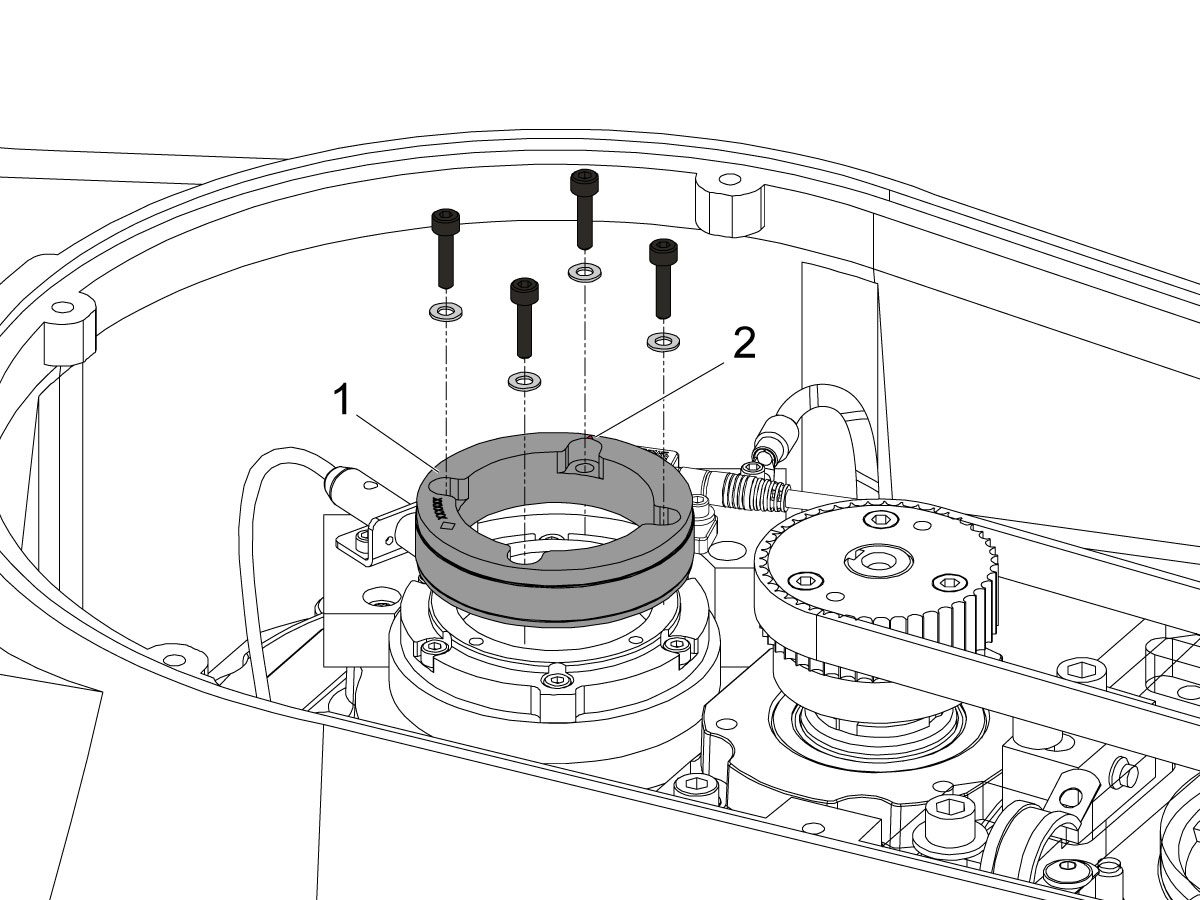
Uninstall the encoder read-head [1] by disconnecting the encoder cable [2] and removing the bolts and washers.

6

Note the Z-Pulse orientation before removing the encoder ring hub.

Uninstall the encoder ring hub [1] by removing the screws and washers mounting the encoder ring hub to the taper-lock. 

7

Mount and loosely install the encoder ring hub [1] from the service kit with the provided hardware, SHCS 10-32 X 3/4 (x4) and WASHER #10 FLAT (x4).

Verify the Z-Pulse is in the same location as the ring that was uninstalled. 

 Note: Do not torque mounting screws yet.

8

Turn on the machine.

Zero return all axis.

 Warning: Do not place the Mag Base anywhere near the Encoder.

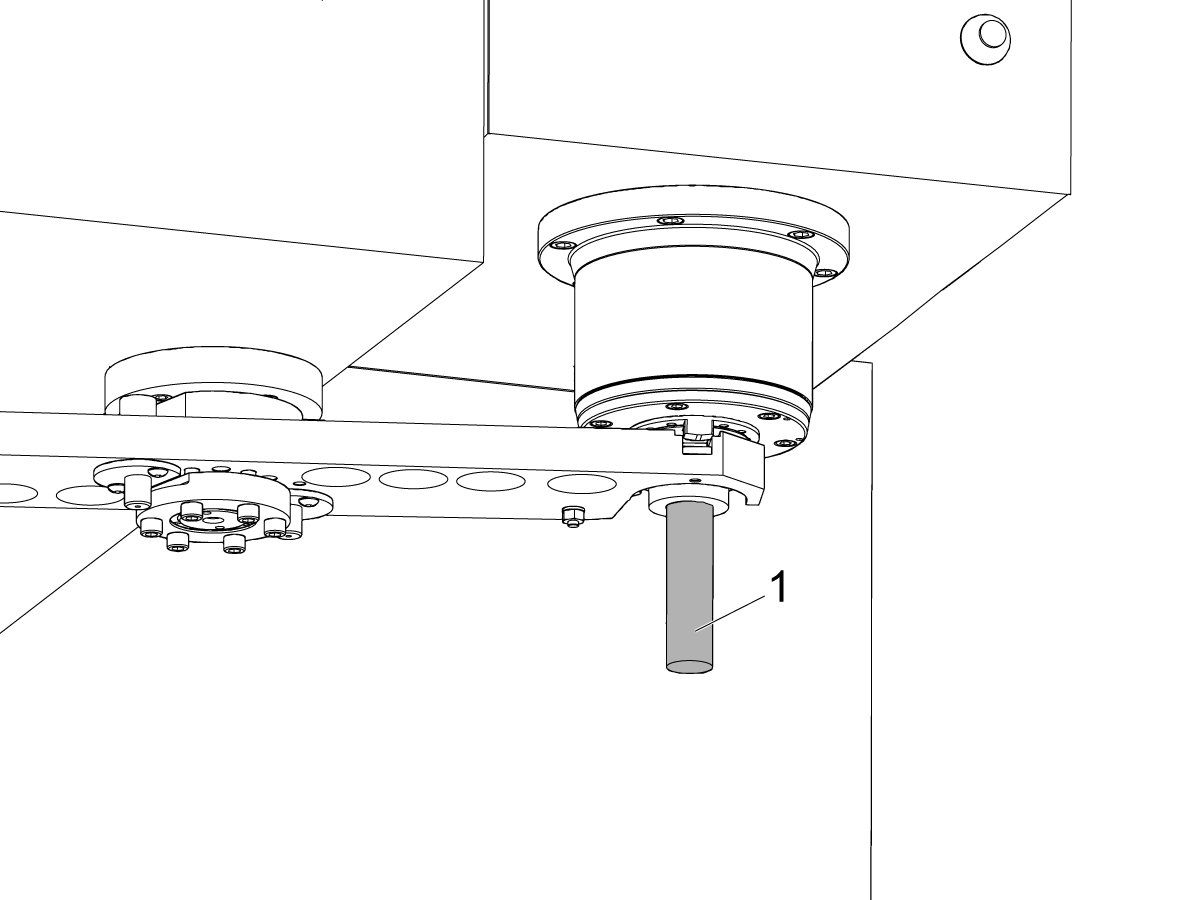
Check and document the runout on the OD of the scale encoder ring hub using the upper-most diameter, as shown.

Adjust as necessary. TIR must be 0.0005" or less.

Torque the 4 bolts of the encoder ring hub to 30 in-lbf in the star pattern.

After torquing, double check the runout to verify the ring hub has not shifted.

9

Clean the back surface of the encoder read-head and the mounting surface.

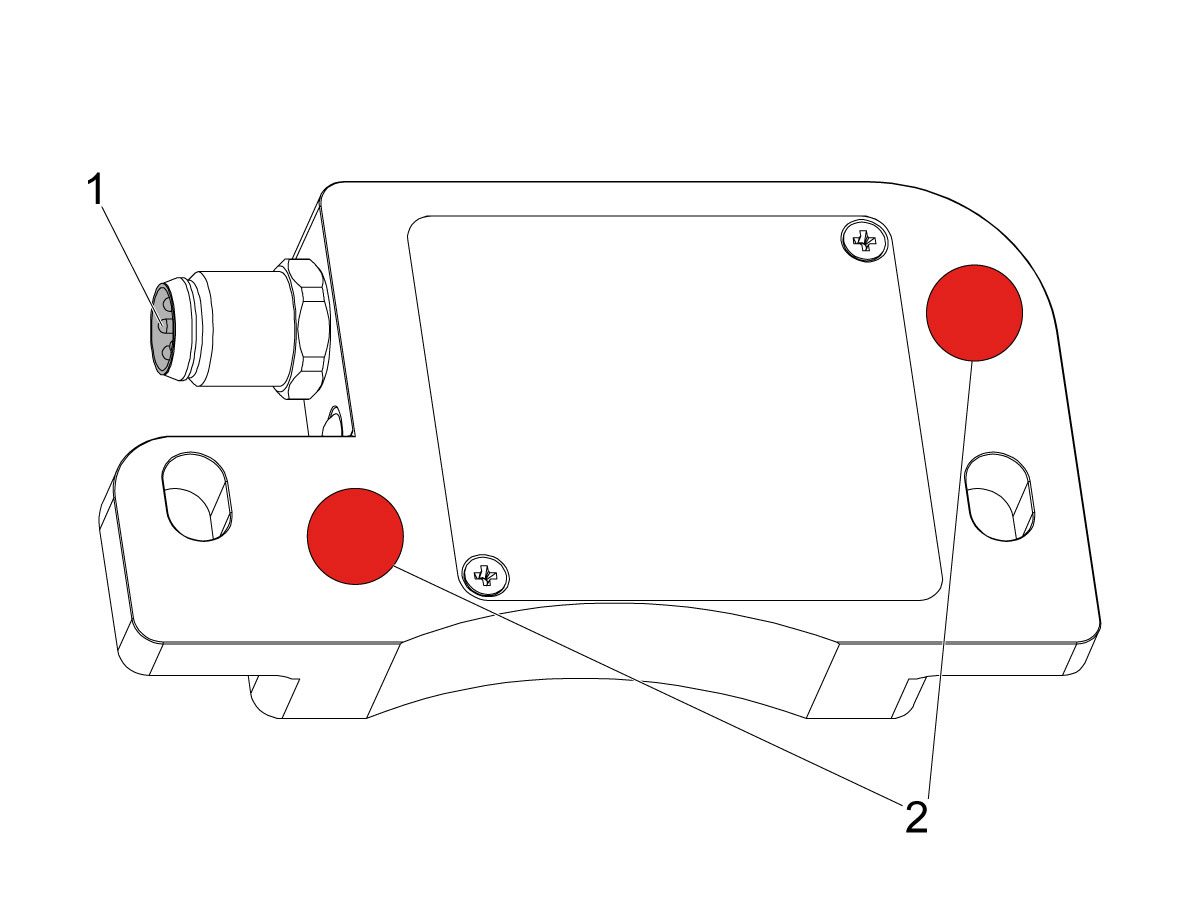
Add a small amount of silicone dielectric grease to encoder cable connection [1]. Grease should be a thin layer, but cover all the pins.

Apply two small drops of anti-oxidant (99-2130) to the mounting surface on the read head in the locations shown [2].

10

Connect the encoder cable [4] to the encoder read-head.

Insert cable by carefully lining up electrical pins with cable connector.

Install the encoder read-head [1] from the service kit with the provided hardware,  SHCS 8-32 x 1/2 bolts (x2) [2] and Washer .17ID x .4OD (2x) [3].

 Note: Do not torque mounting screws yet.

11

Set the gap between the scale ring and read-head as shown [1] using the appropriate mylar shim (0.008").

 Note: Do not use a metal shim.

Starting on the left side of the read-head [2], torque the two read-head mounting bolts to 20 in-lbf.

After torquing, double check the gap with the shim to verify the read-head has not shifted.

12

Reinstall the C-Axis bottom cover being sure no tools, shims, etc. have been left in the casting.

13

Press [SETTING].

Navigate to the Rotaty tab.

Check the 4th Axis.

Rotate the B-Axis back to zero when done.

14

Press [DIAGNOSTIC].

Navigate to Parameters > Configuration > Axis > B > Travel Limits.

Change: 6.108 B-Axis Positive Travel Limit from 180 to 110.

15

Press [DIAGNOSTIC].

Navigate to Parameters > Factory.

Set 7.083 C-Axis Linear Scale Enabled to "Scale Linear".

Power cycle the machine.

16

Zero-Return the C-Axis.

Zero-Return All Axis.

Set new Tool Change offset by following the UMC - X and Y Axes - Tool Change Offsets and the Side-Mount Tool Changer - Z-Axis Tool Change Offset - NGC procedures.

17

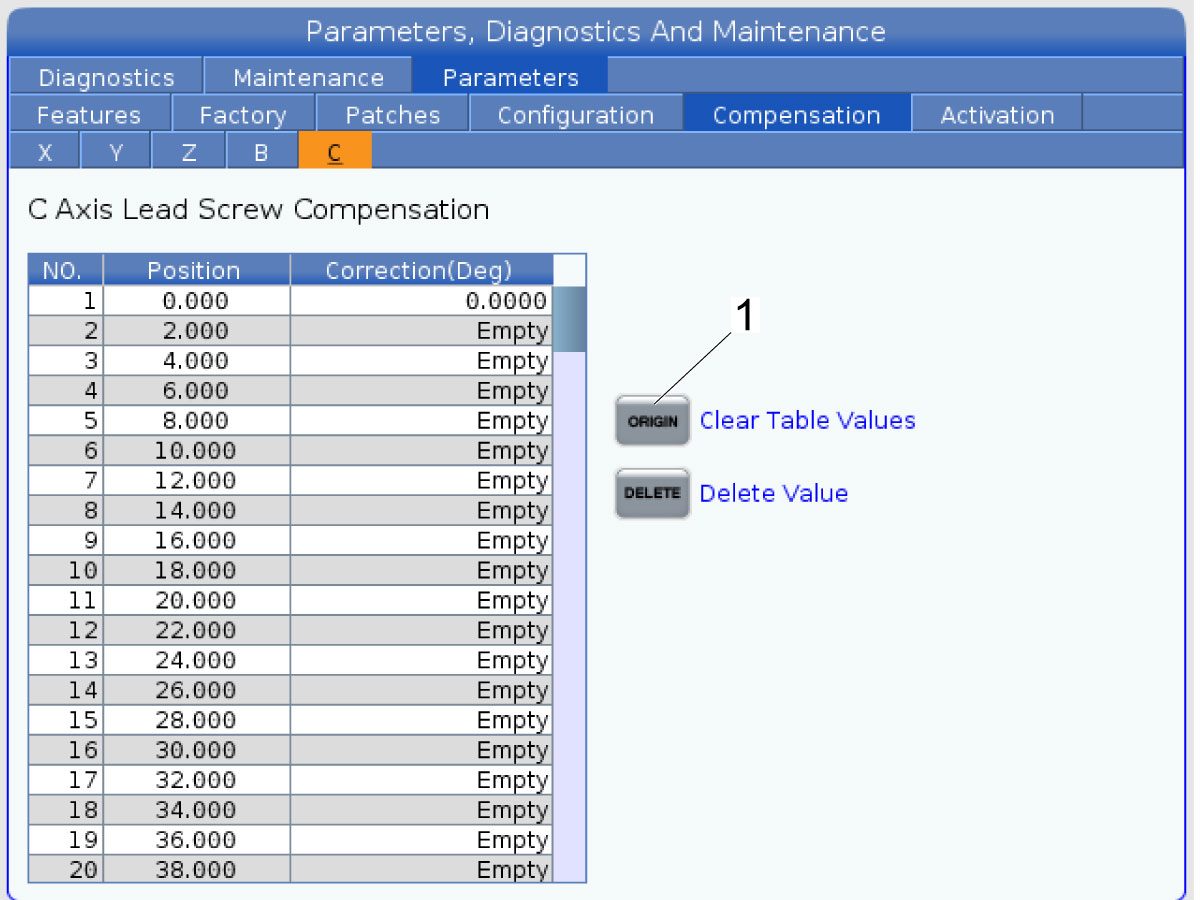
Clear the Compensation table for the C-Axis.

Press [DIAGNOSTIC].

Navigate to Parameters > Compensation > C.

Press [ORIGIN].

To update compensation table values for the C-Axis a laser calibration is required. The calculated compensation values will then be entered into the C-Axis Compensation Table.

B-Axis Encoder Ring Replacement

 Note: These step apply only to the UMC-500/SS B-Axis.

1

: Warning: Only certified service personnel should perform this procedure. Reorientation of Z-pulse or Trip-Flag will require laser calibration to populate rotary compensation tables with new, correct, values.

Zero-return all Axis.

Press [EMERGENCY STOP].

2

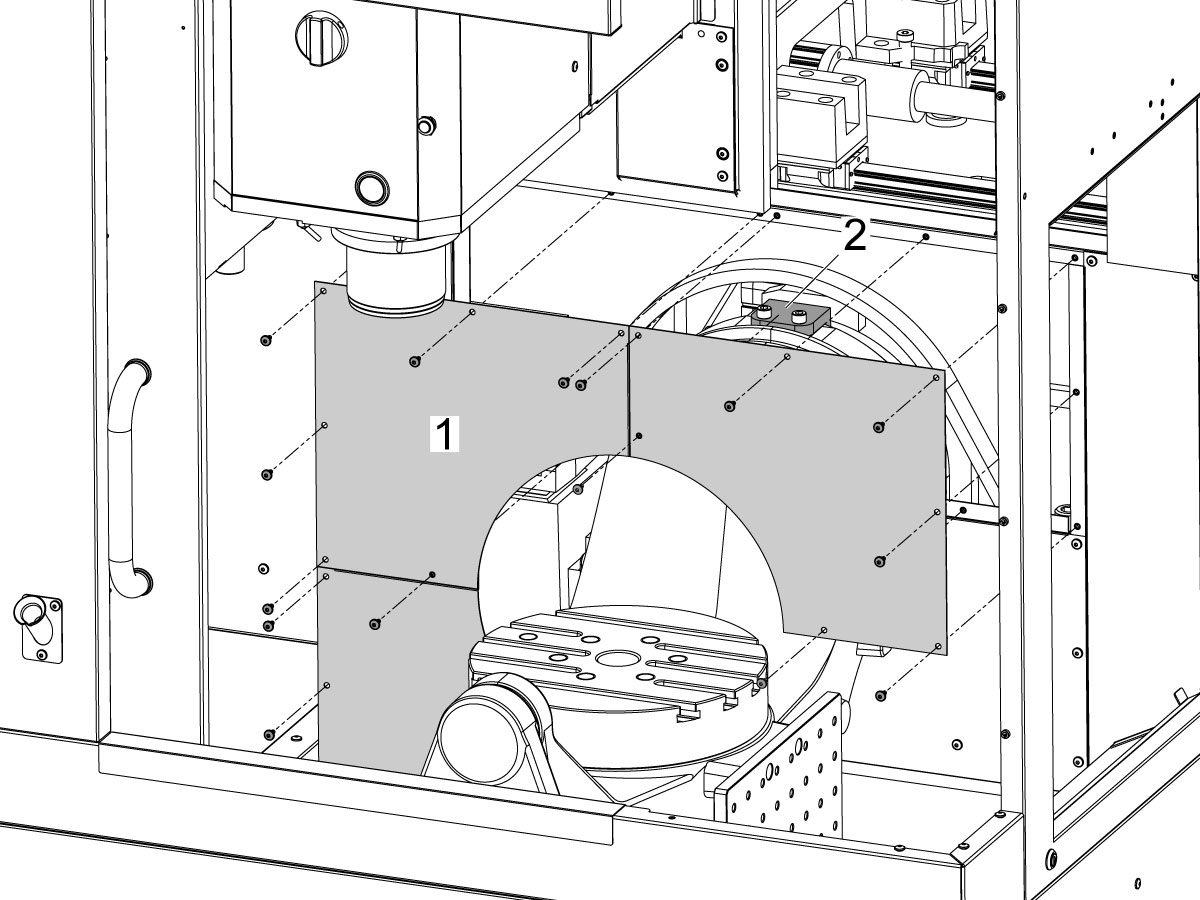
Remove the bulkhead sheet metal [1] to access the B-Axis hard stop [2]. 

3

Rotate the B-Axis approximately 100 degrees, or until there is enough room to access the hard stop [1].

Remove the B-Axis hard stop [1].

4

Remove the two rear sheet metal panels [1] to access the B-Axis components.

5

Insert a service key and enter service mode.

Press [DIAGNOSTIC].

Navigate to Parameters > Factory > 6.021.

Change: 6.021 B-Axis Check Travel Limit from TRUE to FALSE .

6

Handle jog B to +180°.

Remove the C-Axis bottom cover.

7

Press [DIAGNOSTIC].

Navigate to Parameters > Factory.

Set 6.083 B-Axis Linear Scale Enabled to "Scale Disabled".

Power off the machine.

8

Disconnect all of the cables and hoses [1] running to the C-Axis through the B-Axis encoder ring. 

 Note: Mark the cables and hose to make reconnecting them easier later in this procedure. 

Remove the corrugated conduit [2].

9

Uninstall the encoder read-head [1] by disconnecting the encoder cable [2] and removing the bolts and washers.

10

Note the Z-Pulse orientation before removing the encoder ring hub.

Uninstall the encoder ring hub [1] by removing the screws and washers mounting the encoder ring hub to the taper-lock. 

11

Mount and loosely install the encoder ring hub [1] from the service kit with the provided hardware, SHCS 10-32 X 3/4 (x4) and WASHER #10 FLAT (x4).

Verify the Z-Pulse is in the same location as the ring that was uninstalled. 

 Note: If the Z-Pulse is in the wrong location the B-Axis will not zero return correctly and can damage the cables and hoses.

 Note: Do not torque mounting screws yet.

12

Route all of the cables and hoses [1] for the C-Axis through the corrugated conduit [2] and through the B-Axis encoder ring. 

Reconnect all of the cables and hoses to their original locations in the C-Axis.

13

Turn on the machine.

Zero return all axis.

 Note: The B-Axis should zero return in the Clockwise direction.

 Warning: Do not place the Mag Base anywhere near the Encoder.

Check and document the runout on the OD of the scale encoder ring hub using the upper-most diameter, as shown.

Adjust as necessary. TIR must be 0.0005" or less.

Torque the 4 bolts of the encoder ring hub to 30 in-lbf in the star pattern.

After torquing, double check the runout to verify the ring hub has not shifted.

14

Clean the back surface of the encoder read-head and the mounting surface.

Add a small amount of silicone dielectric grease to encoder cable connection [1]. Grease should be a thin layer, but cover all the pins.

Apply two small drops of anti-oxidant (99-2130) to the mounting surface on the read head in the locations shown [2].

15

Connect the encoder cable [1] to the encoder read-head.

Insert cable by carefully lining up electrical pins with cable connector.

Install the encoder read-head [2] from the service kit with the provided hardware,  SHCS 8-32 x 1/2 bolts (x2) [4] and Washer .17ID x .4OD (2x) [3].

 Note: Do not torque mounting screws yet.

16

Set the gap between the scale ring and read-head as shown [1] using the appropriate mylar shim (0.008").

 Note: Do not use a metal shim.

Starting on the left side of the read-head [2], torque the two read-head mounting bolts to 20 in-lbf.

After torquing, double check the gap with the shim to verify the read-head has not shifted.

17

Reinstall the C-Axis bottom cover being sure no tools, shims, etc. have been left in the casting.

 Note: You will have to set a new tool change offset and update compensation table values for the B-Axis. This will require laser calibration.

18

Rotate the B-Axis to the same position when the hard stop was removed. 

Install the B-Axis hard stop [1].

19

Press [DIAGNOSTIC].

Navigate to Parameters > Factory > 6.021.

Change: 6.021 B-Axis Check Travel Limit from FALSE to TRUE.

Rotate the B-Axis back to zero when done.

20

Press [DIAGNOSTIC].

Navigate to Parameters > Factory.

Set 6.083 B-Axis Linear Scale Enabled to "Scale Linear".

Power cycle the machine.

21

Zero-Return the B-Axis.

Zero-Return All Axis.

Set new Tool Change offset by following the UMC - X and Y Axes - Tool Change Offsets and the Side-Mount Tool Changer - Z-Axis Tool Change Offset - NGC procedures.

22

Install the bulkhead sheet metal [1] once the B-Axis hard stop [2] has been installed. 

23

Install the two rear sheet metal panels [1].

24

Clear the Compensation table for the B-Axis.

Press [DIAGNOSTIC].

Navigate to Parameters > Compensation > B.

Press [ORIGIN].

To update compensation table values for the B-Axis a laser calibration is required. The calculated compensation values will then be entered into the B-Axis Compensation Table.

Recently Viewed Items

You Have No Recently Viewed Items Yet

Commentaires
Haas Logo

Tarification de livraison Haas

Ce prix comprend les frais d’expédition, les droits d’exportation et d’importation, l’assurance et tous les autres frais encourus pendant l’expédition vers un lieu en France convenu avec vous en tant qu’acheteur. Aucun autre frais obligatoire ne peut être ajouté à la livraison d’un Produit CNC Haas.

PRENEZ CONNAISSANCE DES TOUTES DERNIÈRES SUGGESTIONS ET TECHNOLOGIES DE HAAS.

Inscrivez-vous maintenant !   

HAAS TOOLING ACCEPTE CE QUI SUIT :

  • Service et assistance
  • Propriétaires
  • Demande de service
  • Manuels d’utilisation
  • Pièces Haas
  • Demande de réparation de tables rotatives
  • Guides de pré-installation
  • Outils d’achat
  • Fabrication et prix d’une nouvelle machine Haas
  • Stock disponible
  • La liste des tarifs Haas
  • Financement CNCA
  • À propos de Haas
  • Engagement d’accessibilité
  • Principe DNSH
  • Respect des exportations
  • Carrières
  • Certifications et sécurité
  • Contactez-nous
  • Histoire
  • Conditions générales
  • Conditions générales outillage Haas
  • Confidentialité
  • Garantie
  • Communauté Haas
  • Programme de certification Haas
  • Haas Motorsports
  • Gene Haas Foundation
  • Communauté éducative technique Haas
  • Événements
  • Participer aux échanges
  • Facebook
  • X
  • Flickr
  • YouTube
  • LinkedIn
  • Instagram
  • TikTok
© 2026 Haas Automation, Inc. - Machines-outils CNC
This site is protected by reCAPTCHA and the Google Privacy Policy et Terms of Service apply.

2800 Sturgis Rd., Oxnard, CA 93030 / Toll Free: 800-331-6746
Phone: 805-278-1800 / Fax: 805-278-2255