MyHaas Welkom,
!
Haas Tooling MyHaas/HaasConnect Aanmelden Aanmelden Haas Tooling MyHaas/HaasConnect Uitloggen Welkom, Mijn machines Laatste activiteit Mijn offertes Mijn account Mijn gebruikers Uitloggen
Zoek uw distributeur
  1. Taal selecteren
    1. English
    2. Deutsch
    3. Español - España
    4. Español - México
    5. Français
    6. Italiano
    7. Português
    8. Český
    9. Dansk
    10. Nederlands
    11. Magyar
    12. Polski
    13. Svenska
    14. Türkçe
    15. 中文
    16. Suomi
    17. Norsk
    18. الإنجليزية
    19. български
    20. Hrvatski
    21. Ελληνικά
    22. Română
    23. Slovenský
    24. Slovenščina
    25. 한국어
    26. 日本語
    27. Українська
  • machines Hoofdmenu
    • Verticale bewerkingscentra
      Verticale bewerkingscentra
      Verticale bewerkingscentra View All
      • Verticale bewerkingscentra
      • VF-serie
      • Universele machines
      • VR-serie
      • VP-5 prismatisch
      • Palletwisselaar VMC’s
      • Mini Mills
      • MoldMakers
      • Hogesnelheidsboorcentra
      • Boor/tap/frees-serie
      • Toolroom Mill Serie
      • Pocket Mill
      • Compact verticaal bewerkingscentrum
      • Portaalfreesmachine
      • SR-bladrouters
      • Extra grote VMC
      • Frezen met dubbele kolom
      • 3+2 positioneer-machines
    • Multi-asoplossingen
      Multi-asoplossingen
      Multi-asoplossingen View All
      • Multi-asoplossingen
      • Y-as-draaimachines
      • 5-assige freesmachines
    • Draaimachines
      Draaimachines
      Draaimachines View All
      • Draaimachines
      • ST-serie
      • Dubbele spil
      • Box Way-serie
      • Toolroom-draaimachines
      • Compacte draaimachine
      • Haas-staafdoorvoer
    • Horizontale freesmachines
      Horizontale freesmachines
      Horizontale freesmachines View All
      • Horizontale freesmachines
      • 50-conus
      • 40-conus
    • Draai- en indexeertafels
      Draai- en indexeertafels
      Draai- en indexeertafels View All
      • Draai- en indexeertafels
      • Draaitafels
      • Indexeertafels
      • 5-assige draaitafels
      • Extra lange draaitafels
    • Automatiseringssystemen
      Automatiseringssystemen
      Automatiseringssystemen View All
      • Automatiseringssystemen
      • Automatisering voor freesmachines
      • Draaimachine automatisering
      • Automatische werkstukbeladers
      • Automatiseringsmodellen
    • Desktop-machines
      Desktop-machines
      Desktop-machines View All
      • Desktop-machines
      • Desktop Freesmachine
      • Desktop draaimachine
      • Control Simulator, standaard
      • Control Simulator, Premium
    • Werkplaatsapparatuur
      Werkplaatsapparatuur
      Werkplaatsapparatuur View All
      • Werkplaatsapparatuur
      • Knie frees
      • Haas handbediende draaimachines
      • Haas-zaag
    • Fabricagemachines
      Fabricagemachines
      Fabricagemachines View All
      • Fabricagemachines
      • Lasersnijmachines
      • CNC-persremmen
    • SNELKOPPELINGEN Speciale serie  Speciale serie 
      EU-SERIE EU-SERIE SAMENSTELLEN EN PRIJS BEPALEN | PRIJSLIJST SAMENSTELLEN EN PRIJS BEPALEN | PRIJSLIJST Machines op voorraad Machines op voorraad WAT IS ER NIEUW WAT IS ER NIEUW UW EERSTE CNC UW EERSTE CNC
      WINKELEN VOOR GEREEDSCHAP
      • Een Haas samen stellen en de prijs bepalen
      • Prijslijst
      • Beschikbare voorraad
      • CNCA financiering
      WILT U MET IEMAND SPREKEN?

      Een Haas Factory Outlet (HFO) kan uw vragen beantwoorden en de beste mogelijkheden met u bespreken.

      CONTACT YOUR DISTRIBUTOR >
  • Opties Hoofdmenu
    • Product Image Spillen
      Spillen
      Spillen View All
      • Spillen
    • Product Image Gereedschapswisselaars
      Gereedschapswisselaars
      Gereedschapswisselaars View All
      • Gereedschapswisselaars
    • Product Image 4e- | 5e-as
      4e- | 5e-as
      4e- | 5e-as View All
      • 4e- | 5e-as
    • Product Image Revolvers en aangedreven gereedschappen
      Revolvers en aangedreven gereedschappen
      Revolvers en aangedreven gereedschappen View All
      • Revolvers en aangedreven gereedschappen
    • Product Image Tasten
      Tasten
      Tasten View All
      • Tasten
    • Haas beheer van spanen en koelmiddel Beheer van spanen en koelmiddel
      Beheer van spanen en koelmiddel
      Beheer van spanen en koelmiddel View All
      • Beheer van spanen en koelmiddel
    • De Haas besturing De Haas besturing
      De Haas besturing
      De Haas besturing View All
      • De Haas besturing
    • Product Image Productopties
      Productopties
      Productopties View All
      • Productopties
    • Product Image Gereedschap en opspanning
      Gereedschap en opspanning
      Gereedschap en opspanning View All
      • Gereedschap en opspanning
    • Product Image Werkstukopspanning
      Werkstukopspanning
      Werkstukopspanning View All
      • Werkstukopspanning
    • Product Image 5-assige oplossingen
      5-assige oplossingen
      5-assige oplossingen View All
      • 5-assige oplossingen
      • 5 Easy Steps to 5-Axis
    • Product Image Automatisering
      Automatisering
      Automatisering View All
      • Automatisering
    • SNELKOPPELINGEN Speciale serie  Speciale serie 
      EU-SERIE EU-SERIE SAMENSTELLEN EN PRIJS BEPALEN | PRIJSLIJST SAMENSTELLEN EN PRIJS BEPALEN | PRIJSLIJST Machines op voorraad Machines op voorraad WAT IS ER NIEUW WAT IS ER NIEUW UW EERSTE CNC UW EERSTE CNC
      WINKELEN VOOR GEREEDSCHAP
      • Een Haas samen stellen en de prijs bepalen
      • Prijslijst
      • Beschikbare voorraad
      • CNCA financiering
      WILT U MET IEMAND SPREKEN?

      Een Haas Factory Outlet (HFO) kan uw vragen beantwoorden en de beste mogelijkheden met u bespreken.

      CONTACT YOUR DISTRIBUTOR >
  • Why Haas Hoofdmenu
      Ontdek het verschil dat Haas maakt
    • Waarom Haas
    • MyHaas
    • Onderwijscommunity
    • Industrie 4.0
    • HAAS-CERTIFICERING
    • Ervaringen van klanten
  • Service Hoofdmenu
      Welkom bij Haas Service
      SERVICE HOME Bedieningshandleidingen Instructieprocedures Gidsen voor het verhelpen van storingen Preventief onderhoud Haas-onderdelen Haas Tooling Video’s
  • Video’s Hoofdmenu
  • Haas-gereedschap Hoofdmenu
MyHaas Welkom,
!
Haas Tooling MyHaas/HaasConnect Aanmelden Aanmelden Haas Tooling MyHaas/HaasConnect Uitloggen Welkom, Mijn machines Laatste activiteit Mijn offertes Mijn account Mijn gebruikers Uitloggen
Zoek uw distributeur
  1. Taal selecteren
    1. English
    2. Deutsch
    3. Español - España
    4. Español - México
    5. Français
    6. Italiano
    7. Português
    8. Český
    9. Dansk
    10. Nederlands
    11. Magyar
    12. Polski
    13. Svenska
    14. Türkçe
    15. 中文
    16. Suomi
    17. Norsk
    18. الإنجليزية
    19. български
    20. Hrvatski
    21. Ελληνικά
    22. Română
    23. Slovenský
    24. Slovenščina
    25. 한국어
    26. 日本語
    27. Українська
×

Resultaten zoekopdracht

Web Pages

Images

    • <
    • 1
    • >

UMC C-Axis Rotary Encoder Ring - Replacement - AD0497

Service Home Instructieprocedure UMC C-as roterende encoderring - Vervanging - AD0497

UMC C-as roterende encoderring - Vervanging - AD0497

- Spring naar sectie - Back to Top

10.2 UMC ROTARY ENCODER RING - REPLACEMENT

Recently Updated Last updated: 06/13/2025

UMC C-Axis Rotary Encoder Ring - Replacement


AD0497

Revision B - 09/2025

Introduction

This procedure details the replacement of the 3" C-Axis Encoder on all UMC machines and the 3" B-Axis Encoder on UMC -500/SS machines only.

Laser calibration is required to update the compensation table for the corresponding rotary axis following the encoder replacement. 

This document applies to the following Service Kits:

  • 93-3923  ENCDR NON-CONT KIT 3"ID SER HI-RES

Used on B & C-Axis:

  • UMC-500/SS

Used on C-Axis:

  • UMC-750/SS
  • UMC-1000/SS
  • UMC-1250/SS
  • UMC-1500-DUO/SS

Tools Required:

  • 99-2130 ANTI-OXIDANT COMPOUND ELECTRICAL
  • 99-2147 DIELECTRIC GREASE PACK SUPER LUBE
  • 0.008" Mylar Shim

C-Axis Encoder Ring Replacement

1

: Warning: Only certified service personnel should perform this procedure. Reorientation of Z-pulse or Trip-Flag will require laser calibration to populate rotary compensation tables with new, correct, values.

Zero-return all Axis.


2

Handle jog B to +120°.

Press [EMERGENCY STOP].

Remove the C-Axis bottom cover.

3

Press [SETTING].

Navigate to the Rotaty tab.

Un-Check the 4th Axis.

4

Press [DIAGNOSTIC].

Navigate to Parameters > Factory.

Set 7.083 C-Axis Linear Scale Enabled to "Scale Disabled".

Power off the machine.

5

Uninstall the encoder read-head [1] by disconnecting the encoder cable [2] and removing the bolts and washers.

6

Note the Z-Pulse orientation before removing the encoder ring hub.

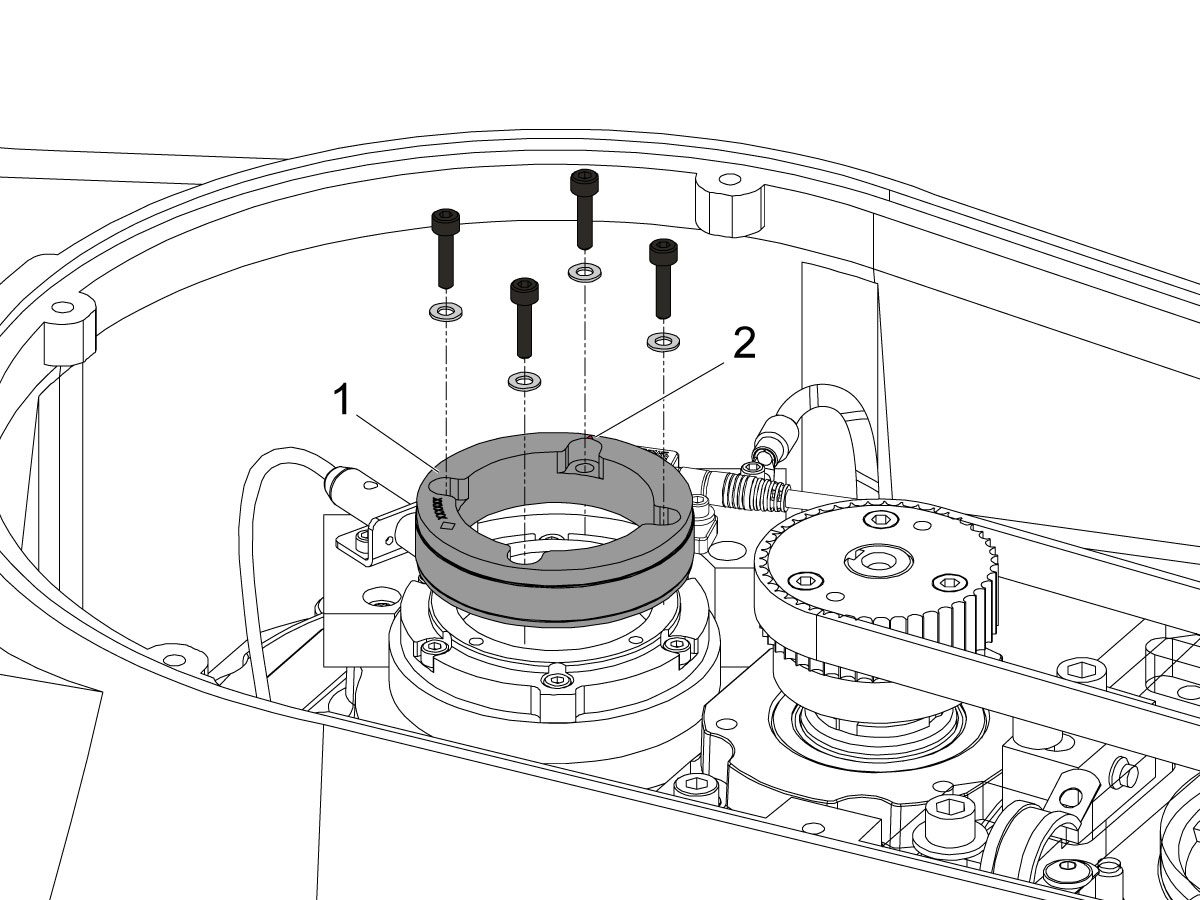
Uninstall the encoder ring hub [1] by removing the screws and washers mounting the encoder ring hub to the taper-lock. 

7

Mount and loosely install the encoder ring hub [1] from the service kit with the provided hardware, SHCS 10-32 X 3/4 (x4) and WASHER #10 FLAT (x4).

Verify the Z-Pulse is in the same location as the ring that was uninstalled. 

 Note: Do not torque mounting screws yet.

8

Turn on the machine.

Zero return all axis.

 Warning: Do not place the Mag Base anywhere near the Encoder.

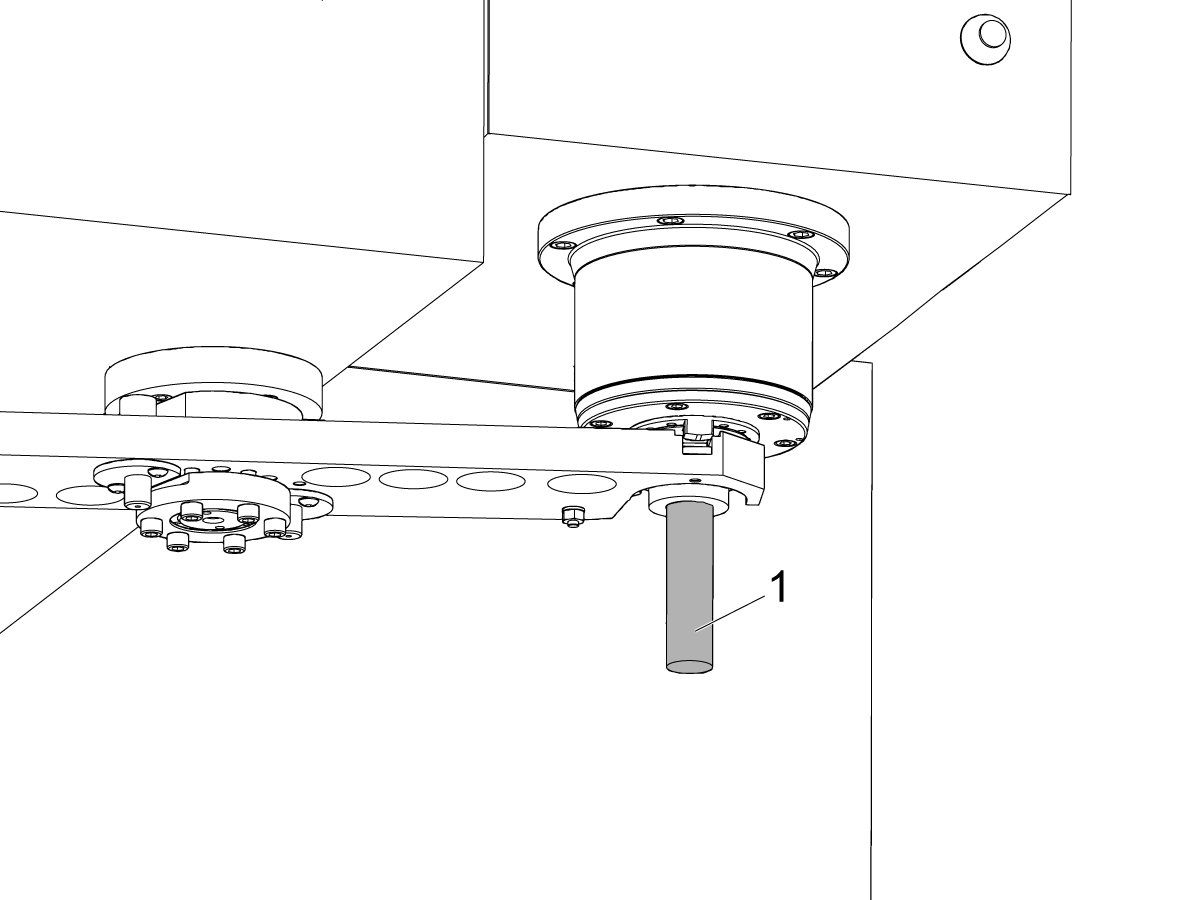
Check and document the runout on the OD of the scale encoder ring hub using the upper-most diameter, as shown.

Adjust as necessary. TIR must be 0.0005" or less.

Torque the 4 bolts of the encoder ring hub to 30 in-lbf in the star pattern.

After torquing, double check the runout to verify the ring hub has not shifted.

9

Clean the back surface of the encoder read-head and the mounting surface.

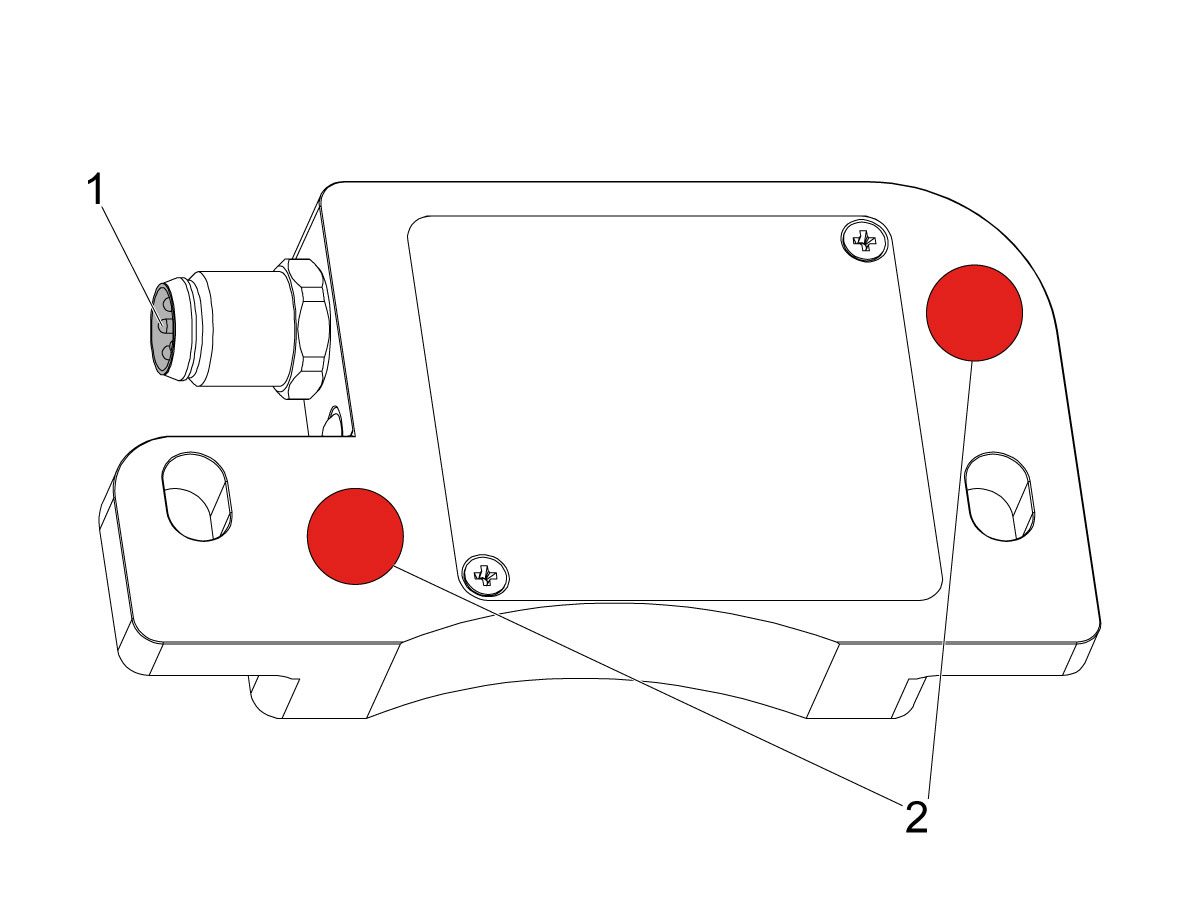
Add a small amount of silicone dielectric grease to encoder cable connection [1]. Grease should be a thin layer, but cover all the pins.

Apply two small drops of anti-oxidant (99-2130) to the mounting surface on the read head in the locations shown [2].

10

Connect the encoder cable [4] to the encoder read-head.

Insert cable by carefully lining up electrical pins with cable connector.

Install the encoder read-head [1] from the service kit with the provided hardware,  SHCS 8-32 x 1/2 bolts (x2) [2] and Washer .17ID x .4OD (2x) [3].

 Note: Do not torque mounting screws yet.

11

Set the gap between the scale ring and read-head as shown [1] using the appropriate mylar shim (0.008").

 Note: Do not use a metal shim.

Starting on the left side of the read-head [2], torque the two read-head mounting bolts to 20 in-lbf.

After torquing, double check the gap with the shim to verify the read-head has not shifted.

12

Reinstall the C-Axis bottom cover being sure no tools, shims, etc. have been left in the casting.

13

Press [SETTING].

Navigate to the Rotaty tab.

Check the 4th Axis.

Rotate the B-Axis back to zero when done.

14

Press [DIAGNOSTIC].

Navigate to Parameters > Configuration > Axis > B > Travel Limits.

Change: 6.108 B-Axis Positive Travel Limit from 180 to 110.

15

Press [DIAGNOSTIC].

Navigate to Parameters > Factory.

Set 7.083 C-Axis Linear Scale Enabled to "Scale Linear".

Power cycle the machine.

16

Zero-Return the C-Axis.

Zero-Return All Axis.

Set new Tool Change offset by following the UMC - X and Y Axes - Tool Change Offsets and the Side-Mount Tool Changer - Z-Axis Tool Change Offset - NGC procedures.

17

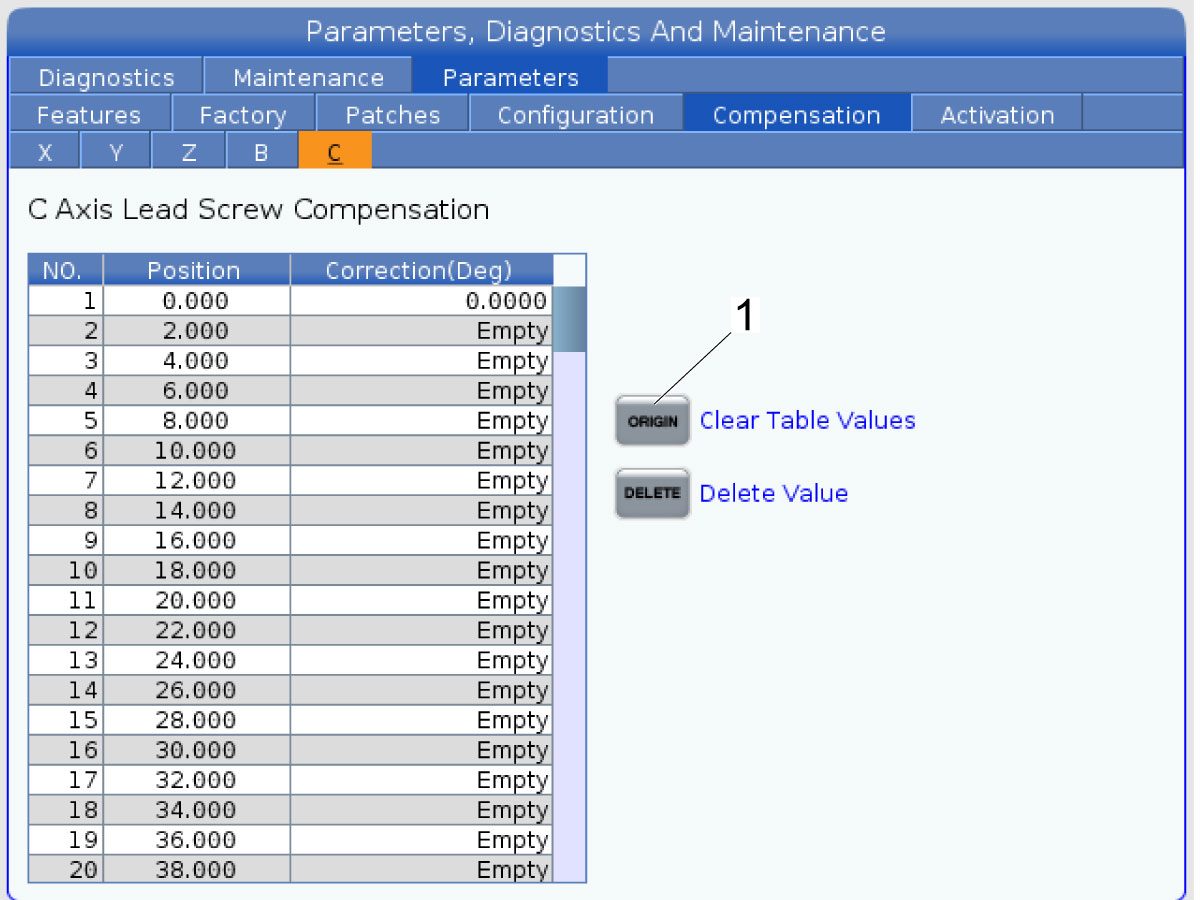
Clear the Compensation table for the C-Axis.

Press [DIAGNOSTIC].

Navigate to Parameters > Compensation > C.

Press [ORIGIN].

To update compensation table values for the C-Axis a laser calibration is required. The calculated compensation values will then be entered into the C-Axis Compensation Table.

B-Axis Encoder Ring Replacement

 Note: These step apply only to the UMC-500/SS B-Axis.

1

: Warning: Only certified service personnel should perform this procedure. Reorientation of Z-pulse or Trip-Flag will require laser calibration to populate rotary compensation tables with new, correct, values.

Zero-return all Axis.

Press [EMERGENCY STOP].

2

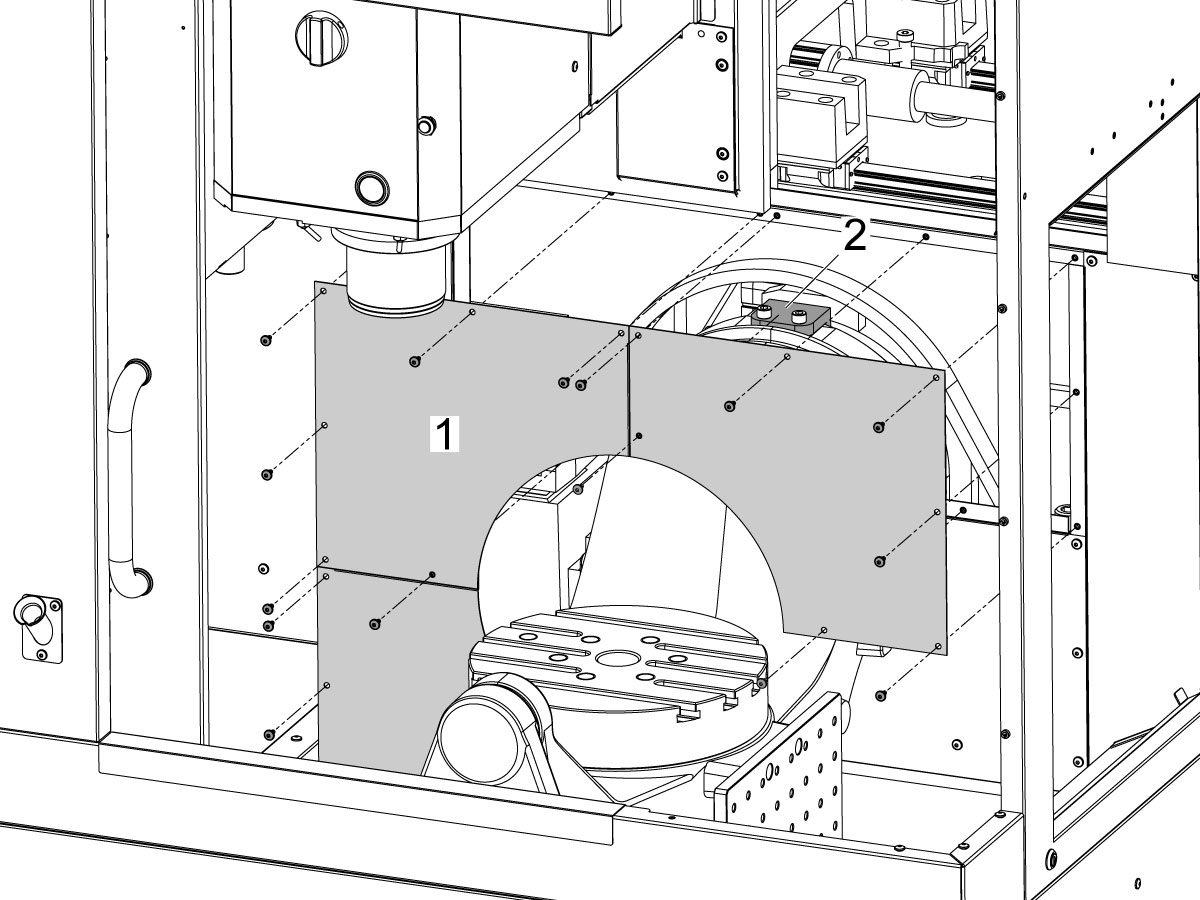
Remove the bulkhead sheet metal [1] to access the B-Axis hard stop [2]. 

3

Rotate the B-Axis approximately 100 degrees, or until there is enough room to access the hard stop [1].

Remove the B-Axis hard stop [1].

4

Remove the two rear sheet metal panels [1] to access the B-Axis components.

5

Insert a service key and enter service mode.

Press [DIAGNOSTIC].

Navigate to Parameters > Factory > 6.021.

Change: 6.021 B-Axis Check Travel Limit from TRUE to FALSE .

6

Handle jog B to +180°.

Remove the C-Axis bottom cover.

7

Press [DIAGNOSTIC].

Navigate to Parameters > Factory.

Set 6.083 B-Axis Linear Scale Enabled to "Scale Disabled".

Power off the machine.

8

Disconnect all of the cables and hoses [1] running to the C-Axis through the B-Axis encoder ring. 

 Note: Mark the cables and hose to make reconnecting them easier later in this procedure. 

Remove the corrugated conduit [2].

9

Uninstall the encoder read-head [1] by disconnecting the encoder cable [2] and removing the bolts and washers.

10

Note the Z-Pulse orientation before removing the encoder ring hub.

Uninstall the encoder ring hub [1] by removing the screws and washers mounting the encoder ring hub to the taper-lock. 

11

Mount and loosely install the encoder ring hub [1] from the service kit with the provided hardware, SHCS 10-32 X 3/4 (x4) and WASHER #10 FLAT (x4).

Verify the Z-Pulse is in the same location as the ring that was uninstalled. 

 Note: If the Z-Pulse is in the wrong location the B-Axis will not zero return correctly and can damage the cables and hoses.

 Note: Do not torque mounting screws yet.

12

Route all of the cables and hoses [1] for the C-Axis through the corrugated conduit [2] and through the B-Axis encoder ring. 

Reconnect all of the cables and hoses to their original locations in the C-Axis.

13

Turn on the machine.

Zero return all axis.

 Note: The B-Axis should zero return in the Clockwise direction.

 Warning: Do not place the Mag Base anywhere near the Encoder.

Check and document the runout on the OD of the scale encoder ring hub using the upper-most diameter, as shown.

Adjust as necessary. TIR must be 0.0005" or less.

Torque the 4 bolts of the encoder ring hub to 30 in-lbf in the star pattern.

After torquing, double check the runout to verify the ring hub has not shifted.

14

Clean the back surface of the encoder read-head and the mounting surface.

Add a small amount of silicone dielectric grease to encoder cable connection [1]. Grease should be a thin layer, but cover all the pins.

Apply two small drops of anti-oxidant (99-2130) to the mounting surface on the read head in the locations shown [2].

15

Connect the encoder cable [1] to the encoder read-head.

Insert cable by carefully lining up electrical pins with cable connector.

Install the encoder read-head [2] from the service kit with the provided hardware,  SHCS 8-32 x 1/2 bolts (x2) [4] and Washer .17ID x .4OD (2x) [3].

 Note: Do not torque mounting screws yet.

16

Set the gap between the scale ring and read-head as shown [1] using the appropriate mylar shim (0.008").

 Note: Do not use a metal shim.

Starting on the left side of the read-head [2], torque the two read-head mounting bolts to 20 in-lbf.

After torquing, double check the gap with the shim to verify the read-head has not shifted.

17

Reinstall the C-Axis bottom cover being sure no tools, shims, etc. have been left in the casting.

 Note: You will have to set a new tool change offset and update compensation table values for the B-Axis. This will require laser calibration.

18

Rotate the B-Axis to the same position when the hard stop was removed. 

Install the B-Axis hard stop [1].

19

Press [DIAGNOSTIC].

Navigate to Parameters > Factory > 6.021.

Change: 6.021 B-Axis Check Travel Limit from FALSE to TRUE.

Rotate the B-Axis back to zero when done.

20

Press [DIAGNOSTIC].

Navigate to Parameters > Factory.

Set 6.083 B-Axis Linear Scale Enabled to "Scale Linear".

Power cycle the machine.

21

Zero-Return the B-Axis.

Zero-Return All Axis.

Set new Tool Change offset by following the UMC - X and Y Axes - Tool Change Offsets and the Side-Mount Tool Changer - Z-Axis Tool Change Offset - NGC procedures.

22

Install the bulkhead sheet metal [1] once the B-Axis hard stop [2] has been installed. 

23

Install the two rear sheet metal panels [1].

24

Clear the Compensation table for the B-Axis.

Press [DIAGNOSTIC].

Navigate to Parameters > Compensation > B.

Press [ORIGIN].

To update compensation table values for the B-Axis a laser calibration is required. The calculated compensation values will then be entered into the B-Axis Compensation Table.

Recently Viewed Items

You Have No Recently Viewed Items Yet

Feedback
Haas Logo

Leveringsprijs Haas

Deze prijs is inclusief verzendkosten, export- en invoerrechten, verzekeringen en andere kosten tijdens verzending naar een locatie in Frankrijk die met u als koper is overeengekomen. Er kunnen geen andere verplichte kosten worden toegevoegd aan de levering van een Haas CNC-product.

BLIJF OP DE HOOGTE VAN DE NIEUWSTE TIPS EN TECHNOLOGIE VAN HAAS…

Meld u nu aan!   

HAAS TOOLING ACCEPTEERT HET VOLGENDE:

  • Service en ondersteuning
  • Eigenaren
  • Service aanvragen
  • Bedieningshandleidingen
  • Haas-onderdelen
  • Reparatieverzoek voor draaitafel
  • Handleidingen voor het voorinstalleren
  • Winkelen voor gereedschap
  • Een nieuwe Haas samenstellen en prijs bepalen
  • Beschikbare voorraad
  • De prijslijst van Haas
  • CNCA financiering
  • Over Haas
  • Toegankelijkheidsverklaring
  • DNSH-verklaring
  • Naleving van exportvoorschriften
  • Carrières
  • Certificeringen en veiligheid
  • Neem contact met ons op
  • Geschiedenis
  • Algemene voorwaarden
  • Algemene voorwaarden Haas Tooling
  • Privacy
  • Garantie
  • Haas-gemeenschap
  • HAAS-certificeringsprogramma
  • Haas Motorsports
  • Gene Haas Foundation
  • Haas gemeenschap technisch onderwijs
  • Evenementen
  • Doe mee aan de conversatie
  • Facebook
  • X
  • Flickr
  • YouTube
  • LinkedIn
  • Instagram
  • TikTok
© 2026 Haas Automation, Inc - CNC werktuigmachines

This site is protected by reCAPTCHA and the Google Privacy Policy and Terms of Service apply.

2800 Sturgis Rd., Oxnard, CA 93030 / Toll Free: 800-331-6746
Phone: 805-278-1800 / Fax: 805-278-2255