My Haas Witaj,
!
Haas Tooling MyHaas/HaasConnect Zarejestruj się Zarejestruj się Haas Tooling MyHaas/HaasConnect Wyloguj się Witaj, Moje maszyny Ostatnia aktywność Moje wyceny Moje konto Moi użytkownicy Wyloguj się
Znajdź swojego dystrybutora
  1. Wybierz język
    1. English
    2. Deutsch
    3. Español - España
    4. Español - México
    5. Français
    6. Italiano
    7. Português
    8. Český
    9. Dansk
    10. Nederlands
    11. Magyar
    12. Polski
    13. Svenska
    14. Türkçe
    15. 中文
    16. Suomi
    17. Norsk
    18. الإنجليزية
    19. български
    20. Hrvatski
    21. Ελληνικά
    22. Română
    23. Slovenský
    24. Slovenščina
    25. 한국어
    26. 日本語
    27. Українська
  • maszyny Główne menu
    • Frezarki pionowe
      Frezarki pionowe
      Frezarki pionowe View All
      • Frezarki pionowe
      • Seria VF
      • Maszyny uniwersalne
      • VR Series
      • VP-5 Prismatic
      • Maszyny VMC z funkcją zmiany palet
      • Minifrezarki Mini Mill
      • Maszyny do form
      • Wysokoobrotowe centra wiertarskie
      • Seria centrów wiercących/gwintujących/frezujących
      • Frezarki narzędziowe
      • Pocket Mill
      • Frezarki kompaktowe
      • Seria suwnic bramowych
      • Rutery do arkuszy serii SR
      • Bardzo duże centra VMC
      • Frezarki dwukolumnowe
    • Rozwiązania wieloosiowe
      Rozwiązania wieloosiowe
      Rozwiązania wieloosiowe View All
      • Rozwiązania wieloosiowe
      • Tokarki z osią Y
      • Frezarki 5-osiowe
    • Tokarki
      Tokarki
      Tokarki View All
      • Tokarki
      • ST Series
      • Dwuwrzecionowe
      • Seria tokarek z prowadnicą ślizgową
      • Tokarki narzędziowe
      • Tokarka uchwytowa
      • Podajniki prętów Haas
      • Podajnik prętów Haas V2
      • Podajnik pręta Haas 12
    • Frezarki poziome
      Frezarki poziome
      Frezarki poziome View All
      • Frezarki poziome
      • Stożek 50
      • Stożek 40
    • Stoły obrotowe i aparaty podziałowe
      Stoły obrotowe i aparaty podziałowe
      Stoły obrotowe i aparaty podziałowe View All
      • Stoły obrotowe i aparaty podziałowe
      • Stoły obrotowe
      • Aparaty podziałowe
      • Stoły obrotowe osi 5-osiowe
      • Stoły obrotowe XL
    • Systemy automatyzacji
      Systemy automatyzacji
      Systemy automatyzacji View All
      • Systemy automatyzacji
      • Automatyzacja frezarki
      • Automatyzacja tokarki
      • Automatyczne ładowarki części
      • Modele automatyzacji
    • Maszyny stołowe
      Maszyny stołowe
      Maszyny stołowe View All
      • Maszyny stołowe
      • Frezarka stołowa
      • Tokarka stołowa
      • Symulator sterowania, standardowy
      • Symulator sterowania Premium
    • Wyposażenie hali produkcyjnej
      Wyposażenie hali produkcyjnej
      Wyposażenie hali produkcyjnej View All
      • Wyposażenie hali produkcyjnej
      • Frezarka wspornikowa
      • Tokarki ręczne Haas
      • Piły Haas
    • Maszyny produkcyjne
      Maszyny produkcyjne
      Maszyny produkcyjne View All
      • Maszyny produkcyjne
      • Maszyny do cięcia laserowego
      • Prasy krawędziowe CNC
    • SZYBKIE ŁĄCZA Seria specjalna  Seria specjalna 
      SERIA UE SERIA UE ZBUDUJ I WYCEŃ | CENNIK ZBUDUJ I WYCEŃ | CENNIK Dostępne maszyny Dostępne maszyny NOWOŚCI NOWOŚCI TWOJA PIERWSZA OBRABIARKA CNC TWOJA PIERWSZA OBRABIARKA CNC
      NARZĘDZIA ZAKUPOWE
      • Zbuduj i Wyceń maszynę Haas
      • Cennik
      • Dostępne produkty
      • Finansowanie CNCA
      CZY CHCESZ Z KIMŚ POROZMAWIAĆ?

      W punkcie sprzedaży fabrycznej Haas (HFO) znajdziesz odpowiedź na wszystkie pytania i poznasz optymalne rozwiązania.

      CONTACT YOUR DISTRIBUTOR >
  • Opcje Główne menu
    • Product Image Wrzeciona
      Wrzeciona
      Wrzeciona View All
      • Wrzeciona
    • Product Image Magazyny narzędzi
      Magazyny narzędzi
      Magazyny narzędzi View All
      • Magazyny narzędzi
    • Product Image 4. | 5. oś
      4. | 5. oś
      4. | 5. oś View All
      • 4. | 5. oś
    • Product Image Głowice i narzędzia napędzane
      Głowice i narzędzia napędzane
      Głowice i narzędzia napędzane View All
      • Głowice i narzędzia napędzane
    • Product Image Pomiary sondą
      Pomiary sondą
      Pomiary sondą View All
      • Pomiary sondą
    • Zarządzanie wiórami i chłodziwem Haas Zarządzanie wiórami i chłodziwem
      Zarządzanie wiórami i chłodziwem
      Zarządzanie wiórami i chłodziwem View All
      • Zarządzanie wiórami i chłodziwem
    • Sterownik Haas Sterownik Haas
      Sterownik Haas
      Sterownik Haas View All
      • Sterownik Haas
    • Product Image Opcje produktu
      Opcje produktu
      Opcje produktu View All
      • Opcje produktu
    • Product Image Narzędzia i mocowanie
      Narzędzia i mocowanie
      Narzędzia i mocowanie View All
      • Narzędzia i mocowanie
    • Product Image Uchwyt roboczy
      Uchwyt roboczy
      Uchwyt roboczy View All
      • Uchwyt roboczy
    • Product Image Rozwiązania 5-osiowe
      Rozwiązania 5-osiowe
      Rozwiązania 5-osiowe View All
      • Rozwiązania 5-osiowe
      • 5 Easy Steps to 5-Axis
    • Product Image Automatyka
      Automatyka
      Automatyka View All
      • Automatyka
    • SZYBKIE ŁĄCZA Seria specjalna  Seria specjalna 
      SERIA UE SERIA UE ZBUDUJ I WYCEŃ | CENNIK ZBUDUJ I WYCEŃ | CENNIK Dostępne maszyny Dostępne maszyny NOWOŚCI NOWOŚCI TWOJA PIERWSZA OBRABIARKA CNC TWOJA PIERWSZA OBRABIARKA CNC
      NARZĘDZIA ZAKUPOWE
      • Zbuduj i Wyceń maszynę Haas
      • Cennik
      • Dostępne produkty
      • Finansowanie CNCA
      CZY CHCESZ Z KIMŚ POROZMAWIAĆ?

      W punkcie sprzedaży fabrycznej Haas (HFO) znajdziesz odpowiedź na wszystkie pytania i poznasz optymalne rozwiązania.

      CONTACT YOUR DISTRIBUTOR >
  • Why Haas Główne menu
      Odkryj różnicę kreowaną przez Haas
    • Dlaczego właśnie Haas
    • MyHaas
    • Społeczność edukacyjna
    • Przemysł 4.0
    • Certyfikat Haas
    • Referencje klientów
  • Serwis Główne menu
      Witamy w Haas Service.
      SERWIS – STRONA GŁÓWNA Podręczniki operatora Procedury postępowania Podręczniki rozwiązywania problemów Profilaktyczna konserwacja Części Haas Haas Tooling Filmy
  • Filmy Główne menu
  • Oprzyrządowanie Haas Główne menu

My Haas Witaj,
!
Haas Tooling MyHaas/HaasConnect Zarejestruj się Zarejestruj się Haas Tooling MyHaas/HaasConnect Wyloguj się Witaj, Moje maszyny Ostatnia aktywność Moje wyceny Moje konto Moi użytkownicy Wyloguj się
Znajdź swojego dystrybutora
  1. Wybierz język
    1. English
    2. Deutsch
    3. Español - España
    4. Español - México
    5. Français
    6. Italiano
    7. Português
    8. Český
    9. Dansk
    10. Nederlands
    11. Magyar
    12. Polski
    13. Svenska
    14. Türkçe
    15. 中文
    16. Suomi
    17. Norsk
    18. الإنجليزية
    19. български
    20. Hrvatski
    21. Ελληνικά
    22. Română
    23. Slovenský
    24. Slovenščina
    25. 한국어
    26. 日本語
    27. Українська
×

Wyniki wyszukiwania

Web Pages

Images

    • <
    • 1
    • >

UMC C-Axis Rotary Encoder Ring - Replacement - AD0497

Serwis – Strona główna Procedura postępowania Pierścień kodera elementu obrotowego osi UMC — Wymiana — AD0497

Pierścień kodera elementu obrotowego osi UMC — Wymiana — AD0497

- Przejdź do sekcji - Back to Top

10.2 UMC ROTARY ENCODER RING - REPLACEMENT

Recently Updated Last updated: 06/13/2025

UMC C-Axis Rotary Encoder Ring - Replacement


AD0497

Revision B - 09/2025

Introduction

This procedure details the replacement of the 3" C-Axis Encoder on all UMC machines and the 3" B-Axis Encoder on UMC -500/SS machines only.

Laser calibration is required to update the compensation table for the corresponding rotary axis following the encoder replacement. 

This document applies to the following Service Kits:

  • 93-3923  ENCDR NON-CONT KIT 3"ID SER HI-RES

Used on B & C-Axis:

  • UMC-500/SS

Used on C-Axis:

  • UMC-750/SS
  • UMC-1000/SS
  • UMC-1250/SS
  • UMC-1500-DUO/SS

Tools Required:

  • 99-2130 ANTI-OXIDANT COMPOUND ELECTRICAL
  • 99-2147 DIELECTRIC GREASE PACK SUPER LUBE
  • 0.008" Mylar Shim

C-Axis Encoder Ring Replacement

1

: Warning: Only certified service personnel should perform this procedure. Reorientation of Z-pulse or Trip-Flag will require laser calibration to populate rotary compensation tables with new, correct, values.

Zero-return all Axis.


2

Handle jog B to +120°.

Press [EMERGENCY STOP].

Remove the C-Axis bottom cover.

3

Press [SETTING].

Navigate to the Rotaty tab.

Un-Check the 4th Axis.

4

Press [DIAGNOSTIC].

Navigate to Parameters > Factory.

Set 7.083 C-Axis Linear Scale Enabled to "Scale Disabled".

Power off the machine.

5

Uninstall the encoder read-head [1] by disconnecting the encoder cable [2] and removing the bolts and washers.

6

Note the Z-Pulse orientation before removing the encoder ring hub.

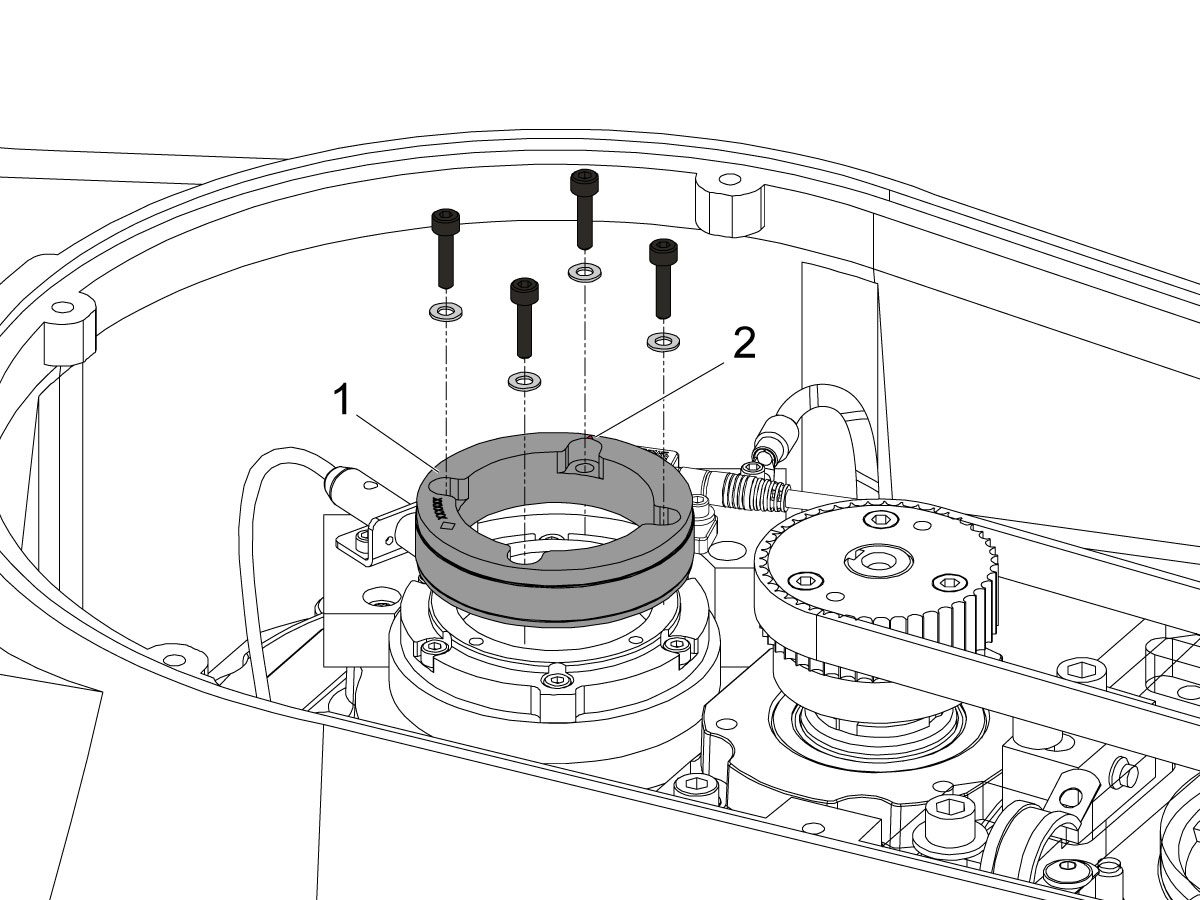
Uninstall the encoder ring hub [1] by removing the screws and washers mounting the encoder ring hub to the taper-lock. 

7

Mount and loosely install the encoder ring hub [1] from the service kit with the provided hardware, SHCS 10-32 X 3/4 (x4) and WASHER #10 FLAT (x4).

Verify the Z-Pulse is in the same location as the ring that was uninstalled. 

 Note: Do not torque mounting screws yet.

8

Turn on the machine.

Zero return all axis.

 Warning: Do not place the Mag Base anywhere near the Encoder.

Check and document the runout on the OD of the scale encoder ring hub using the upper-most diameter, as shown.

Adjust as necessary. TIR must be 0.0005" or less.

Torque the 4 bolts of the encoder ring hub to 30 in-lbf in the star pattern.

After torquing, double check the runout to verify the ring hub has not shifted.

9

Clean the back surface of the encoder read-head and the mounting surface.

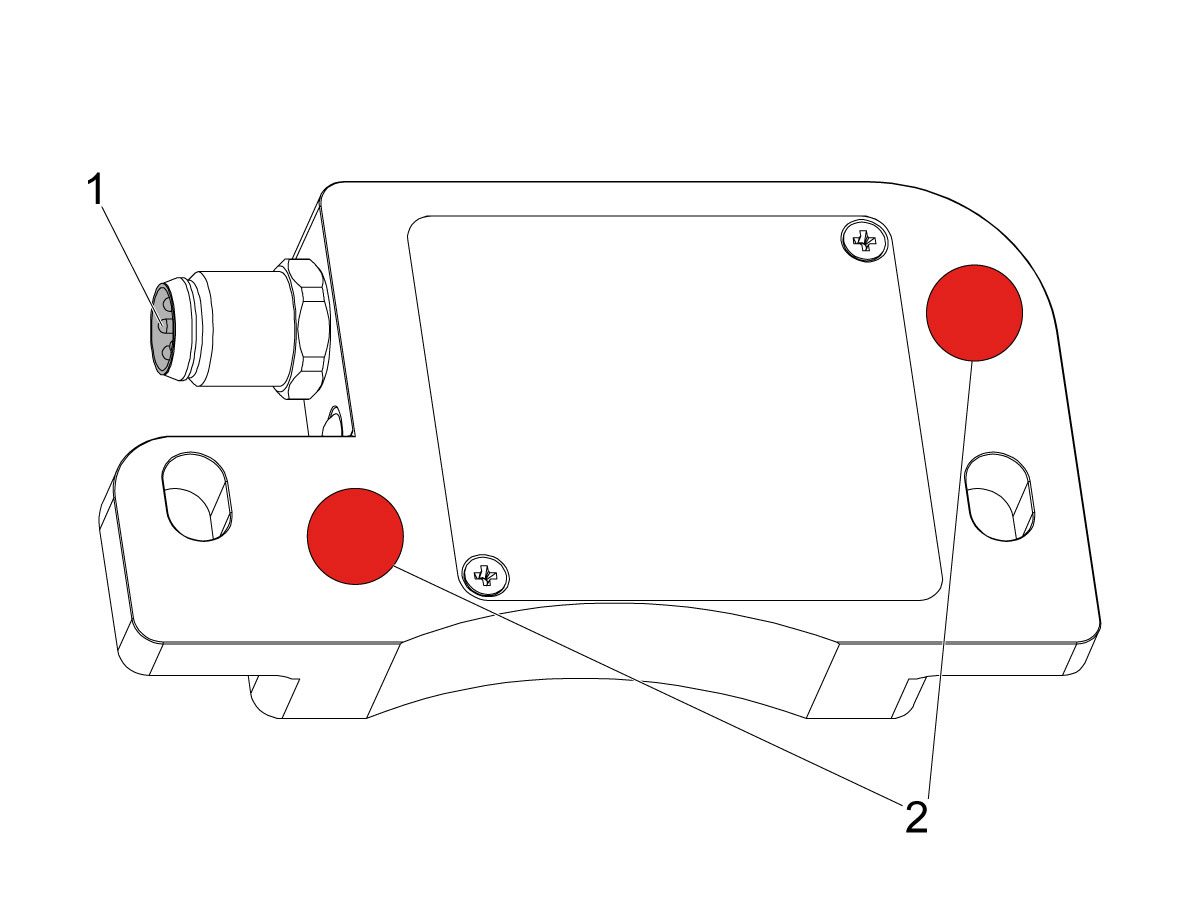
Add a small amount of silicone dielectric grease to encoder cable connection [1]. Grease should be a thin layer, but cover all the pins.

Apply two small drops of anti-oxidant (99-2130) to the mounting surface on the read head in the locations shown [2].

10

Connect the encoder cable [4] to the encoder read-head.

Insert cable by carefully lining up electrical pins with cable connector.

Install the encoder read-head [1] from the service kit with the provided hardware,  SHCS 8-32 x 1/2 bolts (x2) [2] and Washer .17ID x .4OD (2x) [3].

 Note: Do not torque mounting screws yet.

11

Set the gap between the scale ring and read-head as shown [1] using the appropriate mylar shim (0.008").

 Note: Do not use a metal shim.

Starting on the left side of the read-head [2], torque the two read-head mounting bolts to 20 in-lbf.

After torquing, double check the gap with the shim to verify the read-head has not shifted.

12

Reinstall the C-Axis bottom cover being sure no tools, shims, etc. have been left in the casting.

13

Press [SETTING].

Navigate to the Rotaty tab.

Check the 4th Axis.

Rotate the B-Axis back to zero when done.

14

Press [DIAGNOSTIC].

Navigate to Parameters > Configuration > Axis > B > Travel Limits.

Change: 6.108 B-Axis Positive Travel Limit from 180 to 110.

15

Press [DIAGNOSTIC].

Navigate to Parameters > Factory.

Set 7.083 C-Axis Linear Scale Enabled to "Scale Linear".

Power cycle the machine.

16

Zero-Return the C-Axis.

Zero-Return All Axis.

Set new Tool Change offset by following the UMC - X and Y Axes - Tool Change Offsets and the Side-Mount Tool Changer - Z-Axis Tool Change Offset - NGC procedures.

17

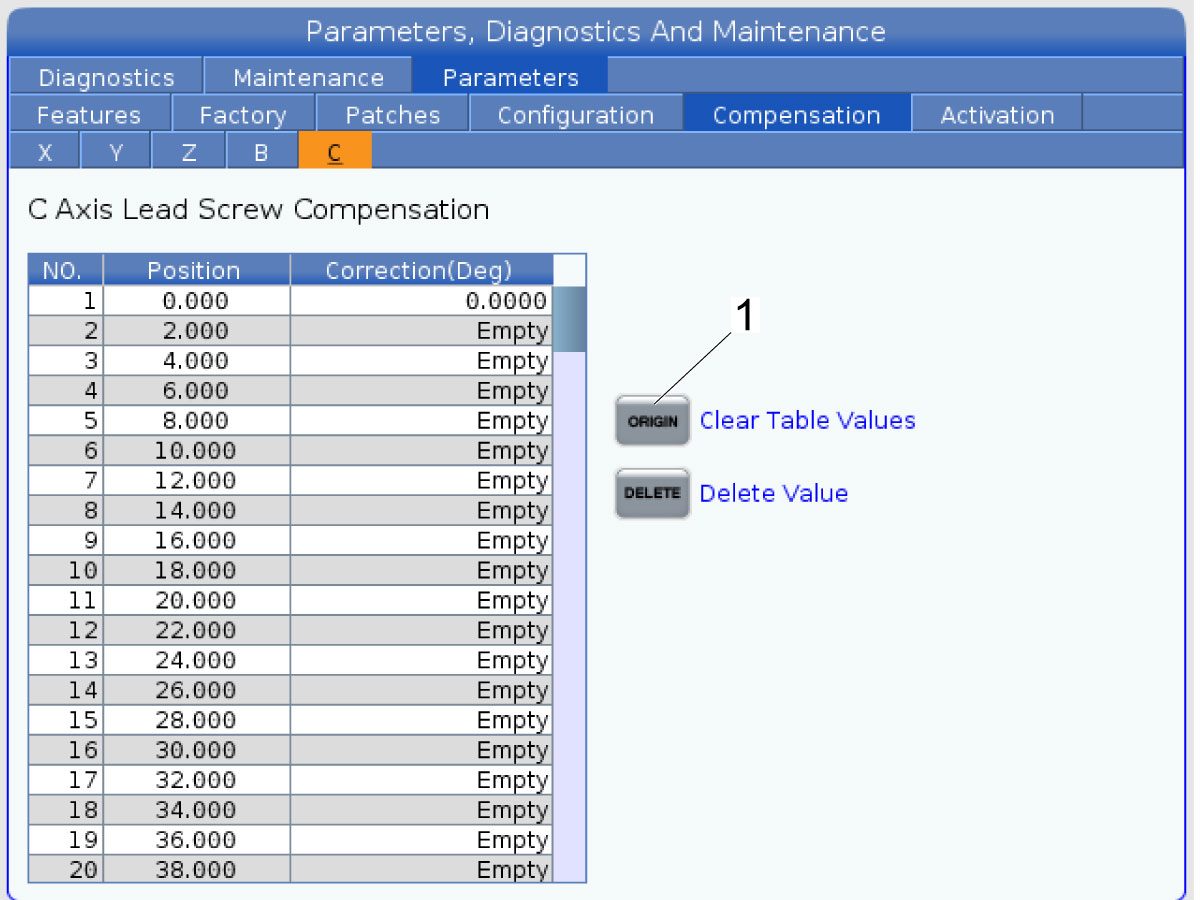
Clear the Compensation table for the C-Axis.

Press [DIAGNOSTIC].

Navigate to Parameters > Compensation > C.

Press [ORIGIN].

To update compensation table values for the C-Axis a laser calibration is required. The calculated compensation values will then be entered into the C-Axis Compensation Table.

B-Axis Encoder Ring Replacement

 Note: These step apply only to the UMC-500/SS B-Axis.

1

: Warning: Only certified service personnel should perform this procedure. Reorientation of Z-pulse or Trip-Flag will require laser calibration to populate rotary compensation tables with new, correct, values.

Zero-return all Axis.

Press [EMERGENCY STOP].

2

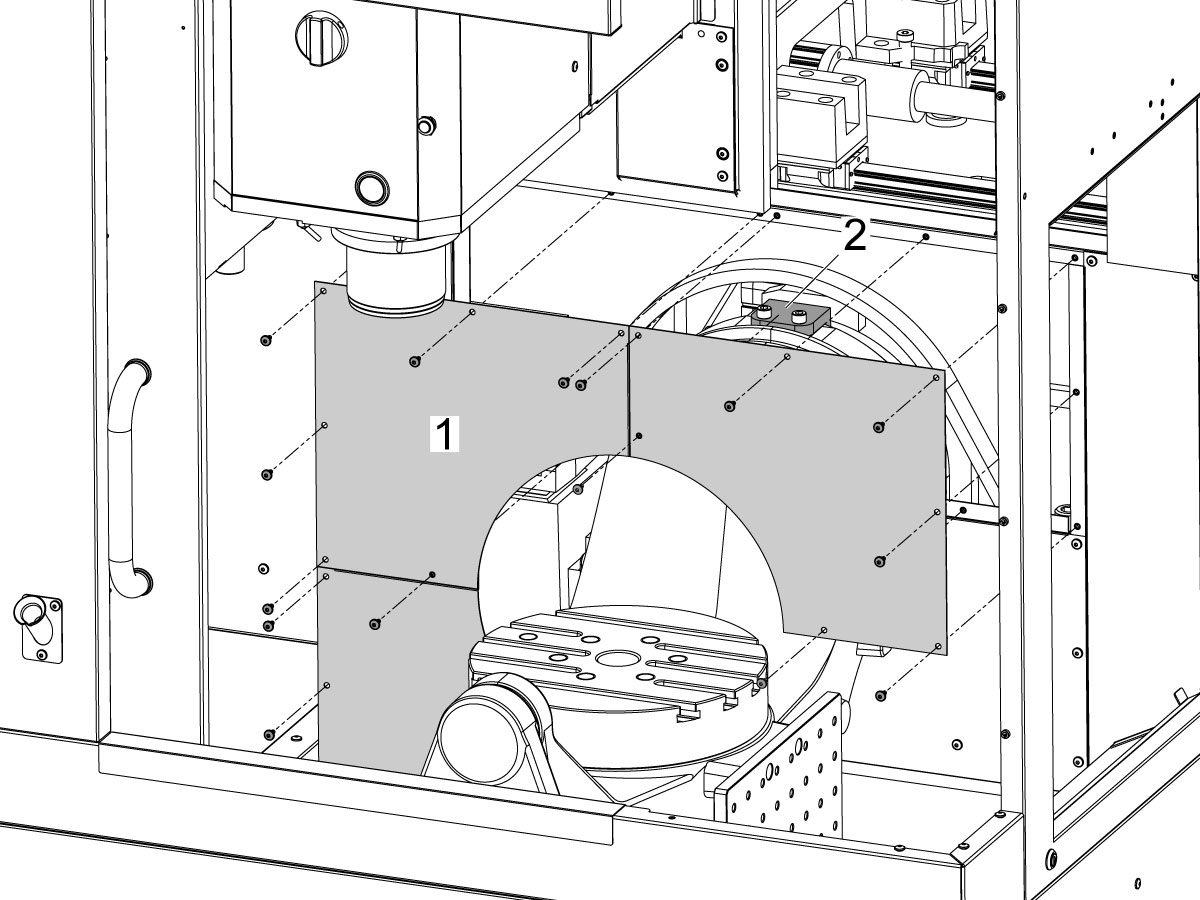
Remove the bulkhead sheet metal [1] to access the B-Axis hard stop [2]. 

3

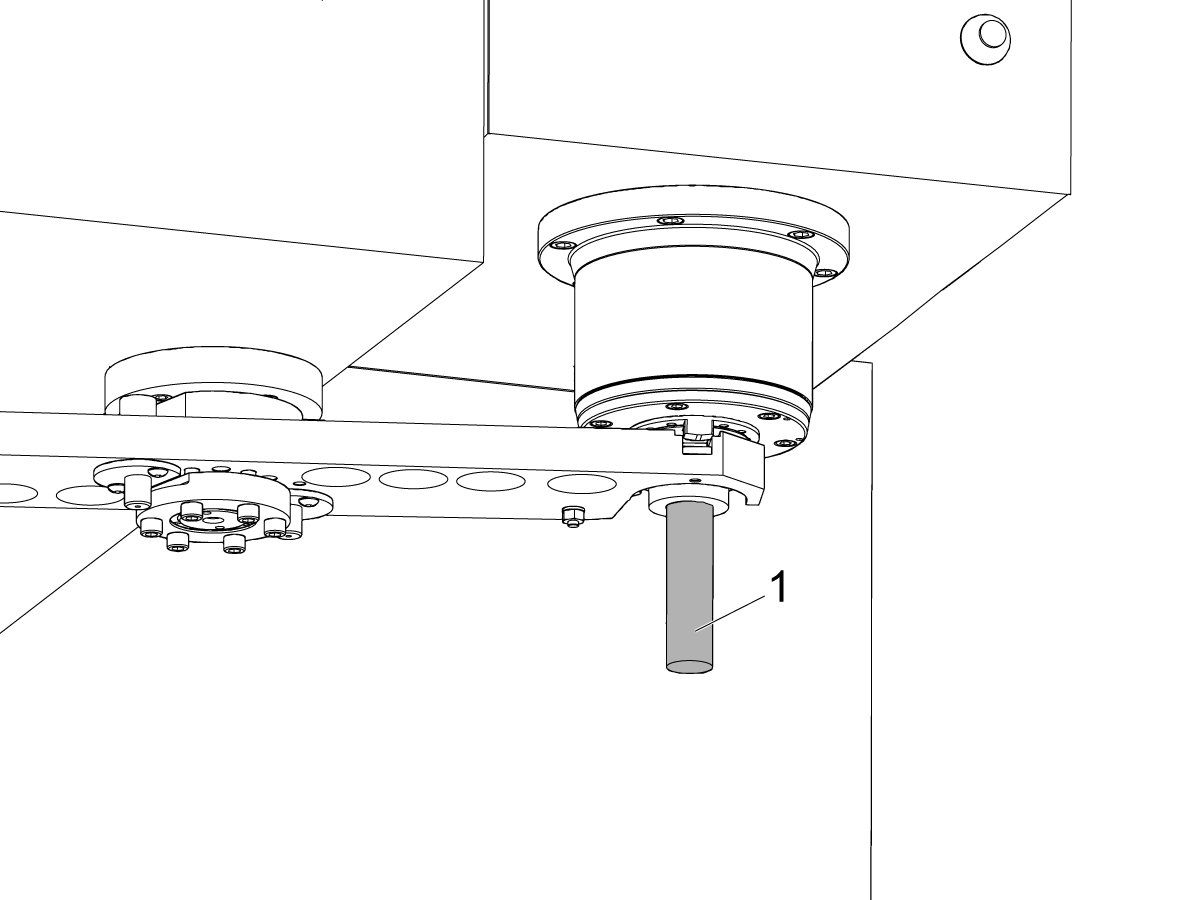
Rotate the B-Axis approximately 100 degrees, or until there is enough room to access the hard stop [1].

Remove the B-Axis hard stop [1].

4

Remove the two rear sheet metal panels [1] to access the B-Axis components.

5

Insert a service key and enter service mode.

Press [DIAGNOSTIC].

Navigate to Parameters > Factory > 6.021.

Change: 6.021 B-Axis Check Travel Limit from TRUE to FALSE .

6

Handle jog B to +180°.

Remove the C-Axis bottom cover.

7

Press [DIAGNOSTIC].

Navigate to Parameters > Factory.

Set 6.083 B-Axis Linear Scale Enabled to "Scale Disabled".

Power off the machine.

8

Disconnect all of the cables and hoses [1] running to the C-Axis through the B-Axis encoder ring. 

 Note: Mark the cables and hose to make reconnecting them easier later in this procedure. 

Remove the corrugated conduit [2].

9

Uninstall the encoder read-head [1] by disconnecting the encoder cable [2] and removing the bolts and washers.

10

Note the Z-Pulse orientation before removing the encoder ring hub.

Uninstall the encoder ring hub [1] by removing the screws and washers mounting the encoder ring hub to the taper-lock. 

11

Mount and loosely install the encoder ring hub [1] from the service kit with the provided hardware, SHCS 10-32 X 3/4 (x4) and WASHER #10 FLAT (x4).

Verify the Z-Pulse is in the same location as the ring that was uninstalled. 

 Note: If the Z-Pulse is in the wrong location the B-Axis will not zero return correctly and can damage the cables and hoses.

 Note: Do not torque mounting screws yet.

12

Route all of the cables and hoses [1] for the C-Axis through the corrugated conduit [2] and through the B-Axis encoder ring. 

Reconnect all of the cables and hoses to their original locations in the C-Axis.

13

Turn on the machine.

Zero return all axis.

 Note: The B-Axis should zero return in the Clockwise direction.

 Warning: Do not place the Mag Base anywhere near the Encoder.

Check and document the runout on the OD of the scale encoder ring hub using the upper-most diameter, as shown.

Adjust as necessary. TIR must be 0.0005" or less.

Torque the 4 bolts of the encoder ring hub to 30 in-lbf in the star pattern.

After torquing, double check the runout to verify the ring hub has not shifted.

14

Clean the back surface of the encoder read-head and the mounting surface.

Add a small amount of silicone dielectric grease to encoder cable connection [1]. Grease should be a thin layer, but cover all the pins.

Apply two small drops of anti-oxidant (99-2130) to the mounting surface on the read head in the locations shown [2].

15

Connect the encoder cable [1] to the encoder read-head.

Insert cable by carefully lining up electrical pins with cable connector.

Install the encoder read-head [2] from the service kit with the provided hardware,  SHCS 8-32 x 1/2 bolts (x2) [4] and Washer .17ID x .4OD (2x) [3].

 Note: Do not torque mounting screws yet.

16

Set the gap between the scale ring and read-head as shown [1] using the appropriate mylar shim (0.008").

 Note: Do not use a metal shim.

Starting on the left side of the read-head [2], torque the two read-head mounting bolts to 20 in-lbf.

After torquing, double check the gap with the shim to verify the read-head has not shifted.

17

Reinstall the C-Axis bottom cover being sure no tools, shims, etc. have been left in the casting.

 Note: You will have to set a new tool change offset and update compensation table values for the B-Axis. This will require laser calibration.

18

Rotate the B-Axis to the same position when the hard stop was removed. 

Install the B-Axis hard stop [1].

19

Press [DIAGNOSTIC].

Navigate to Parameters > Factory > 6.021.

Change: 6.021 B-Axis Check Travel Limit from FALSE to TRUE.

Rotate the B-Axis back to zero when done.

20

Press [DIAGNOSTIC].

Navigate to Parameters > Factory.

Set 6.083 B-Axis Linear Scale Enabled to "Scale Linear".

Power cycle the machine.

21

Zero-Return the B-Axis.

Zero-Return All Axis.

Set new Tool Change offset by following the UMC - X and Y Axes - Tool Change Offsets and the Side-Mount Tool Changer - Z-Axis Tool Change Offset - NGC procedures.

22

Install the bulkhead sheet metal [1] once the B-Axis hard stop [2] has been installed. 

23

Install the two rear sheet metal panels [1].

24

Clear the Compensation table for the B-Axis.

Press [DIAGNOSTIC].

Navigate to Parameters > Compensation > B.

Press [ORIGIN].

To update compensation table values for the B-Axis a laser calibration is required. The calculated compensation values will then be entered into the B-Axis Compensation Table.

Recently Viewed Items

You Have No Recently Viewed Items Yet

Uwagi
Haas Logo

Cena dostawy Haas

Cena ta obejmuje koszt wysyłki, cła eksportowe i importowe, ubezpieczenie oraz wszelkie inne wydatki poniesione podczas wysyłki do miejsca docelowego we Francji uzgodnionego z kupującym. Do dostawy Produktu CNC firmy Haas nie zostaną doliczone żadne inne obowiązkowe koszty.

BĄDŹ NA BIEŻĄCO Z NAJNOWSZYMI WSKAZÓWKAMI I TECHNOLOGIĄ HAAS...

Zapisz się już dziś!   

HAAS TOOLING AKCEPTUJE:

  • Serwis i wsparcie
  • Właściciele
  • Zgłoszenie serwisowe
  • Instrukcje obsługi
  • Części Haas
  • Zgłoszenie naprawy stołu obrotowego
  • Wskazówki dotyczące instalacji
  • Narzędzia zakupowe
  • Zbuduj & Wyceń nową maszynę Haas
  • Dostępne produkty
  • Cennik Haas
  • Finansowanie CNCA
  • O firmie Haas
  • Informacja o dostępności
  • Oświadczenie DNSH
  • Zgodność z przepisami eksportowymi
  • Oferty pracy
  • Certyfikaty i bezpieczeństwo
  • Skontaktuj się z nami
  • Historia
  • Regulamin
  • Regulamin dotyczący firmy Haas Tooling
  • Poufność
  • Gwarancja
  • Społeczność Haas
  • Program Certyfikacji Haas
  • Haas Motorsports
  • Fundacja Gene'a Haas
  • Społeczność Edukacji Technicznej Haas
  • Wydarzenia
  • Dołącz do rozmowy
  • Facebook
  • X
  • Flickr
  • YouTube
  • LinkedIn
  • Instagram
  • TikTok
© 2026 Haas Automation, Inc — maszyny CNC

This site is protected by reCAPTCHA and the Google Privacy Policy and Terms of Service apply.

2800 Sturgis Rd., Oxnard, CA 93030 / Toll Free: 800-331-6746
Phone: 805-278-1800 / Fax: 805-278-2255