MyHaas Bem-vindo,
!
Haas Tooling MyHaas/HaasConnect Iniciar a sessão Registar Haas Tooling MyHaas/HaasConnect Encerrar a sessão Bem-vindo, As minhas máquinas Última atividade Os meus orçamentos A minha conta Os meus utilizadores Encerrar a sessão
Encontrar o seu distribuidor
  1. Selecionar idioma
    1. English
    2. Deutsch
    3. Español - España
    4. Español - México
    5. Français
    6. Italiano
    7. Português
    8. Český
    9. Dansk
    10. Nederlands
    11. Magyar
    12. Polski
    13. Svenska
    14. Türkçe
    15. 中文
    16. Suomi
    17. Norsk
    18. الإنجليزية
    19. български
    20. Hrvatski
    21. Ελληνικά
    22. Română
    23. Slovenský
    24. Slovenščina
    25. 한국어
    26. 日本語
    27. Українська
  • máquinas Main Menu
    • Fresadoras verticais
      Fresadoras verticais
      Fresadoras verticais View All
      • Fresadoras verticais
      • Série VF
      • Máquinas universais
      • Série VR
      • VP-5 prismático
      • VMC com troca de paletes
      • Mini Fresadoras
      • Máquinas de moldagem
      • Centros de perfuração de alta velocidade
      • Série Perfurar/Roscar/Fresar
      • Fresadora Sala de Ferramentas
      • Pocket Mill
      • Fresadoras compactas
      • Série pórtico
      • Routers de chapa SR
      • VMC extragrande
      • Fresadoras de coluna dupla
      • Máquinas de posicionamento 3+2
    • Soluções multi-eixo
      Soluções multi-eixo
      Soluções multi-eixo View All
      • Soluções multi-eixo
      • Tornos de eixo Y
      • Fresadoras de 5 eixos
    • Tornos
      Tornos
      Tornos View All
      • Tornos
      • Série ST
      • Spindle duplo
      • Série Box Way
      • Tornos de sala de ferramentas
      • Torno de Bucha
      • Torno de compartimento
      • Alimentação de barra Haas
    • Fresadoras horizontais
      Fresadoras horizontais
      Fresadoras horizontais View All
      • Fresadoras horizontais
      • Cone ISO50
      • Cone ISO40
    • Rotativos e Indexadores
      Rotativos e Indexadores
      Rotativos e Indexadores View All
      • Rotativos e Indexadores
      • Mesas rotativas
      • Indexadores
      • Rotativos de 5 eixos
      • Rotativos extra-grandes
    • Sistemas de automação
      Sistemas de automação
      Sistemas de automação View All
      • Sistemas de automação
      • Automatização de fresadora
      • Automação de tornos
      • Carregador de peças automático
      • Modelos de automação
    • Máquinas Desktop
      Máquinas Desktop
      Máquinas Desktop View All
      • Máquinas Desktop
      • Fresadora Desktop
      • Torno Desktop
      • Simulador de contrololador, padrão
      • Simulador de controlador, Premium
    • Comprar equipamento
      Comprar equipamento
      Comprar equipamento View All
      • Comprar equipamento
      • Fresadora de joelho
      • Tornos manuais Haas
      • Serras Haas
    • Máquinas de fabrico
      Máquinas de fabrico
      Máquinas de fabrico View All
      • Máquinas de fabrico
      • Máquinas de corte a laser
      • Travões de pressão CNC
    • LIGAÇÕES RÁPIDAS Série especial  Série especial 
      SÉRIE UE SÉRIE UE CONSTRUÇÃO E PREÇO | LISTA DE PREÇOS CONSTRUÇÃO E PREÇO | LISTA DE PREÇOS Máquinas em stock Máquinas em stock NOVIDADES NOVIDADES A SUA PRIMEIRA CNC A SUA PRIMEIRA CNC
      FERRAMENTAS DE COMPRAS
      • Construção e Preço de uma Haas
      • Lista de Preços
      • Inventário disponível
      • Financiamento CNCA
      QUER FALAR COM ALGUÉM?

      A Haas Factory Outlet (HFO) pode responder às suas perguntas e orientá-lo nas suas melhores opções.

      CONTACT YOUR DISTRIBUTOR >
  • Opções Main Menu
    • Product Image Spindles
      Spindles
      Spindles View All
      • Spindles
    • Product Image Trocadores da ferramenta
      Trocadores da ferramenta
      Trocadores da ferramenta View All
      • Trocadores da ferramenta
    • Product Image 4.º | 5.º eixo
      4.º | 5.º eixo
      4.º | 5.º eixo View All
      • 4.º | 5.º eixo
    • Product Image Torretas e ferramenta motorizada
      Torretas e ferramenta motorizada
      Torretas e ferramenta motorizada View All
      • Torretas e ferramenta motorizada
    • Product Image Sondagem
      Sondagem
      Sondagem View All
      • Sondagem
    • Gestão de limalha e líquido de refrigeração Haas Gestão da limalha e do líquido de refrigeração
      Gestão da limalha e do líquido de refrigeração
      Gestão da limalha e do líquido de refrigeração View All
      • Gestão da limalha e do líquido de refrigeração
    • O controlador Haas O controlador Haas
      O controlador Haas
      O controlador Haas View All
      • O controlador Haas
    • Product Image Opções de Produtos
      Opções de Produtos
      Opções de Produtos View All
      • Opções de Produtos
    • Product Image Ferramentas e Fixação
      Ferramentas e Fixação
      Ferramentas e Fixação View All
      • Ferramentas e Fixação
    • Product Image Dispositivo de aperto
      Dispositivo de aperto
      Dispositivo de aperto View All
      • Dispositivo de aperto
    • Product Image Soluções de 5 eixos
      Soluções de 5 eixos
      Soluções de 5 eixos View All
      • Soluções de 5 eixos
      • 5 Easy Steps to 5-Axis
    • Product Image AUTOMATIZAÇÃO
      AUTOMATIZAÇÃO
      AUTOMATIZAÇÃO View All
      • AUTOMATIZAÇÃO
    • LIGAÇÕES RÁPIDAS Série especial  Série especial 
      SÉRIE UE SÉRIE UE CONSTRUÇÃO E PREÇO | LISTA DE PREÇOS CONSTRUÇÃO E PREÇO | LISTA DE PREÇOS Máquinas em stock Máquinas em stock NOVIDADES NOVIDADES A SUA PRIMEIRA CNC A SUA PRIMEIRA CNC
      FERRAMENTAS DE COMPRAS
      • Construção e Preço de uma Haas
      • Lista de Preços
      • Inventário disponível
      • Financiamento CNCA
      QUER FALAR COM ALGUÉM?

      A Haas Factory Outlet (HFO) pode responder às suas perguntas e orientá-lo nas suas melhores opções.

      CONTACT YOUR DISTRIBUTOR >
  • Why Haas Main Menu
      Descubra a Diferença da Haas
    • Porquê a Haas?
    • MyHaas
    • Comunidade de formação
    • Indústria 4.0
    • Certificação Haas
    • Testemunhos de clientes
  • Assistência Main Menu
      Bem-vindo à Haas Service
      INÍCIO DA ASSISTÊNCIA Manuais do operador Procedimentos como fazer Manuais de Resolução de Problemas Manutenção preventiva Peças Haas Haas Tooling Vídeos
  • Vídeos Main Menu
MyHaas Bem-vindo,
!
Haas Tooling MyHaas/HaasConnect Iniciar a sessão Registar Haas Tooling MyHaas/HaasConnect Encerrar a sessão Bem-vindo, As minhas máquinas Última atividade Os meus orçamentos A minha conta Os meus utilizadores Encerrar a sessão
Encontrar o seu distribuidor
  1. Selecionar idioma
    1. English
    2. Deutsch
    3. Español - España
    4. Español - México
    5. Français
    6. Italiano
    7. Português
    8. Český
    9. Dansk
    10. Nederlands
    11. Magyar
    12. Polski
    13. Svenska
    14. Türkçe
    15. 中文
    16. Suomi
    17. Norsk
    18. الإنجليزية
    19. български
    20. Hrvatski
    21. Ελληνικά
    22. Română
    23. Slovenský
    24. Slovenščina
    25. 한국어
    26. 日本語
    27. Українська
×

Resultados da pesquisa

Web Pages

Images

    • <
    • 1
    • >

Geometry Guide - UMC - Series

Início da Assistência Procedimento como fazer Geometry Guide - UMC - Series

Geometry Guide - UMC - Series

- Ir para secção - Back to Top

8.1 Guia de geometria

Recently Updated Last updated: 04/05/2021

Guia de geometria -UMC-Series


Introdução

  1. Cabeça do spindle
  2. Ram
  3. Sela
  4. Ponte
  5. Base
  6. Veio B rotativo
  7. Veio B rotativo

Antes de iniciar o registro da fábrica-defina o valor para o parâmetro ou configuração abaixo. Você precisará definir isso como zero ao fazer ajustes e, em seguida, redefini-lo para o valor original quando acabamento. O valor pode ser positivo ou negativo.

  • Controlador Haas Clássico (CHC) Parâmetro 1314 (Rotary Axes Center Deviation in X)
  • Controle de próxima geração (NGC) Configuração 254 (5 Axis Rotary Center Distance)

Ferramentas e kits necessários:

  • T-2193A - UMC-750 SPINDLE HEAD ALIGNMENT PIN *
  • T-2181- CNC DUAL LEVELING TOOL
  • T-2192- LEVELING ADAPTER UMC-750
  • 93-2236 - SHIM KIT FOR UMC-750 *

Clique no link para ver o  UMC-750 nivelamento e alinhamento Vídeo.

*  : Utilizado apenas na série de pré-reinicialização. 

Nivelar a máquina

1

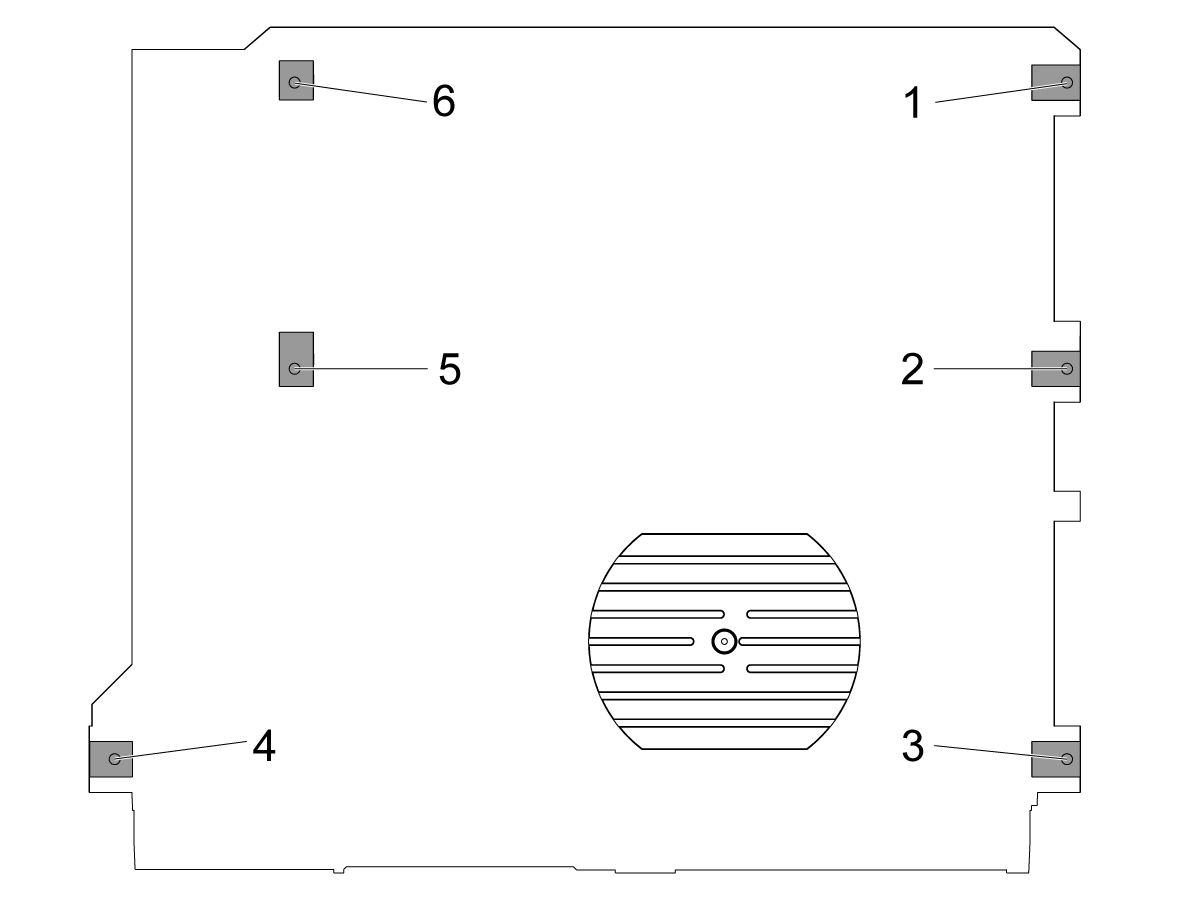
Defina a altura da máquina:

Mova os eixos X e Y para a posição inicial.

Afrouxe os parafusos de nivelamento médios [2 e 5] de modo que não estejam suportando nenhum peso.

Definir a máquina em 4 parafusos de nivelamento de canto 3" (76,2 mm) acima do assoalho.

2

Nível áspero a máquina:

Gire o parafuso de nivelamento #4 para cima.

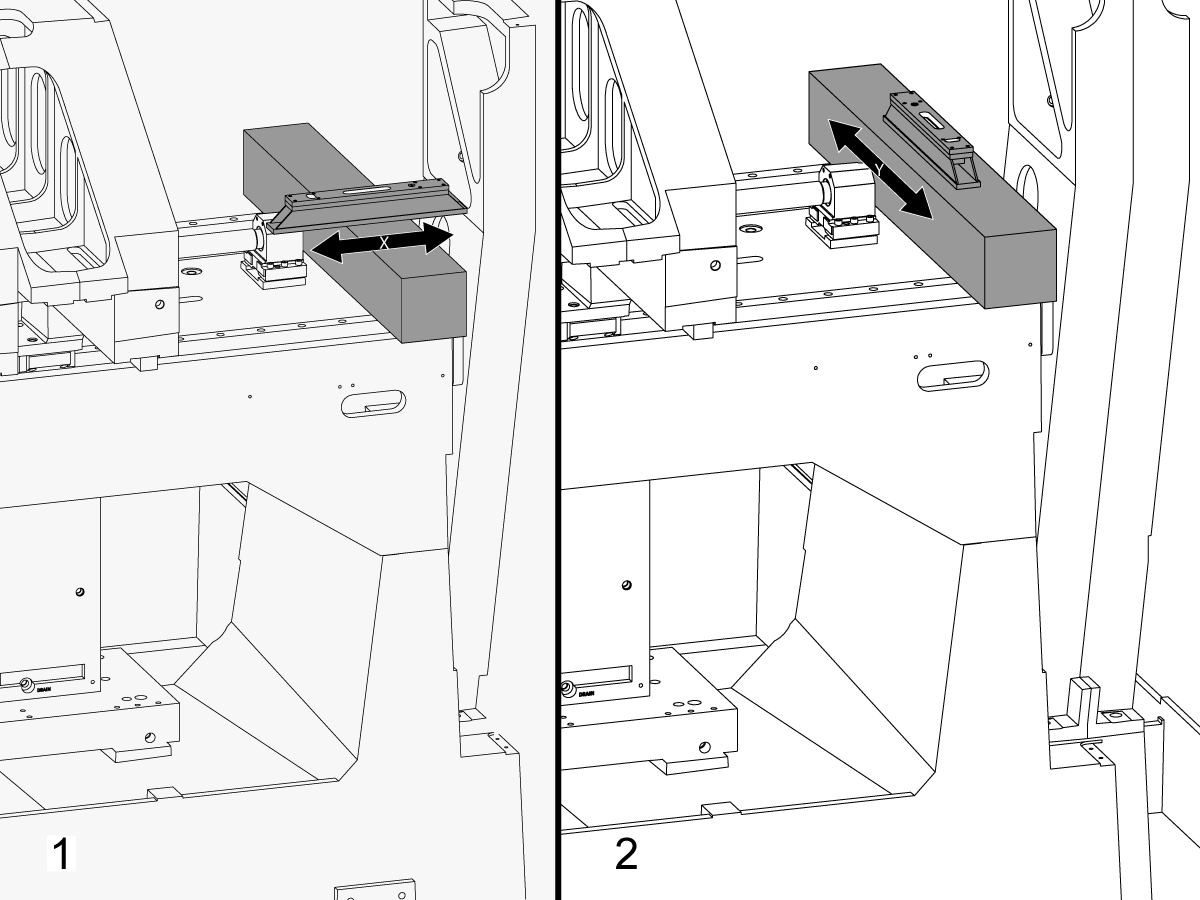
Coloque o granito nas guias lineares do veio X perto do suporte do rolamento de rosca do veio X.

Configurar o nível de maquinista em cima do granito paralelo ao veio X. 1

Ajuste o parafuso de nivelamento #6 até que a máquina seja nivelada no veio X.

Configurar o nível de maquinista em cima do granito perpendicular ao veio X. 2

Ajuste o parafuso de nivelamento #3 até que a máquina seja nivelada no veio Y.

Gire o parafuso de nivelamento #4 para baixo até que faça o contato com a almofada de nivelamento.

3

Ajuste o rolo do veio X:

Montar T-2192 com T-2181.

Mova o veio Y para o meio da viagem.

Colocar T-2192 no lado do veio.

Certifique-se que a bolha em T-2181 está dentro da escala legível.

Se não estiver, afrouxe o parafuso que fixa T-2192 à base magnética e mova o adaptador conforme necessário.

Jog o veio X lado a lado e medir o X veio roll. Faça leituras na posição inicial, no meio e no final da viagem.

Ajuste o parafuso de nivelamento #4 do não há nenhum desvio entre a leitura na posição Home e a leitura na extremidade da viagem.

Nota: A bolha em T-2181 não tem que estar no meio do frasco. Ele só precisa estar dentro da faixa legível.

4

Ajuste os parafusos de nivelamento médios:

Gire os parafusos de nivelamento médios para baixo até que façam o contato com as almofadas nivelando e gire-os então um adicional 45 °.

Verifique o rolo do veio X. Ajuste os parafusos de nivelamento médios para corrigir o rolo do veio X.

Veio X para alinhamento do veio Y

1

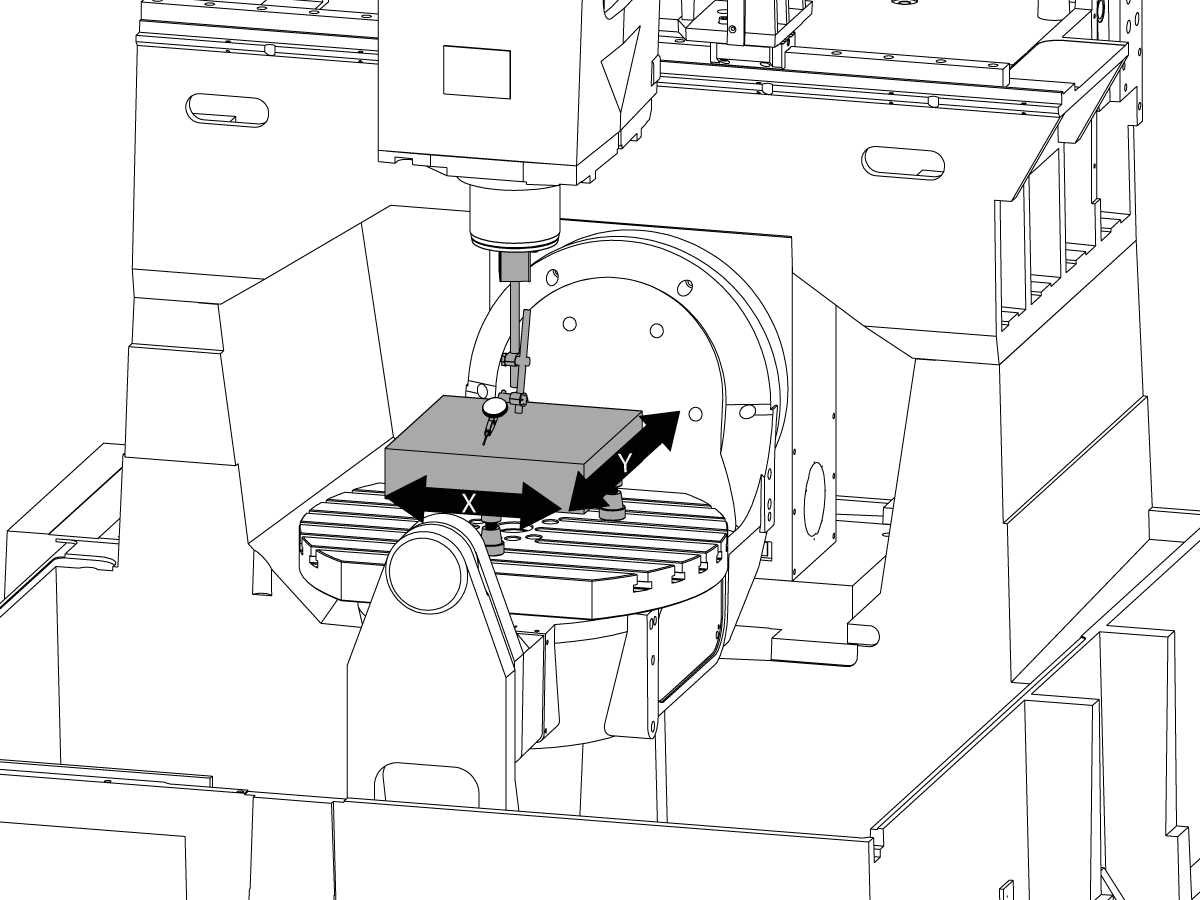
Alinhe a face da sela paralela ao movimento do veio X:

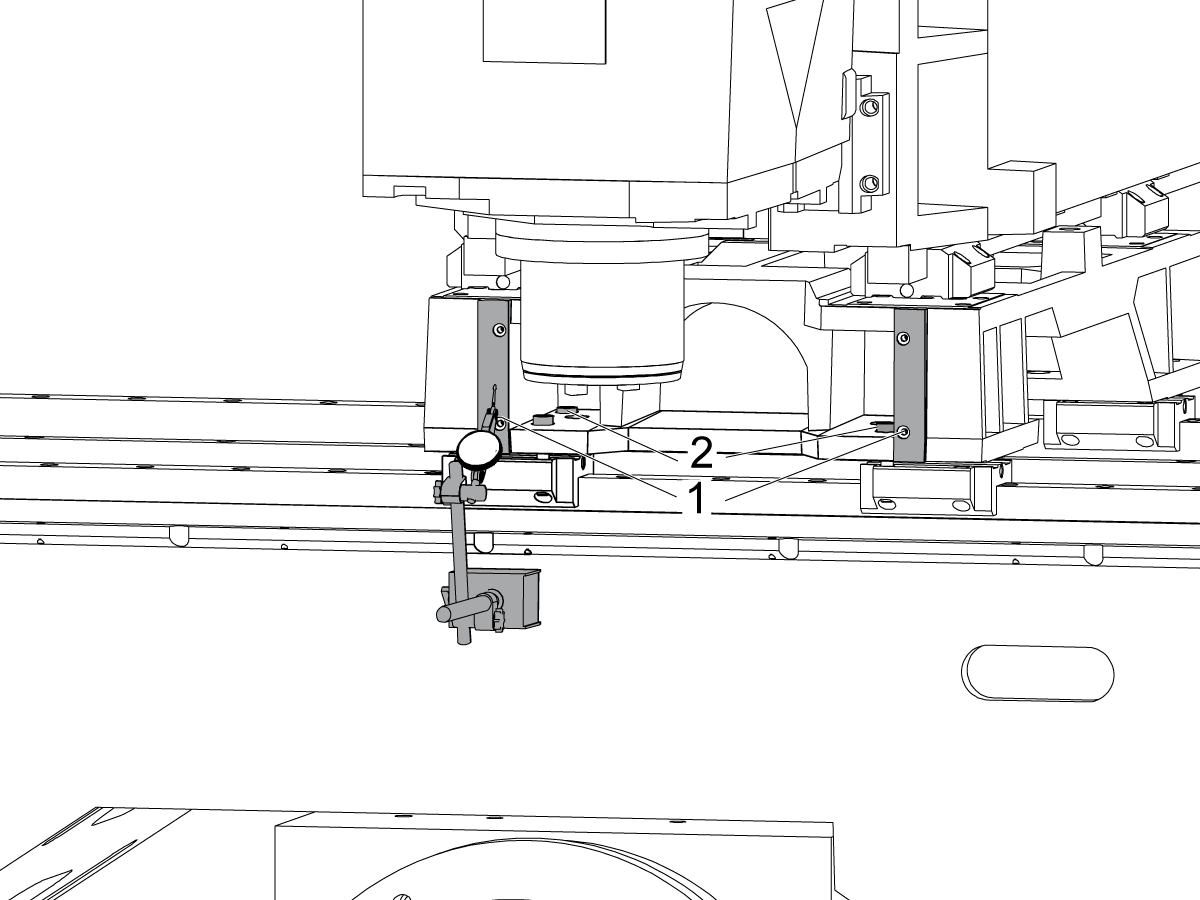
Atravesse a superfície usinada na parte frontal da sela [1] movimentando o veio X.

Afrouxe os parafusos que fixam a sela aos caminhões do veio X [2] e alinhe a face da sela paralela ao movimento do veio X dentro de 0,001" se necessário.

Torque dos parafusos. Consulte a Especificações de torque do fixador Haas.

2

Alinhe o veio Y perpendicular ao veio X:

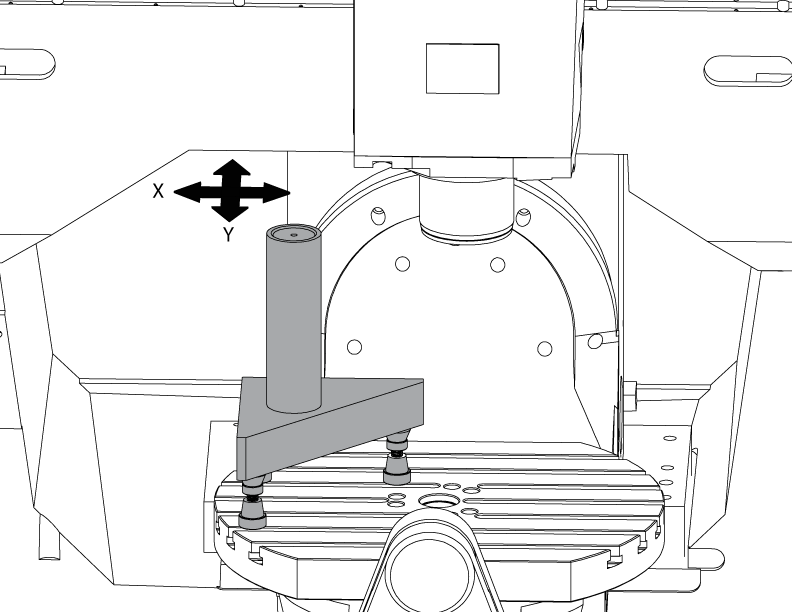
Setup o granito Tri-quadrado no lado esquerdo da bandeja do veio de C nas tomadas do Machinist.

Ajuste o verso do granito Tri-quadrado paralelo ao veio X. NTE 0,0001"/10"

Varrer o topo do granito Tri-quadrado ao longo dos eixos X e Y.

Ajuste as tomadas do maquinista até que a superfície superior do granito Tri-quadrado seja paralela ao plano X-Y NTE 0,0005".

Verifique se o verso do granito paralelo ao veio X. NTE 0,0001"/10".

Afrouxe os parafusos que fixam os caminhões do veio Y à sela e alinham o veio Y perpendicular ao veio X. NTE 0,0005"/10"

Torque dos parafusos. Consulte a Especificações de torque do fixador Haas.

Verifique o veio Y perpendicular ao veio X NTE 0,0005"/10" após os parafusos são torqued.

Veio Z para o alinhamento do plano X-Y

1

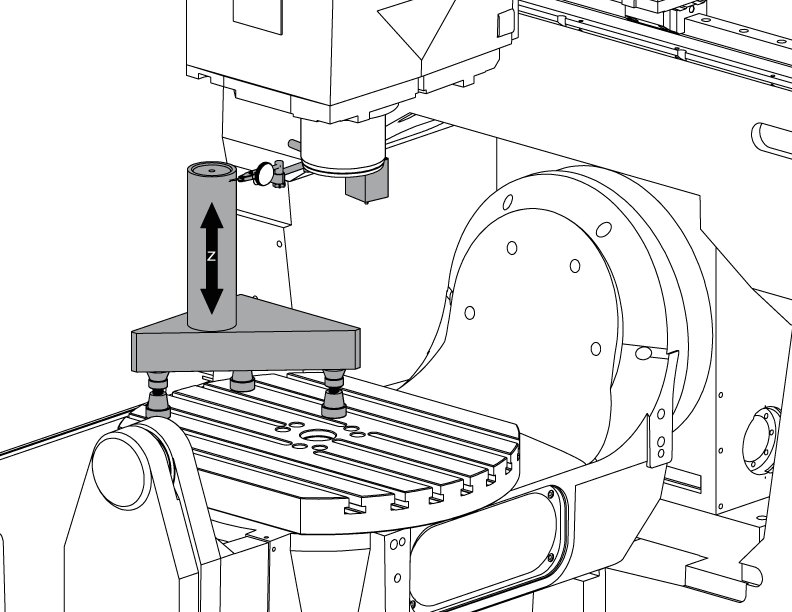
Configurar o cilindro.

Coloque um cilindro no topo da Tri-pedra, como mostrado na imagem.

Alinhe a superfície superior do cilindro paralelo ao plano X-Y NTE 0,0001" girando as tomadas Machinist.

Jog a máquina para a seguinte posição:

  • UMC-750 para X-7,000" e Y-10,000"
  • UMC-750SS para X-10,000" e Y-10,000"

2

Alinhe o veio Z perpendicular ao veio X:

Substitua um dos parafusos de canto superior nos caminhões do veio Z com o T-2193A * para girar a cabeça do spindle em torno dele.

Indique o lado do cilindro ao longo do veio Z.

Afrouxe os parafusos que fixam caminhões do veio Z à RAM.

Alinhe o eixo Z perpendicular ao eixo X NTE 0,0005"/10" ao oscilar a cabeça do spindle de um lado paraoutro.

Torque dos parafusos. Consulte a Especificações de torque do fixador Haas.

Verifique se o veio Z perpendicular ao veio X após os parafusos são torqued.

Substitua o T-2193A * com o parafuso quando o alinhamento estiver concluído

*  : Utilizado apenas na série de pré-reinicialização. 

3

Alinhe o veio Z perpendicular ao veio Y:

Indique a parte dianteira do cilindro ao longo do veio Z.

Lamina entre caminhões Z Axis e a RAM para alinhar o veio Z perpendicular ao veio Y NTE 0,0005"/10".

Nota: Shim ou dois caminhões superiores ou os dois caminhões inferiores com os shims iguais.

Torque dos parafusos. Consulte a Especificações de torque do fixador Haas.

Verifique se o veio Z perpendicular aos eixos Y e X após os parafusos são torqued.

4

Alinhar e torque Y e Z eixos ballnut carcaças:

Afrouxe os parafusos que fixam o ballnut à carcaça e aos parafusos que fixam a carcaça à carcaça.

Confortável os parafusos que fixam a carcaça do ballnut à carcaça primeiramente, a seguir confortável os parafusos que fixam o ballnut à carcaça.

Use a função jog Lock para executar o veio para frente e para trás viagem completa.

Nota: Não use o volante ou o movimento rápido.

Torque dos parafusos. Consulte a Especificações de torque do fixador Haas.

A carcaça da porca do veio Y pode ser alcançada na parte traseira da máquina com a RAM correu toda a maneira para a parte dianteira da máquina.

A carcaça da porca do veio Z pode ser acessada da parte dianteira da máquina com a cabeça do spindle correu toda a maneira para baixo.

Nota: A mortalha do motor do spindle precisa ser removida para acessar o mancal de ballnut do veio Z.

Tram o spindle para o plano X-Y

1

Configurar o granito:

Setup as tomadas do Machinist e o granito no meio do prato frontal do veio de C segundo as indicações do retrato.

Alinhe a superfície superior da paralela do granito ao plano de X-Y ajustando a altura NTE 0,0001" dos jaques do maquinista.

Posicione o veio sobre o centro do prato frontal.

2

Tram o spindle para o plano X-Y:

Coloque um indicador no veio do veio.

Faça uma medição em cima do granito a cada 90 ° de torneamento /em rotação.

Afrouxe os parafusos (6) na placa de base para a cabeça do veio.

Adicionar ou remover calços entre a carcaça da cabeça do veio e a placa de base para o bonde do veio para o plano X-Y nte 0,0005"/10".

Nota: Use calços de espessura desigual [1] para alterar o ângulo da placa de base.

Quando a varredura está dentro da especificação, torque os parafusos (6). Consulte a Especificações de torque do fixador Haas.

Verifique se o bonde do spindle após os parafusos são torqued.

Veio B para alinhamento de eixos XYZ

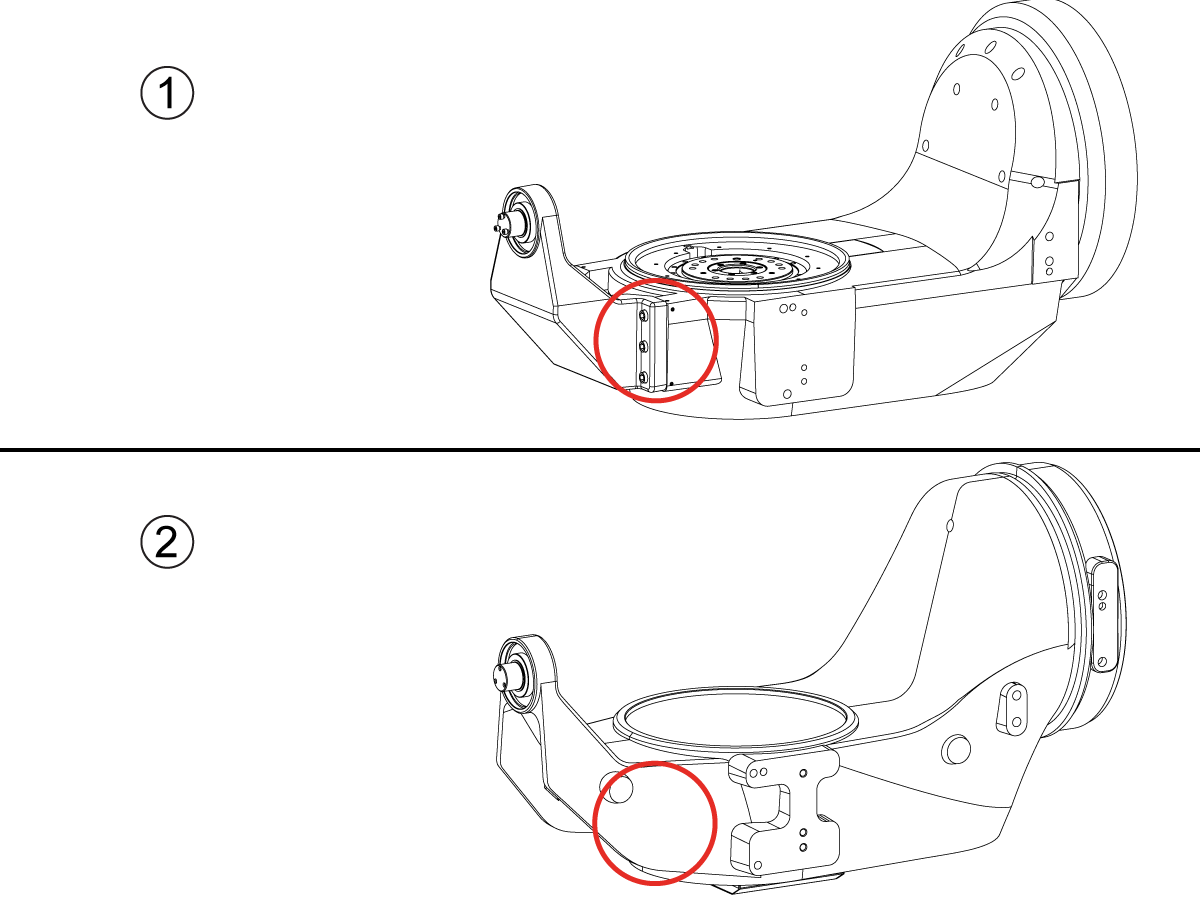
How to identify the Multi-Piece and the Unibody trunnion   

1) Multi-Piece trunnion:    UMC machines built approximetely before 11/2022 will have this configuration.

2) Unibody trunnion:    UMC machines built approximetely after 11/2022 will have this configuration.

1

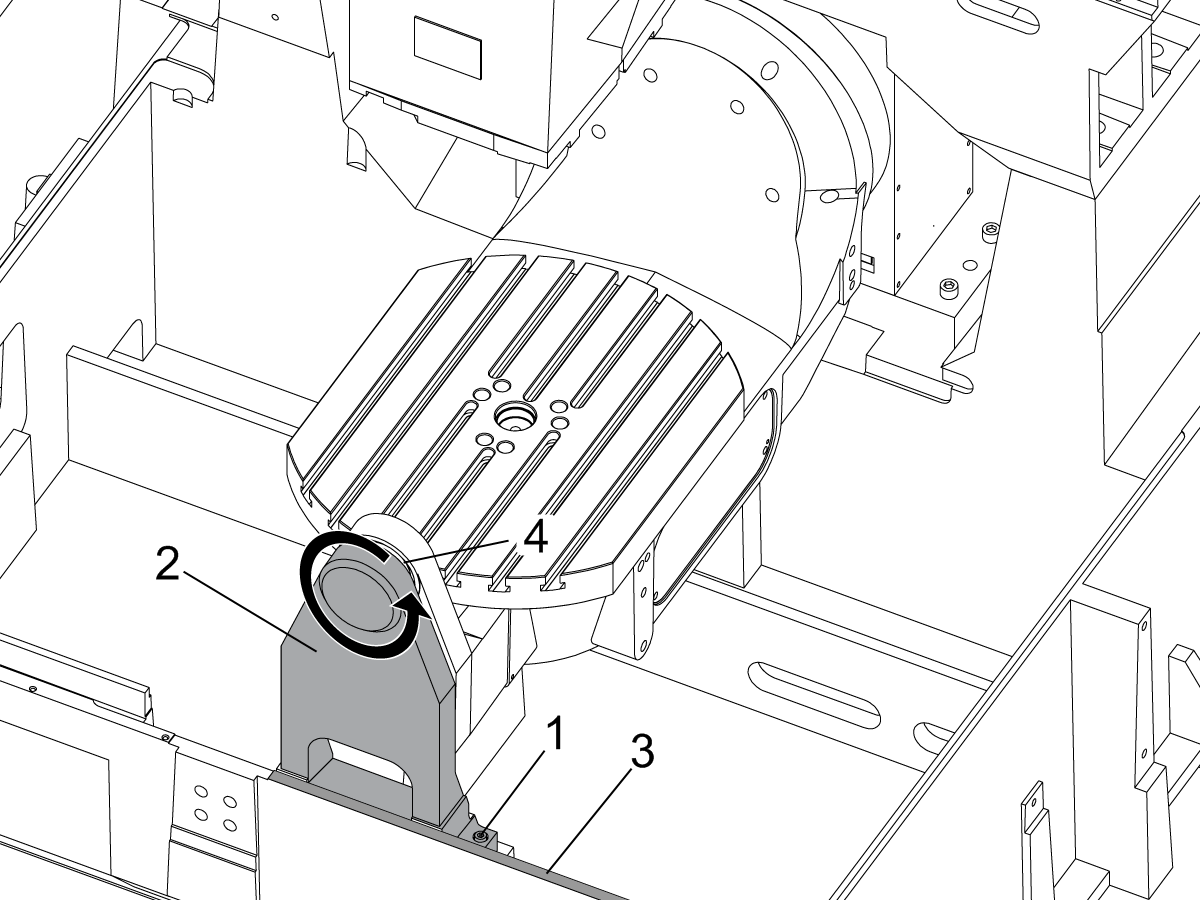
Remove the A-frame trunnion support:

Remove the bolts [1] that secure the A-frame trunnion support [2] to the base and take out the shims between A-frame support and the base.

Rotate the A-frame support [2] counter-clockwise to clear the edge of the base [3].

Pull the A-frame support off the bearings.

 Note: The A-frame support might vacuum lock on the bearings. Use the zip-tie to pry the seal [4] open.

 Caution: To lift the trunnion support, get the aid of another person. The support weighs 85 lbs (39 kg).

2

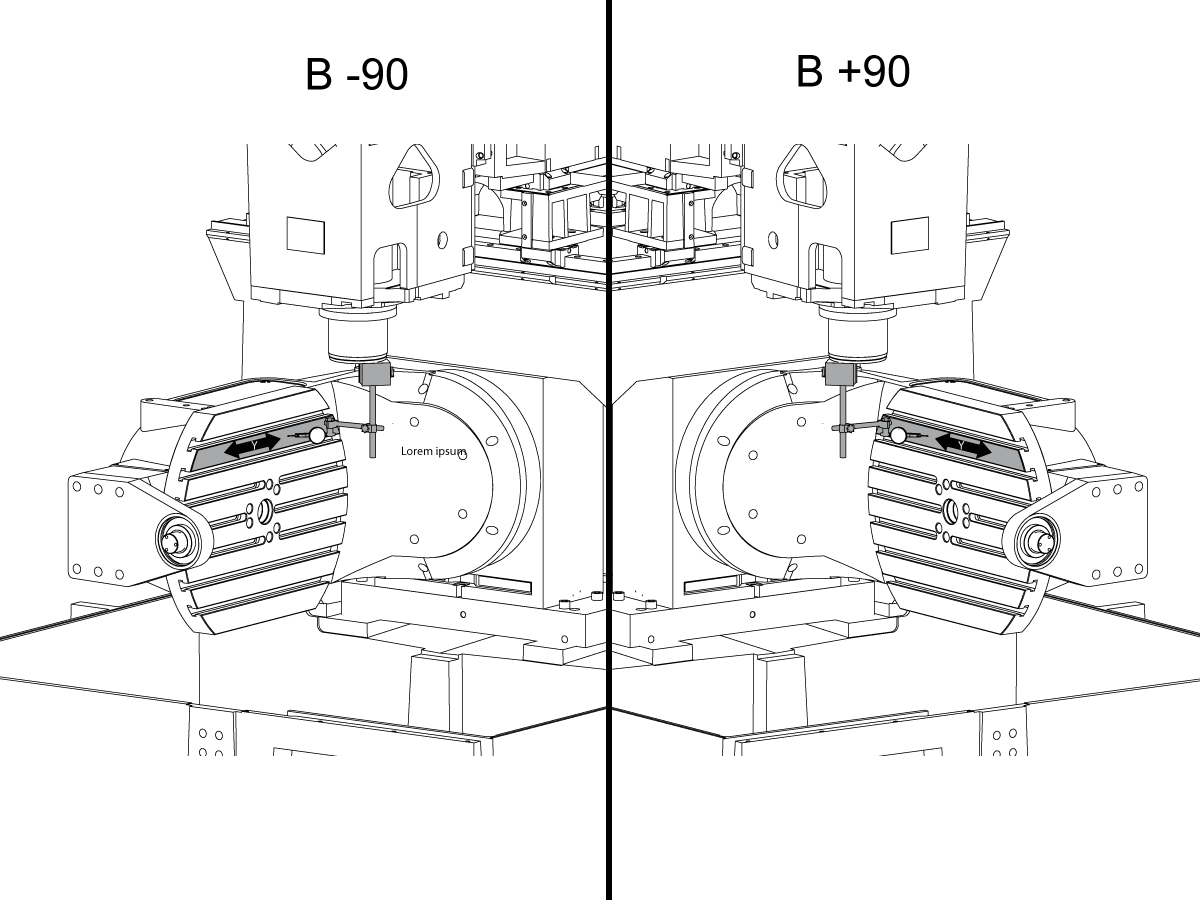
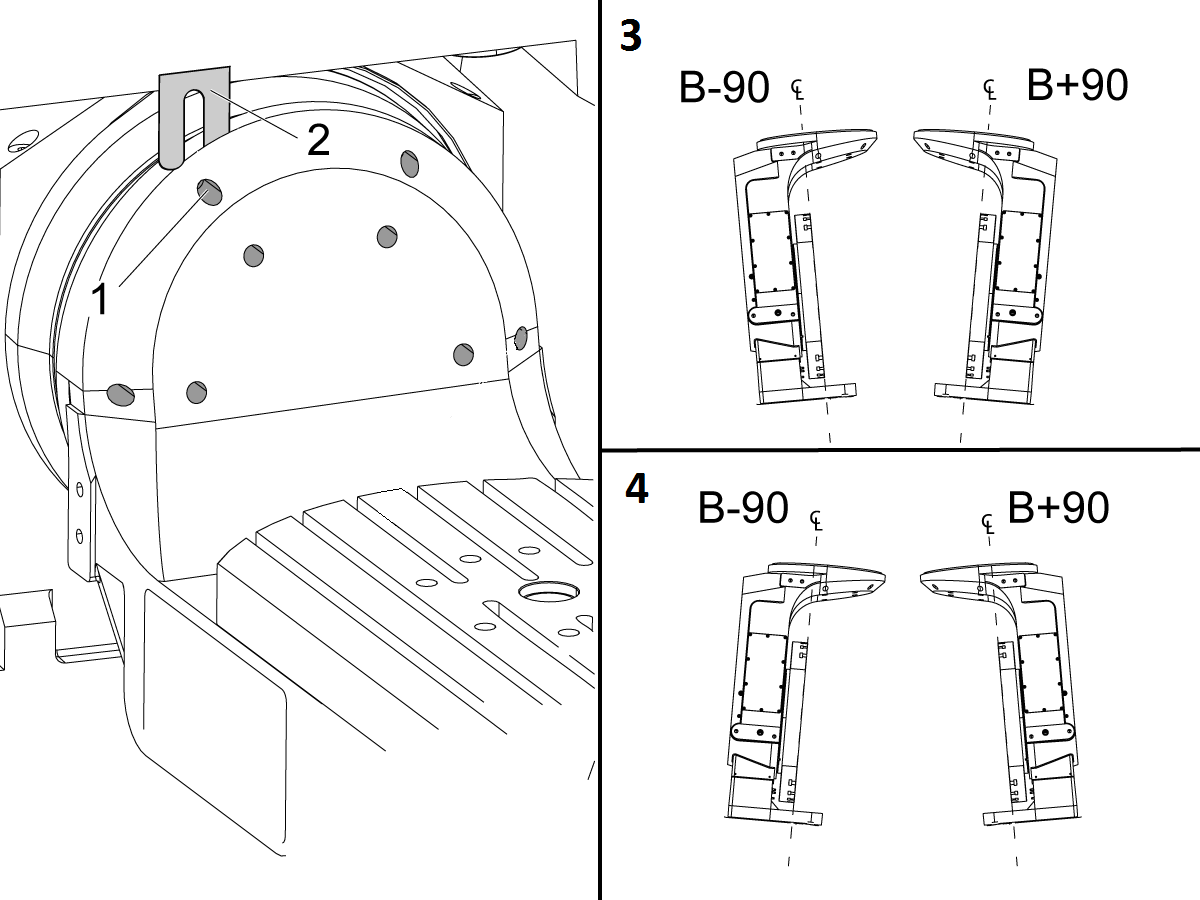
Measure the B- axis of rotation parallelism to the Y-Z plane:

For a machine with a Classic Haas Control, change Parameter 151:20 (B axis CHK TRAVL LIM) to 0.

For a machine with a Next Generation Control, change Parameter 6.021 (B axis CHK TRAVL LIM) to FALSE.

Measure the parallelism of the platter to the Y-Z plane with the B axis at 90° and then the B axis at -90° as shown in the picture.

Position the Y-Axis in the following starting position:

UMC-500: Y=0, Sweep 15”, 3rd T-Slot Land from the top.

UMC-750/1500-Duo: Y=-1.0, Sweep 18", 3rd T-Slot Land from the Top .

UMC-1250: Y=-1.0, Sweep 28", 3rd T-Slot Land from the Top.

UMC-500PP: Y=-4.0, Sweep 7".

UMC-750PP: Y=-2”, Sweep 15".

UMC-1000PP: Y=-4”, Sweep 15".

Compare the results at B 90° and B-90°. The results should be...

  • Symmetric against the Y-Z plane, positive or negative direction
  • Less than 0.0010"/20"

If the results are symmetric against Y-Z plane, and are less than 0.0010"/20 inches: Go to Step 5.

If the results are symmetric against Y-Z plane, but are more than 0.0010"/20 inches: Go to Step 4.

 Warning: If the results [3] are not symmetric against the Y-Z plane, the B axis rotary needs to be aligned: Go to Step 3.

3

Align the B axis of rotation parallel to the Y-Z plane:

Loosen the (6) bolts [1] that secure the B axis rotary to the base casting.

 Note: Keep the bolts sufficiently snug to control the adjustments.

Adjust the front and rear setscrews [2] until the measurements taken in Step 2 are symmetric against the Y-Z plane.

Torque the (6) bolts [1]. Refer to Haas Fastener Torque Specification.

Verify the measurements in Step 2 after the bolts have been torqued.

4

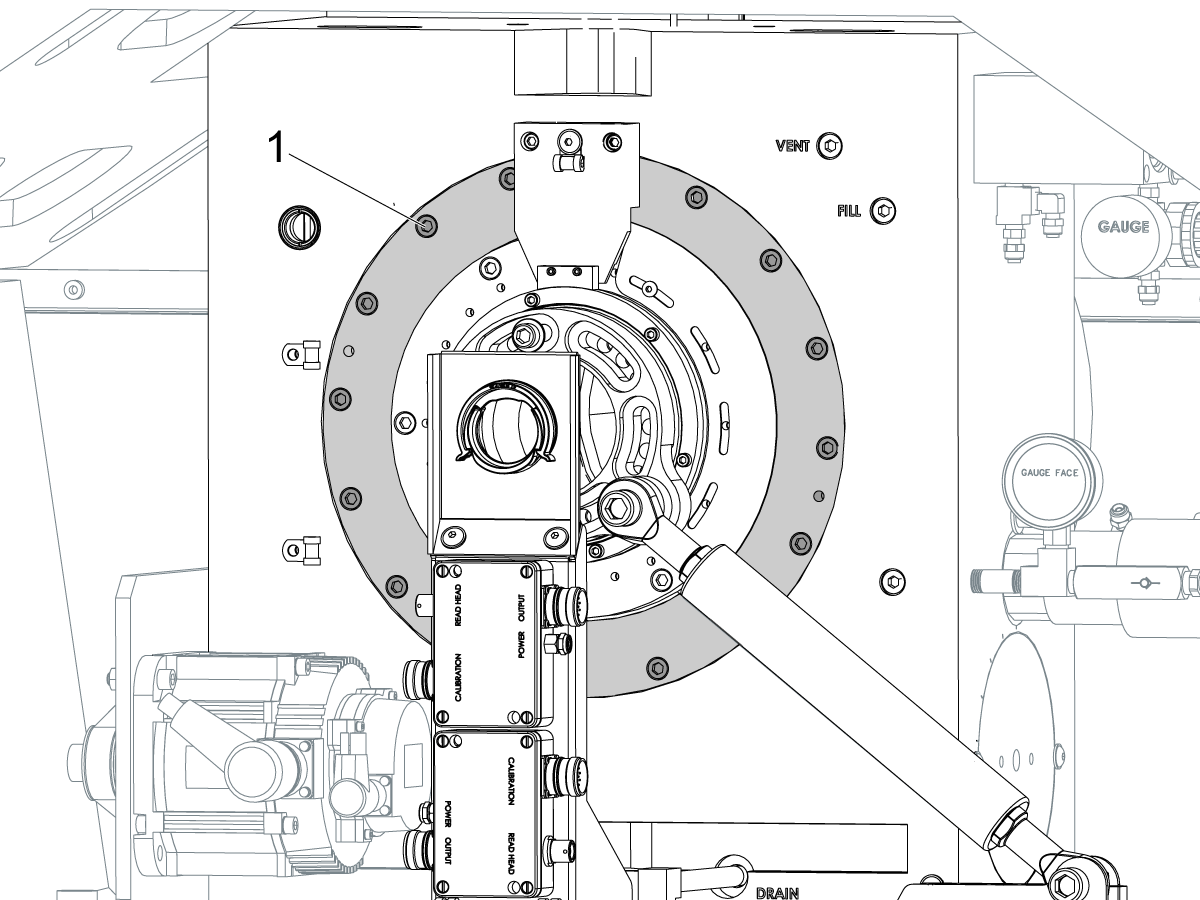
Align the C Axis of rotation perpendicular to the B Axis of rotation:

Remove the bottom C-Axis access cover.

Loosen the (12) bolts [1] that hold the C Axis body to the B Axis platter face.

Reach the bottom (4) bolts through the C Axis access port.

If the B Axis is symmetric in the positive direction [4], install horseshoe shims [2] of appropriate size behind the top (2) bolts.

If the B Axis is symmetric in the negative direction [5], install horseshoe shims [2] of appropriate size behind the bottom (2) bolts.

Torque the (12) bolts to 80 Ft-lbs (108 Nm).

Cut the excessive shim material off.

Verify the measurements in Step 2 after bolts are torqued.

5

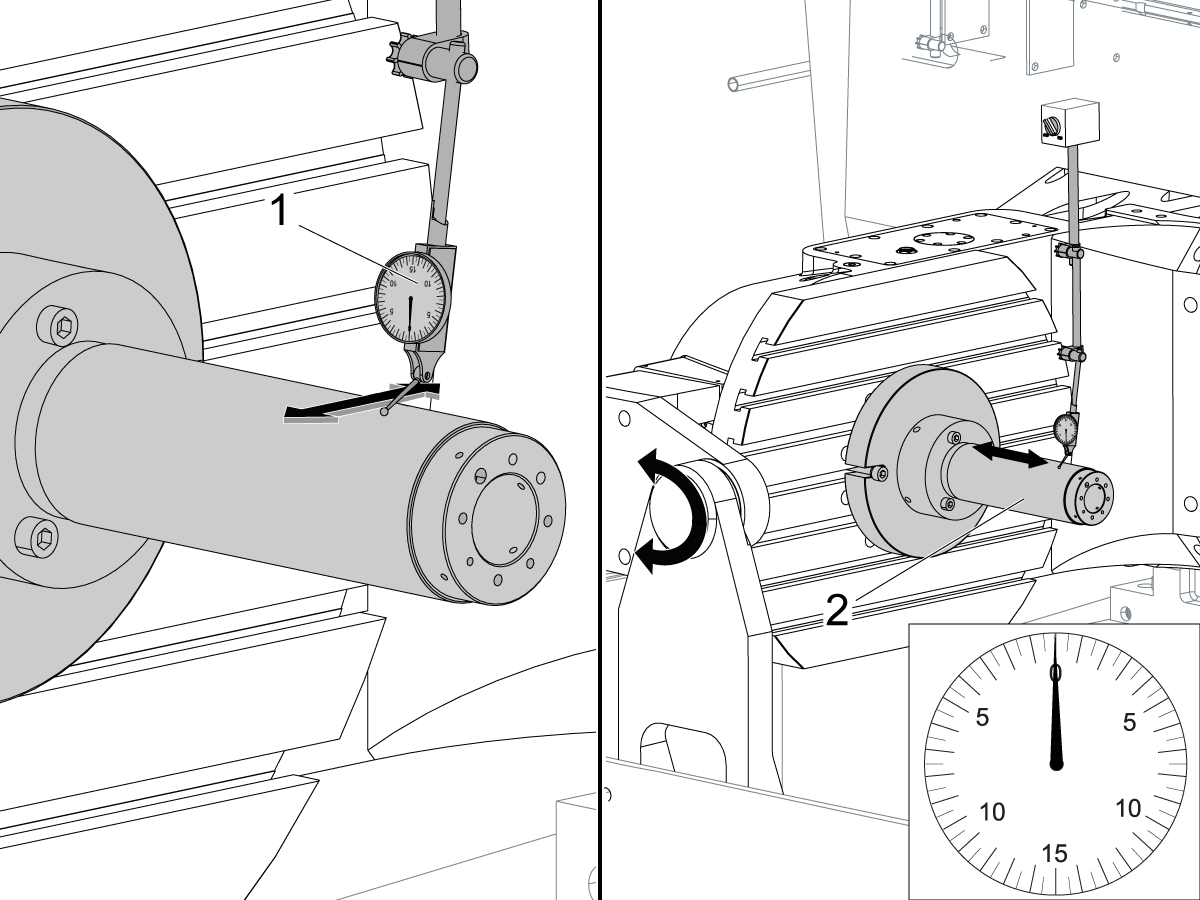
Align the trunnion support shaft co-axial with the B Axis of rotation:

Setup (2) indicators on the outer race of the trunnion support bearing [2] as shown in the picture.

Mark the spot on the outer race where one of the indicator needles is contacting the surface.

After moving the B Axis to 90° or -90° you will align the marked spot with the needle again to exclude the bearing runout error from the measurements.

Take the readings when B is at 90° and B at -90°. Compare the readings. 

 Caution: The B axis brake needs to be clamped when taking the readings.

The deviation between the results when B is at 90° and at -90° needs to be less than 0.001" on each indicator.

 Note: The indicator on the side of the bearing will measure top to bottom alignment and the indicator on the top of the bearing will measure side to side alignment.

____

For models with a multi-piece trunnion

Loosen the (6) bolts [3] on the C Axis body support. Keep the bolts sufficiently snug to control adjustment.

Adjust the (8) set screws [4] until deviation between B at 90° and B at -90° is within 0.001".

Torque the (6) bolts [2] on the C Axis body support to 80 Ft-lbs (108 Nm).

Verify the alignment after the bolts have been torqued.

____

For models with a unibody trunnion

Jog rotary to B90. Set up an indicator on the highlighted surface as shown in the lower diagram .

Rotate B-axis 180 degrees (90 to -90).

Run out (NTE 0.010” TIR).

 Caution: If the measurement exceeds the tolerance then contact support.

6

Install and shim the A-frame trunnion support:

Move the B Axis to 90°.

Setup an indicator [1] against a machined surface of the C Axis body. Set the indicator to 0.

Use plastic zip ties [2] to pry the seal open while installing the A-frame support. This lets unwanted air and grease out of the assembly.

Install the A-frame trunnion support [3] over the bearings.

Remove the cable ties.

Turn the trunnion support clockwise until it is vertical.

 Note: The weight of the A-frame support will cause the trunnion to sag. The amount of sag is measured with the indicator that was previously setup on the side of the C Axis body.

____

For multi-piece trunnions

Adjust the shims [4] between the A-frame support and the base casting to remove the sag until indicator reads 0 again.

When the indicator reading is 0, torque the (4) bolts. Refer to Haas Fastener Torque Specification.

Verify the reading after bolts are torqued. Adjust the shims again if necessary until the indicator reads 0.

____

For models with unibody trunnion

Determine the amount of shim stock [4] needed to raise the Trunnion arm so the indicator reads 0.005".

The indicator [1] value will change once the support is torqued.

With indicator still in place:

  • Torque trunnion support bolts to appropriate values.
  • Check indicator to make sure it reads between the range of

Trunnion arm raised (0.005” to  0.010”).

 Note: For unibody trunnions, the shim location may also be used to correct the C-axis to X-Y plane perpendicularity instead of shimming the saddle trucks.

 Caution: Use equal amount of shims on each side of the A-frame support. Unequal shims will cause the A-frame support to pull the trunnion to the side.

Verify the B Axis of rotation alignment to the Y-Z plane (Step 2). Loosen the bolts and tap the A-frame support side to side if necessary to correct the B axis to Y-Z plane alignment.

7

Set C-axis perpendicular to X/Y plane:

Move the axes to

UMC-750's........X= -10.5" & Y=0."

UMC-1000's......X=-17.0" & Y=-0."

Zero an indicator [1], on a Ground Block [2], 1/2" off the edge at the rear of the platter (Mag-Base on Spindle), with C at 0 Degrees

Rotate C-Axis to 180°.

Move Y axis, and ground block, in Y Axis negative direction until you are 1/2" away from platter edge, and take the perpendicularity measurement

Adjust the shims until the average error is within 0.0005" end to end.

 Note: For unibody trunnions, the shim location under the bearing support may also be used to correct the C-axis to X-Y plane perpendicularity instead of shimming the saddle truck.

Caution: Shim either two front trucks or two rear trucks with the equal shim.

Note: Shim one truck at the time to maintain the X to Y squareness.

Verify the measurements after all bolts are torqued.

Verify the X to Y alignment in Step 2.

8

Set the tool change offsets:

B-axis tool change offset [1]

For Classic Haas Controls, change Parameter 213. 

For Next Generation Controls, go to: Settings>Rotary Tab>Highlight the rotary and press [INSERT], or change Parameter 6.078 (B TOOL CHANGE OFFSET) to set the trunnion (B Axis) parallel to the X Axis.

For models with multipiece trunnion

(NTE 0.001/10"; NTE 0.0020" overall)

For models with unibody trunnion

(NTE 0.0005/10"; NTE 0.0010" overall)

___

C-axis tool change offset [2]

For Classic Haas Controls change Parameter 523.

For Next Generation Control go to: Settings>Rotary Tab> Highlight the rotary and press [INSERT], or change Parameter 7.078 (C TOOL CHANGE OFFSET) to set the table T-slot (C Axis) parallel to the X Axis

For models with multipiece trunnion

(NTE 0.001/10"; NTE 0.0020" overall)

For models with unibody trunnion

(NTE 0.0005/10"; NTE 0.0010" overall)

9

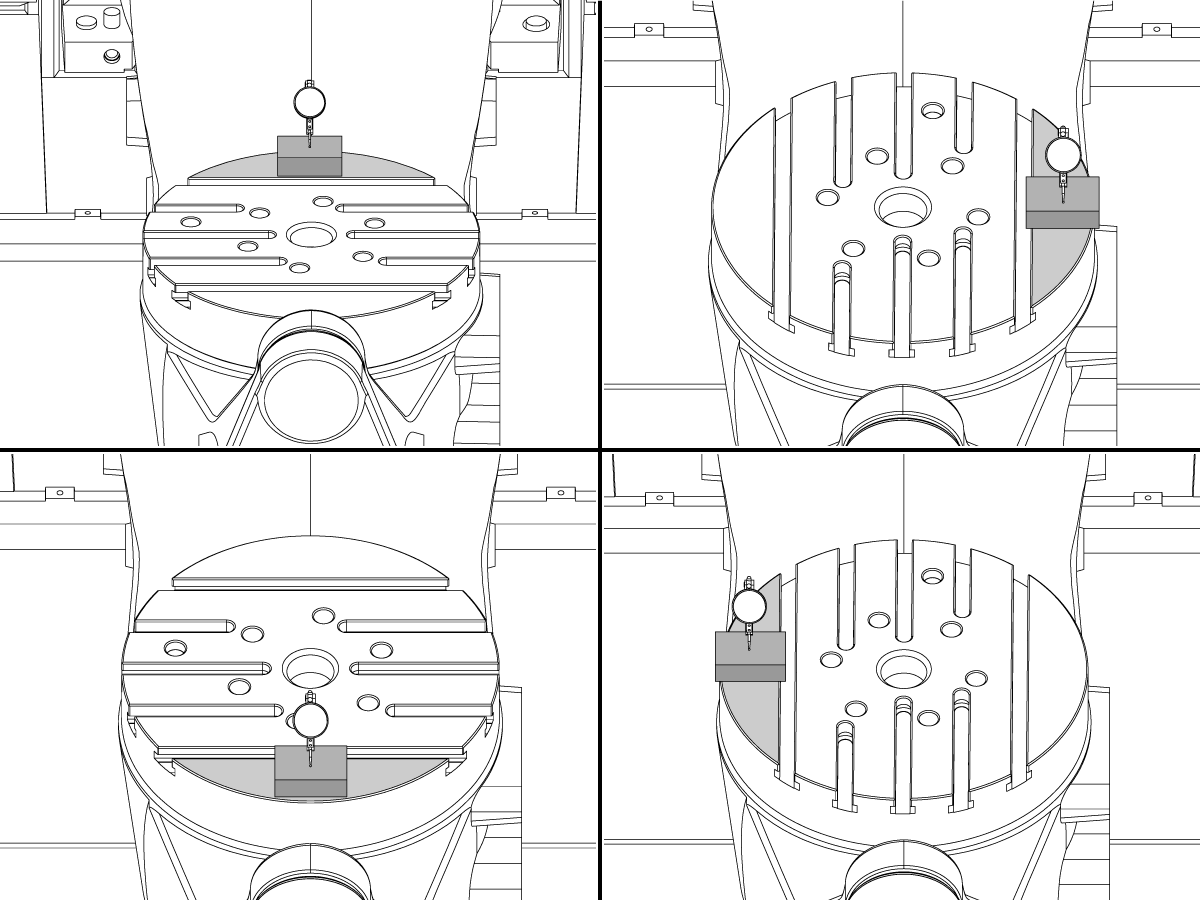
Check C-axis perpendicularity to X/Y plane:

Align the indicator centered over the C-axis bore with the Y-axis at -10.

Jog positive in the Y-axis and align the indicator over the center of the last section of the platter and make a mark at this spot with a washable marker.

Insert 1-2-3 block as shown and set the indicator to zero.

Remove the block and rotate the platter 90 degrees, following the marked spot with the indicator.

Insert block back between the indicator and platter. Note reading.

Repeat the previous two steps, taking readings with the platter at 180, 270 and 360 degrees.

Multi-piece trunnion:  (NTE 0.0005")

Unibody trunnion: (NTE 0.001")

10

Measure the intersection of the B and C axis:

Follow the linked instruction manual to complete this step.

B-Axis and C-Axis intersection Adjustment

11

Align the B-Axis brake disk:

 Note: Do not do this step if you are working on a SS machine.

Operate this code in MDI mode to unclamp the brake:

M11;

Loosen all of the brake disc bolts [1] and torque them to 5 Ft-lbs (7 Nm).

Operate this code in MDI mode to clamp the brake:

M10;

Wait 10 seconds.

Torque the bolts. Refer to Haas Fastener Torque Specifications.

Definir parâmetro/configuração de volta para valores de fábrica

Defina a Parâmetro 1314 para CHC/ Configuração 254 para a NGC de volta ao valor do conjunto de fábrica. (Ciclo de energia para a máquina depois de alterar o valor.)

Jacn e calibrar o WIPS. Sistema de sonda intuitiva sem fio (WIPS)-calibração

Defina os pontos zero do Rotary Machine. 

  • UMC-750-MRZP WIPS offsets configurações-CHC
  • UMC-750-MRZP WIPS offsets Settings- Ngc

Preencha o relatório de inspecção completo:

  • EA0420 UMC-500 relatório de inspecção
  • EA0373 UMC-750 relatório de inspecção
  • EA0418 UMC-1000 relatório de inspecção

Deixe a cópia do relatório de inspeção com a máquina.

Se você substituiu o conjunto de eixos B e C, faça o UMC-750-veio B e interseção C-Axis-alinhamento

Recently Viewed Items

You Have No Recently Viewed Items Yet

Feedback
Haas Logo

Preçário de entregas da Haas

Este preço inclui custo de envio, direitos de exportação e importação, seguro e quaisquer outras despesas incorridas durante o envio para um local em França acordado consigo na qualidade de comprador. Nenhum outro custo obrigatório pode ser acrescentado à entrega de um produto Haas CNC.

ACOMPANHE AS DICAS E TECNOLOGIA MAIS RECENTES DA HAAS…

Registe-se já!   

HAAS TOOLING ACEITA O SEGUINTE:

  • Assistência e Suporte
  • Proprietários
  • Pedir assistência
  • Manuais do operador
  • Peças Haas
  • Pedido de reparação do rotativo
  • Guias de Pré-instalação
  • Ferramentas de compras
  • Construção e preço de uma máquina Haas nova
  • Inventário disponível
  • A lista de preços Haas
  • Financiamento CNCA
  • Sobre a Haas
  • Declaração de acessibilidade
  • Declaração DNSH
  • Conformidade de exportação
  • Carreiras
  • Certificações e segurança
  • Contacte-nos
  • Histórico
  • Termos e condições
  • Termos e condições de Haas Tooling
  • Privacidade
  • Garantia
  • Comunidade Haas
  • Programa Haas de Certificação
  • Haas Motorsports
  • Fundação Gene Haas
  • Comunidade de formação técnica Haas
  • Eventos
  • Junte-se à Conversa
  • Facebook
  • X
  • Flickr
  • YouTube
  • LinkedIn
  • Instagram
  • TikTok
© 2026 Haas Automation, Inc – Máquinas-Ferramenta CNC

This site is protected by reCAPTCHA and the Google Privacy Policy and Terms of Service apply.

2800 Sturgis Rd., Oxnard, CA 93030 / Toll Free: 800-331-6746
Phone: 805-278-1800 / Fax: 805-278-2255