My Haas Welcome,
!
Haas Tooling MyHaas/HaasConnect Sign In Register Haas Tooling MyHaas/HaasConnect Sign Out Welcome, My Machines Latest Activity My Quotes My Account My Users Sign Out
Find Your Distributor
  1. Select Language
    1. English
    2. Deutsch
    3. Español - España
    4. Español - México
    5. Français
    6. Italiano
    7. Português
    8. Český
    9. Dansk
    10. Nederlands
    11. Magyar
    12. Polski
    13. Svenska
    14. Türkçe
    15. 中文
    16. Suomi
    17. Norsk
    18. الإنجليزية
    19. български
    20. Hrvatski
    21. Ελληνικά
    22. Română
    23. Slovenský
    24. Slovenščina
    25. 한국어
    26. 日本語
    27. Українська
  • machines Main Menu
    • Vertical Mills
      Vertical Mills
      Vertical Mills View All
      • Vertical Mills
      • VF Series
      • Universal Machines
      • VR Series
      • VP-5 Prismatic
      • Pallet-Changing VMCs
      • Mini Mills
      • Mold Machines
      • High-Speed Drill Centers
      • Drill/Tap/ Mill Series
      • Toolroom Mills
      • Pocket Mill
      • Compact Mills
      • Gantry Series
      • SR Sheet Routers
      • Extra-Large VMC
      • Double-Column Mills
      • 3+2 Positioning Machines
    • Multi-Axis Solutions
      Multi-Axis Solutions
      Multi-Axis Solutions View All
      • Multi-Axis Solutions
      • Y-Axis Lathes
      • 5-Axis Mills
    • Lathes
      Lathes
      Lathes View All
      • Lathes
      • ST Series
      • Dual-Spindle
      • Box Way Series
      • Toolroom Lathes
      • Chucker Lathe
      • Haas Bar Feeders
    • Horizontal Mills
      Horizontal Mills
      Horizontal Mills View All
      • Horizontal Mills
      • 50-Taper
      • 40-Taper
    • Rotaries & Indexers
      Rotaries & Indexers
      Rotaries & Indexers View All
      • Rotaries & Indexers
      • Rotary Tables
      • Indexers
      • 5-Axis Rotaries
      • Extra-Large Rotaries
    • Special Series
      Special Series
      Special Series View All
      • Special Series
      • EU_Series_Redirect
    • Automation Systems
      Automation Systems
      Automation Systems View All
      • Automation Systems
      • Mill Automation
      • Lathe Automation
      • Automatic Parts Loaders
      • Automation Models
    • Desktop Machines
      Desktop Machines
      Desktop Machines View All
      • Desktop Machines
      • Desktop Mill
      • Desktop Lathe
      • Control Simulator, Standard
      • Control Simulator, Premium
    • Shop Equipment
      Shop Equipment
      Shop Equipment View All
      • Shop Equipment
      • Knee Mill
      • Haas Manual Lathes
      • Haas Saws
    • Fabrication Machines
      Fabrication Machines
      Fabrication Machines View All
      • Fabrication Machines
      • Laser Cutting Machines
      • CNC Press Brakes
    • QUICK LINKS Special Series  Special Series 
      EU SERIES EU SERIES BUILD & PRICE | PRICE LIST BUILD & PRICE | PRICE LIST In-Stock Machines In-Stock Machines WHAT’S NEW WHAT’S NEW YOUR FIRST CNC YOUR FIRST CNC
      SHOPPING TOOLS
      • Build & Price a Haas
      • Price List
      • Available Inventory
      • CNCA Financing
      WANT TO TALK TO SOMEONE?

      A Haas Factory Outlet (HFO) can answer your questions, and walk you through your best options.

      CONTACT YOUR DISTRIBUTOR >
  • Options Main Menu
    • The Haas Control Value Option Packages
      Value Option Packages
      Value Option Packages View All
      • Value Option Packages
    • Product Image Spindles
      Spindles
      Spindles View All
      • Spindles
    • Product Image Tool Changers
      Tool Changers
      Tool Changers View All
      • Tool Changers
    • Product Image 4th- | 5th-Axis
      4th- | 5th-Axis
      4th- | 5th-Axis View All
      • 4th- | 5th-Axis
    • Product Image Turrets & Live Tooling
      Turrets & Live Tooling
      Turrets & Live Tooling View All
      • Turrets & Live Tooling
    • Product Image Probing
      Probing
      Probing View All
      • Probing
    • Haas Chip & Coolant Management Chip & Coolant Management
      Chip & Coolant Management
      Chip & Coolant Management View All
      • Chip & Coolant Management
    • The Haas Control The Haas Control
      The Haas Control
      The Haas Control View All
      • The Haas Control
    • Product Image Product Options
      Product Options
      Product Options View All
      • Product Options
    • Product Image Tooling & Fixturing
      Tooling & Fixturing
      Tooling & Fixturing View All
      • Tooling & Fixturing
    • Product Image Workholding
      Workholding
      Workholding View All
      • Workholding
    • Product Image 5-Axis Solutions
      5-Axis Solutions
      5-Axis Solutions View All
      • 5-Axis Solutions
      • 5 Easy Steps to 5-Axis
    • QUICK LINKS Special Series  Special Series 
      EU SERIES EU SERIES BUILD & PRICE | PRICE LIST BUILD & PRICE | PRICE LIST In-Stock Machines In-Stock Machines WHAT’S NEW WHAT’S NEW YOUR FIRST CNC YOUR FIRST CNC
      SHOPPING TOOLS
      • Build & Price a Haas
      • Price List
      • Available Inventory
      • CNCA Financing
      WANT TO TALK TO SOMEONE?

      A Haas Factory Outlet (HFO) can answer your questions, and walk you through your best options.

      CONTACT YOUR DISTRIBUTOR >
  • Why Haas Main Menu
      Discover the Haas Difference
    • Why Haas
    • MyHaas
    • Education Community
    • Industry 4.0
    • Haas Certification
    • Customer Testimonials
  • Service Main Menu
      Welcome to Haas Service
      SERVICE HOME Operator’s Manuals How-To Procedures Troubleshooting Guides Preventive Maintenance Haas Parts Haas Tooling Videos
  • Videos Main Menu
  • Main Menu
    • View All
    • View All
    • View All
    • View All
      • HTEC Curriculum Support
      • Haas Value Option Packages (VOP) Journey
    • View All
      • Haas 10 kg Cobot Package
      • Cobot Kits
      • DC-1 Drill Center
      • CNC Sales News
      • Do More With Your Haas
    • View All
    • View All
      • contact-us-test
      • 4 - AUTOMATION SYSTEMS
      • Carousel-V2
      • expert test
      • Demo_Day_Trident-test
      • Link Test
      • image-sale-tag-test
      • article-list-test
      • Haas 25 kg Robot Package
    • View All
      • Choose Options
    • View All
    • View All
    • View All
    • View All
    • View All
      • calc-test
    • View All
    • QUICK LINKS Special Series  Special Series 
      EU SERIES EU SERIES BUILD & PRICE | PRICE LIST BUILD & PRICE | PRICE LIST In-Stock Machines In-Stock Machines WHAT’S NEW WHAT’S NEW YOUR FIRST CNC YOUR FIRST CNC
      SHOPPING TOOLS
      • Build & Price a Haas
      • Price List
      • Available Inventory
      • CNCA Financing
      WANT TO TALK TO SOMEONE?

      A Haas Factory Outlet (HFO) can answer your questions, and walk you through your best options.

      CONTACT YOUR DISTRIBUTOR >
  • Haas Tooling Main Menu
  • Haas Service Parts Main Menu

My Haas Welcome,
!
Haas Tooling MyHaas/HaasConnect Sign In Register Haas Tooling MyHaas/HaasConnect Sign Out Welcome, My Machines Latest Activity My Quotes My Account My Users Sign Out
Find Your Distributor
  1. Select Language
    1. English
    2. Deutsch
    3. Español - España
    4. Español - México
    5. Français
    6. Italiano
    7. Português
    8. Český
    9. Dansk
    10. Nederlands
    11. Magyar
    12. Polski
    13. Svenska
    14. Türkçe
    15. 中文
    16. Suomi
    17. Norsk
    18. الإنجليزية
    19. български
    20. Hrvatski
    21. Ελληνικά
    22. Română
    23. Slovenský
    24. Slovenščina
    25. 한국어
    26. 日本語
    27. Українська
×

Search Results

Web Pages

Images

    • <
    • 1
    • >

G-code, M-code, and Setting

Service Home G254 Dynamic Work Offset (DWO)

G254 Dynamic Work Offset (DWO)

G254 Dynamic Work Offset (DWO) (Group 23)


G254 Dynamic Work Offset (DWO) is similar to TCPC, except that it is designed for use with 3+1 or 3+2 positioning, not for simultaneous 4- or 5-axis machining. If the program does not use the B and C Axes, there is no need to use DWO.UMC - G254 - Dynamic Work Offset (DWO) (Group 23)G254 Dynamic Work Offset (DWO) is similar to TCPC, except that it is designed for use with 3+1 or 3+2 positioning, not for simultaneous 4- or 5-axis machining. If the program does not make use of the tilt and rotary Axes, there is no need to use DWO.

CAUTION: The B-Axis value of the work offset you use with G254 MUST be zero.
With DWO, you no longer need to set the workpiece in the exact position as programmed in the CAM system. DWO applies the appropriate offsets to account for the differences between the programmed workpiece location and the actual workpiece location. This eliminates the need to repost a program from the CAM system when the programmed and actual workpiece locations are different.The control knows the centers of rotation for the rotary table (MRZP) and the location of the workpiece (active work offset). This data is used to produce the desired machine motion from the original CAM-generated program. Therefore, it is recommended that G254 be invoked after the desired work offset is commanded, and after any rotational command to position the 4th and 5th axes.After G254 is invoked, you must specify an X, Y, and Z Axis position before a cutting command, even if it recalls the current position. The program should specify the X- and Y Axis position in one block and the Z Axis in a separate block.

CAUTION: Before rotary motion, use a G53 Non-Modal Machine Coordinate motion command to safely retract the tool from the workpiece and allow clearance for the rotary motion. After the rotary motion finishes, specify an X-, Y-, and Z-Axis position before a cutting command, even if it recalls the current position. The program should specify the X- and Y-Axis position in one block and the Z-Axis position in a separate block.


CAUTION: Be sure to cancel G254 with G255 when your program does simultaneous 4- or 5-axis machining.


NOTE: For clarity, the illustrations in this section do not depict workholding.
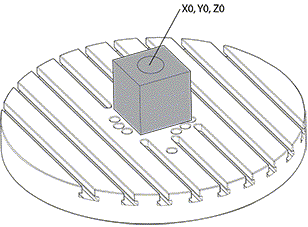
The block in the figure below was programmed in the CAM system with the top center hole located at the center of the pallet and defined as X0, Y0, Z0.Original Programmed Position


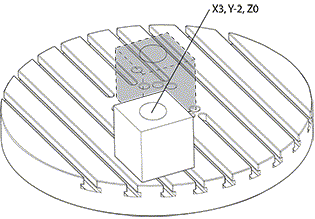
In the figure below, the actual workpiece is not located in this programmed position. The center of the workpiece is actually located at X3, Y-2, Z0, and is defined as G54.Center at G54, DWO Off


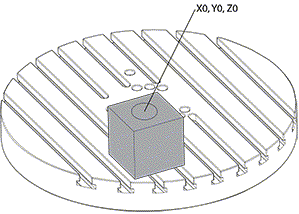
DWO is invoked in the figure below. The control knows the centers of rotation for the rotary table (MRZP), and the location of the workpiece (active work offset G54). The control uses this data to apply the appropriate offset adjustments to make sure that the proper toolpath is applied to the workpiece, as intended by the CAM-generated program. This eliminates the need to repost a program from the CAM system when the programmed and actual workpiece locations are different.Center with DWO On


G254 Program Example
%
O00004 (DWO SAMPLE) ;
G20 ;
G00 G17 G40 G80 G90 G94 G98 ;
G53 Z0. ;
T1 M06 ;
G00 G90 G54 X0. Y0. B0. C0. (G54 is the active work offset for) ;
(the actual workpiece location) ;
S1000 M03 ;
G43 H01 Z1. (Start position 1.0 above face of part Z0.) ;
G01 Z-1.0 F20. (Feed into part 1.0) ;
G00 G53 Z0. (Retract Z with G53) ;
B90. C0. (ROTARY POSITIONING) ;
G254 (INVOKE DWO) ;
X1. Y0. (X and Y position command) ;
Z2. (Start position 1.0 above face of part Z1.0) ;
G01 Z0. F20. (Feed into part 1.0 ) ;
G00 G53 Z0. (Retract Z with G53) ;
B90. C-90. (ROTARY POSITIONING) ;
X1. Y0. (X and Y position command) ;
Z2. (Start position 1.0 above face of part Z1.0) ;
G01 Z0. F20. (Feed into part 1.0 ) ;
G255 (CANCEL DWO) ;
B0. C0. ;
M30 ;
%
G254 Programmer's NotesThese key presses and program codes will cancel G254: [EMERGENCY STOP]
[RESET]
[HANDLE JOG]
[LIST PROGRAM]
G255 -- Cancel DWO
M02 -- Program End
M30 -- Program End and Reset
These codes will NOT cancel G254:M00 -- Program Stop
M01 -- Optional Stop
Some codes ignore G254. These codes will not apply rotational deltas:*G28 -- Return to Machine Zero Through Optional Reference Point
*G29 -- Move to Location Through G29 Reference Point
G53 -- Non-Modal Machine Coordinate Selection
M06-- Tool Change
*It is strongly recommended that you not use G28 or G29 while G254 is active, nor when the B and C Axes are not at zero.1. G254 (DWO) is intended for 3+1 and 3+2 machining, where the B and C Axes are used to position only.
2. An active work offset (G54, G55, etc.) must be applied before G254 is commanded.
3. All rotary motion must be complete before G254 is commanded.
4. After G254 is invoked, you must specify an X-, Y-, and Z-Axis position prior to any cutting command, even if it recalls the current position. It is recommended to specify the X and Y Axes in one block, and the Z Axis in a separate block.
5. Cancel G254 with G255 immediately after use and before ANY rotary motion.
6. Cancel G254 with G255any time simultaneous 4- or 5-axis machining is performed.
7. Cancel G254 with G255 and retract the cutting tool to a safe location before the workpiece is repositioned.

Recently Viewed Items

You Have No Recently Viewed Items Yet

Feedback
Haas Logo

Haas Delivered Price

This price includes shipping cost, export and import duties, insurance, and any other expenses incurred during shipping to a location in France agreed with you as a buyer. No other mandatory costs can be added to the delivery of a Haas CNC Product.

KEEP UP WITH THE LATEST HAAS TIPS AND TECHNOLOGY...

Sign up now!   

HAAS TOOLING ACCEPTS THE FOLLOWING:

  • Service & Support
  • Owners
  • Request Service
  • Operator Manuals
  • Haas Parts
  • Rotary Repair Request
  • Pre-Install Guides
  • Shopping Tools
  • Build & Price a New Haas
  • Available Inventory
  • The Haas Price List
  • CNCA Financing
  • About Haas
  • Accessibility Statement
  • DNSH Statement
  • Export Compliance
  • Careers
  • Certifications & Safety
  • Contact Us
  • History
  • Terms & Conditions
  • Haas Tooling Terms & Conditions
  • Privacy
  • Warranty
  • Haas Community
  • Haas Certification Program
  • Haas Motorsports
  • Gene Haas Foundation
  • Haas Technical Education Community
  • Events
  • Join the Conversation
  • Facebook
  • X
  • Flickr
  • YouTube
  • LinkedIn
  • Instagram
  • TikTok
© 2026 Haas Automation, Inc – CNC Machine Tools

This site is protected by reCAPTCHA and the Google Privacy Policy and Terms of Service apply.

2800 Sturgis Rd., Oxnard, CA 93030
Toll Free: (888) 817-4446 / Fax: 805-278-8554