My Haas Welcome,
!
Haas Tooling MyHaas/HaasConnect Sign In Register Haas Tooling MyHaas/HaasConnect Sign Out Welcome, My Machines Latest Activity My Quotes My Account My Users Sign Out
Find Your Distributor
  1. Select Language
    1. English
    2. Deutsch
    3. Español - ES
    4. Español - MX
    5. Français
    6. Italiano
    7. Português
    8. Český
    9. Dansk
    10. Nederlands
    11. Magyar
    12. Polski
    13. Svenska
    14. Türkçe
    15. 中文
    16. Suomi
    17. Norsk
    18. الإنجليزية
    19. български
    20. Hrvatski
    21. Ελληνικά
    22. Română
    23. Slovenský
    24. Slovenščina
    25. 한국어
    26. 日本語
    27. Українська
  • machines Main Menu
    • Vertical Mills
      Vertical Mills
      Vertical Mills View All
      • Vertical Mills
      • VF Series
      • Universal Machines
      • VR Series
      • VP-5 Prismatic
      • Pallet-Changing VMCs
      • Mini Mills
      • Mold Machines
      • High-Speed Drill Centers
      • Drill/Tap/ Mill Series
      • Toolroom Mills
      • Pocket Mill
      • Compact Mills
      • Gantry Series
      • SR Sheet Routers
      • Extra-Large VMC
      • Double-Column Mills
      • 3+2 Positioning Machines
    • Multi-Axis Solutions
      Multi-Axis Solutions
      Multi-Axis Solutions View All
      • Multi-Axis Solutions
      • Y-Axis Lathes
      • 5-Axis Mills
    • Lathes
      Lathes
      Lathes View All
      • Lathes
      • ST Series
      • Dual-Spindle
      • Box Way Series
      • Toolroom Lathes
      • Chucker Lathe
      • Pocket Lathe
      • Haas Bar Feeders
    • Horizontal Mills
      Horizontal Mills
      Horizontal Mills View All
      • Horizontal Mills
      • 50-Taper
      • 40-Taper
    • Rotaries & Indexers
      Rotaries & Indexers
      Rotaries & Indexers View All
      • Rotaries & Indexers
      • Rotary Tables
      • Indexers
      • 5-Axis Rotaries
      • Extra-Large Rotaries
    • Special Series
      Special Series
      Special Series View All
      • Special Series
      • EU_Series_Redirect
    • Automation Systems
      Automation Systems
      Automation Systems View All
      • Automation Systems
      • Mill Automation
      • Lathe Automation
      • Automatic Parts Loaders
      • Automation Models
    • Desktop Machines
      Desktop Machines
      Desktop Machines View All
      • Desktop Machines
      • Desktop Mill
      • Desktop Lathe
      • Control Simulator, Standard
      • Control Simulator, Premium
    • Shop Equipment
      Shop Equipment
      Shop Equipment View All
      • Shop Equipment
      • Knee Mill
      • Haas Manual Lathes
      • Haas Saws
    • Fabrication Machines
      Fabrication Machines
      Fabrication Machines View All
      • Fabrication Machines
      • Laser Cutting Machines
      • CNC Press Brakes
    • QUICK LINKS Special Series  Special Series 
      EU SERIES EU SERIES BUILD & PRICE | PRICE LIST BUILD & PRICE | PRICE LIST In-Stock Machines In-Stock Machines WHAT’S NEW WHAT’S NEW YOUR FIRST CNC YOUR FIRST CNC
      SHOPPING TOOLS
      • Build & Price a Haas
      • Price List
      • Available Inventory
      • CNCA Financing
      WANT TO TALK TO SOMEONE?

      A Haas Factory Outlet (HFO) can answer your questions, and walk you through your best options.

      CONTACT YOUR DISTRIBUTOR >
  • Options Main Menu
    • The Haas Control Value Option Packages
      Value Option Packages
      Value Option Packages View All
      • Value Option Packages
    • Product Image Spindles
      Spindles
      Spindles View All
      • Spindles
    • Product Image Tool Changers
      Tool Changers
      Tool Changers View All
      • Tool Changers
    • Product Image 4th- | 5th-Axis
      4th- | 5th-Axis
      4th- | 5th-Axis View All
      • 4th- | 5th-Axis
    • Product Image Turrets & Live Tooling
      Turrets & Live Tooling
      Turrets & Live Tooling View All
      • Turrets & Live Tooling
    • Product Image Probing
      Probing
      Probing View All
      • Probing
    • Haas Chip & Coolant Management Chip & Coolant Management
      Chip & Coolant Management
      Chip & Coolant Management View All
      • Chip & Coolant Management
    • The Haas Control The Haas Control
      The Haas Control
      The Haas Control View All
      • The Haas Control
    • Product Image Product Options
      Product Options
      Product Options View All
      • Product Options
    • Product Image Tooling & Fixturing
      Tooling & Fixturing
      Tooling & Fixturing View All
      • Tooling & Fixturing
    • Product Image Workholding
      Workholding
      Workholding View All
      • Workholding
    • Product Image 5-Axis Solutions
      5-Axis Solutions
      5-Axis Solutions View All
      • 5-Axis Solutions
      • 5 Easy Steps to 5-Axis
    • QUICK LINKS Special Series  Special Series 
      EU SERIES EU SERIES BUILD & PRICE | PRICE LIST BUILD & PRICE | PRICE LIST In-Stock Machines In-Stock Machines WHAT’S NEW WHAT’S NEW YOUR FIRST CNC YOUR FIRST CNC
      SHOPPING TOOLS
      • Build & Price a Haas
      • Price List
      • Available Inventory
      • CNCA Financing
      WANT TO TALK TO SOMEONE?

      A Haas Factory Outlet (HFO) can answer your questions, and walk you through your best options.

      CONTACT YOUR DISTRIBUTOR >
  • Why Haas Main Menu
      Discover the Haas Difference
    • Why Haas
    • MyHaas
    • Education Community
    • Industry 4.0
    • Haas Certification
    • Customer Testimonials
  • Service Main Menu
      Welcome to Haas Service
      SERVICE HOME Operator’s Manuals How-To Procedures Troubleshooting Guides Preventive Maintenance Haas Parts Haas Tooling Videos
  • Videos Main Menu
  • Main Menu
    • View All
    • View All
    • View All
    • View All
      • HTEC Curriculum Support
      • Haas Value Option Packages (VOP) Journey
    • View All
      • Haas 10 kg Cobot Package
      • Cobot Kits
      • DC-1 Drill Center
      • CNC Sales News
      • Do More With Your Haas
    • View All
    • View All
      • contact-us-test
      • 4 - AUTOMATION SYSTEMS
      • Carousel-V2
      • expert test
      • Demo_Day_Trident-test
      • Link Test
      • image-sale-tag-test
      • article-list-test
      • Haas 25 kg Robot Package
      • test-algolia-page
    • View All
    • View All
    • View All
    • View All
      • calc-test
    • View All
    • QUICK LINKS Special Series  Special Series 
      EU SERIES EU SERIES BUILD & PRICE | PRICE LIST BUILD & PRICE | PRICE LIST In-Stock Machines In-Stock Machines WHAT’S NEW WHAT’S NEW YOUR FIRST CNC YOUR FIRST CNC
      SHOPPING TOOLS
      • Build & Price a Haas
      • Price List
      • Available Inventory
      • CNCA Financing
      WANT TO TALK TO SOMEONE?

      A Haas Factory Outlet (HFO) can answer your questions, and walk you through your best options.

      CONTACT YOUR DISTRIBUTOR >
  • Haas Tooling Main Menu
  • Haas Service Parts Main Menu
My Haas Welcome,
!
Haas Tooling MyHaas/HaasConnect Sign In Register Haas Tooling MyHaas/HaasConnect Sign Out Welcome, My Machines Latest Activity My Quotes My Account My Users Sign Out
Find Your Distributor
  1. Select Language
    1. English
    2. Deutsch
    3. Español - ES
    4. Español - MX
    5. Français
    6. Italiano
    7. Português
    8. Český
    9. Dansk
    10. Nederlands
    11. Magyar
    12. Polski
    13. Svenska
    14. Türkçe
    15. 中文
    16. Suomi
    17. Norsk
    18. الإنجليزية
    19. български
    20. Hrvatski
    21. Ελληνικά
    22. Română
    23. Slovenský
    24. Slovenščina
    25. 한국어
    26. 日本語
    27. Українська
×

Search Results

Web Pages

Images

    • <
    • 1
    • >

3 - Haas Laser - CO2 Series - Installation

Haas Laser - CO2 Series - Operator's/Service Manual


  • 0 - Haas Laser - CO2 Series - Table of Contents
  • 1 - Haas Laser - CO2 Series - Introduction
  • 2 - Haas Laser - CO2 Series - Safety
  • 3 - Haas Laser - CO2 Series - Installation
  • 4 - Haas Laser - CO2 Series - Operation
  • 5 - Haas Laser - CO2 Series - Maintenance
  • 6 - Haas Laser - CO2 Series - Troubleshooting

Go To :

  • 3.1 HL-30E-CO2 - Installation
Recently Updated

HL-30E-CO2 - Installation


AD0984

Revision A - 07-2026

Installation Requirements

This procedure will guide you through the installation of a HL-30E-CO2. The fiber laser marking machine is composed of three main components:

  • Laser Source System
  • Galvonometer Scanning System
  • Desktop/Windows 11 Operating System

Tools Required:

  • Forklift
  • Hexkey Set (included)
  • Phillips Screwdriver
  • Flat Head Screwdriver 
  • Internet
  • Dark Colored Construction Paper (Black is recommended for best results)
  • Caliper

Windows 11 Operating System:

 
Haas Automation provides a Windows 11 Pro license with the purchase of a HL50E Fiber Laser Marking Machine. All technical support, troubleshooting, or assistance related to the installation, use, or maintenance of the Windows 11 Pro software needs to be directed to Microsoft or a qualified IT professional.

To learn how to activate Windows 11 Pro using a product key click here.

LightBurn Software Activation:

To learn how to activate LightBurn click here, or refer to the LightBurn License Activation section below.

 IMPORTANT: Internet will be needed to complete the Lightburn installation.

For additional information on how to get started with LightBurn CLICK HERE.

To see LightBurn tutorials CLICK HERE.

Pre-Installation

This system should be installed in an environment that meets the following requirements:

  • Smoke and dust-free
  • No exposure to acid vapor or other corrosive gases
  • Flat foundation

Laser Unpacking

1

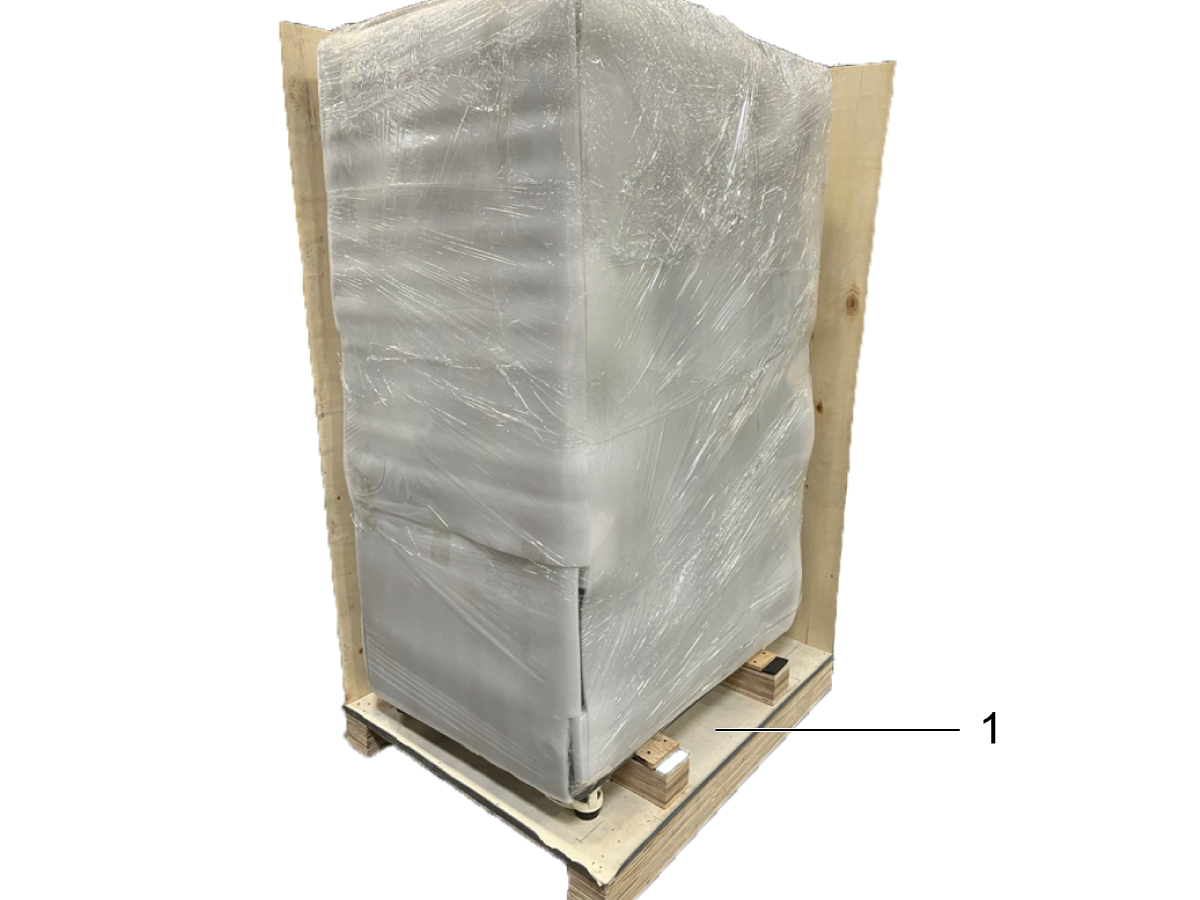
Only two side panels and the top panel from the crate need to be removed as shown in the image. 

Move the laser to the desired location and remove the wrapping.

A forklift will be needed to remove the laser from the pallet [1].

The laser machine can be easily moved after removing the brake pads found on each wheel.

2

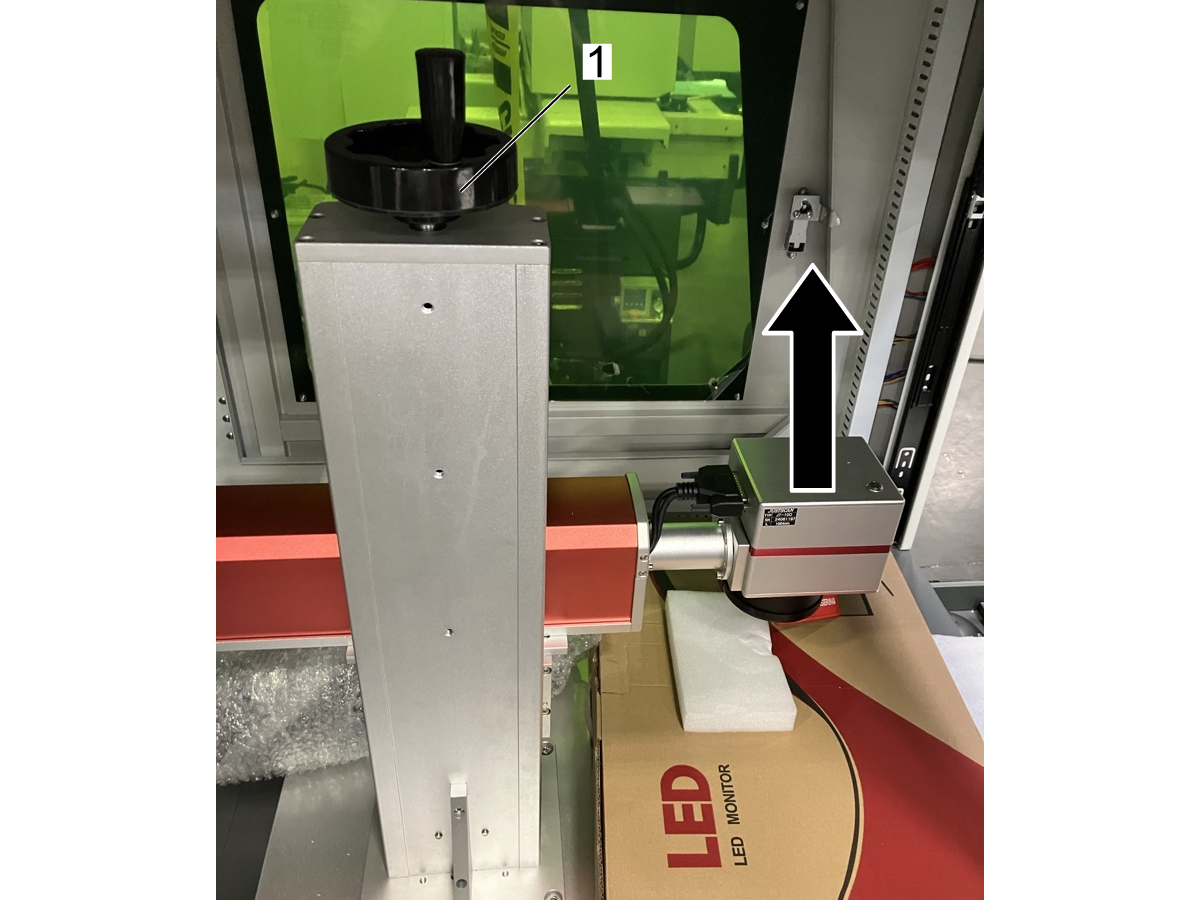
Loosen the Handle Screw to the Z-axis [1]. 

3

With either side window opened, use the laser handle [1] to manually move the laser head upwards for unobstructed access to the monitor box.

4

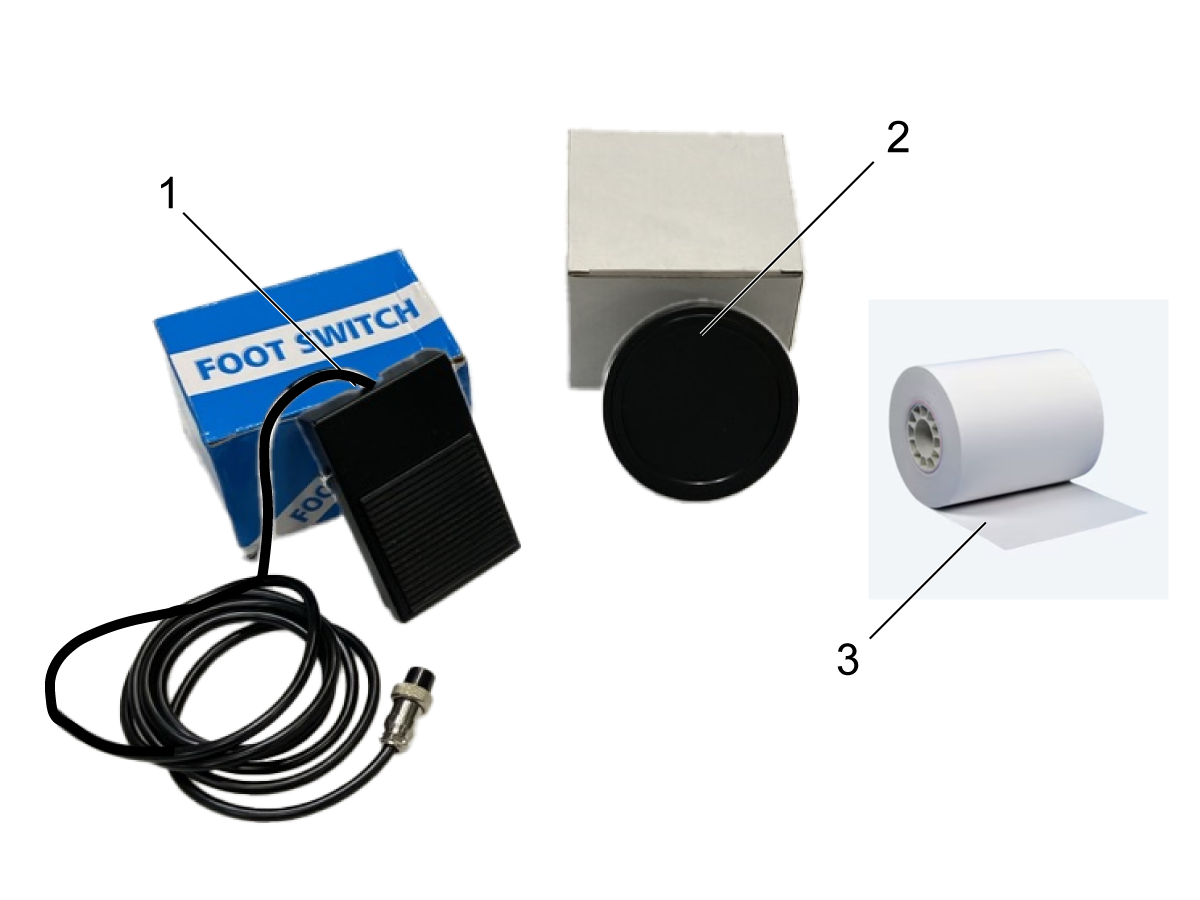
Included accessories:

    Foot Switch [1]

    F300 [210x210mm] F-Theta Lens [2]

    Thermal Receipt Paper Roll  [3]

Installation

1

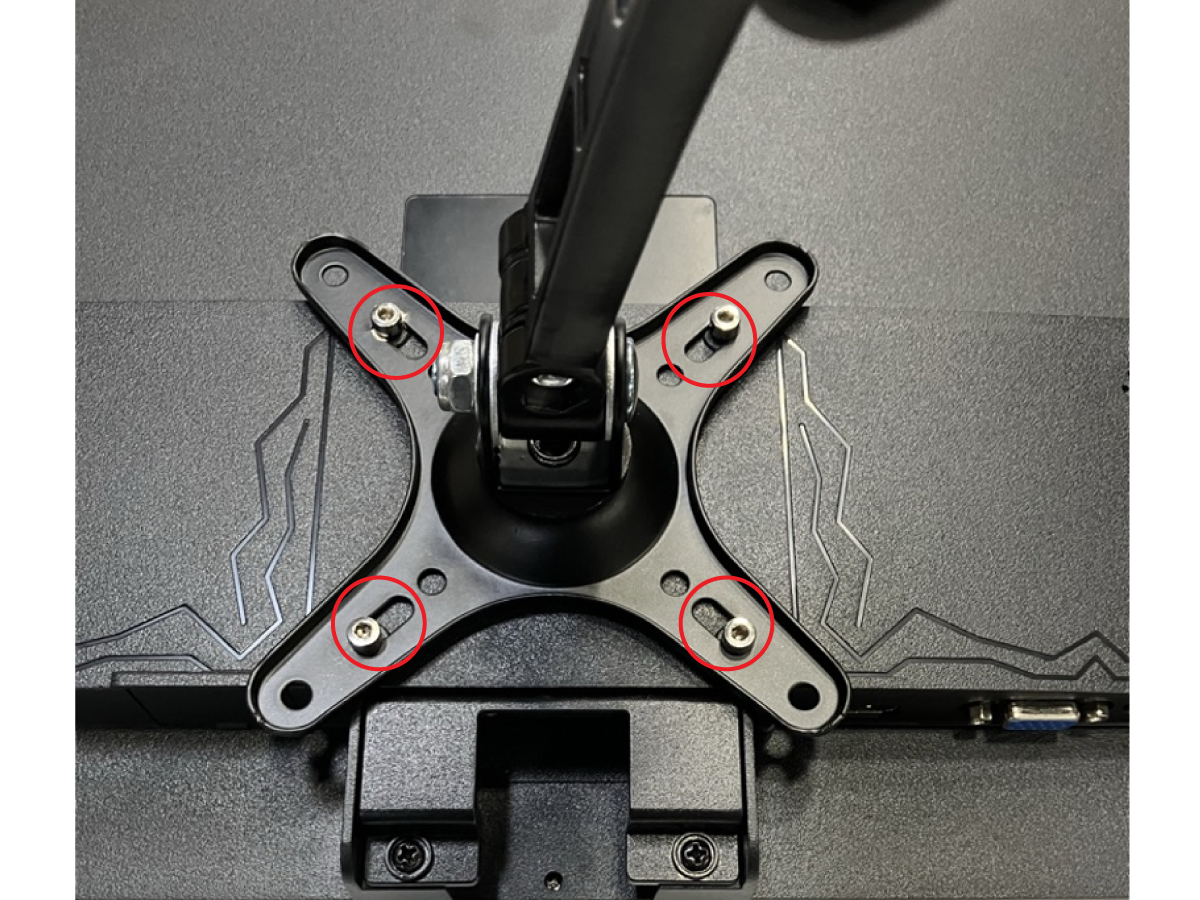
Screw on the mounting arm assembly to the monitor using the (4) bolts using the hexkey set that was provided with the laser marker.

2

Install the monitor mount using the (2) bolts located on right side of the laser machine enclosure.

3

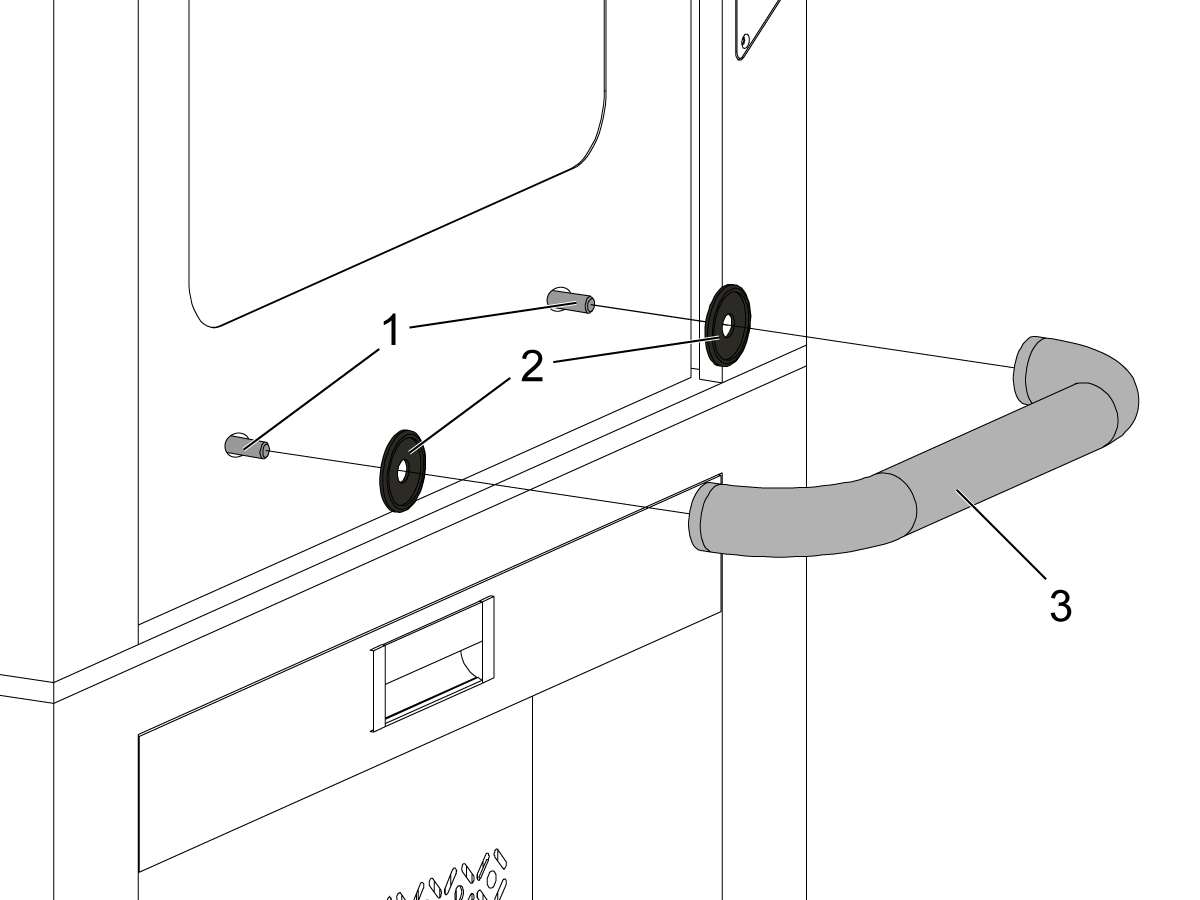
Install the handle by accessing the side window to feed the (2) bolts [1] through the front door as shown in the image.

Add the ferrules [2] before screwing on the handle [3]. 

NOTE: Ferrules are installed in a specific orientation. The flat side should be sitting flush against the front door.
 

4

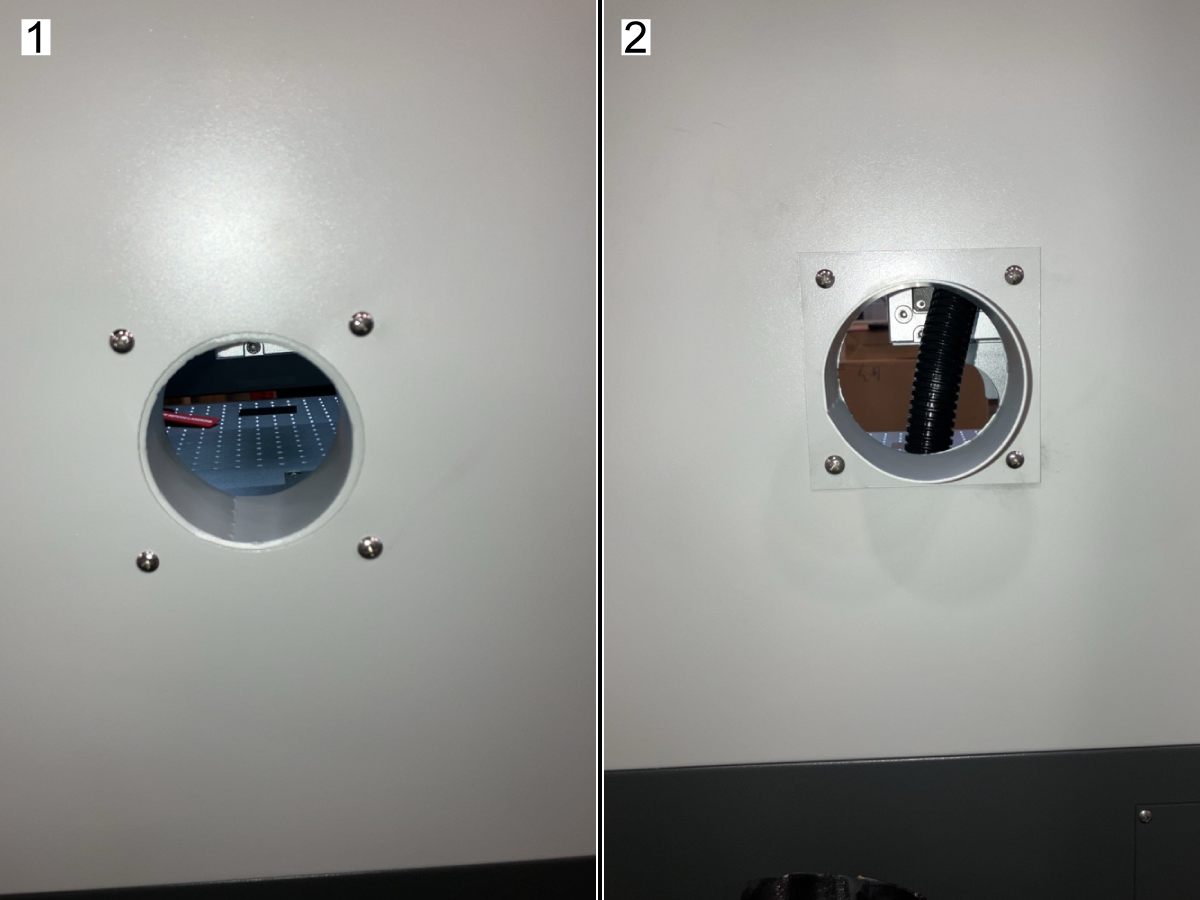
Invert the air duct bracket [1] so that it is now installed on the outside back panel of the laser machine as shown in image [2].

The cylinder should be facing outward to connect to the fume extractor air duct, using the included air duct clamps.

5

Unbox the fume extractor.

6

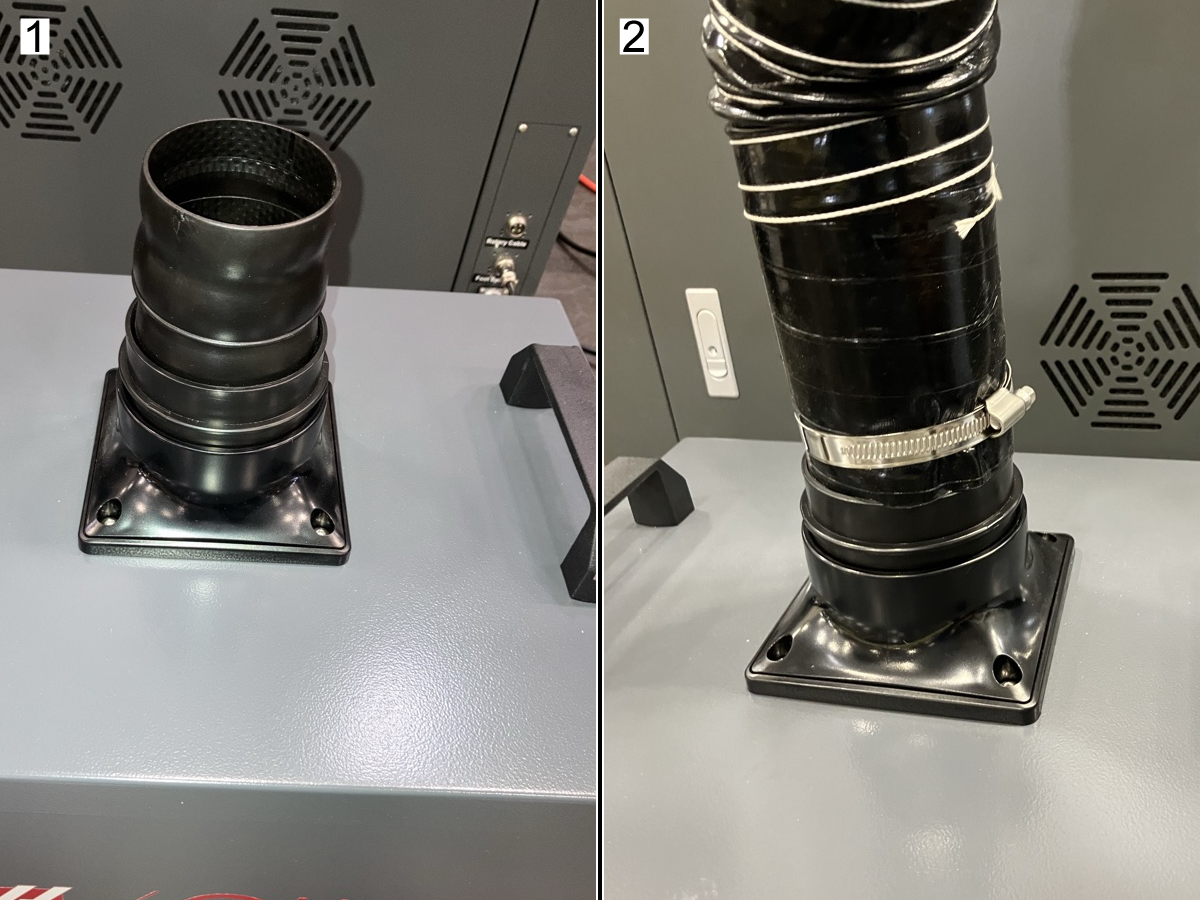
Attach the elbow duct fitting [1] to the fume extractor.

Connect the air duct to the elbow duct fitting using the included air duct clamps [2].

Electrical Installation

1

Updated

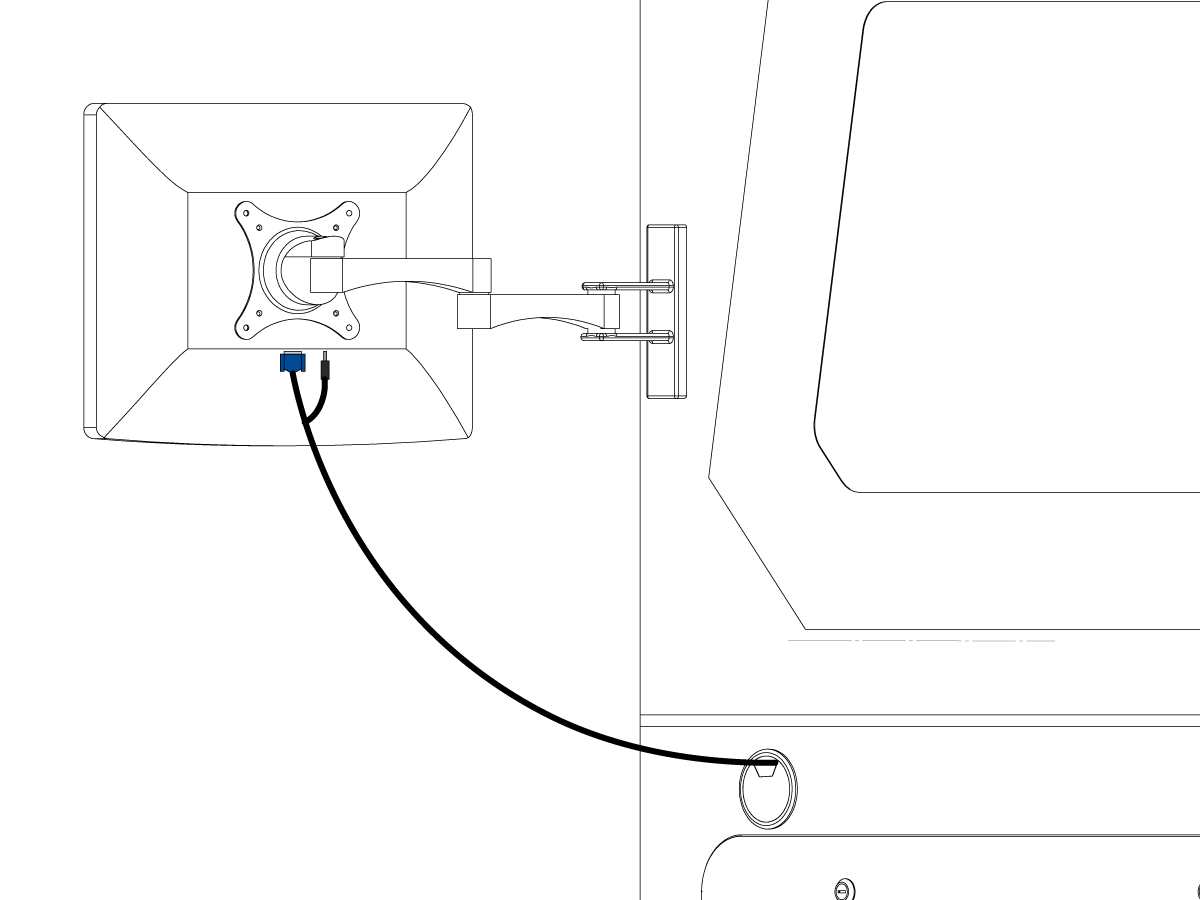
Connect the power/signal cable to the monitor.

2

Open the front access door to the PC and remove the (4) screws [1] so they can be used to install the PC.

Slide in the PC and use the (4) screws [2] to secure to the PC mount.

Connect the mouse, keyboard, power, laser source signal cable, and monitor signal cable to the PC [3].

3

Connect the foot switch and power cable located in the back of the laser machine.

Plug the power cable to an outlet.

4

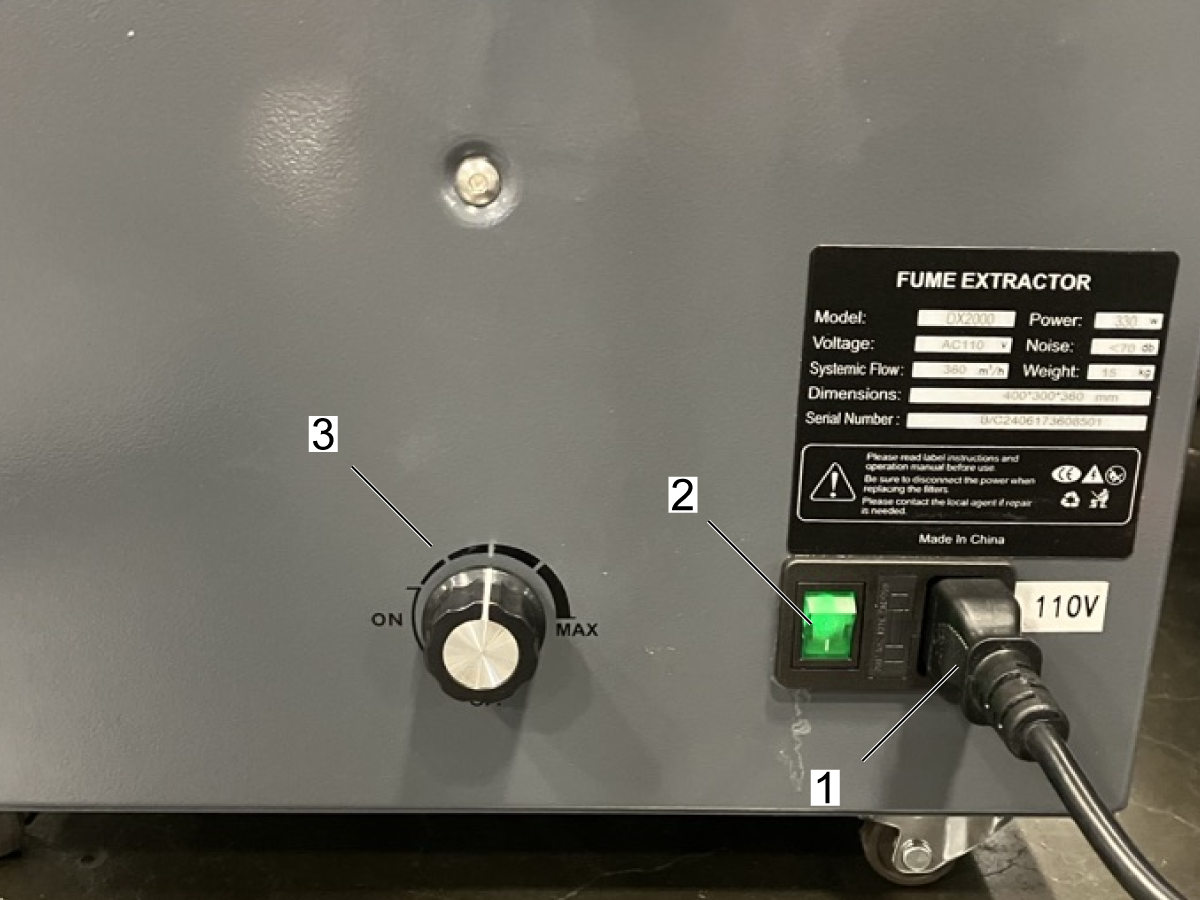
Connect the female side of the power cable [1] to the fume extractor and connect the male side to an outlet.

Use switch [2] to turn the fume extractor on or off.

The fume extractor knob [3] can be used to adjust the intensity of the vacuum.

Lightburn License Activation

IMPORTANT: Internet will be needed to complete the Lightburn installation.

 IMPORTANT: The Haas laser marker includes a lifetime license to LightBurn Pro Laser Control Software. Upon completion of your purchase, a license key to activate the LightBurn software will be sent to the email associated with your account. If you do not receive an email with your license key, please contact [email protected]. DO NOT activate the trial version of the LightBurn software. LightBurn licenses are perpetual, meaning the software works forever, but the included 365-day update period expires after one year. To continue receiving the newest versions after that year, the customer must purchase a new license. 

1

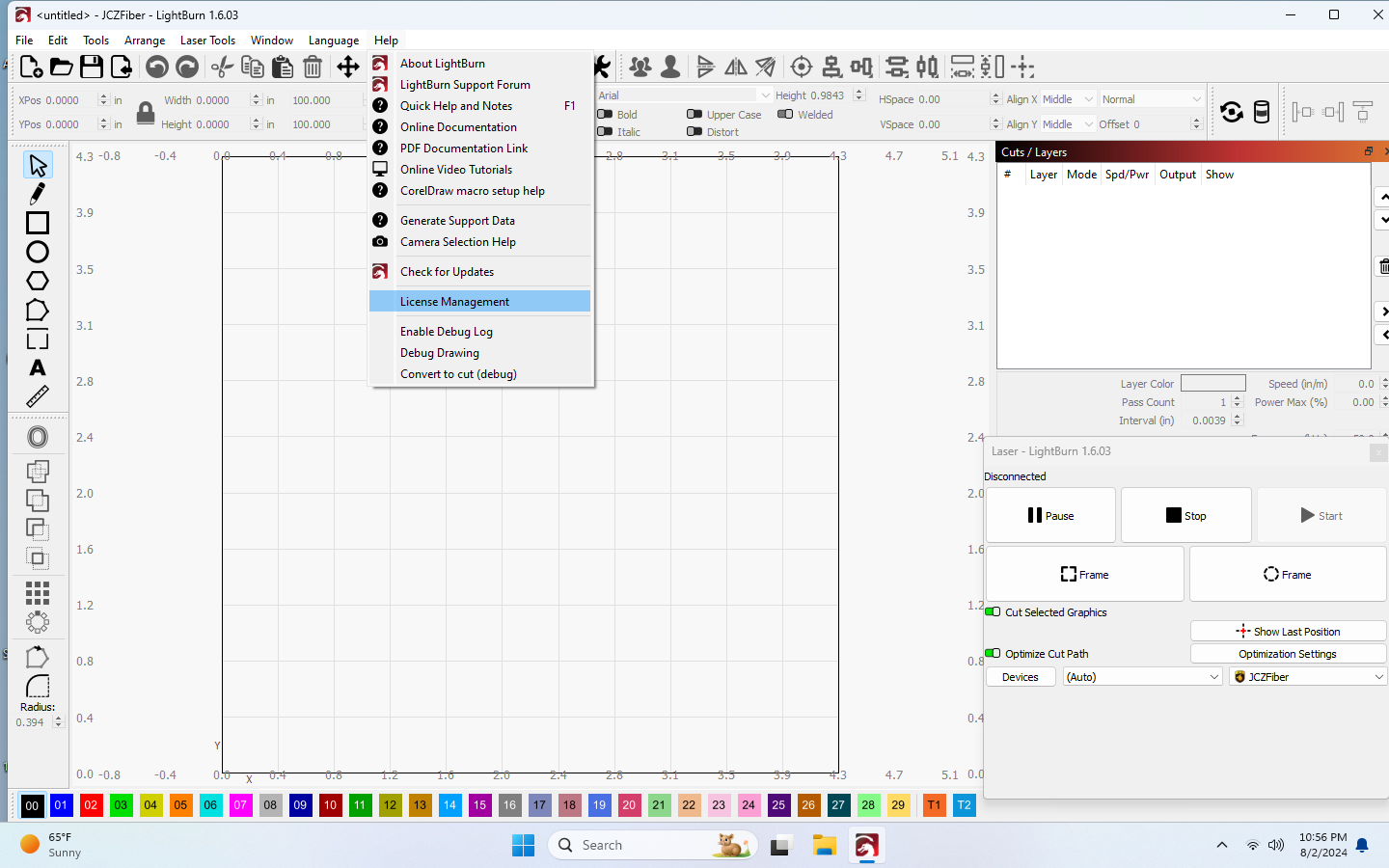
Hover over the Help tab and navigate to License Management and select it.

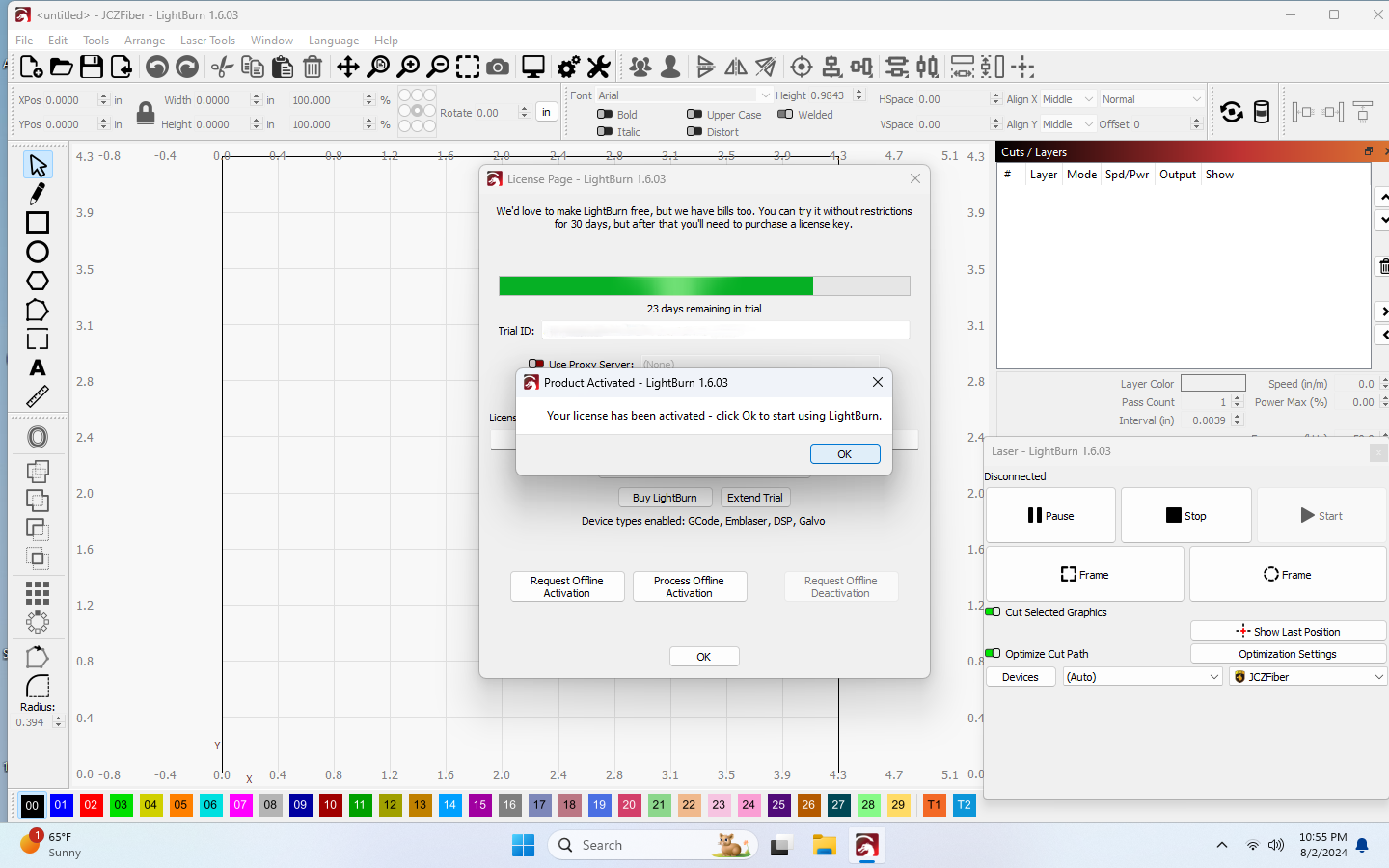
2

Enter the License Key. 
NOTE: When entering the License Key, be sure to include the hyphen(-).

Click Activate License.

Click Ok.

3

Click Ok.


IMPORTANT: If you find that the laser is not connecting to Lighburn, refer to the Laser Drivers section in the HL - CO2 Series - Troubleshooting Guide.

Galvo Lens Calibration

Calibrate the lens.

IMPORTANT: It is important to have the Galvo Lens calibrated to avoid skewed engravings and any bulging on the material. Remove lens caps before operating laser.

To calibrate the lens, refer to Galvo Lens Calibration.

You can also find relevant information in the Swapping Lenses section in the Operations Chapter found in the manual, see: 4 - HL - CO2 Series - Operation.

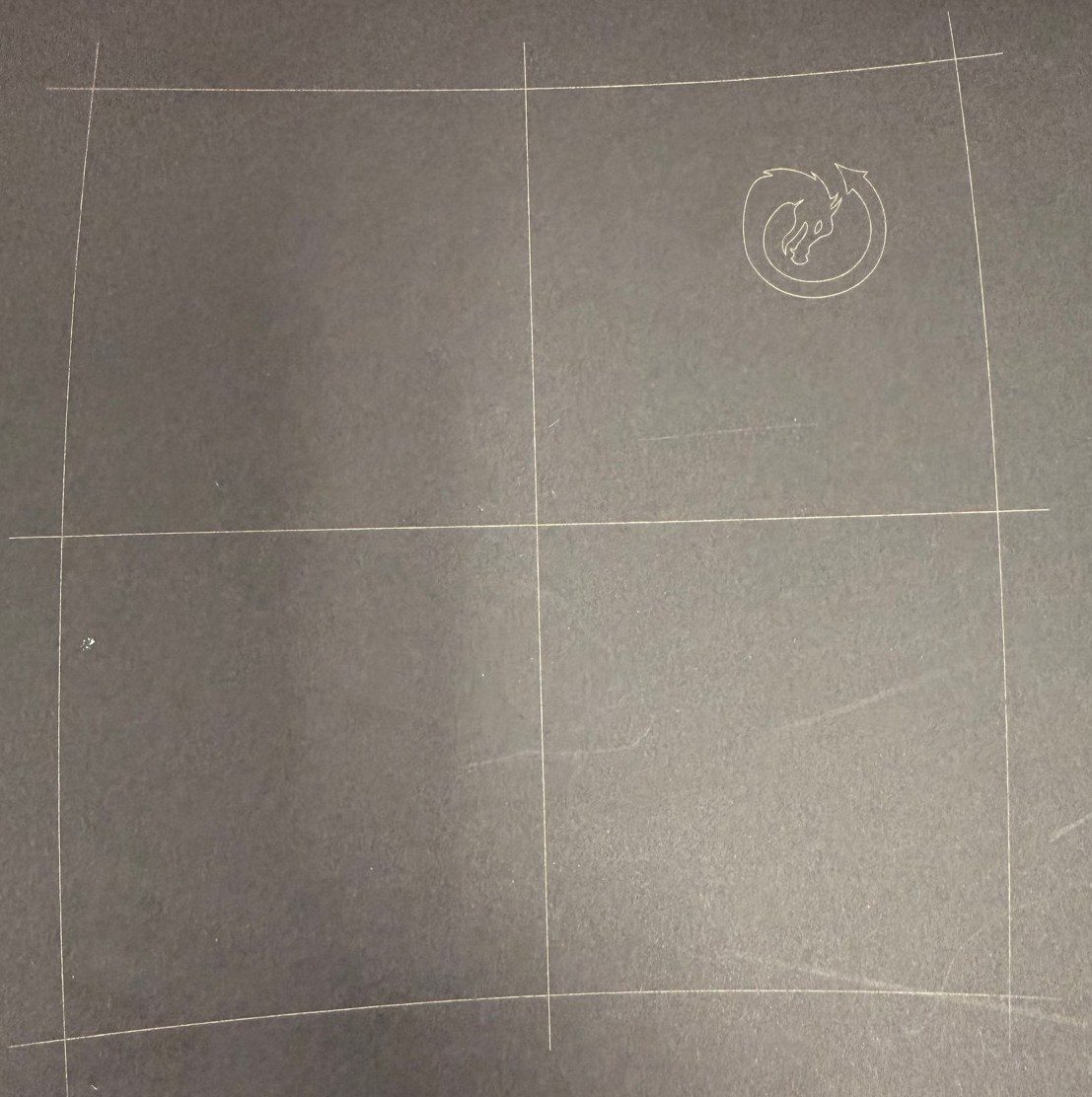
This image illustrates the expected reference markings on the black construction paper following execution of the Galvo lens calibration procedure.

Recently Viewed Items

You Have No Recently Viewed Items Yet

Feedback
Haas Logo

Haas Delivered Price

This price includes shipping cost, export and import duties, insurance, and any other expenses incurred during shipping to a location in France agreed with you as a buyer. No other mandatory costs can be added to the delivery of a Haas CNC Product.

KEEP UP WITH THE LATEST HAAS TIPS AND TECHNOLOGY...

Sign up now!   

HAAS TOOLING ACCEPTS THE FOLLOWING:

  • Service & Support
  • Owners
  • Request Service
  • Operator Manuals
  • Haas Parts
  • Rotary Repair Request
  • Pre-Install Guides
  • Shopping Tools
  • Build & Price a New Haas
  • Available Inventory
  • The Haas Price List
  • CNCA Financing
  • About Haas
  • Accessibility Statement
  • DNSH Statement
  • Export Compliance
  • Careers
  • Certifications & Safety
  • Contact Us
  • History
  • Terms & Conditions
  • Haas Tooling Terms & Conditions
  • Privacy
  • Warranty
  • Haas Community
  • Haas Certification Program
  • Haas Motorsports
  • Gene Haas Foundation
  • Haas Technical Education Community
  • Events
  • Join the Conversation
  • Facebook
  • X
  • Flickr
  • YouTube
  • LinkedIn
  • Instagram
  • TikTok
© 2026 Haas Automation, Inc – CNC Machine Tools
This site is protected by reCAPTCHA and the Google Privacy Policy and Terms of Service apply.

2800 Sturgis Rd., Oxnard, CA 93030
Toll Free: (888) 817-4446 / Fax: 805-278-8554