My Haas Welcome,
!
Haas Tooling MyHaas/HaasConnect Sign In Register Haas Tooling MyHaas/HaasConnect Sign Out Welcome, My Machines Latest Activity My Quotes My Account My Users Sign Out
Find Your Distributor
  1. Select Language
    1. English
    2. Deutsch
    3. Español - España
    4. Español - México
    5. Français
    6. Italiano
    7. Português
    8. Český
    9. Dansk
    10. Nederlands
    11. Magyar
    12. Polski
    13. Svenska
    14. Türkçe
    15. 中文
    16. Suomi
    17. Norsk
    18. الإنجليزية
    19. български
    20. Hrvatski
    21. Ελληνικά
    22. Română
    23. Slovenský
    24. Slovenščina
    25. 한국어
    26. 日本語
    27. Українська
  • machines Main Menu
    • Vertical Mills
      Vertical Mills
      Vertical Mills View All
      • Vertical Mills
      • VF Series
      • Universal Machines
      • VR Series
      • VP-5 Prismatic
      • Pallet-Changing VMCs
      • Mini Mills
      • Mold Machines
      • High-Speed Drill Centers
      • Drill/Tap/ Mill Series
      • Toolroom Mills
      • Pocket Mill
      • Compact Mills
      • Gantry Series
      • SR Sheet Routers
      • Extra-Large VMC
      • Double-Column Mills
      • 3+2 Positioning Machines
    • Multi-Axis Solutions
      Multi-Axis Solutions
      Multi-Axis Solutions View All
      • Multi-Axis Solutions
      • Y-Axis Lathes
      • 5-Axis Mills
    • Lathes
      Lathes
      Lathes View All
      • Lathes
      • ST Series
      • Dual-Spindle
      • Box Way Series
      • Toolroom Lathes
      • Chucker Lathe
      • Haas Bar Feeders
    • Horizontal Mills
      Horizontal Mills
      Horizontal Mills View All
      • Horizontal Mills
      • 50-Taper
      • 40-Taper
    • Rotaries & Indexers
      Rotaries & Indexers
      Rotaries & Indexers View All
      • Rotaries & Indexers
      • Rotary Tables
      • Indexers
      • 5-Axis Rotaries
      • Extra-Large Rotaries
    • Special Series
      Special Series
      Special Series View All
      • Special Series
      • EU_Series_Redirect
    • Automation Systems
      Automation Systems
      Automation Systems View All
      • Automation Systems
      • Mill Automation
      • Lathe Automation
      • Automatic Parts Loaders
      • Automation Models
    • Desktop Machines
      Desktop Machines
      Desktop Machines View All
      • Desktop Machines
      • Desktop Mill
      • Desktop Lathe
      • Control Simulator, Standard
      • Control Simulator, Premium
    • Shop Equipment
      Shop Equipment
      Shop Equipment View All
      • Shop Equipment
      • Knee Mill
      • Haas Manual Lathes
      • Haas Saws
    • Fabrication Machines
      Fabrication Machines
      Fabrication Machines View All
      • Fabrication Machines
      • Laser Cutting Machines
      • CNC Press Brakes
    • QUICK LINKS Special Series  Special Series 
      EU SERIES EU SERIES BUILD & PRICE | PRICE LIST BUILD & PRICE | PRICE LIST In-Stock Machines In-Stock Machines WHAT’S NEW WHAT’S NEW YOUR FIRST CNC YOUR FIRST CNC
      SHOPPING TOOLS
      • Build & Price a Haas
      • Price List
      • Available Inventory
      • CNCA Financing
      WANT TO TALK TO SOMEONE?

      A Haas Factory Outlet (HFO) can answer your questions, and walk you through your best options.

      CONTACT YOUR DISTRIBUTOR >
  • Options Main Menu
    • The Haas Control Value Option Packages
      Value Option Packages
      Value Option Packages View All
      • Value Option Packages
    • Product Image Spindles
      Spindles
      Spindles View All
      • Spindles
    • Product Image Tool Changers
      Tool Changers
      Tool Changers View All
      • Tool Changers
    • Product Image 4th- | 5th-Axis
      4th- | 5th-Axis
      4th- | 5th-Axis View All
      • 4th- | 5th-Axis
    • Product Image Turrets & Live Tooling
      Turrets & Live Tooling
      Turrets & Live Tooling View All
      • Turrets & Live Tooling
    • Product Image Probing
      Probing
      Probing View All
      • Probing
    • Haas Chip & Coolant Management Chip & Coolant Management
      Chip & Coolant Management
      Chip & Coolant Management View All
      • Chip & Coolant Management
    • The Haas Control The Haas Control
      The Haas Control
      The Haas Control View All
      • The Haas Control
    • Product Image Product Options
      Product Options
      Product Options View All
      • Product Options
    • Product Image Tooling & Fixturing
      Tooling & Fixturing
      Tooling & Fixturing View All
      • Tooling & Fixturing
    • Product Image Workholding
      Workholding
      Workholding View All
      • Workholding
    • Product Image 5-Axis Solutions
      5-Axis Solutions
      5-Axis Solutions View All
      • 5-Axis Solutions
      • 5 Easy Steps to 5-Axis
    • QUICK LINKS Special Series  Special Series 
      EU SERIES EU SERIES BUILD & PRICE | PRICE LIST BUILD & PRICE | PRICE LIST In-Stock Machines In-Stock Machines WHAT’S NEW WHAT’S NEW YOUR FIRST CNC YOUR FIRST CNC
      SHOPPING TOOLS
      • Build & Price a Haas
      • Price List
      • Available Inventory
      • CNCA Financing
      WANT TO TALK TO SOMEONE?

      A Haas Factory Outlet (HFO) can answer your questions, and walk you through your best options.

      CONTACT YOUR DISTRIBUTOR >
  • Why Haas Main Menu
      Discover the Haas Difference
    • Why Haas
    • MyHaas
    • Education Community
    • Industry 4.0
    • Haas Certification
    • Customer Testimonials
  • Service Main Menu
      Welcome to Haas Service
      SERVICE HOME Operator’s Manuals How-To Procedures Troubleshooting Guides Preventive Maintenance Haas Parts Haas Tooling Videos
  • Videos Main Menu
  • Main Menu
    • View All
    • View All
    • View All
    • View All
      • HTEC Curriculum Support
      • Haas Value Option Packages (VOP) Journey
    • View All
      • Haas 10 kg Cobot Package
      • Cobot Kits
      • DC-1 Drill Center
      • CNC Sales News
      • Do More With Your Haas
    • View All
    • View All
      • contact-us-test
      • 4 - AUTOMATION SYSTEMS
      • Carousel-V2
      • expert test
      • Demo_Day_Trident-test
      • Link Test
      • image-sale-tag-test
      • article-list-test
      • Haas 25 kg Robot Package
      • test-algolia-page
    • View All
    • View All
    • View All
    • View All
      • calc-test
    • View All
    • QUICK LINKS Special Series  Special Series 
      EU SERIES EU SERIES BUILD & PRICE | PRICE LIST BUILD & PRICE | PRICE LIST In-Stock Machines In-Stock Machines WHAT’S NEW WHAT’S NEW YOUR FIRST CNC YOUR FIRST CNC
      SHOPPING TOOLS
      • Build & Price a Haas
      • Price List
      • Available Inventory
      • CNCA Financing
      WANT TO TALK TO SOMEONE?

      A Haas Factory Outlet (HFO) can answer your questions, and walk you through your best options.

      CONTACT YOUR DISTRIBUTOR >
  • Haas Tooling Main Menu
  • Haas Service Parts Main Menu

My Haas Welcome,
!
Haas Tooling MyHaas/HaasConnect Sign In Register Haas Tooling MyHaas/HaasConnect Sign Out Welcome, My Machines Latest Activity My Quotes My Account My Users Sign Out
Find Your Distributor
  1. Select Language
    1. English
    2. Deutsch
    3. Español - España
    4. Español - México
    5. Français
    6. Italiano
    7. Português
    8. Český
    9. Dansk
    10. Nederlands
    11. Magyar
    12. Polski
    13. Svenska
    14. Türkçe
    15. 中文
    16. Suomi
    17. Norsk
    18. الإنجليزية
    19. български
    20. Hrvatski
    21. Ελληνικά
    22. Română
    23. Slovenský
    24. Slovenščina
    25. 한국어
    26. 日本語
    27. Українська
×

Search Results

Web Pages

Images

    • <
    • 1
    • >

DC-Series - Spindle Motor Replacement - AD0905

Service Home How To Procedures DC-Series - Spindle Motor Replacement - AD0905

DC-Series - Spindle Motor Replacement - AD0905

- Jump to Section - Back to Top

14.1 DC-Series - Spindle Motor Replacement

Recently Updated Last updated: 02/23/2026

DC-Series - Spindle Motor Replacement


AD0905

Revision C - 06/2026

Introduction

This procedure covers how to replace the spindle motor on a DC-1/2 30T or DC-1/2 40T machine.

This procedure applies to the following kits:

  • 93-30-14275 - SPINDLE MOTOR 40T DC-1 HIGEN/HPB
  • 93-30-14276 - SPINDLE MOTOR 40T DC-2 HIGEN/HPB [1]
  • 93-4618 - SPINDLE MOTOR SVC KIT DC-1

Note: The transfer tube assembly only needs to be purchased if the original transfer tube is damaged. It does not come with the service kits and needs to be purchased separately.

Important: HDF applies to these service kits. See 10.3 - Brand Identification and 10.4 - HDF Requirements pages for more information on the HDF process.

Remove Spindle Motor

1

Remove the sheet metal and spindle fan surrounding spindle motor [1].

Remove TSC union assembly and mounting blocks [2].

Note: Set aside the TSC union and mounting blocks so that they can be reinstalled on the new motor.

Disconnect the encoder cable and ground wire [3].

Remove terminal block cover and disconnect wires from terminal block.

Pull the spindle motor straight up to avoid damaging the transfer tube on the top of the spindle.

Note: Make sure transfer tube is still fully seated into the top of the spindle and that the O-rings are in good condition.

Note: If a new transfer tube is needed, order 30-14327 as a replacement before installing the new motor.

2

Updated

Disconnect the encoder cable and ground wire from the motor.

Remove the junction box cover and disconnect wires from motor power cable from the junction box.

Pull the spindle motor straight up [1] to avoid damaging the transfer tube on the top of the spindle.

Note: Make sure transfer tube [2] is still fully seated into the top of the spindle and that the O-rings [3] are in good condition.

Install Replacement Motor

1

Double check that the transfer tube is fully seated. Then apply silicon grease to the O-rings on the transfer tube.

Stone the mounting surface on the spindle head [1] and the mounting surface on the spindle motor [2].

2

Slowly lower the motor into position. As it is being lowered, make sure the the coupler teeth on the motor shaft [1] are properly aligned to the coupler on the spindle [2].

Once the spindle motor is in position, measure the gap between the coupler teeth [3] and bottom of the coupler [4]. Use feeler gauges to verify that the gap is 3mm.

3

Snug the spindle motor mounting bolts after verifying the coupler gap.

Note: Leave the mounting bolts loose until the motor and spindle have been aligned. See the section below for information on how to aligning the motor.

Make sure to use the 4 Hex head bolts [1]  split washers [2] and hard washers [3] to fasten the motor to the spindle head.

Connect the encoder and the power cable to the junction box for the spindle motor. Also install the ground cable going to the spindle motor.

Important: Before aligning the motor to spindle, make sure HDF is setup correctly for the replacement spindle motor.

Configure HDF

The Hardware Definition File (HDF) allows you to configure your machine to be compatible with multiple spindle brands.

In the event of a spindle motor replacement, a service tech may easily swap out the motor and update the spindle motor brand configuration.

The table below lists the 40T spindle motor service kits that currently require a Hardware Definition File (HDF). If you have recently installed one of these kits, contact your local Haas Factory Outlet to update your spindle motor brand configuration on your machine.

For Service Techs: To update your spindle motor brand configuration:

  1. Log in to the Dealer-only Content (DOC) portal.
  2. Navigate to the Spindle Motor - Brand Configuration - NGC page.

Note: Only Haas Certified Service Technicians can log into this site.


Kit Number Kit Name Valid Date
93-30-12078 SPNDL MTR 40T INLINE 12K PIN DRV 6/1/2025
93-30-12078A SPNDL MTR 40T INLINE 12K NCE GEN2 EC SVC 6/1/2025
93-30-12117 SPNDL MTR 40T INLINE 12K NCE GEN2 VF SVC 12/1/2024
93-30-12117A SPNDL MTR 40T INLINE 12K NCE GEN2 VF SVC 12/1/2024
93-30-11973 SPNDL MTR 40T 12K INLINE PIN DRIVE 6/1/2025
93-30-14276 SPINDL MTR 40T DC-2 3/1/2025
93-30-14275 SPINDL MTR 40T DC-1 1/1/2025

Align Spindle Motor

1

Hand tighten the motor mounting bolts and then back them off a few turns.

Run the spindle at 1000 RPM to align the spindle and motor.

In MDI run the program S1000 M03;

Let the spindle run for 1 minute and then snug the motor mounting bolts while the spindle is still running.

Note: When motors stops it will jolt to the side and misalign if not snugged down.

Stop the spindle.

Then torque the mounting bolts to hold the motor in position. Torque the screws per Haas Torque Specifications.

2

Once the motor is torqued down, reinstall the TSC union and any enclosure panels that were removed.

Note: For details on reinstalling the TSC union refer to the 40-Taper - Inline - Captive Stub Shaft - Compensating TSC Union - Replacement guide.

Set Spindle Orientation Offset - Parameter 30.085

1

Turn the spindle so that the spindle dogs are in line with the Y-axis.

Place the mag base on the table and use an indicator to check if the dogs are parallel with the Y-axis.

Indicate from the front dog [1] to the rear dog [2] by jogging the machine in the Y-axis. 

Note: Align the spindle so that the error when sweeping with an indicator is 0.001" or less. 

2

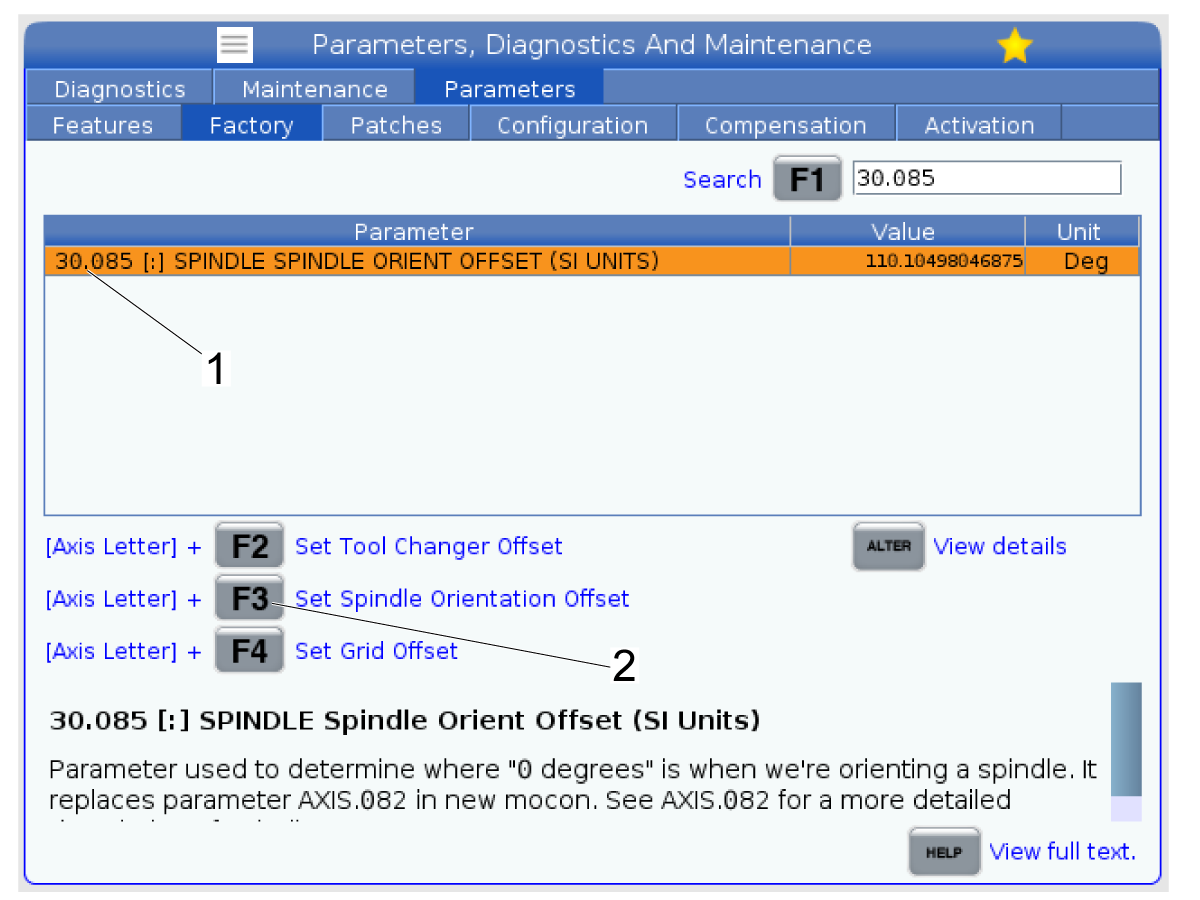
Once you have the spindle oriented so that there is less than 0.001" error between the dogs and the Y-axis, go to the Factory tab on the Parameters window.

Search for parameter 30.085 [1] which is the Spindle Orientation Offset parameter.

Highlight the parameter as shown in the image.

Press [E-Stop] on the pendant.

Press [S] + [F3] [2] to set the spindle orientation offset to the current position.

The value should populate for the parameter.

Verify Spindle Orientation Offset

1

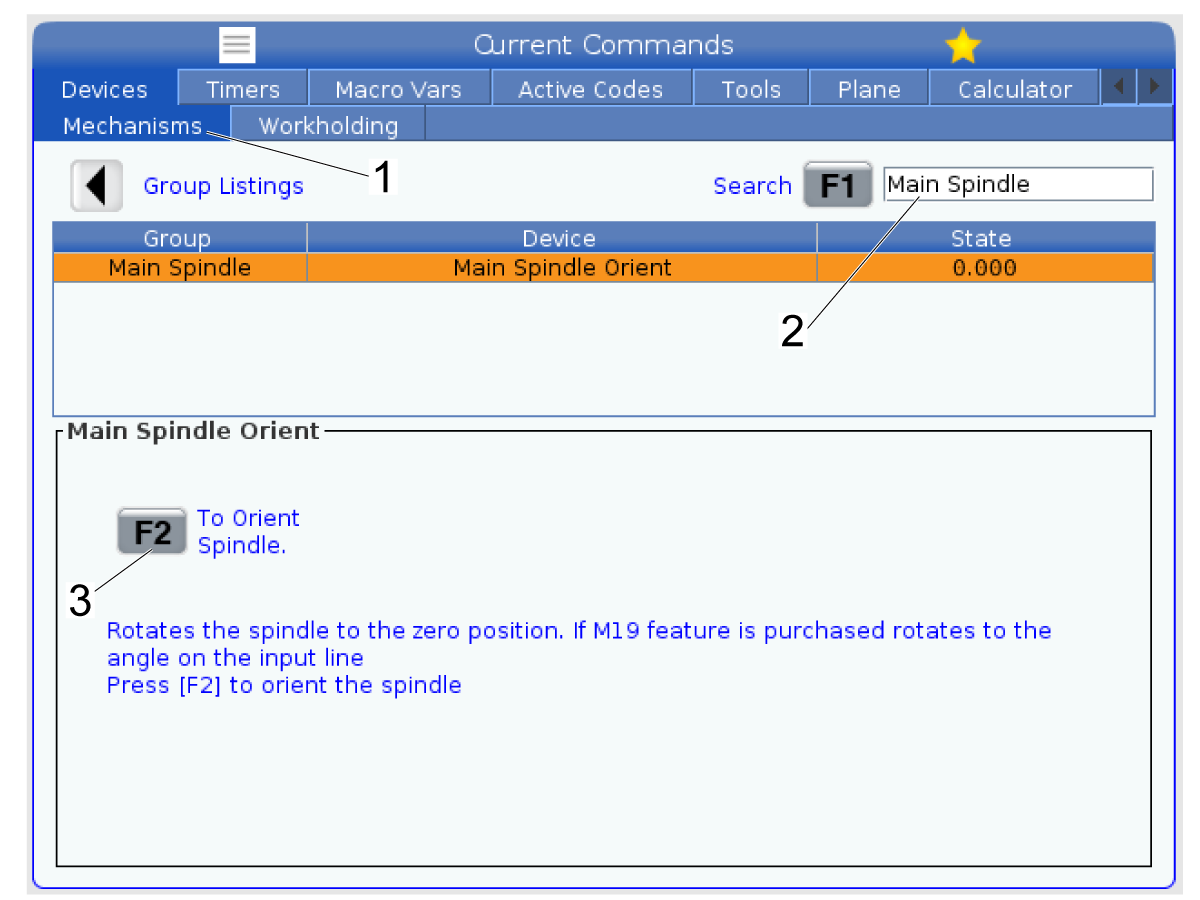
Go to Current Commands -> Devices -> Mechanisms [1] and then search for "Main Spindle" [2] and press [F1].

Press [F2] to orient the spindle so the offset position.

Repeat Step 1 and use the indicator to check whether the spindle orientation was set to the correct position. 

If the error between spindle dogs is greater than 0.001" then incrementally change the 30.085 parameter by 0.250 degrees or less until the orient position aligns the dogs within spec of 0.001".

2

Use the indicator to check whether the spindle orientation was set to the correct position. 

Jog the Y-axis of the machine and check the error between the front spindle dog [1] and the rear dog [2].

If the error between spindle dogs is greater than 0.001" then incrementally change the 30.085 parameter by +/-0.250 degrees or less until the orient position aligns the dogs within spec of 0.001".

Note: If adjusting the parameter by +/-0.250 degrees resulted in the error between spindle dogs changing from positive to negative, use an increment smaller than +/-0.250 degrees when changing the parameter value. For example try adjusting by +/-0.125 degrees instead.

Once you change this parameter repeat this section until the orient position correct.

Recently Viewed Items

You Have No Recently Viewed Items Yet

Feedback
Haas Logo

Haas Delivered Price

This price includes shipping cost, export and import duties, insurance, and any other expenses incurred during shipping to a location in France agreed with you as a buyer. No other mandatory costs can be added to the delivery of a Haas CNC Product.

KEEP UP WITH THE LATEST HAAS TIPS AND TECHNOLOGY...

Sign up now!   

HAAS TOOLING ACCEPTS THE FOLLOWING:

  • Service & Support
  • Owners
  • Request Service
  • Operator Manuals
  • Haas Parts

  • Rotary Repair Request
  • Pre-Install Guides
  • Shopping Tools
  • Build & Price a New Haas
  • Available Inventory
  • The Haas Price List
  • CNCA Financing
  • About Haas
  • Accessibility Statement
  • DNSH Statement
  • Export Compliance
  • Careers
  • Certifications & Safety
  • Contact Us
  • History
  • Terms & Conditions
  • Haas Tooling Terms & Conditions
  • Privacy
  • Warranty
  • Haas Community
  • Haas Certification Program
  • Haas Motorsports
  • Gene Haas Foundation
  • Haas Technical Education Community
  • Events
  • Join the Conversation
  • Facebook
  • X
  • Flickr
  • YouTube
  • LinkedIn
  • Instagram
  • TikTok
© 2026 Haas Automation, Inc – CNC Machine Tools

This site is protected by reCAPTCHA and the Google Privacy Policy and Terms of Service apply.

2800 Sturgis Rd., Oxnard, CA 93030
Toll Free: (888) 817-4446 / Fax: 805-278-8554