My Haas Welcome,
!
Haas Tooling MyHaas/HaasConnect Sign In Register Haas Tooling MyHaas/HaasConnect Sign Out Welcome, My Machines Latest Activity My Quotes My Account My Users Sign Out
Find Your Distributor
  1. Select Language
    1. English
  • machines Main Menu
    • Vertical Mills
      Vertical Mills
      Vertical Mills View All
      • Vertical Mills
      • VF Series
      • Universal Machines
      • VR Series
      • VP-5 Prismatic
      • Pallet-Changing VMCs
      • Mini Mills
      • Mold Machines
      • High-Speed Drill Centers
      • Drill/Tap/ Mill Series
      • Toolroom Mills
      • Pocket Mill
      • Compact Mills
      • Gantry Series
      • SR Sheet Routers
      • Extra-Large VMC
      • Double-Column Mills
      • 3+2 Positioning Machines
    • Multi-Axis Solutions
      Multi-Axis Solutions
      Multi-Axis Solutions View All
      • Multi-Axis Solutions
      • Y-Axis Lathes
      • 5-Axis Mills
    • Lathes
      Lathes
      Lathes View All
      • Lathes
      • ST Series
      • Dual-Spindle
      • Box Way Series
      • Toolroom Lathes
      • Chucker Lathe
      • Haas Bar Feeders
    • Horizontal Mills
      Horizontal Mills
      Horizontal Mills View All
      • Horizontal Mills
      • 50-Taper
      • 40-Taper
    • Rotaries & Indexers
      Rotaries & Indexers
      Rotaries & Indexers View All
      • Rotaries & Indexers
      • Rotary Tables
      • Indexers
      • 5-Axis Rotaries
      • Extra-Large Rotaries
    • Special Series
      Special Series
      Special Series View All
      • Special Series
      • EU_Series_Redirect
    • Automation Systems
      Automation Systems
      Automation Systems View All
      • Automation Systems
      • Mill Automation
      • Lathe Automation
      • Automatic Parts Loaders
      • Automation Models
    • Desktop Machines
      Desktop Machines
      Desktop Machines View All
      • Desktop Machines
      • Desktop Mill
      • Desktop Lathe
      • Control Simulator, Standard
      • Control Simulator, Premium
    • Shop Equipment
      Shop Equipment
      Shop Equipment View All
      • Shop Equipment
      • Knee Mill
      • Haas Manual Lathes
      • Haas Saws
    • Fabrication Machines
      Fabrication Machines
      Fabrication Machines View All
      • Fabrication Machines
      • Laser Cutting Machines
      • CNC Press Brakes
    • QUICK LINKS Special Series  Special Series 
      EU SERIES EU SERIES BUILD & PRICE | PRICE LIST BUILD & PRICE | PRICE LIST In-Stock Machines In-Stock Machines WHAT’S NEW WHAT’S NEW YOUR FIRST CNC YOUR FIRST CNC
      SHOPPING TOOLS
      • Build & Price a Haas
      • Price List
      • Available Inventory
      • CNCA Financing
      WANT TO TALK TO SOMEONE?

      A Haas Factory Outlet (HFO) can answer your questions, and walk you through your best options.

      CONTACT YOUR DISTRIBUTOR >
  • Options Main Menu
    • The Haas Control Value Option Packages
      Value Option Packages
      Value Option Packages View All
      • Value Option Packages
    • Product Image Spindles
      Spindles
      Spindles View All
      • Spindles
    • Product Image Tool Changers
      Tool Changers
      Tool Changers View All
      • Tool Changers
    • Product Image 4th- | 5th-Axis
      4th- | 5th-Axis
      4th- | 5th-Axis View All
      • 4th- | 5th-Axis
    • Product Image Turrets & Live Tooling
      Turrets & Live Tooling
      Turrets & Live Tooling View All
      • Turrets & Live Tooling
    • Product Image Probing
      Probing
      Probing View All
      • Probing
    • Haas Chip & Coolant Management Chip & Coolant Management
      Chip & Coolant Management
      Chip & Coolant Management View All
      • Chip & Coolant Management
    • The Haas Control The Haas Control
      The Haas Control
      The Haas Control View All
      • The Haas Control
    • Product Image Product Options
      Product Options
      Product Options View All
      • Product Options
    • Product Image Tooling & Fixturing
      Tooling & Fixturing
      Tooling & Fixturing View All
      • Tooling & Fixturing
    • Product Image Workholding
      Workholding
      Workholding View All
      • Workholding
    • Product Image 5-Axis Solutions
      5-Axis Solutions
      5-Axis Solutions View All
      • 5-Axis Solutions
      • 5 Easy Steps to 5-Axis
    • QUICK LINKS Special Series  Special Series 
      EU SERIES EU SERIES BUILD & PRICE | PRICE LIST BUILD & PRICE | PRICE LIST In-Stock Machines In-Stock Machines WHAT’S NEW WHAT’S NEW YOUR FIRST CNC YOUR FIRST CNC
      SHOPPING TOOLS
      • Build & Price a Haas
      • Price List
      • Available Inventory
      • CNCA Financing
      WANT TO TALK TO SOMEONE?

      A Haas Factory Outlet (HFO) can answer your questions, and walk you through your best options.

      CONTACT YOUR DISTRIBUTOR >
  • Why Haas Main Menu
      Discover the Haas Difference
    • Why Haas
    • MyHaas
    • Education Community
    • Industry 4.0
    • Haas Certification
    • Customer Testimonials
  • Service Main Menu
      Welcome to Haas Service
      SERVICE HOME Operator’s Manuals How-To Procedures Troubleshooting Guides Preventive Maintenance Haas Parts Haas Tooling Videos
  • Videos Main Menu
  • Main Menu
    • View All
    • View All
    • View All
    • View All
      • HTEC Curriculum Support
      • Haas Value Option Packages (VOP) Journey
    • View All
      • Haas 10 kg Cobot Package
      • Cobot Kits
      • DC-1 Drill Center
      • CNC Sales News
      • Do More With Your Haas
    • View All
    • View All
      • contact-us-test
      • 4 - AUTOMATION SYSTEMS
      • Carousel-V2
      • expert test
      • Demo_Day_Trident-test
      • Link Test
      • image-sale-tag-test
      • article-list-test
      • Haas 25 kg Robot Package
      • test-algolia-page
    • View All
    • View All
    • View All
    • View All
      • calc-test
    • View All
    • QUICK LINKS Special Series  Special Series 
      EU SERIES EU SERIES BUILD & PRICE | PRICE LIST BUILD & PRICE | PRICE LIST In-Stock Machines In-Stock Machines WHAT’S NEW WHAT’S NEW YOUR FIRST CNC YOUR FIRST CNC
      SHOPPING TOOLS
      • Build & Price a Haas
      • Price List
      • Available Inventory
      • CNCA Financing
      WANT TO TALK TO SOMEONE?

      A Haas Factory Outlet (HFO) can answer your questions, and walk you through your best options.

      CONTACT YOUR DISTRIBUTOR >
  • Haas Tooling Main Menu
  • Haas Service Parts Main Menu

My Haas Welcome,
!
Haas Tooling MyHaas/HaasConnect Sign In Register Haas Tooling MyHaas/HaasConnect Sign Out Welcome, My Machines Latest Activity My Quotes My Account My Users Sign Out
Find Your Distributor
  1. Select Language
    1. English
×

Search Results

Web Pages

Images

    • <
    • 1
    • >

H-5AX Double Yoke Spindle Head - Geometry Guide

Service Home How To Procedures H-5AX Double Yoke Spindle Head - Geometry Guide

H-5AX Double Yoke Spindle Head - Geometry Guide

- Jump to Section - 1. Warning 2. Introduction 3. Leveling 4. Flatness of Square Granite 5. X-Axis to Y-Axis Perpendicularity (2 steps) 6. X-Z plane & Y-Z Plane Perpendicularity (2 steps) 7. C-Axis Parallel to Z-Axis (1 step) 8. B-Axis Tool Change Offset (3 steps) 9. C-Axis Tool Change Offset (3 steps) 10. B-Axis to C-Axis Perpendicularity (2 steps) 11. Spindle Centerline to B-Axis Perpendicularity (2 steps) 12. B-Axis Sweep (5 steps) 13. Spindle Centerline Parallel to C-Axis (3 steps) 14. C-Axis Runout (2 steps) 15. Spindle Centerline and B-axis Intersection (3 steps) Back to Top
Recently Updated Last updated: 04/30/2026

H-5AX Double Yoke Spindle Head - Geometry Guide


Under Construction

Revision B - 06/2025

Warning

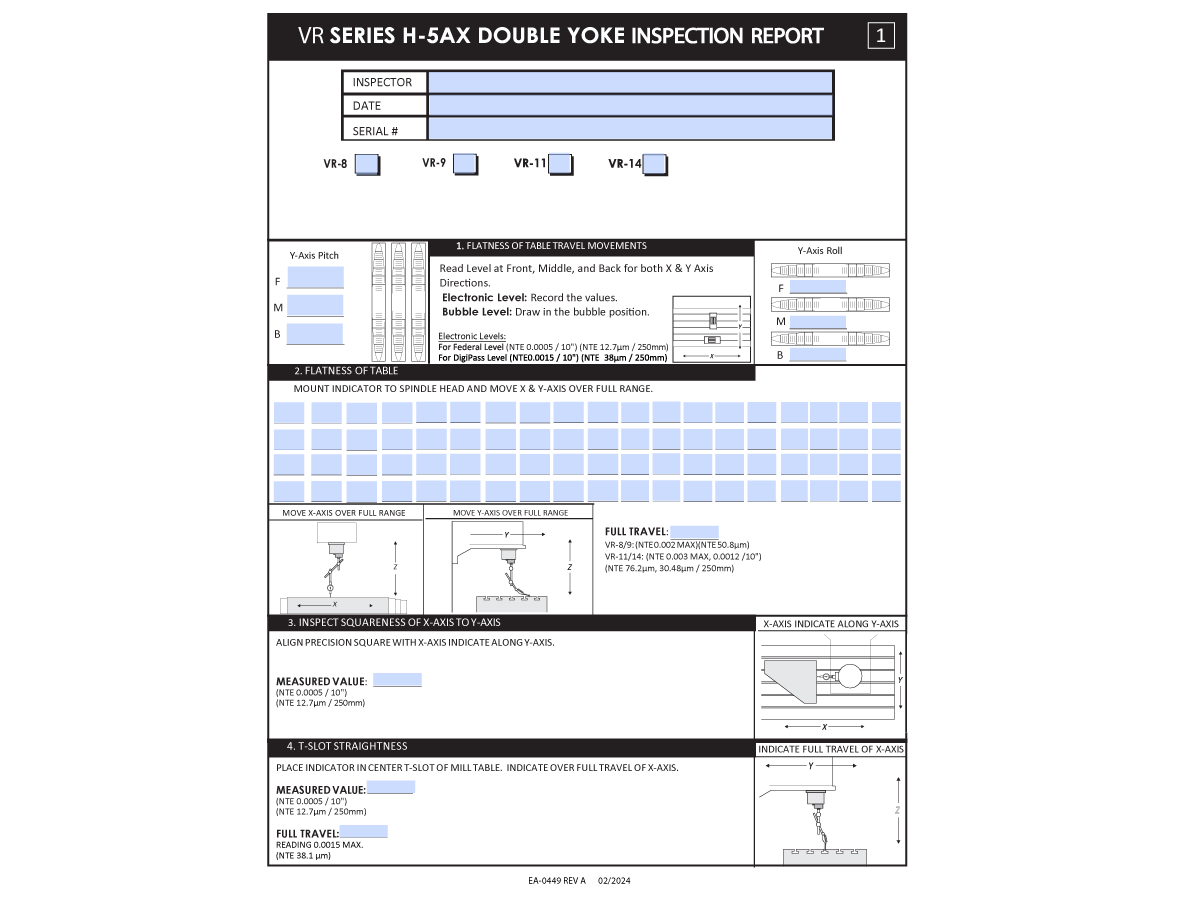
Fill out the latest Inspection Report on HBC and consult with Haas Service before attempting any geometry adjustments.

 Note: This site is available only to Haas Service Techs.

 WARNING: Breaking the DON'T REMOVE seal on the spindle without contacting Haas Service will VOID the warranty. Contact Haas Service before proceeding with process.

WARNING: This page may be used as reference for the inspection report but do not make any adjustments before consulting with Haas Service. Adjustments made without consulting Haas Service will void warranty.

 Warning: Do not home B or C-Axis with a tool in the spindle.

Inspection Report

Introduction

 Note: This procedure applies to the Double Yoke machine. Follow the H-5AX Single Yoke Spindle Head - Geometry Guide for the VR Single Yoke machines.
 
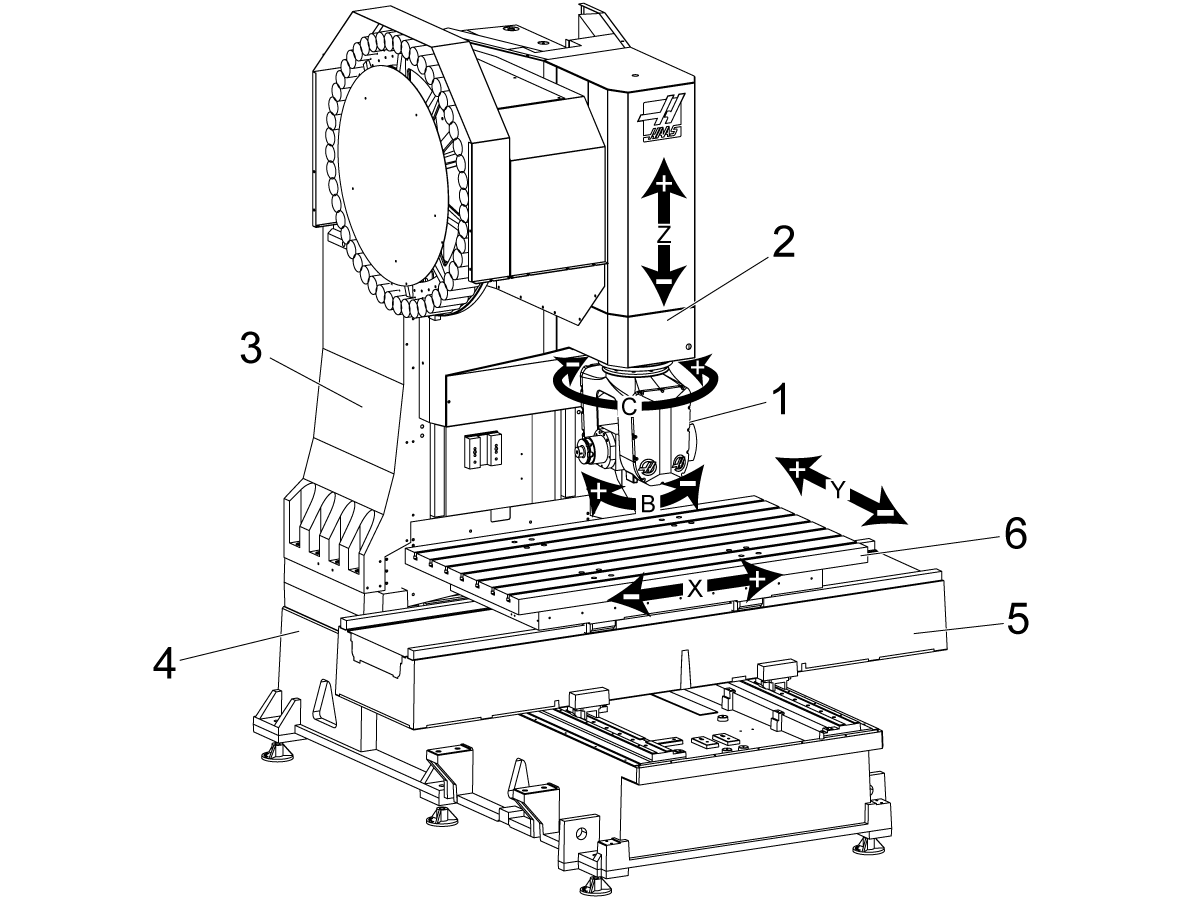
This procedure will go over how to adjust the following components on the VR-series machine:
 
  1. Haas 5-Axis Head
  2. Spindle Head
  3. Column
  4. Base
  5. Saddle
  6. Table

Note: As mentioned before this procedure can be used as an aid to the inspection report, but adjustments made without consultation from Haas Service will void warranty for the machine. 

 Note:  All B and C-Axis geometry checks should be done with the B and C Axis brakes engaged.

Leveling

Verify the level, if the machine is not level follow the instructions below to level the machine. 

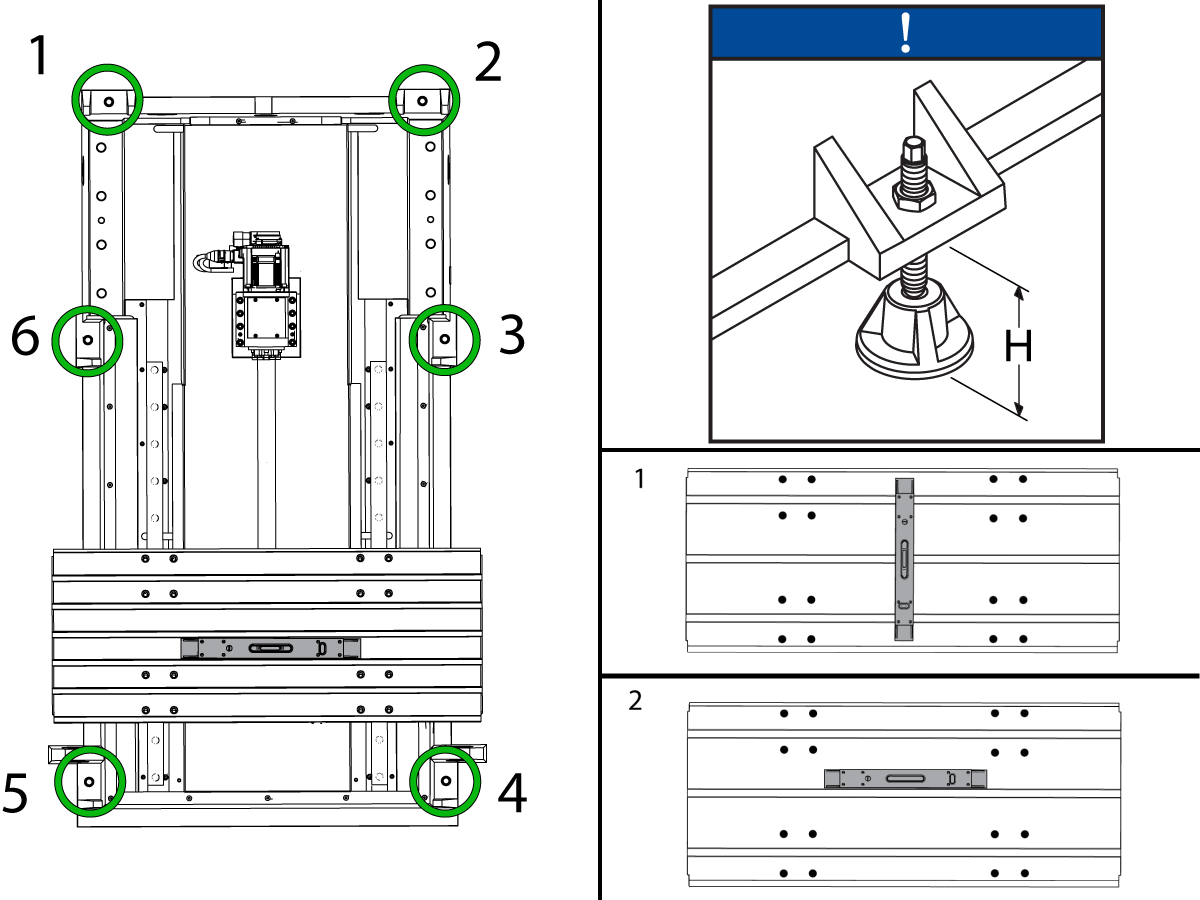
1

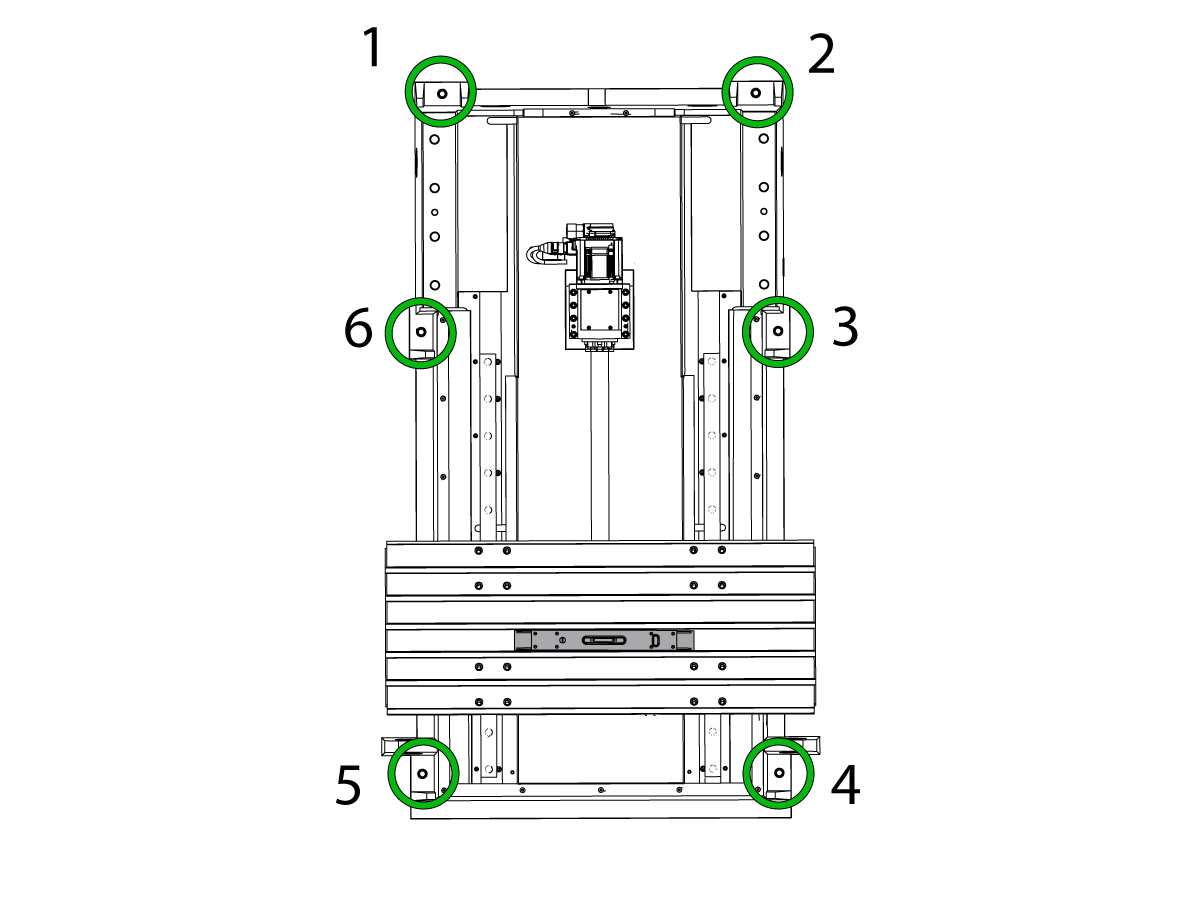
  • Adjust the four corner leveling screws to the same height to lift the base casting to the height specified as [H] on the leveling decal on the back of the machine.
  • Loosen the middle leveling screws [3, 6] so that they are not touching the pads, install jam nuts [1] on leveling screws, but do not tighten 
  • Jog the table so that it is centered in the machine. 

2

  • Place the level on the center of the bed and position it so that the shorter vial is parallel to the Y-axis and the longer vial is parallel to the X-axis.
  • Using the shorter vial adjust the front to back level by either adjusting the front or back leveling screws.
  • Adjust the leveling screws until the Y-axis bubble is centered. 
  • Using the longer vial which is parallel to the X-axis, raise the leveling screws on lower side of the machine.
  • Adjust the leveling screws accordingly until the X-axis bubble is centered

3

  • Continue using the longer vial, with the table at the front of the machine look at the position of the indicating bubble
  • Jog the table through its full Y-axis travel stopping at the column, with the table at the column look to see which rear corner of the machine is lowest if any. 
  • If needed adjust the leveling screws 2 and 4 until there is no twist across Y axis
  • Continue adjusting the level at the front and back of the machine until both readings are zero.
  • Lower the center leveling screws 3 and 6 until they make contact with the pads. Tighten these hand tight and then tighten them an additional 10 degrees with the ratchet. 

4

  • Place the level in the center of the bed and orient it so the long vial is parallel to the Y-axis
  • Look at the bubble position when the bed is at its center position and then jog the bed back in the Y direction until it reaches the column.
  • Take note of the bubble position, if the level shows that the machine is either bowed in the up or down direction, make small and even adjustments to middle leveling screws 3 and 6
  • The Tolerance for both the twist and bow is N.T.E 0.0002"/10"

For a more in depth guide on how to level your VMC including how to level machines with outriggers please see:

VMC Leveling

Flatness of Square Granite

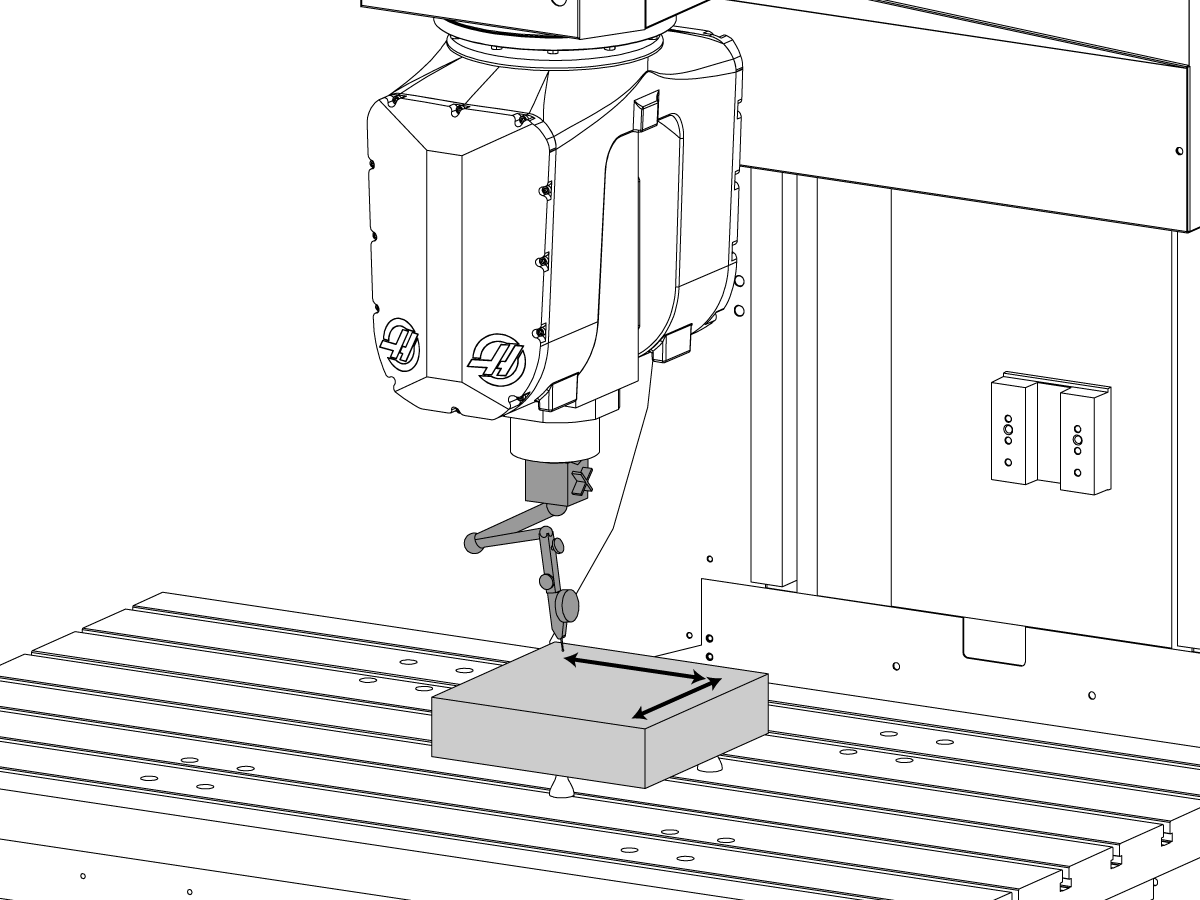
Place three leveling jacks on the VR table then place a 12 inch (305mm) square granite on the leveling jacks.

Adjust the surface of the granite flat. This is NTE 0.0001"

X-Axis to Y-Axis Perpendicularity

1

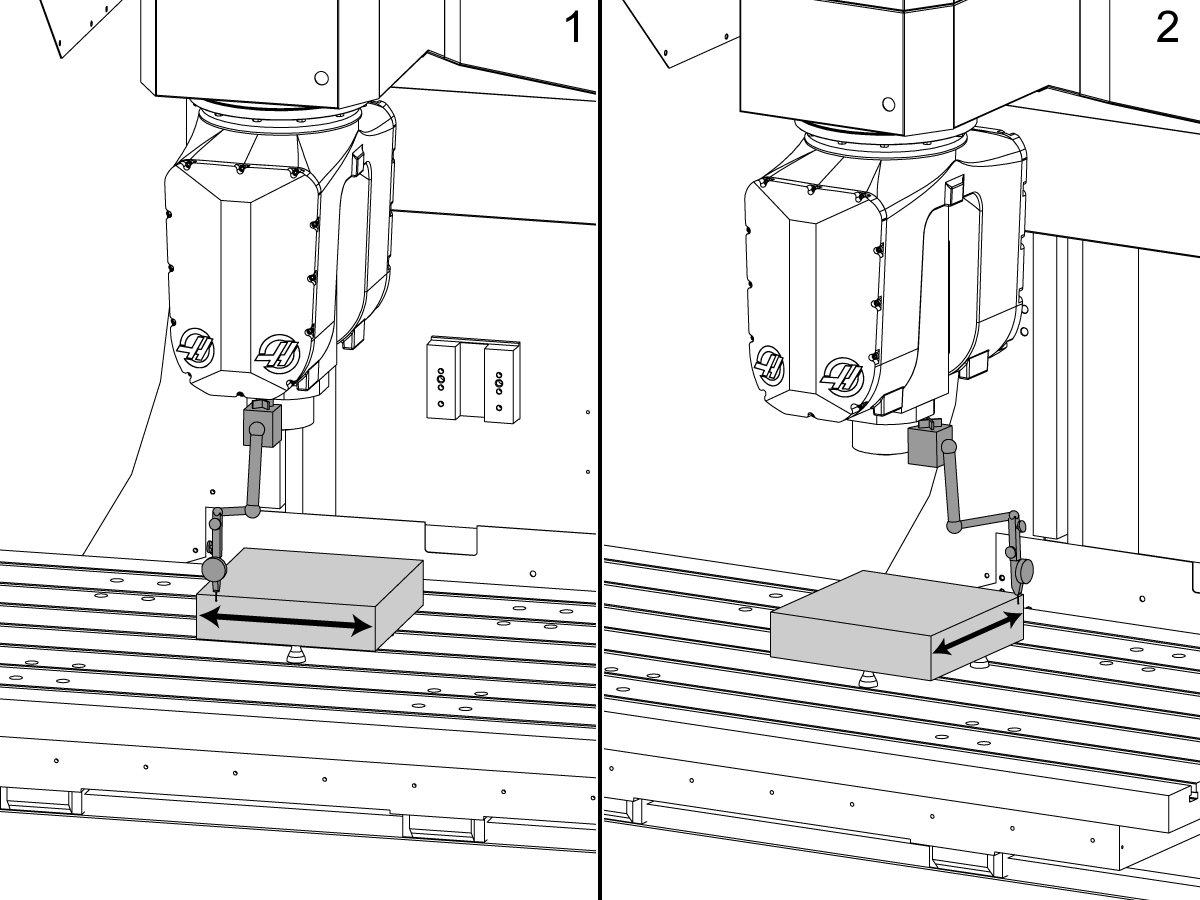
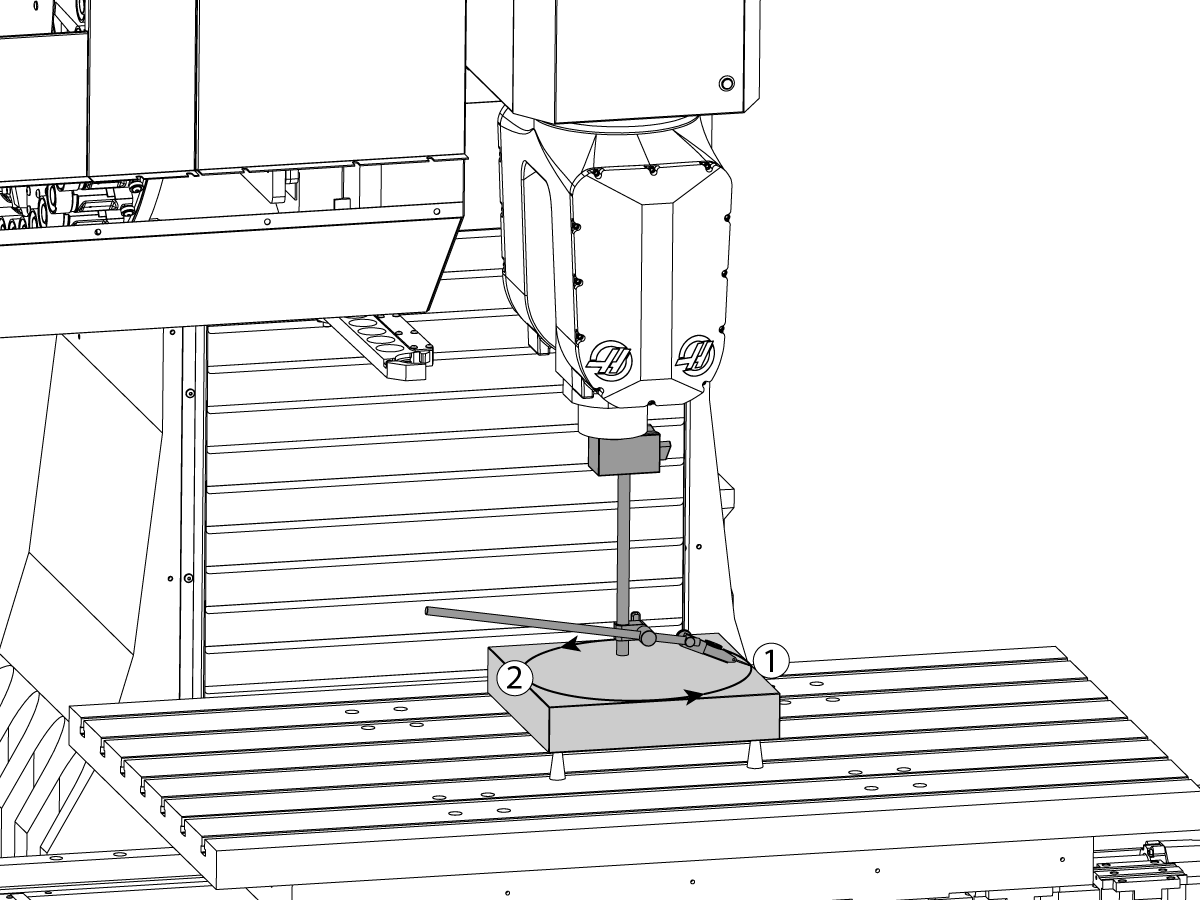
With the granite adjusted flat, place the indicator on the front face of the granite [1]. Zero the indicator and run it across the granite, adjust the granite so that both ends read zero.

Once the X-axis plane is zeroed. Place the indicator on one of the sides of the granite [2]. Parallel to the Y-axis plane. Zero the indicator on one end of the granite and run the indicator to the opposite end of the granite. Record the measurement. 

This measurement is NTE 0.0005/10" 

2

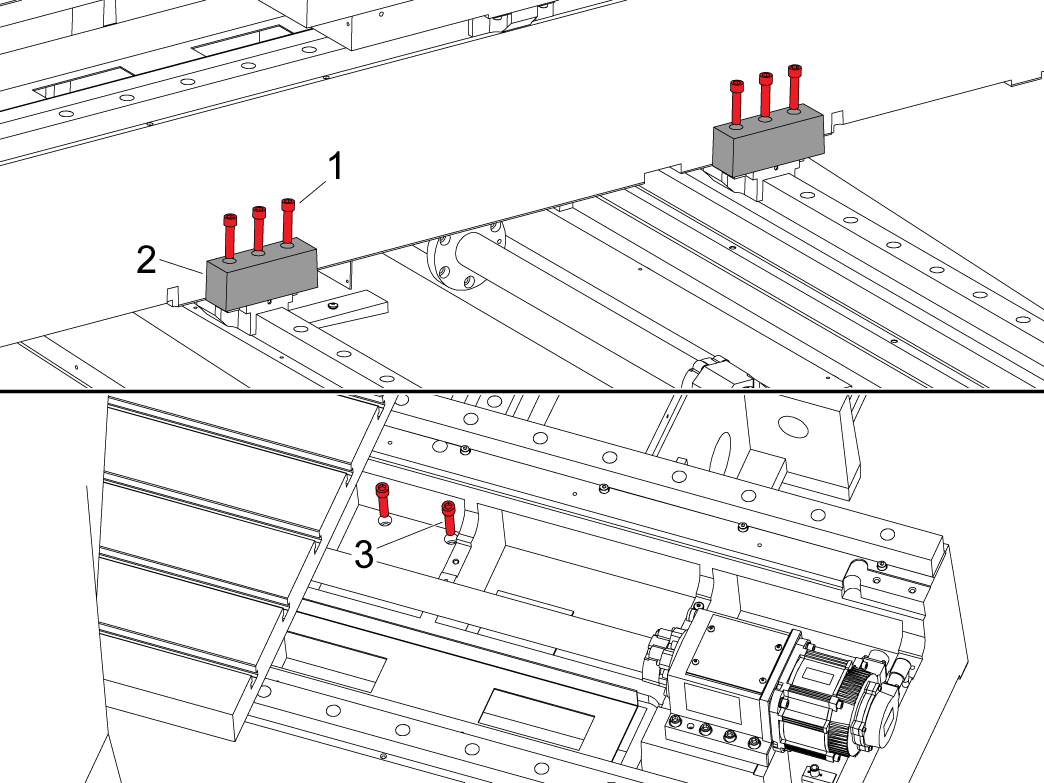
Note: The X-Axis and Y-Axis waycovers will need to be disconnected from the saddle to gain access to the bolts.

To adjust the Y-Axis perpendicular to X-Axis loosen the five bolts connecting the Y-Axis Ballnut to the Ballnut housing, and the ten bolts that connect the Ballnut housing to the saddle. 

Loosen the hardware [1] on the front of the saddle that connects the casting [2] to the linear pads. Be sure to loosen all 4 pads.

NOTE: There is hardware [3] for each linear pad found under the table that needs to be loosen as well to make this adjustment. This hardware can be either SHCS or studs.

Once the bolts for all 4 linear pads are loosened, jog the saddle front to back a few times. Tap the saddle to make adjustments if needed.

Once the perpendicularity is within spec, tighten and torque all bolts back to specification using the HAAS TORQUE SPECIFICATION and re-check the X-Y perpendicularity.

WARNING: This step may be used as reference for the inspection report but do not make any adjustments before consulting with Haas Service. Adjustments made without consulting Haas Service will void warranty.

X-Z plane & Y-Z Plane Perpendicularity

1

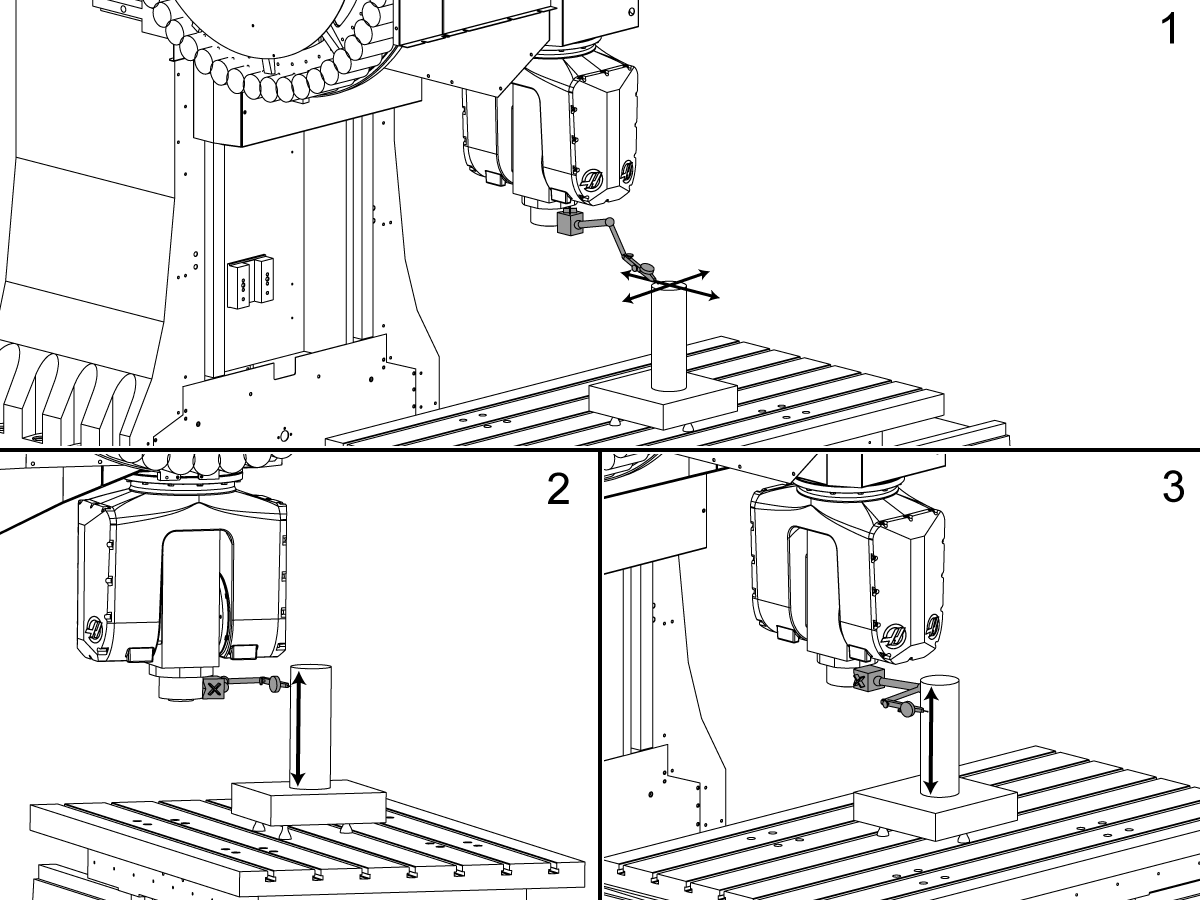
Place a cylinder on the granite and place an indicator on the top face of the granite [1]. Adjust the cylinder flatness so that the indicator reads zero in X/Y motion by shimming under the cylinder.

Place the indicator on the back face of the cylinder [2], zero the indicator, and jog the Z-axis up and down. This measurement is NTE 0.0005/10".

Place the indicator on the side face of the cylinder [3], zero the indicator, and jog the Z-axis up and down. This measurement is NTE 0.0005/10". 

2

IMPORTANT: This step is for reference only.  The column should not need to be adjusted, as the head geometry may influence this value. If any adjustments need to be made Haas service approval is  necessary. Adjustments made without consulting Haas Service will void warranty.

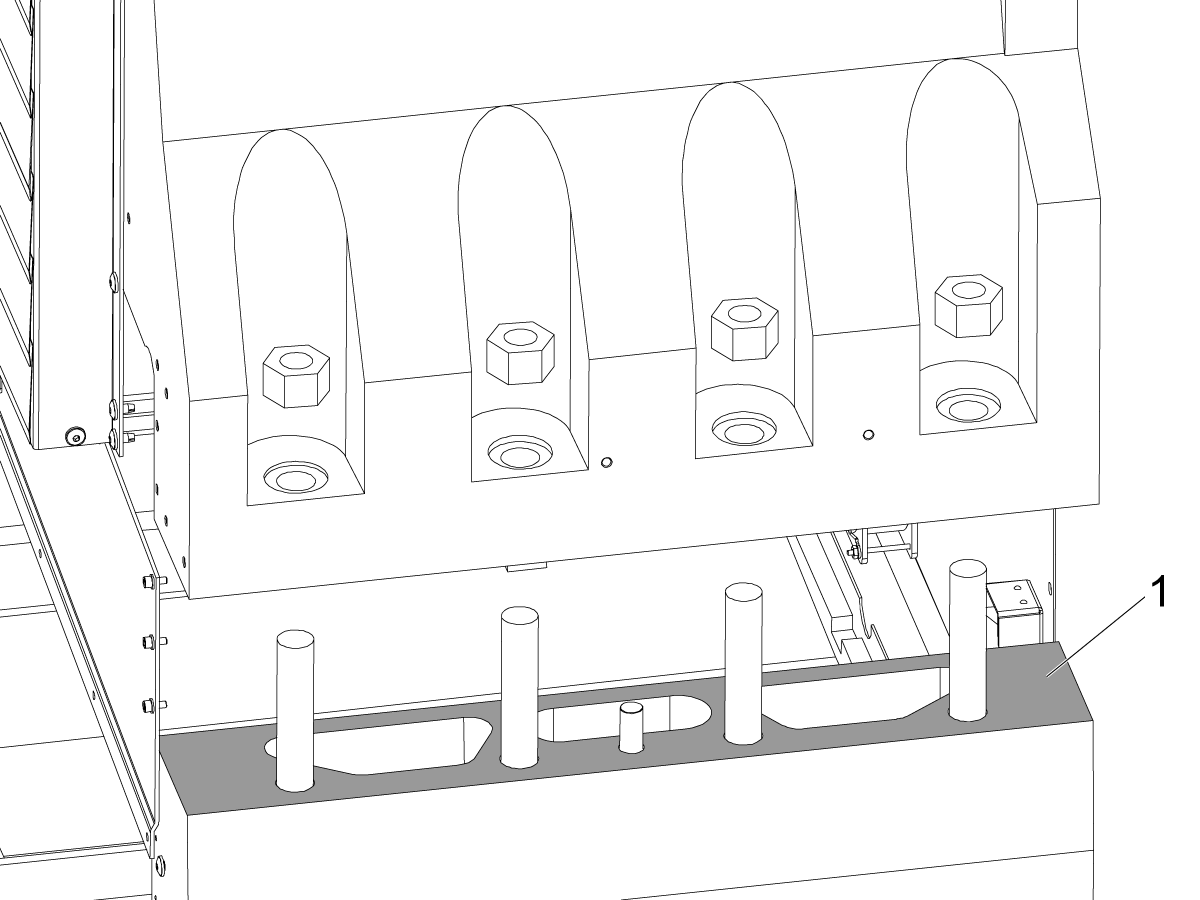
To adjust perpendicularity in either plane place shims on the highlighted portion of the riser block [1].

The shim amount should not exceed 0.008" thickness.

C-Axis Parallel to Z-Axis

1

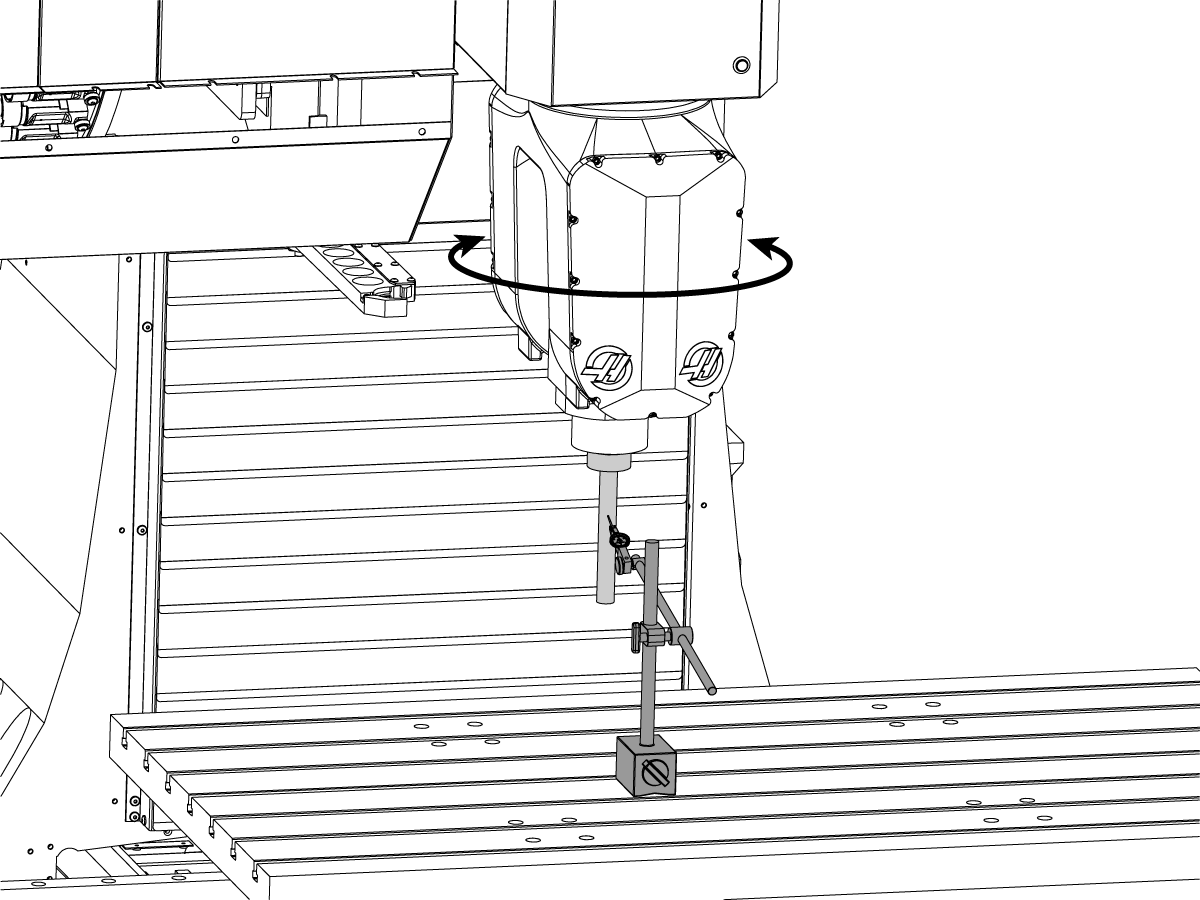
Place an indicator on the B-Axis body and place the indicator on the face of the granite, set up the indicator so that it can sweep the granite with a 10" diameter.

Zero the indicator and rotate the C-Axis 360 degrees and record the measurement. This measurement is NTE 0.0008/10" diameter.

 Note: You will not be able to fully rotate 360 degrees in one direction as the head has +245 to -245 travel limits. 

B-Axis Tool Change Offset

1

Home the B & C-Axis.

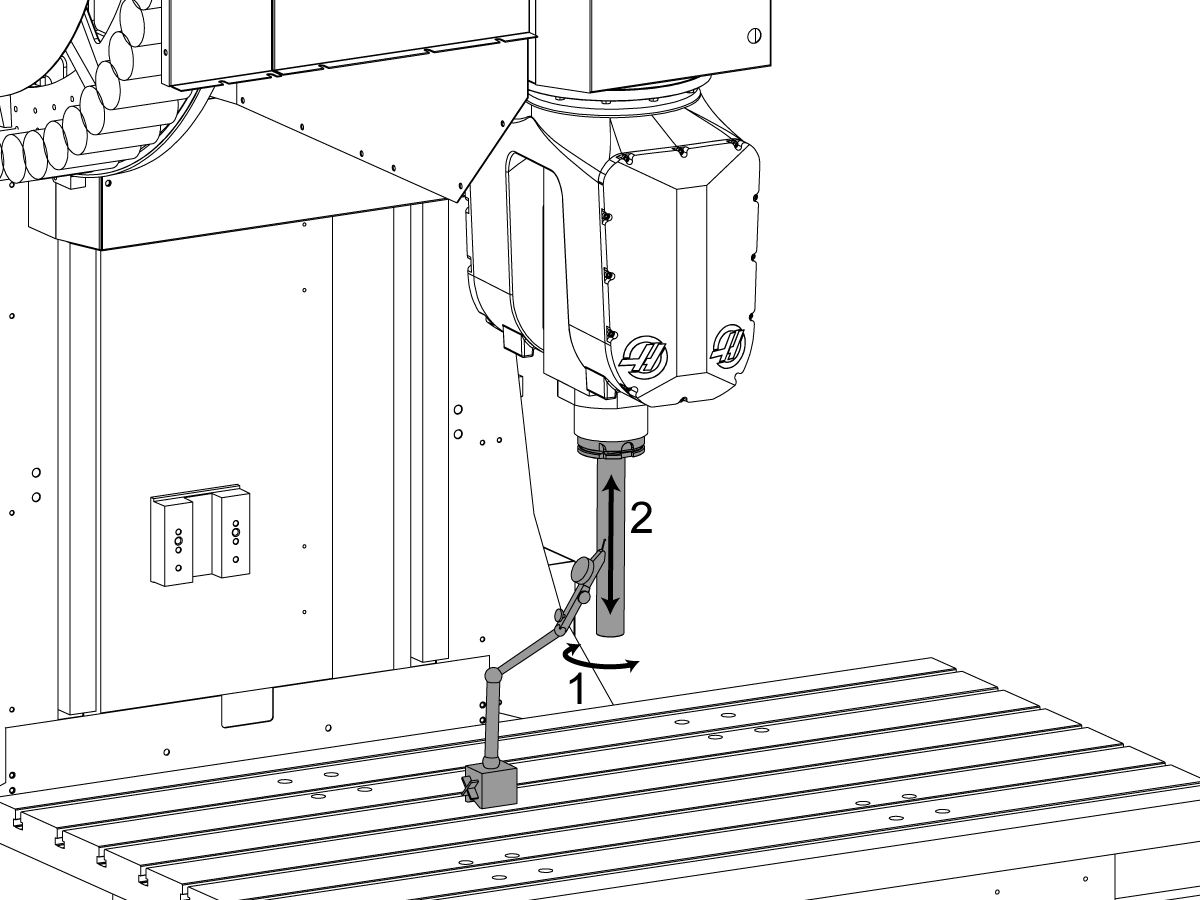
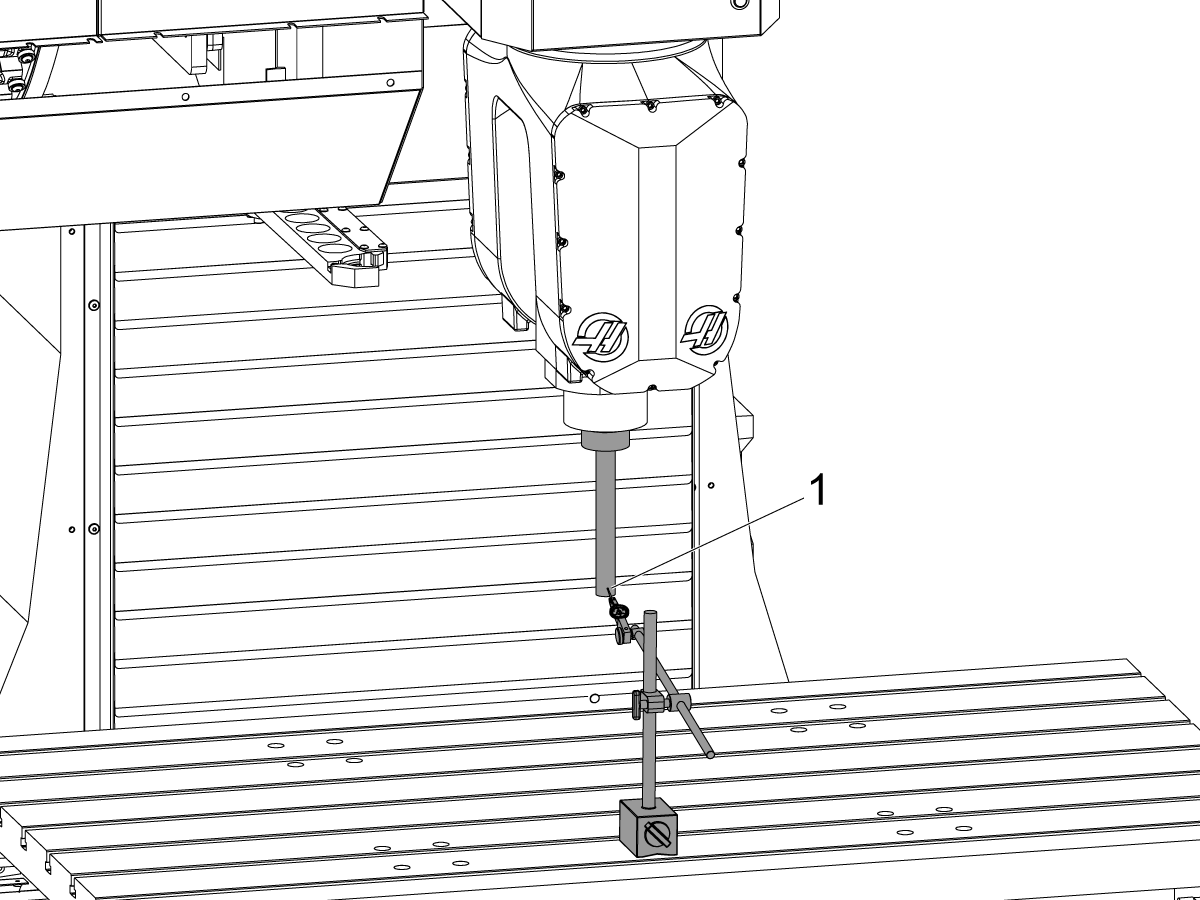
Load the test arbor into the spindle. Place the indicator on the side face of the test arbor.

Find the high spot on the test bar by jogging the Y-Axis. Once the indicator is on the high spot jog the indicator up and down the test bar and adjust the B-Axis so that the error on the indicator is no more than 0.0001".

2

Use the following instructions to change the B-Axis Tool Change Offset if a service key is not available. 

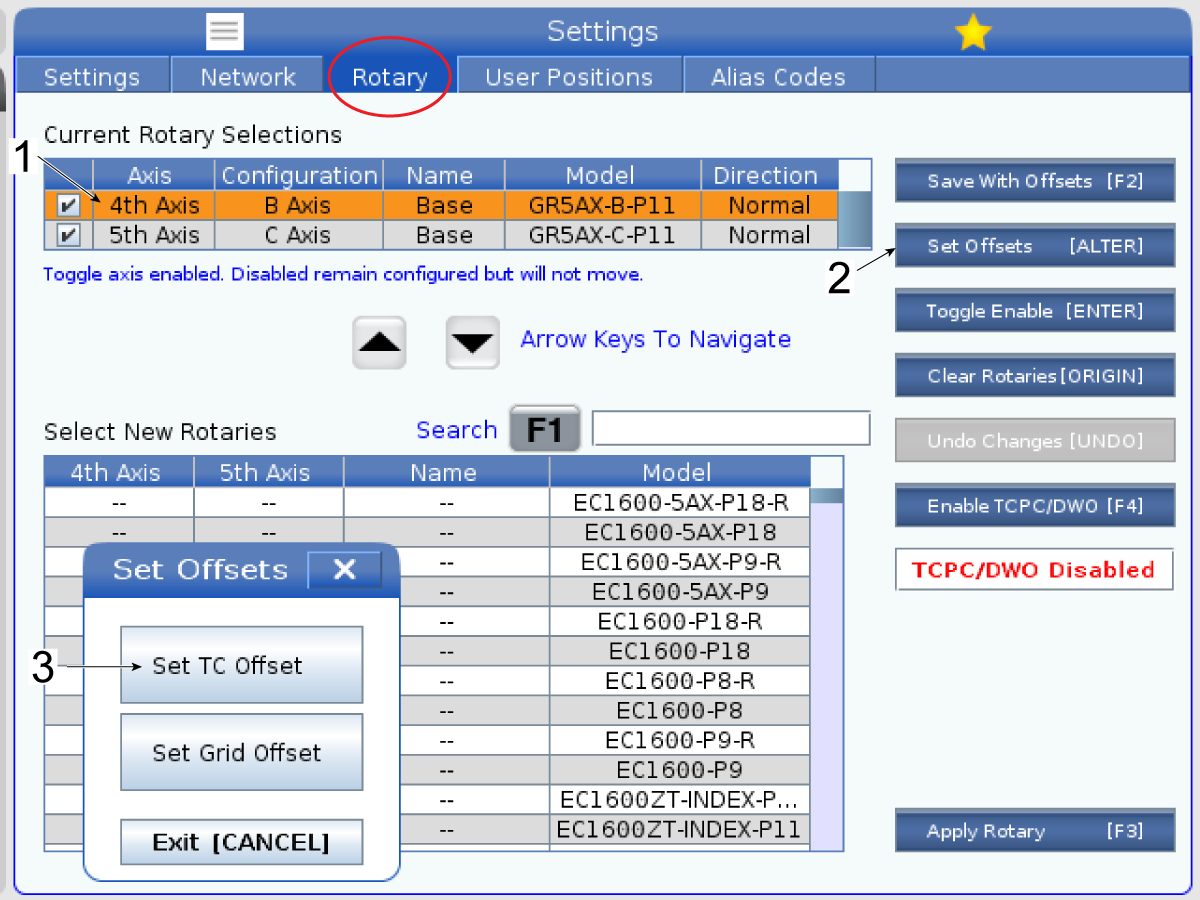
Press [SETTING] and navigate to the rotary tab. Highlight the 4th axis selection [1] and press [ALTER] [2] to set the B-Axis Tool Change Offset [3].

After adjusting the B-Axis Tool Change Offset. Redo the inclination test, sweeping from position [1] to [2]. If the inclination is out of tolerance after adjusting the offset, redo the adjustment portion. 

3

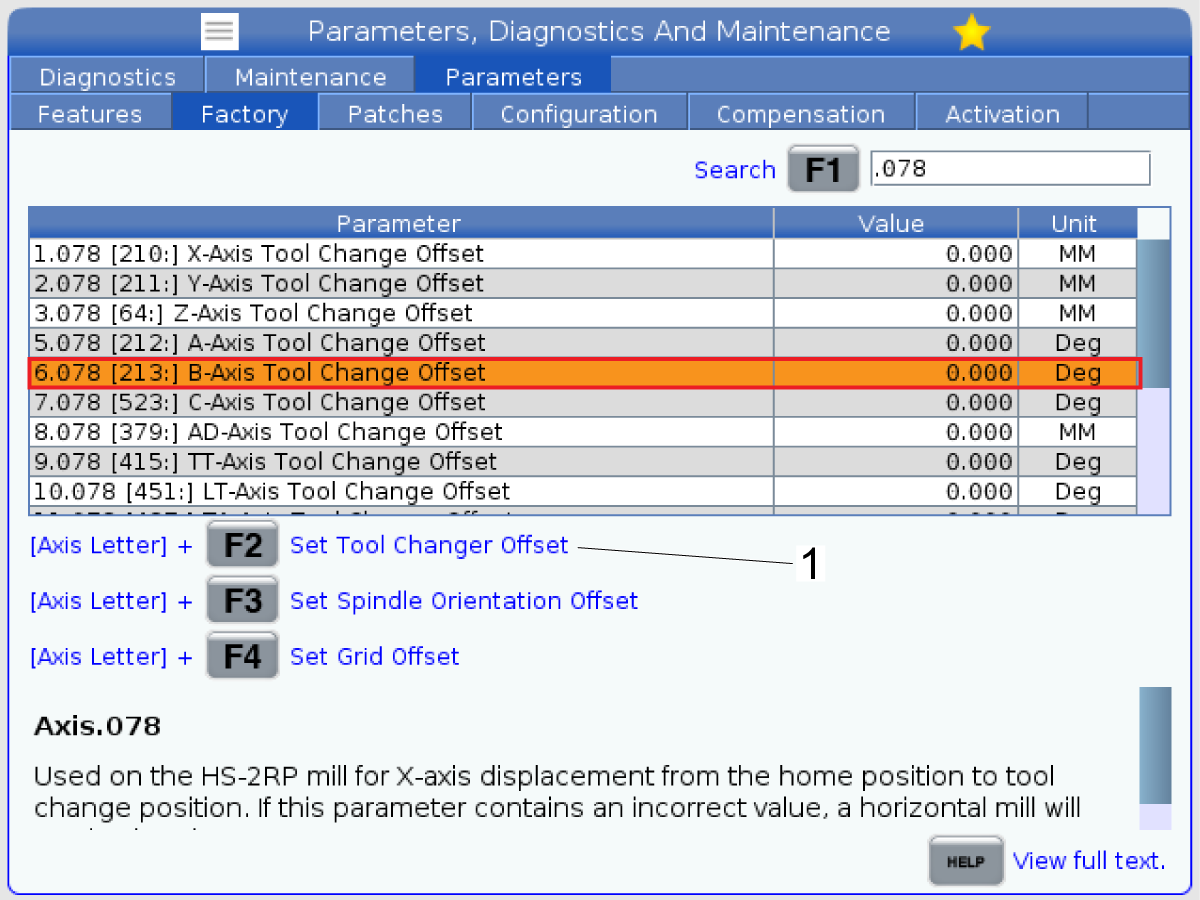
If a service key is available press [DIAGNOSTIC] and navigate to the parameters tab and to the factory tab. Find Parameter 6.078 B-AXIS TOOL CHANGE OFFSET to set the Tool Change Offset by pressing the [B] + [F2] to set the offset to the current position.

After adjusting the Tool Change Offset. Redo the inclination test, sweeping from position [1] to [2]. If the inclination is out of tolerance after adjusting the offset, redo the adjustment portion. 

C-Axis Tool Change Offset

1

Home the B and C-Axis.

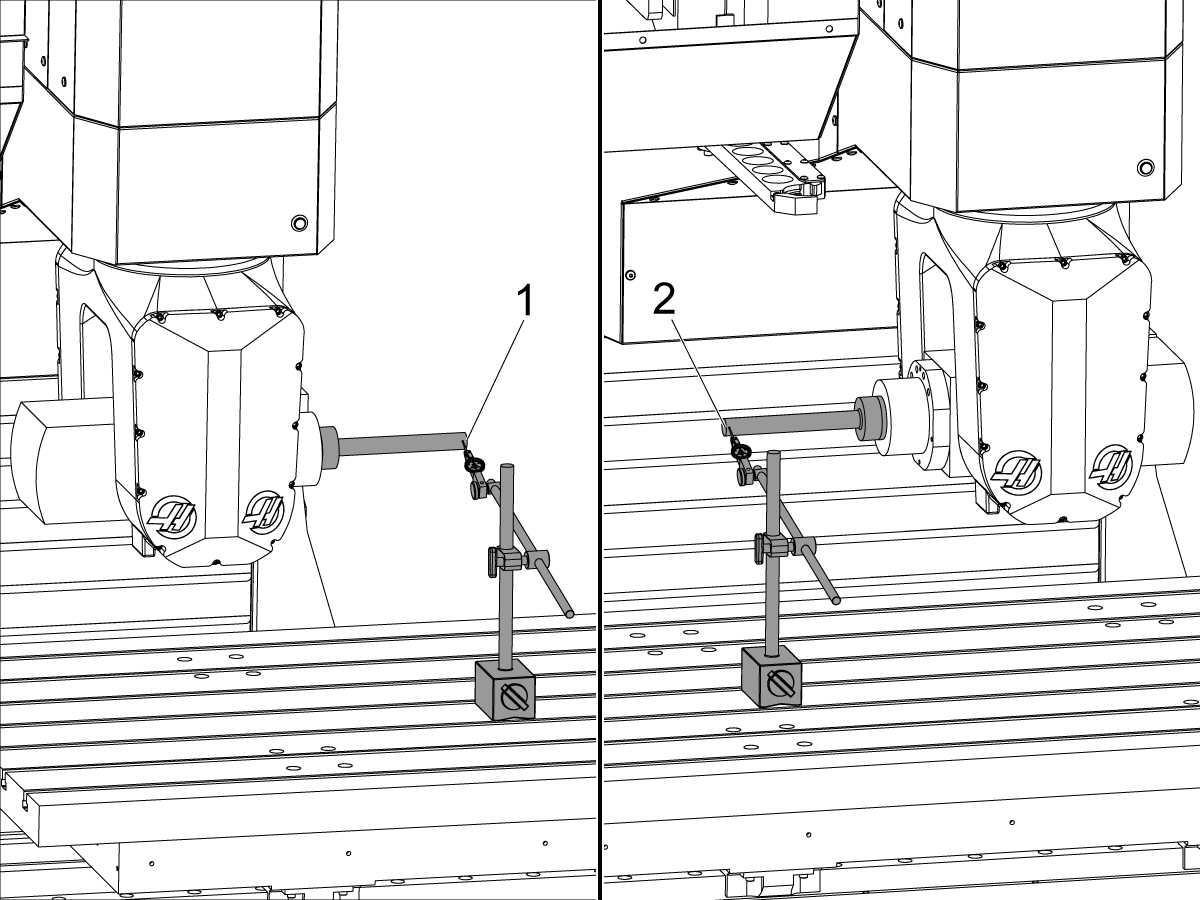
In MDI command the B-Axis to -90°.

Load the test arbor into the spindle. Place an indicator on the front face of the test bar at the end of the bar [1] on the high spot. Zero the indicator at this location.

Jog the Z-Axis up so the test bar clears the table and command B = +90°. Jog the table in the Z and X direction to move the indicator to position [2] on the front face of the test bar at the end of the bar on the high spot. Adjust the C-Axis so that the error on the indicator is the same between positions [1] and [2]. This should not exceed 0.0005".

Once the end of the test bar reads the same error at both B = -90 and B = +90 degrees set the C-Axis Tool Change Offset. See steps below.

 Note: Do not move the Y-Axis during this step.

 Important: If the C-Axis Tool Change Offset is changed, the spindle orientation must be verified before doing a tool change. 

2

Use the following instructions to change the C-Axis Tool Change Offset if a service key is not available. 

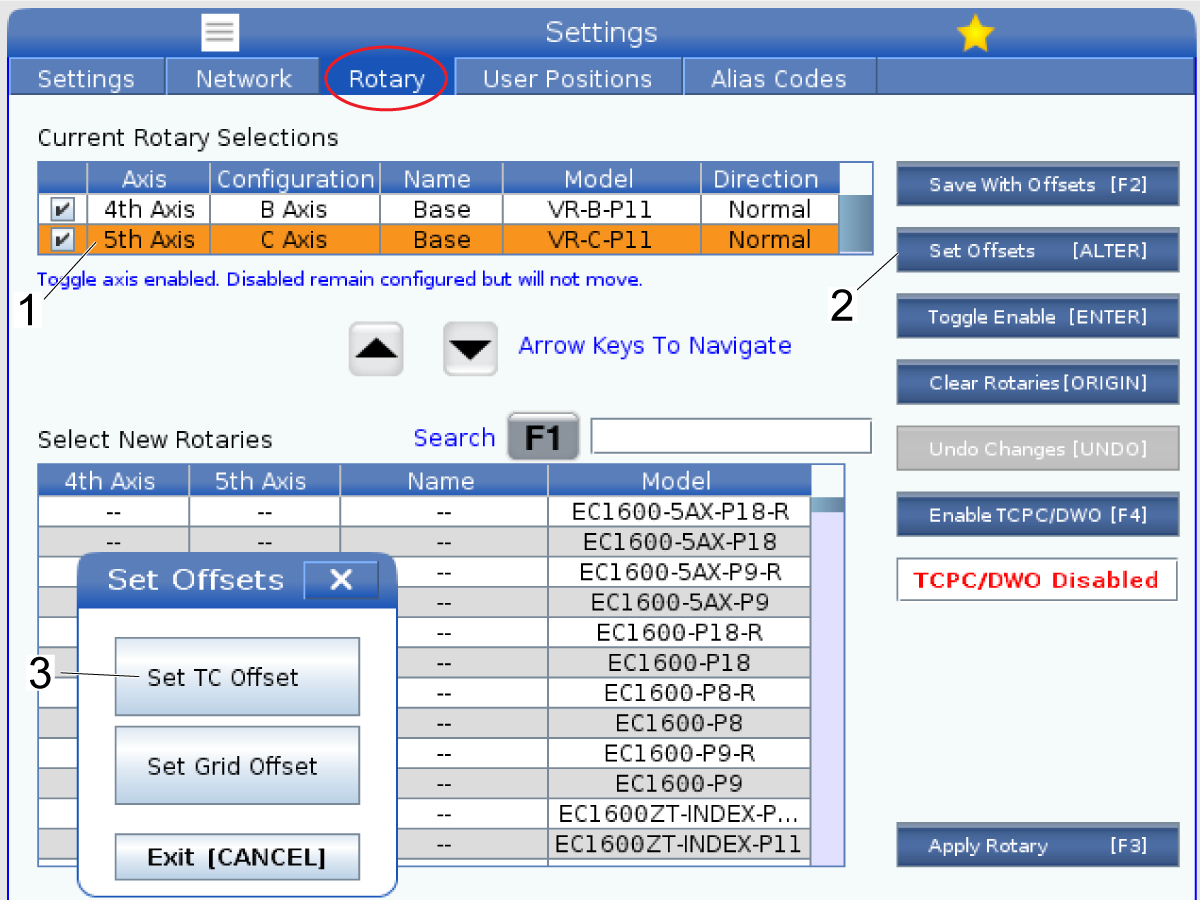
Press [SETTING] and navigate to the rotary tab. Highlight the 5th axis selection [1] and press [ALTER] to set the C-Axis Tool Change Offset [3].

After adjusting the Tool Change Offset. Redo the inclination test, sweeping from position [1] to [2]. If the inclination is out of tolerance after adjusting the offset, redo the adjustment portion. 

3

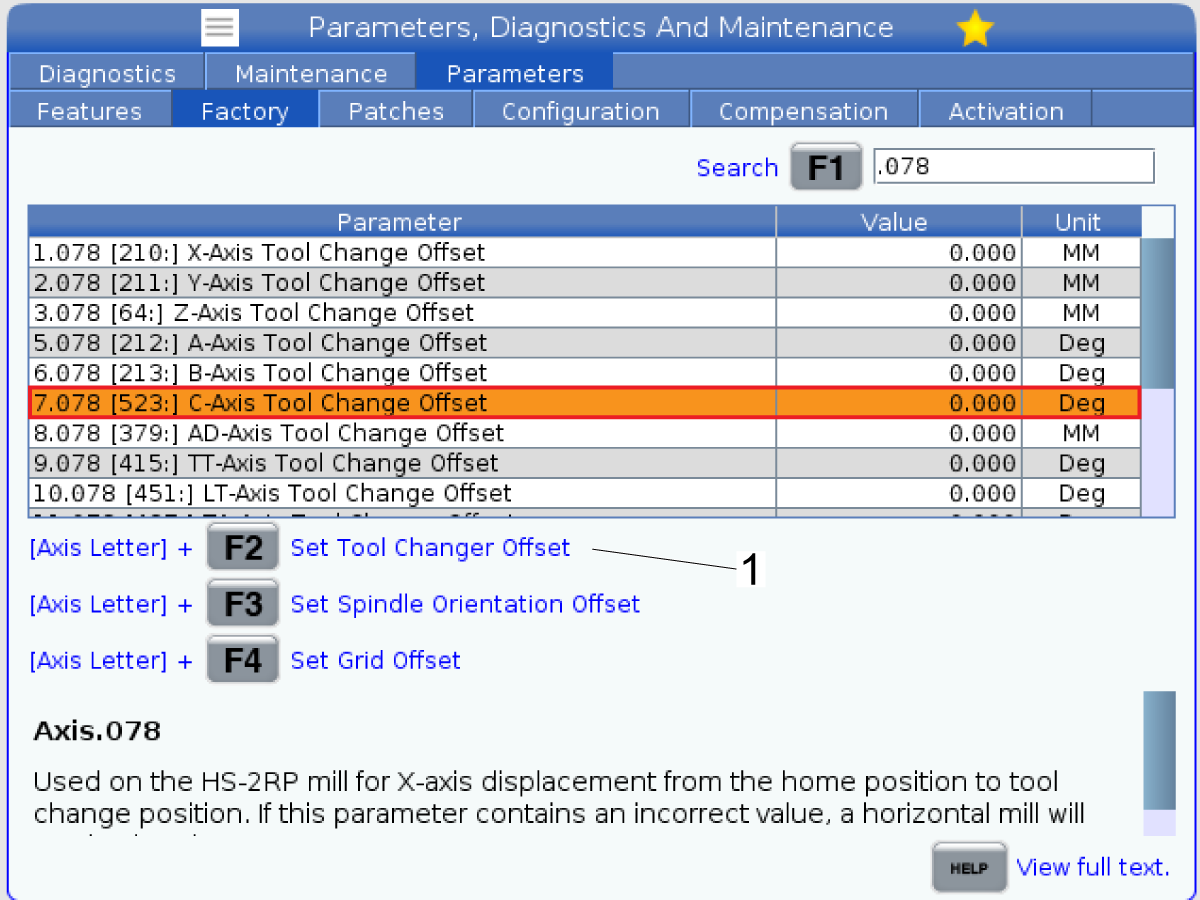
If a service key is available press [DIAGNOSTIC] and navigate to the parameters tab and to the factory tab. Find Parameter 7.078 C-AXIS TOOL CHANGE OFFSET to set the tool change offset by pressing [C] + [F2] to set the offset to the current position.

After adjusting the Tool Change Offset. Redo the inclination test, sweeping from position [1] to [2]. If the inclination is out of tolerance after adjusting the offset, redo the adjustment portion. 

B-Axis to C-Axis Perpendicularity

1

Home the B and C-Axis.

In MDI command the B-Axis to -90°.

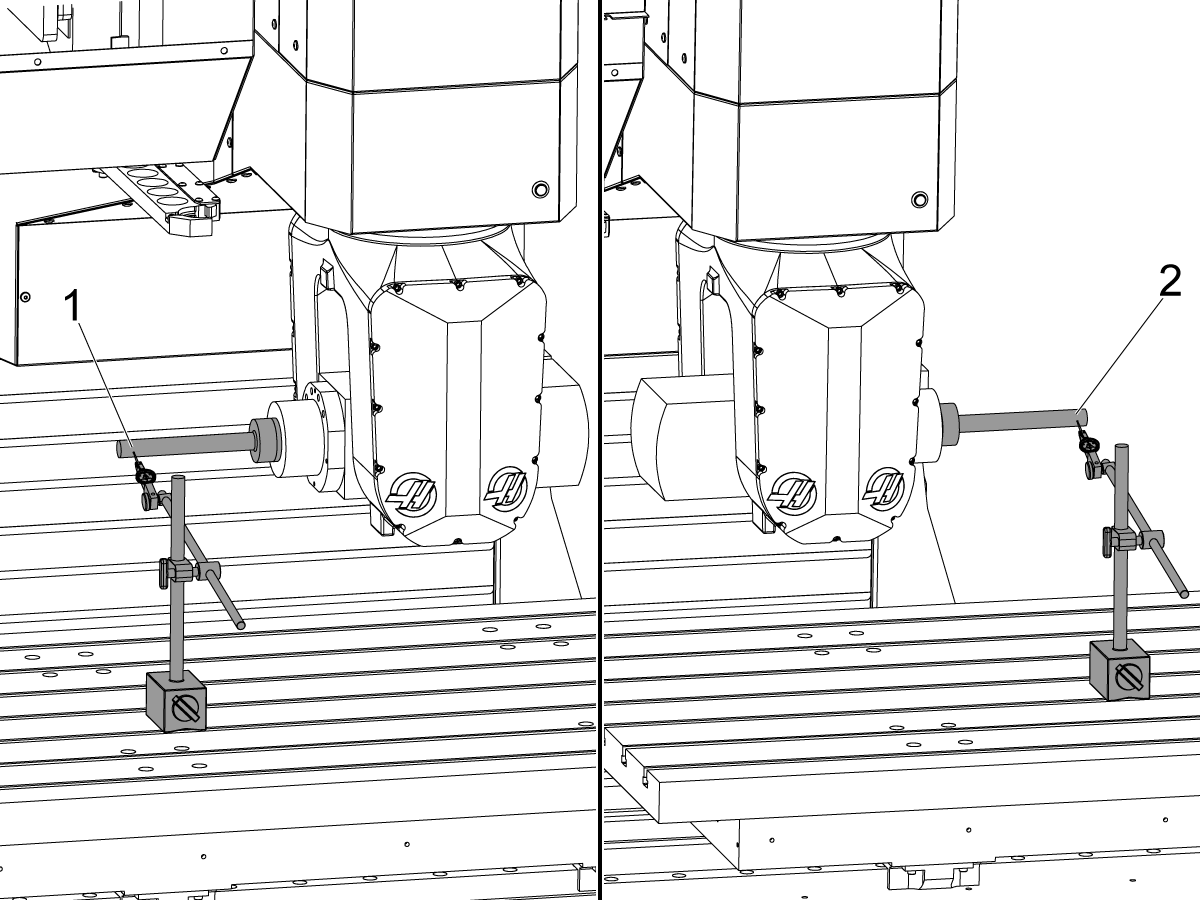
Place an indicator on the front face of the test bar at the end of the bar [1] on the high spot. Zero the indicator at this location.

Jog the Z-Axis up so the test bar clears the table and command B = +90°. Jog the table in the Z and X direction to move the indicator to position [2] on the front face of the test bar at the end of the bar on the high spot. Adjust the C-Axis so that the error on the indicator is the same between positions [1] and [2]. This should not exceed 0.0005".

 Note: Do not move the Y-Axis during this step.

2

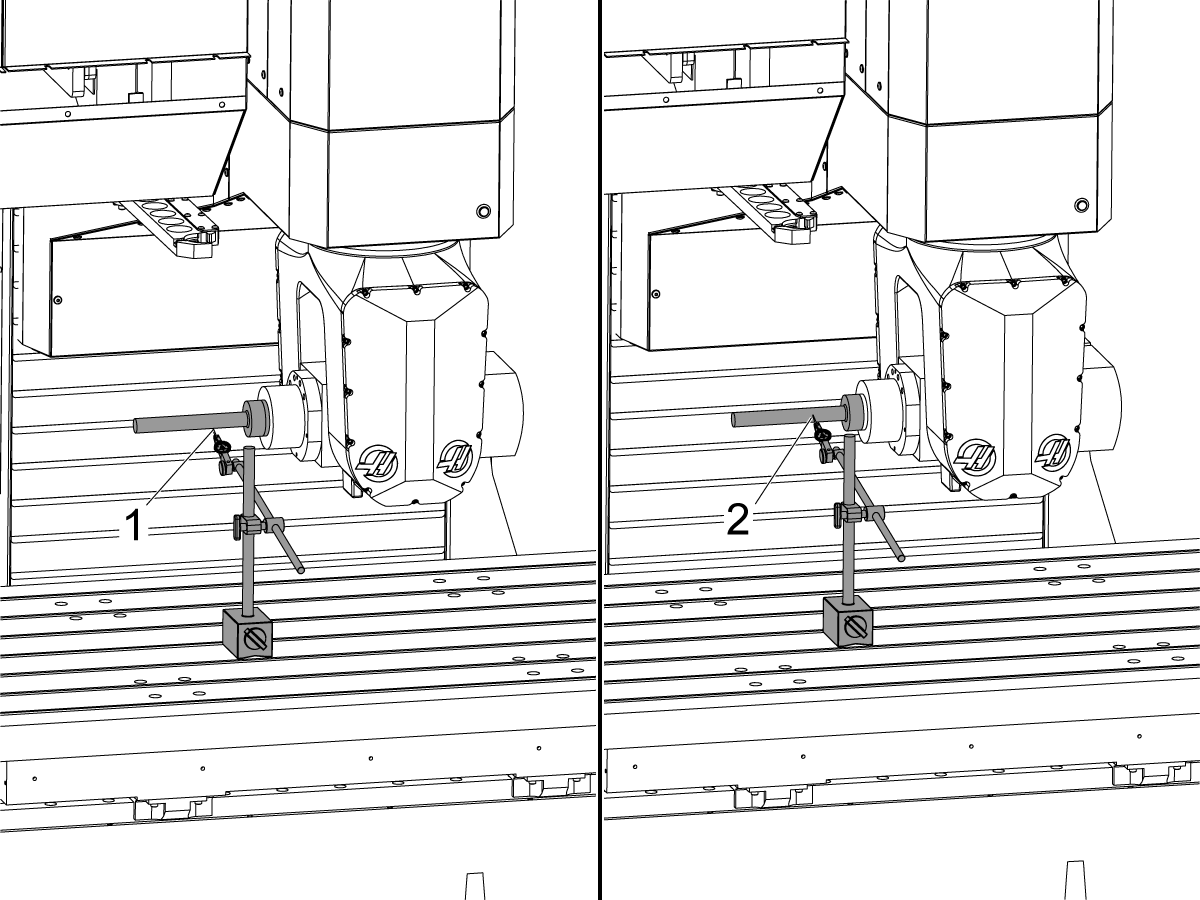
Once the face of the test bar reads zero at B =-90° and B = +90°, in MDI command the B-Axis to 0°.

Jog the table to move the indicator to position [1] on the test bar. Make sure to jog in the Z and X direction to find the "high" value in the B = 0 position. Record the value. DO NOT SET THE INDICATOR BACK TO ZERO. 

 Note: Do not move the Y-Axis during this step.

Spindle Centerline to B-Axis Perpendicularity

1

Home the B and C-Axis.

In MDI command the B-Axis to -90°.

Place an indicator on the front face of the test bar at the end of the bar [1] on the high spot. Zero the indicator at this location.

Jog the Z-Axis up so the test bar clears the table and command B = +90°. Jog the table in the Z and X direction to move the indicator to position [2] on the front face of the test bar at the end of the bar on the high spot. Adjust the C-Axis so that the error on the indicator is the same between positions [1] and [2]. This should not exceed 0.0005".

 Note: Do not move the Y-Axis during this step.

2

Once the face of the test bar reads zero at B =-90° and B = +90°, in MDI command the B-Axis to 0°.

Jog the table to move the indicator to position [1] on the test bar. Make sure to jog in the Z and X direction to find the "high" value in the B = 0 position.  This value should match the one found in the B-Axis to C-Axis Perpendicularity section.

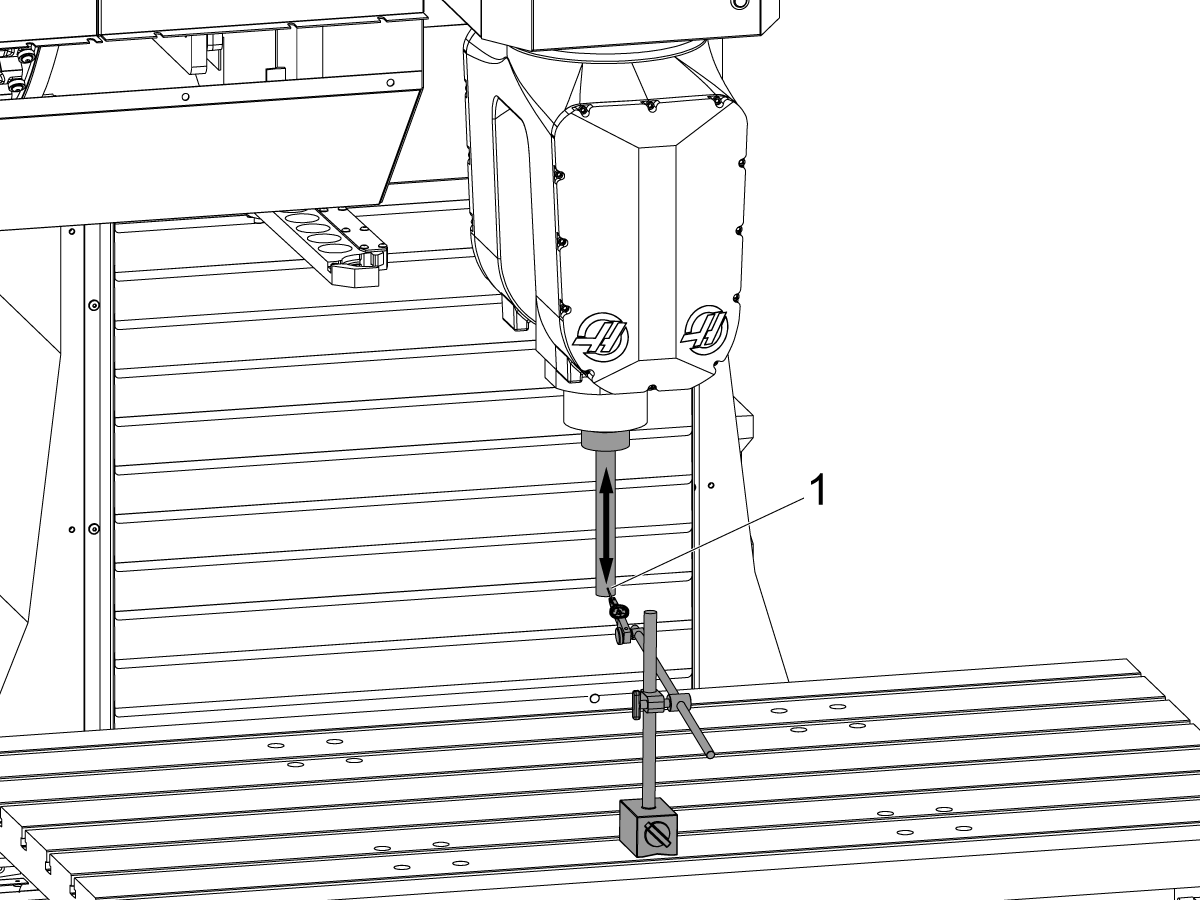
Zero the indicator at position [1]. Jog in the Z direction up the test bar. Record the error seen.

 Note: Do not move the Y-Axis during this step.

B-Axis Sweep

1

Home the B and C-Axis.

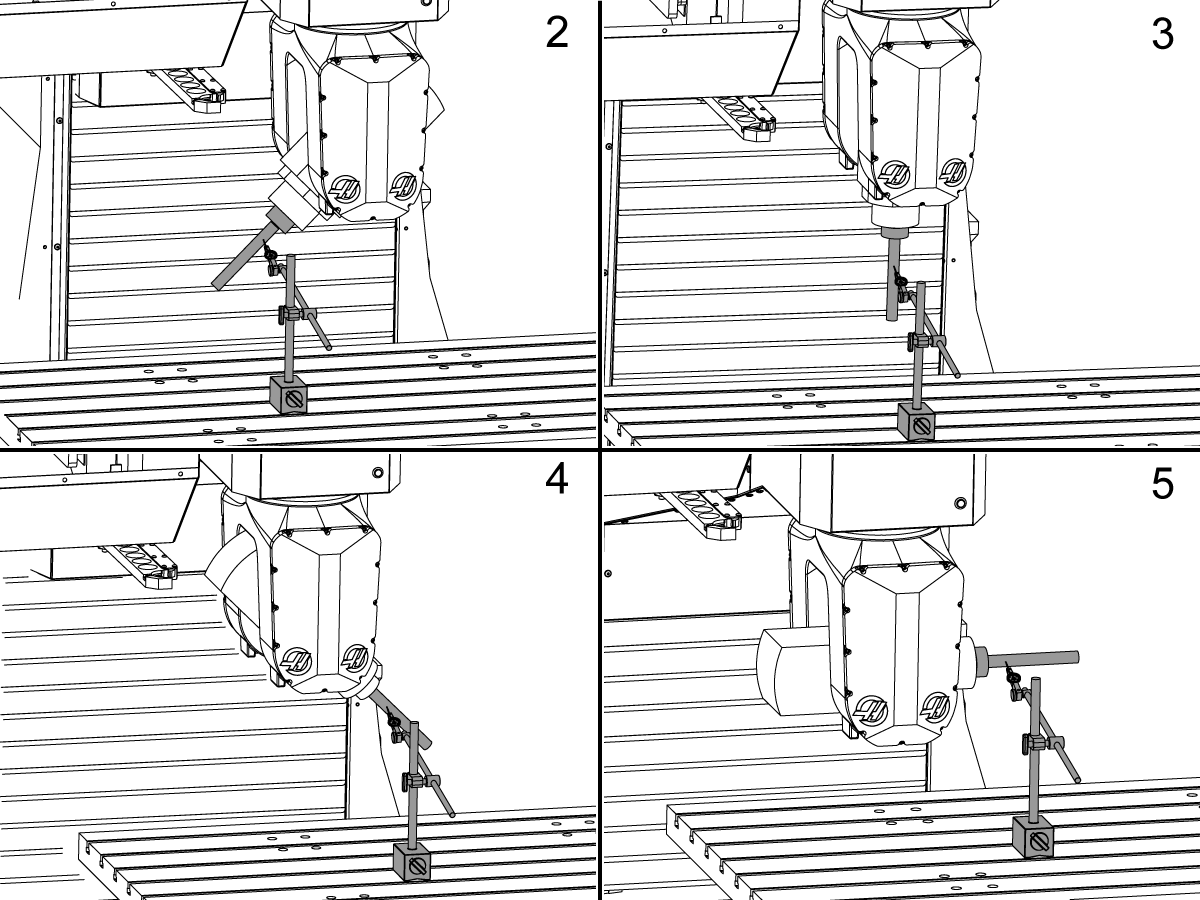
In MDI command the B-Axis to -90°.

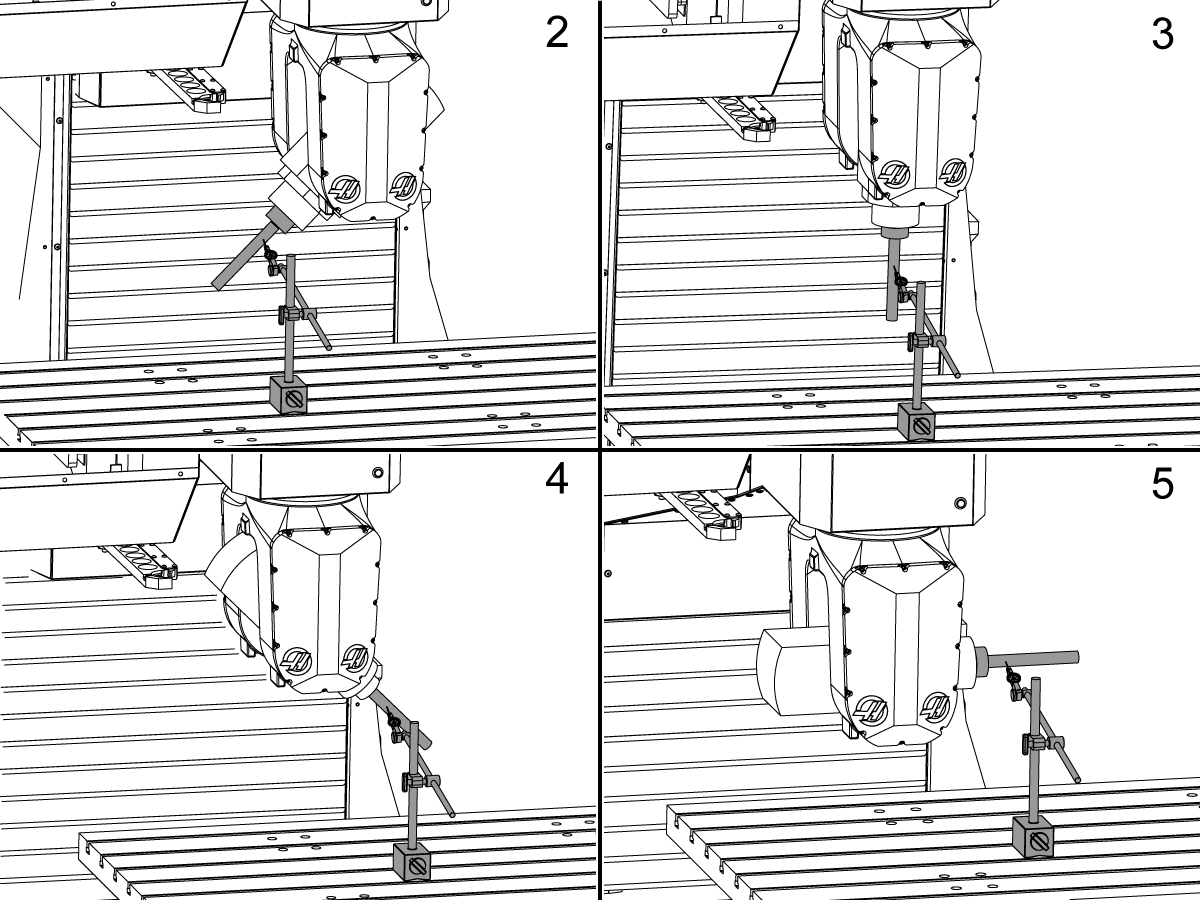
Place an indicator on the front face of the test bar at the end of the bar [1] on the high spot. Zero the indicator at this location.

Jog the Z-Axis up so the test bar clears the table and command B = +90°. Jog the table in the Z and X direction to move the indicator to position [2] on the front face of the test bar at the end of the bar on the high spot. Adjust the C-Axis so that the error on the indicator is the same between positions [1] and [2]. This should not exceed 0.0005".

 Note: Do not move the Y-Axis during this step.

2

In MDI command the B-Axis to +90°.

Place the indicator on the bottom face [1] of the test bar and sweep the whole travel. Make sure this is straight, if not, adjust the B-Axis until it is. 

Then place the indicator on the front face and zero the indicator 4 inches away from the face of the spindle [2]. It is recommended to mark a point on the test bar to indicate the spot to take measurements on the next portion of the test. 

On the operators page, set the Y, Z, and B-Axis to zero. 

3

 Note: This test will move the B-Axis in 45 degree increments and creates a plane that will be evaluated.

The starting position will be at B = +90 shown in the previous step, this will always be our zero. 

Jog the B-Axis to B = +45.

Jog the table to move the indicator to the position that was marked on the test bar. Make sure to jog in the Z and X direction to find the "high" value in the B = +45 position. Record the value.

 Note: It is recommended to use a dual dial test indicator.

Jog the B-Axis to B = 0, B = -45, and B = -90 position, all while jogging the table to move the indicator to the marked position on the test bar in each of the B-Axis movements and record the values. Find the "high" spot in each of these positions to take the measurement. 

 Note: It is recommended to not move the Y-Axis during this test, but if it is moved return it to the operators Y-Axis zero position.

4

In MDI command the C-Axis to +180°.

Place an indicator on the front face of the test bar at the end of the bar [1] on the high spot. 

 Note: It is recommended to not move the Y-Axis during this test, but if it is moved return it to the operators Y-Axis zero position.

Jog the Z-Axis up so the test bar clears the table and command B = +90°. Jog the table in the Z and X direction to move the indicator to position [2] on the front face of the test bar at the end of the bar on the high spot. Adjust the C-Axis so that the error on the indicator is the same between positions [1] and [2]. This should not exceed 0.0005".

 Note: Do not move the Y-Axis during this step.

5

Jog the B-Axis to B = -90. 

Then place the indicator on the front face and zero the indicator 4 inches away from the face of the spindle. It is recommended to mark a point on the test bar to indicate the spot to take measurements on the next portion of the test. 

Redo the sweep steps mentioned in the previous step and record the values. The difference between the measurements in run 1 and run 2 at each B-Axis position divided by 2, is NTE 0.004" (Run 1 is at C = 0, Run 2 is at C = 180; use latest inspection report to help calculate).

Inspection Report

Spindle Centerline Parallel to C-Axis

1

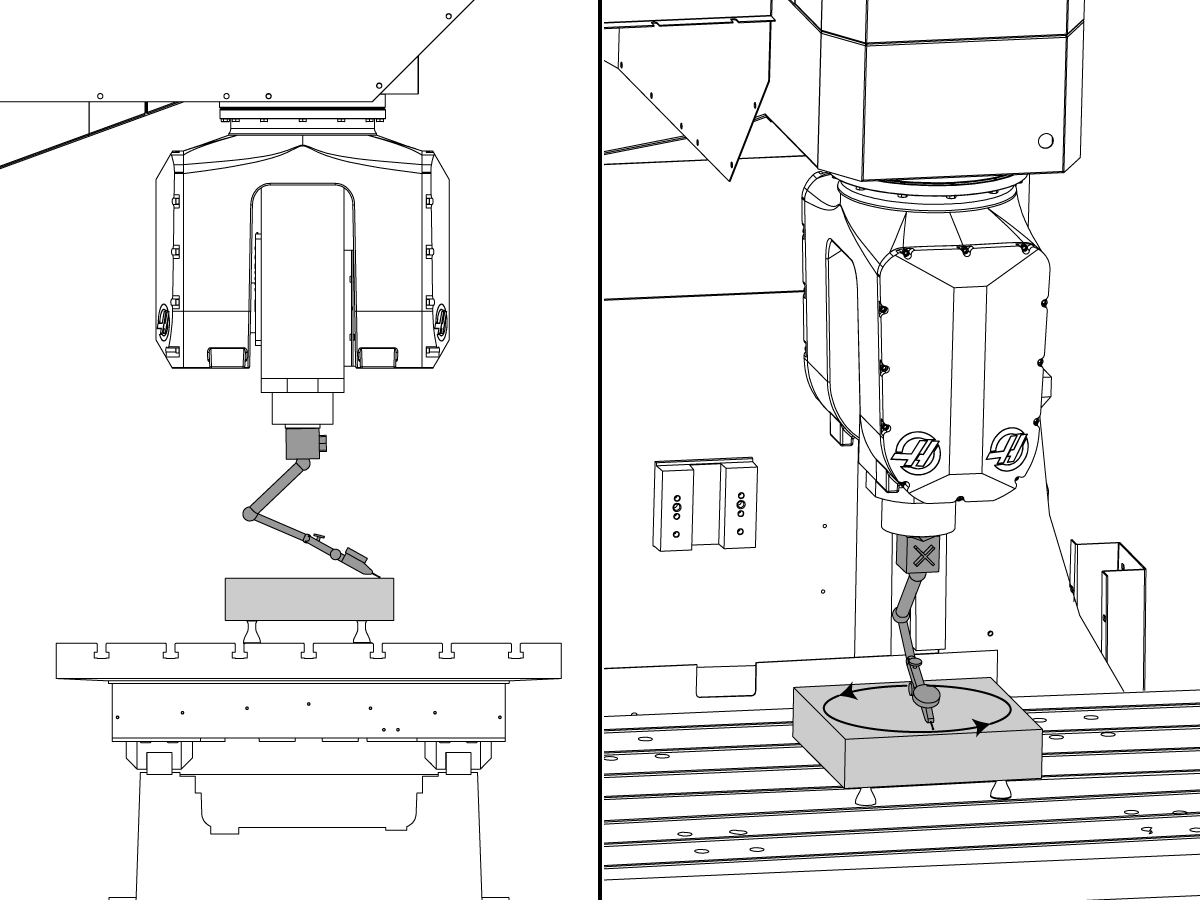
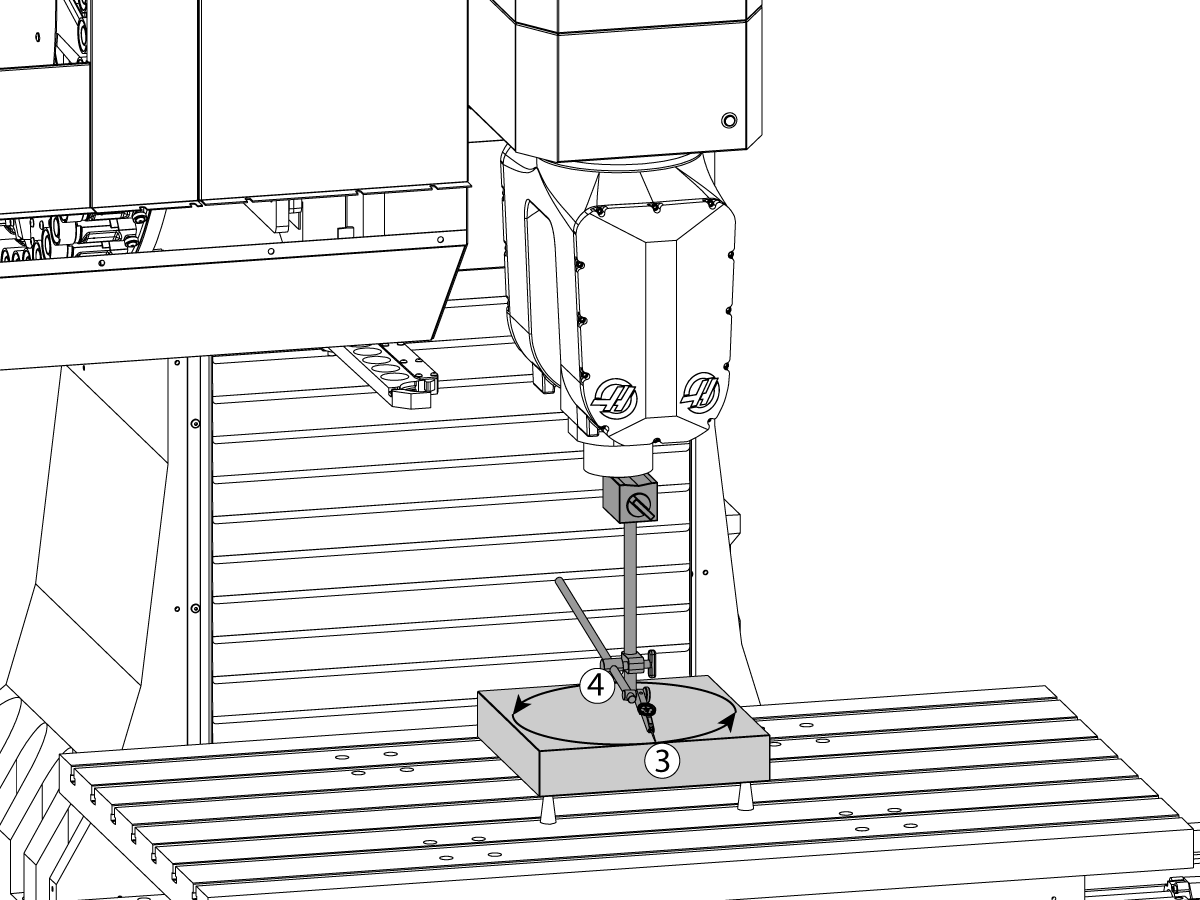
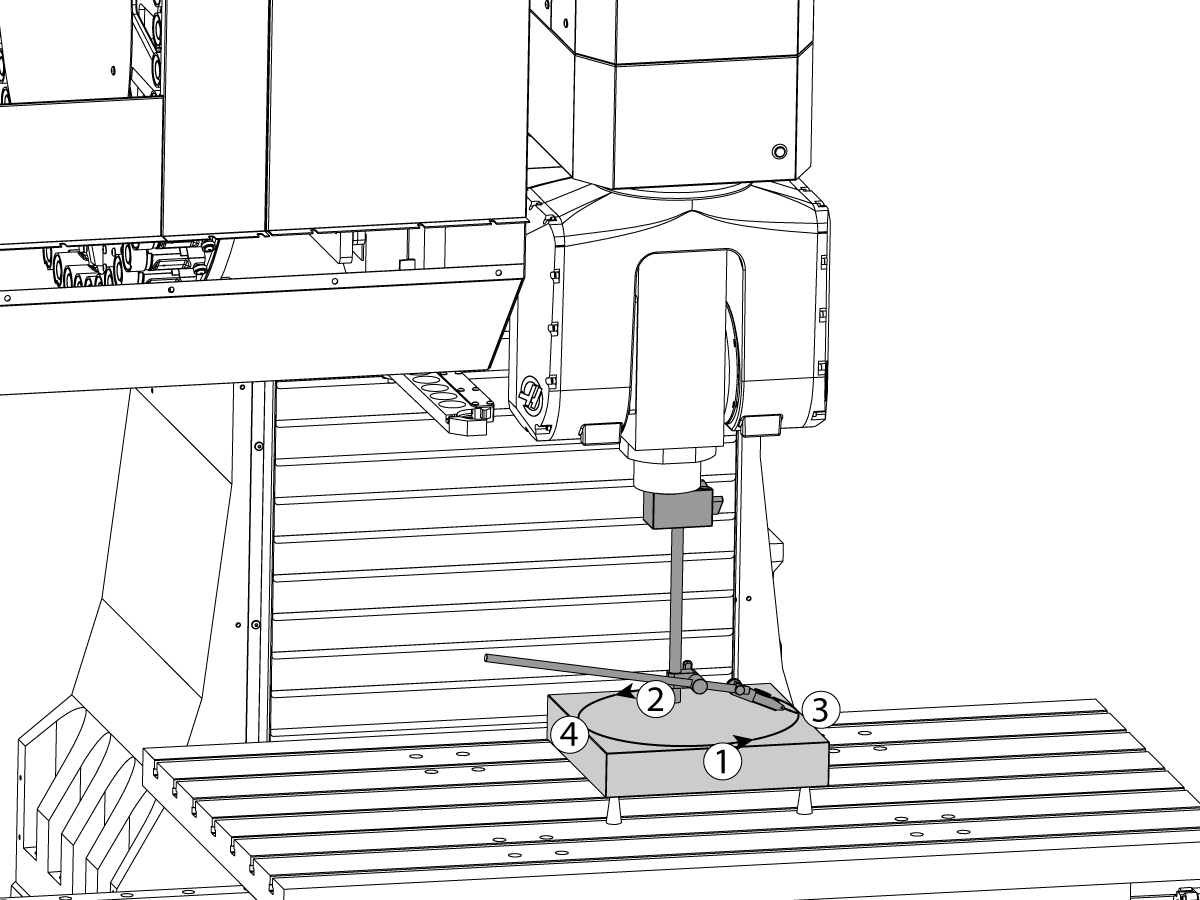
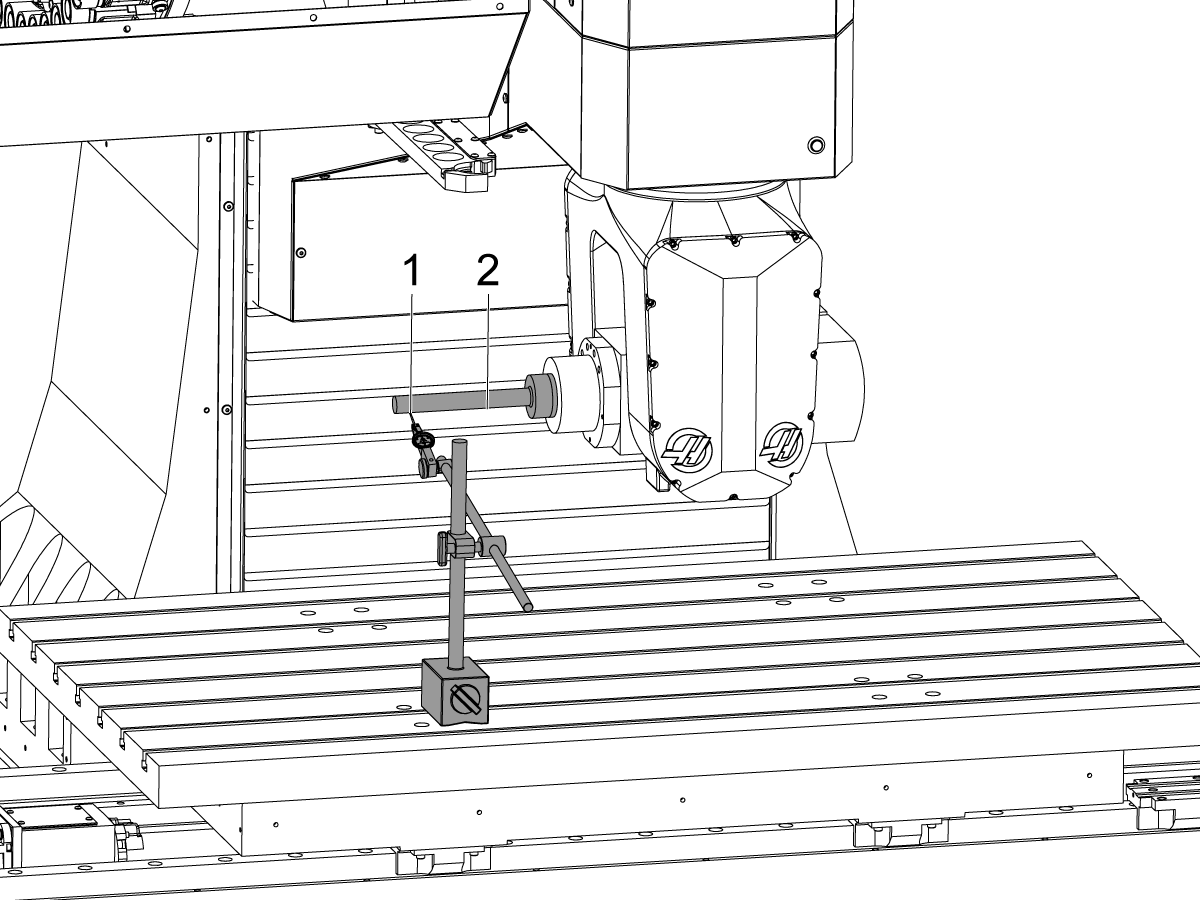
Home the B and C-Axis, mount the indicator on the spindle nose and set the indicator to sweep a 10" diameter circle. Set the indicator to zero at position [1] and sweep to position [2]. This is NTE 0.0005"

Record the measurement and fix this by adjusting the B-Axis Tool Change Offset. See the B-Axis Tool Change Offset steps.

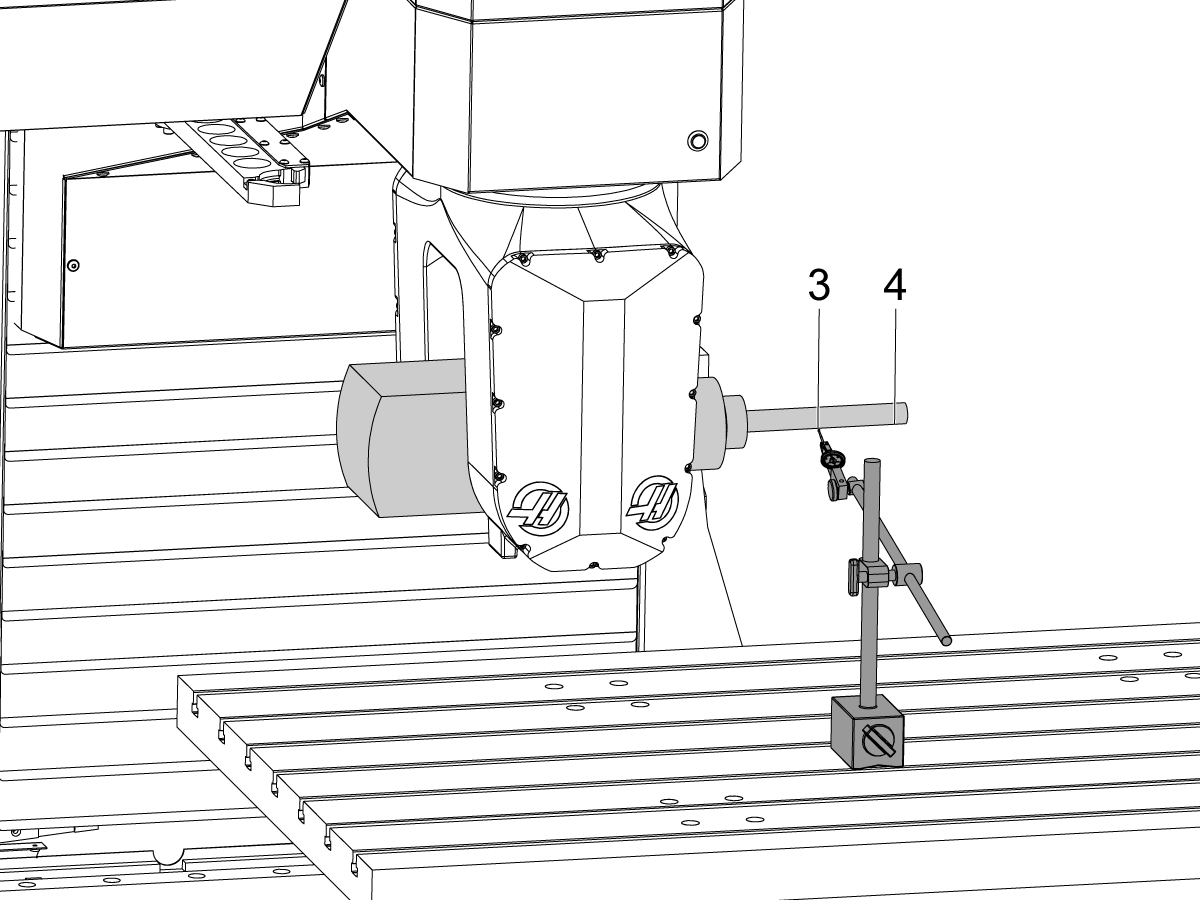
Note: The B-Axis Tool Change Offset must be set before moving on to sweeping positions [3] and [4].

2

Set the indicator to zero at position [3] and sweep a 10" diameter circle to position [4] and record the measurement, this is NTE 0.002".

3

Repeat the same steps above with the C-Axis at C = +90.

Set the indicator to zero at position [1] and sweep to position [2]. 

Record the measurement.

Set the indicator to zero at position [3]. Sweep to position [4] and record the measurement.

 Note: This check is to make sure the C-Axis is parallel to Z-Axis. You should see the same error when C = 0 and when C = +90. Any additional error is from the C-Axis parallel to Z-Axis step.

C-Axis Runout

1

Home the B & C-Axis and place the indicator on the side face of the test arbor.

Find the high spot on the test bar by jogging the Y-Axis. Once the indicator is on the high spot jog the indicator up and down the test bar and adjust the B-Axis so that the error on the indicator is no more than 0.0001".

2

Place an indicator on the front of the test bar 4 inches away from the spindle face. Find the high spot on the test bar by jogging the indicator along the X-Axis.

 Note: Hold the test bar when jogging the C-Axis. 

Zero the indicator on the high spot and rotate the C- Axis +180/-180 degree's. Record the error at the following positions: C = +90, C = +180/-180, C = -90.

The error between C = 0 and C = +180/-180 is NTE 0.005" TIR. 

The error between C = -90 and C = +90 is NTE 0.005" TIR.

 Note: You will not be able to fully rotate 360 degrees in one direction as the head has +245 to -245 travel limits. 

Make a note of the C-Axis positions where the runout was the highest as this will be needed to make the adjustment.

Spindle Centerline and B-axis Intersection

1

Home the B and C-Axis.

In MDI command the B-Axis to -90°.

Place an indicator on the front face of the test bar at the end of the bar [1] on the high spot. Zero the indicator at this location.

Jog the Z-Axis up so the test bar clears the table and command B = +90°. Jog the table in the Z and X direction to move the indicator to position [2] on the front face of the test bar at the end of the bar on the high spot. Adjust the C-Axis so that the error on the indicator is the same between positions [1] and [2]. This should not exceed 0.0005".

 Note: Do not move the Y-Axis during this step.

2

Place the indicator on the bottom face [1] of the test bar and sweep the whole travel. Make sure this is straight, if not, adjust the B-Axis until it is. 

On the operators page, set the Y, Z, and B-Axis to zero. 

3

 Note: It is recommended to use a dual dial test indicator.

Rotate the B-Axis 180 degrees to B = -90 and jog the table to set the indicator on the bottom side of the test bar. 

It is recommended to not move the Y-Axis and only the X and Z. Jog the Z down to the zero position on the operators page. Sweep the bottom length of the test bar to make sure the error reads the same across the test bar. If it does not, adjust the B-Axis until it does. DO NOT MOVE THE Z-AXIS while making the adjustments, only the B-Axis. Divide the error by two. This is NTE 0.002".

If error exceeds tolerance contact Haas Service.

Recently Viewed Items

You Have No Recently Viewed Items Yet

Feedback
Haas Logo

Haas Delivered Price

This price includes shipping cost, export and import duties, insurance, and any other expenses incurred during shipping to a location in France agreed with you as a buyer. No other mandatory costs can be added to the delivery of a Haas CNC Product.

KEEP UP WITH THE LATEST HAAS TIPS AND TECHNOLOGY...

Sign up now!   

HAAS TOOLING ACCEPTS THE FOLLOWING:

  • Service & Support
  • Owners
  • Request Service
  • Operator Manuals
  • Haas Parts
  • Rotary Repair Request
  • Pre-Install Guides
  • Shopping Tools
  • Build & Price a New Haas
  • Available Inventory
  • The Haas Price List
  • CNCA Financing
  • About Haas
  • Accessibility Statement
  • DNSH Statement
  • Export Compliance
  • Careers
  • Certifications & Safety
  • Contact Us
  • History
  • Terms & Conditions
  • Haas Tooling Terms & Conditions
  • Privacy
  • Warranty
  • Haas Community
  • Haas Certification Program
  • Haas Motorsports
  • Gene Haas Foundation
  • Haas Technical Education Community
  • Events
  • Join the Conversation
  • Facebook
  • X
  • Flickr
  • YouTube
  • LinkedIn
  • Instagram
  • TikTok
© 2026 Haas Automation, Inc – CNC Machine Tools
This site is protected by reCAPTCHA and the Google Privacy Policy and Terms of Service apply.

2800 Sturgis Rd., Oxnard, CA 93030
Toll Free: (888) 817-4446 / Fax: 805-278-8554