My Haas Welcome,
!
Haas Tooling MyHaas/HaasConnect Sign In Register Haas Tooling MyHaas/HaasConnect Sign Out Welcome, My Machines Latest Activity My Quotes My Account My Users Sign Out
Find Your Distributor
  1. Select Language
    1. English
  • machines Main Menu
    • Vertical Mills
      Vertical Mills
      Vertical Mills View All
      • Vertical Mills
      • VF Series
      • Universal Machines
      • VR Series
      • VP-5 Prismatic
      • Pallet-Changing VMCs
      • Mini Mills
      • Mold Machines
      • High-Speed Drill Centers
      • Drill/Tap/ Mill Series
      • Toolroom Mills
      • Pocket Mill
      • Compact Mills
      • Gantry Series
      • SR Sheet Routers
      • Extra-Large VMC
      • Double-Column Mills
      • 3+2 Positioning Machines
    • Multi-Axis Solutions
      Multi-Axis Solutions
      Multi-Axis Solutions View All
      • Multi-Axis Solutions
      • Y-Axis Lathes
      • 5-Axis Mills
    • Lathes
      Lathes
      Lathes View All
      • Lathes
      • ST Series
      • Dual-Spindle
      • Box Way Series
      • Toolroom Lathes
      • Chucker Lathe
      • Haas Bar Feeders
    • Horizontal Mills
      Horizontal Mills
      Horizontal Mills View All
      • Horizontal Mills
      • 50-Taper
      • 40-Taper
    • Rotaries & Indexers
      Rotaries & Indexers
      Rotaries & Indexers View All
      • Rotaries & Indexers
      • Rotary Tables
      • Indexers
      • 5-Axis Rotaries
      • Extra-Large Rotaries
    • Special Series
      Special Series
      Special Series View All
      • Special Series
      • EU_Series_Redirect
    • Automation Systems
      Automation Systems
      Automation Systems View All
      • Automation Systems
      • Mill Automation
      • Lathe Automation
      • Automatic Parts Loaders
      • Automation Models
    • Desktop Machines
      Desktop Machines
      Desktop Machines View All
      • Desktop Machines
      • Desktop Mill
      • Desktop Lathe
      • Control Simulator, Standard
      • Control Simulator, Premium
    • Shop Equipment
      Shop Equipment
      Shop Equipment View All
      • Shop Equipment
      • Knee Mill
      • Haas Manual Lathes
      • Haas Saws
    • Fabrication Machines
      Fabrication Machines
      Fabrication Machines View All
      • Fabrication Machines
      • Laser Cutting Machines
      • CNC Press Brakes
    • QUICK LINKS Special Series  Special Series 
      EU SERIES EU SERIES BUILD & PRICE | PRICE LIST BUILD & PRICE | PRICE LIST In-Stock Machines In-Stock Machines WHAT’S NEW WHAT’S NEW YOUR FIRST CNC YOUR FIRST CNC
      SHOPPING TOOLS
      • Build & Price a Haas
      • Price List
      • Available Inventory
      • CNCA Financing
      WANT TO TALK TO SOMEONE?

      A Haas Factory Outlet (HFO) can answer your questions, and walk you through your best options.

      CONTACT YOUR DISTRIBUTOR >
  • Options Main Menu
    • The Haas Control Value Option Packages
      Value Option Packages
      Value Option Packages View All
      • Value Option Packages
    • Product Image Spindles
      Spindles
      Spindles View All
      • Spindles
    • Product Image Tool Changers
      Tool Changers
      Tool Changers View All
      • Tool Changers
    • Product Image 4th- | 5th-Axis
      4th- | 5th-Axis
      4th- | 5th-Axis View All
      • 4th- | 5th-Axis
    • Product Image Turrets & Live Tooling
      Turrets & Live Tooling
      Turrets & Live Tooling View All
      • Turrets & Live Tooling
    • Product Image Probing
      Probing
      Probing View All
      • Probing
    • Haas Chip & Coolant Management Chip & Coolant Management
      Chip & Coolant Management
      Chip & Coolant Management View All
      • Chip & Coolant Management
    • The Haas Control The Haas Control
      The Haas Control
      The Haas Control View All
      • The Haas Control
    • Product Image Product Options
      Product Options
      Product Options View All
      • Product Options
    • Product Image Tooling & Fixturing
      Tooling & Fixturing
      Tooling & Fixturing View All
      • Tooling & Fixturing
    • Product Image Workholding
      Workholding
      Workholding View All
      • Workholding
    • Product Image 5-Axis Solutions
      5-Axis Solutions
      5-Axis Solutions View All
      • 5-Axis Solutions
      • 5 Easy Steps to 5-Axis
    • QUICK LINKS Special Series  Special Series 
      EU SERIES EU SERIES BUILD & PRICE | PRICE LIST BUILD & PRICE | PRICE LIST In-Stock Machines In-Stock Machines WHAT’S NEW WHAT’S NEW YOUR FIRST CNC YOUR FIRST CNC
      SHOPPING TOOLS
      • Build & Price a Haas
      • Price List
      • Available Inventory
      • CNCA Financing
      WANT TO TALK TO SOMEONE?

      A Haas Factory Outlet (HFO) can answer your questions, and walk you through your best options.

      CONTACT YOUR DISTRIBUTOR >
  • Why Haas Main Menu
      Discover the Haas Difference
    • Why Haas
    • MyHaas
    • Education Community
    • Industry 4.0
    • Haas Certification
    • Customer Testimonials
  • Service Main Menu
      Welcome to Haas Service
      SERVICE HOME Operator’s Manuals How-To Procedures Troubleshooting Guides Preventive Maintenance Haas Parts Haas Tooling Videos
  • Videos Main Menu
  • Main Menu
    • View All
    • View All
    • View All
    • View All
      • HTEC Curriculum Support
      • Haas Value Option Packages (VOP) Journey
    • View All
      • Haas 10 kg Cobot Package
      • Cobot Kits
      • DC-1 Drill Center
      • CNC Sales News
      • Do More With Your Haas
    • View All
    • View All
      • contact-us-test
      • 4 - AUTOMATION SYSTEMS
      • Carousel-V2
      • expert test
      • Demo_Day_Trident-test
      • Link Test
      • image-sale-tag-test
      • article-list-test
      • Haas 25 kg Robot Package
      • test-algolia-page
    • View All
    • View All
    • View All
    • View All
      • calc-test
    • View All
    • QUICK LINKS Special Series  Special Series 
      EU SERIES EU SERIES BUILD & PRICE | PRICE LIST BUILD & PRICE | PRICE LIST In-Stock Machines In-Stock Machines WHAT’S NEW WHAT’S NEW YOUR FIRST CNC YOUR FIRST CNC
      SHOPPING TOOLS
      • Build & Price a Haas
      • Price List
      • Available Inventory
      • CNCA Financing
      WANT TO TALK TO SOMEONE?

      A Haas Factory Outlet (HFO) can answer your questions, and walk you through your best options.

      CONTACT YOUR DISTRIBUTOR >
  • Haas Tooling Main Menu
  • Haas Service Parts Main Menu

My Haas Welcome,
!
Haas Tooling MyHaas/HaasConnect Sign In Register Haas Tooling MyHaas/HaasConnect Sign Out Welcome, My Machines Latest Activity My Quotes My Account My Users Sign Out
Find Your Distributor
  1. Select Language
    1. English
×

Search Results

Web Pages

Images

    • <
    • 1
    • >

UMC-400 Rotary Switch Relocation - AD0921

Service Home How To Procedures UMC-400 Rotary Switch Relocation - AD0921

UMC-400 Rotary Switch Relocation - AD0921

- Jump to Section - 1. Introduction 2. Relocation Kit Preparation (5 steps) 3. Parts Removal (14 steps) 4. Service Kit Installation (9 steps) 5. Update Configuration Parameters Before Verification 6. Verification (1 step) Back to Top
Recently Updated Last updated: 02/24/2026

UMC-400 Rotary Switch Relocation


AD0921

Revision A - 01/2026

Introduction

The purpose of this procedure is to relocate the air line connections, solenoids and pressure switches out of the rotary enclosure area for easier serviceability.

This procedure applies to the following Kit:

  • 93-5854 PRESS SW/SOLENOID RELOCATION KIT UMC400


Relocation Kit Preparation

1

Move the spindle head out of the way.

Jog the Y axis all the way forward and to the right side of the machine for easier access to the rotary.

Jog the B axis to 90 degrees to gain access to the underside of the rotary.


2

Power down the machine.

Turn [OFF] power in the control cabinet (make sure all lights are off and lock it out).

Turn off Air in the lube cabinet and release the pressure in the machine.


3

Service Tip: If your machine has a Zero Point Kit installed, you must disconnect the airlines before unscrewing the cover plate.

Unscrew (4) SHCS 1/4-20 x 3/4 from black cover plate[1] and remove.

Disconnect air lines [2].

4

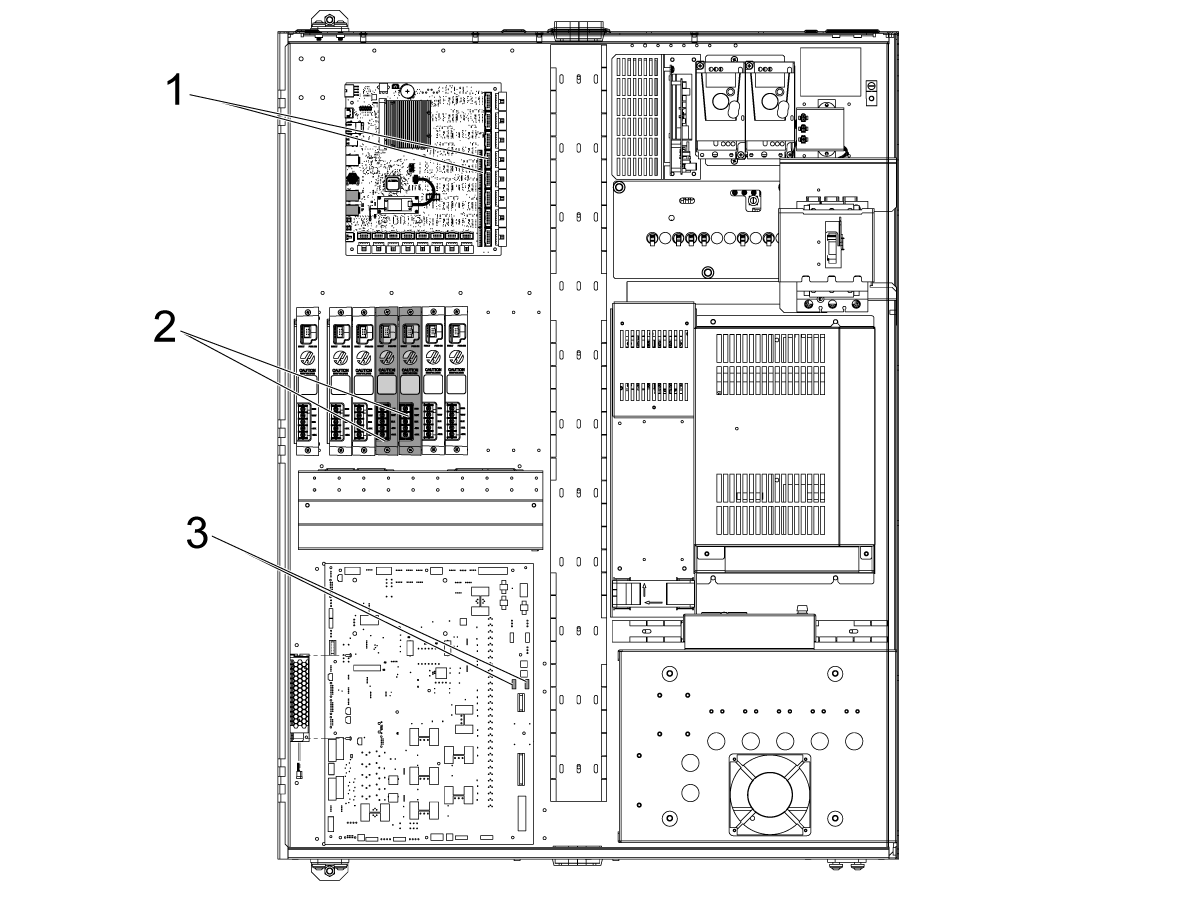
Unplug encoder switches located in P4 and P5 on the mocon [1].

Unscrew and disconnect the power amplifiers from the 4th and 5th axis power box [2]. Read the decal below the power supplies. Always verify the wires according to the markings shown below each box. 

Unplug solenoid cables P16 and P17 from the I/O board [3].


5

Remove the (4) FBHCS 1/4-20 x 1/2 from the underside of the wire housing box [1] to detach it from the control cabinet in order to remove cables and pull them through. 

Parts Removal

1

Remove two back panels of the machine to reveal access to the rotary enclosure.

Remove front box cover [1]. (10) FBHCS 1/4-20 x 1/2 on the front and bottom face of the box.  


2

Mark all air lines and disconnect [2].

Disconnect steel braided aux air lines [3]. 

Disconnect 5th axis rotary cable connections [4].

3

Remove (5) FBHCS 1/4-20 x 1/2 and completely remove box from the machine [5].

Service Tip: In order to remove this box completely you may need to remove the TRT back cover panel as shown in step 4 to reach behind and unplug further connections preventing the removal of the box. 

Note: This part of the procedure can be done in numerous ways. 

4

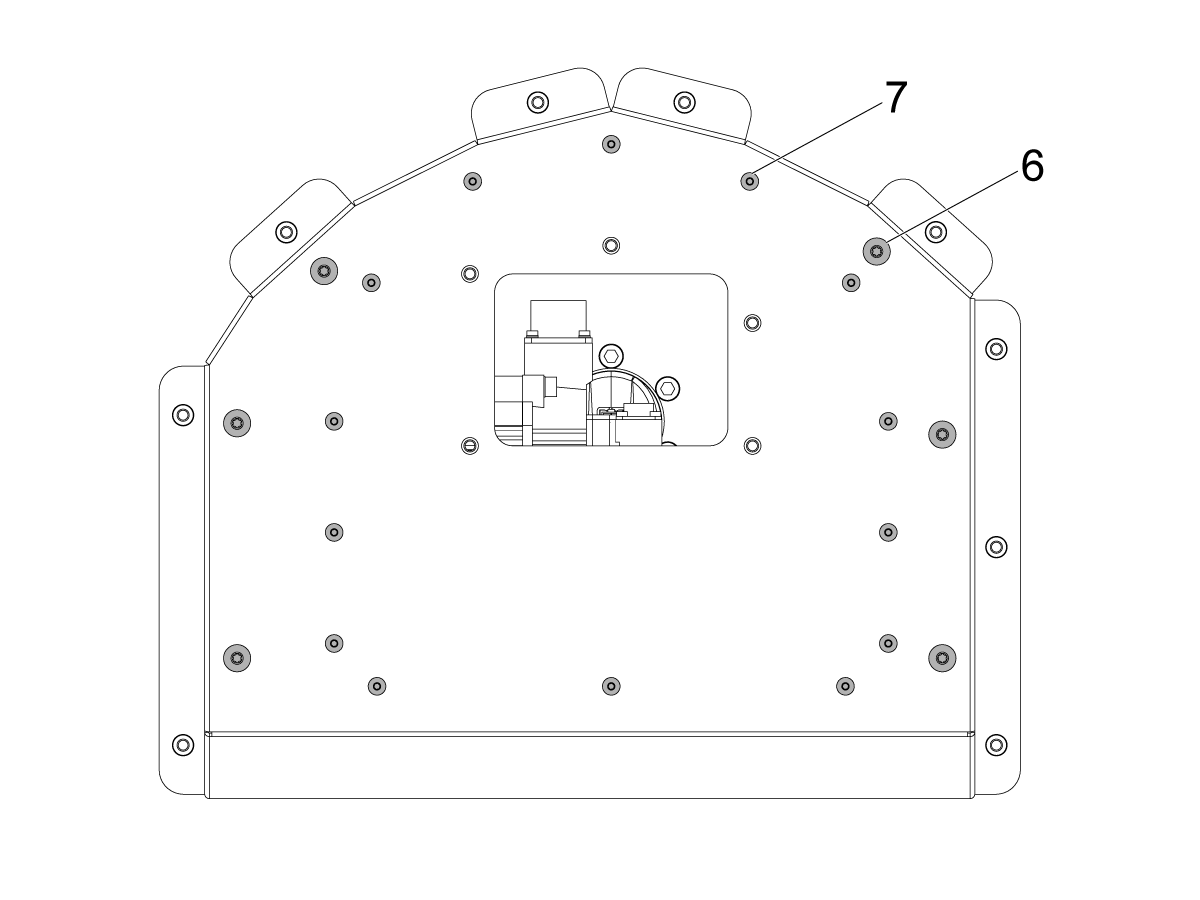
Remove TRT back cover panel (14) 10-32 BHCS [7] & (6) 1/4-20 BHCS [6].

Once the back cover is unbolted, disconnect motor power, encoders, and home switch.


5

Unplug pressure switches [8].

Unscrew (2) 1/4-20 x1/2 screws and remove solenoid assembly plate from inside the rotary [9].

Service Kit Installation

1

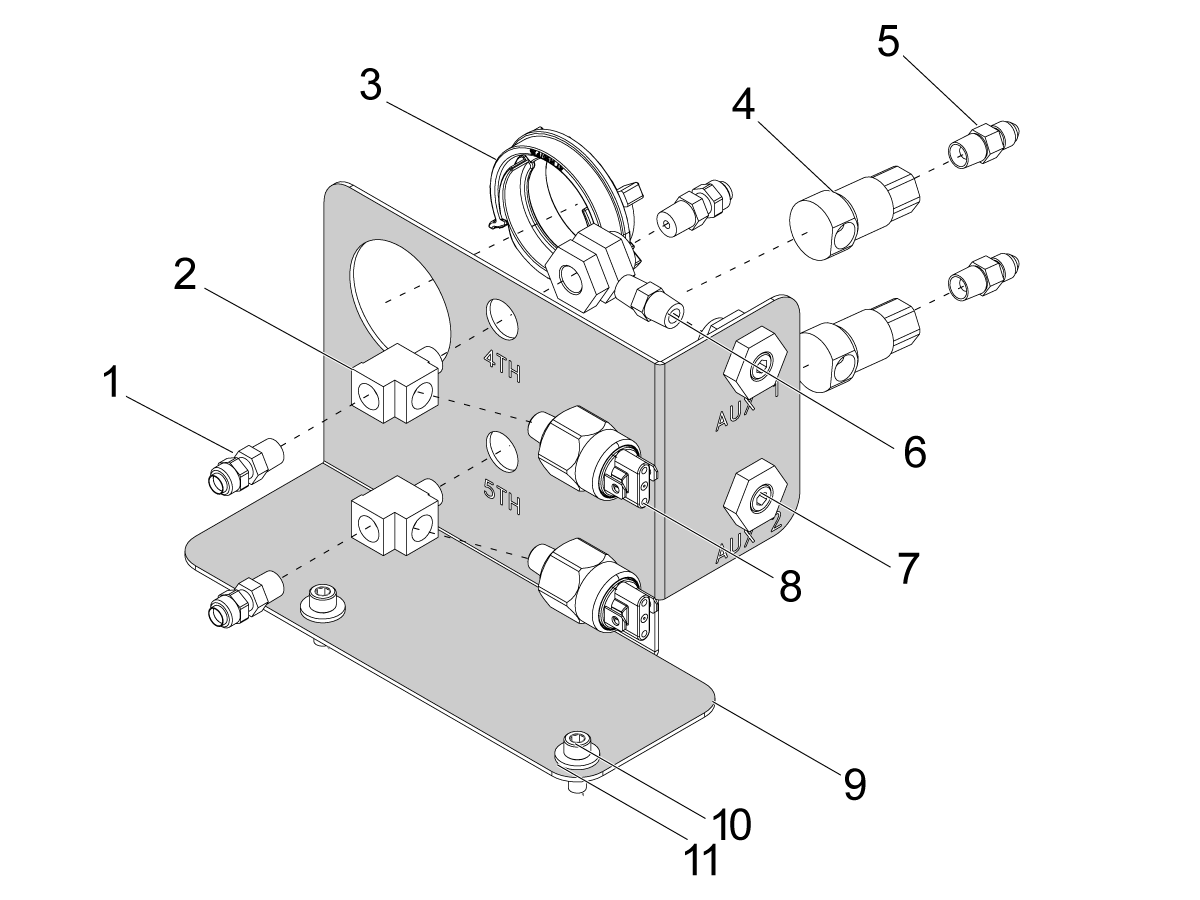
Assemble bracket as shown.

[1] 58-16706 - FITG POLY1/4F NPT1/8M STR BRASS

[2] 58-3002 - FITG GARDEN 3/4 M X 1-11 BSPT M 90

[3] 79-0036 - SPLIT CONDUIT PANEL CONNECTOR P36

[4] 58-0959 - FITG 1/8-27NPTF 1/8-27NPTF 90 SWIVEL

[5] 58-3082 - FITG JIC3M NPT1/8M STR STL

[6] 58-16732 - NIPPLE 1/8 NPT X 1 HEX BRASS

[7] 58-2021 - FITG NPT1/8 X DIA .625 X .96 BKHD BRASS

[8] 53-0020A - PRESSURE SWITCH 4PSI NO ROTARY

[9] 25-17646 - BRKT PRESS SWITCH Y-AXIS RT UMC-400

[10] 40-2000 - SHCS 1/4-20 X 5/8 ZINC PLATED

[11] 45-0040 - WASHER FLAT SAE 1/4 ZINC PLATED


2

Install solenoid assembly in the lube cabinet using 58-1521 FITG COMP [1].

3

Plug brake cable 33-0529 into the 4th and 5th axis connections from the backside of the connector bracket, then plug the solenoids into the front side of 33-0529. Plug the top solenoid(blue air line) into 4th axis [2], and plug bottom solenoid(orange air line) into 5th axis [1].

Route both the brake cable and airlines through the top of the lube cabinet [3].

4

Route rotary brake cable and air lines from lube cabinet in 78-1994 SPIRALLY CUT CBL WRAP 3/4 PANDUIT [1]. Route cables to the control cabinet. 


5

Install the new sheetmetal cover (14) 10-32 BHCS [2] & (6) 1/4-20 BHCS [1].

6

Plug in 4th axis Motor Power cable [1].

Plug in encoder cable [2].

7

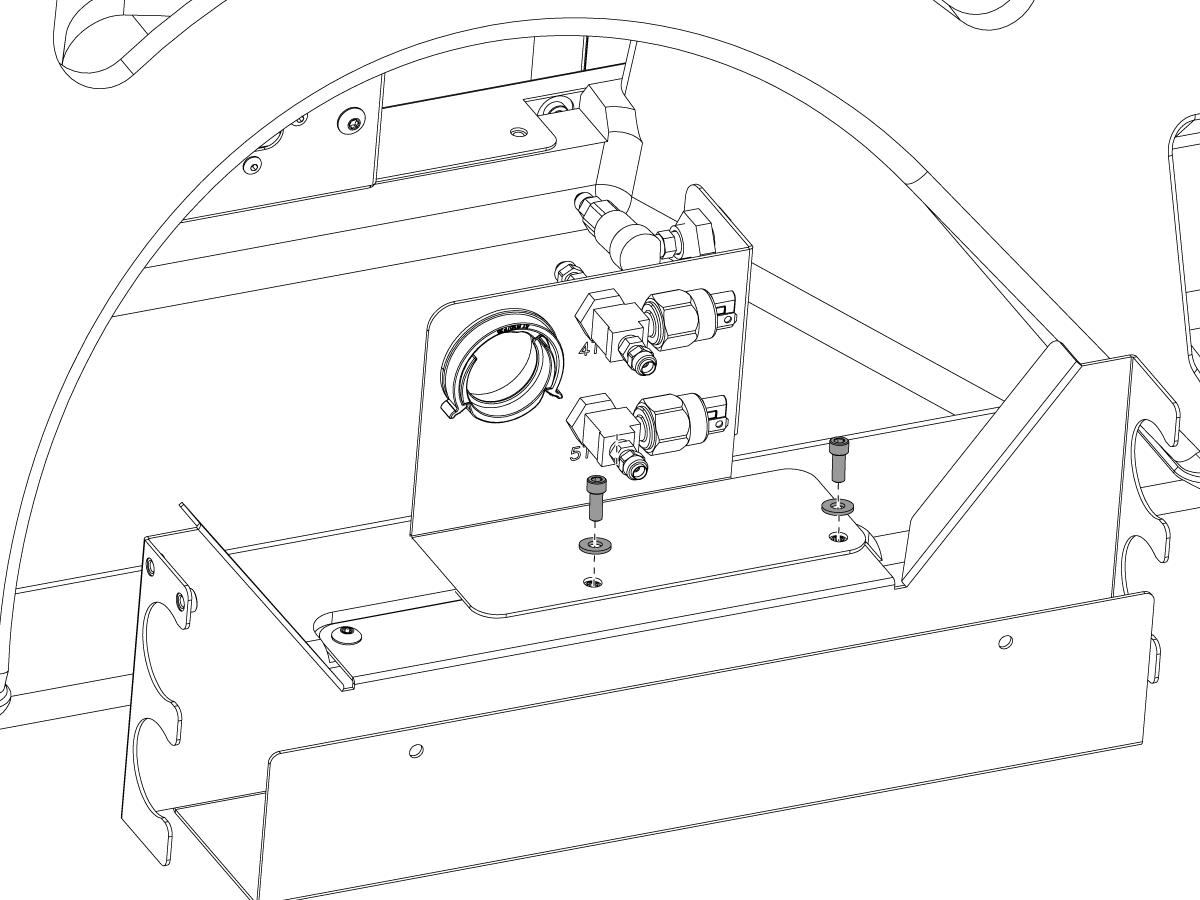
Remove the two farthest right FBHCS 1/4-20 x 1/2 and Install the bracket using (2) SHCS 1/4-20 x 5/8 as shown. 

8

Route 4th and 5th axis motor power cables, encoder, and home switch cables into the double split congregated tubing 79-0029 [1]. Route the congregated tubing down to the wire housing box on the underside of the control cabinet so the cables can be plugged into the same pins shown in steps 4 & 5 of the kit preparation.

Connect the air lines coming from the motor to the bracket using fittings (2)     58-2746 and (4) 58-16706 [2].

Connect the steel braided air lines to the bracket [3].

Plug in the pressure switches [4]. 4th axis motor plugs into the top solenoid, 5th axis motor plugs into the bottom solenoid. 

Connect blue and orange airlines that connect to the solenoids in the lube cabinet [5].

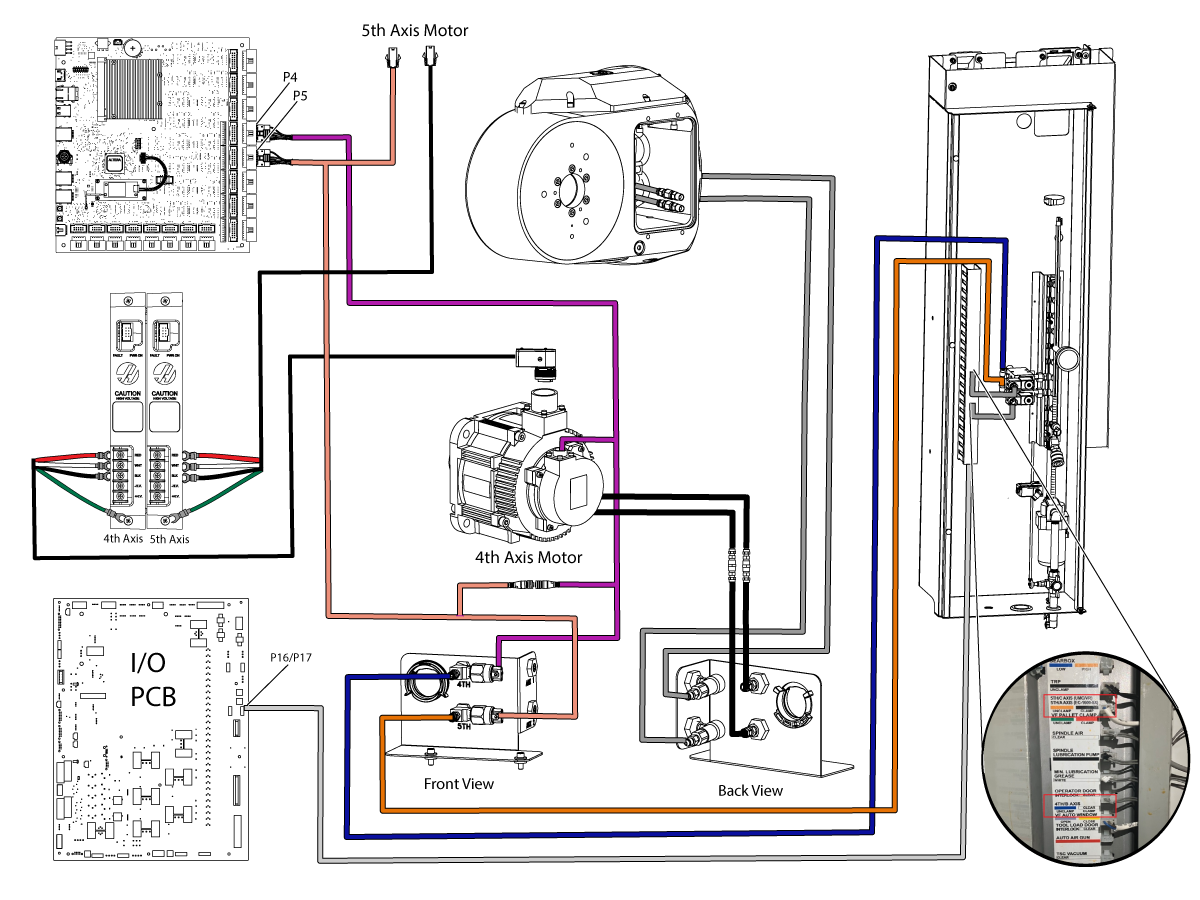
Connect the home switch and remaining molex connectors. Use the schematic below to verify locations. 

Service Tip: If your machine has a Zero Point Kit installed, you must disconnect the steel braided auxiliary lines that are connected to the original box and reconnect them to the new bracket. These airlines are connected to solenoids in the lube cabinet. 


9

Below is a full schematic showing connections in order to complete kit installation.  

Update Configuration Parameters Before Verification

Download the latest Rotary files from HBC.HAASCNC.COM and select UMC400-B-P20 and UMC400-C-P20.

Note: Only HAAS Certified Service Technicians can log into this website.

Refer to Update Rotary Configuration Files - NGC procedure.

Verification

1

Verify that the system is working properly by actuating the B & C axis brake several times. 

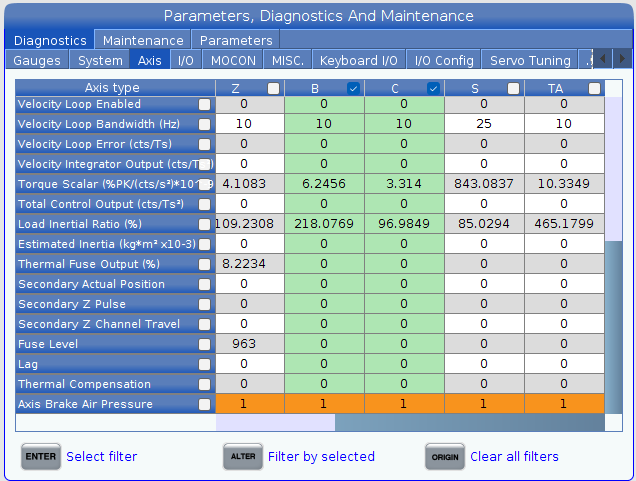
Go into Diagnostics -> Axis, then scroll over to the B & C Axis and all the way down to Axis Brake Air Pressure, to confirm that the pressure switch bit is changing. 

Recently Viewed Items

You Have No Recently Viewed Items Yet

Feedback
Haas Logo

Haas Delivered Price

This price includes shipping cost, export and import duties, insurance, and any other expenses incurred during shipping to a location in France agreed with you as a buyer. No other mandatory costs can be added to the delivery of a Haas CNC Product.

KEEP UP WITH THE LATEST HAAS TIPS AND TECHNOLOGY...

Sign up now!   

HAAS TOOLING ACCEPTS THE FOLLOWING:

  • Service & Support
  • Owners
  • Request Service
  • Operator Manuals
  • Haas Parts
  • Rotary Repair Request
  • Pre-Install Guides
  • Shopping Tools
  • Build & Price a New Haas
  • Available Inventory
  • The Haas Price List
  • CNCA Financing
  • About Haas
  • Accessibility Statement
  • DNSH Statement
  • Export Compliance
  • Careers
  • Certifications & Safety
  • Contact Us
  • History
  • Terms & Conditions
  • Haas Tooling Terms & Conditions
  • Privacy
  • Warranty
  • Haas Community
  • Haas Certification Program
  • Haas Motorsports
  • Gene Haas Foundation
  • Haas Technical Education Community
  • Events
  • Join the Conversation
  • Facebook
  • X
  • Flickr
  • YouTube
  • LinkedIn
  • Instagram
  • TikTok
© 2026 Haas Automation, Inc – CNC Machine Tools
This site is protected by reCAPTCHA and the Google Privacy Policy and Terms of Service apply.

2800 Sturgis Rd., Oxnard, CA 93030
Toll Free: (888) 817-4446 / Fax: 805-278-8554