My Haas Welcome,
!
Haas Tooling MyHaas/HaasConnect Sign In Register Haas Tooling MyHaas/HaasConnect Sign Out Welcome, My Machines Latest Activity My Quotes My Account My Users Sign Out
Find Your Distributor
  1. Select Language
    1. English
    2. Українська
  • machines Main Menu
    • Vertical Mills
      Vertical Mills
      Vertical Mills View All
      • Vertical Mills
      • VF Series
      • Universal Machines
      • VR Series
      • VP-5 Prismatic
      • Pallet-Changing VMCs
      • Mini Mills
      • Mold Machines
      • High-Speed Drill Centers
      • Drill/Tap/ Mill Series
      • Toolroom Mills
      • Pocket Mill
      • Compact Mills
      • Gantry Series
      • SR Sheet Routers
      • Extra-Large VMC
      • Double-Column Mills
      • 3+2 Positioning Machines
    • Multi-Axis Solutions
      Multi-Axis Solutions
      Multi-Axis Solutions View All
      • Multi-Axis Solutions
      • Y-Axis Lathes
      • 5-Axis Mills
    • Lathes
      Lathes
      Lathes View All
      • Lathes
      • ST Series
      • Dual-Spindle
      • Box Way Series
      • Toolroom Lathes
      • Chucker Lathe
      • Haas Bar Feeders
    • Horizontal Mills
      Horizontal Mills
      Horizontal Mills View All
      • Horizontal Mills
      • 50-Taper
      • 40-Taper
    • Rotaries & Indexers
      Rotaries & Indexers
      Rotaries & Indexers View All
      • Rotaries & Indexers
      • Rotary Tables
      • Indexers
      • 5-Axis Rotaries
      • Extra-Large Rotaries
    • Special Series
      Special Series
      Special Series View All
      • Special Series
      • EU_Series_Redirect
    • Automation Systems
      Automation Systems
      Automation Systems View All
      • Automation Systems
      • Mill Automation
      • Lathe Automation
      • Automatic Parts Loaders
      • Automation Models
    • Desktop Machines
      Desktop Machines
      Desktop Machines View All
      • Desktop Machines
      • Desktop Mill
      • Desktop Lathe
      • Control Simulator, Standard
      • Control Simulator, Premium
    • Shop Equipment
      Shop Equipment
      Shop Equipment View All
      • Shop Equipment
      • Knee Mill
      • Haas Manual Lathes
      • Haas Saws
    • Fabrication Machines
      Fabrication Machines
      Fabrication Machines View All
      • Fabrication Machines
      • Laser Cutting Machines
      • CNC Press Brakes
    • QUICK LINKS Special Series  Special Series 
      EU SERIES EU SERIES BUILD & PRICE | PRICE LIST BUILD & PRICE | PRICE LIST In-Stock Machines In-Stock Machines WHAT’S NEW WHAT’S NEW YOUR FIRST CNC YOUR FIRST CNC
      SHOPPING TOOLS
      • Build & Price a Haas
      • Price List
      • Available Inventory
      • CNCA Financing
      WANT TO TALK TO SOMEONE?

      A Haas Factory Outlet (HFO) can answer your questions, and walk you through your best options.

      CONTACT YOUR DISTRIBUTOR >
  • Options Main Menu
    • The Haas Control Value Option Packages
      Value Option Packages
      Value Option Packages View All
      • Value Option Packages
    • Product Image Spindles
      Spindles
      Spindles View All
      • Spindles
    • Product Image Tool Changers
      Tool Changers
      Tool Changers View All
      • Tool Changers
    • Product Image 4th- | 5th-Axis
      4th- | 5th-Axis
      4th- | 5th-Axis View All
      • 4th- | 5th-Axis
    • Product Image Turrets & Live Tooling
      Turrets & Live Tooling
      Turrets & Live Tooling View All
      • Turrets & Live Tooling
    • Product Image Probing
      Probing
      Probing View All
      • Probing
    • Haas Chip & Coolant Management Chip & Coolant Management
      Chip & Coolant Management
      Chip & Coolant Management View All
      • Chip & Coolant Management
    • The Haas Control The Haas Control
      The Haas Control
      The Haas Control View All
      • The Haas Control
    • Product Image Product Options
      Product Options
      Product Options View All
      • Product Options
    • Product Image Tooling & Fixturing
      Tooling & Fixturing
      Tooling & Fixturing View All
      • Tooling & Fixturing
    • Product Image Workholding
      Workholding
      Workholding View All
      • Workholding
    • Product Image 5-Axis Solutions
      5-Axis Solutions
      5-Axis Solutions View All
      • 5-Axis Solutions
      • 5 Easy Steps to 5-Axis
    • QUICK LINKS Special Series  Special Series 
      EU SERIES EU SERIES BUILD & PRICE | PRICE LIST BUILD & PRICE | PRICE LIST In-Stock Machines In-Stock Machines WHAT’S NEW WHAT’S NEW YOUR FIRST CNC YOUR FIRST CNC
      SHOPPING TOOLS
      • Build & Price a Haas
      • Price List
      • Available Inventory
      • CNCA Financing
      WANT TO TALK TO SOMEONE?

      A Haas Factory Outlet (HFO) can answer your questions, and walk you through your best options.

      CONTACT YOUR DISTRIBUTOR >
  • Why Haas Main Menu
      Discover the Haas Difference
    • Why Haas
    • MyHaas
    • Education Community
    • Industry 4.0
    • Haas Certification
    • Customer Testimonials
  • Service Main Menu
      Welcome to Haas Service
      SERVICE HOME Operator’s Manuals How-To Procedures Troubleshooting Guides Preventive Maintenance Haas Parts Haas Tooling Videos
  • Videos Main Menu
  • Main Menu
    • View All
    • View All
    • View All
    • View All
      • HTEC Curriculum Support
      • Haas Value Option Packages (VOP) Journey
    • View All
      • Haas 10 kg Cobot Package
      • Cobot Kits
      • DC-1 Drill Center
      • CNC Sales News
      • Do More With Your Haas
    • View All
    • View All
      • contact-us-test
      • 4 - AUTOMATION SYSTEMS
      • Carousel-V2
      • expert test
      • Demo_Day_Trident-test
      • Link Test
      • image-sale-tag-test
      • article-list-test
      • Haas 25 kg Robot Package
      • test-algolia-page
    • View All
    • View All
    • View All
    • View All
      • calc-test
    • View All
    • QUICK LINKS Special Series  Special Series 
      EU SERIES EU SERIES BUILD & PRICE | PRICE LIST BUILD & PRICE | PRICE LIST In-Stock Machines In-Stock Machines WHAT’S NEW WHAT’S NEW YOUR FIRST CNC YOUR FIRST CNC
      SHOPPING TOOLS
      • Build & Price a Haas
      • Price List
      • Available Inventory
      • CNCA Financing
      WANT TO TALK TO SOMEONE?

      A Haas Factory Outlet (HFO) can answer your questions, and walk you through your best options.

      CONTACT YOUR DISTRIBUTOR >
  • Haas Tooling Main Menu
  • Haas Service Parts Main Menu

My Haas Welcome,
!
Haas Tooling MyHaas/HaasConnect Sign In Register Haas Tooling MyHaas/HaasConnect Sign Out Welcome, My Machines Latest Activity My Quotes My Account My Users Sign Out
Find Your Distributor
  1. Select Language
    1. English
    2. Українська
×

Search Results

Web Pages

Images

    • <
    • 1
    • >

Haas Control Surge Protector - Troubleshooting Guide - TG0078

Service Home Haas Control Surge Protector - Troubleshooting Guide - TG0078
Recently Updated Last updated: 10/14/2025

Haas Control Surge Protector - Troubleshooting Guide


TG0078

Haas Control Surge Protector - Troubleshooting Guide - TG0078

- Jump to Cause - 1. Introduction 2. Haas Control Surge Protector - System Overview 3. Electrical Safety 4. Symptom Table 5. System Message & Notification 20026 SURGE PROTECTOR FAULT HAS BEEN DETECTED/REPAIRED 6. Surge Protector Fault Detected Pop-Up 7. Surge Protector Voltage Measurement 8. Electrical Diagram Back to Top

Introduction

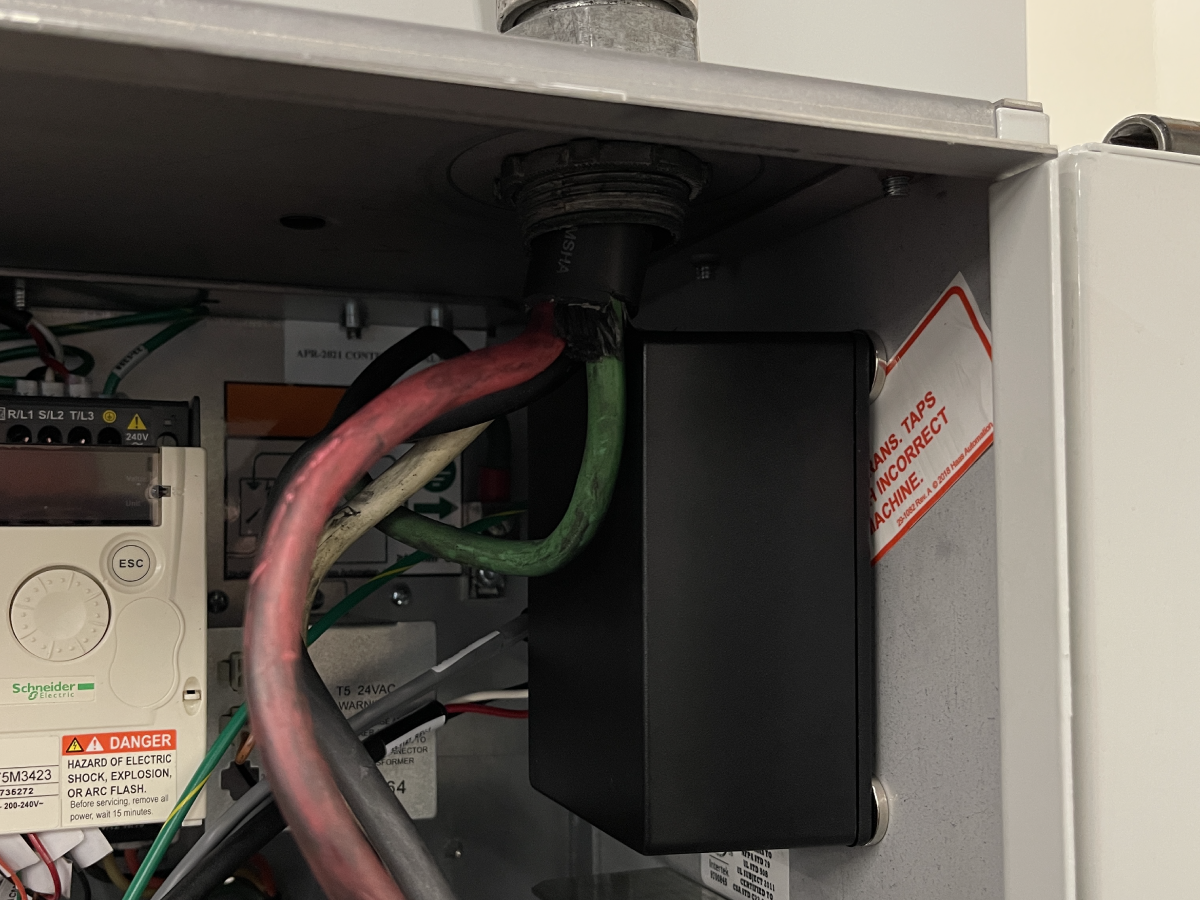
The Haas Control Surge Protector protects machines against lightning strikes and power surges.

Replacement Surge Protector Assembly:

  • 93-3709A SURGE PROTECTOR FIELD INSTALL ASSEMBLY

Machine Requirements:

  • Software Version 100.22.000.1015 or higher
  • Three Phase Machines only.
  • Not installable on Pre-Reboot UMC Machines built 06/15/2018 and later. P65 is used on the I/O PCB for cable 33-0476 for the redundant door lock.
  • Not installable on Desktop Mills or Desktop Lathes.

Haas Control Surge Protector - System Overview

The Haas Control Surge Protector has the following behavior:

  • This device uses six surge protection units. In the event of a voltage spike or transient, the surge protectors will absorb the energy and the fuse will open triggering a fault and warning. At this time, Input 27 will change from 0 to 1. 
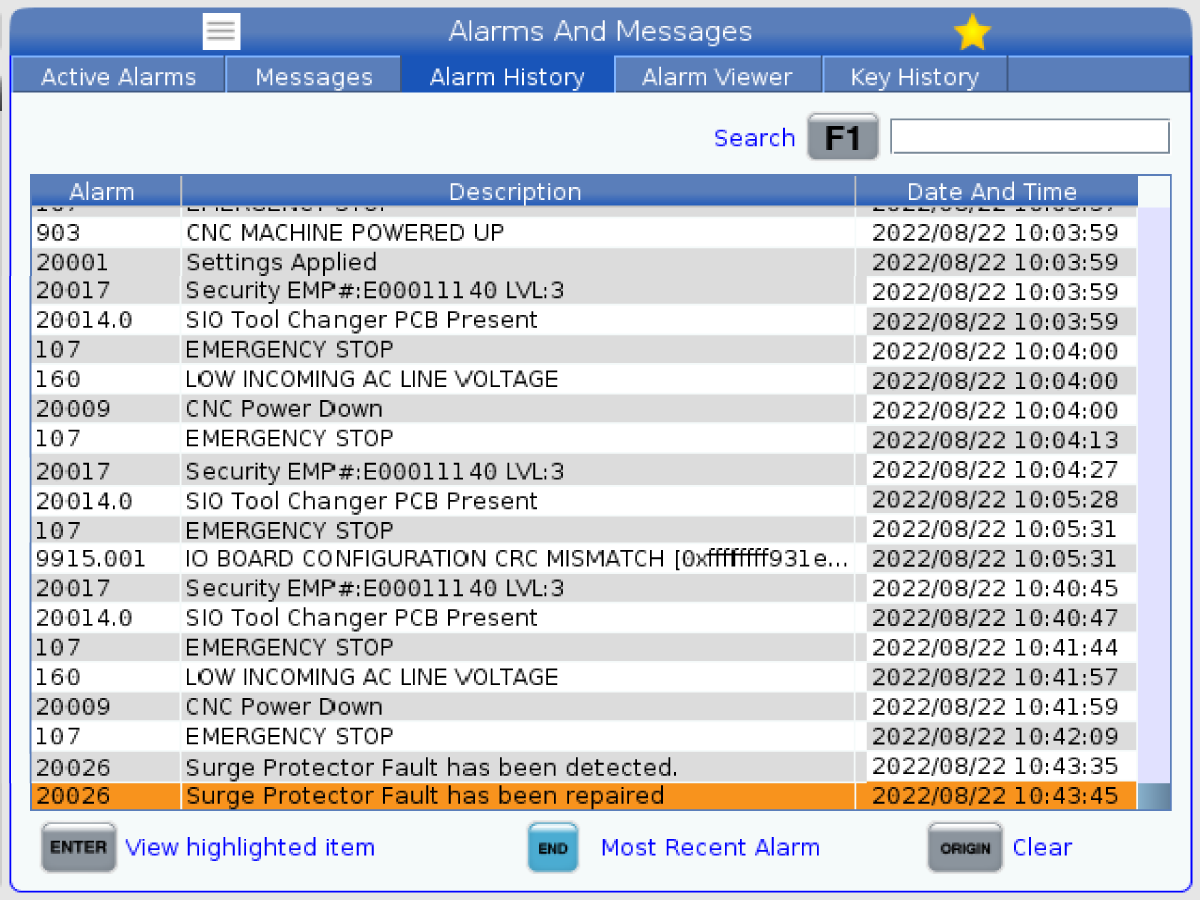
  • When Input 27 is a 1, True. The Surge Fault icon will display on the control display, the LED status light will be red, and System Message & Notification 20026 SURGE PROTECTOR FAULT HAS BEEN DETECTED is logged in the Alarm History. If Input 27 is a 0, False. The Surge Fault icon will clear, the LED status light will be green, and System Message & Notification 20026 SURGE PROTECTOR FAULT HAS BEEN REPAIRED is logged in the Alarm History.
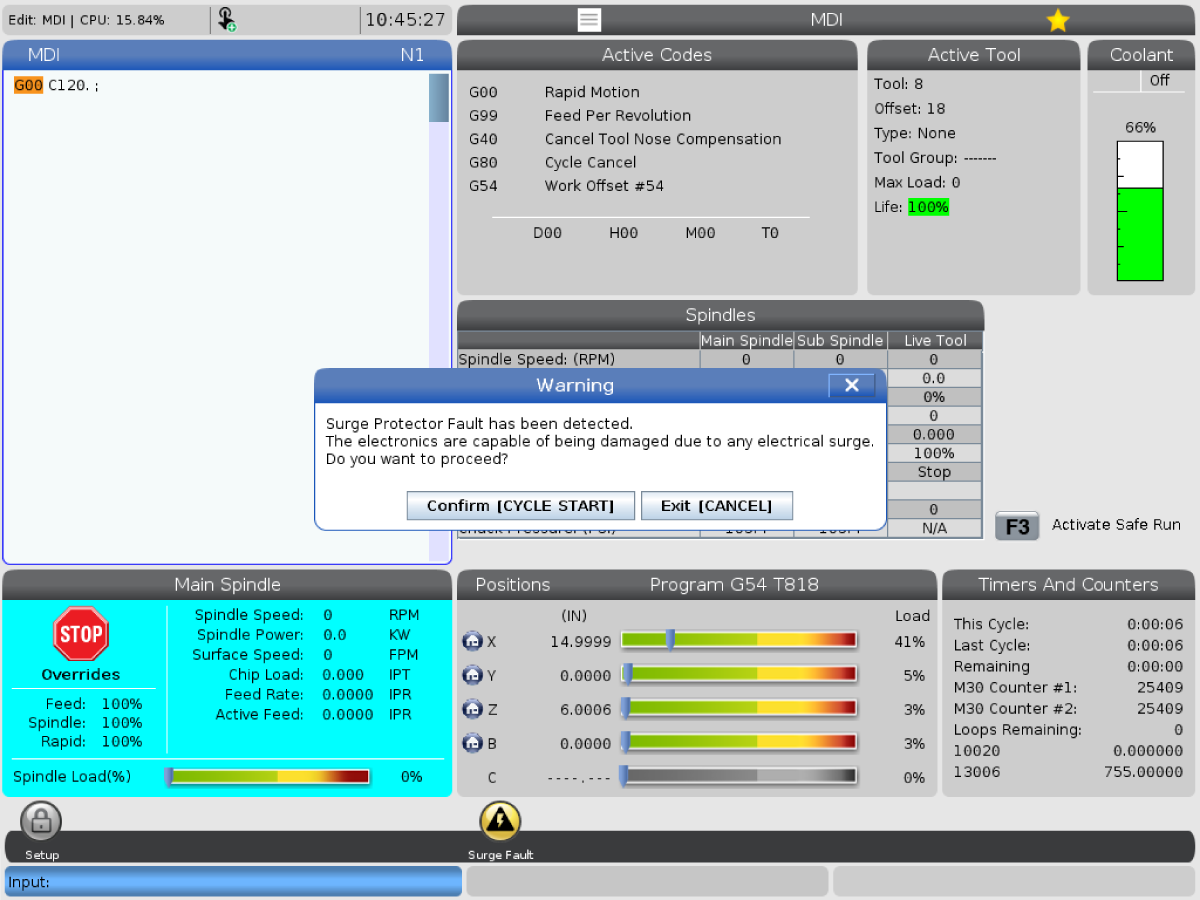
  • If Input 27 is a 1, the LED Status Light is Red, and the Surge Protector Icon is displayed. A Pop-Up will display when a program is run by pressing [CYCLE START].

Surge Protector Fault has been detected.
The electronics are capable of being damaged due to any electrical surge.
Do you want to proceed?

Press [CYCLE START] to continue or [CANCEL] to Exit.

  • Alarm 9000 is generated when Input 27 is a 1 only at power up. The alarm is resettable but if Input 27 stays a 1, the LED status light is red and the Surge Fault icon is displayed. The machine is no longer protected in the event of an electrical surge event. The machine electronics are capable of being damaged.

Electrical Safety

 DANGER: Working with the electrical services required for CNC machines is extremely hazardous and can result in serious injury or death.

Before connecting line wires to the CNC:

  • Turn off all power to the machine at the source.
  • Perform a Lockout-Tagout (LOTO) procedure to ensure the power remains off during service.
  • Verify that power has been disconnected by using an AC voltage detector on all incoming lines.

If you are uncertain about how to safely disconnect power or perform LOTO procedures:

  • Do not proceed.
  • Contact qualified personnel or obtain appropriate assistance before continuing.

Failure to follow these precautions may result in electrical shock, equipment damage, or fatal injury.

 Danger: Before beginning any work inside the control cabinet, verify that the High Voltage indicator light on the 320V Power Supply / Vector Drive has been off for a minimum of five (5) minutes. This waiting period ensures that residual voltage has dissipated and reduces the risk of electric shock.

Certain service procedures involve high-risk electrical components and may pose serious injury or fatality hazards. Technicians must not attempt any procedure unless they have a complete understanding of the steps involved and the associated risks.

If there is any uncertainty regarding a procedure, contact your Haas Factory Outlet (HFO) to arrange for a qualified service technician.

WARNING: Before preceding the following must be done.

  • All incoming power to the CNC Machine must be turned off Lockout-Tagout at the source prior to installing the surge protector.
  • The machine main circuit breaker must be in the [OFF] position.
  • Always check the incoming lines with an AC Voltage detector to make sure power has been disconnected.

Symptom Table

Symptom Possible Cause Corrective Action
Alarm 9000 Enhanced Surge Protector Fault Detected The Enhanced Surge Protector Device has detected a fault. The machine must have Software Version 100.22.000.1015 or higher. This alarm is generated at power up. Try to clear the alarm by pressing [RESET]. The device fuse takes time to stabilize, wait at least 10 seconds or more. Verify Input 27 is a 0 and the alarm clears. If Input 27 stays a 1, the LED Status Light is Red, and the alarm clears. The unit should be replaced to ensure the machine electronics are safe. Replace the Surge Protector with 93-3709A SURGE PROTECTOR FIELD INSTALL ASSEMBLY.
The machine must have Software Version 100.22.000.1015 or higher. This alarm is generated at power up. Try to clear the alarm by pressing [RESET]. The device fuse takes time to stabilize, wait at least 10 seconds or more. Verify Input 27 is a 0 and the alarm clears. If Input 27 stays a 1, the LED Status Light is Red, and the alarm does not clear. The unit should be replaced to ensure the machine electronics are safe. Replace the Surge Protector with 93-3709A SURGE PROTECTOR FIELD INSTALL ASSEMBLY.
System Message & Notification 20026 SURGE PROTECTOR FAULT HAS BEEN DETECTED/REPAIRED A Surge Protector Fault has been detected or repaired. This is an informational message only. No parts need to be replaced. This is an informational message only. No parts need to be replaced. If the System Message & Notification 20026 SURGE PROTECTOR FAULT HAS BEEN DETECTED/REPAIRED appears in the Alarm History consistently, the incoming power to the machine may need to be inspected.
The Surge Protector Icon is displayed. The Enhanced Surge Protector Device has detected a fault. Check the machine Alarm History for System Message & Notification 20026 SURGE PROTECTOR FAULT HAS BEEN DETECTED. If System Message & Notification 20026 SURGE PROTECTOR FAULT HAS BEEN REPAIRED is not generated after pressing [RESET]. Cycle Power the machine. If alarm 9000 is generated at power up. Try clearing the alarm. If the alarm clears and the LED Status Light is Red, and Input 27 is a 1. Replace the Surge Protector with 93-3709A SURGE PROTECTOR FIELD INSTALL ASSEMBLY.
Alarm 9000 ENHANCED SURGE PROTECTOR FAULT DETECTED at Power Up or the Surge Fault icon is displayed, the Status LED is Red, and Input 27 is a 1. N/A

For Machines Built before 2/2/2023:

See the Surge Protector Voltage Measurement section below.

HSG-A  02-15-2023

For Machines Built 2/2/2023 and later:

The machine must have Software Version 100.22.000.1015 or higher. This alarm is generated at power up. Try to clear the alarm by pressing [RESET]. The device fuse takes time to stabilize, wait at least 10 seconds or more. Verify Input 27 is a 0 and the alarm clears. If Input 27 stays a 1, the LED Status Light is Red, and the alarm clears. The unit should be replaced to ensure the machine electronics are safe. Replace the Surge Protector with 93-3709A SURGE PROTECTOR FIELD INSTALL ASSEMBLY.

HSG-A  02-15-2023

LED Status Light - Green
Status Ok. N/A
LED Status Light - Red The cable labeled 77-79 230V IN PSUP P11 is disconnected or the cable labeled XMFR CBL is disconnected.

Check the connections and cables.

Circuit is open due to surge voltage. Verify Input 27 is a 1 and alarm 9000 does not clear. The device circuit is open and not resettable. The unit should be replaced to ensure the machine electronics are safe. Replace the Surge Protector with 93-3709A SURGE PROTECTOR FIELD INSTALL ASSEMBLY.
LED Status Light - Off Signal cable to I/O PCB is disconnected. Check and connect the cable labeled 33-1148 SURGE FLT I/O PCB P65 to the I/O PCB at P65. 

System Message & Notification 20026 SURGE PROTECTOR FAULT HAS BEEN DETECTED/REPAIRED

If the System Message & Notification 20026 SURGE PROTECTOR FAULT HAS BEEN DETECTED/REPAIRED appears in the Alarm History consistently, the incoming power to the machine may need to be inspected by an electrician. This is an informational message only. No parts need to be replaced.

Surge Protector Fault Detected Pop-Up

If Input 27 is a 1, the LED Status Light is Red, and the Surge Protector Icon is displayed. A Pop-Up will display when a program is run by pressing [CYCLE START].

Surge Protector Fault has been detected.
The electronics are capable of being damaged due to any electrical surge.
Do you want to proceed?

Press [CYCLE START] to continue or [CANCEL] to Exit.


Surge Protector Voltage Measurement

Machines Built before 2/2/2023 may see the following issue.

Problem: Machines with the Haas Control Surge Protector may generate Alarm 9000 ENHANCED SURGE PROTECTOR FAULT DETECTED at Power Up.

Corrective Action: If the alarm clears but the Surge Fault icon is displayed, the Status LED is Red, and Input 27 is a 1.

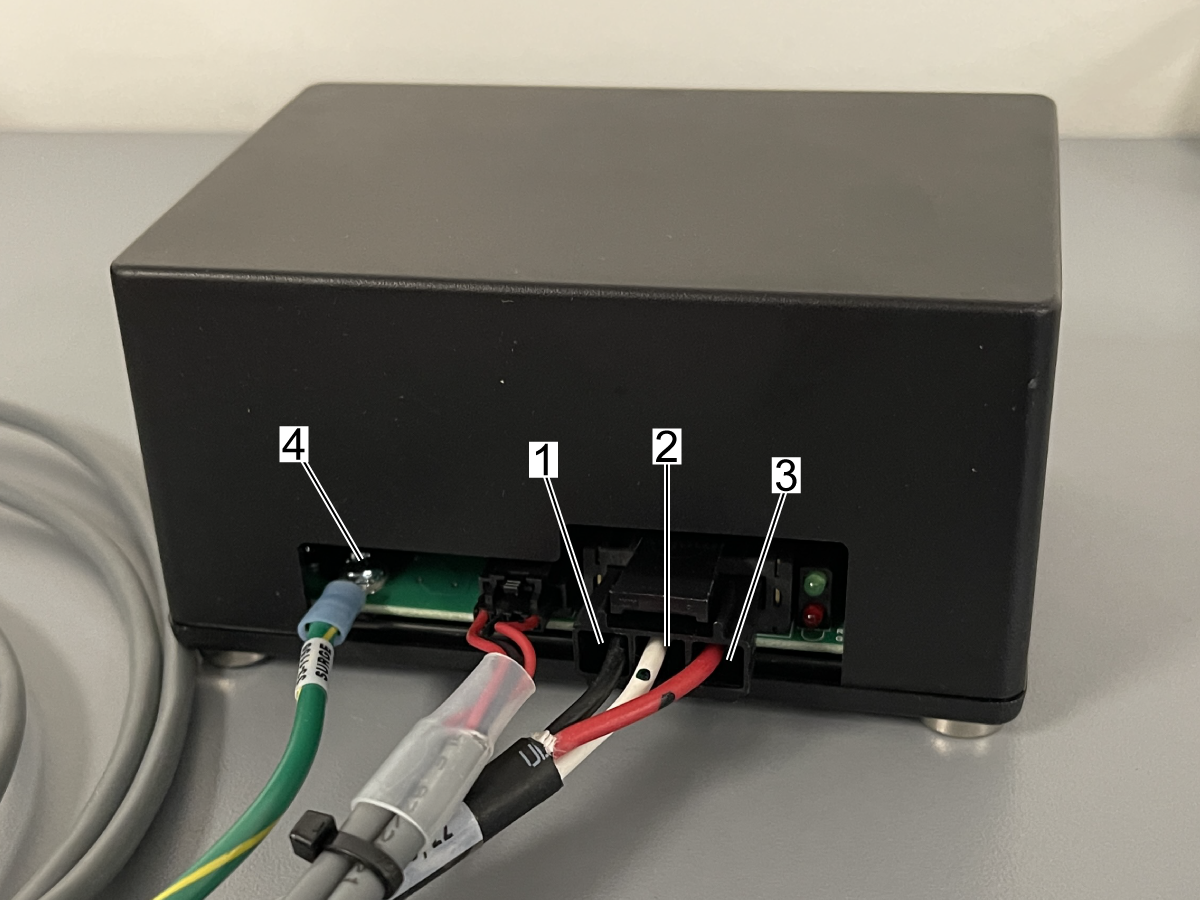
  1. Measure the voltage at connector J2 on the Surge Protector PCB. Leg to Leg (195-260VAC).
  2. Leg to Ground Cable Screw[4] (Screw where Surge Protector ground cable is connected to the PCB, Leg to Ground Cable Screw should be balanced and no more than +/- 10% of each measurement).
  3. Ground Cable Screw[4] to Chassis of Control Cabinet. (Should be 0VAC).
  • [1] to [2]
  • [2] to [3]
  • [1] to [3]
  • [1] to [4]
  • [2] to [4]
  • [3] to [4]
  • [4] to Chassis in Control Cabinet

If the voltage measurements are correct, the assembly should not be replaced. Attach the measurements and Error Report to Haas Service App. The Surge Protector monitoring can be disabled by changing Parameter 2252 to 0 or downloading and loading a new configuration file. The machine can continue operation. The machine will still be protected, but there will be not be any feedback from the machine that there has been a Surge Event.

If the Surge Protector assembly is damaged from a surge event, replace the Surge Protector Assembly with PN: 93-3709A. The Surge Protector monitoring can be enabled by loading machine configurations or changing Parameter 2252 to 1.

Electrical Diagram

Ground cable[1] labeled 33-1156 SURGE to control panel chassis. 

Cable[2] labeled 33-1148 SURGE FLT I/O PCB P65 to the I/O PCB at P65.

Cable[3] labeled 33-1148 SURGE +12V PSUP PCB P18 to the PSUP PCB at P18.

Cable[4] labeled 77-79 230V IN PSUP P11 and connect it to the cable labled 33-1167 XMFR CBL.

Cable[5] labeled 33-1167 PSUP P11 to the PSUP PCB at P11.

Recently Viewed Items

You Have No Recently Viewed Items Yet

Feedback
Haas Logo

Haas Delivered Price

This price includes shipping cost, export and import duties, insurance, and any other expenses incurred during shipping to a location in France agreed with you as a buyer. No other mandatory costs can be added to the delivery of a Haas CNC Product.

KEEP UP WITH THE LATEST HAAS TIPS AND TECHNOLOGY...

Sign up now!   

HAAS TOOLING ACCEPTS THE FOLLOWING:

  • Service & Support
  • Owners
  • Request Service
  • Operator Manuals
  • Haas Parts
  • Rotary Repair Request
  • Pre-Install Guides
  • Shopping Tools
  • Build & Price a New Haas
  • Available Inventory
  • The Haas Price List
  • CNCA Financing
  • About Haas
  • Accessibility Statement
  • DNSH Statement
  • Export Compliance
  • Careers
  • Certifications & Safety
  • Contact Us
  • History
  • Terms & Conditions
  • Haas Tooling Terms & Conditions
  • Privacy
  • Warranty
  • Haas Community
  • Haas Certification Program
  • Haas Motorsports
  • Gene Haas Foundation
  • Haas Technical Education Community
  • Events
  • Join the Conversation
  • Facebook
  • X
  • Flickr
  • YouTube
  • LinkedIn
  • Instagram
  • TikTok
© 2026 Haas Automation, Inc – CNC Machine Tools

This site is protected by reCAPTCHA and the Google Privacy Policy and Terms of Service apply.

2800 Sturgis Rd., Oxnard, CA 93030
Toll Free: (888) 817-4446 / Fax: 805-278-8554