Moj Haas Dobrodošli,
!
Haas Tooling MyHaas/HaasConnect Vpis Registrirajte Haas Tooling MyHaas/HaasConnect Izpis Dobrodošli, Moji stroji Zadnja dejavnost Moje ponudbe Moj račun Moji uporabniki Izpis
Poiščite distributerja
  1. Izberite jezik
    1. English
    2. Deutsch
    3. Español - España
    4. Español - México
    5. Français
    6. Italiano
    7. Português
    8. Český
    9. Dansk
    10. Nederlands
    11. Magyar
    12. Polski
    13. Svenska
    14. Türkçe
    15. 中文
    16. Suomi
    17. Norsk
    18. الإنجليزية
    19. български
    20. Hrvatski
    21. Ελληνικά
    22. Română
    23. Slovenský
    24. Slovenščina
    25. 한국어
    26. 日本語
    27. Українська
  • stroji Main Menu
    • Vertikalni rezkarji
      Vertikalni rezkarji
      Vertikalni rezkarji View All
      • Vertikalni rezkarji
      • VF Serija
      • Univerzalni stroji
      • Serija VF
      • VP-5 prizmatično
      • VMC z menjavo palet
      • Rezkalni stroji Mini Mills
      • Kalupni stroji
      • Visokohitrostni vrtalni centri
      • Serija Drill/Tap/Mill
      • Rezkarji Toolroom Mill
      • Pocket Mill
      • Kompaktni rezkarji
      • Serija Gantry
      • SR usmerjevalniki pločevine
      • Izjemno velik vertikalni obdelovalni center (VMC)
      • Rezkarji z dvema stebroma
    • Večosne rešitve
      Večosne rešitve
      Večosne rešitve View All
      • Večosne rešitve
      • Stružnice z Y-osjo
      • 5-osni rezkarji
    • Stružnice
      Stružnice
      Stružnice View All
      • Stružnice
      • Serija ST
      • Dvojno-vreteno
      • Serija drsnih vodil
      • Stružnice Toolroom Lathe
      • Stružnica Chucker
      • Podajalec palic Haas
      • Podajalec palic Haas V2
      • Podajalec palic Haas 12
    • Horizontalni rezkarji
      Horizontalni rezkarji
      Horizontalni rezkarji View All
      • Horizontalni rezkarji
      • 50-konusni
      • 40-konusni
    • Rotacijske mize in indekserji
      Rotacijske mize in indekserji
      Rotacijske mize in indekserji View All
      • Rotacijske mize in indekserji
      • Vrtljive mize
      • Indekserji
      • 5-osne vrtljive mize
      • Zelo velike vrtljive mize
    • Avtomatizirani sistemi
      Avtomatizirani sistemi
      Avtomatizirani sistemi View All
      • Avtomatizirani sistemi
      • Avtomatizacija rezkarja
      • Avtomatizacija stružnice
      • Avtomatske naprave za nalaganje kosov
      • Modeli avtomatizacije
    • Namizni stroji
      Namizni stroji
      Namizni stroji View All
      • Namizni stroji
      • Namizni rezkar
      • Namizna stružnica
      • Simulator krmilja, standardni
      • Simulator krmilja, Premium
    • Oprema za delavnice
      Oprema za delavnice
      Oprema za delavnice View All
      • Oprema za delavnice
      • Rezkar za koleno
      • Haas ročne stružnice
      • Žage Haas
    • Stroji za proizvodnjo
      Stroji za proizvodnjo
      Stroji za proizvodnjo View All
      • Stroji za proizvodnjo
      • Laserski rezalni stroj
      • CNC stiskalnice
    • HITRE POVEZAVE Posebna serija  Posebna serija 
      EU SERIJA EU SERIJA IZDELAVA IN CENA | CENIK IZDELAVA IN CENA | CENIK Stroji na zalogi Stroji na zalogi KAJ JE NOVEGA? KAJ JE NOVEGA? VAŠ PRVI CNC VAŠ PRVI CNC
      ORODJA ZA NAKUPOVANJE
      • Sestavi in preveri ceno Haas
      • Cenik
      • Razpoložljiv inventar
      • Financiranje CNCA
      SE ŽELITE S KOM POGOVORITI?

      Tovarniška izpostava Haas (HFO) lahko odgovori na vaša vprašanja in vam predstavi vaše najboljše možnosti.

      CONTACT YOUR DISTRIBUTOR >
  • Možnosti Main Menu
    • Product Image Vretena
      Vretena
      Vretena View All
      • Vretena
    • Product Image Menjalci orodja
      Menjalci orodja
      Menjalci orodja View All
      • Menjalci orodja
    • Product Image 4. | 5. os
      4. | 5. os
      4. | 5. os View All
      • 4. | 5. os
    • Product Image Revolverji in gnana orodja
      Revolverji in gnana orodja
      Revolverji in gnana orodja View All
      • Revolverji in gnana orodja
    • Product Image Merjenje s sondo
      Merjenje s sondo
      Merjenje s sondo View All
      • Merjenje s sondo
    • Obvladovanje odrezkov in emulzije Haas Obvladovanje odrezkov in emulzije
      Obvladovanje odrezkov in emulzije
      Obvladovanje odrezkov in emulzije View All
      • Obvladovanje odrezkov in emulzije
    • Krmilje Haas Krmilje Haas
      Krmilje Haas
      Krmilje Haas View All
      • Krmilje Haas
    • Product Image Opcije izdelka
      Opcije izdelka
      Opcije izdelka View All
      • Opcije izdelka
    • Product Image Orodje in vpenjanje
      Orodje in vpenjanje
      Orodje in vpenjanje View All
      • Orodje in vpenjanje
    • Product Image Vpenjanje obdelovanca
      Vpenjanje obdelovanca
      Vpenjanje obdelovanca View All
      • Vpenjanje obdelovanca
    • Product Image 5-osne rešitve
      5-osne rešitve
      5-osne rešitve View All
      • 5-osne rešitve
      • 5 Easy Steps to 5-Axis
    • Product Image Avtomatizacija
      Avtomatizacija
      Avtomatizacija View All
      • Avtomatizacija
    • HITRE POVEZAVE Posebna serija  Posebna serija 
      EU SERIJA EU SERIJA IZDELAVA IN CENA | CENIK IZDELAVA IN CENA | CENIK Stroji na zalogi Stroji na zalogi KAJ JE NOVEGA? KAJ JE NOVEGA? VAŠ PRVI CNC VAŠ PRVI CNC
      ORODJA ZA NAKUPOVANJE
      • Sestavi in preveri ceno Haas
      • Cenik
      • Razpoložljiv inventar
      • Financiranje CNCA
      SE ŽELITE S KOM POGOVORITI?

      Tovarniška izpostava Haas (HFO) lahko odgovori na vaša vprašanja in vam predstavi vaše najboljše možnosti.

      CONTACT YOUR DISTRIBUTOR >
  • Why Haas Main Menu
      Spoznajte Haasovo razliko
    • Zakaj Haas?
    • MyHaas
    • Skupnost za izobraževanje
    • Industrija 4.0
    • Certifikat Haas
    • Pričevanja strank
  • Servis Main Menu
      Dobrodošli v Haas Service
      DOMAČA STRAN ZA SERVIS Priročniki za operaterja Postopki z navodili Navodila za odpravljanje napak preventivno vzdrževanje Deli Haas Haas Tooling Videoposnetki
  • Videoposnetki Main Menu
Moj Haas Dobrodošli,
!
Haas Tooling MyHaas/HaasConnect Vpis Registrirajte Haas Tooling MyHaas/HaasConnect Izpis Dobrodošli, Moji stroji Zadnja dejavnost Moje ponudbe Moj račun Moji uporabniki Izpis
Poiščite distributerja
  1. Izberite jezik
    1. English
    2. Deutsch
    3. Español - España
    4. Español - México
    5. Français
    6. Italiano
    7. Português
    8. Český
    9. Dansk
    10. Nederlands
    11. Magyar
    12. Polski
    13. Svenska
    14. Türkçe
    15. 中文
    16. Suomi
    17. Norsk
    18. الإنجليزية
    19. български
    20. Hrvatski
    21. Ελληνικά
    22. Română
    23. Slovenský
    24. Slovenščina
    25. 한국어
    26. 日本語
    27. Українська
×

Iskalni rezultati

Web Pages

Images

    • <
    • 1
    • >

Mini Mill/Super Mini Mill - Installation

Servisna domača stran Kako poteka postopek Mini Mill/Super Mini Mill - Namestitev

Mini Mill/Super Mini Mill - Namestitev

- Skok na razdelek - Back to Top

3.1 MM/SMM – Namestitev

Recently Updated Last updated: 03/28/2025

Mini Mill/Super Mini Mill - Namestitev


Introduction

Ta postopek vam pove, kako namestiti stroj Mini Mill/2/EDU ali Super Mini Mill/2. Za več podatkov o namestitvi stroja Reboot Mini Mill (s ponovnim zagonom) ali Super Mini Mill glejte postopek Mini Mill/Super Mini Mill - Namestitev. 

Če želite ugotoviti, katero različico Mini Mill imate, glejte Mini Mill/Super Mini Mill - Različica stroja -  referenčni dokument za identifikacijo.

Potrebna orodja:

  • 3/4" vtičnica
  • 5/32", 1/4", 3/8" šesterokotne vtičnice
  • Zaskočka
  • 3/4", 1,5" ključ
  • Merilni trak
  • 0,0005" ali 1-mikronski testni indikator in magnetna osnova
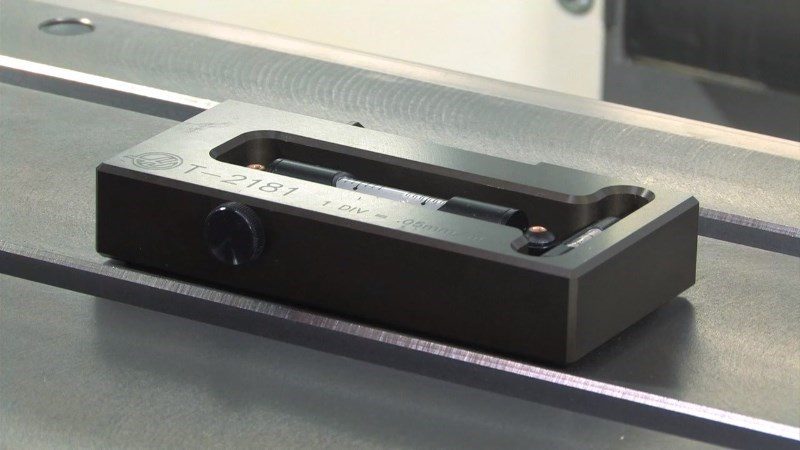
  • T-2181 SERVISNO ORODJE, IZRAVNALNO ORODJE ali raven natančnosti strojne obdelave, porazdelitev 0,0005"

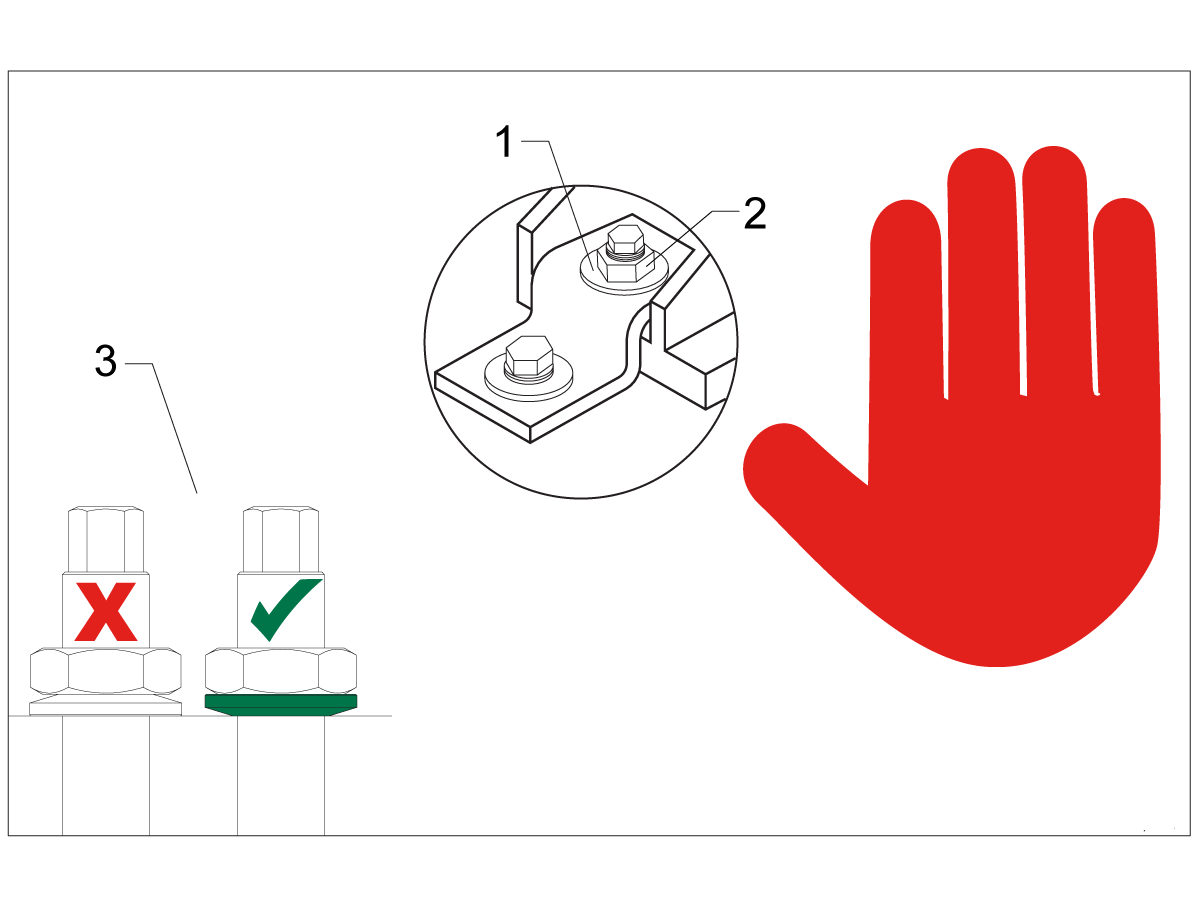
Leveling Screws Hardware

Note: The washers [1] and nuts [2] are installed during shipping and should be saved for installation and not be discarded.

Note: The washer orientation [3] is important.  The conical part of the washer should be against the casting,  see illustration.

Remove Rust Inhibitor

To safely and effectively remove rust inhibitor from way covers and other non-painted surfaces:

Initial Scraping

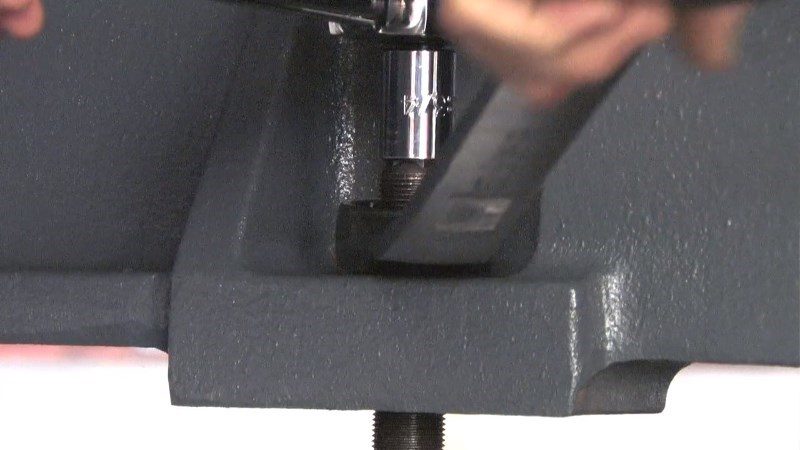
  • Use a plastic scraper to remove the bulk of the rust inhibitor.
  • Avoid using metal tools to prevent scratching or damaging the surface.

 Important: Do not use scotch-brite or metal scrapers, these will scratch the way covers.

Chemical Cleaning

  • Spray the affected areas with a heavy-duty citrus cleaner or Simple Green.
  • Ensure full coverage of all non-painted surfaces coated with rust inhibitor.

Soak Time

  • Allow the cleaner to soak for several minutes to loosen remaining residue.

Wipe Down

  • Use a clean shop towel to thoroughly wipe off the softened rust inhibitor.

Rust Proofing

  • Apply mineral spirits or WD-40 to all exposed metal surfaces to prevent future rust formation.

Important: Always wear gloves and eye protection when handling chemical cleaners. Dispose of used towels and cleaning agents according to local environmental regulations.

 Important: To avoid any contamination of the way cover seals with the sticky residue. Do not move any of the axes until all the rust inhibitor has been removed.

Rust Inhibitor - Safety Data Sheet (SDS)

Air Connection

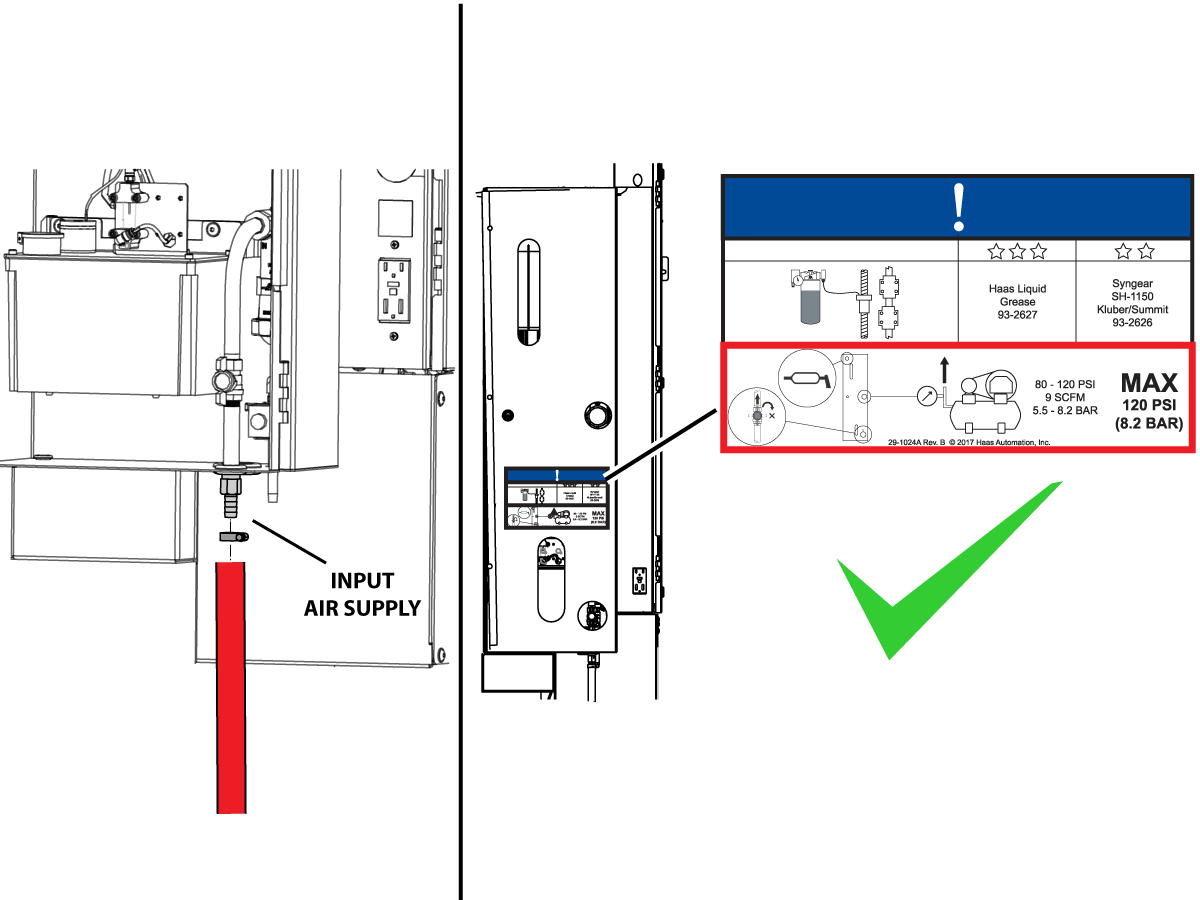
Connect the air supply at the lube panel.

 Note: For air requirements refer to the decal that is located on the lube cabinet door.

Follow the Air Gun and Hose Installation procedure to install or replace the Air Gun.

 Note: Some installation kits will come with a spare air gun assembly.

Electrical Installation

 DANGER: Working with the electrical services required for CNC machines is extremely hazardous and can result in serious injury or death.

Before connecting line wires to the CNC:

  • Turn off all power to the machine at the source.
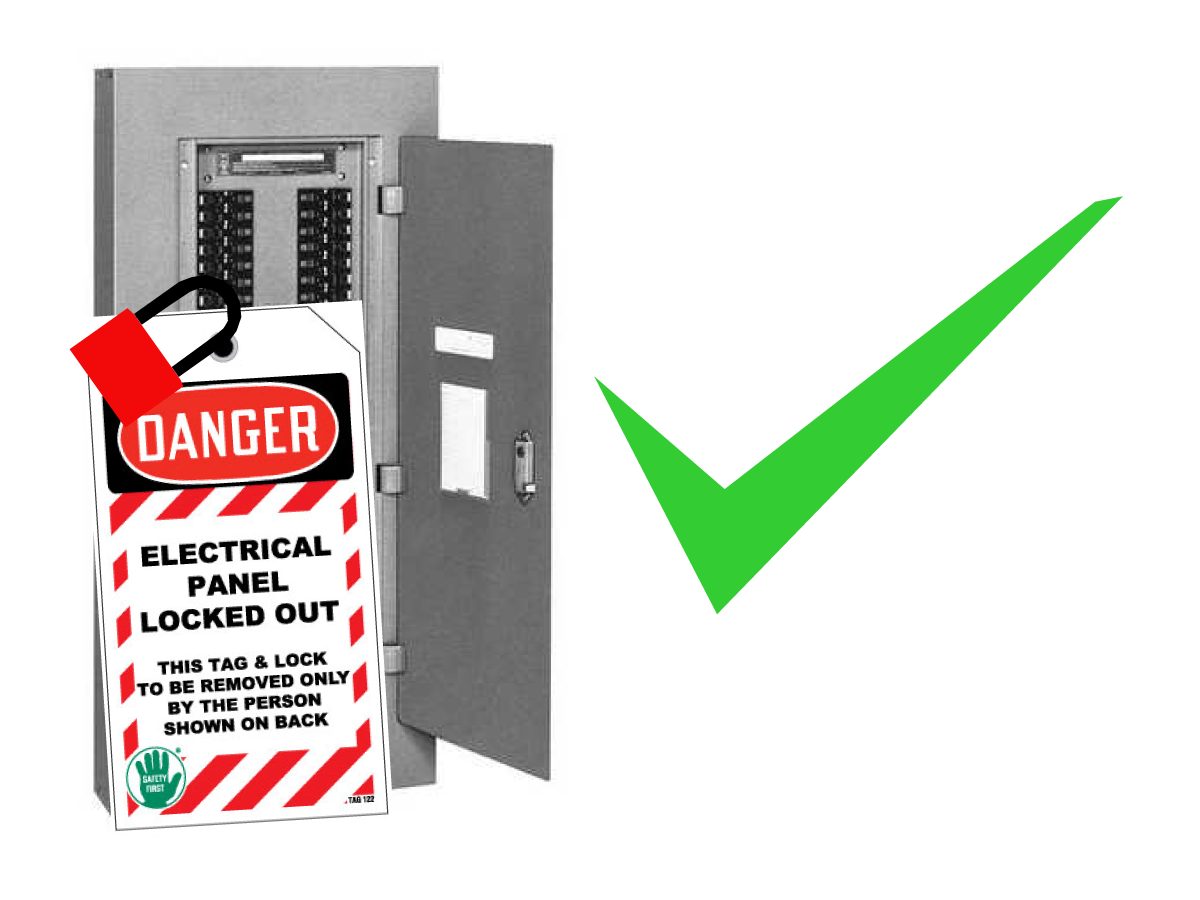
  • Perform a Lockout-Tagout (LOTO) procedure to ensure the power remains off during service.
  • Verify that power has been disconnected by using an AC voltage detector on all incoming lines.

If you are uncertain about how to safely disconnect power or perform LOTO procedures:

  • Do not proceed.
  • Contact qualified personnel or obtain appropriate assistance before continuing.

Failure to follow these precautions may result in electrical shock, equipment damage, or fatal injury.

1

Initial Control Inspection

Danger: At this point, there should be no electrical connection to the machine. Electrical panel must be closed and secured. When main switch is on, there is HIGH VOLTAGE throughout the electrical panel (including the circuit boards and logic circuits) and some components operate at high temperatures. Therefore, exercise extreme caution when working in the panel.

  • Set the main breaker switch at the upper right of the electrical panel on the back of the machine to OFF.
  • Using a screwdriver, unlock the two latches on the panel door, unlock the cabinet with the key and open the door.
  • Take sufficient time to check all the components and connectors associated with the circuit boards. Look for any cables that have become disconnected, look for any signs damage and loose parts in the bottom of the panel box. If there are any signs that the machine was mishandled, call the factory before proceeding.

2

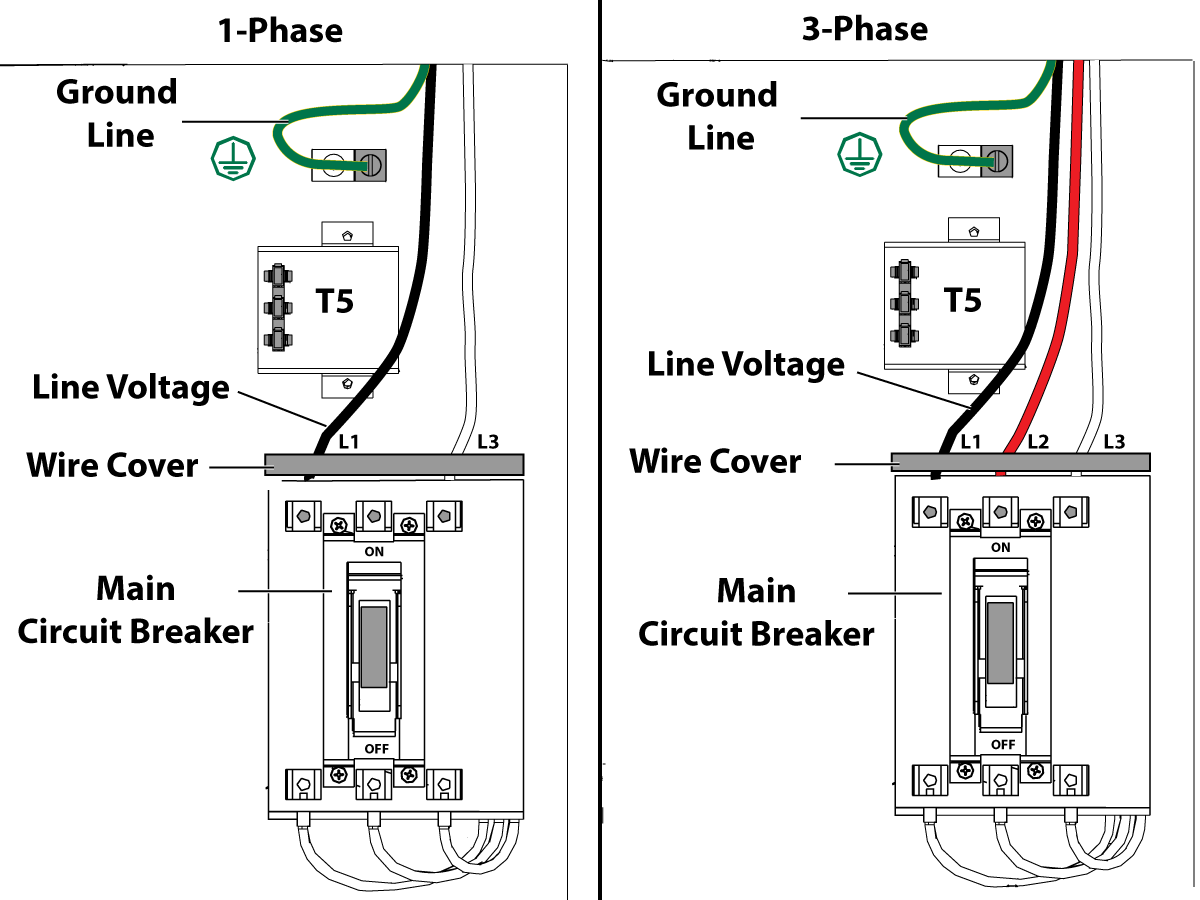
1-Phase Machines: Insert each power lead into the wire cover.  Connect the two power leads to L1 and L3 terminals on top of the main circuit breaker.

3-Phase Machines: Insert each power lead into the wire cover.  Connect the three power leads to L1, L2 and L3 terminals on top of the main circuit breaker.

Connect the separate ground line to the ground bus to the left of the terminals.

For 3-phase machines, check to see what type of power configuration is supplying the machine. Take voltage measurements of each power lead to ground line. Then refer to RD0084 - Input Power Configurations to determine which power lead should be connected to the L1 terminal based of the voltage readings and power configuration.

Refer to Haas Main Circuit Breaker - Torque Specifications for what value to torque the circuit breaker power leads.

 Note: Make sure that the leads actually go into the terminal-block clamps . (A poor connection will cause the machine to run intermittently or have other problems, such as servo overloads.) To check, simply pull on the wires after the screws are tightened.

3

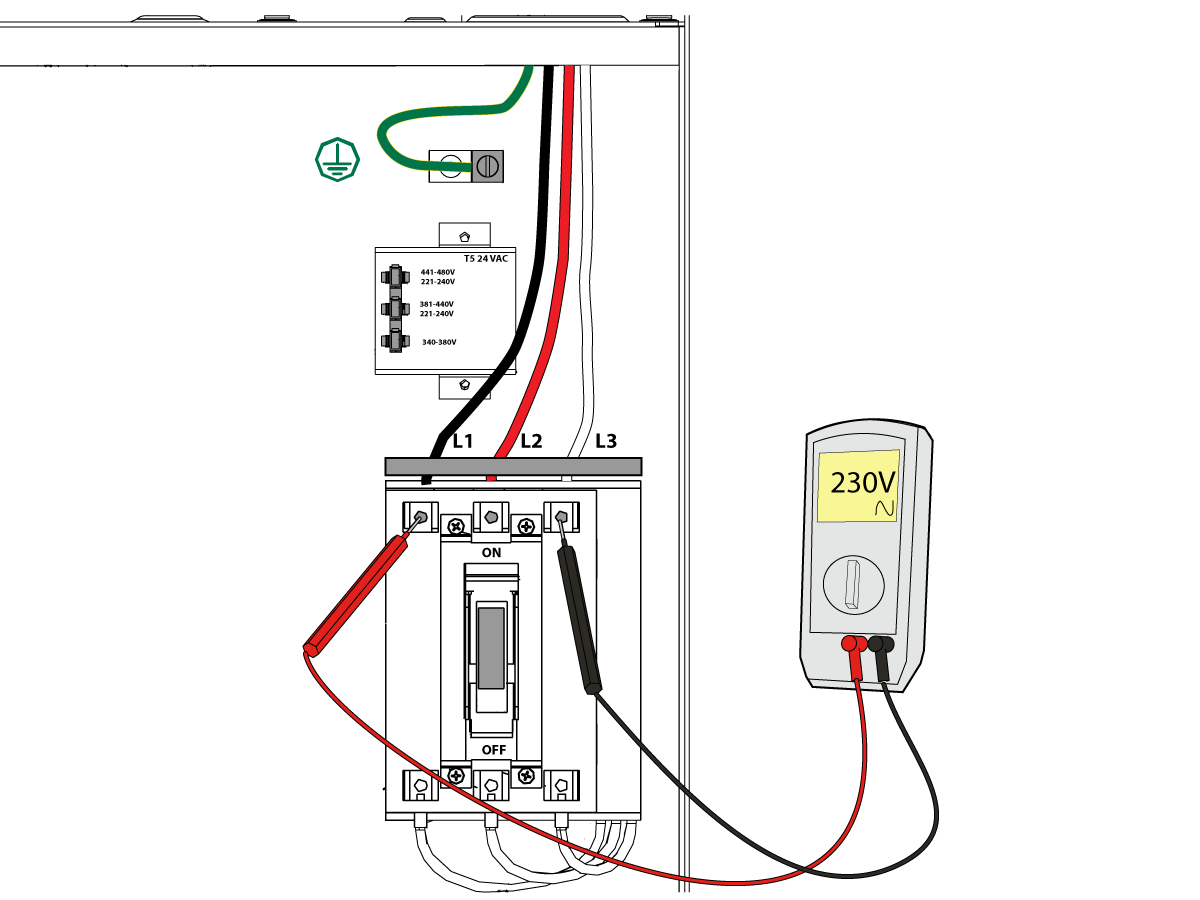
After the line voltage is connected to the machine, make sure that main circuit breaker (at top-right of rear cabinet) is OFF . Remove the Lockout / Tagout and Turn ON the power at the source. Using a digital voltmeter and appropriate safety procedures: 

1-Phase Machines: Measure the AC voltage across L1 & L3 at the main circuit breaker.  The AC voltage must be between 220 - 250 volts .
Note: Lower or higher than this voltage can generate low/high voltage alarms.

3-Phase Machines : Measure the AC voltage between all three pair phases at the main circuit breaker. 

The AC voltage must be between 195 and 260 volts (360 and 480 volts for high voltage option).

SMinimill - Reboot: The AC voltage must be between 198 and 242 volts for machines without a high voltage transformer.  Refer to the Minimill/SMinimill - Identification document.

 Note: Wide voltage fluctuations are common in many industrial areas; minimum and maximum voltage supplied to a machine while it is in operation must be known. U.S. National Electrical Code specifies that machines should operate with a variation of +5% to -5% around an average supply voltage. If problems with line voltage occur, or low line voltage is suspected, an external transformer may be used. If you suspect voltage problems, voltage should be checked every hour or two during a typical day to be sure it does not fluctuate more than +5% or -5% from an average.

4

Important: With the main circuit breaker turned OFF.

Check the transformer taps at the bottom-right corner of the rear cabinet.

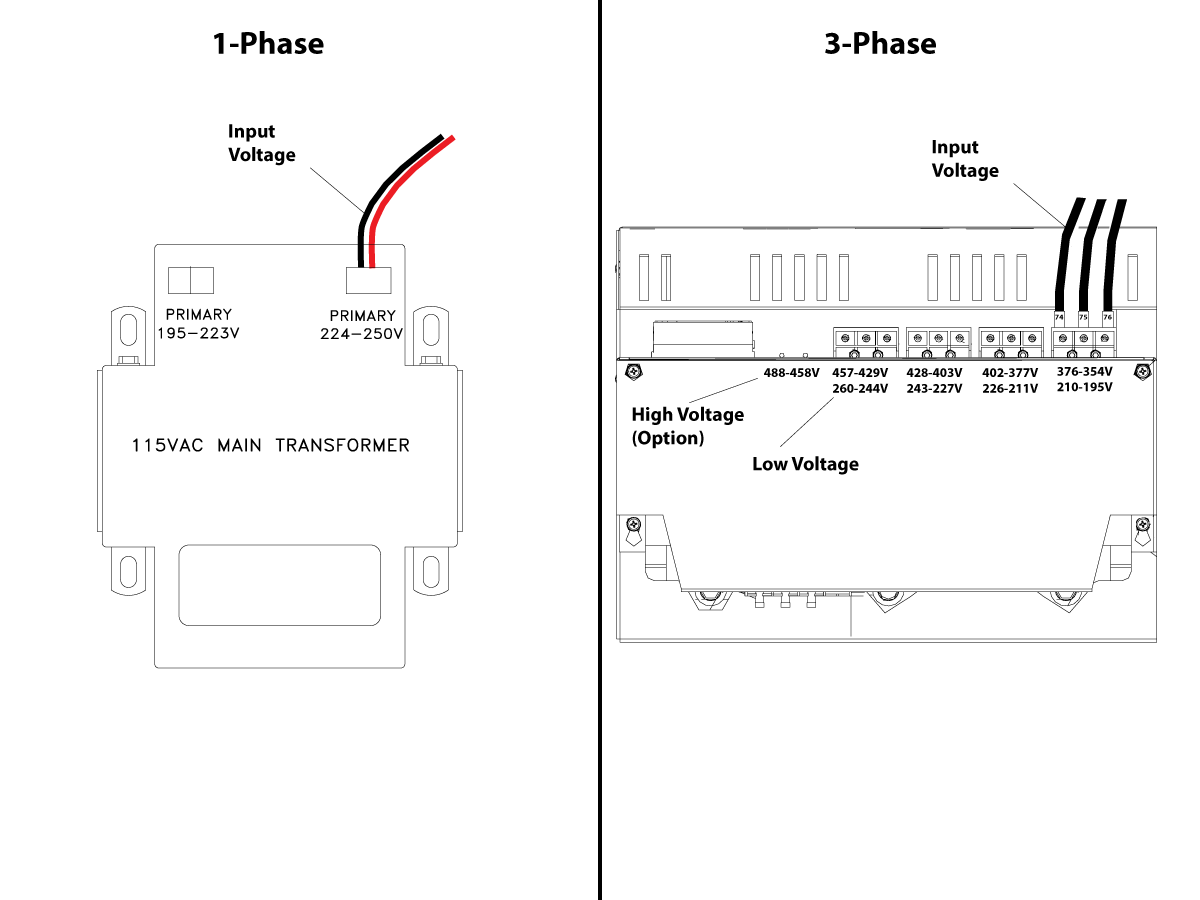
1-Phase Machines: The input voltage cable must be moved to the connector which corresponds to the average voltage measured in the above step.

3-Phase Machines:  The input voltage cables labeled 74, 75, and 76 must be moved to the terminal block triple which corresponds to the average voltage measured in the above step.

5

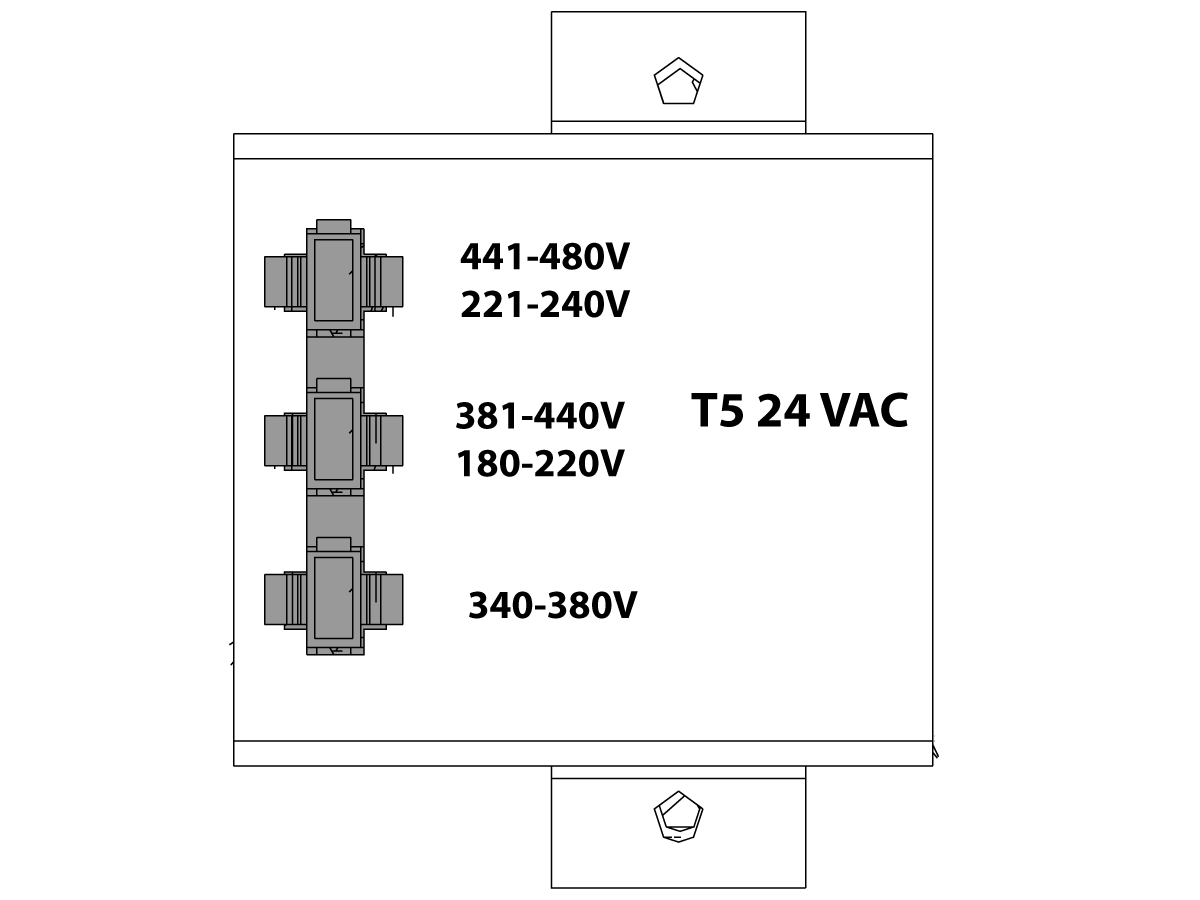
Transformer T5 supplies 24VAC used to power the main contactor. There are two versions of this transformer for use on a 240 and 400V machines. The 240V transformer has two input connectors located about two inches from the transformer, which allow it to be connected to either 180-220V or 221-240V.

Users that have 220V-240V RMS input power should use the connector labeled 221-240V, while users with 190-220V input power should use the connector labeled 180-220V. Failure to use the correct input connector will result in either overheating of the main contactor or failure to reliably engage the main contactor.

The 480V (option) T5 transformer has three input connectors, labeled 340-380V, 381-440V and 441-480V.

Users with 340-380V 50/60Hz power should use the 340-380V connector while users with 380V-440V 50/60Hz power should use the 381-440V connector.

Important: Set the main circuit breaker to ON. Check for evidence of problems, such as the smell of overheating components or smoke. If such problems are indicated, immediately set the main circuit breaker to OFF and call the factory before proceeding.

After the power is on, measure the voltage across the bottom terminals on the main circuit breaker. It should be the same as the measurements where the input power connects to the main breaker. If there are any problems, check the wiring.

6

Apply power to the control by pressing the Power-On switch on the front panel.

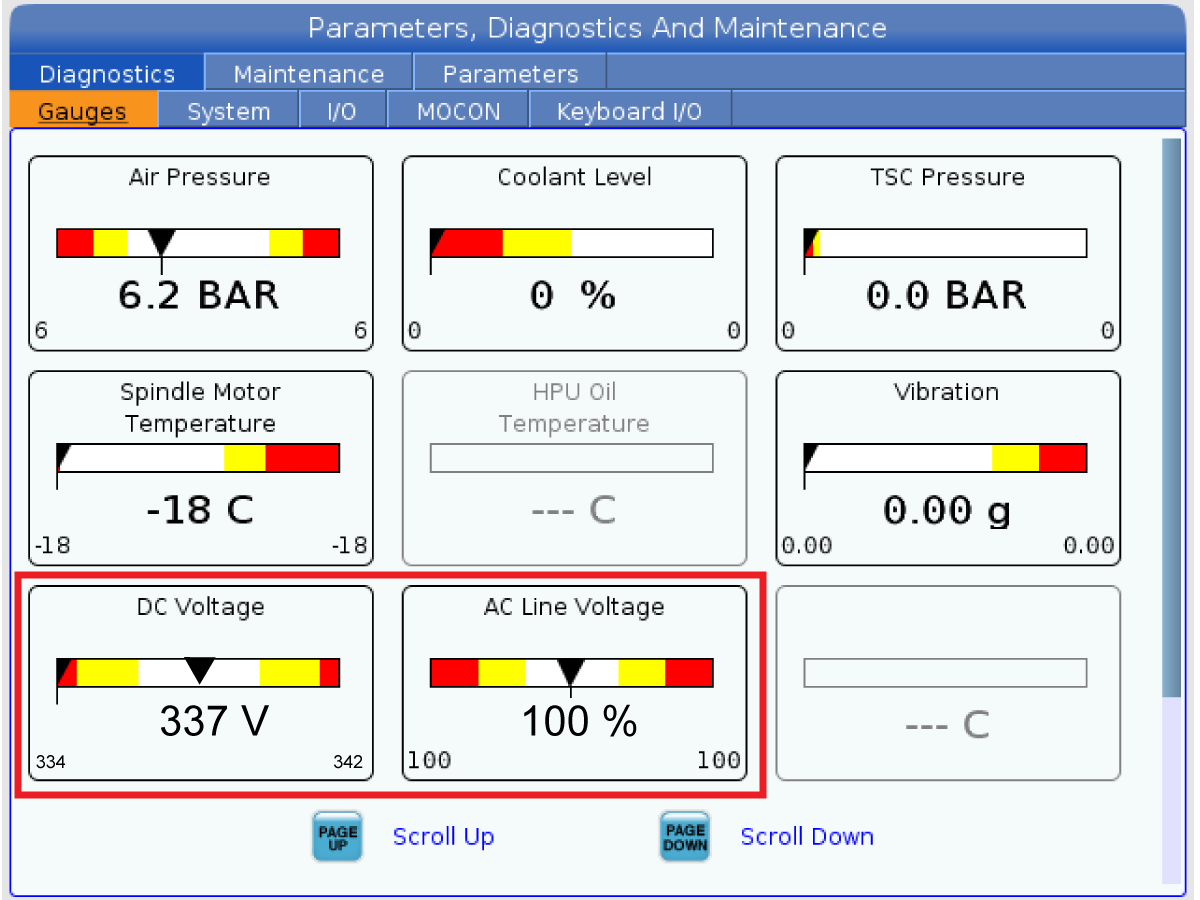
Check the DC Voltage and AC Line Voltage gauges in Diagnostics. The DC Voltage gauge must read between 310 - 360V. The AC Line Voltage must be between 90 and 105 percent. If the voltage is outside these limits, turn off the power and recheck steps 2 and 3. If the voltage is still outside these limits, call the factory.

7

Electrical power must be phased properly to avoid damage to your equipment. The Power Supply Assembly PC board incorporates a "Phase Detect" circuit with neon indicators. When the orange neon is lit (NE5), the phasing is incorrect. If the green neon is lit (NE6), the phasing is correct. If both neon indicators are lit, you have a loose wire; check the connections. Adjust phasing by setting the source power to off and then swapping L1 and L2 of the incoming power lines at the main circuit breaker.

Danger: ALL POWER TO CNC MUST BE TURNED OFF LOCKOUT-TAGOUT AT THE SOURCE PRIOR TO ADJUSTING PHASING. ALWAYS DOUBLE CHECK THE INCOMING LINES WITH AN AC VOLTAGE DETECTOR.

Turn off the power and set the main circuit breaker to OFF. Close the door, lock the latches, and turn the power back on.

Remove the key from the control cabinet and give it to the shop manager.

8

Activation

When the machine is properly placed and connected to both air and electrical power, it is ready for final installation (removing shipping blocks, leveling, spindle sweep, etc.) and software activation. The HFO service technician does this. Contact the local HFO to schedule the work.

IMPORTANT:  Machines equipped with motion sensors must be rough‑leveled before attempting to arm the motion sensor.  For detailed instructions, refer to Service Notification - SA0007.  Access to this document is restricted to Haas Factory Outlet personnel.

Shipping Brackets Removal

1

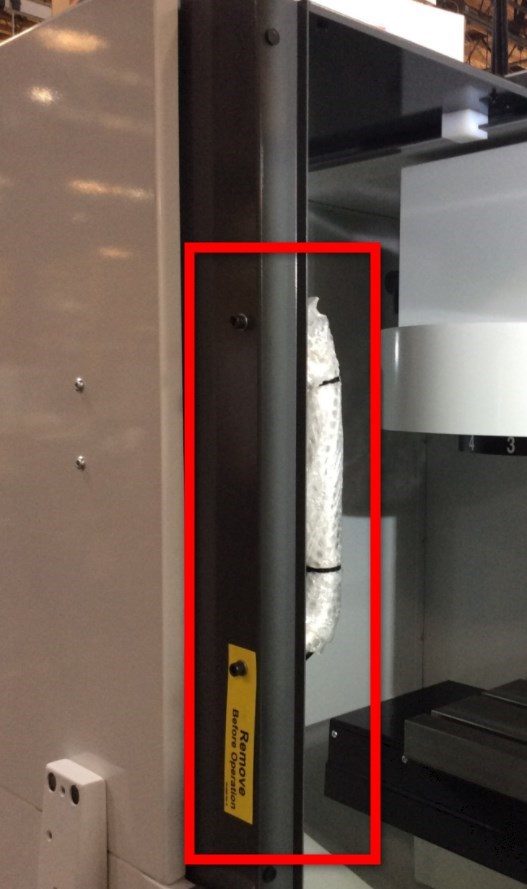
Odstranite transportni nosilec za obešalo.

2

Odstranite transportni nosilec za majhna vrata upravljavca.

3

Znova namestite ročaj vrat na zunanjo stran vrat upravljavca.

4

Pritisnite [POWER ON] in sledite navodilom na zaslonu.

Pritisnite na gumbe [HAND JOG] in [Z+] . Premaknite Z-os navzgor v JOG načinu.

Odstranite drugi nosilec za vreteno 40T.

Machine Leveling

1

Vrnite vsako os posebej na ničelno točko ali pritisnite [POWER UP]. Pojdite skozi postopek izravnave.
Ponovite te korake, da dosežete pravilno raven stroja.

2

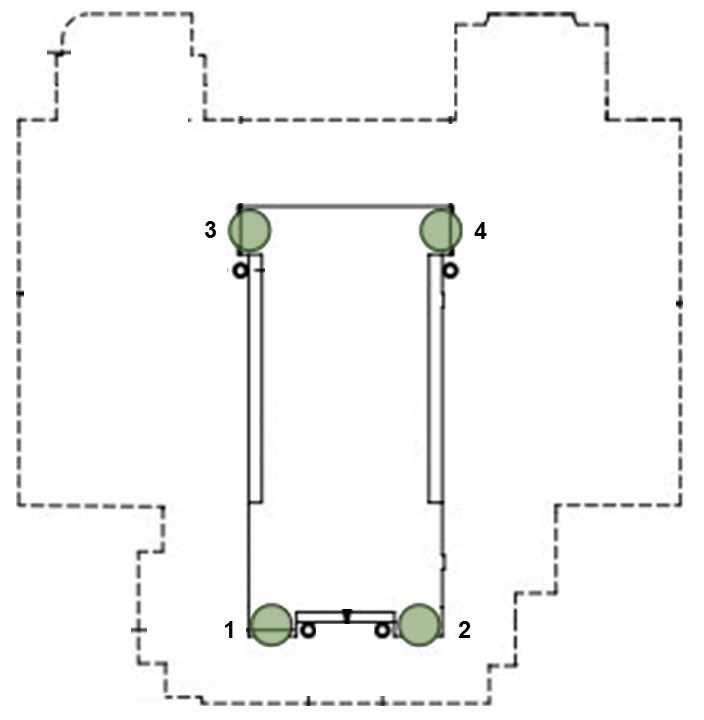
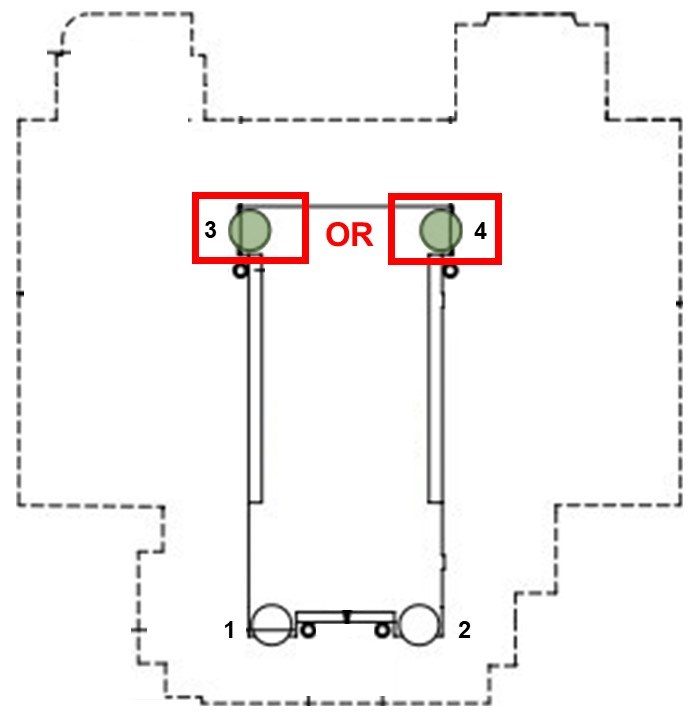
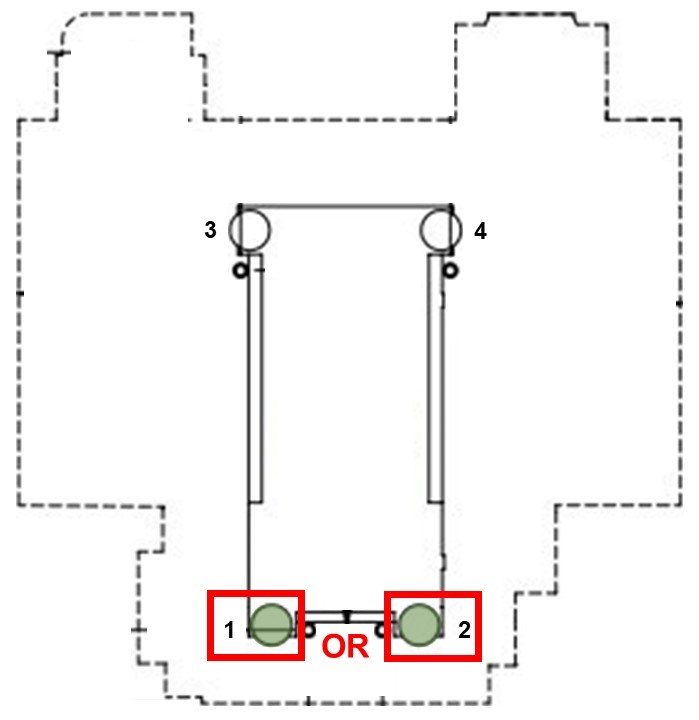
Nastavite višino stroja s štirimi kotnimi nivelirnimi vijaki [1,2,3,4] do 3" +/- 0,5" (75 mm +/– 10 mm) nad tlemi. Zavrtite vsak vijak, tako da imata enako napetost.

X–os in Y-os pomaknite v JOG načinu do sredine njunega hoda, centrirano na mizo.

Opomba: Slika prikazuje postavitev DM-2, vendar enak postopek velja za vse stroje DM, DT, Mini Mill in Super Mini Mill s štirimi nivelirnimi vijaki. Če ima vaš stroj šest ali več nivelirnih vijakov, glejte:

Izravnava VMC

3

Očistite površino mize in izravnalno orodje (T-2181) in preverite kalibracijo izravnalnega orodja, preden nadaljujete.

Na sredino mize postavite libelo, vzporedno z X-osjo. Za poravnavo uporabite t-utor.

Upoštevajte položaj mehurčka.

Postavite libelo tako, da jo obrnete za 180 stopinj. Mehurček naj prikazuje enako odčitek kot prej.

Če se odčitki razlikujejo za več kot eno delitev, vrnite libelo nazaj v Haas za nastavitev in je ne uporabljajte za izravnavo stroja.

4

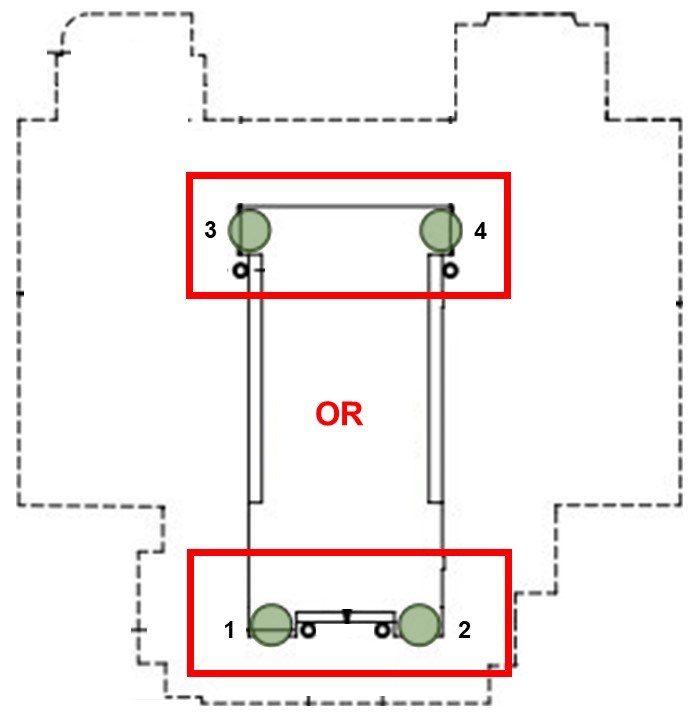
Prilagodite kotne nivelirne vijake [1, 2] ali [3, 4], dokler ni mehurček, vzporeden z osjo Y, centriran.

To poravna stroj od spredaj nazaj.

Vedno dvignite spodnjo stran stroja, da ohranite praznino za rezervoar emulzije (če je na voljo) in prilagodite oba nivelirna vijaka na tej strani na enak nivo.

5

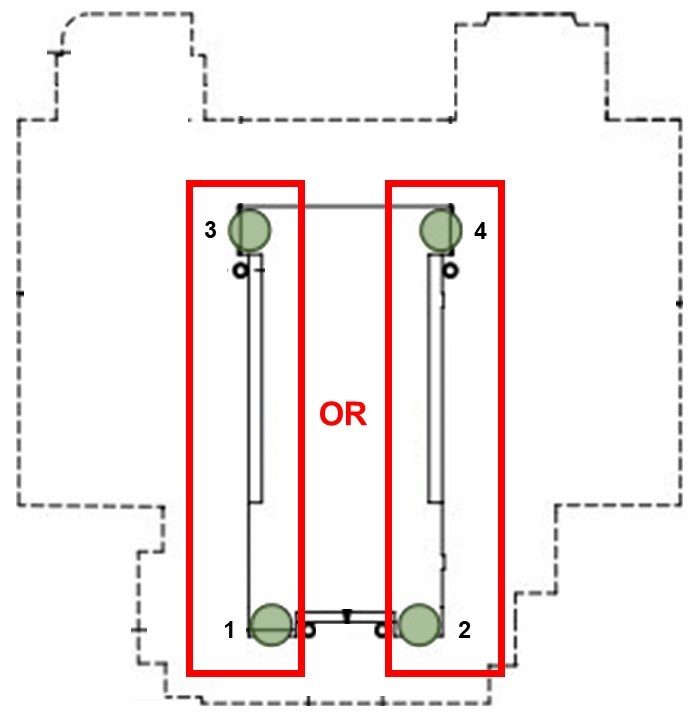
Prilagodite kotne nivelirne vijake [1, 3] ali [2, 4], dokler ni mehurček, vzporeden z osjo X, centriran.

To poravna stroj od leve proti desni.

Ponovno dvignite spodnjo stran stroja in prilagodite oba nivelirna vijaka na tej strani na enak nivo.

6

Naj bo libela v istem položaju in potisnite Y-os v JOG načinu, da mizo premaknete na sprednji del stroja.

Upoštevajte položaj mehurčka.

Premaknite Y-os v JOG načinu po celotnem hodu in se zaustavite pri stebru. Oglejte si, kateri sprednji vogal je najnižji, kar prikazuje nivo.

Dvignite najnižji zadnji vogal z nastavitvijo kotnih nivelirnih vijakov [3] ali [4], dokler mehurček na libeli ni centriran.

7

Y-os premaknite v JOG načinu po celotnem hodu in mizo pripeljite na sprednji del stroja. Oglejte si, kateri sprednji vogal je najnižji, kar prikazuje nivo.

Dvignite najnižji sprednji vogal z nastavitvijo kotnih nivelirnih vijakov [1] ali [2], dokler mehurček na libeli ni centriran.

Ponovite koraka 6 in 7, tako da mizo premikate po celotnem hodu Y-osi. tako da vsakič dvignete spodnji kot.

Nadaljujte s tem postopkom, dokler libela ni nič na obeh koncih hoda Y-osi.

Spindle Sweep Check

1

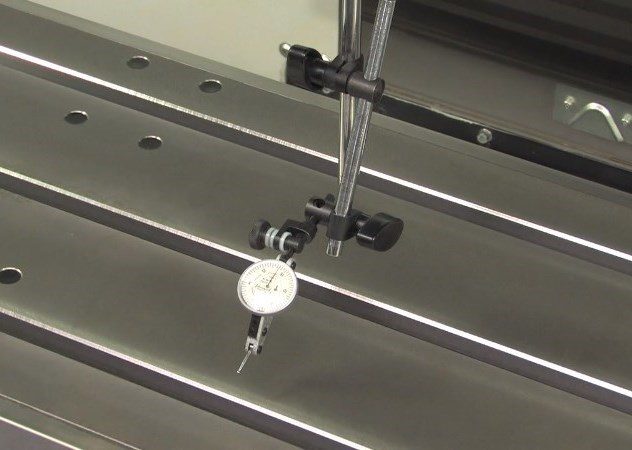
Spustite Z-os do sredine njenega hoda. Pritrdite testni indikator na magnetno osnovo in pritrdite magnetno osnovo na dno vretena.

Postavite testni indikator za izmero 10" (250 mm) premera kroga.

Postavite mizo tako, da bo testni indikator ostal na mizi (ne preko t-utora), ko bo obrnjen tako na sprednjo stran kot na stran stebra naprave.

Indikator obrnite proti sprednjem delu stroja, Z-os spuščajte za desetino (0,0001") korake in spustite testni indikator do stika z mizo.

Testni indikator postavite na nič.

2

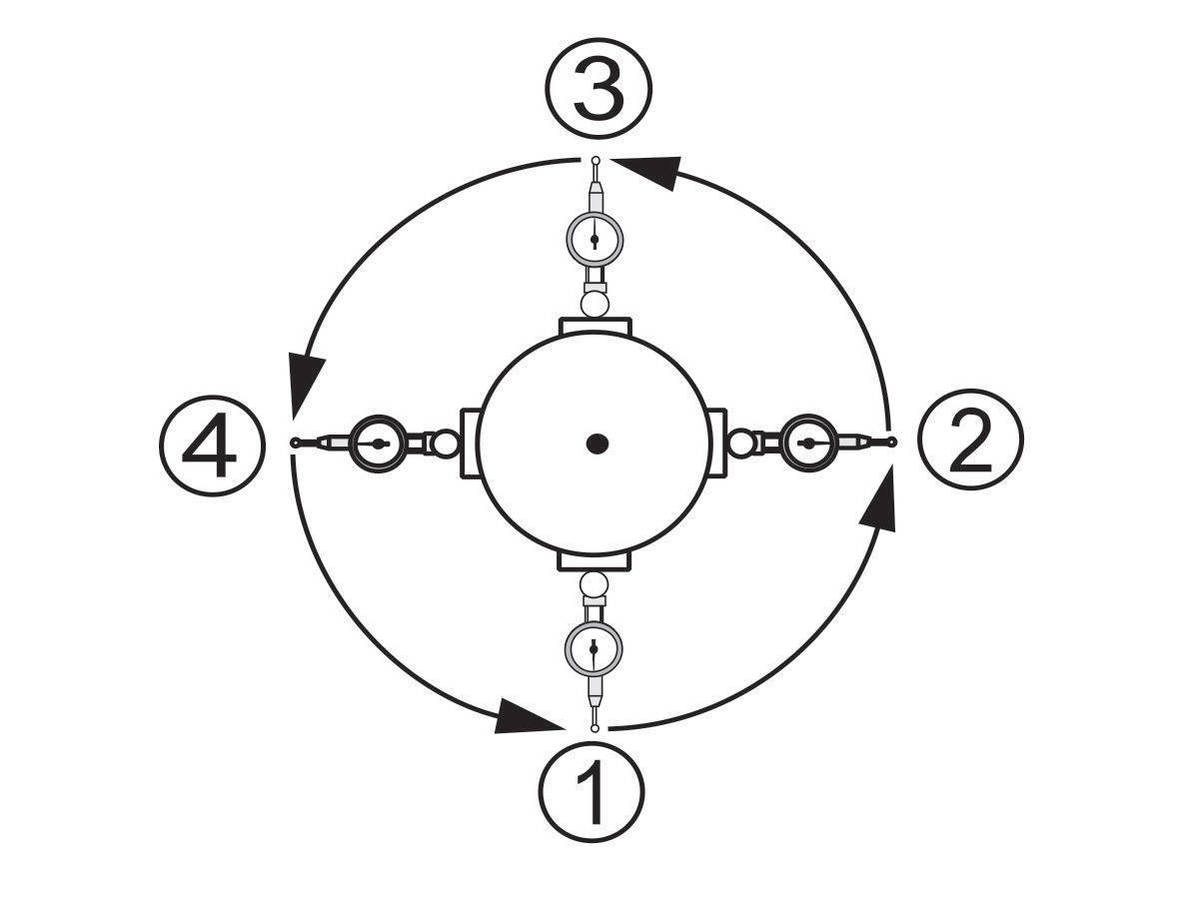
Ročno zavrtite vreteno in odčitajte odčitek vsakih 90 stopinj, da dobite dve vrednosti vzdolž X-osi in Y-osi.

Razlika med odčitki indikatorjev za vsako os ne sme presegati 0,0005" (0,013 mm).

3

Zaklenite nivelirne vijake na mesto, tako da zategnete zaporno matico in držite nivelirni vijak.

Pazite, da se nivelirni vijaki med tem postopkom ne premikajo.

Opomba: Če domet vretena ni tolerančen, se prepričajte, da je nivo stroja pravilen.

Za podrobnejša navodila o izvedbi tega postopka glejte:

Domet vretena VMC

Lubrication Verification

1

Run the spindle run-in program.

 Note: For 10K spindles and above use a balanced tool holder

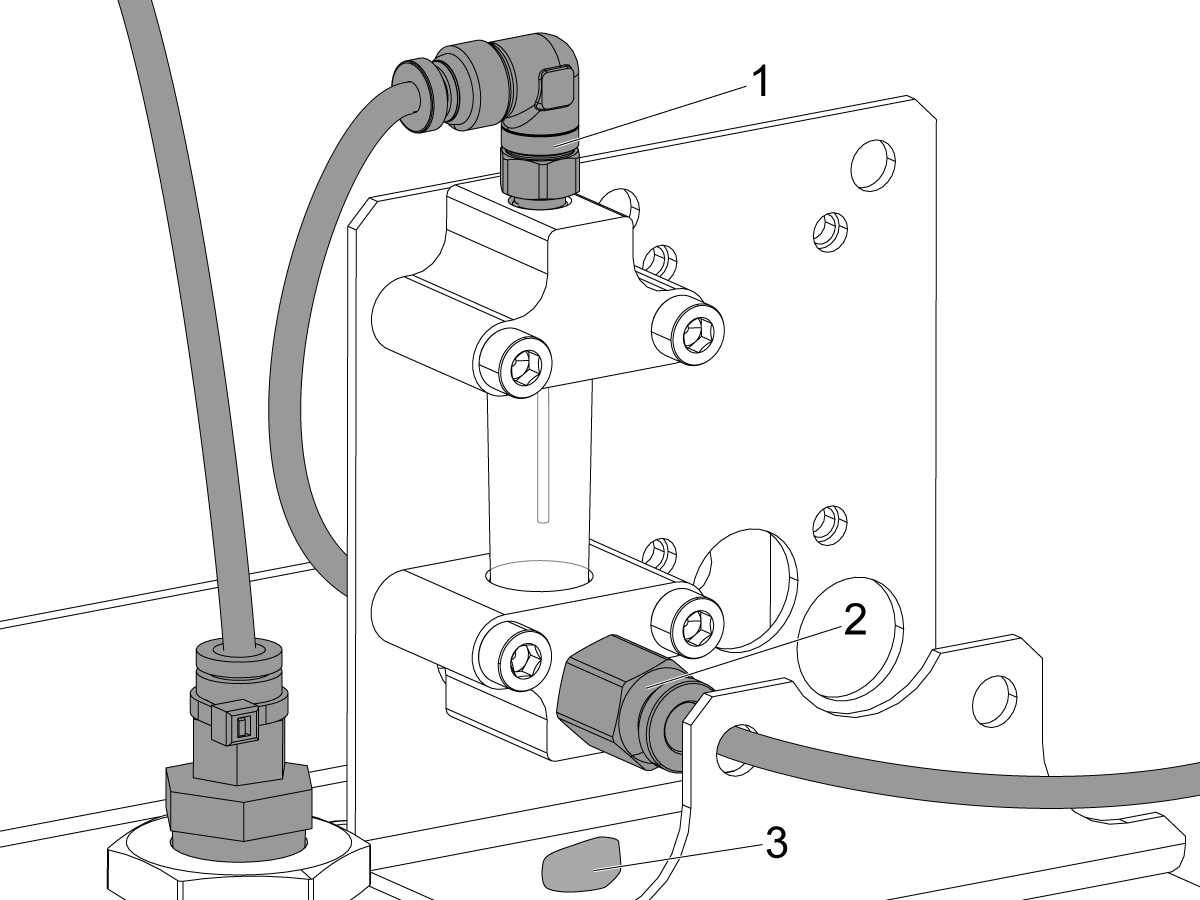
Examine the sight glass, make sure the correct number of drops are fall through the sight glass.

Examine the fittings [1,2] on top of the oil pump tank.

The oil collects on top of the oil pump tank [3] either behind or in front of the sight glass bracket, underneath the leaking fitting.

Tighten any leaking fittings.

2

Go to the Maintenance tab.

Press [F2] to cycle an axis lubrication test.

Inspect the gauge on the lubrication system.  Make sure it holds pressure.

MiniMill-EDU Machines

1

Za stroje MiniMill-EDU:

Če ima stroj možnost 45-galonskega terenske namestitve rezervoarja emulzije 93-1001072, je treba namestiti vodilo ločevalnika odrezkov.

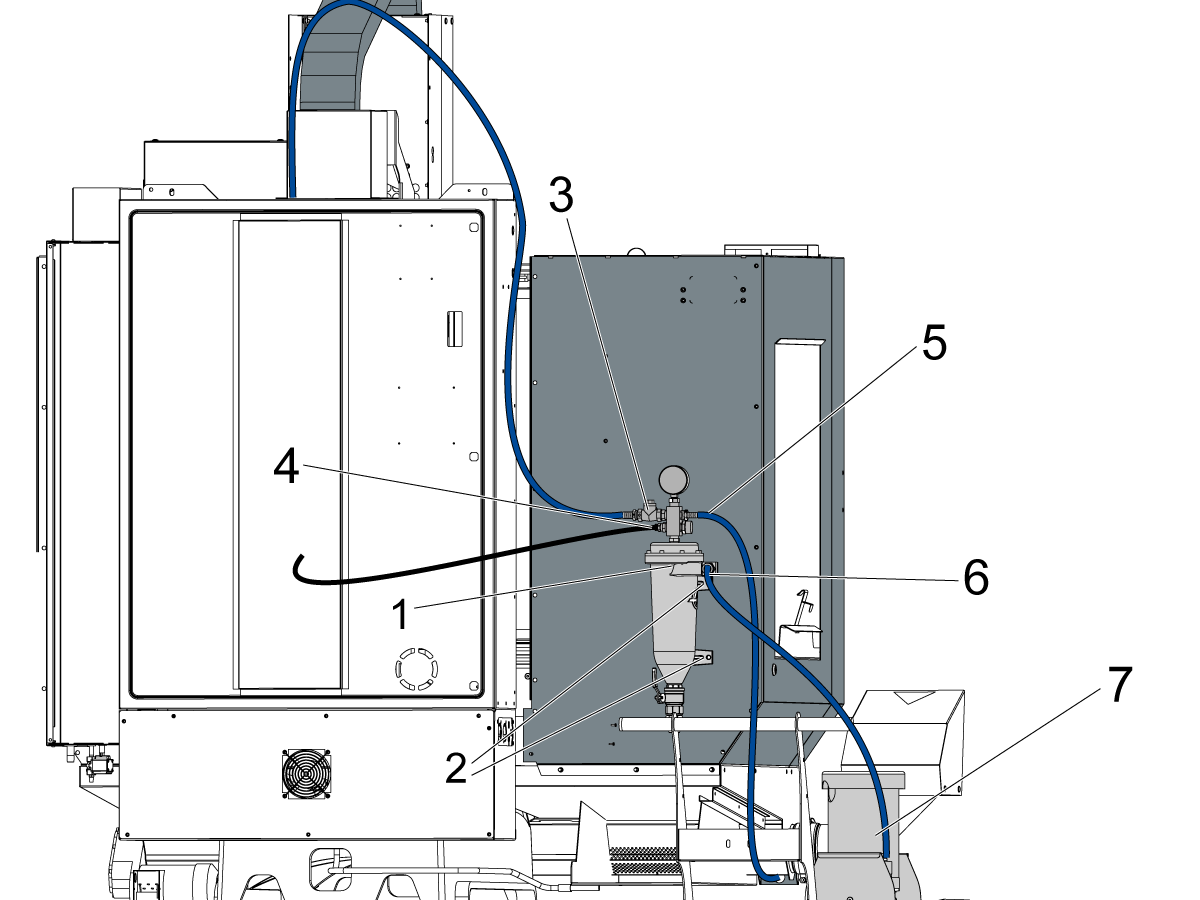
Filter emulzije [1] namestite tako, da ga pritrdite na zadnji del panela zaprtega sistema s FBHCS [2]. Nato priključite cevi in jih napeljite, kot je podrobno opisano spodaj:

Speljite modro cev emulzije [3] od zgornje leve strani ločevalnika odrezkov do priključka v glavi vretena.

Črni vod emulzije [4] speljite od priključnega priključka do zadnjega priključka za izpiranje Y-osi. Cev je treba speljati skozi ulitek stebra.

Speljite modro cev emulzije [5] od zgornje desne strani sklopa ločevalnika odrezkov do nosilca emulzije za spiranje.

Modro cev emulzije [6] priključite od sredine ločevalnika odrezkov do črpalke emulzije [7].

2

Za stroje MiniMill-EDU:

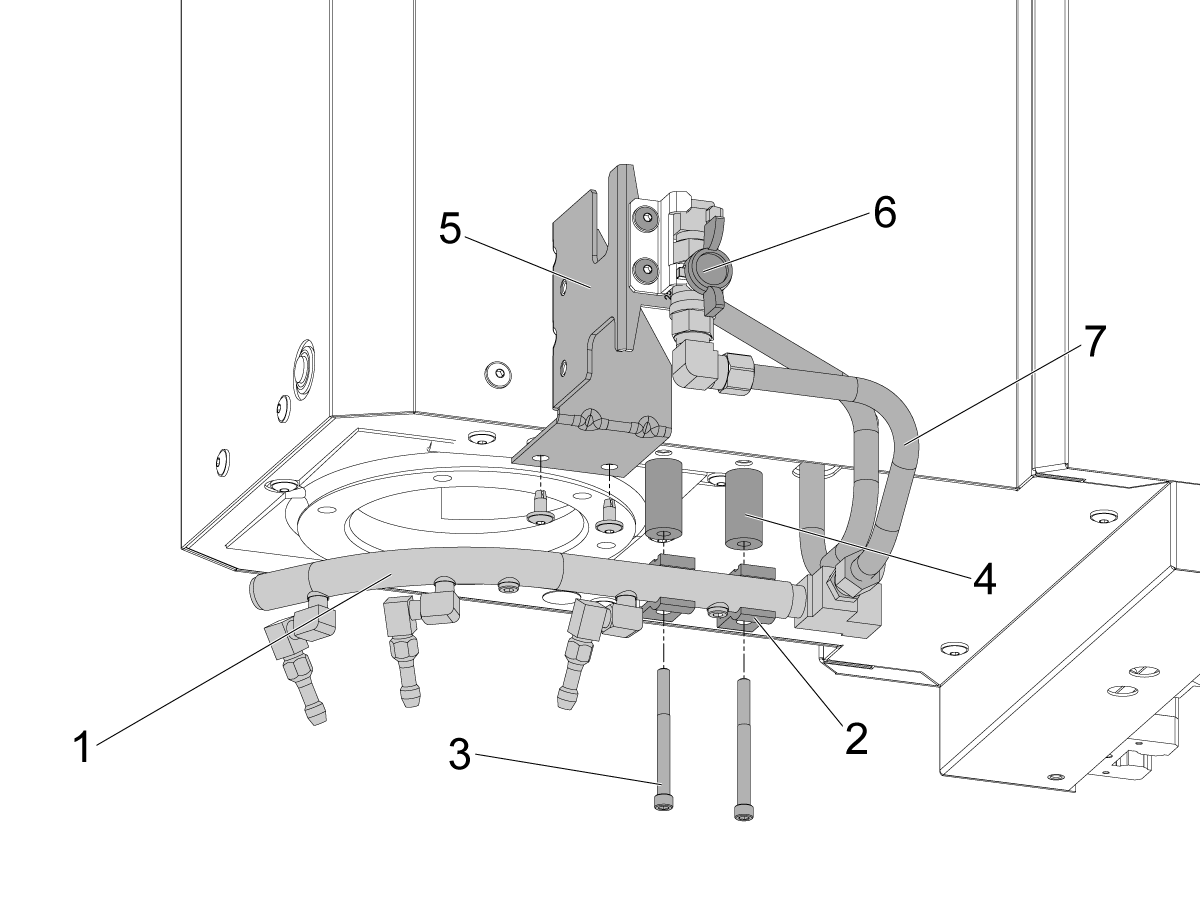
Namestite sklop obroča emulzije tako, da ga pritrdite na glavo vretena.

Za namestitev sklopa emulzije [1] uporabite dolge SHCS [3] in 2 sponki emulzije [2].

Uporabite distančnike [4] med tirnico emulzije in glavo vretena.

S pomočjo BHCS pritrdite montažni nosilec P-COOL [5] na glavo vretena.

Speljite cev od glave vretena do ventila emulzije [6].

Speljite drugo cev [7] od ventila do tirnice emulzije

Opomba: Prepričajte se, da so vsi priključki zategnjeni, da preprečite puščanje emulzije.

Opomba: Če je bil stroj tovarniško naročen z možnostjo hladilne emulzije 45 galonov, ti koraki niso potrebni. To je treba storiti samo za komplet za namestitev na terenu 93-1001072. Preverite, ali možnost deluje po testiranju v naslednjem razdelku.

Option Installation Guides

Preverite in preverite, ali so bile vse možnosti pravilno nameščene.

Daljinski ročaj jog (RJH-Touch) - namestitev
Namestitev možnosti Wi-Fi kamere
VMC paket ugodnosti
dodatni filter emulzije
Namestitev CABCOOL
Pulsejet namestitev
HAAS oljni skimmer
Delovna lučka za mizo
Orodje zraka
Avto pištola

Final Testing

1

Priključite črpalko emulzije in črpalko hlajenja skozi vreteno (TSC) (če je na voljo).

Modro cev emulzije pritrdite z dovoda filtra na dotok črpalke emulzije.

Priključite črpalko emulzije na nizkotlačni čep emulzije.

Pritrdite TSC črpalko na majhno vijolično cev emulzije.

Priključite črpalko emulzije na vtič visokotlačni čep emulzije.

Priključite senzor nivoja emulzije in druge sorodne tipala na ustrezne vtiče.

2

Preizkusite emulzijo za hlajenje z zalivanjem.

Pred tem preizkusom odprite ventil obroča za emulzijo in zaprite vrata upravljavca.

Pritisnite [COOLNT] na krmilniku. Emulzija mora zalivati iz šob.

Ponovno pritisnite [COOLNT] , da ustaviti pretok.

3

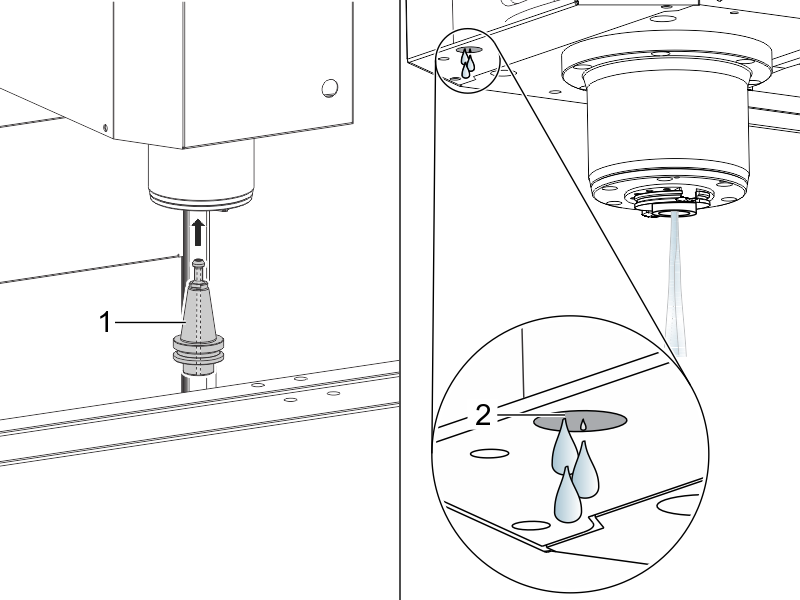
Preverite hlajenje skozi vreteno (TSC) (če je na voljo).

Vstavite držalo za orodje TSC v vreteno [1].

Pritisnite [AUX CLNT] za zagon TSC.

Pravilno delovanje je naslednje:

  1. Hladilna tekočina pravilno teče iz držala za orodje
  2. .
  3. Nekaj kapljic izteče iz cevi vakuumskega generatorja [2].

Pritisnite [RESET].

4

Preizkusite vreteno.

Zaženite program za zagon vretena:

Utekanje vretena VMC

5

Preizkusite polžni transporter odrezkov (če je na voljo).

Pritisnite [CHIP FWD] in [CHIP REV] na krmilniku.

6

Preizkusite zaporo vrat.

Pritisnite [MDI], vtipkajte S500 M03, in pritisnite [ENTER].

Prepričajte se, da stroj ni v načinu Nastavitev, kar preverite na ključnem stikalu ob strani obešala.

Pritisnite [CYCLE START] z odprtimi vrati. Stroj bi moral ukazati, da se vrata zaprejo in pritisk [CYCLE START].

Pritisnite  [CYCLE START] z zaprtimi vrati. Zaporni zatič bi se moral iztegniti in vreteno začeti vrteti.

Poskusite odpreti vrata, medtem ko se vreteno vrti. Vreteno se ne bi smelo nehati vrteti.

7

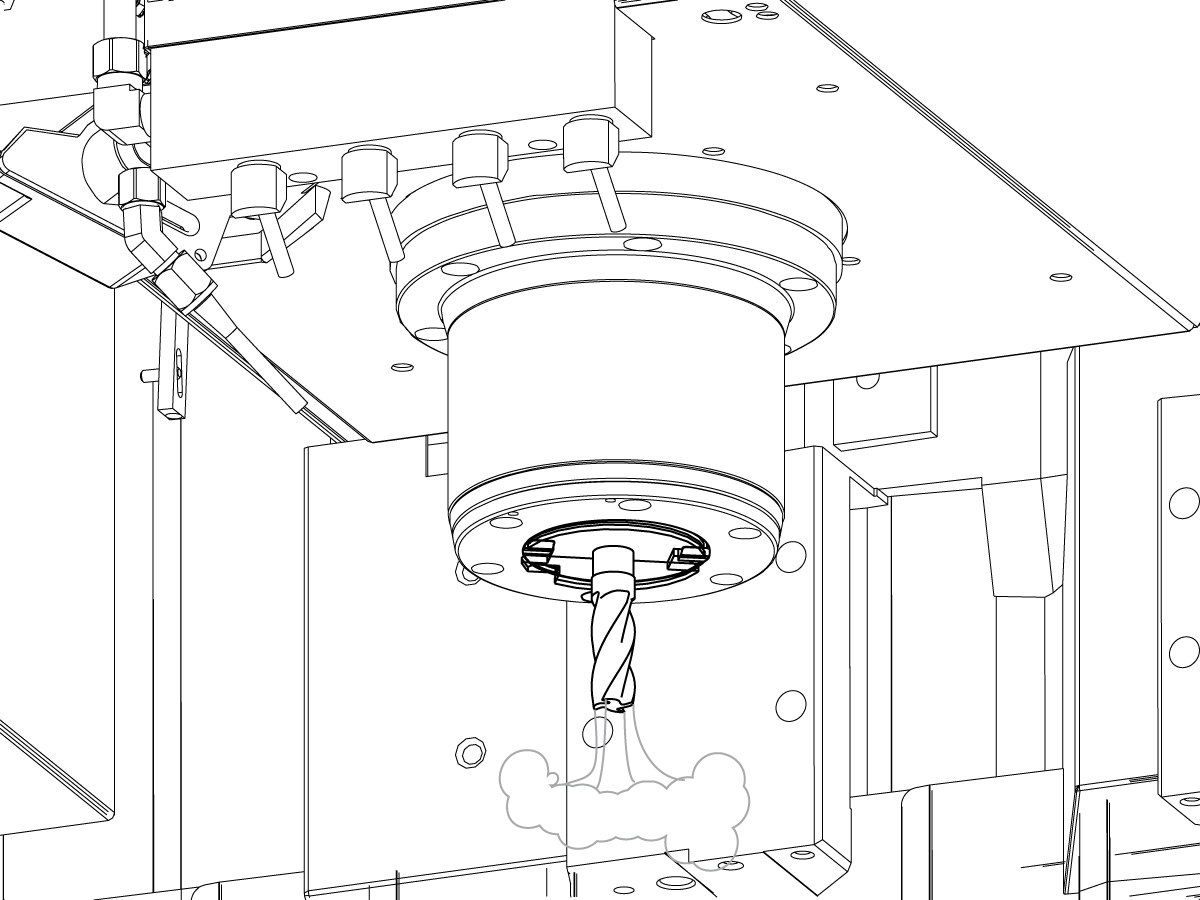
Preizkusite sistem za izpihovanje skozi orodje (če je na voljo).

To kodo upravljajte v  MDI načinu:

M73;

G04 P5. ;

M74;

G04 P3. ;

M99;

M73  zažene TAB. M74 stops TAB.

Ročno upravljajte TAB:

Pritisnite [AUX CLNT]. Pritisnite [RIGHT] puščično tipko kazalca

.

Začne se izpihovanje skozi orodje.

Pritisnite [AUX CLNT].

Izpihovanje skozi orodje se zaustavi.

8

Preizkusite ključna stikala.

Vstavite ključ za zaklep namestitve/zagona (# 2007) v spodnjo odprtino za ključ in ga obrnite v odklenjeni položaj.

Preverite, ali je ključ mogoče odstraniti samo iz zaklenjenega položaja.

Vstavite ključ za zaklep pomnilnika (# 2341) v zgornjo odprtino za ključ in ga obrnite v zaklenjeni položaj.

Preverite, ali je ključ mogoče odstraniti iz katerega koli položaja.

S ključem za zaklep pomnilnika v zaklenjenem položaju preverite, da v nastavitvah ali programih ni mogoče narediti sprememb.

9

Preverite, ali je okenski zapah nameščen na vsaki strani dostopnega okna.

(To ne velja za fiksna bočna okna na strojih serije DM in DT.)

Preverite, ali se zapah zaskoči pri vsakem oknu, da ohrani okno v zgornjem položaju.

Preverite, ali so okenske ključavnice nameščene na vsaki strani okna.

Preverite, ali so okna zaklenjena v spodnjem položaju.

Install and Calibrate WIPS

1

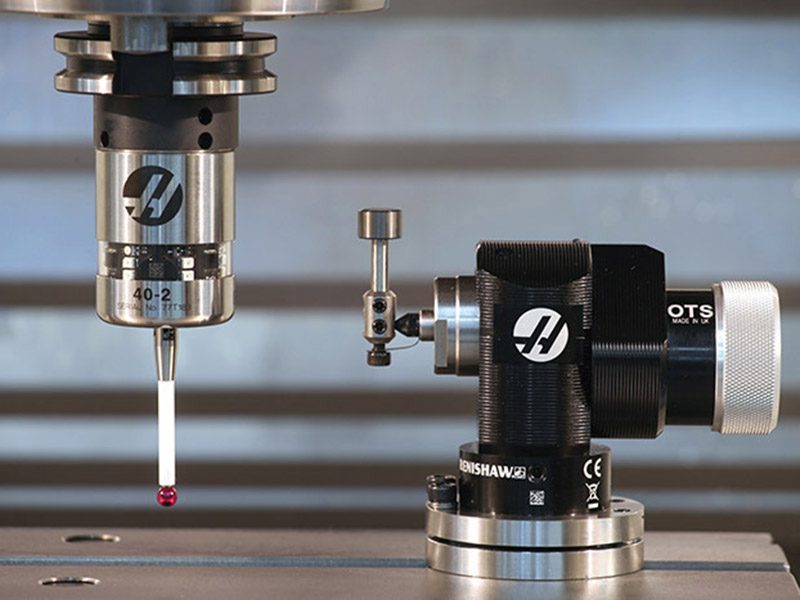
Namestite in umerite brezžični intuitivni sistem sonde (WIPS) (če je na voljo).

Za podrobna navodila o namestitvi in kalibraciji (umerjanju) WIPS glejte:

Namestitev sistema brezžičnega intuitivnega merjenja (WIPS)

Recently Viewed Items

You Have No Recently Viewed Items Yet

Povratne informacije
Haas Logo

HAAS dobavljena cena

Ta cena vključuje stroške pošiljanja, izvozne in uvozne dajatve ter vse druge stroške, ki nastanejo med pošiljanjem na lokacijo v Franciji, dogovorjeno z vami kot kupcem. Za dostavo CNC produkta Haas se ne sme zaračunati nobenih drugih obveznih stroškov.

BODITE OBVEŠČENI O NAJNOVEJŠIH NASVETIH IN TEHNOLOGIJI PODJETJA HAAS…

Prijavite se zdaj!   

HAAS TOOLING SPREJEMA NASLEDNJE:

  • Servis in podpora
  • Lastniki
  • Zahteva za servis
  • Priročniki za operaterja
  • Deli Haas
  • Zahteva za popravilo delilnika
  • Navodila za prednamestitev
  • Orodja za nakupovanje
  • Sestavi in preveri ceno novega Haas
  • Razpoložljiv inventar
  • Cenik Haas
  • Financiranje CNCA
  • O podjetju Haas
  • Izjava o dostopnosti
  • Izjava DNSH
  • Skladnost z izvoznimi predpisi
  • Zaposlitev
  • Certifikati in varnost
  • Kontaktirajte nas
  • Zgodovina
  • Pogoji in določbe
  • Pogoji in določbe Haas Tooling
  • Zasebnost
  • Garancija
  • Skupnost Haas
  • Certifikacijski program Haas
  • Motošport Haas
  • Fundacija Gena Haas
  • Haas skupnost za tehnično izobraževanje
  • Dogodki
  • Pridružite se pogovoru
  • Facebook
  • X
  • Flickr
  • YouTube
  • LinkedIn
  • Instagram
  • TikTok
© 2026 Haas Automation, Inc – Orodja CNC stroja

This site is protected by reCAPTCHA and the Google Privacy Policy and Terms of Service apply.

2800 Sturgis Rd., Oxnard, CA 93030 / Toll Free: 800-331-6746
Phone: 805-278-1800 / Fax: 805-278-2255