My Haas Dobro došli,
!
Haas Tooling MyHaas/HaasConnect Prijava Registrirajte se Haas Tooling MyHaas/HaasConnect Odjava Dobro došli, Moji strojevi Zadnja aktivnost Moje ponude Moj račun Moji korisnici Odjava
Pronađite zastupnika
  1. Odaberite jezik
    1. English
    2. Deutsch
    3. Español - España
    4. Español - México
    5. Français
    6. Italiano
    7. Português
    8. Český
    9. Dansk
    10. Nederlands
    11. Magyar
    12. Polski
    13. Svenska
    14. Türkçe
    15. 中文
    16. Suomi
    17. Norsk
    18. الإنجليزية
    19. български
    20. Hrvatski
    21. Ελληνικά
    22. Română
    23. Slovenský
    24. Slovenščina
    25. 한국어
    26. 日本語
    27. Українська
  • strojevi Main Menu
    • Vertikalne glodalice
      Vertikalne glodalice
      Vertikalne glodalice View All
      • Vertikalne glodalice
      • Serija VF
      • Univerzalni strojevi
      • VR serija
      • VP-5 prizmatski stroj
      • VMC-ovi za izmjenu paleta
      • Male glodalice
      • Strojevi za modeliranje
      • Centri za bušenje velike brzine
      • Serija strojeva za bušenje/narezivanje/glodanje
      • Alatne glodalice
      • Pocket Mill
      • Kompaktne glodalice
      • Serije pokretnih postolja
      • SR Usmjernici za ploče
      • Iznimno veliki VMC strojevi
      • Glodalice s dvostrukim stupcem
    • Višeosna rješenja
      Višeosna rješenja
      Višeosna rješenja View All
      • Višeosna rješenja
      • Y-osne tokarilice
      • 5-osne glodalice
    • Tokarilica
      Tokarilica
      Tokarilica View All
      • Tokarilica
      • ST serije
      • Dva glavnog vretena
      • Serija Box Way
      • Alatne tokarilice
      • Konjić tokarilice
      • Haas dodavači šipki
    • Horizontalne glodalice
      Horizontalne glodalice
      Horizontalne glodalice View All
      • Horizontalne glodalice
      • 50-konusni
      • Konus 40
    • rotacioni proizvodi i indekseri
      rotacioni proizvodi i indekseri
      rotacioni proizvodi i indekseri View All
      • rotacioni proizvodi i indekseri
      • Okretni stolovi
      • Indekseri
      • 5-osne rotacione jedinice
      • Iznimno velike rotacione jedinice
    • Sustavi automatizacije
      Sustavi automatizacije
      Sustavi automatizacije View All
      • Sustavi automatizacije
      • Automatizacija glodalice
      • Automatizacija tokarilice
      • Automatski sustavi za dodavanje sirovca
      • Modeli za automatizaciju
    • Desktop strojevi
      Desktop strojevi
      Desktop strojevi View All
      • Desktop strojevi
      • Desktop glodalica
      • Desktop tokarilica
      • Upravljački simulator, standardni
      • Upravljački simulator, Premium
    • Oprema za radionice
      Oprema za radionice
      Oprema za radionice View All
      • Oprema za radionice
      • Konzolna glodalica
      • Haas ručne tokarilice
      • Haas pile
    • Strojevi za izradu
      Strojevi za izradu
      Strojevi za izradu View All
      • Strojevi za izradu
      • CNC preše za savijanje
    • BRZE POVEZNICE Posebne serije  Posebne serije 
      EU SERIJE EU SERIJE KONFIGURACIJA I CIJENA | CJENIK KONFIGURACIJA I CIJENA | CJENIK Strojevi na zalihi Strojevi na zalihi ŠTO JE NOVO ŠTO JE NOVO VAŠ PRVI CNC VAŠ PRVI CNC
      ALATI ZA KUPNJU
      • Sastavite i izradite cijenu Haas stroja
      • Cjenik
      • Dostupan inventar
      • CNCA financiranje
      ŽELITE RAZGOVARATI S NEKIM?

      Haas tvornički dućan (outlet) (HFO) može odgovoriti na vaša pitanja i provesti vas kroz najbolje opcije.

      CONTACT YOUR DISTRIBUTOR >
  • Opcije Main Menu
    • Product Image Glavna vretena
      Glavna vretena
      Glavna vretena View All
      • Glavna vretena
    • Product Image Izmjenjivači alata
      Izmjenjivači alata
      Izmjenjivači alata View All
      • Izmjenjivači alata
    • Product Image 4- | 5-osni
      4- | 5-osni
      4- | 5-osni View All
      • 4- | 5-osni
    • Product Image Revolveri i pogonjeni alati
      Revolveri i pogonjeni alati
      Revolveri i pogonjeni alati View All
      • Revolveri i pogonjeni alati
    • Product Image Sondiranje
      Sondiranje
      Sondiranje View All
      • Sondiranje
    • Haas Upravljanje strugotinom i rashladnim sredstvima Upravljanje strugotinom i rashladnim sredstvima
      Upravljanje strugotinom i rashladnim sredstvima
      Upravljanje strugotinom i rashladnim sredstvima View All
      • Upravljanje strugotinom i rashladnim sredstvima
    • Haas upravljačka naprava Haas upravljačka naprava
      Haas upravljačka naprava
      Haas upravljačka naprava View All
      • Haas upravljačka naprava
    • Product Image Opcije proizvoda
      Opcije proizvoda
      Opcije proizvoda View All
      • Opcije proizvoda
    • Product Image Alati i Stezanje i prihvat sirovca
      Alati i Stezanje i prihvat sirovca
      Alati i Stezanje i prihvat sirovca View All
      • Alati i Stezanje i prihvat sirovca
    • Product Image Držač obratka
      Držač obratka
      Držač obratka View All
      • Držač obratka
    • Product Image 5-osna rješenja
      5-osna rješenja
      5-osna rješenja View All
      • 5-osna rješenja
      • 5 Easy Steps to 5-Axis
    • Product Image Automatizacija
      Automatizacija
      Automatizacija View All
      • Automatizacija
    • BRZE POVEZNICE Posebne serije  Posebne serije 
      EU SERIJE EU SERIJE KONFIGURACIJA I CIJENA | CJENIK KONFIGURACIJA I CIJENA | CJENIK Strojevi na zalihi Strojevi na zalihi ŠTO JE NOVO ŠTO JE NOVO VAŠ PRVI CNC VAŠ PRVI CNC
      ALATI ZA KUPNJU
      • Sastavite i izradite cijenu Haas stroja
      • Cjenik
      • Dostupan inventar
      • CNCA financiranje
      ŽELITE RAZGOVARATI S NEKIM?

      Haas tvornički dućan (outlet) (HFO) može odgovoriti na vaša pitanja i provesti vas kroz najbolje opcije.

      CONTACT YOUR DISTRIBUTOR >
  • Why Haas Main Menu
      Otkrijte Haas razliku
    • Zašto Haas
    • MyHaas
    • Edukacijska zajednica
    • Industry 4.0
    • Haas certifikat
    • Svjedočenja kupaca
  • Servis Main Menu
      Dobrodošli u Haas Service
      POČETNA STRANICA SERVISA Priručnici za korisnika Upute za izvršenje Upute za rješavanje problema Preventivno održavanje Haas dijelovi Haas Tooling Videozapisi
  • Videozapisi Main Menu
My Haas Dobro došli,
!
Haas Tooling MyHaas/HaasConnect Prijava Registrirajte se Haas Tooling MyHaas/HaasConnect Odjava Dobro došli, Moji strojevi Zadnja aktivnost Moje ponude Moj račun Moji korisnici Odjava
Pronađite zastupnika
  1. Odaberite jezik
    1. English
    2. Deutsch
    3. Español - España
    4. Español - México
    5. Français
    6. Italiano
    7. Português
    8. Český
    9. Dansk
    10. Nederlands
    11. Magyar
    12. Polski
    13. Svenska
    14. Türkçe
    15. 中文
    16. Suomi
    17. Norsk
    18. الإنجليزية
    19. български
    20. Hrvatski
    21. Ελληνικά
    22. Română
    23. Slovenský
    24. Slovenščina
    25. 한국어
    26. 日本語
    27. Українська
×

Rezultati pretrage

Web Pages

Images

    • <
    • 1
    • >

8 - UMC - Geometry and Alignment

UMC-Serija - Servisni priručnik


  • UMC - vreteno
  • 1 - UMC - Uvod
  • 2 - UMC - Specifikacije
  • 3 - UMC-400/500/750 - Instalacija
  • 4 - UMC-1000/1250 - Instalacija
  • 5 - UMC-1500-DUO/1600-H - Instalacija
  • 6 - UMC - Ankeriranje
  • 7 - UMC - Upravljanje
  • 8 - UMC - Geometrija i poravnavanje
  • 9 - UMC - MRZP i sigurne zone
  • 10 - UMC - B/C - Rotacijska osovina
  • 11 - UMC - Izmjenjivač alata
  • 12 - UMC - Uklanjanje strugotina i rashladno sredstvo
  • 13 - UMC - Električno upravljanje
  • 14 - UMC - Podmazivanje
  • 15 - UMC - Održavanje
  • 16 - UMC - Magazin paleta
  • 17 - UMC - Hidraulični držač obratka
  • 18 - UMC - Pneumatski držač obratka

Go To :

  • 8.1 Vodič za geometriju
  • 8.2 Poravnavanje - Označava zone
  • 8.3 Geometrija - Otklanjanje poteškoća
  • 8.4 Aplikacije - Otklanjanje poteškoća
  • 8.5 UMC-750 - Popis za provjeru kompleta podloški
  • 8.6 Sjecišta B/C osovine - Poravnavanje

8.1 Vodič za geometriju

Recently Updated

Geometrijska vodilica - UMC-serija


Uvod

  1. Glava glavnog vretena
  2. Kljun
  3. Uzdužni suport
  4. Most
  5. Postolje
  6. Rotor C-osi
  7. Rotor B-osi

Prije početka zabilježite tvornički postavljenu vrijednost za parametar ili postavku u nastavku. Bit će vam potrebna za povratak u referentnu točku prilikom podešavanja, a zatim vraćanja na originalnu vrijednost po završetku. Vrijednost može biti pozitivna ili negativna.

  • Klasična Haas upravljačka jedinica (CHC) Parametar 1314 (Rotary Axes Center Deviation in X)
  • Upravljačka jedinica sljedeće generacije (NGC) Postavka 254 (5 Axis Rotary Center Distance)

Potrebni alati i kompleti:

  • T-2193A - UMC-750 SPINDLE HEAD ALIGNMENT PIN *
  • T-2181 - CNC DUAL LEVELING TOOL
  • T-2192 - LEVELING ADAPTER UMC-750
  • 93-2236 - SHIM KIT FOR UMC-750 *

Kliknite na poveznicu za pregled videozapisa  UMC-750 niveliranje i poravnavanje.

*  : Koristi se samo na seriji prije ponovnog pokretanja. 

Nivelirajte stroj

1

Podesite visinu stroja:

Pomaknite X i Y-os u poziciju strojne nul točke.

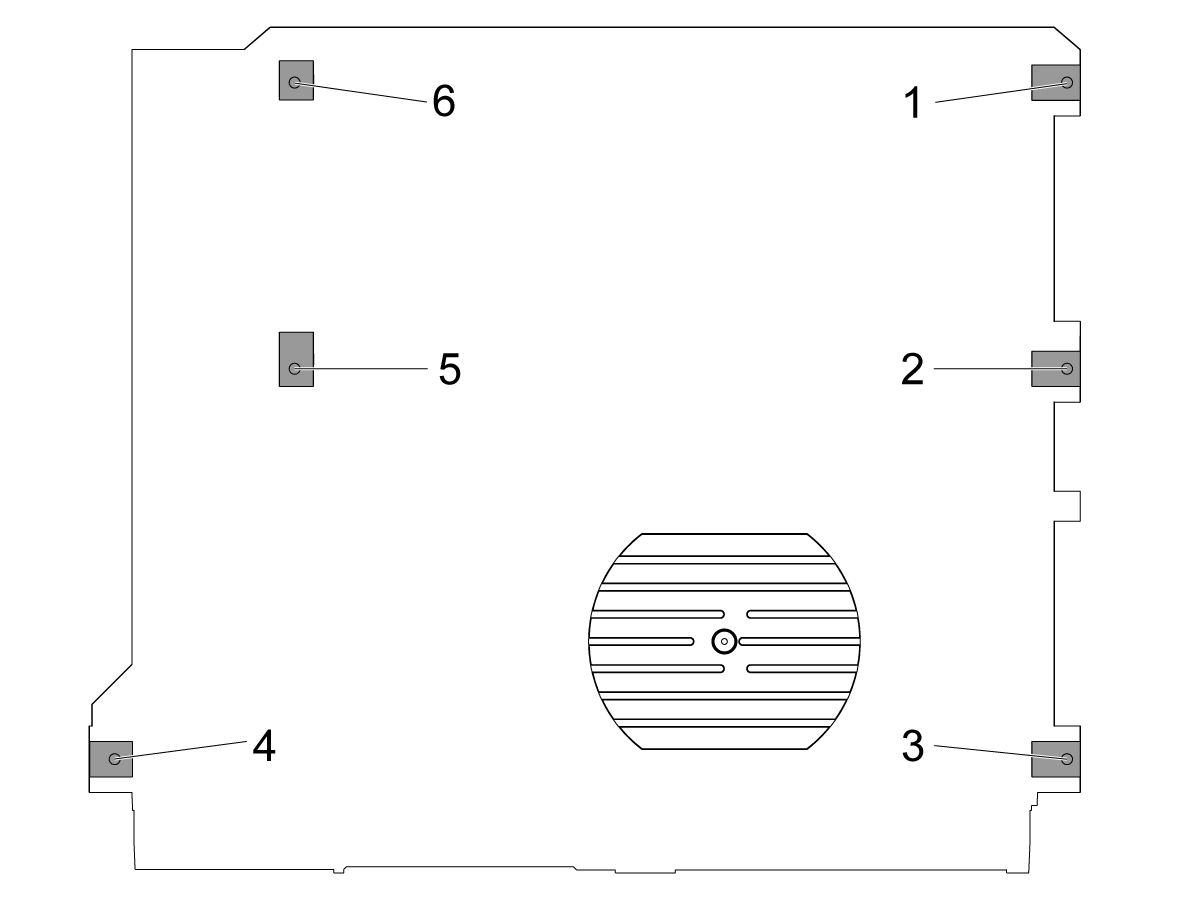
Otpustite srednje vijke za niveliranje [2 i 5] tako da ne podupiru nikakav teret.

Pomoću 4 vijka za kutno niveliranje postavite stroj na udaljenosti od 3" (76,2 mm) iznad poda.

2

Obavite grubo niveliranje stroja:

Odvijte vijak za niveliranje br. 4.

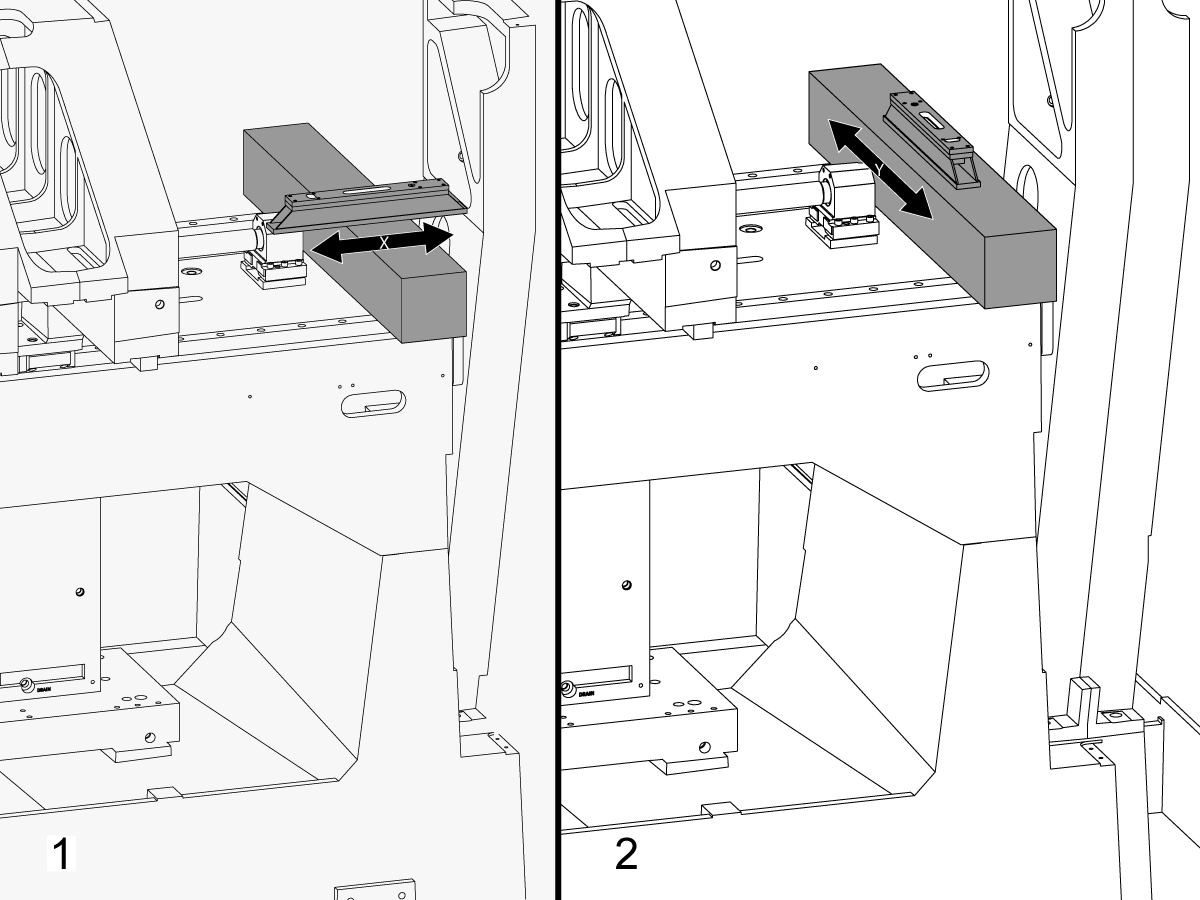
Postavite granit preko linearnih vodilica X-osi u blizini nosača ležaja kugličastog vretena na X-osi.

Postavite strojnu libelu na vrh granita paralelno s X-osom.[1]

Podešavajte vijak za niveliranje br. 6 dok stroj ne bude ravan u X-osi.

Postavite strojnu libelu na vrh granita okomito na X-os.[2]

Podešavajte vijak za niveliranje br. 3 dok stroj ne bude ravan u Y-osi.

Pritežite vijak za niveliranje br. 4 dok ne dodirne podložak za niveliranje.

3

Podesite valjak X-osi:

Sastavit eT-2192 s T-2181.

Pomaknite Y-os na sredinu hoda.

Stavite T-2192 na bočnu stranu glavnog vretena.

Provjerite je li mjehurić na T-2181 unutar čitljivog raspona.

Ako nije, otpustite vijak koji pričvršćuje T-2192 na magnetno postolje i pomaknite nastavak po potrebi.

Ručno pomaknite X-os na stranu i izmjerite valjak X-osi. Očitajte poziciju strojne nul točke, na sredini i na kraju hoda.

Podešavajte vijak za niveliranje br. 4 dok ne bude odstupanja između očitanja na poziciji strojne nul točke i očitanja na kraju hoda.

Napomena: Mjehurić na T-2181 NE mora biti na sredini posude. Treba biti samo unutar čitljivog raspona.

4

Postavite srednje vijke za niveliranje:

Pritežite srednje vijke za niveliranje dok ne dodirnu podloške za niveliranje, a zatim ih pritegnite za dodatnih 45°.

Provjerite valjak X-osi. Podesite srednje vijke za niveliranje kako biste ispravili valjak X-osi.

Poravnavanje X-osi s Y-osom

1

Poravnajte čelo uzdužnog suporta paralelno s kretanjem X-osi:

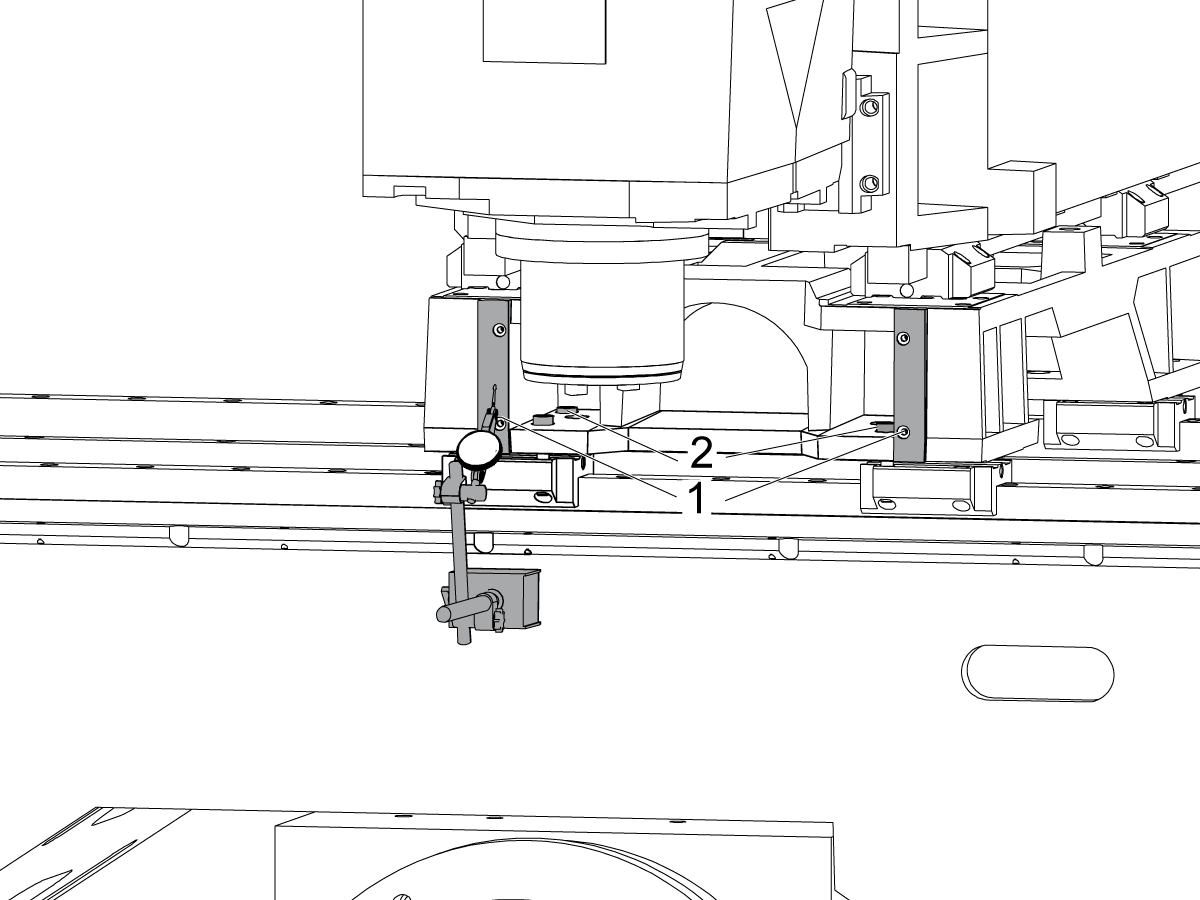
Pređite preko obrađene površine na prednjem dijelu uzdužnog suporta [1] ručnim pomicanjem X-osi.

Otpustite vijke koji pričvršćuju uzdužni suport za kanalice X-osi [2] i po potrebi poravnajte čelo uzdužnog suporta paralelno s kretanjem X-osi unutar 0,001".

Zavrnite vijke. Pogledajte Haas specifikacije zakretnog momenta spone.

2

Poravnajte Y-os okomito na X-os:

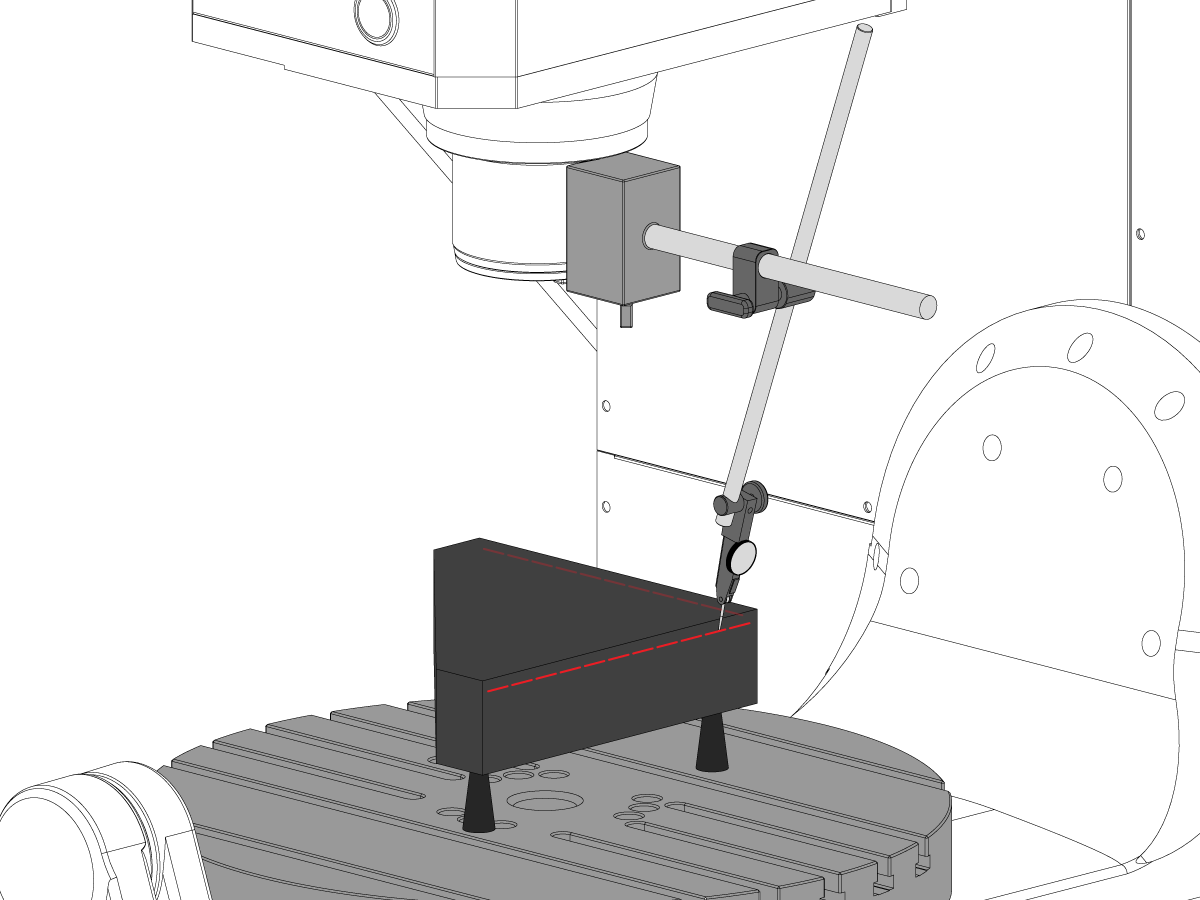
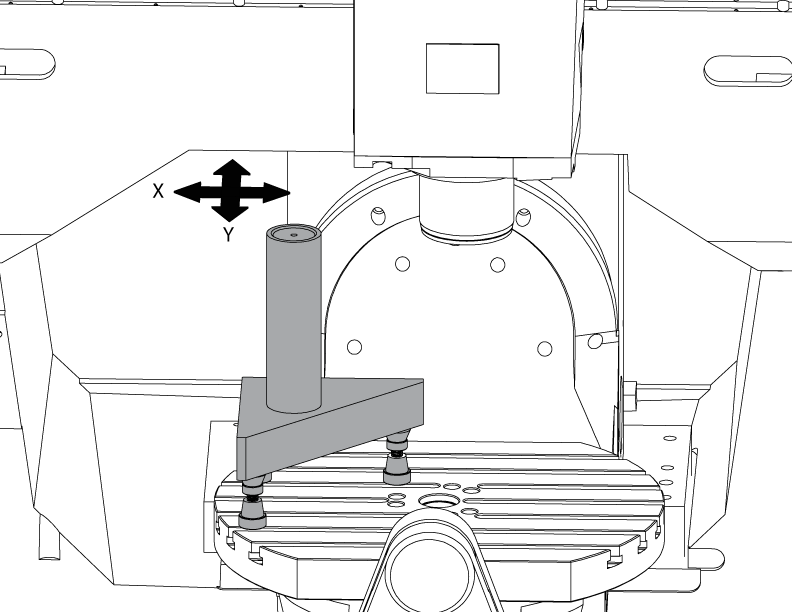
Postavite trokutni granit s lijeve strane ploče C-si na strojnim dizalicama.

Stražnju stranu trokutnog granita postavite paralelno s X-osom. NTE 0,0001"/10"

Pomičite vrh trokutnog granita duž X i Y-osi.

Podesite strojne dizalice dok gornja površina trokutnog granita ne bude paralelna s ravninom X-Y, NTE 0,0005".

Provjerite je li stražnja strana granita paralelna s X-osom. NTE 0,0001"/10".

Otpustite vijke koji pričvršćuju kanalice Y-osi na uzdužni suport i poravnajte Y-os okomito na X-os. NTE 0,0005"/10"

Zavrnite vijke. Pogledajte Haas specifikacije zakretnog momenta spone.

Provjerite je li Y-os okomita na Y-os (NTE 0,0005"/10") nakon pritezanja vijaka.

Poravnavanje Z-osi s ravninom X-Y

1

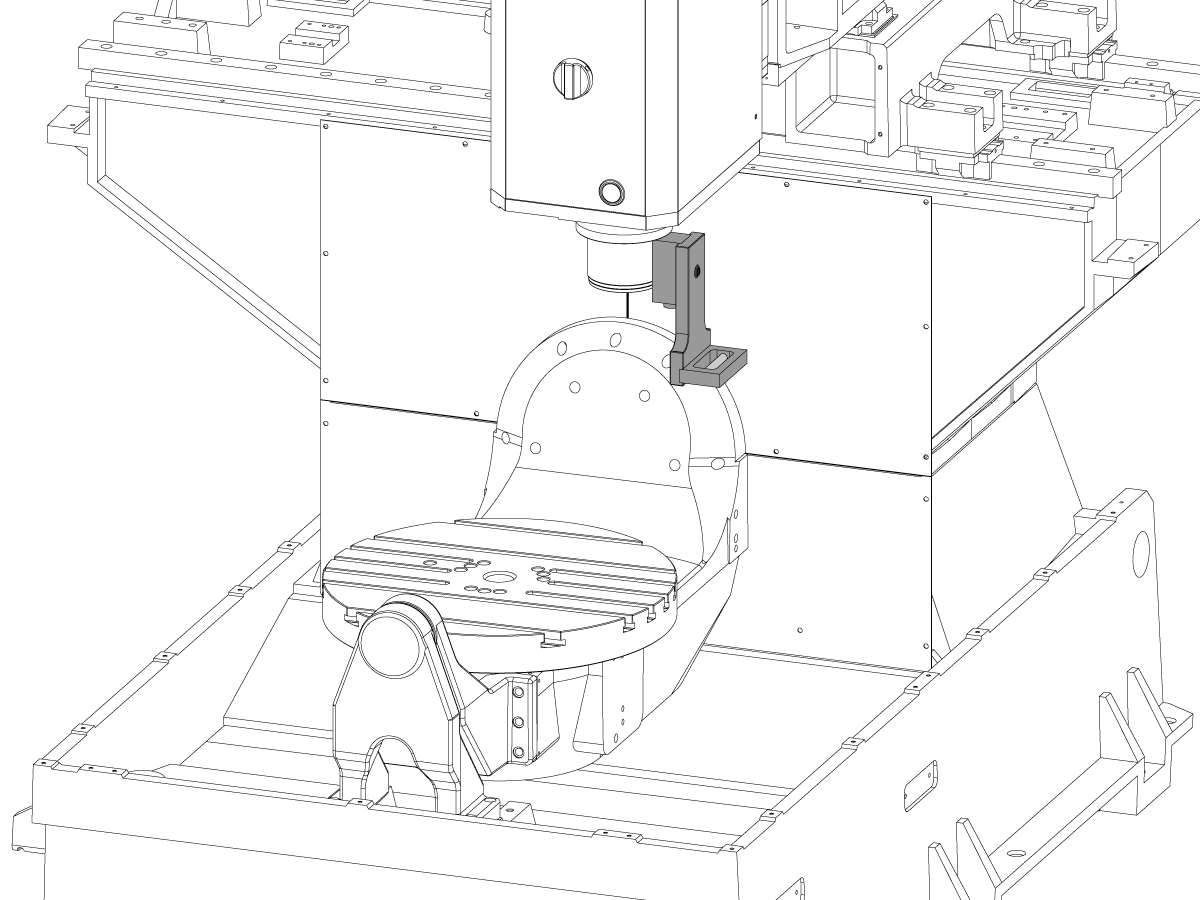
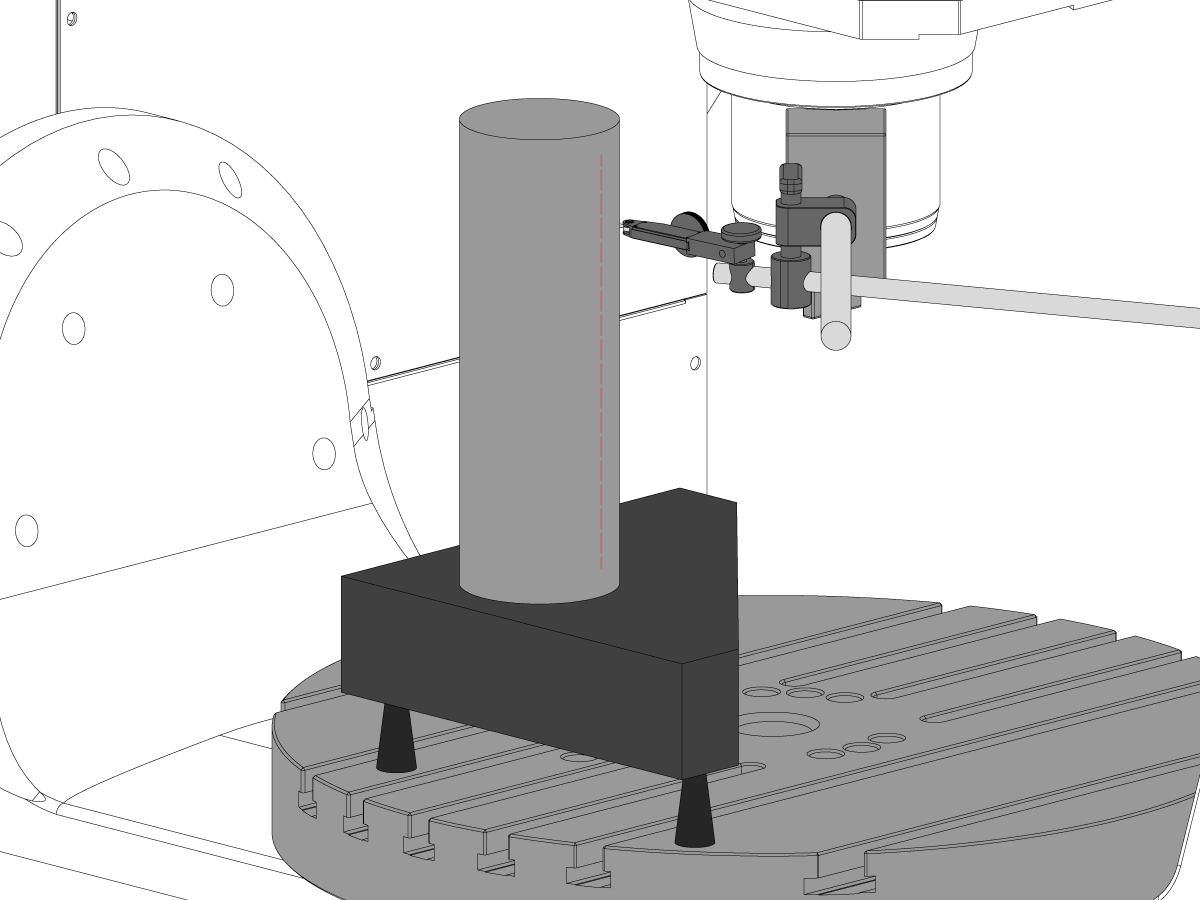
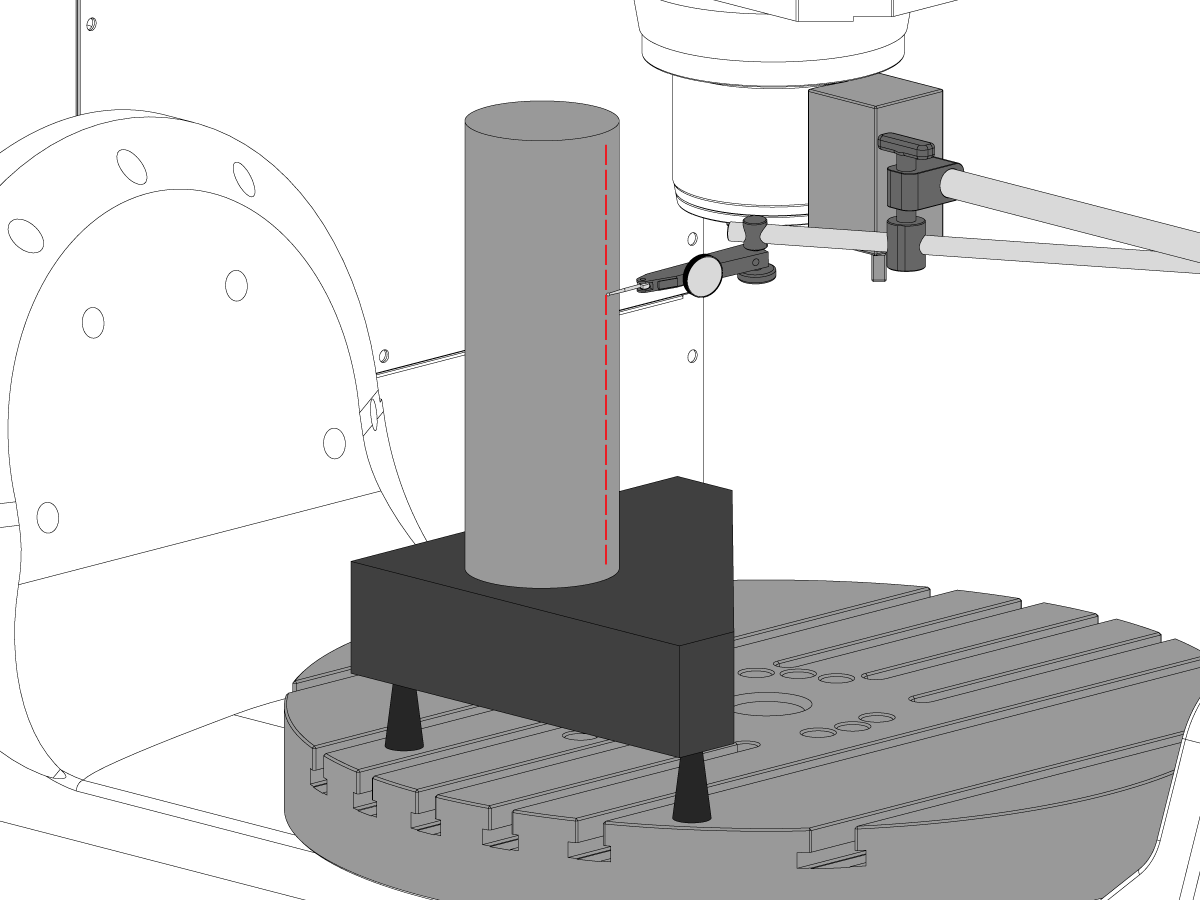
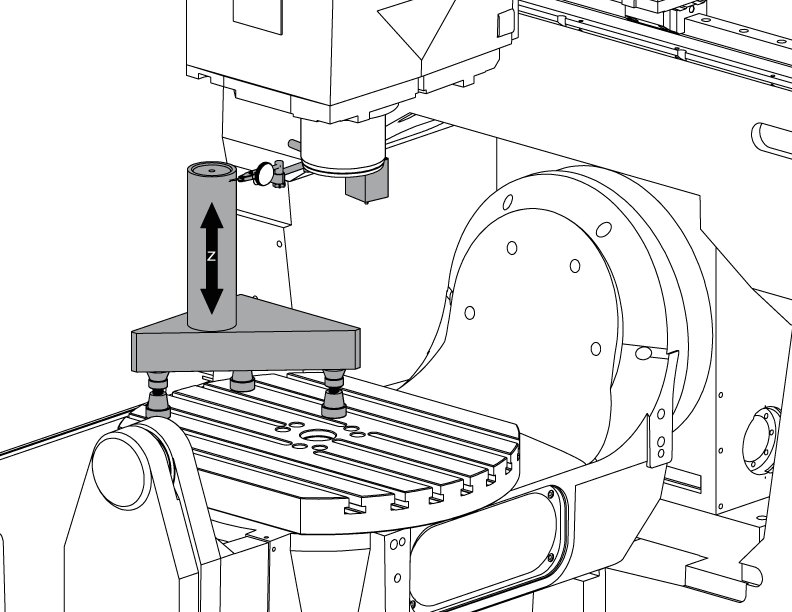
Postavite cilindar.

Postavite cilindar na vrh trokutnog granita kako je prikazano na slici.

Poravnajte gornju površinu cilindra paralelno s ravninom X-Y (NTE 0,0001") okretanjem strojnih dizalica.

Postavite stroj u sljedeći položaj:

  • UMC-750 na X -7,000" i Y -10,000"
  • UMC-750SS na X -10,000" i Y-10,000"

2

Poravnajte Z-os okomito na X-os:

Zamijenite jedan od gornjih kutnih vijaka na kanalicama Z-osi s T-2193A * kako biste okrenuli glavu glavnog vretena oko njega.

Označite stranu cilindra duž Z-osi.

Otpustite vijke koji pričvršćuju kanalice Z-osi za kljun.

Poravnajte Z-os okomito na X-os (NTE 0,0005"/10") tako što ćete glavu glavnog vretena njihati s jedne na drugu stranu.

Zavrnite vijke. Pogledajte Haas specifikacije zakretnog momenta spone.

Provjerite je li Z-os okomita na X-os nakon pritezanja vijaka.

Nakon završetka poravnavanja zamijenite T-2193A * s vijkom

*  : Koristi se samo na seriji prije ponovnog pokretanja. 

3

Poravnajte Z-os okomito na Y-os:

Označite prednju stranu cilindra duž Z-osi.

Postavite podlošku između kanalica Z-osi i kljuna da poravnate Z-os okomito na Y-os (NTE 0,0005"/10").

Napomena: postavite jednake podloške za gornje dvije kanalice ili donje dvije kanalice.

Zavrnite vijke. Pogledajte Haas specifikacije zakretnog momenta spone.

Provjerite je li Z-os okomita na Y-os i Z-os nakon pritezanja vijaka.

4

Poravnajte i pritegnite kućišta kugličaste matice Y-osi i Z-osi:

Otpustite vijke koji pričvršćuju kugličastu maticu na kućište i vijke koji pričvršćuju kućište za odljevak.

Prvo pritegnite vijke koji pričvršćuju kućište kugličaste matice na odljevak, a zatim pritegnite vijke koji pričvršćuju kugličastu maticu na kućište.

Pomoću funkcije blokade ručnog pomicanja pomaknite os naprijed-natrag kroz puni hod.

Napomena: nemojte koristiti ručno kolo za brzo pomicanje.

Zavrnite vijke. Pogledajte Haas specifikacije zakretnog momenta spone.

Kućištu matice Y-osi može se pristupiti sa stražnje strane stroja kad je kljun ručno potpuno pomaknut prema prednjem kraju stroja.

Kućištu matice Z-osi može se pristupiti s prednje strane stroja kada je glavno vreteno ručno potpuno pomaknuta nadolje.

Napomena: Kućište motora glavnog vretena treba skinuti kako bi se pristupilo kućištu kugličaste matice Z-osi.

Navodite glavno vreteno na ravninu X-Y

1

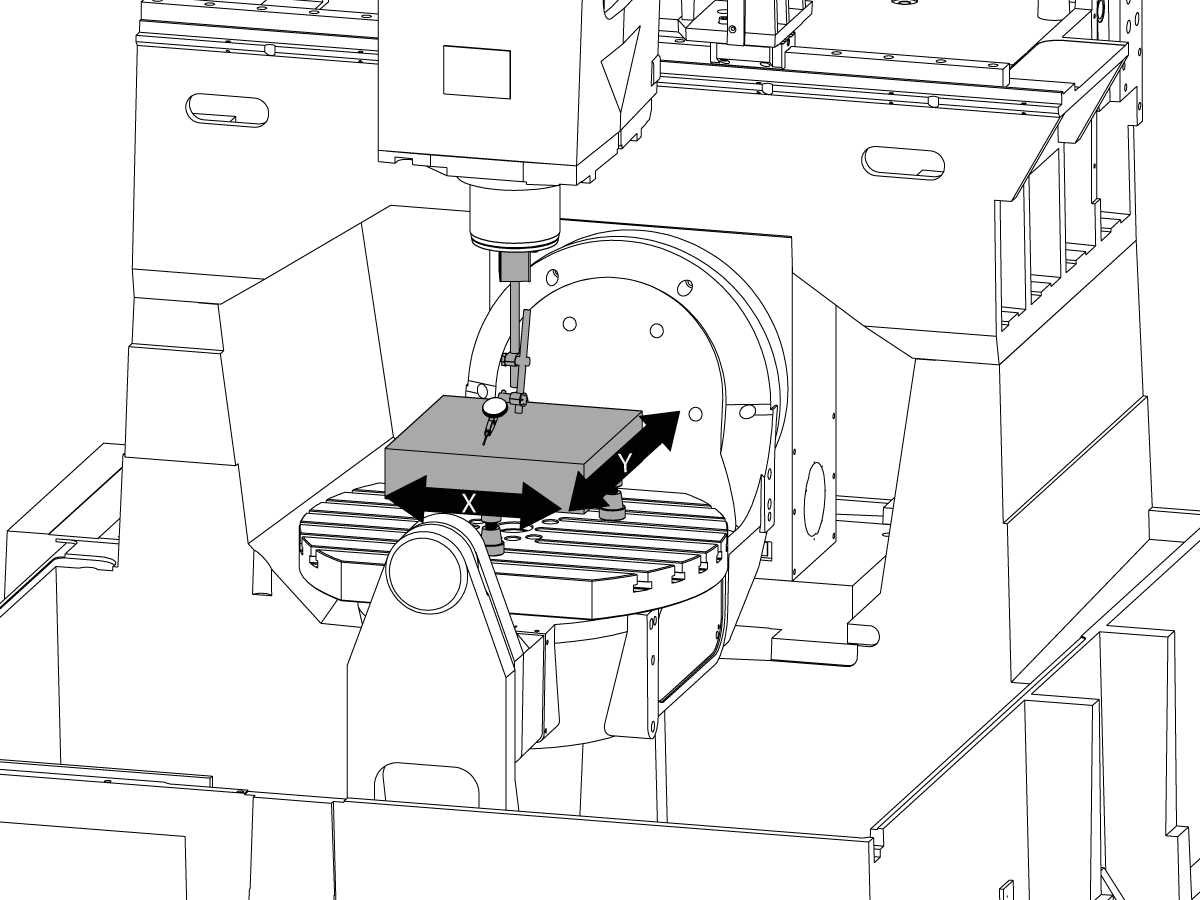
Postavljanje granita:

Postavite strojne dizalice i granit na sredinu ploče C-osi kako je prikazano na slici.

Poravnajte gornju površinu granita paralelno s ravninom X-Y podešavanjem visine strojnih dizalica NTE 0,0001".

Glavno vreteno postavite preko središta ploče.

2

Navodite glavno vreteno na ravninu X-Y:

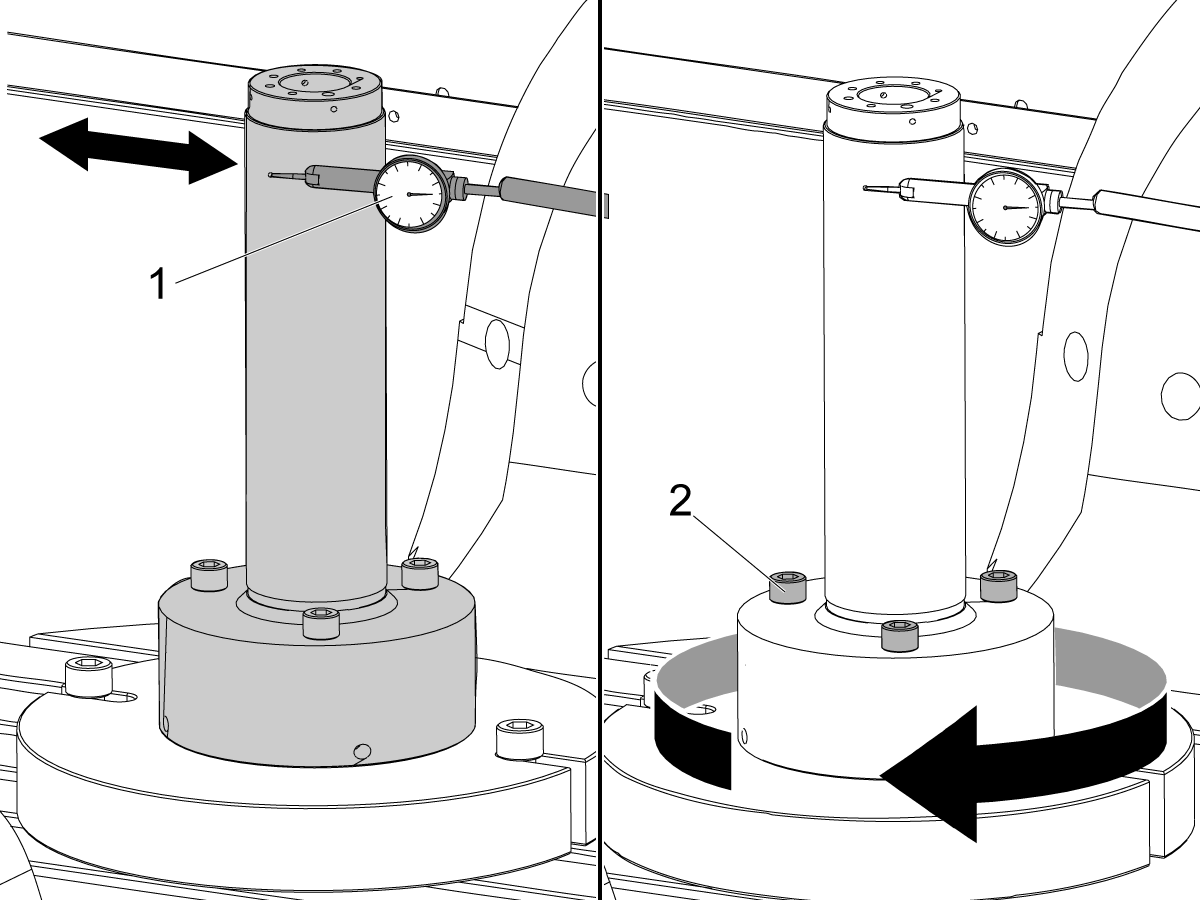
Postavite indikator na osovinu glavnog vretena.

Izvršite mjerenje na vrhu granita prilikom okreta za svakih 90°.

Otpustite (6) vijaka na podnožnoj ploči za glavu glavnog vretena.

Dodajte ili uklonite podloške između odljevka glave glavnog vretena i podnožne ploče kako biste navodili glavno vreteno na ravan X-Y NTE 0,0005"/10".

Napomena: Za promjenu kuta podnožne ploče upotrijebite podloške nejednake debljine [1].

Kada je zamah unutar specifikacije, pritegnite (6) vijaka. Pogledajte Haas specifikacije zakretnog momenta spone.

Provjerite navođenje glavnog vretena nakon pritezanja vijaka.

Usklađivanje B osi s XYZ osima

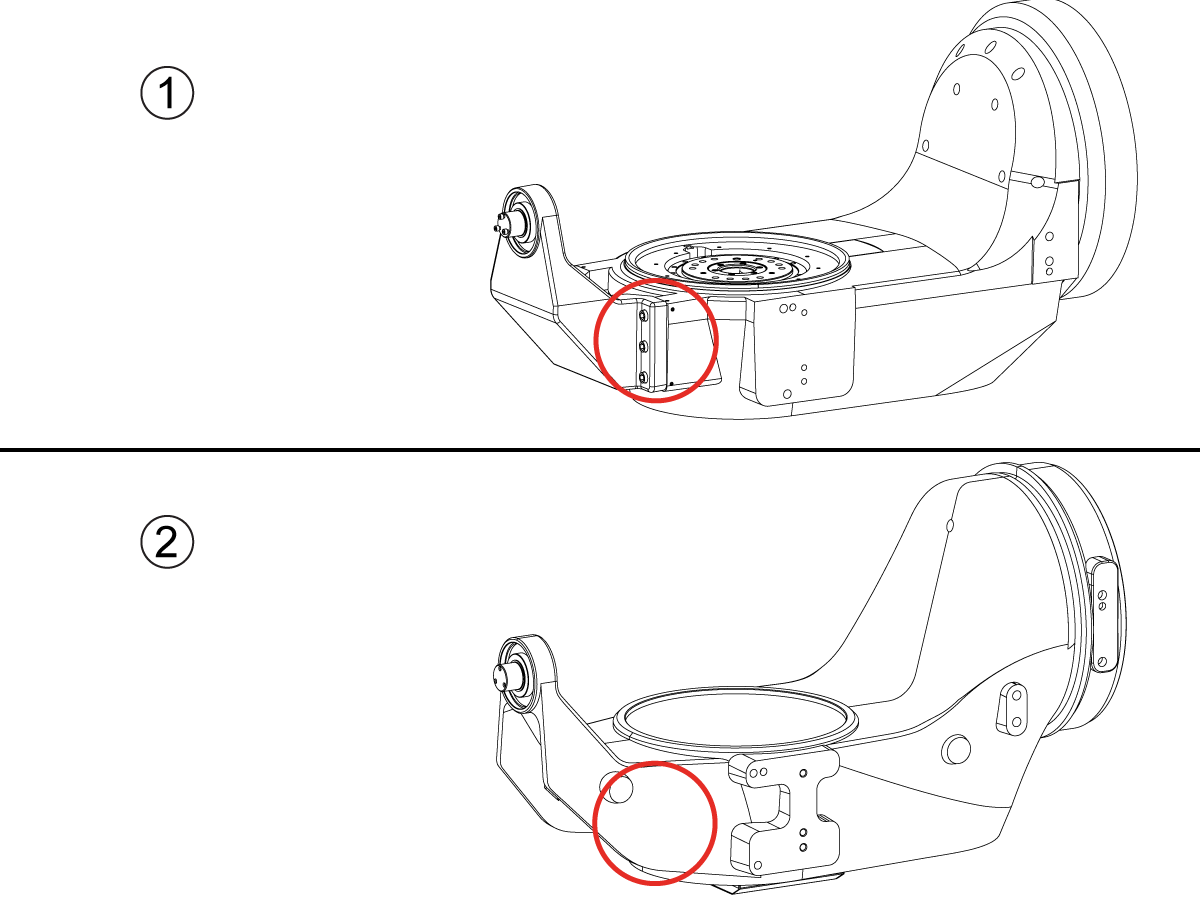
How to identify the Multi-Piece and the Unibody trunnion   

1) Multi-Piece trunnion:    UMC machines built approximetely before 11/2022 will have this configuration.

2) Unibody trunnion:    UMC machines built approximetely after 11/2022 will have this configuration.

1

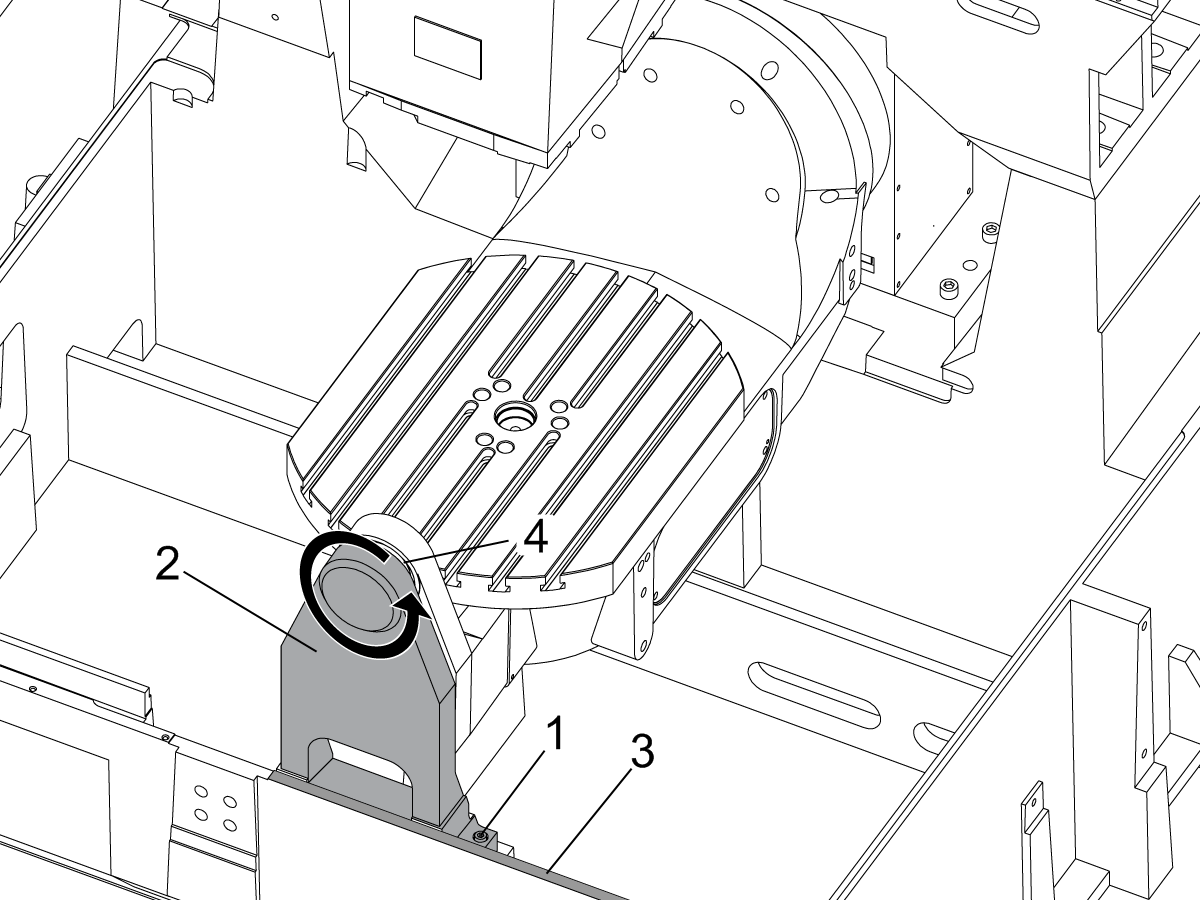
Remove the A-frame trunnion support:

Remove the bolts [1] that secure the A-frame trunnion support [2] to the base and take out the shims between A-frame support and the base.

Rotate the A-frame support [2] counter-clockwise to clear the edge of the base [3].

Pull the A-frame support off the bearings.

 Note: The A-frame support might vacuum lock on the bearings. Use the zip-tie to pry the seal [4] open.

 Caution: To lift the trunnion support, get the aid of another person. The support weighs 85 lbs (39 kg).

2

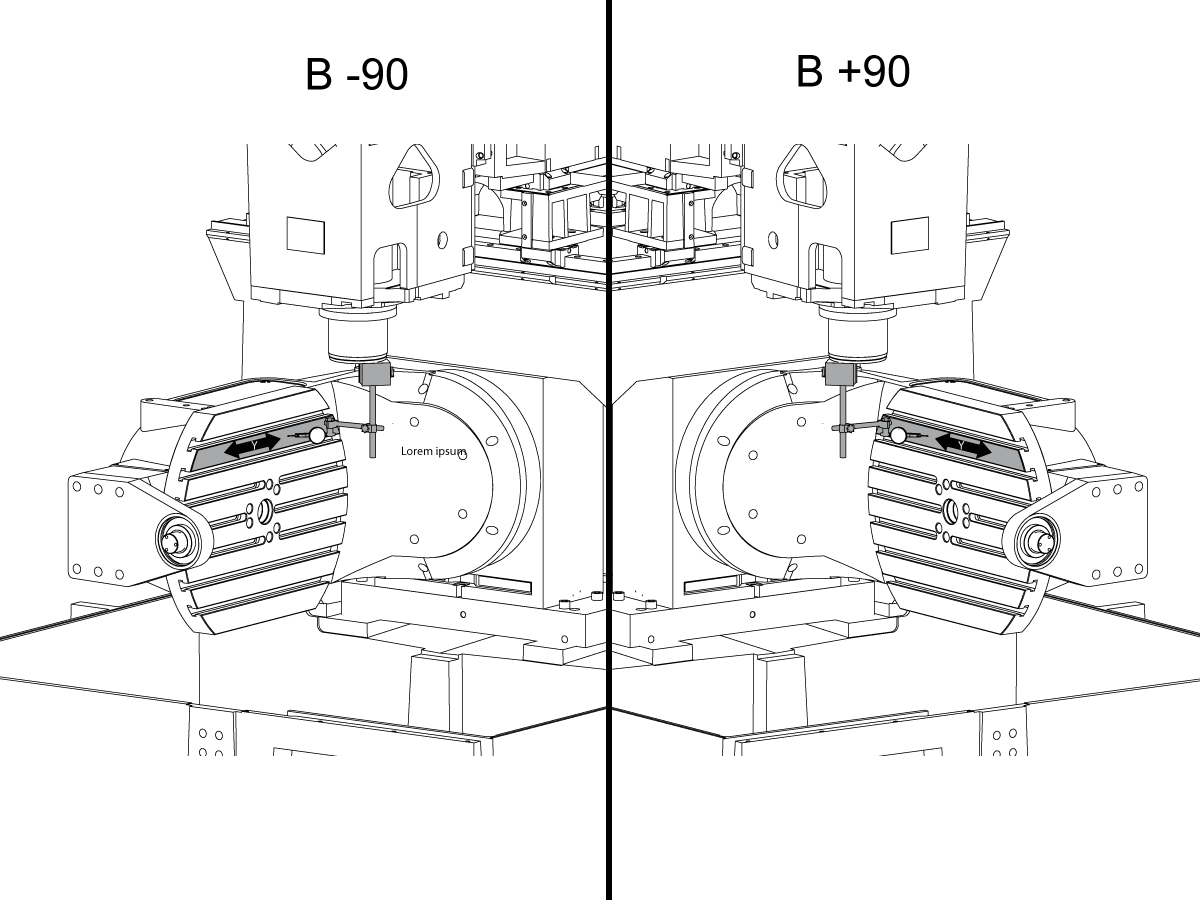
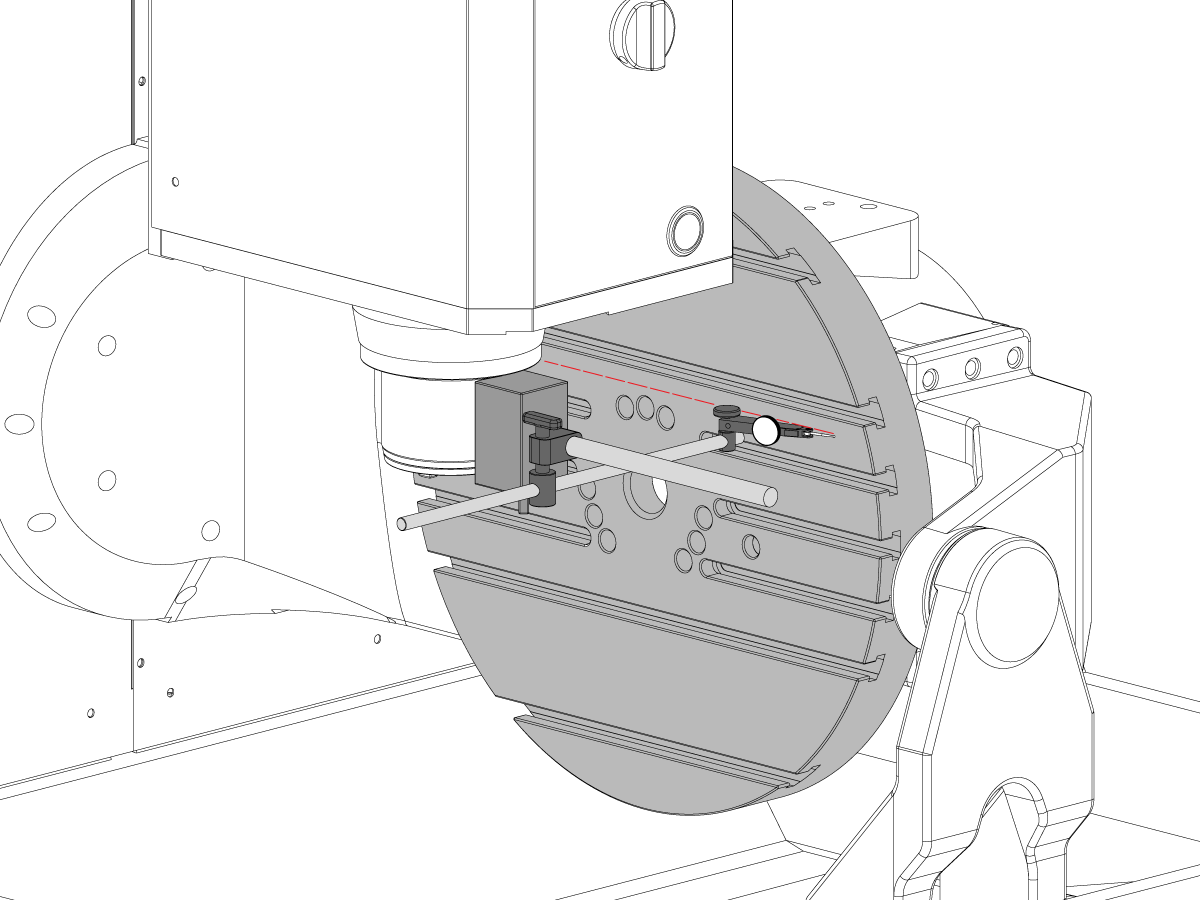
Measure the B- axis of rotation parallelism to the Y-Z plane:

For a machine with a Classic Haas Control, change Parameter 151:20 (B axis CHK TRAVL LIM) to 0.

For a machine with a Next Generation Control, change Parameter 6.021 (B axis CHK TRAVL LIM) to FALSE.

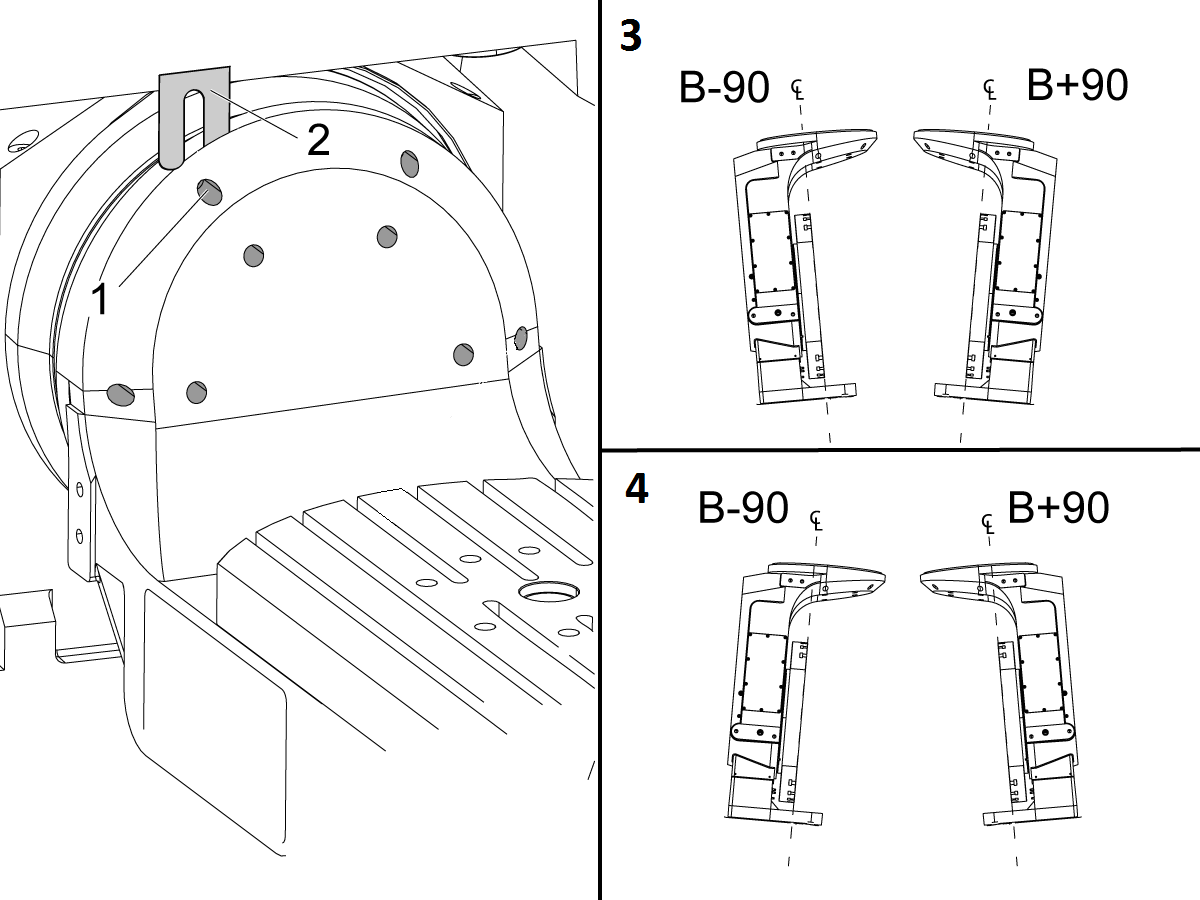
Measure the parallelism of the platter to the Y-Z plane with the B axis at 90° and then the B axis at -90° as shown in the picture.

Position the Y-Axis in the following starting position:

UMC-500: Y=0, Sweep 15”, 3rd T-Slot Land from the top.

UMC-750/1500-Duo: Y=-1.0, Sweep 18", 3rd T-Slot Land from the Top .

UMC-1250: Y=-1.0, Sweep 28", 3rd T-Slot Land from the Top.

UMC-500PP: Y=-4.0, Sweep 7".

UMC-750PP: Y=-2”, Sweep 15".

UMC-1000PP: Y=-4”, Sweep 15".

Compare the results at B 90° and B-90°. The results should be...

  • Symmetric against the Y-Z plane, positive or negative direction
  • Less than 0.0010"/20"

If the results are symmetric against Y-Z plane, and are less than 0.0010"/20 inches: Go to Step 5.

If the results are symmetric against Y-Z plane, but are more than 0.0010"/20 inches: Go to Step 4.

 Warning: If the results [3] are not symmetric against the Y-Z plane, the B axis rotary needs to be aligned: Go to Step 3.

3

Align the B axis of rotation parallel to the Y-Z plane:

Loosen the (6) bolts [1] that secure the B axis rotary to the base casting.

 Note: Keep the bolts sufficiently snug to control the adjustments.

Adjust the front and rear setscrews [2] until the measurements taken in Step 2 are symmetric against the Y-Z plane.

Torque the (6) bolts [1]. Refer to Haas Fastener Torque Specification.

Verify the measurements in Step 2 after the bolts have been torqued.

4

Align the C Axis of rotation perpendicular to the B Axis of rotation:

Remove the bottom C-Axis access cover.

Loosen the (12) bolts [1] that hold the C Axis body to the B Axis platter face.

Reach the bottom (4) bolts through the C Axis access port.

If the B Axis is symmetric in the positive direction [4], install horseshoe shims [2] of appropriate size behind the top (2) bolts.

If the B Axis is symmetric in the negative direction [5], install horseshoe shims [2] of appropriate size behind the bottom (2) bolts.

Torque the (12) bolts to 80 Ft-lbs (108 Nm).

Cut the excessive shim material off.

Verify the measurements in Step 2 after bolts are torqued.

5

Align the trunnion support shaft co-axial with the B Axis of rotation:

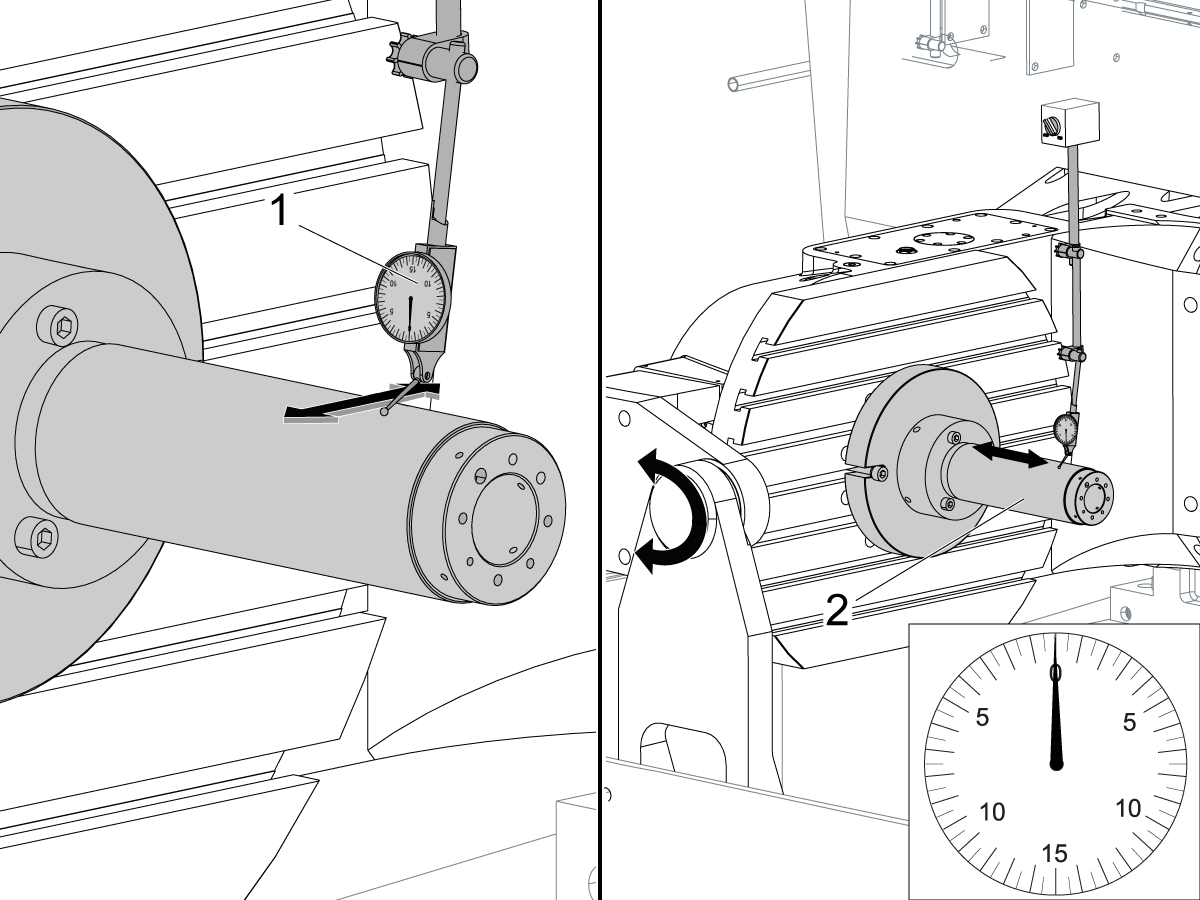
Setup (2) indicators on the outer race of the trunnion support bearing [2] as shown in the picture.

Mark the spot on the outer race where one of the indicator needles is contacting the surface.

After moving the B Axis to 90° or -90° you will align the marked spot with the needle again to exclude the bearing runout error from the measurements.

Take the readings when B is at 90° and B at -90°. Compare the readings. 

 Caution: The B axis brake needs to be clamped when taking the readings.

The deviation between the results when B is at 90° and at -90° needs to be less than 0.001" on each indicator.

 Note: The indicator on the side of the bearing will measure top to bottom alignment and the indicator on the top of the bearing will measure side to side alignment.

____

For models with a multi-piece trunnion

Loosen the (6) bolts [3] on the C Axis body support. Keep the bolts sufficiently snug to control adjustment.

Adjust the (8) set screws [4] until deviation between B at 90° and B at -90° is within 0.001".

Torque the (6) bolts [2] on the C Axis body support to 80 Ft-lbs (108 Nm).

Verify the alignment after the bolts have been torqued.

____

For models with a unibody trunnion

Jog rotary to B90. Set up an indicator on the highlighted surface as shown in the lower diagram .

Rotate B-axis 180 degrees (90 to -90).

Run out (NTE 0.010” TIR).

 Caution: If the measurement exceeds the tolerance then contact support.

6

Install and shim the A-frame trunnion support:

Move the B Axis to 90°.

Setup an indicator [1] against a machined surface of the C Axis body. Set the indicator to 0.

Use plastic zip ties [2] to pry the seal open while installing the A-frame support. This lets unwanted air and grease out of the assembly.

Install the A-frame trunnion support [3] over the bearings.

Remove the cable ties.

Turn the trunnion support clockwise until it is vertical.

 Note: The weight of the A-frame support will cause the trunnion to sag. The amount of sag is measured with the indicator that was previously setup on the side of the C Axis body.

____

For multi-piece trunnions

Adjust the shims [4] between the A-frame support and the base casting to remove the sag until indicator reads 0 again.

When the indicator reading is 0, torque the (4) bolts. Refer to Haas Fastener Torque Specification.

Verify the reading after bolts are torqued. Adjust the shims again if necessary until the indicator reads 0.

____

For models with unibody trunnion

Determine the amount of shim stock [4] needed to raise the Trunnion arm so the indicator reads 0.005".

The indicator [1] value will change once the support is torqued.

With indicator still in place:

  • Torque trunnion support bolts to appropriate values.
  • Check indicator to make sure it reads between the range of

Trunnion arm raised (0.005” to  0.010”).

 Note: For unibody trunnions, the shim location may also be used to correct the C-axis to X-Y plane perpendicularity instead of shimming the saddle trucks.

 Caution: Use equal amount of shims on each side of the A-frame support. Unequal shims will cause the A-frame support to pull the trunnion to the side.

Verify the B Axis of rotation alignment to the Y-Z plane (Step 2). Loosen the bolts and tap the A-frame support side to side if necessary to correct the B axis to Y-Z plane alignment.

7

Set C-axis perpendicular to X/Y plane:

Move the axes to

UMC-750's........X= -10.5" & Y=0."

UMC-1000's......X=-17.0" & Y=-0."

Zero an indicator [1], on a Ground Block [2], 1/2" off the edge at the rear of the platter (Mag-Base on Spindle), with C at 0 Degrees

Rotate C-Axis to 180°.

Move Y axis, and ground block, in Y Axis negative direction until you are 1/2" away from platter edge, and take the perpendicularity measurement

Adjust the shims until the average error is within 0.0005" end to end.

 Note: For unibody trunnions, the shim location under the bearing support may also be used to correct the C-axis to X-Y plane perpendicularity instead of shimming the saddle truck.

Caution: Shim either two front trucks or two rear trucks with the equal shim.

Note: Shim one truck at the time to maintain the X to Y squareness.

Verify the measurements after all bolts are torqued.

Verify the X to Y alignment in Step 2.

8

Set the tool change offsets:

B-axis tool change offset [1]

For Classic Haas Controls, change Parameter 213. 

For Next Generation Controls, go to: Settings>Rotary Tab>Highlight the rotary and press [INSERT], or change Parameter 6.078 (B TOOL CHANGE OFFSET) to set the trunnion (B Axis) parallel to the X Axis.

For models with multipiece trunnion

(NTE 0.001/10"; NTE 0.0020" overall)

For models with unibody trunnion

(NTE 0.0005/10"; NTE 0.0010" overall)

___

C-axis tool change offset [2]

For Classic Haas Controls change Parameter 523.

For Next Generation Control go to: Settings>Rotary Tab> Highlight the rotary and press [INSERT], or change Parameter 7.078 (C TOOL CHANGE OFFSET) to set the table T-slot (C Axis) parallel to the X Axis

For models with multipiece trunnion

(NTE 0.001/10"; NTE 0.0020" overall)

For models with unibody trunnion

(NTE 0.0005/10"; NTE 0.0010" overall)

9

Check C-axis perpendicularity to X/Y plane:

Align the indicator centered over the C-axis bore with the Y-axis at -10.

Jog positive in the Y-axis and align the indicator over the center of the last section of the platter and make a mark at this spot with a washable marker.

Insert 1-2-3 block as shown and set the indicator to zero.

Remove the block and rotate the platter 90 degrees, following the marked spot with the indicator.

Insert block back between the indicator and platter. Note reading.

Repeat the previous two steps, taking readings with the platter at 180, 270 and 360 degrees.

Multi-piece trunnion:  (NTE 0.0005")

Unibody trunnion: (NTE 0.001")

10

Measure the intersection of the B and C axis:

Follow the linked instruction manual to complete this step.

B-Axis and C-Axis intersection Adjustment

11

Align the B-Axis brake disk:

 Note: Do not do this step if you are working on a SS machine.

Operate this code in MDI mode to unclamp the brake:

M11;

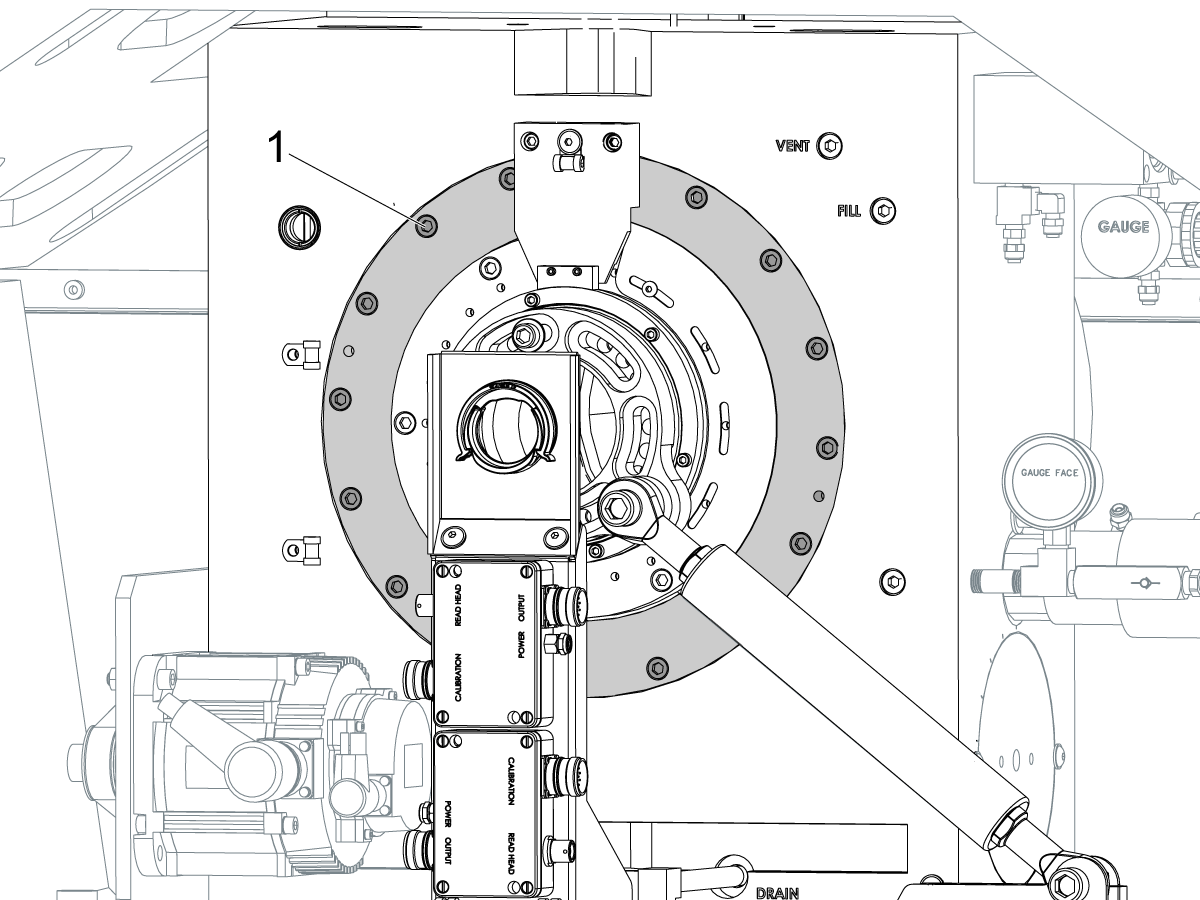
Loosen all of the brake disc bolts [1] and torque them to 5 Ft-lbs (7 Nm).

Operate this code in MDI mode to clamp the brake:

M10;

Wait 10 seconds.

Torque the bolts. Refer to Haas Fastener Torque Specifications.

Vratite parametar/postavku na tvorničke vrijednosti

Vratite parametar 1314 za CHC / postavku 254 za NGC na tvorničku vrijednost. (Isključite i ponovno uključite stroj nakon promjene vrijednosti.)

Poravnajte i kalibrirajte WIPS. Sustav bežične intuitivne sonde (WIPS) - Kalibracija

Postavite referentne točke rotora stroja. 

  • UMC-750 - Postavke pomaka za MRZP WIPS - CHC
  • UMC-750 - Postavke pomaka za MRZP WIPS - NGC

Ispunite potpuno izvješće o provjeri:

  • EA0420 UMC-500 izvješće o provjeri
  • EA0373 UMC-750 izvješće o provjeri
  • EA0418 UMC-1000 izvješće o provjeri

Primjerak izvješća o provjeri čuvajte sa strojem.

Ako ste zamijenili sklop B-osi i C-osi, obavite postupak opisan u odjeljku UMC-750 - Sjecište B-osi i C-osi - Poravnavanje

8.2 Poravnavanje - Označava zone

Recently Updated

UMC Poravnanje označava zone


AD0490

Označavanje zona

1

Valjak osovine X

  • Najprije pričvrstite alat T-2192 na bočnu stranu glavnog vretena.
  • Za mjerenje valjka X zadržite sljedeće položaje Y i Z:
    • UMC 500 (Y,Z): -8, -8
    • UMC 750 (Y,Z): -10, -10
    • UMC 1000 (Y,Z): -12, -12
  • Izmjerite valjak osovine X (NTE 0,0005"/10")


2

Postavljanje paraleliteta B osovine na Y osovinu

  • Vratite B i C osovinu u referentnu točku
  • Izmjerite odliv ploča u osi Y (NTE: 0,0008"/10" 0,0012"/15")
  • Zatim izmjerite istu površinu s osovinom B na -90° i + 90°  (NTE: 0,0008"/10" 0,0012"/15")
  • Za UMC 500 i 750 izmjerite cijelu duljinu ploče
  • Za UMC 1000, pomaknite 2" od ruba ploče, a zatim izmjerite preko 20"

3

Provjera okomitosti osovine Y na osovinu X

  • Upotrijebite vijčanu dizalicu da postavite gornju površinu granita paralelno s ravninom XY (NTE: 0,0002")
  • Zatim provjerite je li Y kvadrat X (NTE 0,0005"/10")

4

Provjera okomitosti osovine X na osovinu Z

  • Postavite granitni i precizni cilindar na ploču u prikazanoj orijentaciji
  • Upotrijebite vijčanu dizalicu da postavite gornju površinu cilindra paralelno s ravninom XY (NTE: 0,0002")
  • XY lokacije glavnog vretena za ovaj korak:
    • UMC 500, X = -6, Y = -8
    • UMC 750, X = -10, Y = -10
    • UMC 1000, X = -17, Y = -12
  • Z početni položaj za ovo mjerenje:
    • UMC 500, Zpočetni = Ztop – 2”
    • UMC 750, Zpočetni = Ztop – 5”
    • UMC 1000, Zpočetni = Ztop – 7”
  • Zvrh je granica hoda osi Z u pozitivnom smjeru (prema gore)
  • Od Zpočetni, izmjerite prema dolje 10” duž cilindra

5

Provjera okomitosti osovine Y na osovinu Z

  • Postavite granitni i precizni cilindar na ploču u prikazanoj orijentaciji
  • Upotrijebite vijčanu dizalicu da postavite gornju površinu cilindra paralelno s ravninom XY (NTE: 0,0002")
  • XY lokacije glavnog vretena za ovaj korak:
    • UMC 500, X = -6, Y = -8
    • UMC 750, X = -10, Y = -10
    • UMC 1000, X = -17, Y = -12
  • Z početni položaj za ovo mjerenje:
    • UMC 500, Zpočetni = Zvrh – 2”
    • UMC 750, Zpočetni = Zvrh – 5”
    • UMC 1000, Zpočetni = Zvrh – 7”
  • Zvrh  je granica hoda osovine Z u pozitivnom smjeru (prema gore)
  • Od Zpočetni, izmjerite prema dolje 10” duž cilindra

6

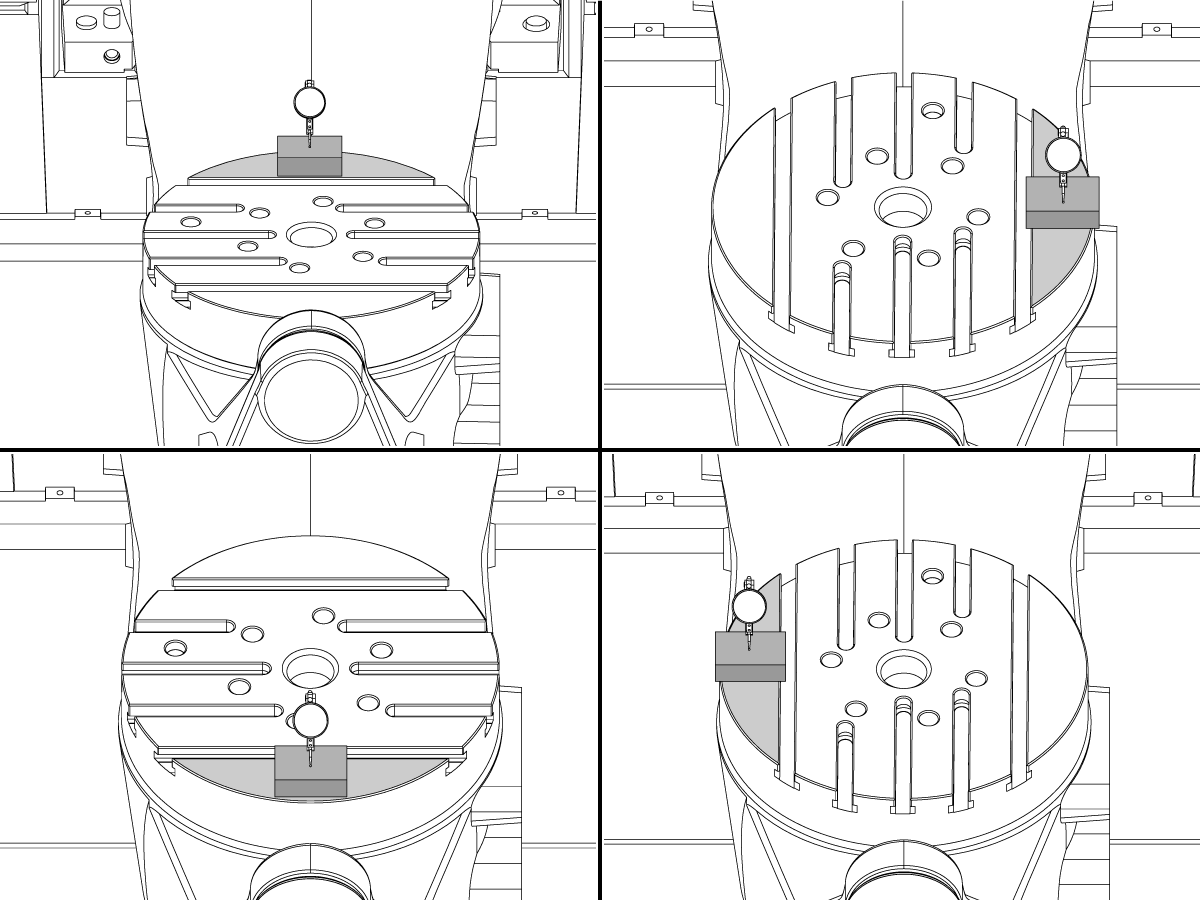
Provjera okomitosti osovine C na ravninu XY

  • Postavite mag podlogu na glavno vreteno da se ne može zakretati s glavnim vretenom.
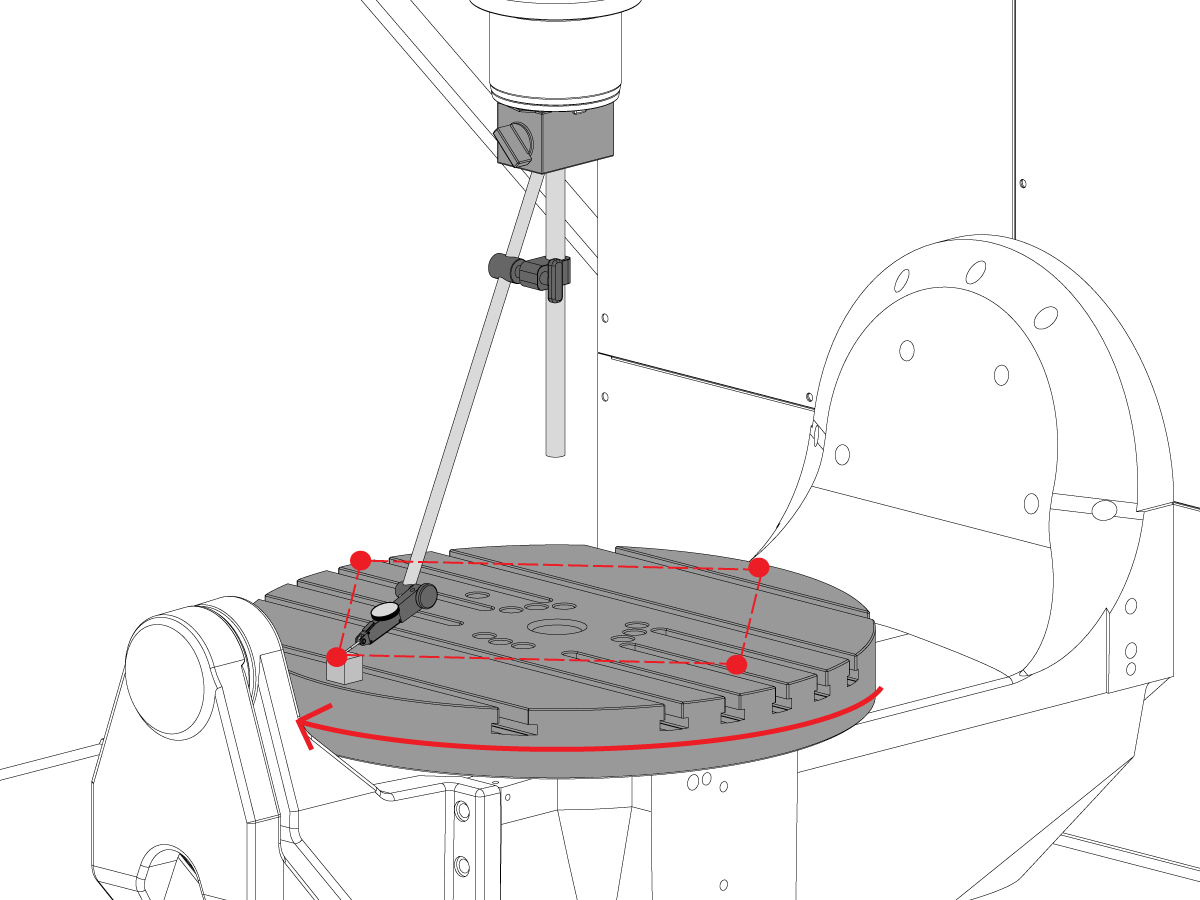
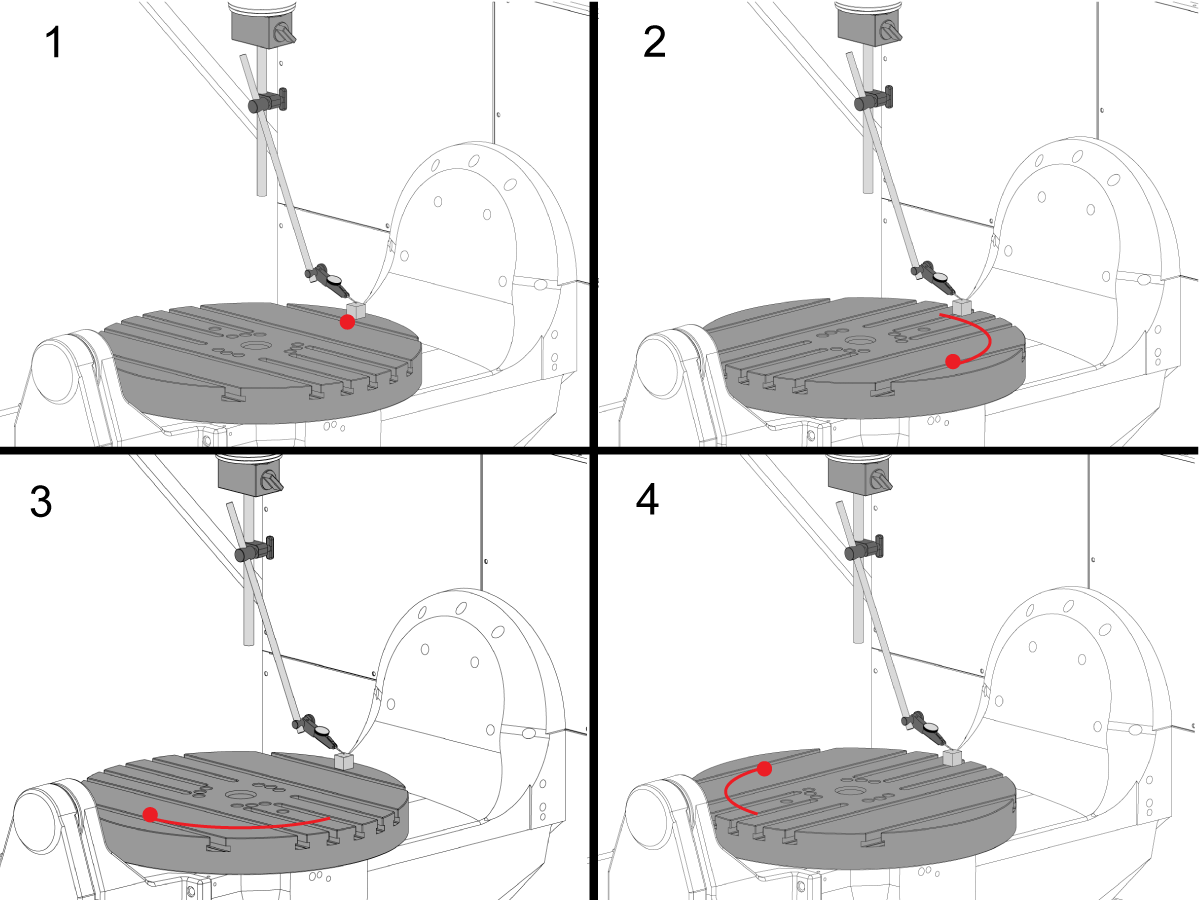
  • Postavite precizni blok mjerač na rub ploče u položaj od 12 sati. 
  • Postavite nultu točku vrha indikatora na bloku mjerača u ovaj položaj.
  • Zakrenite osovinu C  90° 
  • Zatim pomaknite glavno vreteno u osovinu X i Y da biste slijedili blok mjerača i obavili mjerenje iste točke na ploči. Ne bi trebalo doći do rotacije glavnog vretena
  • Ponovite ovo još 2 puta za ukupno 4 položaja, pod razmakom od 90°, na rubu palete kao što je prikazano. 
  • Razlika između mjerenja položaja od 12 i 6 sati određuje ravnanje duž osovine X (NTE 0,0005")
  • Razlika između mjerenja položaja od 3 i 9 sati određuje  ravnanje duž osovine Y (NTE 0,0005)

7

Odstupanje čeone ploče

NAPOMENA: Kočnica osovine C je isključena za ovaj korak

  • Postavite precizni blok mjerač na rub ploče u položaj od 12 sati. 
  • Postavite nultu točku vrha indikatora na bloku mjerača u ovaj položaj.
  • Zakrenite osovinu C  90°, ali držite blok mjerača na položaju 12 sati
  • Obavite mjerenje od vrha bloka mjerača
  • Ponovite ovo još 2 puta za ukupno 4 položaja, pod razmakom od 90°, na rubu palete kao što je prikazano. 
  • Zabilježite ukupno naznačeno odstupanje. (NTE 0,001")

8

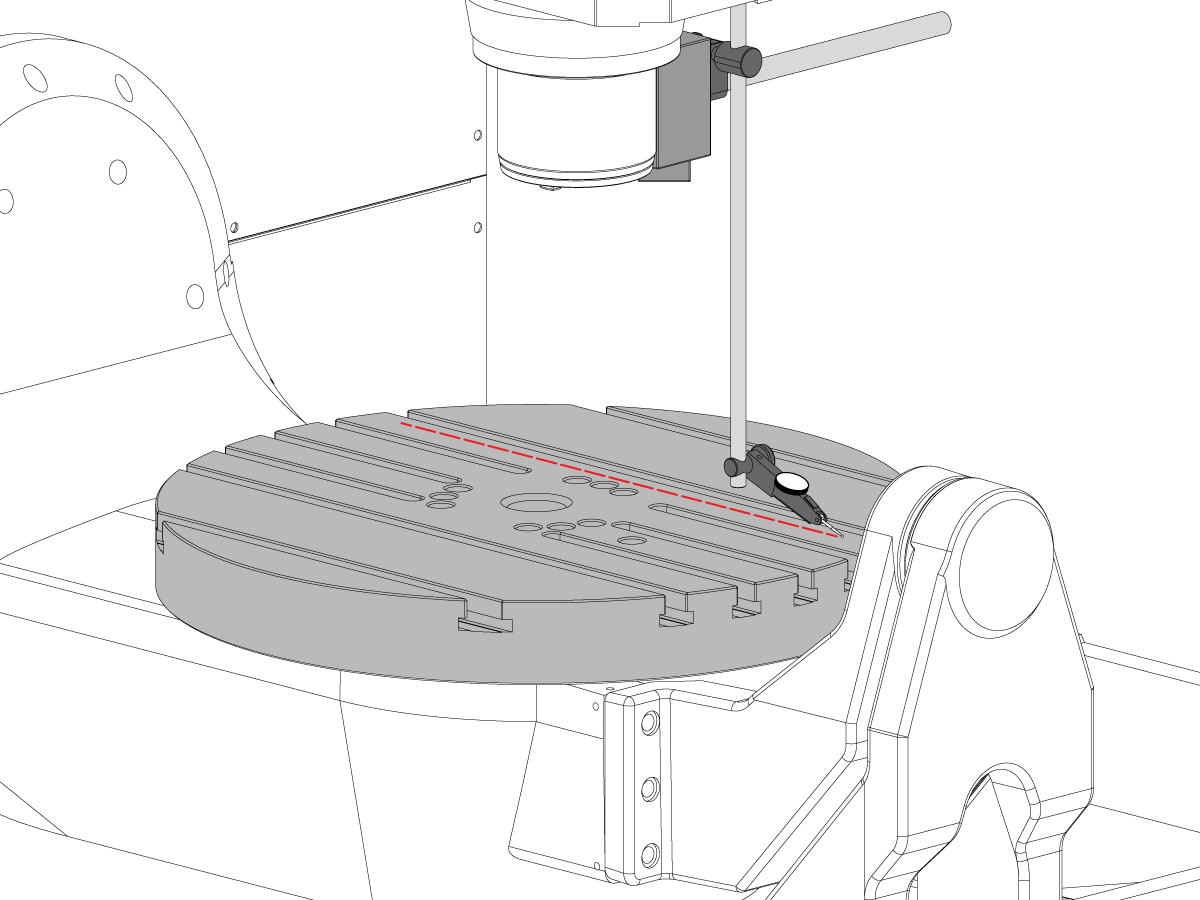
Paralelitet površine ploče i ravnine XY

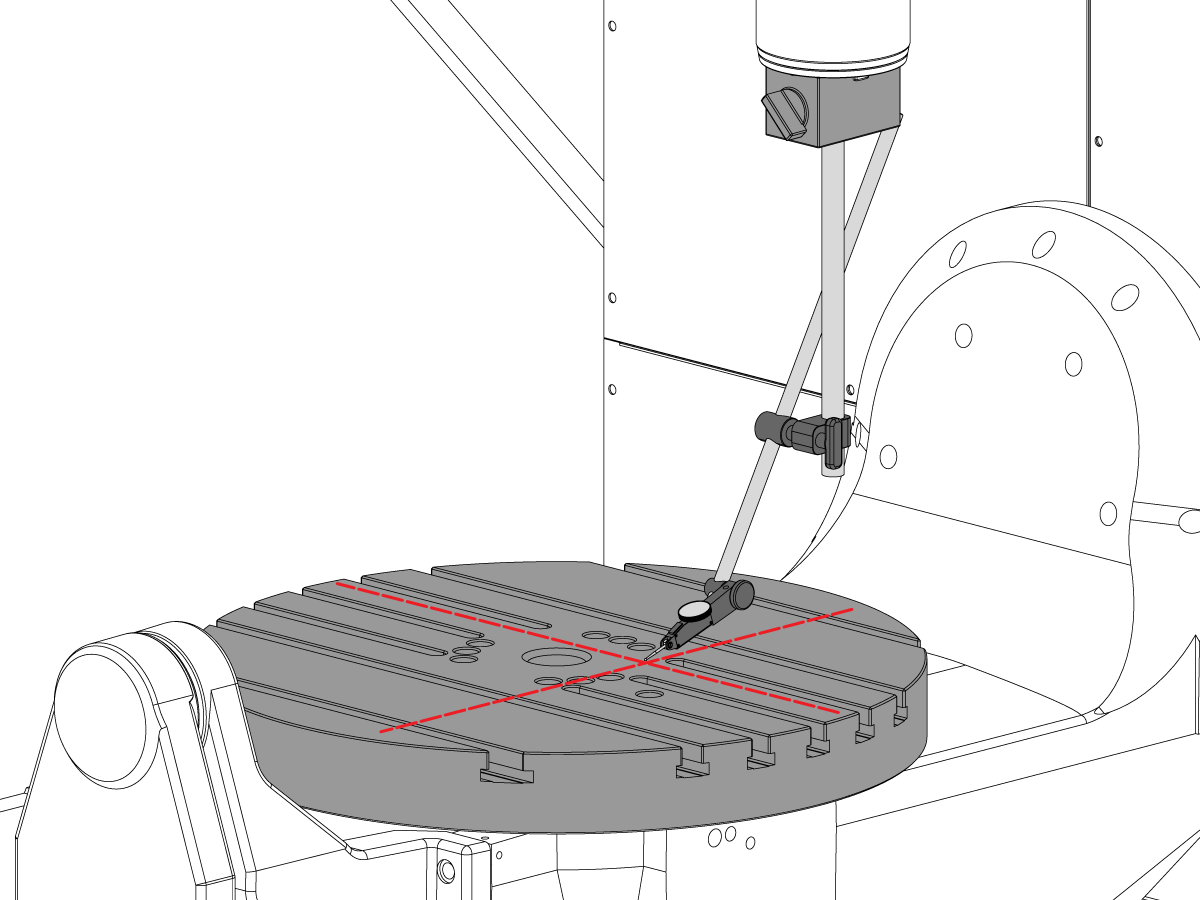
  • Vratite osovinu C u referentnu točku, tako da se T-utori paralelno kreću po osovini X
  • Postavite pokazivač na pločicu i gurnite u X-osi uz pladanj kako biste pronašli paralelnost ploče na X osi (NTE 0,001 ”/ 10" 0.0015"/15")
  • Zatim pomaknite osovinu Y duž ploče kako biste pronašli paralelitet ploče osovine Y (NTE 0,001” / 10" 0.0015" / 15")

9

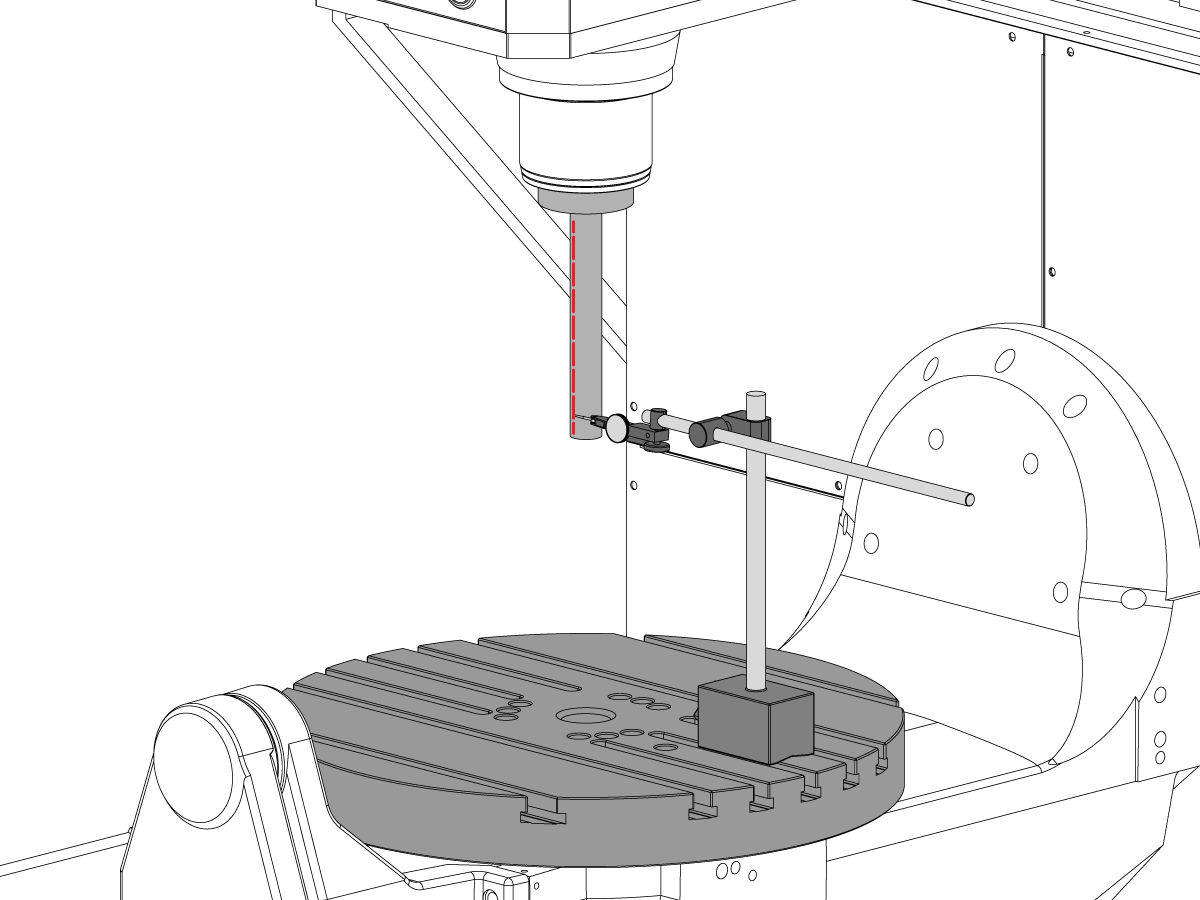
Odstupanje glavnog vretena

  • Glavno vreteno centrirajte preko provrta osovine C.
  • Postavite mag podlogu na stol i umetnite šipku za ispitivanje.
  • Provjerite odstupanje glavnog vretena na dnu šipke za ispitivanje (NTE 0,0005" TIR)
  • Provjerite odstupanje 6" glavnog vretena na dnu šipke za ispitivanje (NTE 0,001" TIR)

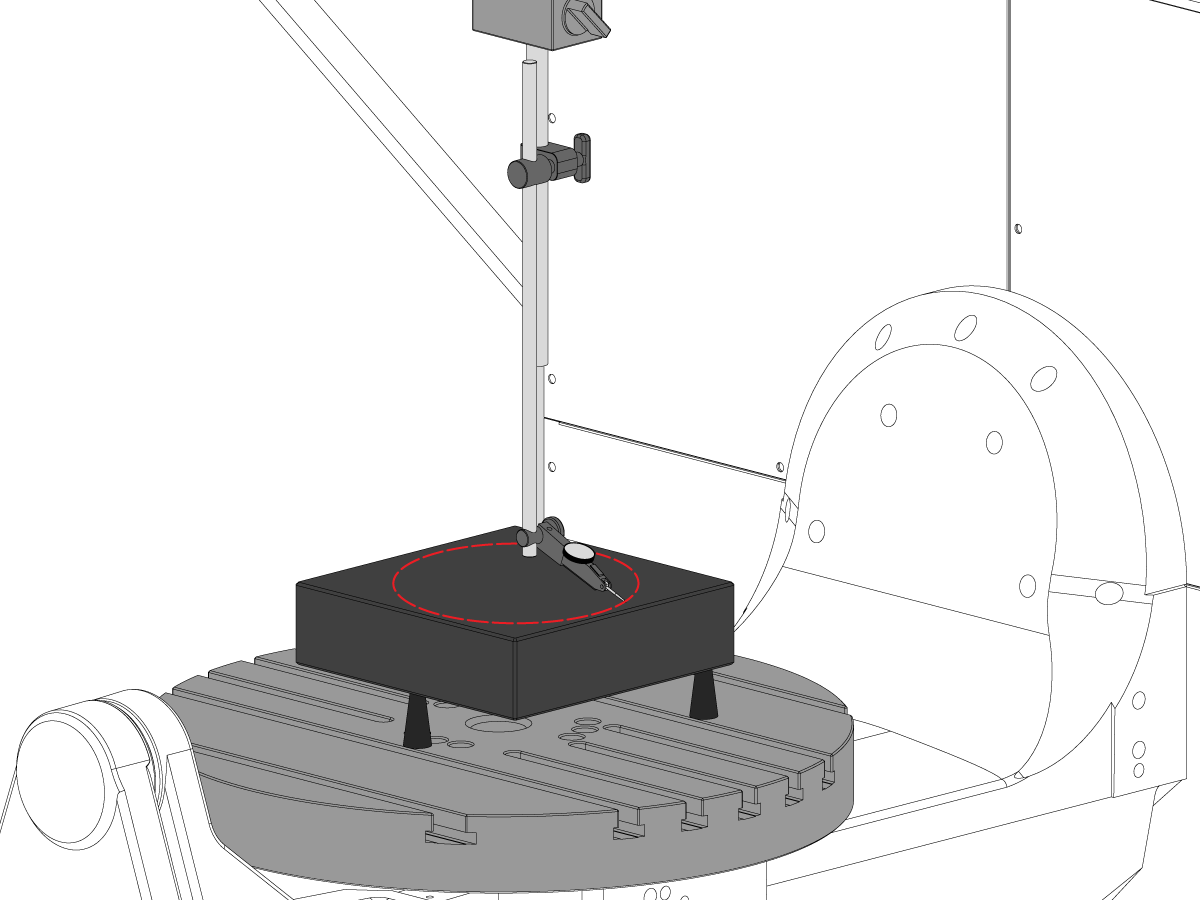
10

Središnji paralelizma glavnog vretena sa osovinom Z

  • Upotrijebite vijčanu dizalicu da postavite granit paralelno s ravninom XY u prikazanoj orijentaciji (NTE: 0,0002")
  • Glavno vreteno centrirajte preko provrta osovine C na ploči.
  • Pomaknite se u krug promjera 10"
  • Zabilježite XZ TIR  (NTE 0,0005")
  • Zabilježite YZ TIR  (NTE 0,0005")

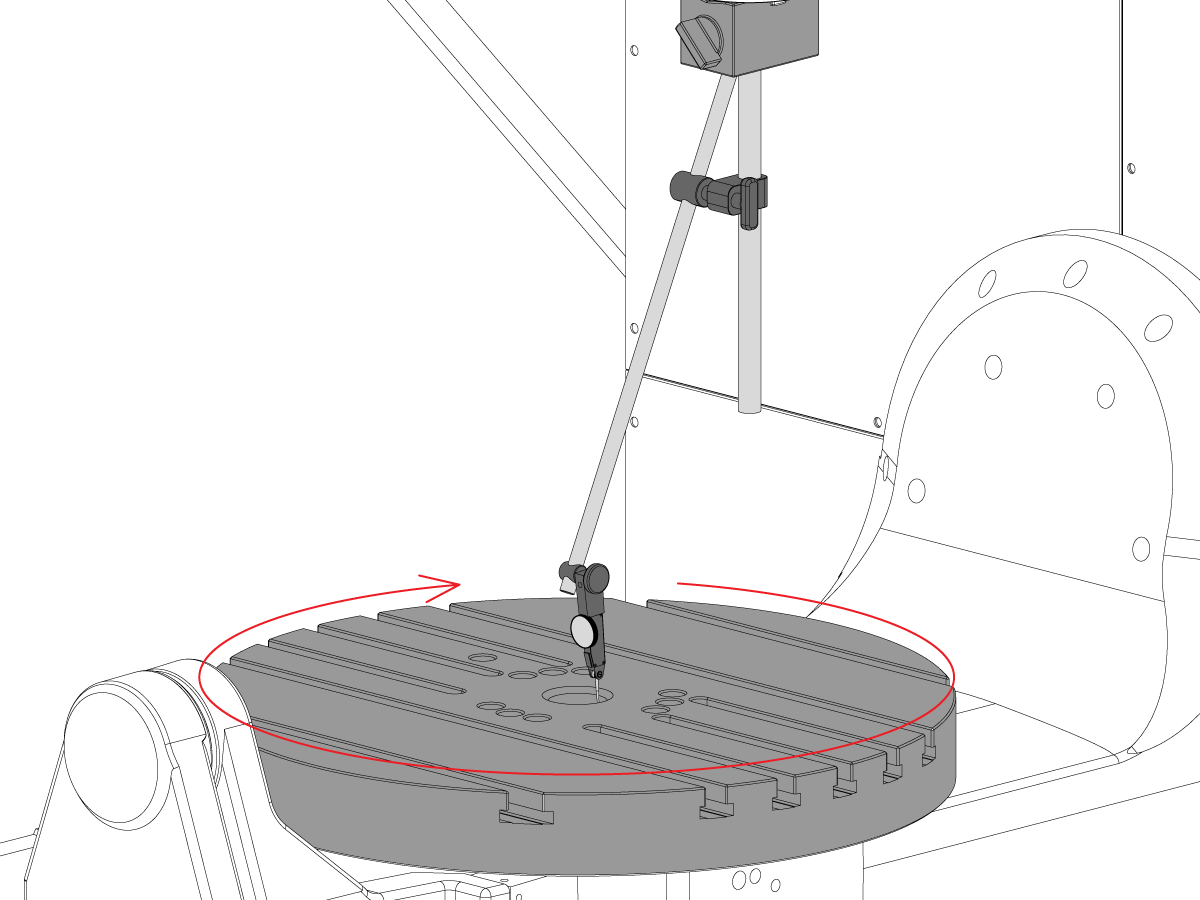
11

Koncentričnost provrta osovine C

  • Postavite indikator kako je prikazano i pomaknite osovina C 360°
  • Zabilježite TIR preciznog provrta (NTE 0,002)")

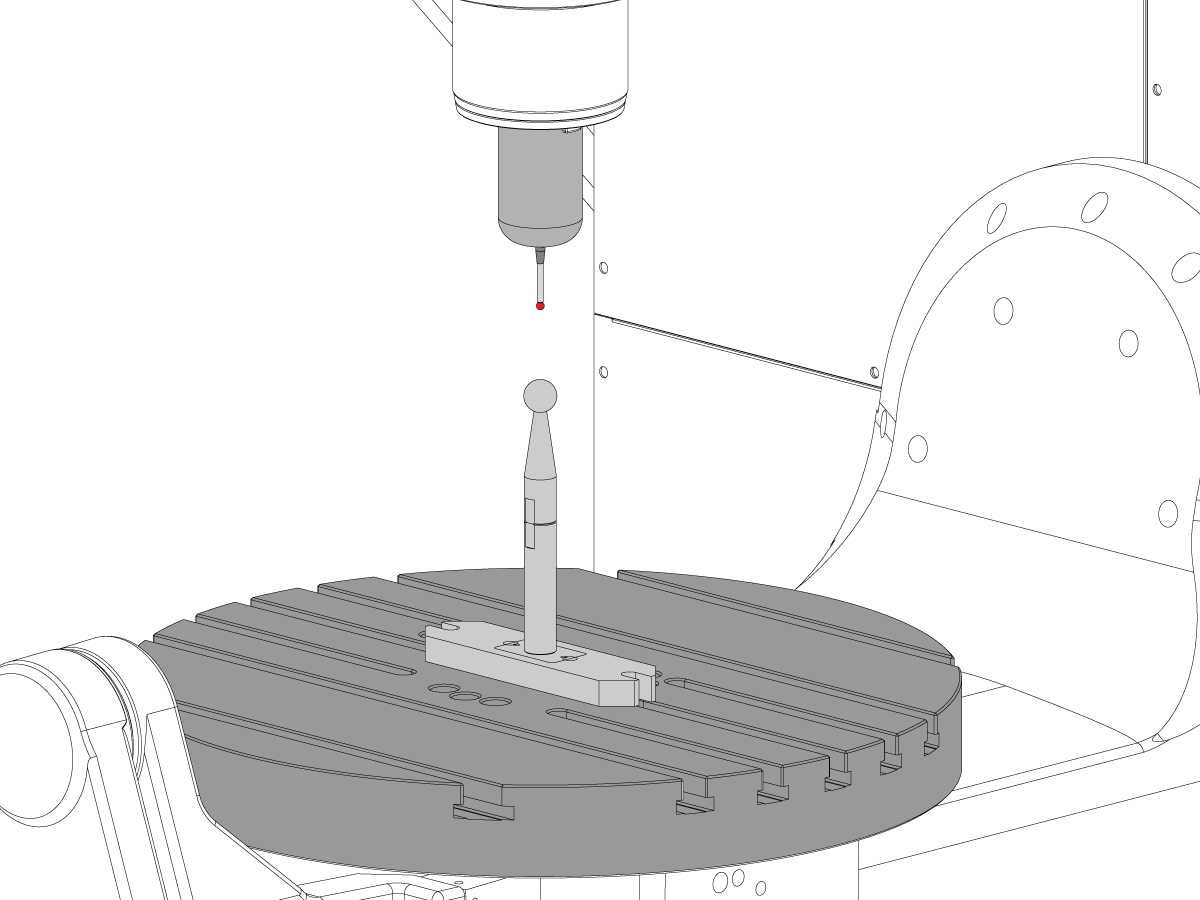
12

Rotacijska referentna točka stroja

  • Koristite VQC program makronaredbi i sustav sonde za provjeru vrijednosti za parametre Coldfire ili NGC postavke prikazane u nastavku:
    • 255 – POMAK X MRZP
    • 256 – POMAK Y MRZP
    • 257 – POMAK Z MRZP
    • 254 – RAZMAK OD SREDIŠTA ROTACIJE 5 OSOVINA
  • Cjelovitu uputu za MRZP potražite u odjeljku Haas postupak Podešavanje pomaka MRZP WIPS 

8.3 Geometrija - Otklanjanje poteškoća

Recently Updated

UMC - Geometrija - Otklanjanje poteškoća


TG0151

Preglednik

Prije otklanjanja poteškoća s UMC-750 problemom točnosti ili geometrije, tehničar mora imati temeljito razumijevanje sljedećih osnova:

  • Kako na izravnati i poravnati rotacijske osi UMC-a
  • Kako ponovno poravnati sve osi stroja
  • Kako izvesti MRZP kalibraciju i temeljito razumijevanje o tome što su povezani parametri i njihov utjecaj na stroj
  • Razumijevanje točnosti strojeva i sposobnost prosuđivanja s geometrijskim problemima
  • Poravnanje sjecišta osi od B do C

Problemu s UMC-750 geometrijom stroja ili točnošću treba pristupiti sustavno i pravilnim redoslijedom. Sljedeće informacije treba strogo poštivati i slijediti rednim redoslijedom.

Apsolutno je važno da prije bilo kakve procjene ili prilagodbe na geometriju stroja da je stroj provjeren na ispravnost i usklađenost rotacijskih osovina s strojem

Mnoge pogreške mogu se pripisati stroju koji je pretrpio sudare ili probleme bilo s alatnim aplikacijama ili s problemima programiranja. Ne pokušavajte mijenjati geometriju stroja bez potpune provjere ukupne razine i geometrije strojeva po izvješću o inspekciji. To uključuje provjeru Machine Rotary Zero Point (MRZP).

U slučaju sudara postoje 4 klizna spoja na stroju. Ova područja su glava vretena na ram, ram na nosač, nosač na most, i trunion na trunion potporu.

 Napomena: nijedan od ovih spojeva ne smije koristiti podloške. U slučaju sudara stroja ne bi smjeli mijenjati broj podloški potrebanih u stroju od broja podloški tvorničkih postavki.

Važno je zapamtiti da je linearna točnost stroja 0.0004/10" a kutna točnost +/- 15 arc. sek. Te se tolerancije mogu brzo zbrojiti.

Treba uložiti svaki napor kako bi se utvrdilo je li program strojne obrade razuman i unutar sposobnosti stroja, stega i alata.

Procjena stanja stroja

Utvrdite je li se stroj prethodno rušio. Pregledajte povijest alarma; potražite fizička oštećenja na metalnom limu, stolu, glavi vretena itd. Bez obzira na to kako je "mali" sudar bio, to će utjecati strojnu geometriju. Ako je stroj srušen, potrebno je provesti potpuni pregled geometrije strojeva

Procijenite opće stanje dijelova za stezanje i prihvat sirovca i stanje alata za rezanje.

Nabavite cjelokupnu sigurnosnu kopiju i izvješće o pogrešci stroja.

Provjerite poravnanje i geometriju stroja

Provjerite je li stroj u ravni i je li rotacijska osovina poravnata s strojem

 Napomena: u ovom trenutku ne pokušavajte prilagođavati geometriju stroja osim podešavanja razina stopica.

Ako je stroj izvan razine ili rotacijska jedinica nije poravnata, resetirajte razinu i rotacijsko poravnavanje.

Izvršite pregled potpune geometrije, uzimajući u obzir veličinu i smjer pogrešaka za svaku osovinu.

Analizirajte izvješće o inspekciji.

Ako je bilo koji dio izvješća o inspekciji izvan tolerancije, stroj treba ponovno uskladiti.

Pregled aplikacije

Prikupite sljedeće informacije o obradku, držaču obratka i alatima:

  • Koje značajke su izvan tolerancije, veličine, smjer pogreške
  • Je li obradak obrađen pomoću 5 osi, osi 3+2 ili 3 osi?
  • Pregledajte obradak i pristup strojnoj obradi
  • Može li se bilo koja od pogrešaka u točnosti obratka smanjiti promjenom pristupa obradi?
  • Je li problem problem ponovljivosti, problem veličine ili geometrijski problem?
  • Koristi li program TCPC ili DWO?
  • Postoje li vrijednosti u tablicama kompenzacije?

8.4 Aplikacije - Otklanjanje poteškoća

Recently Updated

UMC - Aplikacije - Otklanjanje poteškoća


TG0150

Kako pristupiti

Za dobivanje vodiča za rješavanje problema UMC aplikacija:

Slijedite ovu poveznicu Dokumenti i softver | HBC

ili

Prijavite se na HBC.HAASCNC.COM

NAPOMENA: Samo Haas certificirani servisni tehničari mogu se prijaviti na ove stranice. 

Odaberite karticu Servis.

Pod Pomoćni alati, odaberite Dokumenti i softver.

Odaberite mapu Aplikacije.

8.5 UMC-750 - Popis za provjeru kompleta podloški

Recently Updated

UMC-750 - Kontrolni popis kompleta podloški


AD0131

Uvod

Ovo je kontrolni popis kompleta podloški za sljedeći komplet:

  • 93-2236 LOANER, KOMPLET PODLOŠKI ZA UMC-750

Popis za provjeru: Podloška-odstojnik-stupac

Debljina obradak #
Količina u kompletu RABLJEN
0,02100 20-9358A 2  
0,2105 20-9359A 2  
,02110 20-9383A 2  
0,2115 20-9365A 2  
0,2120 20-9384A 2  
0,2125 20-9385A 2  
0,2130 20-9368A 2  
0,2135 20-9369A 2  
0,2140 20-9386A 2  
0,2145 20-9371A 2  
0,2150 20-9372A 2  
0,2155 20-9387A 2  
0,2160 20-9374A 2  
0,2165 20-9375A 2  
0,2170 20-9376A 2  
0,2175 20-9377A 2  
0,2180 20-9378A 2  
0,2185 20-9379A 2  
0,2190 20-9380A 2  
0,2195 20-9381A 2  
0,2200 20-9382A 2  

Napomena: Samo vlasnici kompleta: Navedite debljinu podloške prilikom narudžbe zamjenskih dijelova. Na primjer, 20-9382 0.2145

Popis za provjeru: Horshoe podloške

Debljina obradak #
Količina u kompletu RABLJEN
0,0010 59-0240 2  
0,0020 59-0241 2  
0,0030 59-0242 2  

Popis za provjeru: Podloška-odstojnik-stupac-veliko

Debljina obradak #
Količina u kompletu RABLJEN
0,2130 20-6282A 2  
0,2135 20-6283A 2  
0,2140 20-6284A 2  
0,2145 20-6285A 2  
0,2150 20-6286A 2  
0,2155 20-6287A 2  
0,2160 20-6288A 2  
0,2165 20-6289A 2  
0,2170 20-6290A
2  
0,2175 20-6291A 2  
0,2180 20-6294A 2  
0,2185 20-6295A 2  
0,2190 20-6292A 2  
0,2195 20-6293A 2  
0,2200 20-6296A 2  
0,2205 20-6297A 2  
0,2210 20-6277A 2  
0,2215 20-6279A 2  
0,2220 20-6278A 2  
0,2225 20-6298A 2  
0,2230 20-6281A 2  

Napomena: Samo vlasnici kompleta: Navedite debljinu podloške prilikom narudžbe zamjenskih dijelova. Na primjer, 20-6290A 0.2080

ZABILJEŽITE KOJE PODLOŠKE SU UKLONJENE IZ SETA U STUPCU RABLJENO

Vratite popis za provjeru sa setom podloške.

VRATITE ORIGINALNE PODLOŠKE U SANDUK.

8.6 Sjecišta B/C osovine - Poravnavanje

Uvod

Ovaj postupak pokazuje kako izmjeriti i poravnati sjecište B i C osovina.  Prije nego što pokušate ovaj postupak, provjerite je li stroj u razini sa UMC-750 niveliranjem.

Morat ćete poravnati B i C osovine nakon što učinite sljedeće:

  • Zamijenite B i C osovine
  • ili dovršite izvješće UMC inspekcije i pronađite problem

Udaljenost centra rotacijskog sustava s 5 osovina definira razliku između rotacijskih centara rotacije: C osovina Stroj Rotor Referentna točka (MRZP) i B osovina MRZP u X osovini.

Moguće je da nema razlike između C osovine i B osovine MRZP.

  • Classic Haas upravljačka naprava (CHC): Parametar 1314 - Rotary Axes Center Deviation in X
  • Upravljanje nove generacije (NGC): Postavka 254 -  5 Axis Rotary Center Distance

Trebat će vam sljedeći alati:

  • T-2195A UMC Aligment Bar Adapter
  • T-2113 Alignment bar
  • Toplinska pištolj i rukavice otporne na toplinu

Usklađivanje B osi s XYZ osima

How to identify the Multi-Piece and the Unibody trunnion   

1) Multi-Piece trunnion:    UMC machines built approximetely before 11/2022 will have this configuration.

2) Unibody trunnion:    UMC machines built approximetely after 11/2022 will have this configuration.

1

Remove the A-frame trunnion support:

Remove the bolts [1] that secure the A-frame trunnion support [2] to the base and take out the shims between A-frame support and the base.

Rotate the A-frame support [2] counter-clockwise to clear the edge of the base [3].

Pull the A-frame support off the bearings.

 Note: The A-frame support might vacuum lock on the bearings. Use the zip-tie to pry the seal [4] open.

 Caution: To lift the trunnion support, get the aid of another person. The support weighs 85 lbs (39 kg).

2

Measure the B- axis of rotation parallelism to the Y-Z plane:

For a machine with a Classic Haas Control, change Parameter 151:20 (B axis CHK TRAVL LIM) to 0.

For a machine with a Next Generation Control, change Parameter 6.021 (B axis CHK TRAVL LIM) to FALSE.

Measure the parallelism of the platter to the Y-Z plane with the B axis at 90° and then the B axis at -90° as shown in the picture.

Position the Y-Axis in the following starting position:

UMC-500: Y=0, Sweep 15”, 3rd T-Slot Land from the top.

UMC-750/1500-Duo: Y=-1.0, Sweep 18", 3rd T-Slot Land from the Top .

UMC-1250: Y=-1.0, Sweep 28", 3rd T-Slot Land from the Top.

UMC-500PP: Y=-4.0, Sweep 7".

UMC-750PP: Y=-2”, Sweep 15".

UMC-1000PP: Y=-4”, Sweep 15".

Compare the results at B 90° and B-90°. The results should be...

  • Symmetric against the Y-Z plane, positive or negative direction
  • Less than 0.0010"/20"

If the results are symmetric against Y-Z plane, and are less than 0.0010"/20 inches: Go to Step 5.

If the results are symmetric against Y-Z plane, but are more than 0.0010"/20 inches: Go to Step 4.

 Warning: If the results [3] are not symmetric against the Y-Z plane, the B axis rotary needs to be aligned: Go to Step 3.

3

Align the B axis of rotation parallel to the Y-Z plane:

Loosen the (6) bolts [1] that secure the B axis rotary to the base casting.

 Note: Keep the bolts sufficiently snug to control the adjustments.

Adjust the front and rear setscrews [2] until the measurements taken in Step 2 are symmetric against the Y-Z plane.

Torque the (6) bolts [1]. Refer to Haas Fastener Torque Specification.

Verify the measurements in Step 2 after the bolts have been torqued.

4

Align the C Axis of rotation perpendicular to the B Axis of rotation:

Remove the bottom C-Axis access cover.

Loosen the (12) bolts [1] that hold the C Axis body to the B Axis platter face.

Reach the bottom (4) bolts through the C Axis access port.

If the B Axis is symmetric in the positive direction [4], install horseshoe shims [2] of appropriate size behind the top (2) bolts.

If the B Axis is symmetric in the negative direction [5], install horseshoe shims [2] of appropriate size behind the bottom (2) bolts.

Torque the (12) bolts to 80 Ft-lbs (108 Nm).

Cut the excessive shim material off.

Verify the measurements in Step 2 after bolts are torqued.

5

Align the trunnion support shaft co-axial with the B Axis of rotation:

Setup (2) indicators on the outer race of the trunnion support bearing [2] as shown in the picture.

Mark the spot on the outer race where one of the indicator needles is contacting the surface.

After moving the B Axis to 90° or -90° you will align the marked spot with the needle again to exclude the bearing runout error from the measurements.

Take the readings when B is at 90° and B at -90°. Compare the readings. 

 Caution: The B axis brake needs to be clamped when taking the readings.

The deviation between the results when B is at 90° and at -90° needs to be less than 0.001" on each indicator.

 Note: The indicator on the side of the bearing will measure top to bottom alignment and the indicator on the top of the bearing will measure side to side alignment.

____

For models with a multi-piece trunnion

Loosen the (6) bolts [3] on the C Axis body support. Keep the bolts sufficiently snug to control adjustment.

Adjust the (8) set screws [4] until deviation between B at 90° and B at -90° is within 0.001".

Torque the (6) bolts [2] on the C Axis body support to 80 Ft-lbs (108 Nm).

Verify the alignment after the bolts have been torqued.

____

For models with a unibody trunnion

Jog rotary to B90. Set up an indicator on the highlighted surface as shown in the lower diagram .

Rotate B-axis 180 degrees (90 to -90).

Run out (NTE 0.010” TIR).

 Caution: If the measurement exceeds the tolerance then contact support.

6

Install and shim the A-frame trunnion support:

Move the B Axis to 90°.

Setup an indicator [1] against a machined surface of the C Axis body. Set the indicator to 0.

Use plastic zip ties [2] to pry the seal open while installing the A-frame support. This lets unwanted air and grease out of the assembly.

Install the A-frame trunnion support [3] over the bearings.

Remove the cable ties.

Turn the trunnion support clockwise until it is vertical.

 Note: The weight of the A-frame support will cause the trunnion to sag. The amount of sag is measured with the indicator that was previously setup on the side of the C Axis body.

____

For multi-piece trunnions

Adjust the shims [4] between the A-frame support and the base casting to remove the sag until indicator reads 0 again.

When the indicator reading is 0, torque the (4) bolts. Refer to Haas Fastener Torque Specification.

Verify the reading after bolts are torqued. Adjust the shims again if necessary until the indicator reads 0.

____

For models with unibody trunnion

Determine the amount of shim stock [4] needed to raise the Trunnion arm so the indicator reads 0.005".

The indicator [1] value will change once the support is torqued.

With indicator still in place:

  • Torque trunnion support bolts to appropriate values.
  • Check indicator to make sure it reads between the range of

Trunnion arm raised (0.005” to  0.010”).

 Note: For unibody trunnions, the shim location may also be used to correct the C-axis to X-Y plane perpendicularity instead of shimming the saddle trucks.

 Caution: Use equal amount of shims on each side of the A-frame support. Unequal shims will cause the A-frame support to pull the trunnion to the side.

Verify the B Axis of rotation alignment to the Y-Z plane (Step 2). Loosen the bolts and tap the A-frame support side to side if necessary to correct the B axis to Y-Z plane alignment.

7

Set C-axis perpendicular to X/Y plane:

Move the axes to

UMC-750's........X= -10.5" & Y=0."

UMC-1000's......X=-17.0" & Y=-0."

Zero an indicator [1], on a Ground Block [2], 1/2" off the edge at the rear of the platter (Mag-Base on Spindle), with C at 0 Degrees

Rotate C-Axis to 180°.

Move Y axis, and ground block, in Y Axis negative direction until you are 1/2" away from platter edge, and take the perpendicularity measurement

Adjust the shims until the average error is within 0.0005" end to end.

 Note: For unibody trunnions, the shim location under the bearing support may also be used to correct the C-axis to X-Y plane perpendicularity instead of shimming the saddle truck.

Caution: Shim either two front trucks or two rear trucks with the equal shim.

Note: Shim one truck at the time to maintain the X to Y squareness.

Verify the measurements after all bolts are torqued.

Verify the X to Y alignment in Step 2.

8

Set the tool change offsets:

B-axis tool change offset [1]

For Classic Haas Controls, change Parameter 213. 

For Next Generation Controls, go to: Settings>Rotary Tab>Highlight the rotary and press [INSERT], or change Parameter 6.078 (B TOOL CHANGE OFFSET) to set the trunnion (B Axis) parallel to the X Axis.

For models with multipiece trunnion

(NTE 0.001/10"; NTE 0.0020" overall)

For models with unibody trunnion

(NTE 0.0005/10"; NTE 0.0010" overall)

___

C-axis tool change offset [2]

For Classic Haas Controls change Parameter 523.

For Next Generation Control go to: Settings>Rotary Tab> Highlight the rotary and press [INSERT], or change Parameter 7.078 (C TOOL CHANGE OFFSET) to set the table T-slot (C Axis) parallel to the X Axis

For models with multipiece trunnion

(NTE 0.001/10"; NTE 0.0020" overall)

For models with unibody trunnion

(NTE 0.0005/10"; NTE 0.0010" overall)

9

Check C-axis perpendicularity to X/Y plane:

Align the indicator centered over the C-axis bore with the Y-axis at -10.

Jog positive in the Y-axis and align the indicator over the center of the last section of the platter and make a mark at this spot with a washable marker.

Insert 1-2-3 block as shown and set the indicator to zero.

Remove the block and rotate the platter 90 degrees, following the marked spot with the indicator.

Insert block back between the indicator and platter. Note reading.

Repeat the previous two steps, taking readings with the platter at 180, 270 and 360 degrees.

Multi-piece trunnion:  (NTE 0.0005")

Unibody trunnion: (NTE 0.001")

10

Measure the intersection of the B and C axis:

Follow the linked instruction manual to complete this step.

B-Axis and C-Axis intersection Adjustment

11

Align the B-Axis brake disk:

 Note: Do not do this step if you are working on a SS machine.

Operate this code in MDI mode to unclamp the brake:

M11;

Loosen all of the brake disc bolts [1] and torque them to 5 Ft-lbs (7 Nm).

Operate this code in MDI mode to clamp the brake:

M10;

Wait 10 seconds.

Torque the bolts. Refer to Haas Fastener Torque Specifications.

Postavljanje alata za sjecište B osovine i C osovine*

1

Install the B Axis and C Axis intersection tool:

Jog the C Axis to 0°.

Push [EMERGENCY STOP].

Clean the table.

Guide the shaft of the adapter [1] while you slowly lower it into the center bore.

Attach the adapter to the table with (2) screws [4] and (2) T-nuts.

Attach the alignment bar [2] to the adapter with (3) screws [3].

Snug the (3) screws to allow for adjustments in the next step.

2

Align the B/C intersection tool with the C Axis:

Put an indicator on the front side of the alignment bar near the base.

Release the [EMERGENCY STOP]. Push [RESET] to clear any alarms.

Jog across the tool in the X Axis to find the high spot.

Set the indicator to 0.

Jog the C Axis 360°.

Lightly tap the base with a rubber mallet to adjust the radial error on the alignment bar.

Note: Adjust the alignment bar to half of the measured error, because you are measuring the diameter error.

Jog the C Axis 360°.

When correctly adjusted the radial error is less than 0.0002" (0.005 mm).

3

Check the B/C intersection:

Center the indicator [1] on the front side of the alignment bar near the top of the cylinder.

Jog across the tool in the X Axis to find the high spot.

Zero the indicator.

Jog the C Axis 360°.

Turn the (3) screws [2] on the alignment bar to adjust the runout.

Jog the C Axis 360°.

When correctly adjusted the radial error is less than 0.0002" (0.005 mm).

Repeat Step 2 and verify the alignment did not change.

Podešavanje sjecišta B-osi do C-osi

1

For a machine with a Classic Haas Control change:

  • Parameter 151:20 (B-axis CHK TRAVL LIM) to 0.
  • Parameter 1314 (ROTARY AXIS CENTER DEVIATION IN X) to 0.

For a machine with a Next Generation Control change:

  • Parameter 6.021 (B-axis CHK TRAVL LIM) to FALSE.
  • Setting 254 (5-Axis Rotary Center Distance) to 0.

Push [ZERO RETURN]. Then push [ALL].

Jog the B-axis to -90°.

Note: The rotary positions are for reference only.

Put an indicator [1] on top of the alignment bar.

Jog in the Y-axis to find the high point.

Set the indicator to 0.

Jog across the alignment bar in the X-axis [2].

Jog the B-axis to adjust the alignment bar parallel to the X plane.

Set the indicator to 0.

Jog the Y-axis to 0.

Caution: Make sure the indicator assembly is clear of the B-axis movement.

 Caution: Do not move the Z-axis.

2

Jog the B-axis to +90°.

 Caution: Make sure the indicator assembly is clear of the B-axis movement.

Jog the Y-axis [1] to find the high point on the alignment bar.

Note: Do not set the indicator to 0.

Jog across the alignment bar in the X-axis.

Jog the B-axis to adjust the alignment bar parallel [2] to the X plane.

When the alignment bar is parallel to the X plane, the indicator reading is the change needed in the Z-Axis (∆Z=indicator reading).

Record the value shown on the indicator. In this example the indicator now shows 0.0015". ∆Z is 0.0015".

3

Do these calculations to get the value for CHC Parameter 1314 or NGC Setting 254. (In this example the difference in readings for the B-C intersection (∆Z) is 0.0015".):

  • ∆Z / 2 x 10,000 = CHC Parameter 1314 / NGC Setting 254
  • 0.0015 / 2 = 0.00075
  • Round down to 4 decimal places: 0.00075 = 0.0007 (NGC Setting 254)
  • 0.0007 x 10,000 = 7 (CHC Parameter 1314)

Set Parameter CHC Parameter 1314 (Rotary Axes Center Deviation in X) or NGC Setting 254 (5-Axis Rotary Center Distance), to the calculated value.

In this example, set parameter CHC Parameter 1314 to 7 or NGC Setting 254 to 0.0007.

Cycle the power to save CHC Parameter 1314 or NGC Setting 254.

Repeat Steps 1-3 to verify that the value for ∆Z is less than 0.0002" (0.005 mm).

4

Jog the B-Axis to the home position.

Set Parameter 151:20 (B-Axis CK Travel Limit) to 1.

Make sure the MRZP offsets are correct.

Calibrate WIPS per Wireless Intuitive Probe System (WIPS) - Calibration.

Complete an inspection report. Refer to UMC-750 Inspection Report.

Recently Viewed Items

You Have No Recently Viewed Items Yet

Povratna veza
Haas Logo

Haas cijena s dostavom

Ova cijena uključuje troškove dostave, izvozne i uvozne carine, osiguranje i sve druge troškove dostave na lokaciju u Francuskoj dogovorenu s vama kao kupcem. Nikakvi drugi obvezni troškovi ne mogu se dodati u cijenu dostave Haas CNC proizvoda.

OSTANITE U TIJEKU S NAJNOVIJIM HAAS SAVJETIMA I TEHNOLOGIJAMA…

Prijavite se sad!   

HAAS TOOLING PRIHVAĆA SLJEDEĆE:

  • Usluga i podrška
  • Vlasnici
  • Zatražite popravak
  • Upute za uporabu
  • Haas dijelovi
  • Zahtjev za popravak okretnog ili okretno nagibnog aparata
  • Vodič prije ugradnje
  • Alati za kupovinu
  • Cijena izrade novog Haasovog stroja
  • Dostupan inventar
  • Cjenik tvrtke Haas
  • CNCA financiranje
  • O tvrtki Haas
  • Izjava o pristupačnosti
  • Izjava DNSH
  • Usklađenost s propisima o izvozu
  • Zapošljavanje
  • Certifikati i sigurnost
  • Kontaktirajte nas
  • Povijest
  • Uvjeti i odredbe
  • Uvjeti i odredbe za Haas Tooling
  • Privatnost
  • Jamstvo
  • Zajednica Haas
  • Haas CNC program certifikacije
  • Haas motosportovi
  • Zaklada Gene Haas
  • Tehnička edukacijska zajednica tvrtke Haas
  • Događanja
  • Pridružite se razgovoru
  • Facebook
  • X
  • Flickr
  • YouTube
  • LinkedIn
  • Instagram
  • TikTok
© 2026 Haas Automation, Inc – CNC alatni strojevi

This site is protected by reCAPTCHA and the Google Privacy Policy and Terms of Service apply.

2800 Sturgis Rd., Oxnard, CA 93030 / Toll Free: 800-331-6746
Phone: 805-278-1800 / Fax: 805-278-2255