MyHaas Velkommen,
!
Haas Tooling MyHaas/HaasConnect Logg inn Registrer deg Haas Tooling MyHaas/HaasConnect Logg ut Velkommen, Mine maskiner Seneste aktivitet Mine pristilbud Min konto Mine brukere Logg ut
Finn forhandleren din
  1. Velg språk
    1. English
    2. Deutsch
    3. Español - España
    4. Español - México
    5. Français
    6. Italiano
    7. Português
    8. Český
    9. Dansk
    10. Nederlands
    11. Magyar
    12. Polski
    13. Svenska
    14. Türkçe
    15. 中文
    16. Suomi
    17. Norsk
    18. الإنجليزية
    19. български
    20. Hrvatski
    21. Ελληνικά
    22. Română
    23. Slovenský
    24. Slovenščina
    25. 한국어
    26. 日本語
    27. Українська
  • maskiner Main Menu
    • Vertikale freser
      Vertikale freser
      Vertikale freser View All
      • Vertikale freser
      • VF-serier
      • Universalmaskiner
      • VR-serien
      • VP-5 Prismatisk
      • HMC-er med pallskifting
      • Mini Mill
      • Formbyggermaskiner
      • Høyhastighets boresentre
      • Bore-/innergjengings-/fres-serien
      • Freser for verktøyavdelingen
      • Pocket Mill
      • Kompakte freser
      • Gantryserier
      • SR platefreser
      • Ekstra stor VMC
      • Freser med dobbel kolonne
    • Flereakseløsninger
      Flereakseløsninger
      Flereakseløsninger View All
      • Flereakseløsninger
      • Y-akse-dreiebenker
      • 5-akse freser
    • Dreiebenker
      Dreiebenker
      Dreiebenker View All
      • Dreiebenker
      • ST-serier
      • Dobbel-spindel
      • Boksbaneserien
      • Dreiebenker for verktøyavdelinger
      • Chuck dreiebenk
      • Lommedreiebenk
      • Haas stangmagasiner
    • Horisontale freser
      Horisontale freser
      Horisontale freser View All
      • Horisontale freser
      • 50-koner
      • 40-kon
    • Roterende enheter og indekseringsenheter
      Roterende enheter og indekseringsenheter
      Roterende enheter og indekseringsenheter View All
      • Roterende enheter og indekseringsenheter
      • Dreiebord
      • Indekserere
      • 5-akse dreieenheter
      • Ekstra store dreieenheter
    • Automasjonssystemer
      Automasjonssystemer
      Automasjonssystemer View All
      • Automasjonssystemer
      • Automatisering av fres
      • Automatisering av dreiebenk
      • Automatiske delelastere
      • Automatiseringsmodeller
    • Stasjonære maskiner
      Stasjonære maskiner
      Stasjonære maskiner View All
      • Stasjonære maskiner
      • Skrivebordfreser
      • Skrivebordsdreiebenk
      • Kontrollsimulator, standard
      • Kontrollsimulator, premium
    • Butikkutstyr
      Butikkutstyr
      Butikkutstyr View All
      • Butikkutstyr
      • Knefres
      • Haas manuelle dreiebenker
      • Haas-sager
    • Fabrikeringsmaskiner
      Fabrikeringsmaskiner
      Fabrikeringsmaskiner View All
      • Fabrikeringsmaskiner
      • Laserkuttemaskiner
      • CNC-trykkbremser
    • HURTIGLENKER Spesialserie  Spesialserie 
      EU-SERIEN EU-SERIEN BYGG OG PRISSETT | PRISLISTE BYGG OG PRISSETT | PRISLISTE Maskiner på lager Maskiner på lager HVA ER NYTT HVA ER NYTT DIN FØRSTE CNC DIN FØRSTE CNC
      HANDLE VERKTØY
      • Bygg og få pris på en ny Haas
      • Prisliste
      • Tilgjengelig beholdning
      • CNCA-finansiering
      VIL DU SNAKKE MED NOEN?

      Et Haas fabrikkutsalg (HFO) kan svare på spørsmålene dine, og ta deg gjennom de beste alternativene dine.

      CONTACT YOUR DISTRIBUTOR >
  • Alternativer Main Menu
    • Product Image Spindler
      Spindler
      Spindler View All
      • Spindler
    • Product Image Verktøyvekslere
      Verktøyvekslere
      Verktøyvekslere View All
      • Verktøyvekslere
    • Product Image 4.- | 5. akse
      4.- | 5. akse
      4.- | 5. akse View All
      • 4.- | 5. akse
    • Product Image Revolverhoder og direkteverktøy
      Revolverhoder og direkteverktøy
      Revolverhoder og direkteverktøy View All
      • Revolverhoder og direkteverktøy
    • Product Image Probing
      Probing
      Probing View All
      • Probing
    • Haas-håndtering av spon og kjølevæske Håndtering av spon og kjølevæske
      Håndtering av spon og kjølevæske
      Håndtering av spon og kjølevæske View All
      • Håndtering av spon og kjølevæske
    • Haas-kontrollen Haas-kontrollen
      Haas-kontrollen
      Haas-kontrollen View All
      • Haas-kontrollen
    • Product Image Produktalternativer
      Produktalternativer
      Produktalternativer View All
      • Produktalternativer
    • Product Image Verktøy og oppspenning
      Verktøy og oppspenning
      Verktøy og oppspenning View All
      • Verktøy og oppspenning
    • Product Image Arbeidsoppspenning
      Arbeidsoppspenning
      Arbeidsoppspenning View All
      • Arbeidsoppspenning
    • Product Image Løsninger med 5-akse
      Løsninger med 5-akse
      Løsninger med 5-akse View All
      • Løsninger med 5-akse
      • 5 Easy Steps to 5-Axis
    • Product Image Automatisering
      Automatisering
      Automatisering View All
      • Automatisering
    • HURTIGLENKER Spesialserie  Spesialserie 
      EU-SERIEN EU-SERIEN BYGG OG PRISSETT | PRISLISTE BYGG OG PRISSETT | PRISLISTE Maskiner på lager Maskiner på lager HVA ER NYTT HVA ER NYTT DIN FØRSTE CNC DIN FØRSTE CNC
      HANDLE VERKTØY
      • Bygg og få pris på en ny Haas
      • Prisliste
      • Tilgjengelig beholdning
      • CNCA-finansiering
      VIL DU SNAKKE MED NOEN?

      Et Haas fabrikkutsalg (HFO) kan svare på spørsmålene dine, og ta deg gjennom de beste alternativene dine.

      CONTACT YOUR DISTRIBUTOR >
  • Why Haas Main Menu
      Oppdag forskjellen Haas gjør
    • Hvorfor Haas
    • MyHaas
    • Utdanningsfellesskap
    • Industri 4.0
    • Haas-sertifisering
    • Kundeanbefalinger
  • Service Main Menu
      Velkommen til Haas Service
      SERVICE HJEM Operatørhåndbøker Hvordan-prosedyrer Feilsøkingsveiledere Forebyggende vedlikehold Haas-deler Haas Tooling Videoer
  • Videoer Main Menu
MyHaas Velkommen,
!
Haas Tooling MyHaas/HaasConnect Logg inn Registrer deg Haas Tooling MyHaas/HaasConnect Logg ut Velkommen, Mine maskiner Seneste aktivitet Mine pristilbud Min konto Mine brukere Logg ut
Finn forhandleren din
  1. Velg språk
    1. English
    2. Deutsch
    3. Español - España
    4. Español - México
    5. Français
    6. Italiano
    7. Português
    8. Český
    9. Dansk
    10. Nederlands
    11. Magyar
    12. Polski
    13. Svenska
    14. Türkçe
    15. 中文
    16. Suomi
    17. Norsk
    18. الإنجليزية
    19. български
    20. Hrvatski
    21. Ελληνικά
    22. Română
    23. Slovenský
    24. Slovenščina
    25. 한국어
    26. 日本語
    27. Українська
×

Søkeresultater

Web Pages

Images

    • <
    • 1
    • >

8 - UMC - Geometry and Alignment

UMC-serien – Servicehåndbok


  • UMC – Spindel
  • 1 – UMC – Introduksjon
  • 2 – UMC – Spesifikasjoner
  • 3 – UMC-400/500/750 – Installasjon
  • 4 – UMC-1000/1250 – Installasjon
  • 5 – UMC-1500-DUO/1600-H – Installasjon
  • 6 – UMC – Forankring
  • 7 – UMC – Drift
  • 8 – UMC – Geometri og justering
  • 9 – UMC – MRZP og sikre soner
  • 10 – UMC – B/C – Roterende akse
  • 11 – UMC – Verktøyveksler
  • 12 – UMC –Sponfjerning og kjølevæske
  • 13 – UMC – Elektrisk kontroll
  • 14 – UMC – Smøring
  • 15 – UMC – Vedlikehold
  • 16 – UMC – Palettmagasin
  • 17 – UMC – Hydraulisk arbeidsoppspenning
  • 18 – UMC – Pneumatisk arbeidsoppspenning

Go To :

  • 8.1 Geometriveiledning
  • 8.2 Justering – Indikere soner
  • 8.3 Geometri – Feilsøking
  • 8.4 Applikasjoner – Feilsøking
  • 8.5 UMC-750 – Sjekkliste for avstandsskivesett
  • 8.6 B/C-akse skjæringspunkt – Justering

8.1 Geometriveiledning

Recently Updated

Geometri guide– UMC – serien


Introduksjon

  1. Spindelhode
  2. Ram
  3. sal
  4. Bridge
  5. Base
  6. Roterende C-akse
  7. Roterende B-akse

Før du begynner å registrere fabrikkinnstillingene, angir du verdien for parameteren eller innstillingen nedenfor. Du må sette denne til null mens du foretar justeringer, og deretter tilbakestille den til den opprinnelige verdien når du er ferdig. Verdien kan være positiv eller negativ.

  • Klassisk Haas kontroll (CHC) Parameter 1314 (Rotary Axes Center Deviation in X)
  • Neste generasjons kontroll (NGC) Innstilling 254 (5 Axis Rotary Center Distance)

Verktøy og sett som kreves:

  • T-2193A - UMC-750 SPINDLE HEAD ALIGNMENT PIN *
  • T-2181 - CNC DUAL LEVELING TOOL
  • T-2192 - LEVELING ADAPTER UMC-750
  • 93-2236 - SHIM KIT FOR UMC-750 *

Klikk på lenken for å se  UMC-750 utjevning og justering Video.

*  : Brukes kun på Pre-Reboot-serier. 

Nivå maskinen

1

Still inn maskinens høyde:

Flytt X- og Y-aksene til hjemposisjonen.

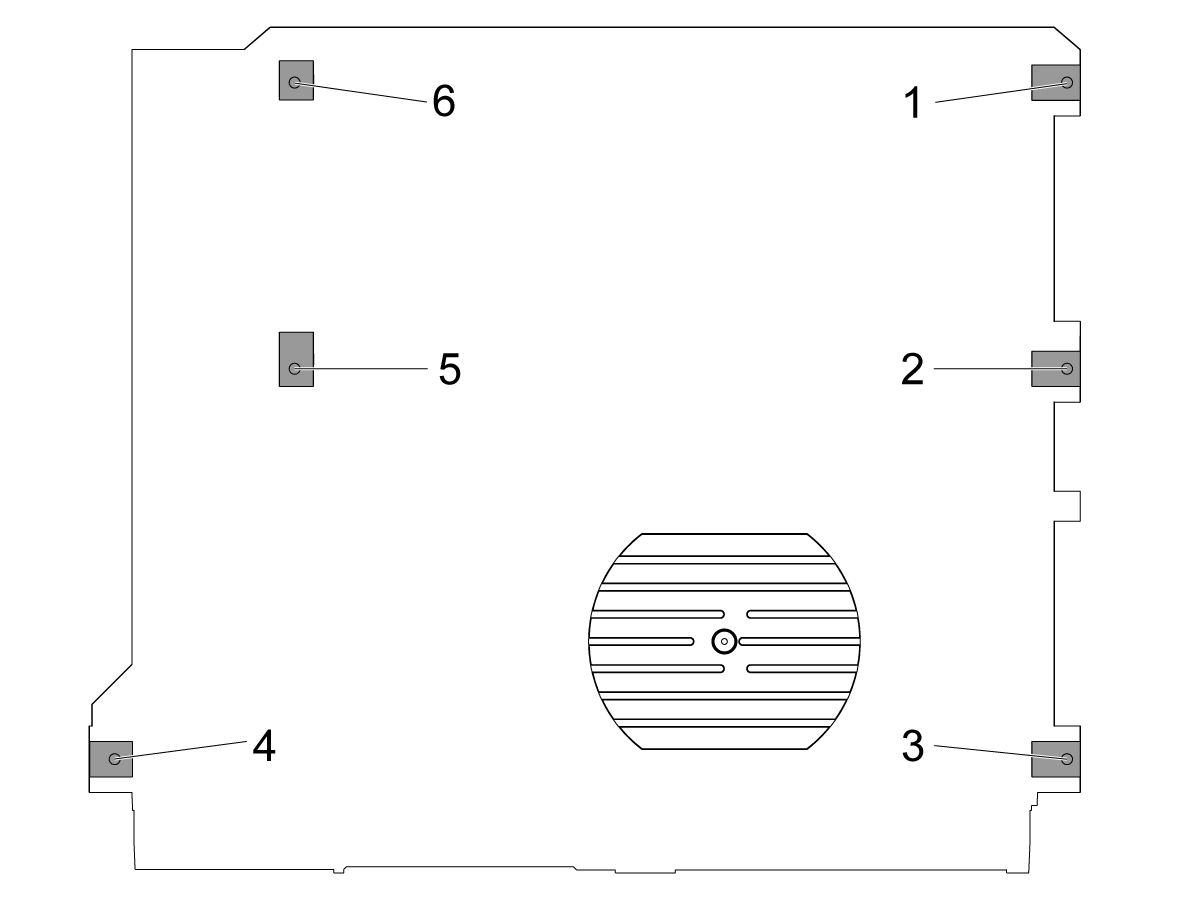
Løsne de midterste utjevnings skruene [2 og 5] slik at de ikke støtter noen vekt.

Still inn maskinen på 4 hjørneutjevningsskruer 3" (76,2 mm) over gulvet.

2

Grov nivå maskinen:

Drei justeringsskruen #4 opp.

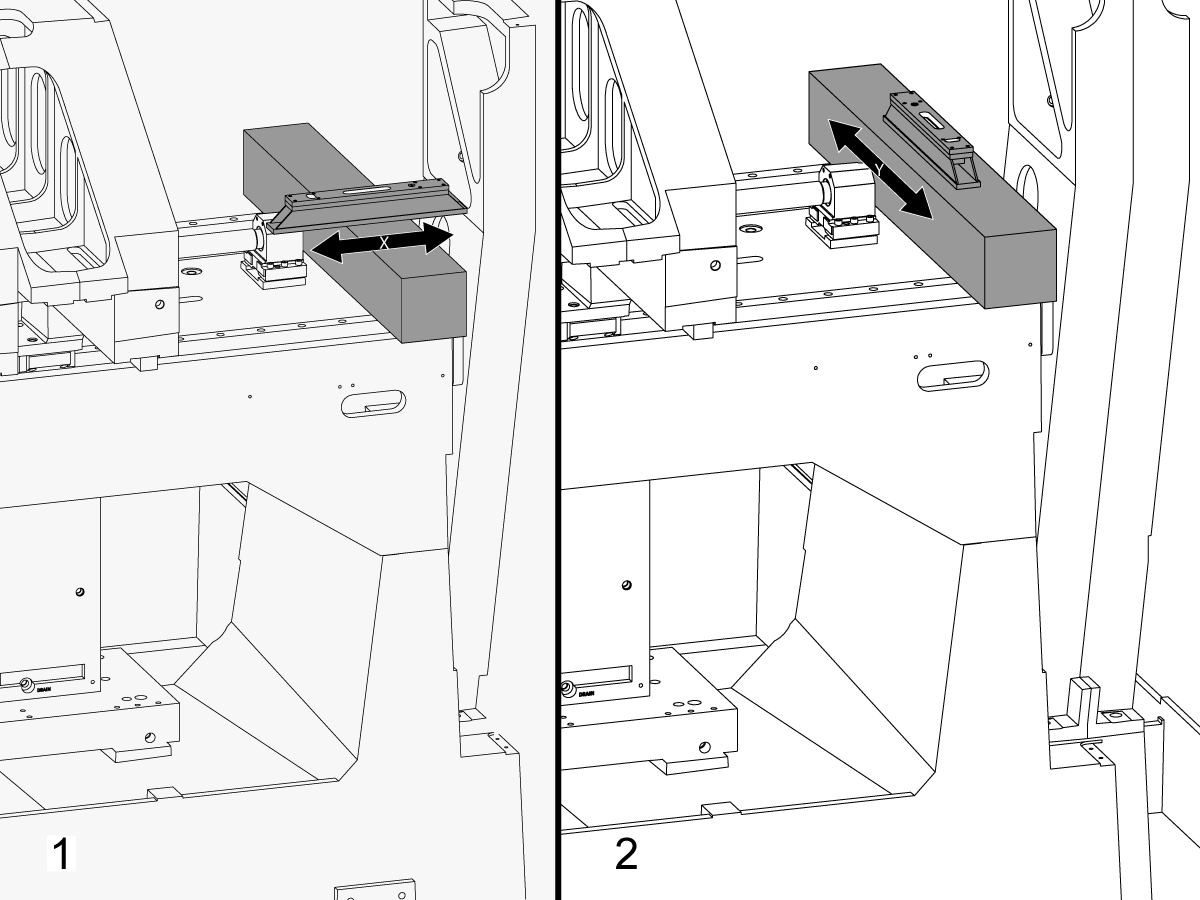
Plasser granitten over X-aksens lineære føringer nær X-aksens kuleskruelagerstøtte.

Oppsett av maskinistnivå på toppen av granitt parallelt med X-aksen.[1]

Juster justeringsskruen #6 til maskinen utjevnes i X-aksen.

Oppsett av maskinistnivå på toppen av granitt parallelt med X-aksen.[2]

Juster utjevnings skruen #3 til maskinen utjevnes i Y-aksen.

Drei utjevnings skruen #4 ned til den får kontakten med utjevnings blokken.

3

Juster X-akse roll:

Monter T-2192 med T-2181.

Flytt Y-aksen til midten av vandring.

Sett T-2192 på siden av spindelen.

Sørg for at boblen på T-2181 er innenfor lesbar rekkevidde.

Hvis ikke, løsner du bolten som fester T-2192 til den magnetiske basen og flytter adapteren etter behov.

Jog X-aksen fra side til side og mål X-akserullingen. Ta målinger i hjemposisjonen, midten, og slutten av vandring.

Juster utjevningsskruen #4 intil det ikke er noen avvik mellom avlesningen i hjemposisjon og avlesningen på slutten av vandring.

Merknad: Boblen på T-2181 trenger ikke å være i midten av hetteglasset. Den trenger kun å være innenfor lesbar rekkevidde.

4

Angi de midterste utjevnings skruene:

Drei midt utjevnings skruer ned til de får kontakten med utjevnings putene, og slå dem deretter en ekstra 45 °.

Kontroller rullen med X-aksen. Juster de midterste utjevnings skruene for å korrigere X-akse-rullen.

Justering av X-akse til Y-akse

1

Rett inn ansiktet på setet parallelt med X Axis-bevegelsen:

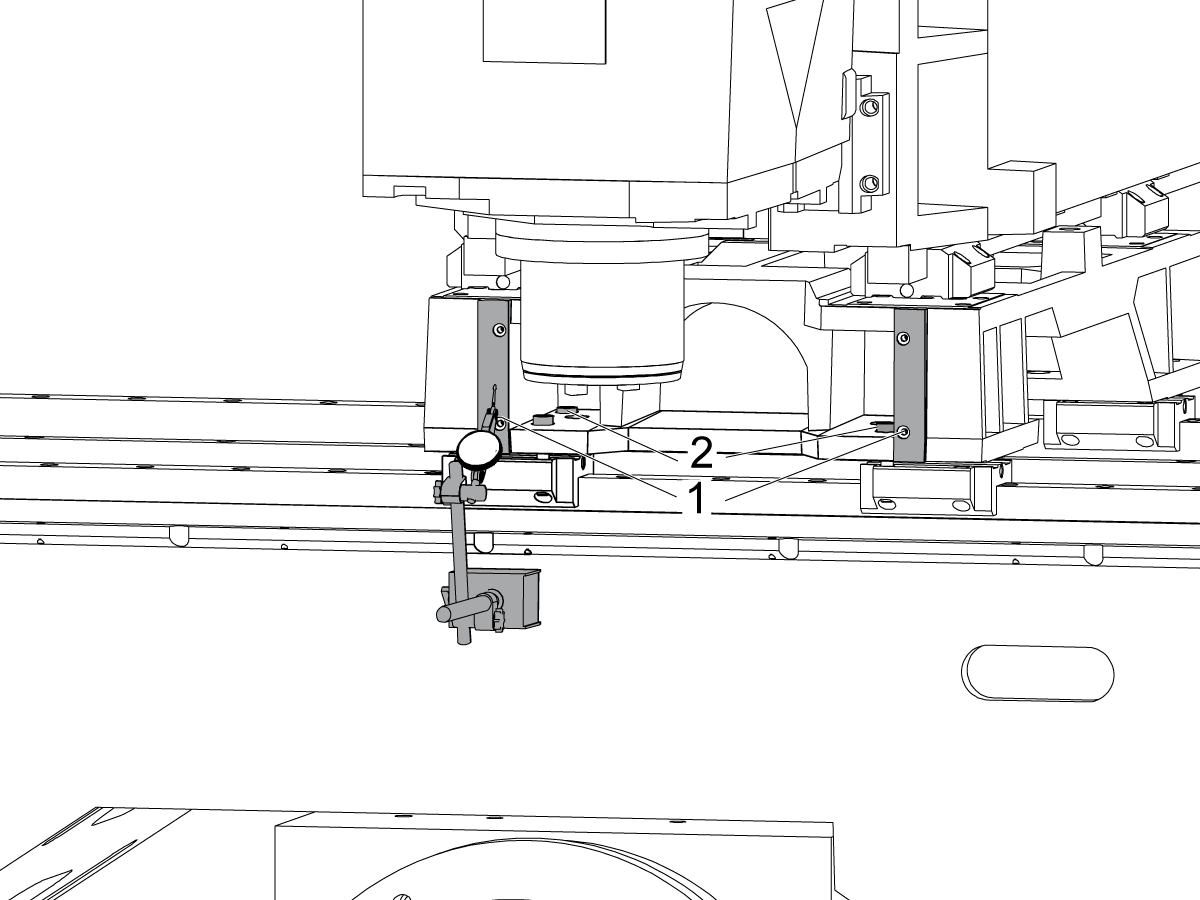
Sveip over den maskinerte overflaten på forsiden av salen [1] ved å jogge X-aksen.

Løsne boltene som sikrer setet til X-aksens truck [2] og juster fronten til setet parallelt med X-aksen bevegelse innenfor 0,001" om nødvendig.

Dreiemoment boltene. Gå til Haas feste Moment spesifikasjoner.

2

Juster Y-aksen vinkelrett på X-aksen:

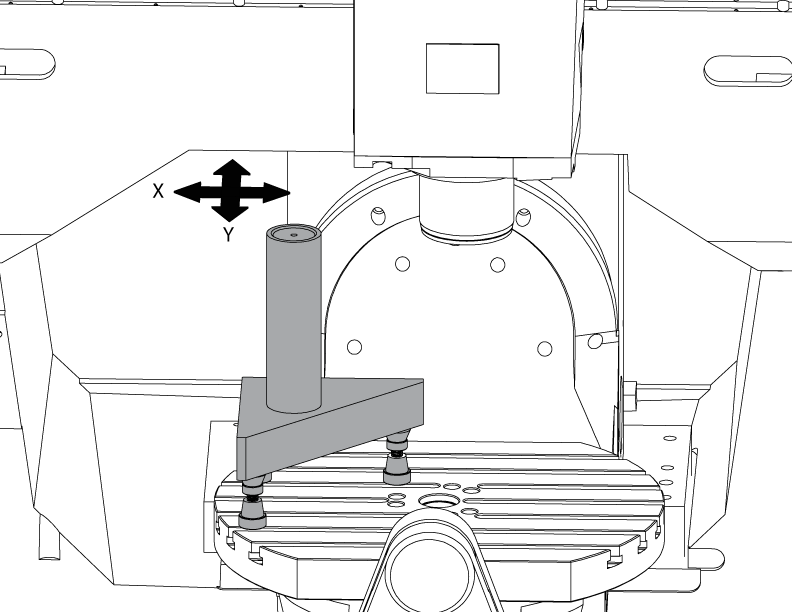
Oppsett av Tri-kvadrat granitt på venstre side av C-aksen tallerken på maskinist knekt.

Sett baksiden av Tri-kvadrat granitt parallelt med X-aksen. NTE 0.0001"/10"

Feie toppen av Tri-kvadrat granitt langs X-og Y-aksene.

Juster maskinistjekken til overflaten av granitt tri-square er parallell med X-Y flaten NTE 0,0005".

Kontroller at baksiden av granitt parallelt med X-aksen. NTE 0.0001"/10".

Løsne boltene som fester Y-aksen til setet og Juster Y-aksen vinkelrett på X-aksen. NTE 0.0005"/10"

Dreiemoment boltene. Gå til Haas feste Moment spesifikasjoner.

Kontroller Y-aksen er vinkelrett på X-aksen NTE 0,0005"/10" etter boltene er strammet.

Z-akse til justering av X-Y-plan

1

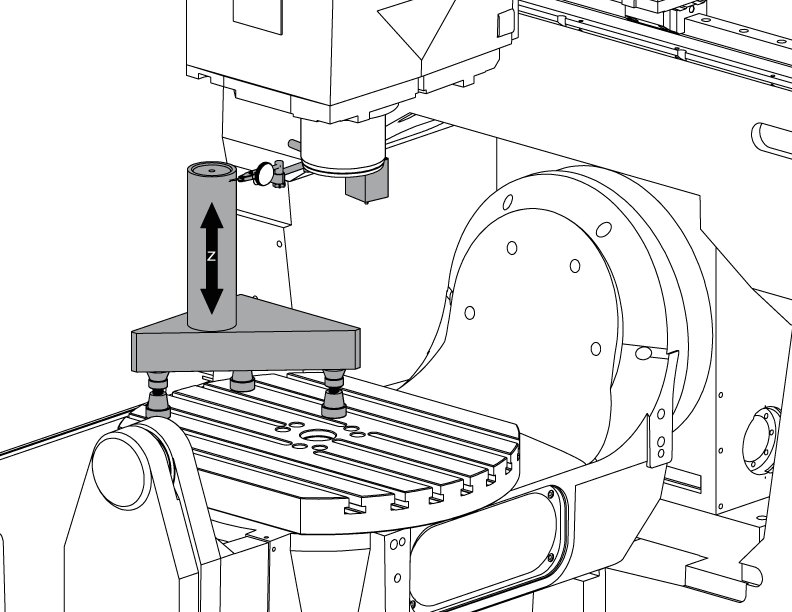
Sett opp sylinderen.

Sett en sylinder på toppen av Tri-steinen som vist på bildet.

Juster den øverste overflaten på sylinderen parallelt med X-Y-flaten NTE 0,0001" ved å dreie maskinistjekkene.

Jog maskinen til følgende posisjon:

  • UMC-750 til X -7000" og Y -10000"
  • UMC-750SS til X -10000" og Y-10000"

2

Juster Z-aksen vinkelrett på X-aksen:

Skift ut én av de øverste hjørneboltene på Z-aksen med T-2193A * for å dreie spindelhodet rundt den.

Angi siden av sylinderen langs Z-aksen.

Løsne boltene som sikrer Z Axis lastebiler til RAM.

Juster Z-aksen vinkelrett på X-aksen NTE 0,0005"/10" ved å svinge spindelhodet side til side.

Drei boltene. Gå til Haas feste Moment spesifikasjoner.

Kontroller at Z-aksen er vinkelrett på X-aksen etter at boltene er torqued.

Skift ut T-2193A * med bolten når justeringen er ferdig

*  : Brukes kun på Pre-Reboot-serier. 

3

Juster Z-aksen vinkelrett på Y-aksen:

Angi fronten på sylinderen langs Z-aksen.

Sett en avstandsskive mellom Z-aksen trucks og ram til å justere Z-aksen vinkelrett til Y-aksen NTE 0,0005"/10".

Merk: SHIM enten toppen to lastebiler eller de to nederste lastebiler med lik mellomlegg.

Dreiemoment boltene. Gå til Haas feste Moment spesifikasjoner.

Kontroller at Z-aksen er vinkelrett på Y-og X-aksene etter at boltene er torqued.

4

Juster og gi Y- og Z-aksers kulemutterkapsling moment:

Løsne boltene som fester kulemutteren til kapslingen og boltene som fester kapslingen til støpet.

Stram boltene som fester kulemutterkapslingen til støpet først, stram deretter boltene som kulemutteren til kapslingen.

Bruk funksjonen jog lås til å kjøre aksen frem og tilbake hele vandringen.

Merk: Ikke bruk håndrattet eller rask bevegelse.

Dreiemoment boltene. Gå til Haas feste Moment spesifikasjoner.

Y-aksens mutterkapsling kan nås fra baksiden av maskinen med rambukken jogget helt opp mot fronten av maskinen.

Z-aksens mutterkapsling kan nås fra fronten av maskinen med spindelhodet jogget hele veien ned.

Merk: Spindelmotordeksel må fjernes for å få tilgang til Z-aksens kulemutterkapsling.

Trikk spindelen til X-Y-planet

1

Sett opp granitt:

Oppsett av maskinist knekt og granitt på midten av C-aksen tallerken som vist på bildet.

Juster overflaten på sylinderen parallelt med X-Y-flaten NTE 0,0001" ved å dreie maskinistjekkene.

Plasser akselen over midten av tallerken.

2

Trikk spindelen til X-Y-planet:

Sett en indikator på spindelakselen.

Lag en måling på toppen av granitt ved hver 90 ° rotasjon.

Løsne (6) boltene i bunnplaten for spindelhodet.

Legg til eller fjern avstandsskiver mellom spindelhodestøpet og bunnplaten for å tre spindelen til X-Y-flaten NTE 0,0005"/10".

Merk: Bruk mellomlegg av ulik tykkelse [1] for å endre vinkelen på bunnplaten.

Når feie er innenfor spesifikasjonen, dreiemoment (6) bolter. Se Haas´ spesifikasjoner for festemoment.

Kontroller spindel trikken etter at boltene er torqued.

Justering v B-akse til XYZ-akser

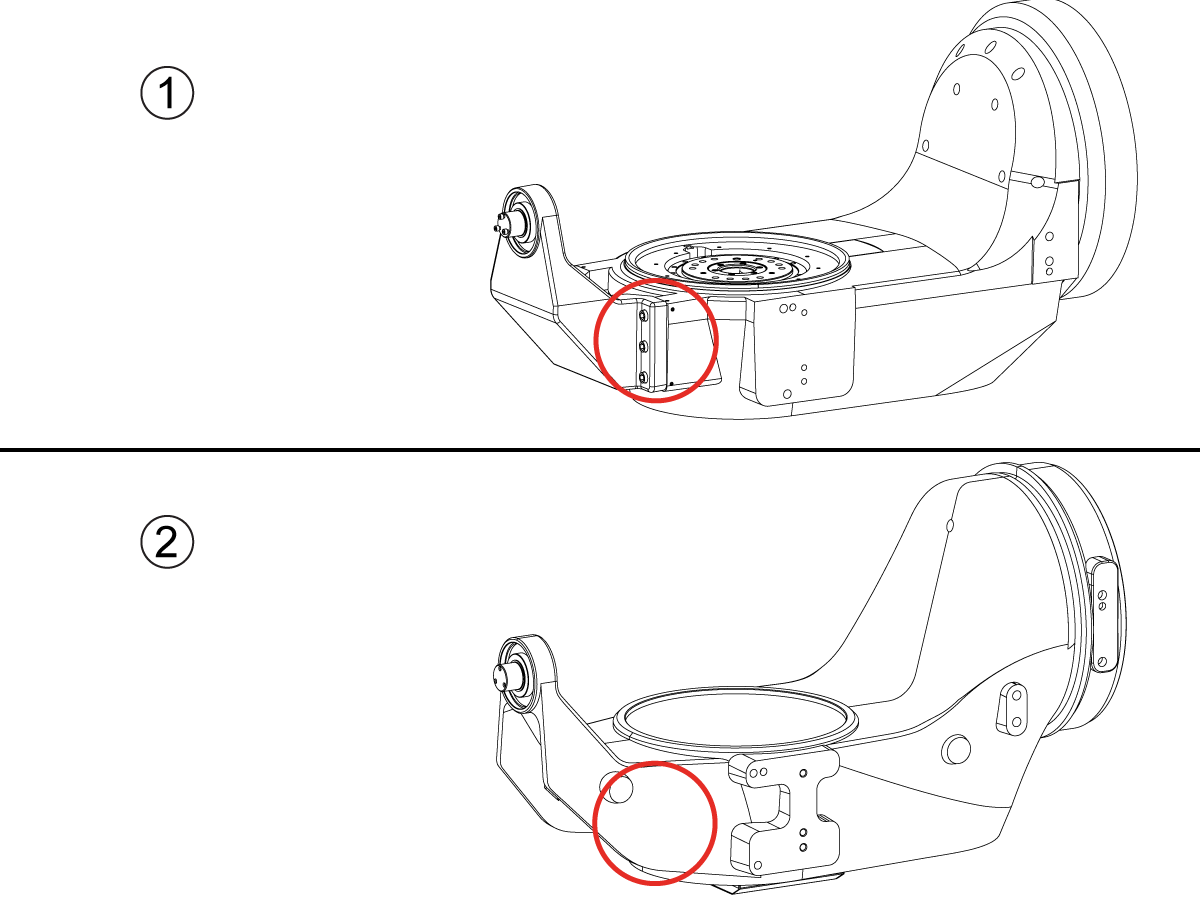
How to identify the Multi-Piece and the Unibody trunnion   

1) Multi-Piece trunnion:    UMC machines built approximetely before 11/2022 will have this configuration.

2) Unibody trunnion:    UMC machines built approximetely after 11/2022 will have this configuration.

1

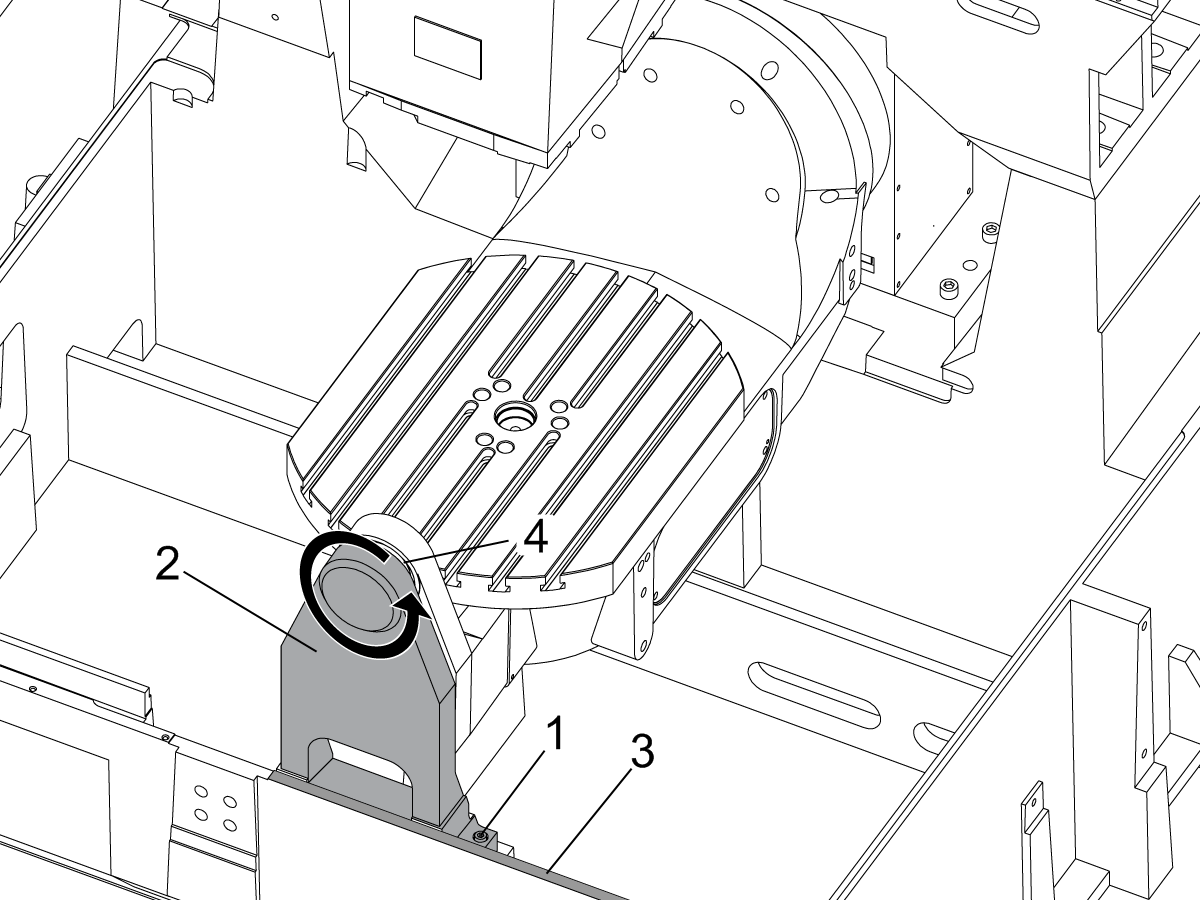
Remove the A-frame trunnion support:

Remove the bolts [1] that secure the A-frame trunnion support [2] to the base and take out the shims between A-frame support and the base.

Rotate the A-frame support [2] counter-clockwise to clear the edge of the base [3].

Pull the A-frame support off the bearings.

 Note: The A-frame support might vacuum lock on the bearings. Use the zip-tie to pry the seal [4] open.

 Caution: To lift the trunnion support, get the aid of another person. The support weighs 85 lbs (39 kg).

2

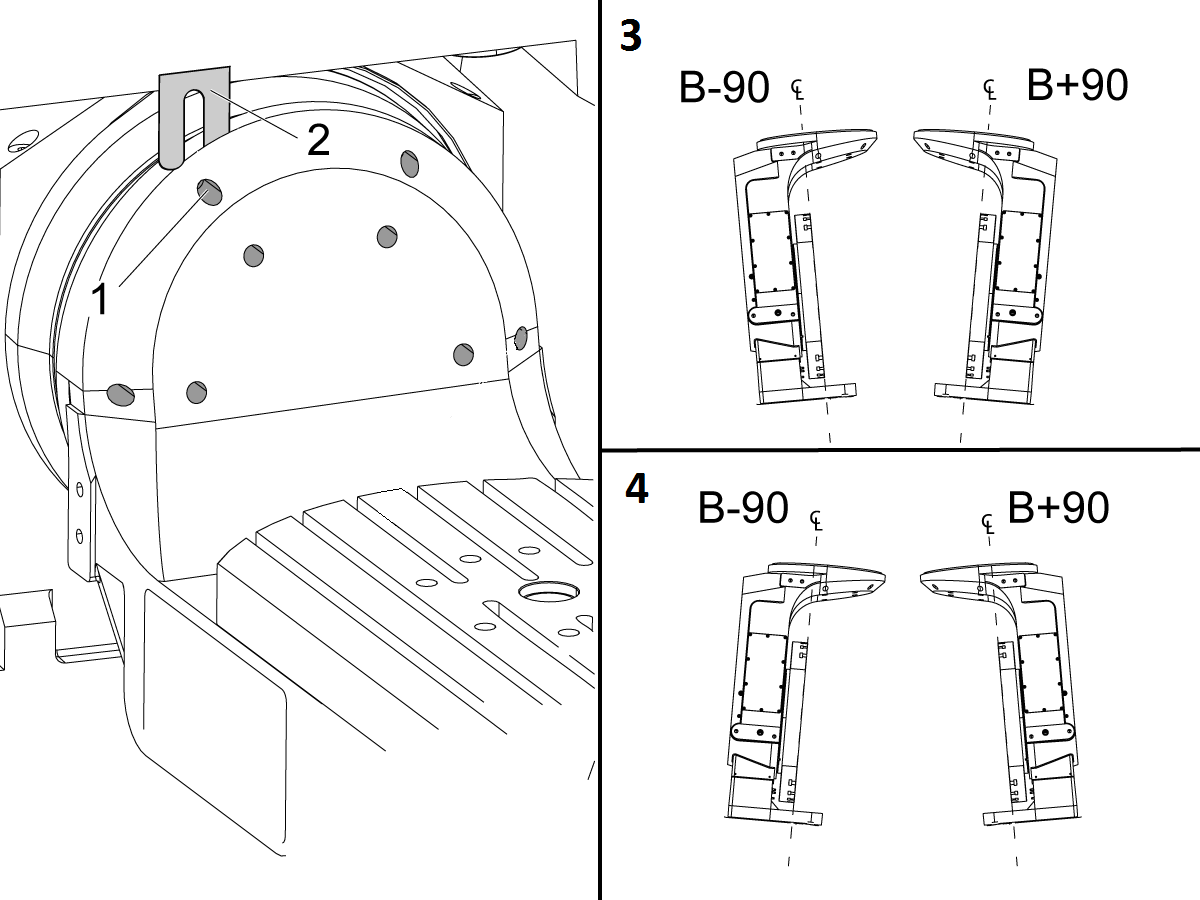
Measure the B- axis of rotation parallelism to the Y-Z plane:

For a machine with a Classic Haas Control, change Parameter 151:20 (B axis CHK TRAVL LIM) to 0.

For a machine with a Next Generation Control, change Parameter 6.021 (B axis CHK TRAVL LIM) to FALSE.

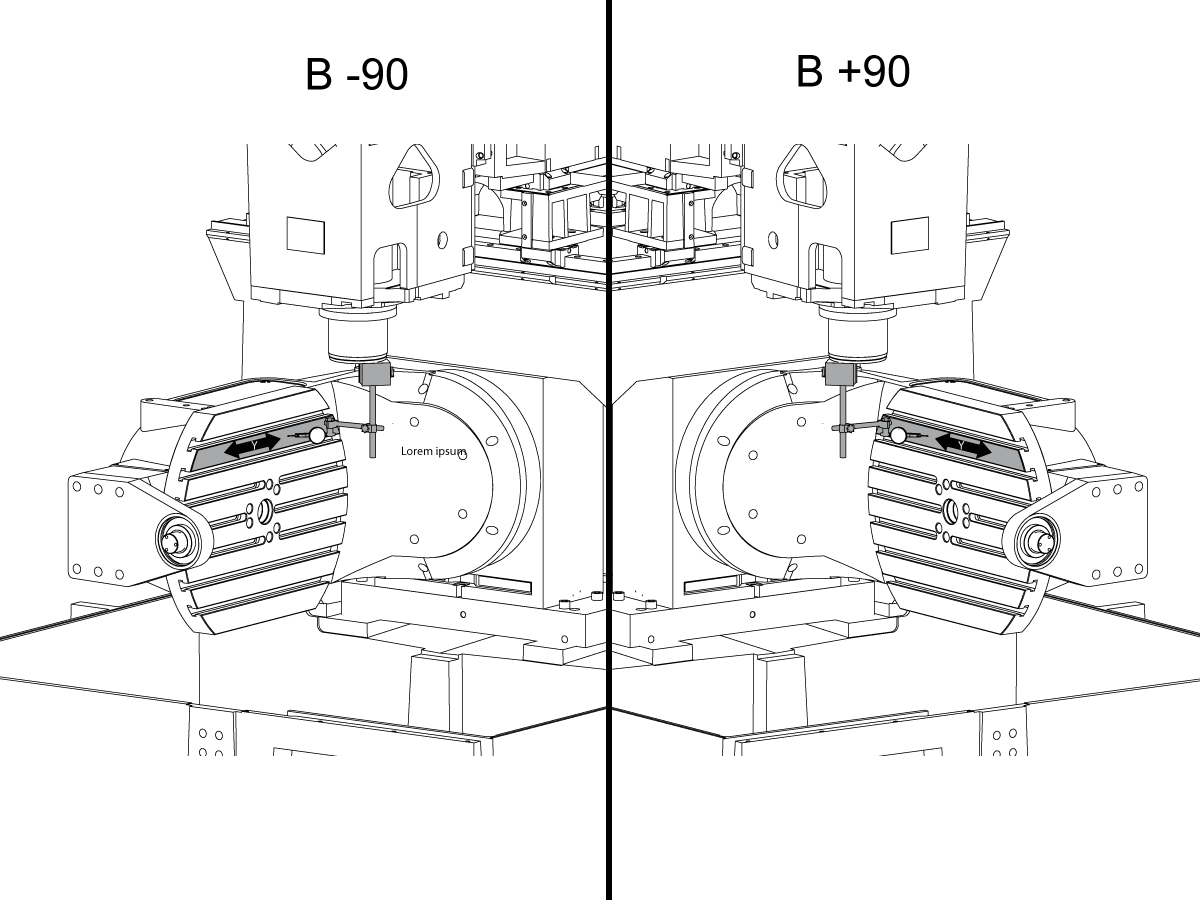
Measure the parallelism of the platter to the Y-Z plane with the B axis at 90° and then the B axis at -90° as shown in the picture.

Position the Y-Axis in the following starting position:

UMC-500: Y=0, Sweep 15”, 3rd T-Slot Land from the top.

UMC-750/1500-Duo: Y=-1.0, Sweep 18", 3rd T-Slot Land from the Top .

UMC-1250: Y=-1.0, Sweep 28", 3rd T-Slot Land from the Top.

UMC-500PP: Y=-4.0, Sweep 7".

UMC-750PP: Y=-2”, Sweep 15".

UMC-1000PP: Y=-4”, Sweep 15".

Compare the results at B 90° and B-90°. The results should be...

  • Symmetric against the Y-Z plane, positive or negative direction
  • Less than 0.0010"/20"

If the results are symmetric against Y-Z plane, and are less than 0.0010"/20 inches: Go to Step 5.

If the results are symmetric against Y-Z plane, but are more than 0.0010"/20 inches: Go to Step 4.

 Warning: If the results [3] are not symmetric against the Y-Z plane, the B axis rotary needs to be aligned: Go to Step 3.

3

Align the B axis of rotation parallel to the Y-Z plane:

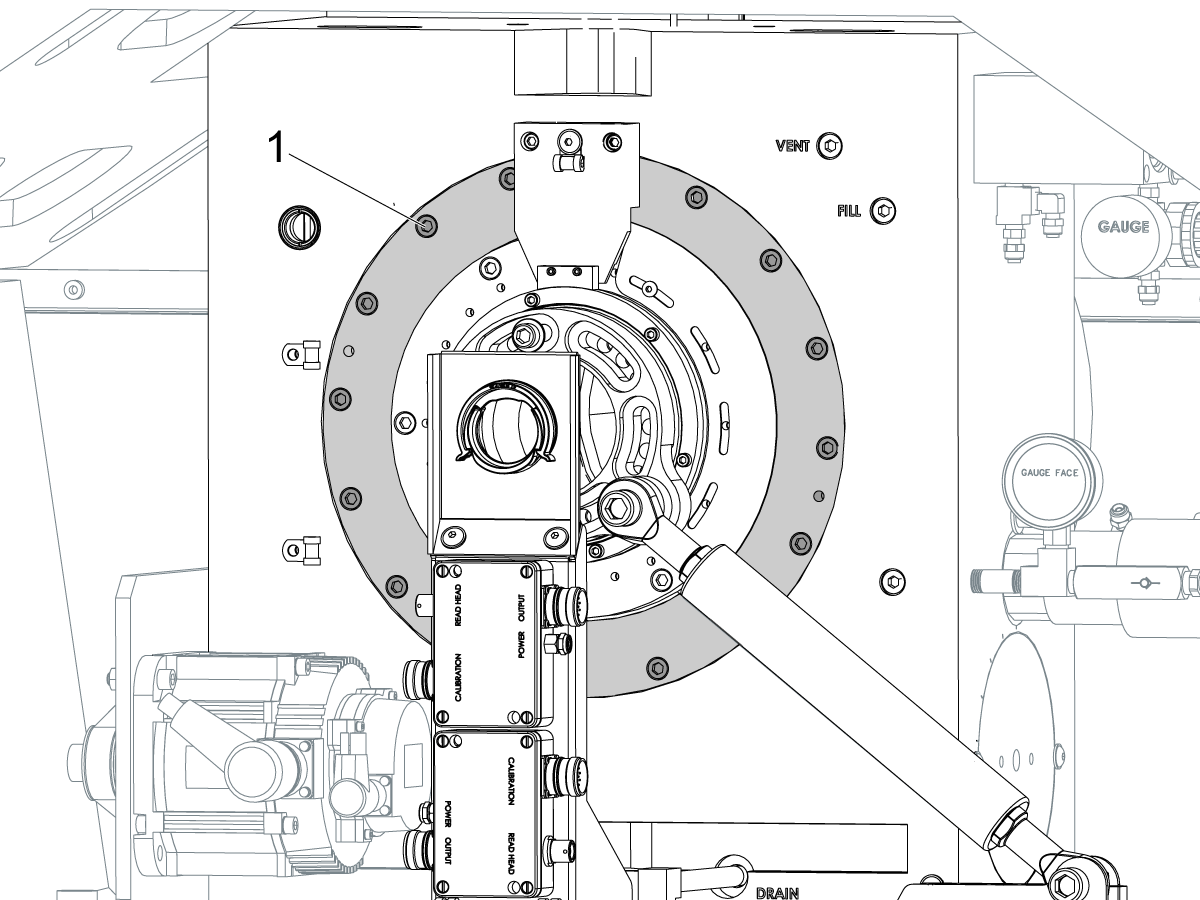
Loosen the (6) bolts [1] that secure the B axis rotary to the base casting.

 Note: Keep the bolts sufficiently snug to control the adjustments.

Adjust the front and rear setscrews [2] until the measurements taken in Step 2 are symmetric against the Y-Z plane.

Torque the (6) bolts [1]. Refer to Haas Fastener Torque Specification.

Verify the measurements in Step 2 after the bolts have been torqued.

4

Align the C Axis of rotation perpendicular to the B Axis of rotation:

Remove the bottom C-Axis access cover.

Loosen the (12) bolts [1] that hold the C Axis body to the B Axis platter face.

Reach the bottom (4) bolts through the C Axis access port.

If the B Axis is symmetric in the positive direction [4], install horseshoe shims [2] of appropriate size behind the top (2) bolts.

If the B Axis is symmetric in the negative direction [5], install horseshoe shims [2] of appropriate size behind the bottom (2) bolts.

Torque the (12) bolts to 80 Ft-lbs (108 Nm).

Cut the excessive shim material off.

Verify the measurements in Step 2 after bolts are torqued.

5

Align the trunnion support shaft co-axial with the B Axis of rotation:

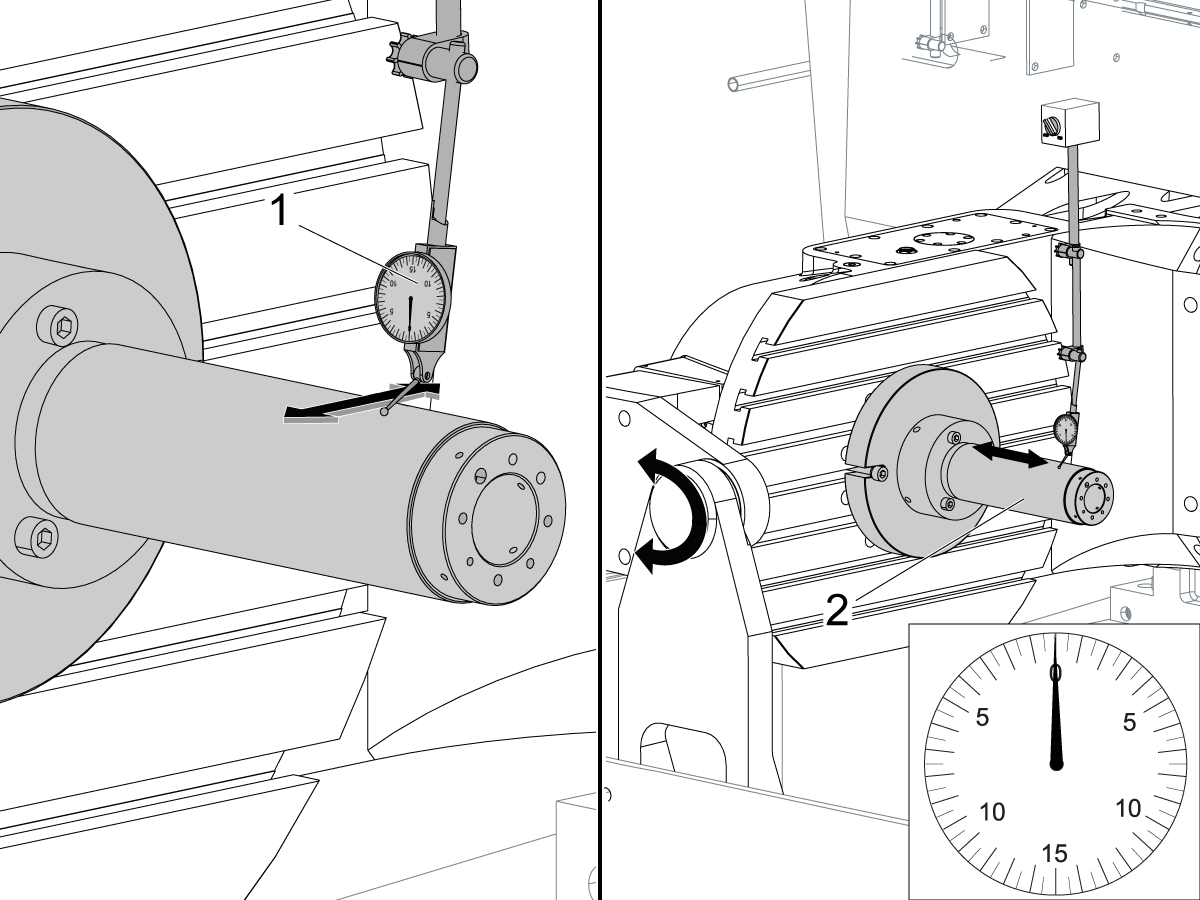
Setup (2) indicators on the outer race of the trunnion support bearing [2] as shown in the picture.

Mark the spot on the outer race where one of the indicator needles is contacting the surface.

After moving the B Axis to 90° or -90° you will align the marked spot with the needle again to exclude the bearing runout error from the measurements.

Take the readings when B is at 90° and B at -90°. Compare the readings. 

 Caution: The B axis brake needs to be clamped when taking the readings.

The deviation between the results when B is at 90° and at -90° needs to be less than 0.001" on each indicator.

 Note: The indicator on the side of the bearing will measure top to bottom alignment and the indicator on the top of the bearing will measure side to side alignment.

____

For models with a multi-piece trunnion

Loosen the (6) bolts [3] on the C Axis body support. Keep the bolts sufficiently snug to control adjustment.

Adjust the (8) set screws [4] until deviation between B at 90° and B at -90° is within 0.001".

Torque the (6) bolts [2] on the C Axis body support to 80 Ft-lbs (108 Nm).

Verify the alignment after the bolts have been torqued.

____

For models with a unibody trunnion

Jog rotary to B90. Set up an indicator on the highlighted surface as shown in the lower diagram .

Rotate B-axis 180 degrees (90 to -90).

Run out (NTE 0.010” TIR).

 Caution: If the measurement exceeds the tolerance then contact support.

6

Install and shim the A-frame trunnion support:

Move the B Axis to 90°.

Setup an indicator [1] against a machined surface of the C Axis body. Set the indicator to 0.

Use plastic zip ties [2] to pry the seal open while installing the A-frame support. This lets unwanted air and grease out of the assembly.

Install the A-frame trunnion support [3] over the bearings.

Remove the cable ties.

Turn the trunnion support clockwise until it is vertical.

 Note: The weight of the A-frame support will cause the trunnion to sag. The amount of sag is measured with the indicator that was previously setup on the side of the C Axis body.

____

For multi-piece trunnions

Adjust the shims [4] between the A-frame support and the base casting to remove the sag until indicator reads 0 again.

When the indicator reading is 0, torque the (4) bolts. Refer to Haas Fastener Torque Specification.

Verify the reading after bolts are torqued. Adjust the shims again if necessary until the indicator reads 0.

____

For models with unibody trunnion

Determine the amount of shim stock [4] needed to raise the Trunnion arm so the indicator reads 0.005".

The indicator [1] value will change once the support is torqued.

With indicator still in place:

  • Torque trunnion support bolts to appropriate values.
  • Check indicator to make sure it reads between the range of

Trunnion arm raised (0.005” to  0.010”).

 Note: For unibody trunnions, the shim location may also be used to correct the C-axis to X-Y plane perpendicularity instead of shimming the saddle trucks.

 Caution: Use equal amount of shims on each side of the A-frame support. Unequal shims will cause the A-frame support to pull the trunnion to the side.

Verify the B Axis of rotation alignment to the Y-Z plane (Step 2). Loosen the bolts and tap the A-frame support side to side if necessary to correct the B axis to Y-Z plane alignment.

7

Set C-axis perpendicular to X/Y plane:

Move the axes to

UMC-750's........X= -10.5" & Y=0."

UMC-1000's......X=-17.0" & Y=-0."

Zero an indicator [1], on a Ground Block [2], 1/2" off the edge at the rear of the platter (Mag-Base on Spindle), with C at 0 Degrees

Rotate C-Axis to 180°.

Move Y axis, and ground block, in Y Axis negative direction until you are 1/2" away from platter edge, and take the perpendicularity measurement

Adjust the shims until the average error is within 0.0005" end to end.

 Note: For unibody trunnions, the shim location under the bearing support may also be used to correct the C-axis to X-Y plane perpendicularity instead of shimming the saddle truck.

Caution: Shim either two front trucks or two rear trucks with the equal shim.

Note: Shim one truck at the time to maintain the X to Y squareness.

Verify the measurements after all bolts are torqued.

Verify the X to Y alignment in Step 2.

8

Set the tool change offsets:

B-axis tool change offset [1]

For Classic Haas Controls, change Parameter 213. 

For Next Generation Controls, go to: Settings>Rotary Tab>Highlight the rotary and press [INSERT], or change Parameter 6.078 (B TOOL CHANGE OFFSET) to set the trunnion (B Axis) parallel to the X Axis.

For models with multipiece trunnion

(NTE 0.001/10"; NTE 0.0020" overall)

For models with unibody trunnion

(NTE 0.0005/10"; NTE 0.0010" overall)

___

C-axis tool change offset [2]

For Classic Haas Controls change Parameter 523.

For Next Generation Control go to: Settings>Rotary Tab> Highlight the rotary and press [INSERT], or change Parameter 7.078 (C TOOL CHANGE OFFSET) to set the table T-slot (C Axis) parallel to the X Axis

For models with multipiece trunnion

(NTE 0.001/10"; NTE 0.0020" overall)

For models with unibody trunnion

(NTE 0.0005/10"; NTE 0.0010" overall)

9

Check C-axis perpendicularity to X/Y plane:

Align the indicator centered over the C-axis bore with the Y-axis at -10.

Jog positive in the Y-axis and align the indicator over the center of the last section of the platter and make a mark at this spot with a washable marker.

Insert 1-2-3 block as shown and set the indicator to zero.

Remove the block and rotate the platter 90 degrees, following the marked spot with the indicator.

Insert block back between the indicator and platter. Note reading.

Repeat the previous two steps, taking readings with the platter at 180, 270 and 360 degrees.

Multi-piece trunnion:  (NTE 0.0005")

Unibody trunnion: (NTE 0.001")

10

Measure the intersection of the B and C axis:

Follow the linked instruction manual to complete this step.

B-Axis and C-Axis intersection Adjustment

11

Align the B-Axis brake disk:

 Note: Do not do this step if you are working on a SS machine.

Operate this code in MDI mode to unclamp the brake:

M11;

Loosen all of the brake disc bolts [1] and torque them to 5 Ft-lbs (7 Nm).

Operate this code in MDI mode to clamp the brake:

M10;

Wait 10 seconds.

Torque the bolts. Refer to Haas Fastener Torque Specifications.

Angi parameter/innstilling tilbake til fabrikkverdiene

Still inn parameter 1314 for CHC/ innstilling 254 for NGC tilbake til fabrikkinnstilt verdi. (Slå strømmen til maskinen av og på etter at du har endret verdien.)

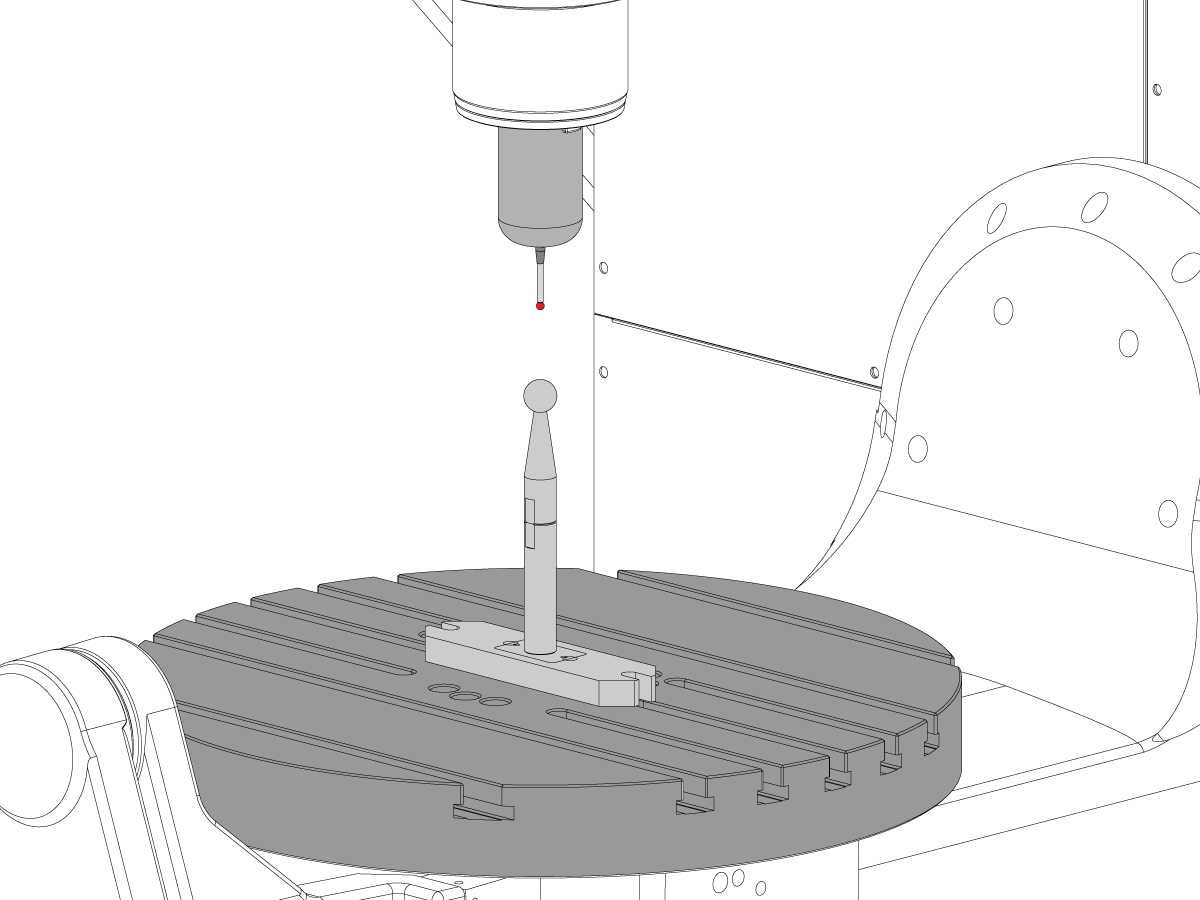
Juster og kalibrer WIPS. Trådløst intuitivt probesystem (WIPS) - kalibrering

Still inn maskinens roterende nullpunkt. 

  • UMC - 750 - innstillinger for MRZP WIPS offset - CHC
  • UMC – innstillinger for 750 MRZP WIPS offset -  NGC

Fyll ut fullstendig inspeksjons rapport:

  • EA0420 UMC-500 inspeksjon rapport
  • EA0373 UMC-750 inspeksjon rapport
  • EA0418 UMC-1000 inspeksjon rapport

Behold kopien av inspeksjonsrapporten med maskinen.

Hvis du erstattet B- og C-aksene på enheten, UMC-750 – B-akse- og C-akse – skjæringspunkt – justering

8.2 Justering – Indikere soner

Recently Updated

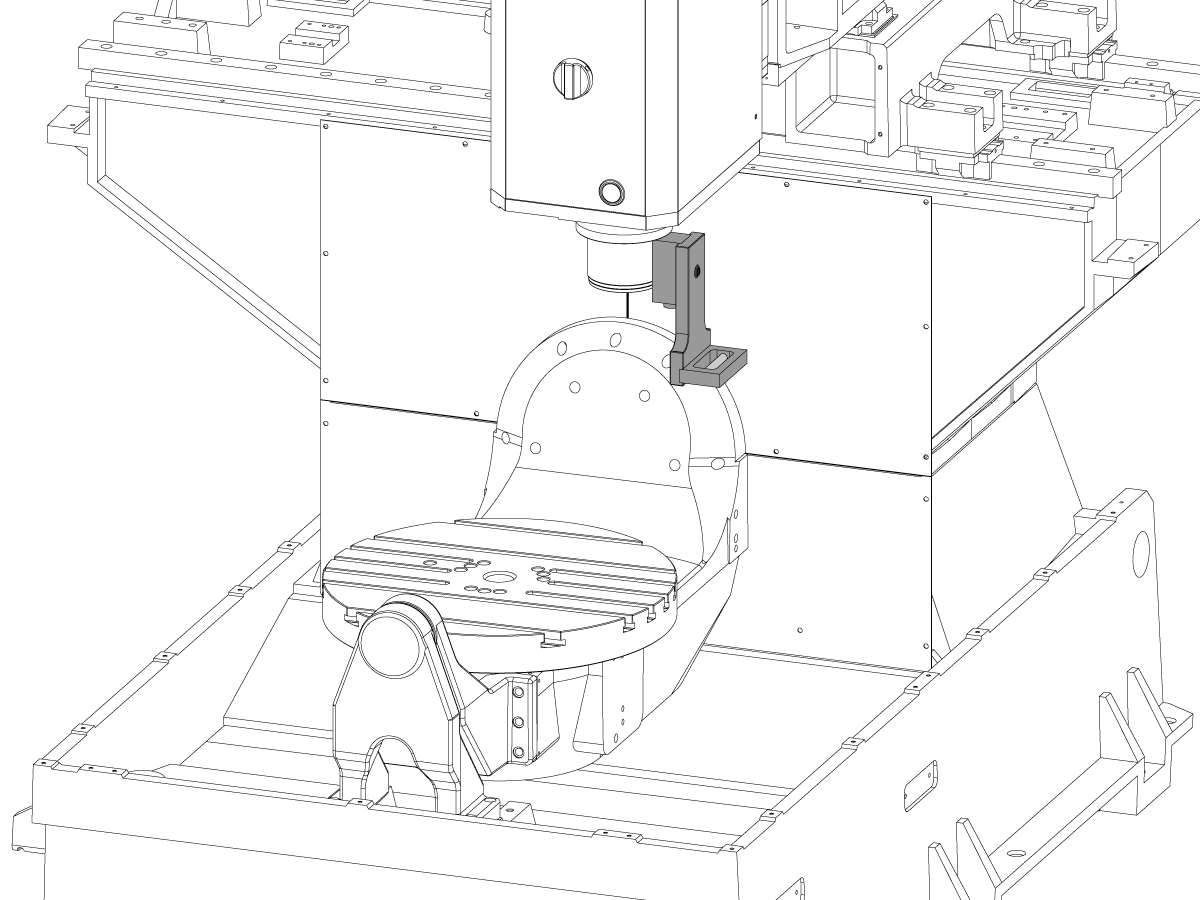
Indikasjonssoner for UMC justering


AD0490

Indikasjonssoner

1

X-akse-rull

  • Fest først verktøy T-2192 på siden av spindelen.
  • For X-rull-måling, hold følgende Y- og Z-akseposisjoner:
    • UMC 500 (Y,Z): -8, -8
    • UMC 750 (Y,Z): -10, -10
    • UMC 1000 (Y,Z): -12, -12
  • Mål X-akserull (NTE 0,0005" / 10")


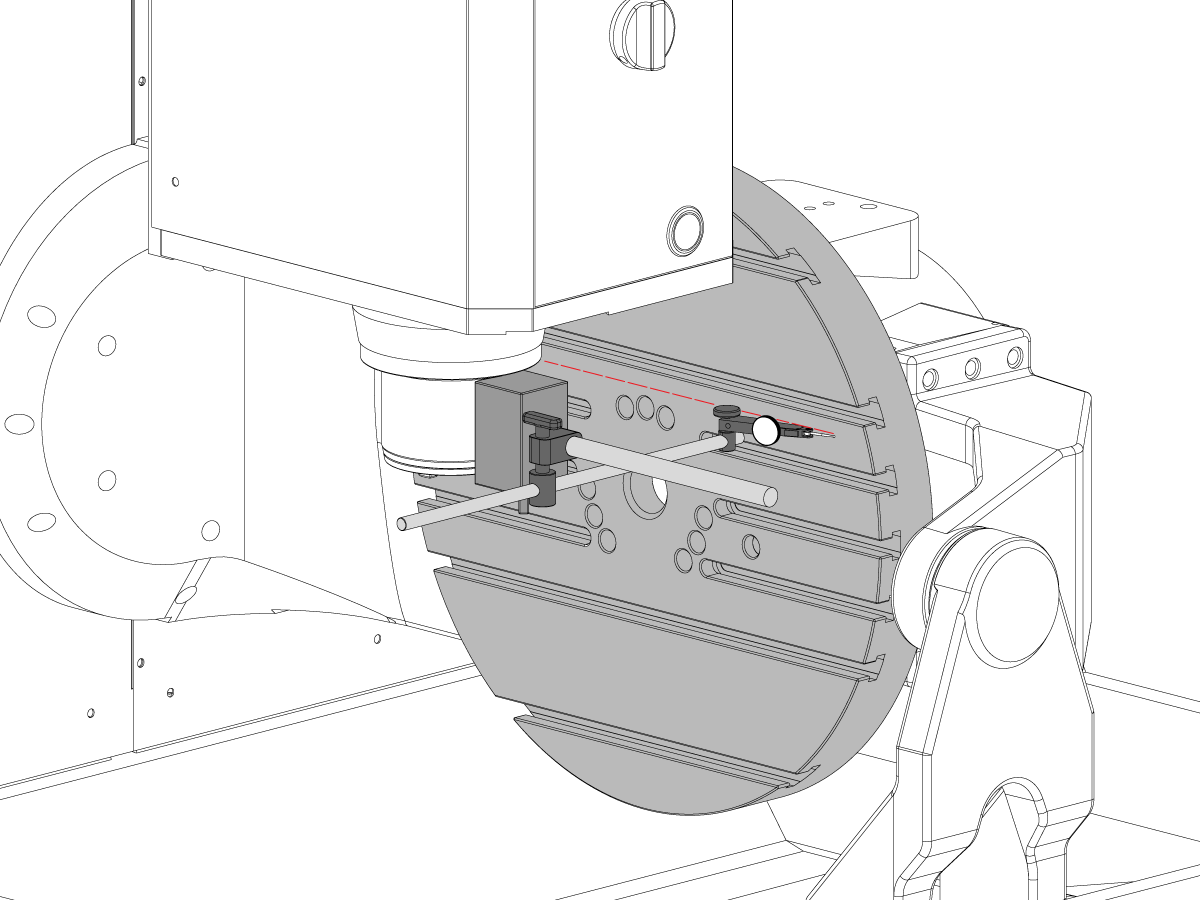
2

B-akse til Y-akse-parallellitet

  • Nullreturner B- og C-aksene.
  • Mål platehjulslaget i Y-aksen (NTE: 0,0008" / 10", 0,0012" / 15")
  • Mål deretter samme overflate med B-aksen i både -90° og +90°  (NTE: 0,0008" / 10", 0,0012" / 15")
  • For UMC 500 og 750, mål hele lengden på platen
  • For UMC 1000, offset 2” fra kanten av platen og mål deretter over 20”

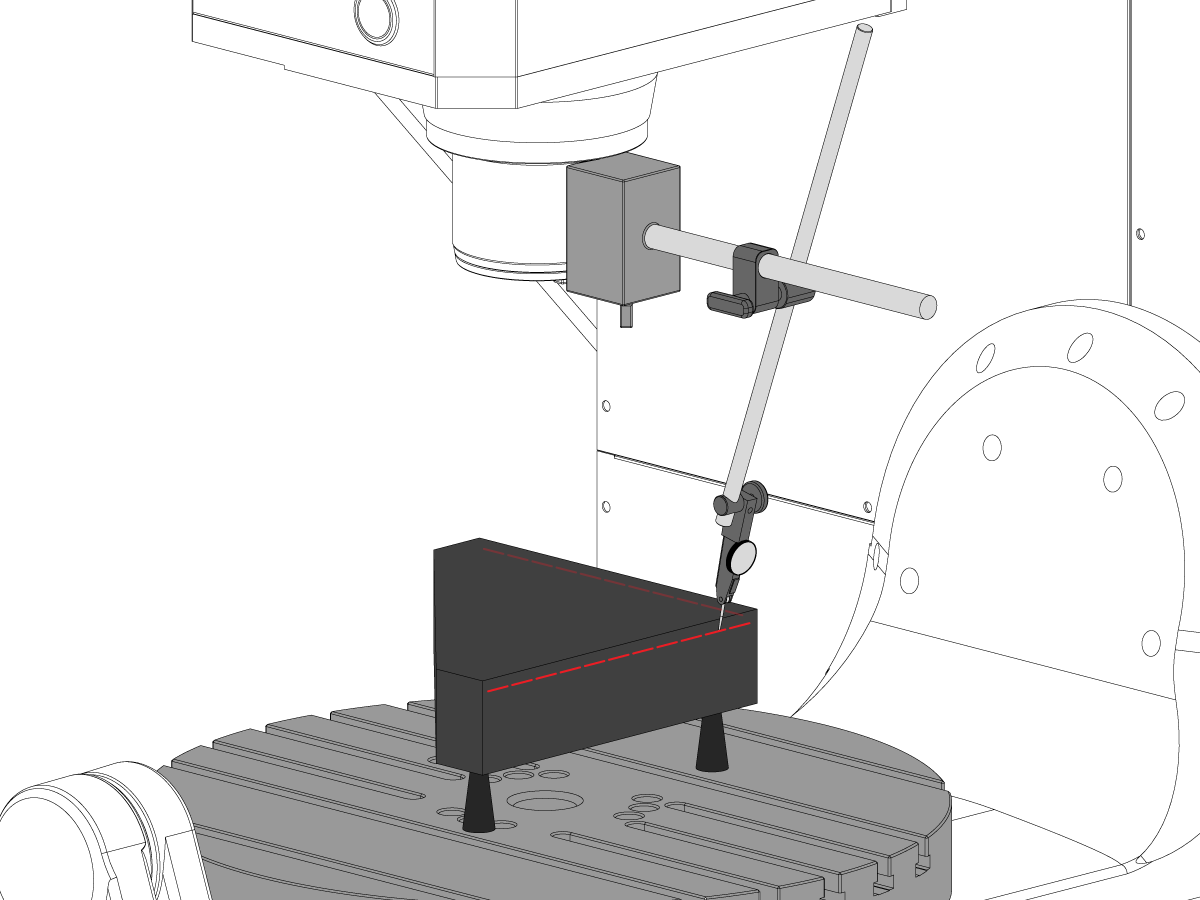
3

Y-akse til X-akse vinkelretthet

  • Bruk løfteskruer til å gjøre den øvre overflaten av granitten parallell med XY-plan (NTE: 0,0002")
  • Kontroller deretter om Y er vinkelrett til X (NTE 0,0005" / 10")

4

Vinkelretthet av X-akse til Z-akse

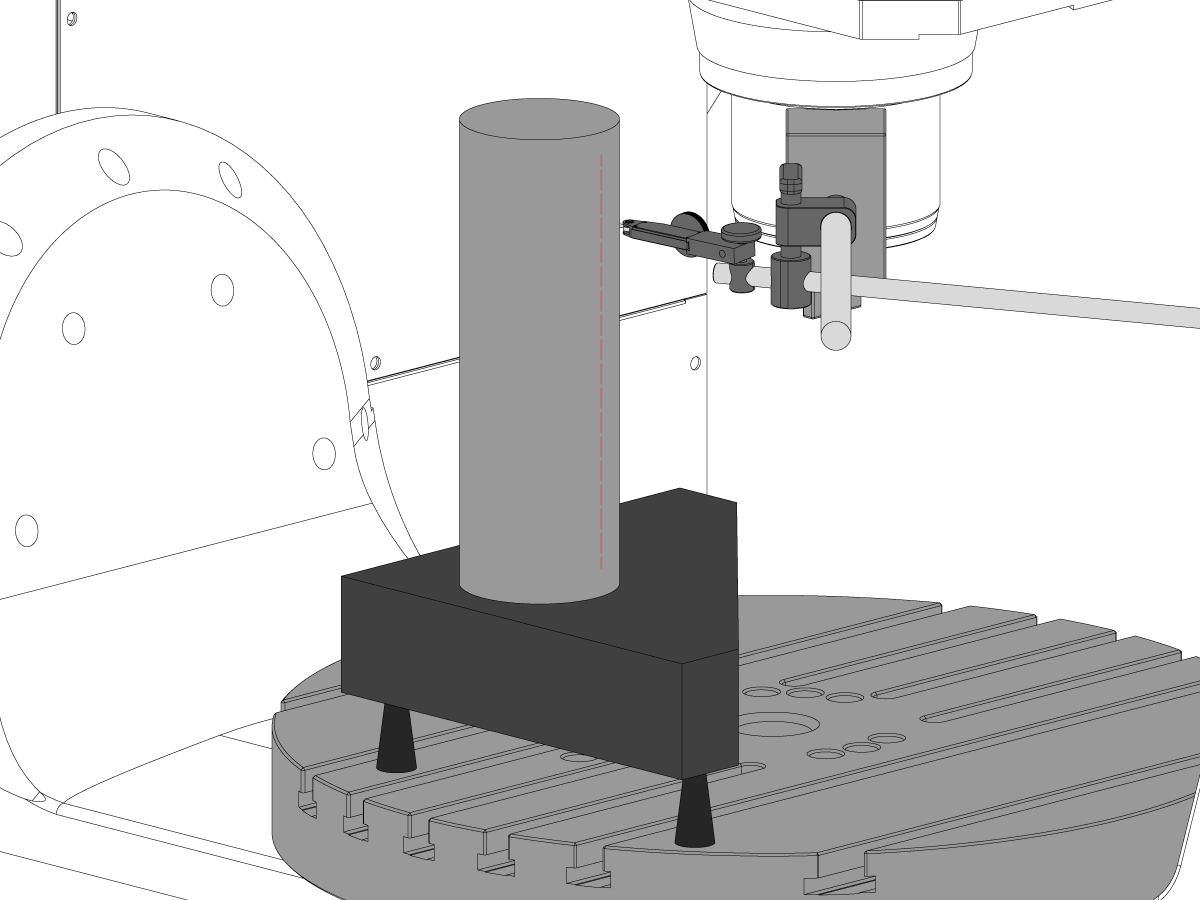
  • Plasser granitt og presisjonssylinder på platen i orienteringen vist
  • Bruk løfteskruer til å stille inn den øvre overflaten av sylinderen parallell med XY-plan (NTE: 0,0002")
  • XY-spindelplasseringer for dette trinnet:
    • UMC 500, X = -6, Y = -8
    • UMC 750, X = -10, Y = -10
    • UMC 1000, X = -17, Y = -12
  • Z-startposisjon for denne målingen:
    • UMC 500, Zstart = Ztopp – 2”
    • UMC 750, Zstart = Ztopp – 5”
    • UMC 1000, Zstart = Ztopp – 7”
  • Ztopp er grensen for Z-aksevandringen i den positive retningen (opp)
  • Fra Zstart, mål ned 10" langs sylinderen

5

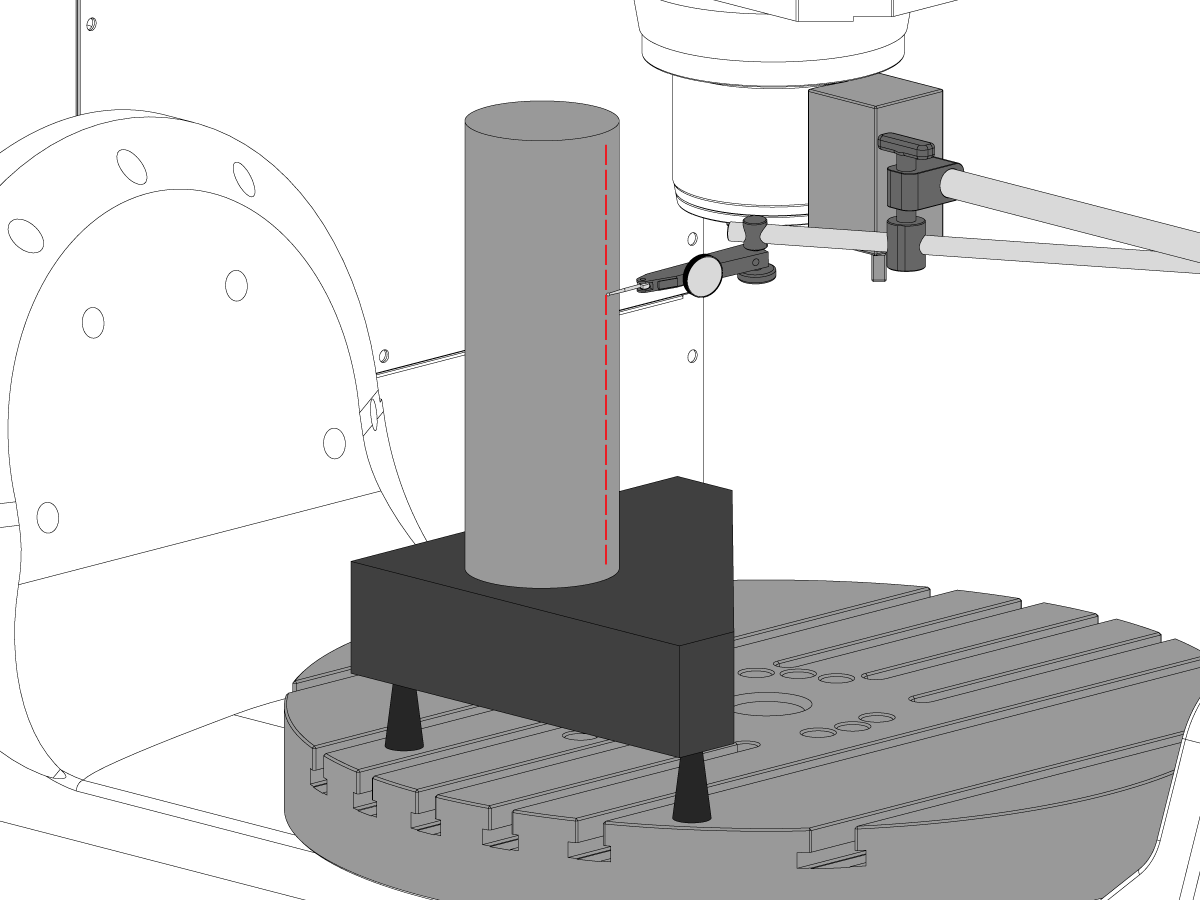
Vinkelretthet av Y-akse til Z-akse

  • Plasser granitt og presisjonssylinder på platen i orienteringen vist
  • Bruk løfteskruer til å stille inn den øvre overflaten av sylinderen parallell med XY-plan (NTE: 0,0002")
  • XY-spindelplasseringer for dette trinnet:
    • UMC 500, X = -6, Y = -8
    • UMC 750, X = -10, Y = -10
    • UMC 1000, X = -17, Y = -12
  • Z-startposisjon for denne målingen:
    • UMC 500, Zstart = Ztopp – 2”
    • UMC 750, Zstart = Ztopp – 5”
    • UMC 1000, Zstart = Ztopp – 7”
  • Ztopp  er grensen for Z-aksevandringen i den positive retningen (opp)
  • Fra Zstart, mål ned 10” langs sylinderen

6

C-akse vinkelretthet til XY-plan

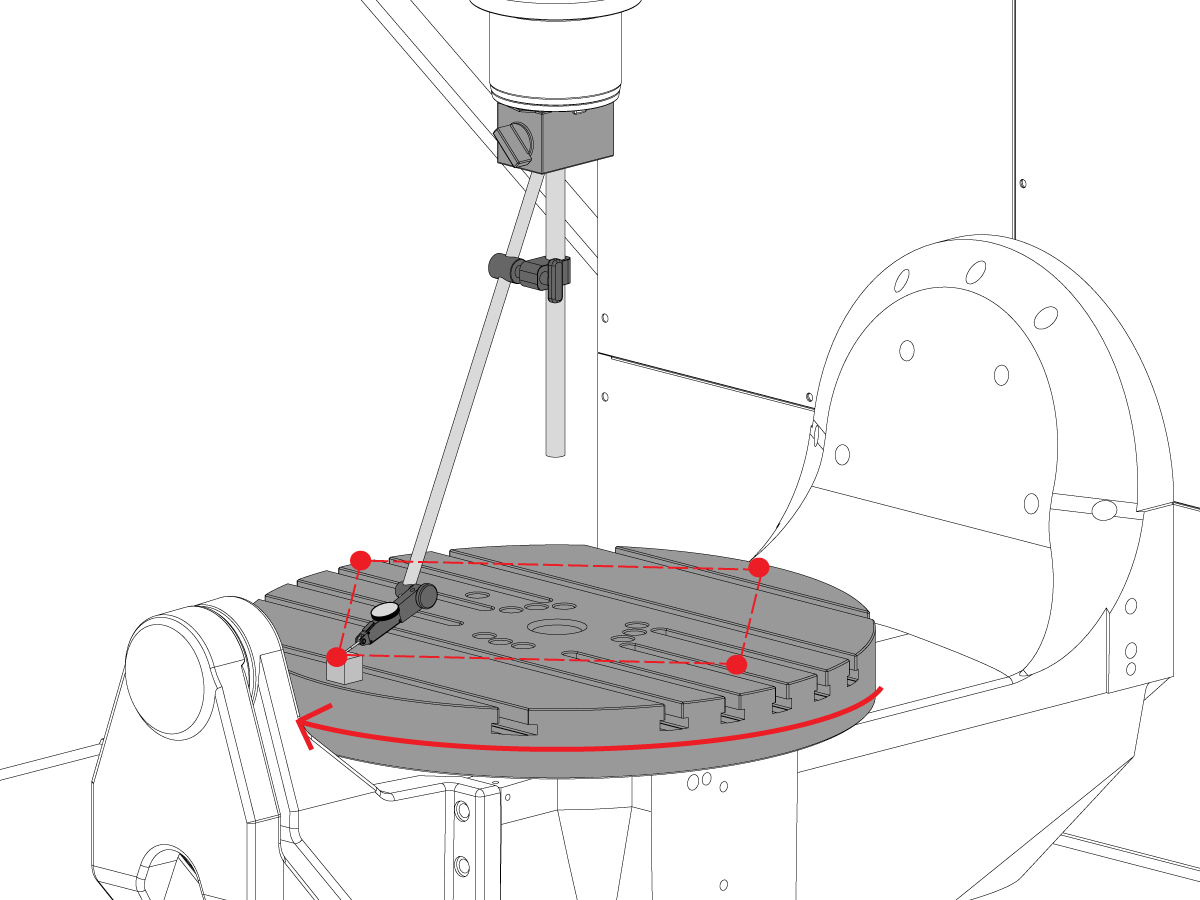
  • Omposisjoner den magnetiske basen på spindelen slik at den ikke kan rotere med spindelen.
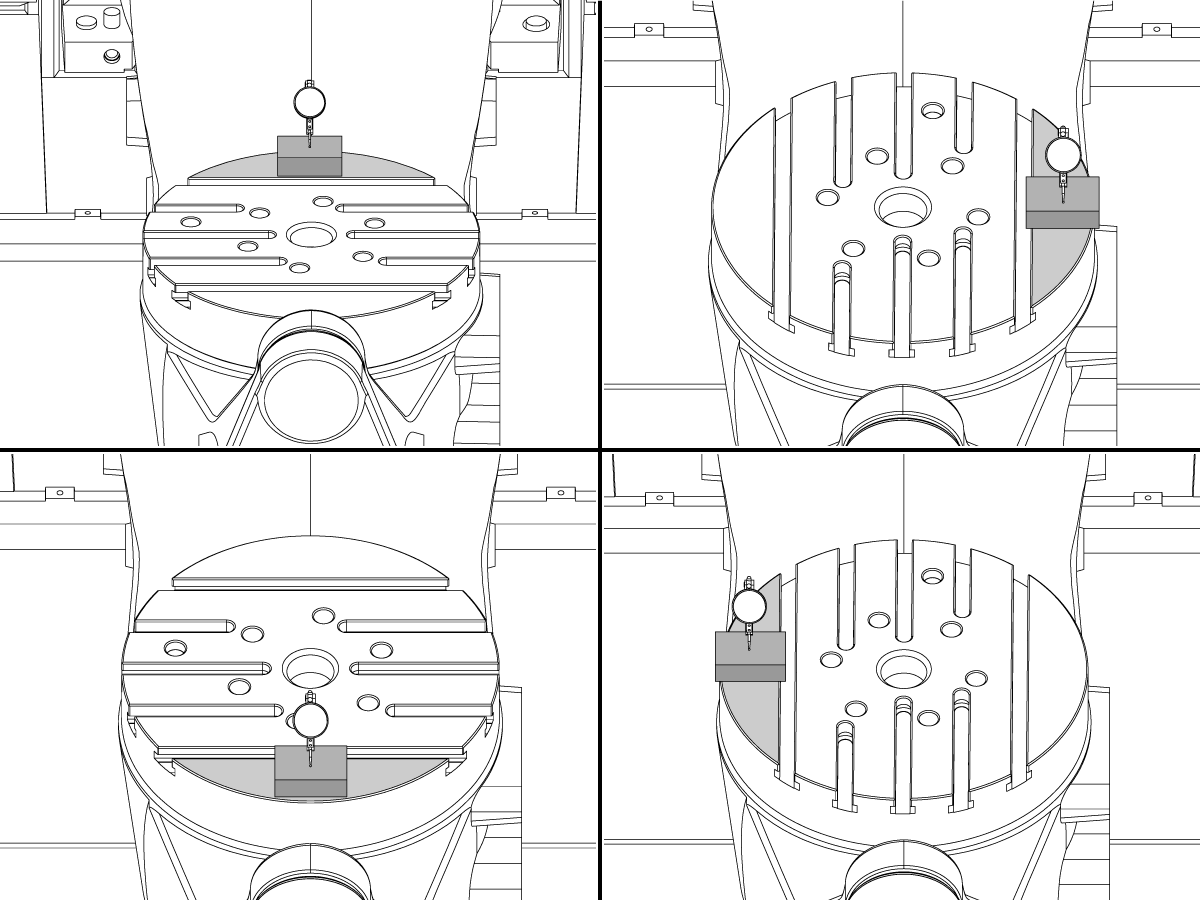
  • Plasser presisjonsmålerblokken på kanten av platen i klokken 12-posisjonen. 
  • Nullstill indikatorspissen på målerblokken i denne posisjonen.
  • Roter C-aksen  90° 
  • Jogg deretter spindelen i X- og Y-aksen for å følge målerblokken og ta en måling av samme punkt på platen. Ingen rotasjon av spindelen skal forekomme
  • Gjenta dette 2 ganger til for totalt 4 posisjoner, 90° fra hverandre, ved kanten av paletten som vist. 
  • Forskjellen mellom klokken 12- og 6-posisjonsmålinger bestemmer flatheten langs X-aksen (NTE 0,0005")
  • Forskjellen mellom klokken 3- og 9-posisjonsmålinger bestemmer flatheten langs Y-aksen (NTE 0,0005")

7

Hjulslag på plateflate

MERK: C-aksebremsen er av for dette trinnet

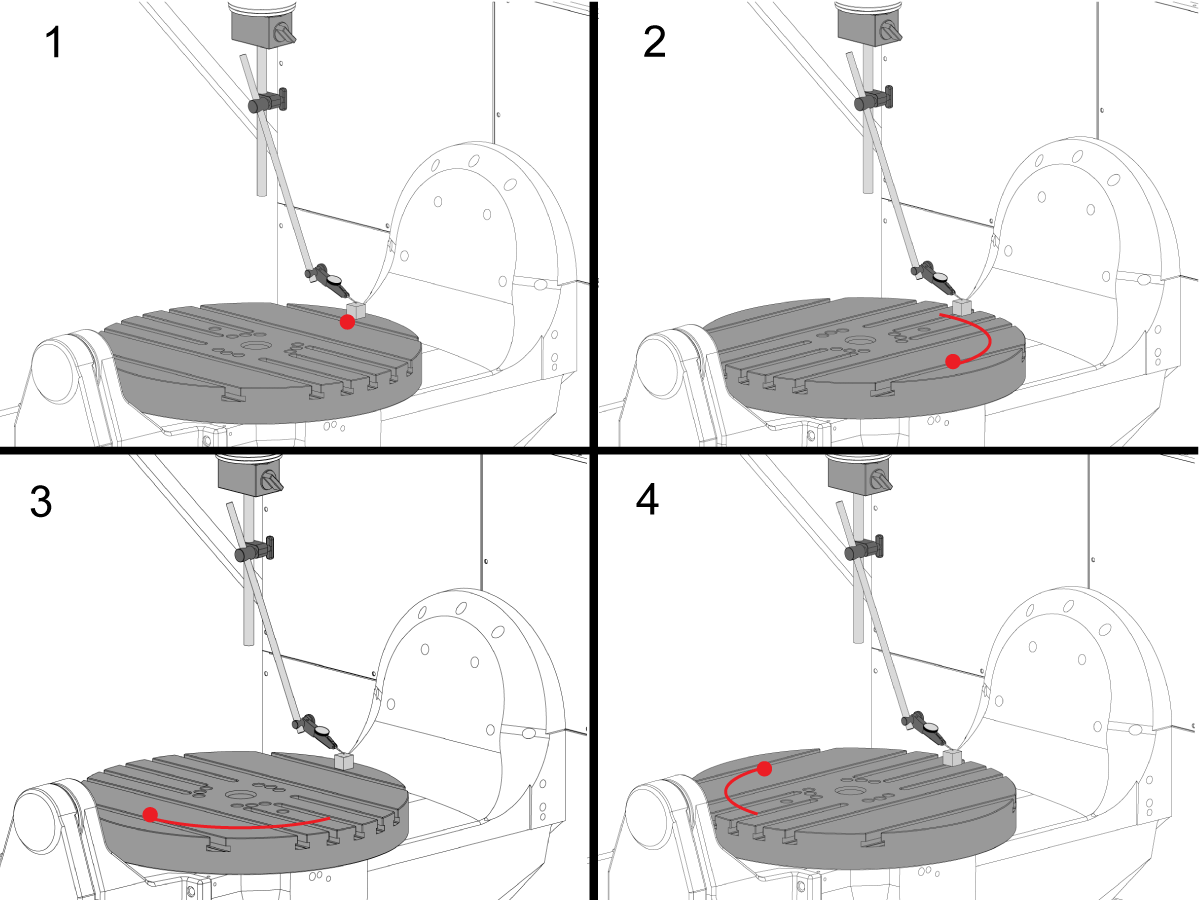
  • Plasser presisjonsmålerblokken på kanten av platen i klokken 12-posisjonen. 
  • Nullstill indikatorspissen på målerblokken i denne posisjonen.
  • Roter C-aksen  90°, men hold målerblokken i kl. 12-posisjonen
  • Ta en måling fra toppen av målerblokken
  • Gjenta dette 2 ganger til for totalt 4 posisjoner, 90° fra hverandre, ved kanten av paletten som vist. 
  • Merk det totale indikerte hjulslaget. (NTE 0,001")

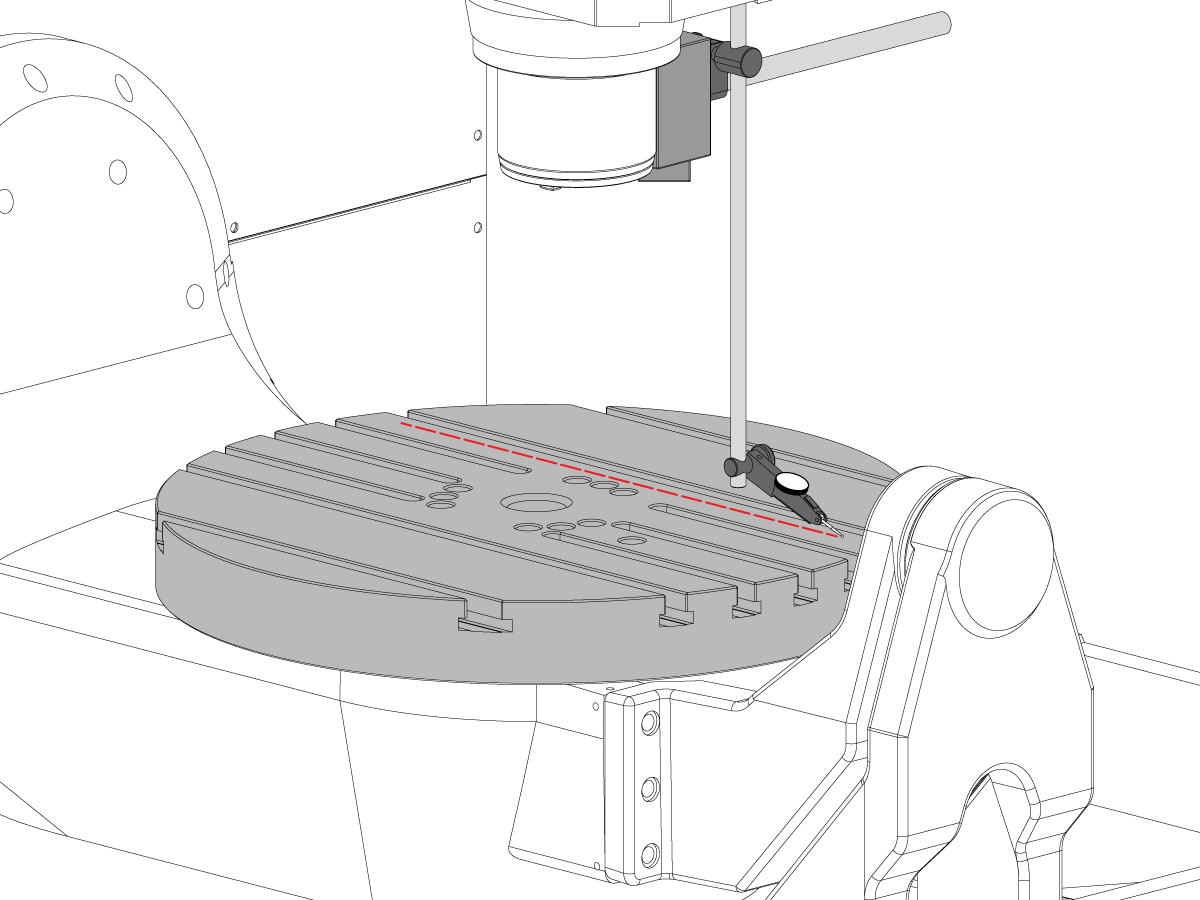
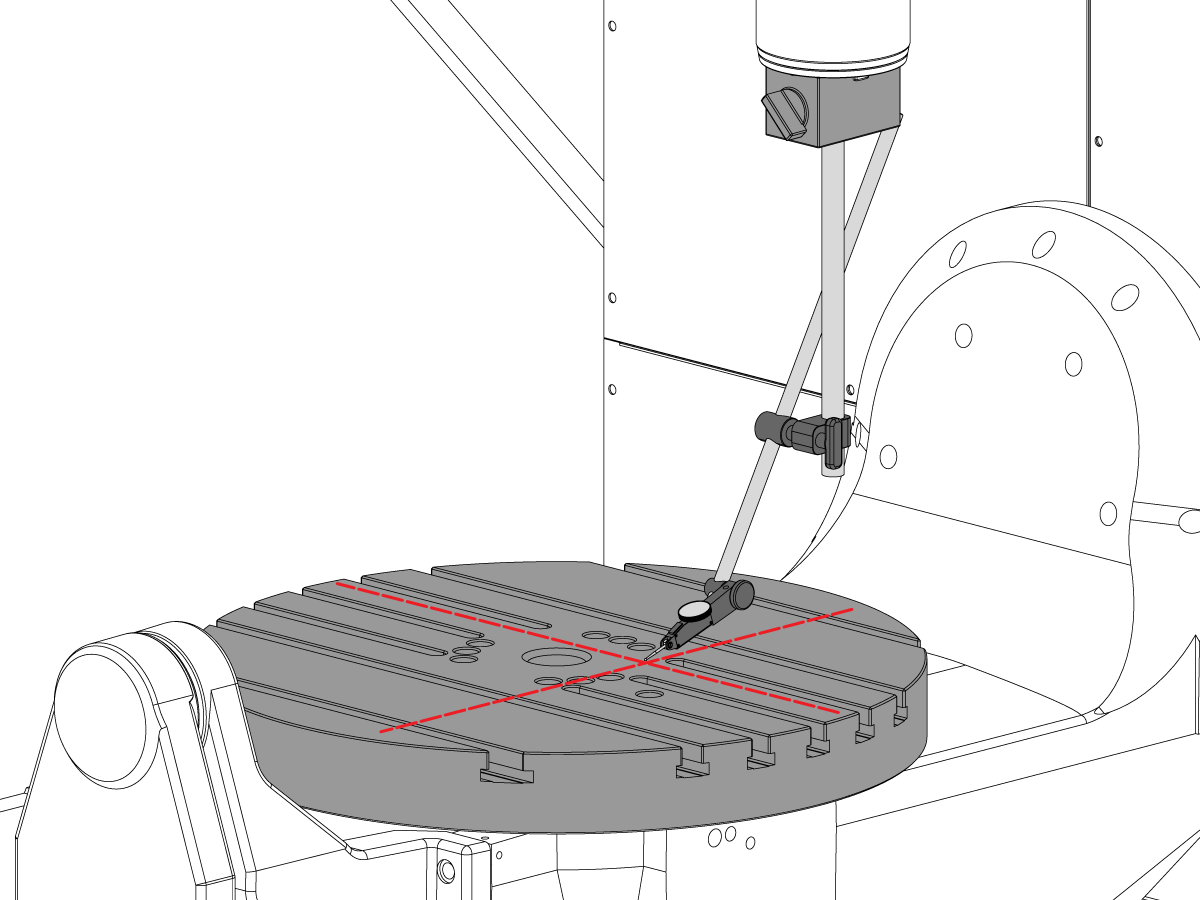
8

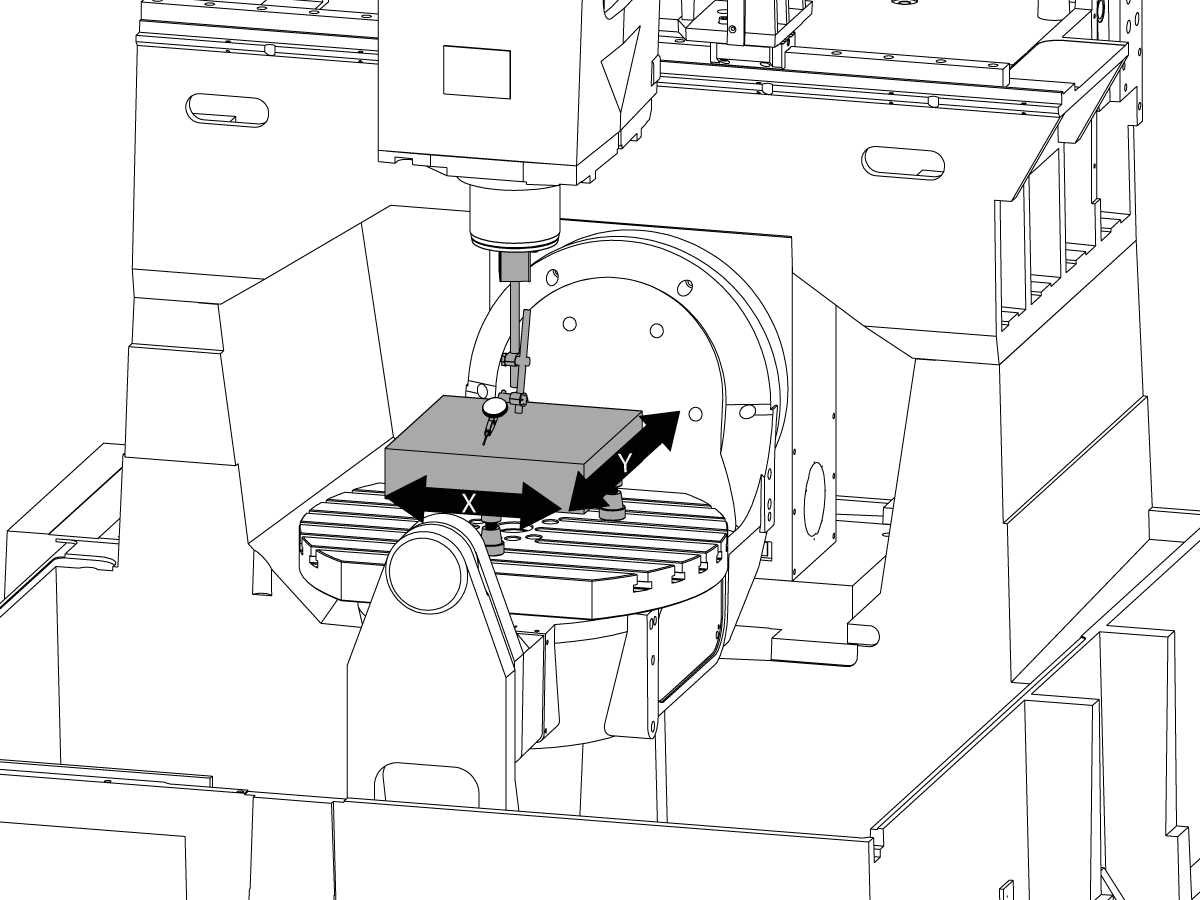
Parallelitet på plate-overflate til XY-plan

  • Nullreturner C-aksen slik at T-sporene går parallelt med X-aksen
  • Plasser indikatorspissen på platen og jogg i X-aksen langs platen for å finne plateparallelitet med X-aksen (NTE 0,001" / 10", 0,0015" / 15")
  • Jogg deretter Y-aksen langs platen for å finne plateparallelitet med Y-aksen (NTE 0,001" / 10", 0,0015" / 15")

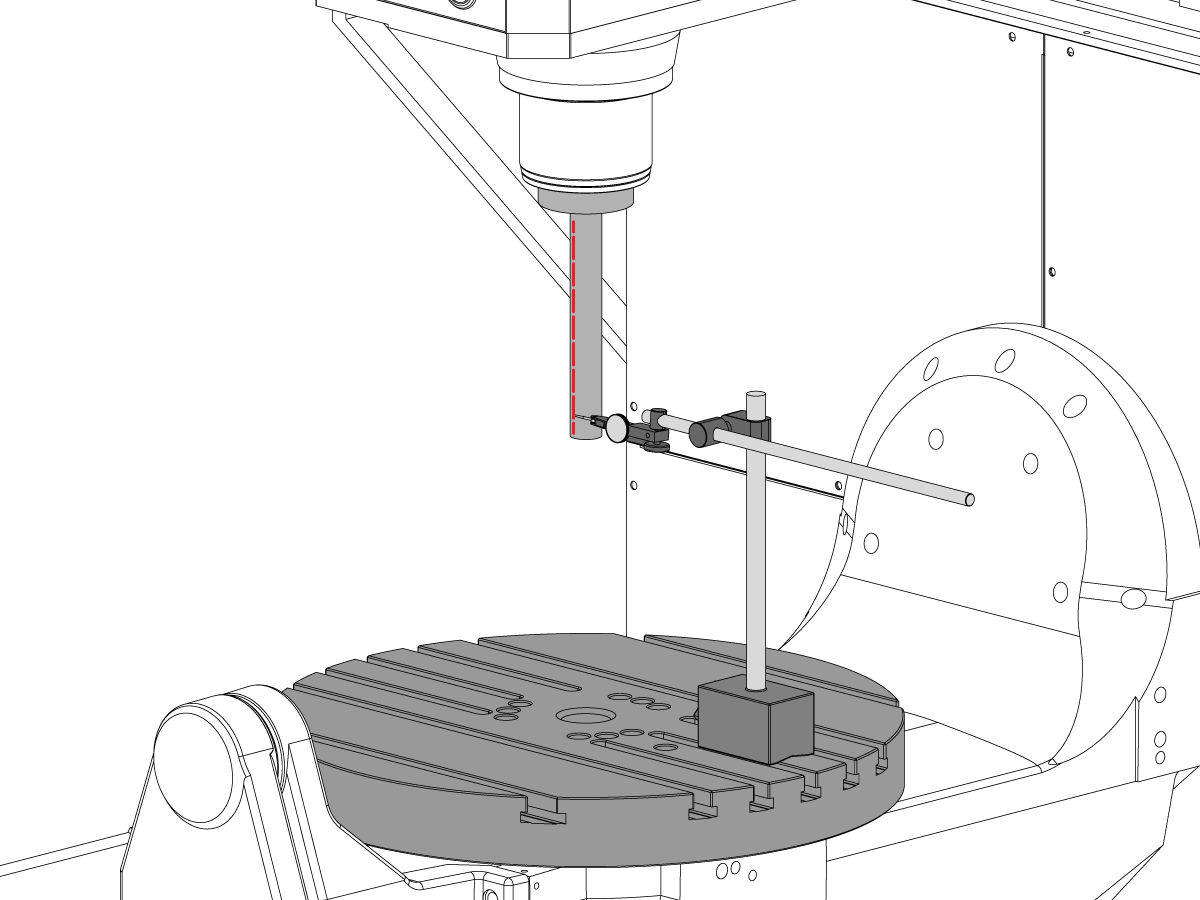
9

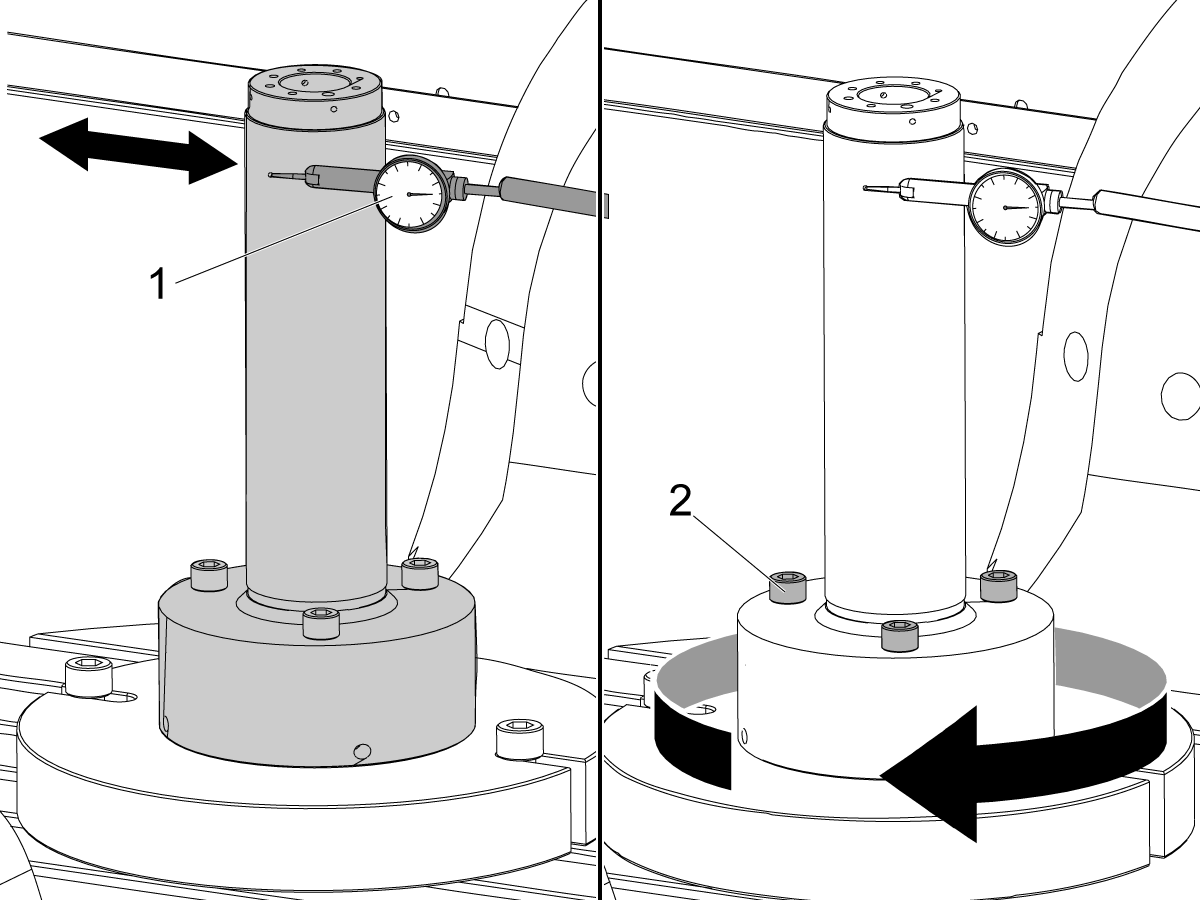
Spindelhjulslag

  • Sentrer spindelen over C-akseboringen.
  • Plasser den magnetiske basen på bordet og sett inn teststangen.
  • Sjekk spindelhjulslag på basen av teststangen (NTE 0,0005" TIR)
  • Sjekk spindelhjulslag 6" ned fra basen av teststangen (NTE 0,001" TIR)

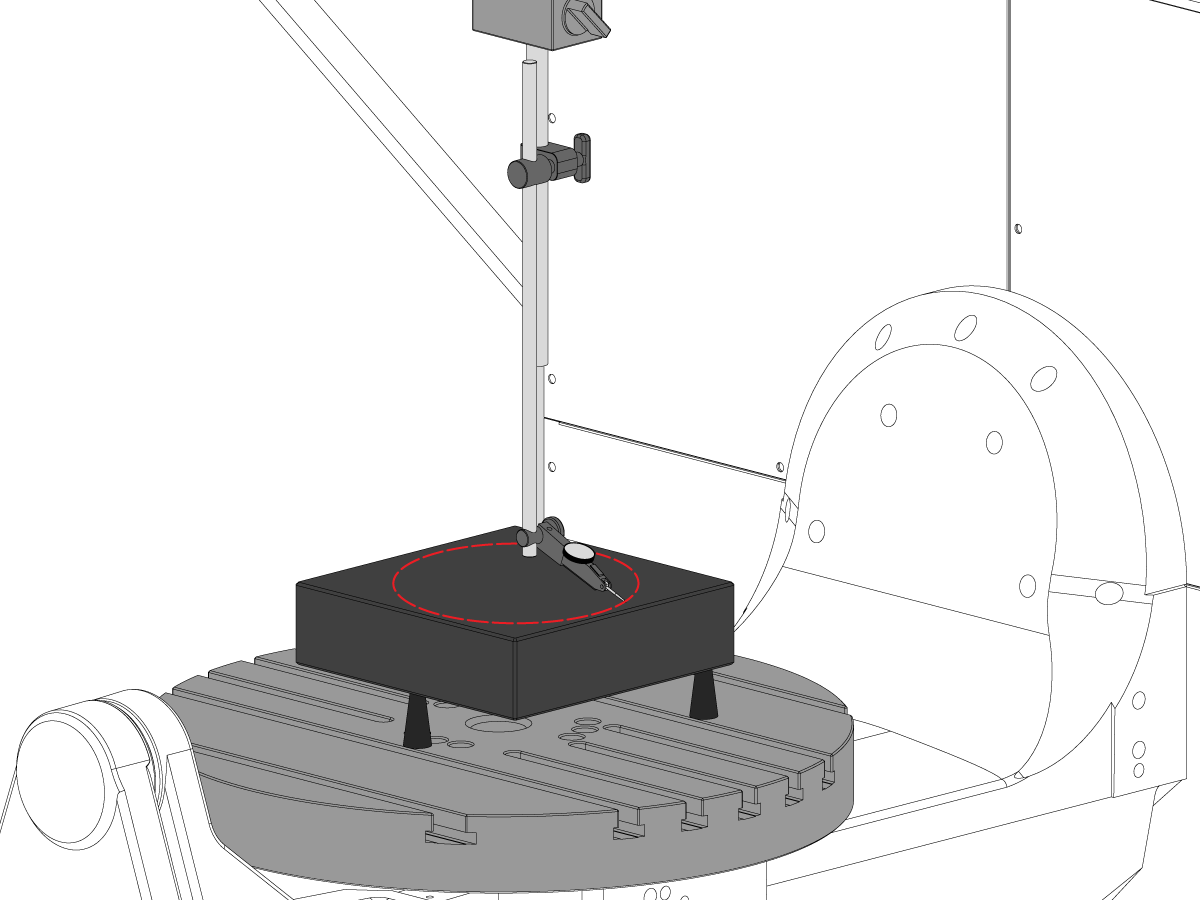
10

Spindelmidtlinje parallellitet til Z-akse

  • Bruk løfteskruer til å gjøre granitten parallell med XY-plan i orienteringen vist (NTE: 0,0002")
  • Sentrer spindelen over C-akseplateboringen.
  • Sveip i en 10" diameter sirkel
  • Registrer XZ TIR  (NTE 0,0005")
  • Registrer YZ TIR  (NTE 0,0005")

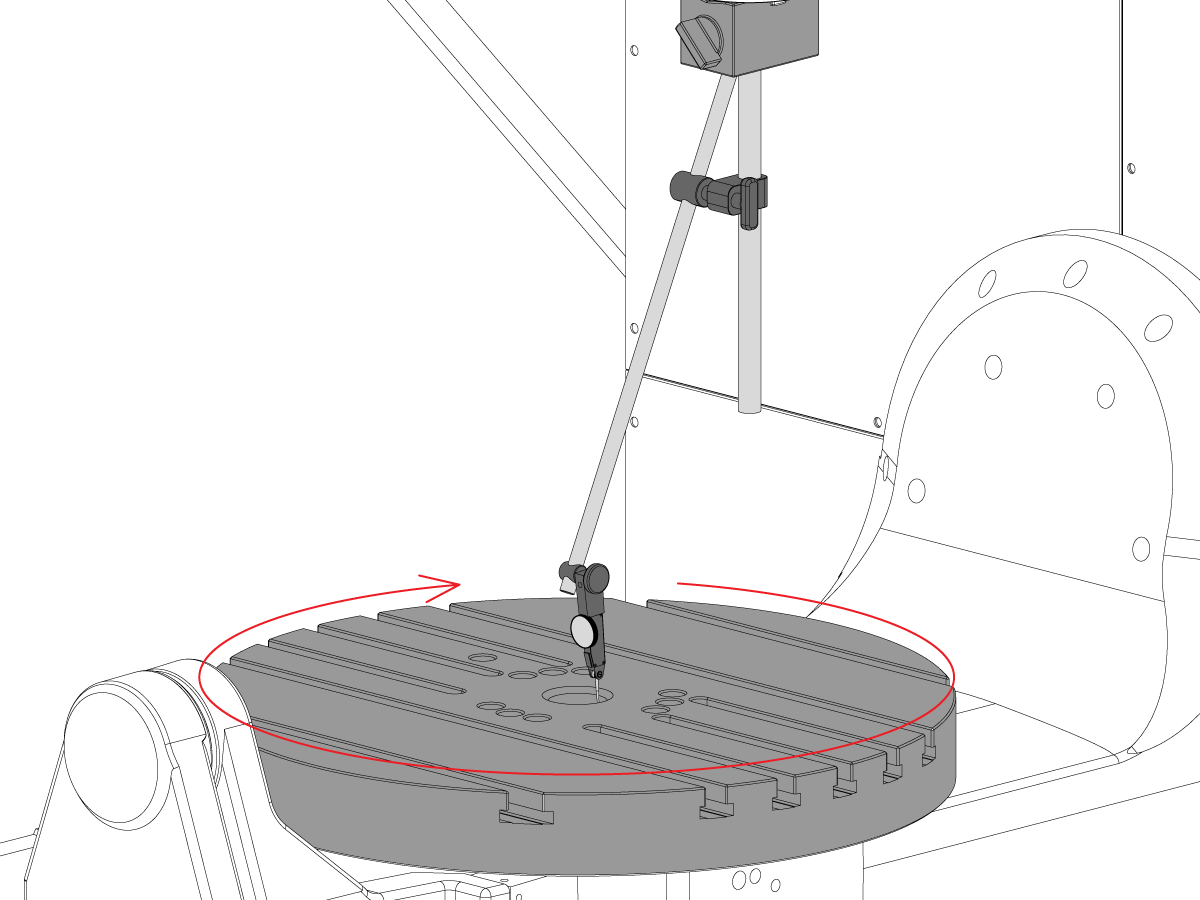
11

Konsentrisitet med C-akseboring

  • Plasser indikatoren som vist og jogg C-aksen 360°
  • Registrer TIR på presisjonsboring (NTE 0,002")

12

Maskinens roterende enhetsnullpunkt.

  • Bruk VQC-makroprogram og probesystem for å verifisere verdiene for Coldfire-parameterne eller NGC-innstillingene vist nedenfor:
    • 255 – MRZP X-OFFSET
    • 256 – MRZP Y-OFFSET
    • 257 – MRZP Z-OFFSET
    • 254 – 5-AKSE ROTERENDE ENHETS MIDTPUNKTAVSTAND
  • For en komplett MRZP-instruksjon, se Haas MRZP WIPS Offset-innstilling prosedyre

8.3 Geometri – Feilsøking

Recently Updated

UMC – Geometri – Feilsøkingsveiledning


TG0151

Oversikt

Før du feilsøker en UMC-750 nøyaktighet eller geometri problem, må tech ha en grundig forståelse av følgende grunnleggende:

  • Hvordan jevne og justere de roterende aksene på UMC
  • Justere alle aksene på maskinen på nytt
  • Hvordan utføre MRZP-kalibrering og en grundig forståelse for hva de tilhørende parametrene er, og deres effekt på maskinen
  • En forståelse av maskinene nøyaktighetsevner og evnen til å gå igjennom de geometriske problemene
  • B til C-akse kryssjustering

Et problem med UMC-750 maskin geometri eller nøyaktighet må tas opp systematisk og i riktig rekkefølge. Følgende informasjon bør overholdes strengt og følges i sekvensiell rekkefølge.

Det er helt avgjørende at før noen evaluering eller justering gjøres på maskingeometrien må maskinen ha blitt kontrollert for riktig nivå og justering av maskinens roterende akser

Mange feil kan tilskrives maskinen som krasjer eller problemer enten med verktøyprogrammer eller programmeringsproblemer. Ikke forsøk å endre maskinens geometri uten å kontrollere maskinens generelle nivå og geometri i henhold til inspeksjonsrapporten. Dette inkluderer å sjekke Machine Rotary Zero Point (MRZP).

Hvis det oppstår en krasj finnes det 4 glideskjøter på maskinen. Disse områdene er spindelhodet til rammen, rammen til salen, salen til brua, og vugge til vugge-støtten.

 Merk: ingen av disse skjøtene skal noensinne være avstandsskivet. En maskinkrasj bør aldri endre antall avstandsskiver som kreves i maskinen fra fabrikkinnstillingene.

Det er viktig å huske at maskinens lineære nøyaktighet er 0.0004/10" og vikel nøyaktigheten er +/-15 arc. sec. Disse toleransene kan rask legges sammen.

Alle anstrengelser bør ha blitt tatt for å avgjøre om maskinprogrammet fornuftig og innenfor maskinen, oppspenning, og verktøysevne.

Vurder maskintilstand

Fastslå om maskinen krasjet tidligere. Se gjennom alarmhistorien; se etter fysiske skader på metallplater, bord, spindelhode, osv. Uansett hvor "liten" krasjen var vil det påvirke maskinens geometri. Hvis maskinen har krasjet, må en fullstendig inspeksjon av maskinens geometri utføres

Evaluer den generelle tilstanden til delens oppspenning og tilstanden til skjær verktøyene.

Få fullstendig sikkerhetskopiering og feilrapport for maskin.

Bekreft maskinnivå og geometri

Bekreft at maskinen er jevn og at den roterende aksen er justert til maskinen

 Merk: ikke forsøk å gjøre noen justeringer på maskinens geometri annet enn å justere nivåføttene på dette tidspunktet.

Hvis maskinen ikke er i nivå eller rotasjonen ikke er justert, tilbakestiller du nivået og rotasjonsjusteringen.

Utfør en fullstendig geometriinspeksjon hvor du noterer størrelsesorden og retning av eventuelle feil for hver akse.

Analyser inspeksjonsrapporten.

Hvis noen av delene i inspeksjonsrapporten ikke tolereres, må maskinen justeres på nytt.

Gå gjennom programmet

Samle inn følgende informasjon om delen, arbeidsoppspenning og verktøy:

  • Hvilke funksjoner tolereres ikke, størrelseorden, retning av feilen
  • Er delen bearbeidet ved hjelp av en 5-akse, 3+2-akse eller 3-akse?
  • Gå gjennom delen og maskintilnærmingen
  • Kan noen av delens nøyaktighetsfeil minimeres ved å endre maskineringstilnærming?
  • Er problemet et repeterbarhetsproblem, et størrelseproblem eller et geometrisk problem?
  • Bruker programmet TCPC eller DWO?
  • Er det noen verdier i kompensasjonstabellene?

8.4 Applikasjoner – Feilsøking

Recently Updated

UMC – Applikasjoner – Feilsøkingsveiledning


TG0150

Slik får du tilgang

For å få feilsøkingsveiledningen for UMC-applikasjoner:

Følg denne koblingen Dokumenter og programvare | HBC

eller

Logg inn på HBC.HAASCNC.COM

MERK: Kun Haas-sertifiserte serviceteknikere kan logge inn på disse nettstedene. 

Velg Service-fanen.

Under Verktøy, velg Dokumenter og programvare.

Velg mappen Applikasjoner.

8.5 UMC-750 – Sjekkliste for avstandsskivesett

Recently Updated

UMC-750 – Sjekkliste for avstandsskivesett


AD0131

Introduksjon

Dette er sjekklisten for avstandsskivesett for følgende sett:

  • 93-2236 UTLÅN, AVSTNADSSKIVESETT FOR UMC-750

Sjekkliste: Avstandsskive–mellomlegg-kolonne

Tykkelse Del # Antall i sett BRUKT
.02100 20-9358A 2  
0.2105 20-9359A 2  
.02110 20-9383A 2  
0.2115 20-9365A 2  
0.2120 20-9384A 2  
0.2125 20-9385A 2  
0.2130 20-9368A 2  
0.2135 20-9369A 2  
0.2140 20-9386A 2  
0.2145 20-9371A 2  
0.2150 20-9372A 2  
0.2155 20-9387A 2  
0.2160 20-9374A 2  
0.2165 20-9375A 2  
0.2170 20-9376A 2  
0.2175 20-9377A 2  
0.2180 20-9378A 2  
0.2185 20-9379A 2  
0.2190 20-9380A 2  
0.2195 20-9381A 2  
0.2200 20-9382A 2  

Merk: Kun setteiere: Spesifiser tykkelsen på avstandsskiven når du bestiller erstatninger. For eksempel, 20-9382 0,2145

Sjekkliste: Hesteskoavstandsskiver

Tykkelse Del # Antall i sett BRUKT
0.0010 59-0240 2  
0.0020 59-0241 2  
0.0030 59-0242 2  

Sjekkliste: Avstandsskive-mellomlegg-kolonne-stor

Tykkelse Del # Antall i sett BRUKT
0.2130 20-6282A 2  
0.2135 20-6283A 2  
0.2140 20-6284A 2  
0.2145 20-6285A 2  
0.2150 20-6286A 2  
0.2155 20-6287A 2  
0.2160 20-6288A 2  
0.2165 20-6289A 2  
0.2170 20-6290A
2  
0.2175 20-6291A 2  
0.2180 20-6294A 2  
0.2185 20-6295A 2  
0.2190 20-6292A 2  
0.2195 20-6293A 2  
0.2200 20-6296A 2  
0.2205 20-6297A 2  
0.2210 20-6277A 2  
0.2215 20-6279A 2  
0.2220 20-6278A 2  
0.2225 20-6298A 2  
0.2230 20-6281A 2  

Merk: Kun setteiere: Spesifiser tykkelsen på avstandsskiven når du bestiller erstatninger. For eksempel, 20-6290A 0,2080

REGISTRER HVILKE AVSTANDSSKIVER SOM BLE FJERNET FRA SETTET I BRUKT-KOLONNEN.

RETURNER SJEKKLISTEN MED AVSTANDSSKIVESETTET.

RETURN DE OPPRINNELIGE AVSTANDSSKIVENE I KASSEN.

8.6 B/C-akse skjæringspunkt – Justering

Introduksjon

Denne fremgangsmåten viser hvordan du kan måle og justere skjæringspunktet mellom B- og C-aksene.  Før du utfører denne prosedyren må du kontrollere at maskinen er på nivå per UMC-750-utjevning.

Du må justere B- og C-aksene etter at du har enten:

  • Skiftet ut B- og C-aksene
  • eller fullfører en UMC-inspeksjonsrapport og finner et problem

5-akse roterende senteravstand definerer forskjellen mellom de roterende sentrene for rotasjon: Maskinens rotasjonsnullpunkt for C-akse (MRZP) og B-aksen MRZP i X-aksen.

Det er mulig det er ingen forskjell mellom C-aksen og B-aksen MRZP.

  • Klassisk Haas-kontroll (CHC): Parameter 1314 - Rotary Axes Center Deviation in X
  • Neste generasjons kontroll (NGC): Innstilling 254 - 5 Axis Rotary Center Distance

Du må ha følgende verktøy:

  • T-2195A UMC Aligment Bar Adapter
  • T-2113 Alignment bar
  • Varmepistol og varmebestandige hansker

Justering v B-akse til XYZ-akser

How to identify the Multi-Piece and the Unibody trunnion   

1) Multi-Piece trunnion:    UMC machines built approximetely before 11/2022 will have this configuration.

2) Unibody trunnion:    UMC machines built approximetely after 11/2022 will have this configuration.

1

Remove the A-frame trunnion support:

Remove the bolts [1] that secure the A-frame trunnion support [2] to the base and take out the shims between A-frame support and the base.

Rotate the A-frame support [2] counter-clockwise to clear the edge of the base [3].

Pull the A-frame support off the bearings.

 Note: The A-frame support might vacuum lock on the bearings. Use the zip-tie to pry the seal [4] open.

 Caution: To lift the trunnion support, get the aid of another person. The support weighs 85 lbs (39 kg).

2

Measure the B- axis of rotation parallelism to the Y-Z plane:

For a machine with a Classic Haas Control, change Parameter 151:20 (B axis CHK TRAVL LIM) to 0.

For a machine with a Next Generation Control, change Parameter 6.021 (B axis CHK TRAVL LIM) to FALSE.

Measure the parallelism of the platter to the Y-Z plane with the B axis at 90° and then the B axis at -90° as shown in the picture.

Position the Y-Axis in the following starting position:

UMC-500: Y=0, Sweep 15”, 3rd T-Slot Land from the top.

UMC-750/1500-Duo: Y=-1.0, Sweep 18", 3rd T-Slot Land from the Top .

UMC-1250: Y=-1.0, Sweep 28", 3rd T-Slot Land from the Top.

UMC-500PP: Y=-4.0, Sweep 7".

UMC-750PP: Y=-2”, Sweep 15".

UMC-1000PP: Y=-4”, Sweep 15".

Compare the results at B 90° and B-90°. The results should be...

  • Symmetric against the Y-Z plane, positive or negative direction
  • Less than 0.0010"/20"

If the results are symmetric against Y-Z plane, and are less than 0.0010"/20 inches: Go to Step 5.

If the results are symmetric against Y-Z plane, but are more than 0.0010"/20 inches: Go to Step 4.

 Warning: If the results [3] are not symmetric against the Y-Z plane, the B axis rotary needs to be aligned: Go to Step 3.

3

Align the B axis of rotation parallel to the Y-Z plane:

Loosen the (6) bolts [1] that secure the B axis rotary to the base casting.

 Note: Keep the bolts sufficiently snug to control the adjustments.

Adjust the front and rear setscrews [2] until the measurements taken in Step 2 are symmetric against the Y-Z plane.

Torque the (6) bolts [1]. Refer to Haas Fastener Torque Specification.

Verify the measurements in Step 2 after the bolts have been torqued.

4

Align the C Axis of rotation perpendicular to the B Axis of rotation:

Remove the bottom C-Axis access cover.

Loosen the (12) bolts [1] that hold the C Axis body to the B Axis platter face.

Reach the bottom (4) bolts through the C Axis access port.

If the B Axis is symmetric in the positive direction [4], install horseshoe shims [2] of appropriate size behind the top (2) bolts.

If the B Axis is symmetric in the negative direction [5], install horseshoe shims [2] of appropriate size behind the bottom (2) bolts.

Torque the (12) bolts to 80 Ft-lbs (108 Nm).

Cut the excessive shim material off.

Verify the measurements in Step 2 after bolts are torqued.

5

Align the trunnion support shaft co-axial with the B Axis of rotation:

Setup (2) indicators on the outer race of the trunnion support bearing [2] as shown in the picture.

Mark the spot on the outer race where one of the indicator needles is contacting the surface.

After moving the B Axis to 90° or -90° you will align the marked spot with the needle again to exclude the bearing runout error from the measurements.

Take the readings when B is at 90° and B at -90°. Compare the readings. 

 Caution: The B axis brake needs to be clamped when taking the readings.

The deviation between the results when B is at 90° and at -90° needs to be less than 0.001" on each indicator.

 Note: The indicator on the side of the bearing will measure top to bottom alignment and the indicator on the top of the bearing will measure side to side alignment.

____

For models with a multi-piece trunnion

Loosen the (6) bolts [3] on the C Axis body support. Keep the bolts sufficiently snug to control adjustment.

Adjust the (8) set screws [4] until deviation between B at 90° and B at -90° is within 0.001".

Torque the (6) bolts [2] on the C Axis body support to 80 Ft-lbs (108 Nm).

Verify the alignment after the bolts have been torqued.

____

For models with a unibody trunnion

Jog rotary to B90. Set up an indicator on the highlighted surface as shown in the lower diagram .

Rotate B-axis 180 degrees (90 to -90).

Run out (NTE 0.010” TIR).

 Caution: If the measurement exceeds the tolerance then contact support.

6

Install and shim the A-frame trunnion support:

Move the B Axis to 90°.

Setup an indicator [1] against a machined surface of the C Axis body. Set the indicator to 0.

Use plastic zip ties [2] to pry the seal open while installing the A-frame support. This lets unwanted air and grease out of the assembly.

Install the A-frame trunnion support [3] over the bearings.

Remove the cable ties.

Turn the trunnion support clockwise until it is vertical.

 Note: The weight of the A-frame support will cause the trunnion to sag. The amount of sag is measured with the indicator that was previously setup on the side of the C Axis body.

____

For multi-piece trunnions

Adjust the shims [4] between the A-frame support and the base casting to remove the sag until indicator reads 0 again.

When the indicator reading is 0, torque the (4) bolts. Refer to Haas Fastener Torque Specification.

Verify the reading after bolts are torqued. Adjust the shims again if necessary until the indicator reads 0.

____

For models with unibody trunnion

Determine the amount of shim stock [4] needed to raise the Trunnion arm so the indicator reads 0.005".

The indicator [1] value will change once the support is torqued.

With indicator still in place:

  • Torque trunnion support bolts to appropriate values.
  • Check indicator to make sure it reads between the range of

Trunnion arm raised (0.005” to  0.010”).

 Note: For unibody trunnions, the shim location may also be used to correct the C-axis to X-Y plane perpendicularity instead of shimming the saddle trucks.

 Caution: Use equal amount of shims on each side of the A-frame support. Unequal shims will cause the A-frame support to pull the trunnion to the side.

Verify the B Axis of rotation alignment to the Y-Z plane (Step 2). Loosen the bolts and tap the A-frame support side to side if necessary to correct the B axis to Y-Z plane alignment.

7

Set C-axis perpendicular to X/Y plane:

Move the axes to

UMC-750's........X= -10.5" & Y=0."

UMC-1000's......X=-17.0" & Y=-0."

Zero an indicator [1], on a Ground Block [2], 1/2" off the edge at the rear of the platter (Mag-Base on Spindle), with C at 0 Degrees

Rotate C-Axis to 180°.

Move Y axis, and ground block, in Y Axis negative direction until you are 1/2" away from platter edge, and take the perpendicularity measurement

Adjust the shims until the average error is within 0.0005" end to end.

 Note: For unibody trunnions, the shim location under the bearing support may also be used to correct the C-axis to X-Y plane perpendicularity instead of shimming the saddle truck.

Caution: Shim either two front trucks or two rear trucks with the equal shim.

Note: Shim one truck at the time to maintain the X to Y squareness.

Verify the measurements after all bolts are torqued.

Verify the X to Y alignment in Step 2.

8

Set the tool change offsets:

B-axis tool change offset [1]

For Classic Haas Controls, change Parameter 213. 

For Next Generation Controls, go to: Settings>Rotary Tab>Highlight the rotary and press [INSERT], or change Parameter 6.078 (B TOOL CHANGE OFFSET) to set the trunnion (B Axis) parallel to the X Axis.

For models with multipiece trunnion

(NTE 0.001/10"; NTE 0.0020" overall)

For models with unibody trunnion

(NTE 0.0005/10"; NTE 0.0010" overall)

___

C-axis tool change offset [2]

For Classic Haas Controls change Parameter 523.

For Next Generation Control go to: Settings>Rotary Tab> Highlight the rotary and press [INSERT], or change Parameter 7.078 (C TOOL CHANGE OFFSET) to set the table T-slot (C Axis) parallel to the X Axis

For models with multipiece trunnion

(NTE 0.001/10"; NTE 0.0020" overall)

For models with unibody trunnion

(NTE 0.0005/10"; NTE 0.0010" overall)

9

Check C-axis perpendicularity to X/Y plane:

Align the indicator centered over the C-axis bore with the Y-axis at -10.

Jog positive in the Y-axis and align the indicator over the center of the last section of the platter and make a mark at this spot with a washable marker.

Insert 1-2-3 block as shown and set the indicator to zero.

Remove the block and rotate the platter 90 degrees, following the marked spot with the indicator.

Insert block back between the indicator and platter. Note reading.

Repeat the previous two steps, taking readings with the platter at 180, 270 and 360 degrees.

Multi-piece trunnion:  (NTE 0.0005")

Unibody trunnion: (NTE 0.001")

10

Measure the intersection of the B and C axis:

Follow the linked instruction manual to complete this step.

B-Axis and C-Axis intersection Adjustment

11

Align the B-Axis brake disk:

 Note: Do not do this step if you are working on a SS machine.

Operate this code in MDI mode to unclamp the brake:

M11;

Loosen all of the brake disc bolts [1] and torque them to 5 Ft-lbs (7 Nm).

Operate this code in MDI mode to clamp the brake:

M10;

Wait 10 seconds.

Torque the bolts. Refer to Haas Fastener Torque Specifications.

Oppsett av skjæringspunktverktøy for B-akse til C-akse

1

Install the B Axis and C Axis intersection tool:

Jog the C Axis to 0°.

Push [EMERGENCY STOP].

Clean the table.

Guide the shaft of the adapter [1] while you slowly lower it into the center bore.

Attach the adapter to the table with (2) screws [4] and (2) T-nuts.

Attach the alignment bar [2] to the adapter with (3) screws [3].

Snug the (3) screws to allow for adjustments in the next step.

2

Align the B/C intersection tool with the C Axis:

Put an indicator on the front side of the alignment bar near the base.

Release the [EMERGENCY STOP]. Push [RESET] to clear any alarms.

Jog across the tool in the X Axis to find the high spot.

Set the indicator to 0.

Jog the C Axis 360°.

Lightly tap the base with a rubber mallet to adjust the radial error on the alignment bar.

Note: Adjust the alignment bar to half of the measured error, because you are measuring the diameter error.

Jog the C Axis 360°.

When correctly adjusted the radial error is less than 0.0002" (0.005 mm).

3

Check the B/C intersection:

Center the indicator [1] on the front side of the alignment bar near the top of the cylinder.

Jog across the tool in the X Axis to find the high spot.

Zero the indicator.

Jog the C Axis 360°.

Turn the (3) screws [2] on the alignment bar to adjust the runout.

Jog the C Axis 360°.

When correctly adjusted the radial error is less than 0.0002" (0.005 mm).

Repeat Step 2 and verify the alignment did not change.

Justering av skjæringspunkt for B-akse til C-akse

1

For a machine with a Classic Haas Control change:

  • Parameter 151:20 (B-axis CHK TRAVL LIM) to 0.
  • Parameter 1314 (ROTARY AXIS CENTER DEVIATION IN X) to 0.

For a machine with a Next Generation Control change:

  • Parameter 6.021 (B-axis CHK TRAVL LIM) to FALSE.
  • Setting 254 (5-Axis Rotary Center Distance) to 0.

Push [ZERO RETURN]. Then push [ALL].

Jog the B-axis to -90°.

Note: The rotary positions are for reference only.

Put an indicator [1] on top of the alignment bar.

Jog in the Y-axis to find the high point.

Set the indicator to 0.

Jog across the alignment bar in the X-axis [2].

Jog the B-axis to adjust the alignment bar parallel to the X plane.

Set the indicator to 0.

Jog the Y-axis to 0.

Caution: Make sure the indicator assembly is clear of the B-axis movement.

 Caution: Do not move the Z-axis.

2

Jog the B-axis to +90°.

 Caution: Make sure the indicator assembly is clear of the B-axis movement.

Jog the Y-axis [1] to find the high point on the alignment bar.

Note: Do not set the indicator to 0.

Jog across the alignment bar in the X-axis.

Jog the B-axis to adjust the alignment bar parallel [2] to the X plane.

When the alignment bar is parallel to the X plane, the indicator reading is the change needed in the Z-Axis (∆Z=indicator reading).

Record the value shown on the indicator. In this example the indicator now shows 0.0015". ∆Z is 0.0015".

3

Do these calculations to get the value for CHC Parameter 1314 or NGC Setting 254. (In this example the difference in readings for the B-C intersection (∆Z) is 0.0015".):

  • ∆Z / 2 x 10,000 = CHC Parameter 1314 / NGC Setting 254
  • 0.0015 / 2 = 0.00075
  • Round down to 4 decimal places: 0.00075 = 0.0007 (NGC Setting 254)
  • 0.0007 x 10,000 = 7 (CHC Parameter 1314)

Set Parameter CHC Parameter 1314 (Rotary Axes Center Deviation in X) or NGC Setting 254 (5-Axis Rotary Center Distance), to the calculated value.

In this example, set parameter CHC Parameter 1314 to 7 or NGC Setting 254 to 0.0007.

Cycle the power to save CHC Parameter 1314 or NGC Setting 254.

Repeat Steps 1-3 to verify that the value for ∆Z is less than 0.0002" (0.005 mm).

4

Jog the B-Axis to the home position.

Set Parameter 151:20 (B-Axis CK Travel Limit) to 1.

Make sure the MRZP offsets are correct.

Calibrate WIPS per Wireless Intuitive Probe System (WIPS) - Calibration.

Complete an inspection report. Refer to UMC-750 Inspection Report.

Recently Viewed Items

You Have No Recently Viewed Items Yet

Tilbakemelding
Haas Logo

Haas-levert pris

Denne prisen inkluderer fraktkostnader, utførsels- og innførselstoll, forsikring, og alle andre utgifter som pådras under forsendelse til en lokasjon i Frankrike som er avtalt med deg som kjøper. Ingen andre obligatoriske kostnader kan legges til ved levering av et Haas CNC-produkt.

FØLG MED PÅ DE SENESTE HAAS-TIPSENE OG TEKNOLOGIEN ...

Registrer deg nå!   

HAAS TOOLING GODTAR FØLGENDE:

  • Service og støtte
  • Eiere
  • Be om service
  • Brukerhåndbøker
  • Haas-deler
  • Forespørsel om reparasjon av dreiebord
  • Førinstallasjonsveiledninger
  • Handle verktøy
  • Bygg og pris en ny Haas
  • Tilgjengelig beholdning
  • Haas-prislisten
  • CNCA-finansiering
  • Om Haas
  • Tilgjengelighetserklæring
  • Melding om praksis for bærekraft (DNSH)
  • Eksportsamsvar
  • Karrierer
  • Sertifiseringer og sikkerhet
  • Kontakt oss
  • Historie
  • Vilkår og betingelser
  • Haas Tooling vilkår og betingelser
  • Personvern
  • Garanti
  • Haas fellesskapet
  • Haas sertifiseringsprogram
  • Haas motorsport
  • Gene Haas Foundation
  • Haas-fellesskapet for teknisk utdanning
  • Hendelser
  • Bli med i samtalen
  • Facebook
  • X
  • Flickr
  • YouTube
  • LinkedIn
  • Instagram
  • TikTok
© 2026 Haas Automation, Inc – CNC verktøymaskiner

This site is protected by reCAPTCHA and the Google Privacy Policy and Terms of Service apply.

2800 Sturgis Rd., Oxnard, CA 93030 / Toll Free: 800-331-6746
Phone: 805-278-1800 / Fax: 805-278-2255