MyHaas Bem-vindo,
!
Haas Tooling MyHaas/HaasConnect Iniciar a sessão Registar Haas Tooling MyHaas/HaasConnect Encerrar a sessão Bem-vindo, As minhas máquinas Última atividade Os meus orçamentos A minha conta Os meus utilizadores Encerrar a sessão
Encontrar o seu distribuidor
  1. Selecionar idioma
    1. English
    2. Deutsch
    3. Español - España
    4. Español - México
    5. Français
    6. Italiano
    7. Português
    8. Český
    9. Dansk
    10. Nederlands
    11. Magyar
    12. Polski
    13. Svenska
    14. Türkçe
    15. 中文
    16. Suomi
    17. Norsk
    18. الإنجليزية
    19. български
    20. Hrvatski
    21. Ελληνικά
    22. Română
    23. Slovenský
    24. Slovenščina
    25. 한국어
    26. 日本語
    27. Українська
  • máquinas Main Menu
    • Fresadoras verticais
      Fresadoras verticais
      Fresadoras verticais View All
      • Fresadoras verticais
      • Série VF
      • Máquinas universais
      • Série VR
      • VP-5 prismático
      • VMC com troca de paletes
      • Mini Fresadoras
      • Máquinas de moldagem
      • Centros de perfuração de alta velocidade
      • Série Perfurar/Roscar/Fresar
      • Fresadora Sala de Ferramentas
      • Pocket Mill
      • Fresadoras compactas
      • Série pórtico
      • Routers de chapa SR
      • VMC extragrande
      • Fresadoras de coluna dupla
      • Máquinas de posicionamento 3+2
    • Soluções multi-eixo
      Soluções multi-eixo
      Soluções multi-eixo View All
      • Soluções multi-eixo
      • Tornos de eixo Y
      • Fresadoras de 5 eixos
    • Tornos
      Tornos
      Tornos View All
      • Tornos
      • Série ST
      • Spindle duplo
      • Série Box Way
      • Tornos de sala de ferramentas
      • Torno de Bucha
      • Torno de compartimento
      • Alimentação de barra Haas
    • Fresadoras horizontais
      Fresadoras horizontais
      Fresadoras horizontais View All
      • Fresadoras horizontais
      • Cone ISO50
      • Cone ISO40
    • Rotativos e Indexadores
      Rotativos e Indexadores
      Rotativos e Indexadores View All
      • Rotativos e Indexadores
      • Mesas rotativas
      • Indexadores
      • Rotativos de 5 eixos
      • Rotativos extra-grandes
    • Sistemas de automação
      Sistemas de automação
      Sistemas de automação View All
      • Sistemas de automação
      • Automatização de fresadora
      • Automação de tornos
      • Carregador de peças automático
      • Modelos de automação
    • Máquinas Desktop
      Máquinas Desktop
      Máquinas Desktop View All
      • Máquinas Desktop
      • Fresadora Desktop
      • Torno Desktop
      • Simulador de contrololador, padrão
      • Simulador de controlador, Premium
    • Comprar equipamento
      Comprar equipamento
      Comprar equipamento View All
      • Comprar equipamento
      • Fresadora de joelho
      • Tornos manuais Haas
      • Serras Haas
    • Máquinas de fabrico
      Máquinas de fabrico
      Máquinas de fabrico View All
      • Máquinas de fabrico
      • Máquinas de corte a laser
      • Travões de pressão CNC
    • LIGAÇÕES RÁPIDAS Série especial  Série especial 
      SÉRIE UE SÉRIE UE CONSTRUÇÃO E PREÇO | LISTA DE PREÇOS CONSTRUÇÃO E PREÇO | LISTA DE PREÇOS Máquinas em stock Máquinas em stock NOVIDADES NOVIDADES A SUA PRIMEIRA CNC A SUA PRIMEIRA CNC
      FERRAMENTAS DE COMPRAS
      • Construção e Preço de uma Haas
      • Lista de Preços
      • Inventário disponível
      • Financiamento CNCA
      QUER FALAR COM ALGUÉM?

      A Haas Factory Outlet (HFO) pode responder às suas perguntas e orientá-lo nas suas melhores opções.

      CONTACT YOUR DISTRIBUTOR >
  • Opções Main Menu
    • Product Image Spindles
      Spindles
      Spindles View All
      • Spindles
    • Product Image Trocadores da ferramenta
      Trocadores da ferramenta
      Trocadores da ferramenta View All
      • Trocadores da ferramenta
    • Product Image 4.º | 5.º eixo
      4.º | 5.º eixo
      4.º | 5.º eixo View All
      • 4.º | 5.º eixo
    • Product Image Torretas e ferramenta motorizada
      Torretas e ferramenta motorizada
      Torretas e ferramenta motorizada View All
      • Torretas e ferramenta motorizada
    • Product Image Sondagem
      Sondagem
      Sondagem View All
      • Sondagem
    • Gestão de limalha e líquido de refrigeração Haas Gestão da limalha e do líquido de refrigeração
      Gestão da limalha e do líquido de refrigeração
      Gestão da limalha e do líquido de refrigeração View All
      • Gestão da limalha e do líquido de refrigeração
    • O controlador Haas O controlador Haas
      O controlador Haas
      O controlador Haas View All
      • O controlador Haas
    • Product Image Opções de Produtos
      Opções de Produtos
      Opções de Produtos View All
      • Opções de Produtos
    • Product Image Ferramentas e Fixação
      Ferramentas e Fixação
      Ferramentas e Fixação View All
      • Ferramentas e Fixação
    • Product Image Dispositivo de aperto
      Dispositivo de aperto
      Dispositivo de aperto View All
      • Dispositivo de aperto
    • Product Image Soluções de 5 eixos
      Soluções de 5 eixos
      Soluções de 5 eixos View All
      • Soluções de 5 eixos
      • 5 Easy Steps to 5-Axis
    • Product Image AUTOMATIZAÇÃO
      AUTOMATIZAÇÃO
      AUTOMATIZAÇÃO View All
      • AUTOMATIZAÇÃO
    • LIGAÇÕES RÁPIDAS Série especial  Série especial 
      SÉRIE UE SÉRIE UE CONSTRUÇÃO E PREÇO | LISTA DE PREÇOS CONSTRUÇÃO E PREÇO | LISTA DE PREÇOS Máquinas em stock Máquinas em stock NOVIDADES NOVIDADES A SUA PRIMEIRA CNC A SUA PRIMEIRA CNC
      FERRAMENTAS DE COMPRAS
      • Construção e Preço de uma Haas
      • Lista de Preços
      • Inventário disponível
      • Financiamento CNCA
      QUER FALAR COM ALGUÉM?

      A Haas Factory Outlet (HFO) pode responder às suas perguntas e orientá-lo nas suas melhores opções.

      CONTACT YOUR DISTRIBUTOR >
  • Why Haas Main Menu
      Descubra a Diferença da Haas
    • Porquê a Haas?
    • MyHaas
    • Comunidade de formação
    • Indústria 4.0
    • Certificação Haas
    • Testemunhos de clientes
  • Assistência Main Menu
      Bem-vindo à Haas Service
      INÍCIO DA ASSISTÊNCIA Manuais do operador Procedimentos como fazer Manuais de Resolução de Problemas Manutenção preventiva Peças Haas Haas Tooling Vídeos
  • Vídeos Main Menu
MyHaas Bem-vindo,
!
Haas Tooling MyHaas/HaasConnect Iniciar a sessão Registar Haas Tooling MyHaas/HaasConnect Encerrar a sessão Bem-vindo, As minhas máquinas Última atividade Os meus orçamentos A minha conta Os meus utilizadores Encerrar a sessão
Encontrar o seu distribuidor
  1. Selecionar idioma
    1. English
    2. Deutsch
    3. Español - España
    4. Español - México
    5. Français
    6. Italiano
    7. Português
    8. Český
    9. Dansk
    10. Nederlands
    11. Magyar
    12. Polski
    13. Svenska
    14. Türkçe
    15. 中文
    16. Suomi
    17. Norsk
    18. الإنجليزية
    19. български
    20. Hrvatski
    21. Ελληνικά
    22. Română
    23. Slovenský
    24. Slovenščina
    25. 한국어
    26. 日本語
    27. Українська
×

Resultados da pesquisa

Web Pages

Images

    • <
    • 1
    • >

8 - UMC - Geometry and Alignment

Série UMC - Manual de Serviço


  • UMC - Spindle
  • 1 - UMC - Introdução
  • 2 - UMC - Especificações
  • 3 - UMC-400/500/750 - Instalação
  • 4 - UMC-1000/1250 - Instalação
  • 5 - UMC-1500-DUO/1600-H - Instalação
  • 6 - UMC - Ancoragem
  • 7 - UMC - Operação
  • 8 - UMC - Geometria e alinhamento
  • 9 - UMC - MRZP e Zonas Seguras
  • 10 - UMC - B/C - Eixo da rotativa
  • 11 - UMC - Trocador de ferramenta
  • 12 - UMC - Remoção de limalha e refrigeração
  • 13 - UMC - Controlador elétrico
  • 14 - UMC - Lubrificação
  • 15 - UMC - Manutenção
  • 16 - UMC - Conjunto de paletes
  • 17 - UMC - Dispositivo de aperto hidráulico
  • 18- UMC - Dispositivo de aperto pneumático

Go To :

  • 8.1 Guia de geometria
  • 8.2 Alinhamento - Zonas indicadas
  • 8.3 Geometria - Resolução de problemas
  • 8.4 Aplicações - Resolução de problemas
  • 8.5 UMC-750 - Verificação do kit de lâmina
  • 8.6 Interseção do eixo B/C - Alinhamento

8.1 Guia de geometria

Recently Updated

Guia de geometria -UMC-Series


Introdução

  1. Cabeça do spindle
  2. Ram
  3. Sela
  4. Ponte
  5. Base
  6. Veio B rotativo
  7. Veio B rotativo

Antes de iniciar o registro da fábrica-defina o valor para o parâmetro ou configuração abaixo. Você precisará definir isso como zero ao fazer ajustes e, em seguida, redefini-lo para o valor original quando acabamento. O valor pode ser positivo ou negativo.

  • Controlador Haas Clássico (CHC) Parâmetro 1314 (Rotary Axes Center Deviation in X)
  • Controle de próxima geração (NGC) Configuração 254 (5 Axis Rotary Center Distance)

Ferramentas e kits necessários:

  • T-2193A - UMC-750 SPINDLE HEAD ALIGNMENT PIN *
  • T-2181- CNC DUAL LEVELING TOOL
  • T-2192- LEVELING ADAPTER UMC-750
  • 93-2236 - SHIM KIT FOR UMC-750 *

Clique no link para ver o  UMC-750 nivelamento e alinhamento Vídeo.

*  : Utilizado apenas na série de pré-reinicialização. 

Nivelar a máquina

1

Defina a altura da máquina:

Mova os eixos X e Y para a posição inicial.

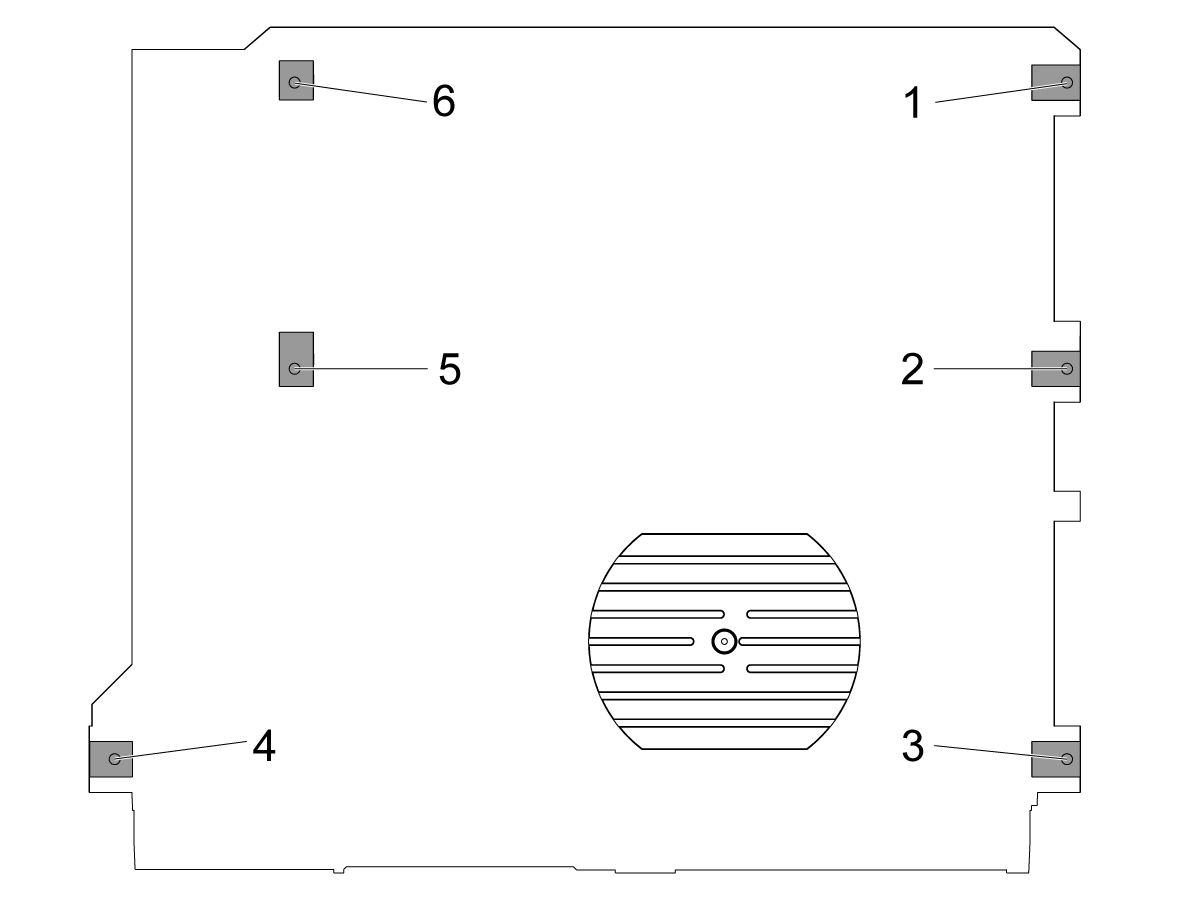
Afrouxe os parafusos de nivelamento médios [2 e 5] de modo que não estejam suportando nenhum peso.

Definir a máquina em 4 parafusos de nivelamento de canto 3" (76,2 mm) acima do assoalho.

2

Nível áspero a máquina:

Gire o parafuso de nivelamento #4 para cima.

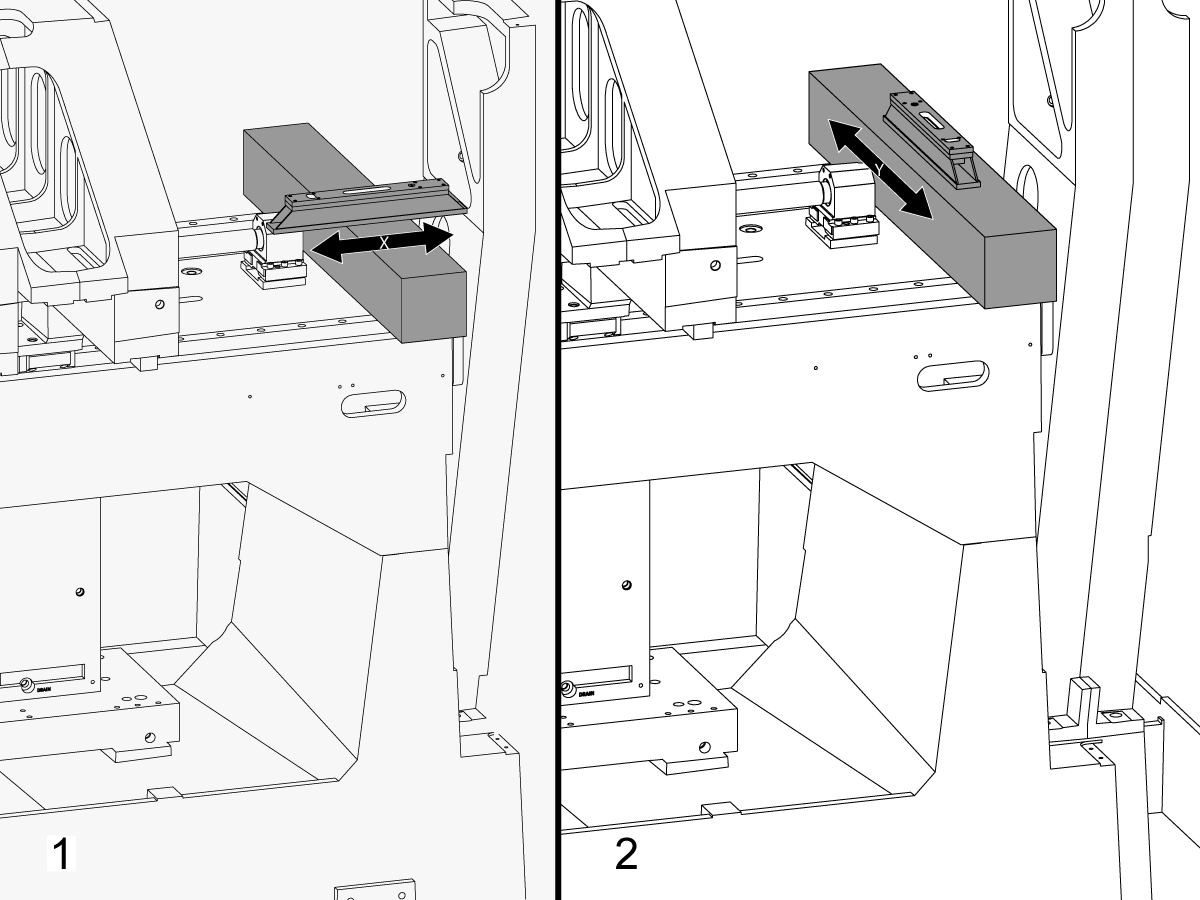
Coloque o granito nas guias lineares do veio X perto do suporte do rolamento de rosca do veio X.

Configurar o nível de maquinista em cima do granito paralelo ao veio X. 1

Ajuste o parafuso de nivelamento #6 até que a máquina seja nivelada no veio X.

Configurar o nível de maquinista em cima do granito perpendicular ao veio X. 2

Ajuste o parafuso de nivelamento #3 até que a máquina seja nivelada no veio Y.

Gire o parafuso de nivelamento #4 para baixo até que faça o contato com a almofada de nivelamento.

3

Ajuste o rolo do veio X:

Montar T-2192 com T-2181.

Mova o veio Y para o meio da viagem.

Colocar T-2192 no lado do veio.

Certifique-se que a bolha em T-2181 está dentro da escala legível.

Se não estiver, afrouxe o parafuso que fixa T-2192 à base magnética e mova o adaptador conforme necessário.

Jog o veio X lado a lado e medir o X veio roll. Faça leituras na posição inicial, no meio e no final da viagem.

Ajuste o parafuso de nivelamento #4 do não há nenhum desvio entre a leitura na posição Home e a leitura na extremidade da viagem.

Nota: A bolha em T-2181 não tem que estar no meio do frasco. Ele só precisa estar dentro da faixa legível.

4

Ajuste os parafusos de nivelamento médios:

Gire os parafusos de nivelamento médios para baixo até que façam o contato com as almofadas nivelando e gire-os então um adicional 45 °.

Verifique o rolo do veio X. Ajuste os parafusos de nivelamento médios para corrigir o rolo do veio X.

Veio X para alinhamento do veio Y

1

Alinhe a face da sela paralela ao movimento do veio X:

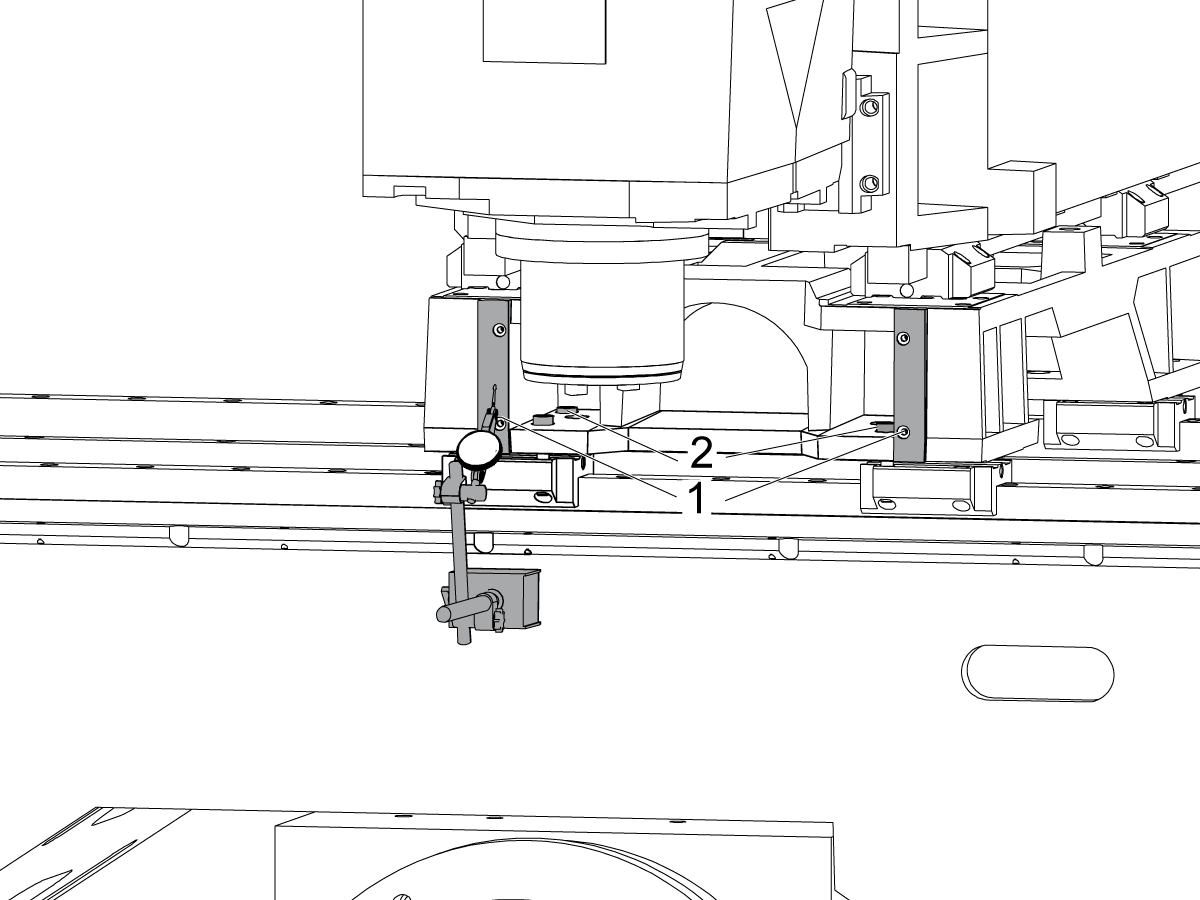
Atravesse a superfície usinada na parte frontal da sela [1] movimentando o veio X.

Afrouxe os parafusos que fixam a sela aos caminhões do veio X [2] e alinhe a face da sela paralela ao movimento do veio X dentro de 0,001" se necessário.

Torque dos parafusos. Consulte a Especificações de torque do fixador Haas.

2

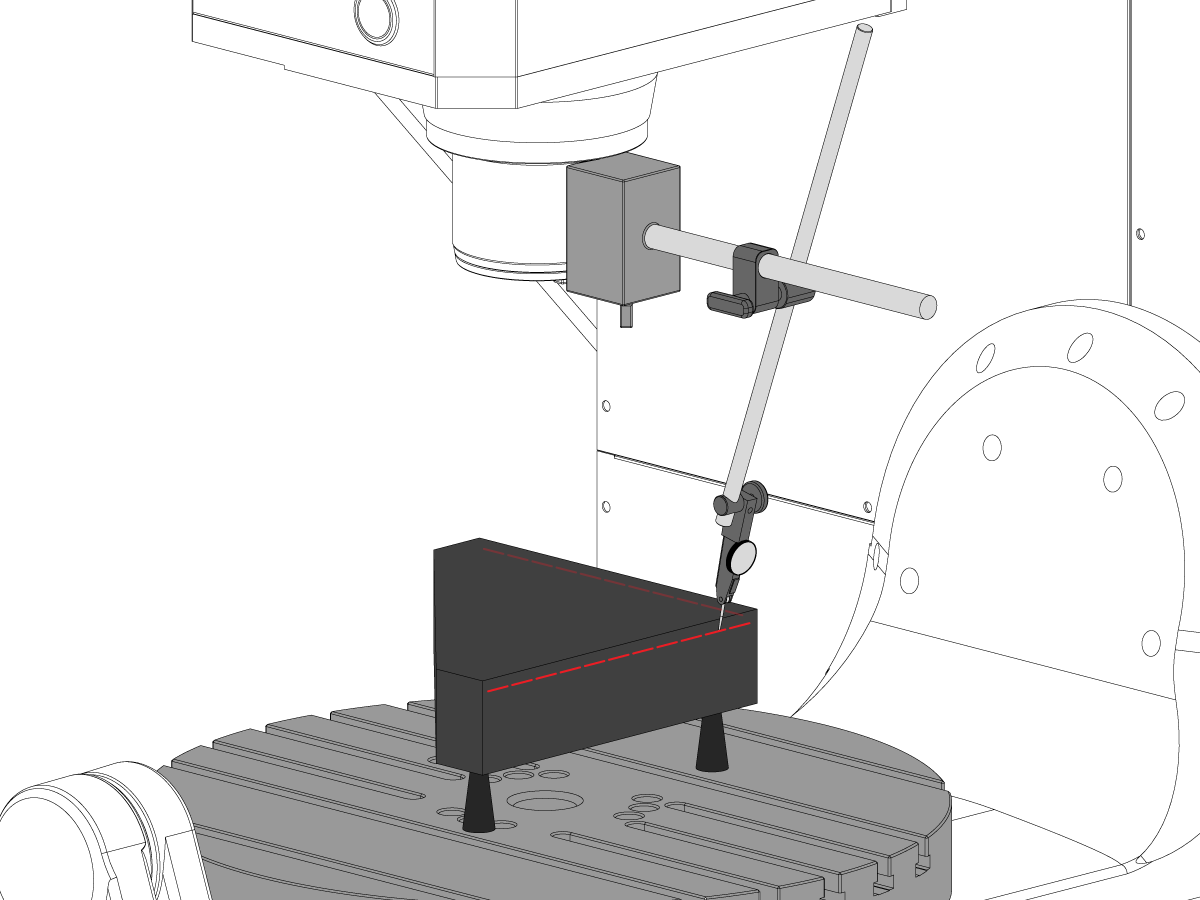
Alinhe o veio Y perpendicular ao veio X:

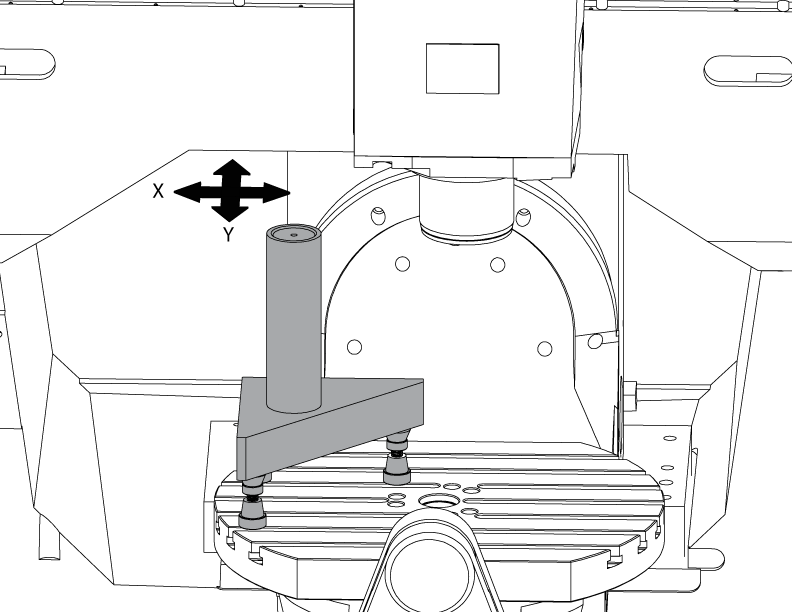
Setup o granito Tri-quadrado no lado esquerdo da bandeja do veio de C nas tomadas do Machinist.

Ajuste o verso do granito Tri-quadrado paralelo ao veio X. NTE 0,0001"/10"

Varrer o topo do granito Tri-quadrado ao longo dos eixos X e Y.

Ajuste as tomadas do maquinista até que a superfície superior do granito Tri-quadrado seja paralela ao plano X-Y NTE 0,0005".

Verifique se o verso do granito paralelo ao veio X. NTE 0,0001"/10".

Afrouxe os parafusos que fixam os caminhões do veio Y à sela e alinham o veio Y perpendicular ao veio X. NTE 0,0005"/10"

Torque dos parafusos. Consulte a Especificações de torque do fixador Haas.

Verifique o veio Y perpendicular ao veio X NTE 0,0005"/10" após os parafusos são torqued.

Veio Z para o alinhamento do plano X-Y

1

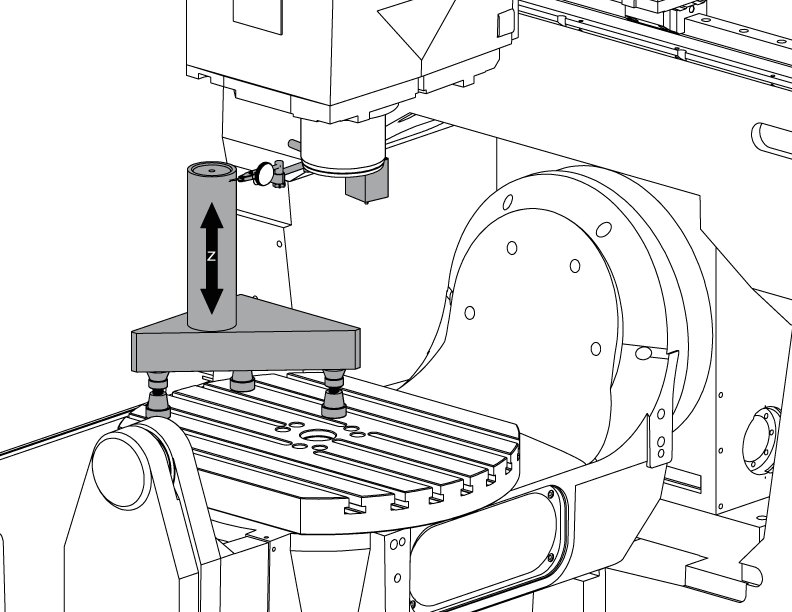
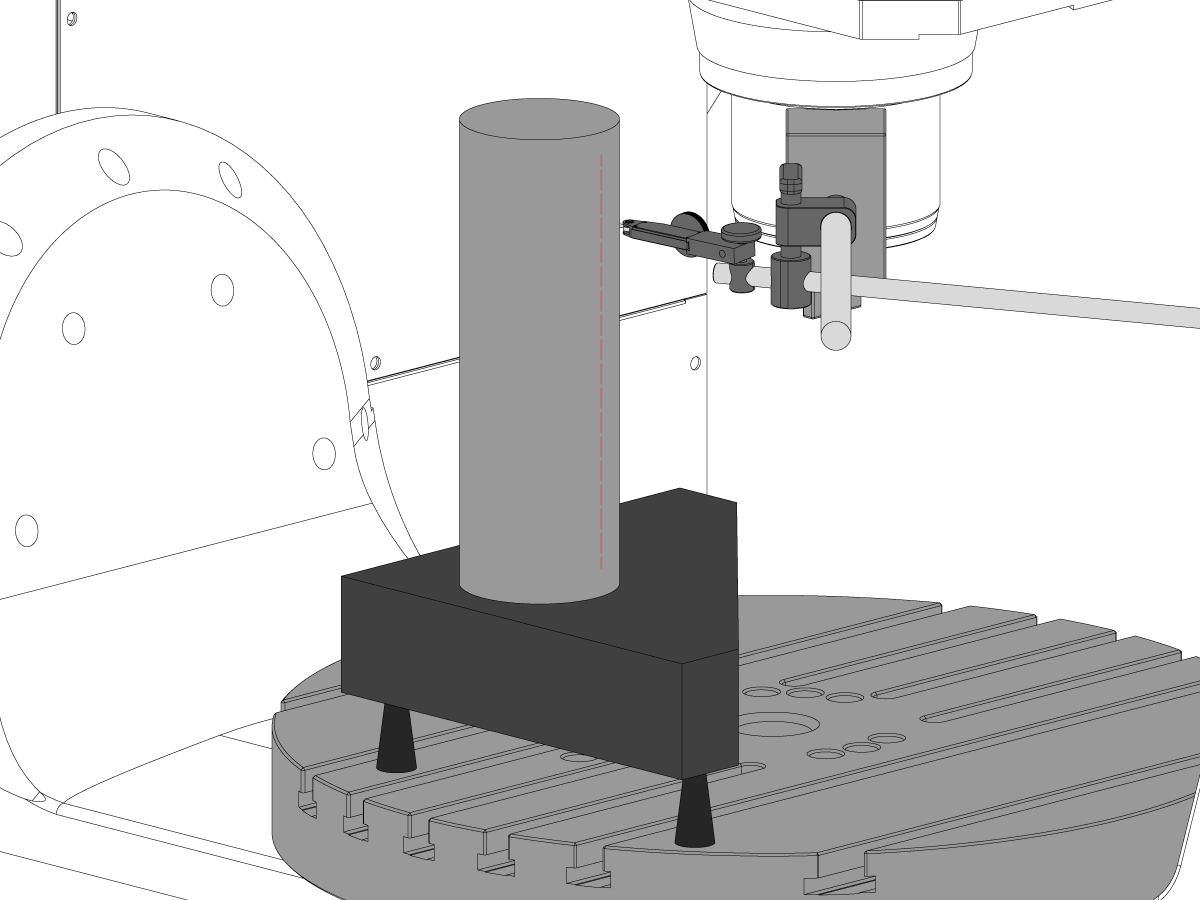
Configurar o cilindro.

Coloque um cilindro no topo da Tri-pedra, como mostrado na imagem.

Alinhe a superfície superior do cilindro paralelo ao plano X-Y NTE 0,0001" girando as tomadas Machinist.

Jog a máquina para a seguinte posição:

  • UMC-750 para X-7,000" e Y-10,000"
  • UMC-750SS para X-10,000" e Y-10,000"

2

Alinhe o veio Z perpendicular ao veio X:

Substitua um dos parafusos de canto superior nos caminhões do veio Z com o T-2193A * para girar a cabeça do spindle em torno dele.

Indique o lado do cilindro ao longo do veio Z.

Afrouxe os parafusos que fixam caminhões do veio Z à RAM.

Alinhe o eixo Z perpendicular ao eixo X NTE 0,0005"/10" ao oscilar a cabeça do spindle de um lado paraoutro.

Torque dos parafusos. Consulte a Especificações de torque do fixador Haas.

Verifique se o veio Z perpendicular ao veio X após os parafusos são torqued.

Substitua o T-2193A * com o parafuso quando o alinhamento estiver concluído

*  : Utilizado apenas na série de pré-reinicialização. 

3

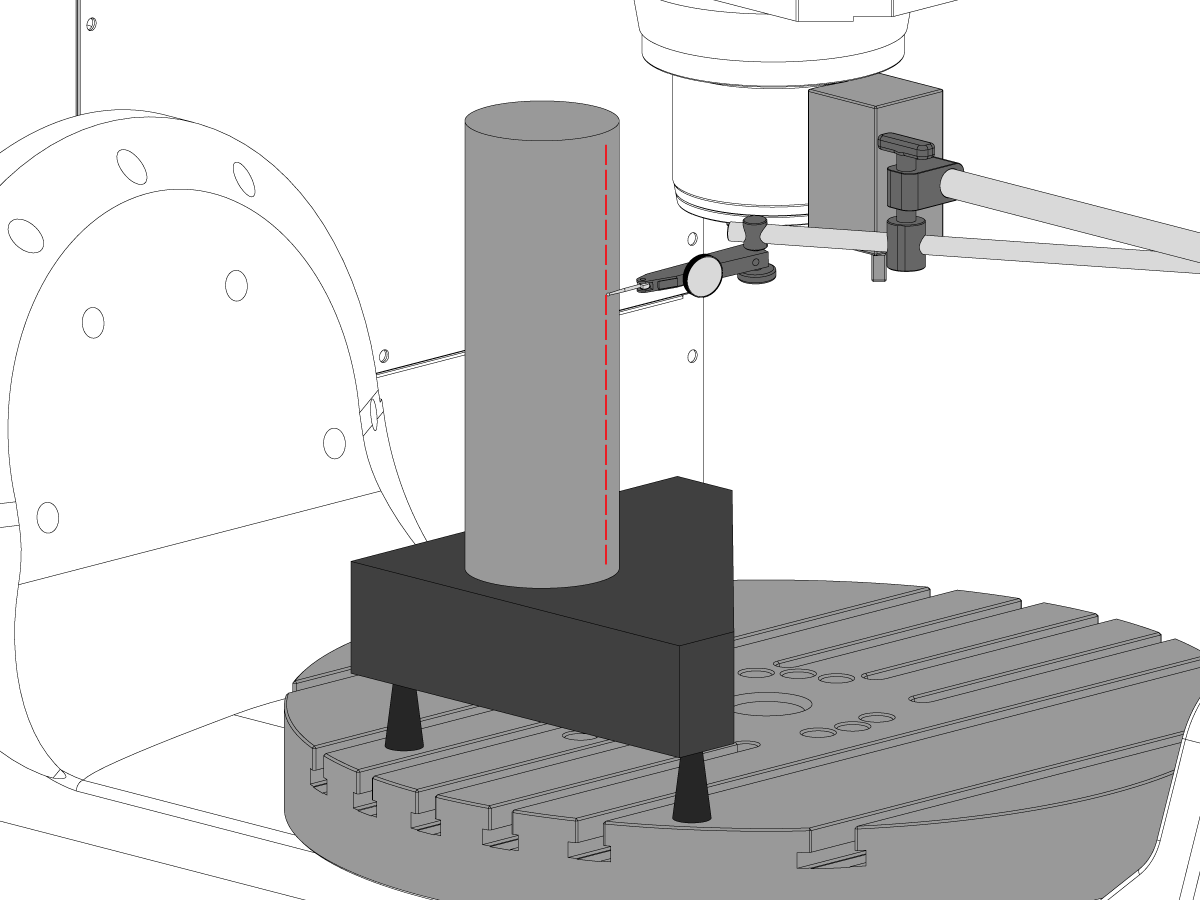
Alinhe o veio Z perpendicular ao veio Y:

Indique a parte dianteira do cilindro ao longo do veio Z.

Lamina entre caminhões Z Axis e a RAM para alinhar o veio Z perpendicular ao veio Y NTE 0,0005"/10".

Nota: Shim ou dois caminhões superiores ou os dois caminhões inferiores com os shims iguais.

Torque dos parafusos. Consulte a Especificações de torque do fixador Haas.

Verifique se o veio Z perpendicular aos eixos Y e X após os parafusos são torqued.

4

Alinhar e torque Y e Z eixos ballnut carcaças:

Afrouxe os parafusos que fixam o ballnut à carcaça e aos parafusos que fixam a carcaça à carcaça.

Confortável os parafusos que fixam a carcaça do ballnut à carcaça primeiramente, a seguir confortável os parafusos que fixam o ballnut à carcaça.

Use a função jog Lock para executar o veio para frente e para trás viagem completa.

Nota: Não use o volante ou o movimento rápido.

Torque dos parafusos. Consulte a Especificações de torque do fixador Haas.

A carcaça da porca do veio Y pode ser alcançada na parte traseira da máquina com a RAM correu toda a maneira para a parte dianteira da máquina.

A carcaça da porca do veio Z pode ser acessada da parte dianteira da máquina com a cabeça do spindle correu toda a maneira para baixo.

Nota: A mortalha do motor do spindle precisa ser removida para acessar o mancal de ballnut do veio Z.

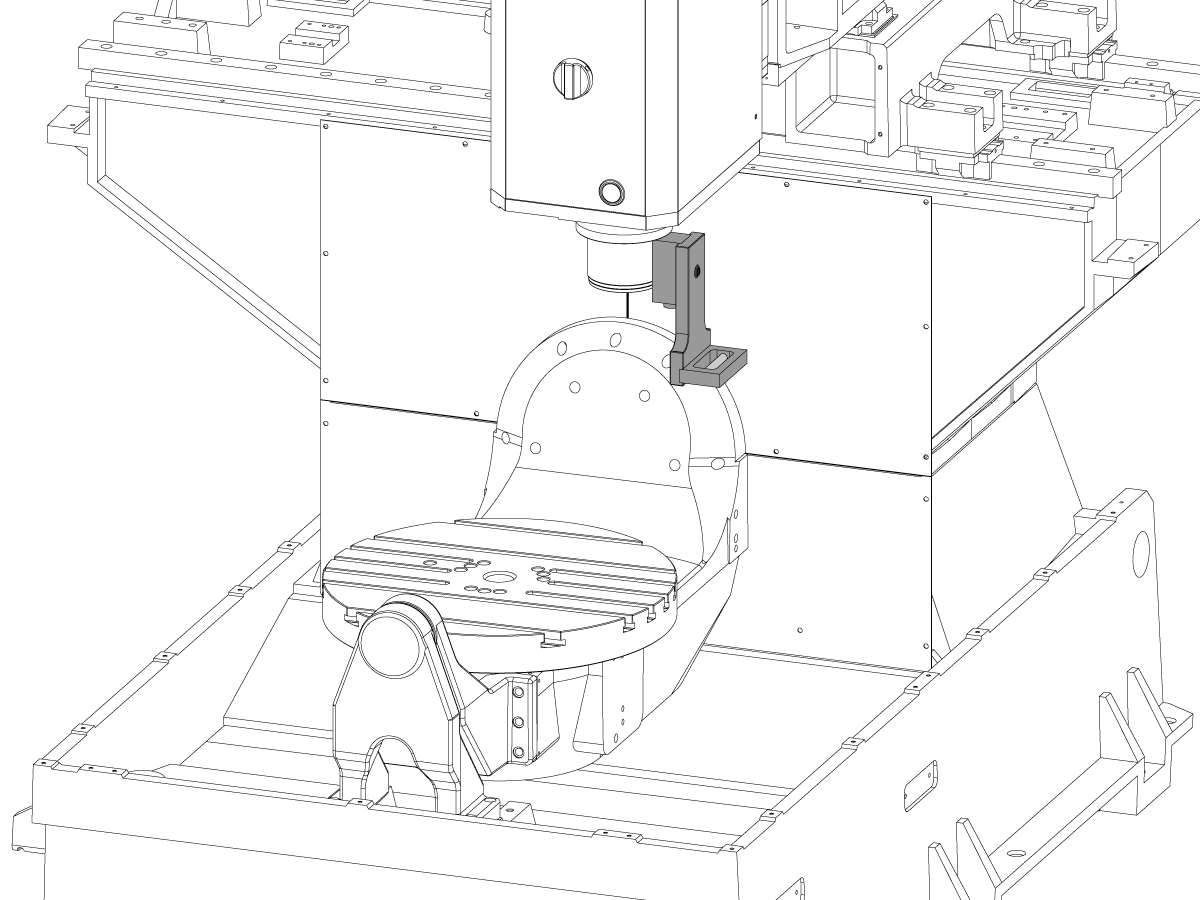
Tram o spindle para o plano X-Y

1

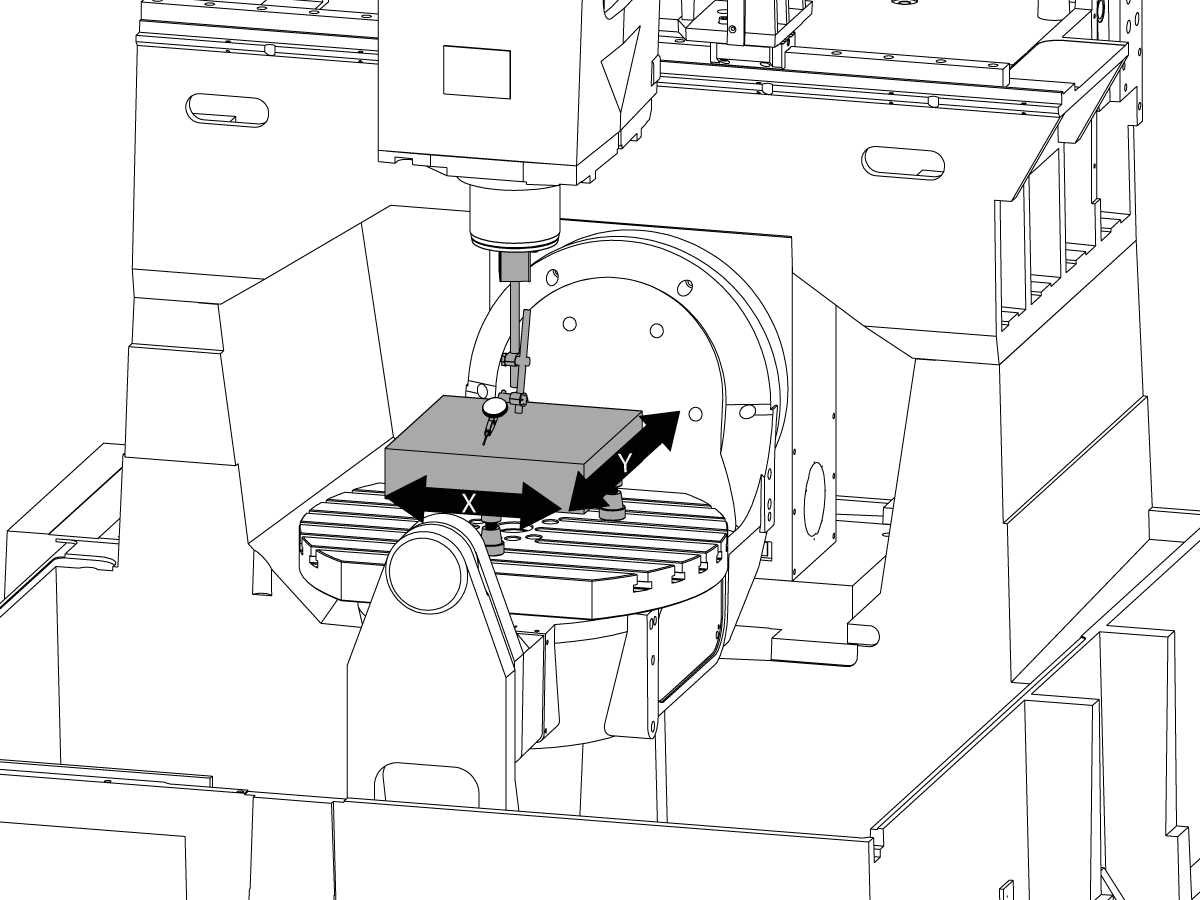
Configurar o granito:

Setup as tomadas do Machinist e o granito no meio do prato frontal do veio de C segundo as indicações do retrato.

Alinhe a superfície superior da paralela do granito ao plano de X-Y ajustando a altura NTE 0,0001" dos jaques do maquinista.

Posicione o veio sobre o centro do prato frontal.

2

Tram o spindle para o plano X-Y:

Coloque um indicador no veio do veio.

Faça uma medição em cima do granito a cada 90 ° de torneamento /em rotação.

Afrouxe os parafusos (6) na placa de base para a cabeça do veio.

Adicionar ou remover calços entre a carcaça da cabeça do veio e a placa de base para o bonde do veio para o plano X-Y nte 0,0005"/10".

Nota: Use calços de espessura desigual [1] para alterar o ângulo da placa de base.

Quando a varredura está dentro da especificação, torque os parafusos (6). Consulte a Especificações de torque do fixador Haas.

Verifique se o bonde do spindle após os parafusos são torqued.

Veio B para alinhamento de eixos XYZ

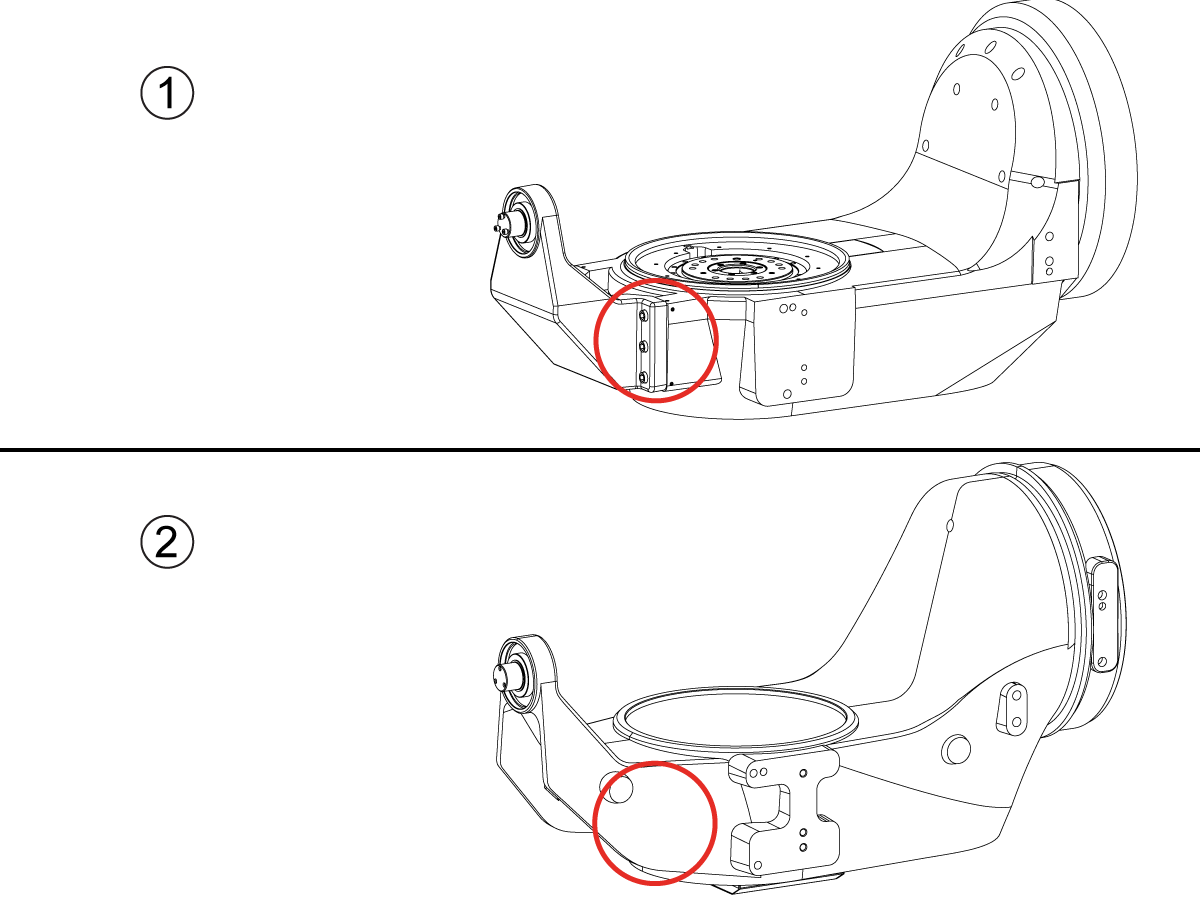
How to identify the Multi-Piece and the Unibody trunnion   

1) Multi-Piece trunnion:    UMC machines built approximetely before 11/2022 will have this configuration.

2) Unibody trunnion:    UMC machines built approximetely after 11/2022 will have this configuration.

1

Remove the A-frame trunnion support:

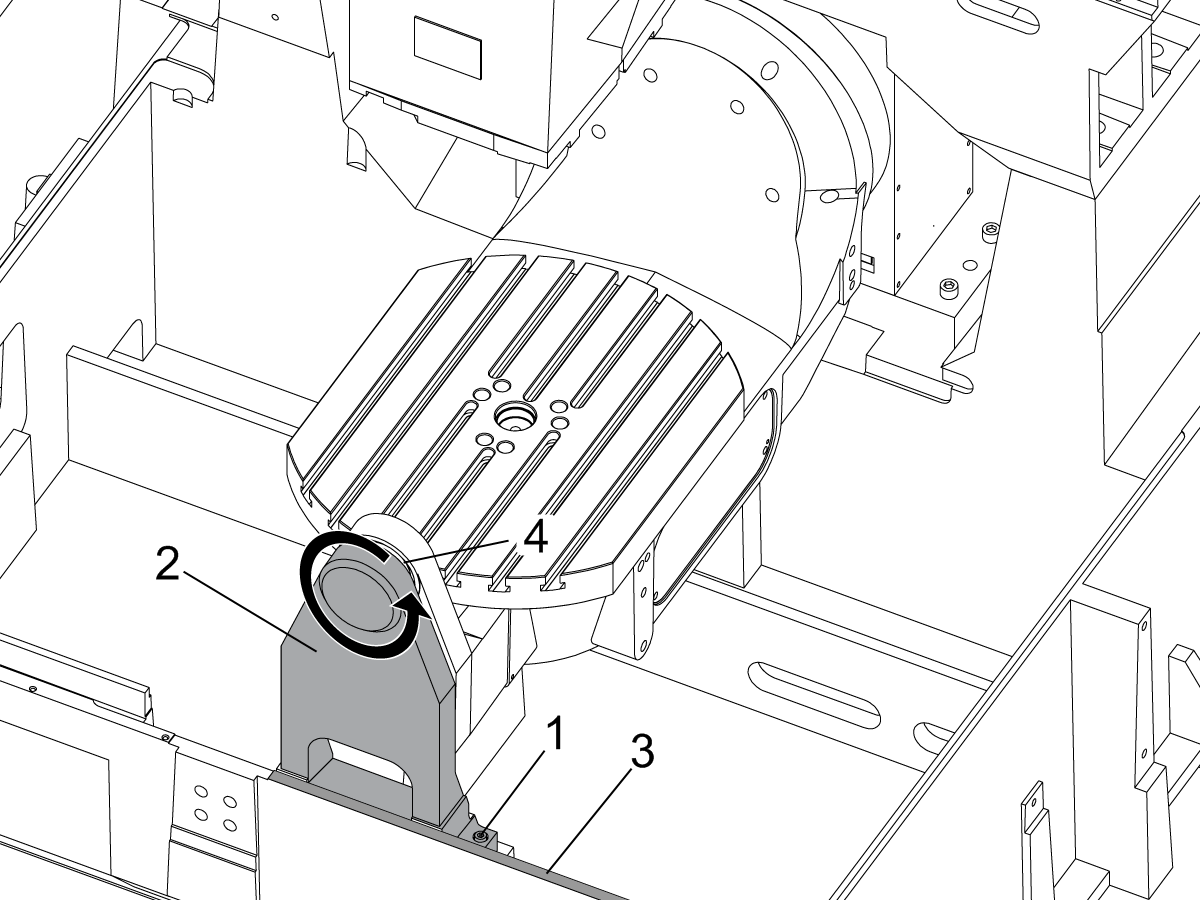
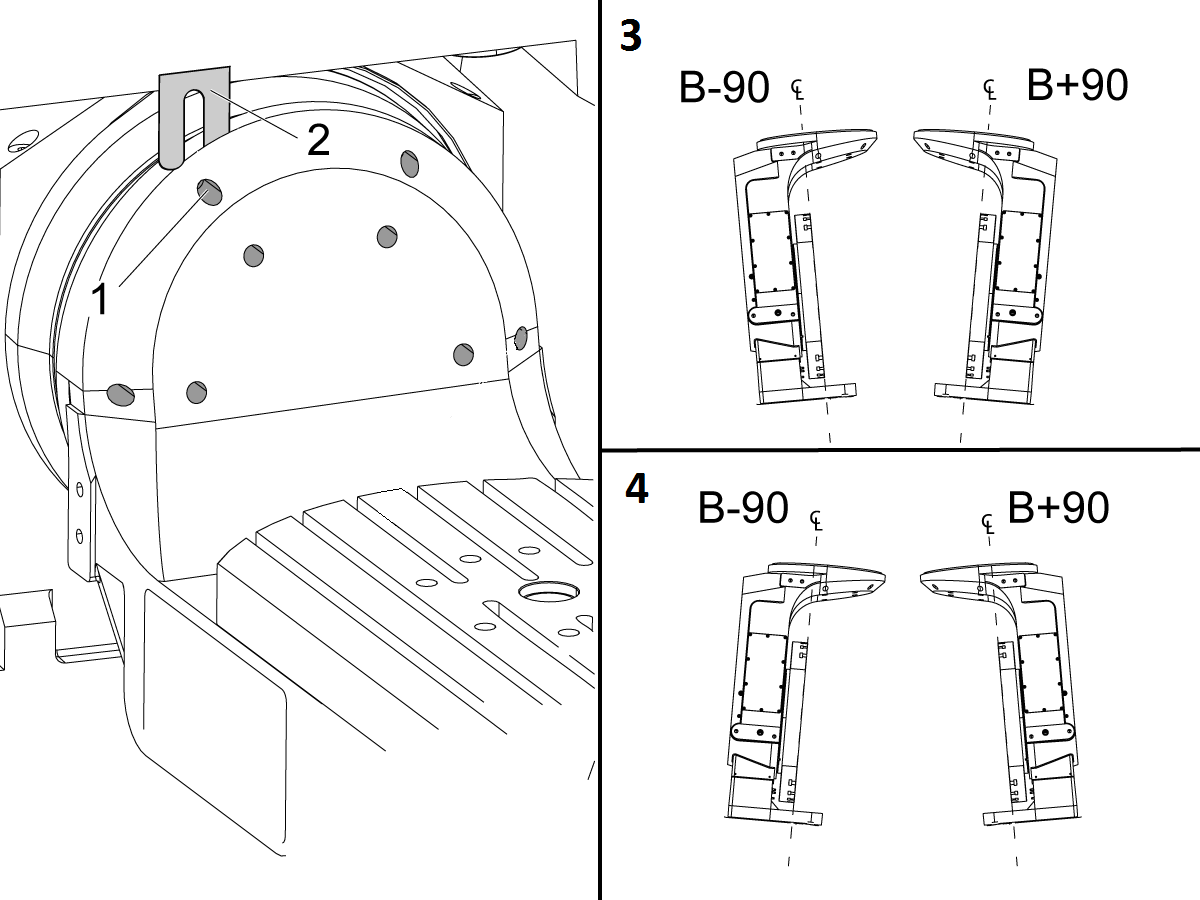
Remove the bolts [1] that secure the A-frame trunnion support [2] to the base and take out the shims between A-frame support and the base.

Rotate the A-frame support [2] counter-clockwise to clear the edge of the base [3].

Pull the A-frame support off the bearings.

 Note: The A-frame support might vacuum lock on the bearings. Use the zip-tie to pry the seal [4] open.

 Caution: To lift the trunnion support, get the aid of another person. The support weighs 85 lbs (39 kg).

2

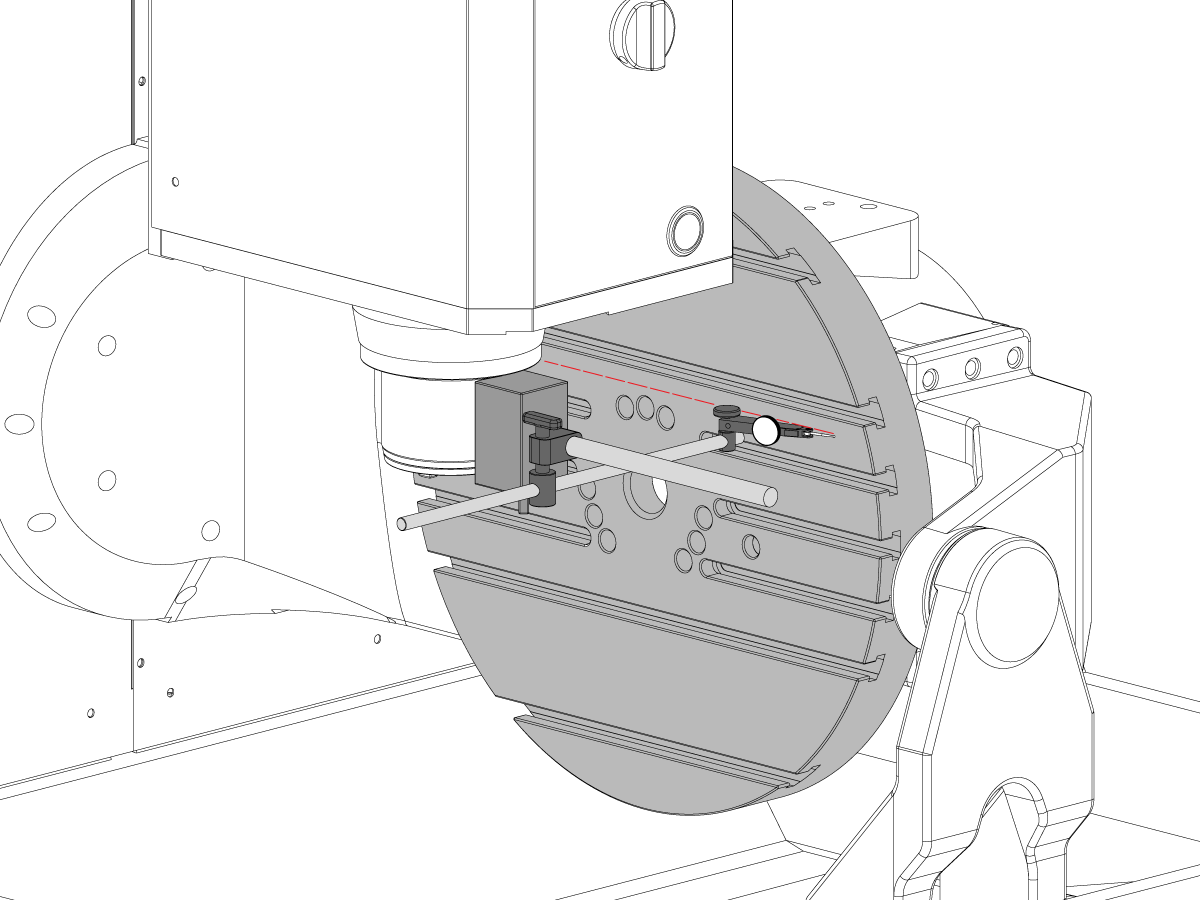
Measure the B- axis of rotation parallelism to the Y-Z plane:

For a machine with a Classic Haas Control, change Parameter 151:20 (B axis CHK TRAVL LIM) to 0.

For a machine with a Next Generation Control, change Parameter 6.021 (B axis CHK TRAVL LIM) to FALSE.

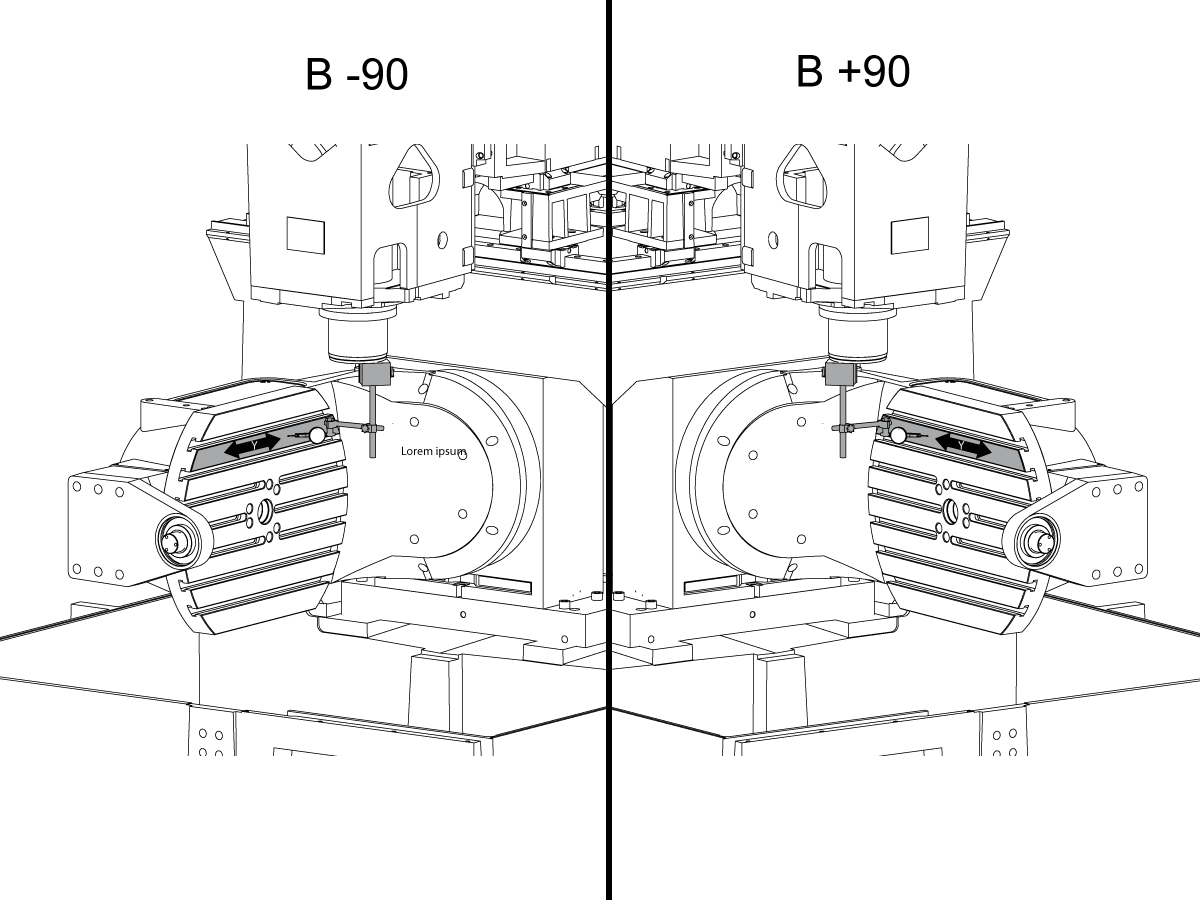
Measure the parallelism of the platter to the Y-Z plane with the B axis at 90° and then the B axis at -90° as shown in the picture.

Position the Y-Axis in the following starting position:

UMC-500: Y=0, Sweep 15”, 3rd T-Slot Land from the top.

UMC-750/1500-Duo: Y=-1.0, Sweep 18", 3rd T-Slot Land from the Top .

UMC-1250: Y=-1.0, Sweep 28", 3rd T-Slot Land from the Top.

UMC-500PP: Y=-4.0, Sweep 7".

UMC-750PP: Y=-2”, Sweep 15".

UMC-1000PP: Y=-4”, Sweep 15".

Compare the results at B 90° and B-90°. The results should be...

  • Symmetric against the Y-Z plane, positive or negative direction
  • Less than 0.0010"/20"

If the results are symmetric against Y-Z plane, and are less than 0.0010"/20 inches: Go to Step 5.

If the results are symmetric against Y-Z plane, but are more than 0.0010"/20 inches: Go to Step 4.

 Warning: If the results [3] are not symmetric against the Y-Z plane, the B axis rotary needs to be aligned: Go to Step 3.

3

Align the B axis of rotation parallel to the Y-Z plane:

Loosen the (6) bolts [1] that secure the B axis rotary to the base casting.

 Note: Keep the bolts sufficiently snug to control the adjustments.

Adjust the front and rear setscrews [2] until the measurements taken in Step 2 are symmetric against the Y-Z plane.

Torque the (6) bolts [1]. Refer to Haas Fastener Torque Specification.

Verify the measurements in Step 2 after the bolts have been torqued.

4

Align the C Axis of rotation perpendicular to the B Axis of rotation:

Remove the bottom C-Axis access cover.

Loosen the (12) bolts [1] that hold the C Axis body to the B Axis platter face.

Reach the bottom (4) bolts through the C Axis access port.

If the B Axis is symmetric in the positive direction [4], install horseshoe shims [2] of appropriate size behind the top (2) bolts.

If the B Axis is symmetric in the negative direction [5], install horseshoe shims [2] of appropriate size behind the bottom (2) bolts.

Torque the (12) bolts to 80 Ft-lbs (108 Nm).

Cut the excessive shim material off.

Verify the measurements in Step 2 after bolts are torqued.

5

Align the trunnion support shaft co-axial with the B Axis of rotation:

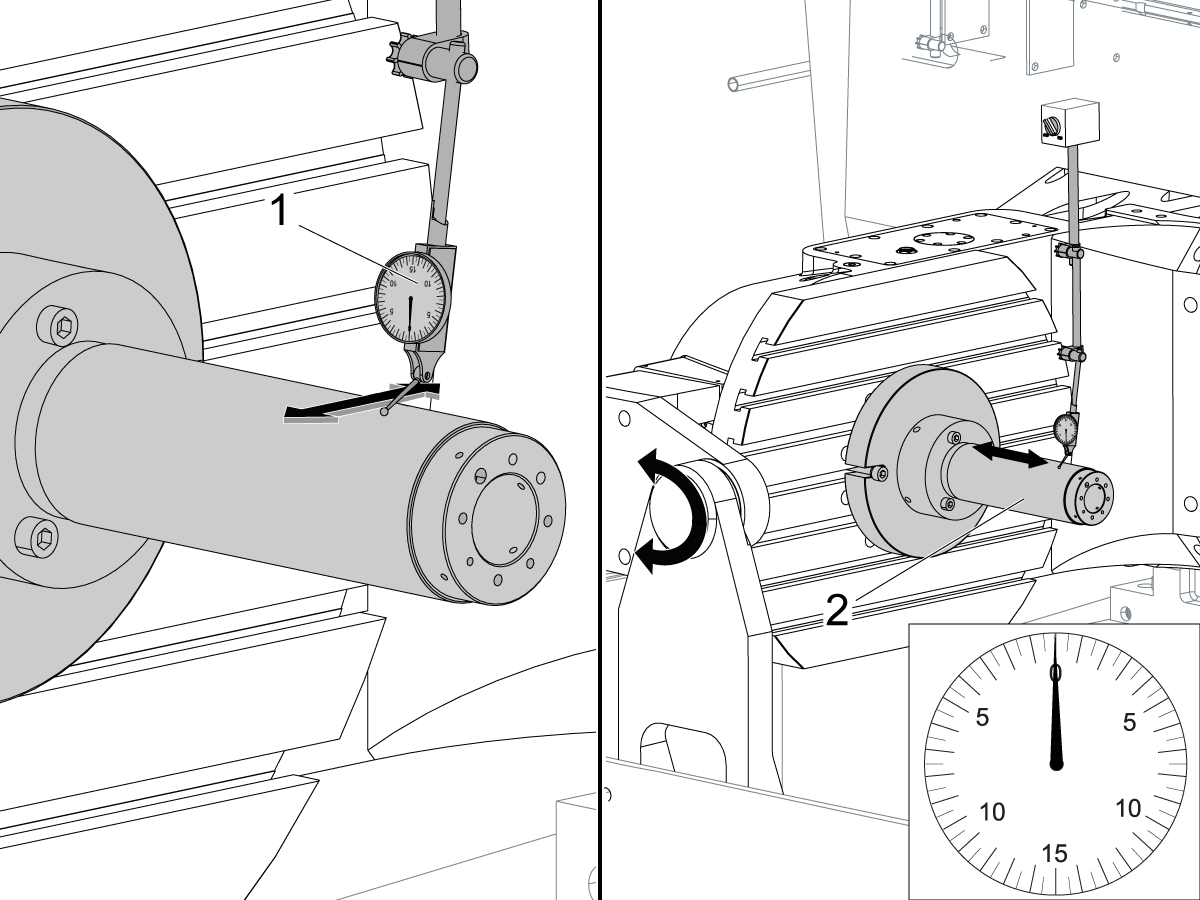
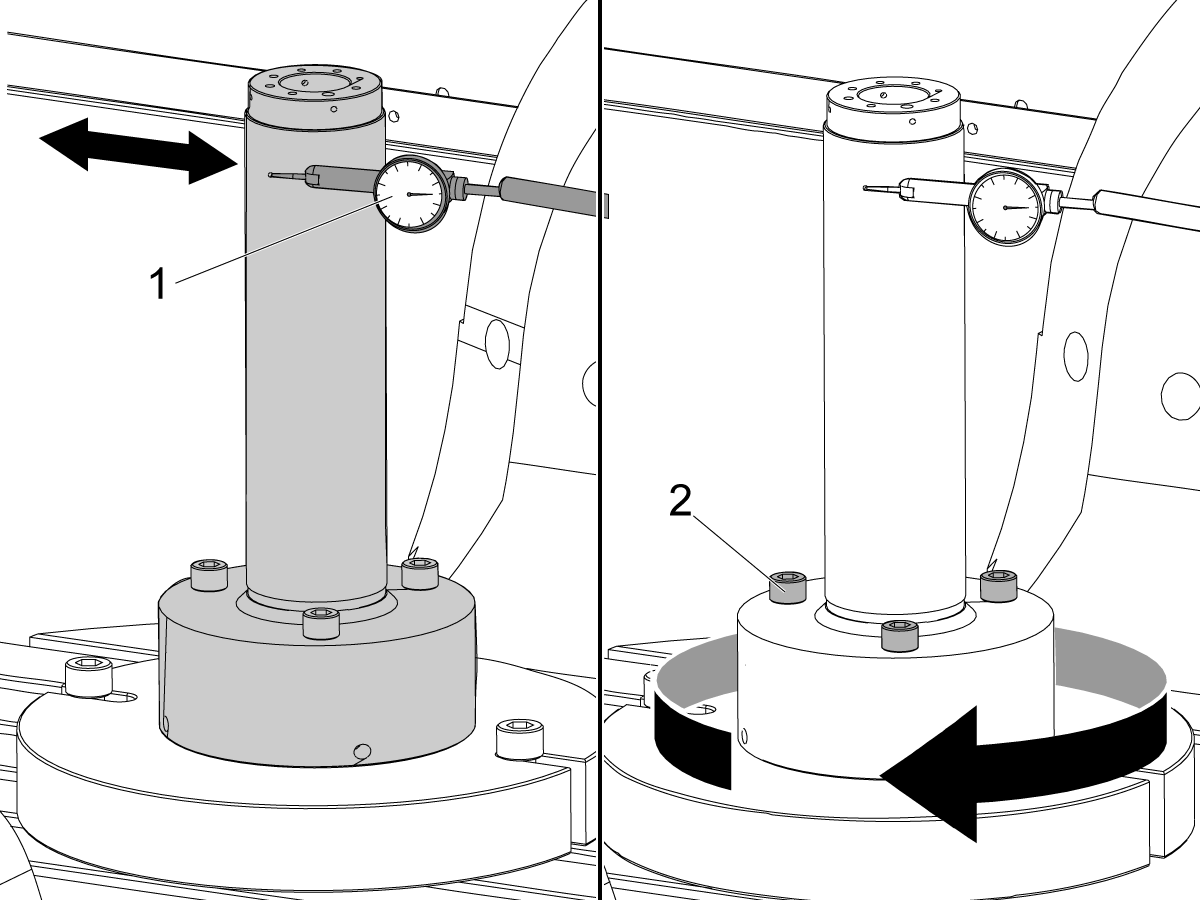
Setup (2) indicators on the outer race of the trunnion support bearing [2] as shown in the picture.

Mark the spot on the outer race where one of the indicator needles is contacting the surface.

After moving the B Axis to 90° or -90° you will align the marked spot with the needle again to exclude the bearing runout error from the measurements.

Take the readings when B is at 90° and B at -90°. Compare the readings. 

 Caution: The B axis brake needs to be clamped when taking the readings.

The deviation between the results when B is at 90° and at -90° needs to be less than 0.001" on each indicator.

 Note: The indicator on the side of the bearing will measure top to bottom alignment and the indicator on the top of the bearing will measure side to side alignment.

____

For models with a multi-piece trunnion

Loosen the (6) bolts [3] on the C Axis body support. Keep the bolts sufficiently snug to control adjustment.

Adjust the (8) set screws [4] until deviation between B at 90° and B at -90° is within 0.001".

Torque the (6) bolts [2] on the C Axis body support to 80 Ft-lbs (108 Nm).

Verify the alignment after the bolts have been torqued.

____

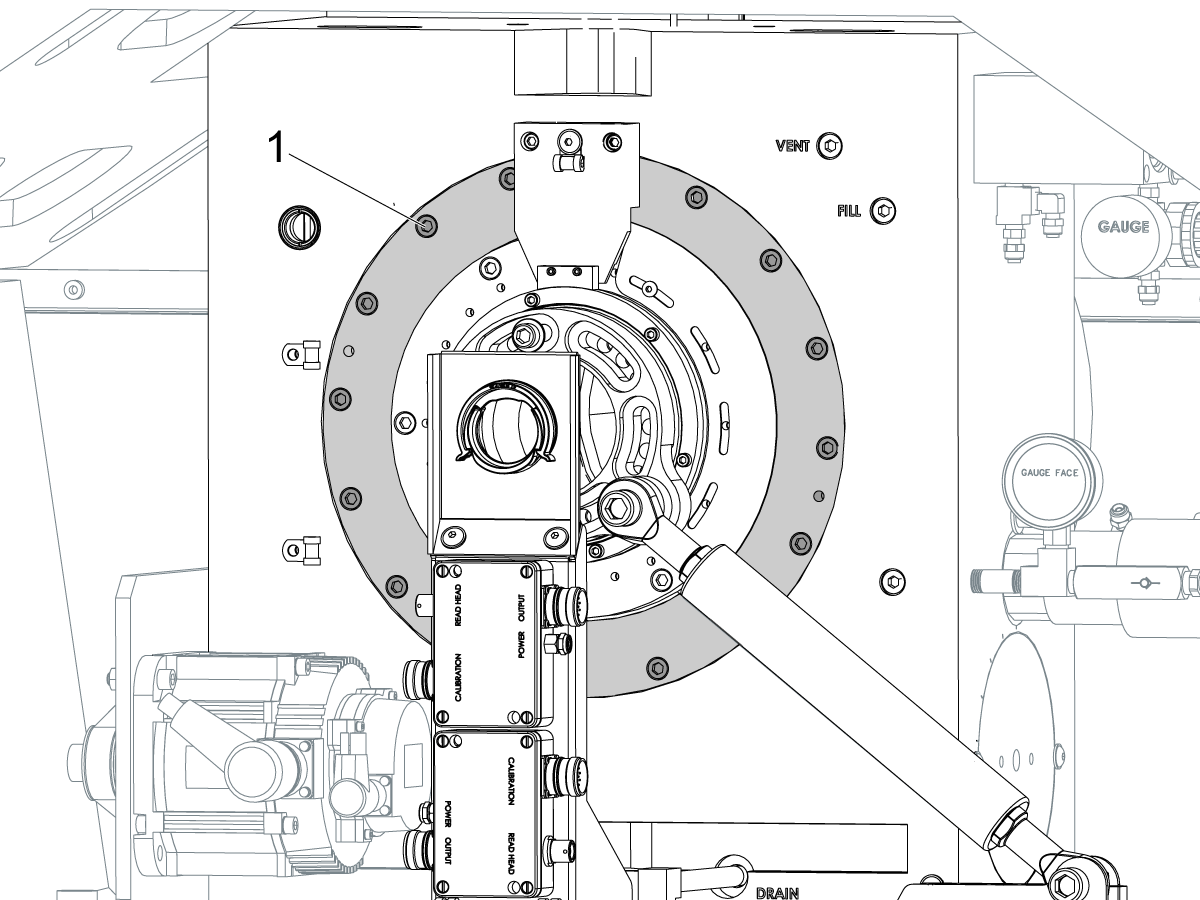
For models with a unibody trunnion

Jog rotary to B90. Set up an indicator on the highlighted surface as shown in the lower diagram .

Rotate B-axis 180 degrees (90 to -90).

Run out (NTE 0.010” TIR).

 Caution: If the measurement exceeds the tolerance then contact support.

6

Install and shim the A-frame trunnion support:

Move the B Axis to 90°.

Setup an indicator [1] against a machined surface of the C Axis body. Set the indicator to 0.

Use plastic zip ties [2] to pry the seal open while installing the A-frame support. This lets unwanted air and grease out of the assembly.

Install the A-frame trunnion support [3] over the bearings.

Remove the cable ties.

Turn the trunnion support clockwise until it is vertical.

 Note: The weight of the A-frame support will cause the trunnion to sag. The amount of sag is measured with the indicator that was previously setup on the side of the C Axis body.

____

For multi-piece trunnions

Adjust the shims [4] between the A-frame support and the base casting to remove the sag until indicator reads 0 again.

When the indicator reading is 0, torque the (4) bolts. Refer to Haas Fastener Torque Specification.

Verify the reading after bolts are torqued. Adjust the shims again if necessary until the indicator reads 0.

____

For models with unibody trunnion

Determine the amount of shim stock [4] needed to raise the Trunnion arm so the indicator reads 0.005".

The indicator [1] value will change once the support is torqued.

With indicator still in place:

  • Torque trunnion support bolts to appropriate values.
  • Check indicator to make sure it reads between the range of

Trunnion arm raised (0.005” to  0.010”).

 Note: For unibody trunnions, the shim location may also be used to correct the C-axis to X-Y plane perpendicularity instead of shimming the saddle trucks.

 Caution: Use equal amount of shims on each side of the A-frame support. Unequal shims will cause the A-frame support to pull the trunnion to the side.

Verify the B Axis of rotation alignment to the Y-Z plane (Step 2). Loosen the bolts and tap the A-frame support side to side if necessary to correct the B axis to Y-Z plane alignment.

7

Set C-axis perpendicular to X/Y plane:

Move the axes to

UMC-750's........X= -10.5" & Y=0."

UMC-1000's......X=-17.0" & Y=-0."

Zero an indicator [1], on a Ground Block [2], 1/2" off the edge at the rear of the platter (Mag-Base on Spindle), with C at 0 Degrees

Rotate C-Axis to 180°.

Move Y axis, and ground block, in Y Axis negative direction until you are 1/2" away from platter edge, and take the perpendicularity measurement

Adjust the shims until the average error is within 0.0005" end to end.

 Note: For unibody trunnions, the shim location under the bearing support may also be used to correct the C-axis to X-Y plane perpendicularity instead of shimming the saddle truck.

Caution: Shim either two front trucks or two rear trucks with the equal shim.

Note: Shim one truck at the time to maintain the X to Y squareness.

Verify the measurements after all bolts are torqued.

Verify the X to Y alignment in Step 2.

8

Set the tool change offsets:

B-axis tool change offset [1]

For Classic Haas Controls, change Parameter 213. 

For Next Generation Controls, go to: Settings>Rotary Tab>Highlight the rotary and press [INSERT], or change Parameter 6.078 (B TOOL CHANGE OFFSET) to set the trunnion (B Axis) parallel to the X Axis.

For models with multipiece trunnion

(NTE 0.001/10"; NTE 0.0020" overall)

For models with unibody trunnion

(NTE 0.0005/10"; NTE 0.0010" overall)

___

C-axis tool change offset [2]

For Classic Haas Controls change Parameter 523.

For Next Generation Control go to: Settings>Rotary Tab> Highlight the rotary and press [INSERT], or change Parameter 7.078 (C TOOL CHANGE OFFSET) to set the table T-slot (C Axis) parallel to the X Axis

For models with multipiece trunnion

(NTE 0.001/10"; NTE 0.0020" overall)

For models with unibody trunnion

(NTE 0.0005/10"; NTE 0.0010" overall)

9

Check C-axis perpendicularity to X/Y plane:

Align the indicator centered over the C-axis bore with the Y-axis at -10.

Jog positive in the Y-axis and align the indicator over the center of the last section of the platter and make a mark at this spot with a washable marker.

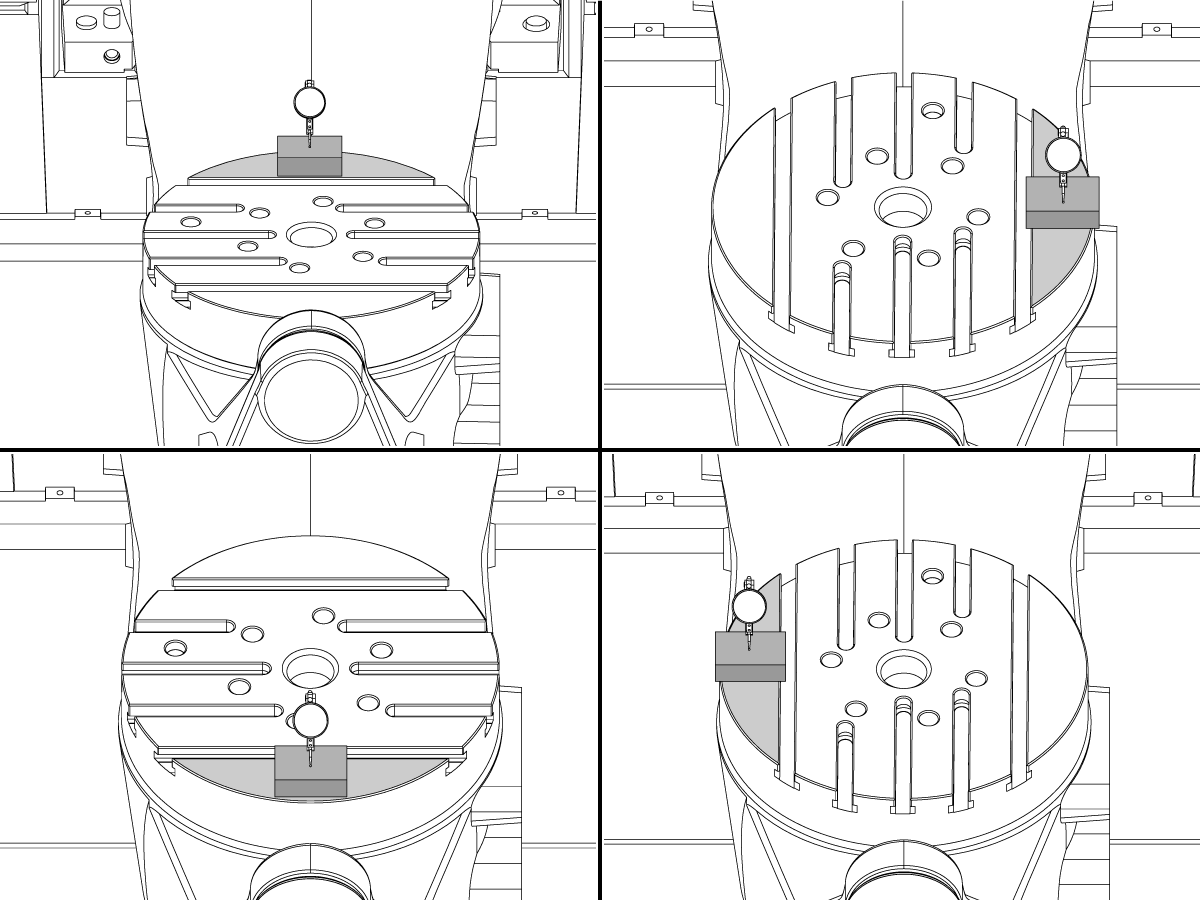
Insert 1-2-3 block as shown and set the indicator to zero.

Remove the block and rotate the platter 90 degrees, following the marked spot with the indicator.

Insert block back between the indicator and platter. Note reading.

Repeat the previous two steps, taking readings with the platter at 180, 270 and 360 degrees.

Multi-piece trunnion:  (NTE 0.0005")

Unibody trunnion: (NTE 0.001")

10

Measure the intersection of the B and C axis:

Follow the linked instruction manual to complete this step.

B-Axis and C-Axis intersection Adjustment

11

Align the B-Axis brake disk:

 Note: Do not do this step if you are working on a SS machine.

Operate this code in MDI mode to unclamp the brake:

M11;

Loosen all of the brake disc bolts [1] and torque them to 5 Ft-lbs (7 Nm).

Operate this code in MDI mode to clamp the brake:

M10;

Wait 10 seconds.

Torque the bolts. Refer to Haas Fastener Torque Specifications.

Definir parâmetro/configuração de volta para valores de fábrica

Defina a Parâmetro 1314 para CHC/ Configuração 254 para a NGC de volta ao valor do conjunto de fábrica. (Ciclo de energia para a máquina depois de alterar o valor.)

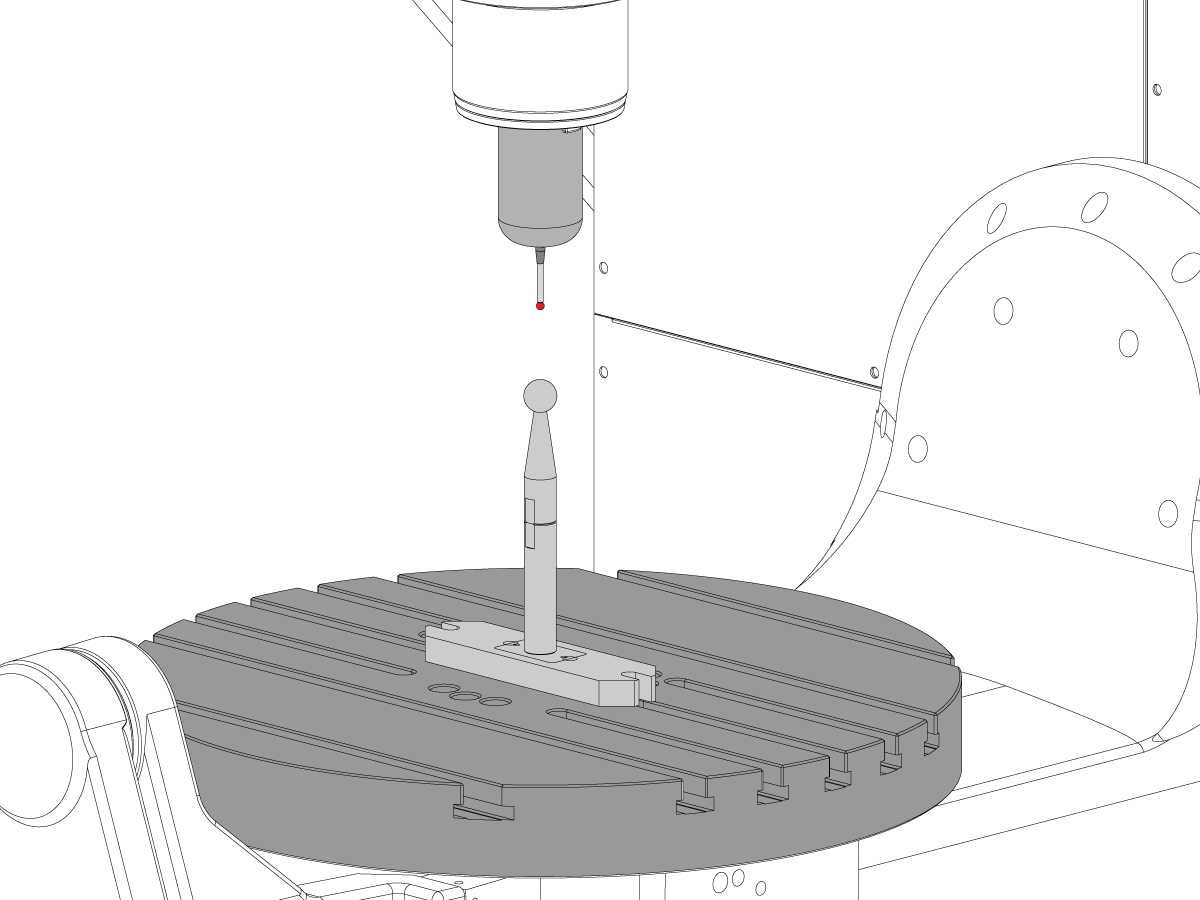
Jacn e calibrar o WIPS. Sistema de sonda intuitiva sem fio (WIPS)-calibração

Defina os pontos zero do Rotary Machine. 

  • UMC-750-MRZP WIPS offsets configurações-CHC
  • UMC-750-MRZP WIPS offsets Settings- Ngc

Preencha o relatório de inspecção completo:

  • EA0420 UMC-500 relatório de inspecção
  • EA0373 UMC-750 relatório de inspecção
  • EA0418 UMC-1000 relatório de inspecção

Deixe a cópia do relatório de inspeção com a máquina.

Se você substituiu o conjunto de eixos B e C, faça o UMC-750-veio B e interseção C-Axis-alinhamento

8.2 Alinhamento - Zonas indicadas

Recently Updated

Alinhamento UMC - Zonas de indicação


AD0490

Indicar zonas

1

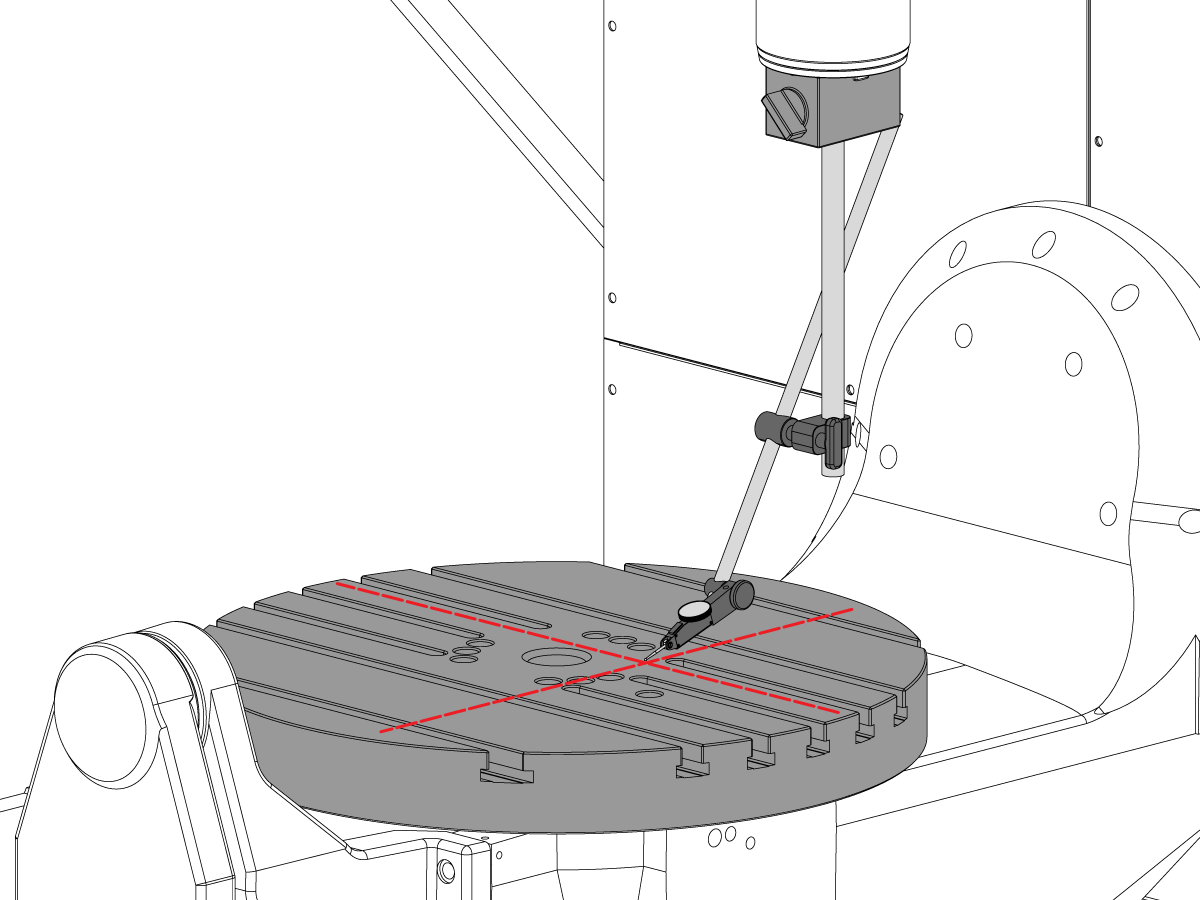
Rolo do eixo X

  • Primeiro, ligue a ferramenta T-2192 à parte lateral do eixo.
  • Para a medição X-Roll, mantenha as seguintes opções Y e Z-axis:
    • UMC 500 (Y,Z): -8, -8
    • UMC 750 (Y,Z): -10, -10
    • UMC 1000 (Y,Z): -12, -12
  • Medir o rolo do eixo X (NTE 0,0005" /10")


2

Paralelismo do eixo B ao eixo Y

  • Retorne a zero o eixo B e C.
  • Meça a execução do prato no eixo Y (NTE: 0,0008" /10" 0,0012" /15")
  • Em seguida, meça esta mesma superfície com o eixo B em -90° e +90°  (NTE: 0,0008" /10" 0,0012" /15")
  • Para IMU 500 e 750, medir todo o comprimento do prato
  • Para IMU 1000, desvio 2" do bordo do platão e depois medir em 20"

3

Perpendiculação do eixo Y para a perpendicular do eixo X

  • Utilize parafusos de reforço para fazer a superfície superior do granito paralelo ao plano XY (NTE: 0,0002")
  • Em seguida, verifique se Y quadrado a X (NTE 0,0005" /10")

4

Perpendicularidade do eixo X ao eixo Z

  • Colocar o granito e o cilindro de precisão no prato na orientação indicada
  • Utilize os parafusos para colocação em espiral para definir a superfície superior do cilindro paralela ao plano XY (NTE 0,0002")
  • Localizações do spindle XY para este passo:
    • UMC 500, X = -6, Y = -8
    • UMC 750, X = -10, Y = -10
    • UMC 1000, X = -17, Y = -12
  • Posição de início Z para esta medição:
    • UMC 500, Zstart = Ztop – 2”
    • UMC 750, Zstart = Ztop – 5”
    • UMC 1000, Zstart = Ztop – 7”
  • Ztop o limite do eixo Z desloca-se na direção positiva (para cima)
  • De Zstart, meça 10 polegadas ao longo do cilindro

5

Perpendicularidade do eixo Y ao eixo Z:

  • Colocar o granito e o cilindro de precisão no prato na orientação indicada
  • Utilize os parafusos para colocação em espiral para definir a superfície superior do cilindro paralela ao plano XY (NTE 0,0002")
  • Localizações do spindle XY para este passo:
    • UMC 500, X = -6, Y = -8
    • UMC 750, X = -10, Y = -10
    • UMC 1000, X = -17, Y = -12
  • Posição de início Z para esta medição:
    • UMC 500, Zstart = Ztop – 2”
    • UMC 750, Zstart = Ztop – 5”
    • UMC 1000, Zstart = Ztop – 7”
  • Ztop é o limite do percurso do eixo Z na direção positiva (cima)
  • Da Zstart, meça 10" ao longo do cilindro

6

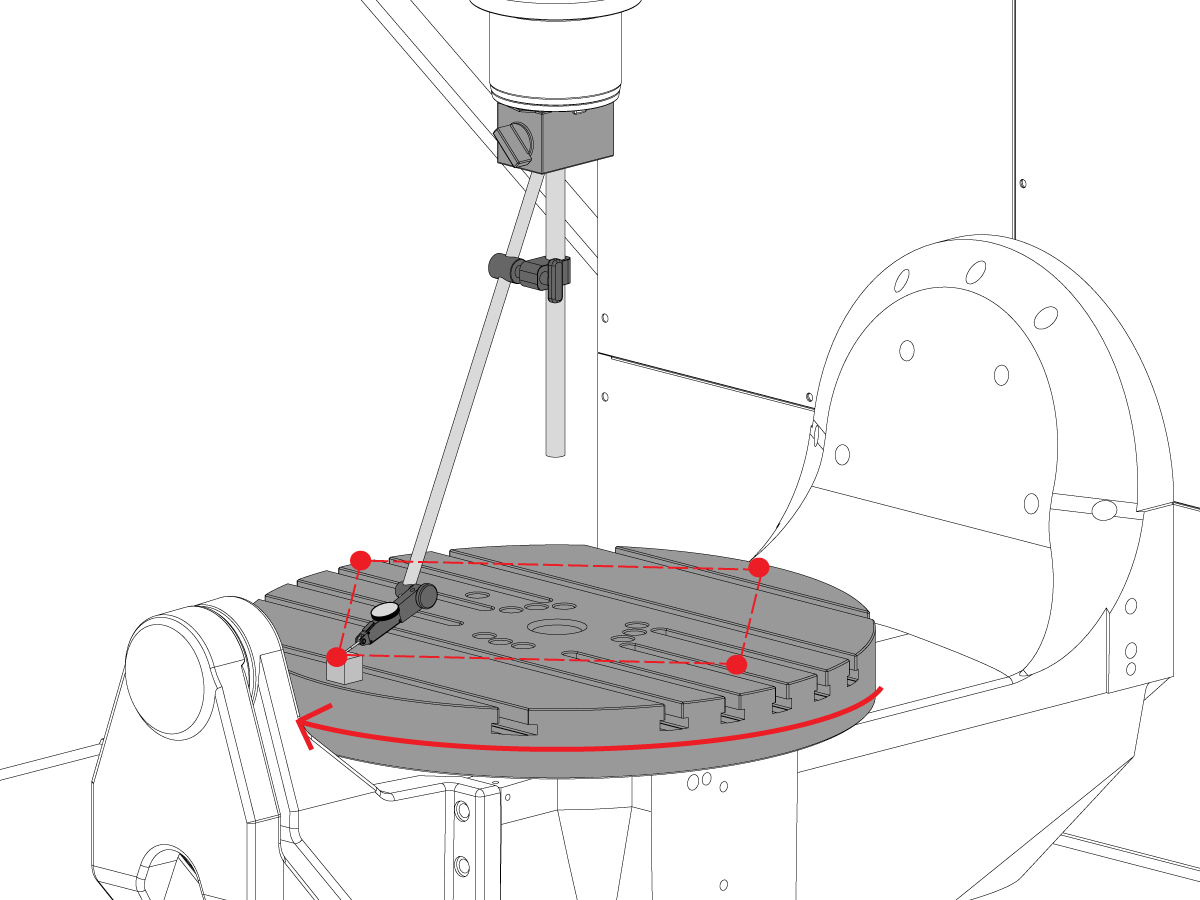
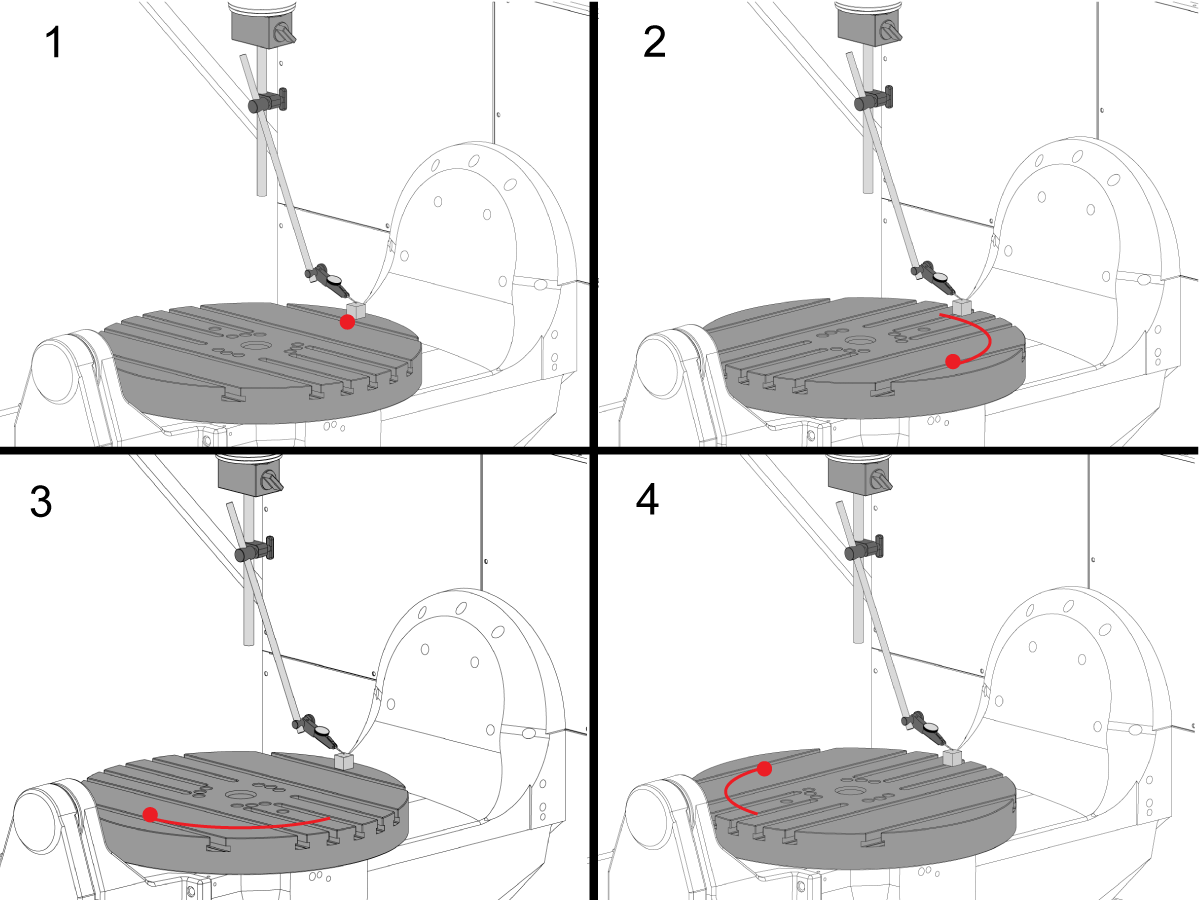
Perpendicularidade do eixo C ao plano XY

  • Reposicione a base magnética no eixo de modo a que não possa rodar com o spindle.
  • Coloque o bloco de precisão na extremidade do prato na posição das 12 horas. 
  • Coloque a ponta do indicador no bloco de medição nesta posição.
  • Rodar o eixo C  90° 
  • Em seguida, coloque o eixo no eixo X e Y para seguir o bloco de parto e medir a medição do mesmo ponto no prato. Não deve ocorrer rotação do eixo
  • Repita este passo mais 2 vezes para um total de 4 posições, 90° de distância, na extremidade da palete, conforme ilustrado. 
  • A diferença entre as medições da posição das 12 e 6 horas determina o nivelamento ao longo do eixo X (NTE 0,0005")
  • A diferença entre as posições das 3 e 9 horas determina nivelamento ao longo do eixo Y (NTE 0,0005")

7

Runter

NOTA: O travão do eixo C está desligado para este passo

  • Coloque o bloco de precisão na extremidade do prato na posição das 12 horas. 
  • Coloque a ponta do indicador no bloco de medição nesta posição.
  • Rodar o eixo C  90° mas, mantenha o bloco de parto na posição 12 horas
  • Meça a medição do topo do bloco de medição
  • Repita este passo mais 2 vezes para um total de 4 posições, 90° de distância, na extremidade da palete, conforme ilustrado. 
  • Anote o total indicado para o escoamento. (NTE 0,001")

8

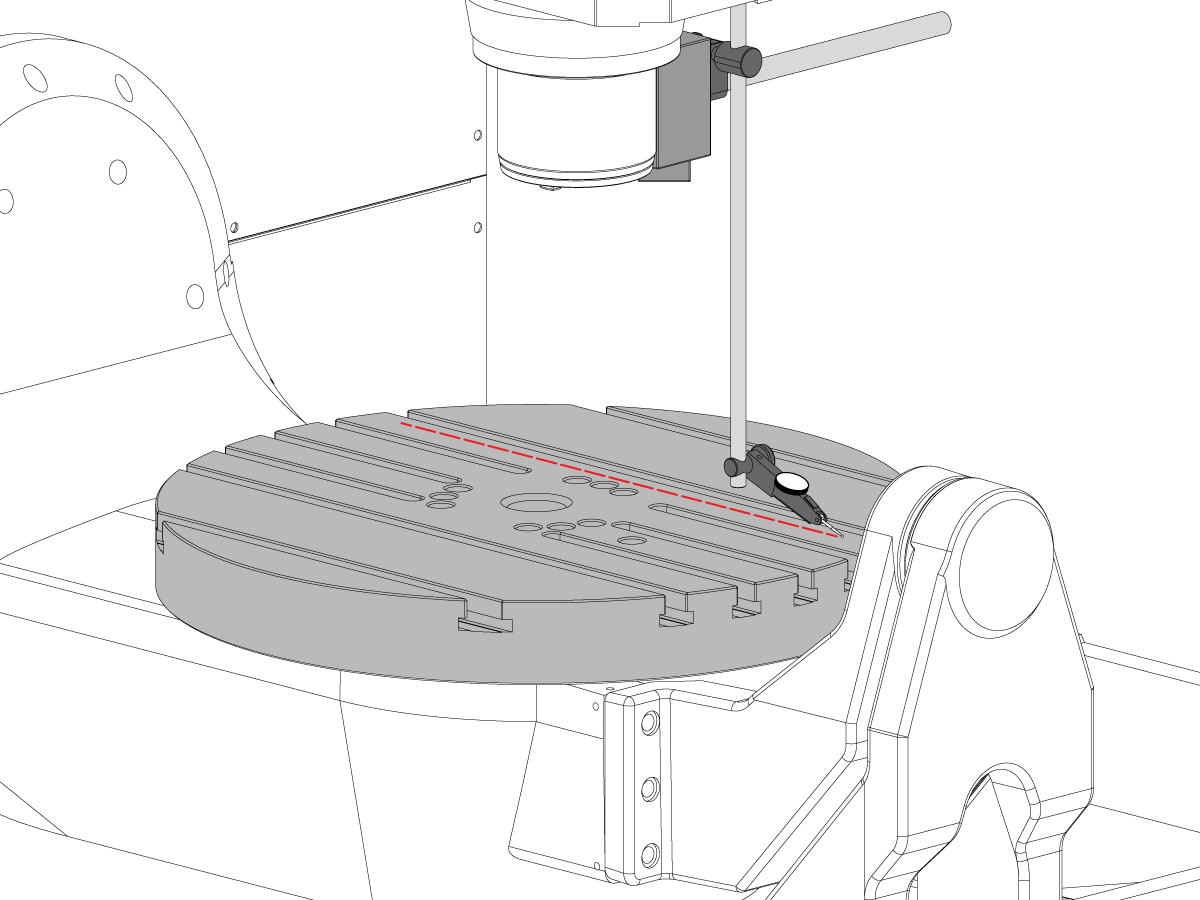
Paralelismo da superfície do platter ao plano XY

  • Zero - Volte o eixo C para que as ranhuras T fiquem paralelas ao eixo X
  • Coloque a ponta do indicador no platão e faça jogging no eixo X ao longo do prato para encontrar o paralelismo em mosaico do eixo X (NTE 0,001” / 10" 0,0015" /15")
  • A próxima jog no eixo “Y” ao longo do prato para encontrar o paralelismo em mosaico do eixo Y (NTE 0,001” / 10" 0,0015" /15")

9

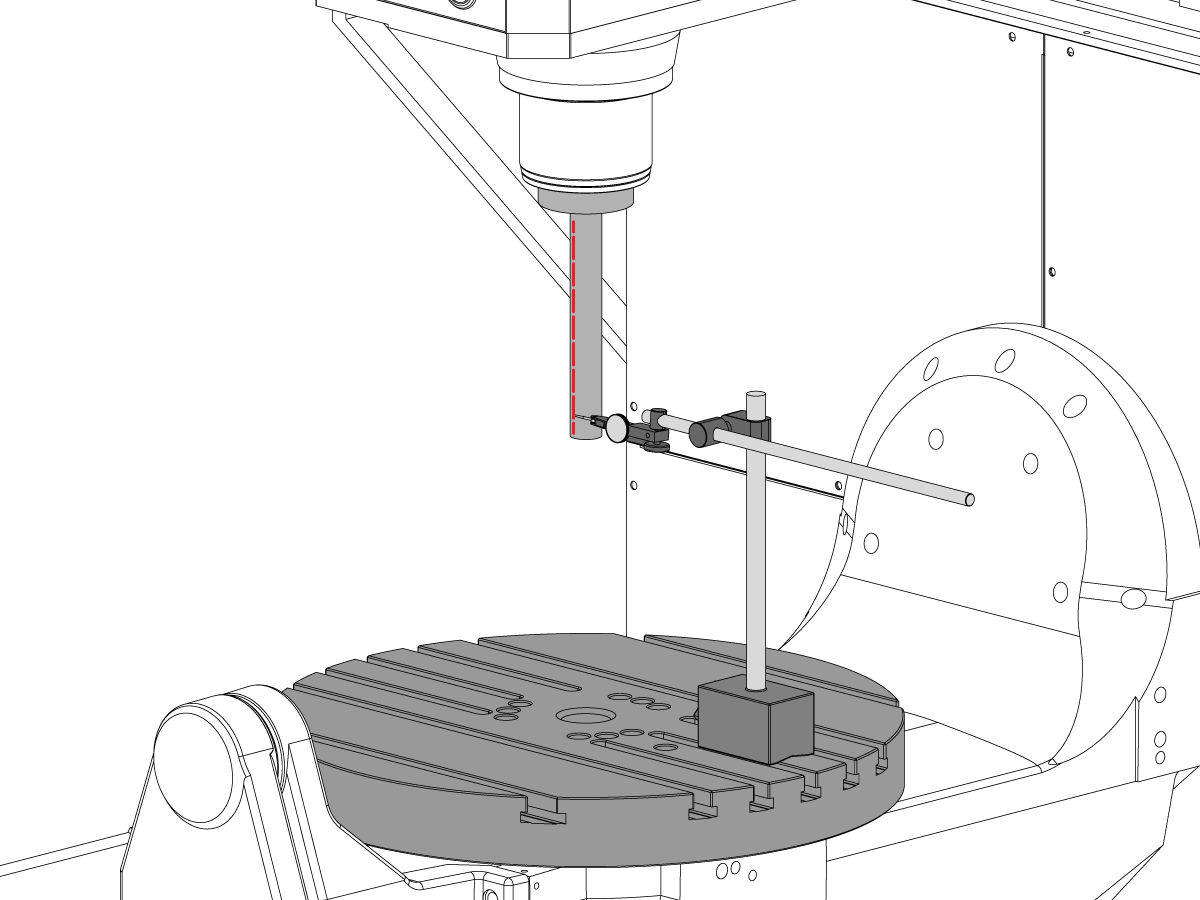
Saída do spindle

  • Centre o eixo sobre o orifício do eixo C.
  • Coloque a base magnética na mesa e insira a barra de teste.
  • Verificar a saída do eixo na base da barra de teste (NTE 0,0005" TIR)
  • Verificar a saída do eixo 6" a partir da base da barra de teste (NTE 0,001" TIR)

10

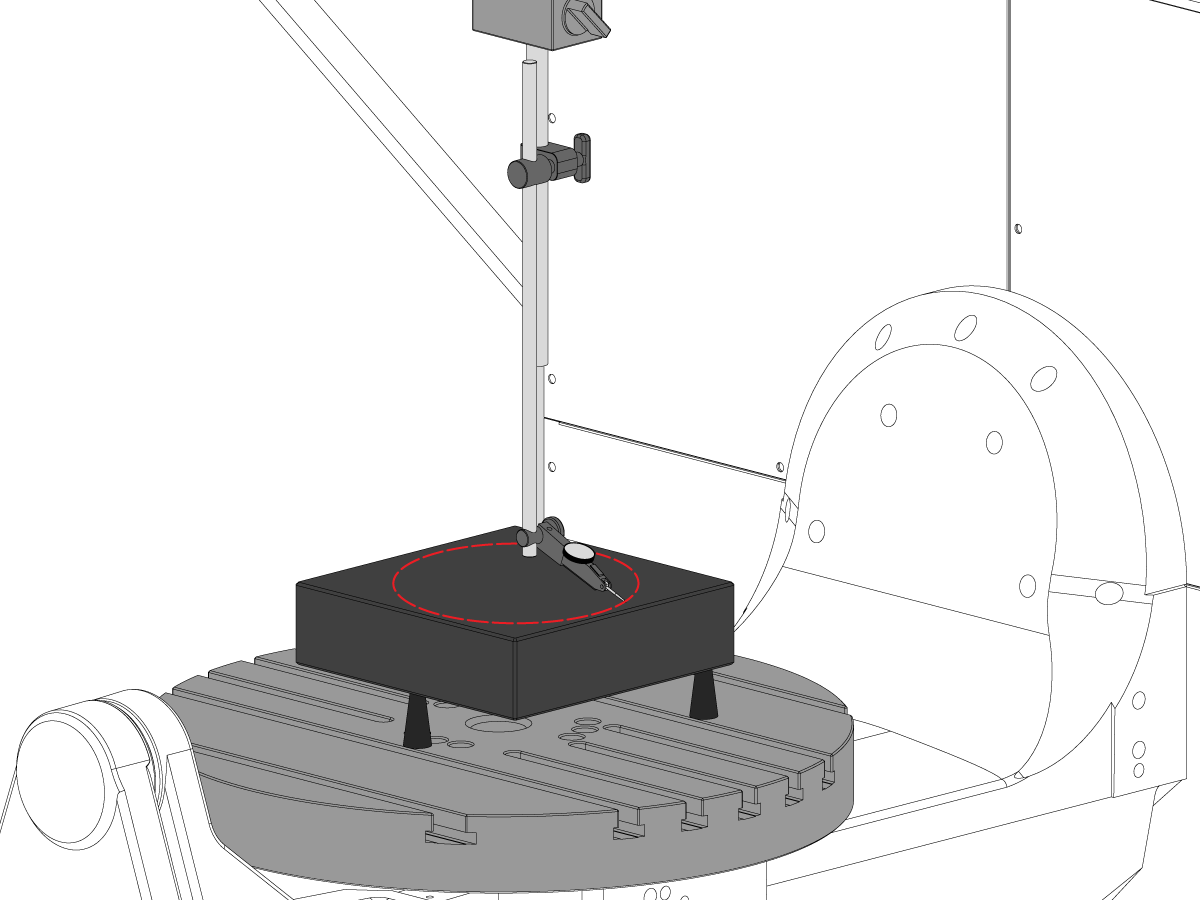
Paralelismo da linha central do spindle ao eixo Z:

  • Utilize os parafusos de colocação para tornar o granito paralelo ao plano XY na orientação mostrada (NTE: 0,0002")
  • Centre o eixo sobre o orifício do prato do eixo C
  • Varrer num 10" círculo de diâmetro
  • Gravar XZ TIR  (NTE 0,0005")
  • Gravar YZ TIR  (NTE 0,0005")

11

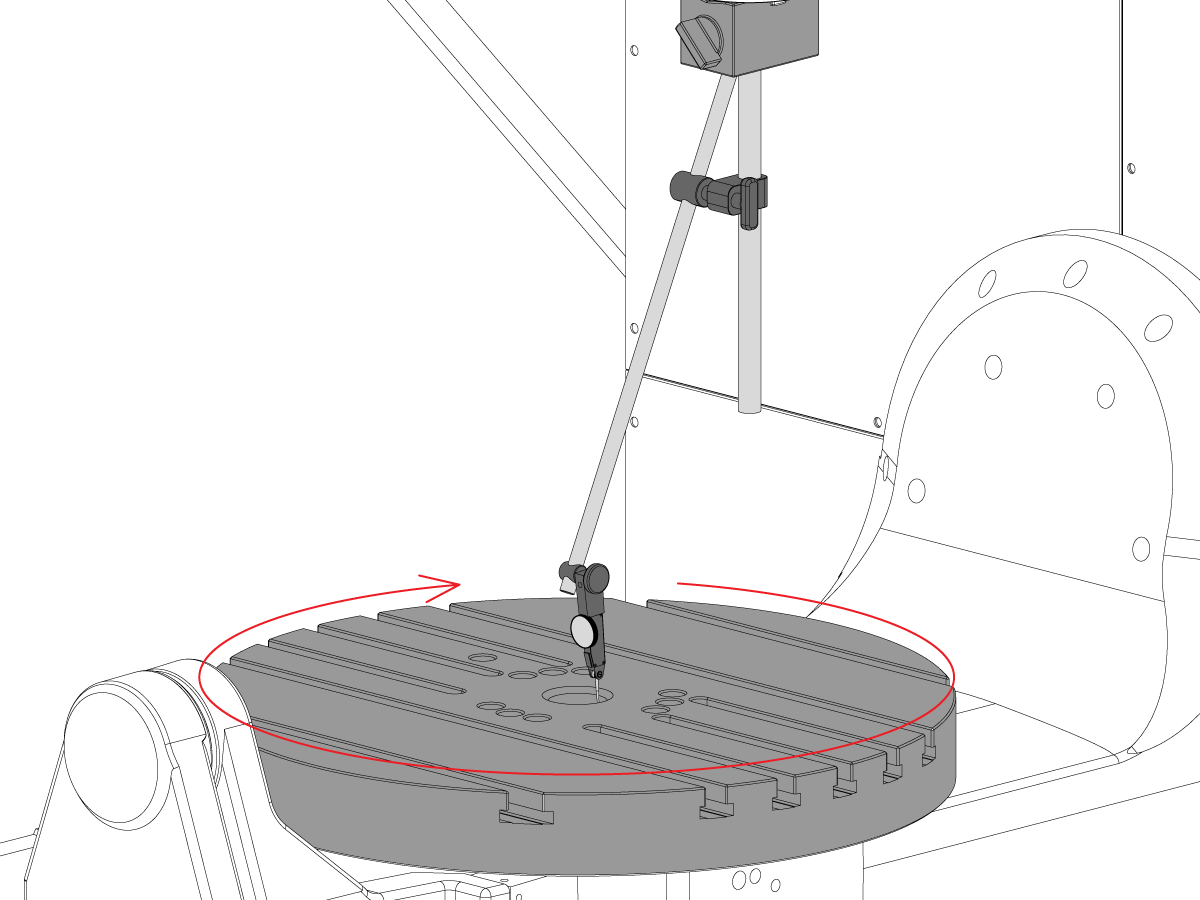
Concentricidade do orifício do eixo C

  • Coloque o indicador como mostrar e jove o eixo C 360°
  • Registo TIR do orifício de precisão (NTE 0,002")

12

Ponto Zero Rotativo da Máquina

  • Utilize o Programa de Macro-Programa VQC e o sistema de sonda para verificar os valores para os parâmetros Coldfire ou as definições NGC mostradas abaixo:
    • 255 - DESVIO X MRZP
    • 256 - DESVIO Y MRZP
    • 257 - DESVIO Z MRZP
    • 254 - DISTANCIA AO CENTRO DA ROTATIVA DE 5 EIXOS
  • Para obter uma instrução MRZP completa, consulte o Haas Definição de desvio MRZP WIPS procedure

8.3 Geometria - Resolução de problemas

Recently Updated

UMC - Geometria - Guia de resolução de problemas


TG0151

Perspectiva geral

Antes de solucionar um problema de precisão ou geometria UMC-750, a tecnologia deve ter uma compreensão completa dos seguintes fundamentos:

  • Como nivelar e alinhar os veios giratórios do UMC
  • Como realinhar todos os veios da máquina
  • Como executar a calibração de mrzp e um compreensão minucioso do que os parâmetros associados são, e seu efeito na máquina
  • Uma compreensão das capacidades da exatidão das máquinas e a habilidade de raciocinar embora os problemas geométricos
  • Alinhamento de interseção de veio B a C

Um problema com a geometria ou precisão da máquina UMC-750 precisa ser abordado sistematicamente e na sequência apropriada. As informações a seguir devem ser cumpridas estritamente e seguidas em ordem sequencial.

É absolutamente crítico que antes de qualquer avaliação ou ajuste é feita para a geometria da máquina que a máquina foi verificada para o nível adequado e alinhamento dos veios rotativos para a máquina

Muitos erros podem ser atribuídos a máquina sofrendo um acidente ou problemas com aplicações de ferramentas ou problemas de programação. Não tente alterar a geometria da máquina com a verificação completa do nível geral e da geometria das máquinas pelo relatório de inspeção. Isso inclui verificar a Machine Rotary Zero Point (MRZP).

No caso de um acidente há 4 juntas deslizantes na máquina. Estas áreas são a cabeça do spindle à RAM, a RAM à sela, a sela à ponte, e o munhão ao suporte do munhão.

 Nota: nenhumas destas junções devem nunca ser shimmed. Um travamento de máquina nunca deve alterar a quantidade de calços exigida na máquina das configurações de fábrica.

É importante lembrar a exatidão linear da máquina é 0.0004/10" e a precisão angular é +/-15 arco. Segundo. Estas tolerâncias podem somar rapidamente.

Todos os esforços devem ser esgotados para determinar se a aplicação de usinagem é razoável e dentro da máquina, fixturing, e capacidade de ferramentais.

Avalie a condição da máquina

Determine se a máquina foi travou previamente. Reveja o histórico de alarme; procure danos físicos no metal de folha, mesa, spindlehead, etc. Não importa como "Menor" o acidente foi, ele vai afetar a geometria da máquina. Se a máquina foi travou uma inspeção completa da geometria das máquinas precisa de ser executada

Jumentos a condição geral da peça de fixação e a condição das ferramentas de corte.

Obtenha backup completo da máquina e relatório de erros.

Verificar o nível e a geometria da máquina

Verifique se a máquina está nivelada e o veio rotativo está alinhado com a máquina

 Nota: Não tente fazer quaisquer ajustes na geometria da máquina, além de ajustar os pés de nível neste momento.

Se a máquina estiver fora de nível ou o Rotary não estiver alinhado, redefina o nível e o alinhamento rotativo.

Execute a inspeção de geometria completa observando a magnitude e a direção de quaisquer erros para cada veio.

Analise o relatório de inspeção.

Se qualquer uma das seções do relatório de inspeção estiver fora de tolerância, a máquina precisa ser realinhada.

Rever aplicação

Reúna as seguintes informações sobre a peça, o workholding e as ferramentas:

  • Quais recursos estão fora de tolerância, magnitude, direção do erro
  • A peça é usinada usando 5 veios, 3 + 2 veios ou 3 veios?
  • Revise a parte e a abordagem de usinagem
  • Pode algum dos erros da exatidão da parte ser minimizado mudando a aproximação fazendo à máquina?
  • O problema é um problema de repetibilidade, um problema de tamanho ou um problema geométrico?
  • O programa usa TCPC ou DWO?
  • Existem valores nas tabelas de remuneração?

8.4 Aplicações - Resolução de problemas

Recently Updated

UMC - Aplicações - Guia de resolução de problemas


TG0150

Como aceder

Consulte UMC - Aplicações - Guia de resolução de problemas:

Siga esta ligação Documentos e software | HBC

ou

Inicie sessão em HBC.HAASCNC.COM

NOTA: Apenas os técnicos de assistência certificados da Haas podem iniciar sessão nestes sites. 

Selecione o separador Serviço.

Em Utilitários, selecione Documentos e Software.

Selecione a pasta Aplicações.

8.5 UMC-750 - Verificação do kit de lâmina

Recently Updated

UMC-750 - Lista de verificação do kit de lâmina


AD0131

Introdução

Esta é a lista de verificação do kit de lâmina para o seguinte kit:

  • 93-2236 KIT DE LAMINA PARA UMC-750

Lista de verificação: Lâmina-Espaçamento-Coluna

.02100 0.2105 .02110 0.2115 0.2120 0.2125 0.2130 0.2135 0.2140 0.2145 0.2150 0.2155 0.2160 0.2165 0.2170 0.2175 0.2180 0.2185 0.2190 0.2195 0.2200
Espessura Nº da peça Quantidade no kit USADO
20-9358A 2  
20-9359A 2  
20-9383A 2  
20-9365A 2  
20-9384A 2  
20-9385A 2  
20-9368A 2  
20-9369A 2  
20-9386A 2  
20-9371A 2  
20-9372A 2  
20-9387A 2  
20-9374A 2  
20-9375A 2  
20-9376A 2  
20-9377A 2  
20-9378A 2  
20-9379A 2  
20-9380A 2  
20-9381A 2  
20-9382A 2  

Nota: Apenas proprietários de kits: Quando encomendar substituições, especifique a espessura da lâmina. Por exemplo, 20-9382 0.2145

Lista de verificação: Lâmina em ferradura

0.0010 0.0020 0.0030
Espessura Nº da peça Quantidade no kit USADO
59-0240 2  
59-0241 2  
59-0242 2  

Lista de verificação: Lâmina-Espaçador-Coluna-Grande

0.2130 0.2135 0.2140 0.2145 0.2150 0.2155 0.2160 0.2165 0.2170 0.2175 0.2180 0.2185 0.2190 0.2195 0.2200 0.2205 0.2210 0.2215 0.2220 0.2225 0.2230
Espessura Nº da peça Quantidade no kit USADO
20-6282A 2  
20-6283A 2  
20-6284A 2  
20-6285A 2  
20-6286A 2  
20-6287A 2  
20-6288A 2  
20-6289A 2  
20-6290A
2  
20-6291A 2  
20-6294A 2  
20-6295A 2  
20-6292A 2  
20-6293A 2  
20-6296A 2  
20-6297A 2  
20-6277A 2  
20-6279A 2  
20-6278A 2  
20-6298A 2  
20-6281A 2  

Nota: Apenas proprietários de kits: Quando encomendar substituições, especifique a espessura da lâmina. Por exemplo, 20-6290A 0,2080

REGISTRO QUAIS SHIMS FORAM REMOVIDOS DO KIT NA COLUNA USADA.

DEVOLVA A LISTA DE VERIFICAÇÃO COM O KIT DE LÂMINA.

DEVOLVA OS SHIMS ORIGINAIS NA CAIXA.

8.6 Interseção do eixo B/C - Alinhamento

Introdução

Este procedimento mostra como medir e alinhar a interseção dos eixos B e C.  Antes de tentar este procedimento Verifique se a máquina está nivelada por UMC-750 nivelamento.

Você precisará alinhar os eixos B e C depois que você quer:

  • Substitua os eixos B e C
  • ou complete um Inspeção UMC relatório e encontrar um problema

A distância do Rotary Center de 5 eixos define a diferença entre os centros rotativos de torneamento: C-Axis Machine Rotory zero Point (MRZP) e o veio B MRZP no veio X.

É possível que não haja diferença entre o veio C e o veio B MRZP.

  • Controlador Haas Clássico (CHC): Parâmetro 1314 - Rotary Axes Center Deviation in X
  • Controlo de Próxima Geração Configuração 254. 5 Axis Rotary Center Distance

Você vai precisar das seguintes ferramentas:

  • T-2195A UMC Aligment Bar Adapter
  • T-2113 Alignment bar
  • Pistola de calor e luvas resistentes ao calor

Veio B para alinhamento de eixos XYZ

How to identify the Multi-Piece and the Unibody trunnion   

1) Multi-Piece trunnion:    UMC machines built approximetely before 11/2022 will have this configuration.

2) Unibody trunnion:    UMC machines built approximetely after 11/2022 will have this configuration.

1

Remove the A-frame trunnion support:

Remove the bolts [1] that secure the A-frame trunnion support [2] to the base and take out the shims between A-frame support and the base.

Rotate the A-frame support [2] counter-clockwise to clear the edge of the base [3].

Pull the A-frame support off the bearings.

 Note: The A-frame support might vacuum lock on the bearings. Use the zip-tie to pry the seal [4] open.

 Caution: To lift the trunnion support, get the aid of another person. The support weighs 85 lbs (39 kg).

2

Measure the B- axis of rotation parallelism to the Y-Z plane:

For a machine with a Classic Haas Control, change Parameter 151:20 (B axis CHK TRAVL LIM) to 0.

For a machine with a Next Generation Control, change Parameter 6.021 (B axis CHK TRAVL LIM) to FALSE.

Measure the parallelism of the platter to the Y-Z plane with the B axis at 90° and then the B axis at -90° as shown in the picture.

Position the Y-Axis in the following starting position:

UMC-500: Y=0, Sweep 15”, 3rd T-Slot Land from the top.

UMC-750/1500-Duo: Y=-1.0, Sweep 18", 3rd T-Slot Land from the Top .

UMC-1250: Y=-1.0, Sweep 28", 3rd T-Slot Land from the Top.

UMC-500PP: Y=-4.0, Sweep 7".

UMC-750PP: Y=-2”, Sweep 15".

UMC-1000PP: Y=-4”, Sweep 15".

Compare the results at B 90° and B-90°. The results should be...

  • Symmetric against the Y-Z plane, positive or negative direction
  • Less than 0.0010"/20"

If the results are symmetric against Y-Z plane, and are less than 0.0010"/20 inches: Go to Step 5.

If the results are symmetric against Y-Z plane, but are more than 0.0010"/20 inches: Go to Step 4.

 Warning: If the results [3] are not symmetric against the Y-Z plane, the B axis rotary needs to be aligned: Go to Step 3.

3

Align the B axis of rotation parallel to the Y-Z plane:

Loosen the (6) bolts [1] that secure the B axis rotary to the base casting.

 Note: Keep the bolts sufficiently snug to control the adjustments.

Adjust the front and rear setscrews [2] until the measurements taken in Step 2 are symmetric against the Y-Z plane.

Torque the (6) bolts [1]. Refer to Haas Fastener Torque Specification.

Verify the measurements in Step 2 after the bolts have been torqued.

4

Align the C Axis of rotation perpendicular to the B Axis of rotation:

Remove the bottom C-Axis access cover.

Loosen the (12) bolts [1] that hold the C Axis body to the B Axis platter face.

Reach the bottom (4) bolts through the C Axis access port.

If the B Axis is symmetric in the positive direction [4], install horseshoe shims [2] of appropriate size behind the top (2) bolts.

If the B Axis is symmetric in the negative direction [5], install horseshoe shims [2] of appropriate size behind the bottom (2) bolts.

Torque the (12) bolts to 80 Ft-lbs (108 Nm).

Cut the excessive shim material off.

Verify the measurements in Step 2 after bolts are torqued.

5

Align the trunnion support shaft co-axial with the B Axis of rotation:

Setup (2) indicators on the outer race of the trunnion support bearing [2] as shown in the picture.

Mark the spot on the outer race where one of the indicator needles is contacting the surface.

After moving the B Axis to 90° or -90° you will align the marked spot with the needle again to exclude the bearing runout error from the measurements.

Take the readings when B is at 90° and B at -90°. Compare the readings. 

 Caution: The B axis brake needs to be clamped when taking the readings.

The deviation between the results when B is at 90° and at -90° needs to be less than 0.001" on each indicator.

 Note: The indicator on the side of the bearing will measure top to bottom alignment and the indicator on the top of the bearing will measure side to side alignment.

____

For models with a multi-piece trunnion

Loosen the (6) bolts [3] on the C Axis body support. Keep the bolts sufficiently snug to control adjustment.

Adjust the (8) set screws [4] until deviation between B at 90° and B at -90° is within 0.001".

Torque the (6) bolts [2] on the C Axis body support to 80 Ft-lbs (108 Nm).

Verify the alignment after the bolts have been torqued.

____

For models with a unibody trunnion

Jog rotary to B90. Set up an indicator on the highlighted surface as shown in the lower diagram .

Rotate B-axis 180 degrees (90 to -90).

Run out (NTE 0.010” TIR).

 Caution: If the measurement exceeds the tolerance then contact support.

6

Install and shim the A-frame trunnion support:

Move the B Axis to 90°.

Setup an indicator [1] against a machined surface of the C Axis body. Set the indicator to 0.

Use plastic zip ties [2] to pry the seal open while installing the A-frame support. This lets unwanted air and grease out of the assembly.

Install the A-frame trunnion support [3] over the bearings.

Remove the cable ties.

Turn the trunnion support clockwise until it is vertical.

 Note: The weight of the A-frame support will cause the trunnion to sag. The amount of sag is measured with the indicator that was previously setup on the side of the C Axis body.

____

For multi-piece trunnions

Adjust the shims [4] between the A-frame support and the base casting to remove the sag until indicator reads 0 again.

When the indicator reading is 0, torque the (4) bolts. Refer to Haas Fastener Torque Specification.

Verify the reading after bolts are torqued. Adjust the shims again if necessary until the indicator reads 0.

____

For models with unibody trunnion

Determine the amount of shim stock [4] needed to raise the Trunnion arm so the indicator reads 0.005".

The indicator [1] value will change once the support is torqued.

With indicator still in place:

  • Torque trunnion support bolts to appropriate values.
  • Check indicator to make sure it reads between the range of

Trunnion arm raised (0.005” to  0.010”).

 Note: For unibody trunnions, the shim location may also be used to correct the C-axis to X-Y plane perpendicularity instead of shimming the saddle trucks.

 Caution: Use equal amount of shims on each side of the A-frame support. Unequal shims will cause the A-frame support to pull the trunnion to the side.

Verify the B Axis of rotation alignment to the Y-Z plane (Step 2). Loosen the bolts and tap the A-frame support side to side if necessary to correct the B axis to Y-Z plane alignment.

7

Set C-axis perpendicular to X/Y plane:

Move the axes to

UMC-750's........X= -10.5" & Y=0."

UMC-1000's......X=-17.0" & Y=-0."

Zero an indicator [1], on a Ground Block [2], 1/2" off the edge at the rear of the platter (Mag-Base on Spindle), with C at 0 Degrees

Rotate C-Axis to 180°.

Move Y axis, and ground block, in Y Axis negative direction until you are 1/2" away from platter edge, and take the perpendicularity measurement

Adjust the shims until the average error is within 0.0005" end to end.

 Note: For unibody trunnions, the shim location under the bearing support may also be used to correct the C-axis to X-Y plane perpendicularity instead of shimming the saddle truck.

Caution: Shim either two front trucks or two rear trucks with the equal shim.

Note: Shim one truck at the time to maintain the X to Y squareness.

Verify the measurements after all bolts are torqued.

Verify the X to Y alignment in Step 2.

8

Set the tool change offsets:

B-axis tool change offset [1]

For Classic Haas Controls, change Parameter 213. 

For Next Generation Controls, go to: Settings>Rotary Tab>Highlight the rotary and press [INSERT], or change Parameter 6.078 (B TOOL CHANGE OFFSET) to set the trunnion (B Axis) parallel to the X Axis.

For models with multipiece trunnion

(NTE 0.001/10"; NTE 0.0020" overall)

For models with unibody trunnion

(NTE 0.0005/10"; NTE 0.0010" overall)

___

C-axis tool change offset [2]

For Classic Haas Controls change Parameter 523.

For Next Generation Control go to: Settings>Rotary Tab> Highlight the rotary and press [INSERT], or change Parameter 7.078 (C TOOL CHANGE OFFSET) to set the table T-slot (C Axis) parallel to the X Axis

For models with multipiece trunnion

(NTE 0.001/10"; NTE 0.0020" overall)

For models with unibody trunnion

(NTE 0.0005/10"; NTE 0.0010" overall)

9

Check C-axis perpendicularity to X/Y plane:

Align the indicator centered over the C-axis bore with the Y-axis at -10.

Jog positive in the Y-axis and align the indicator over the center of the last section of the platter and make a mark at this spot with a washable marker.

Insert 1-2-3 block as shown and set the indicator to zero.

Remove the block and rotate the platter 90 degrees, following the marked spot with the indicator.

Insert block back between the indicator and platter. Note reading.

Repeat the previous two steps, taking readings with the platter at 180, 270 and 360 degrees.

Multi-piece trunnion:  (NTE 0.0005")

Unibody trunnion: (NTE 0.001")

10

Measure the intersection of the B and C axis:

Follow the linked instruction manual to complete this step.

B-Axis and C-Axis intersection Adjustment

11

Align the B-Axis brake disk:

 Note: Do not do this step if you are working on a SS machine.

Operate this code in MDI mode to unclamp the brake:

M11;

Loosen all of the brake disc bolts [1] and torque them to 5 Ft-lbs (7 Nm).

Operate this code in MDI mode to clamp the brake:

M10;

Wait 10 seconds.

Torque the bolts. Refer to Haas Fastener Torque Specifications.

Veio B para configuração da ferramenta de intersecção do veio C

1

Install the B Axis and C Axis intersection tool:

Jog the C Axis to 0°.

Push [EMERGENCY STOP].

Clean the table.

Guide the shaft of the adapter [1] while you slowly lower it into the center bore.

Attach the adapter to the table with (2) screws [4] and (2) T-nuts.

Attach the alignment bar [2] to the adapter with (3) screws [3].

Snug the (3) screws to allow for adjustments in the next step.

2

Align the B/C intersection tool with the C Axis:

Put an indicator on the front side of the alignment bar near the base.

Release the [EMERGENCY STOP]. Push [RESET] to clear any alarms.

Jog across the tool in the X Axis to find the high spot.

Set the indicator to 0.

Jog the C Axis 360°.

Lightly tap the base with a rubber mallet to adjust the radial error on the alignment bar.

Note: Adjust the alignment bar to half of the measured error, because you are measuring the diameter error.

Jog the C Axis 360°.

When correctly adjusted the radial error is less than 0.0002" (0.005 mm).

3

Check the B/C intersection:

Center the indicator [1] on the front side of the alignment bar near the top of the cylinder.

Jog across the tool in the X Axis to find the high spot.

Zero the indicator.

Jog the C Axis 360°.

Turn the (3) screws [2] on the alignment bar to adjust the runout.

Jog the C Axis 360°.

When correctly adjusted the radial error is less than 0.0002" (0.005 mm).

Repeat Step 2 and verify the alignment did not change.

Veio B para ajuste de interseção do veio C

1

For a machine with a Classic Haas Control change:

  • Parameter 151:20 (B-axis CHK TRAVL LIM) to 0.
  • Parameter 1314 (ROTARY AXIS CENTER DEVIATION IN X) to 0.

For a machine with a Next Generation Control change:

  • Parameter 6.021 (B-axis CHK TRAVL LIM) to FALSE.
  • Setting 254 (5-Axis Rotary Center Distance) to 0.

Push [ZERO RETURN]. Then push [ALL].

Jog the B-axis to -90°.

Note: The rotary positions are for reference only.

Put an indicator [1] on top of the alignment bar.

Jog in the Y-axis to find the high point.

Set the indicator to 0.

Jog across the alignment bar in the X-axis [2].

Jog the B-axis to adjust the alignment bar parallel to the X plane.

Set the indicator to 0.

Jog the Y-axis to 0.

Caution: Make sure the indicator assembly is clear of the B-axis movement.

 Caution: Do not move the Z-axis.

2

Jog the B-axis to +90°.

 Caution: Make sure the indicator assembly is clear of the B-axis movement.

Jog the Y-axis [1] to find the high point on the alignment bar.

Note: Do not set the indicator to 0.

Jog across the alignment bar in the X-axis.

Jog the B-axis to adjust the alignment bar parallel [2] to the X plane.

When the alignment bar is parallel to the X plane, the indicator reading is the change needed in the Z-Axis (∆Z=indicator reading).

Record the value shown on the indicator. In this example the indicator now shows 0.0015". ∆Z is 0.0015".

3

Do these calculations to get the value for CHC Parameter 1314 or NGC Setting 254. (In this example the difference in readings for the B-C intersection (∆Z) is 0.0015".):

  • ∆Z / 2 x 10,000 = CHC Parameter 1314 / NGC Setting 254
  • 0.0015 / 2 = 0.00075
  • Round down to 4 decimal places: 0.00075 = 0.0007 (NGC Setting 254)
  • 0.0007 x 10,000 = 7 (CHC Parameter 1314)

Set Parameter CHC Parameter 1314 (Rotary Axes Center Deviation in X) or NGC Setting 254 (5-Axis Rotary Center Distance), to the calculated value.

In this example, set parameter CHC Parameter 1314 to 7 or NGC Setting 254 to 0.0007.

Cycle the power to save CHC Parameter 1314 or NGC Setting 254.

Repeat Steps 1-3 to verify that the value for ∆Z is less than 0.0002" (0.005 mm).

4

Jog the B-Axis to the home position.

Set Parameter 151:20 (B-Axis CK Travel Limit) to 1.

Make sure the MRZP offsets are correct.

Calibrate WIPS per Wireless Intuitive Probe System (WIPS) - Calibration.

Complete an inspection report. Refer to UMC-750 Inspection Report.

Recently Viewed Items

You Have No Recently Viewed Items Yet

Feedback
Haas Logo

Preçário de entregas da Haas

Este preço inclui custo de envio, direitos de exportação e importação, seguro e quaisquer outras despesas incorridas durante o envio para um local em França acordado consigo na qualidade de comprador. Nenhum outro custo obrigatório pode ser acrescentado à entrega de um produto Haas CNC.

ACOMPANHE AS DICAS E TECNOLOGIA MAIS RECENTES DA HAAS…

Registe-se já!   

HAAS TOOLING ACEITA O SEGUINTE:

  • Assistência e Suporte
  • Proprietários
  • Pedir assistência
  • Manuais do operador
  • Peças Haas
  • Pedido de reparação do rotativo
  • Guias de Pré-instalação
  • Ferramentas de compras
  • Construção e preço de uma máquina Haas nova
  • Inventário disponível
  • A lista de preços Haas
  • Financiamento CNCA
  • Sobre a Haas
  • Declaração de acessibilidade
  • Declaração DNSH
  • Conformidade de exportação
  • Carreiras
  • Certificações e segurança
  • Contacte-nos
  • Histórico
  • Termos e condições
  • Termos e condições de Haas Tooling
  • Privacidade
  • Garantia
  • Comunidade Haas
  • Programa Haas de Certificação
  • Haas Motorsports
  • Fundação Gene Haas
  • Comunidade de formação técnica Haas
  • Eventos
  • Junte-se à Conversa
  • Facebook
  • X
  • Flickr
  • YouTube
  • LinkedIn
  • Instagram
  • TikTok
© 2026 Haas Automation, Inc – Máquinas-Ferramenta CNC

This site is protected by reCAPTCHA and the Google Privacy Policy and Terms of Service apply.

2800 Sturgis Rd., Oxnard, CA 93030 / Toll Free: 800-331-6746
Phone: 805-278-1800 / Fax: 805-278-2255