MyHaas Benvenuto,
!
Haas Tooling MyHaas/HaasConnect Accedi Registrati Haas Tooling MyHaas/HaasConnect Esci Benvenuto, Le mie macchine Ultima attività Preventivi personali Il mio account I miei utenti Esci
Trova il tuo distributore
  1. Seleziona lingua
    1. English
    2. Deutsch
    3. Español - España
    4. Español - México
    5. Français
    6. Italiano
    7. Português
    8. Český
    9. Dansk
    10. Nederlands
    11. Magyar
    12. Polski
    13. Svenska
    14. Türkçe
    15. 中文
    16. Suomi
    17. Norsk
    18. الإنجليزية
    19. български
    20. Hrvatski
    21. Ελληνικά
    22. Română
    23. Slovenský
    24. Slovenščina
    25. 한국어
    26. 日本語
    27. Українська
  • macchine Menu principale
    • Fresatrici verticali
      Fresatrici verticali
      Fresatrici verticali Visualizza tutto
      • Fresatrici verticali
      • Serie VF
      • Macchine universali
      • Serie VR
      • VP-5 prismatico
      • VMC con cambio pallet
      • Mini Mill
      • Stampi e modellazione
      • Centri di foratura ad alta velocità
      • Serie foratura/maschiatura/fresatura
      • Fresatrici da attrezzeria
      • Pocket Mill
      • Fresatrici compatte
      • Serie a portale mobile
      • Fresatrici per lamiera SR
      • VMC Extra-Large
      • Fresatrici a doppio montante
      • Macchine di posizionamento 3+2
    • Soluzioni multiasse
      Soluzioni multiasse
      Soluzioni multiasse Visualizza tutto
      • Soluzioni multiasse
      • Torni con asse Y
      • Fresatrice a cinque assi
    • Torni
      Torni
      Torni Visualizza tutto
      • Torni
      • Serie ST
      • Doppio mandrino
      • Serie con guide scatolari
      • Torni da attrezzeria
      • Tornio Chucker
      • Tornio tascabile
      • Spingibarra Haas
    • Fresatrici orizzontali
      Fresatrici orizzontali
      Fresatrici orizzontali Visualizza tutto
      • Fresatrici orizzontali
      • Cono 50
      • Cono 40
    • Dispositivi rotanti e indexer
      Dispositivi rotanti e indexer
      Dispositivi rotanti e indexer Visualizza tutto
      • Dispositivi rotanti e indexer
      • Tavole rotanti
      • Indexer
      • Dispositivi rotanti a 5 assi
      • Macchine rotative per lavori di grandi dimensioni
    • Sistemi di automazione
      Sistemi di automazione
      Sistemi di automazione Visualizza tutto
      • Sistemi di automazione
      • Automazione della fresatrice
      • Automazione del tornio
      • Caricatori di pezzi automatici
      • Modelli di automazione
    • Macchine da tavolo
      Macchine da tavolo
      Macchine da tavolo Visualizza tutto
      • Macchine da tavolo
      • Fresatrice da tavolo
      • Tornio da tavolo
      • Simulatore di controllo, Standard
      • Simulatore di controllo, di alta qualità
    • Attrezzatura da officina
      Attrezzatura da officina
      Attrezzatura da officina Visualizza tutto
      • Attrezzatura da officina
      • Fresatrice a mensola
      • Torni manuali Haas
      • Seghe Haas
    • Macchine per la produzione
      Macchine per la produzione
      Macchine per la produzione Visualizza tutto
      • Macchine per la produzione
      • Macchine da taglio laser
      • Freni a pressione CNC
    • COLLEGAMENTI RAPIDI Serie speciali  Serie speciali 
      SERIE EU SERIE EU CONFIGURA & QUOTA | LISTINO PREZZI CONFIGURA & QUOTA | LISTINO PREZZI Macchine in magazzino Macchine in magazzino NOVITÀ NOVITÀ LA TUA PRIMA CNC LA TUA PRIMA CNC
      STRUMENTI DI ACQUISTO
      • Configura e quota una Haas
      • Prezzo di listino
      • Inventario disponibile
      • Finanziamento CNCA
      VUOI PARLARE CON QUALCUNO?

      Un Haas Factory Outlet (HFO) può rispondere alle tue domande e guidarti attraverso le migliori opzioni.

      CONTACT YOUR DISTRIBUTOR >
  • Opzioni Menu principale
    • Product Image Mandrini
      Mandrini
      Mandrini Visualizza tutto
      • Mandrini
    • Product Image Cambi utensile
      Cambi utensile
      Cambi utensile Visualizza tutto
      • Cambi utensile
    • Product Image 4° | 5° Asse
      4° | 5° Asse
      4° | 5° Asse Visualizza tutto
      • 4° | 5° Asse
    • Product Image Torrette ed utensili motorizzati
      Torrette ed utensili motorizzati
      Torrette ed utensili motorizzati Visualizza tutto
      • Torrette ed utensili motorizzati
    • Product Image Indagine tramite sonda
      Indagine tramite sonda
      Indagine tramite sonda Visualizza tutto
      • Indagine tramite sonda
    • Gestione di trucioli e refrigerante Haas Gestione di trucioli e refrigerante
      Gestione di trucioli e refrigerante
      Gestione di trucioli e refrigerante Visualizza tutto
      • Gestione di trucioli e refrigerante
    • Il controllo Haas Il controllo Haas
      Il controllo Haas
      Il controllo Haas Visualizza tutto
      • Il controllo Haas
    • Product Image Opzioni di prodotto
      Opzioni di prodotto
      Opzioni di prodotto Visualizza tutto
      • Opzioni di prodotto
    • Product Image Utensileria e fissaggio dei pezzi
      Utensileria e fissaggio dei pezzi
      Utensileria e fissaggio dei pezzi Visualizza tutto
      • Utensileria e fissaggio dei pezzi
    • Product Image Serraggio dei pezzi
      Serraggio dei pezzi
      Serraggio dei pezzi Visualizza tutto
      • Serraggio dei pezzi
    • Product Image Soluzioni a 5 assi
      Soluzioni a 5 assi
      Soluzioni a 5 assi Visualizza tutto
      • Soluzioni a 5 assi
      • 5 Easy Steps to 5-Axis
    • Product Image Automazione
      Automazione
      Automazione Visualizza tutto
      • Automazione
    • COLLEGAMENTI RAPIDI Serie speciali  Serie speciali 
      SERIE EU SERIE EU CONFIGURA & QUOTA | LISTINO PREZZI CONFIGURA & QUOTA | LISTINO PREZZI Macchine in magazzino Macchine in magazzino NOVITÀ NOVITÀ LA TUA PRIMA CNC LA TUA PRIMA CNC
      STRUMENTI DI ACQUISTO
      • Configura e quota una Haas
      • Prezzo di listino
      • Inventario disponibile
      • Finanziamento CNCA
      VUOI PARLARE CON QUALCUNO?

      Un Haas Factory Outlet (HFO) può rispondere alle tue domande e guidarti attraverso le migliori opzioni.

      CONTACT YOUR DISTRIBUTOR >
  • Why Haas Menu principale
      Scopri la differenza di Haas
    • Perché Haas
    • MyHaas
    • Comunità di formazione
    • Industria 4.0
    • Certificazione Haas
    • Testimonianze dei clienti
  • Assistenza Menu principale
      Benvenuti a Haas Service
      PAGINA INIZIALE ASSISTENZA Manuali dell'operatore Procedure d’uso Guide alla risoluzione dei problemi Manutenzione preventiva Pezzi di ricambio Haas Haas Tooling Video
  • Video Menu principale
  • Utensili Haas Menu principale
MyHaas Benvenuto,
!
Haas Tooling MyHaas/HaasConnect Accedi Registrati Haas Tooling MyHaas/HaasConnect Esci Benvenuto, Le mie macchine Ultima attività Preventivi personali Il mio account I miei utenti Esci
Trova il tuo distributore
  1. Seleziona lingua
    1. English
    2. Deutsch
    3. Español - España
    4. Español - México
    5. Français
    6. Italiano
    7. Português
    8. Český
    9. Dansk
    10. Nederlands
    11. Magyar
    12. Polski
    13. Svenska
    14. Türkçe
    15. 中文
    16. Suomi
    17. Norsk
    18. الإنجليزية
    19. български
    20. Hrvatski
    21. Ελληνικά
    22. Română
    23. Slovenský
    24. Slovenščina
    25. 한국어
    26. 日本語
    27. Українська
×

Risultati di ricerca

Web Pages

Immagini

    • <
    • 1
    • >

8 - UMC - Geometry and Alignment

Serie UMC - Manuale di assistenza


  • UMC - Mandrino
  • 1 - UMC - Introduzione
  • 2 - UMC - Specifiche
  • 3 - UMC-400/500/750 - Installazione
  • 4 - UMC-1000/1250 - Installazione
  • 5 - UMC-1500-DUO/1600-H - Installazione
  • 6 - UMC - Ancoraggio
  • 7 - UMC - Funzionamento
  • 8 - UMC - Geometria e allineamento
  • 9 - UMC - MRZP e zone sicure
  • 10 - UMC - B/C - Asse rotante
  • 11 - UMC - Cambio utensile
  • 12 - UMC - Rimozione trucioli e refrigerante
  • 13 - UMC - Quadro di controllo elettrico
  • 14 - UMC - Lubricazione
  • 15 - UMC - Manutenzione
  • 16 - UMC - Pallet Pool
  • 17 - UMC - Serraggio dei pezzi idraulico
  • 18 - UMC - Serraggio dei pezzi pneumatico

Go To :

  • 8.1 Guida alla geometria
  • 8.2 Zone di indicazione dell’allineamento UMC
  • 8.3 Geometria - Risoluzione dei problemi
  • 8.4 Applicazioni - Risoluzione dei problemi
  • 8.5 UMC-750 - Lista di controllo kit spessori
  • 8.6 Intersezione asse B/C - Allineamento

8.1 Guida alla geometria

Recently Updated

"Guida alla geometria" - Serie UMC


Introduzione

    Mandrino
  1. Ariete
  2. Carrello
  3. Ponte
  4. Base
  5. Rotary dell'asse C
  6. Elemento rotante dell'asse B

Prima di iniziare registrare il valore impostato in fabbrica per il parametro o l'impostazione riportata di seguito. Sarà necessario impostare questo valore su zero durante le regolazioni, quindi reimpostarlo sul valore originale al termine. Il valore potrebbe essere positivo o negativo.

  • Controllo Classico Haas (CHC) Parametro 1314 (Rotary Axes Center Deviation in X)
  • Controllo di nuova generazione (NGC) Impostazione 254 (5 Axis Rotary Center Distance)

Strumenti e kit necessari:

  • T-2193A - UMC-750 SPINDLE HEAD ALIGNMENT PIN *
  • T-2181 - CNC DUAL LEVELING TOOL
  • T-2192 - LEVELING ADAPTER UMC-750
  • 93-2236 - SHIM KIT FOR UMC-750 *

Clicca sul link per vedere il  Livellamento e allineamento UMC-750 videocassetta.

*  : Utilizzato solo sulla serie pre-riavvio. 

Livella la macchina

1

Impostare l'altezza della macchina:

Spostare gli assi X e Y nella posizione iniziale.

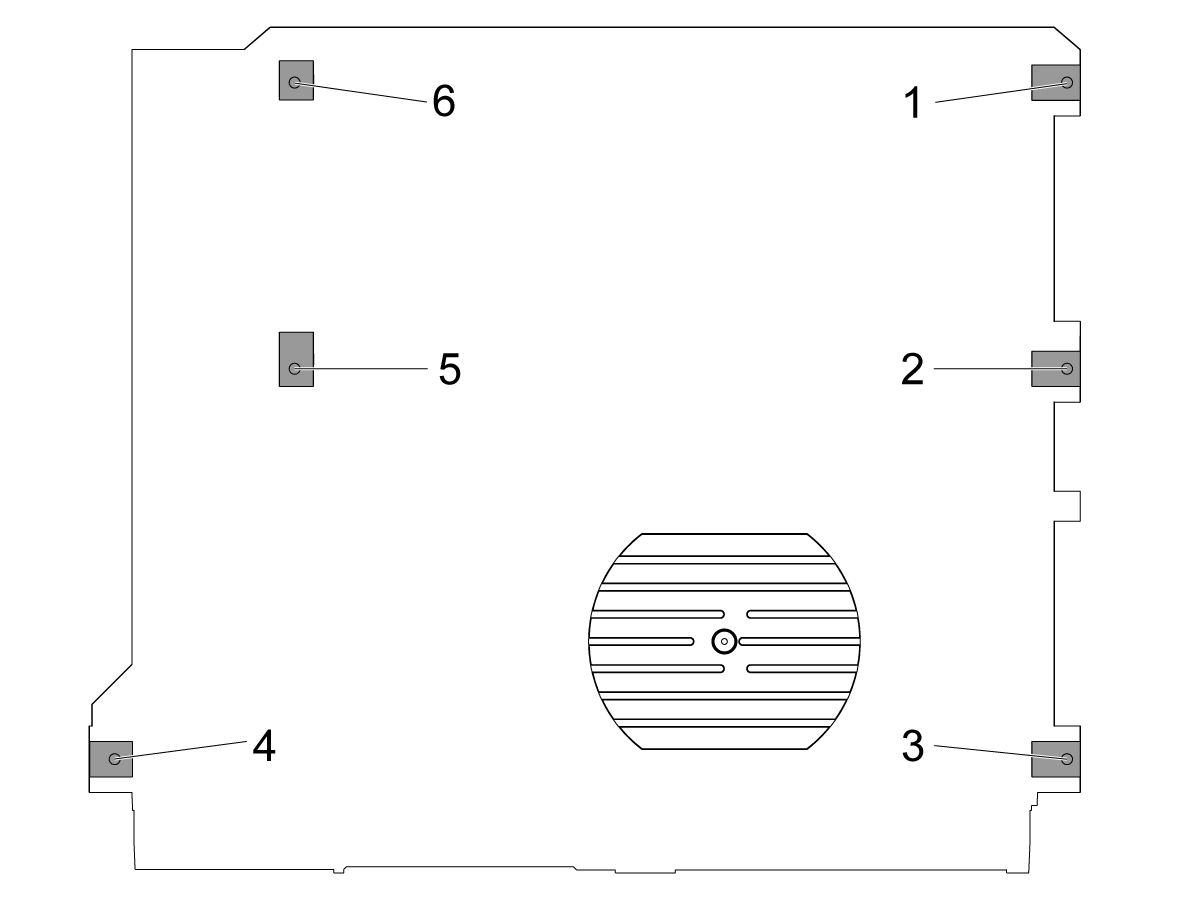
Allentare le viti di livellamento medio [2 e 5] in modo che non supportino alcun peso.

Impostare la macchina su 4 viti di livellamento ad angolo da 3" (76,2 mm) sopra il pavimento.

2

Livello ruvido della macchina:

Girare la vite di livellamento #4.

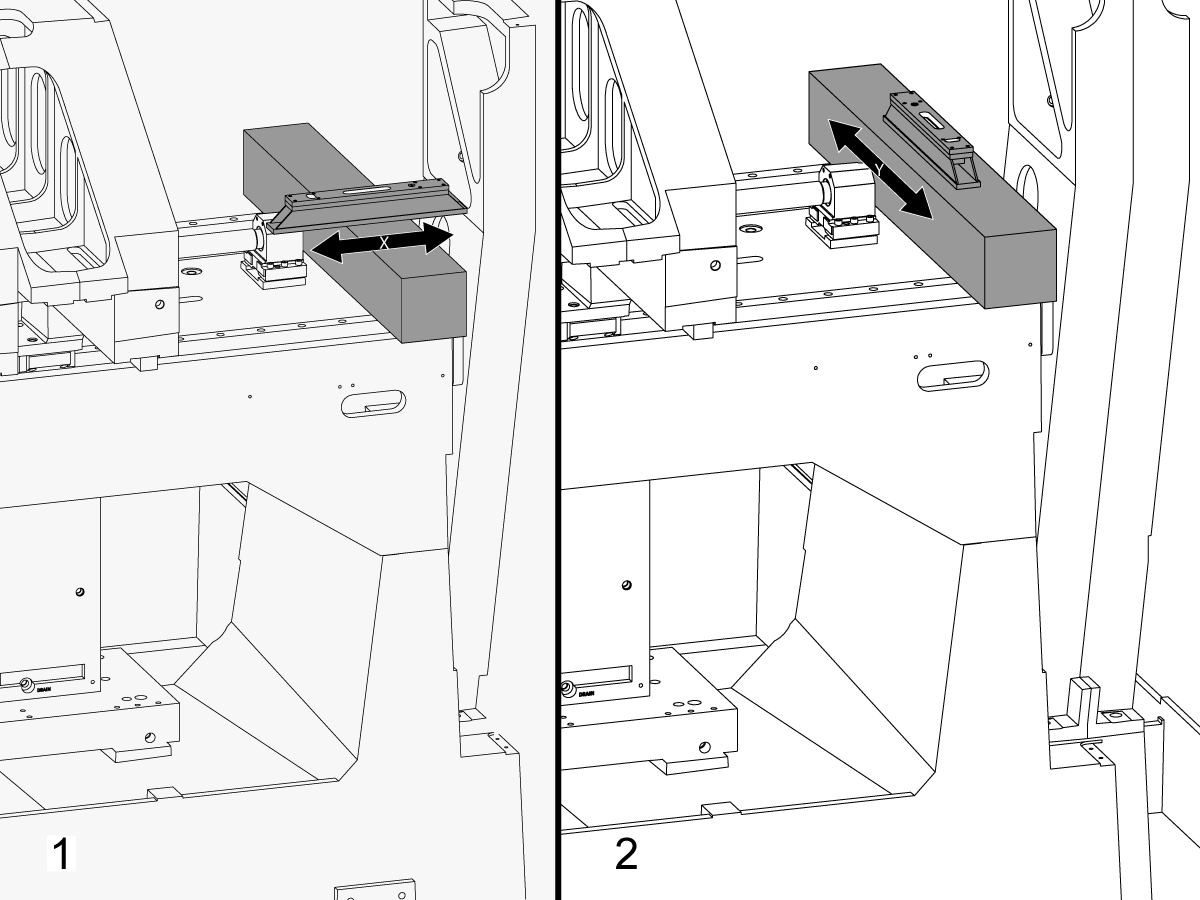
Posizionare il granito attraverso le guide lineari dell'asse X vicino al supporto del supporto del supporto del supporto del supporto del supporto del supporto del supporto del supporto del supporto del supporto del supporto del supporto del supporto del supporto del supporto del supporto del supporto del supporto del supporto del supporto del supporto del supporto

Impostare il livello del macchinista sopra il granito parallelamente all'asse X. [1]

Regolare la vite di livellamento #6 fino a quando la macchina non viene rasa al livellamento nell'asse X.

Impostare il livello del macchinista sopra il granito perpendicolare all'asse X. [2]

Regolare la vite di livellamento #3 fino a quando la macchina non viene rasa al livellamento nell'asse Y.

Ruotare la vite di livellamento #4 verso il basso fino a quando non entra in contatto con il piedino di livellamento.

3

Regola rotolo asse X:

Assemblare il T-2192 con il T-2181.

Spostare l'asse Y al centro del viaggio.

Posizionare il T-2192 sul lato del mandrino.

Assicurarsi che la bolla sul T-2181 sia compresa nell'intervallo leggibile.

In caso contrario, allentare il bullone che fissa il T-2192 alla base magnetica e spostare l'adattatore in base alle esigenze.

Fai jog l'asse X da un lato all'altro e misura il rotolo dell'asse X. Prendere le letture in posizione di casa, al centro, e la fine del viaggio.

Regolare la vite di livellamento #4 intil non vi è alcuna deviazione tra la lettura in posizione di casa e la lettura alla fine del viaggio.

Nota: La bolla sul T-2181 NON deve essere al centro della fiala. Deve solo essere compreso nell'intervallo leggibile.

4

Impostare le viti di livellamento medio:

Girare le viti di livellamento medio verso il basso fino a quando non entrano in contatto con i piedini di livellamento e poi girarle di altri 45°.

Verificare il rotolo dell'asse X. Regolare le viti di livellamento medio per correggere il rotolo dell'asse X.

Allineamento asse X a asse Y

1

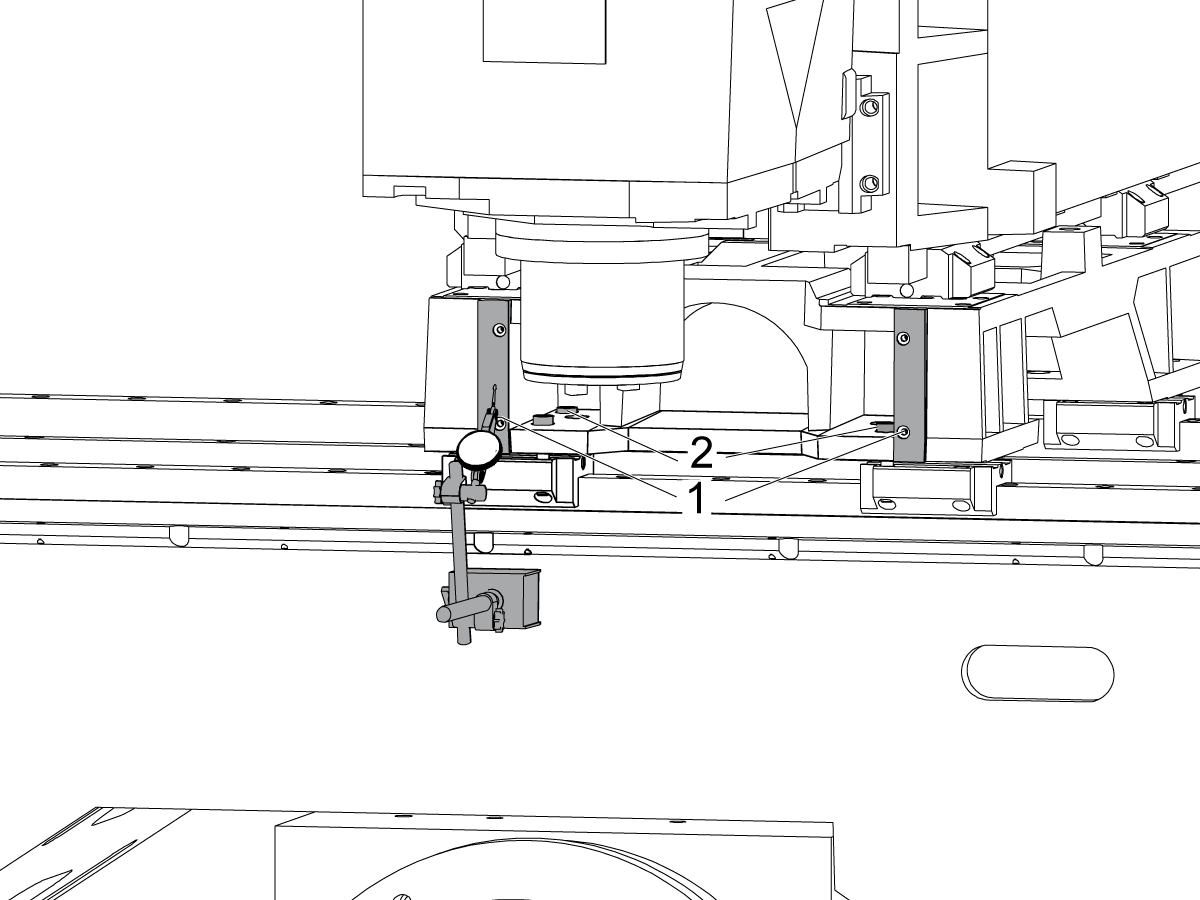
Allineare la faccia della sella parallelamente al movimento dell'asse X:

Spazzare sulla superficie lavorata sulla parte anteriore della sella [1] facendo jogging sull'asse X.

Allenta i bulloni che fissano la sella ai camion X Axis [2] e allinea la faccia della sella parallela al movimento X Axis entro 0,001" se necessario.

Coppia i bulloni. Fare riferimento alle Specifiche sulla coppia dei dispositivi di fissaggio Haas.

2

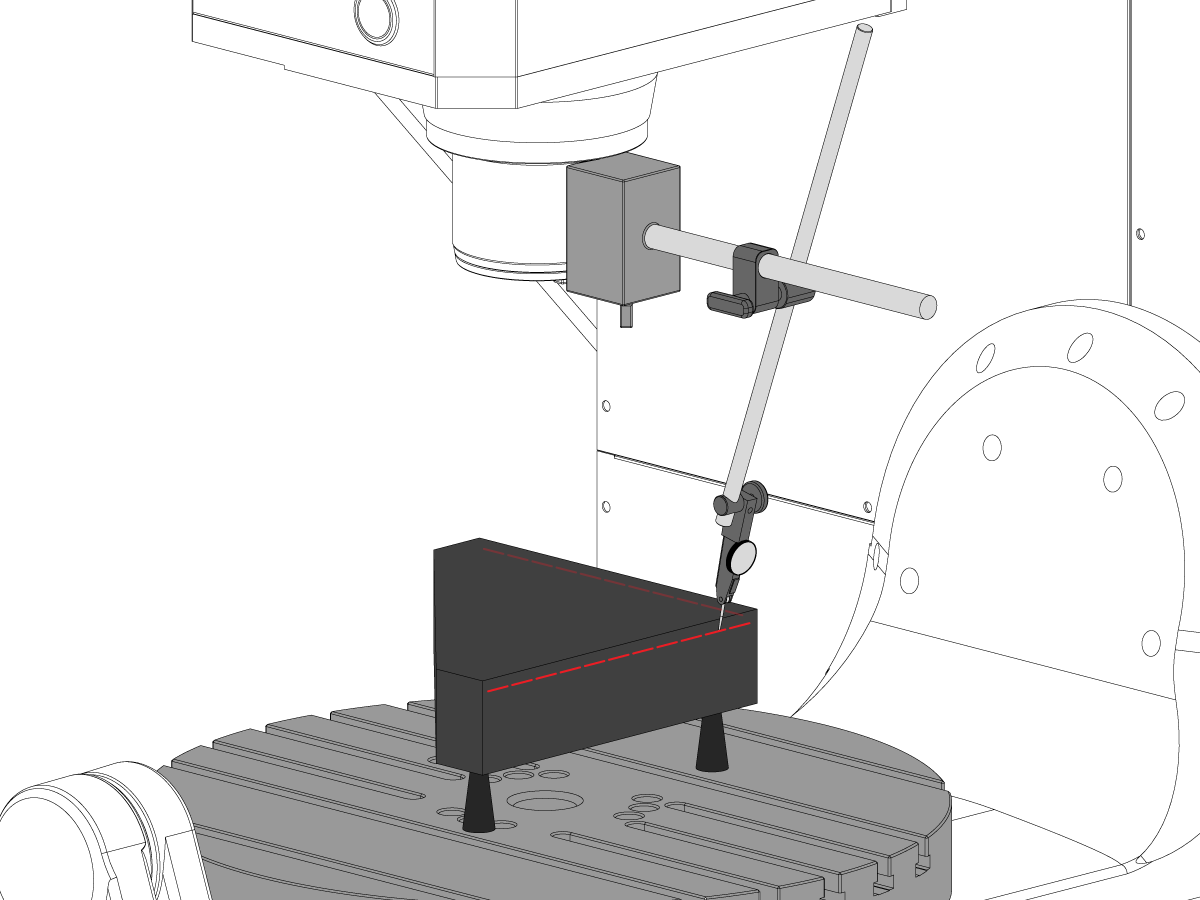
Allineare l'asse Y perpendicolare all'asse X:

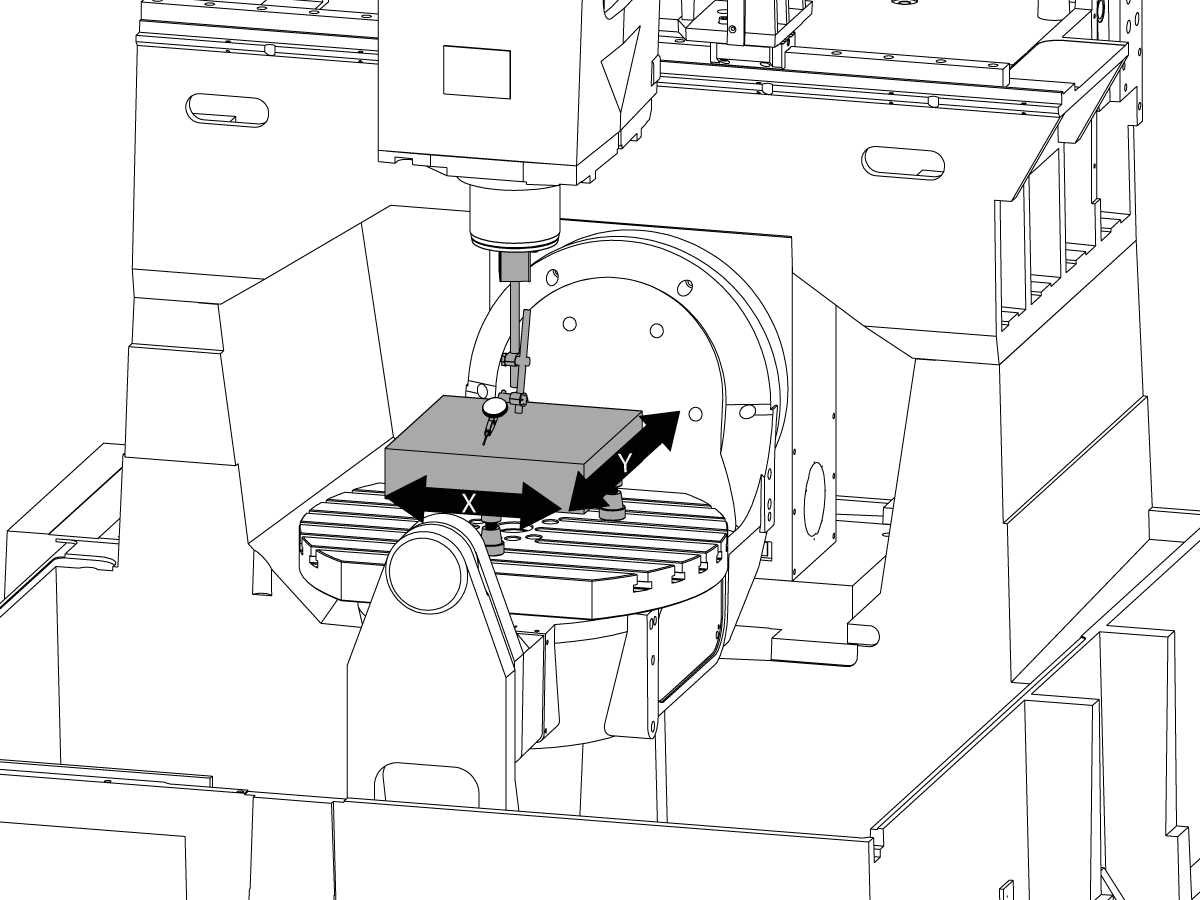
Impostare il granito triquadrato sul lato sinistro del piatto dell'Asse C sui jack macchinisti.

Impostare il lato posteriore del granito triquadrato parallelo all'asse X. NTE 0,0001"/10"

Liberare la parte superiore del blocco di granito triquadrato lungo gli assi X e Y.

Regolare i martinetti a vite finché la superficie superiore del blocco di granito triquadrato non è parallela al piano X-Y NTE 0.0005".

Verificare che il lato posteriore del blocco di granito sia parallelo all'asse X. NTE 0,0001"/10".

Allentare i bulloni che fissano i carrelli dell'asse Y al carrello e allineare l'asse Y perpendicolarmente all'asse X. NTE 0,0005"/10"

Coppia i bulloni. Fare riferimento alle Specifiche sulla coppia dei dispositivi di fissaggio Haas.

Verificare l'asse Y perpendicolare all'asse X NTE 0.0005"/10" dopo aver serrato i bulloni.

Allineamento dell'asse Z al piano X-Y

1

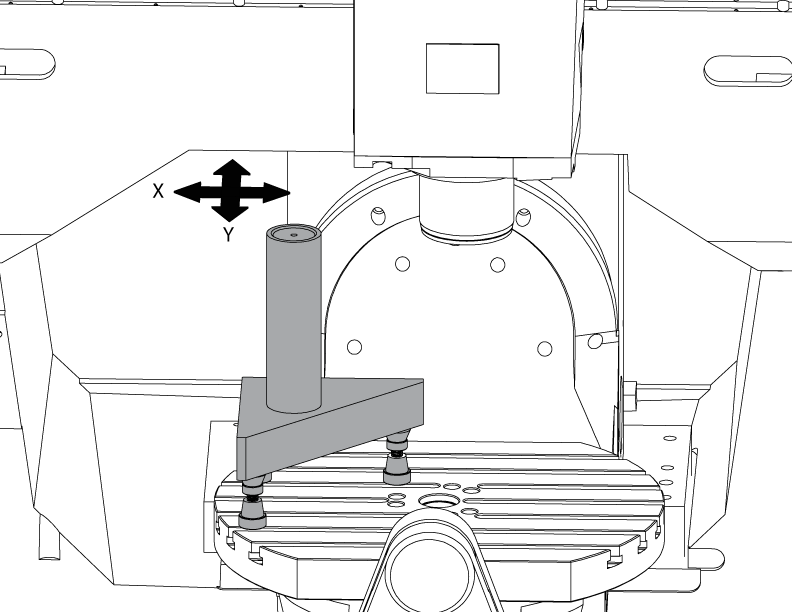
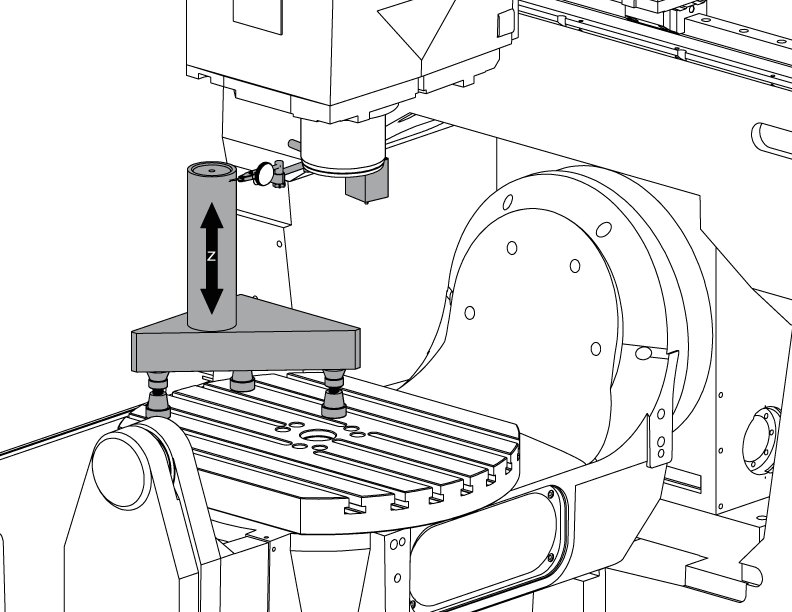
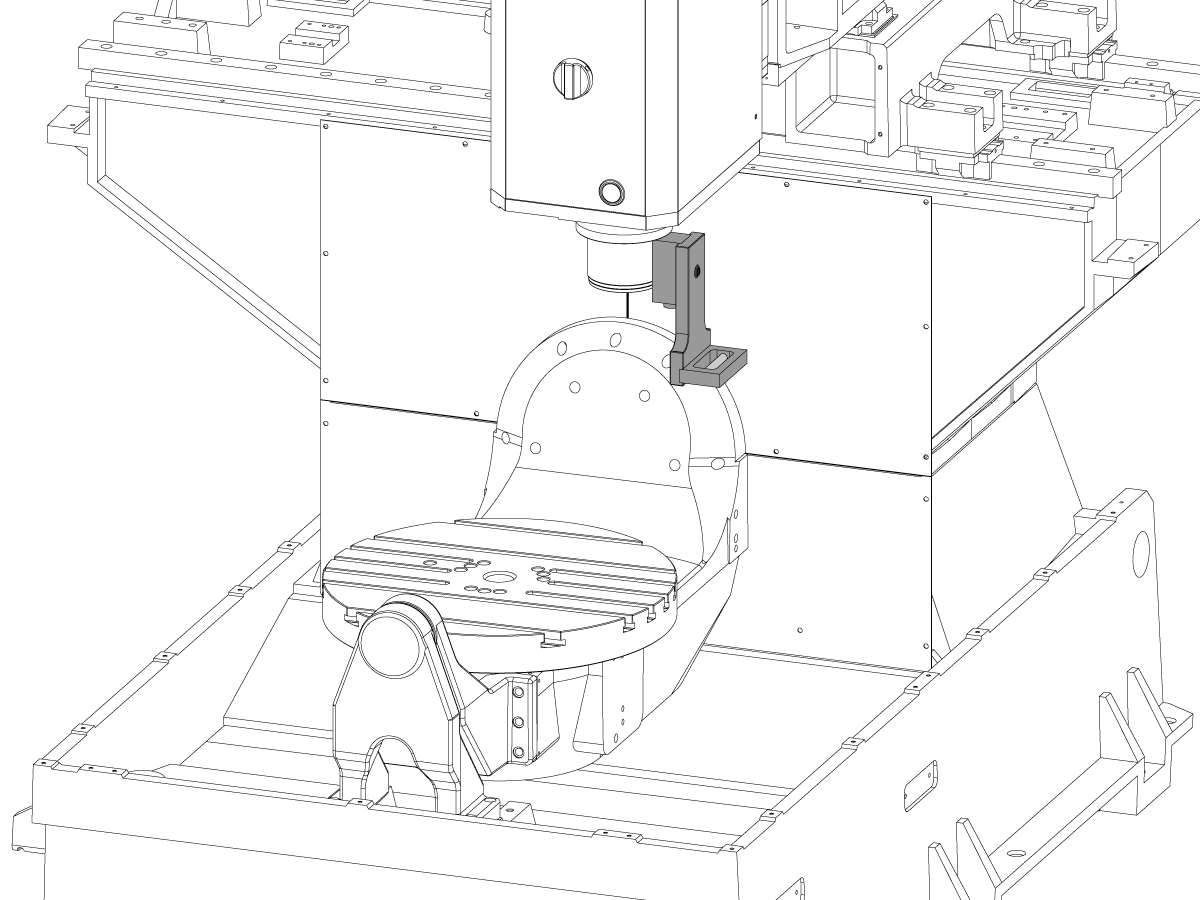
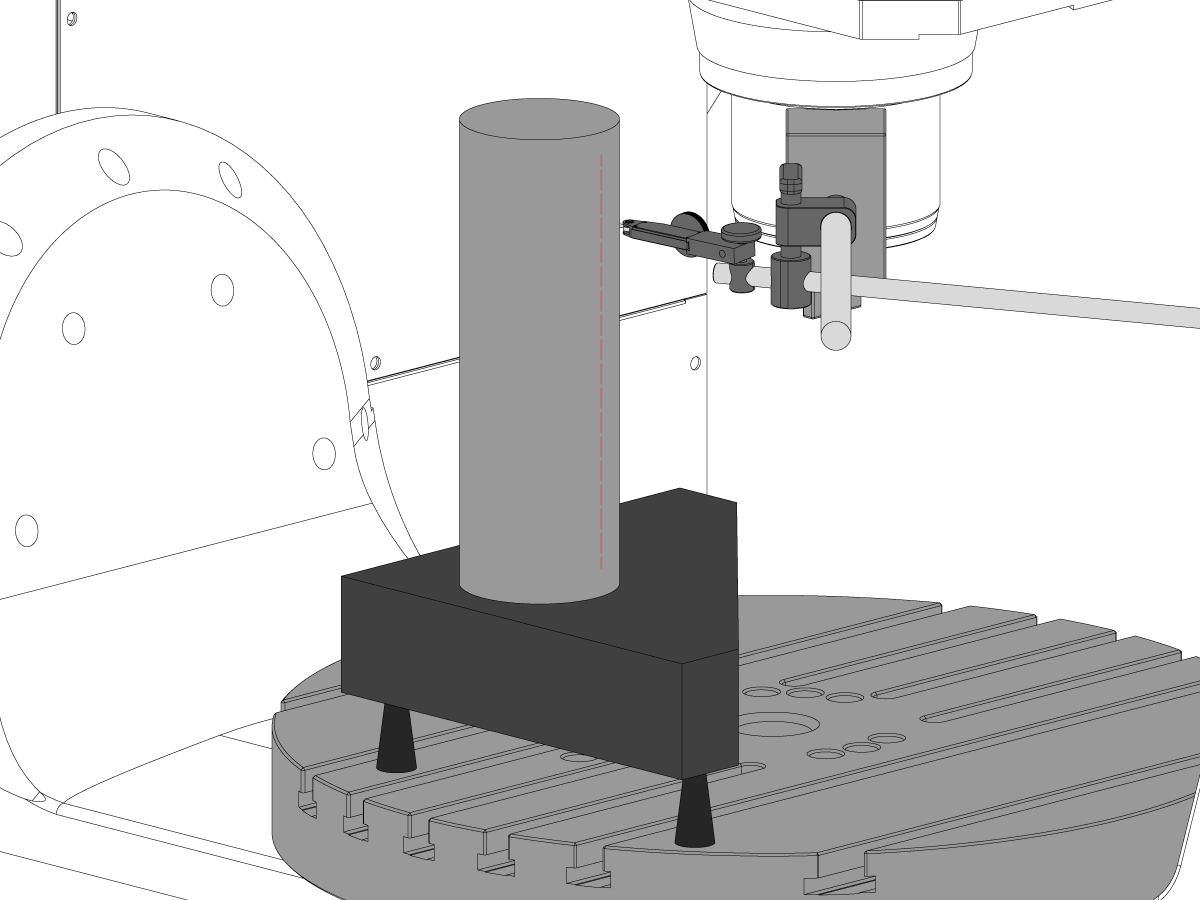
Impostare il cilindro.

Mettere un cilindro sopra la tripla come mostrato nell'immagine.

Allineare la superficie superiore del cilindro parallelamente al piano X-Y NTE 0.0001" ruotando gli aschinisti.

Eseguire il jogging della macchina nella seguente posizione:

  • Da UMC-750 a X -7.000" e Y -10.000"
  • Da UMC-750SS a X -10.000" e Y-10.000"

2

Allineare l'asse z perpendicolare all'asse X:

Sostituire uno dei bulloni d'angolo superiori sui camion dell'asse z con il T-2193A *per ruotare la testa del mandrino intorno ad esso.

Indicare il lato del cilindro lungo l'asse z.

Allenta i bulloni che fissano i camion dell'Asse all'ariete.

Allineare l'asse Z perpendicolarmente all'asse X NTE 0,0005"/10" facendo oscillare il mandrino da un lato all'altro.

Stringere i bulloni. Fare riferimento alle Specifiche sulla coppia dei dispositivi di fissaggio Haas.

Verificare che l'asse z perpendicolare all'asse X dopo la coppia dei bulloni.

Sostituire il T-2193A * con il bullone al termine dell'allineamento

*  : Utilizzato solo sulla serie pre-riavvio. 

3

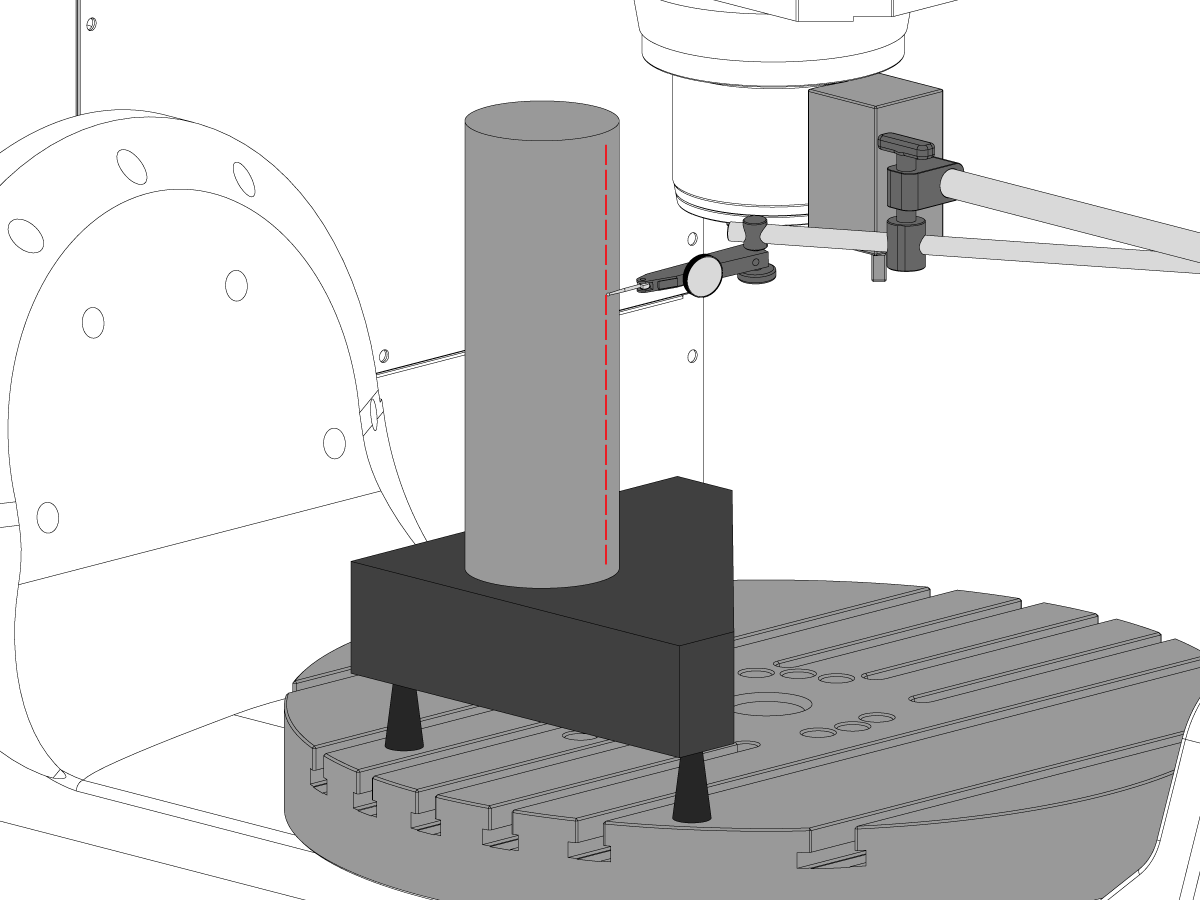
Allinea l'asse z perpendicolare all'asse Y:

Indicare la parte anteriore del cilindro lungo l'asse z.

Mettere uno spessore tra le guide dell'asse Z e l'ariete per allineare l'asse Z perpendicolarmente all'asse Y NTE 0,0005"/10".

nota: Shim sia top due camion o i due camion in basso con gli stessi inneschi.

Coppia i bulloni. Fare riferimento alle Specifiche sulla coppia dei dispositivi di fissaggio Haas.

Verificare che gli assi Y perpendicolari e gli assi X dopo i bulloni siano stati spremuti.

4

Allineare e coppia Y e z assi ballnut alloggia:

Allenta relone i bulloni che fissano la palla all'alloggiamento e i bulloni che fissano l'alloggiamento alla colata.

Snug i bulloni che fissano l'alloggiamento palla alla colata prima, quindi accostano i bulloni che fissano la palla all'alloggiamento.

Utilizzare la funzione Blocco Jog per eseguire l'asse avanti e indietro durante l'intera corsa.

nota: Non usare la manoa o il movimento rapido.

Coppia i bulloni. Fare riferimento alle Specifiche sulla coppia dei dispositivi di fissaggio Haas.

L'alloggiamento del dado dell'asse Y è accessibile nella parte posteriore della macchina con il ram jogged tutta la strada verso la parte anteriore della macchina.

L'alloggiamento del dado dell'asse z è accessibile dalla parte anteriore della macchina con la testa del mandrino orrinata fino in fondo.

Nota: La sindone del motore del mandrino deve essere rimossa per accedere all'alloggiamento della palla dell'asse z.

Tram il mandrino al piano X-Y

1

Impostare il granito:

Impostare i jack macchinisti e il granito al centro del piatto dell'asse C, come mostrato nell'immagine.

Allineare la superficie superiore del granito parallelamente al piano X-Y regolando l'altezza dei jack macchinisti NTE 0.0001".

Posizionare il mandrino sopra il centro del piatto.

2

Tram il mandrino al piano X-Y:

Posizionare un indicatore sull'albero del mandrino.

Effettuare una misurazione sopra il granito ad ogni 90 gradi di rotazione.

Allentare i (6) bulloni nella piastra di base per la testa del mandrino.

Aggiungere o rimuovere gli spessori tra il pezzo fuso del mandrino e la piastra di base per avvitare il mandrino al piano X-Y NTE 0,0005"/10".

Nota: Utilizzare shim di spessore diverso [1] per modificare l'angolo della piastra di base.

Quando la sweep rientra nelle specifiche, è possibile pronunciare i bulloni (6). Fare riferimento alle Specifiche sulla coppia dei dispositivi di fissaggio Haas.

Verificare il tram mandrino dopo che i bulloni sono stati scoppiati.

Allineamento dell'asse B per gli assi XY

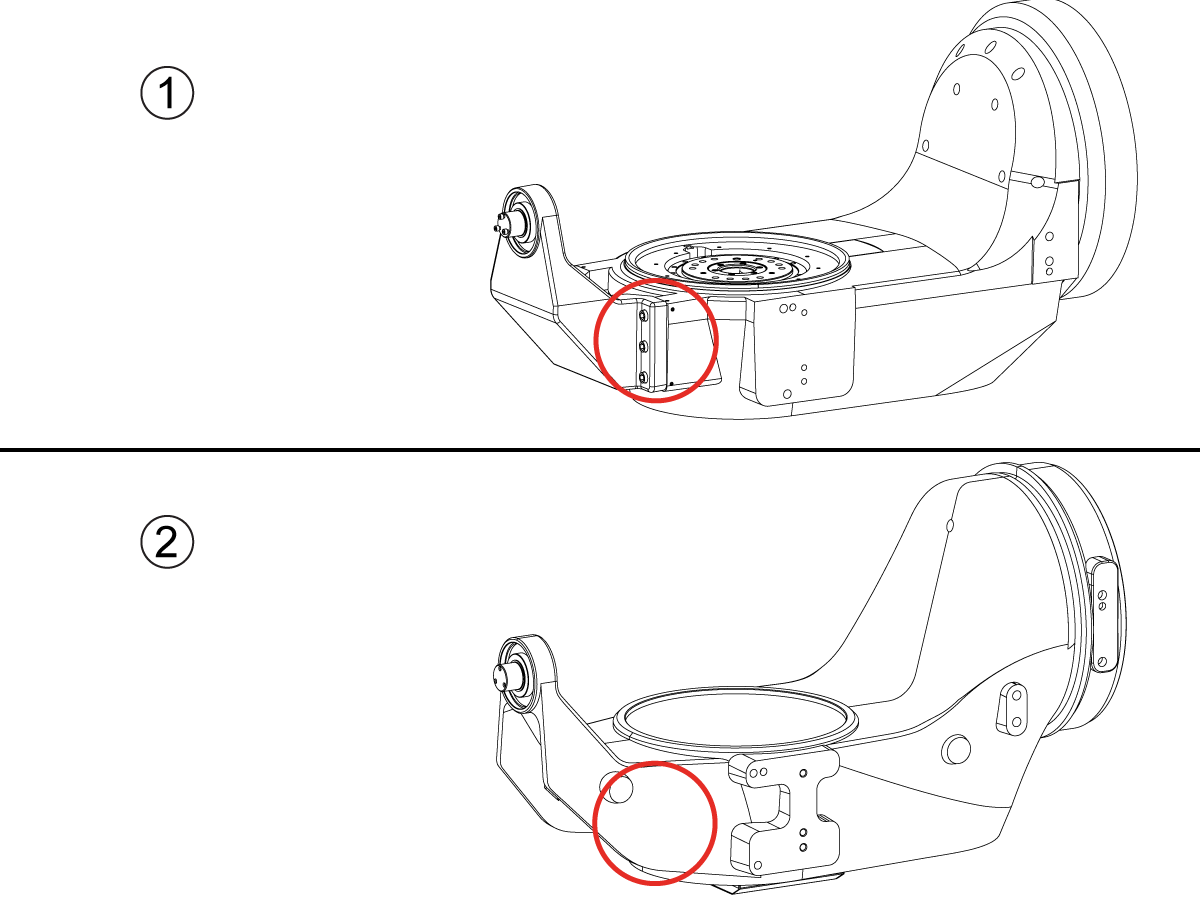
How to identify the Multi-Piece and the Unibody trunnion   

1) Multi-Piece trunnion:    UMC machines built approximetely before 11/2022 will have this configuration.

2) Unibody trunnion:    UMC machines built approximetely after 11/2022 will have this configuration.

1

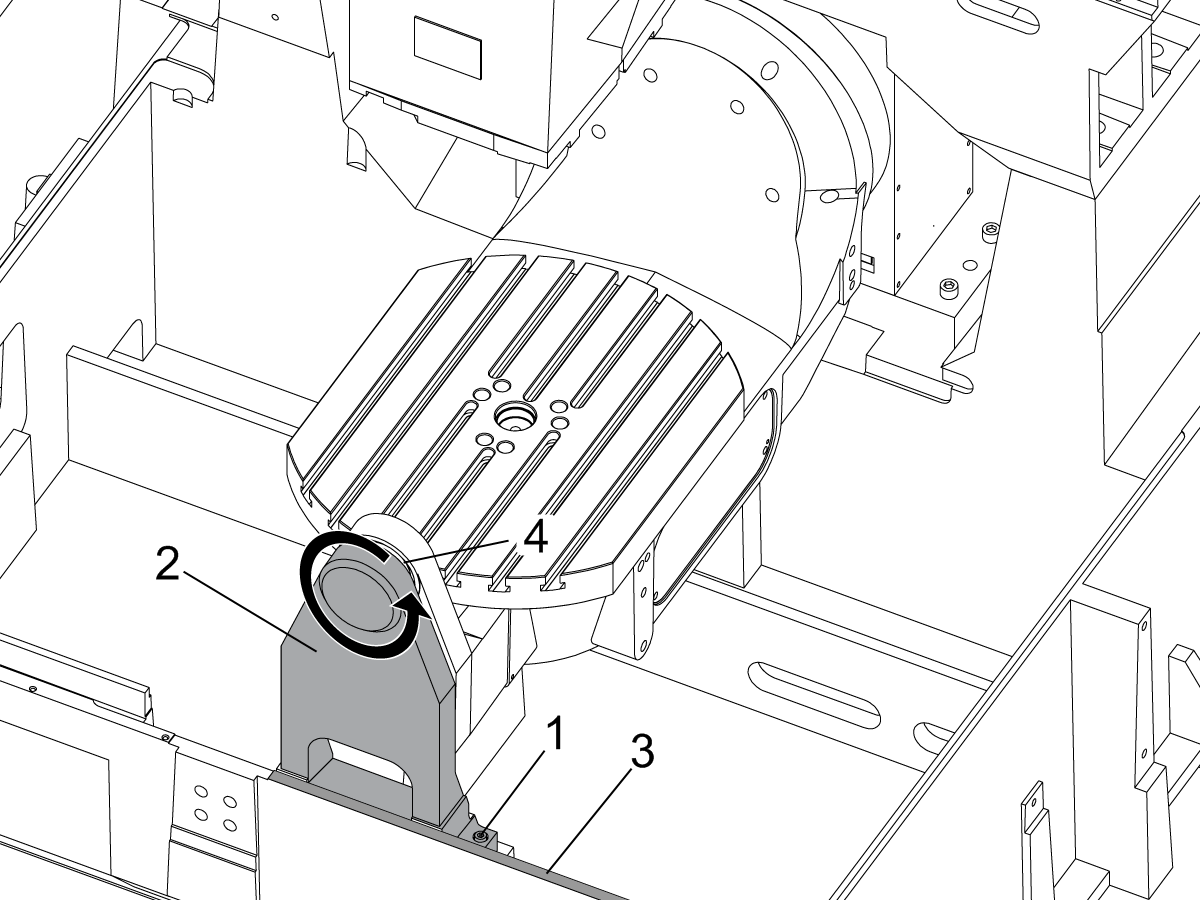
Remove the A-frame trunnion support:

Remove the bolts [1] that secure the A-frame trunnion support [2] to the base and take out the shims between A-frame support and the base.

Rotate the A-frame support [2] counter-clockwise to clear the edge of the base [3].

Pull the A-frame support off the bearings.

 Note: The A-frame support might vacuum lock on the bearings. Use the zip-tie to pry the seal [4] open.

 Caution: To lift the trunnion support, get the aid of another person. The support weighs 85 lbs (39 kg).

2

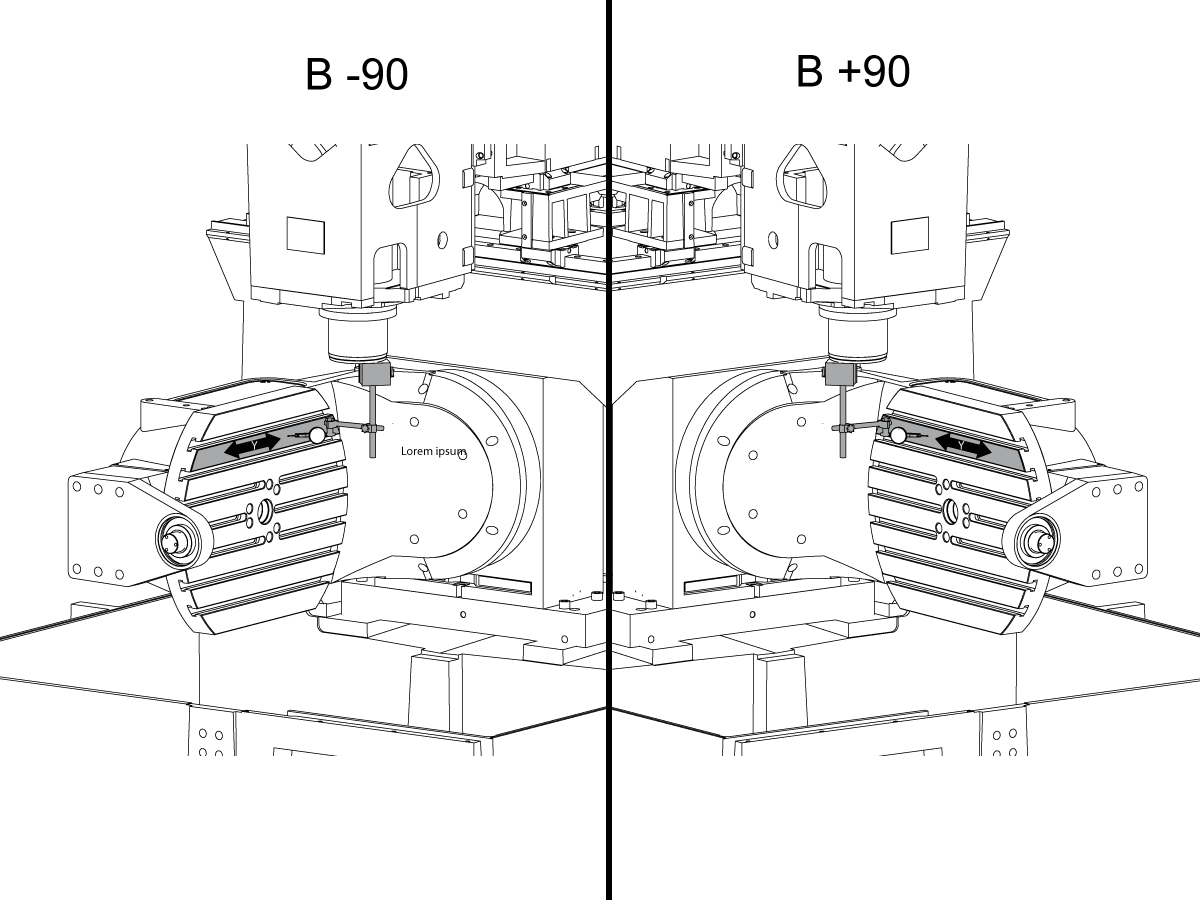
Measure the B- axis of rotation parallelism to the Y-Z plane:

For a machine with a Classic Haas Control, change Parameter 151:20 (B axis CHK TRAVL LIM) to 0.
For a machine with a Next Generation Control, change Parameter 6.021 (B axis CHK TRAVL LIM) to FALSE.

Measure the parallelism of the platter to the Y-Z plane with the B axis at 90° and then the B axis at -90° as shown in the picture.

Position the Y-Axis in the following starting position:

UMC-500: Y=0, Sweep 15”, 3rd T-Slot Land from the top.

UMC-750/1500-Duo: Y=-1.0, Sweep 18", 3rd T-Slot Land from the Top .

UMC-1250: Y=-1.0, Sweep 28", 3rd T-Slot Land from the Top.

UMC-500PP: Y=-4.0, Sweep 7".

UMC-750PP: Y=-2”, Sweep 15".

UMC-1000PP: Y=-4”, Sweep 15".

Compare the results at B 90° and B-90°. The results should be...

  • Symmetric against the Y-Z plane, positive or negative direction
  • Less than 0.0010"/20"

If the results are symmetric against Y-Z plane, and are less than 0.0010"/20 inches: Go to Step 5.

If the results are symmetric against Y-Z plane, but are more than 0.0010"/20 inches: Go to Step 4.

 Warning: If the results [3] are not symmetric against the Y-Z plane, the B axis rotary needs to be aligned: Go to Step 3.

3

Align the B axis of rotation parallel to the Y-Z plane:

Loosen the (6) bolts [1] that secure the B axis rotary to the base casting.

 Note: Keep the bolts sufficiently snug to control the adjustments.

Adjust the front and rear setscrews [2] until the measurements taken in Step 2 are symmetric against the Y-Z plane.

Torque the (6) bolts [1]. Refer to Haas Fastener Torque Specification.

Verify the measurements in Step 2 after the bolts have been torqued.

4

Align the C Axis of rotation perpendicular to the B Axis of rotation:

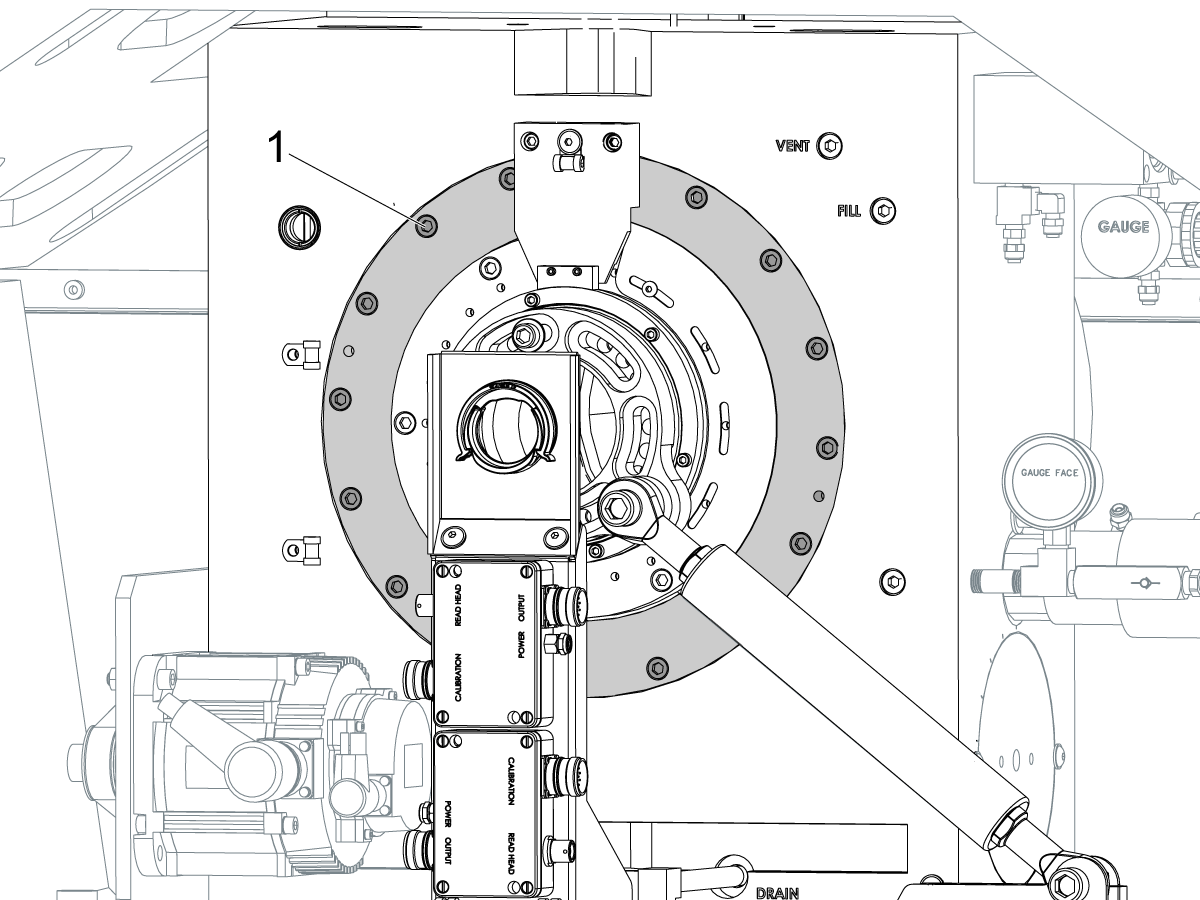
Remove the bottom C-Axis access cover.

Loosen the (12) bolts [1] that hold the C Axis body to the B Axis platter face.

Reach the bottom (4) bolts through the C Axis access port.

If the B Axis is symmetric in the positive direction [4], install horseshoe shims [2] of appropriate size behind the top (2) bolts.

If the B Axis is symmetric in the negative direction [5], install horseshoe shims [2] of appropriate size behind the bottom (2) bolts.

Torque the (12) bolts to 80 Ft-lbs (108 Nm).

Cut the excessive shim material off.

Verify the measurements in Step 2 after bolts are torqued.

5

Align the trunnion support shaft co-axial with the B Axis of rotation:

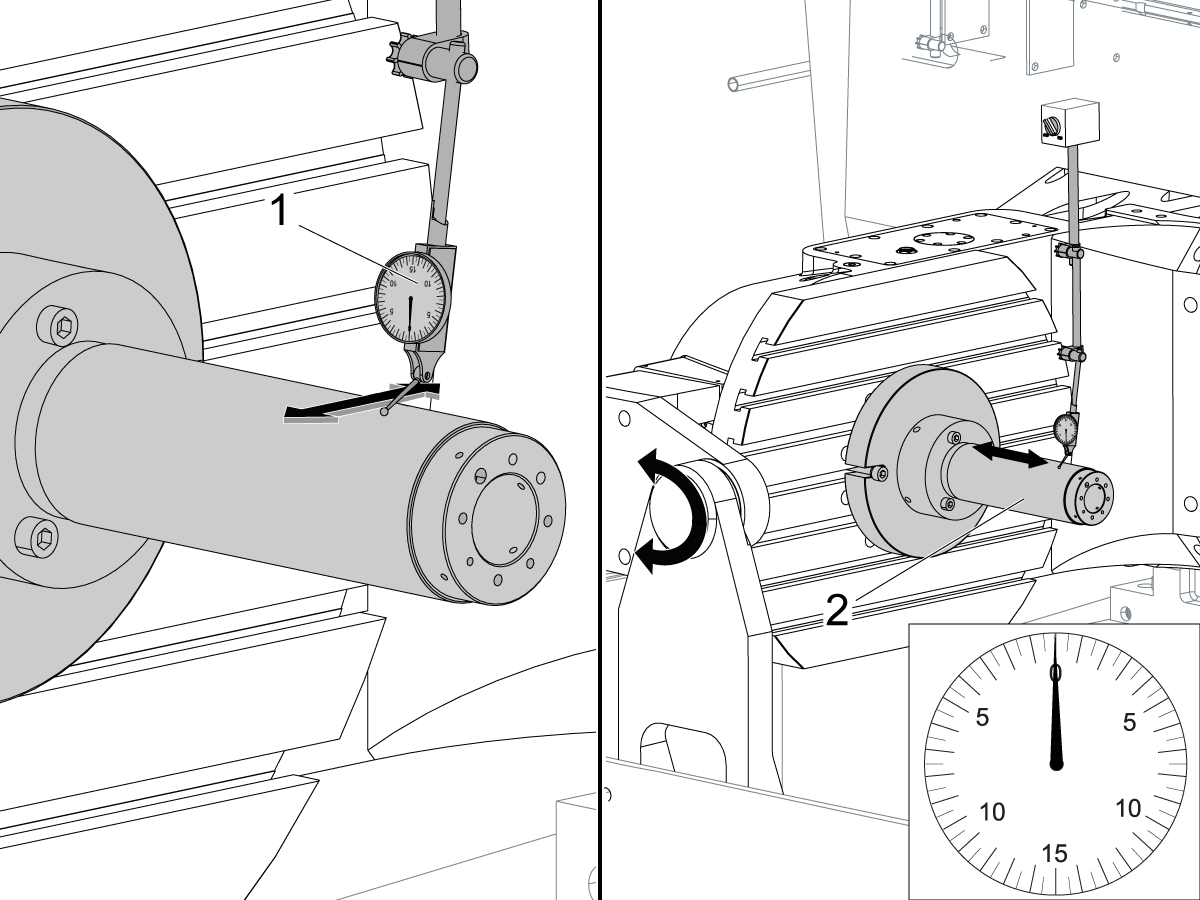
Setup (2) indicators on the outer race of the trunnion support bearing [2] as shown in the picture.
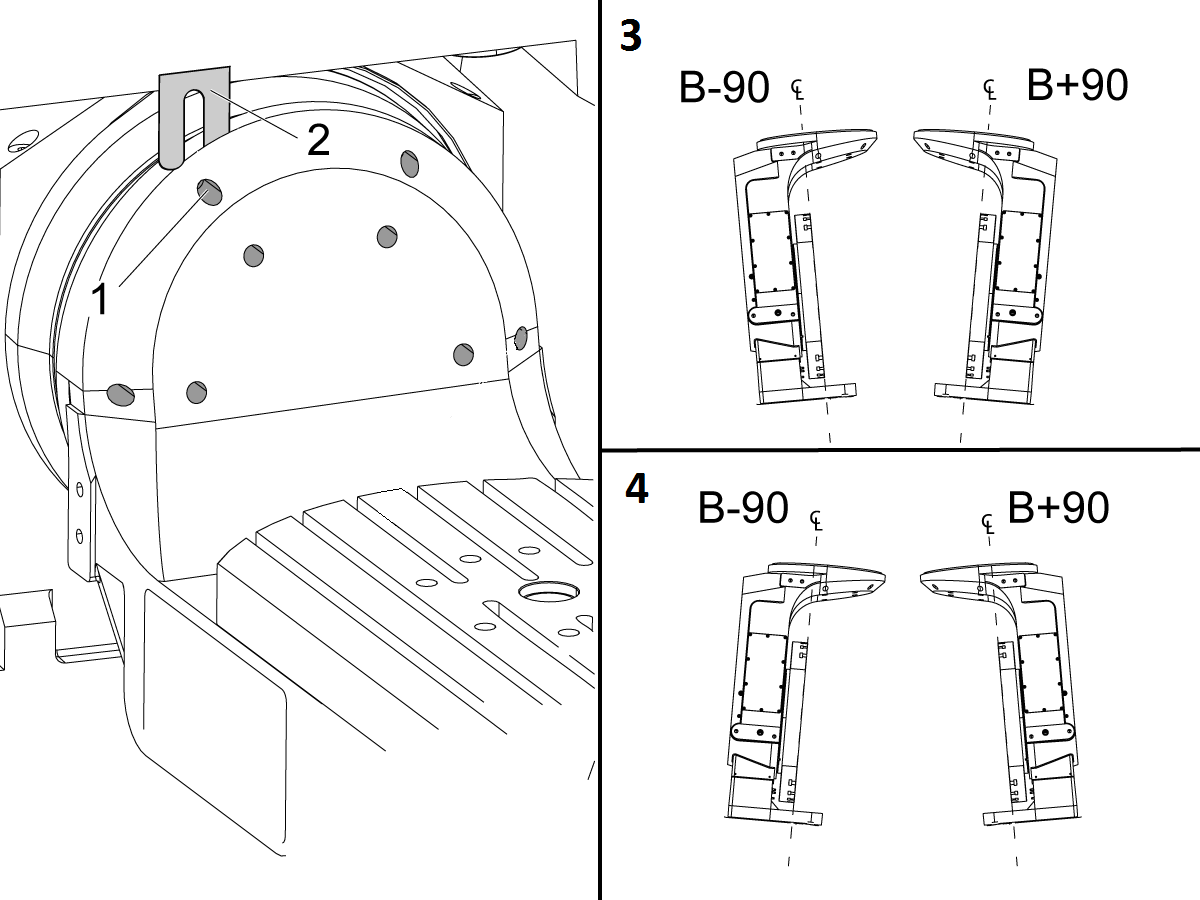
Mark the spot on the outer race where one of the indicator needles is contacting the surface.

After moving the B Axis to 90° or -90° you will align the marked spot with the needle again to exclude the bearing runout error from the measurements.

Take the readings when B is at 90° and B at -90°. Compare the readings. 

 Caution: The B axis brake needs to be clamped when taking the readings.

The deviation between the results when B is at 90° and at -90° needs to be less than 0.001" on each indicator.

 Note: The indicator on the side of the bearing will measure top to bottom alignment and the indicator on the top of the bearing will measure side to side alignment.

____

For models with a multi-piece trunnion

Loosen the (6) bolts [3] on the C Axis body support. Keep the bolts sufficiently snug to control adjustment.

Adjust the (8) set screws [4] until deviation between B at 90° and B at -90° is within 0.001".

Torque the (6) bolts [2] on the C Axis body support to 80 Ft-lbs (108 Nm).

Verify the alignment after the bolts have been torqued.

____

For models with a unibody trunnion

Jog rotary to B90. Set up an indicator on the highlighted surface as shown in the lower diagram .

Rotate B-axis 180 degrees (90 to -90).

Run out (NTE 0.010” TIR).

 Caution: If the measurement exceeds the tolerance then contact support.

6

Install and shim the A-frame trunnion support:

Move the B Axis to 90°.

Setup an indicator [1] against a machined surface of the C Axis body. Set the indicator to 0.

Use plastic zip ties [2] to pry the seal open while installing the A-frame support. This lets unwanted air and grease out of the assembly.

Install the A-frame trunnion support [3] over the bearings.

Remove the cable ties.

Turn the trunnion support clockwise until it is vertical.

 Note: The weight of the A-frame support will cause the trunnion to sag. The amount of sag is measured with the indicator that was previously setup on the side of the C Axis body.

____

For multi-piece trunnions

Adjust the shims [4] between the A-frame support and the base casting to remove the sag until indicator reads 0 again.

When the indicator reading is 0, torque the (4) bolts. Refer to Haas Fastener Torque Specification.

Verify the reading after bolts are torqued. Adjust the shims again if necessary until the indicator reads 0.

____

For models with unibody trunnion

Determine the amount of shim stock [4] needed to raise the Trunnion arm so the indicator reads 0.005".

The indicator [1] value will change once the support is torqued.

With indicator still in place:

  • Torque trunnion support bolts to appropriate values.
  • Check indicator to make sure it reads between the range of

Trunnion arm raised (0.005” to  0.010”).

 Note: For unibody trunnions, the shim location may also be used to correct the C-axis to X-Y plane perpendicularity instead of shimming the saddle trucks.

 Caution: Use equal amount of shims on each side of the A-frame support. Unequal shims will cause the A-frame support to pull the trunnion to the side.

Verify the B Axis of rotation alignment to the Y-Z plane (Step 2). Loosen the bolts and tap the A-frame support side to side if necessary to correct the B axis to Y-Z plane alignment.

7

Set C-axis perpendicular to X/Y plane:

Move the axes to

UMC-750's........X= -10.5" & Y=0."

UMC-1000's......X=-17.0" & Y=-0."

Zero an indicator [1], on a Ground Block [2], 1/2" off the edge at the rear of the platter (Mag-Base on Spindle), with C at 0 Degrees

Rotate C-Axis to 180°.

Move Y axis, and ground block, in Y Axis negative direction until you are 1/2" away from platter edge, and take the perpendicularity measurement

Adjust the shims until the average error is within 0.0005" end to end.

 Note: For unibody trunnions, the shim location under the bearing support may also be used to correct the C-axis to X-Y plane perpendicularity instead of shimming the saddle truck.

Caution: Shim either two front trucks or two rear trucks with the equal shim.

Note: Shim one truck at the time to maintain the X to Y squareness.

Verify the measurements after all bolts are torqued.

Verify the X to Y alignment in Step 2.

8

Set the tool change offsets:

B-axis tool change offset [1]

For Classic Haas Controls, change Parameter 213. 

For Next Generation Controls, go to: Settings>Rotary Tab>Highlight the rotary and press [INSERT], or change Parameter 6.078 (B TOOL CHANGE OFFSET) to set the trunnion (B Axis) parallel to the X Axis.

For models with multipiece trunnion

(NTE 0.001/10"; NTE 0.0020" overall)

For models with unibody trunnion

(NTE 0.0005/10"; NTE 0.0010" overall)

___

C-axis tool change offset [2]

For Classic Haas Controls change Parameter 523.

For Next Generation Control go to: Settings>Rotary Tab> Highlight the rotary and press [INSERT], or change Parameter 7.078 (C TOOL CHANGE OFFSET) to set the table T-slot (C Axis) parallel to the X Axis

For models with multipiece trunnion

(NTE 0.001/10"; NTE 0.0020" overall)

For models with unibody trunnion

(NTE 0.0005/10"; NTE 0.0010" overall)

9

Check C-axis perpendicularity to X/Y plane:

Align the indicator centered over the C-axis bore with the Y-axis at -10.

Jog positive in the Y-axis and align the indicator over the center of the last section of the platter and make a mark at this spot with a washable marker.

Insert 1-2-3 block as shown and set the indicator to zero.

Remove the block and rotate the platter 90 degrees, following the marked spot with the indicator.

Insert block back between the indicator and platter. Note reading.

Repeat the previous two steps, taking readings with the platter at 180, 270 and 360 degrees.

Multi-piece trunnion:  (NTE 0.0005")

Unibody trunnion: (NTE 0.001")

10

Measure the intersection of the B and C axis:

Follow the linked instruction manual to complete this step.

B-Axis and C-Axis intersection Adjustment

11

Align the B-Axis brake disk:

 Note: Do not do this step if you are working on a SS machine.

Operate this code in MDI mode to unclamp the brake:

M11;

Loosen all of the brake disc bolts [1] and torque them to 5 Ft-lbs (7 Nm).

Operate this code in MDI mode to clamp the brake:

M10;

Wait 10 seconds.

Torque the bolts. Refer to Haas Fastener Torque Specifications.

Imposta parametro/impostazione indietro sui valori di fabbrica

Impostare il Parametro 1314 per CHC / Impostazione 254 NGC torna al valore impostato in fabbrica. (Ciclo di alimentazione alla macchina dopo aver modificato il valore.)

Allineare e calibrare il WIPS. Wireless Intuitive Probe System (WIPS) - Calibrazione

Impostare i punti zero dell’elemento rotante della macchina. 

  • UMC-750 - Impostazioni offset WIPS MRZP - CHC
  • UMC-750 - Impostazioni offset WIPS MRZP - NGC

Compilare il rapporto di ispezione completo:

  • Rapporto di ispezione EA0420 UMC-500
  • Rapporto di ispezione UMC-750 EA0373
  • Rapporto di ispezione EA0418 UMC-1000

Lasciare la copia del rapporto di ispezione con la macchina.

Se è stato sostituito l'assieme degli assi B e C, UMC-750 - Intersezione asse B e asse C - Allineamento

8.2 Zone di indicazione dell’allineamento UMC

Recently Updated

Zone di indicazione dell’allineamento UMC


AD0490

Zone di indicazione

1

Rullo asse X

  • Innanzitutto agganciare lo strumento T-2192 al lato del mandrino.
  • Per la misurazione X-Roll, tenere le seguenti registrazioni asse Y e asse Z:
    • UMC 500 (Y,Z): -8, -8
    • UMC 750 (Y,Z): -10, -10
    • UMC 1000 (Y,Z): -12, -12
  • Misurazione rotolo asse X (NTE 0,0005" / 10")


2

Parallelismo dell’asse B all’asse B

  • Effettuare il ritorno a zero dell’asse C:
  • Misurare il runnout piatto nell’asse Y (NTE: 0,0008" / 10" 0,0012" /15")
  • Misurare quindi la stessa superficie con l’asse B a -90° e +90°  (NTE: 0,0008" / 10" 0,0012" /15")
  • Per UMC 500 e 750, misurare l’intera lunghezza del piatto
  • Per UMC 1000, offset 2" dal bordo del piatto, quindi misurare su 20"

3

Perpendicolarità asse Y-asse X

  • Utilizzare viti di sollevamento per rendere la superficie superiore del granito parallela al piano XY (NTE: 0,0002")
  • Quindi, controllare se Y square to X (NTE 0,0005)" / 10")

4

Perpendicolarità dell’asse X all’asse Z

  • Posizionare il cilindro di granito e di precisione sul piatto nell’orientamento mostrato
  • Utilizzare viti di sollevamento per impostare la superficie superiore del cilindro parallelamente al piano XY (NTE 0,0002")
  • Posizioni del mandrino XY per questa fase:
    • UMC 500, X = -6, Y = -8
    • UMC 750, X = -10, Y = -10
    • UMC 1000, X = -17, Y = -12
  • Posizione iniziale Z per questa misurazione:
    • UMC 500, Zstart = Ztop – 2"
    • UMC 750, Zstart = Ztop – 5"
    • UMC 1000, Zstart = Ztop – 7"
  • Ztop è il limite di corsa dell’asse Z nella direzione positiva (verso l’alto)
  • Da Zstart, misurare il valore di 10" lungo il cilindro

5

Allinea l’asse z perpendicolare all’asse Y:

  • Posizionare il cilindro di granito e di precisione sul piatto nell’orientamento mostrato
  • Utilizzare viti di sollevamento per impostare la superficie superiore del cilindro parallelamente al piano XY (NTE 0,0002")
  • Posizioni del mandrino XY per questa fase:
    • UMC 500, X = -6, Y = -8
    • UMC 750, X = -10, Y = -10
    • UMC 1000, X = -17, Y = -12
  • Posizione iniziale Z per questa misurazione:
    • UMC 500, Zstart = Zalto – 2"
    • UMC 750, Zstart = Zalto – 5"
    • UMC 1000, Zstart = Zalto – 7"
  • Far avanzare l’Asse Z nella direzione positiva verso la parte superiore della corsa.
  • Da Zstart, misurare il valore di 10" lungo il cilindro

6

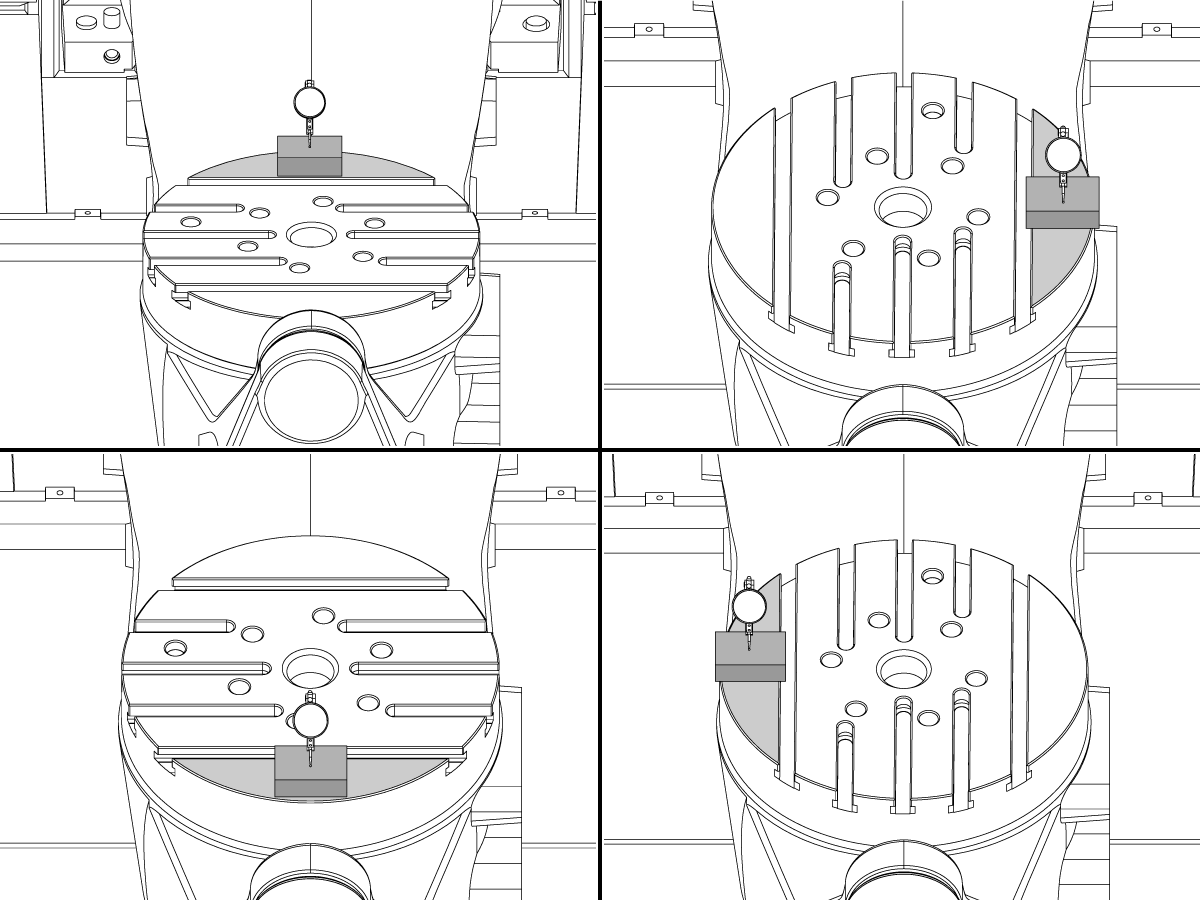
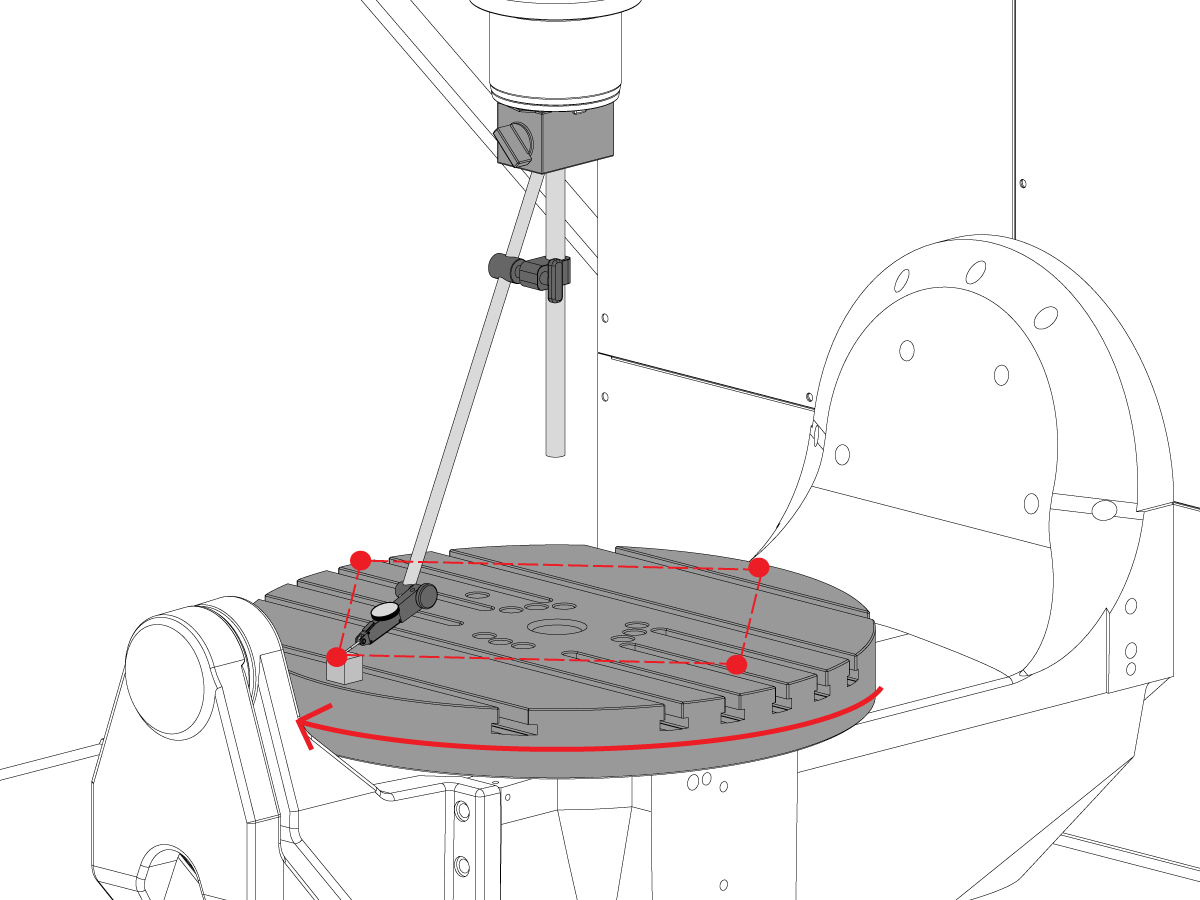
Perpendicolarità dell’asse C rispetto al piano XY

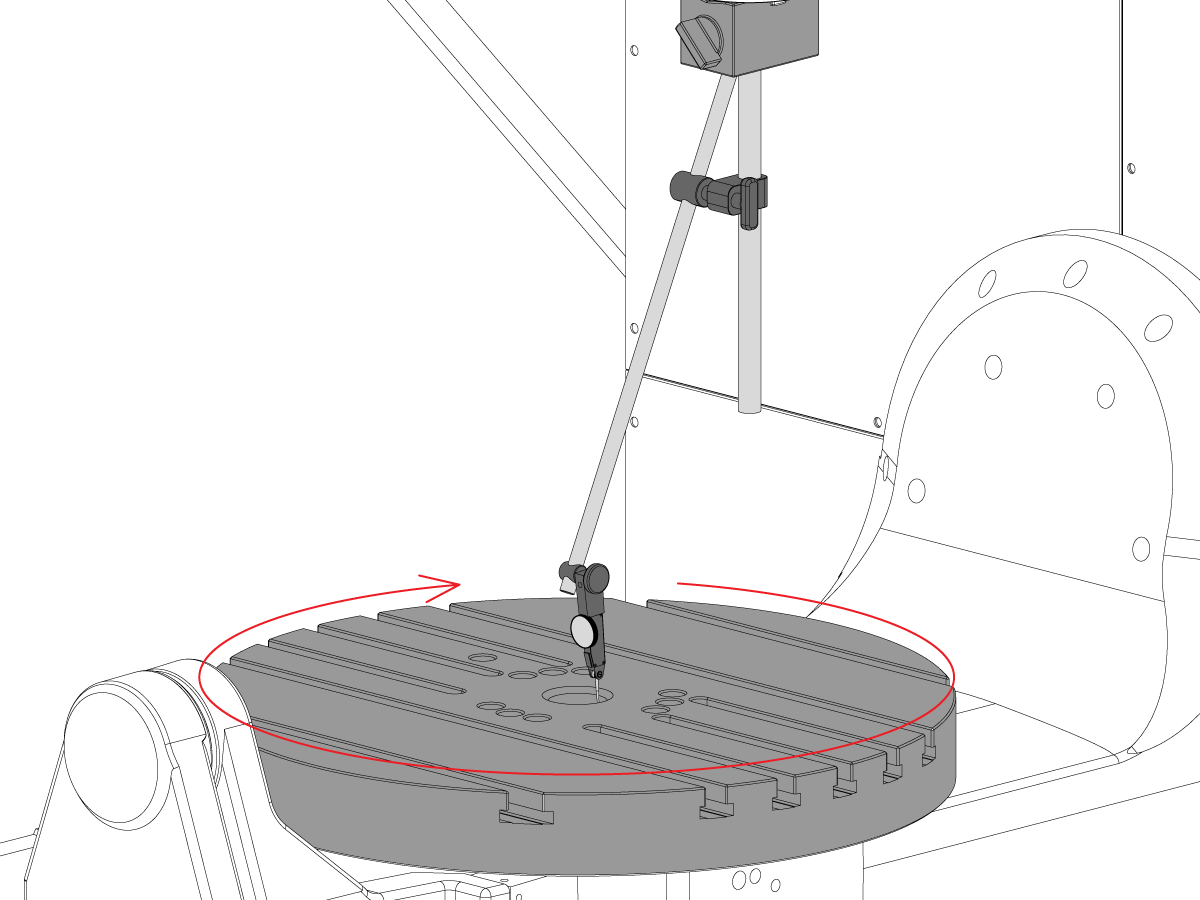
  • Riposizionare la base magnetica sul mandrino in modo che non possa ruotare con il mandrino.
  • Posizionare il blocco di precisione del guage sul bordo del piatto in posizione ore 12. 
  • Azzerare la punta dell’indicatore sul blocco indicatore in questa posizione.
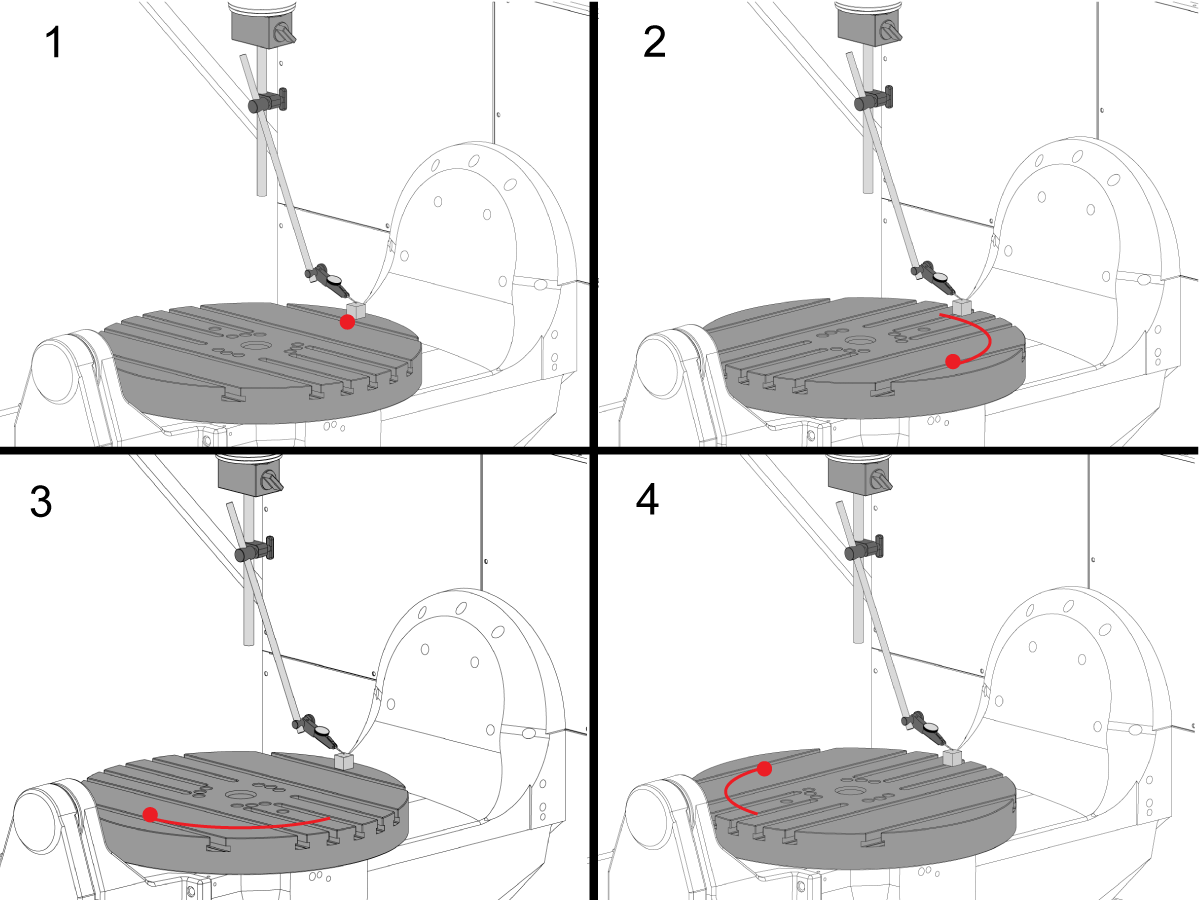
  • Ruotare l’asse C  90° 
  • Quindi, jog il mandrino nell’asse X e Y per seguire il blocco del guage e misurare lo stesso punto sul piatto. Non deve verificarsi alcuna rotazione del mandrino
  • Ripetere questo 2 volte per un totale di 4 posizioni, a 90°, sul bordo del pallet come mostrato. 
  • La differenza tra le misurazioni della posizione ore 12 e 6 determina la planarità lungo l’asse X (NTE 0,0005")
  • La differenza tra le mele della posizione a ore 3 e ore 9 determina planarità lungo l’asse Y (NTE 0,0005")

7

Fuori corsa della superficie del piatto

NOTA: Il freno dell’asse C è disattivato per questa fase

  • Posizionare il blocco di precisione del guage sul bordo del piatto in posizione ore 12. 
  • Azzerare la punta dell’indicatore sul blocco indicatore in questa posizione.
  • Ruotare l’asse C  90° ma mantieni il blocco dell’intestino in posizione ore 12
  • Eseguire una misurazione dalla parte superiore del blocco indicatore
  • Ripetere questo 2 volte per un totale di 4 posizioni, a 90°, sul bordo del pallet come mostrato. 
  • Annotare il runout indicato totale. (NTE 0,001")

8

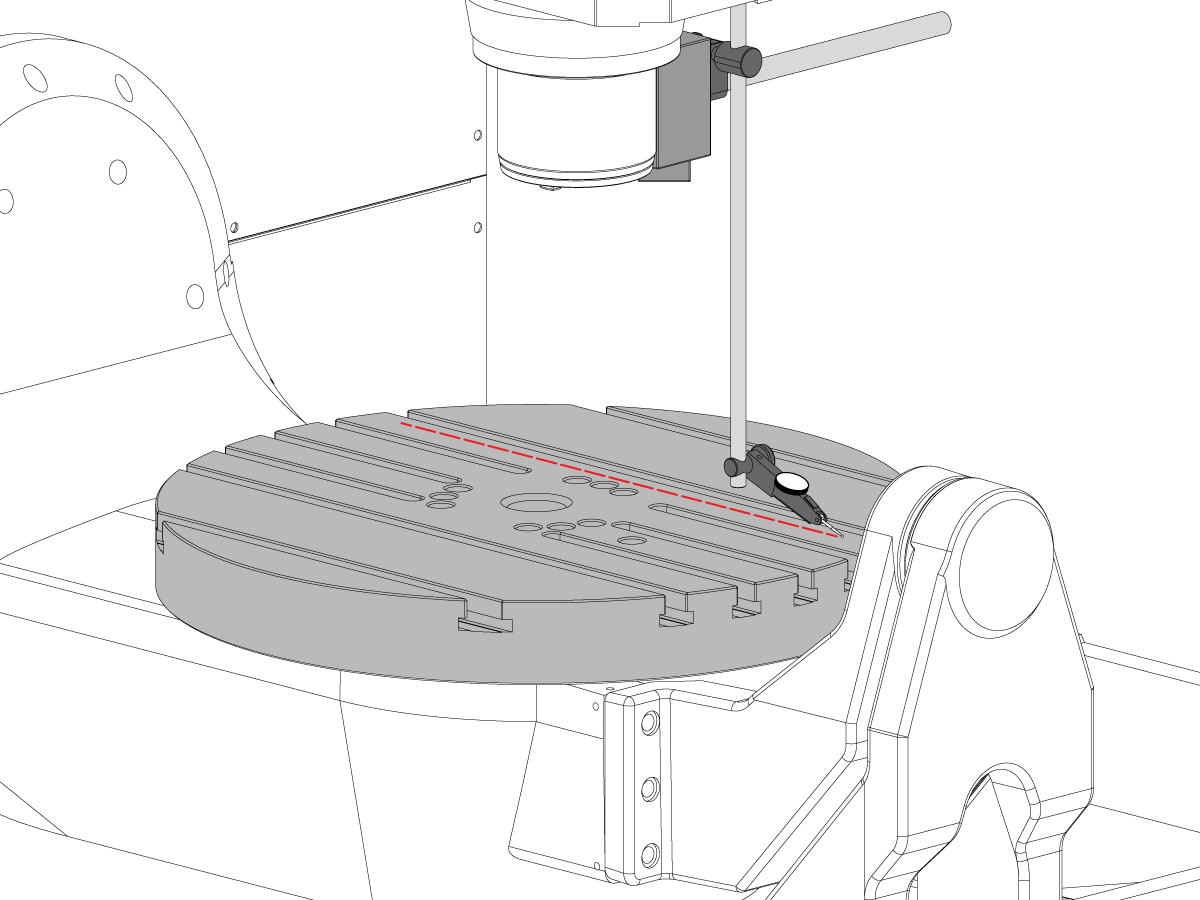
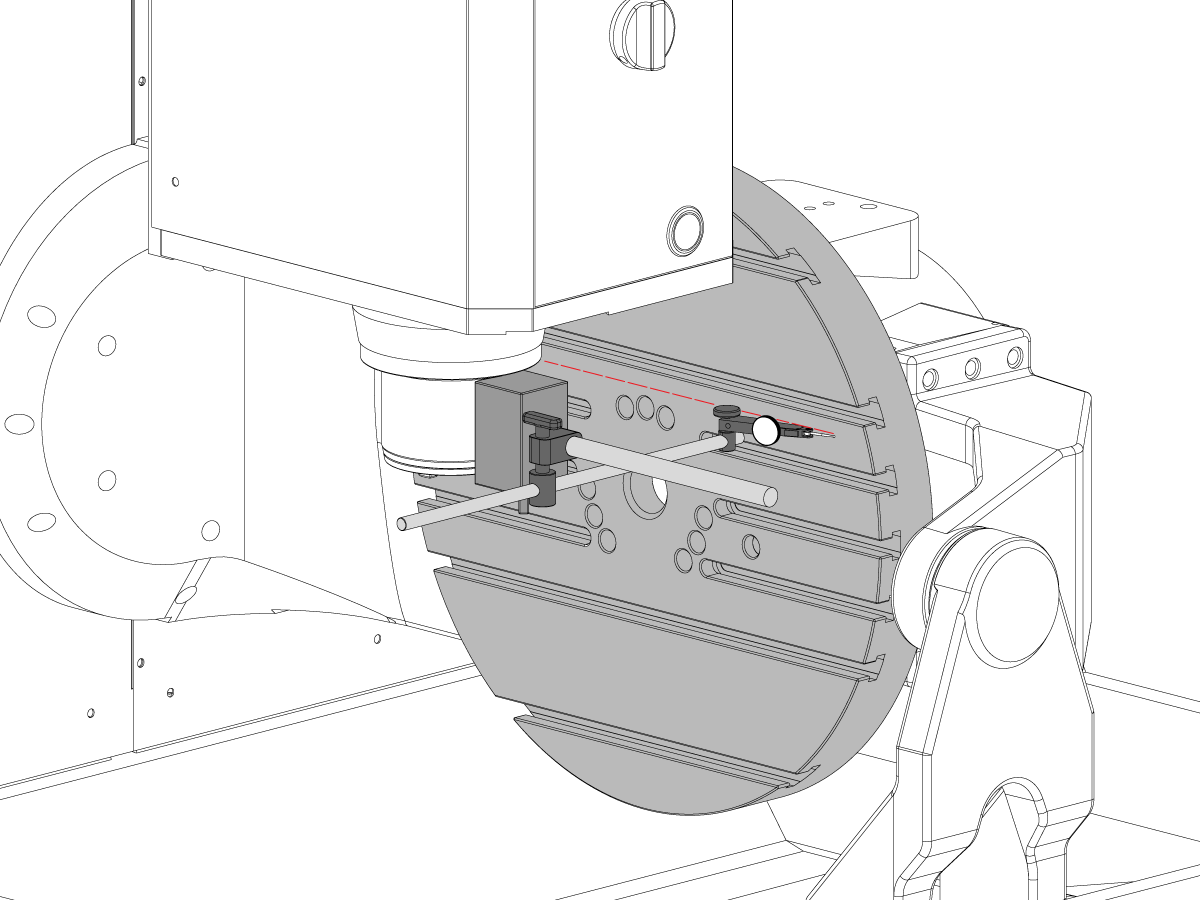
Parallelismo della superficie Platter al piano XY

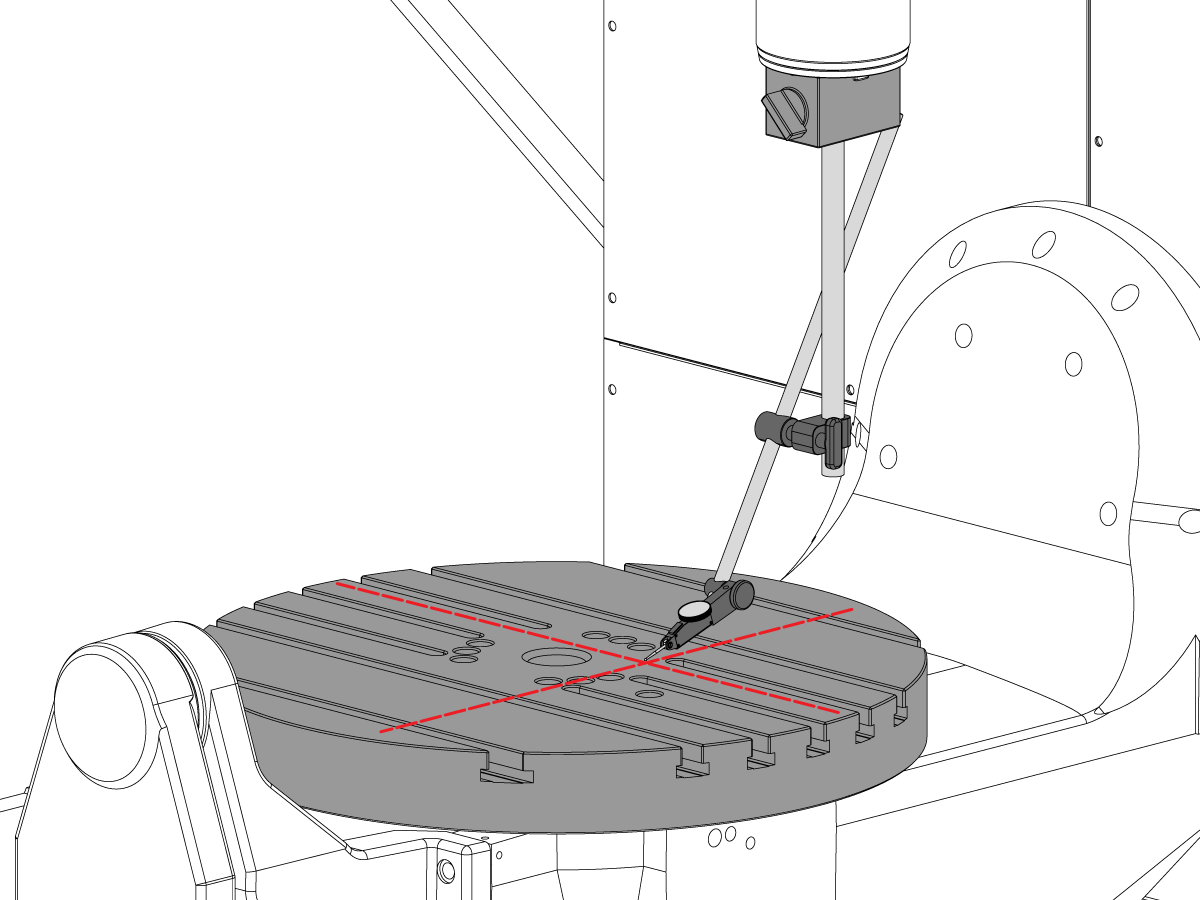
  • Azzerare l’asse C in modo che le scanalature T funzionino parallelamente all’asse X
  • Posizionare la punta dell’indicatore sul piatto e fare jogging nell’asse X lungo il piatto per trovare il parallelismo dell’asse X (NTE 0,001"/10" 0,0015" /15")
  • Prossimo jog nell’asse Y lungo il piatto per trovare il parallelismo piatto dell’asse Y (NTE 0,001" / 10" 0,0015" /15")

9

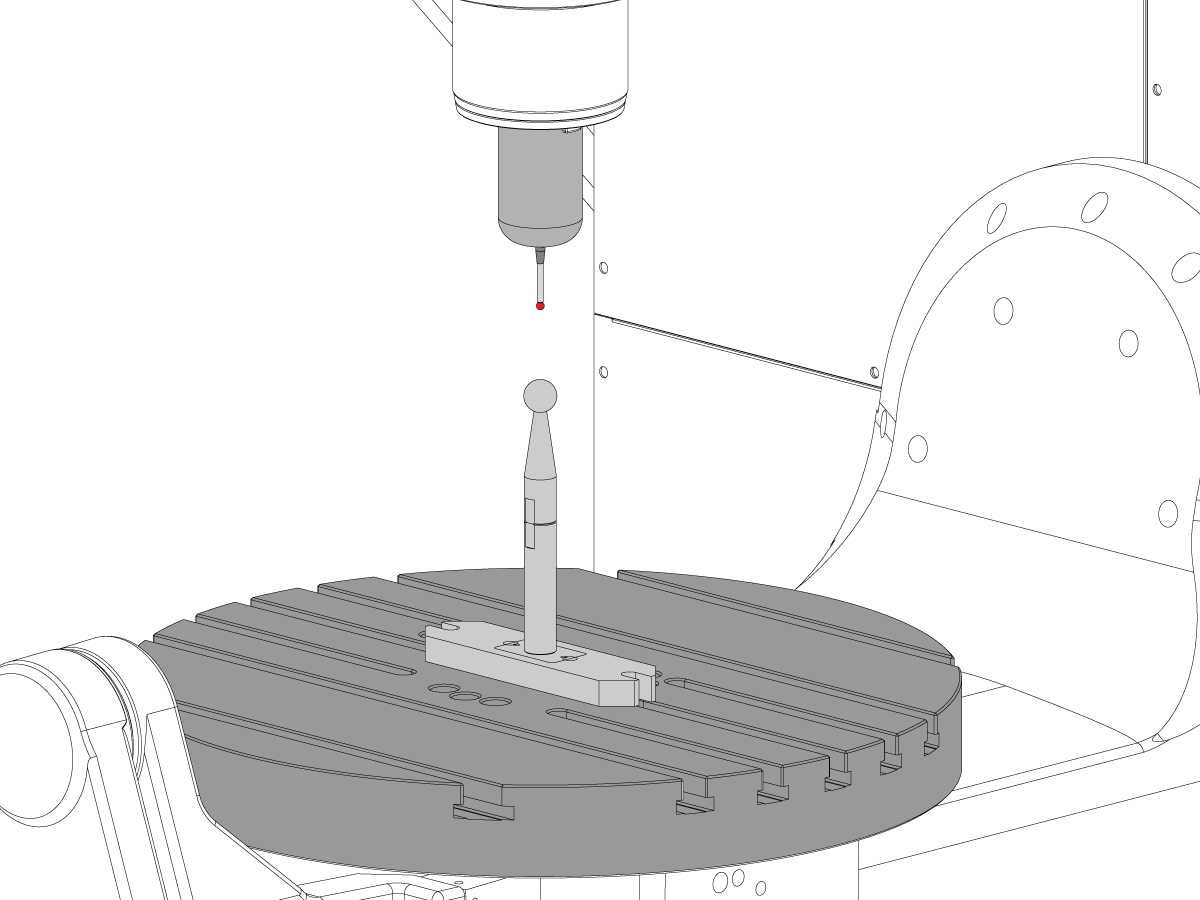
Fuori corsa mandrino

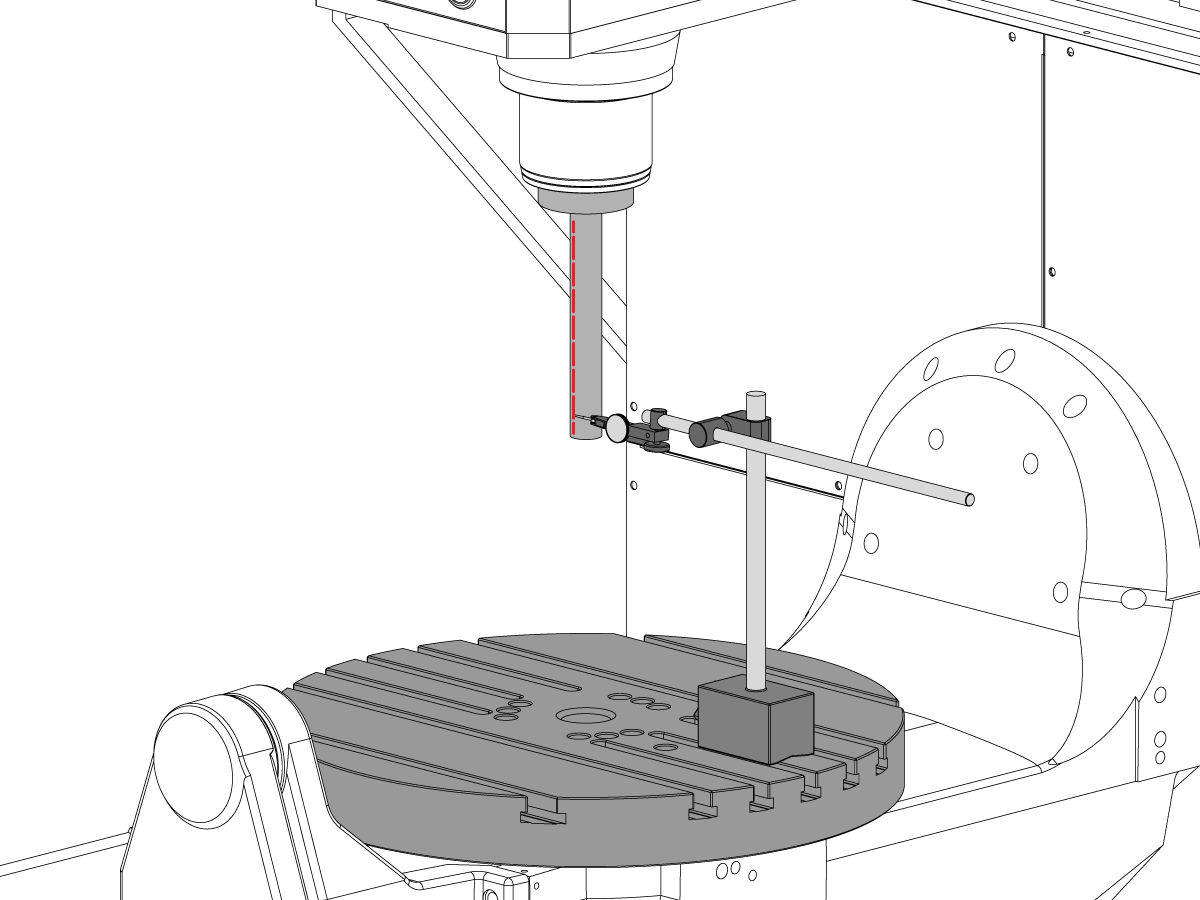
  • Centrare il mandrino sul foro dell’asse C.
  • Posizionare la base magnetica sul tavolo e inserire la barra di prova.
  • Controllare il runout del mandrino alla base della barra di prova (NTE 0,0005" TIR)
  • Controllare il runout del mandrino 6" dalla base della barra di prova (NTE 0,001" TIR)

10

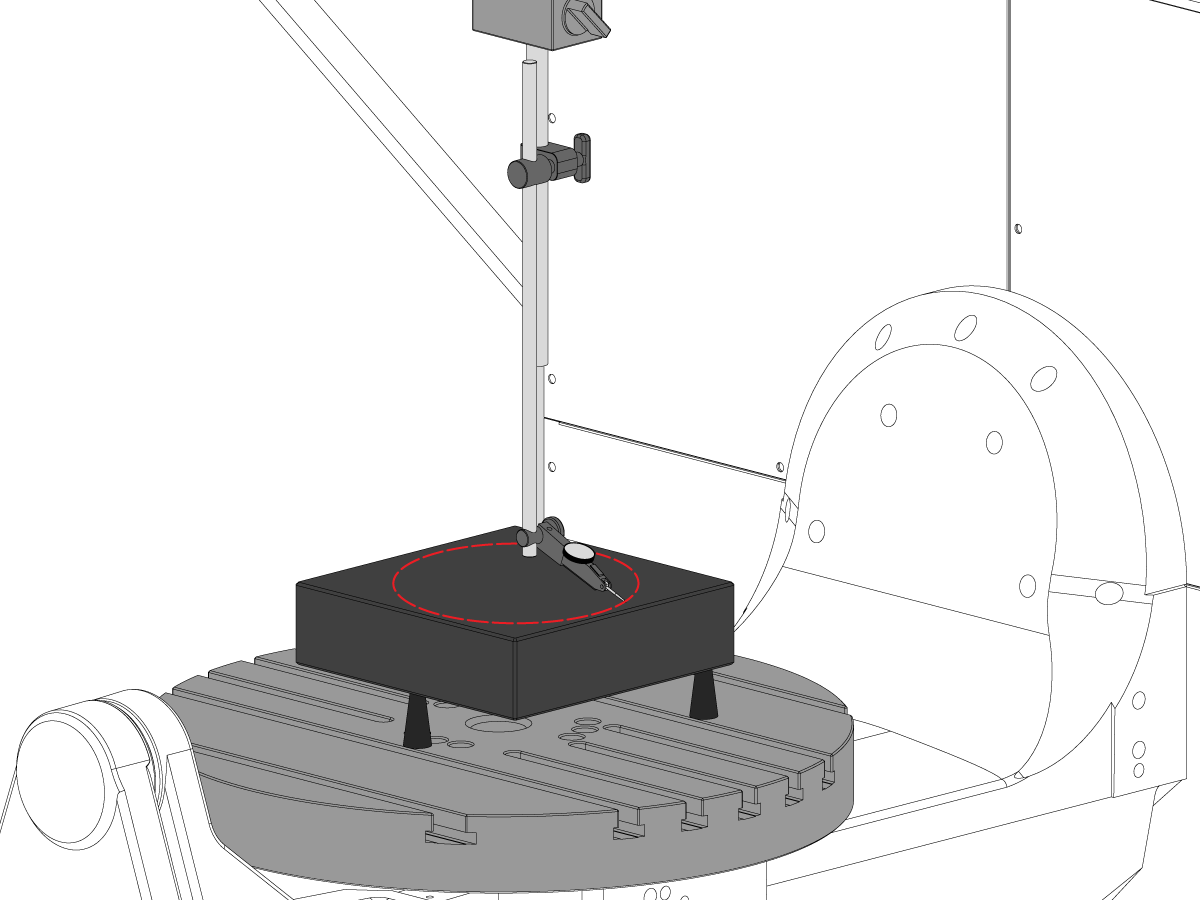
Linea di mezzeria del mandrino verso l’asse di z Parallelsim

  • Utilizzare le viti di sollevamento per rendere granito parallelo al piano XY nell’orientamento mostrato (NTE: 0,0002")
  • Centrare il mandrino sul foro del piatto dell’asse C
  • Spazzare in un 10" cerchio diametro
  • Registrare XZ TIR  (NTE 0,0005")
  • Registrare YZ TIR  (NTE 0,0005")

11

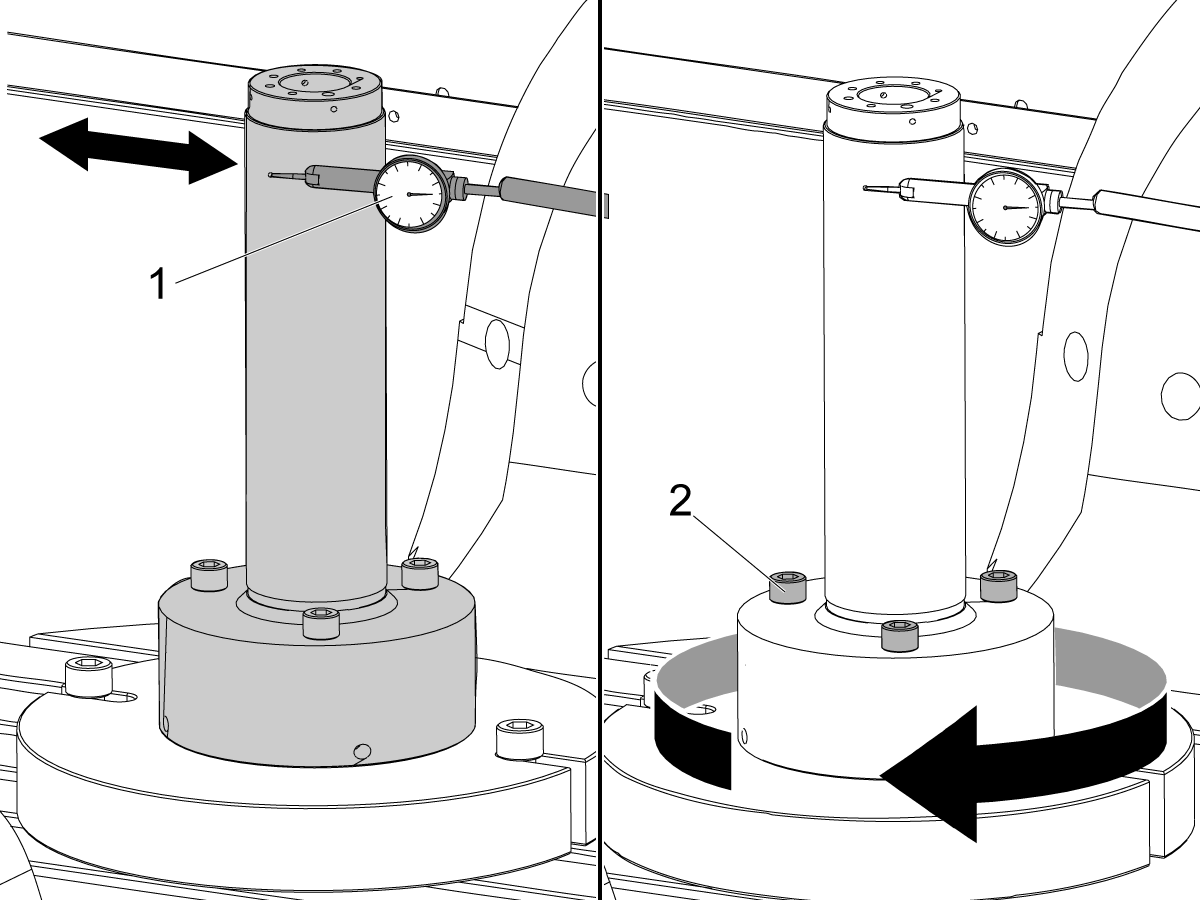
Concentricità del foro dell’asse C

  • Posizionare l’indicatore come mostra e jog l’asse C 360°
  • TIR record del foro di precisione (NTE 0,002")

12

Punto zero macchina rotante (MRZP)

  • Utilizzare il VQC Macro Program e il sistema della sonda per verificare i valori dei parametri Coldfire o delle impostazioni NGC mostrate di seguito:
    • 255 - MRZP X OFFSET
    • 256 - MRZP Y OFFSET
    • 257 - MRZP Z OFFSET
    • 254 - INTERASSE ROTANTE A 5 ASSI
  • Per un’istruzione MRZP completa, vedere Haas Impostazione offset MRZP WIPS procedure

8.3 Geometria - Risoluzione dei problemi

Recently Updated

Risoluzione dei problemi relativi alla geometria UMC


TG0151

Panoramica

Prima di risolvere un problema di precisione o geometria UMC-750, la tecnologia deve avere una conoscenza approfondita dei seguenti principi fondamentali:

  • Come livellare e allineare gli assi rotanti dell'UMC
  • Come riallineare tutti gli assi della macchina
  • Come eseguire la calibrazione MR-P e una sottostatura approfondita di quali sono i parametri associati e il loro effetto sulla macchina
  • La comprensione delle capacità di precisione delle macchine e la capacità di ragionare attraverso i problemi geometrici
  • Allineamento intersezione da B ad asse C

Un problema con la geometria o la precisione della macchina UMC-750 deve essere affrontato sistematicamente e nella sequenza corretta. Le seguenti informazioni devono essere rigorosamente rispettate e seguite in ordine sequenziale.

È assolutamente fondamentale che prima che venga effettuato un asse o una regolazione alla geometria della macchina, la macchina sia stata controllata per il livello corretto e l'allineamento degli assi rotanti alla macchina

Molti errori possono essere attribuiti alla macchina che soffre di un crash o problemi sia con applicazioni di utensili o problemi di programmazione. Non tentare di cambiare la geometria della macchina controllando completamente il livello complessivo e la geometria delle macchine Rapporto di ispezione. Ciò include il controllo Machine Rotary Zero Point (MRZP).

In caso di incidente ci sono 4 giunti di scivolamento sulla macchina. Queste aree sono la testa del mandrino al montone, l'ariete alla sella, la sella al ponte e il tronnione al supporto del tronnione.

 nota: nessuna di queste articolazioni dovrebbe mai essere sconnessa. Un arresto anomalo della macchina non dovrebbe mai modificare la quantità di shim richiesti nella macchina dalle impostazioni di fabbrica.

È importante ricordare che la precisione lineare della macchina è 0.0004/10" e la precisione angolare è arco 15. Sec. Queste tolleranze possono sommarsi rapidamente.

Ogni sforzo dovrebbe essere esaurito per determinare se l'applicazione di lavorazione è ragionevole e all'interno della macchina, fissaggio, e capacità di utensili.

Valutare le condizioni della macchina

Determinare se la macchina si è arrestata in modo anomalo in precedenza. Rivedere lo storico degli allarmi; cercare danni fisici sulla lamiera, tavolo, mandrino, ecc. Non importa quanto sia stato "minore" il danno, influenzerà comunque la geometria della macchina. Se la macchina si è schiantata, è necessario eseguire un'ispezione completa della geometria delle macchine

Valuta la condizione complessiva del fissaggio della parte e la condizione degli utensili da taglio.

Ottieni il backup completo della macchina e la segnalazione degli errori.

Verificare il livello e la geometria della macchina

Verificare che la macchina sia livellata e che l'asse rotante sia allineato alla macchina

 nota: non tentare di apportare modifiche alla geometria della macchina se non regolando i piedini di livello in questo momento.

Se la macchina è fuori livello o il rotativo non è allineato, azzerare il livello e l'allineamento rotativo.

Eseguire l'ispezione Geometria completa notando la grandezza e la direzione di eventuali errori per ogni asse.

Analizzare il report di ispezione.

Se una qualsiasi delle sezioni del report di ispezione è fuori tolleranza, la macchina deve essere ri-allineata.

Domanda di revisione

Raccogliere le seguenti informazioni sulla parte, la tenuta di lavoro e gli utensili:

  • Quali caratteristiche sono fuori tolleranza, grandezza, direzione dell'errore
  • La parte lavorata viene eseguita utilizzando un asse a 5 assi, 3 + 2 o 3 assi?
  • Rivedere la parte e l'approccio di lavorazione
  • È possibile ridurre al minimo gli errori di precisione della parte modificando l'approccio di lavorazione?
  • Il problema è un problema di ripetibilità, un problema di dimensioni o un problema geometrico?
  • Il programma utilizza TCPC o DWO?
  • Sono presenti valori nelle tabelle retributivi?

8.4 Applicazioni - Risoluzione dei problemi

Recently Updated

Applicazioni UMC - Guida alla risoluzione dei problemi


TG0150

Come accedere

Per ottenere la Guida alla risoluzione dei problemi delle applicazioni UMC:

Seguire questo link Documenti e software | HBC

oppure

Accedere a HBC.HAASCNC.COM

NOTA: Solo i tecnici dell’assistenza certificata Haas possono accedere a questi siti. 

Selezionare la scheda Assistenza.

Sotto Utilità, selezionare Documenti e Software.

Selezionare la cartella Applicazioni.

8.5 UMC-750 - Lista di controllo kit spessori

Recently Updated

UMC-750 - Lista di controllo kit spessori


AD0131

Introduzione

Questa è la lista di controllo del kit di spessori per il seguente kit:

  • 93-2236  DI SCARICO, KIT SPESSORI PER UMC-750

Lista di controllo: Colonna-distanziatore-spessore

Spessore Codice articolo Quanità nel kit Utilizzato
0,02100 20-9358A 2  
0,2105 20-9359A 2  
0,02110 20-9383A 2  
0,2115 20-9365A 2  
0,2120 20-9384A 2  
0,2125 20-9385A 2  
0,2130 20-9368A 2  
0,2135 20-9369A 2  
0,2140 20-9386A 2  
0,2145 20-9371A 2  
0,2150 20-9372A 2  
0,2155 20-9387A 2  
0,2160 20-9374A 2  
0,2165 20-9375A 2  
0,2170 20-9376A 2  
0,2175 20-9377A 2  
0,2180 20-9378A 2  
0,2185 20-9379A 2  
0,2190 20-9380A 2  
0,2195 20-9381A 2  
0,2200 20-9382A 2  

Nota: solo proprietari di kit: Specificare lo spessore dello spessore quando si ordinano le sostituzioni. Ad esempio, 20-9382 0.2145

Lista di controllo: Spessori di Horshoe

Spessore Codice articolo Quanità nel kit Utilizzato
0,0010 59-0240 2  
0,0020 59-0241 2  
0.0030 59-0242 2  

Lista di controllo: Spessore-Distanziatore-Colonna-Grande

Spessore Codice articolo Quanità nel kit Utilizzato
0,2130 20-6282A 2  
0,2135 20-6283A 2  
0,2140 20-6284A 2  
0,2145 20-6285A 2  
0,2150 20-6286A 2  
0,2155 20-6287A 2  
0,2160 20-6288A 2  
0,2165 20-6289A 2  
0,2170 20-6290A
2  
0,2175 20-6291A 2  
0,2180 20-6294A 2  
0,2185 20-6295A 2  
0,2190 20-6292A 2  
0,2195 20-6293A 2  
0,2200 20-6296A 2  
0,2205 20-6297A 2  
0,2210 20-6277A 2  
0,2215 20-6279A 2  
0,2220 20-6278A 2  
0,2225 20-6298A 2  
0,2230 20-6281A 2  

Nota: solo proprietari di kit: Specificare lo spessore dello spessore quando si ordinano le sostituzioni. Ad esempio, 20-6290A 0.2080

RECORD WHICH SHIMS WERE REMOVED FROM THE KIT IN THE USED COLUMN.

RITORNO IL CHECK LIST CON Il SHIM KIT.

RETURN THE ORIGINAL SHIMS NEL CRATE.

8.6 Intersezione asse B/C - Allineamento

Introduzione

In questa procedura viene illustrato come misurare e allineare l'intersezione degli assi B e C.  Prima di tentare questa procedura, verificare che la macchina sia Livellamento UMC-750.

Sarà necessario allineare gli assi B e C dopo aver:

  • Sostituire gli assi B e C
  • o completare un Ispezione UMC segnalare e trovare un problema

La distanza del centro rotariale a 5 assi definisce la differenza tra i centri rotanti di rotazione: C-Axis Machine Rotory zero Point (MR-P) e il Mr-P dell'asse B nell'asse X.

È possibile che non ci sia alcuna differenza tra l'asse C e l'asse B MR-P.

  • Controllo Classico Haas (CHC): Parametro 1314 - Rotary Axes Center Deviation in X
  • Controllo di nuova generazione Impostazione 254

Avrete bisogno dei seguenti strumenti:

  • T-2195A UMC Aligment Bar Adapter
  • T-2113 Alignment bar
  • Pistola termica e guanti resistenti al calore

Allineamento dell'asse B per gli assi XY

How to identify the Multi-Piece and the Unibody trunnion   

1) Multi-Piece trunnion:    UMC machines built approximetely before 11/2022 will have this configuration.

2) Unibody trunnion:    UMC machines built approximetely after 11/2022 will have this configuration.

1

Remove the A-frame trunnion support:

Remove the bolts [1] that secure the A-frame trunnion support [2] to the base and take out the shims between A-frame support and the base.

Rotate the A-frame support [2] counter-clockwise to clear the edge of the base [3].

Pull the A-frame support off the bearings.

 Note: The A-frame support might vacuum lock on the bearings. Use the zip-tie to pry the seal [4] open.

 Caution: To lift the trunnion support, get the aid of another person. The support weighs 85 lbs (39 kg).

2

Measure the B- axis of rotation parallelism to the Y-Z plane:

For a machine with a Classic Haas Control, change Parameter 151:20 (B axis CHK TRAVL LIM) to 0.

For a machine with a Next Generation Control, change Parameter 6.021 (B axis CHK TRAVL LIM) to FALSE.

Measure the parallelism of the platter to the Y-Z plane with the B axis at 90° and then the B axis at -90° as shown in the picture.

Position the Y-Axis in the following starting position:

UMC-500: Y=0, Sweep 15”, 3rd T-Slot Land from the top.

UMC-750/1500-Duo: Y=-1.0, Sweep 18", 3rd T-Slot Land from the Top .

UMC-1250: Y=-1.0, Sweep 28", 3rd T-Slot Land from the Top.

UMC-500PP: Y=-4.0, Sweep 7".

UMC-750PP: Y=-2”, Sweep 15".

UMC-1000PP: Y=-4”, Sweep 15".

Compare the results at B 90° and B-90°. The results should be...

  • Symmetric against the Y-Z plane, positive or negative direction
  • Less than 0.0010"/20"

If the results are symmetric against Y-Z plane, and are less than 0.0010"/20 inches: Go to Step 5.

If the results are symmetric against Y-Z plane, but are more than 0.0010"/20 inches: Go to Step 4.

 Warning: If the results [3] are not symmetric against the Y-Z plane, the B axis rotary needs to be aligned: Go to Step 3.

3

Align the B axis of rotation parallel to the Y-Z plane:

Loosen the (6) bolts [1] that secure the B axis rotary to the base casting.

 Note: Keep the bolts sufficiently snug to control the adjustments.

Adjust the front and rear setscrews [2] until the measurements taken in Step 2 are symmetric against the Y-Z plane.

Torque the (6) bolts [1]. Refer to Haas Fastener Torque Specification.

Verify the measurements in Step 2 after the bolts have been torqued.

4

Align the C Axis of rotation perpendicular to the B Axis of rotation:

Remove the bottom C-Axis access cover.

Loosen the (12) bolts [1] that hold the C Axis body to the B Axis platter face.

Reach the bottom (4) bolts through the C Axis access port.

If the B Axis is symmetric in the positive direction [4], install horseshoe shims [2] of appropriate size behind the top (2) bolts.

If the B Axis is symmetric in the negative direction [5], install horseshoe shims [2] of appropriate size behind the bottom (2) bolts.

Torque the (12) bolts to 80 Ft-lbs (108 Nm).

Cut the excessive shim material off.

Verify the measurements in Step 2 after bolts are torqued.

5

Align the trunnion support shaft co-axial with the B Axis of rotation:

Setup (2) indicators on the outer race of the trunnion support bearing [2] as shown in the picture.

Mark the spot on the outer race where one of the indicator needles is contacting the surface.

After moving the B Axis to 90° or -90° you will align the marked spot with the needle again to exclude the bearing runout error from the measurements.

Take the readings when B is at 90° and B at -90°. Compare the readings. 

 Caution: The B axis brake needs to be clamped when taking the readings.

The deviation between the results when B is at 90° and at -90° needs to be less than 0.001" on each indicator.

 Note: The indicator on the side of the bearing will measure top to bottom alignment and the indicator on the top of the bearing will measure side to side alignment.

____

For models with a multi-piece trunnion

Loosen the (6) bolts [3] on the C Axis body support. Keep the bolts sufficiently snug to control adjustment.

Adjust the (8) set screws [4] until deviation between B at 90° and B at -90° is within 0.001".

Torque the (6) bolts [2] on the C Axis body support to 80 Ft-lbs (108 Nm).

Verify the alignment after the bolts have been torqued.

____

For models with a unibody trunnion

Jog rotary to B90. Set up an indicator on the highlighted surface as shown in the lower diagram .

Rotate B-axis 180 degrees (90 to -90).

Run out (NTE 0.010” TIR).

 Caution: If the measurement exceeds the tolerance then contact support.

6

Install and shim the A-frame trunnion support:

Move the B Axis to 90°.

Setup an indicator [1] against a machined surface of the C Axis body. Set the indicator to 0.

Use plastic zip ties [2] to pry the seal open while installing the A-frame support. This lets unwanted air and grease out of the assembly.

Install the A-frame trunnion support [3] over the bearings.

Remove the cable ties.

Turn the trunnion support clockwise until it is vertical.

 Note: The weight of the A-frame support will cause the trunnion to sag. The amount of sag is measured with the indicator that was previously setup on the side of the C Axis body.

____

For multi-piece trunnions

Adjust the shims [4] between the A-frame support and the base casting to remove the sag until indicator reads 0 again.

When the indicator reading is 0, torque the (4) bolts. Refer to Haas Fastener Torque Specification.

Verify the reading after bolts are torqued. Adjust the shims again if necessary until the indicator reads 0.

____

For models with unibody trunnion

Determine the amount of shim stock [4] needed to raise the Trunnion arm so the indicator reads 0.005".

The indicator [1] value will change once the support is torqued.

With indicator still in place:

  • Torque trunnion support bolts to appropriate values.
  • Check indicator to make sure it reads between the range of

Trunnion arm raised (0.005” to  0.010”).

 Note: For unibody trunnions, the shim location may also be used to correct the C-axis to X-Y plane perpendicularity instead of shimming the saddle trucks.

 Caution: Use equal amount of shims on each side of the A-frame support. Unequal shims will cause the A-frame support to pull the trunnion to the side.

Verify the B Axis of rotation alignment to the Y-Z plane (Step 2). Loosen the bolts and tap the A-frame support side to side if necessary to correct the B axis to Y-Z plane alignment.

7

Set C-axis perpendicular to X/Y plane:

Move the axes to

UMC-750's........X= -10.5" & Y=0."

UMC-1000's......X=-17.0" & Y=-0."

Zero an indicator [1], on a Ground Block [2], 1/2" off the edge at the rear of the platter (Mag-Base on Spindle), with C at 0 Degrees

Rotate C-Axis to 180°.

Move Y axis, and ground block, in Y Axis negative direction until you are 1/2" away from platter edge, and take the perpendicularity measurement

Adjust the shims until the average error is within 0.0005" end to end.

 Note: For unibody trunnions, the shim location under the bearing support may also be used to correct the C-axis to X-Y plane perpendicularity instead of shimming the saddle truck.

Caution: Shim either two front trucks or two rear trucks with the equal shim.

Note: Shim one truck at the time to maintain the X to Y squareness.

Verify the measurements after all bolts are torqued.

Verify the X to Y alignment in Step 2.

8

Set the tool change offsets:

B-axis tool change offset [1]

For Classic Haas Controls, change Parameter 213. 

For Next Generation Controls, go to: Settings>Rotary Tab>Highlight the rotary and press [INSERT], or change Parameter 6.078 (B TOOL CHANGE OFFSET) to set the trunnion (B Axis) parallel to the X Axis.

For models with multipiece trunnion

(NTE 0.001/10"; NTE 0.0020" overall)

For models with unibody trunnion

(NTE 0.0005/10"; NTE 0.0010" overall)

___

C-axis tool change offset [2]

For Classic Haas Controls change Parameter 523.

For Next Generation Control go to: Settings>Rotary Tab> Highlight the rotary and press [INSERT], or change Parameter 7.078 (C TOOL CHANGE OFFSET) to set the table T-slot (C Axis) parallel to the X Axis

For models with multipiece trunnion

(NTE 0.001/10"; NTE 0.0020" overall)

For models with unibody trunnion

(NTE 0.0005/10"; NTE 0.0010" overall)

9

Check C-axis perpendicularity to X/Y plane:

Align the indicator centered over the C-axis bore with the Y-axis at -10.

Jog positive in the Y-axis and align the indicator over the center of the last section of the platter and make a mark at this spot with a washable marker.

Insert 1-2-3 block as shown and set the indicator to zero.

Remove the block and rotate the platter 90 degrees, following the marked spot with the indicator.

Insert block back between the indicator and platter. Note reading.

Repeat the previous two steps, taking readings with the platter at 180, 270 and 360 degrees.

Multi-piece trunnion:  (NTE 0.0005")

Unibody trunnion: (NTE 0.001")

10

Measure the intersection of the B and C axis:

Follow the linked instruction manual to complete this step.

B-Axis and C-Axis intersection Adjustment

11

Align the B-Axis brake disk:

 Note: Do not do this step if you are working on a SS machine.

Operate this code in MDI mode to unclamp the brake:

M11;

Loosen all of the brake disc bolts [1] and torque them to 5 Ft-lbs (7 Nm).

Operate this code in MDI mode to clamp the brake:

M10;

Wait 10 seconds.

Torque the bolts. Refer to Haas Fastener Torque Specifications.

Impostazione dell'utensile Asse B-Asse asse

1

Install the B Axis and C Axis intersection tool:

Jog the C Axis to 0°.

Push [EMERGENCY STOP].

Clean the table.

Guide the shaft of the adapter [1] while you slowly lower it into the center bore.

Attach the adapter to the table with (2) screws [4] and (2) T-nuts.

Attach the alignment bar [2] to the adapter with (3) screws [3].

Snug the (3) screws to allow for adjustments in the next step.

2

Align the B/C intersection tool with the C Axis:

Put an indicator on the front side of the alignment bar near the base.

Release the [EMERGENCY STOP]. Push [RESET] to clear any alarms.

Jog across the tool in the X Axis to find the high spot.

Set the indicator to 0.

Jog the C Axis 360°.

Lightly tap the base with a rubber mallet to adjust the radial error on the alignment bar.

Note: Adjust the alignment bar to half of the measured error, because you are measuring the diameter error.

Jog the C Axis 360°.

When correctly adjusted the radial error is less than 0.0002" (0.005 mm).

3

Check the B/C intersection:

Center the indicator [1] on the front side of the alignment bar near the top of the cylinder.

Jog across the tool in the X Axis to find the high spot.

Zero the indicator.

Jog the C Axis 360°.

Turn the (3) screws [2] on the alignment bar to adjust the runout.

Jog the C Axis 360°.

When correctly adjusted the radial error is less than 0.0002" (0.005 mm).

Repeat Step 2 and verify the alignment did not change.

Regolazione dell'asse B a asse C

1

For a machine with a Classic Haas Control change:

  • Parameter 151:20 (B-axis CHK TRAVL LIM) to 0.
  • Parameter 1314 (ROTARY AXIS CENTER DEVIATION IN X) to 0.

For a machine with a Next Generation Control change:

  • Parameter 6.021 (B-axis CHK TRAVL LIM) to FALSE.
  • Setting 254 (5-Axis Rotary Center Distance) to 0.

Push [ZERO RETURN]. Then push [ALL].

Jog the B-axis to -90°.

Note: The rotary positions are for reference only.

Put an indicator [1] on top of the alignment bar.

Jog in the Y-axis to find the high point.

Set the indicator to 0.

Jog across the alignment bar in the X-axis [2].

Jog the B-axis to adjust the alignment bar parallel to the X plane.

Set the indicator to 0.

Jog the Y-axis to 0.

Caution: Make sure the indicator assembly is clear of the B-axis movement.

 Caution: Do not move the Z-axis.

2

Jog the B-axis to +90°.

 Caution: Make sure the indicator assembly is clear of the B-axis movement.

Jog the Y-axis [1] to find the high point on the alignment bar.

Note: Do not set the indicator to 0.

Jog across the alignment bar in the X-axis.

Jog the B-axis to adjust the alignment bar parallel [2] to the X plane.

When the alignment bar is parallel to the X plane, the indicator reading is the change needed in the Z-Axis (∆Z=indicator reading).

Record the value shown on the indicator. In this example the indicator now shows 0.0015". ∆Z is 0.0015".

3

Do these calculations to get the value for CHC Parameter 1314 or NGC Setting 254. (In this example the difference in readings for the B-C intersection (∆Z) is 0.0015".):

  • ∆Z / 2 x 10,000 = CHC Parameter 1314 / NGC Setting 254
  • 0.0015 / 2 = 0.00075
  • Round down to 4 decimal places: 0.00075 = 0.0007 (NGC Setting 254)
  • 0.0007 x 10,000 = 7 (CHC Parameter 1314)

Set Parameter CHC Parameter 1314 (Rotary Axes Center Deviation in X) or NGC Setting 254 (5-Axis Rotary Center Distance), to the calculated value.

In this example, set parameter CHC Parameter 1314 to 7 or NGC Setting 254 to 0.0007.

Cycle the power to save CHC Parameter 1314 or NGC Setting 254.

Repeat Steps 1-3 to verify that the value for ∆Z is less than 0.0002" (0.005 mm).

4

Jog the B-Axis to the home position.

Set Parameter 151:20 (B-Axis CK Travel Limit) to 1.

Make sure the MRZP offsets are correct.

Calibrate WIPS per Wireless Intuitive Probe System (WIPS) - Calibration.

Complete an inspection report. Refer to UMC-750 Inspection Report.

Recently Viewed Items

You Have No Recently Viewed Items Yet

Feedback
Haas Logo

Costi di spedizione Haas

Questo prezzo include le spese di spedizione, i dazi all'esportazione e all'importazione, l'assicurazione e qualsiasi altra spesa sostenuta durante la spedizione verso una località in Francia concordata con l'acquirente. Non è possibile aggiungere altri costi obbligatori alla spedizione di un prodotto CNC Haas.

MANTIENITI AGGIORNATO CON GLI ULTIMI SUGGERIMENTI E LA NUOVA TECNOLOGIA DI HAAS

Iscriviti subito!   

HAAS TOOLING ACCETTA QUANTO SEGUE:

  • Servizio e assistenza
  • Proprietari
  • Richiedi assistenza
  • Manuali dell’operatore
  • Pezzi di ricambio Haas
  • Richiesta di riparazione tavola rotante
  • Guide di preparazione all’installazione
  • Strumenti di acquisto
  • Configura e quota una nuova Haas
  • Inventario disponibile
  • Listino prezzi Haas
  • Finanziamento CNCA
  • Informazioni su Haas
  • Dichiarazione di accessibilità
  • Dichiarazione DNSH
  • Conformità delle esportazioni
  • Carriere
  • Certificazioni e sicurezza
  • Contattaci
  • Storia
  • Termini e condizioni
  • Termini e condizioni di Haas Tooling
  • Privacy
  • Garanzia
  • Community di Haas
  • Programma di certificazione Haas
  • Haas Motorsports
  • Fondazione Gene Haas
  • Comunità di formazione tecnica Haas
  • Eventi
  • Unisciti alla conversazione
  • Facebook
  • X
  • Flickr
  • YouTube
  • LinkedIn
  • Instagram
  • TikTok
© 2026 Haas Automation, Inc - Macchine utensili CNC

This site is protected by reCAPTCHA and the Google Privacy Policy e Terms of Service apply.

2800 Sturgis Rd., Oxnard, CA 93030 / Toll Free: 800-331-6746
Phone: 805-278-1800 / Fax: 805-278-2255