My Haas Bun venit,
!
Haas Tooling MyHaas/HaasConnect Înregistrare Înregistrare Haas Tooling MyHaas/HaasConnect Deconectare Bun venit, Mașinile mele Cea mai recentă activitate Cotațiile mele Contul meu Utilizatorii mei Deconectare
Găsiți-vă distribuitorul
  1. Selectare limbă
    1. English
    2. Deutsch
    3. Español - España
    4. Español - México
    5. Français
    6. Italiano
    7. Português
    8. Český
    9. Dansk
    10. Nederlands
    11. Magyar
    12. Polski
    13. Svenska
    14. Türkçe
    15. 中文
    16. Suomi
    17. Norsk
    18. الإنجليزية
    19. български
    20. Hrvatski
    21. Ελληνικά
    22. Română
    23. Slovenský
    24. Slovenščina
    25. 한국어
    26. 日本語
    27. Українська
  • mașini Main Menu
    • Freze verticale
      Freze verticale
      Freze verticale View All
      • Freze verticale
      • Seria VF
      • Mașinile universale
      • Seria VR
      • VP-5 Prismatic
      • VMC-uri cu schimbarea paletelor
      • Mini Mills
      • Mașini de prelucrare matrițe
      • Centre de găurire de mare viteză
      • Seria pentru găurire/tarodare/frezare
      • Freze pentru sculărie
      • Pocket Mill
      • Freze compacte
      • Seriile portal
      • Frezele de tablă SR
      • VMC foarte mare
      • Freze cu coloană dublă
    • Soluții în mai multe axe
      Soluții în mai multe axe
      Soluții în mai multe axe View All
      • Soluții în mai multe axe
      • Strunguri pe axa Y
      • Freze pe 5 axe
    • Strunguri
      Strunguri
      Strunguri View All
      • Strunguri
      • Seria ST
      • Arbore dublu
      • Seria glisieră
      • Strunguri de sculărie
      • Strung cu mandrină
      • Alimentatoare de bare Haas
    • Freze orizontale
      Freze orizontale
      Freze orizontale View All
      • Freze orizontale
      • Con 50
      • Con 40
    • Unități rotative și indexoare
      Unități rotative și indexoare
      Unități rotative și indexoare View All
      • Unități rotative și indexoare
      • Mese rotative
      • Indexoare
      • Unități rotative în 5 axe
      • Unități rotative foarte mari
    • Sisteme de automatizare
      Sisteme de automatizare
      Sisteme de automatizare View All
      • Sisteme de automatizare
      • Automatizare freză
      • Automatizare strung
      • Încărcătoare automate de piese
      • Modele de automatizare
    • Mașini desktop
      Mașini desktop
      Mașini desktop View All
      • Mașini desktop
      • Freze desktop
      • Desktop Lathe
      • Simulator unitate de comandă, standard
      • Simulator unitate de comandă, Premium
    • Echipament pentru atelier
      Echipament pentru atelier
      Echipament pentru atelier View All
      • Echipament pentru atelier
      • Freză articulată
      • Strunguri manuale Haas
      • Ferăstraie Haas
    • Mașini de producție
      Mașini de producție
      Mașini de producție View All
      • Mașini de producție
      • Mașini de așchiere cu laser
      • Prese de îndoit CNC
    • LINK-URI RAPIDE Serie specială  Serie specială 
      SERIILE EU SERIILE EU CONFIGURAȚIE ȘI PREȚ | LISTĂ DE PREȚURI CONFIGURAȚIE ȘI PREȚ | LISTĂ DE PREȚURI Mașini în stoc Mașini în stoc CE ESTE NOU CE ESTE NOU PRIMA DVS. MAȘINĂ CNC PRIMA DVS. MAȘINĂ CNC
      CUMPĂRAREA SCULELOR
      • Configurare și preț mașină Haas
      • Listă de prețuri
      • Inventar disponibil
      • Finanțare CNCA
      AVEȚI NEVOIE DE CONSILIERE?

      O reprezentanță Haas (HFO) vă poate răspunde la întrebări și vă poate ghida spre cele mai bune opțiuni.

      CONTACT YOUR DISTRIBUTOR >
  • Opțiuni Main Menu
    • Product Image Arborii principali
      Arborii principali
      Arborii principali View All
      • Arborii principali
    • Product Image Schimbătoare de scule
      Schimbătoare de scule
      Schimbătoare de scule View All
      • Schimbătoare de scule
    • Product Image Axa a 4-a | 5-a
      Axa a 4-a | 5-a
      Axa a 4-a | 5-a View All
      • Axa a 4-a | 5-a
    • Product Image Capete revolver și ansamblul sculelor antrenate
      Capete revolver și ansamblul sculelor antrenate
      Capete revolver și ansamblul sculelor antrenate View All
      • Capete revolver și ansamblul sculelor antrenate
    • Product Image Palpare
      Palpare
      Palpare View All
      • Palpare
    • Gestionarea Haas a șpanului și a lichidului de răcire Gestionarea lichidului de răcire și șpanului
      Gestionarea lichidului de răcire și șpanului
      Gestionarea lichidului de răcire și șpanului View All
      • Gestionarea lichidului de răcire și șpanului
    • Unitatea de comandă Haas Unitatea de comandă Haas
      Unitatea de comandă Haas
      Unitatea de comandă Haas View All
      • Unitatea de comandă Haas
    • Product Image Opțiunile produsului
      Opțiunile produsului
      Opțiunile produsului View All
      • Opțiunile produsului
    • Product Image Scule și dispozitive de fixare
      Scule și dispozitive de fixare
      Scule și dispozitive de fixare View All
      • Scule și dispozitive de fixare
    • Product Image Sistemul de suport piesă
      Sistemul de suport piesă
      Sistemul de suport piesă View All
      • Sistemul de suport piesă
    • Product Image Soluții în 5 axe
      Soluții în 5 axe
      Soluții în 5 axe View All
      • Soluții în 5 axe
      • 5 Easy Steps to 5-Axis
    • Product Image Automatizare
      Automatizare
      Automatizare View All
      • Automatizare
    • LINK-URI RAPIDE Serie specială  Serie specială 
      SERIILE EU SERIILE EU CONFIGURAȚIE ȘI PREȚ | LISTĂ DE PREȚURI CONFIGURAȚIE ȘI PREȚ | LISTĂ DE PREȚURI Mașini în stoc Mașini în stoc CE ESTE NOU CE ESTE NOU PRIMA DVS. MAȘINĂ CNC PRIMA DVS. MAȘINĂ CNC
      CUMPĂRAREA SCULELOR
      • Configurare și preț mașină Haas
      • Listă de prețuri
      • Inventar disponibil
      • Finanțare CNCA
      AVEȚI NEVOIE DE CONSILIERE?

      O reprezentanță Haas (HFO) vă poate răspunde la întrebări și vă poate ghida spre cele mai bune opțiuni.

      CONTACT YOUR DISTRIBUTOR >
  • Why Haas Main Menu
      Descoperiți diferența Haas
    • De ce Haas
    • MyHaas
    • Comunitate pentru învățare
    • Industry 4.0
    • Certificare Haas
    • Mărturiile clienților
  • Service Main Menu
      Bine ați venit la departamentul de Haas Service
      PAGINA PRINCIPALĂ SERVICE Manualele de utilizare Instrucțiuni de folosire Ghiduri de depanare Întreținerea preventivă a mașinii Piese Haas Haas Tooling Videoclipuri
  • Videoclipuri Main Menu
  • Main Menu
    • View All
      • Financing
    • View All
      • Showroom Inventory
    • LINK-URI RAPIDE Serie specială  Serie specială 
      SERIILE EU SERIILE EU CONFIGURAȚIE ȘI PREȚ | LISTĂ DE PREȚURI CONFIGURAȚIE ȘI PREȚ | LISTĂ DE PREȚURI Mașini în stoc Mașini în stoc CE ESTE NOU CE ESTE NOU PRIMA DVS. MAȘINĂ CNC PRIMA DVS. MAȘINĂ CNC
      CUMPĂRAREA SCULELOR
      • Configurare și preț mașină Haas
      • Listă de prețuri
      • Inventar disponibil
      • Finanțare CNCA
      AVEȚI NEVOIE DE CONSILIERE?

      O reprezentanță Haas (HFO) vă poate răspunde la întrebări și vă poate ghida spre cele mai bune opțiuni.

      CONTACT YOUR DISTRIBUTOR >
My Haas Bun venit,
!
Haas Tooling MyHaas/HaasConnect Înregistrare Înregistrare Haas Tooling MyHaas/HaasConnect Deconectare Bun venit, Mașinile mele Cea mai recentă activitate Cotațiile mele Contul meu Utilizatorii mei Deconectare
Găsiți-vă distribuitorul
  1. Selectare limbă
    1. English
    2. Deutsch
    3. Español - España
    4. Español - México
    5. Français
    6. Italiano
    7. Português
    8. Český
    9. Dansk
    10. Nederlands
    11. Magyar
    12. Polski
    13. Svenska
    14. Türkçe
    15. 中文
    16. Suomi
    17. Norsk
    18. الإنجليزية
    19. български
    20. Hrvatski
    21. Ελληνικά
    22. Română
    23. Slovenský
    24. Slovenščina
    25. 한국어
    26. 日本語
    27. Українська
×

Rezultatele căutării

Web Pages

Images

    • <
    • 1
    • >

8 - UMC - Geometry and Alignment

Seria UMC - Manual de service


  • UMC - Arbore principal
  • 1 – UMC – Prezentare
  • 2 – UMC – Specificații
  • 3 - UMC-400/500/750 - Instalare
  • 4 – UMC-1000/1250 – Instalare
  • 5 – UMC-1500-DUO/1600-H – Instalare
  • 6 - UMC - Ancorare
  • 7 – UMC – Funcționare
  • 8 – UMC – Geometrie și poziționare
  • 9 – UMC – MRZP și zone sigure
  • 10 – UMC – B/C – Axă rotativă
  • 11 – UMC – Schimbător de scule
  • 12 – UMC – Evacuare șpan și lichid de răcire
  • 13 – UMC – Comandă electrică
  • 14 – UMC – Lubrifiere
  • 15 – UMC – Întreținere
  • 16 – UMC – Fond de palete
  • 17 – UMC – Sistem de suport piesă hidraulic
  • 18 - UMC - Sistem pneumatic de suport piesă

Go To :

  • 8.1 Ghid de geometrie
  • 8.2 Poziționare - Zone indicatoare
  • 8.3 Geometrie - Depanare
  • 8.4 Aplicații - Depanare
  • 8.5 UMC-750 - Listă de verificare pentru setul de bailaguri
  • 8.6 Intersecția axelor B/C - Aliniere

8.1 Ghid de geometrie

Recently Updated

Ghid de geometri - Seria UMC


Prezentare

  1. Păpușă portsculă
  2. Piston
  3. Sanie transversală
  4. Pod
  5. Bază
  6. Rotaţia axei C
  7. Rotaţia axei B

Înainte de a începe, înregistrați valoarea din fabrică a parametrului sau a setării de mai jos. Va trebui să setați aceasta la zero în timp ce efectuați reglaje, apoi să resetați la valoarea inițială când ați terminat. Valoarea ar putea fi pozitivă sau negativă.

  • Unitatea de comandă Haas clasică (CHC) Parametru 1314 (Rotary Axes Center Deviation in X)
  • Unitatea de comandă de generația următoare (NGC) Setare 254 (5 Axis Rotary Center Distance)

Instrumente şi truse necesare:

  • T-2193A - UMC-750 SPINDLE HEAD ALIGNMENT PIN *
  • T-2181 - CNC DUAL LEVELING TOOL
  • T-2192 - LEVELING ADAPTER UMC-750
  • 93-2236 - SHIM KIT FOR UMC-750 *

Faceți clic pe link pentru a vedea videoclipul  Alinierea şi nivelarea UMC-750 .

*  : Se utilizează numai pentru seriile pre-repornire. 

Aduceți maşina la nivel

1

Setaţi înălţimea maşinii:

Deplasați axele X și Y în poziția de origine.

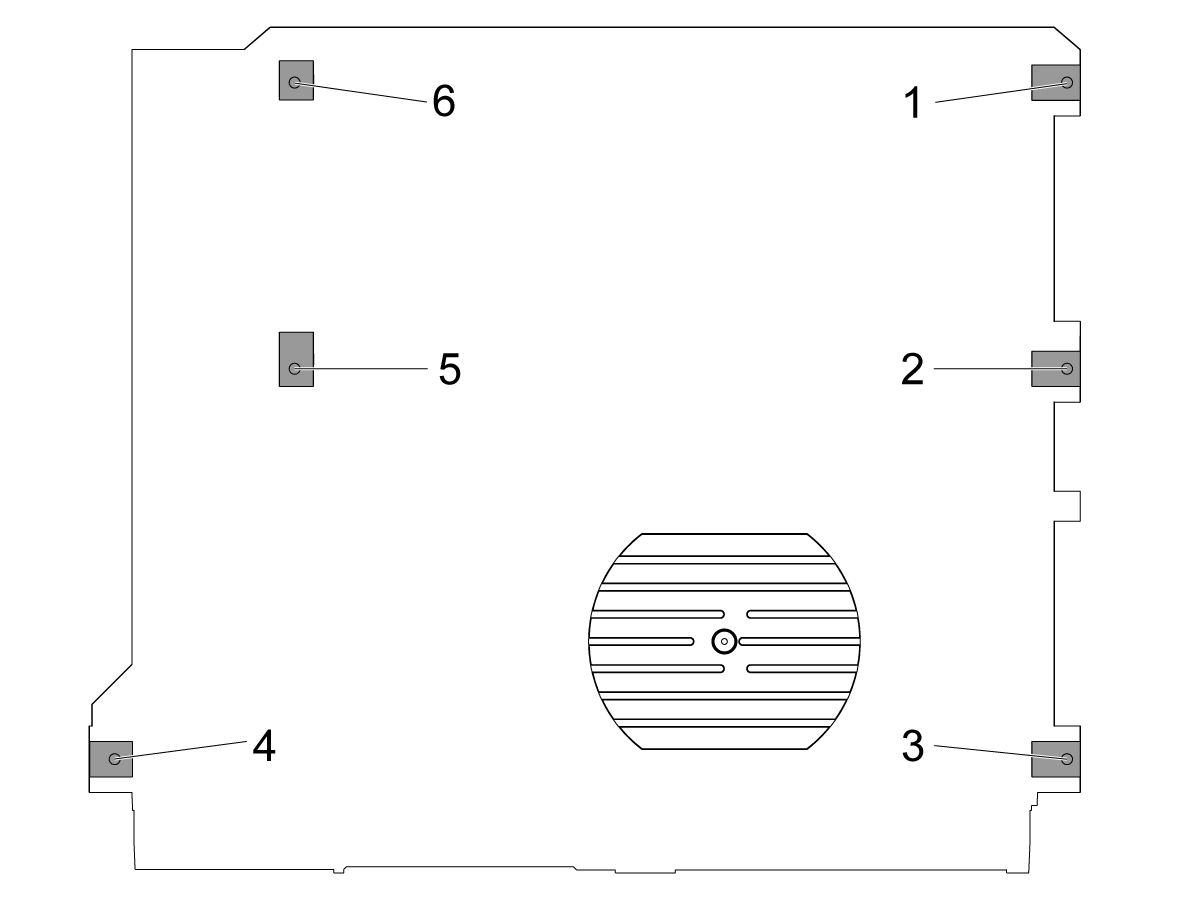
Slăbiţi şuruburile mediane de nivelare [2 şi 5], astfel încât acestea să nu susţină nicio greutate.

Puneți mașina pe șuruburile de nivelare pentru cele (4) colțuri, de 3" (76,2 mm) aflate deasupra podelei.

2

Aduceți maşina la un nivel aproximativ:

Răsuciţi şurubul de nivelare 4 în sus.

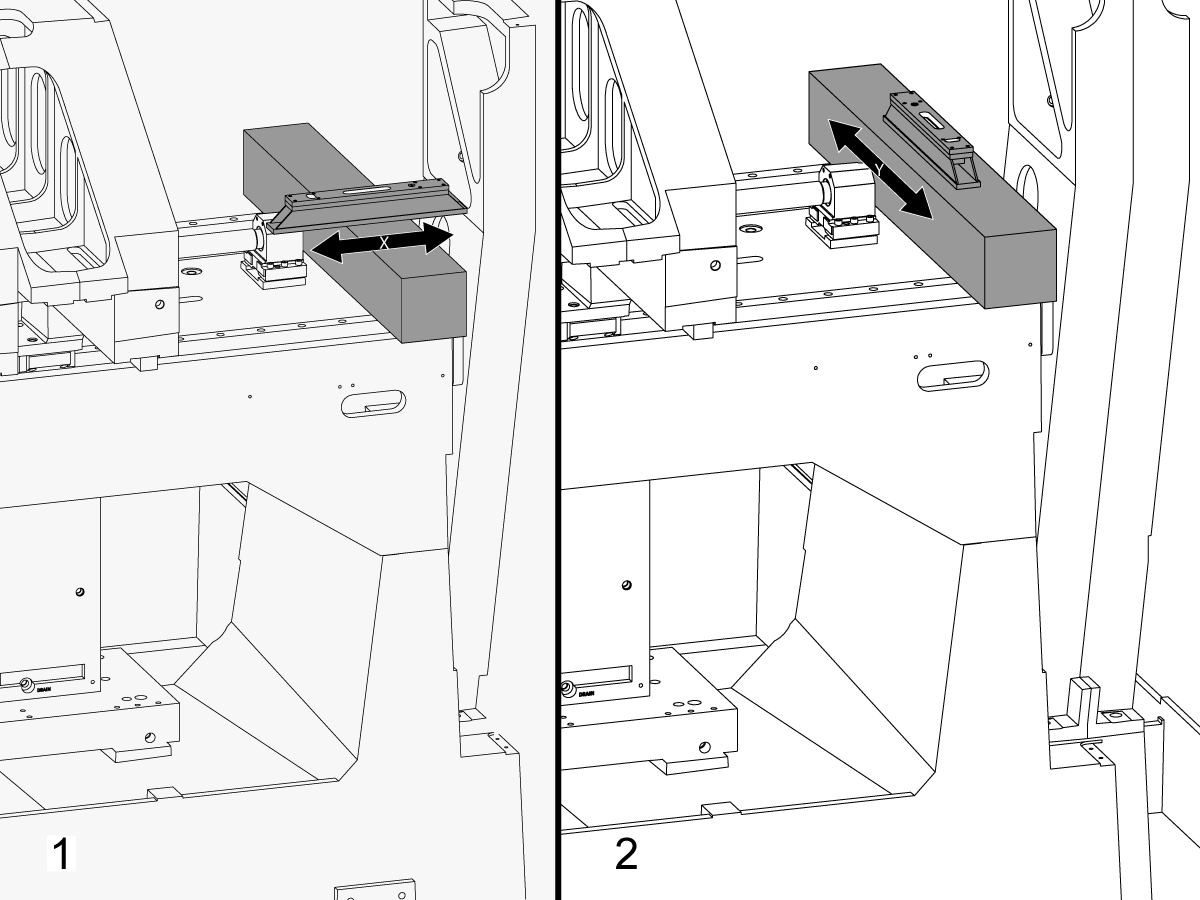
Amplasaţi granitul pe ghidajele liniare ale axei X, lângă suportul lagărului cu șurub cu bilă al axei X.

Configurați nivelul de prelucrare deasupra granitului paralel cu axa X.[1]

Ajustați şurubul de nivelare 6 până când maşina este nivelată la axa X.

Configurați nivelul de prelucrare deasupra granitului perpendicular pe axa X.[2]

Ajustați şurubul de nivelare 3 până când maşina este nivelată la axa Y.

Răsuciţi şurubul de nivelare 4 în jos până când ajunge în contact cu discul de nivelare.

3

Ajustați rola axei X:

Asamblați T-2192 cu T-2181.

Mutați axa Y în mijlocul cursei.

Puneți T-2192 pe latura arborelui principal.

Asiguraţi-vă că bula de pe T-2181 se încadrează în intervalul lizibil.

În caz contrar, slăbiţi bolțul care fixează T-2192 la baza magnetică şi mutaţi adaptorul după cum este necesar.

Deplasaţi axa X dintr-o parte în alta și măsurați rola axei X. Efectuaţi măsurători în poziția de origine, la mijlocul şi la sfârşitul cursei.

Reglaţi şurubul de nivelare 4 până când nu mai există nicio abatere între citirea în poziţia de origine şi citirea la sfârșitul cursei.

Notă: Bula de la T-2181 NU trebuie să se afle în mijlocul flaconului. Trebuie doar să se încadreze în intervalul în care se poate realiza citirea.

4

Setaţi şuruburile mediane de nivelare:

Răsuciţi şuruburile de nivelare mediane până când acestea intră în contact cu discurile de nivelare şi apoi rotiți-le cu încă 45 de grade.

Verificaţi rola axei X. Reglaţi şuruburile mediane de nivelare pentru a corecta rola axei X.

Alinierea de la axa X la axa Y

1

Aliniați fața saniei transversale paralel cu mișcarea axei X:

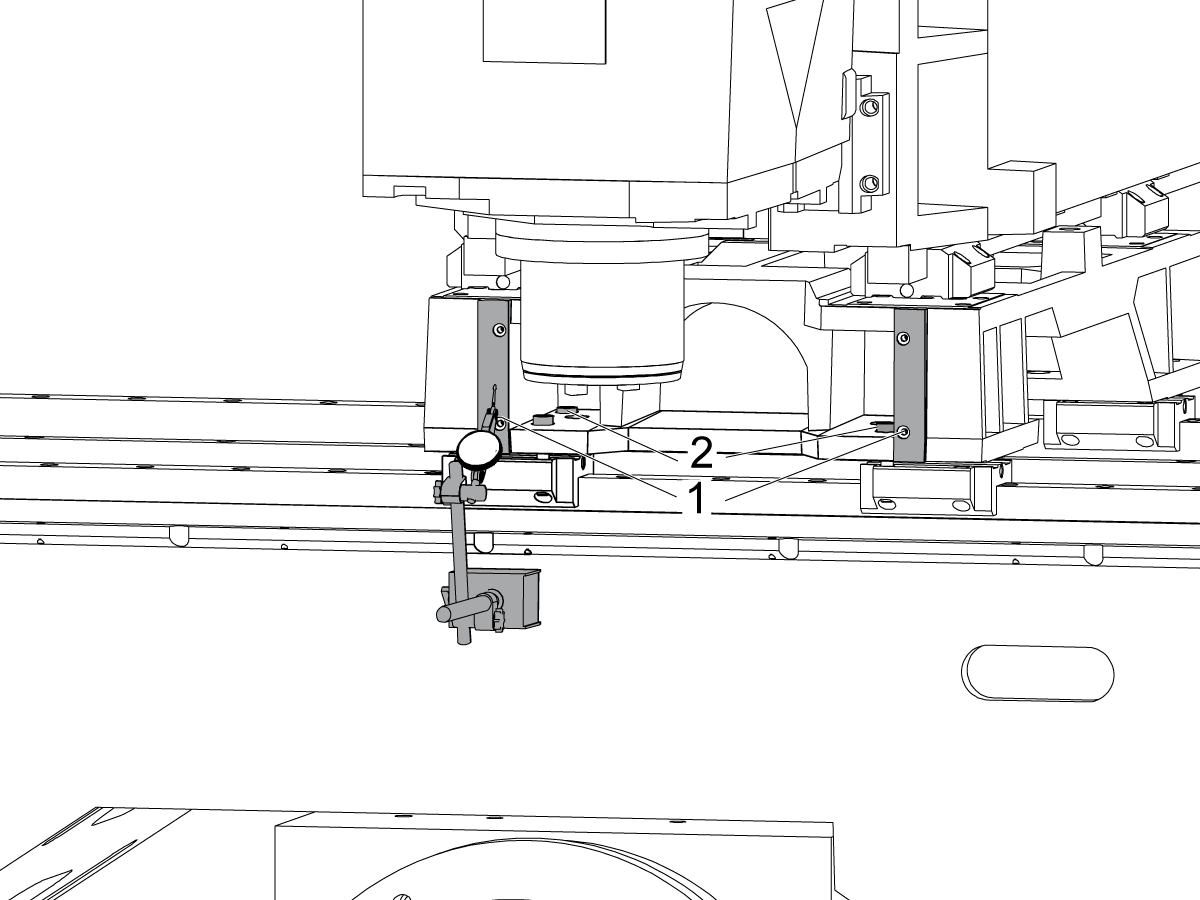
Măturaţi pe suprafaţa prelucrată de pe partea frontală a saniei transversale [1] prin deplasarea axei X.

Slăbiți bolțurile care fixează sania transversală pe transportoarele axei X [2] și aliniați fața saniei transversale cu mișcarea axei X în intervalul de 0,001", dacă este necesar.

Strângeți șuruburile la cuplu. Consultaţi Specificații cuplu bridă Haas.

2

Aliniaţi axa Y perpendicular pe axa X:

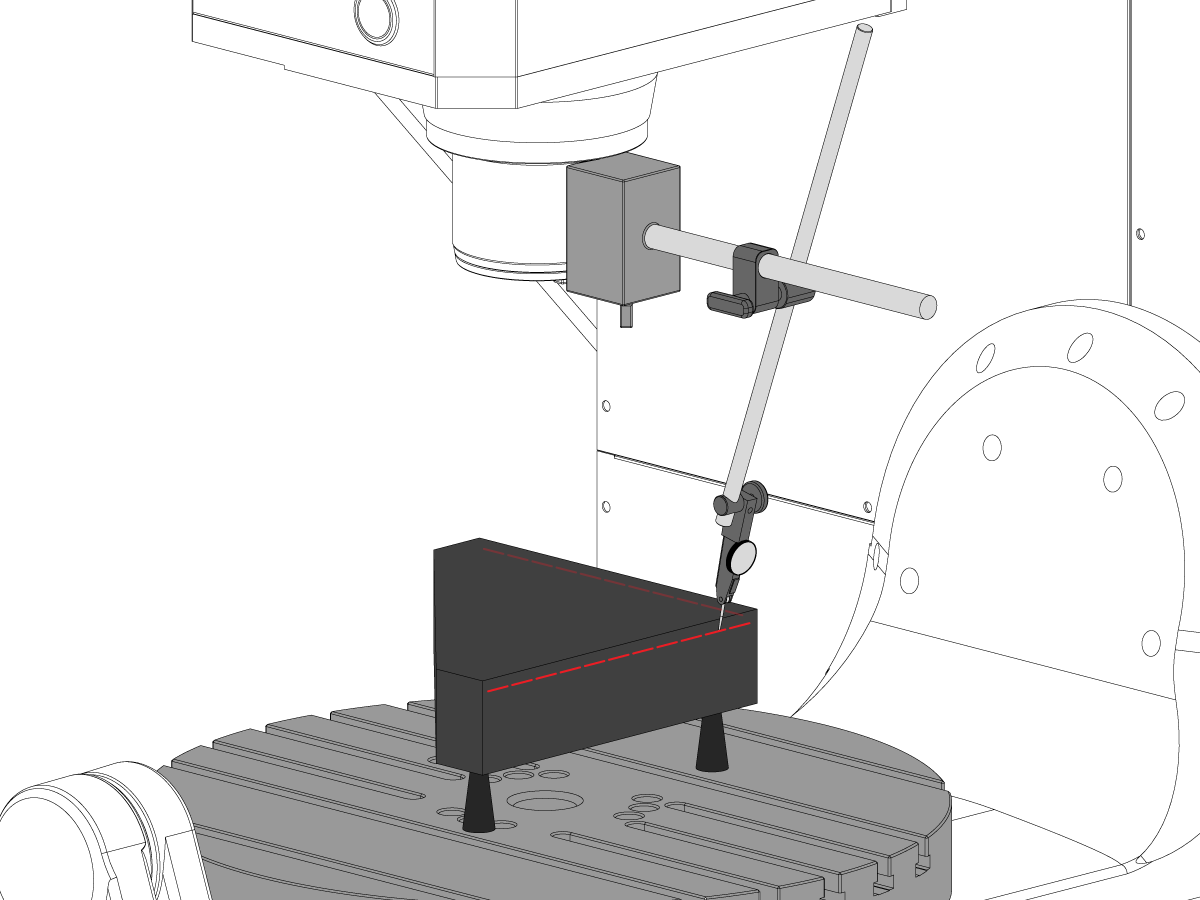
Configuraţi granitul din trei pătrate din partea stângă a platoului axei C pe cricurile de prelucrare.

Setaţi partea din spate a granitului din trei pătrate paralel cu axa X. NTE 0,0001"/10"

Măturaţi partea superioară a granitului din trei pătrate de-a lungul axelor X şi Y.

Reglaţi cricurile de prelucrare până ce suprafața superioară a granitului din trei pătrate este paralelă cu planul X-Y NTE 0,0005".

Verificați dacă partea din spate a granitului este paralelă cu axa X. NTE 0,0001"/10".

Slăbiţi bolţurile care fixează transportoarele axei Y pe sania transversală și aliniați axa Y perpendicular pe axa X. NTE 0,0005"/10"

Strângeți șuruburile la cuplu. Consultaţi Specificații cuplu bridă Haas.

Verificaţi dacă axa Y este perpendiculară pe axa X NTE 0,0005"/10" după ce bolțurile sunt torsionate.

Alinierea planului de la axa Z la axele X-Y

1

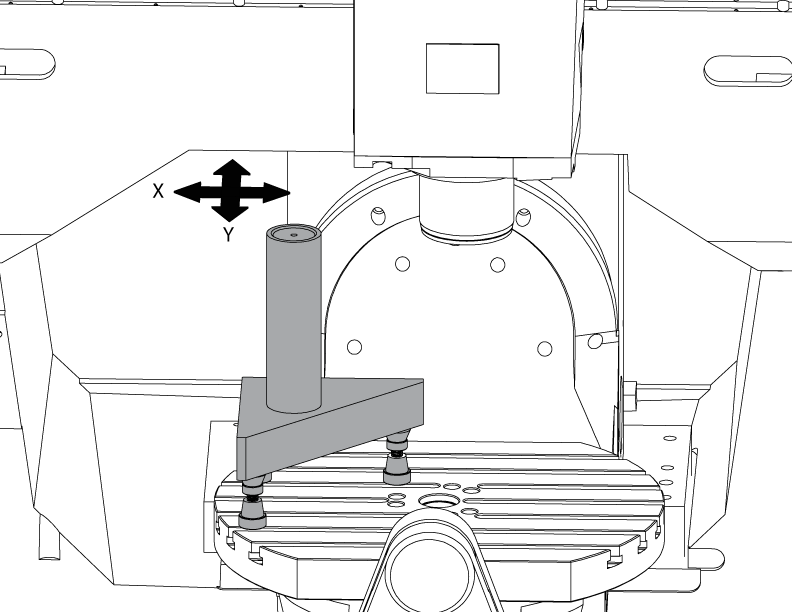
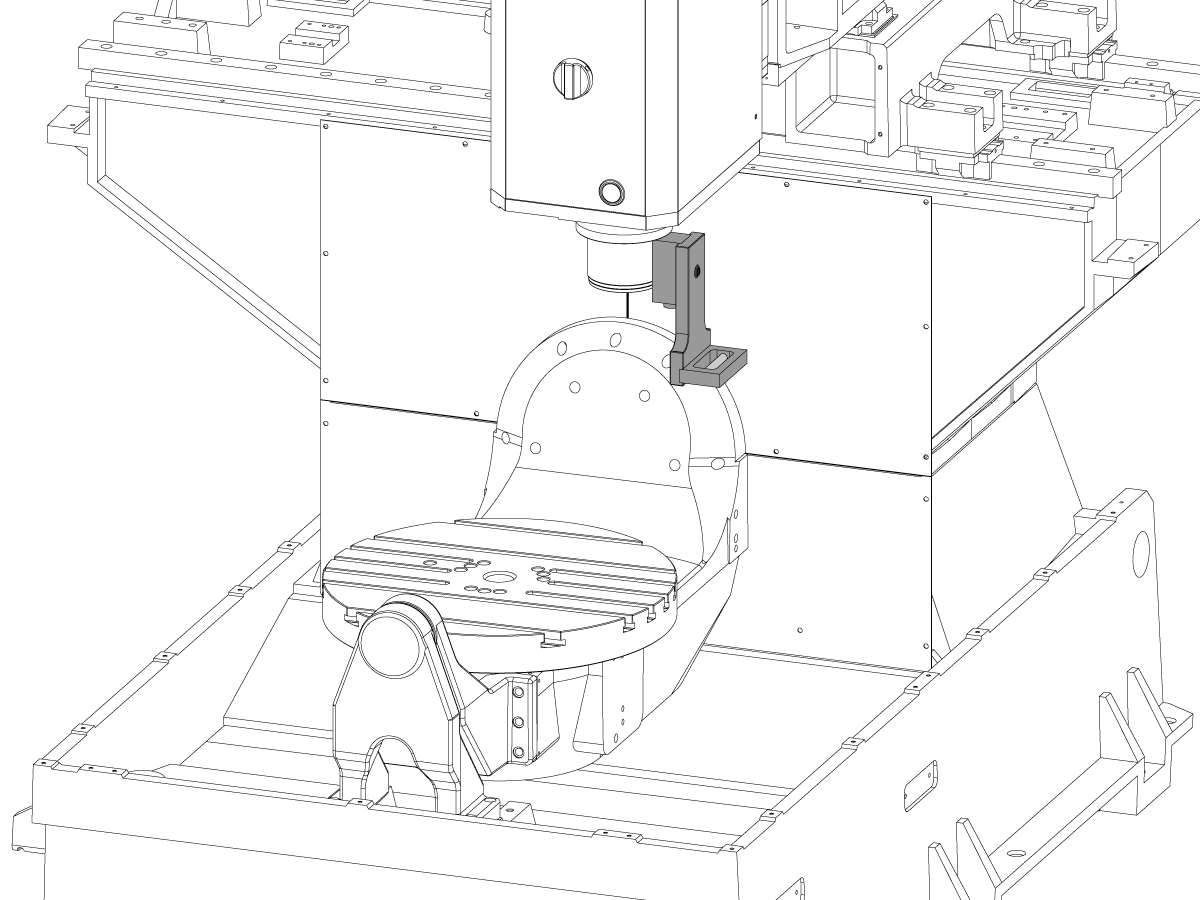
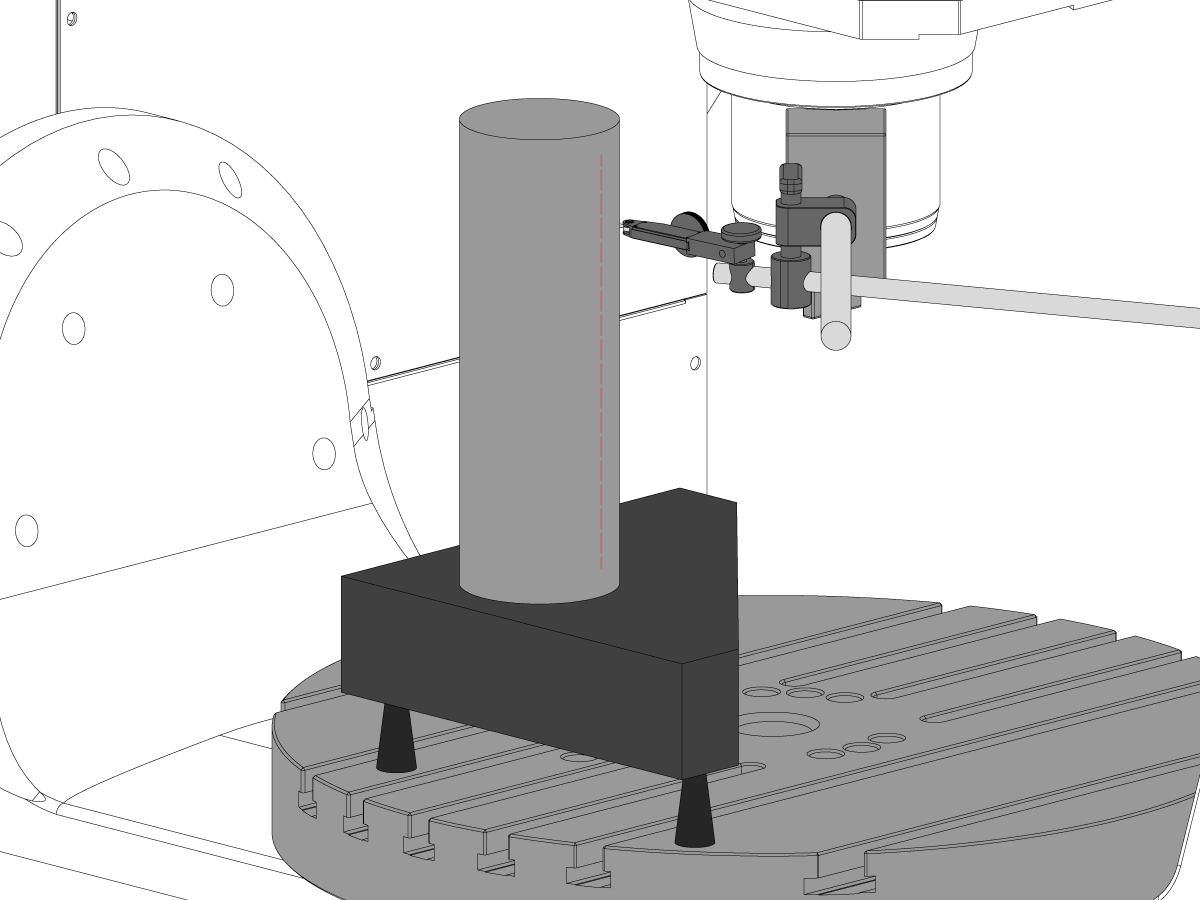
Configurați cilindrul.

Puneți un cilindru peste piatra triplă, astfel cum este ilustrat în imagine.

Aliniați suprafața superioară a cilindrului paralel cu planul X-Y NTE 0,0001" rotind cricurile de prelucrare.

Deplasaţi maşina în următoarea poziţie:

  • UMC-750 la X -7,000" și Y -10,000"
  • UMC-750SS la X -10,000" și Y-10,000"

2

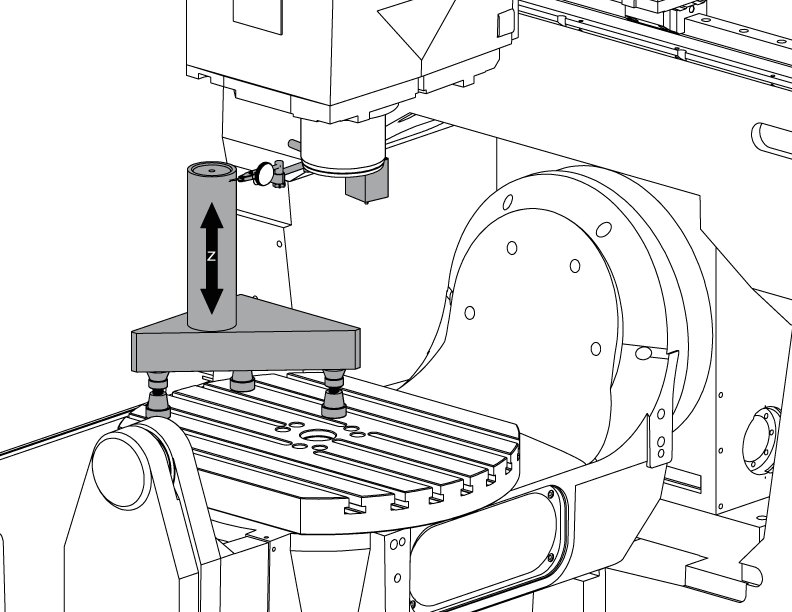
Aliniaţi axa Z perpendicular pe axa X:

Înlocuiți unul dintre bolțurile superioare din colțuri de pe transportoarele axei Z cu T-2193A * pentru a pivota păpușa portsculă în jurul acestuia.

Indicaţi partea cilindrului de-a lungul axei Z.

Slăbiți bolțurile care fixează transportoarele axei Z pe piston.

Aliniaţi axa Z perpendicular pe axa X NTE 0,0005"/10", balansând capul arborelui principal dintr-o parte în alta.

Strângeți șuruburile la cuplu. Consultaţi Specificații cuplu bridă Haas.

Verificaţi dacă axa Z este perpendiculară pe axa X după ce bolțurile sunt torsionate.

Înlocuiți T-2193A * cu bolțul, când se realizează alinierea

*  : Se utilizează numai pentru seriile pre-repornire. 

3

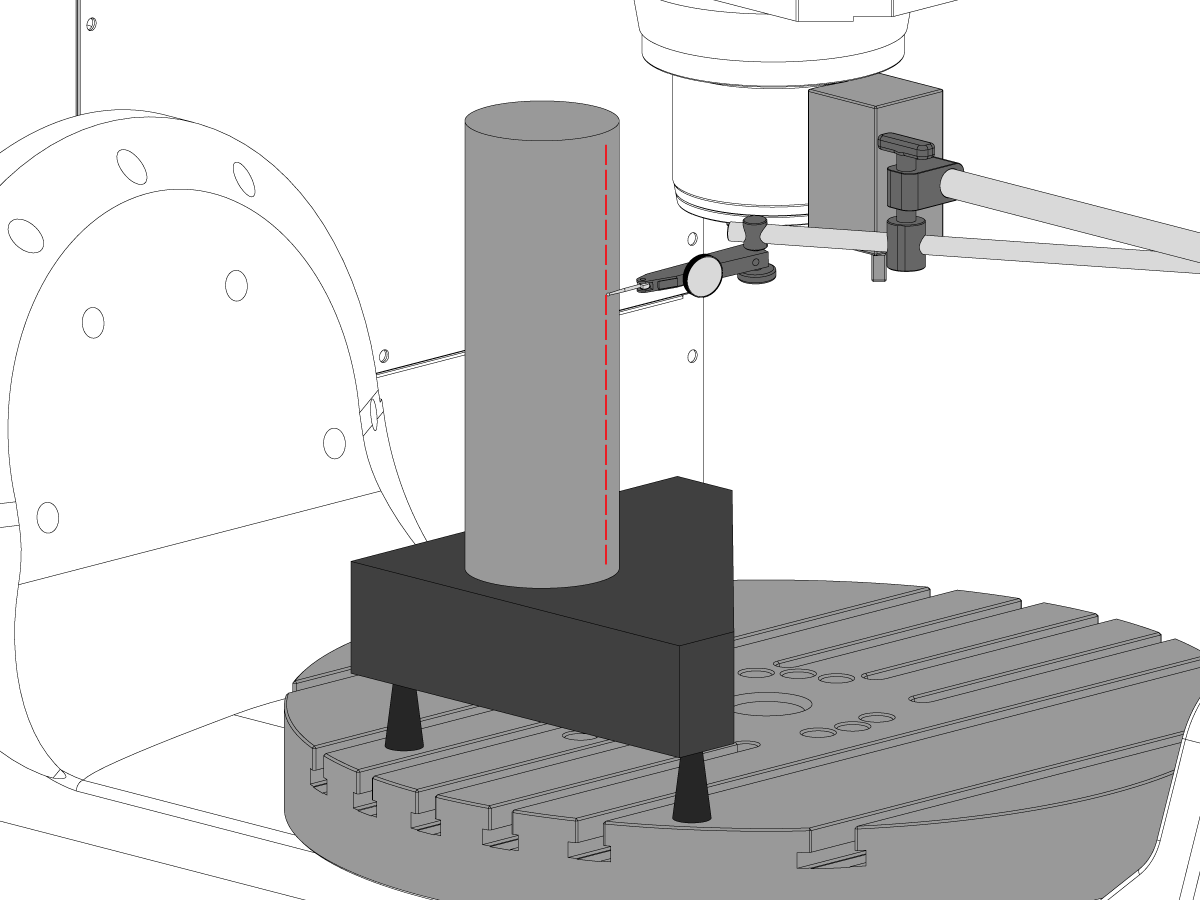
Aliniaţi axa Z perpendicular pe axa Y:

Indicaţi partea frontală a cilindrului de-a lungul axei Z.

Puneți un bailag între transportoarele axei Z și piston, pentru a alinia axa Z perpendicular pe axa Y NTE 0,0005"/10".

Notă: puneți un bailag fie la cele două transportatoare superioare, fie la cele două transportatoare inferioare, folosind bailaguri egale.

Strângeți șuruburile la cuplu. Consultaţi Specificații cuplu bridă Haas.

Verificaţi dacă axa Z este perpendiculară pe axele Y și X, după ce bolțurile sunt torsionate.

4

Aliniaţi şi cuplaţi carcasele piuliței cu bilă ale axelor Y și Z:

Slăbiți bolțurile care fixează piulița cu bilă de carcasă și bolțurile care fixează carcasa de aceasta.

Strângeți mai întâi bolțurile care fixează carcasa piuliței cu bilă la carcasă și apoi strângeți bolțurile care fixează piulița cu bilă la carcasă.

Utilizați funcția Blocare avans rapid, pentru a rula axa înainte și înapoi pe întreaga cursă.

Notă: nu utilizaţi volantul de manevră sau mișcarea rapidă.

Strângeți șuruburile la cuplu. Consultaţi Specificații cuplu bridă Haas.

Carcasa cu piuliță a axei Y poate fi accesată în partea din spate a maşinii, cu pistonul deplasat complet către partea frontală a mașinii.

Carcasa cu piuliţă a axei Z poate fi accesată din partea frontală a maşinii cu păpușa portsculă deplasată în jos până la capăt.

Notă: Carcasa motorului arborelui principal trebuie îndepărtată pentru a avea acces la carcasa piuliței cu bilă a axei Z.

Deplasați arborele principal în planul X-Y

1

Pregătiţi granitul:

Configuraţi cricurile de prelucrare și granitul din mijlocul platoului axei C, astfel cum se indică în imagine.

Aliniați suprafața superioară a granitului paralel cu planul X-Y ajustând cricurile de prelucrare la înălțimea NTE 0,0001".

Poziţionaţi arborele principal peste centrul platoului.

2

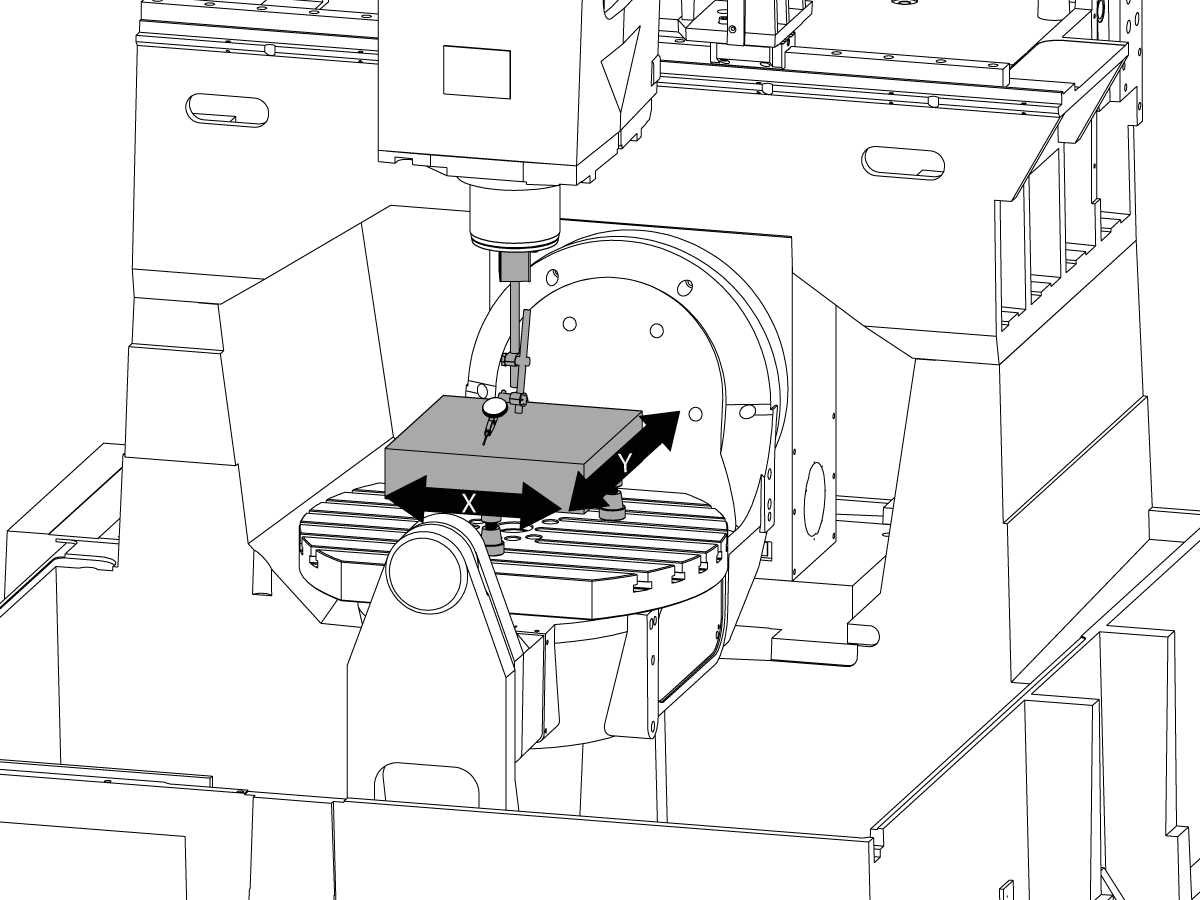
Deplasați arborele principal în planul X-Y:

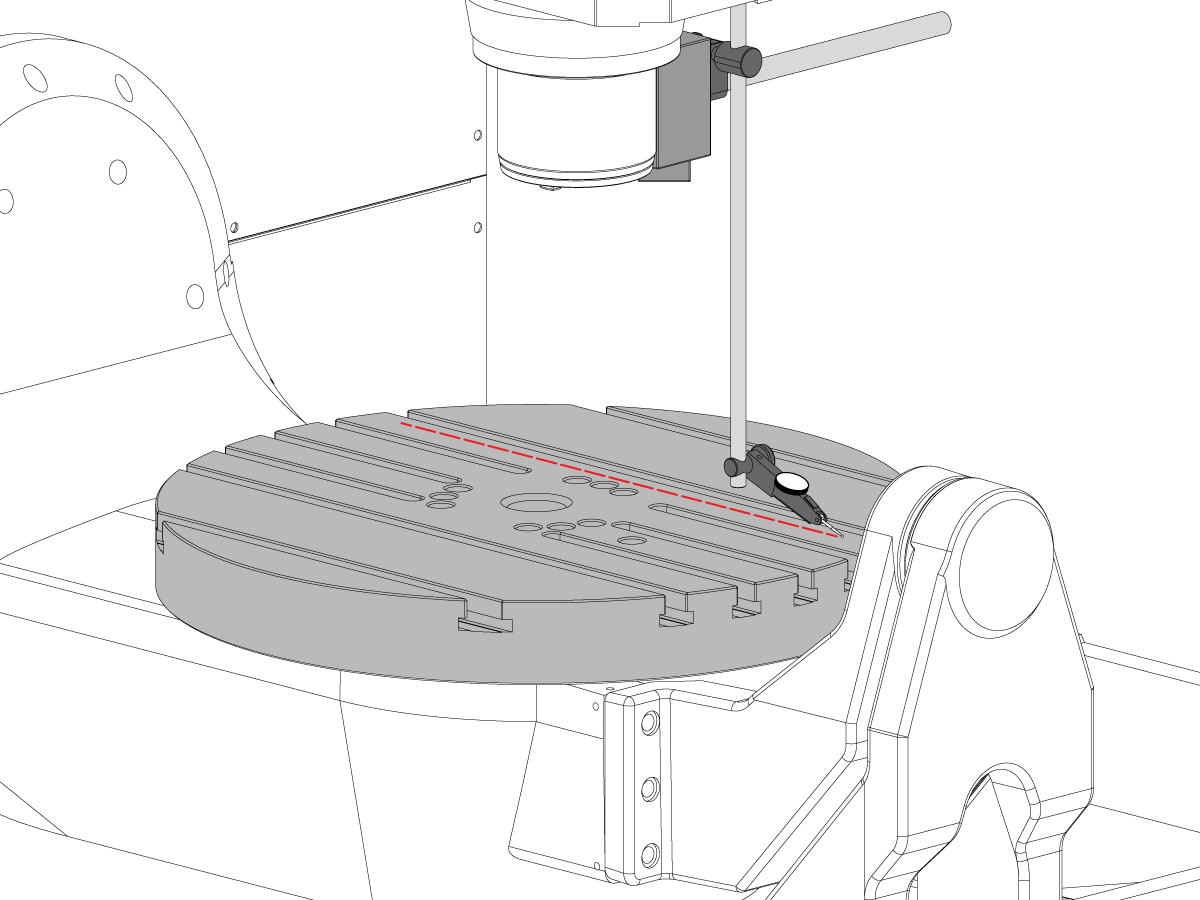
Puneţi un indicator pe axul arborelui principal.

Efectuaţi o măsurătoare pe partea superioară a granitului, la fiecare 90° de rotaţie.

Slăbiți cele (6) bolțuri de pe placa de bază pentru păpușa portsculă.

Adăugați sau îndepărtați bailaguri între carcasa păpușii portsculă și placa de bază, pentru a deplasa arborele principal în planul X-Y NTE 0,0005"/10".

Notă: Utilizaţi bailaguri cu o grosime inegală [1] pentru a schimba unghiul plăcii de bază.

Când baleiajul se încadrează în specificaţii, cuplaţi cele (6) şuruburi. Consultaţi Specificații cuplu bridă Haas.

Verificați dacă deplasarea arborelui principal după bolțuri este torsionată.

Alinierea axelor B la axele XYZ

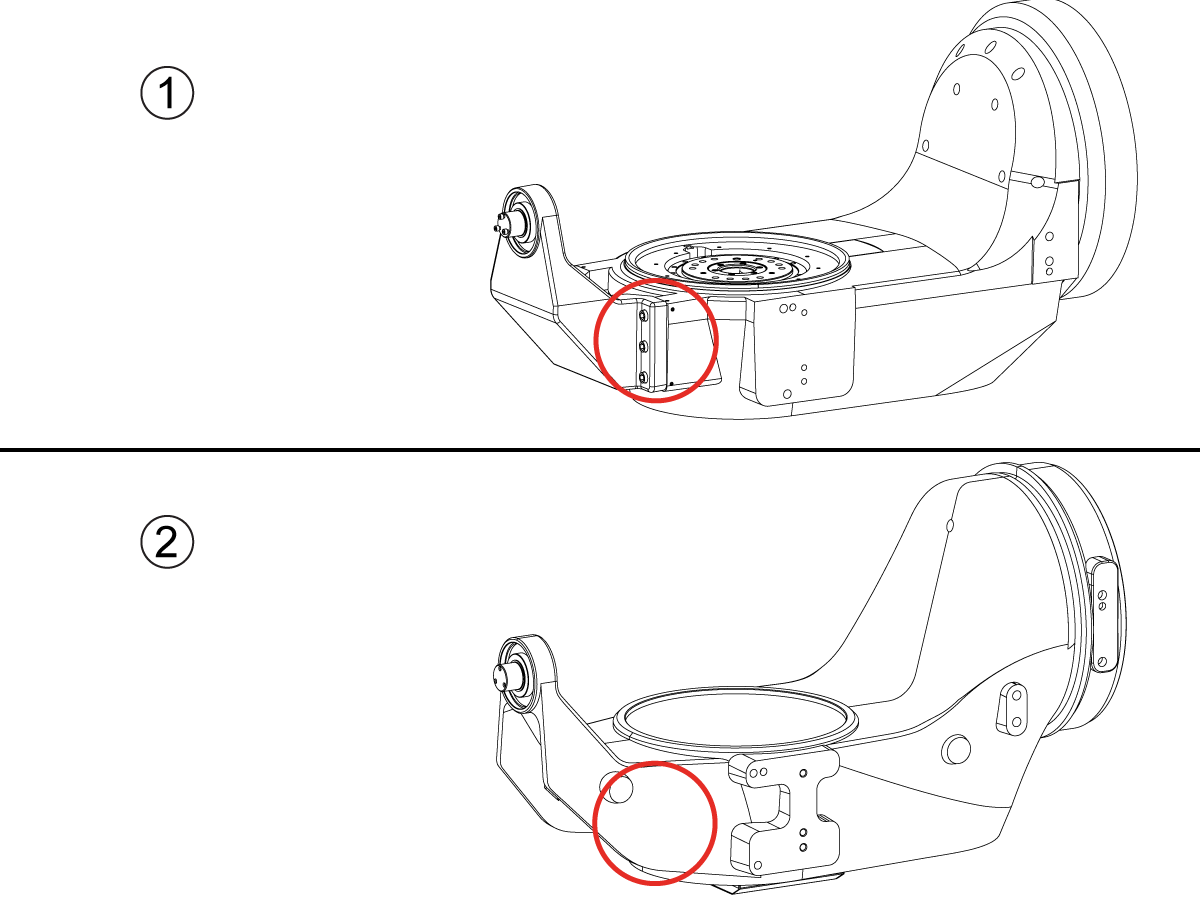
How to identify the Multi-Piece and the Unibody trunnion   

1) Multi-Piece trunnion:    UMC machines built approximetely before 11/2022 will have this configuration.

2) Unibody trunnion:    UMC machines built approximetely after 11/2022 will have this configuration.

1

Remove the A-frame trunnion support:

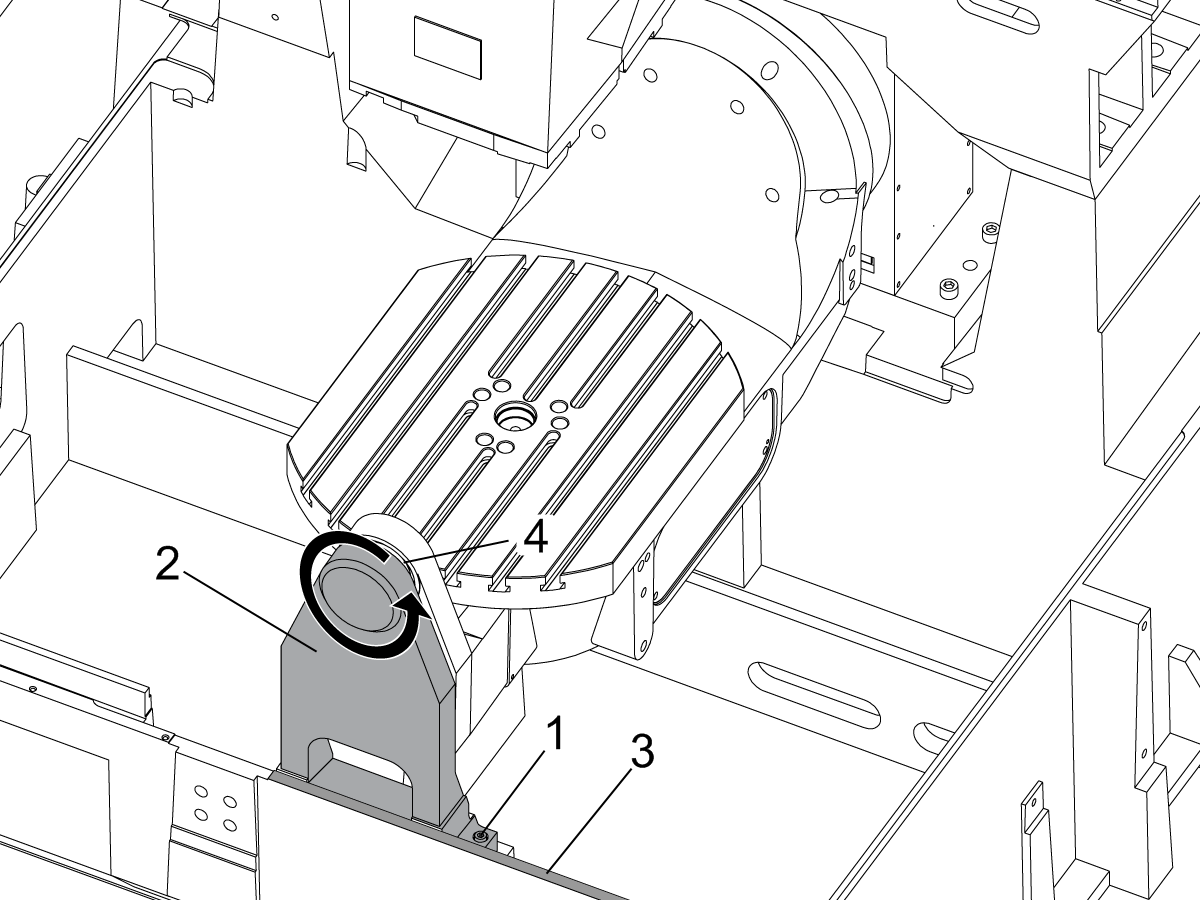
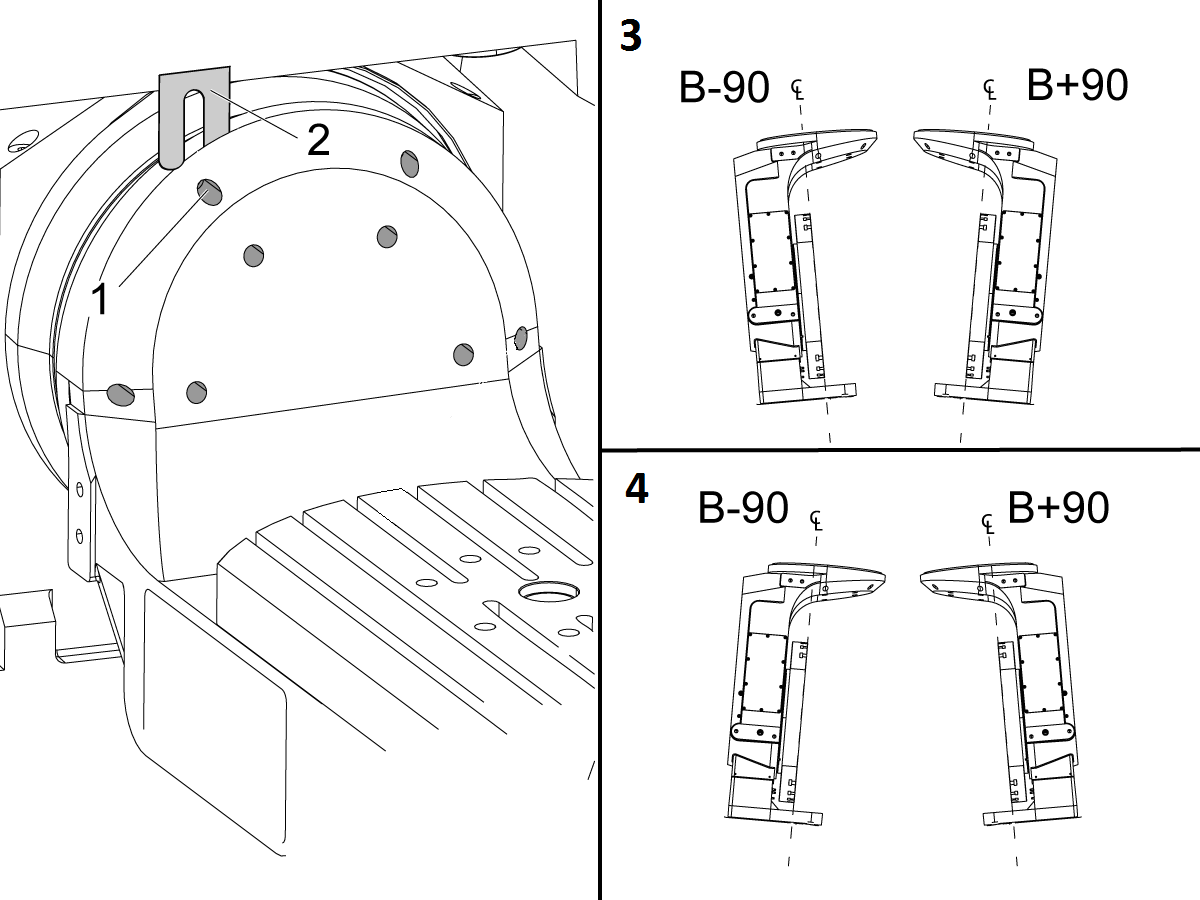
Remove the bolts [1] that secure the A-frame trunnion support [2] to the base and take out the shims between A-frame support and the base.

Rotate the A-frame support [2] counter-clockwise to clear the edge of the base [3].

Pull the A-frame support off the bearings.

 Note: The A-frame support might vacuum lock on the bearings. Use the zip-tie to pry the seal [4] open.

 Caution: To lift the trunnion support, get the aid of another person. The support weighs 85 lbs (39 kg).

2

Measure the B- axis of rotation parallelism to the Y-Z plane:

For a machine with a Classic Haas Control, change Parameter 151:20 (B axis CHK TRAVL LIM) to 0.

For a machine with a Next Generation Control, change Parameter 6.021 (B axis CHK TRAVL LIM) to FALSE.

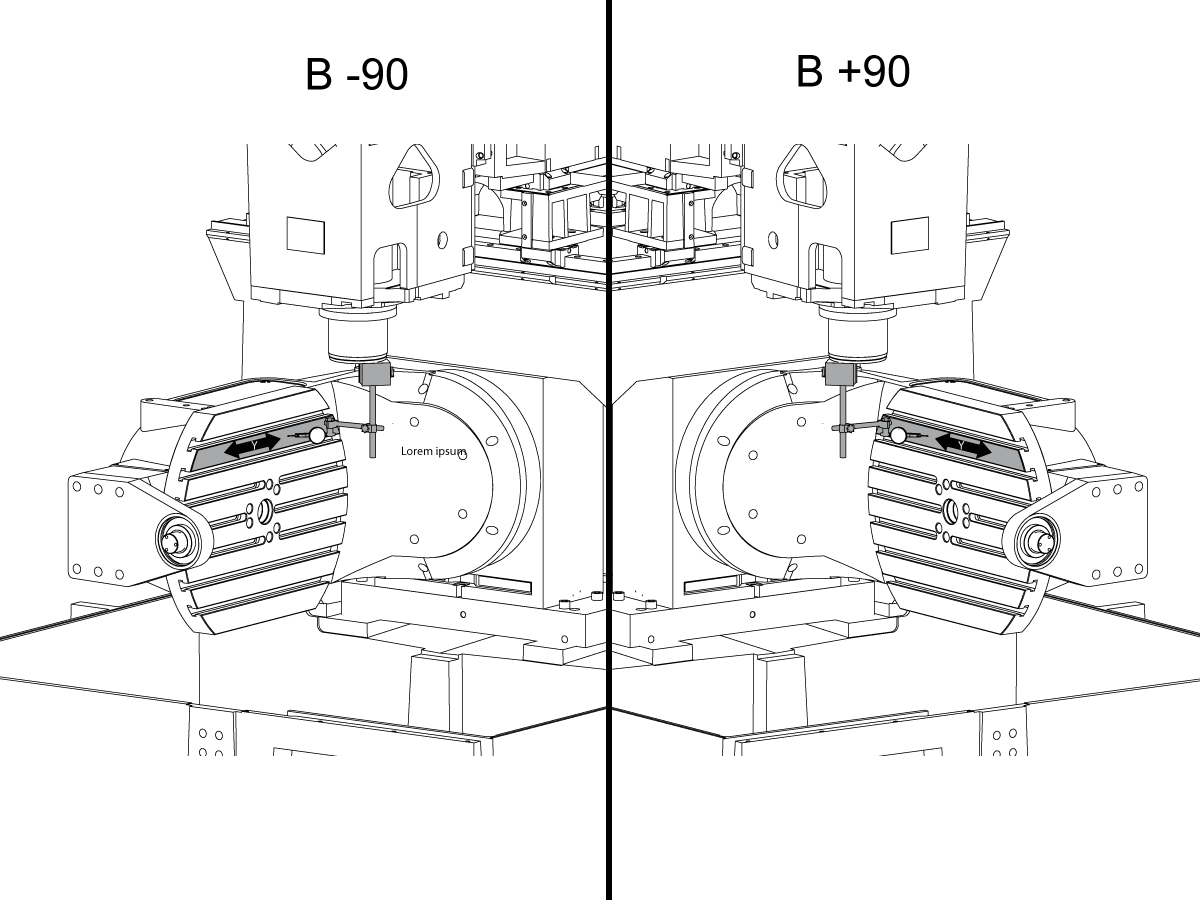
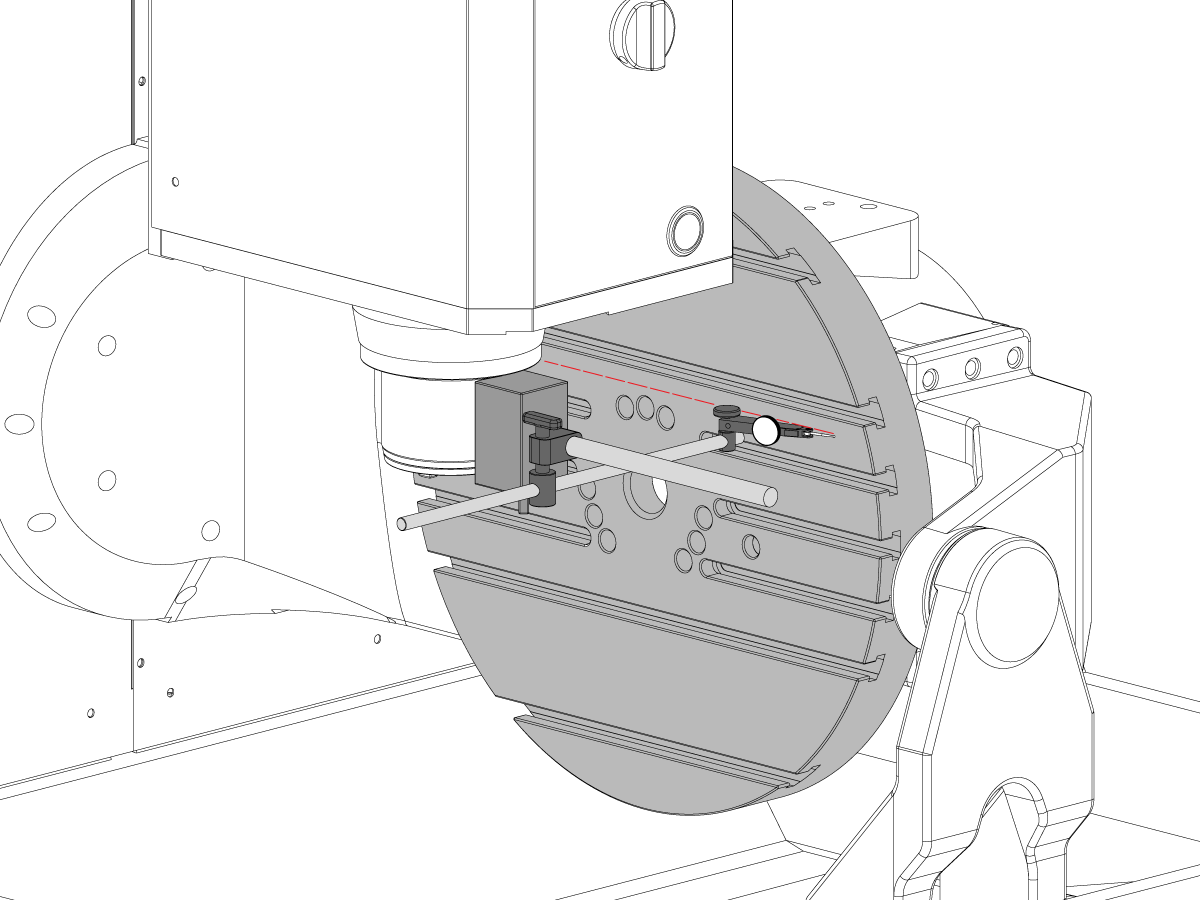
Measure the parallelism of the platter to the Y-Z plane with the B axis at 90° and then the B axis at -90° as shown in the picture.

Position the Y-Axis in the following starting position:

UMC-500: Y=0, Sweep 15”, 3rd T-Slot Land from the top.

UMC-750/1500-Duo: Y=-1.0, Sweep 18", 3rd T-Slot Land from the Top .

UMC-1250: Y=-1.0, Sweep 28", 3rd T-Slot Land from the Top.

UMC-500PP: Y=-4.0, Sweep 7".

UMC-750PP: Y=-2”, Sweep 15".

UMC-1000PP: Y=-4”, Sweep 15".

Compare the results at B 90° and B-90°. The results should be...

  • Symmetric against the Y-Z plane, positive or negative direction
  • Less than 0.0010"/20"

If the results are symmetric against Y-Z plane, and are less than 0.0010"/20 inches: Go to Step 5.

If the results are symmetric against Y-Z plane, but are more than 0.0010"/20 inches: Go to Step 4.

 Warning: If the results [3] are not symmetric against the Y-Z plane, the B axis rotary needs to be aligned: Go to Step 3.

3

Align the B axis of rotation parallel to the Y-Z plane:

Loosen the (6) bolts [1] that secure the B axis rotary to the base casting.

 Note: Keep the bolts sufficiently snug to control the adjustments.

Adjust the front and rear setscrews [2] until the measurements taken in Step 2 are symmetric against the Y-Z plane.

Torque the (6) bolts [1]. Refer to Haas Fastener Torque Specification.

Verify the measurements in Step 2 after the bolts have been torqued.

4

Align the C Axis of rotation perpendicular to the B Axis of rotation:

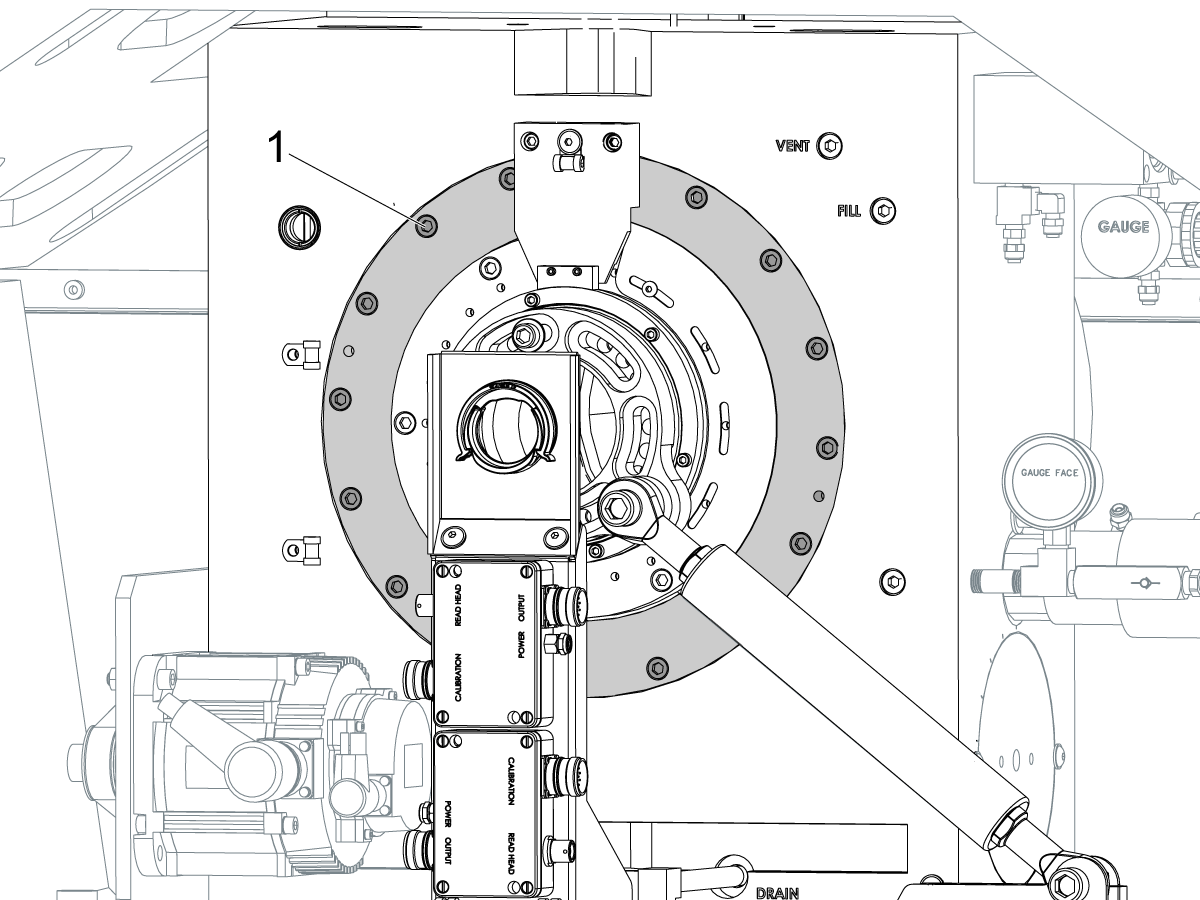
Remove the bottom C-Axis access cover.

Loosen the (12) bolts [1] that hold the C Axis body to the B Axis platter face.

Reach the bottom (4) bolts through the C Axis access port.

If the B Axis is symmetric in the positive direction [4], install horseshoe shims [2] of appropriate size behind the top (2) bolts.

If the B Axis is symmetric in the negative direction [5], install horseshoe shims [2] of appropriate size behind the bottom (2) bolts.

Torque the (12) bolts to 80 Ft-lbs (108 Nm).

Cut the excessive shim material off.

Verify the measurements in Step 2 after bolts are torqued.

5

Align the trunnion support shaft co-axial with the B Axis of rotation:

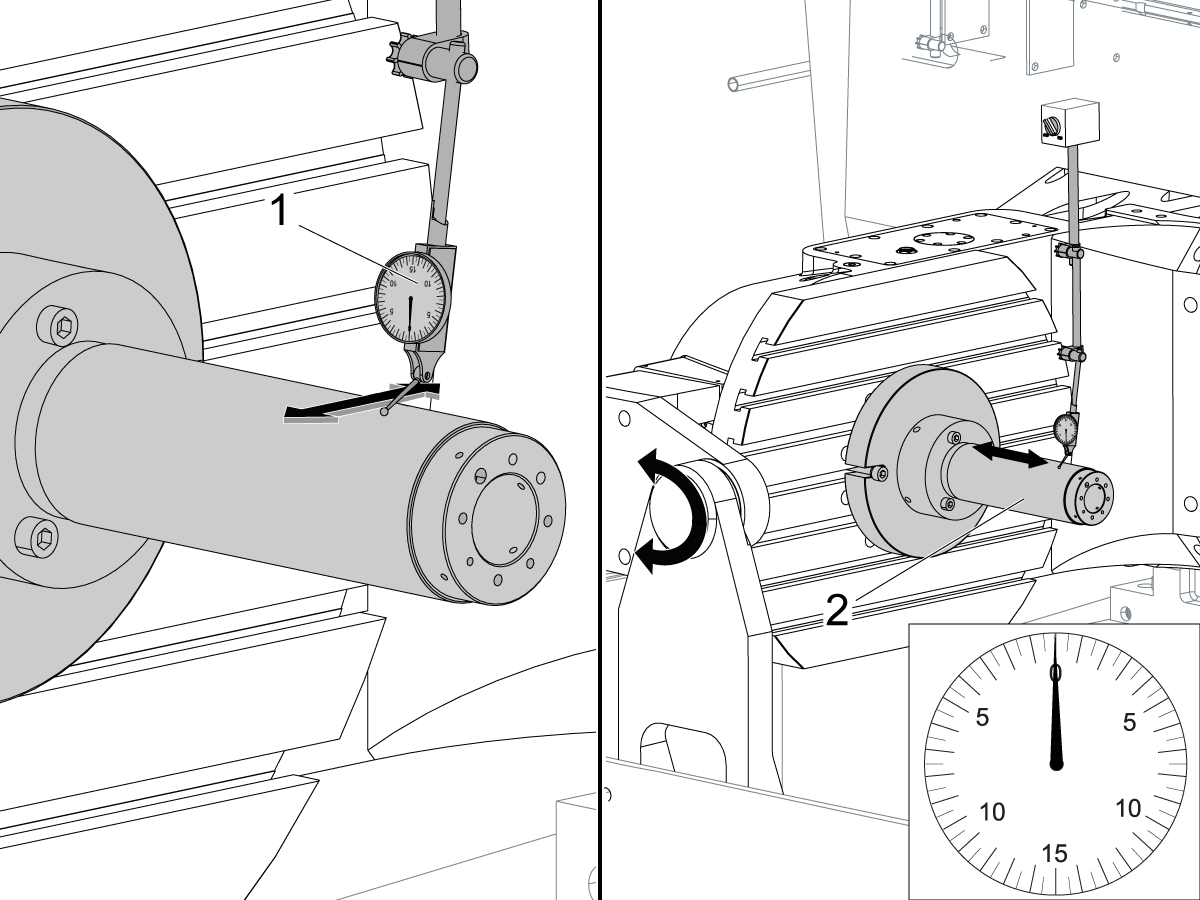
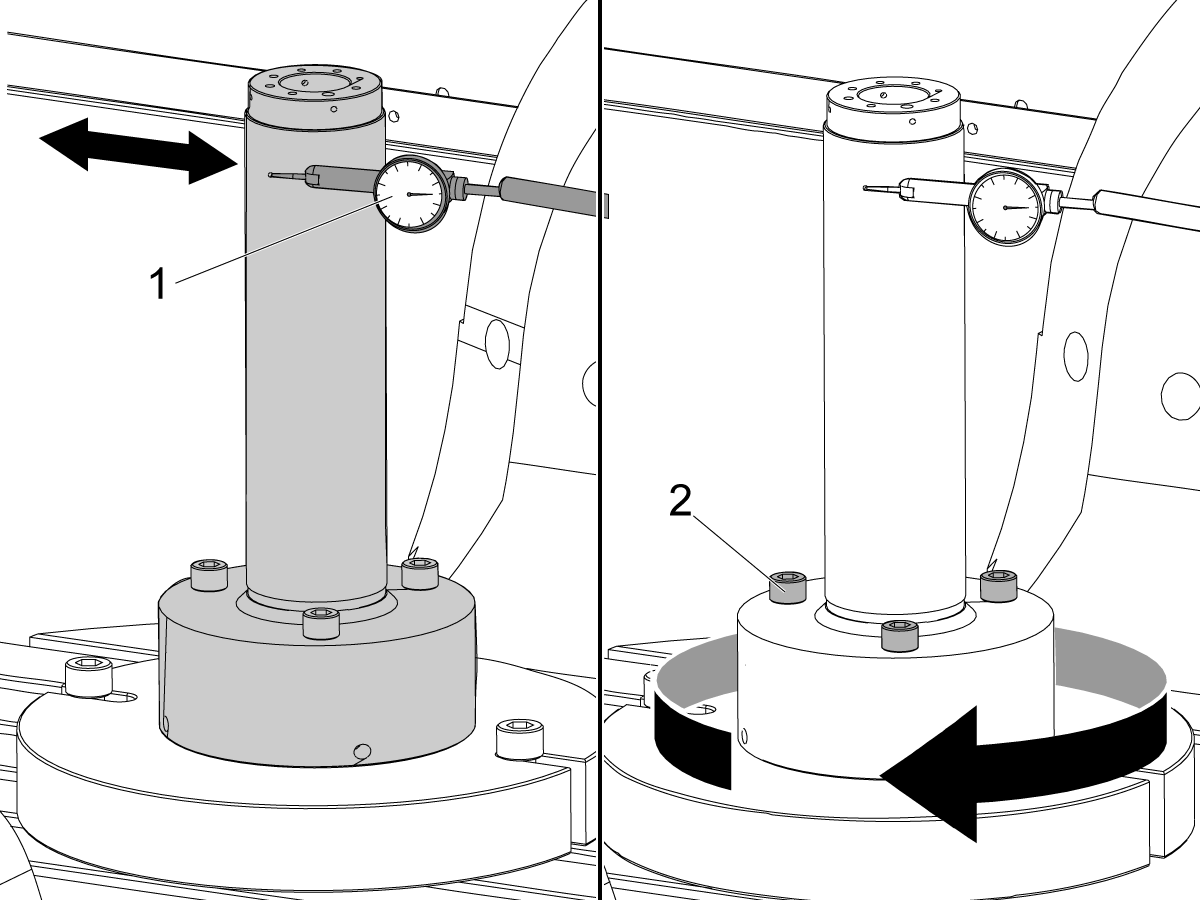
Setup (2) indicators on the outer race of the trunnion support bearing [2] as shown in the picture.

Mark the spot on the outer race where one of the indicator needles is contacting the surface.

After moving the B Axis to 90° or -90° you will align the marked spot with the needle again to exclude the bearing runout error from the measurements.

Take the readings when B is at 90° and B at -90°. Compare the readings. 

 Caution: The B axis brake needs to be clamped when taking the readings.

The deviation between the results when B is at 90° and at -90° needs to be less than 0.001" on each indicator.

 Note: The indicator on the side of the bearing will measure top to bottom alignment and the indicator on the top of the bearing will measure side to side alignment.

____

For models with a multi-piece trunnion

Loosen the (6) bolts [3] on the C Axis body support. Keep the bolts sufficiently snug to control adjustment.

Adjust the (8) set screws [4] until deviation between B at 90° and B at -90° is within 0.001".

Torque the (6) bolts [2] on the C Axis body support to 80 Ft-lbs (108 Nm).

Verify the alignment after the bolts have been torqued.

____

For models with a unibody trunnion

Jog rotary to B90. Set up an indicator on the highlighted surface as shown in the lower diagram .

Rotate B-axis 180 degrees (90 to -90).

Run out (NTE 0.010” TIR).

 Caution: If the measurement exceeds the tolerance then contact support.

6

Install and shim the A-frame trunnion support:

Move the B Axis to 90°.

Setup an indicator [1] against a machined surface of the C Axis body. Set the indicator to 0.

Use plastic zip ties [2] to pry the seal open while installing the A-frame support. This lets unwanted air and grease out of the assembly.

Install the A-frame trunnion support [3] over the bearings.

Remove the cable ties.

Turn the trunnion support clockwise until it is vertical.

 Note: The weight of the A-frame support will cause the trunnion to sag. The amount of sag is measured with the indicator that was previously setup on the side of the C Axis body.

____

For multi-piece trunnions

Adjust the shims [4] between the A-frame support and the base casting to remove the sag until indicator reads 0 again.

When the indicator reading is 0, torque the (4) bolts. Refer to Haas Fastener Torque Specification.

Verify the reading after bolts are torqued. Adjust the shims again if necessary until the indicator reads 0.

____

For models with unibody trunnion

Determine the amount of shim stock [4] needed to raise the Trunnion arm so the indicator reads 0.005".

The indicator [1] value will change once the support is torqued.

With indicator still in place:

  • Torque trunnion support bolts to appropriate values.
  • Check indicator to make sure it reads between the range of

Trunnion arm raised (0.005” to  0.010”).

 Note: For unibody trunnions, the shim location may also be used to correct the C-axis to X-Y plane perpendicularity instead of shimming the saddle trucks.

 Caution: Use equal amount of shims on each side of the A-frame support. Unequal shims will cause the A-frame support to pull the trunnion to the side.

Verify the B Axis of rotation alignment to the Y-Z plane (Step 2). Loosen the bolts and tap the A-frame support side to side if necessary to correct the B axis to Y-Z plane alignment.

7

Set C-axis perpendicular to X/Y plane:

Move the axes to

UMC-750's........X= -10.5" & Y=0."

UMC-1000's......X=-17.0" & Y=-0."

Zero an indicator [1], on a Ground Block [2], 1/2" off the edge at the rear of the platter (Mag-Base on Spindle), with C at 0 Degrees

Rotate C-Axis to 180°.

Move Y axis, and ground block, in Y Axis negative direction until you are 1/2" away from platter edge, and take the perpendicularity measurement

Adjust the shims until the average error is within 0.0005" end to end.

 Note: For unibody trunnions, the shim location under the bearing support may also be used to correct the C-axis to X-Y plane perpendicularity instead of shimming the saddle truck.

Caution: Shim either two front trucks or two rear trucks with the equal shim.

Note: Shim one truck at the time to maintain the X to Y squareness.

Verify the measurements after all bolts are torqued.

Verify the X to Y alignment in Step 2.

8

Set the tool change offsets:

B-axis tool change offset [1]

For Classic Haas Controls, change Parameter 213. 

For Next Generation Controls, go to: Settings>Rotary Tab>Highlight the rotary and press [INSERT], or change Parameter 6.078 (B TOOL CHANGE OFFSET) to set the trunnion (B Axis) parallel to the X Axis.

For models with multipiece trunnion

(NTE 0.001/10"; NTE 0.0020" overall)

For models with unibody trunnion

(NTE 0.0005/10"; NTE 0.0010" overall)

___

C-axis tool change offset [2]

For Classic Haas Controls change Parameter 523.

For Next Generation Control go to: Settings>Rotary Tab> Highlight the rotary and press [INSERT], or change Parameter 7.078 (C TOOL CHANGE OFFSET) to set the table T-slot (C Axis) parallel to the X Axis

For models with multipiece trunnion

(NTE 0.001/10"; NTE 0.0020" overall)

For models with unibody trunnion

(NTE 0.0005/10"; NTE 0.0010" overall)

9

Check C-axis perpendicularity to X/Y plane:

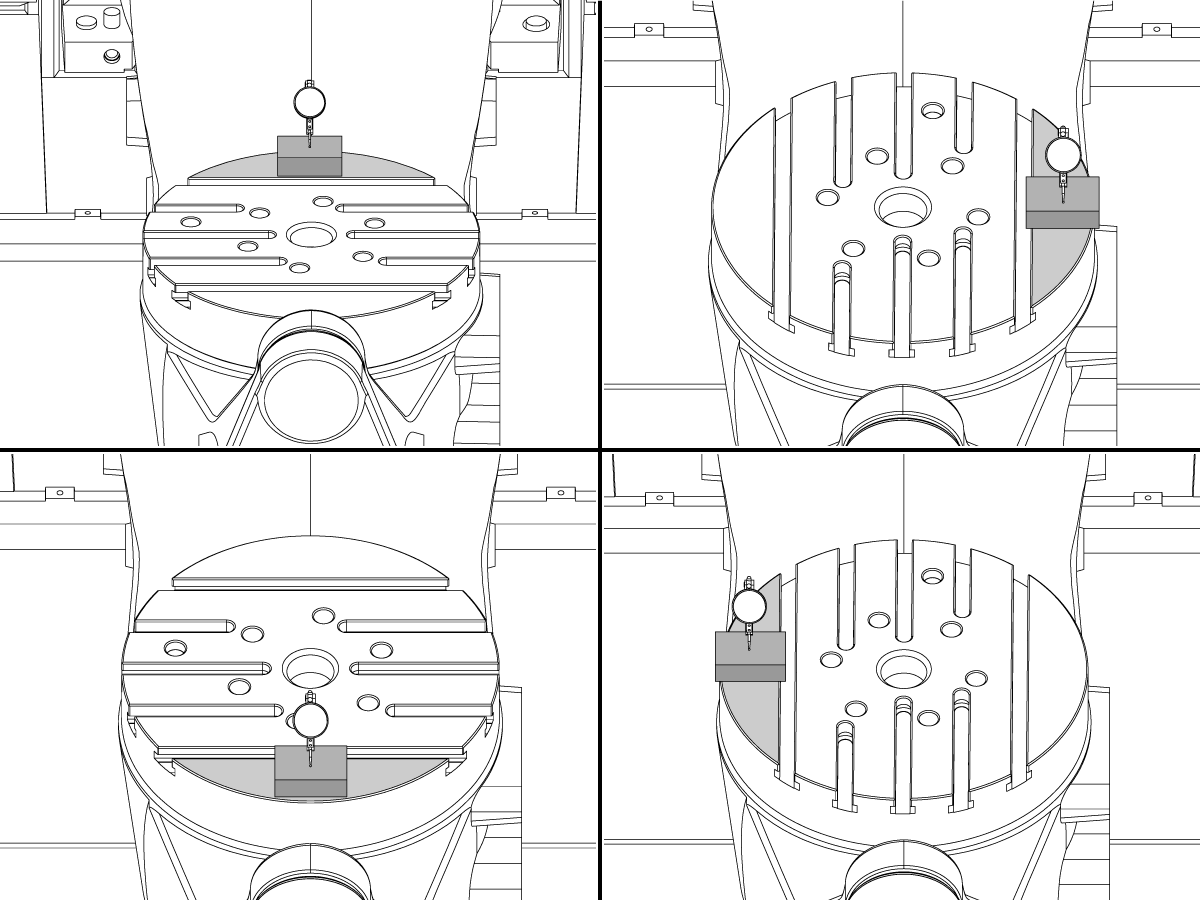
Align the indicator centered over the C-axis bore with the Y-axis at -10.

Jog positive in the Y-axis and align the indicator over the center of the last section of the platter and make a mark at this spot with a washable marker.

Insert 1-2-3 block as shown and set the indicator to zero.

Remove the block and rotate the platter 90 degrees, following the marked spot with the indicator.

Insert block back between the indicator and platter. Note reading.

Repeat the previous two steps, taking readings with the platter at 180, 270 and 360 degrees.

Multi-piece trunnion:  (NTE 0.0005")

Unibody trunnion: (NTE 0.001")

10

Measure the intersection of the B and C axis:

Follow the linked instruction manual to complete this step.

B-Axis and C-Axis intersection Adjustment

11

Align the B-Axis brake disk:

 Note: Do not do this step if you are working on a SS machine.

Operate this code in MDI mode to unclamp the brake:

M11;

Loosen all of the brake disc bolts [1] and torque them to 5 Ft-lbs (7 Nm).

Operate this code in MDI mode to clamp the brake:

M10;

Wait 10 seconds.

Torque the bolts. Refer to Haas Fastener Torque Specifications.

Setare parametru/Setare înapoi la valorile din fabrică

Setați Parametru 1314 pentru CHC / Setarea 254 pentru NGC înapoi la valoarea din fabrică. (Rulați un ciclu de alimentare cu energie a mașinii după schimbarea valorii.)

Aliniați şi calibraţi WIPS. Sistem intuitiv de palpare wireless (WIPS) - Calibrare

Setați punctele de zero rotative ale maşinii 

  • UMC-750 - Setări pentru decalaje MRZP WIPS - CHC
  • UMC-750 - Setări pentru decalaje MRZP WIPS - NGC

Completați  raportul de inspecție:

  • Raport de inspecţie EA0420 UMC-500
  • Raport de inspecție EA0373 UMC-750
  • Raport de inspecție EA0418 UMC-1000

Lăsaţi copia raportului de inspecţie la maşină.

Dacă aţi înlocuit ansamblul axelor B şi C, realizați procedura  UMC-750 - Intersecţia axei B şi axei C - Aliniere

8.2 Poziționare - Zone indicatoare

Recently Updated

Poziționare UMC Zone indicatoare


AD0490

Zone indicatoare

1

Rolă axa X

  • Mai întâi atașați scula T-2192 pe laterala arborelui principal.
  • Pentru măsurarea rolei X, mențineți următoarele poziții ale axei Y și axei Z:
    • UMC 500 (Y,Z): -8, -8
    • UMC 750 (Y,Z): -10, -10
    • UMC 1000 (Y,Z): -12, -12
  • Măsurarea rolei axei X (NTE 0,0005" / 10")


2

Axa B la paralelismul axei Y

  • Revenire la zero B şi axa C.
  • Măsuraţi nivelul de zgomot al platoului pe axa Y (NTE: 0,0008" / 10" 0,0012" / 15")
  • Apoi măsurați aceeași suprafață cu axa B la o temperatură de -90° și +90°  (NTE: 0,0008" / 10" 0,0012" / 15")
  • Pentru UMC 500 şi 750, măsuraţi lungimea completă a platoului
  • Pentru UMC 1000, efectuați decalajul 2” de la marginea platoului, apoi măsuraţi 20”

3

Perpendicularitate axa Y la axa X

  • Utilizaţi cricurile cu şurub pentru a aduce suprafaţa superioară a granitului paralel cu planul XY (NTE: 0,0002")
  • Apoi, bifaţi dacă Y este rectangular la X (NTE 0,0005" / 10")

4

Perpendicularitatea axei X la axa Z

  • Aşezaţi cilindrul de granit şi de precizie pe platou în direcția indicată
  • Utilizaţi cricurile cu şurub pentru a seta suprafaţa cilindrului paralel cu planul XY (NTE: 0,0002")
  • Locaţiile arborelui principal XY pentru acest pas:
    • UMC 500, X = -6, Y = -8
    • UMC 750, X = -10, Y = -10
    • UMC 1000, X = -17, Y = -12
  • Poziţia de pornire Z pentru această măsurătoare:
    • UMC 500, Zstart = Ztop – 2”
    • UMC 750, Zstart = Ztop – 5”
    • UMC 1000, Zstart = Ztop – 7”
  • Ztop este limita cursei axei Z în direcţia pozitivă (sus)
  • De la Zstart, măsuraţi în jos 10” de-a lungul cilindrului

5

Perpendicularitatea axei Y la axa Z

  • Aşezaţi cilindrul de granit şi de precizie pe platou în direcția indicată
  • Utilizaţi cricurile cu şurub pentru a seta suprafaţa cilindrului paralel cu planul XY (NTE: 0,0002")
  • Locaţiile arborelui principal XY pentru acest pas:
    • UMC 500, X = -6, Y = -8
    • UMC 750, X = -10, Y = -10
    • UMC 1000, X = -17, Y = -12
  • Poziţia de pornire Z pentru această măsurătoare:
    • UMC 500, Zstart = Ztop – 2”
    • UMC 750, Zstart = Ztop – 5”
    • UMC 1000, Zstart = Ztop – 7”
  • Ztop  este limita cursei axei Z în direcţia pozitivă (sus)
  • De la Zstart, măsurați în jos 10” de-a lungul cilindru

6

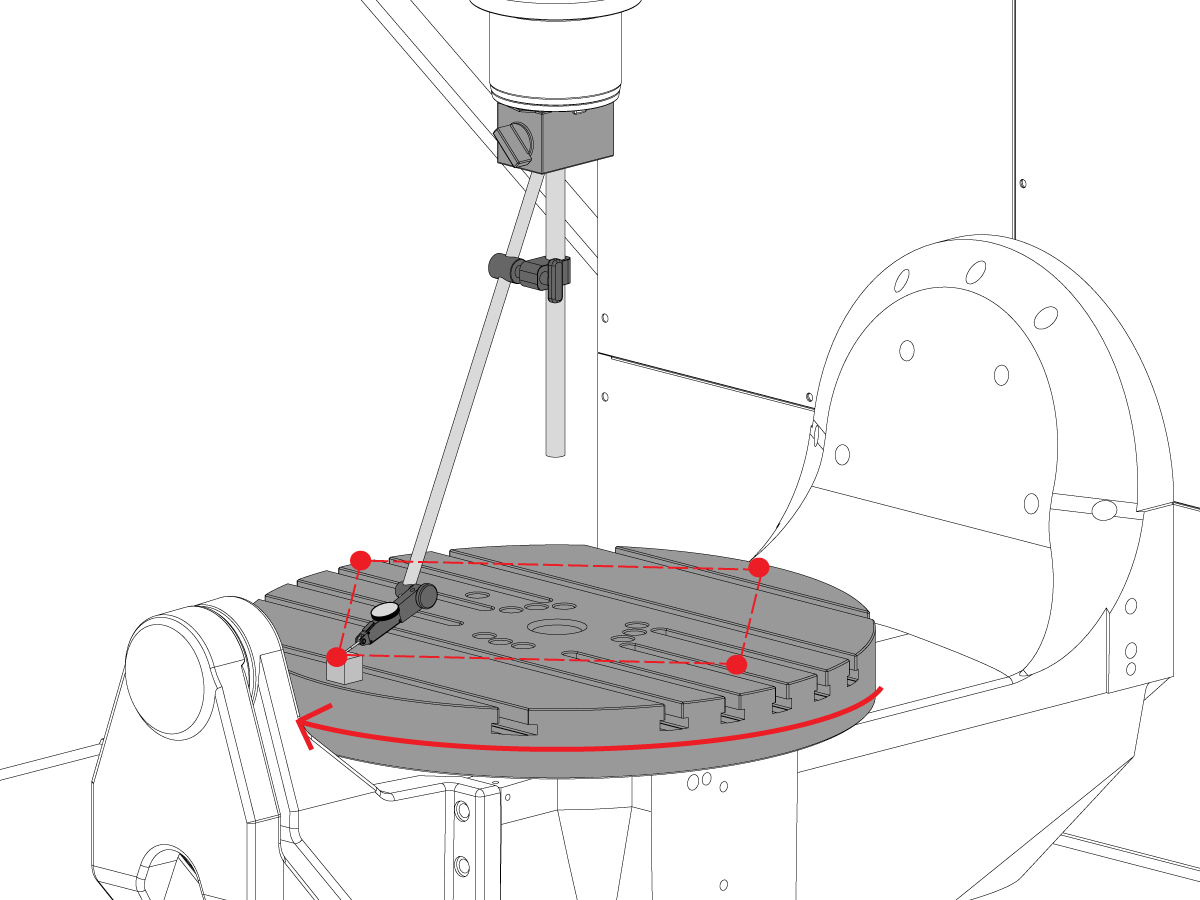
Perpendicularitate axa C la planul XY

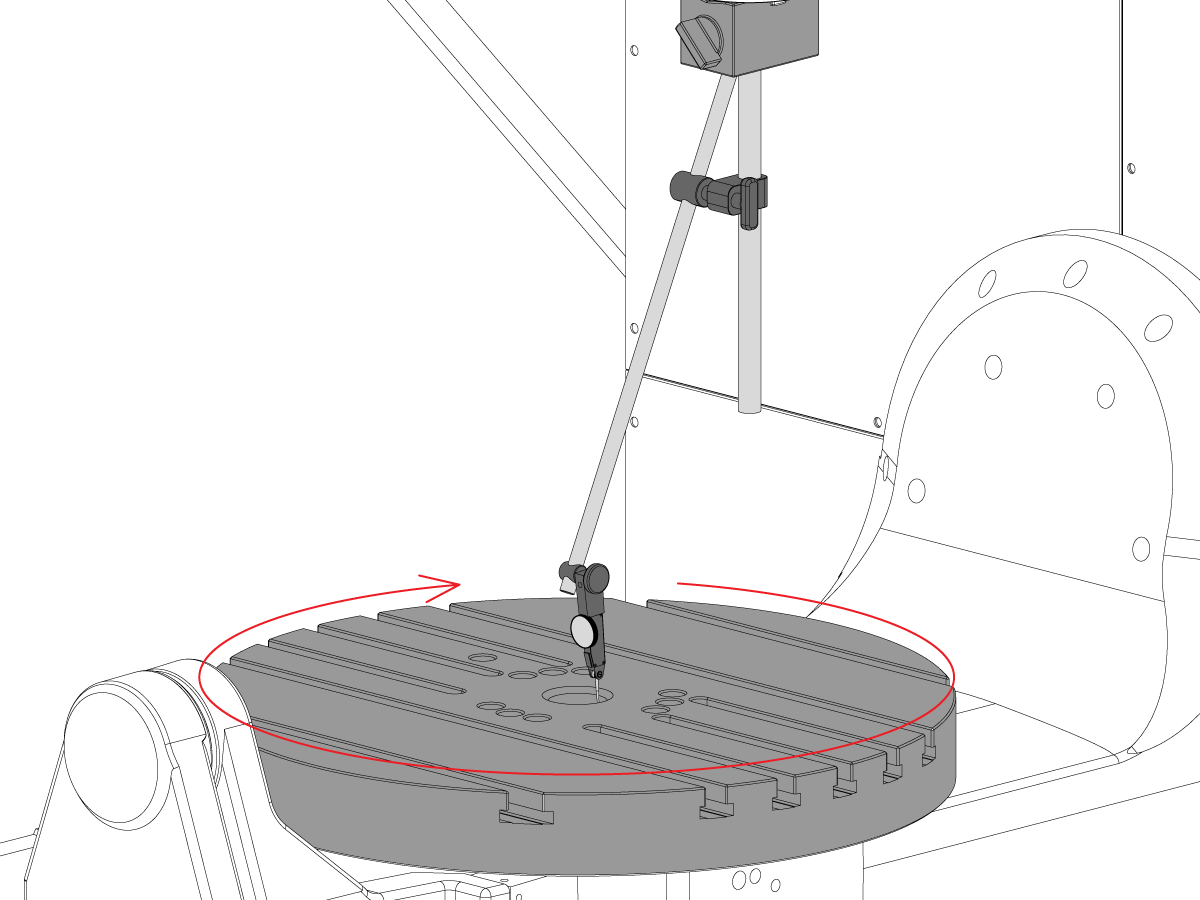
  • Repoziționați baza mag pe arborele principal, astfel încât să nu se poată roti cu arborele principal.
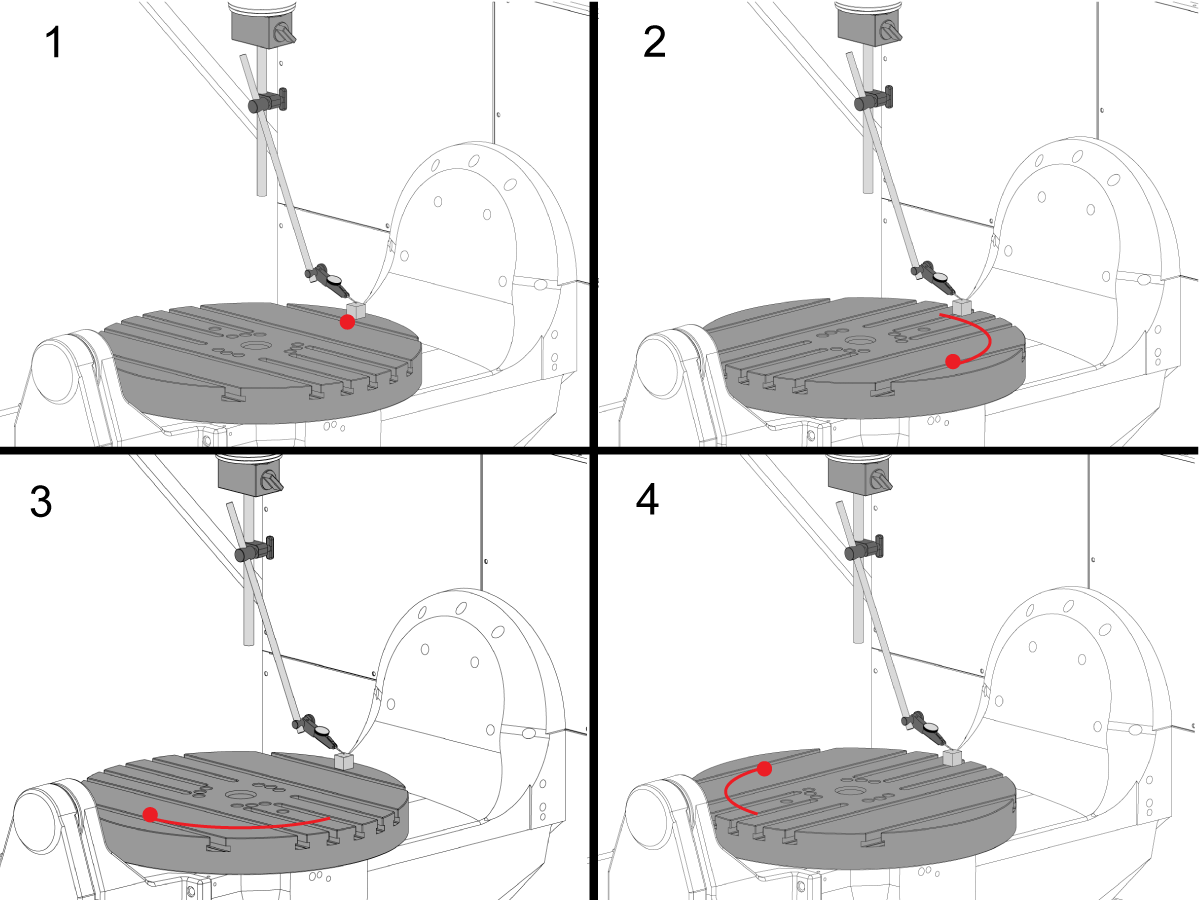
  • Puneţi placa de calibrare de precizie la marginea platoului în poziţia 12 fix. 
  • Resetaţi vârful indicator pe placa de calibrare în această poziţie.
  • Rotiţi axa C  90° 
  • Apoi, efectuați avansul rapid al arborelui principa în axa X şi Y pentru a urma placa de calibrare şi a efectua o măsurătoare a aceluiaşi punct pe platou. Nu trebuie să se producă rotaţia arborelui principal
  • Repetați această mișcare de încă 2 ori pentru un total de 4 poziții, la distanță de 90°, la marginea paletului, conform ilustrației. 
  • Diferenţa dintre măsurătorile poziţiei 12 şi 6 fix determină planitatea de-a lungul axei X (NTE 0,0005")
  • Diferenţa dintre măsurătorile poziţiei 3 şi 9 fix determină  planitatea de-a lungul axei Y (NTE 0,0005")

7

Excentricitatea feței platoului

NOTĂ: Frâna axei C este oprită pentru acest pas

  • Puneţi placa de calibrare de precizie la marginea platoului în poziţia 12 fix. 
  • Resetaţi vârful indicator pe placa de calibrare în această poziţie.
  • Rotiţi axa C  90°, dar mențineți placa de calibrare în poziția ora 12 fix
  • Măsuraţi din partea de sus a plăcii de calibrare
  • Repetați această mișcare de încă 2 ori pentru un total de 4 poziții, la distanță de 90°, la marginea paletului, conform ilustrației. 
  • Notaţi totalul excentricității indicate. (NTE 0,001")

8

Paralelismul suprafeţei platoului în planul XY

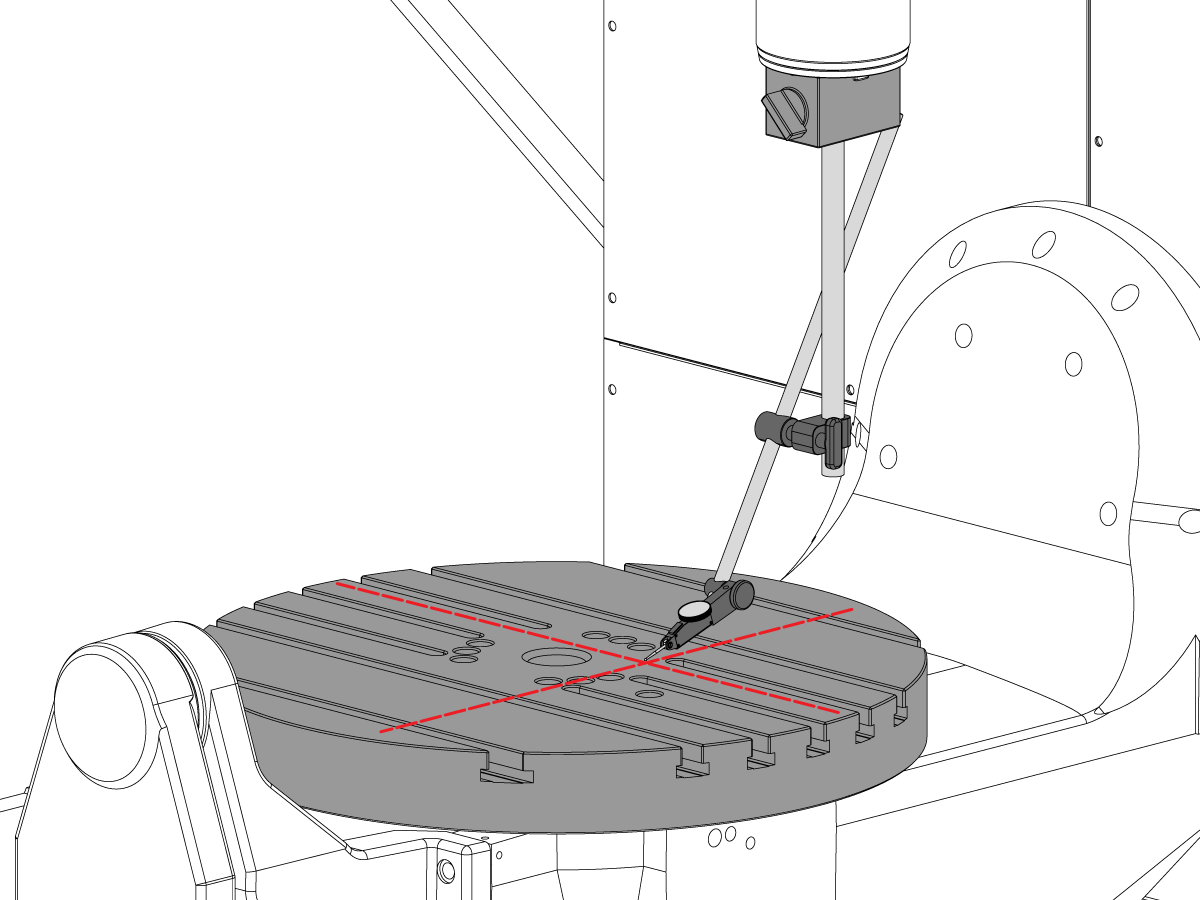
  • Asigurați revenirea la zero a axei C astfel încât canalele T să ruleze paralel cu axa X
  • Plasaţi vârful indicatorului pe platou şi efectuați avansul rapid în axa X de-a lungul platoului pentru a găsi paralelismul platoului pe axa X (NTE 0,001” / 10" 0,0015" / 15")
  • În continuare efectuați avansul rapid în axa Y de-a lungul platoului pentru a găsi paralelismul platoului axei Y (NTE 0,001” / 10" 0,0015" / 15")

9

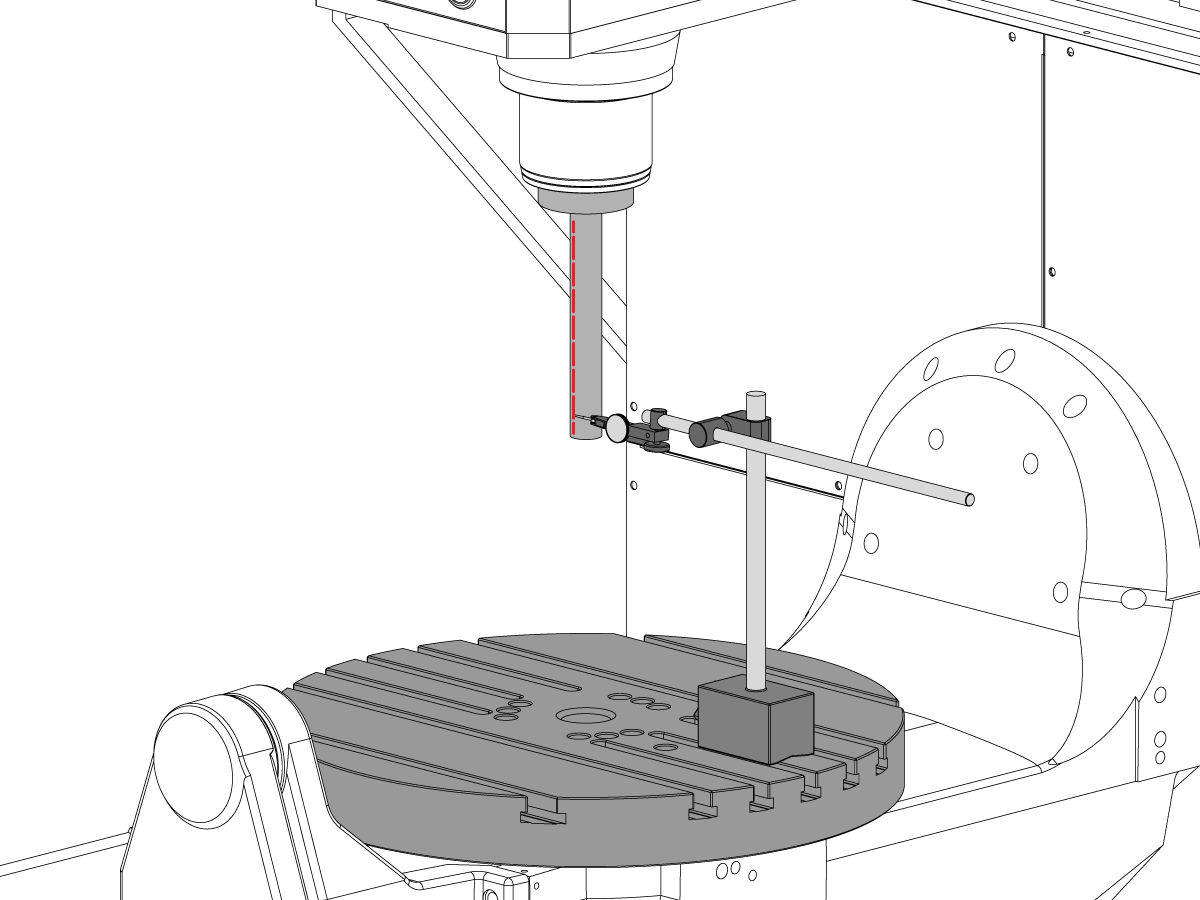
Excentricitate arbore principal

  • Centraţi arborele principal peste alezajul axei C.
  • Puneţi baza de mag pe masă şi introduceţi bara de testare.
  • Verificaţi excentricitatea arborelui principal la baza barei de testare (NTE 0,0005" TIR)
  • Verificaţi excentricitatea arborelui principal6" la baza barei de testare (NTE 0,001" TIR)

10

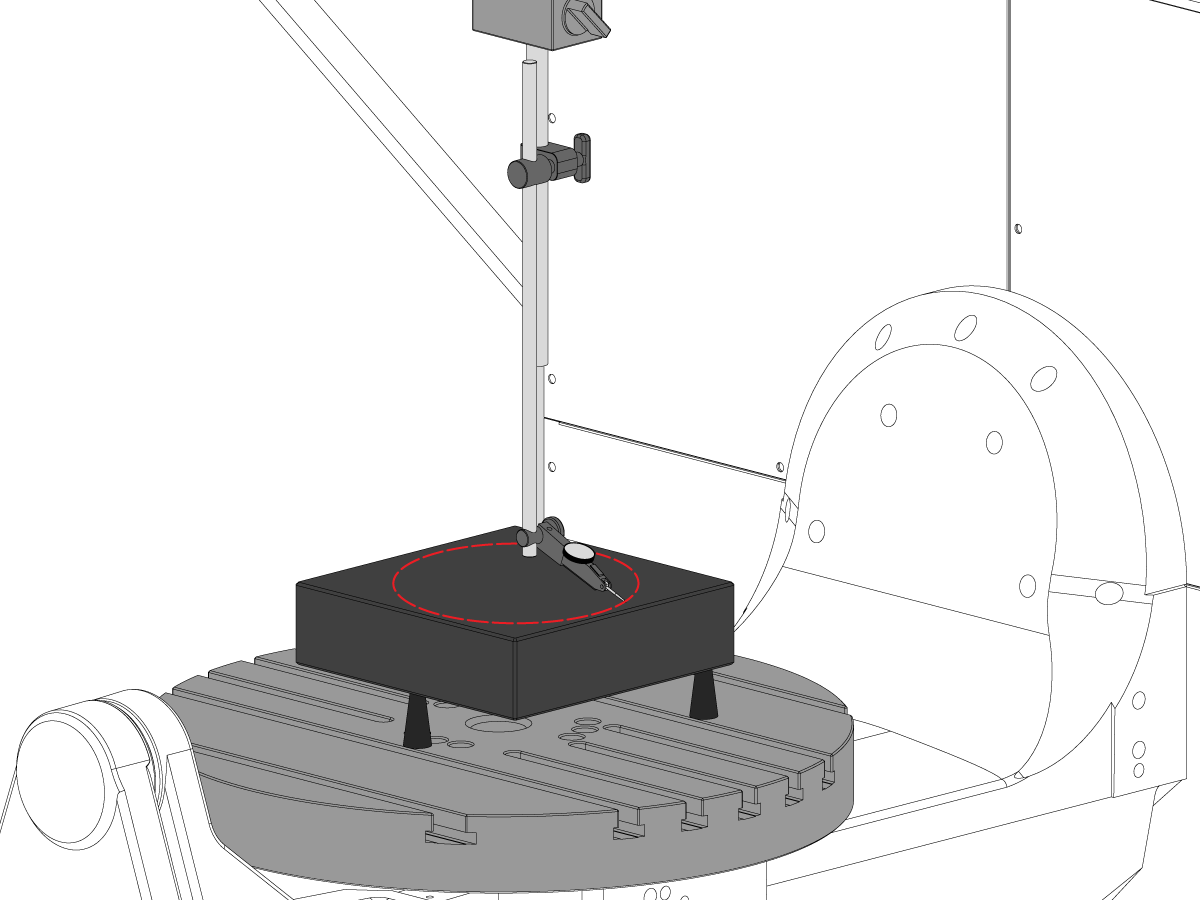
Paralelismul liniei de centru a arborelui principal la axa Z

  • Utilizaţi cricurile cu şurub pentru a granitul paralel cu planul XY în direcția arătată (NTE: 0,0002")
  • Centraţi arborele principal peste alezajul platoului axei C.
  • Treceți într-un cerc cu diametrul de 10"
  • Înregistrați XZ TIR  (NTE 0,0005")
  • Înregistrați YZ TIR  (NTE 0,0005")

11

Concentricitatea alezajului axa C

  • Puneți indicatorul astfel cum este prezentat și efectuați avansul rapid al axei C 360°
  • Înregistraţi TIR-ul alezajului de precizie (NTE 0,002")

12

Punctul de zero rotativ al maşinii

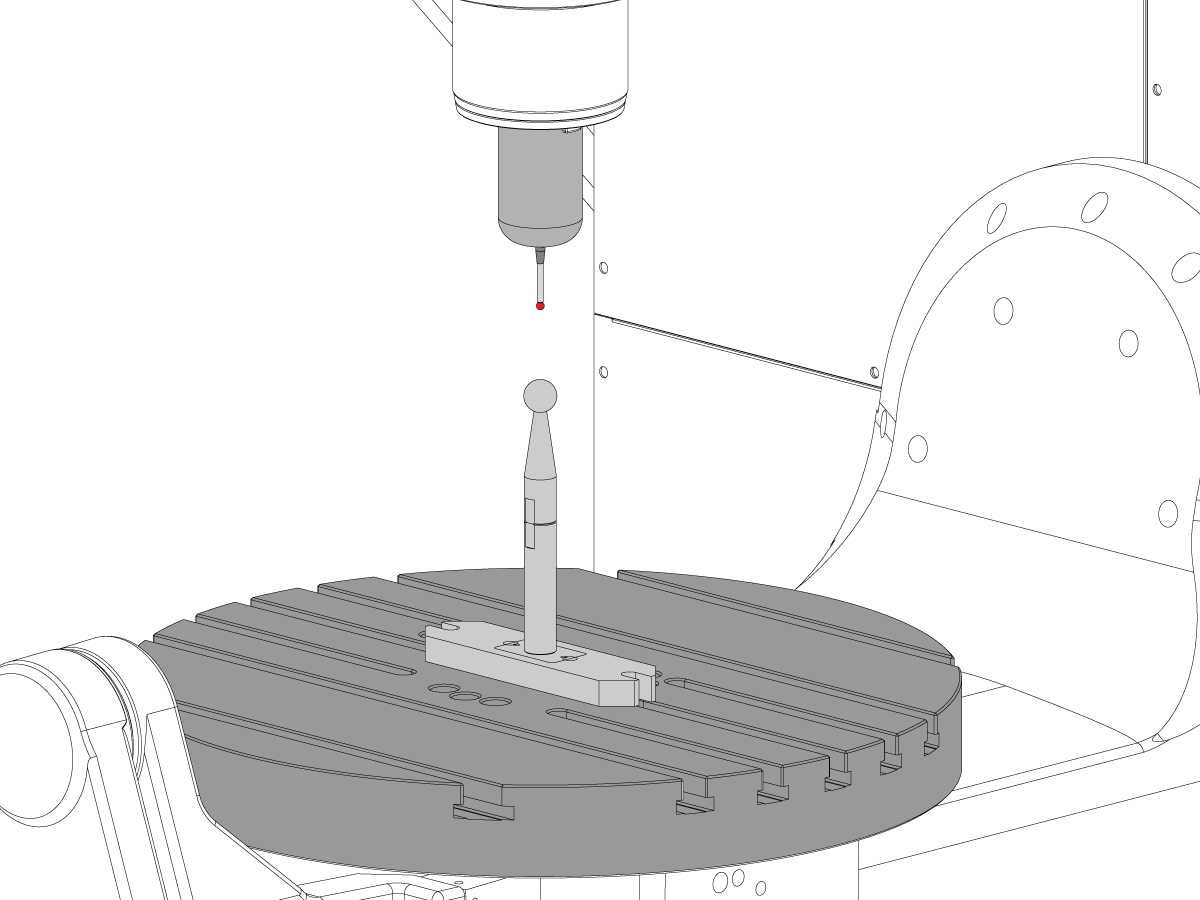
  • Utilizaţi programul macro VQC şi sistemul palpatorului pentru a verifica valorile pentru parametrii Colddire sau setările NGC de mai jos:
    • 255- DECALAJ X MRZP
    • 256 - DECALAJ Y MRZP
    • 257 - DECAPAJ Z MRZP
    • 254 - DISTANȚĂ PUNCT CENTRUL ROTATIV AL AXEI A 5 A
  • Pentru instrucțiuni complete MRZP, vă rugăm să consultați procedura Haas de setare a decalajului MRZP WIPS 

8.3 Geometrie - Depanare

Recently Updated

UMC - Geometrie - Ghid de depanare


TG0151

Prezentare generală

Înainte de depanarea unei probleme de precizie sau geometrie a UMC-750, tehnicianul trebuie să înțeleagă bine următoarele aspecte fundamentale:

  • Modul de nivelare și aliniere a axelor rotative ale UMC
  • Modul de realiniere a tuturor axelor mașinii
  • Modul de efectuare a calibrării MRZP și o înțelegere bună a parametrilor asociați și a efectului acestora asupra mașinii
  • Înțelegerea capacităților de precizie a mașinilor și capacitatea de a înțelege problemele de geometrie a mașinii
  • Alinierea intersecției între axele B și C

O problemă cu geometria sau precizia mașinii UMC-750 trebuie abordată sistematic și în ordinea corectă. Următoarele informații trebuie respectate cu strictețe și urmate în ordine secvențială.

Este absolut esențial ca înainte de orice evaluare sau reglare a geometriei mașinii, mașina sa fie verificată pentru nivelul corect și alinierea axelor rotative

Multe erori pot fi atribuite unei mașini care suferă o coliziune sau probleme fie cu aplicații de scule, fie de programare. Nu încercați să schimbați geometria mașinii fără verificarea completă a nivelului și geometriei mașinii conform Raportului de inspecție. Aceasta include verificarea Machine Rotary Zero Point (MRZP).

În cazul unei coliziuni, există 4 articulații culisante pe mașină. Aceste zone sunt păpușa portsculă pe piston, pistonul la sania transversală, sania transversală la punte și crucea cardanică la suportul crucii cardanice.

 Notă: niciuna dintre aceste articulații nu trebuie să fie vreodată reglată cu bailaguri. O coliziune a mașinii nu trebuie să modifice niciodată cantitatea de bailaguri necesare în mașină existente din setările din fabrică.

Este important să rețineți că precizia liniară a mașinii este 0,0004/10" iar precizia unghiulară este +/- 15 secundă de arc. Aceste toleranțe se pot adăuga rapid.

Fiecare efort trebuie epuizat pentru a determina dacă aplicația de prelucrare este rezonabilă și în cadrul capacităților mașinii, dispozitivului de fixare și pentru scule.

Evaluarea stării mașinii

Stabiliți dacă mașina a suferit o coliziune. Verificați istoricul alarmei; căutați deteriorări fizice pe capacul din tablă, masă, capul arborelui principal etc. Indiferent de cât de "minoră" a fost coliziunea, aceasta va afecta geometria mașinii. Dacă mașina a suferit o coliziune, trebuie efectuată o inspecție completă a geometriei mașinii

Se referă la starea generală a dispozitivului de fixare a pieselor și la starea sculelor de tăiere.

Obțineți un raport complet de backup și cu erorile mașinii.

Verificarea nivelului și geometriei mașinii

Verificați dacă mașina este orizontală și axa rotativă este aliniată cu mașina

 Notă: nu încercați să efectuați nicio ajustare a geometriei mașinii, alta decât ajustarea picioarelor de nivel în acest moment.

Dacă mașina nu este orizontală sau nu este aliniată, resetați nivelul și alinierea unității rotative.

Efectuați inspecția completă a geometriei, notând magnitudinea și direcția oricăror erori pentru fiecare axă.

Analizați raportul de inspecție.

Dacă oricare dintre secțiunile raportului de inspecție este în afara toleranțelor, mașina trebuie realiniată.

Revizuire aplicație

Adunați următoarele informații despre piesă, sistemul de suport piesă și scule:

  • Care caracteristici sunt în afara toleranțelor, magnitudinii, direcției erorii
  • Piesa este prelucrată utilizând axa 5, axa 3+2 sau axa 3?
  • Revizuiți piesa și abordarea prelucrării
  • Poate fi redusă oricare dintre erorile de acuratețe a pieselor prin schimbarea abordării de prelucrare?
  • Problema este o problemă de repetabilitate, o problemă de mărime sau o problemă de geometrie?
  • Programul utilizează TCPC sau DWO?
  • Există valori în tabelele de compensare?

8.4 Aplicații - Depanare

Recently Updated

UMC - Aplicații - Ghid de depanare


TG0150

Cum se accesează

Consultați Ghidul de depanare aplicații UMC.

Urmați acest link Documente și software | HBC

sau

Conectați-vă la HBC.HAASCNC.COM

NOTĂ: Numai tehnicienii de service certificați Haas se pot conecta la acest site-uri. 

Selectați fila Service.

Accesați Utilități, selectați Documente și software.

Selectați folderul Aplicații.

8.5 UMC-750 - Listă de verificare pentru setul de bailaguri

Recently Updated

UMC-750 - Lista de verificare pentru trusa de bailaguri


AD0131

Prezentare

Aceasta este Lista de verificare pentru trusa de bailaguri pentru următoarea trusă:

  • 93-2236  ÎNLOCUITOR, KIT BAILAG PENTRU UMC-750

Listă de verificare: Bailag-Distanțier-Coloană

Grosime Nr. piesă Cantitate în kit UTILIZAT
.02100 20-9358A 2  
0,2105 20-9359A 2  
,02110 20-9383A 2  
0,2115 20-9365A 2  
0,2120 20-9384A 2  
0,2125 20-9385A 2  
0,2130 20-9368A 2  
0,2135 20-9369A 2  
0,2140 20-9386A 2  
0,2145 20-9371A 2  
0,2150 20-9372A 2  
0,2155 20-9387A 2  
0,2160 20-9374A 2  
0,2165 20-9375A 2  
0,2170 20-9376A 2  
0,2175 20-9377A 2  
0,2180 20-9378A 2  
0,2185 20-9379A 2  
0,2190 20-9380A 2  
0,2195 20-9381A 2  
0,2200 20-9382A 2  

Notă:  Numai proprietarii de truse: Specificați grosimea bailagului atunci când comandați înlocuitori. De exemplu, 20-9382 0.2145

Listă de verificare: Bailaguri potcoavă

Grosime Nr. piesă Cantitate în kit UTILIZAT
0,0010 59-0240 2  
0,0020 59-0241 2  
0,0030 59-0242 2  

Listă de verificare: Bailag-Distanțier-Coloană-Mare

Grosime Nr. piesă Cantitate în kit UTILIZAT
0,2130 20-6282A 2  
0,2135 20-6283A 2  
0,2140 20-6284A 2  
0,2145 20-6285A 2  
0,2150 20-6286A 2  
0,2155 20-6287A 2  
0,2160 20-6288A 2  
0,2165 20-6289A 2  
0,2170 20-6290A
2  
0,2175 20-6291A 2  
0,2180 20-6294A 2  
0,2185 20-6295A 2  
0,2190 20-6292A 2  
0,2195 20-6293A 2  
0,2200 20-6296A 2  
0,2205 20-6297A 2  
0,2210 20-6277A 2  
0,2215 20-6279A 2  
0,2220 20-6278A 2  
0,2225 20-6298A 2  
0,2230 20-6281A 2  

Notă:   Numai proprietarii de truse: Specificați grosimea bailagului atunci când comandați înlocuitori. De exemplu, 20-6290A 0.2080

ÎNREGISTRAȚI CARE BAILAGURI AU FOST ÎNDEPĂRTATE DIN KIT ÎN COLOANA UTILIZATĂ.

PUNEȚI LISTA DE VERIFICARE ÎNAPOI ÎN KITUL PENTRU BAILAG.

PUNEȚI BAILAGURILE ORIGINALE ÎNAPOI ÎN LADĂ.

8.6 Intersecția axelor B/C - Aliniere

Prezentare

Această procedură vă arată cum să măsuraţi şi să aliniaţi intersecţia axelor B şi C.  Înainte de a încerca această procedură, verificaţi dacă maşina este la nivel conform Nivelare UMC-750.

Va trebui să aliniaţi axele B şi C după ce:

  • Înlocuiți axele B și C
  • sau finalizați raportul de Inspecție UMC și găsiți o problemă

Distanţa centrului rotativ al axei a 5-a defineşte diferenţa dintre centrele rotative de rotaţie: Punctul de zero rotativ al mașinii pe axa C (MRZP) şi MRZP pe axa B în axa X.

Este posibil să nu existe nicio diferenţă între MRZP pe axa C şi MRZP pe axa B.

  • Unitatea de comandă Haas Classic (CHC): Parametrul 1314 - Rotary Axes Center Deviation in X
  • Unitatea de comandă de nouă generaţie (NGC): Setarea 254 - 5 Axis Rotary Center Distance

Veţi avea nevoie de următoarele scule:

  • T-2195A UMC Aligment Bar Adapter
  • T-2113 Alignment bar
  • Mănuşi pentru pistolul cu aer cald și rezistente la căldură

Alinierea axelor B la axele XYZ

How to identify the Multi-Piece and the Unibody trunnion   

1) Multi-Piece trunnion:    UMC machines built approximetely before 11/2022 will have this configuration.

2) Unibody trunnion:    UMC machines built approximetely after 11/2022 will have this configuration.

1

Remove the A-frame trunnion support:

Remove the bolts [1] that secure the A-frame trunnion support [2] to the base and take out the shims between A-frame support and the base.

Rotate the A-frame support [2] counter-clockwise to clear the edge of the base [3].

Pull the A-frame support off the bearings.

 Note: The A-frame support might vacuum lock on the bearings. Use the zip-tie to pry the seal [4] open.

 Caution: To lift the trunnion support, get the aid of another person. The support weighs 85 lbs (39 kg).

2

Measure the B- axis of rotation parallelism to the Y-Z plane:

For a machine with a Classic Haas Control, change Parameter 151:20 (B axis CHK TRAVL LIM) to 0.

For a machine with a Next Generation Control, change Parameter 6.021 (B axis CHK TRAVL LIM) to FALSE.

Measure the parallelism of the platter to the Y-Z plane with the B axis at 90° and then the B axis at -90° as shown in the picture.

Position the Y-Axis in the following starting position:

UMC-500: Y=0, Sweep 15”, 3rd T-Slot Land from the top.

UMC-750/1500-Duo: Y=-1.0, Sweep 18", 3rd T-Slot Land from the Top .

UMC-1250: Y=-1.0, Sweep 28", 3rd T-Slot Land from the Top.

UMC-500PP: Y=-4.0, Sweep 7".

UMC-750PP: Y=-2”, Sweep 15".

UMC-1000PP: Y=-4”, Sweep 15".

Compare the results at B 90° and B-90°. The results should be...

  • Symmetric against the Y-Z plane, positive or negative direction
  • Less than 0.0010"/20"

If the results are symmetric against Y-Z plane, and are less than 0.0010"/20 inches: Go to Step 5.

If the results are symmetric against Y-Z plane, but are more than 0.0010"/20 inches: Go to Step 4.

 Warning: If the results [3] are not symmetric against the Y-Z plane, the B axis rotary needs to be aligned: Go to Step 3.

3

Align the B axis of rotation parallel to the Y-Z plane:

Loosen the (6) bolts [1] that secure the B axis rotary to the base casting.

 Note: Keep the bolts sufficiently snug to control the adjustments.

Adjust the front and rear setscrews [2] until the measurements taken in Step 2 are symmetric against the Y-Z plane.

Torque the (6) bolts [1]. Refer to Haas Fastener Torque Specification.

Verify the measurements in Step 2 after the bolts have been torqued.

4

Align the C Axis of rotation perpendicular to the B Axis of rotation:

Remove the bottom C-Axis access cover.

Loosen the (12) bolts [1] that hold the C Axis body to the B Axis platter face.

Reach the bottom (4) bolts through the C Axis access port.

If the B Axis is symmetric in the positive direction [4], install horseshoe shims [2] of appropriate size behind the top (2) bolts.

If the B Axis is symmetric in the negative direction [5], install horseshoe shims [2] of appropriate size behind the bottom (2) bolts.

Torque the (12) bolts to 80 Ft-lbs (108 Nm).

Cut the excessive shim material off.

Verify the measurements in Step 2 after bolts are torqued.

5

Align the trunnion support shaft co-axial with the B Axis of rotation:

Setup (2) indicators on the outer race of the trunnion support bearing [2] as shown in the picture.

Mark the spot on the outer race where one of the indicator needles is contacting the surface.

After moving the B Axis to 90° or -90° you will align the marked spot with the needle again to exclude the bearing runout error from the measurements.

Take the readings when B is at 90° and B at -90°. Compare the readings. 

 Caution: The B axis brake needs to be clamped when taking the readings.

The deviation between the results when B is at 90° and at -90° needs to be less than 0.001" on each indicator.

 Note: The indicator on the side of the bearing will measure top to bottom alignment and the indicator on the top of the bearing will measure side to side alignment.

____

For models with a multi-piece trunnion

Loosen the (6) bolts [3] on the C Axis body support. Keep the bolts sufficiently snug to control adjustment.

Adjust the (8) set screws [4] until deviation between B at 90° and B at -90° is within 0.001".

Torque the (6) bolts [2] on the C Axis body support to 80 Ft-lbs (108 Nm).

Verify the alignment after the bolts have been torqued.

____

For models with a unibody trunnion

Jog rotary to B90. Set up an indicator on the highlighted surface as shown in the lower diagram .

Rotate B-axis 180 degrees (90 to -90).

Run out (NTE 0.010” TIR).

 Caution: If the measurement exceeds the tolerance then contact support.

6

Install and shim the A-frame trunnion support:

Move the B Axis to 90°.

Setup an indicator [1] against a machined surface of the C Axis body. Set the indicator to 0.

Use plastic zip ties [2] to pry the seal open while installing the A-frame support. This lets unwanted air and grease out of the assembly.

Install the A-frame trunnion support [3] over the bearings.

Remove the cable ties.

Turn the trunnion support clockwise until it is vertical.

 Note: The weight of the A-frame support will cause the trunnion to sag. The amount of sag is measured with the indicator that was previously setup on the side of the C Axis body.

____

For multi-piece trunnions

Adjust the shims [4] between the A-frame support and the base casting to remove the sag until indicator reads 0 again.

When the indicator reading is 0, torque the (4) bolts. Refer to Haas Fastener Torque Specification.

Verify the reading after bolts are torqued. Adjust the shims again if necessary until the indicator reads 0.

____

For models with unibody trunnion

Determine the amount of shim stock [4] needed to raise the Trunnion arm so the indicator reads 0.005".

The indicator [1] value will change once the support is torqued.

With indicator still in place:

  • Torque trunnion support bolts to appropriate values.
  • Check indicator to make sure it reads between the range of

Trunnion arm raised (0.005” to  0.010”).

 Note: For unibody trunnions, the shim location may also be used to correct the C-axis to X-Y plane perpendicularity instead of shimming the saddle trucks.

 Caution: Use equal amount of shims on each side of the A-frame support. Unequal shims will cause the A-frame support to pull the trunnion to the side.

Verify the B Axis of rotation alignment to the Y-Z plane (Step 2). Loosen the bolts and tap the A-frame support side to side if necessary to correct the B axis to Y-Z plane alignment.

7

Set C-axis perpendicular to X/Y plane:

Move the axes to

UMC-750's........X= -10.5" & Y=0."

UMC-1000's......X=-17.0" & Y=-0."

Zero an indicator [1], on a Ground Block [2], 1/2" off the edge at the rear of the platter (Mag-Base on Spindle), with C at 0 Degrees

Rotate C-Axis to 180°.

Move Y axis, and ground block, in Y Axis negative direction until you are 1/2" away from platter edge, and take the perpendicularity measurement

Adjust the shims until the average error is within 0.0005" end to end.

 Note: For unibody trunnions, the shim location under the bearing support may also be used to correct the C-axis to X-Y plane perpendicularity instead of shimming the saddle truck.

Caution: Shim either two front trucks or two rear trucks with the equal shim.

Note: Shim one truck at the time to maintain the X to Y squareness.

Verify the measurements after all bolts are torqued.

Verify the X to Y alignment in Step 2.

8

Set the tool change offsets:

B-axis tool change offset [1]

For Classic Haas Controls, change Parameter 213. 

For Next Generation Controls, go to: Settings>Rotary Tab>Highlight the rotary and press [INSERT], or change Parameter 6.078 (B TOOL CHANGE OFFSET) to set the trunnion (B Axis) parallel to the X Axis.

For models with multipiece trunnion

(NTE 0.001/10"; NTE 0.0020" overall)

For models with unibody trunnion

(NTE 0.0005/10"; NTE 0.0010" overall)

___

C-axis tool change offset [2]

For Classic Haas Controls change Parameter 523.

For Next Generation Control go to: Settings>Rotary Tab> Highlight the rotary and press [INSERT], or change Parameter 7.078 (C TOOL CHANGE OFFSET) to set the table T-slot (C Axis) parallel to the X Axis

For models with multipiece trunnion

(NTE 0.001/10"; NTE 0.0020" overall)

For models with unibody trunnion

(NTE 0.0005/10"; NTE 0.0010" overall)

9

Check C-axis perpendicularity to X/Y plane:

Align the indicator centered over the C-axis bore with the Y-axis at -10.

Jog positive in the Y-axis and align the indicator over the center of the last section of the platter and make a mark at this spot with a washable marker.

Insert 1-2-3 block as shown and set the indicator to zero.

Remove the block and rotate the platter 90 degrees, following the marked spot with the indicator.

Insert block back between the indicator and platter. Note reading.

Repeat the previous two steps, taking readings with the platter at 180, 270 and 360 degrees.

Multi-piece trunnion:  (NTE 0.0005")

Unibody trunnion: (NTE 0.001")

10

Measure the intersection of the B and C axis:

Follow the linked instruction manual to complete this step.

B-Axis and C-Axis intersection Adjustment

11

Align the B-Axis brake disk:

 Note: Do not do this step if you are working on a SS machine.

Operate this code in MDI mode to unclamp the brake:

M11;

Loosen all of the brake disc bolts [1] and torque them to 5 Ft-lbs (7 Nm).

Operate this code in MDI mode to clamp the brake:

M10;

Wait 10 seconds.

Torque the bolts. Refer to Haas Fastener Torque Specifications.

Configurarea sculei pe intersecția axa B cu axa C

1

Install the B Axis and C Axis intersection tool:

Jog the C Axis to 0°.

Push [EMERGENCY STOP].

Clean the table.

Guide the shaft of the adapter [1] while you slowly lower it into the center bore.

Attach the adapter to the table with (2) screws [4] and (2) T-nuts.

Attach the alignment bar [2] to the adapter with (3) screws [3].

Snug the (3) screws to allow for adjustments in the next step.

2

Align the B/C intersection tool with the C Axis:

Put an indicator on the front side of the alignment bar near the base.

Release the [EMERGENCY STOP]. Push [RESET] to clear any alarms.

Jog across the tool in the X Axis to find the high spot.

Set the indicator to 0.

Jog the C Axis 360°.

Lightly tap the base with a rubber mallet to adjust the radial error on the alignment bar.

Note: Adjust the alignment bar to half of the measured error, because you are measuring the diameter error.

Jog the C Axis 360°.

When correctly adjusted the radial error is less than 0.0002" (0.005 mm).

3

Check the B/C intersection:

Center the indicator [1] on the front side of the alignment bar near the top of the cylinder.

Jog across the tool in the X Axis to find the high spot.

Zero the indicator.

Jog the C Axis 360°.

Turn the (3) screws [2] on the alignment bar to adjust the runout.

Jog the C Axis 360°.

When correctly adjusted the radial error is less than 0.0002" (0.005 mm).

Repeat Step 2 and verify the alignment did not change.

Reglarea intersecției axei B la axa C

1

For a machine with a Classic Haas Control change:

  • Parameter 151:20 (B-axis CHK TRAVL LIM) to 0.
  • Parameter 1314 (ROTARY AXIS CENTER DEVIATION IN X) to 0.

For a machine with a Next Generation Control change:

  • Parameter 6.021 (B-axis CHK TRAVL LIM) to FALSE.
  • Setting 254 (5-Axis Rotary Center Distance) to 0.

Push [ZERO RETURN]. Then push [ALL].

Jog the B-axis to -90°.

Note: The rotary positions are for reference only.

Put an indicator [1] on top of the alignment bar.

Jog in the Y-axis to find the high point.

Set the indicator to 0.

Jog across the alignment bar in the X-axis [2].

Jog the B-axis to adjust the alignment bar parallel to the X plane.

Set the indicator to 0.

Jog the Y-axis to 0.

Caution: Make sure the indicator assembly is clear of the B-axis movement.

 Caution: Do not move the Z-axis.

2

Jog the B-axis to +90°.

 Caution: Make sure the indicator assembly is clear of the B-axis movement.

Jog the Y-axis [1] to find the high point on the alignment bar.

Note: Do not set the indicator to 0.

Jog across the alignment bar in the X-axis.

Jog the B-axis to adjust the alignment bar parallel [2] to the X plane.

When the alignment bar is parallel to the X plane, the indicator reading is the change needed in the Z-Axis (∆Z=indicator reading).

Record the value shown on the indicator. In this example the indicator now shows 0.0015". ∆Z is 0.0015".

3

Do these calculations to get the value for CHC Parameter 1314 or NGC Setting 254. (In this example the difference in readings for the B-C intersection (∆Z) is 0.0015".):

  • ∆Z / 2 x 10,000 = CHC Parameter 1314 / NGC Setting 254
  • 0.0015 / 2 = 0.00075
  • Round down to 4 decimal places: 0.00075 = 0.0007 (NGC Setting 254)
  • 0.0007 x 10,000 = 7 (CHC Parameter 1314)

Set Parameter CHC Parameter 1314 (Rotary Axes Center Deviation in X) or NGC Setting 254 (5-Axis Rotary Center Distance), to the calculated value.

In this example, set parameter CHC Parameter 1314 to 7 or NGC Setting 254 to 0.0007.

Cycle the power to save CHC Parameter 1314 or NGC Setting 254.

Repeat Steps 1-3 to verify that the value for ∆Z is less than 0.0002" (0.005 mm).

4

Jog the B-Axis to the home position.

Set Parameter 151:20 (B-Axis CK Travel Limit) to 1.

Make sure the MRZP offsets are correct.

Calibrate WIPS per Wireless Intuitive Probe System (WIPS) - Calibration.

Complete an inspection report. Refer to UMC-750 Inspection Report.

Recently Viewed Items

You Have No Recently Viewed Items Yet

Feedback
Haas Logo

Preț de livrare Haas

Prețul include costul transportului, taxele de export și import, asigurarea și orice alte cheltuieli apărute în timpul expedierii către o locație din Franța, stabilită de comun acord cu dvs. în calitate de cumpărător. Nu pot fi adăugate alte costuri obligatorii la livrarea unui produs CNC de la Haas.

RĂMÂNEȚI LA CURENT CU CELE MAI RECENTE SFATURI ȘI TEHNOLOGII HAAS...

Înregistrați-vă acum!   

HAAS TOOLING ACCEPTĂ URMĂTOARELE:

  • Servicii și asistență
  • Proprietari
  • Solicitare de service
  • Manuale de utilizare
  • Piese Haas
  • Solicitare de reparație unitate rotativă
  • Ghiduri de pre-instalare
  • Cumpărarea sculelor
  • Configurare și preț pentru o mașină Haas nouă
  • Inventar disponibil
  • Listă de prețuri Haas
  • Finanțare CNCA
  • Despre Haas
  • Declarație privind accesibilitatea
  • Declarația DNSH
  • Conformitate cu reglementările privind exportul
  • Cariere
  • Certificări și siguranță
  • Contactați-ne
  • Istoric
  • Termeni și condiții
  • Termeni și condiții Haas Tooling
  • Confidențialitate
  • Garanție
  • Comunitatea Haas
  • Programul de certificare oferit de Haas
  • Sporturi cu motor Haas
  • Fundație Gene Haas
  • Comunitatea pentru formare tehnică Haas
  • Evenimente
  • Alăturați-vă conversației
  • Facebook
  • X
  • Flickr
  • YouTube
  • LinkedIn
  • Instagram
  • TikTok
© 2026 Haas Automation, Inc – Mașini-unelte CNC

This site is protected by reCAPTCHA and the Google Privacy Policy and Terms of Service apply.

2800 Sturgis Rd., Oxnard, CA 93030 / Toll Free: 800-331-6746
Phone: 805-278-1800 / Fax: 805-278-2255