My Haas Welcome,
!
Haas Tooling MyHaas/HaasConnect Sign In Register Haas Tooling MyHaas/HaasConnect Sign Out Welcome, My Machines Latest Activity My Quotes My Account My Users Sign Out
Find Your Distributor
  1. Select Language
    1. English
    2. Deutsch
    3. Español - España
    4. Español - México
    5. Français
    6. Italiano
    7. Português
    8. Český
    9. Dansk
    10. Nederlands
    11. Magyar
    12. Polski
    13. Svenska
    14. Türkçe
    15. 中文
    16. Suomi
    17. Norsk
    18. الإنجليزية
    19. български
    20. Hrvatski
    21. Ελληνικά
    22. Română
    23. Slovenský
    24. Slovenščina
    25. 한국어
    26. 日本語
    27. Українська
  • machines Main Menu
    • Vertical Mills
      Vertical Mills
      Vertical Mills View All
      • Vertical Mills
      • VF Series
      • Universal Machines
      • VR Series
      • VP-5 Prismatic
      • Pallet-Changing VMCs
      • Mini Mills
      • Mold Machines
      • High-Speed Drill Centers
      • Drill/Tap/ Mill Series
      • Toolroom Mills
      • Pocket Mill
      • Compact Mills
      • Gantry Series
      • SR Sheet Routers
      • Extra-Large VMC
      • Double-Column Mills
      • 3+2 Positioning Machines
    • Multi-Axis Solutions
      Multi-Axis Solutions
      Multi-Axis Solutions View All
      • Multi-Axis Solutions
      • Y-Axis Lathes
      • 5-Axis Mills
    • Lathes
      Lathes
      Lathes View All
      • Lathes
      • ST Series
      • Dual-Spindle
      • Box Way Series
      • Toolroom Lathes
      • Chucker Lathe
      • Haas Bar Feeders
    • Horizontal Mills
      Horizontal Mills
      Horizontal Mills View All
      • Horizontal Mills
      • 50-Taper
      • 40-Taper
    • Rotaries & Indexers
      Rotaries & Indexers
      Rotaries & Indexers View All
      • Rotaries & Indexers
      • Rotary Tables
      • Indexers
      • 5-Axis Rotaries
      • Extra-Large Rotaries
    • Special Series
      Special Series
      Special Series View All
      • Special Series
      • EU_Series_Redirect
    • Automation Systems
      Automation Systems
      Automation Systems View All
      • Automation Systems
      • Mill Automation
      • Lathe Automation
      • Automatic Parts Loaders
      • Automation Models
    • Desktop Machines
      Desktop Machines
      Desktop Machines View All
      • Desktop Machines
      • Desktop Mill
      • Desktop Lathe
      • Control Simulator, Standard
      • Control Simulator, Premium
    • Shop Equipment
      Shop Equipment
      Shop Equipment View All
      • Shop Equipment
      • Knee Mill
      • Haas Manual Lathes
      • Haas Saws
    • Fabrication Machines
      Fabrication Machines
      Fabrication Machines View All
      • Fabrication Machines
      • Laser Cutting Machines
      • CNC Press Brakes
    • QUICK LINKS Special Series  Special Series 
      EU SERIES EU SERIES BUILD & PRICE | PRICE LIST BUILD & PRICE | PRICE LIST In-Stock Machines In-Stock Machines WHAT’S NEW WHAT’S NEW YOUR FIRST CNC YOUR FIRST CNC
      SHOPPING TOOLS
      • Build & Price a Haas
      • Price List
      • Available Inventory
      • CNCA Financing
      WANT TO TALK TO SOMEONE?

      A Haas Factory Outlet (HFO) can answer your questions, and walk you through your best options.

      CONTACT YOUR DISTRIBUTOR >
  • Options Main Menu
    • The Haas Control Value Option Packages
      Value Option Packages
      Value Option Packages View All
      • Value Option Packages
    • Product Image Spindles
      Spindles
      Spindles View All
      • Spindles
    • Product Image Tool Changers
      Tool Changers
      Tool Changers View All
      • Tool Changers
    • Product Image 4th- | 5th-Axis
      4th- | 5th-Axis
      4th- | 5th-Axis View All
      • 4th- | 5th-Axis
    • Product Image Turrets & Live Tooling
      Turrets & Live Tooling
      Turrets & Live Tooling View All
      • Turrets & Live Tooling
    • Product Image Probing
      Probing
      Probing View All
      • Probing
    • Haas Chip & Coolant Management Chip & Coolant Management
      Chip & Coolant Management
      Chip & Coolant Management View All
      • Chip & Coolant Management
    • The Haas Control The Haas Control
      The Haas Control
      The Haas Control View All
      • The Haas Control
    • Product Image Product Options
      Product Options
      Product Options View All
      • Product Options
    • Product Image Tooling & Fixturing
      Tooling & Fixturing
      Tooling & Fixturing View All
      • Tooling & Fixturing
    • Product Image Workholding
      Workholding
      Workholding View All
      • Workholding
    • Product Image 5-Axis Solutions
      5-Axis Solutions
      5-Axis Solutions View All
      • 5-Axis Solutions
      • 5 Easy Steps to 5-Axis
    • QUICK LINKS Special Series  Special Series 
      EU SERIES EU SERIES BUILD & PRICE | PRICE LIST BUILD & PRICE | PRICE LIST In-Stock Machines In-Stock Machines WHAT’S NEW WHAT’S NEW YOUR FIRST CNC YOUR FIRST CNC
      SHOPPING TOOLS
      • Build & Price a Haas
      • Price List
      • Available Inventory
      • CNCA Financing
      WANT TO TALK TO SOMEONE?

      A Haas Factory Outlet (HFO) can answer your questions, and walk you through your best options.

      CONTACT YOUR DISTRIBUTOR >
  • Why Haas Main Menu
      Discover the Haas Difference
    • Why Haas
    • MyHaas
    • Education Community
    • Industry 4.0
    • Haas Certification
    • Customer Testimonials
  • Service Main Menu
      Welcome to Haas Service
      SERVICE HOME Operator’s Manuals How-To Procedures Troubleshooting Guides Preventive Maintenance Haas Parts Haas Tooling Videos
  • Videos Main Menu
  • Main Menu
    • View All
    • View All
    • View All
    • View All
      • HTEC Curriculum Support
    • View All
      • Haas 10 kg Cobot Package
      • Cobot Kits
      • DC-1 Drill Center
      • CNC Sales News
      • Do More With Your Haas
    • View All
    • View All
      • contact-us-test
      • 4 - AUTOMATION SYSTEMS
      • Carousel-V2
      • expert test
      • Demo_Day_Trident-test
      • Link Test
      • image-sale-tag-test
      • article-list-test
      • Haas 25 kg Robot Package
    • View All
      • Choose Options
    • View All
    • View All
    • View All
    • View All
    • View All
      • calc-test
    • View All
    • QUICK LINKS Special Series  Special Series 
      EU SERIES EU SERIES BUILD & PRICE | PRICE LIST BUILD & PRICE | PRICE LIST In-Stock Machines In-Stock Machines WHAT’S NEW WHAT’S NEW YOUR FIRST CNC YOUR FIRST CNC
      SHOPPING TOOLS
      • Build & Price a Haas
      • Price List
      • Available Inventory
      • CNCA Financing
      WANT TO TALK TO SOMEONE?

      A Haas Factory Outlet (HFO) can answer your questions, and walk you through your best options.

      CONTACT YOUR DISTRIBUTOR >
  • Haas Tooling Main Menu
  • Haas Service Parts Main Menu

My Haas Welcome,
!
Haas Tooling MyHaas/HaasConnect Sign In Register Haas Tooling MyHaas/HaasConnect Sign Out Welcome, My Machines Latest Activity My Quotes My Account My Users Sign Out
Find Your Distributor
  1. Select Language
    1. English
    2. Deutsch
    3. Español - España
    4. Español - México
    5. Français
    6. Italiano
    7. Português
    8. Český
    9. Dansk
    10. Nederlands
    11. Magyar
    12. Polski
    13. Svenska
    14. Türkçe
    15. 中文
    16. Suomi
    17. Norsk
    18. الإنجليزية
    19. български
    20. Hrvatski
    21. Ελληνικά
    22. Română
    23. Slovenský
    24. Slovenščina
    25. 한국어
    26. 日本語
    27. Українська
×

Search Results

Web Pages

Images

    • <
    • 1
    • >

Lathe - Next Generation Control - Icon Guide - RD0034

Service Home Lathe - Next Generation Control - Icon Guide - RD0034
Recently Updated Last updated: 02/10/2026

Lathe - Next Generation Control - Icon Guide


RD0034

Lathe - Next Generation Control - Icon Guide - RD0034

- Jump to Section - 1. Introduction 2. Icon Guide Back to Top

Introduction

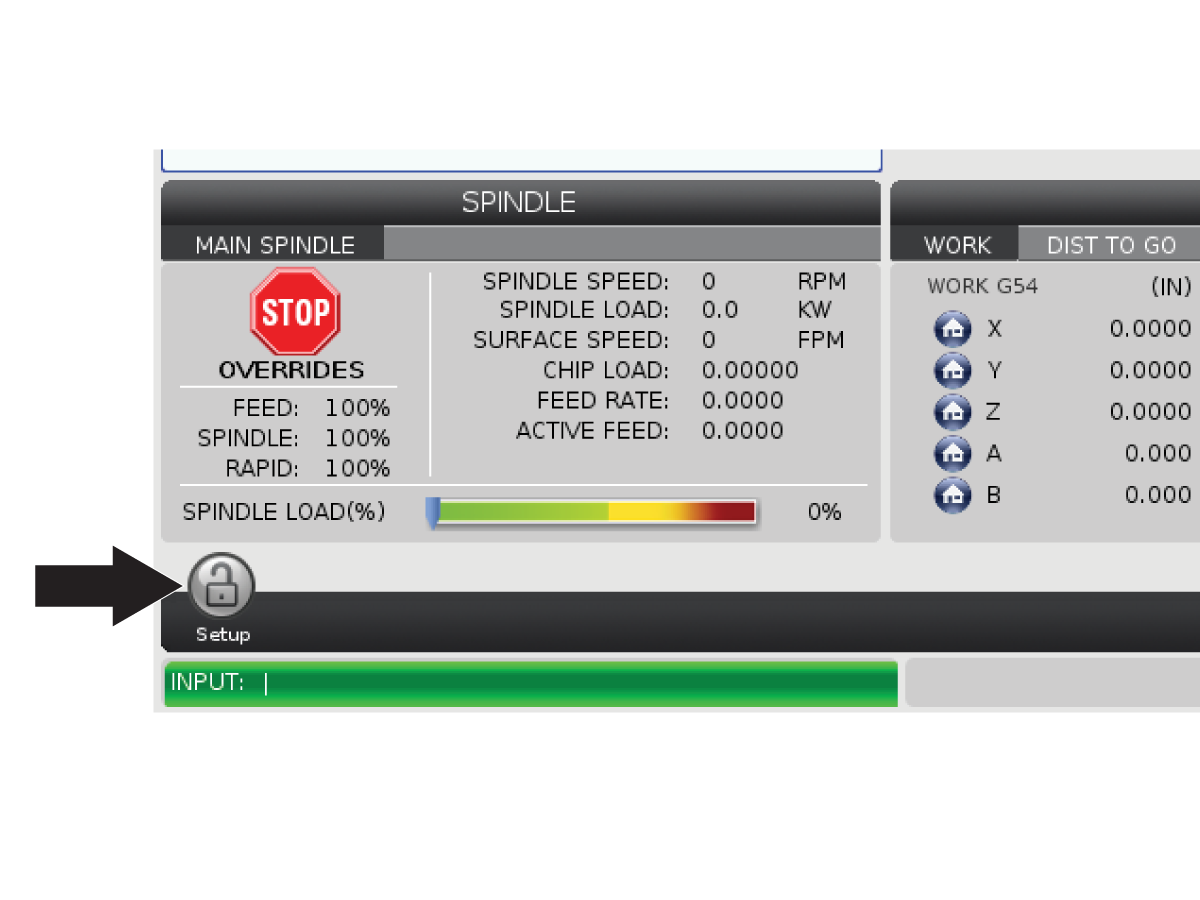
The control screen shows icons to quickly give you information about machine status. Icons tell you about current machine modes, your program as it runs, and machine maintenance status.

The icon bar is near the bottom of the control pendant display, above the input and status bars.

Icon Guide

Setup

Setup mode is locked; the control is in Run mode. Most machine functions are disabled or limited while the machine doors are open.

Setup

Setup mode is unlocked; the control is in Setup mode. Most machine functions are available, but may be limited while the machine doors are open.

Bar Feeder is Not Aligned

This icon appears when the bar feeder is enabled and out of position. Make sure the bar feeder is aligned with the feeding hole.

Bar Feeder Cover is Open

This icon appears when the bar feeder is enabled and the bar feeder cover is open

Bar Feeder is Out of Bars

This icon appears when the bar feeder has run out of the bars.

Cycle Door

The door must be cycled at least once to ensure that the door sensor is working. This icon appears after [POWER UP] If the user has not yet cycled the door.

Door Open

Warning, door is open.

Light Curtain Breach

This icon appears when the machine is idle and the light curtain is triggered. It also appears when a program is running and the light curtain is running. This icon disappears when the obstacle is removed from the light curtain line of sight.

Light Curtain Hold

This icon appears when a program is running and the light curtain is triggered. This icon will clear the next time [CYCLE START] is pressed.

Running

The machine is running a program.

Jog

An axis is jogging at the current jog rate.

Jog Warning

This icon appears when setting 53, Jog W/O Zero Return, is set to ON and the machine is in handle jog mode.

Note: Setting 53, Jog W/O Zero Return, is set to ON automatically if APL hardware is installed and the machine has not been zeroed.

APL Mode

This icon appears when the machine is in APL Mode.

Power Saving

The power-saving servos-off feature is active. Setting 216, SERVO AND HYDRAULIC SHUTOFF, designates the time period allowed before this feature activates. Press a key to activate the servos.

Jog

This icon appears while the control returns to the workpiece during a run-stop-jog-continue operation.

Jog

You have pressed [FEED HOLD] during the return portion of a run-stop-jog-continue operation.

Jog

This icon prompts you to jog away during a run-stop-jog-continue operation.

Feed Hold

The machine is in feed hold. Axis motion has stopped, but the spindle continues to turn.

Feed

The machine is executing a cutting move.

Rapid

The machine is executing a non-cutting axis move (G00) at the fastest possible rate. Overrides can affect the actual rate.

Dwell

The machine is executing a dwell (G04) command.

Singbk Stop

SINGLE BLOCK mode is active, and the control needs a command to continue.

Door Hold

Machine motion has stopped because of door rules.

Restricted Zone

A current axis position is in the restricted zone.

Remote Jog

The optional remote jog handle is active.

Low Gearbox Oil Flow

The icon appears when low gearbox oil flow persists for 1 minute.

Low Gearbox Oil

The control detected a low gearbox oil level.

Note: The control only monitors the gearbox oil level condition at power-on. Once the gearbox low oil condition is detected, the icon will clear on the next power on when a normal level condition is detected.

Dirty HPC/HPFC Filter

Clean the High-Pressure Coolant or High-Pressure Flood Coolant filter.

Low Coolant Concentrate

Fill the concentrate reservoir for the coolant refill system.

Low Lube

The spindle lubrication oil system detected a low oil condition, or the axis ball screw lubrication system detected a low oil or low pressure condition.

Inspect the spindle and axis lubrication oil reservoirs for the correct oil level.  If levels are correct refer to the Spindle Lubrication - Troubleshooting Guide or Haas Oil Axis Lubrication - Troubleshooting guide for more troubleshooting information.

Low Oil

The rotary brake oil level is low.

Residual Pressure

Before a lubrication cycle the system detected residual pressure from the grease pressure sensor. This can be caused by an obstruction in the axes grease lubrication system.

HPU Oil Low

The HPU oil level is low. The HPU oil level is low. Check the oil level and add the recommended oil for the machine.

HPU Oil Temperature (Warning)

The oil temperature is too high to reliably operate the HPU.

Mist Filter

Clean the mist extractor.

Low Coolant (Warning)

Coolant level is low.

Low Air Flow

Inch Mode - Air flow is not sufficient for correct machine operation.

Low Air Flow

Metric Mode - Air flow is not sufficient for correct machine operation.

Spindle

When you press [HANDLE SPINDLE], the jog handle varies the spindle override percentage.

Feed

When you press [HANDLE FEED], the jog handle varies the feed rate override percentage.

Handle Scroll

When you press [HANDLE SCROLL], the jog handle scrolls through the text.

Mirroring

Secondary spindle swap with Z-Axis mirroring active.

Mirroring

Mirroring mode is active. Either G101 is programmed or Setting 45, 46, 47, 48, 80, or 250 (mirror image of axis X, Y, Z, A, B, or C) is set to ON.

Chuck Unclamp I.D.

The chuck is unclamped.

Note: This icon is used when Setting 282, Main Spindle Chuck Clamping, is set to I.D.

Chuck Unclamp O.D.

The chuck is unclamped.

 Note: This icon is used when Setting 282, Main Spindle Chuck Clamping, is set to O.D.

C-Axis Engaged

The C-Axis is engaged.

Spindle Fan Failed

This icon appears when the spindle fan stops operating.

Electronics Overheat (Warning)

This icon appears when the control has detected cabinet temperatures are approaching levels that are potentially dangerous to the electronics. If the temperature reaches or exceeds this recommended level alarm 253 ELECTRONICS OVERHEAT will be generated. Inspect the cabinet for clogged air filters and correctly operating fans.

Electronics Overheat (Alarm)

This icon appears when the electronics remains in the overheat state for too long. The machine will not operate until the condition is corrected. Inspect the cabinet for clogged air filters and correctly operating fans.

Transformer Overheat (Warning)

This icon appears when the transformer is detected to be overheated for more than 1 second.

Transformer Overheat (Alarm)

This icon appears when the transformer remains in the overheat state for too long. The machine will not operate until the condition is corrected.

Low Voltage (Warning)

The PFDM detects low incoming voltage. If the condition continues, the machine cannot continue operation.

Low Voltage (Alarm)

The Power Fault Detect Module (PDFM) detects incoming voltage that is too low to operate. The machine will not operate until the condition is corrected.

High Voltage (Warning)

The PFDM detects incoming voltage above a set limit, but still within operating parameters. Correct the condition to prevent damage to machine components.

High Voltage (Alarm)

The PFDM detects incoming voltage that is too high to operate and could cause damage to the machine. The machine will not operate until the condition is corrected.

Surge Protector Fault Detected

Indicates a Surge Protector Fault has been detected. This icon is active until the fault has been cleared.

Warning: If continuing to use the machine in this state. The electronics are capable of being damaged due to any electrical surge.

Robot Battery is Low

Robot Battery is Low. Please replace the pulse coder batteries as soon as possible. Do NOT turn off the robot, otherwise it may require remastering. Reference 9156.062 ROBOT COMMAND FAILED SRVO-062 BZAL alarm in service documentation for more information.

Motion Sensor Battery is Low

Motion sensor battery is low. Batteries can not be replaced on a motion sensor contact your HFO to order a replacement.

NOTE: Geolocation will need to be validated.

Motion Sensor Battery is Depleated

Motion sensor battery is depleated. Batteries can not be replaced on a motion sensor contact your HFO to order a replacement.

NOTE: Geolocation will need to be validated.

Low Air (Warning)

The air pressure to the machine is too low to reliably operate pneumatic systems. Correct this condition to prevent damage to or incorrect operation of pneumatic systems.

Low Air (Alarm)

The air pressure to the machine is too low to operate pneumatic systems. The machine will not operate until the condition is corrected. You may need a higher-capacity air compressor.

High Air (Warning)

The air pressure to the machine is too high to reliably operate pneumatic systems. Correct this condition to prevent damage to or incorrect operation of pneumatic systems. You may need to install a regulator at the machine’s air input.

High Air (Alarm)

The air pressure to the machine is too high to operate pneumatic systems. The machine will not operate until the condition is corrected. You may need to install a regulator at the machine’s air input.

Pendant E-Stop

[EMERGENCY STOP] on the pendant has been pressed. This icon disappears when [EMERGENCY STOP] is released.

Auxiliary E-Stop

[EMERGENCY STOP] on an auxiliary device has been pressed. This icon disappears when [EMERGENCY STOP] is released.

Remote Jog Handle-XL (RJH-XL) E-Stop

[EMERGENCY STOP] on the RJH-XL has been pressed. This icon disappears when [EMERGENCY STOP] is released.

Chamfer Mode

This icon appears when the e-wheel is in chamfer mode.

Single Blk

SINGLE BLOCK mode is active. The control executes programs (1) block at a time. Press [CYCLE START] to execute the next block.

Tool Life (Warning)

The tool life remaining is below Setting 240 or the current tool is the last one in its tool group.

Tool Life (Alarm)

The tool or tool group has expired and no replacement tools are available.

Opt Stop

OPTIONAL STOP is active. The control stops the program at each M01 command.

Blk Delete

BLOCK DELETE is active. The control skpid program blocks that begin with a slash (/).

Tool Change

A tool change is in progress.

Probe

The probe system is active.

Parts Catcher

The parts catcher is activated.

Tailstock Hold

The tailstock is engaged with the part.

Conveyor Fwd

The conveyor is active and moving forward.

Conveyor Rev

The conveyor is active and moving in reverse.

HPC

The High-Pressure Coolant system is active.

Air Blast

The Air Blast is active.

HIL Light

Indicates the optional High Intensity Lights (HIL) are turned ON and the doors are open. Duration is determined by Setting 238.

Coolant

The main coolant system is active.

Recently Viewed Items

You Have No Recently Viewed Items Yet

Feedback
Haas Logo

Haas Delivered Price

This price includes shipping cost, export and import duties, insurance, and any other expenses incurred during shipping to a location in France agreed with you as a buyer. No other mandatory costs can be added to the delivery of a Haas CNC Product.

KEEP UP WITH THE LATEST HAAS TIPS AND TECHNOLOGY...

Sign up now!   

HAAS TOOLING ACCEPTS THE FOLLOWING:

  • Service & Support
  • Owners
  • Request Service
  • Operator Manuals
  • Haas Parts
  • Rotary Repair Request
  • Pre-Install Guides
  • Shopping Tools
  • Build & Price a New Haas
  • Available Inventory
  • The Haas Price List
  • CNCA Financing
  • About Haas
  • Accessibility Statement
  • DNSH Statement
  • Export Compliance
  • Careers
  • Certifications & Safety
  • Contact Us
  • History
  • Terms & Conditions
  • Haas Tooling Terms & Conditions
  • Privacy
  • Warranty
  • Haas Community
  • Haas Certification Program
  • Haas Motorsports
  • Gene Haas Foundation
  • Haas Technical Education Community
  • Events
  • Join the Conversation
  • Facebook
  • X
  • Flickr
  • YouTube
  • LinkedIn
  • Instagram
  • TikTok
© 2026 Haas Automation, Inc – CNC Machine Tools

This site is protected by reCAPTCHA and the Google Privacy Policy and Terms of Service apply.

2800 Sturgis Rd., Oxnard, CA 93030
Toll Free: (888) 817-4446 / Fax: 805-278-8554