My Haas Welcome,
!
Haas Tooling MyHaas/HaasConnect Sign In Register Haas Tooling MyHaas/HaasConnect Sign Out Welcome, My Machines Latest Activity My Quotes My Account My Users Sign Out
Find Your Distributor
  1. Select Language
    1. English
    2. Deutsch
    3. Español - España
    4. Español - México
    5. Français
    6. Italiano
    7. Português
    8. Český
    9. Dansk
    10. Nederlands
    11. Magyar
    12. Polski
    13. Svenska
    14. Türkçe
    15. 中文
    16. Suomi
    17. Norsk
    18. الإنجليزية
    19. български
    20. Hrvatski
    21. Ελληνικά
    22. Română
    23. Slovenský
    24. Slovenščina
    25. 한국어
    26. 日本語
    27. Українська
  • machines Main Menu
    • Vertical Mills
      Vertical Mills
      Vertical Mills View All
      • Vertical Mills
      • VF Series
      • Universal Machines
      • VR Series
      • VP-5 Prismatic
      • Pallet-Changing VMCs
      • Mini Mills
      • Mold Machines
      • High-Speed Drill Centers
      • Drill/Tap/ Mill Series
      • Toolroom Mills
      • Pocket Mill
      • Compact Mills
      • Gantry Series
      • SR Sheet Routers
      • Extra-Large VMC
      • Double-Column Mills
      • 3+2 Positioning Machines
    • Multi-Axis Solutions
      Multi-Axis Solutions
      Multi-Axis Solutions View All
      • Multi-Axis Solutions
      • Y-Axis Lathes
      • 5-Axis Mills
    • Lathes
      Lathes
      Lathes View All
      • Lathes
      • ST Series
      • Dual-Spindle
      • Box Way Series
      • Toolroom Lathes
      • Chucker Lathe
      • Haas Bar Feeders
    • Horizontal Mills
      Horizontal Mills
      Horizontal Mills View All
      • Horizontal Mills
      • 50-Taper
      • 40-Taper
    • Rotaries & Indexers
      Rotaries & Indexers
      Rotaries & Indexers View All
      • Rotaries & Indexers
      • Rotary Tables
      • Indexers
      • 5-Axis Rotaries
      • Extra-Large Rotaries
    • Special Series
      Special Series
      Special Series View All
      • Special Series
      • EU_Series_Redirect
    • Automation Systems
      Automation Systems
      Automation Systems View All
      • Automation Systems
      • Mill Automation
      • Lathe Automation
      • Automatic Parts Loaders
      • Automation Models
    • Desktop Machines
      Desktop Machines
      Desktop Machines View All
      • Desktop Machines
      • Desktop Mill
      • Desktop Lathe
      • Control Simulator, Standard
      • Control Simulator, Premium
    • Shop Equipment
      Shop Equipment
      Shop Equipment View All
      • Shop Equipment
      • Knee Mill
      • Haas Manual Lathes
      • Haas Saws
    • Fabrication Machines
      Fabrication Machines
      Fabrication Machines View All
      • Fabrication Machines
      • Laser Cutting Machines
      • CNC Press Brakes
    • QUICK LINKS Special Series  Special Series 
      EU SERIES EU SERIES BUILD & PRICE | PRICE LIST BUILD & PRICE | PRICE LIST In-Stock Machines In-Stock Machines WHAT’S NEW WHAT’S NEW YOUR FIRST CNC YOUR FIRST CNC
      SHOPPING TOOLS
      • Build & Price a Haas
      • Price List
      • Available Inventory
      • CNCA Financing
      WANT TO TALK TO SOMEONE?

      A Haas Factory Outlet (HFO) can answer your questions, and walk you through your best options.

      CONTACT YOUR DISTRIBUTOR >
  • Options Main Menu
    • The Haas Control Value Option Packages
      Value Option Packages
      Value Option Packages View All
      • Value Option Packages
    • Product Image Spindles
      Spindles
      Spindles View All
      • Spindles
    • Product Image Tool Changers
      Tool Changers
      Tool Changers View All
      • Tool Changers
    • Product Image 4th- | 5th-Axis
      4th- | 5th-Axis
      4th- | 5th-Axis View All
      • 4th- | 5th-Axis
    • Product Image Turrets & Live Tooling
      Turrets & Live Tooling
      Turrets & Live Tooling View All
      • Turrets & Live Tooling
    • Product Image Probing
      Probing
      Probing View All
      • Probing
    • Haas Chip & Coolant Management Chip & Coolant Management
      Chip & Coolant Management
      Chip & Coolant Management View All
      • Chip & Coolant Management
    • The Haas Control The Haas Control
      The Haas Control
      The Haas Control View All
      • The Haas Control
    • Product Image Product Options
      Product Options
      Product Options View All
      • Product Options
    • Product Image Tooling & Fixturing
      Tooling & Fixturing
      Tooling & Fixturing View All
      • Tooling & Fixturing
    • Product Image Workholding
      Workholding
      Workholding View All
      • Workholding
    • Product Image 5-Axis Solutions
      5-Axis Solutions
      5-Axis Solutions View All
      • 5-Axis Solutions
      • 5 Easy Steps to 5-Axis
    • QUICK LINKS Special Series  Special Series 
      EU SERIES EU SERIES BUILD & PRICE | PRICE LIST BUILD & PRICE | PRICE LIST In-Stock Machines In-Stock Machines WHAT’S NEW WHAT’S NEW YOUR FIRST CNC YOUR FIRST CNC
      SHOPPING TOOLS
      • Build & Price a Haas
      • Price List
      • Available Inventory
      • CNCA Financing
      WANT TO TALK TO SOMEONE?

      A Haas Factory Outlet (HFO) can answer your questions, and walk you through your best options.

      CONTACT YOUR DISTRIBUTOR >
  • Why Haas Main Menu
      Discover the Haas Difference
    • Why Haas
    • MyHaas
    • Education Community
    • Industry 4.0
    • Haas Certification
    • Customer Testimonials
  • Service Main Menu
      Welcome to Haas Service
      SERVICE HOME Operator’s Manuals How-To Procedures Troubleshooting Guides Preventive Maintenance Haas Parts Haas Tooling Videos
  • Videos Main Menu
  • Main Menu
    • View All
    • View All
    • View All
    • View All
      • HTEC Curriculum Support
      • Haas Value Option Packages (VOP) Journey
    • View All
      • Haas 10 kg Cobot Package
      • Cobot Kits
      • DC-1 Drill Center
      • CNC Sales News
      • Do More With Your Haas
    • View All
    • View All
      • contact-us-test
      • 4 - AUTOMATION SYSTEMS
      • Carousel-V2
      • expert test
      • Demo_Day_Trident-test
      • Link Test
      • image-sale-tag-test
      • article-list-test
      • Haas 25 kg Robot Package
      • test-algolia-page
    • View All
    • View All
    • View All
    • View All
      • calc-test
    • View All
    • QUICK LINKS Special Series  Special Series 
      EU SERIES EU SERIES BUILD & PRICE | PRICE LIST BUILD & PRICE | PRICE LIST In-Stock Machines In-Stock Machines WHAT’S NEW WHAT’S NEW YOUR FIRST CNC YOUR FIRST CNC
      SHOPPING TOOLS
      • Build & Price a Haas
      • Price List
      • Available Inventory
      • CNCA Financing
      WANT TO TALK TO SOMEONE?

      A Haas Factory Outlet (HFO) can answer your questions, and walk you through your best options.

      CONTACT YOUR DISTRIBUTOR >
  • Haas Tooling Main Menu
  • Haas Service Parts Main Menu

My Haas Welcome,
!
Haas Tooling MyHaas/HaasConnect Sign In Register Haas Tooling MyHaas/HaasConnect Sign Out Welcome, My Machines Latest Activity My Quotes My Account My Users Sign Out
Find Your Distributor
  1. Select Language
    1. English
    2. Deutsch
    3. Español - España
    4. Español - México
    5. Français
    6. Italiano
    7. Português
    8. Český
    9. Dansk
    10. Nederlands
    11. Magyar
    12. Polski
    13. Svenska
    14. Türkçe
    15. 中文
    16. Suomi
    17. Norsk
    18. الإنجليزية
    19. български
    20. Hrvatski
    21. Ελληνικά
    22. Română
    23. Slovenský
    24. Slovenščina
    25. 한국어
    26. 日本語
    27. Українська
×

Search Results

Web Pages

Images

    • <
    • 1
    • >

3 - HAB - Installation


  • 0 - HAB - Table of Contents
  • 1 - HAB - Introduction
  • 2 - HAB - Safety
  • 3 - HAB - Installation
  • 4 - HAB - Operation
  • 5 - HAB - Maintenance
  • 6 - HAB - Troubleshooting

Go To :

  • 3.1 Installation
  • 3.2 Blade installation
Recently Updated

HAB-3232 - Installation


Revision E - 11/2025

What HAB-3232 Model Do You Have?

See the provided Identification Guide:     6.2 - HAB - Troubleshooting

Introduction

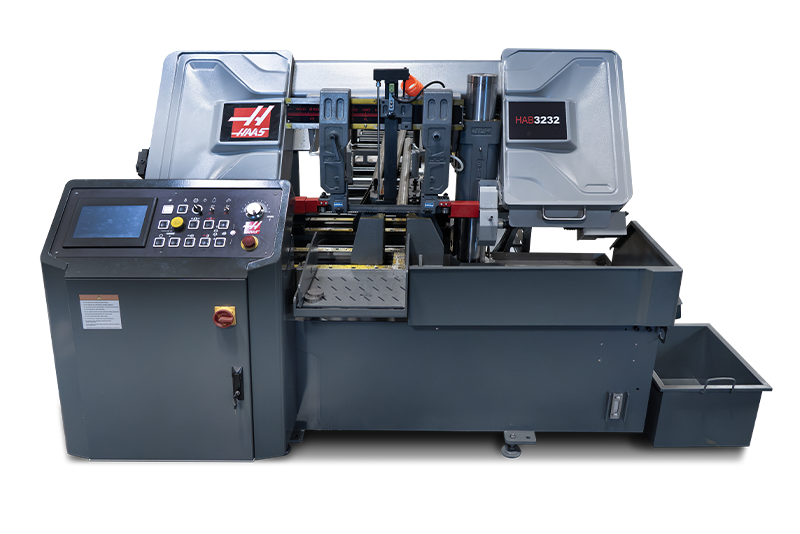
This chapter will walk through the general process needed to install the HAAS Automatic Bandsaw - 3232. This includes unpacking, leveling, powering up, and blade installation. Refer to Chapter 4 - Operation  for more information on how to use the bandsaw control panel and display.

Tools required:

  • 18mm sockets
  • Machinist's Level

Note: The machine will come with all of its accessories and spare sparts in four cardboard boxes. 

Note: Machine weight is 3750 lbs (1800 kgs)

Unpacking Bandsaw

1

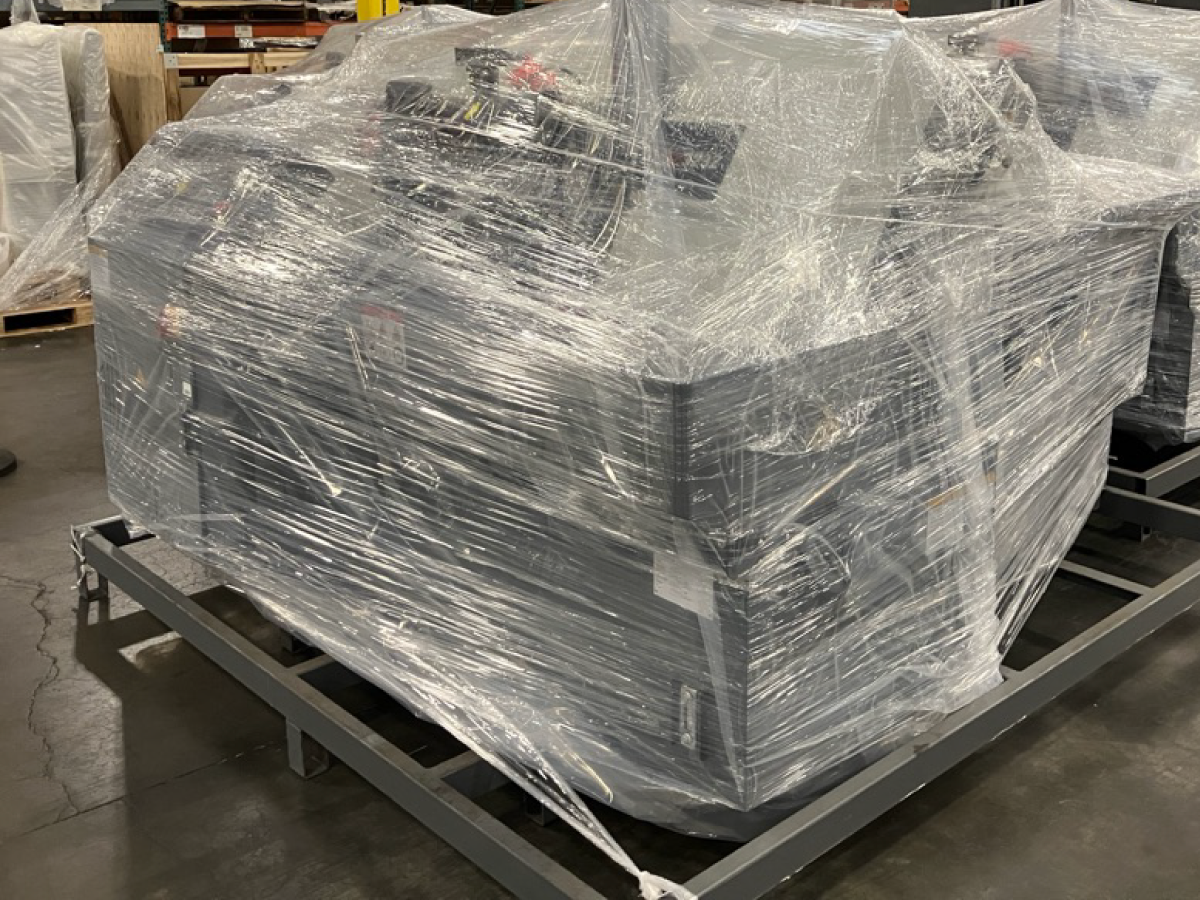
Machine will come wrapped as shown [1]. Remove the wrap around the machine. 


2

Version 1 Bandsaw: 

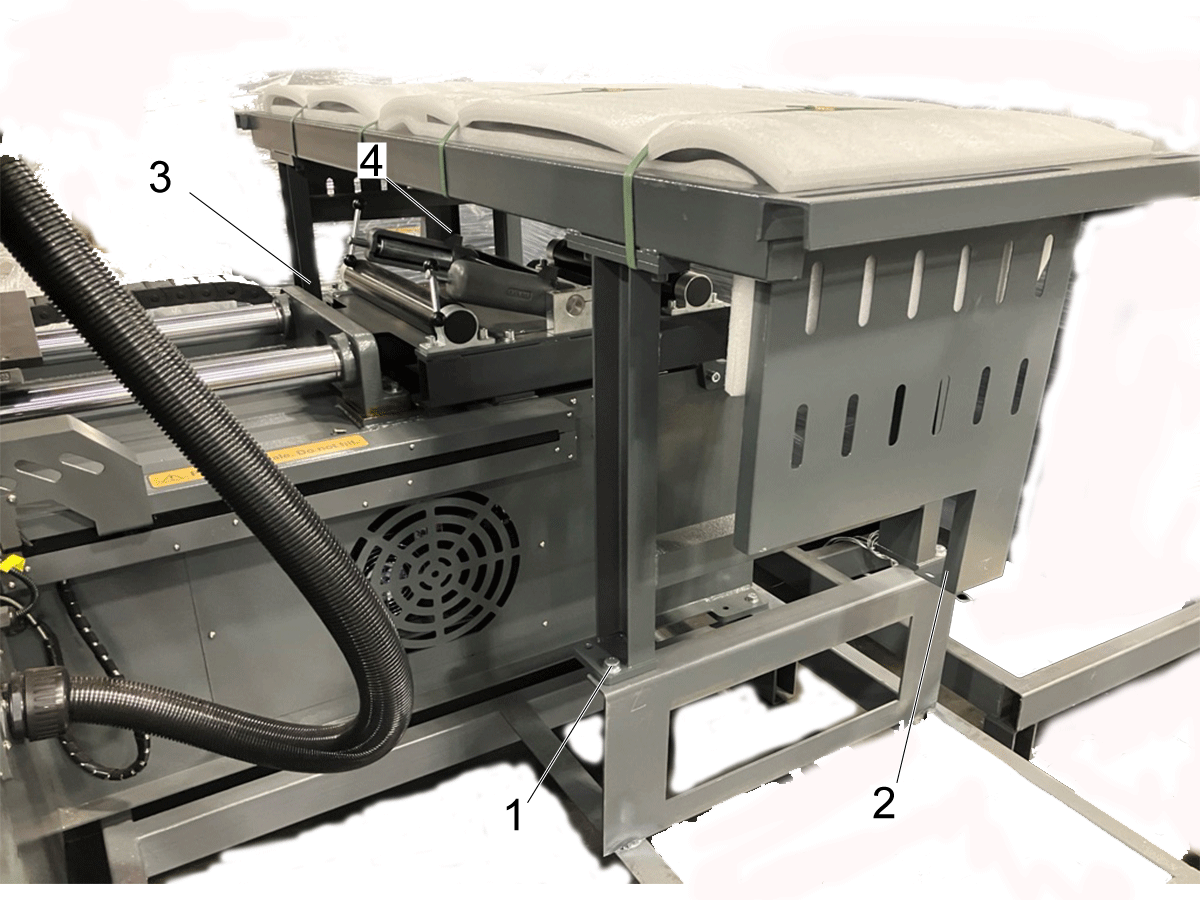
Using a 18mm socket remove the mounting bolts [1,2,3,&4] that hold the extended bed to the skid. 

Lift the extended bed off of the skid and place the extended bed to the side of the machine. 


3

Version 2 Bandsaw: 

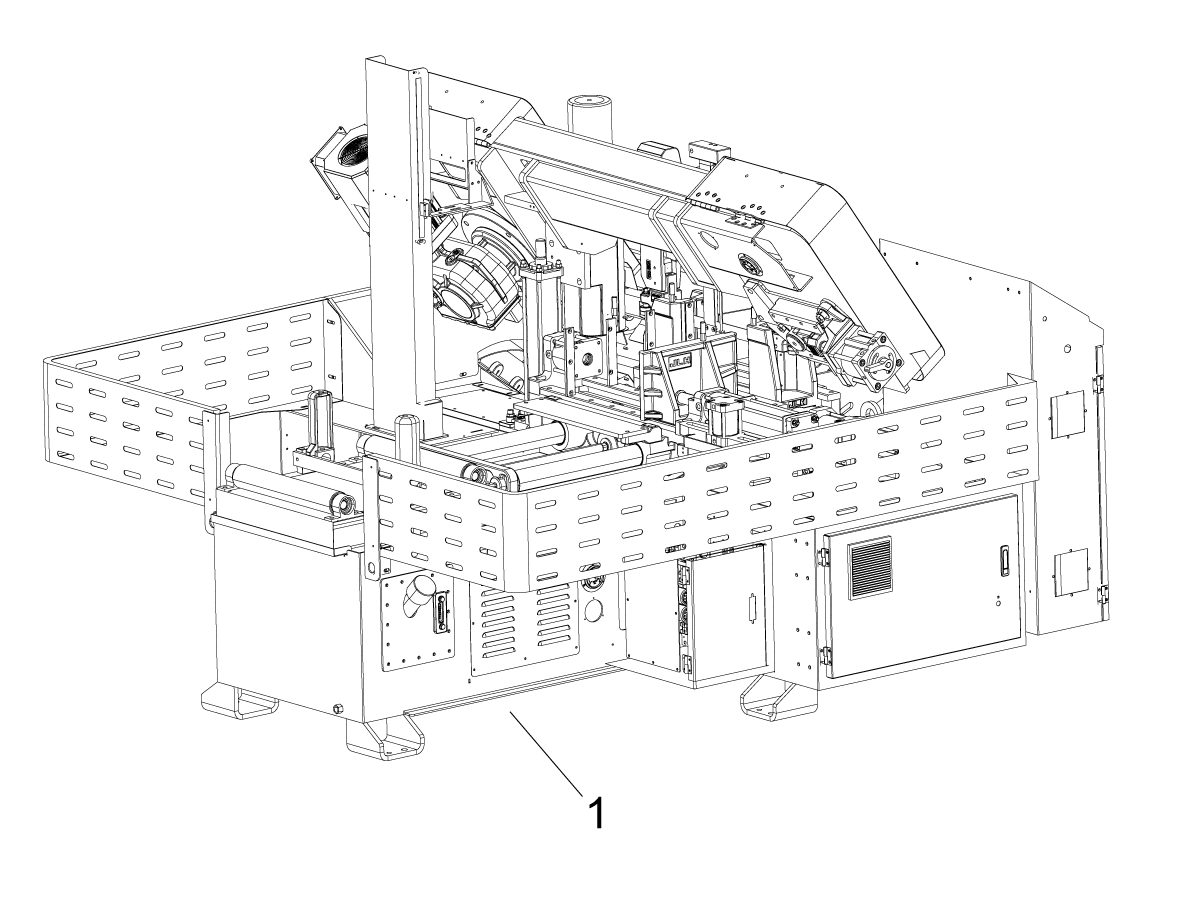
The version 2 table is flat-packed and stored beneath the bandsaw. Remove the extended bed from underneath the bandsaw [1]. 


4

Locate the 4 lifting hooks that can be found on the machine.  Two hooks will be found in the front [1] and two hooks will be found in the rear [2]. 

Attach the straps to the hooks on the machine as indicated, then use a forklift or crane to lift the machine off the skid.

Note: Machine weight is 3750 lbs. This will required a forklift requirement of at  least 5000 lbs. 


Rough Leveling

1

The bandsaw will require 6 leveling feet in order to place the machine safely on the ground. 

Note: The required feet can be found in one of the four cardboard boxes provided with the machine. 

2

Install the machine's leveling feet while the bandsaw is still lifted from the ground. 

Locate the 6 mounting points to install the feet. 

There are two mounting points at the front [1], two in the middle of the machine [2], and two at the rear [3].

Once the feet have been installed, carefully lower the machine to the ground. 

3

Rough level the band saw.

Lift the two middle feet off of the ground by rotating their bolts.

Measure the distance from the floor to the machine at the front and rear feet. Verify that this distance is consistent at each of the four feet.

Note: Do not complete final leveling of the machine at this stage. Final leveling will occur during Level Verification stage. 

Oil Refill

1

Note:  The HAB will arrive with 16 gallons of ISO 46 oil already inside the machine.

Before powering up the bandsaw, remove the red oil tank cap and replace it with the provided cap.

In the case of a refill, the machine must be filled with either ISO 46 or ISO 32 oil. 

Note: Do not cross-contaminate oils during a refill. Band saw will require 16 gallons of oil before any kind of start up. 

2

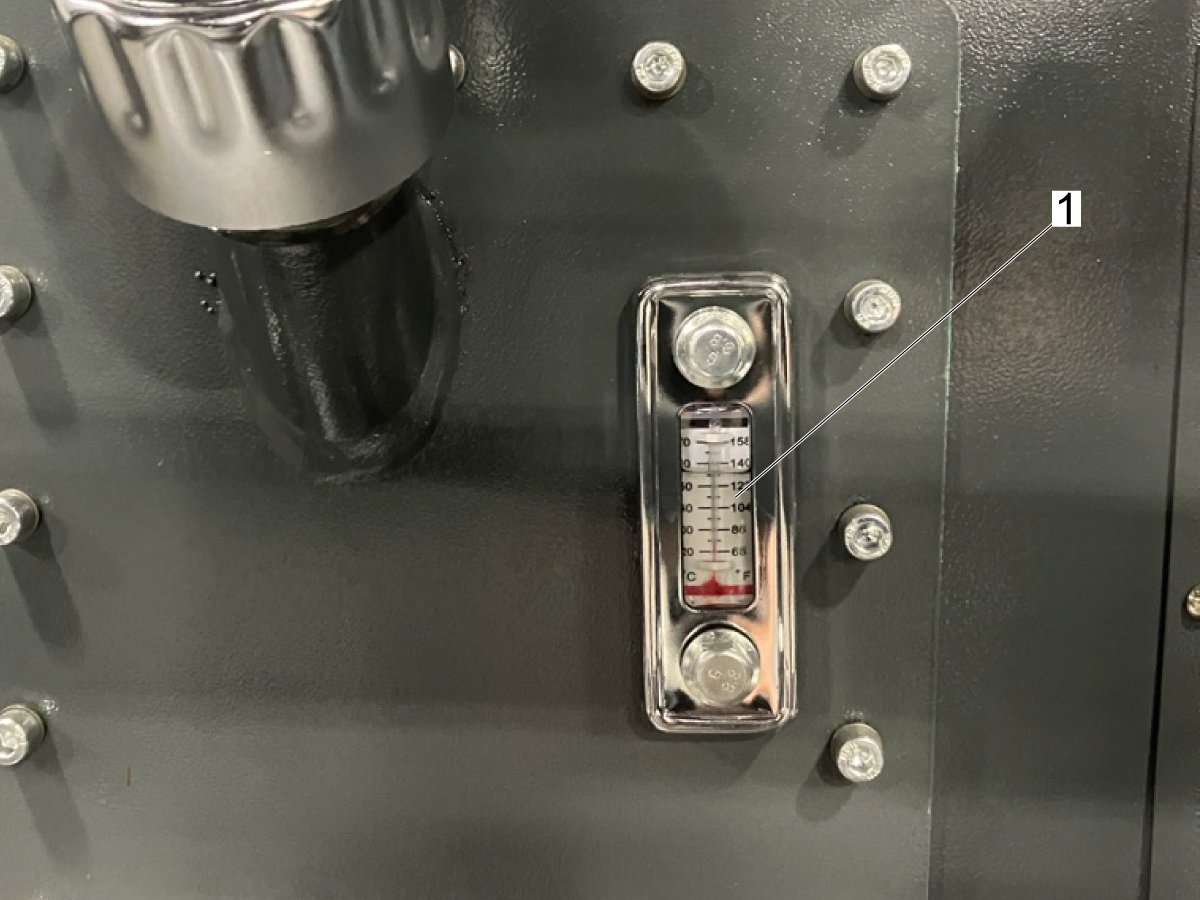
Check the hydraulic oil level on the gauge [1].  

Gauge will give two readings. One being the level of the oil and the other being the temperature of the oil.

Important : The hydraulic pump will not turn on if the oil level is too low.

Electrical Installation

1

Open the main breaker door. 

Note:  The Main breaker has to be switched to the off position to be able to open the electrical cabinet door.

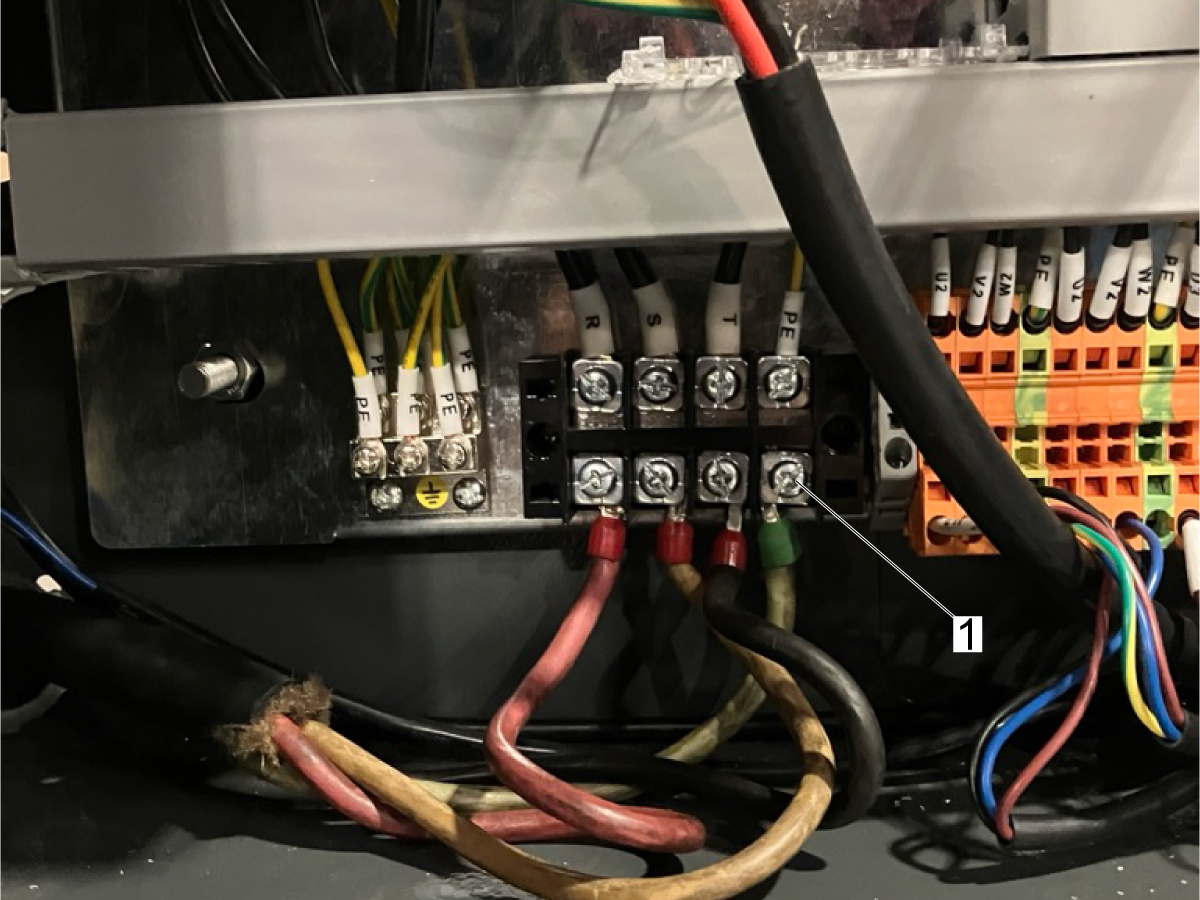
In the lower left-hand corner of the electrical cabinet, connect the power pigtail to the terminal shown.

Verify the ground is connected to the correct terminal [1].

Note: Make sure the pigtail is not connected to main power supply when making the connections.

2

Check that breakers are set to the on position.

Note: The red indicator will test the breaker[1]. The blue indicator will reset the breaker[2]. If one of the breakers are tripped the green indicator will pop out as shown [3].

Note: The left breaker is for the coolant. The right is for the hydraulic pump. 

Close cabinet and turn the circuit breaker to the ON position.

Control Display should light up.

3

Turn on the machine.

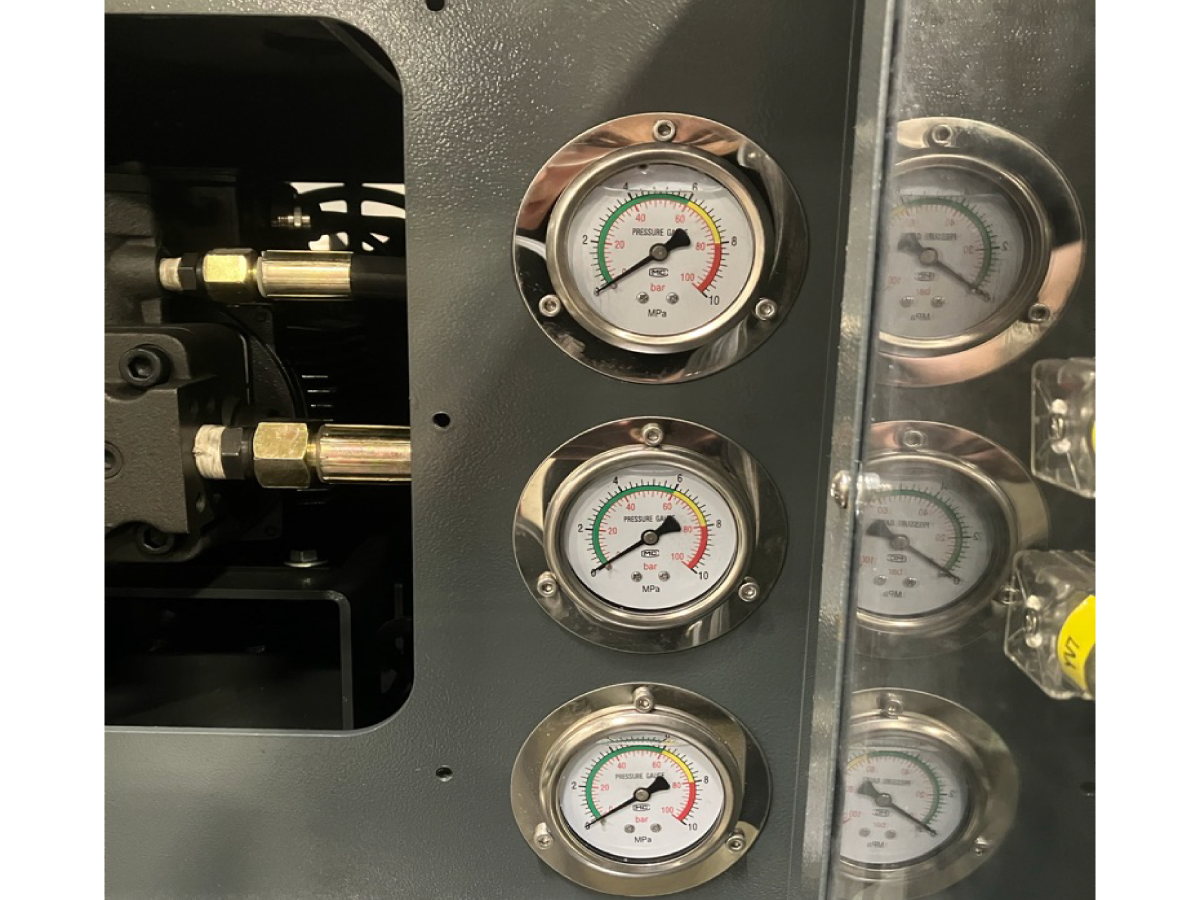
To verify if the machine is phased correctly, turn on the hydraulic pump.

Once the pump turns on and there is pressure on the hydraulic gauge, conduct a test by raising the saw main frame. 

-------------------------------------------------------------------------------------------

If there is no pressure shown on the gauge but the pump is running then the pump is running in reverse. 

Turn off the saw and disconnect from the main power.

Swap two terminals on the incomming power terminal block. See section 1 of this procedure.

Reconnect the machine to power and test the hydraulic system again.

Shipping Bracket

1

Once the HAB has been powered on, raise the frame to access the shipping bracket located beneath the main hydraulic cylinder [1].

Chip Chute Installation

1

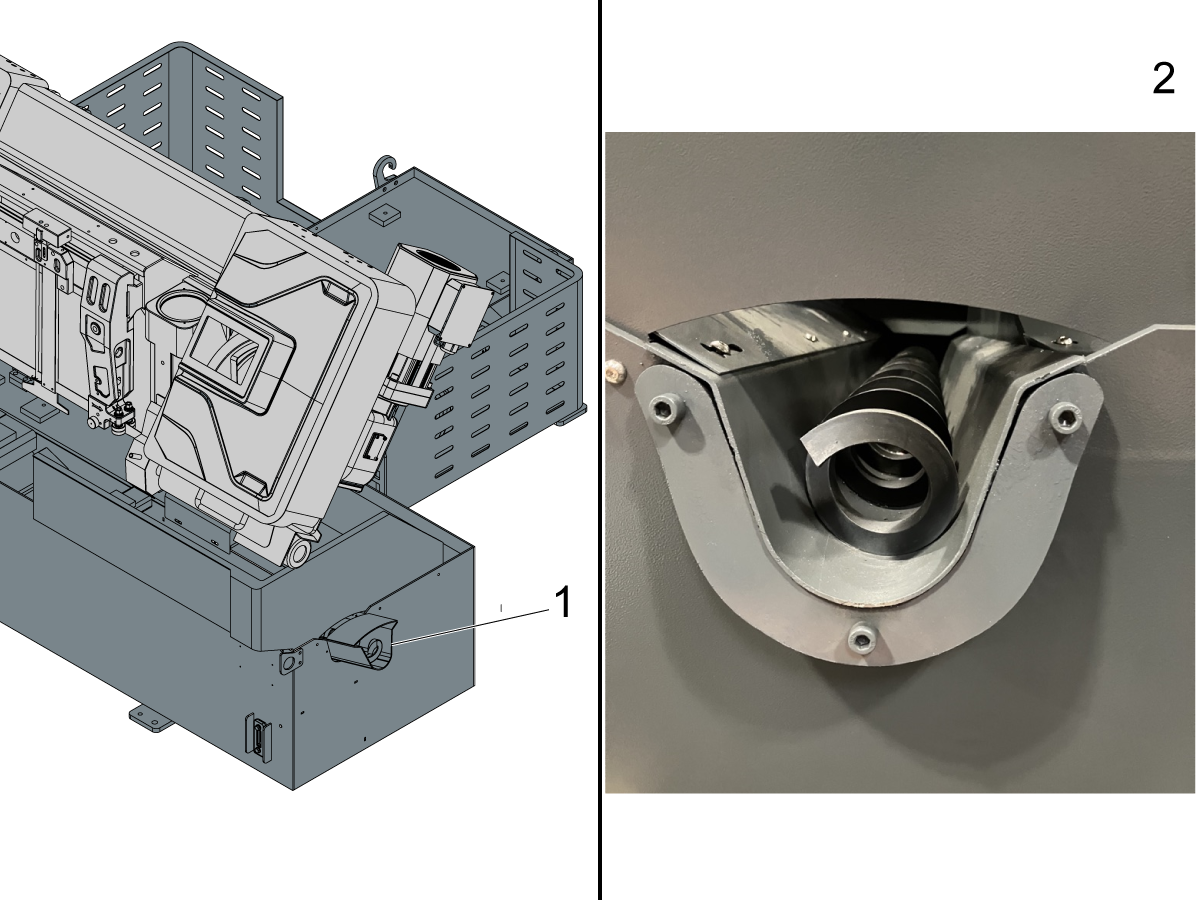
Undo the bolts that mount the chip cute [2]. 

Install the chip chute with the removed bolts as shown [1].

Note: Chip chute will come packaged in one of the cardboard boxes shipped with the machine. 


Note: The blade installation for the HAB 3232 can be found on 3.2 BLADE INSTALLATION. 


Level Verification

There are two concerns when leveling the HAB-3232:

Coolant run off:

  • Pitching the bandsaw slightly forward allows the coolant to return to its reservoir.

Part managment:

  • Tilting the bandsaw slightly to the right will allow cyclindrical parts to roll towards the fixed jaw so that they do not roll away when cut. It also ensures that the stock piece is already resting on vise when the vise clamps together.

When leveling the machine we want to pitch the machine forward, and tilt the machine to the right.

1

Coolant run off:

Coolant should not stagnate at the rear of the machine.

Raise the rear of the machine, or lower the front of the machine to create this flow bias.

A positive result is seen by having the coolant flow towards the front of the machine and into the coolant reservoir.

Note: This is not a drastic bias. Only tilt the machine enough to prevent coolant stagnation. 

2

Roll Test:

Place a socket or a cylindrical stock (1). on the machined surface of the stock chute.

Raise the left hand side of the machine, or lower the right hand side of the machine to create this stock bias.

A positive result is seen by having the round stock/socket roll towards the right side of the machine, towards the fixed jaw.

Note: This is not a drastic bias. Only tilt the machine enough to achieve a successful roll test. 


3

When complete lock the position in place with the top nut of the leveling feet.

Firmly snug the middle two feet to the ground and tighten the lock nut.

Extended Bed Installation - Version 1

1

Remove the packaging of the extended bed 

Locate the 4 mounting points to install the feet of the extended bed [1]. 

Simply lift the bed and install the feet.

2

Install the stock rollers  [1] to the respective cutouts on the extended bed. 

Note: The extended slot lets you modify the path for the stock to roll through [2].

3

Level the extended bed to the same angle as the saw. The right side of the extended bed should be lower than the left. The back of the table should be higher than the front.

Use a bubble level to ensure these angles are consistent between the saw and the extended bed. 


Note: It is important to level the extended bed to the same angle as the saw. This will ensure the stock flows evenly. 

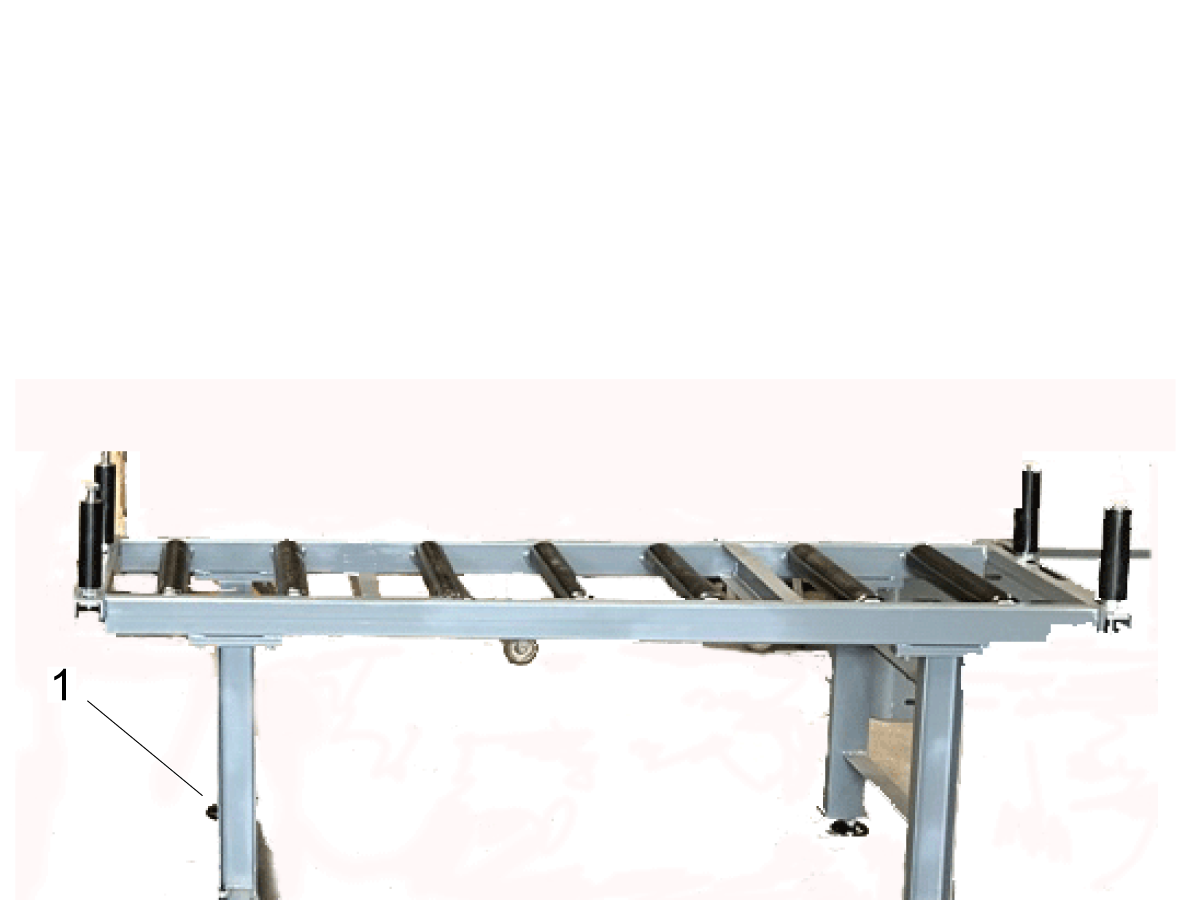
Extended Bed Installation - Version 2

1

Remove the packaging from the extended bed. 

Locate the legs of the extended bed. Screw in one foot to the end of each leg [1]. Bolt the legs to the extended bed. 

2

Install the stock rollers  [1] to the respective cutouts on the extended bed. 

Note: The extended slot lets you modify the path for the stock to roll through [2].

3

Level the extended bed to the same angle as the saw. The right side of the extended bed should be lower than the left. The back of the table should be higher than the front.

Use a bubble level to ensure these angles are consistent between the saw and the extended bed. 


Note: It is important to level the extended bed to the same angle as the saw. This will ensure the stock flows evenly. 

3.2 Blade Installation

Recently Updated

HAB-3232 - Blade Installation


Bandsaw - Blade Installation

1

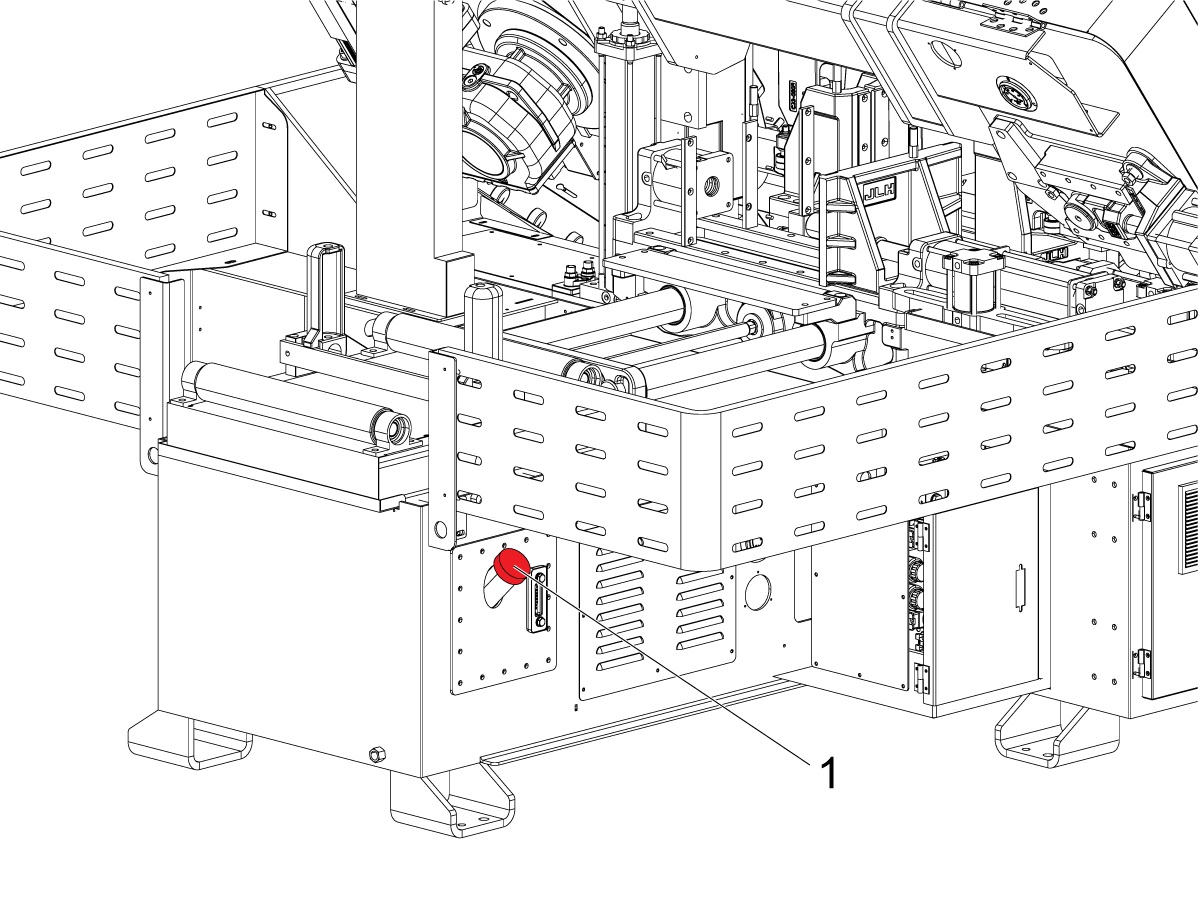
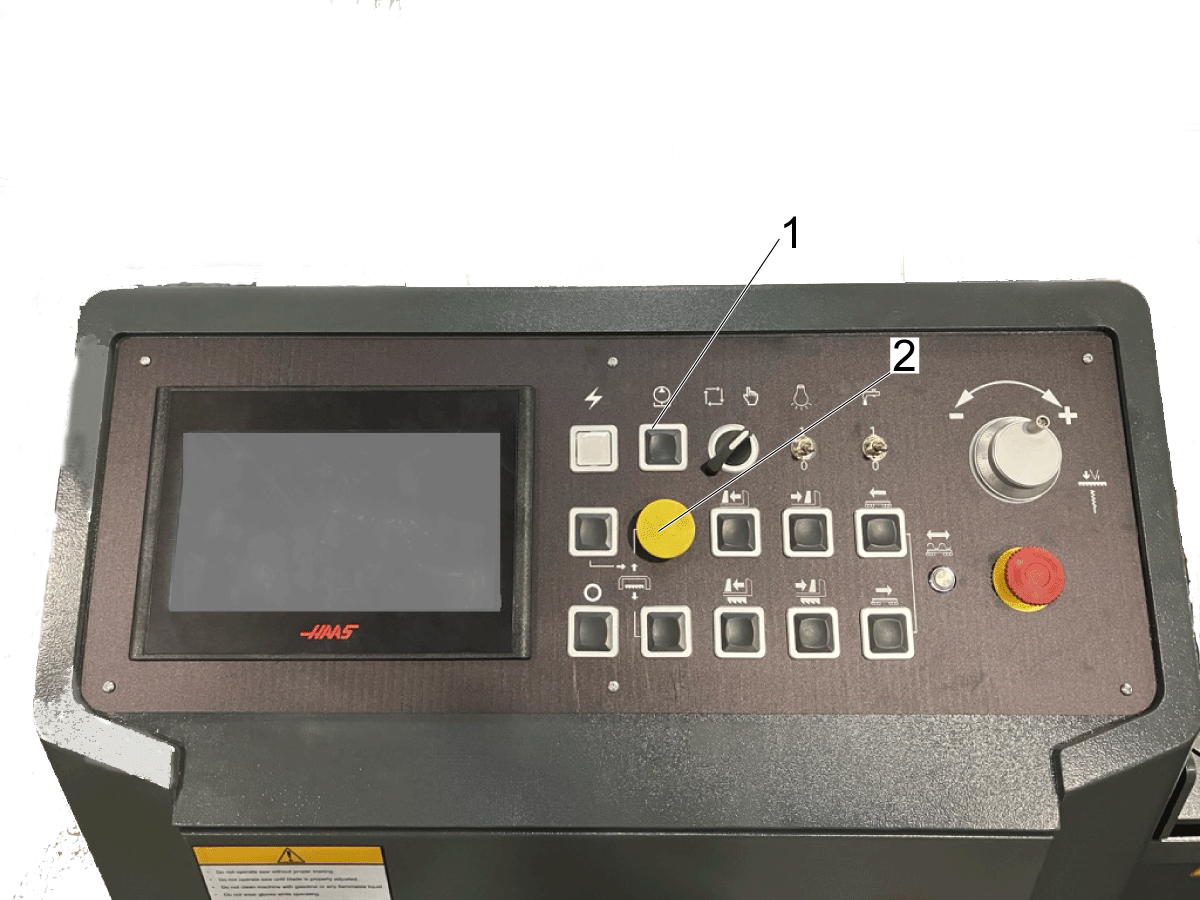
Turn on the hydraulic pump using the Oil Pump Start/Stop button [1].

Press the main yellow button [2] to raise the band saw frame.

Raise the band saw frame up to the top of travel.


2

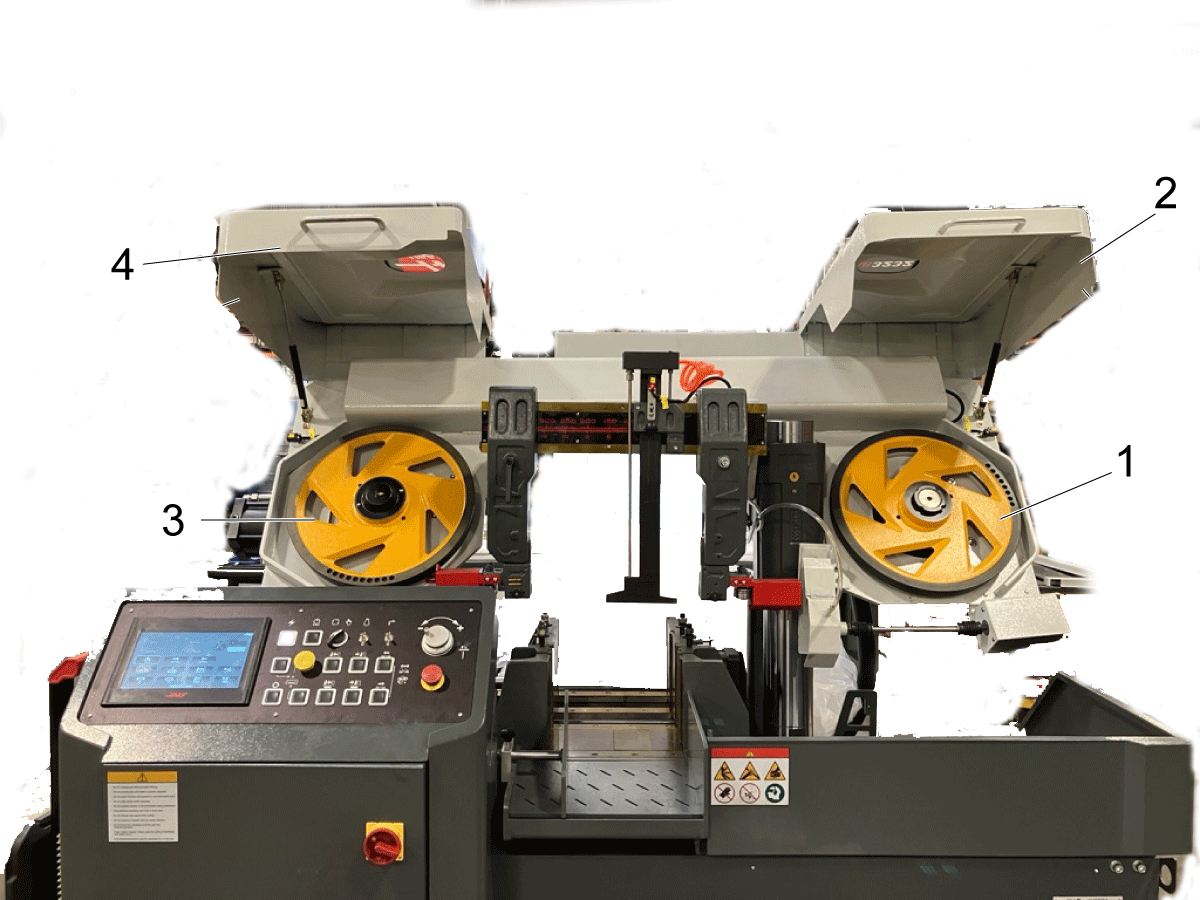
Open both the drive wheel and idle wheel covers [3,4]. 

Note: The wheel on the right [1] is identified as the drive wheel meanwhile the left [2] is identified as the idle wheel [3].

3

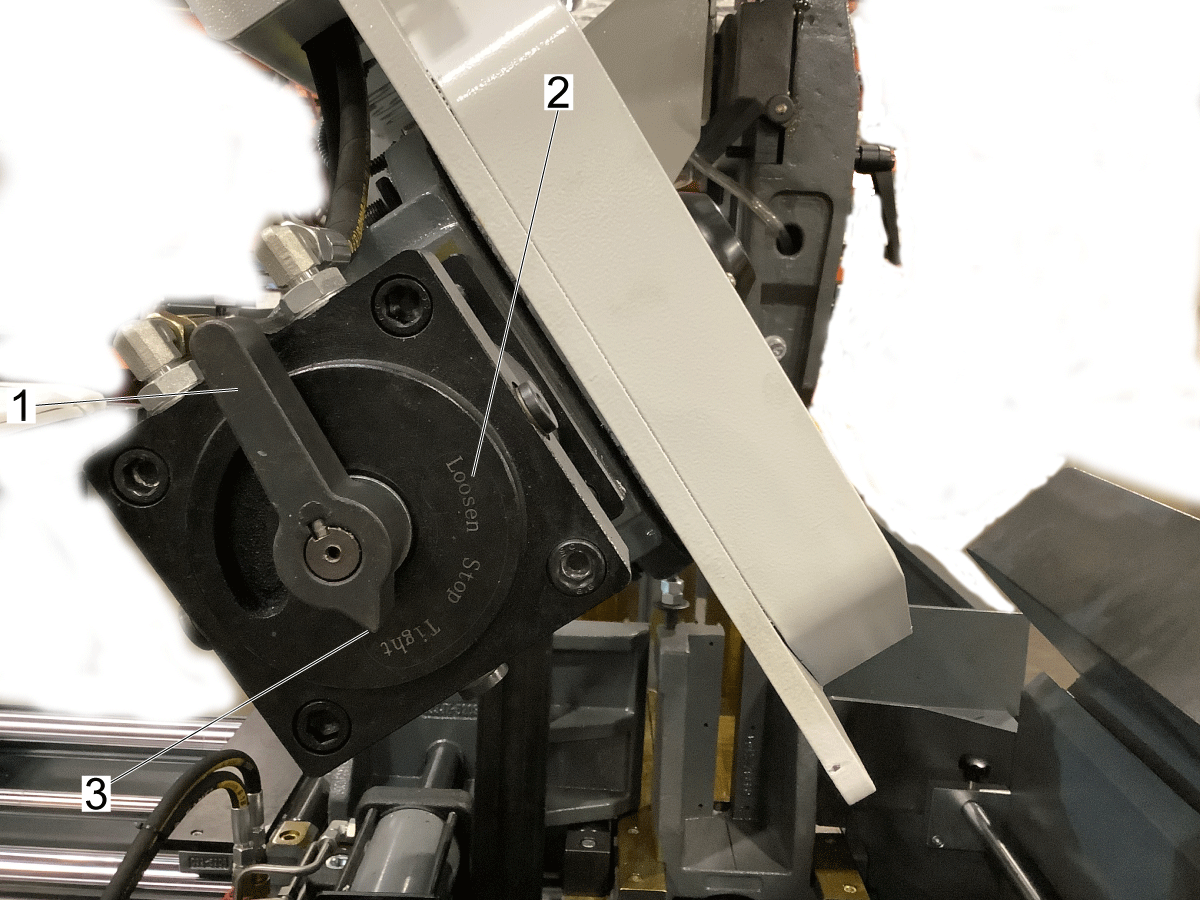
Use the tensioning handle [1] on the left side of the machine located by the idle wheel to install the blade.

Note: The tensioning handle will either loosen [2] or tighten [3] the blade depending how it is positioned. 

Note: This knob does not control the amount of tension on the blade. Refer to the Band Saw - Blade Adjustment Section below for adjusting the blade's tension. 

When loading the blade, make sure the tensioning handle is set to the Loosen position [2].


4

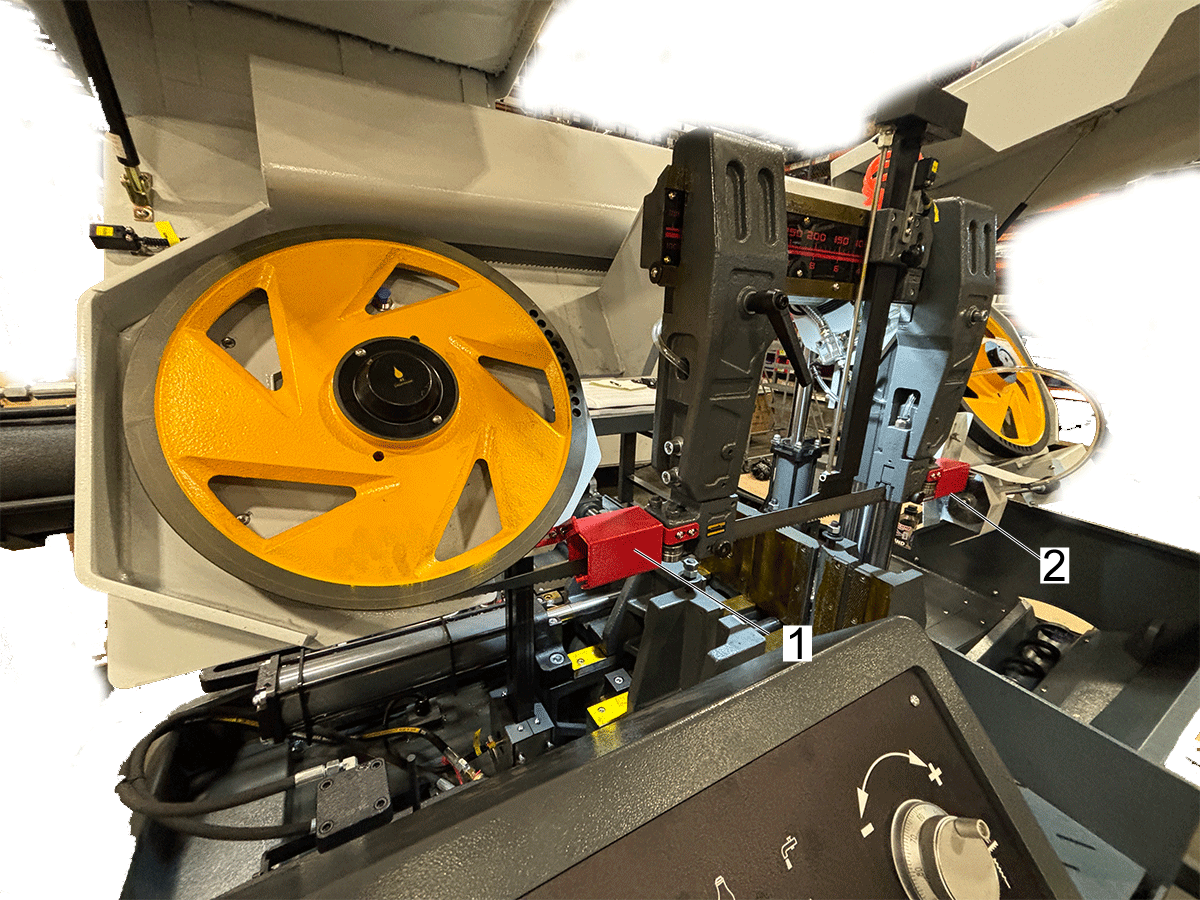
Wrap the blade along both the drive and idle wheels.

Guide the saw blade through the red guide covers [1] and guide arm clamps [3].

Use the thumbscrews [2] to loosen or tighten the guide arm clamps [3].

5

Turn the tensioning handle to Tight and slowly tension the blade.

Let the handle remain in the Tight position.

If the handle is left in the Stop position then the blade will be able to lose tension.

Note: Ensure that the blade moves smoothly through the red covers [1,2], and confirm that it isn’t getting caught anywhere.

Band Saw - Wire Brush Installation

1

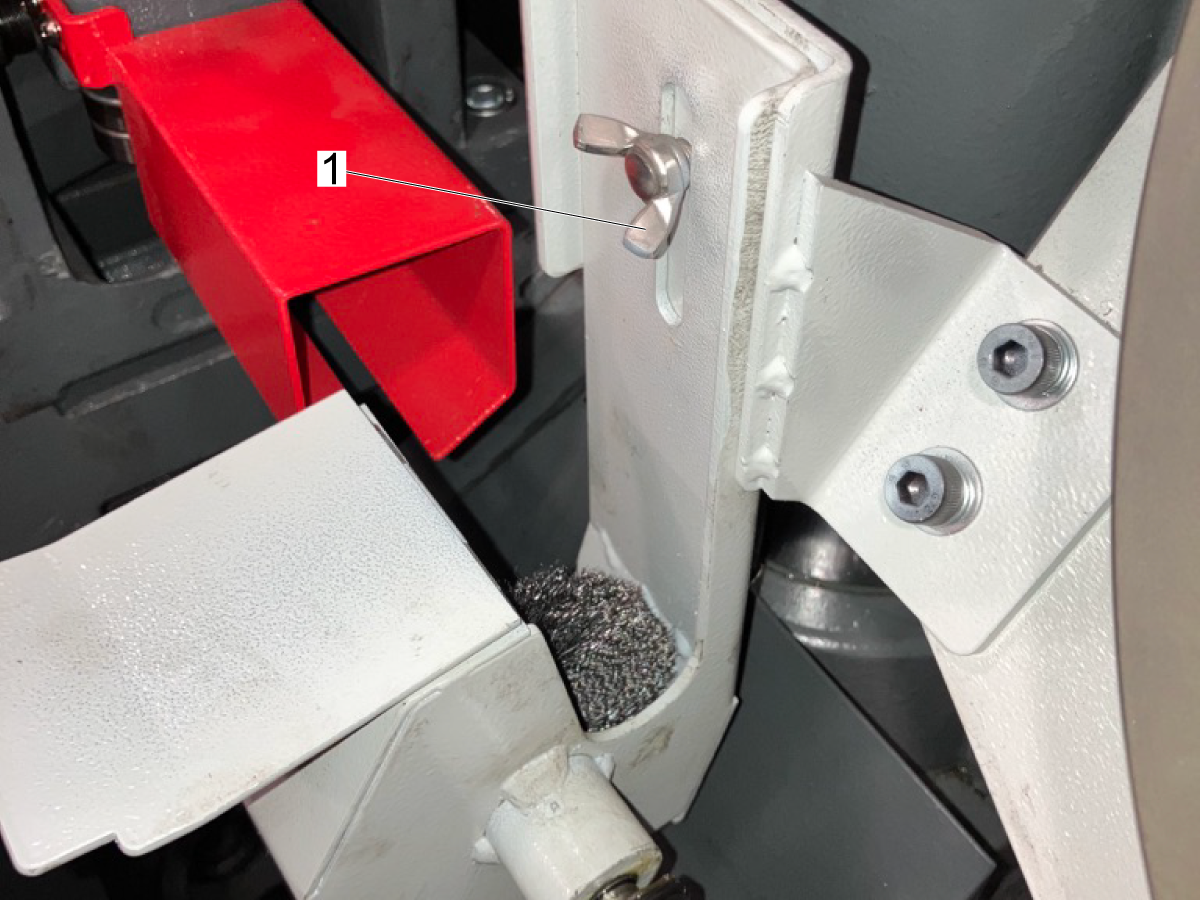
Turn the follwing knob [1] to raise or lower the position of the wire brush.

2

Postion the wire brush correctly in relation to the saw blade. 

Note: Refer to the illustration to find the proper location of the wire brush.

Band Saw - Blade Adjustment

1

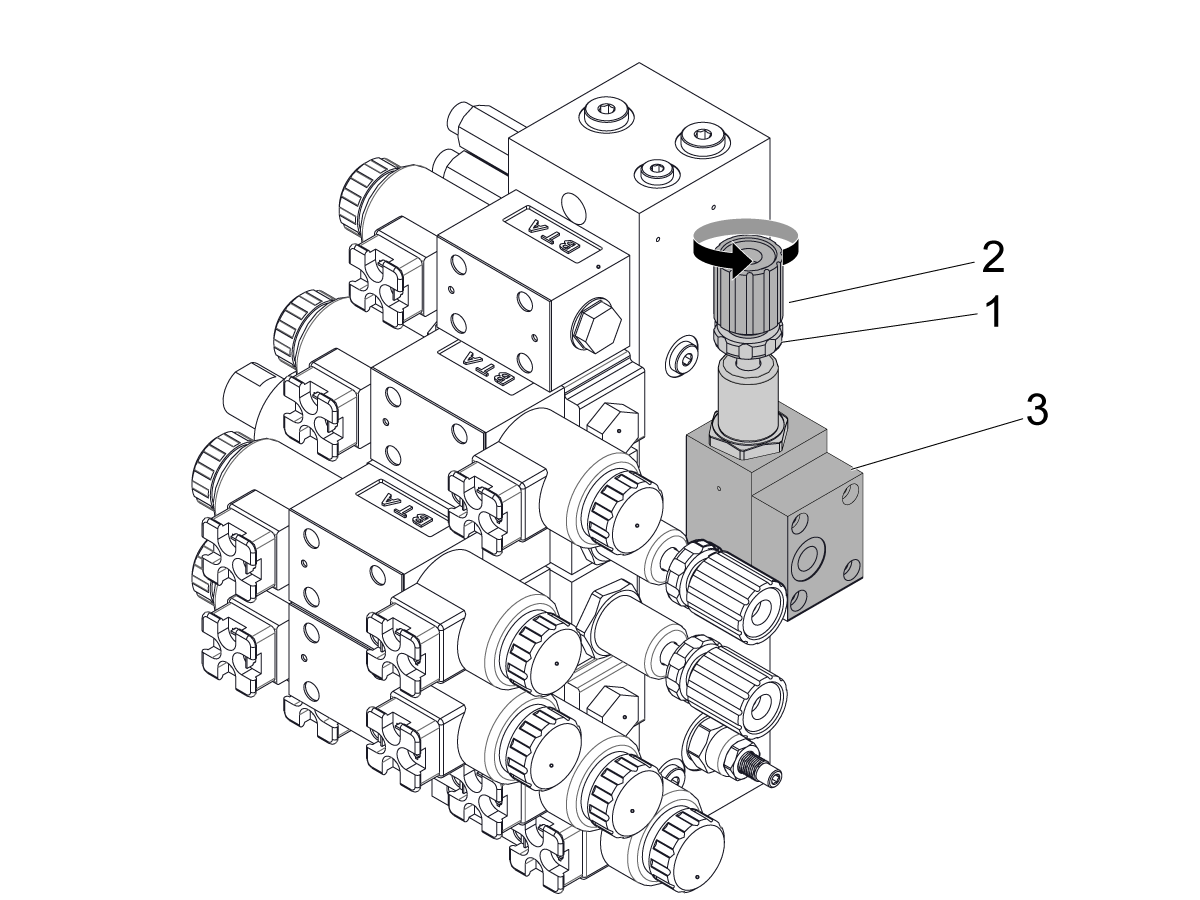
Locate the solenoid cabinet found in the rear of the machine. 

Locate the saw blade pressure valve [3].

Turn the lock nut [1] counter clockwise to be able to adjust the pressure adjusting knob [2].

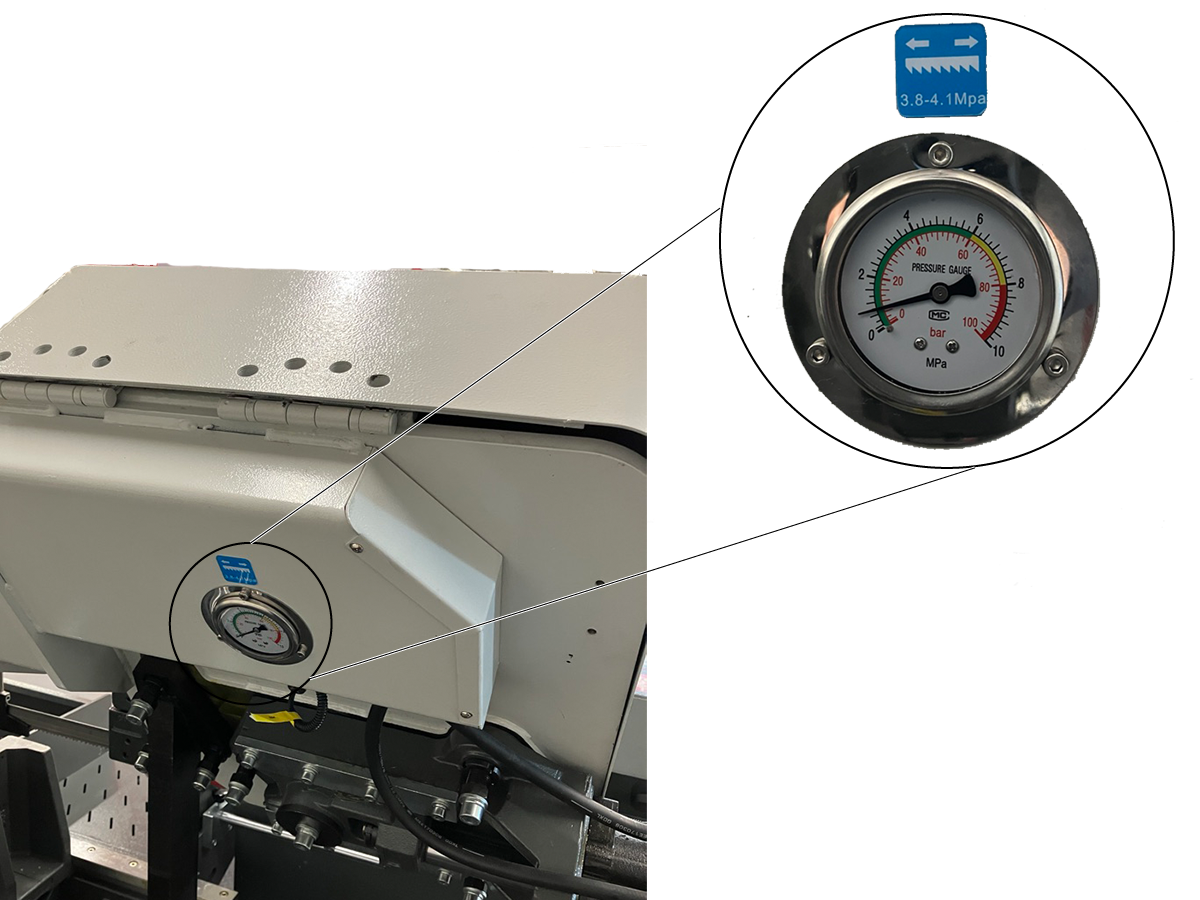
2

Monitor the gauge found on the rear of the machine. Turn the knob counterclockwise to decrease the pressure on the gauge, and clockwise to increase the pressure.

Note: It is recommended to set the pressure gauge according to the specifications provided on the label, which will determine the tension for the blade.

Recently Viewed Items

You Have No Recently Viewed Items Yet

Feedback
Haas Logo

Haas Delivered Price

This price includes shipping cost, export and import duties, insurance, and any other expenses incurred during shipping to a location in France agreed with you as a buyer. No other mandatory costs can be added to the delivery of a Haas CNC Product.

KEEP UP WITH THE LATEST HAAS TIPS AND TECHNOLOGY...

Sign up now!   

HAAS TOOLING ACCEPTS THE FOLLOWING:

  • Service & Support
  • Owners
  • Request Service
  • Operator Manuals
  • Haas Parts
  • Rotary Repair Request
  • Pre-Install Guides
  • Shopping Tools
  • Build & Price a New Haas
  • Available Inventory
  • The Haas Price List
  • CNCA Financing
  • About Haas
  • Accessibility Statement
  • DNSH Statement
  • Export Compliance
  • Careers
  • Certifications & Safety
  • Contact Us
  • History
  • Terms & Conditions
  • Haas Tooling Terms & Conditions
  • Privacy
  • Warranty
  • Haas Community
  • Haas Certification Program
  • Haas Motorsports
  • Gene Haas Foundation
  • Haas Technical Education Community
  • Events
  • Join the Conversation
  • Facebook
  • X
  • Flickr
  • YouTube
  • LinkedIn
  • Instagram
  • TikTok
© 2026 Haas Automation, Inc – CNC Machine Tools
This site is protected by reCAPTCHA and the Google Privacy Policy and Terms of Service apply.

2800 Sturgis Rd., Oxnard, CA 93030
Toll Free: (888) 817-4446 / Fax: 805-278-8554