My Haas Bienvenido:
!
Haas Tooling MyHaas/HaasConnect Sign In Register Haas Tooling MyHaas/HaasConnect Sign Out Bienvenido: Mis maquinas Última actividad Mis presupuestos Mi cuenta Mis usuarios Sign Out
Encuentre su distribuidor
  1. Select Language
    1. English
    2. Deutsch
    3. Español - España
    4. Español - México
    5. Français
    6. Italiano
    7. Português
    8. Český
    9. Dansk
    10. Nederlands
    11. Magyar
    12. Polski
    13. Svenska
    14. Türkçe
    15. 中文
    16. Suomi
    17. Norsk
    18. الإنجليزية
    19. български
    20. Hrvatski
    21. Ελληνικά
    22. Română
    23. Slovenský
    24. Slovenščina
    25. 한국어
    26. 日本語
    27. Українська
  • máquinas Main Menu
    • Fresadoras verticales
      Fresadoras verticales
      Fresadoras verticales View All
      • Fresadoras verticales
      • Serie VF
      • Máquinas universales
      • Series VR
      • VP-5 prismático
      • CMV con cambio de paletas
      • Mini fresadoras
      • Máquinas de moldeo
      • Centros de taladrado de alta velocidad
      • Serie de taladrado/roscado/fresado
      • Fresadoras tipo Toolroom
      • Pocket Mill
      • Fresadoras compactas
      • Serie de puentes
      • Router de láminas
      • CMV de gran tamaño
      • Fresadoras de doble columna
      • Máquinas con posicionamiento 3+2
    • Soluciones multieje
      Soluciones multieje
      Soluciones multieje View All
      • Soluciones multieje
      • Tornos con eje Y
      • Fresadoras de 5 ejes
    • Tornos
      Tornos
      Tornos View All
      • Tornos
      • Serie ST
      • Doble husillo
      • Serie Box Way
      • Tornos tipo Toolroom
      • Torno con chuck
      • Alimentador de barras Haas
      • Alimentadores de barras Haas
    • Fresadoras horizontales
      Fresadoras horizontales
      Fresadoras horizontales View All
      • Fresadoras horizontales
      • Cono 50
      • Cono 40
    • Cuartos ejes y divisores
      Cuartos ejes y divisores
      Cuartos ejes y divisores View All
      • Cuartos ejes y divisores
      • Mesas giratorias
      • Divisores
      • Equipos rotativos de 5 ejes
      • Equipos rotativos extragrandes
    • Sistemas de automatización
      Sistemas de automatización
      Sistemas de automatización View All
      • Sistemas de automatización
      • Automatización de fresadora
      • Automatización del torno
      • Cargadores automáticos de piezas
      • Modelos de automatización
    • Máquinas de sobremesa
      Máquinas de sobremesa
      Máquinas de sobremesa View All
      • Máquinas de sobremesa
      • Fresadora de sobremesa
      • Torno de sobremesa
      • Simulador de control, estándar
      • Simulador de control, prémium
    • Equipo de taller
      Equipo de taller
      Equipo de taller View All
      • Equipo de taller
      • Fresadora de rodilla
      • Tornos manuales Haas
      • Sierras Haas
    • Máquinas de fabricación
      Máquinas de fabricación
      Máquinas de fabricación View All
      • Máquinas de fabricación
      • Máquinas de corte láser
      • Frenos de prensa CNC
    • ENLACES RÁPIDOS Special Series  Special Series 
      SERIE EU SERIE EU CONFIGURACIONES Y PRECIO | LISTA DE PRECIOS CONFIGURACIONES Y PRECIO | LISTA DE PRECIOS Máquinas en stock Máquinas en stock NOVEDADES NOVEDADES SU PRIMER CNC SU PRIMER CNC
      HERRAMIENTAS DE COMPRAS
      • Configure y obtenga el precio de su máquina Haas
      • Lista de precios
      • Inventario disponible
      • Financiación CNCA
      ¿QUIERE HABLAR CON ALGUIEN?

      En su Haas Factory Outlet (HFO) pueden resolver sus dudas y orientarle sobre las mejores opciones.

      CONTACT YOUR DISTRIBUTOR >
  • Opciones Main Menu
    • Product Image Husillos
      Husillos
      Husillos View All
      • Husillos
    • Product Image Cambiadores de herramientas
      Cambiadores de herramientas
      Cambiadores de herramientas View All
      • Cambiadores de herramientas
    • Product Image 4.º | 5.º eje
      4.º | 5.º eje
      4.º | 5.º eje View All
      • 4.º | 5.º eje
    • Product Image Torretas y herramientas vivas
      Torretas y herramientas vivas
      Torretas y herramientas vivas View All
      • Torretas y herramientas vivas
    • Product Image Palpado
      Palpado
      Palpado View All
      • Palpado
    • Extracción de virutas y refrigeración de Haas Manejo del soluble y virutas
      Manejo del soluble y virutas
      Manejo del soluble y virutas View All
      • Manejo del soluble y virutas
    • El Control Haas El Control Haas
      El Control Haas
      El Control Haas View All
      • El Control Haas
    • Product Image Opciones para productos
      Opciones para productos
      Opciones para productos View All
      • Opciones para productos
    • Product Image Herramientas y sujeción
      Herramientas y sujeción
      Herramientas y sujeción View All
      • Herramientas y sujeción
    • Product Image Portapiezas
      Portapiezas
      Portapiezas View All
      • Portapiezas
    • Product Image Soluciones de 5 ejes
      Soluciones de 5 ejes
      Soluciones de 5 ejes View All
      • Soluciones de 5 ejes
      • 5 Easy Steps to 5-Axis
    • Product Image Automatización
      Automatización
      Automatización View All
      • Automatización
    • ENLACES RÁPIDOS Special Series  Special Series 
      SERIE EU SERIE EU CONFIGURACIONES Y PRECIO | LISTA DE PRECIOS CONFIGURACIONES Y PRECIO | LISTA DE PRECIOS Máquinas en stock Máquinas en stock NOVEDADES NOVEDADES SU PRIMER CNC SU PRIMER CNC
      HERRAMIENTAS DE COMPRAS
      • Configure y obtenga el precio de su máquina Haas
      • Lista de precios
      • Inventario disponible
      • Financiación CNCA
      ¿QUIERE HABLAR CON ALGUIEN?

      En su Haas Factory Outlet (HFO) pueden resolver sus dudas y orientarle sobre las mejores opciones.

      CONTACT YOUR DISTRIBUTOR >
  • Why Haas Main Menu
      Descubra la diferencia Haas
    • Por qué Haas
    • MyHaas
    • Comunidad de capacitación
    • Industria 4.0
    • Certificado Haas
    • Testimonios de clientes
  • Servicio técnico Main Menu
      Bienvenido a Haas Service
      PANTALLA DE INICIO DE SERVICIO Manuales del operador Procedimientos instructivos Guías de resolución de problemas Mantenimiento preventivo Piezas Haas Haas Tooling Videos
  • Videos Main Menu
  • Main Menu
    • View All
      • Financing
    • View All
      • Showroom Inventory
    • ENLACES RÁPIDOS Special Series  Special Series 
      SERIE EU SERIE EU CONFIGURACIONES Y PRECIO | LISTA DE PRECIOS CONFIGURACIONES Y PRECIO | LISTA DE PRECIOS Máquinas en stock Máquinas en stock NOVEDADES NOVEDADES SU PRIMER CNC SU PRIMER CNC
      HERRAMIENTAS DE COMPRAS
      • Configure y obtenga el precio de su máquina Haas
      • Lista de precios
      • Inventario disponible
      • Financiación CNCA
      ¿QUIERE HABLAR CON ALGUIEN?

      En su Haas Factory Outlet (HFO) pueden resolver sus dudas y orientarle sobre las mejores opciones.

      CONTACT YOUR DISTRIBUTOR >
My Haas Bienvenido:
!
Haas Tooling MyHaas/HaasConnect Sign In Register Haas Tooling MyHaas/HaasConnect Sign Out Bienvenido: Mis maquinas Última actividad Mis presupuestos Mi cuenta Mis usuarios Sign Out
Encuentre su distribuidor
  1. Select Language
    1. English
    2. Deutsch
    3. Español - España
    4. Español - México
    5. Français
    6. Italiano
    7. Português
    8. Český
    9. Dansk
    10. Nederlands
    11. Magyar
    12. Polski
    13. Svenska
    14. Türkçe
    15. 中文
    16. Suomi
    17. Norsk
    18. الإنجليزية
    19. български
    20. Hrvatski
    21. Ελληνικά
    22. Română
    23. Slovenský
    24. Slovenščina
    25. 한국어
    26. 日本語
    27. Українська
×

Search Results

Web Pages

Images

    • <
    • 1
    • >

8 - UMC - Geometry and Alignment

Serie UMC - Manual de servicio


  • UMC - Husillo
  • 1 - UMC - Introducción
  • 2 - UMC - Especificaciones
  • 3 - UMC-400/500/750 - Instalación
  • 4 - UMC-1000/1250 - Instalación
  • 5 - UMC-1500-DUO/1600-H - Instalación
  • 6 - UMC - Anclaje
  • 7 - UMC - Operación
  • 8 - UMC - Geometría y alineación
  • 9 - UMC - MRZP y zonas seguras
  • 10 - UMC - B/C - Unidad giratoria
  • 11 - UMC - Cambiador de herramientas
  • 12 - UMC - Extracción de virutas y refrigerante
  • 13 - UMC - Control eléctrico
  • 14 - UMC - Lubricación
  • 15 - UMC - Mantenimiento
  • 16 - UMC - Pallet Pool
  • 17 - UMC - Sistema de sujeción hidráulica
  • 18 - UMC - Amarre de pieza neumático

Go To :

  • 8.1 Guía de geometría
  • 8.2 Alineación - Zonas indicadoras
  • 8.3 Geometría - Solución de problemas
  • 8.4 Aplicaciones - Solución de problemas
  • 8.5 UMC-750 - Lista de comprobación del kit de lainas
  • 8.6 B/C - Alineamiento - Intersección del eje B-C

8.1 Guía de geometría

Recently Updated

Guía de geometría - Serie UMC


Introducción

  1. Cabezal del husillo
  2. Ariete
  3. Sillín
  4. Puente
  5. Base
  6. Giratorio del eje C
  7. Giratorio del eje B

Antes de comenzar, registre debajo el valor de fábrica para el parámetro o ajuste. Tendrá que ajustarlo a cero mientras realiza ajustes y, a continuación, restablecerlo al valor original cuando haya terminado. El valor podría ser positivo o negativo.

  • Control de Haas Clásico (CHC) Parámetro 1314 (Rotary Axes Center Deviation in X)
  • Control de próxima generación (NGC) Ajuste 254 (5 Axis Rotary Center Distance)

Herramientas y kits requeridos:

  • T-2193A - UMC-750 SPINDLE HEAD ALIGNMENT PIN *
  • T-2181 - CNC DUAL LEVELING TOOL
  • T-2192 - LEVELING ADAPTER UMC-750
  • 93-2236 - SHIM KIT FOR UMC-750 *

Haga clic en el enlace para ver el vídeo de  Nivelación y alineamiento del UMC-750 .

*  : Utilizado solo en la serie de prereinicio. 

Nivelar la máquina

1

Ajuste la altura de la máquina:

Mueva los ejes X e Y a la posición de origen.

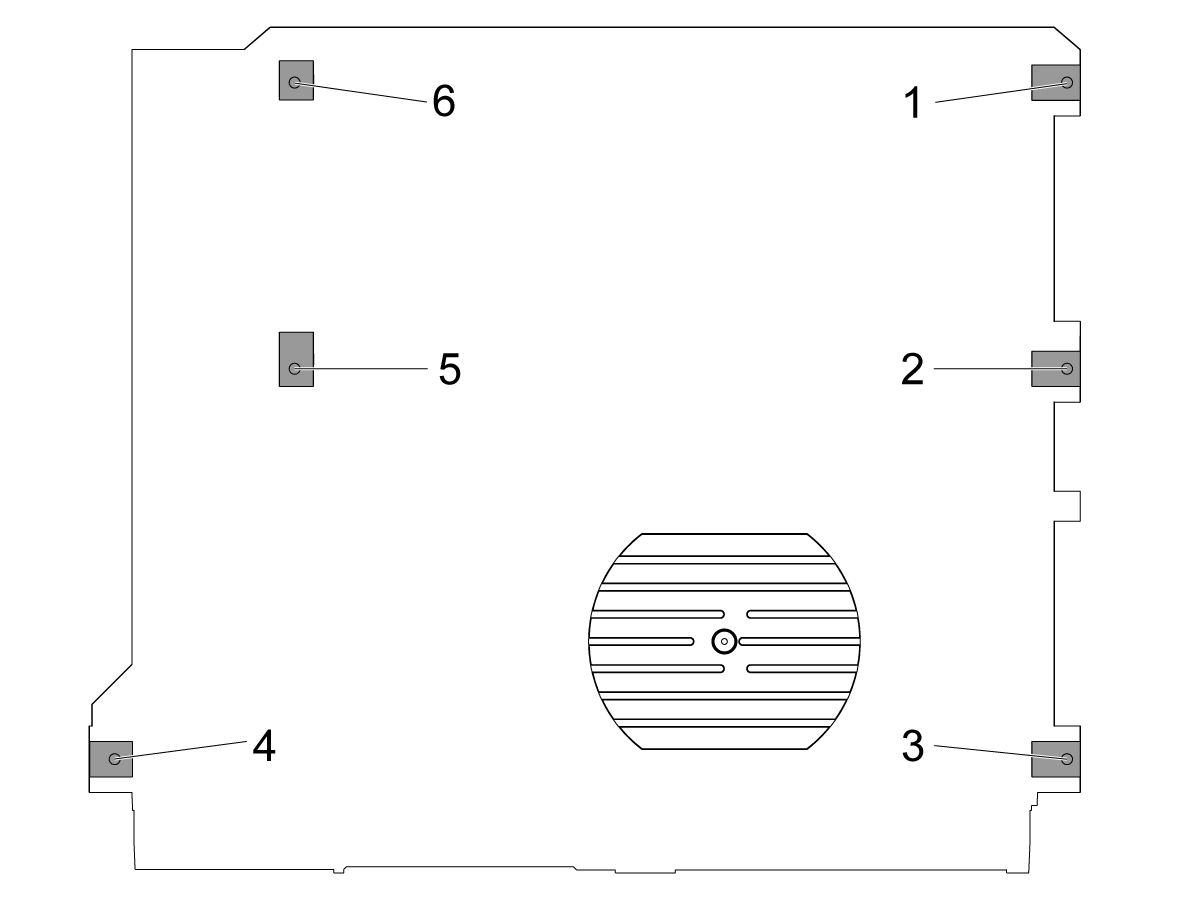
Afloje los tornillos de nivelación central [2 y 5] para que no soporten ningún peso.

Ajuste la máquina en 4 tornillos de nivelación de esquina 3" (76,2 mm) por encima del suelo.

2

Nivel aproximado de la máquina:

Gire el tornillo de nivelación n.º 4 hacia arriba.

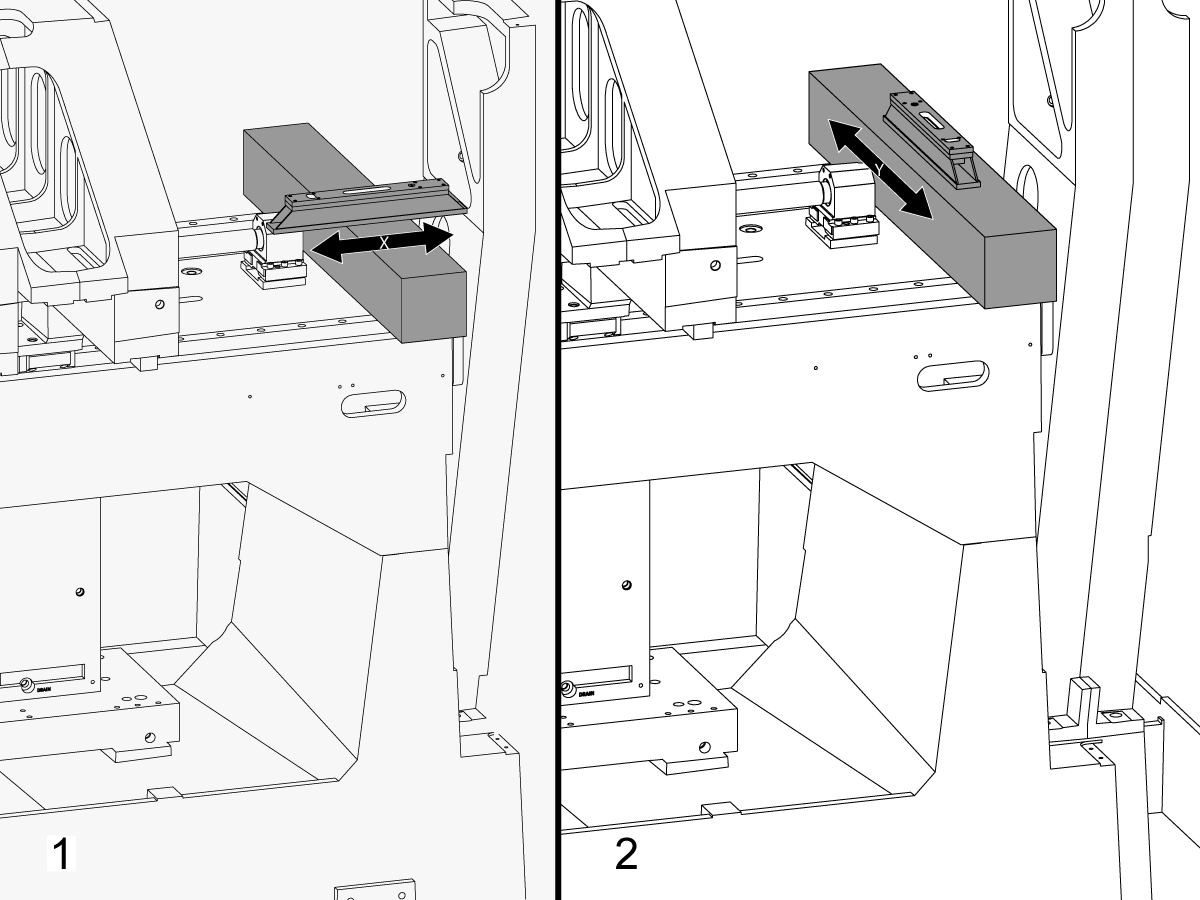
Coloque el granito a través de las guías lineales del eje X cerca del soporte del cojinete del husillo de bolas del eje X.

Configure el nivel de maquinista en la parte superior del granito paralelo al eje X. [1]

Ajuste el tornillo de nivelación n.º 6 hasta que la máquina esté nivelada en el eje X.

Configure el nivel de maquinista en la parte superior del granito perpendicular al eje X. [2]

Ajuste el tornillo de nivelación n.º 3 hasta que la máquina esté nivelada en el eje Y.

Gire el tornillo de nivelación #4 hacia abajo hasta que haga el contacto con la almohadilla de nivelación.

3

Ajustar rollo de eje X:

Ensamble T-2192 con T-2181.

Mueva el eje Y al centro del recorrido.

Coloque el T-2192 en el lateral del husillo.

Asegúrese de que la burbuja en el T-2181 esté dentro del rango legible.

Si no es así, afloje el perno que fija el T-2192 a la base magnética y mueva el adaptador según sea necesario.

Desplace el eje X de lado a lado y mida el rollo del eje X. Tome lecturas en la posición de origen, del medio y del final del recorrido.

Ajuste el tornillo de nivelación n.º 4 hasta que no haya desviación entre la lectura en la posición de origen y la lectura al final del recorrido.

Nota: La burbuja en T-2181 NO tiene que estar en el medio del vial. Sólo necesita estar dentro del rango legible.

4

Ajuste los tornillos de nivelación central:

Gire los tornillos de nivelación del medio hacia abajo hasta que hagan contacto con las almohadillas de nivelación y luego gire 45° adicionales.

Verifique el rollo del Eje X. Ajuste los tornillos de nivelación del medio para corregir el rollo del eje X.

Alineamiento del eje X al eje Y

1

Alinee la cara del sillín en paralelo al movimiento del eje X:

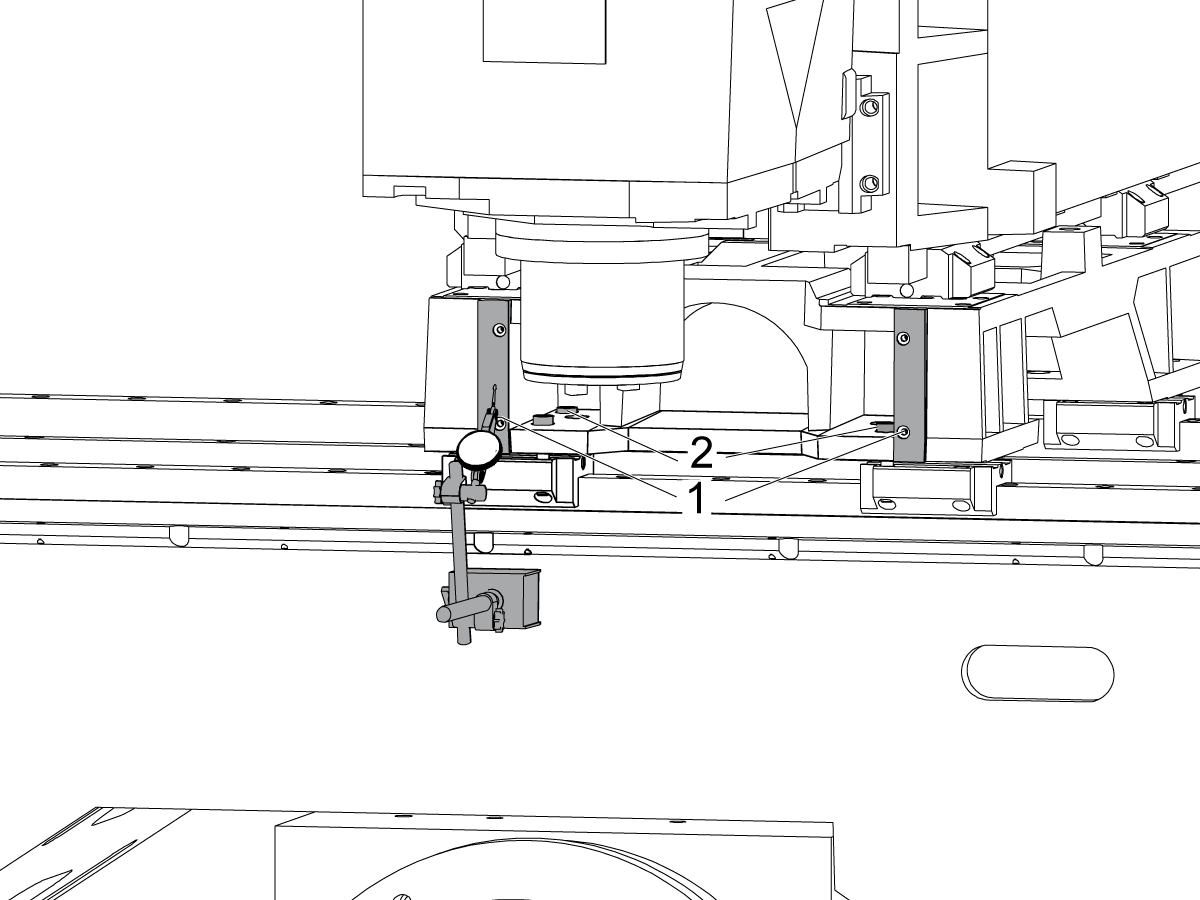
Barra a través de la superficie mecanizada en la parte delantera del sillín [1] moviendo el Eje X.

Afloje los pernos que fijan el sillín a la carretillas del eje X [2] y alinee la cara del sillín en paralelo al movimiento del eje X dentro de 0,001" si es necesario.

Apriete los pernos. Consulte Especificaciones del par de fijación de Haas.

2

Alinee el eje Y perpendicular al eje X:

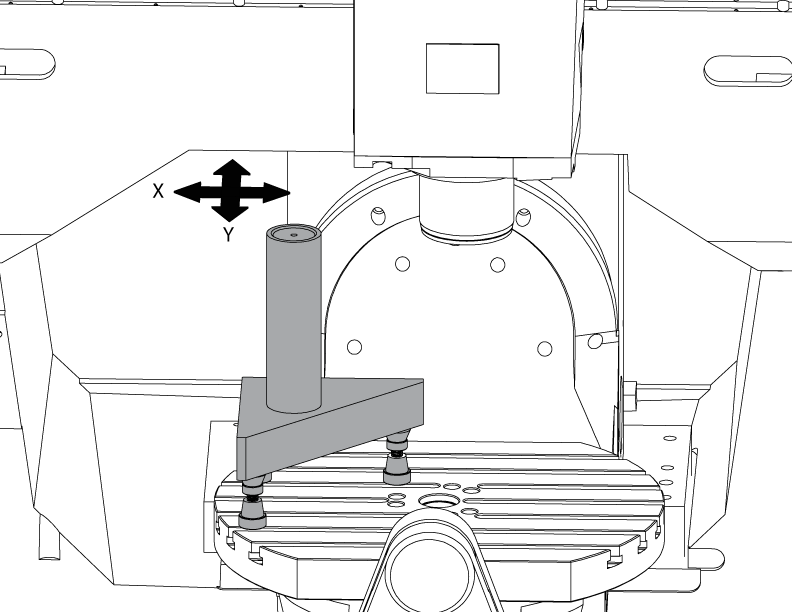
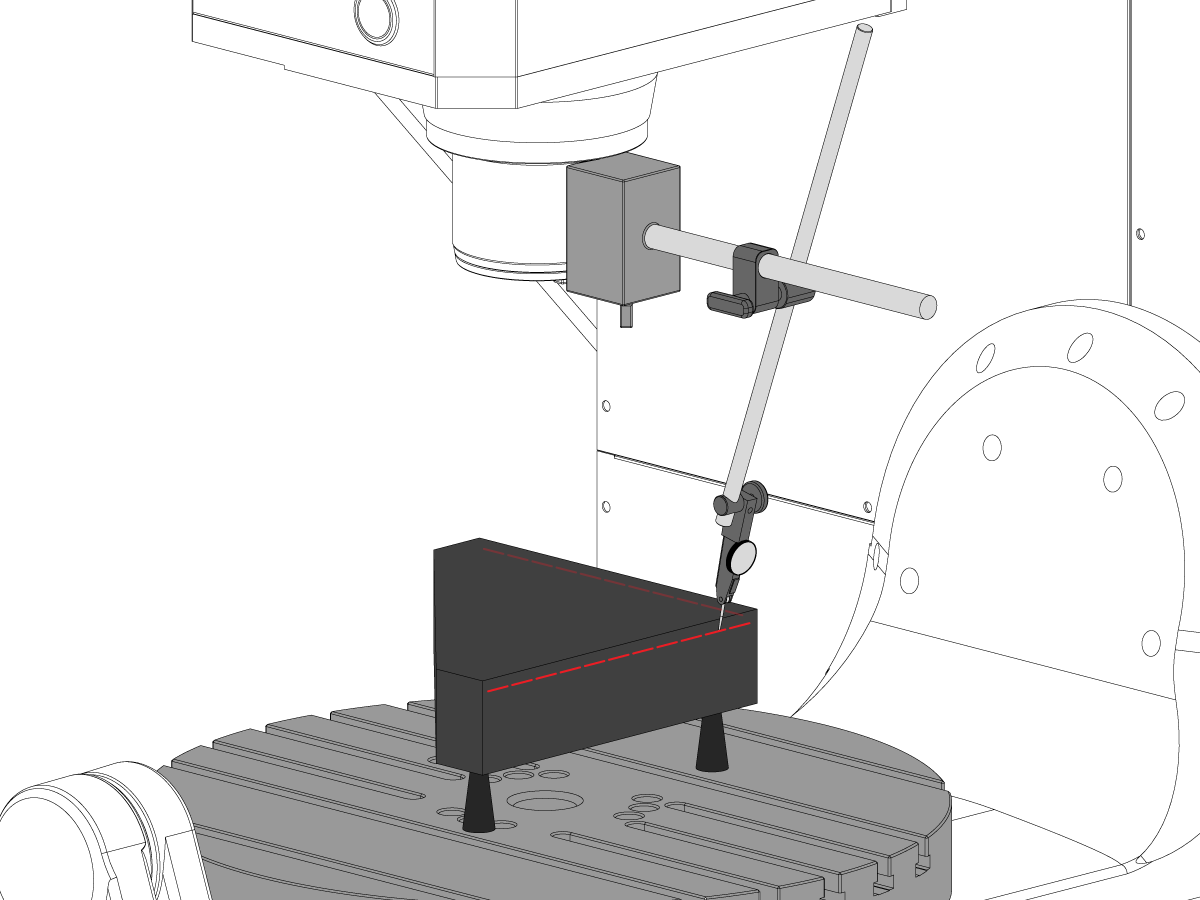
Configure el granito tricuadrado en el lado izquierdo de la plataforma del eje C en las tomas maquinistas.

Ajuste la parte posterior del granito tricuadrado paralelamente al eje X. NTE 0,0001"/10"

Barra la parte superior del granito tricuadrado a lo largo de los ejes X e Y.

Ajuste las tomas maquinistas hasta que la superficie superior del granito tricuadrado esté paralela al plano X-Y NTE 0,0005".

Verifique que la parte posterior del granito esté paralelo al eje X. NTE 0,0001"/10".

Afloje los pernos que fijan las carretillas del eje Y al sillín y alinee el eje Y perpendicularmente al eje X. NTE 0,0005"/10"

Apriete los pernos. Consulte Especificaciones del par de fijación de Haas.

Verifique el eje Y perpendicular al eje X NTE 0,0005"/10" después de que los pernos estén apretados.

Eje Z a el alineamiento del plano X-Y

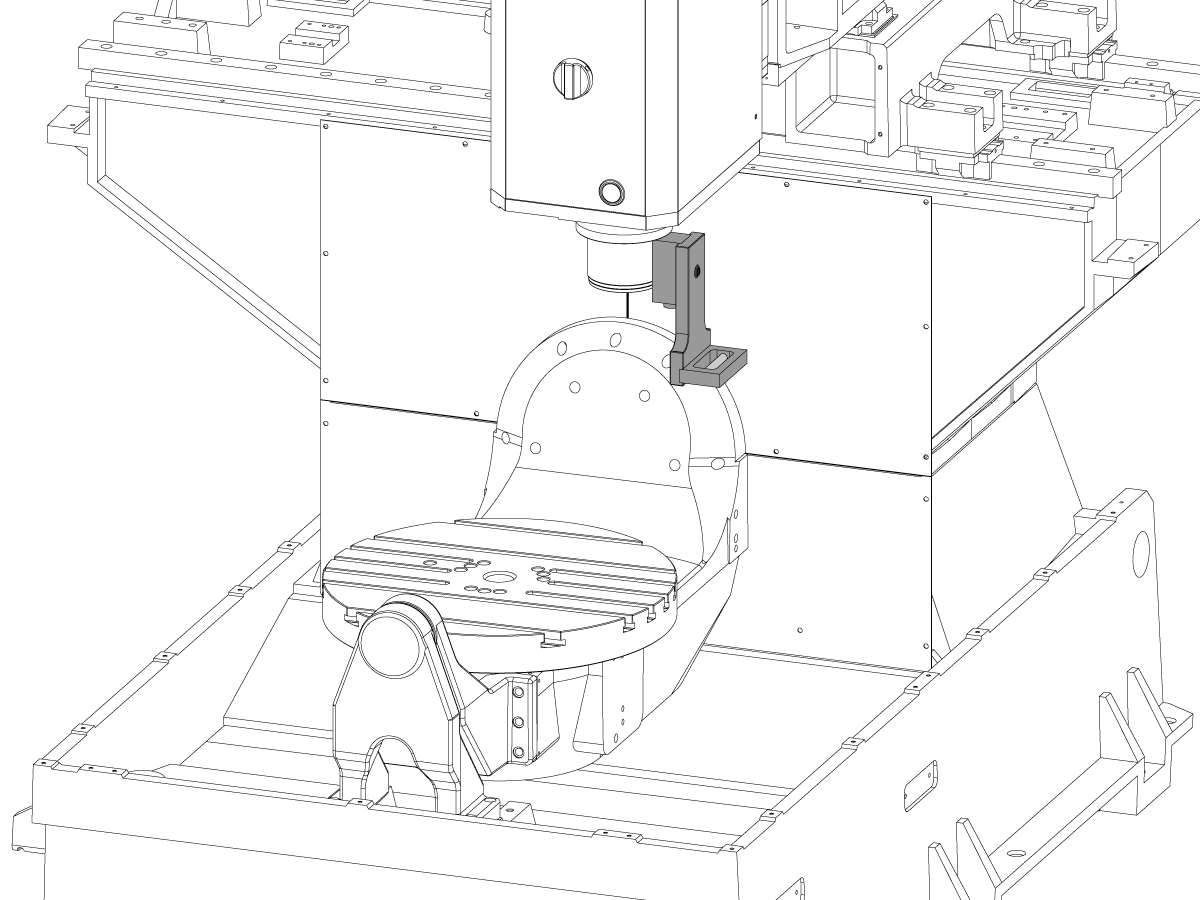
1

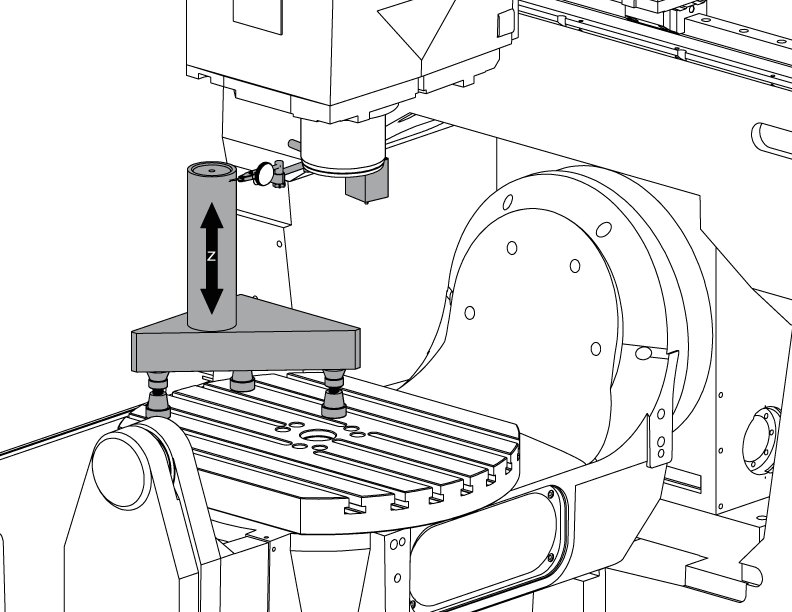
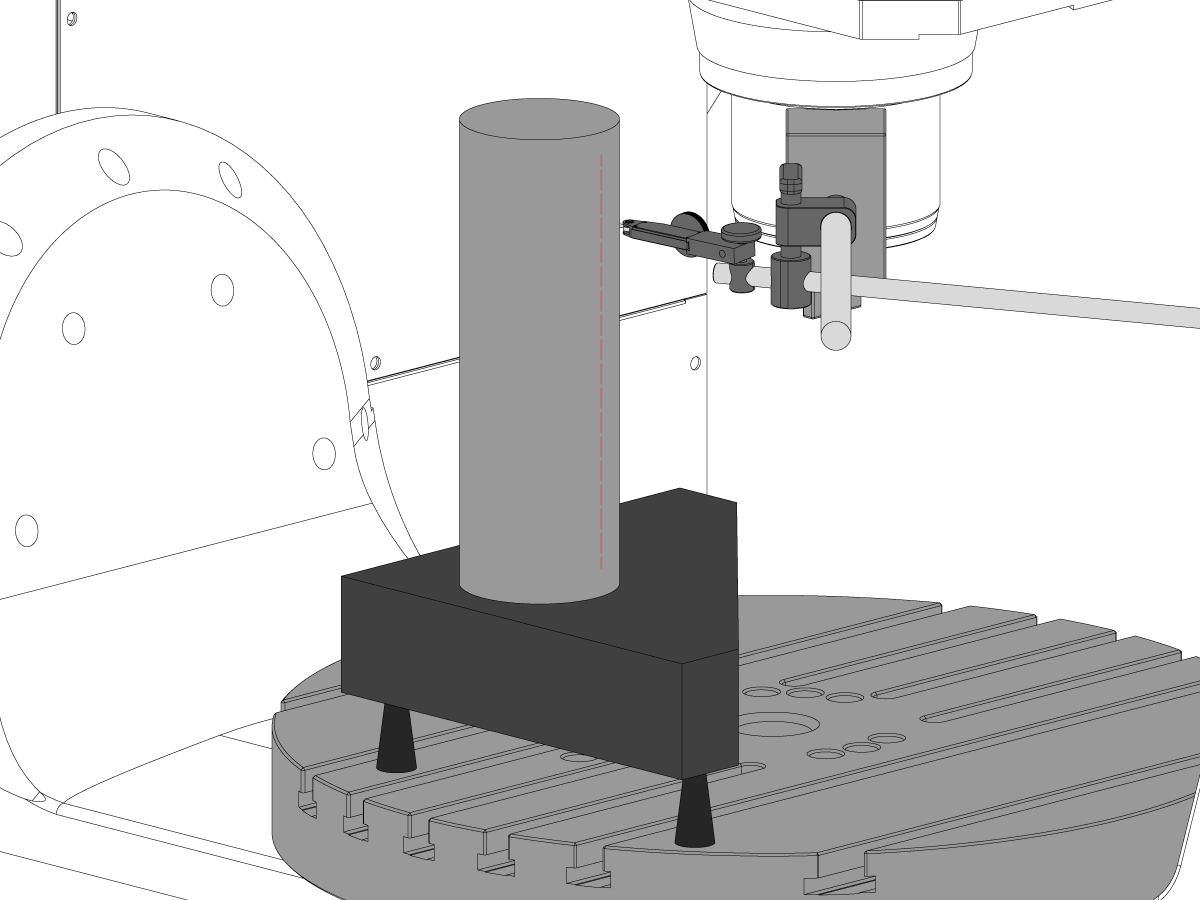
Configure el cilindro.

Coloque un cilindro en la parte superior de la tripiedra como se muestra en la imagen.

Alinee la superficie superior del cilindro en paralelo al plano X-Y NTE 0,0001" girando las tomas maquinistas.

Desplace la máquina a la siguiente posición:

  • UMC-750 a X -7.000" y Y -10.000"
  • UMC-750SS a X -10.000" y Y-10.000"

2

Alinee el eje Z perpendicular al eje X:

Sustituya uno de los pernos de esquina superior de las carretillas del eje Z por el T-2193A * para pivotar el cabezal del husillo a su alrededor.

Indique el lado del cilindro a lo largo del eje Z.

Afloje los pernos que fijan las carretillas del eje Z al ariete.

Alinee el eje Z perpendicularmente al eje X NTE 0,0005"/10" balanceando el cabezal de husillo de lado a lado.

Apriete los pernos. Consulte Especificaciones del par de fijación de Haas.

Compruebe que el eje Z esté perpendicular al eje X después de apretar los pernos.

Sustituya el T-2193A * por el perno cuando se realice el alineamiento

*  : Utilizado solo en la serie de prereinicio. 

3

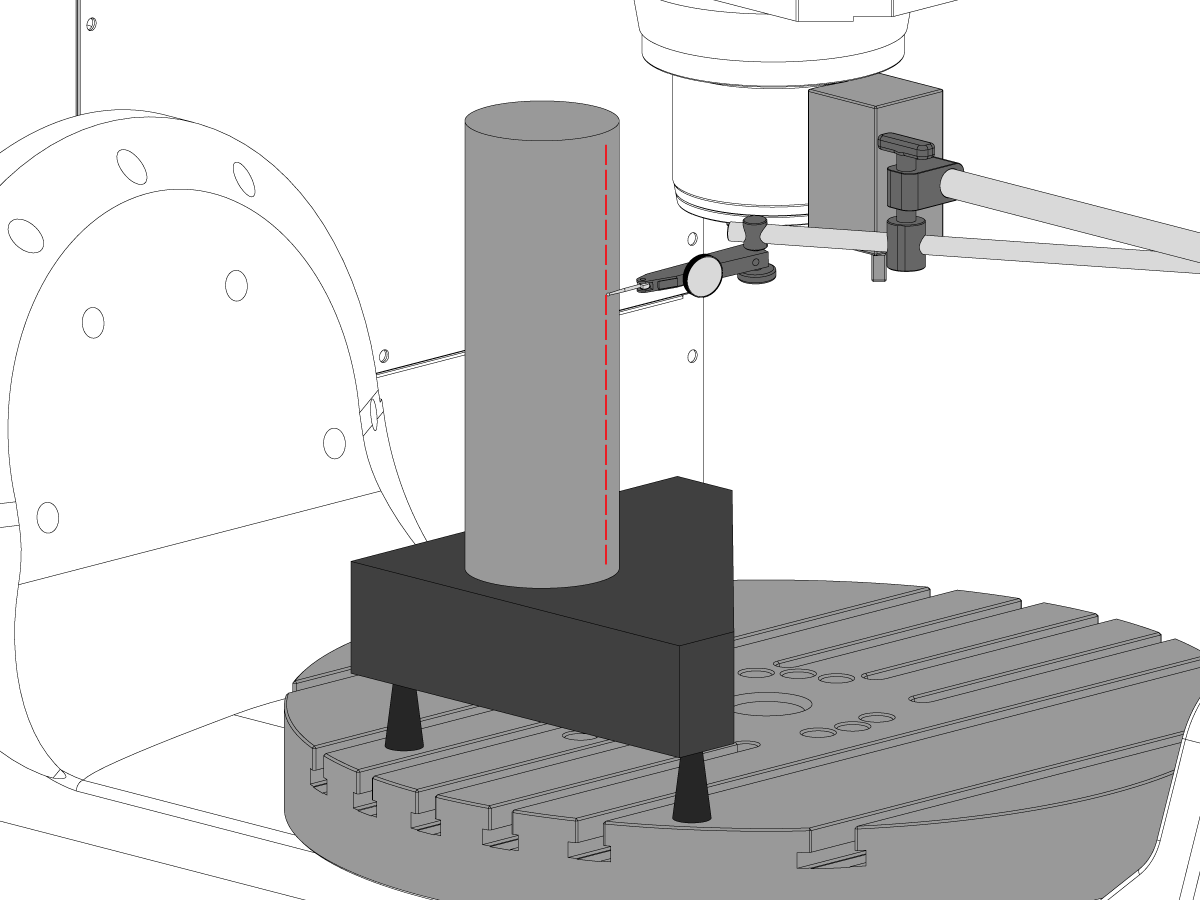
Alinee el eje Z perpendicular al eje Y:

Indique la parte delantera del cilindro a lo largo del eje Z.

Separe las carretillas del eje Z y el ariete para alinear el eje Z perpendicular al eje Y NTE 0,0005"/10".

Nota: Separe cualquiera de las dos carretillas superiores o de las dos carretillas inferiores con los espaciadores iguales.

Apriete los pernos. Consulte Especificaciones del par de fijación de Haas.

Compruebe que los ejes Z perpendiculares a los ejes Y y X después de los pernos estén torcidos.

4

Alinee y torsión y torsión de las carcasas de tuerca de bolas de los ejes Y y Z:

Afloje los pernos que fijan la tuerca de bolas al cerramiento y los pernos que fijan el cerramiento a la fundición.

Ajuste los pernos que fijan el cerramiento de la tuerca de bola a la fundición primero, luego ajuste los pernos que fijan la tuerca de bolas al cerramiento.

Utilice la función bloqueo de avance para ejecutar el recorrido completo de ida y vuelta por el eje.

Nota: No utilice el volante ni el movimiento rápido.

Apriete los pernos. Consulte Especificaciones del par de fijación de Haas.

Se puede acceder al cerramiento de la tuerca del eje Y en la parte trasera de la máquina con el ariete desplazado todo el camino hasta la parte delantera de la máquina.

Se puede acceder al cerramiento de la tuerca del eje Z desde la parte delantera de la máquina con el cabezal del husillo con el cabezal de husillo desplazado hasta el fondo.

 Nota: La cubierta del motor del husillo tiene que retirarse para acceder al cerramiento de la tuerca de bolas del eje Z.

Tranvía del husillo al avión X-Y

1

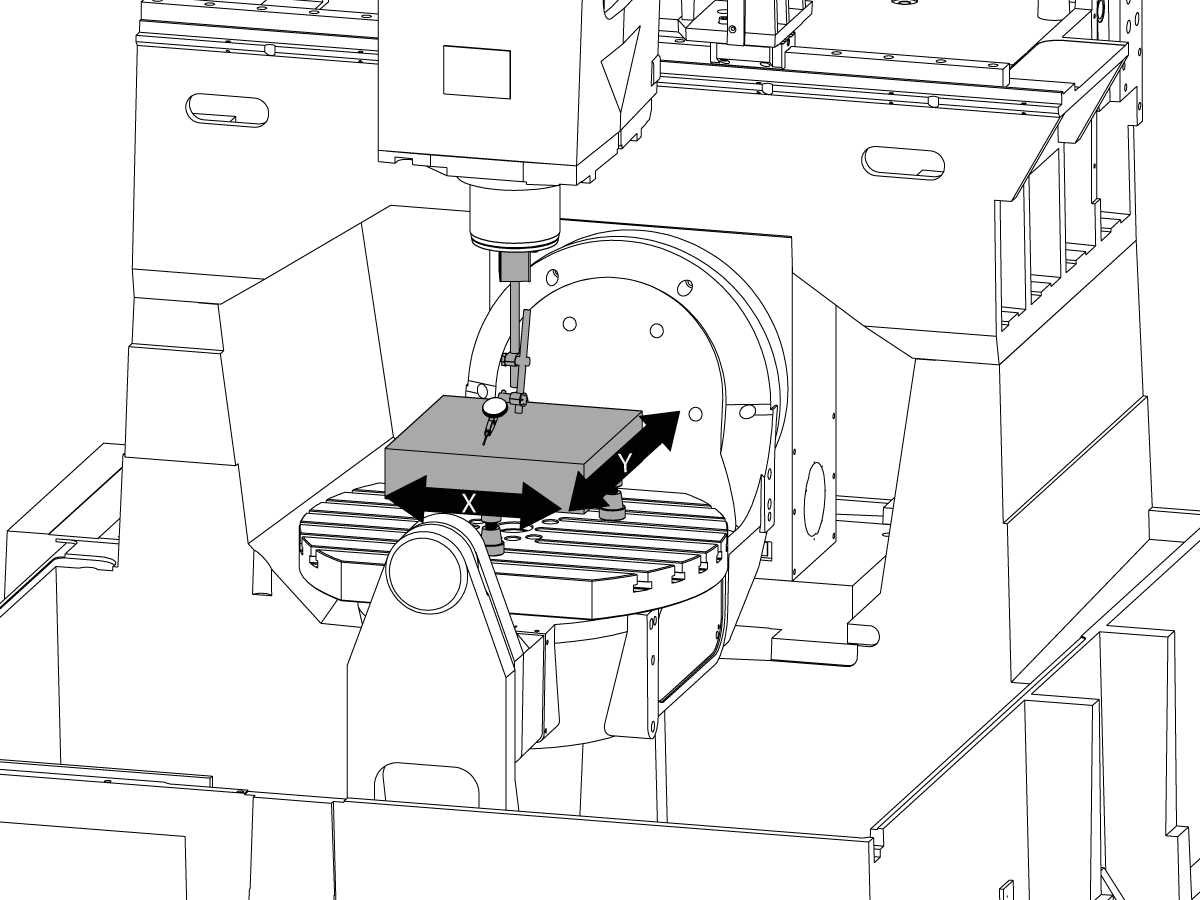
Configure el granito:

Configure las tomas maquinistas y el granito en el centro de la plataforma del eje C como se muestra en la imagen.

Alinee la superficie superior del granito paralelamente al plano X-Y ajustando la altura de las tomas maquinistas NTE 0,0001".

Coloque el husillo sobre el centro del plato.

2

Trame el husillo al plano X-Y:

Coloque un indicador en el eje del husillo.

Realice una medición en la parte superior del granito a cada 90° de rotación.

Afloje los pernos (6) de la placa base para el cabezal del husillo.

Añada o quite espaciadores entre la base de fundición del cabezal del husillo y la placa base para llevar el husillo al plano X-Y NTE 0,0005"/10".

 Nota: Utilice espaciadores de grosor desigual [1] para cambiar el ángulo de la placa base.

Cuando el barrido esté dentro de las especificaciones, apriete los pernos (6). Consulte Especificaciones del par de fijación de Haas.

Verifique que el husillo se desplaza una vez apretados los pernos.

Alineamiento del eje B con los ejes XYZ

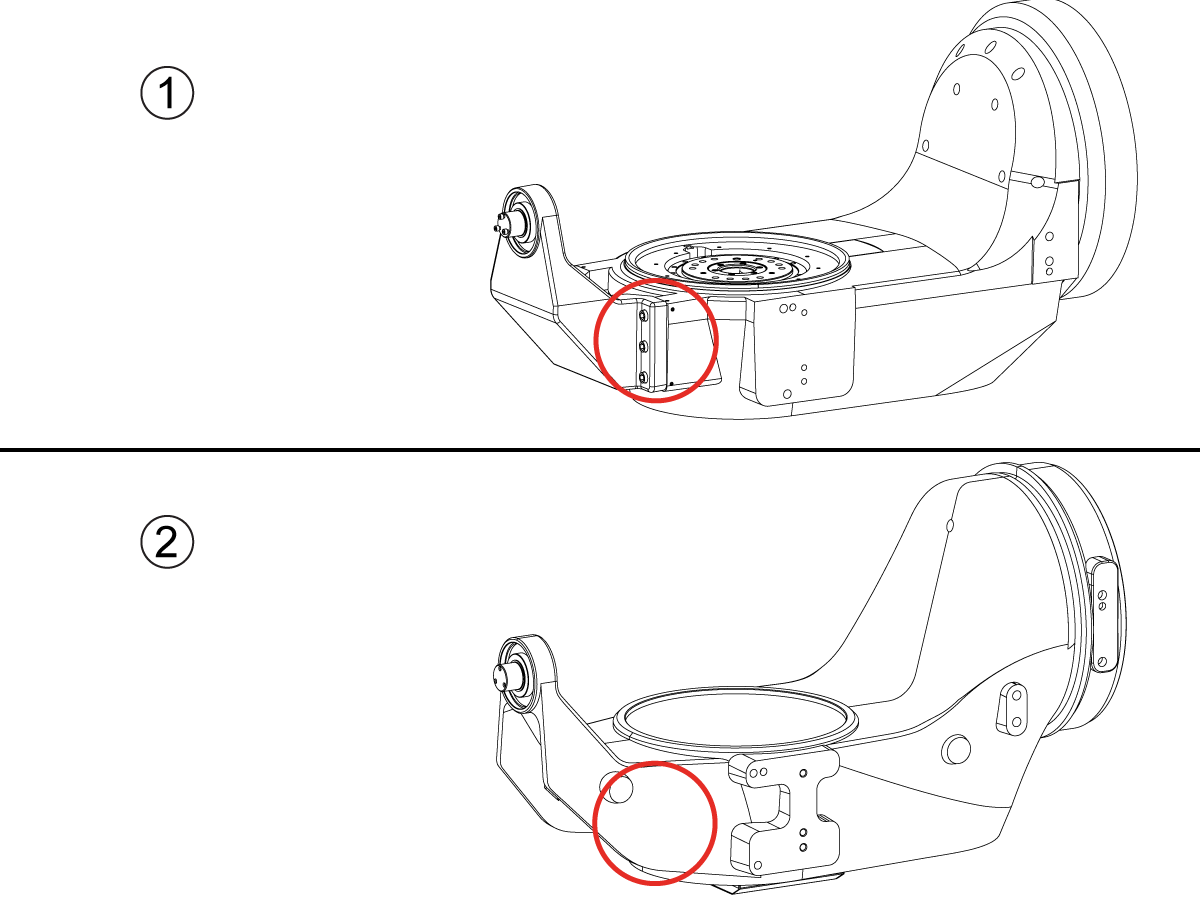
How to identify the Multi-Piece and the Unibody trunnion   

1) Multi-Piece trunnion:    UMC machines built approximetely before 11/2022 will have this configuration.

2) Unibody trunnion:    UMC machines built approximetely after 11/2022 will have this configuration.

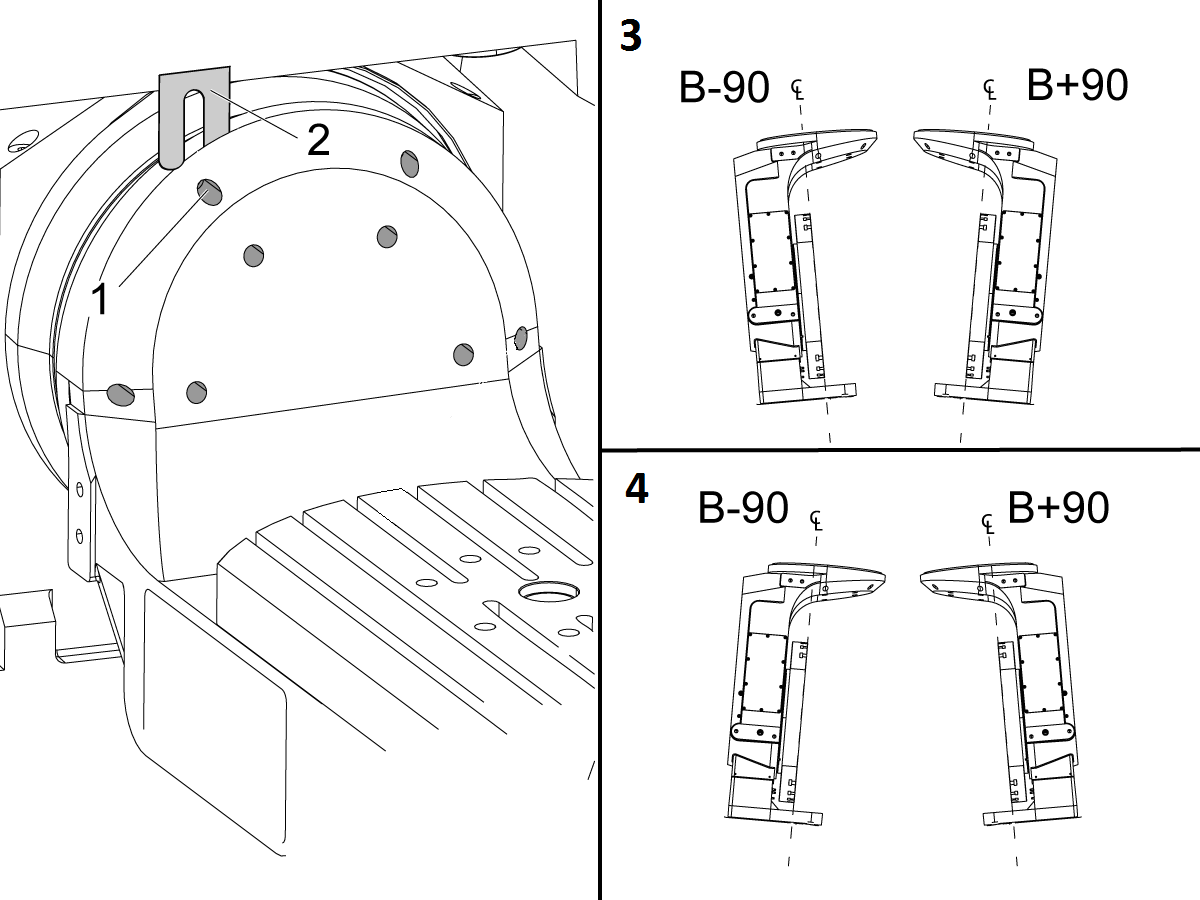
1

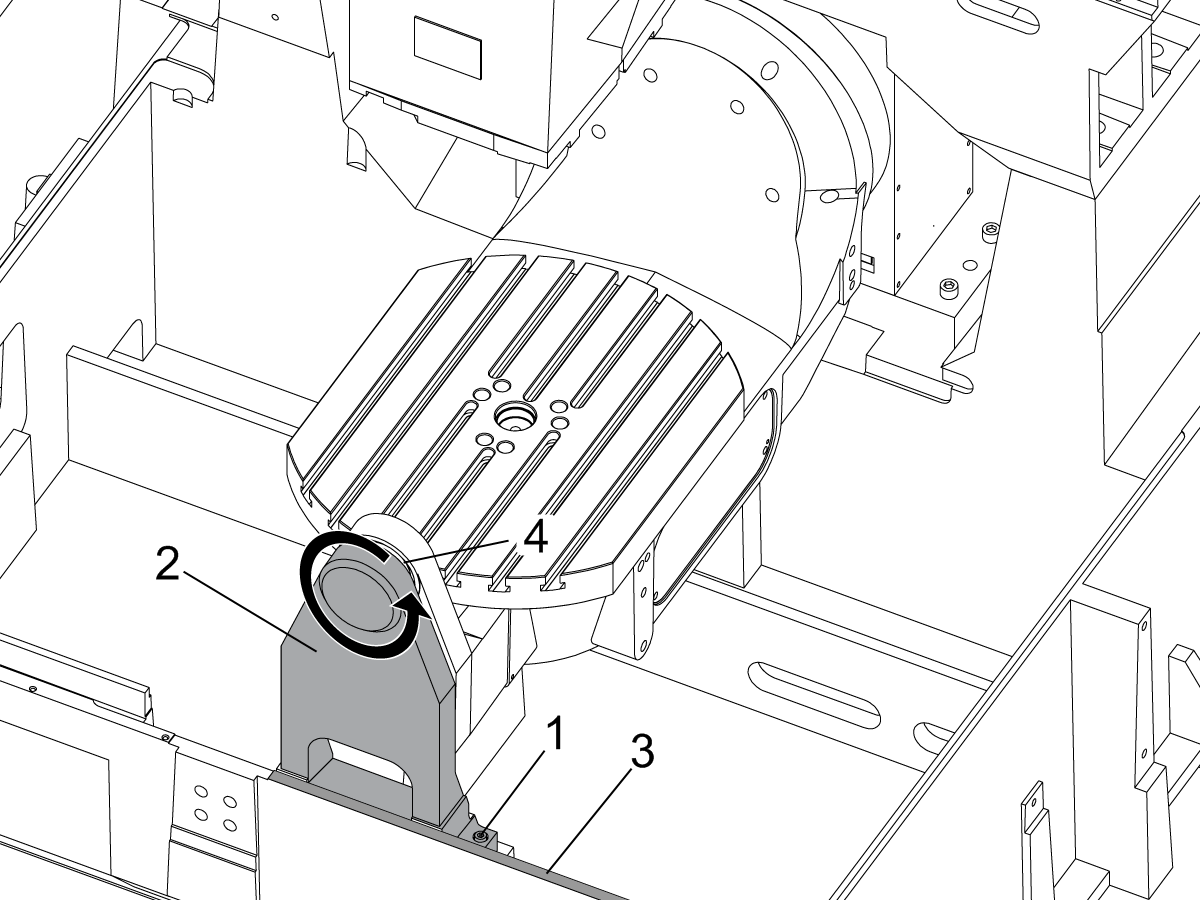
Remove the A-frame trunnion support:

Remove the bolts [1] that secure the A-frame trunnion support [2] to the base and take out the shims between A-frame support and the base.

Rotate the A-frame support [2] counter-clockwise to clear the edge of the base [3].

Pull the A-frame support off the bearings.

 Note: The A-frame support might vacuum lock on the bearings. Use the zip-tie to pry the seal [4] open.

 Caution: To lift the trunnion support, get the aid of another person. The support weighs 85 lbs (39 kg).

2

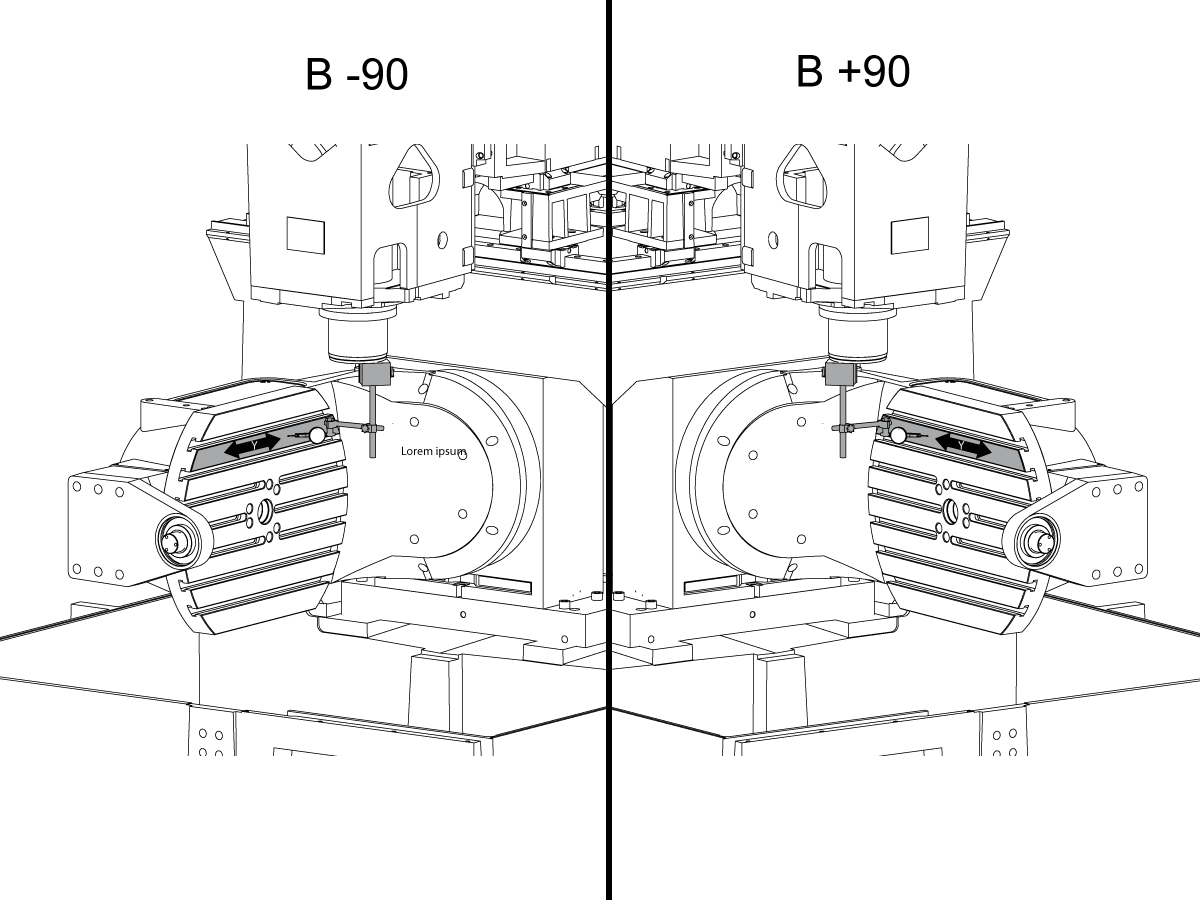
Measure the B- axis of rotation parallelism to the Y-Z plane:

For a machine with a Classic Haas Control, change Parameter 151:20 (B axis CHK TRAVL LIM) to 0.

For a machine with a Next Generation Control, change Parameter 6.021 (B axis CHK TRAVL LIM) to FALSE.

Measure the parallelism of the platter to the Y-Z plane with the B axis at 90° and then the B axis at -90° as shown in the picture.

Position the Y-Axis in the following starting position:

UMC-500: Y=0, Sweep 15”, 3rd T-Slot Land from the top.

UMC-750/1500-Duo: Y=-1.0, Sweep 18", 3rd T-Slot Land from the Top .

UMC-1250: Y=-1.0, Sweep 28", 3rd T-Slot Land from the Top.

UMC-500PP: Y=-4.0, Sweep 7".

UMC-750PP: Y=-2”, Sweep 15".

UMC-1000PP: Y=-4”, Sweep 15".

Compare the results at B 90° and B-90°. The results should be...

  • Symmetric against the Y-Z plane, positive or negative direction
  • Less than 0.0010"/20"

If the results are symmetric against Y-Z plane, and are less than 0.0010"/20 inches: Go to Step 5.

If the results are symmetric against Y-Z plane, but are more than 0.0010"/20 inches: Go to Step 4.

 Warning: If the results [3] are not symmetric against the Y-Z plane, the B axis rotary needs to be aligned: Go to Step 3.

3

Align the B axis of rotation parallel to the Y-Z plane:

Loosen the (6) bolts [1] that secure the B axis rotary to the base casting.

 Note: Keep the bolts sufficiently snug to control the adjustments.

Adjust the front and rear setscrews [2] until the measurements taken in Step 2 are symmetric against the Y-Z plane.

Torque the (6) bolts [1]. Refer to Haas Fastener Torque Specification.

Verify the measurements in Step 2 after the bolts have been torqued.

4

Align the C Axis of rotation perpendicular to the B Axis of rotation:

Remove the bottom C-Axis access cover.

Loosen the (12) bolts [1] that hold the C Axis body to the B Axis platter face.

Reach the bottom (4) bolts through the C Axis access port.

If the B Axis is symmetric in the positive direction [4], install horseshoe shims [2] of appropriate size behind the top (2) bolts.

If the B Axis is symmetric in the negative direction [5], install horseshoe shims [2] of appropriate size behind the bottom (2) bolts.

Torque the (12) bolts to 80 Ft-lbs (108 Nm).

Cut the excessive shim material off.

Verify the measurements in Step 2 after bolts are torqued.

5

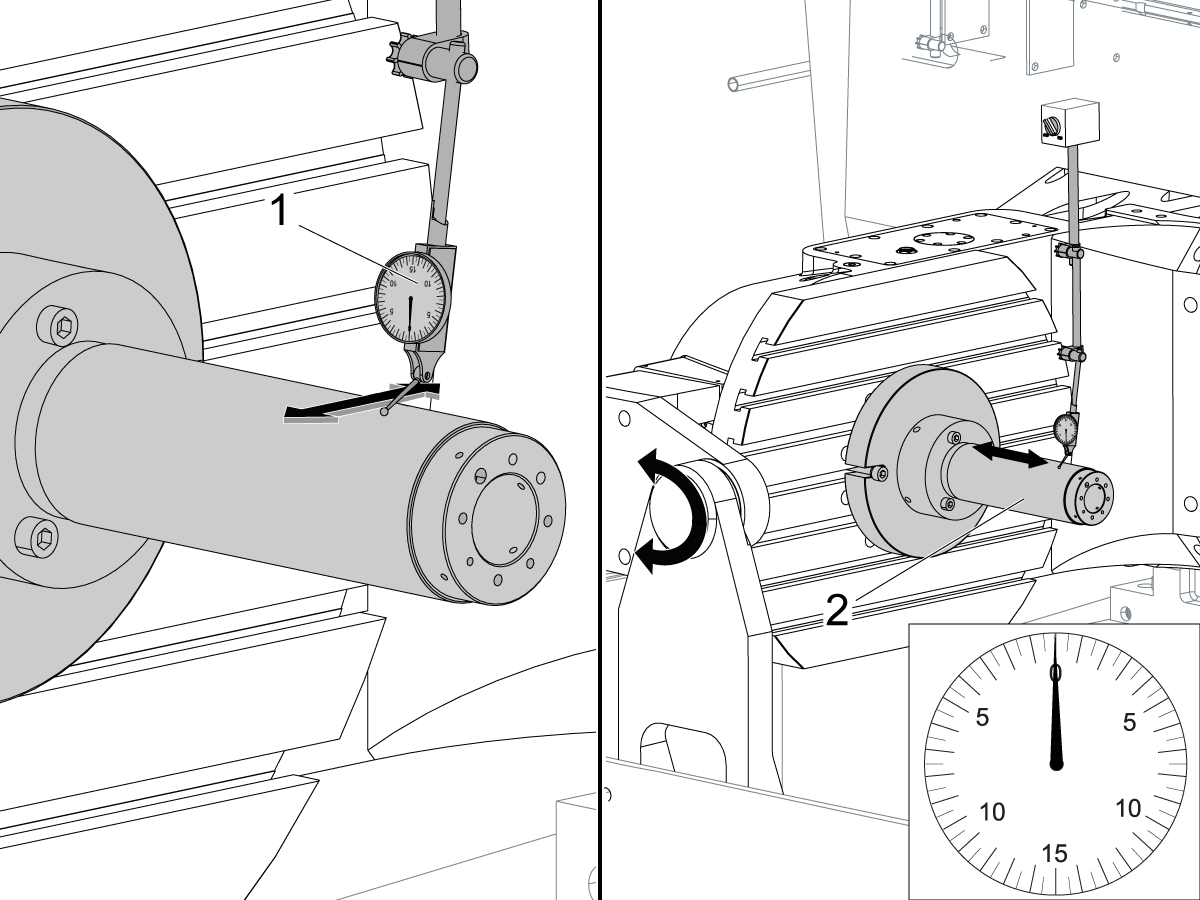
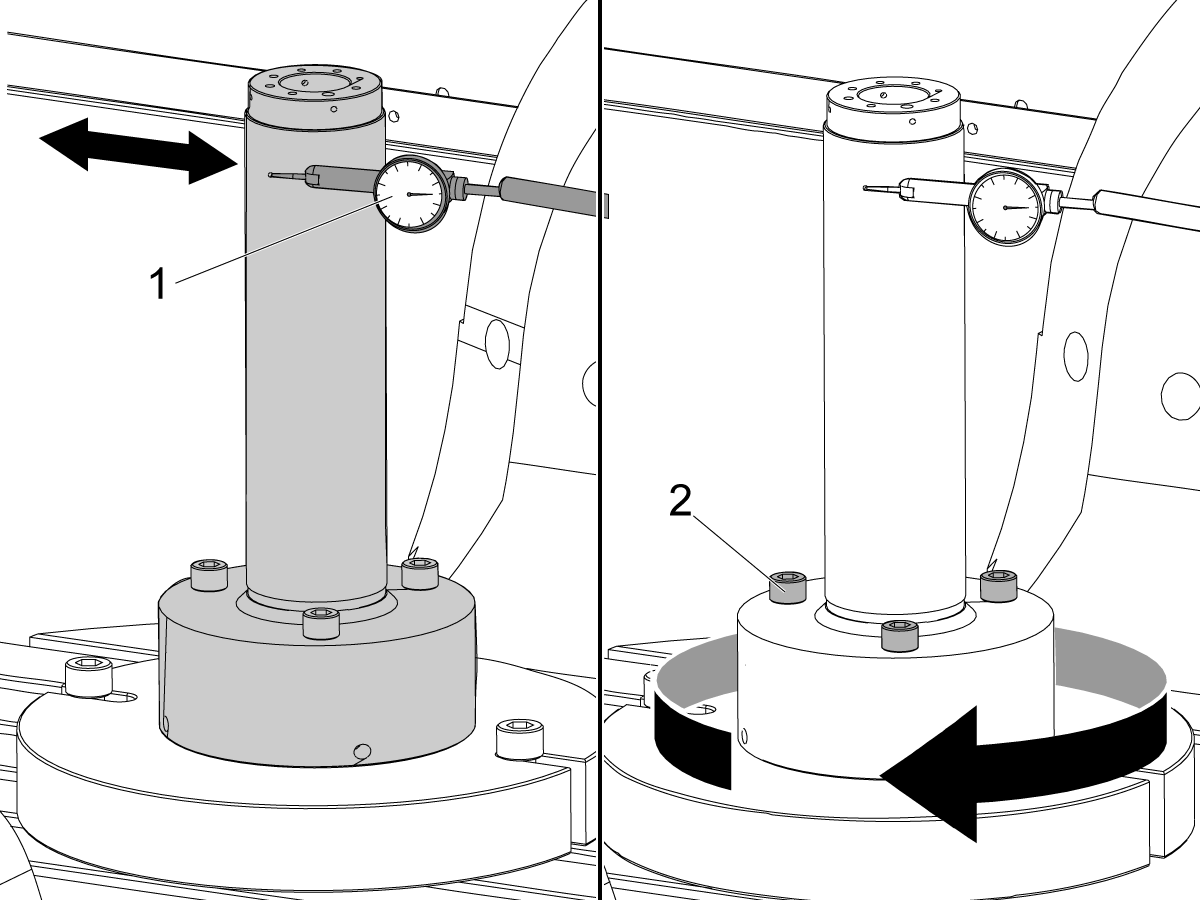
Align the trunnion support shaft co-axial with the B Axis of rotation:

Setup (2) indicators on the outer race of the trunnion support bearing [2] as shown in the picture.

Mark the spot on the outer race where one of the indicator needles is contacting the surface.

After moving the B Axis to 90° or -90° you will align the marked spot with the needle again to exclude the bearing runout error from the measurements.

Take the readings when B is at 90° and B at -90°. Compare the readings. 

 Caution: The B axis brake needs to be clamped when taking the readings.

The deviation between the results when B is at 90° and at -90° needs to be less than 0.001" on each indicator.

 Note: The indicator on the side of the bearing will measure top to bottom alignment and the indicator on the top of the bearing will measure side to side alignment.

____

For models with a multi-piece trunnion

Loosen the (6) bolts [3] on the C Axis body support. Keep the bolts sufficiently snug to control adjustment.

Adjust the (8) set screws [4] until deviation between B at 90° and B at -90° is within 0.001".

Torque the (6) bolts [2] on the C Axis body support to 80 Ft-lbs (108 Nm).

Verify the alignment after the bolts have been torqued.

____

For models with a unibody trunnion

Jog rotary to B90. Set up an indicator on the highlighted surface as shown in the lower diagram .

Rotate B-axis 180 degrees (90 to -90).

Run out (NTE 0.010” TIR).

 Caution: If the measurement exceeds the tolerance then contact support.

6

Install and shim the A-frame trunnion support:

Move the B Axis to 90°.

Setup an indicator [1] against a machined surface of the C Axis body. Set the indicator to 0.

Use plastic zip ties [2] to pry the seal open while installing the A-frame support. This lets unwanted air and grease out of the assembly.

Install the A-frame trunnion support [3] over the bearings.

Remove the cable ties.

Turn the trunnion support clockwise until it is vertical.

 Note: The weight of the A-frame support will cause the trunnion to sag. The amount of sag is measured with the indicator that was previously setup on the side of the C Axis body.

____

For multi-piece trunnions

Adjust the shims [4] between the A-frame support and the base casting to remove the sag until indicator reads 0 again.

When the indicator reading is 0, torque the (4) bolts. Refer to Haas Fastener Torque Specification.

Verify the reading after bolts are torqued. Adjust the shims again if necessary until the indicator reads 0.

____

For models with unibody trunnion

Determine the amount of shim stock [4] needed to raise the Trunnion arm so the indicator reads 0.005".

The indicator [1] value will change once the support is torqued.

With indicator still in place:

  • Torque trunnion support bolts to appropriate values.
  • Check indicator to make sure it reads between the range of

Trunnion arm raised (0.005” to  0.010”).

 Note: For unibody trunnions, the shim location may also be used to correct the C-axis to X-Y plane perpendicularity instead of shimming the saddle trucks.

 Caution: Use equal amount of shims on each side of the A-frame support. Unequal shims will cause the A-frame support to pull the trunnion to the side.

Verify the B Axis of rotation alignment to the Y-Z plane (Step 2). Loosen the bolts and tap the A-frame support side to side if necessary to correct the B axis to Y-Z plane alignment.

7

Set C-axis perpendicular to X/Y plane:

Move the axes to

UMC-750's........X= -10.5" & Y=0."

UMC-1000's......X=-17.0" & Y=-0."

Zero an indicator [1], on a Ground Block [2], 1/2" off the edge at the rear of the platter (Mag-Base on Spindle), with C at 0 Degrees

Rotate C-Axis to 180°.

Move Y axis, and ground block, in Y Axis negative direction until you are 1/2" away from platter edge, and take the perpendicularity measurement

Adjust the shims until the average error is within 0.0005" end to end.

 Note: For unibody trunnions, the shim location under the bearing support may also be used to correct the C-axis to X-Y plane perpendicularity instead of shimming the saddle truck.

Caution: Shim either two front trucks or two rear trucks with the equal shim.

Note: Shim one truck at the time to maintain the X to Y squareness.

Verify the measurements after all bolts are torqued.

Verify the X to Y alignment in Step 2.

8

Set the tool change offsets:

B-axis tool change offset [1]

For Classic Haas Controls, change Parameter 213. 

For Next Generation Controls, go to: Settings>Rotary Tab>Highlight the rotary and press [INSERT], or change Parameter 6.078 (B TOOL CHANGE OFFSET) to set the trunnion (B Axis) parallel to the X Axis.

For models with multipiece trunnion

(NTE 0.001/10"; NTE 0.0020" overall)

For models with unibody trunnion

(NTE 0.0005/10"; NTE 0.0010" overall)

___

C-axis tool change offset [2]

For Classic Haas Controls change Parameter 523.

For Next Generation Control go to: Settings>Rotary Tab> Highlight the rotary and press [INSERT], or change Parameter 7.078 (C TOOL CHANGE OFFSET) to set the table T-slot (C Axis) parallel to the X Axis

For models with multipiece trunnion

(NTE 0.001/10"; NTE 0.0020" overall)

For models with unibody trunnion

(NTE 0.0005/10"; NTE 0.0010" overall)

9

Check C-axis perpendicularity to X/Y plane:

Align the indicator centered over the C-axis bore with the Y-axis at -10.

Jog positive in the Y-axis and align the indicator over the center of the last section of the platter and make a mark at this spot with a washable marker.

Insert 1-2-3 block as shown and set the indicator to zero.

Remove the block and rotate the platter 90 degrees, following the marked spot with the indicator.

Insert block back between the indicator and platter. Note reading.

Repeat the previous two steps, taking readings with the platter at 180, 270 and 360 degrees.

Multi-piece trunnion:  (NTE 0.0005")

Unibody trunnion: (NTE 0.001")

10

Measure the intersection of the B and C axis:

Follow the linked instruction manual to complete this step.

B-Axis and C-Axis intersection Adjustment

11

Align the B-Axis brake disk:

 Note: Do not do this step if you are working on a SS machine.

Operate this code in MDI mode to unclamp the brake:

M11;

Loosen all of the brake disc bolts [1] and torque them to 5 Ft-lbs (7 Nm).

Operate this code in MDI mode to clamp the brake:

M10;

Wait 10 seconds.

Torque the bolts. Refer to Haas Fastener Torque Specifications.

Ajuste el parámetro/ajuste de nuevo a los valores de fábrica

Establezca el Parámetro 1314 para CHC / Ajuste 254 para NGC de vuelta al valor establecido en fábrica. (Encienda y apague la máquina después de cambiar el valor.)

Alinee y calibre el WIPS. Calibración del Sistema de Palpado Intuitivo Inalámkbrico (WIPS) - Calibración

Ajuste los puntos cero giratorios de la máquina. 

  • UMC-750 - Ajustes de los correctores WIPS MrZP - CHC
  • UMC-750 - Ajustes de los correctores WIPS MrZP - NGC

Llene el informe de inspección completo:

  • Informe de inspección EA0420 UMC-500
  • Informe de inspección EA0373 UMC-750
  • Informe de inspección EA0418 UMC-1000

Deje la copia del informe de inspección con la máquina.

Si ha reemplazado el ensamblaje de los ejes B y C, haga el Alineamiento-Intersección del eje B y del eje C - UMC-750

8.2 Alineación - Zonas indicadoras

Recently Updated

Zonas indicadoras de alineamiento del UMC


AD0490

Zonas indicadoras

1

Rodadura del eje X

  • Primero acople la herramienta T-2192 en el lateral del husillo.
  • Para medir la rodadura en X, mantenga las siguientes posiciones de los ejes Y y Z:
    • UMC 500 (Y, Z): -8, -8
    • UMC 750 (Y, Z): -10, -10
    • UMC 1000 (Y, Z): -12, -12
  • Mida la rodadura del eje X (no superior a [NTE] 0,0005"/10")


2

Paralelismo del eje B con el eje Y

  • Ejecute el retorno a cero de los ejes B y C.
  • Mida el descentrado de la plataforma en el eje Y (no superior a [NTE]: 0,0008"/10" 0,0012"/15")
  • Luego, mida esta misma superficie con el eje B tanto a -90° como a +90°  (no superior a [NTE]: 0,0008"/10" 0,0012"/15")
  • Para los UMC 500 y 750, mida la longitud completa de la plataforma
  • Para el UMC 1000, desplácese 2” desde el borde de la plataforma y mida a lo largo de 20”

3

Perpendicularidad del eje Y con el eje X

  • Utilice los tornillos de ajuste para hacer que la superficie superior de la pieza de granito esté paralela al plano XY (no superior a [NTE]: 0,0002")
  • Luego, compruebe si Y está en escuadra con X (no superior a [NTE] 0,0005"/10")

4

Perpendicularidad del eje X con el eje Z

  • Coloque la pieza de granito y el cilindro de precisión en la plataforma en la orientación que se muestra
  • Utilice los tornillos de ajuste para establecer la superficie superior del cilindro paralela al plano XY (no superior a [NTE]: 0,0002")
  • Ubicaciones X-Y del husillo para este paso:
    • UMC 500, X = -6, Y = -8
    • UMC 750, X = -10, Y = -10
    • UMC 1000, X = -17, Y = -12
  • Posición de inicio de Z para esta medición:
    • UMC 500, Zinicio = Zsuperior – 2”
    • UMC 750, Zinicio = Zsuperior – 5”
    • UMC 1000, Zinicio = Zsuperior – 7”
  • Zsuperior es el límite de recorrido del eje Z en la dirección positiva (hacia arriba)
  • Desde Zinicio, mida 10” hacia abajo a lo largo del cilindro

5

Perpendicularidad del eje Y con el eje Z

  • Coloque la pieza de granito y el cilindro de precisión en la plataforma en la orientación que se muestra
  • Utilice los tornillos de ajuste para establecer la superficie superior del cilindro paralela al plano XY (no superior a [NTE]: 0,0002")
  • Ubicaciones X-Y del husillo para este paso:
    • UMC 500, X = -6, Y = -8
    • UMC 750, X = -10, Y = -10
    • UMC 1000, X = -17, Y = -12
  • Posición de inicio de Z para esta medición:
    • UMC 500, Zinicio  = Zsuperior  – 2”
    • UMC 750, Zinicio  = Zsuperior  – 5”
    • UMC 1000, Zinicio  = Zsuperior  – 7”
  • Zsuperior es el límite de recorrido del eje Z en la dirección positiva (hacia arriba)
  • Desde Zinicio, mida 10” hacia abajo a lo largo del cilindro

6

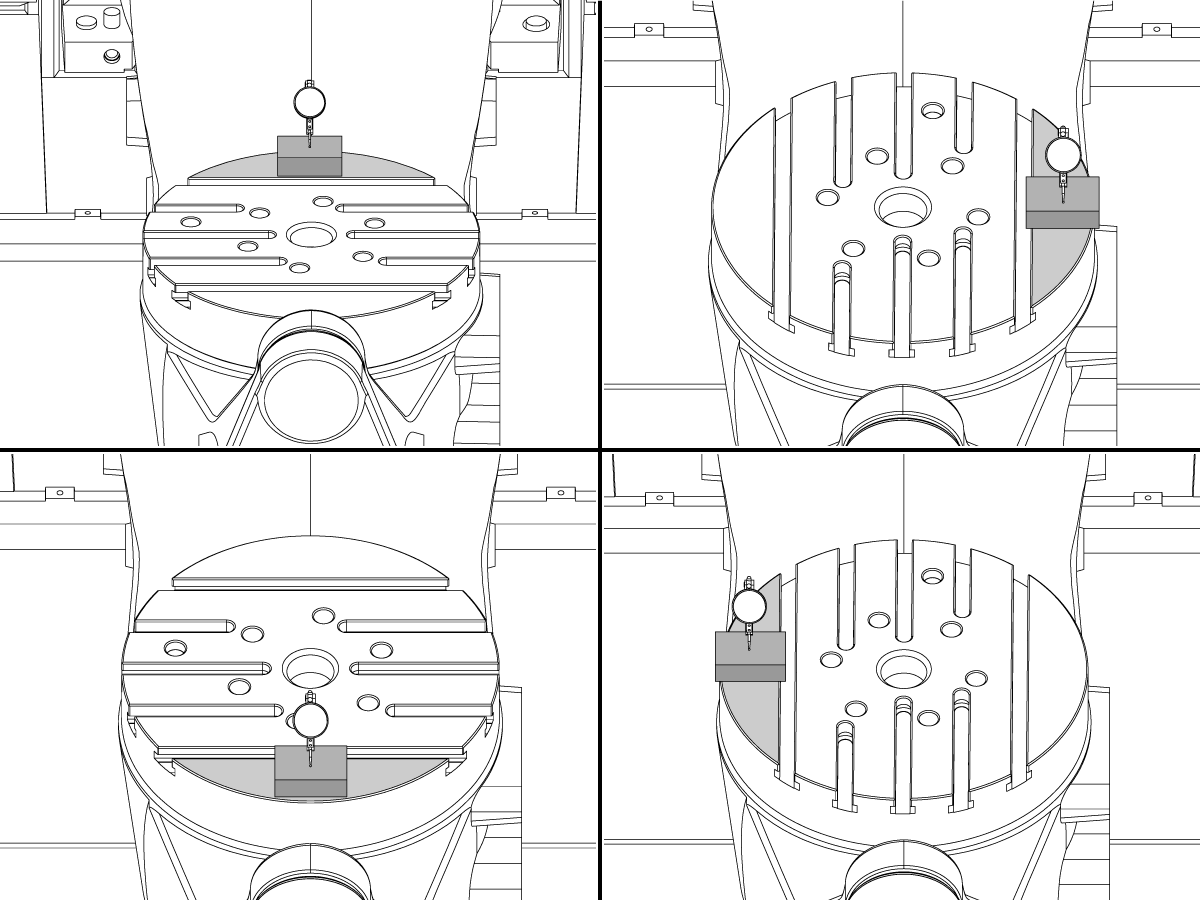
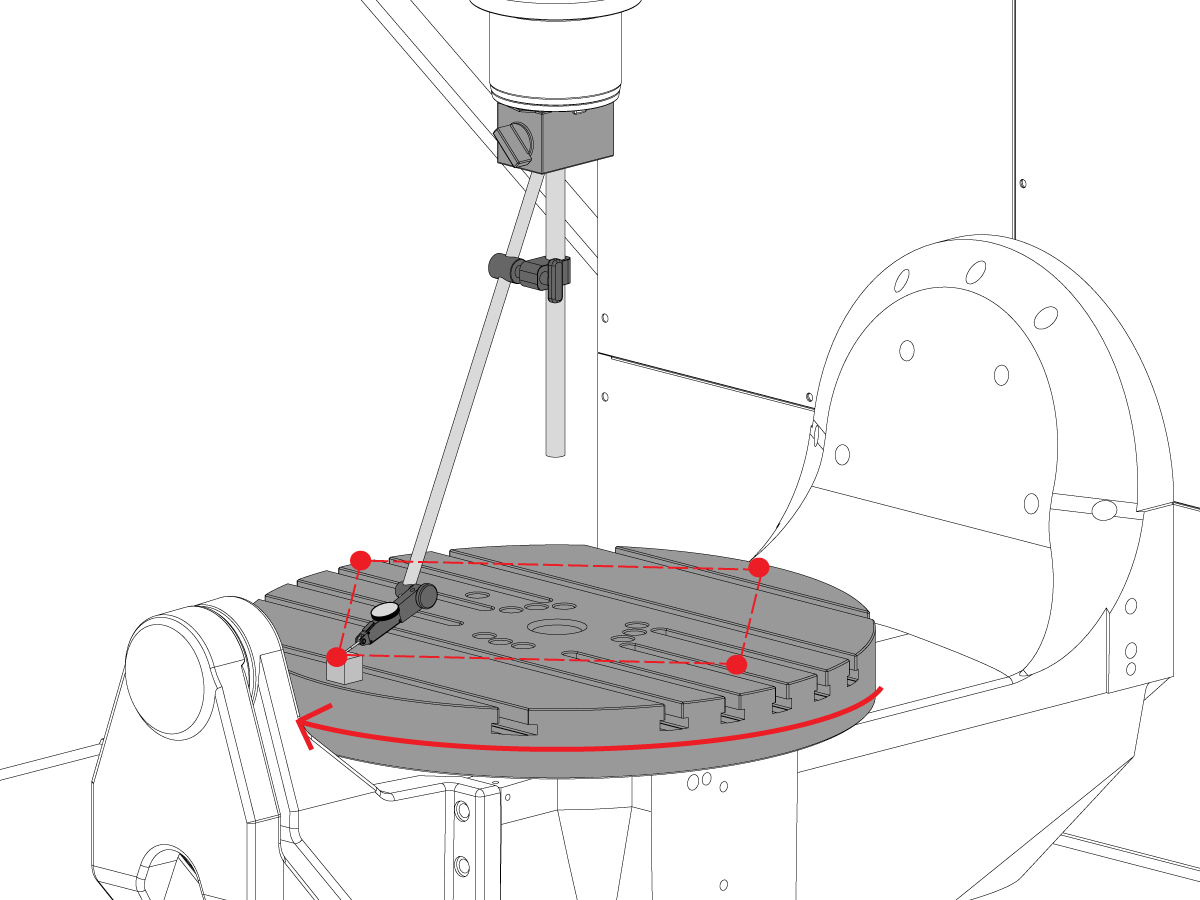
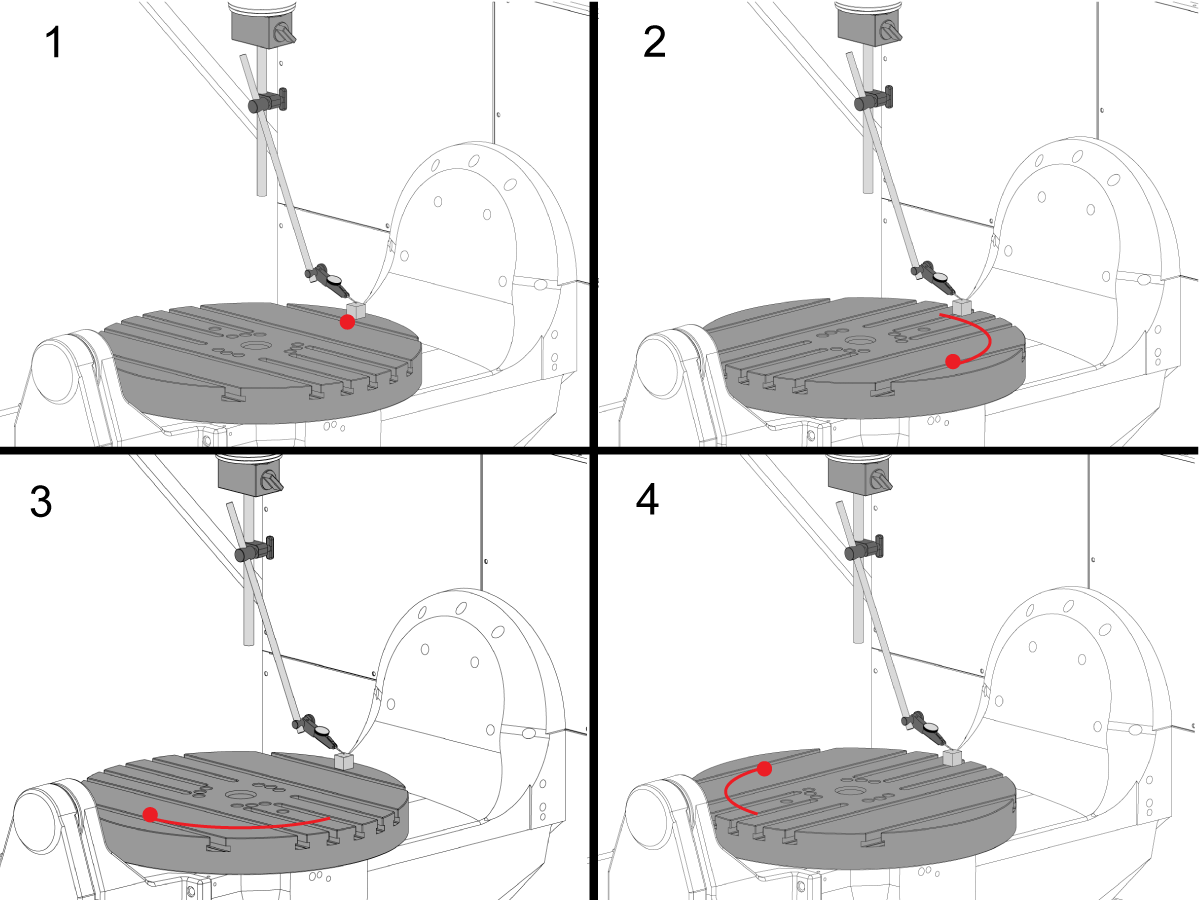
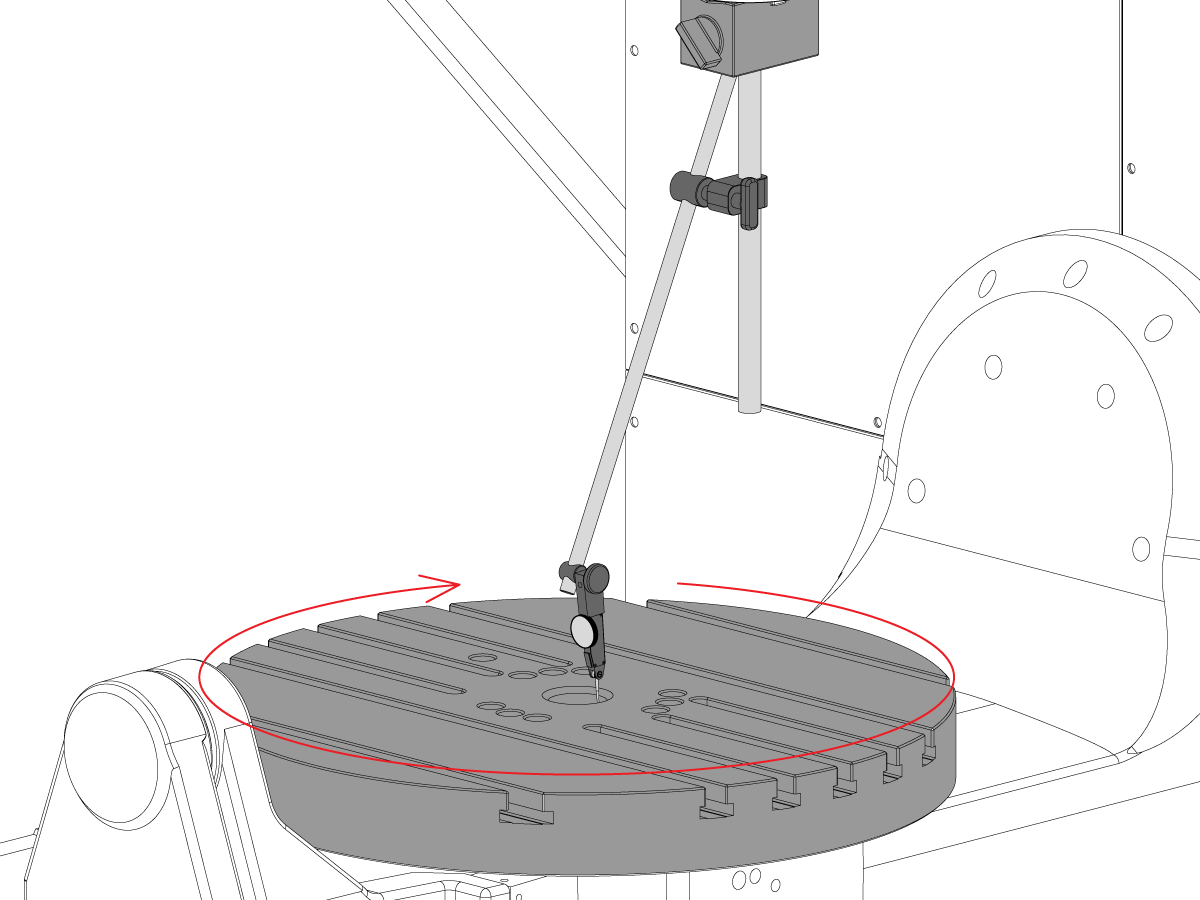
Perpendicularidad del eje C con el plano XY

  • Vuelva a posicionar la base magnética en el husillo de manera que no pueda girar con el husillo.
  • Coloque el bloque de calibre de precisión en el borde de la plataforma en la posición de las 12 en punto. 
  • Ponga a cero la punta del indicador en el bloque de calibre en esta posición.
  • Gire el eje C  90° 
  • Luego, mueva el husillo en el eje X e Y para seguir el bloque de calibre y realice una medición del mismo punto en la plataforma. No debe producirse ninguna rotación del husillo
  • Repita esta operación 2 veces más para un total de 4 posiciones, separadas 90°, en el borde de la paleta, como se muestra. 
  • La diferencia entre las mediciones de las posiciones de las 12 y 6 en punto determina la planicidad a lo largo del eje X (no superior a [NTE] 0,0005")
  • La diferencia entre las mediciones de las posiciones de las 3 y 9 en punto determina la planicidad a lo largo del eje Y (no superior a [NTE] 0,0005")

7

Descentrado de la cara de la plataforma

NOTA: El freno del eje C está desactivado para este paso

  • Coloque el bloque de calibre de precisión en el borde de la plataforma en la posición de las 12 en punto. 
  • Ponga a cero la punta del indicador en el bloque de calibre en esta posición.
  • Gire el eje C  90° pero mantenga el bloque de calibre en la posición de las 12 en punto
  • Realice una medición desde la parte superior del bloque de calibre
  • Repita esta operación 2 veces más para un total de 4 posiciones, separadas 90°, en el borde de la paleta, como se muestra. 
  • Anote el descentrado indicado total. (NTE 0,001")

8

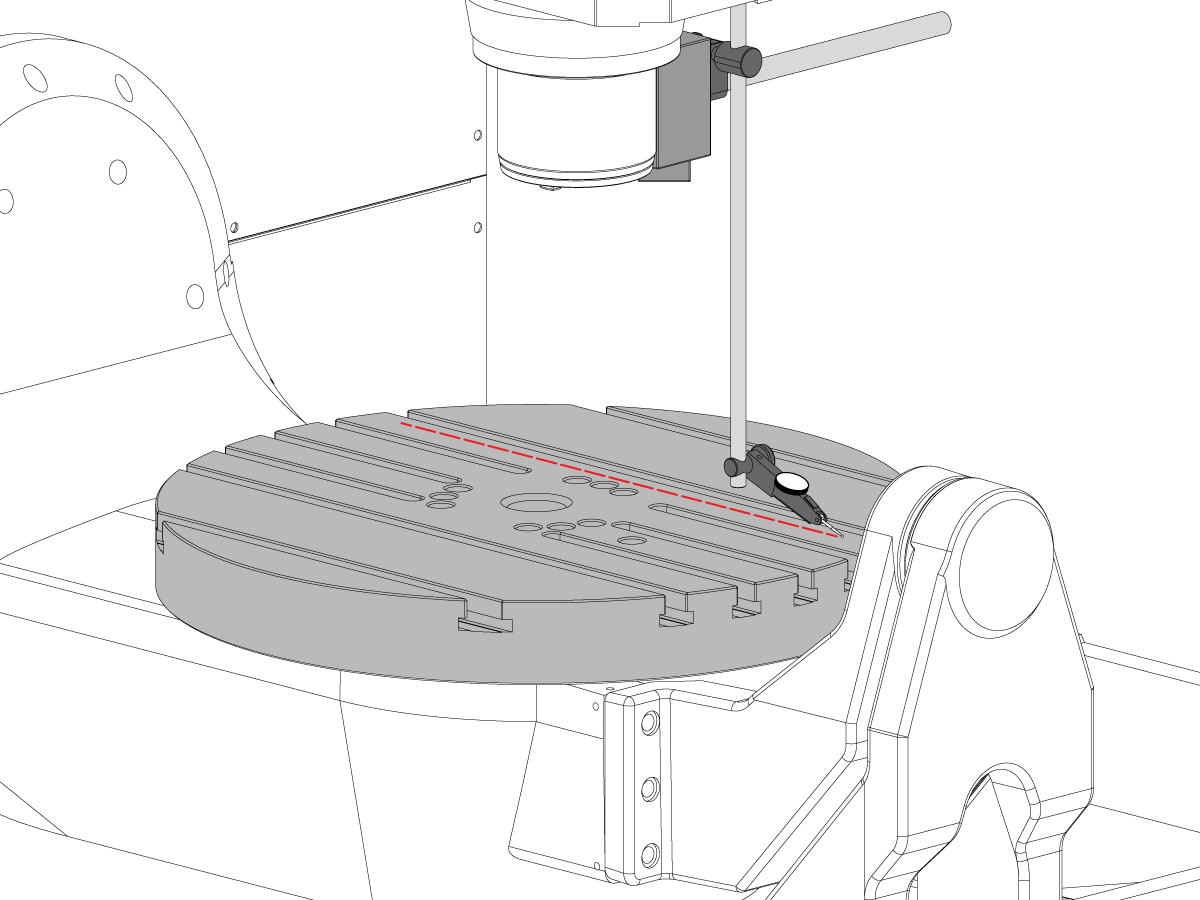
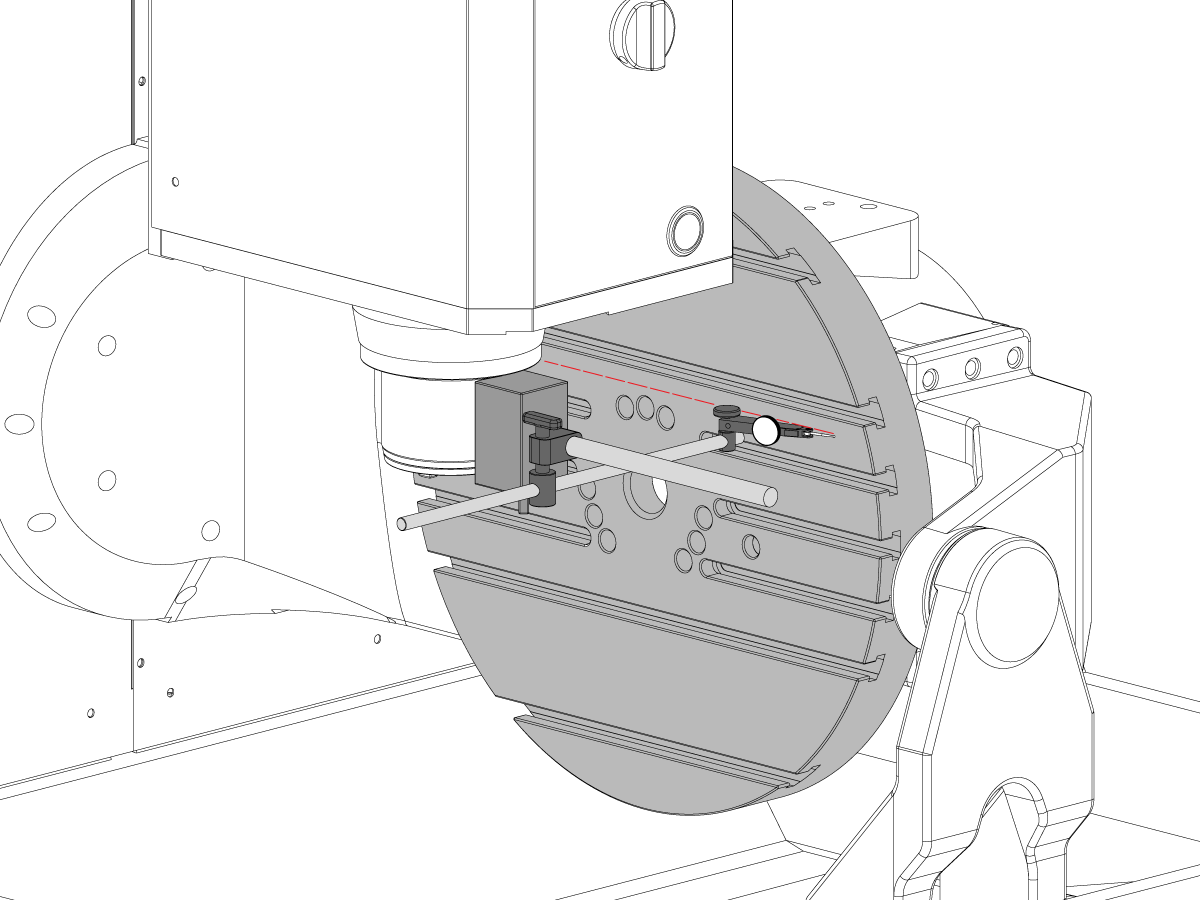
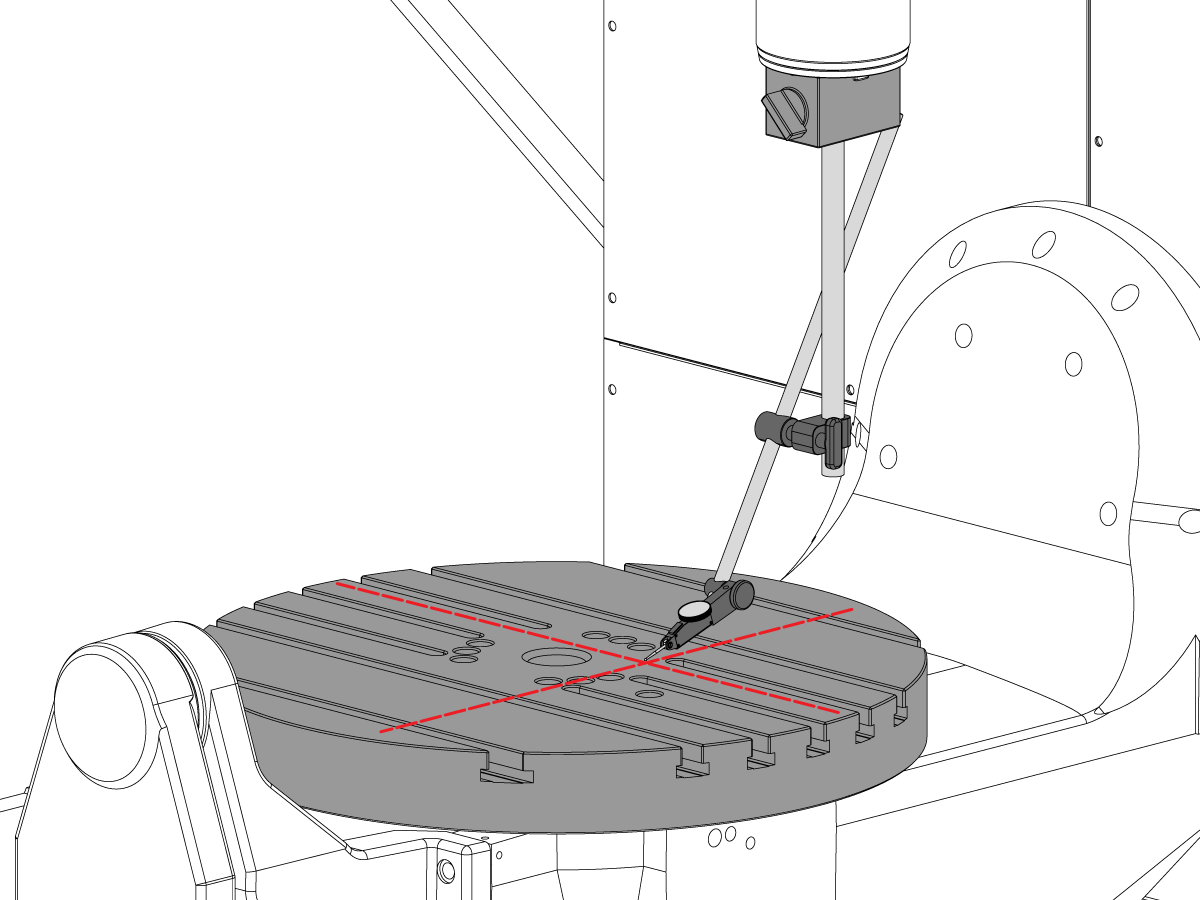
Paralelismo de la superficie de la plataforma con el plano XY

  • Efectúe el retorno a cero del eje C de manera que las ranuras T estén paralelas al eje X
  • Coloque la punta indicadora en la plataforma y muévase en el eje X a lo largo de la plataforma para encontrar el paralelismo de la plataforma en el eje X (no superior a [NTE] 0,001”/10"; 0,0015"/15")
  • Luego muévase en el eje Y a lo largo de la plataforma para encontrar el paralelismo de la bandeja en el eje Y (no superior a [NTE] 0,001”/10" 0,0015"/15")

9

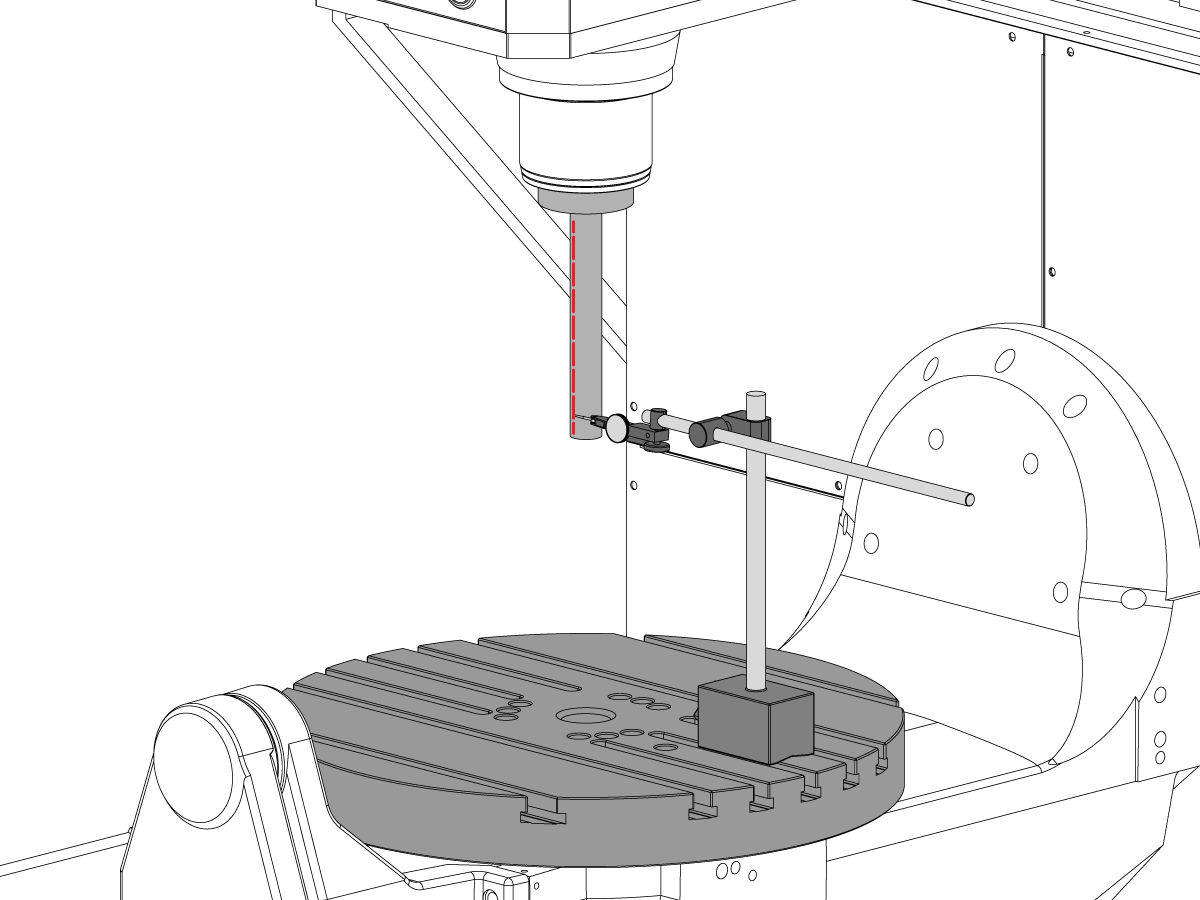
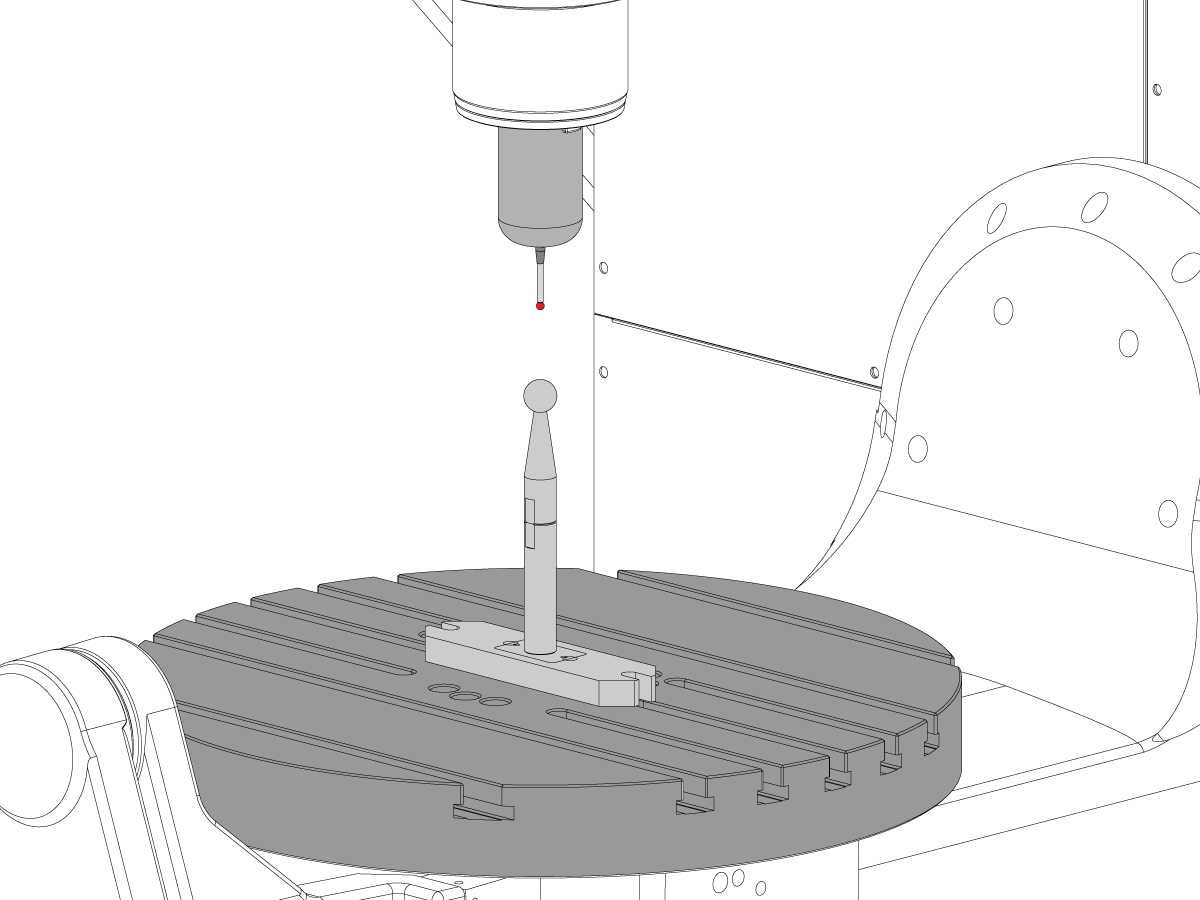
Descentrado del husillo

  • Centre el husillo sobre el agujero del eje C.
  • Coloque la base magnética sobre la mesa e inserte la barra de prueba.
  • Compruebe el descentrado del husillo en la base de la barra de prueba (TIR no superior a [NTE] 0,0005")
  • Compruebe el descentrado del husillo 6" hacia abajo desde la base de la barra de prueba (TIR no superior a [NTE] 0,001")

10

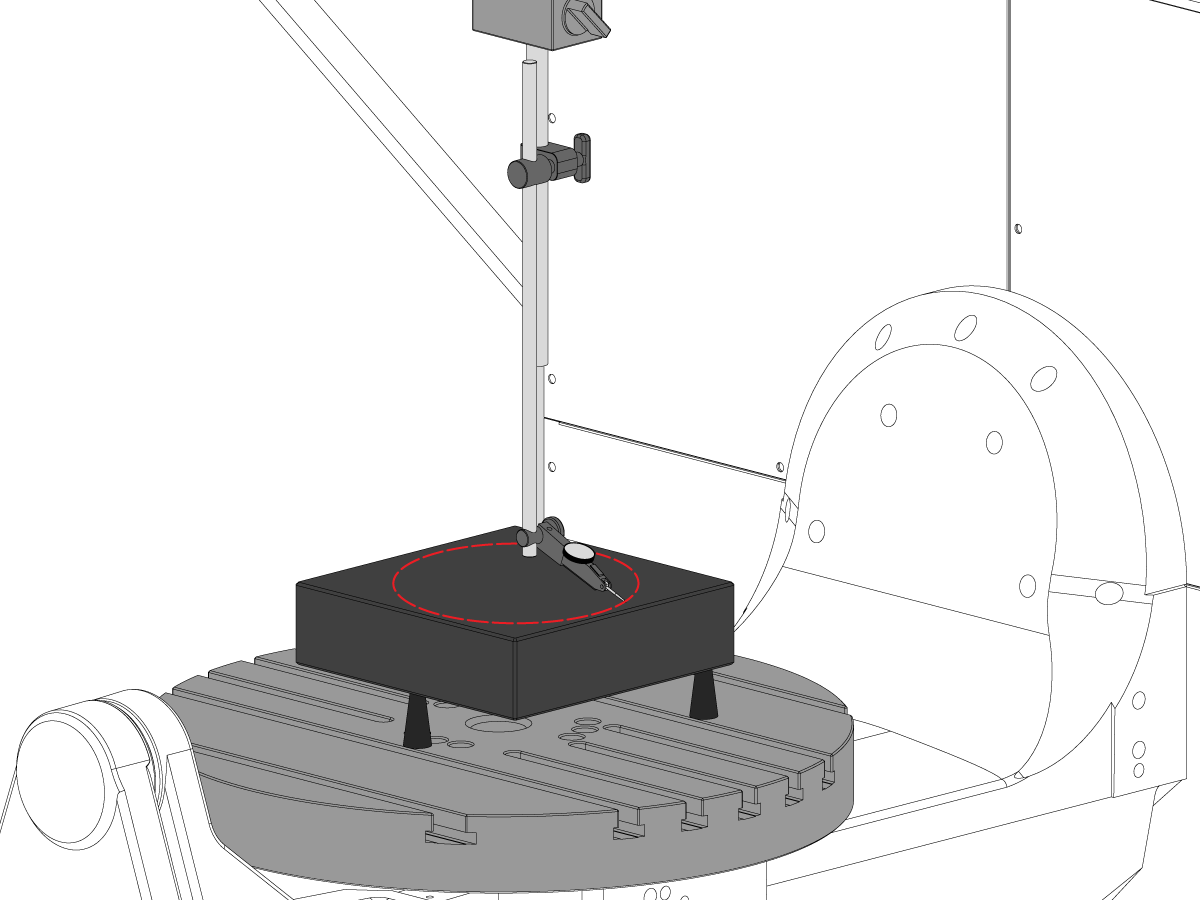
Paralelismo de la línea central del husillo con el eje Z

  • Utilice los tornillos de ajuste para colocar la pieza de granito paralela al plano XY en la orientación que se muestra (no superior a [NTE]: 0,0002")
  • Centre el husillo sobre el agujero de la plataforma del eje C
  • Recorra un círculo de 10" de diámetro
  • Registre el TIR de XZ (no superior a [NTE] 0,0005")
  • Registre el TIR de YZ (no superior a [NTE] 0,0005")

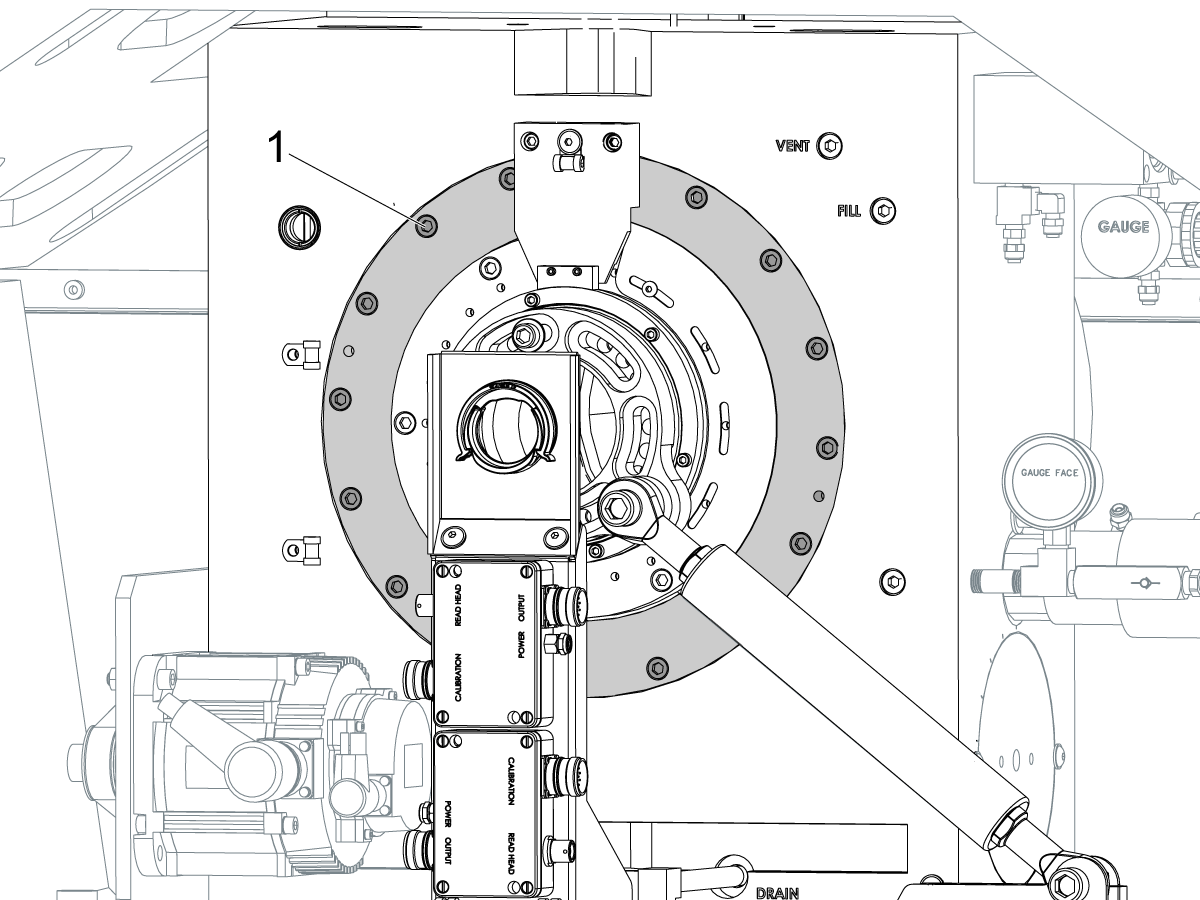
11

Concentricidad de la cavidad del eje C

  • Coloque el indicador como se muestra y mueva el eje C 360°
  • Registre el TIR de la cavidad de precisión (no superior a [NTE] 0,002")

12

Punto cero giratorio de la máquina

  • Utilice el programa de macros VQC y el sistema de sondas para verificar los valores de los parámetros de Coldfire o de la configuración del NGC que se muestra a continuación:
    • 255 - CORRECTOR X DE MRZP
    • 256 - CORRECTOR Y DE MRZP
    • 257 - CORRECTOR Z DE MRZP
    • 254 - DISTANCIA DEL PUNTO CENTRAL DE LA UNIDAD GIRATORIA DE 5 EJES
  • Para obtener instrucciones completas sobre MRZP, consulte el procedimiento Configuración de correctores WIPS de MRZP de Haas

8.3 Geometría - Solución de problemas

Recently Updated

UMC - Geometría - Solución de problemas


TG0151

Descripción general

Antes de solucionar un problema de precisión o geometría UMC-750, la tecnología debe tener una comprensión completa de los siguientes fundamentos:

  • Cómo nivelar y alinear los ejes rotatorios de la UMC
  • Cómo volver a alinear todos los ejes de la máquina
  • Cómo realizar la calibración MRZP y un exhaustivo substading de cuáles son los parámetros asociados, y su efecto en la máquina
  • Una comprensión de las capacidades de precisión de las máquinas y la capacidad de razonar a través de los problemas geométricos
  • Alineamiento de intersección del eje B a C

Un problema con la geometría o la precisión de la máquina UMC-750 debe abordarse sistemáticamente y en la secuencia adecuada. La siguiente información debe cumplirse estrictamente y seguirse en orden secuencial.

Es absolutamente crítico que antes de cualquier evaluación o ajuste se realice a la geometría de la máquina que la máquina ha sido comprobada para el nivel adecuado y el alineamiento de los ejes rotativos a la máquina

Muchos errores se pueden atribuir a la máquina que sufre un accidente o problemas ya sea con aplicaciones de herramientas o problemas de programación. No intente cambiar la geometría de la máquina comprobando por completo el nivel y la geometría de las máquinas Informe de inspección. Esto incluye la comprobación de la Machine Rotary Zero Point (MRZP).

En caso de accidente hay 4 juntas deslizantes en la máquina. Estas áreas son la cabeza del husillo al carnero, el carnero al sillín, el sillín al puente y el basculante de doble apoyo al soporte de trunnion.

 Nota: ninguna de estas articulaciones nunca debe ser calzada. Un fallo de la máquina nunca debe cambiar la cantidad de lainas necesarias en la máquina desde los ajustes de fábrica.

Es importante recordar que la precisión lineal de la máquina es 0.0004/10" y la precisión angular es +/- 15 arco. Sec. Estas tolerancias pueden acumularse rápidamente.

Se debe agotar todo esfuerzo para determinar si la aplicación de mecanizado es razonable y dentro de la máquina, utillaje y capacidad de herramientas.

Evaluar el estado de la máquina

Determine si la máquina se bloqueó anteriormente. Verificar el histórico de alarmas; inspeccionar la chapa, la mesa, el cabezal del husillo, etc. en busca de posibles daños. Incluso si los daños son "mínimos", afectarían la geometría de la máquina. Si la máquina se ha estrellado, es necesario realizar una inspección completa de la geometría de la máquina

Ases el estado general del utillaje de la pieza y el estado de las herramientas de corte.

Obtenga el informe completo de copia de seguridad y error de la máquina.

Verificar el nivel de la máquina y la geometría

Verifique que la máquina esté nivelada y que el eje giratorio esté alineado con la máquina

 Nota: no intente realizar ningún ajuste en la geometría de la máquina que no sea ajustar los pies de nivel en este momento.

Si la máquina está fuera de nivel o el rotativo no está alineado, reinicie el nivel y el alineamiento giratoria.

Realice la inspección de geometría completa observando la magnitud y la dirección de los errores para cada eje.

Analice el informe de inspección.

Si alguna de las secciones del informe de inspección está fuera de tolerancia, la máquina debe volver a alinearse.

Revisar la aplicación

Recopile la siguiente información sobre la pieza, la sujeción y las herramientas:

  • Qué entidades están fuera de tolerancia, magnitud, dirección del error
  • ¿La pieza se mecaniza con 5 ejes, 3+2 ejes o 3 ejes?
  • Revise la pieza y el enfoque de mecanizado
  • ¿Se puede minimizar alguno de los errores de precisión de la pieza cambiando el enfoque de mecanizado?
  • ¿El problema es un problema de repetibilidad, un problema de tamaño o un problema geométrico?
  • ¿Utiliza el Programa TCPC o DWO?
  • ¿Hay algún valor en las tablas de compensación?

8.4 Aplicaciones - Solución de problemas

Recently Updated

UMC - Aplicaciones - Guía de resolución de problemas


TG0150

Cómo acceder

Para obtener la Guía de resolución de problemas de aplicaciones de centros de maquinado universal:

Siga este enlace Documentos y software | HBC

O

Inicie sesión en  HBC.HAASCNC.COM

NOTA: Solo los técnicos de servicio certificados de Haas pueden iniciar sesión en estos sitios.

Seleccione la pestaña Service (Servicio).

En Utilities (Utilidades), selecciones Documents and Software (Documentos y Software).

Seleccione la carpeta Applications (Aplicaciones).

8.5 UMC-750 - Lista de comprobación del kit de lainas

Recently Updated

UMC-750 - Lista de comprobación del kit de lainas


AD0131

Introducción

Esta es la lista de comprobación del kit de lainas para el siguiente kit:

  •  93-2236PRÉSTAMO, KIT DE LAINAS PARA UMC-750

Lista de comprobación: Espaciador de la columna-laina

Grosor N.º pieza Cantidad en kit Utilizado
.02100 20-9358A 2  
0.2105 20-9359A 2  
.02110 20-9383A 2  
0.2115 20-9365A 2  
0.2120 20-9384A 2  
0.2125 20-9385A 2  
0.2130 20-9368A 2  
0.2135 20-9369A 2  
0.2140 20-9386A 2  
0.2145 20-9371A 2  
0.2150 20-9372A 2  
0.2155 20-9387A 2  
0.2160 20-9374A 2  
0.2165 20-9375A 2  
0.2170 20-9376A 2  
0.2175 20-9377A 2  
0.2180 20-9378A 2  
0.2185 20-9379A 2  
0.2190 20-9380A 2  
0.2195 20-9381A 2  
0.2200 20-9382A 2  

Nota: Sólo propietarios del kit: Especifique el grosor de la laina cuando solicite reemplazos. Por ejemplo, 20-9382 0,2145

Lista de comprobación: Lainas de herradura

Grosor N.º pieza Cantidad en kit Utilizado
0.0010 59-0240 2  
0.0020 59-0241 2  
0.0030 59-0242 2  

Lista de comprobación: Espaciador de columna grande-Laina

Grosor N.º pieza Cantidad en kit Utilizado
0.2130 20-6282A 2  
0.2135 20-6283A 2  
0.2140 20-6284A 2  
0.2145 20-6285A 2  
0.2150 20-6286A 2  
0.2155 20-6287A 2  
0.2160 20-6288A 2  
0.2165 20-6289A 2  
0.2170 20-6290A
2  
0.2175 20-6291A 2  
0.2180 20-6294A 2  
0.2185 20-6295A 2  
0.2190 20-6292A 2  
0.2195 20-6293A 2  
0.2200 20-6296A 2  
0.2205 20-6297A 2  
0.2210 20-6277A 2  
0.2215 20-6279A 2  
0.2220 20-6278A 2  
0.2225 20-6298A 2  
0.2230 20-6281A 2  

Nota: Sólo propietarios del kit: Especifique el grosor de la laina cuando solicite reemplazos. Por ejemplo, 20-6290A 0.2080

REGISTRE LAS LAINAS QUE SE ELIMINAN DEL KIT EN LA COLUMNA UTILIZADA.

DEVUELVE LA LISTA DE CHECK CON EL KIT LAINA.

DEVOLVER LAS LAINAS ORIGINALES EN LA CRATE.

8.6 B/C - Alineamiento - Intersección del eje B-C

Introducción

Este procedimiento muestra cómo medir y alinear la intersección de los ejes B y C.  Antes de intentar este procedimiento, verifique que la máquina esté nivelada según Nivelación del UMC-750.

Deberá alinear los ejes B y C después de:

  • efectuar el Reemplazo de los ejes B y C; o
  • completar un informe de Inspección del UMC y encontrar un problema

La distancia de centrado de la unidad rotativa de 5 ejes define la diferencia entre los centros de rotación de la unidad rotativa: Punto cero de rotación de la máquina (MRZP) del eje C y MRZP del eje B en el eje X.

Es posible que no haya diferencia entre los MRZP del eje C y el eje B.

  • Control Haas Clásico (CHC): Parámetro 1314 - Rotary Axes Center Deviation in X
  • Control de nueva generación (NGC): Ajuste 254 - 5 Axis Rotary Center Distance

Necesitará las siguientes herramientas:

  • T-2195A UMC Aligment Bar Adapter
  • T-2113 Alignment bar
  • Pistola de calor y guantes resistentes al calor

Alineamiento del eje B con los ejes XYZ

How to identify the Multi-Piece and the Unibody trunnion   

1) Multi-Piece trunnion:    UMC machines built approximetely before 11/2022 will have this configuration.

2) Unibody trunnion:    UMC machines built approximetely after 11/2022 will have this configuration.

1

Remove the A-frame trunnion support:

Remove the bolts [1] that secure the A-frame trunnion support [2] to the base and take out the shims between A-frame support and the base.

Rotate the A-frame support [2] counter-clockwise to clear the edge of the base [3].

Pull the A-frame support off the bearings.

 Note: The A-frame support might vacuum lock on the bearings. Use the zip-tie to pry the seal [4] open.

 Caution: To lift the trunnion support, get the aid of another person. The support weighs 85 lbs (39 kg).

2

Measure the B- axis of rotation parallelism to the Y-Z plane:

For a machine with a Classic Haas Control, change Parameter 151:20 (B axis CHK TRAVL LIM) to 0.

For a machine with a Next Generation Control, change Parameter 6.021 (B axis CHK TRAVL LIM) to FALSE.

Measure the parallelism of the platter to the Y-Z plane with the B axis at 90° and then the B axis at -90° as shown in the picture.

Position the Y-Axis in the following starting position:

UMC-500: Y=0, Sweep 15”, 3rd T-Slot Land from the top.

UMC-750/1500-Duo: Y=-1.0, Sweep 18", 3rd T-Slot Land from the Top .

UMC-1250: Y=-1.0, Sweep 28", 3rd T-Slot Land from the Top.

UMC-500PP: Y=-4.0, Sweep 7".

UMC-750PP: Y=-2”, Sweep 15".

UMC-1000PP: Y=-4”, Sweep 15".

Compare the results at B 90° and B-90°. The results should be...

  • Symmetric against the Y-Z plane, positive or negative direction
  • Less than 0.0010"/20"

If the results are symmetric against Y-Z plane, and are less than 0.0010"/20 inches: Go to Step 5.

If the results are symmetric against Y-Z plane, but are more than 0.0010"/20 inches: Go to Step 4.

 Warning: If the results [3] are not symmetric against the Y-Z plane, the B axis rotary needs to be aligned: Go to Step 3.

3

Align the B axis of rotation parallel to the Y-Z plane:

Loosen the (6) bolts [1] that secure the B axis rotary to the base casting.

 Note: Keep the bolts sufficiently snug to control the adjustments.

Adjust the front and rear setscrews [2] until the measurements taken in Step 2 are symmetric against the Y-Z plane.

Torque the (6) bolts [1]. Refer to Haas Fastener Torque Specification.

Verify the measurements in Step 2 after the bolts have been torqued.

4

Align the C Axis of rotation perpendicular to the B Axis of rotation:

Remove the bottom C-Axis access cover.

Loosen the (12) bolts [1] that hold the C Axis body to the B Axis platter face.

Reach the bottom (4) bolts through the C Axis access port.

If the B Axis is symmetric in the positive direction [4], install horseshoe shims [2] of appropriate size behind the top (2) bolts.

If the B Axis is symmetric in the negative direction [5], install horseshoe shims [2] of appropriate size behind the bottom (2) bolts.

Torque the (12) bolts to 80 Ft-lbs (108 Nm).

Cut the excessive shim material off.

Verify the measurements in Step 2 after bolts are torqued.

5

Align the trunnion support shaft co-axial with the B Axis of rotation:

Setup (2) indicators on the outer race of the trunnion support bearing [2] as shown in the picture.

Mark the spot on the outer race where one of the indicator needles is contacting the surface.

After moving the B Axis to 90° or -90° you will align the marked spot with the needle again to exclude the bearing runout error from the measurements.

Take the readings when B is at 90° and B at -90°. Compare the readings. 

 Caution: The B axis brake needs to be clamped when taking the readings.

The deviation between the results when B is at 90° and at -90° needs to be less than 0.001" on each indicator.

 Note: The indicator on the side of the bearing will measure top to bottom alignment and the indicator on the top of the bearing will measure side to side alignment.

____

For models with a multi-piece trunnion

Loosen the (6) bolts [3] on the C Axis body support. Keep the bolts sufficiently snug to control adjustment.

Adjust the (8) set screws [4] until deviation between B at 90° and B at -90° is within 0.001".

Torque the (6) bolts [2] on the C Axis body support to 80 Ft-lbs (108 Nm).

Verify the alignment after the bolts have been torqued.

____

For models with a unibody trunnion

Jog rotary to B90. Set up an indicator on the highlighted surface as shown in the lower diagram .

Rotate B-axis 180 degrees (90 to -90).

Run out (NTE 0.010” TIR).

 Caution: If the measurement exceeds the tolerance then contact support.

6

Install and shim the A-frame trunnion support:

Move the B Axis to 90°.

Setup an indicator [1] against a machined surface of the C Axis body. Set the indicator to 0.

Use plastic zip ties [2] to pry the seal open while installing the A-frame support. This lets unwanted air and grease out of the assembly.

Install the A-frame trunnion support [3] over the bearings.

Remove the cable ties.

Turn the trunnion support clockwise until it is vertical.

 Note: The weight of the A-frame support will cause the trunnion to sag. The amount of sag is measured with the indicator that was previously setup on the side of the C Axis body.

____

For multi-piece trunnions

Adjust the shims [4] between the A-frame support and the base casting to remove the sag until indicator reads 0 again.

When the indicator reading is 0, torque the (4) bolts. Refer to Haas Fastener Torque Specification.

Verify the reading after bolts are torqued. Adjust the shims again if necessary until the indicator reads 0.

____

For models with unibody trunnion

Determine the amount of shim stock [4] needed to raise the Trunnion arm so the indicator reads 0.005".

The indicator [1] value will change once the support is torqued.

With indicator still in place:

  • Torque trunnion support bolts to appropriate values.
  • Check indicator to make sure it reads between the range of

Trunnion arm raised (0.005” to  0.010”).

 Note: For unibody trunnions, the shim location may also be used to correct the C-axis to X-Y plane perpendicularity instead of shimming the saddle trucks.

 Caution: Use equal amount of shims on each side of the A-frame support. Unequal shims will cause the A-frame support to pull the trunnion to the side.

Verify the B Axis of rotation alignment to the Y-Z plane (Step 2). Loosen the bolts and tap the A-frame support side to side if necessary to correct the B axis to Y-Z plane alignment.

7

Set C-axis perpendicular to X/Y plane:

Move the axes to

UMC-750's........X= -10.5" & Y=0."

UMC-1000's......X=-17.0" & Y=-0."

Zero an indicator [1], on a Ground Block [2], 1/2" off the edge at the rear of the platter (Mag-Base on Spindle), with C at 0 Degrees

Rotate C-Axis to 180°.

Move Y axis, and ground block, in Y Axis negative direction until you are 1/2" away from platter edge, and take the perpendicularity measurement

Adjust the shims until the average error is within 0.0005" end to end.

 Note: For unibody trunnions, the shim location under the bearing support may also be used to correct the C-axis to X-Y plane perpendicularity instead of shimming the saddle truck.

Caution: Shim either two front trucks or two rear trucks with the equal shim.

Note: Shim one truck at the time to maintain the X to Y squareness.

Verify the measurements after all bolts are torqued.

Verify the X to Y alignment in Step 2.

8

Set the tool change offsets:

B-axis tool change offset [1]

For Classic Haas Controls, change Parameter 213. 

For Next Generation Controls, go to: Settings>Rotary Tab>Highlight the rotary and press [INSERT], or change Parameter 6.078 (B TOOL CHANGE OFFSET) to set the trunnion (B Axis) parallel to the X Axis.

For models with multipiece trunnion

(NTE 0.001/10"; NTE 0.0020" overall)

For models with unibody trunnion

(NTE 0.0005/10"; NTE 0.0010" overall)

___

C-axis tool change offset [2]

For Classic Haas Controls change Parameter 523.

For Next Generation Control go to: Settings>Rotary Tab> Highlight the rotary and press [INSERT], or change Parameter 7.078 (C TOOL CHANGE OFFSET) to set the table T-slot (C Axis) parallel to the X Axis

For models with multipiece trunnion

(NTE 0.001/10"; NTE 0.0020" overall)

For models with unibody trunnion

(NTE 0.0005/10"; NTE 0.0010" overall)

9

Check C-axis perpendicularity to X/Y plane:

Align the indicator centered over the C-axis bore with the Y-axis at -10.

Jog positive in the Y-axis and align the indicator over the center of the last section of the platter and make a mark at this spot with a washable marker.

Insert 1-2-3 block as shown and set the indicator to zero.

Remove the block and rotate the platter 90 degrees, following the marked spot with the indicator.

Insert block back between the indicator and platter. Note reading.

Repeat the previous two steps, taking readings with the platter at 180, 270 and 360 degrees.

Multi-piece trunnion:  (NTE 0.0005")

Unibody trunnion: (NTE 0.001")

10

Measure the intersection of the B and C axis:

Follow the linked instruction manual to complete this step.

B-Axis and C-Axis intersection Adjustment

11

Align the B-Axis brake disk:

 Note: Do not do this step if you are working on a SS machine.

Operate this code in MDI mode to unclamp the brake:

M11;

Loosen all of the brake disc bolts [1] and torque them to 5 Ft-lbs (7 Nm).

Operate this code in MDI mode to clamp the brake:

M10;

Wait 10 seconds.

Torque the bolts. Refer to Haas Fastener Torque Specifications.

Configuración de la herramienta de intersección del eje B con el eje C

1

Install the B Axis and C Axis intersection tool:

Jog the C Axis to 0°.

Push [EMERGENCY STOP].

Clean the table.

Guide the shaft of the adapter [1] while you slowly lower it into the center bore.

Attach the adapter to the table with (2) screws [4] and (2) T-nuts.

Attach the alignment bar [2] to the adapter with (3) screws [3].

Snug the (3) screws to allow for adjustments in the next step.

2

Align the B/C intersection tool with the C Axis:

Put an indicator on the front side of the alignment bar near the base.

Release the [EMERGENCY STOP]. Push [RESET] to clear any alarms.

Jog across the tool in the X Axis to find the high spot.

Set the indicator to 0.

Jog the C Axis 360°.

Lightly tap the base with a rubber mallet to adjust the radial error on the alignment bar.

Note: Adjust the alignment bar to half of the measured error, because you are measuring the diameter error.

Jog the C Axis 360°.

When correctly adjusted the radial error is less than 0.0002" (0.005 mm).

3

Check the B/C intersection:

Center the indicator [1] on the front side of the alignment bar near the top of the cylinder.

Jog across the tool in the X Axis to find the high spot.

Zero the indicator.

Jog the C Axis 360°.

Turn the (3) screws [2] on the alignment bar to adjust the runout.

Jog the C Axis 360°.

When correctly adjusted the radial error is less than 0.0002" (0.005 mm).

Repeat Step 2 and verify the alignment did not change.

Ajuste de intersección del eje B con el eje C

1

For a machine with a Classic Haas Control change:

  • Parameter 151:20 (B-axis CHK TRAVL LIM) to 0.
  • Parameter 1314 (ROTARY AXIS CENTER DEVIATION IN X) to 0.

For a machine with a Next Generation Control change:

  • Parameter 6.021 (B-axis CHK TRAVL LIM) to FALSE.
  • Setting 254 (5-Axis Rotary Center Distance) to 0.

Push [ZERO RETURN]. Then push [ALL].

Jog the B-axis to -90°.

Note: The rotary positions are for reference only.

Put an indicator [1] on top of the alignment bar.

Jog in the Y-axis to find the high point.

Set the indicator to 0.

Jog across the alignment bar in the X-axis [2].

Jog the B-axis to adjust the alignment bar parallel to the X plane.

Set the indicator to 0.

Jog the Y-axis to 0.

Caution: Make sure the indicator assembly is clear of the B-axis movement.

 Caution: Do not move the Z-axis.

2

Jog the B-axis to +90°.

 Caution: Make sure the indicator assembly is clear of the B-axis movement.

Jog the Y-axis [1] to find the high point on the alignment bar.

Note: Do not set the indicator to 0.

Jog across the alignment bar in the X-axis.

Jog the B-axis to adjust the alignment bar parallel [2] to the X plane.

When the alignment bar is parallel to the X plane, the indicator reading is the change needed in the Z-Axis (∆Z=indicator reading).

Record the value shown on the indicator. In this example the indicator now shows 0.0015". ∆Z is 0.0015".

3

Do these calculations to get the value for CHC Parameter 1314 or NGC Setting 254. (In this example the difference in readings for the B-C intersection (∆Z) is 0.0015".):

  • ∆Z / 2 x 10,000 = CHC Parameter 1314 / NGC Setting 254
  • 0.0015 / 2 = 0.00075
  • Round down to 4 decimal places: 0.00075 = 0.0007 (NGC Setting 254)
  • 0.0007 x 10,000 = 7 (CHC Parameter 1314)

Set Parameter CHC Parameter 1314 (Rotary Axes Center Deviation in X) or NGC Setting 254 (5-Axis Rotary Center Distance), to the calculated value.

In this example, set parameter CHC Parameter 1314 to 7 or NGC Setting 254 to 0.0007.

Cycle the power to save CHC Parameter 1314 or NGC Setting 254.

Repeat Steps 1-3 to verify that the value for ∆Z is less than 0.0002" (0.005 mm).

4

Jog the B-Axis to the home position.

Set Parameter 151:20 (B-Axis CK Travel Limit) to 1.

Make sure the MRZP offsets are correct.

Calibrate WIPS per Wireless Intuitive Probe System (WIPS) - Calibration.

Complete an inspection report. Refer to UMC-750 Inspection Report.

Recently Viewed Items

You Have No Recently Viewed Items Yet

Feedback
Haas Logo

Haas Delivered Price

This price includes shipping cost, export and import duties, insurance, and any other expenses incurred during shipping to a location in France agreed with you as a buyer. No other mandatory costs can be added to the delivery of a Haas CNC Product.

ESTÉ AL TANTO DE LO ÚLTIMO EN TECNOLOGÍA Y CONSEJOS DE HAAS...

¡Regístrese ya!   

HAAS TOOLING ACCEPTS THE FOLLOWING:

  • Servicio y asistencia
  • Propietarios
  • Solicitar mantenimiento
  • Manuales del operador
  • Piezas Haas
  • Solicitud de reparación de mesas rotativas
  • Preinstalar guías
  • Herramientas de compras
  • Configure y conozca el precio de su nueva máquina Haas
  • Inventario disponible
  • Lista de precios de Haas
  • Financiación CNCA
  • Acerca de Haas
  • Declaración de accesibilidad
  • Declaración sobre el principio DNSH
  • Cumplimiento de las normas de exportación
  • Oportunidades laborales
  • Certificados y seguridad
  • Póngase en contacto con nosotros.
  • Historia
  • Condiciones
  • Términos y condiciones de Haas Tooling
  • Privacidad
  • Garantía
  • Comunidad Haas
  • Programa de certificación de Haas
  • Haas Motorsports
  • Fundación de Gene Haas
  • Comunidad de educación técnica de Haas
  • Eventos
  • Platique con nosotros
  • Facebook
  • X
  • Flickr
  • YouTube
  • LinkedIn
  • Instagram
  • TikTok
© 2026 Haas Automation, Inc. - Máquinas herramienta CNC

This site is protected by reCAPTCHA and the Google Privacy Policy and Terms of Service apply.

2800 Sturgis Rd., Oxnard, CA 93030 / Toll Free: 800-331-6746
Phone: 805-278-1800 / Fax: 805-278-2255