My Haas Welcome,
!
Haas Tooling MyHaas/HaasConnect Sign In Register Haas Tooling MyHaas/HaasConnect Sign Out Welcome, My Machines Latest Activity My Quotes My Account My Users Sign Out
Find Your Distributor
  1. Select Language
    1. English
    2. Deutsch
    3. Español - España
    4. Español - México
    5. Français
    6. Italiano
    7. Português
    8. Český
    9. Dansk
    10. Nederlands
    11. Magyar
    12. Polski
    13. Svenska
    14. Türkçe
    15. 中文
    16. Suomi
    17. Norsk
    18. الإنجليزية
    19. български
    20. Hrvatski
    21. Ελληνικά
    22. Română
    23. Slovenský
    24. Slovenščina
    25. 한국어
    26. 日本語
    27. Українська
  • machines Main Menu
    • Vertical Mills
      Vertical Mills
      Vertical Mills View All
      • Vertical Mills
      • VF Series
      • Universal Machines
      • VR Series
      • VP-5 Prismatic
      • Pallet-Changing VMCs
      • Mini Mills
      • Mold Machines
      • High-Speed Drill Centers
      • Drill/Tap/ Mill Series
      • Toolroom Mills
      • Pocket Mill
      • Compact Mills
      • Gantry Series
      • SR Sheet Routers
      • Extra-Large VMC
      • Double-Column Mills
      • 3+2 Positioning Machines
    • Multi-Axis Solutions
      Multi-Axis Solutions
      Multi-Axis Solutions View All
      • Multi-Axis Solutions
      • Y-Axis Lathes
      • 5-Axis Mills
    • Lathes
      Lathes
      Lathes View All
      • Lathes
      • ST Series
      • Dual-Spindle
      • Box Way Series
      • Toolroom Lathes
      • Chucker Lathe
      • Haas Bar Feeders
    • Horizontal Mills
      Horizontal Mills
      Horizontal Mills View All
      • Horizontal Mills
      • 50-Taper
      • 40-Taper
    • Rotaries & Indexers
      Rotaries & Indexers
      Rotaries & Indexers View All
      • Rotaries & Indexers
      • Rotary Tables
      • Indexers
      • 5-Axis Rotaries
      • Extra-Large Rotaries
    • Special Series
      Special Series
      Special Series View All
      • Special Series
      • EU_Series_Redirect
    • Automation Systems
      Automation Systems
      Automation Systems View All
      • Automation Systems
      • Mill Automation
      • Lathe Automation
      • Automatic Parts Loaders
      • Automation Models
    • Desktop Machines
      Desktop Machines
      Desktop Machines View All
      • Desktop Machines
      • Desktop Mill
      • Desktop Lathe
      • Control Simulator, Standard
      • Control Simulator, Premium
    • Shop Equipment
      Shop Equipment
      Shop Equipment View All
      • Shop Equipment
      • Knee Mill
      • Haas Manual Lathes
      • Haas Saws
    • Fabrication Machines
      Fabrication Machines
      Fabrication Machines View All
      • Fabrication Machines
      • Laser Cutting Machines
      • CNC Press Brakes
    • QUICK LINKS Special Series  Special Series 
      EU SERIES EU SERIES BUILD & PRICE | PRICE LIST BUILD & PRICE | PRICE LIST In-Stock Machines In-Stock Machines WHAT’S NEW WHAT’S NEW YOUR FIRST CNC YOUR FIRST CNC
      SHOPPING TOOLS
      • Build & Price a Haas
      • Price List
      • Available Inventory
      • CNCA Financing
      WANT TO TALK TO SOMEONE?

      A Haas Factory Outlet (HFO) can answer your questions, and walk you through your best options.

      CONTACT YOUR DISTRIBUTOR >
  • Options Main Menu
    • The Haas Control Value Option Packages
      Value Option Packages
      Value Option Packages View All
      • Value Option Packages
    • Product Image Spindles
      Spindles
      Spindles View All
      • Spindles
    • Product Image Tool Changers
      Tool Changers
      Tool Changers View All
      • Tool Changers
    • Product Image 4th- | 5th-Axis
      4th- | 5th-Axis
      4th- | 5th-Axis View All
      • 4th- | 5th-Axis
    • Product Image Turrets & Live Tooling
      Turrets & Live Tooling
      Turrets & Live Tooling View All
      • Turrets & Live Tooling
    • Product Image Probing
      Probing
      Probing View All
      • Probing
    • Haas Chip & Coolant Management Chip & Coolant Management
      Chip & Coolant Management
      Chip & Coolant Management View All
      • Chip & Coolant Management
    • The Haas Control The Haas Control
      The Haas Control
      The Haas Control View All
      • The Haas Control
    • Product Image Product Options
      Product Options
      Product Options View All
      • Product Options
    • Product Image Tooling & Fixturing
      Tooling & Fixturing
      Tooling & Fixturing View All
      • Tooling & Fixturing
    • Product Image Workholding
      Workholding
      Workholding View All
      • Workholding
    • Product Image 5-Axis Solutions
      5-Axis Solutions
      5-Axis Solutions View All
      • 5-Axis Solutions
      • 5 Easy Steps to 5-Axis
    • QUICK LINKS Special Series  Special Series 
      EU SERIES EU SERIES BUILD & PRICE | PRICE LIST BUILD & PRICE | PRICE LIST In-Stock Machines In-Stock Machines WHAT’S NEW WHAT’S NEW YOUR FIRST CNC YOUR FIRST CNC
      SHOPPING TOOLS
      • Build & Price a Haas
      • Price List
      • Available Inventory
      • CNCA Financing
      WANT TO TALK TO SOMEONE?

      A Haas Factory Outlet (HFO) can answer your questions, and walk you through your best options.

      CONTACT YOUR DISTRIBUTOR >
  • Why Haas Main Menu
      Discover the Haas Difference
    • Why Haas
    • MyHaas
    • Education Community
    • Industry 4.0
    • Haas Certification
    • Customer Testimonials
  • Service Main Menu
      Welcome to Haas Service
      SERVICE HOME Operator’s Manuals How-To Procedures Troubleshooting Guides Preventive Maintenance Haas Parts Haas Tooling Videos
  • Videos Main Menu
  • Main Menu
    • View All
    • View All
    • View All
    • View All
      • HTEC Curriculum Support
      • Haas Value Option Packages (VOP) Journey
    • View All
      • Haas 10 kg Cobot Package
      • Cobot Kits
      • DC-1 Drill Center
      • CNC Sales News
      • Do More With Your Haas
    • View All
    • View All
      • contact-us-test
      • 4 - AUTOMATION SYSTEMS
      • Carousel-V2
      • expert test
      • Demo_Day_Trident-test
      • Link Test
      • image-sale-tag-test
      • article-list-test
      • Haas 25 kg Robot Package
      • test-algolia-page
    • View All
    • View All
    • View All
    • View All
      • calc-test
    • View All
    • QUICK LINKS Special Series  Special Series 
      EU SERIES EU SERIES BUILD & PRICE | PRICE LIST BUILD & PRICE | PRICE LIST In-Stock Machines In-Stock Machines WHAT’S NEW WHAT’S NEW YOUR FIRST CNC YOUR FIRST CNC
      SHOPPING TOOLS
      • Build & Price a Haas
      • Price List
      • Available Inventory
      • CNCA Financing
      WANT TO TALK TO SOMEONE?

      A Haas Factory Outlet (HFO) can answer your questions, and walk you through your best options.

      CONTACT YOUR DISTRIBUTOR >
  • Haas Tooling Main Menu
  • Haas Service Parts Main Menu

My Haas Welcome,
!
Haas Tooling MyHaas/HaasConnect Sign In Register Haas Tooling MyHaas/HaasConnect Sign Out Welcome, My Machines Latest Activity My Quotes My Account My Users Sign Out
Find Your Distributor
  1. Select Language
    1. English
    2. Deutsch
    3. Español - España
    4. Español - México
    5. Français
    6. Italiano
    7. Português
    8. Český
    9. Dansk
    10. Nederlands
    11. Magyar
    12. Polski
    13. Svenska
    14. Türkçe
    15. 中文
    16. Suomi
    17. Norsk
    18. الإنجليزية
    19. български
    20. Hrvatski
    21. Ελληνικά
    22. Română
    23. Slovenský
    24. Slovenščina
    25. 한국어
    26. 日本語
    27. Українська
×

Search Results

Web Pages

Images

    • <
    • 1
    • >

Accelerometer - Troubleshooting Guide - TG0024

Service Home Accelerometer - Troubleshooting Guide - TG0024
Recently Updated Last updated: 01/27/2026

Accelerometer - Troubleshooting Guide


TG0024

Accelerometer - Troubleshooting Guide - TG0024

- Jump to Cause - 1. Introduction 2. Symptoms Table 3. Vibration Detection (2 steps) 4. Crash Detection (4 steps) Back to Top

Introduction

The accelerometer is a small device that can measure acceleration in one or many directions. It uses small mass on small springs to measure changes in acceleration via the change in capacitance between the two moving parts.

There are two main uses for the accelerometer on the Haas machine, vibration detection and crash detection.

Vibration detection has been around since the CHC days and is built in to the main board. 

Crash detection application has an accelerometer mounted on the spindle head, this feature was introduced in 100.21.000.1000.

Symptoms Table

Symptom Probable Cause Corrective Action
ALARM 966 EXCESSIVE TOOL IMBALANCE (board accelerometer) Excessive tool vibration is generated by on board accelerometer Verify that everything is properly balanced, such as tools and spindles

Reduce sensitivity using Setting 245

  • Setting 245 = Normal: Means that parameter 856 is directly used
  • Setting 245 = Low: Means that parameter 856 is multiplied by 1.5
  • Setting 245 = Off: Alarm 966 will not be thrown. 

NOTE: Setting 245 will not persist when the power is cycled

The Main Processor PCB standoff hardware is loose or the Control Cabinet mounting hardware is loose or causing a bind.   Tighten the Main Processor PCB standoff hardware. Loosen the Control Cabinet mounting hardware, snug the hardware, then torque down the hardware.
The tool or tool holder may be too long for the application. Longer tools are less stable than shorter tools. Always use the shortest tool possible, and remember that a 10% reduction in the length-to-diameter ratio results in a 25% increase in tool stiffness. Unless absolutely necessary, the tool's stick-out from the holder should not be more than 3 times longer than its diameter.
The spindle drive belt is worn or damaged. Check the spindle drive belt.
The encoder pulleys or drive belt are worn or damaged. Check the encoder pulleys and belt.
The toolholder is fretting. Verify the length of the tool with the manufacturer's specifications.
The drawbar force is incorrect. Make sure the drawbar clamp force is correct. Refer to: VMC - Spindle - Drawbar - Force Measurement
The fixture does not support the part. Adjust the cutting load or program.

Excessive Endmill Runout - Mill.

Tool runout should not exceed 0.0003" (0.076 mm). To check the tool runout, place a dial indicator on the tool, and then rotate the spindle by hand.
The spindle bearings are damaged. Perform a vibration analyzer.
The surface finish shows chatter, or the spindle vibrates.
ALARM 9941 CRASH DETECTED (spindle head accelerometer)  The machine detected a crash Verify the program machine movements to make sure the machine does not crash
The Accelerometer unit, cable or spindle head CAN board is damaged
  • Verify analog inputs are not 0 (cable unplugged)
  • I/O board minimum version 4.09 (update to latest if possible)
  • Spindle head CAN board minimum 1.10 (update to latest if possible
  • Make sure to take an error report (SHIFT+F3), error reports will have information about the crash direction and magnitude in the JavaConsoleLog.txt file (refer to Crash Detection Section for further information)

Vibration Detection

The vibration detection built in to the main board uses parameters 856 VIBRATION SENSOR MAX G THRESHOLD and 857 VIBRATION SENSOR HAZ COUNT THRESHOLD.

Parameter 856 is the threshold in "g" to be considered a "hazardous event."

Parameter 857 is the number of times a hazardous event must occur before an alarm can occur.

To give an example if parameter 856=1g and 857=50, this means that an alarm will occur if the sensor detects acceleration above 1g more than 50 times in a 2 second period. 

1

Vibration data can be found by pressing [DIAGNOSTIC] then navigating to the Gauges page and viewed [1].

2

Vibration data can also be found by pressing [DIAGNOSTIC] then navigating to the MOCON tab and viewing the analog data for Accelerometer X, Accelerometer Y, and Accelerometer Z [1].

Crash Detection

The accelerometer is assembled in the spindle head and interfaces with the Spindle head CAN board using the following parameters:

  • 2358 ACCELEROMETER CRASH DETECT ENABLE 
  • 2359 ACCELEROMETER CRASH THRESHOLD
  • 2360 ADC CRASH CONVERSION RATIO
  • 2361 X-AXIS ACCELEROMETER OFFSET (sets 0 point for X)
  • 2362 Y-AXIS ACCELEROMETER OFFSET (sets 0 point for Y)
  • 2363 Z-AXIS ACCELEROMETER OFFSET (sets 0 point for Z)
  • 2367 ACCELEROMETER FIR FILTER ORDER (filter signal)

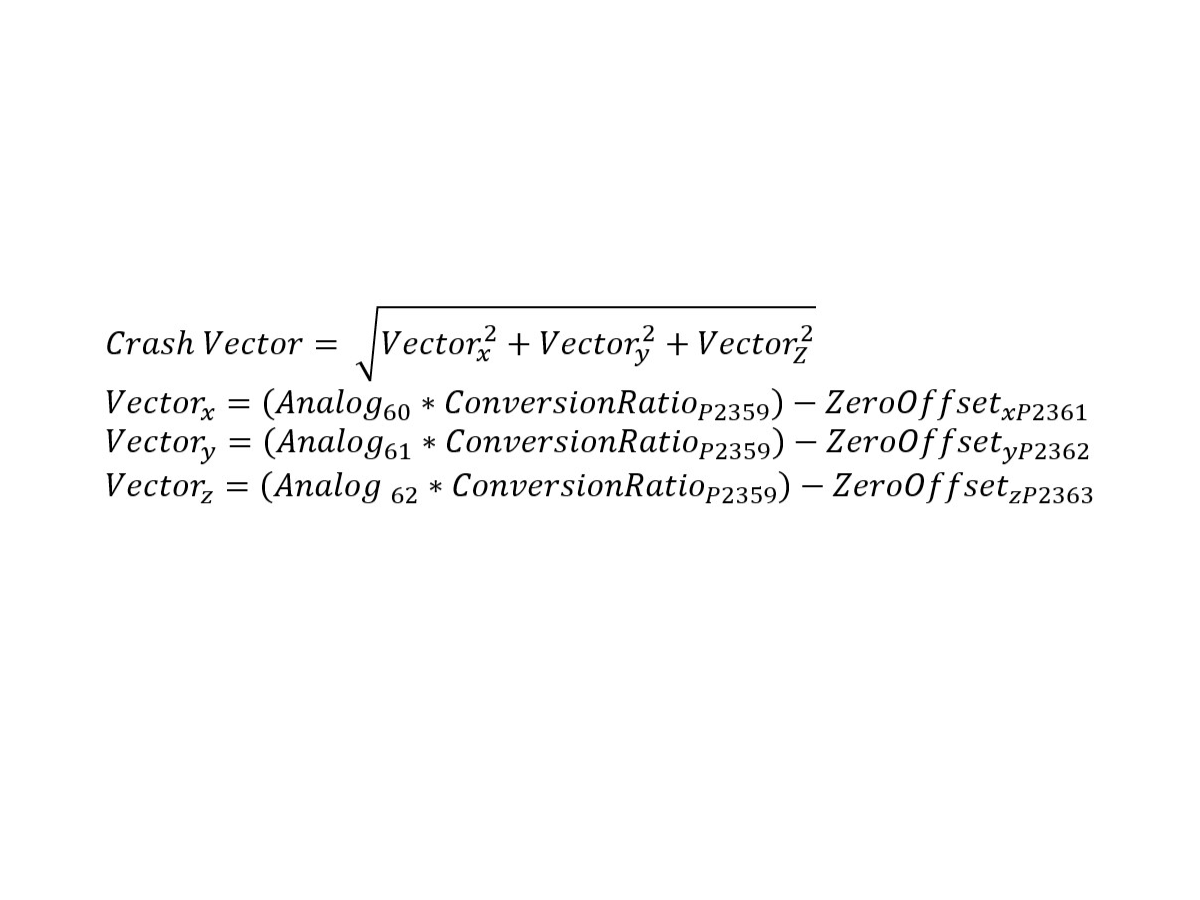
These parameters work together to trigger Alarm 9941. If Parameter 2358 is enabled the control will monitor the accelerometers in the X, Y, and Z.

The following equation in the image is used to trigger Alarm 9941. If this value is greater than Parameter 2359 then the alarm will trigger.

NOTE: When safe mode is enabled and active (ie. during rapids), the alarm behavior will be suppressed so the machine can do the normal back off behavior, then the alarm will generate.  The G force value will still be recorded at the time of the event.

1

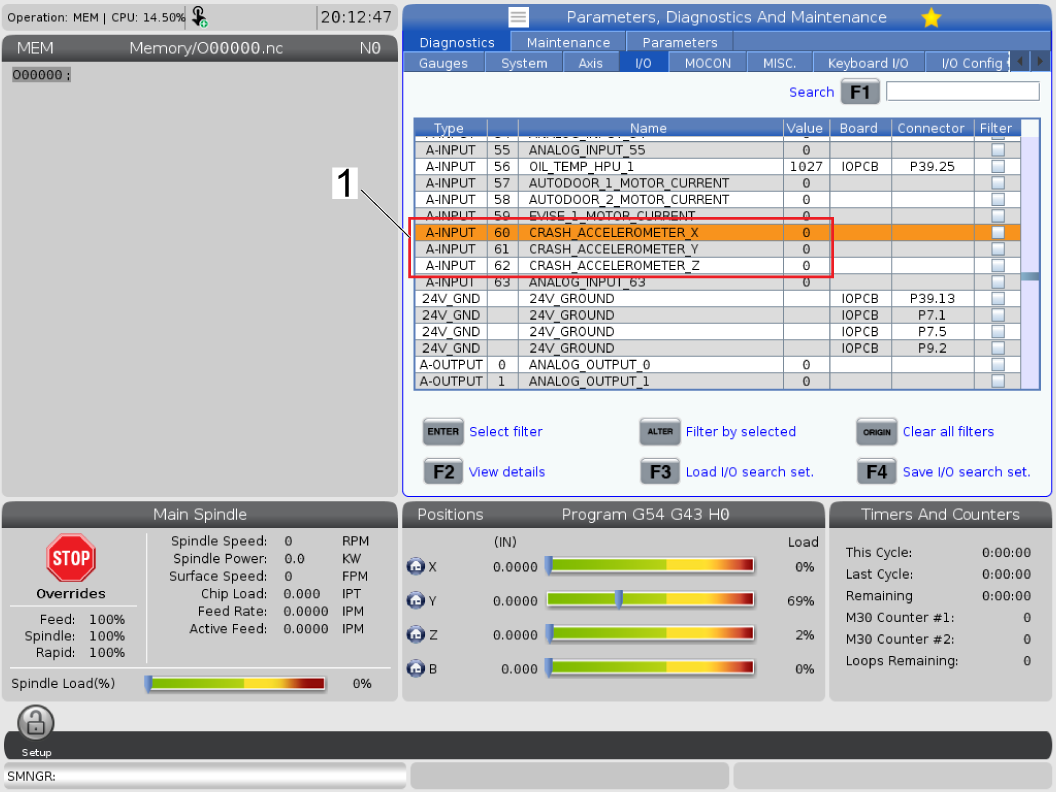
The control allows the user to view the crash accelerometer data in real time. Press [DIAGNOSTIC] then navigate to the I/O tab and view Analog input 60, 61, and 62 [1]. 

These values will show in the control as ADC and converted to mm/sec^2 in the controller using Parameter 2360. 

2

If a machine has crashed Alarm 9941 will appear on the controller.

If an error report was taken you are able to view the vector sum, which triggers this alarm if it exceeds Parameter 2359, by navigating to the JavaConsoleLog.txt in the error report.

Follow the file path as described Error Report [1] > HaasData [2] > JavaConsoleLog.txt [3]. In the JavaConsoleLog.txt file there will be a line showing the accelerometer values for the X, Y, and Z axis. There will also be the total vector value, this is the value that will trigger Parameter 2359 if exceeded.

3

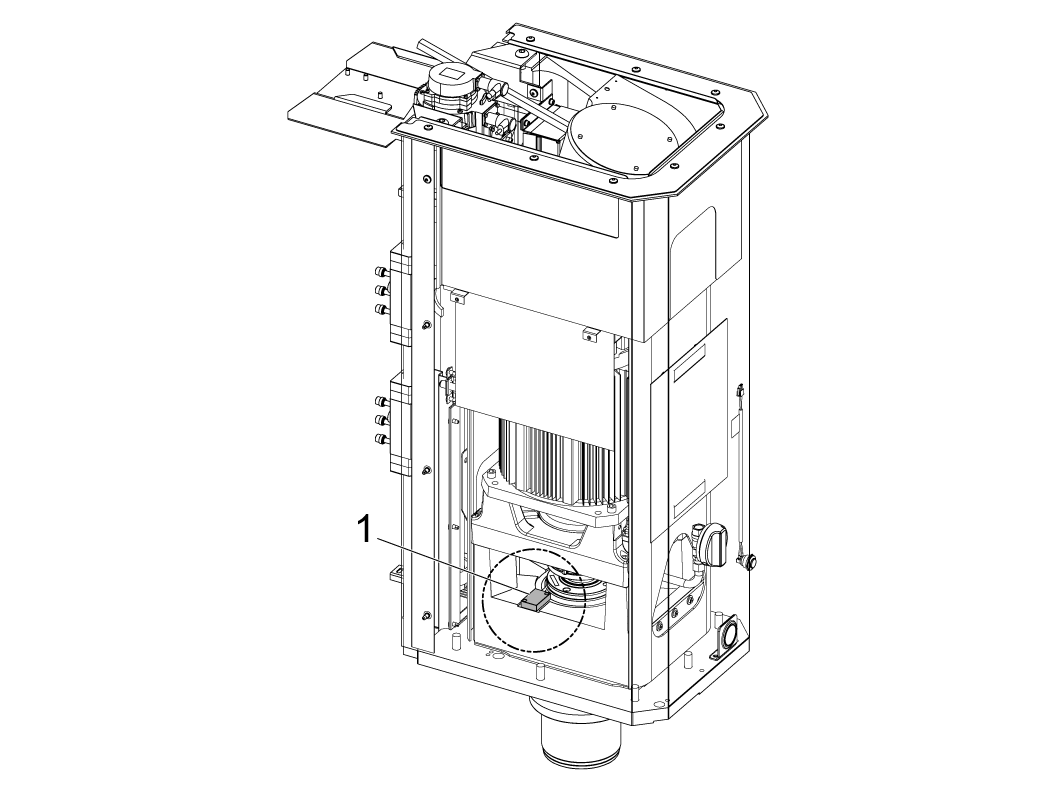
The crash detection accelerometer is located in the spindle head, specifically on the Spindle mount casting as shown in the image [1].

NOTE: Pictured is a UMC-500, the orientation will vary on different machine lines. 

4

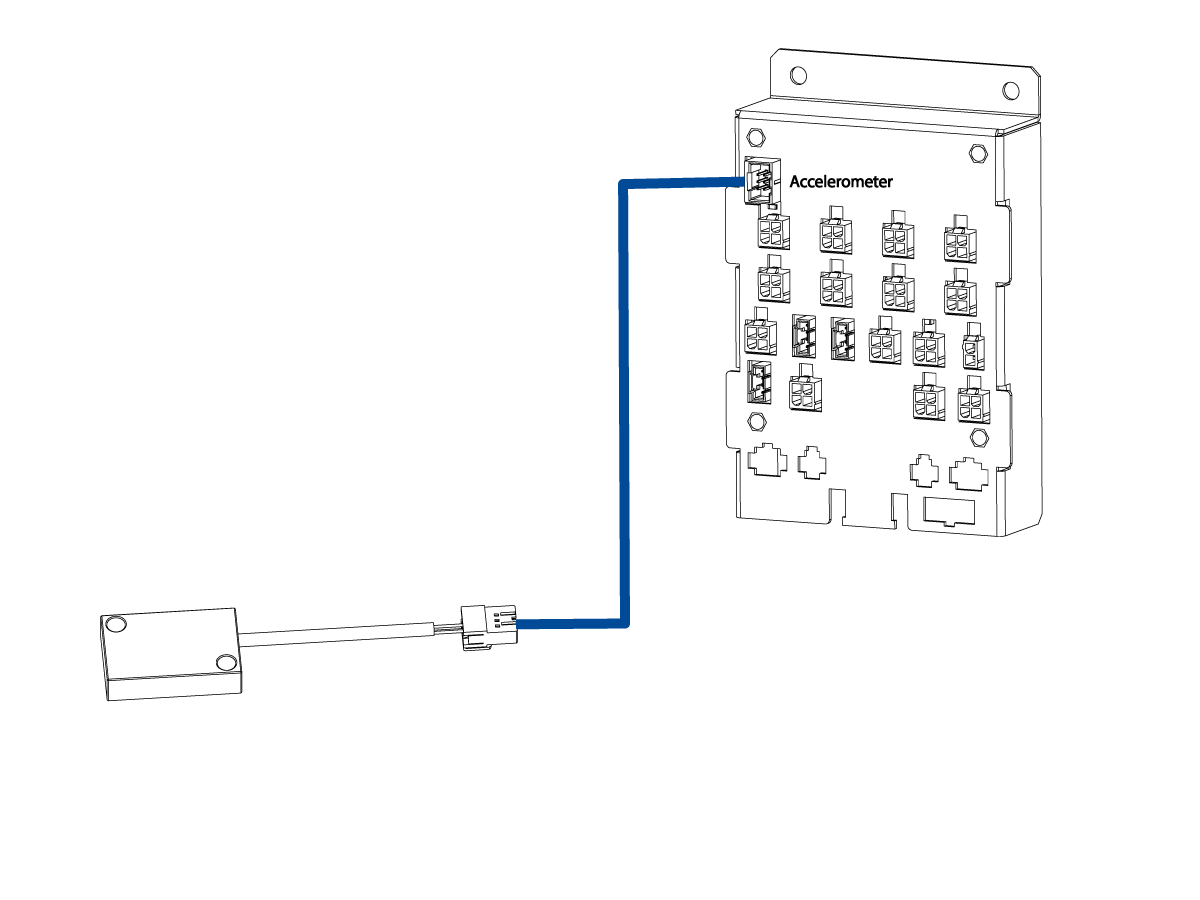
The accelerometer connects to the spindle head CAN board in the port labeled "accelerometer". 

There are several wiring configurations depending on how many CAN systems are installed on the machine. For further information please refer to our CAN Bus Systems - Troubleshooting Guide.

NOTE: Coolant intrusion or physical damage to the accelerometer, cable, or spindle head CAN board can result in nuisance 9941 alarms that will not clear with a reset. 

Recently Viewed Items

You Have No Recently Viewed Items Yet

Feedback
Haas Logo

Haas Delivered Price

This price includes shipping cost, export and import duties, insurance, and any other expenses incurred during shipping to a location in France agreed with you as a buyer. No other mandatory costs can be added to the delivery of a Haas CNC Product.

KEEP UP WITH THE LATEST HAAS TIPS AND TECHNOLOGY...

Sign up now!   

HAAS TOOLING ACCEPTS THE FOLLOWING:

  • Service & Support
  • Owners
  • Request Service
  • Operator Manuals
  • Haas Parts
  • Rotary Repair Request
  • Pre-Install Guides
  • Shopping Tools
  • Build & Price a New Haas
  • Available Inventory
  • The Haas Price List
  • CNCA Financing
  • About Haas
  • Accessibility Statement
  • DNSH Statement
  • Export Compliance
  • Careers
  • Certifications & Safety
  • Contact Us
  • History
  • Terms & Conditions
  • Haas Tooling Terms & Conditions
  • Privacy
  • Warranty
  • Haas Community
  • Haas Certification Program
  • Haas Motorsports
  • Gene Haas Foundation
  • Haas Technical Education Community
  • Events
  • Join the Conversation
  • Facebook
  • X
  • Flickr
  • YouTube
  • LinkedIn
  • Instagram
  • TikTok
© 2026 Haas Automation, Inc – CNC Machine Tools

This site is protected by reCAPTCHA and the Google Privacy Policy and Terms of Service apply.

2800 Sturgis Rd., Oxnard, CA 93030
Toll Free: (888) 817-4446 / Fax: 805-278-8554