My Haas Welcome,
!
Haas Tooling MyHaas/HaasConnect Sign In Register Haas Tooling MyHaas/HaasConnect Sign Out Welcome, My Machines Latest Activity My Quotes My Account My Users Sign Out
Find Your Distributor
  1. Select Language
    1. English
    2. Deutsch
    3. Español - España
    4. Español - México
    5. Français
    6. Italiano
    7. Português
    8. Český
    9. Dansk
    10. Nederlands
    11. Magyar
    12. Polski
    13. Svenska
    14. Türkçe
    15. 中文
    16. Suomi
    17. Norsk
    18. الإنجليزية
    19. български
    20. Hrvatski
    21. Ελληνικά
    22. Română
    23. Slovenský
    24. Slovenščina
    25. 한국어
    26. 日本語
    27. Українська
  • machines Main Menu
    • Vertical Mills
      Vertical Mills
      Vertical Mills View All
      • Vertical Mills
      • VF Series
      • Universal Machines
      • VR Series
      • VP-5 Prismatic
      • Pallet-Changing VMCs
      • Mini Mills
      • Mold Machines
      • High-Speed Drill Centers
      • Drill/Tap/ Mill Series
      • Toolroom Mills
      • Pocket Mill
      • Compact Mills
      • Gantry Series
      • SR Sheet Routers
      • Extra-Large VMC
      • Double-Column Mills
      • 3+2 Positioning Machines
    • Multi-Axis Solutions
      Multi-Axis Solutions
      Multi-Axis Solutions View All
      • Multi-Axis Solutions
      • Y-Axis Lathes
      • 5-Axis Mills
    • Lathes
      Lathes
      Lathes View All
      • Lathes
      • ST Series
      • Dual-Spindle
      • Box Way Series
      • Toolroom Lathes
      • Chucker Lathe
      • Haas Bar Feeders
    • Horizontal Mills
      Horizontal Mills
      Horizontal Mills View All
      • Horizontal Mills
      • 50-Taper
      • 40-Taper
    • Rotaries & Indexers
      Rotaries & Indexers
      Rotaries & Indexers View All
      • Rotaries & Indexers
      • Rotary Tables
      • Indexers
      • 5-Axis Rotaries
      • Extra-Large Rotaries
    • Special Series
      Special Series
      Special Series View All
      • Special Series
      • EU_Series_Redirect
    • Automation Systems
      Automation Systems
      Automation Systems View All
      • Automation Systems
      • Mill Automation
      • Lathe Automation
      • Automatic Parts Loaders
      • Automation Models
    • Desktop Machines
      Desktop Machines
      Desktop Machines View All
      • Desktop Machines
      • Desktop Mill
      • Desktop Lathe
      • Control Simulator, Standard
      • Control Simulator, Premium
    • Shop Equipment
      Shop Equipment
      Shop Equipment View All
      • Shop Equipment
      • Knee Mill
      • Haas Manual Lathes
      • Haas Saws
    • Fabrication Machines
      Fabrication Machines
      Fabrication Machines View All
      • Fabrication Machines
      • Laser Cutting Machines
      • CNC Press Brakes
    • QUICK LINKS Special Series  Special Series 
      EU SERIES EU SERIES BUILD & PRICE | PRICE LIST BUILD & PRICE | PRICE LIST In-Stock Machines In-Stock Machines WHAT’S NEW WHAT’S NEW YOUR FIRST CNC YOUR FIRST CNC
      SHOPPING TOOLS
      • Build & Price a Haas
      • Price List
      • Available Inventory
      • CNCA Financing
      WANT TO TALK TO SOMEONE?

      A Haas Factory Outlet (HFO) can answer your questions, and walk you through your best options.

      CONTACT YOUR DISTRIBUTOR >
  • Options Main Menu
    • The Haas Control Value Option Packages
      Value Option Packages
      Value Option Packages View All
      • Value Option Packages
    • Product Image Spindles
      Spindles
      Spindles View All
      • Spindles
    • Product Image Tool Changers
      Tool Changers
      Tool Changers View All
      • Tool Changers
    • Product Image 4th- | 5th-Axis
      4th- | 5th-Axis
      4th- | 5th-Axis View All
      • 4th- | 5th-Axis
    • Product Image Turrets & Live Tooling
      Turrets & Live Tooling
      Turrets & Live Tooling View All
      • Turrets & Live Tooling
    • Product Image Probing
      Probing
      Probing View All
      • Probing
    • Haas Chip & Coolant Management Chip & Coolant Management
      Chip & Coolant Management
      Chip & Coolant Management View All
      • Chip & Coolant Management
    • The Haas Control The Haas Control
      The Haas Control
      The Haas Control View All
      • The Haas Control
    • Product Image Product Options
      Product Options
      Product Options View All
      • Product Options
    • Product Image Tooling & Fixturing
      Tooling & Fixturing
      Tooling & Fixturing View All
      • Tooling & Fixturing
    • Product Image Workholding
      Workholding
      Workholding View All
      • Workholding
    • Product Image 5-Axis Solutions
      5-Axis Solutions
      5-Axis Solutions View All
      • 5-Axis Solutions
      • 5 Easy Steps to 5-Axis
    • QUICK LINKS Special Series  Special Series 
      EU SERIES EU SERIES BUILD & PRICE | PRICE LIST BUILD & PRICE | PRICE LIST In-Stock Machines In-Stock Machines WHAT’S NEW WHAT’S NEW YOUR FIRST CNC YOUR FIRST CNC
      SHOPPING TOOLS
      • Build & Price a Haas
      • Price List
      • Available Inventory
      • CNCA Financing
      WANT TO TALK TO SOMEONE?

      A Haas Factory Outlet (HFO) can answer your questions, and walk you through your best options.

      CONTACT YOUR DISTRIBUTOR >
  • Why Haas Main Menu
      Discover the Haas Difference
    • Why Haas
    • MyHaas
    • Education Community
    • Industry 4.0
    • Haas Certification
    • Customer Testimonials
  • Service Main Menu
      Welcome to Haas Service
      SERVICE HOME Operator’s Manuals How-To Procedures Troubleshooting Guides Preventive Maintenance Haas Parts Haas Tooling Videos
  • Videos Main Menu
  • Main Menu
    • View All
    • View All
    • View All
    • View All
      • HTEC Curriculum Support
    • View All
      • Haas 10 kg Cobot Package
      • Cobot Kits
      • DC-1 Drill Center
      • CNC Sales News
      • Do More With Your Haas
    • View All
    • View All
      • contact-us-test
      • 4 - AUTOMATION SYSTEMS
      • Carousel-V2
      • expert test
      • Demo_Day_Trident-test
      • Link Test
      • image-sale-tag-test
      • article-list-test
      • Haas 25 kg Robot Package
    • View All
      • Choose Options
    • View All
    • View All
    • View All
    • View All
    • View All
      • calc-test
    • View All
    • QUICK LINKS Special Series  Special Series 
      EU SERIES EU SERIES BUILD & PRICE | PRICE LIST BUILD & PRICE | PRICE LIST In-Stock Machines In-Stock Machines WHAT’S NEW WHAT’S NEW YOUR FIRST CNC YOUR FIRST CNC
      SHOPPING TOOLS
      • Build & Price a Haas
      • Price List
      • Available Inventory
      • CNCA Financing
      WANT TO TALK TO SOMEONE?

      A Haas Factory Outlet (HFO) can answer your questions, and walk you through your best options.

      CONTACT YOUR DISTRIBUTOR >
  • Haas Tooling Main Menu
  • Haas Service Parts Main Menu

My Haas Welcome,
!
Haas Tooling MyHaas/HaasConnect Sign In Register Haas Tooling MyHaas/HaasConnect Sign Out Welcome, My Machines Latest Activity My Quotes My Account My Users Sign Out
Find Your Distributor
  1. Select Language
    1. English
    2. Deutsch
    3. Español - España
    4. Español - México
    5. Français
    6. Italiano
    7. Português
    8. Český
    9. Dansk
    10. Nederlands
    11. Magyar
    12. Polski
    13. Svenska
    14. Türkçe
    15. 中文
    16. Suomi
    17. Norsk
    18. الإنجليزية
    19. български
    20. Hrvatski
    21. Ελληνικά
    22. Română
    23. Slovenský
    24. Slovenščina
    25. 한국어
    26. 日本語
    27. Українська
×

Search Results

Web Pages

Images

    • <
    • 1
    • >

Desktop Mill - Troubleshooting Guide - TG0058

Service Home Desktop Mill - Troubleshooting Guide - TG0058

Desktop Mill - Troubleshooting Guide - TG0058

- Jump to Cause - Back to Top

11.1 Desktop Mill - Troubleshooting guide

Recently Updated Last updated: 10/10/2025

Desktop Mill - Troubleshooting Guide


TG0058

Revision B - 10/2025

Introduction

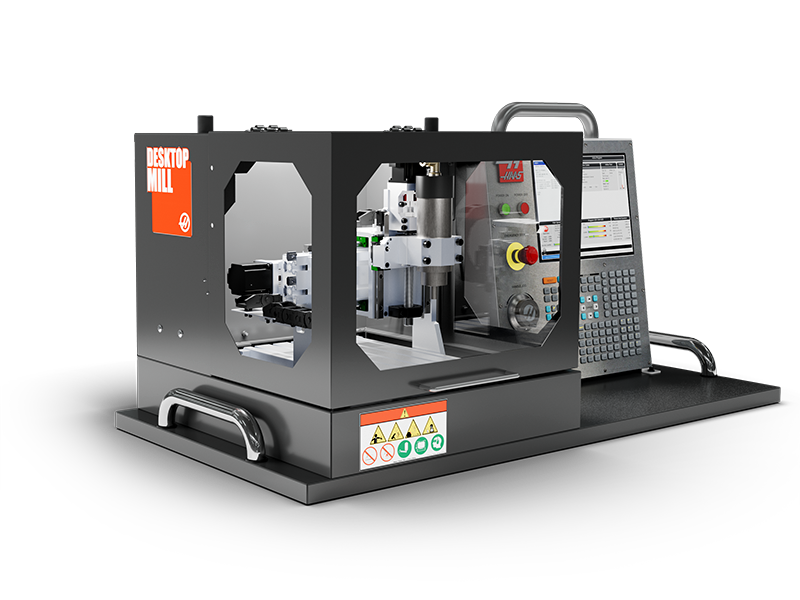
The Haas Desktop Mill is the ultimate training machine for schools and technical colleges.

Powered by a full-function Haas CNC control housed in our portable simulator enclosure, the Desktop Mill is perfect for teaching the basic principles of programming and operating a CNC mill.

Designed to cut plastics and machinable wax, it is also perfect for hobbyists and benchtop machinists.

Symptom Table

Symptom Possible Cause Corrective Action

Alarm 4.992 S (SPINDLE) AMPLIFIER OVER CURRENT

VFD Drive Error Code:  SF1 Motor Short Circuit

Short-circuit or grounding at the drive output.  Refer to the VFD User Manual for the manufacturer's recommendations:  Schneider Altivar 12 Users Manual
As the spindle comes to a stop, it starts spinning in the opposite direction. VFD display will flash and show outputs of 7Hz to 11Hz.  Incorrect parameters in VFD. 

Correct the parameters. This only applies to Schneider VFDs.

The VFD screen will show "rdy" when the machine is on. The VFD has a rotating button for menu navigation. Press the button to enter the menu system. Rotate the button to change your selection, then press it to confirm. Use the ESC button to move back up the menu tree.

1. Change the motor control type from PErF “Performance” to Std “Standard.”  

On the VFD select COnF -> FULL -> drC -> Ctt -> Std

2. Change to DC injection from Yes to No. 

On the VFD select COnF -> FULL -> FUn -> AdC -> AdC -> nO

3. Change deceleration from 1 sec to 1.5 sec.

On the VFD, select COnF -> dEC -> set to 1.5

When trying to run the spindle at 10k rpm or higher, the VFD displays the OCF (overcurrent) error, and the NGC control generates alarms 4.9920 S (Spindle) Position Error too Large and 9146 Tabletop Driver Fault.  Incorrect parameters in VFD. 

Change the Nominal Motor Speed. 

ConF -> FULL -> drC -> nSP -> set the value to “21.00” which represents 21000. (press down on the JOG Dial to confirm the value)

This only applies to 120V Schneider VFDs.

Alarm 4.9920 S (Spindle) Position Error too Large is generated on startup and is resettable.  Software Error 
Press the [RESET] button. Desktop Mill can then be used as usual. 
Alarm 9142 Tabletop 24V Driver Power Supply Fault appears,  followed by 9146 Tabletop Driver Fault, after attempting to run a program.  Outdated Firmware 

The TT Firmware Version on the adapter board must be updated to MA.02.07. To locate its current version, select Diagnostics > System > Hardware.  

Instructions for updating the firmware can be found at I/O PCB, Regen Vector Drive, Auto Door Firmware - Update - NGC.

Alarm 9144 Tabletop Secondary Cable Disconnect appears after updating the software to 100.24.000.1200. 

The TT Firmware Version on the adapter board must be updated to MA.02.09. To locate its current version, select Diagnostics > System > Hardware.  

Instructions for updating the firmware can be found at I/O PCB, Regen Vector Drive, Auto Door Firmware - Update - NGC.

No axis load while the machine is in motion. None There is no force feedback from the axis motors or amplifiers to the control. Therefore, no axis load will show on the control. The machine is operating normally as intended. 
Operating the spindle at low speeds is inaccurate and can also cause excessive overheating. None

Running the spindle below 1500 RPM will result in excessive current being delivered to the integrated spindle motor, leading to failure. 

Update software to 100.24.000.1120 or higher. This will prevent any attempt to lower the spindle speed below 1500 rpm. 

HBC - 03-26-25
Attempting to command the spindle at a speed below its minimum allowed speed will cause Alarm 9192: Spindle Speed too Low. 
The spindle activates when it is not commanded.  Outdated control parameters. Update to the latest version of software and update configuration files. 
The Estop button is released, but alarm 107 EMERGENCY STOP does not reset.  Estop cable has been disconnected.  Refer to the Estop and Alarm 107 Section below for the corrective action. 
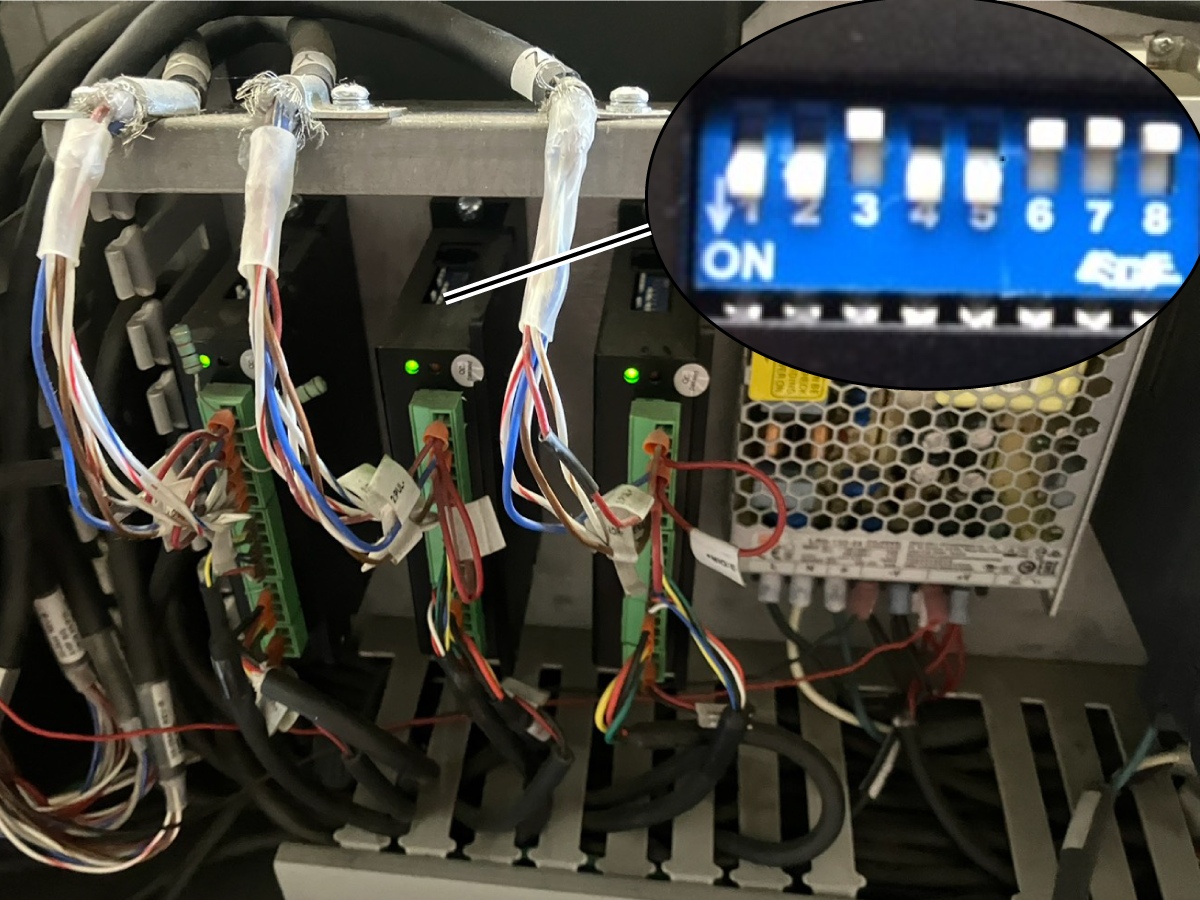
The spindle appears to move a reduced amount of its commanded distance. Tampered dip switches. Refer to the Reduced Axis Travel Section below for the corrective action. 
Alarms 4.9911 AXIS AMPLIFIER CABLE DISCONNECTED and Alarm 9146 TABLETOP DRIVER FAULT are triggered after the spindle intermittently shuts off when commanded to run. Spindle Motor Failure.   Refer to the Desktop Mill Spindle Resistance Test Section below for the corrective action. 
Alarm 4.9146 S (SPINDLE) TABLETOP DRIVER FAULT, and the delta VFD shows the error message Lu5.  Incorrectly wired Delta VFD

The White and brown wires on 33-0546, labeled "RA" or "RB," are connected to terminal RA on the Delta VFD. It should be connected to "RB" even if the wire is labeled "RA". 

Go to AD0561 Desktop Mill - Variable Frequency Drive - Replacement for additional information on wiring the VFD. 

Cannot reset settings 313, 314, or 315 (Max User Travel Limit X, Y, Z) after setting the value to less than 0.22. 

Alarm X.9107 Check your Home switch is generated when trying to reset the values for settings 313, 314, or 315.

An incorrect value entered in the settings caused a software error.  A software clean install is required.  Contact your local Haas Factory Outlet.

Estop and Alarm 107

Possible Cause: The primary Estop cable [1] is disconnected from its port J9 [2] labeled "Estop SIM" on the table top adaptor. 

Corrective Action: 

If no parts are damaged, plug the cable back in and cycle power the machine. 

If the cable [1] is damaged, replace the cable and power cycle the machine. P/N 33-0673

If the port [2] is damaged, replace the table top adaptor.  P/N 93-32-3097

Reduced Axis Travel

Corrective Action: Dip Switches 1-4 on the stepper motor driver establish the step/revolution and must be changed to their correct configuration. 

Switches 1-4 MUST be set as: 

SW1 ON (down)

SW2 ON (down)

SW3 OFF (up) 

SW4 ON (down)

Desktop Mill Spindle Resistance Test

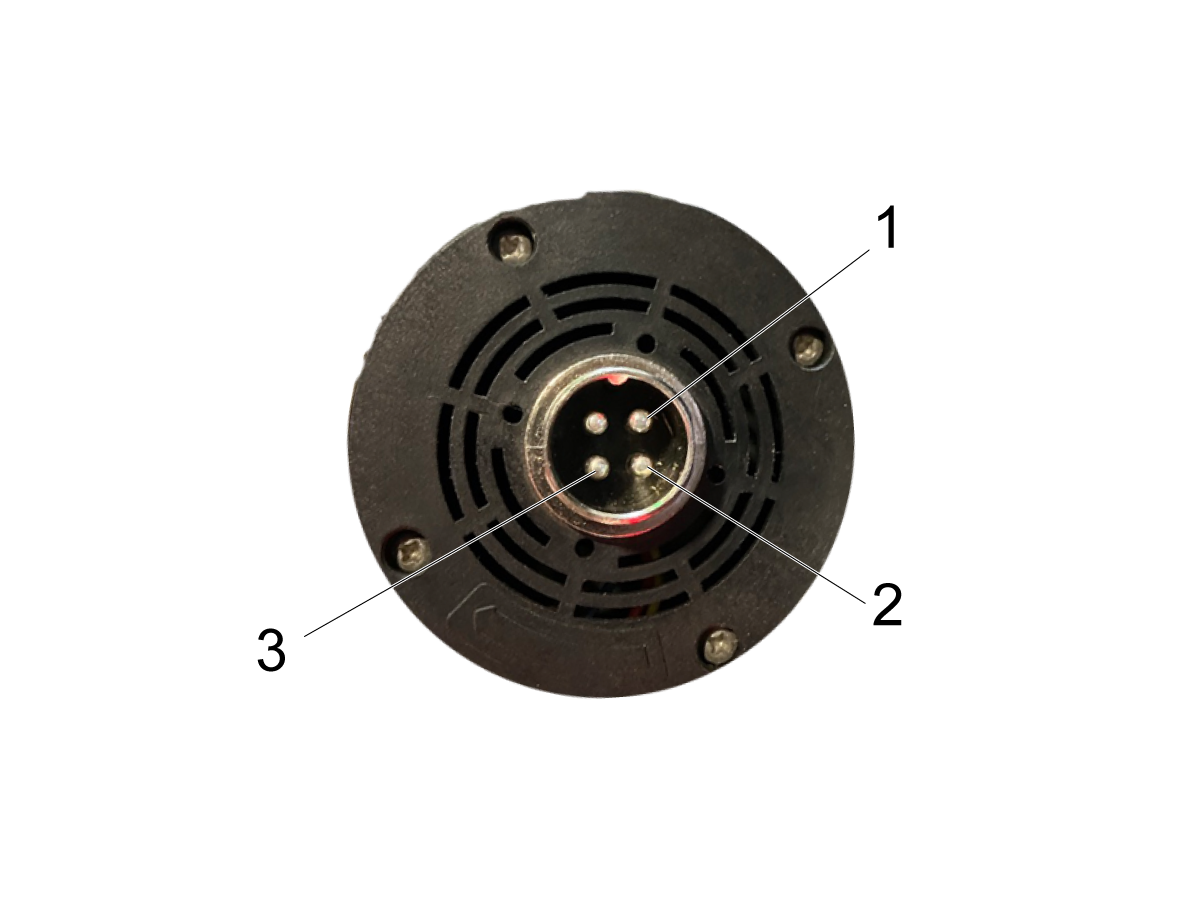
Corrective Action: Use a multimeter to measure the resistance between the pins on the Desktop Mill Spindle.

Remove the Desktop Mill Spindle Power Cable. 

Take the following resistance measurements on the spindle: 

1 to 2.

1 to 3.

2 to 3.

Note: Resistance between each pin should be approximately the same value. 

Note: If the resistance measurements between the pins are noticeably unequal, it indicates that the spindle must be replaced.

Important: In the case of a spindle replacement, machine software must be updated to version 100.24.000.1120 or higher. Please refer to the symptom table above for additional details regarding this update.

Recently Viewed Items

You Have No Recently Viewed Items Yet

Feedback
Haas Logo

Haas Delivered Price

This price includes shipping cost, export and import duties, insurance, and any other expenses incurred during shipping to a location in France agreed with you as a buyer. No other mandatory costs can be added to the delivery of a Haas CNC Product.

KEEP UP WITH THE LATEST HAAS TIPS AND TECHNOLOGY...

Sign up now!   

HAAS TOOLING ACCEPTS THE FOLLOWING:

  • Service & Support
  • Owners
  • Request Service
  • Operator Manuals
  • Haas Parts
  • Rotary Repair Request
  • Pre-Install Guides
  • Shopping Tools
  • Build & Price a New Haas
  • Available Inventory
  • The Haas Price List
  • CNCA Financing
  • About Haas
  • Accessibility Statement
  • DNSH Statement
  • Export Compliance
  • Careers
  • Certifications & Safety
  • Contact Us
  • History
  • Terms & Conditions
  • Haas Tooling Terms & Conditions
  • Privacy
  • Warranty
  • Haas Community
  • Haas Certification Program
  • Haas Motorsports
  • Gene Haas Foundation
  • Haas Technical Education Community
  • Events
  • Join the Conversation
  • Facebook
  • X
  • Flickr
  • YouTube
  • LinkedIn
  • Instagram
  • TikTok
© 2026 Haas Automation, Inc – CNC Machine Tools

This site is protected by reCAPTCHA and the Google Privacy Policy and Terms of Service apply.

2800 Sturgis Rd., Oxnard, CA 93030
Toll Free: (888) 817-4446 / Fax: 805-278-8554