My Haas Welcome,
!
Haas Tooling MyHaas/HaasConnect Sign In Register Haas Tooling MyHaas/HaasConnect Sign Out Welcome, My Machines Latest Activity My Quotes My Account My Users Sign Out
Find Your Distributor
  1. Select Language
    1. English
    2. Deutsch
    3. Español - España
    4. Español - México
    5. Français
    6. Italiano
    7. Português
    8. Český
    9. Dansk
    10. Nederlands
    11. Magyar
    12. Polski
    13. Svenska
    14. Türkçe
    15. 中文
    16. Suomi
    17. Norsk
    18. الإنجليزية
    19. български
    20. Hrvatski
    21. Ελληνικά
    22. Română
    23. Slovenský
    24. Slovenščina
    25. 한국어
    26. 日本語
    27. Українська
  • machines Main Menu
    • Vertical Mills
      Vertical Mills
      Vertical Mills View All
      • Vertical Mills
      • VF Series
      • Universal Machines
      • VR Series
      • VP-5 Prismatic
      • Pallet-Changing VMCs
      • Mini Mills
      • Mold Machines
      • High-Speed Drill Centers
      • Drill/Tap/ Mill Series
      • Toolroom Mills
      • Pocket Mill
      • Compact Mills
      • Gantry Series
      • SR Sheet Routers
      • Extra-Large VMC
      • Double-Column Mills
      • 3+2 Positioning Machines
    • Multi-Axis Solutions
      Multi-Axis Solutions
      Multi-Axis Solutions View All
      • Multi-Axis Solutions
      • Y-Axis Lathes
      • 5-Axis Mills
    • Lathes
      Lathes
      Lathes View All
      • Lathes
      • ST Series
      • Dual-Spindle
      • Box Way Series
      • Toolroom Lathes
      • Chucker Lathe
      • Haas Bar Feeders
    • Horizontal Mills
      Horizontal Mills
      Horizontal Mills View All
      • Horizontal Mills
      • 50-Taper
      • 40-Taper
    • Rotaries & Indexers
      Rotaries & Indexers
      Rotaries & Indexers View All
      • Rotaries & Indexers
      • Rotary Tables
      • Indexers
      • 5-Axis Rotaries
      • Extra-Large Rotaries
    • Special Series
      Special Series
      Special Series View All
      • Special Series
      • EU_Series_Redirect
    • Automation Systems
      Automation Systems
      Automation Systems View All
      • Automation Systems
      • Mill Automation
      • Lathe Automation
      • Automatic Parts Loaders
      • Automation Models
    • Desktop Machines
      Desktop Machines
      Desktop Machines View All
      • Desktop Machines
      • Desktop Mill
      • Desktop Lathe
      • Control Simulator, Standard
      • Control Simulator, Premium
    • Shop Equipment
      Shop Equipment
      Shop Equipment View All
      • Shop Equipment
      • Knee Mill
      • Haas Manual Lathes
      • Haas Saws
    • Fabrication Machines
      Fabrication Machines
      Fabrication Machines View All
      • Fabrication Machines
      • Laser Cutting Machines
      • CNC Press Brakes
    • QUICK LINKS Special Series  Special Series 
      EU SERIES EU SERIES BUILD & PRICE | PRICE LIST BUILD & PRICE | PRICE LIST In-Stock Machines In-Stock Machines WHAT’S NEW WHAT’S NEW YOUR FIRST CNC YOUR FIRST CNC
      SHOPPING TOOLS
      • Build & Price a Haas
      • Price List
      • Available Inventory
      • CNCA Financing
      WANT TO TALK TO SOMEONE?

      A Haas Factory Outlet (HFO) can answer your questions, and walk you through your best options.

      CONTACT YOUR DISTRIBUTOR >
  • Options Main Menu
    • The Haas Control Value Option Packages
      Value Option Packages
      Value Option Packages View All
      • Value Option Packages
    • Product Image Spindles
      Spindles
      Spindles View All
      • Spindles
    • Product Image Tool Changers
      Tool Changers
      Tool Changers View All
      • Tool Changers
    • Product Image 4th- | 5th-Axis
      4th- | 5th-Axis
      4th- | 5th-Axis View All
      • 4th- | 5th-Axis
    • Product Image Turrets & Live Tooling
      Turrets & Live Tooling
      Turrets & Live Tooling View All
      • Turrets & Live Tooling
    • Product Image Probing
      Probing
      Probing View All
      • Probing
    • Haas Chip & Coolant Management Chip & Coolant Management
      Chip & Coolant Management
      Chip & Coolant Management View All
      • Chip & Coolant Management
    • The Haas Control The Haas Control
      The Haas Control
      The Haas Control View All
      • The Haas Control
    • Product Image Product Options
      Product Options
      Product Options View All
      • Product Options
    • Product Image Tooling & Fixturing
      Tooling & Fixturing
      Tooling & Fixturing View All
      • Tooling & Fixturing
    • Product Image Workholding
      Workholding
      Workholding View All
      • Workholding
    • Product Image 5-Axis Solutions
      5-Axis Solutions
      5-Axis Solutions View All
      • 5-Axis Solutions
      • 5 Easy Steps to 5-Axis
    • QUICK LINKS Special Series  Special Series 
      EU SERIES EU SERIES BUILD & PRICE | PRICE LIST BUILD & PRICE | PRICE LIST In-Stock Machines In-Stock Machines WHAT’S NEW WHAT’S NEW YOUR FIRST CNC YOUR FIRST CNC
      SHOPPING TOOLS
      • Build & Price a Haas
      • Price List
      • Available Inventory
      • CNCA Financing
      WANT TO TALK TO SOMEONE?

      A Haas Factory Outlet (HFO) can answer your questions, and walk you through your best options.

      CONTACT YOUR DISTRIBUTOR >
  • Why Haas Main Menu
      Discover the Haas Difference
    • Why Haas
    • MyHaas
    • Education Community
    • Industry 4.0
    • Haas Certification
    • Customer Testimonials
  • Service Main Menu
      Welcome to Haas Service
      SERVICE HOME Operator’s Manuals How-To Procedures Troubleshooting Guides Preventive Maintenance Haas Parts Haas Tooling Videos
  • Videos Main Menu
  • Main Menu
    • View All
    • View All
    • View All
    • View All
      • HTEC Curriculum Support
      • Haas Value Option Packages (VOP) Journey
    • View All
      • Haas 10 kg Cobot Package
      • Cobot Kits
      • DC-1 Drill Center
      • CNC Sales News
      • Do More With Your Haas
    • View All
    • View All
      • contact-us-test
      • 4 - AUTOMATION SYSTEMS
      • Carousel-V2
      • expert test
      • Demo_Day_Trident-test
      • Link Test
      • image-sale-tag-test
      • article-list-test
      • Haas 25 kg Robot Package
      • test-algolia-page
    • View All
    • View All
    • View All
    • View All
      • calc-test
    • View All
    • QUICK LINKS Special Series  Special Series 
      EU SERIES EU SERIES BUILD & PRICE | PRICE LIST BUILD & PRICE | PRICE LIST In-Stock Machines In-Stock Machines WHAT’S NEW WHAT’S NEW YOUR FIRST CNC YOUR FIRST CNC
      SHOPPING TOOLS
      • Build & Price a Haas
      • Price List
      • Available Inventory
      • CNCA Financing
      WANT TO TALK TO SOMEONE?

      A Haas Factory Outlet (HFO) can answer your questions, and walk you through your best options.

      CONTACT YOUR DISTRIBUTOR >
  • Haas Tooling Main Menu
  • Haas Service Parts Main Menu

My Haas Welcome,
!
Haas Tooling MyHaas/HaasConnect Sign In Register Haas Tooling MyHaas/HaasConnect Sign Out Welcome, My Machines Latest Activity My Quotes My Account My Users Sign Out
Find Your Distributor
  1. Select Language
    1. English
    2. Deutsch
    3. Español - España
    4. Español - México
    5. Français
    6. Italiano
    7. Português
    8. Český
    9. Dansk
    10. Nederlands
    11. Magyar
    12. Polski
    13. Svenska
    14. Türkçe
    15. 中文
    16. Suomi
    17. Norsk
    18. الإنجليزية
    19. български
    20. Hrvatski
    21. Ελληνικά
    22. Română
    23. Slovenský
    24. Slovenščina
    25. 한국어
    26. 日本語
    27. Українська
×

Search Results

Web Pages

Images

    • <
    • 1
    • >

4 - Minimum Quantity Lubrication

Lubrication Systems - Service Manual


  • 1 - Lube Systems - Introduction
  • 2 - Haas Axis Lubrication Oil
  • 3 - Haas Liquid Grease
  • 4 - Minimum Quantity Lubrication
  • 5 - PulseJet System

Go To :

  • 4.1 MQL - Installation
  • 4.2 MQL - Filter Maintenance
  • 4.3 MQL - Retrofit Kit
  • 4.4 MQL - Lubrication Chart
Recently Updated

Minimum Quantity Lubrication (MQL) - Installation


AD0150

Introduction

The optional Minimum-Quantity Lubrication has these functions:

  • An oil reservoir and atomizer continuously spray small quantities of oil onto the cutting tool.
  • Flood coolant is not necessary.
  • The part is easier to see during machine operation.
  • The surface finish is smoother.
  • The dry chips make recycling easier.

Machine Compatibility

  • The Auto Air Gun (AAG) is necessary to install the MQL system.

             Note: See the Auto Air Gun - Installation procedure for machine requirements for the AAG.

This procedure applies to the following kits:

  • P/N: MIN QTY LUBE, MINIMUM QUANTITY LUBRICATION SYSTEM
  • 93-1000289: MINIMUM QUANTITY LUBRICATION SYSTEM

Tools Required

  • Drill
  • Drill bit Size 27 (0.144")

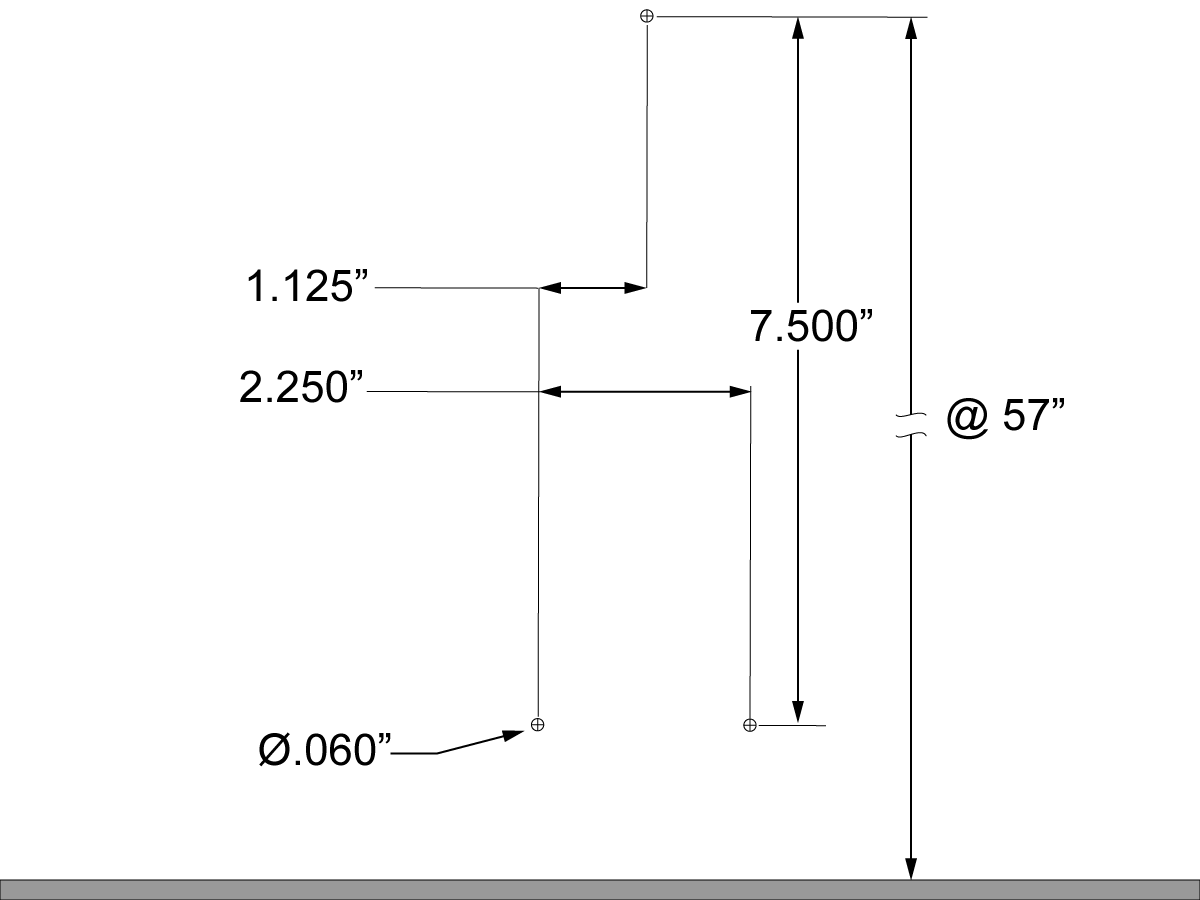
Template

Some machines do not have marks on the front right panel for the bracket holes. For these machines, use this template or the bracket to mark the location of the holes for the bracket.

VMC - Installation

1

Push [POWER OFF].

Set the main circuit breaker to the OFF position.

Lock the main circuit breaker. Use an approved lock with an approved safety tag.

Close the primary air valve. This stops the air supply to the machine.

2

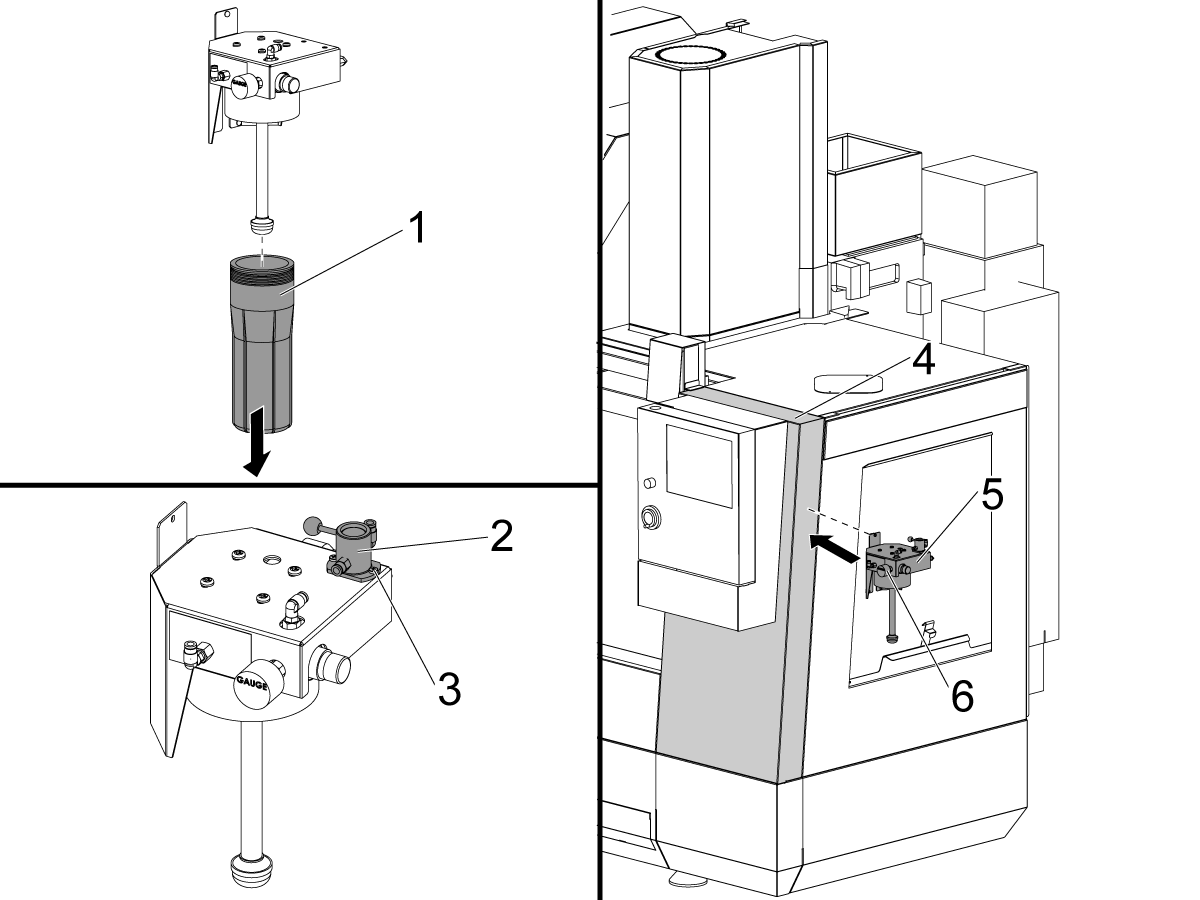
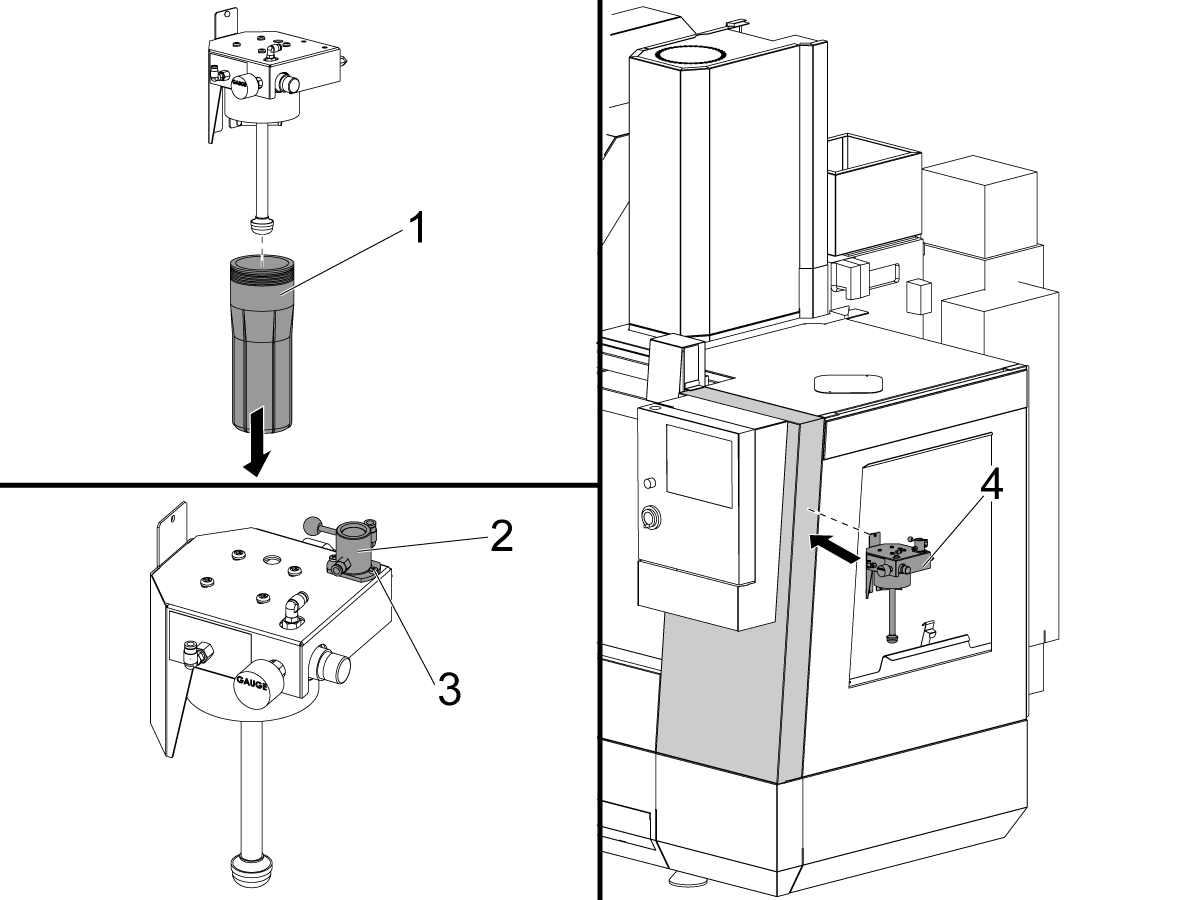
Remove the reservoir bowl [1] from the MQL oil reservoir assembly.

Attach the toggle valve [2] using the provided pemnuts [3]

Hold the MQL oil reservoir assembly [5] or the template on the right-front panel [4] so that the pressure gauge [6] is 5.5 ft (1.7 m) from the ground.

Caution: Attach the MQL reservoir to the front-right panel only.

3

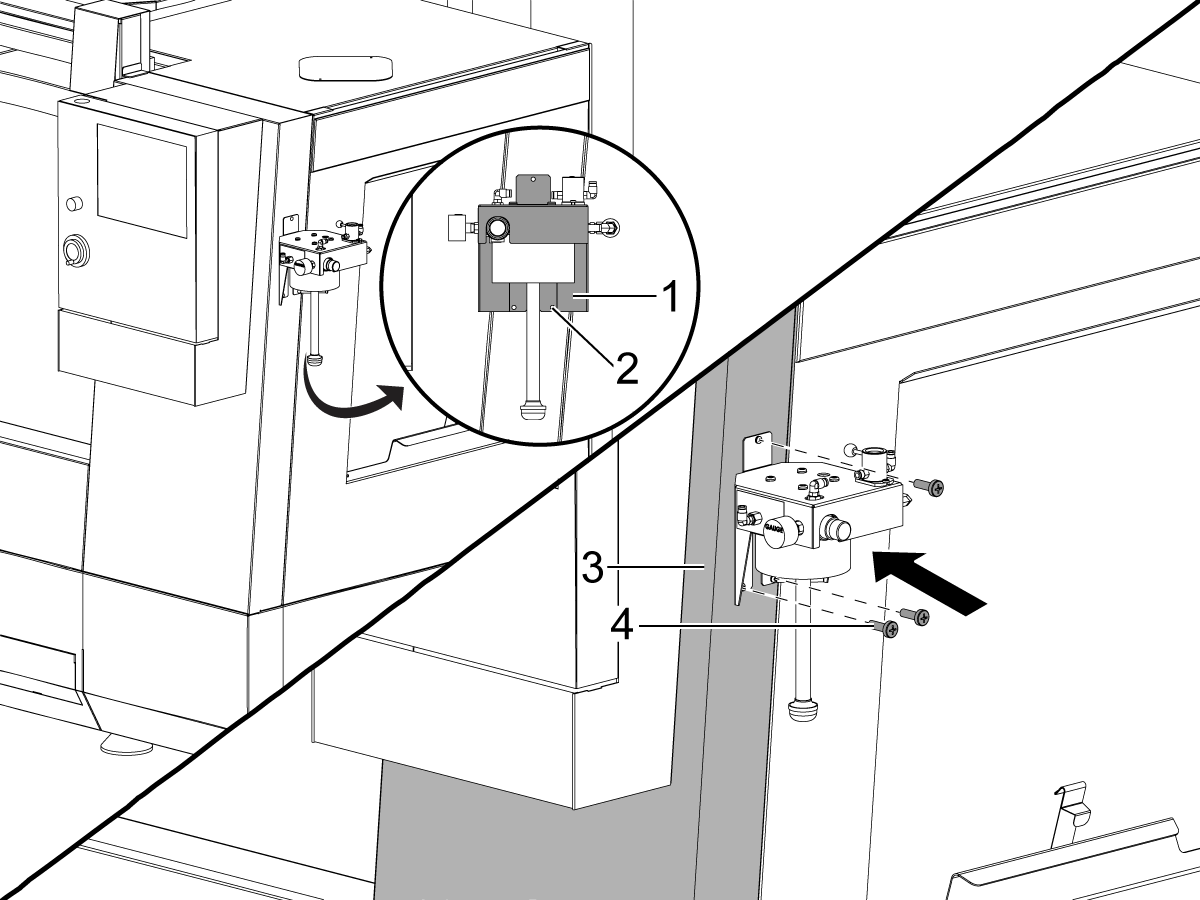
Put marks for the (3) hole locations [2] for the bracket [1] onto the front-right panel.

Note: Some machines have these hole marks. Before drilling, look inside the machine to ensure there are no obstructions for the screws.

Drill the (3) 0.144" (size 27 drill bit) holes in the front-right panel [3].

Attach the bracket to the front-right panel. Use the (3) self-tapping screws [4].

Note: If you damage the sheet metal, use the (3) screws and the (3) nuts.

4

Jog the axes to allow for complete access to all the hardware attaching the upper spindle head cover.

Remove the upper spindle head cover.

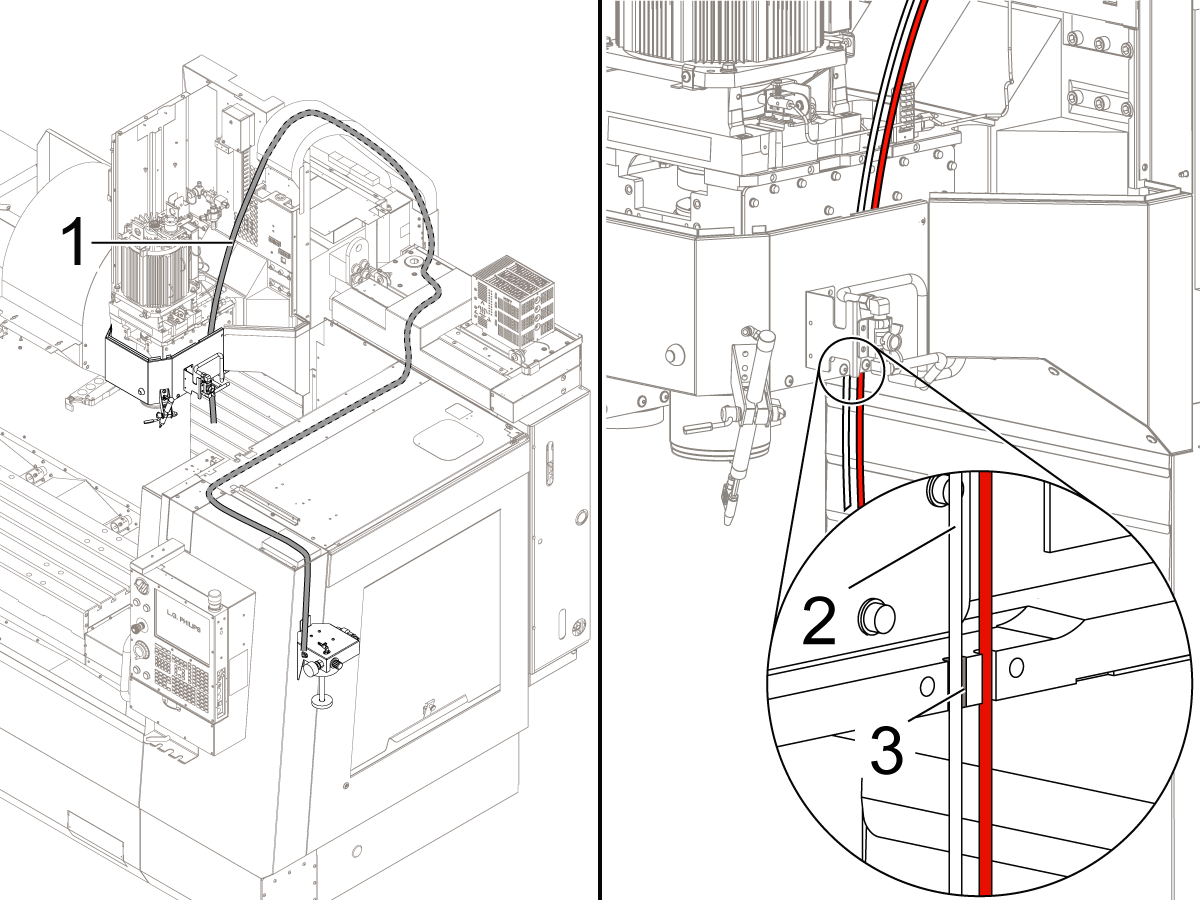
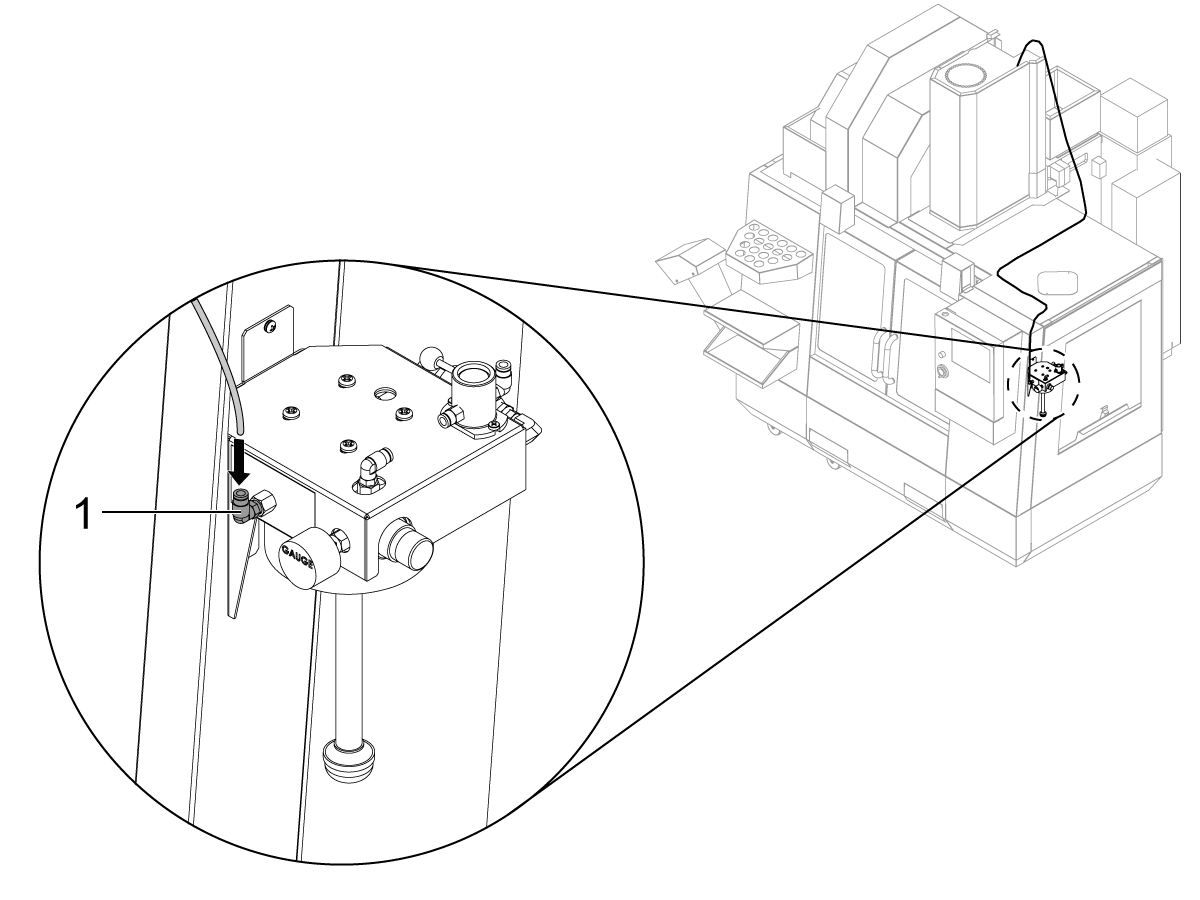
Install the clear 1/4" MQL oil tube [1] through the cable carrier and cable channels as shown. Uncoil the clear 5/32" MQL oil tube that is under the spindle head cover and attach it to the push connect fitting on the 1/4" tube. 

Put the clear 5/32" MQL oil tube [2] through the slot [3] on the spindle head casting.

Note: Keep the fitting that connects the clear 1/4" and 5/32" tubes inside the spindle head cover.

Install the upper cover for the spindle head.

5

Connect the other end of the 1/4" clear tube to the oil output port [1] on the MQL reservoir assembly.

6

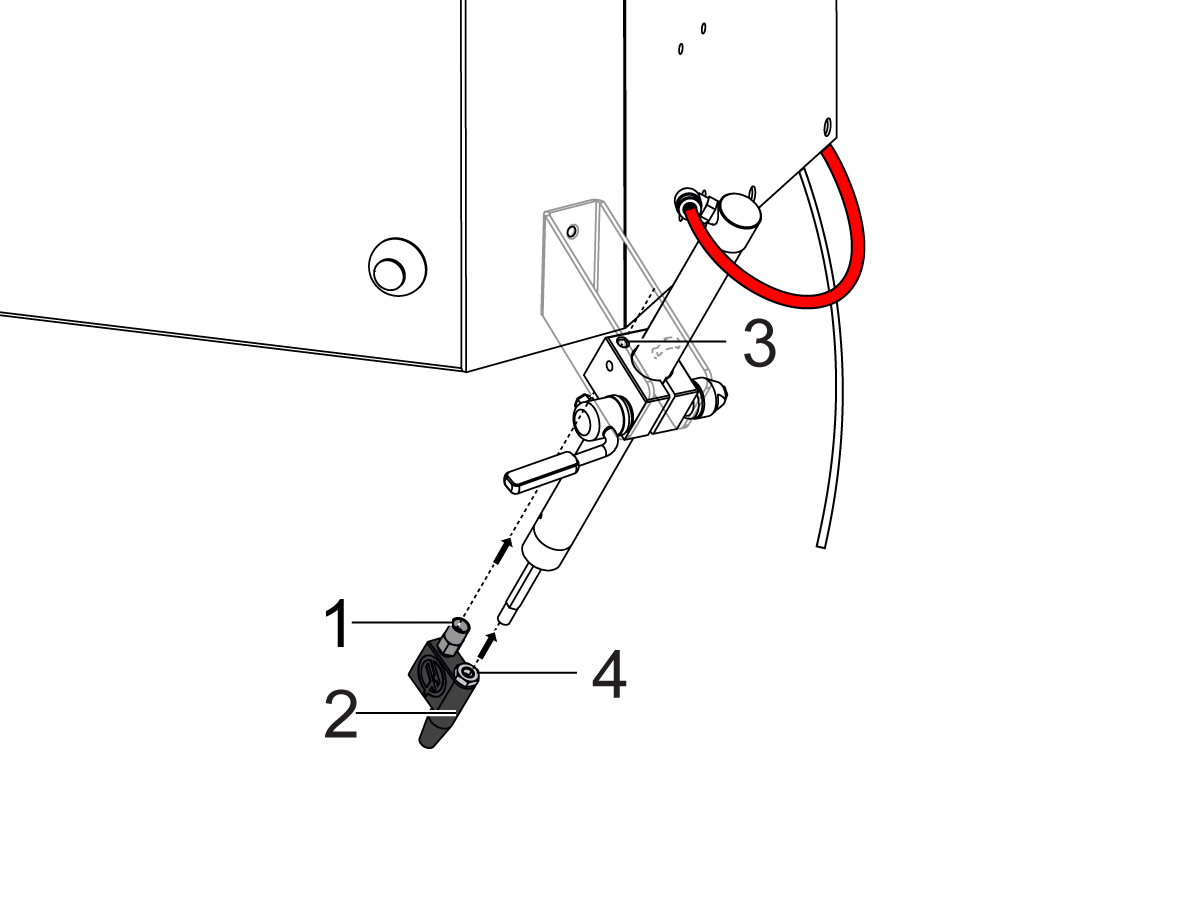
Align the check valve [1] on the MQL atomizer [2] with the through-hole on the cylinder clamp [3].

Install the MQL atomizer to the AAG with the jam nut [4].

Note: For AAGs with the thread inside the cylinder, use the straight brass fitting supplied with the kit. Discard the jam nut.

7

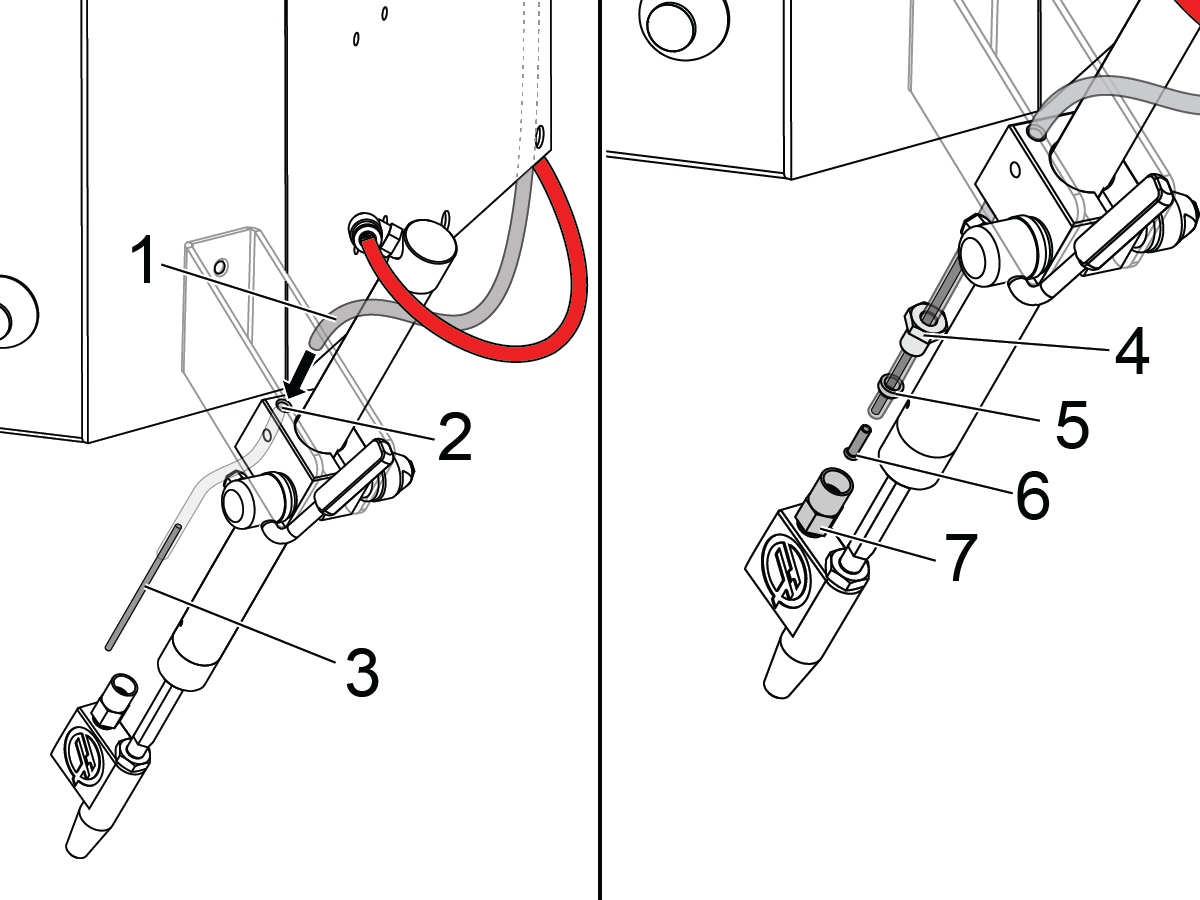
Put the clear MQL oil tube [1] through the hole [2] in the cylinder clamp for the AAG.

Install the brass tube [3] into the clear MQL oil tube [1].

Install the compression nut [4], the sleeve [5], and the insert [6] into the tube.

Attach the compression nut [4] to the check valve [7] on the MQL atomizer.

8

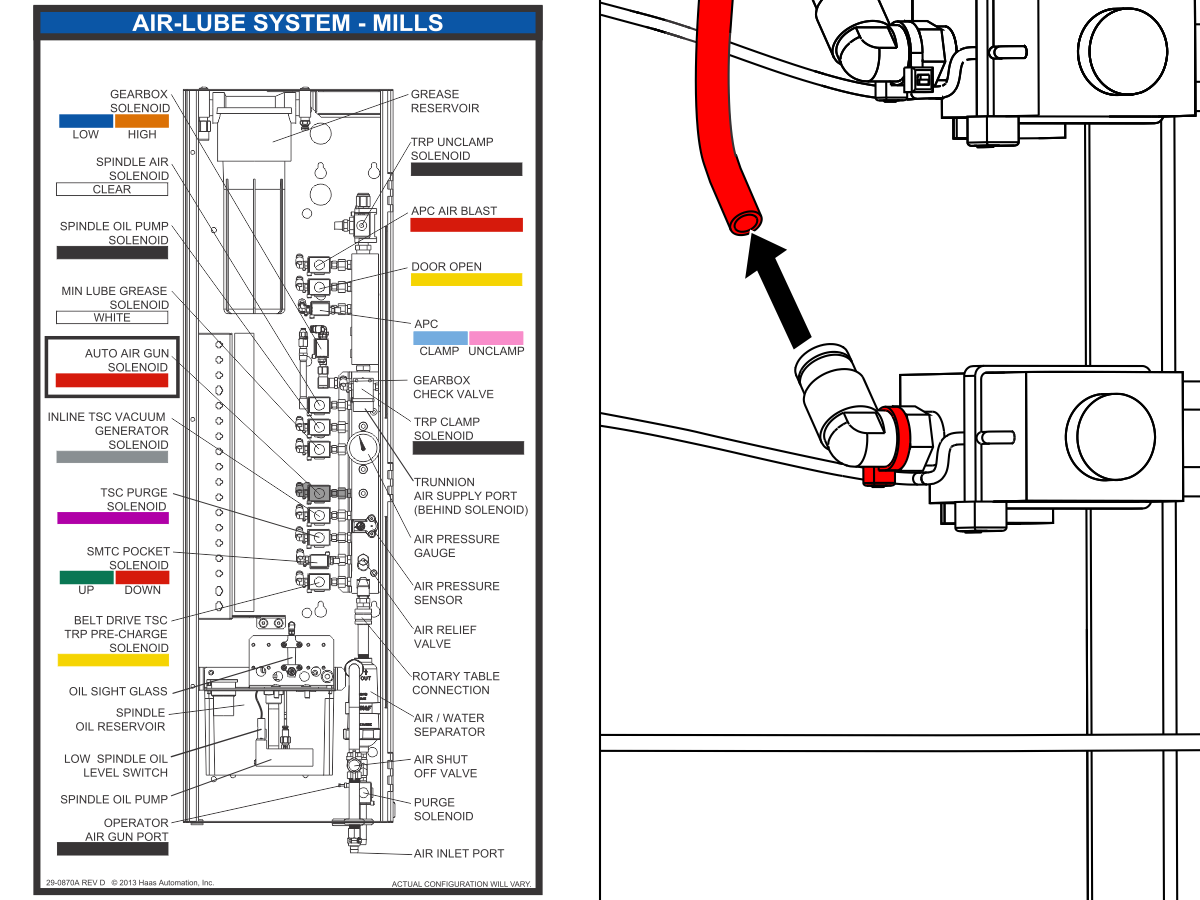
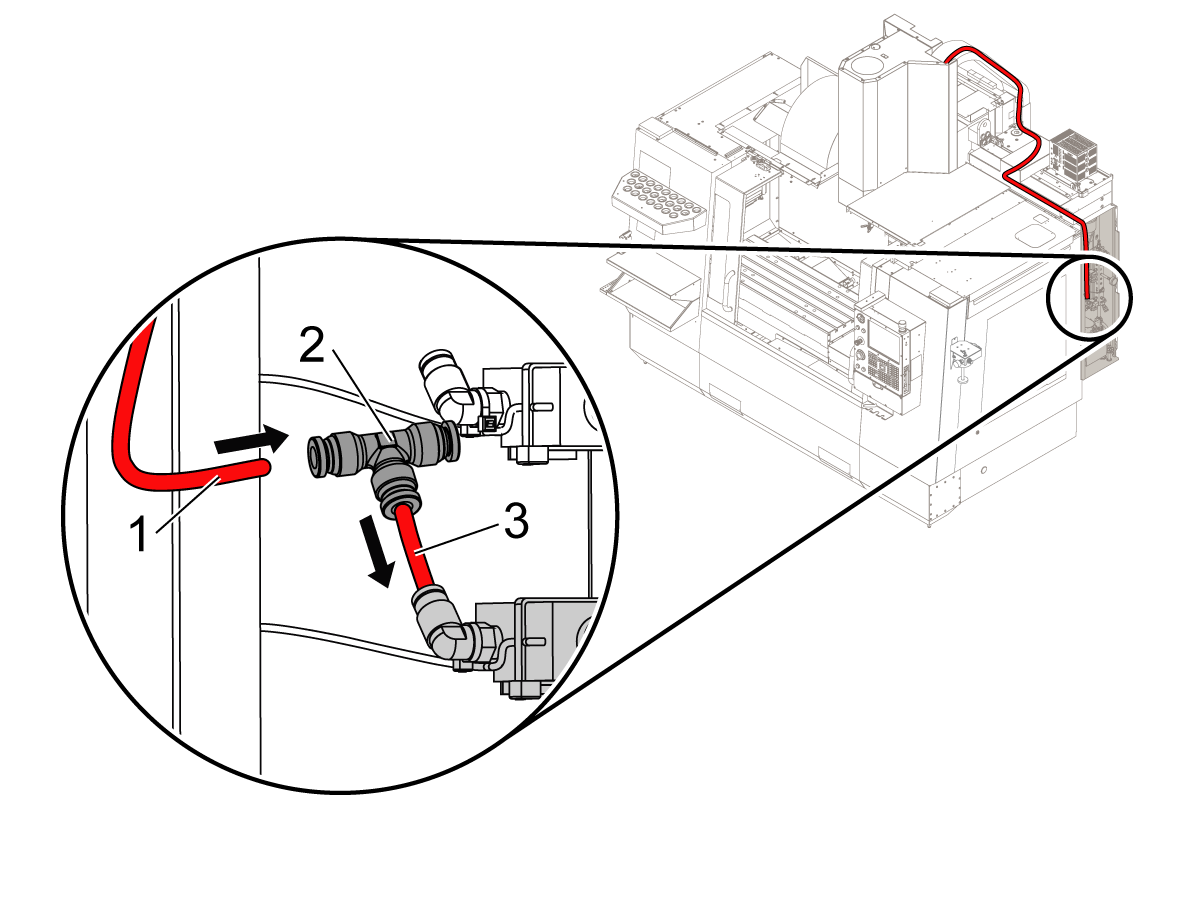
Disconnect the red tube from the AAG solenoid in the lubrication panel.

9

Cut a 2" piece of the red tube [3].

Use the piece of the tube to install the tee-fitting [2] to the AAG solenoid.

Connect the AAG tube [1] to one of the ports on the tee-fitting.

10

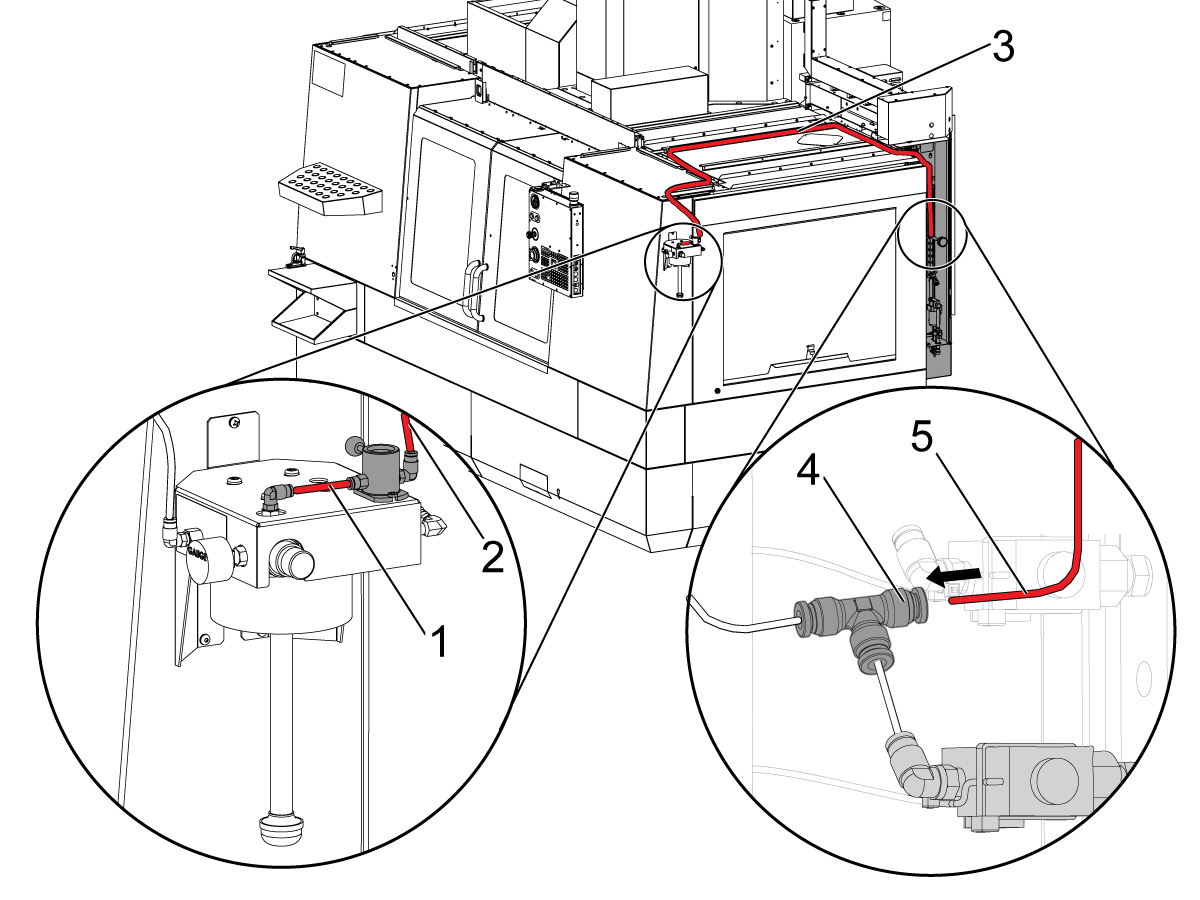
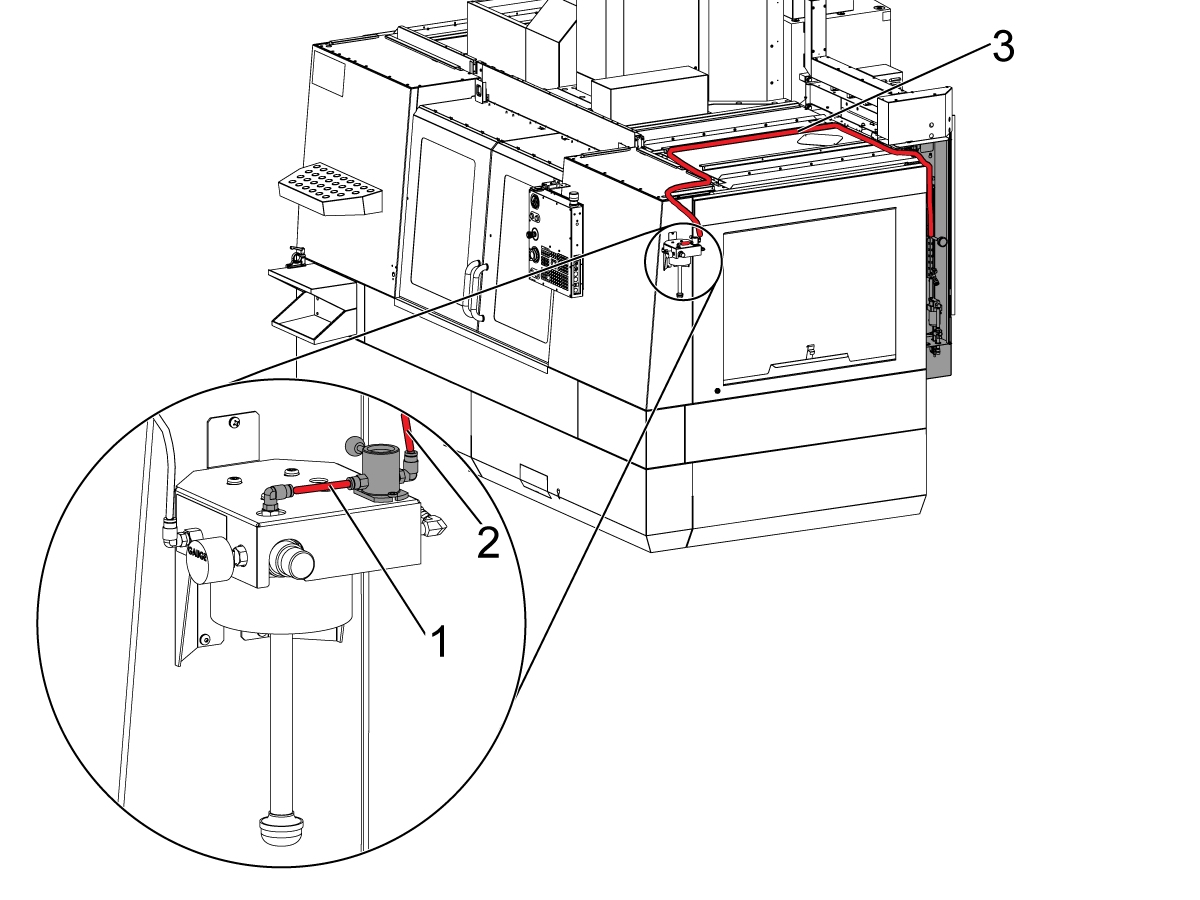
Cut a piece of the red 1/4" tubing [1] given in the kit to install on the MQL.

Route the red 1/4" tube [3] from the lubrication panel to the MQL reservoir assembly. Use the (3) cable ties and the (3) magnetic cable mounts.

Connect the tube [5] to the other port of the tee-fitting [4].

Connect the other end of the tube[2] to the air inlet port of the toggle valve on the MQL reservoir assembly.

Proceed to the MQL - System Purge section.

Note: Keep the toggle valve in the [OFF] position when the MQL is not in use.

MQL - System Purge

The Minimum-Quantity Lubrication (MQL) system supplies oil to the tool. The MQL system has tubes that supply the oil. Air can get into the tubes. This procedure shows you how to remove the air from the tubes.

Do this procedure at these times:

  1. Before you operate the system for the first time.
  2. After you try to operate the system with the oil reservoir empty.
  3. After you change fluids.

1

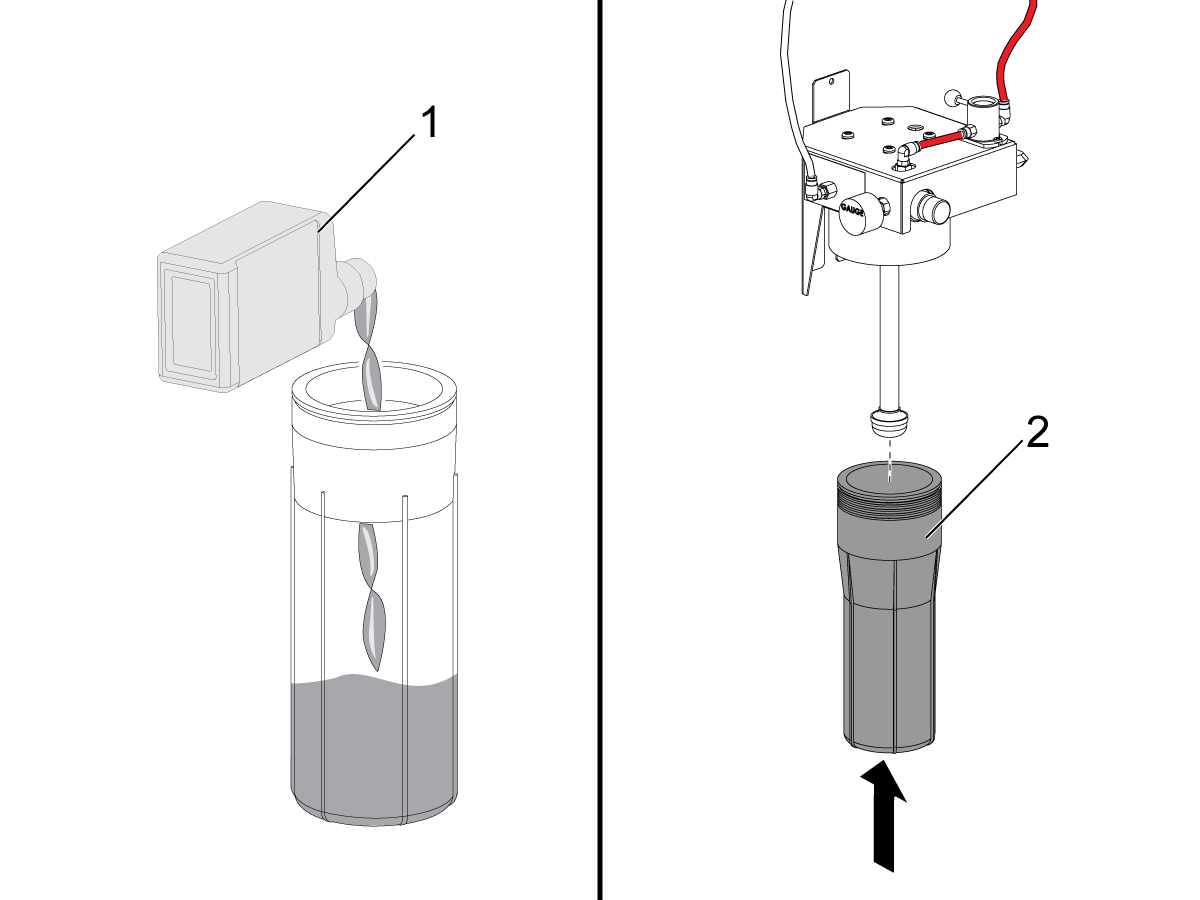
Fill the oil reservoir with MQL lubricant [1].

Install the reservoir [2] into MQL Reservoir assembly.

Caution: Only use lubricants that are non-toxic and specially made for MQL systems. Refer to the Lubricant Table for Haas Machine Components for recommended lubricants.

2

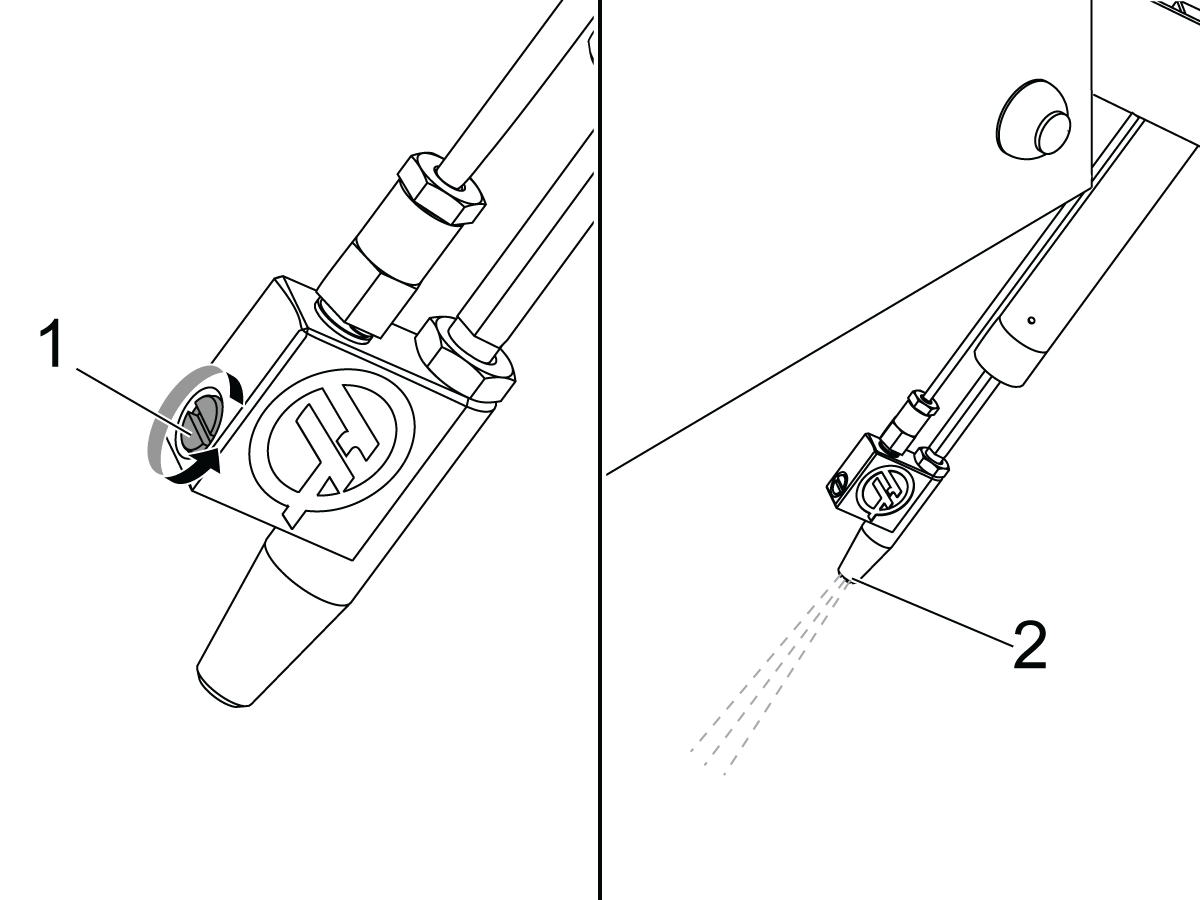
Find the atomizer needle valve [1]. Turn the needle valve counterclockwise (2) full turns from the closed position.

Operate this code in MDI mode:

M83;

Operate the MQL system [2] until no air is in the system. The mist can stop momentarily. This shows that air is in the system. If the mist does not stop, no air is in the system.

Push [RESET] to cancel the purge cycle.

3

Close the atomizer needle valve. Then open it (1/2) to (1) turn.

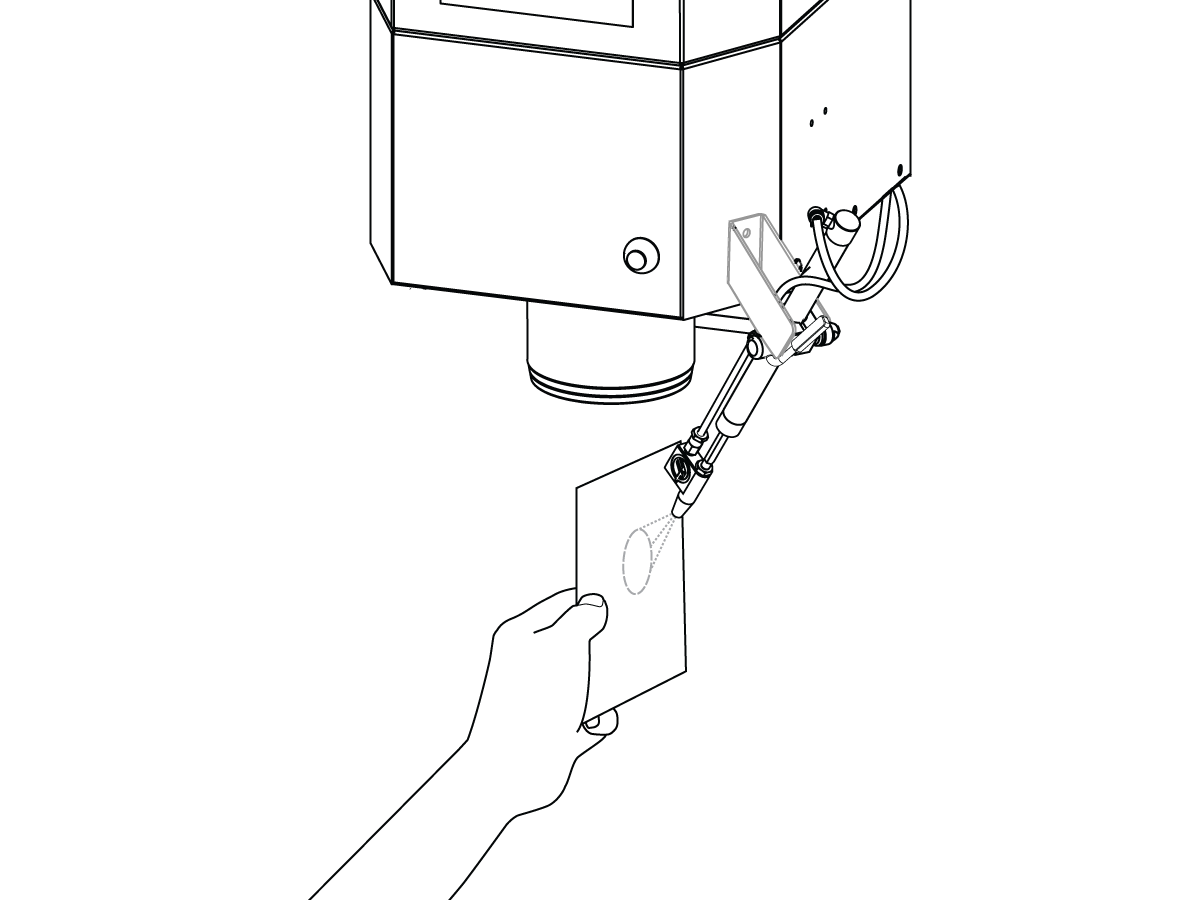
Do these steps to make sure the MQL system operates correctly: Hold a small piece of paper approximately 3 inches from the atomizer. Operate the program in Step 2. A round wet pattern shows that the MQL system is adjusted correctly.

Some oils have a higher viscosity. Oils with higher viscosity flow slowly. To make the oil flow correctly, adjust the needle valve.

Note: If the oil is not flowing through, remove the needle valve and its spring to clean it off and let it run until oil starts leaking through the needle valve hole. Put back the needle valve and its spring, and close it. Then open it (1/2) to (1) turn and try again.

Do not use more than the necessary quantity of oil. The necessary quantity prevents these problems:

  • Chips attach to the tool.
  • Chips attach to the workpiece.

4

If the pressure of the oil mist from the spray head is not sufficient, make sure no kinks are in the oil tube.

If no kinks are in the oil tube, the filter is possibly clogged. The filter is inside the reservoir. Refer to the Minimum Quantity Lubrication (MQL) - Filter Maintenance procedure.

Recently Updated

Minimum Quantity Lubrication (MQL) - Filter Maintenance


Introduction

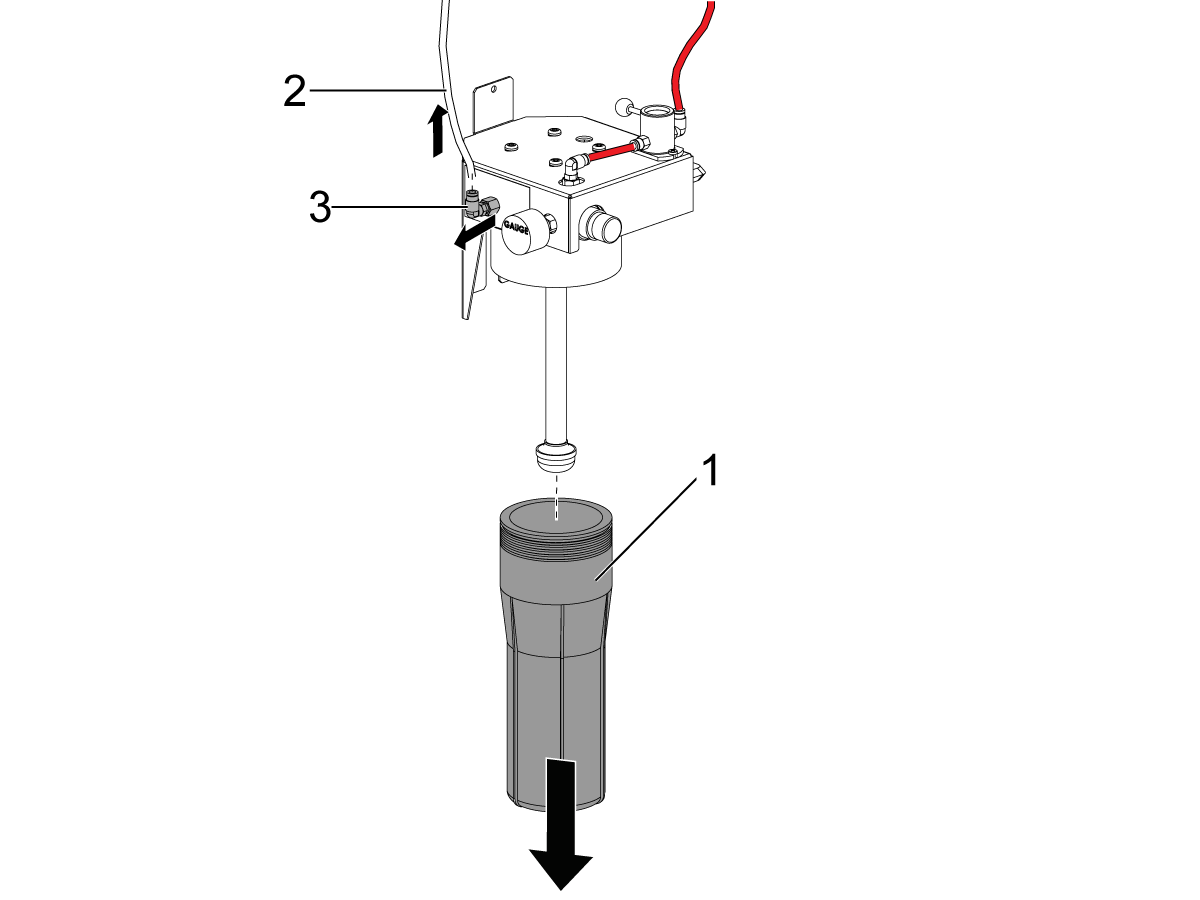
The Minimum-Quantity Lubrication (MQL) system supplies oil to the tool. The MQL system has an oil reservoir [2]. The oil reservoir has a filter [1]. This procedure shows you how to clean the filter. A clean filter keeps the correct oil pressure and oil flow. A dirty filter causes incorrect operation.

Do this procedure if you have these conditions:

  1. The pressure to the MQL system is correct.
  2. The oil flow to the spray head is low.

If the pressure to the MQL system is low, do the VMC - Minimum-Quantity Lubrication - System Purge procedure.

1

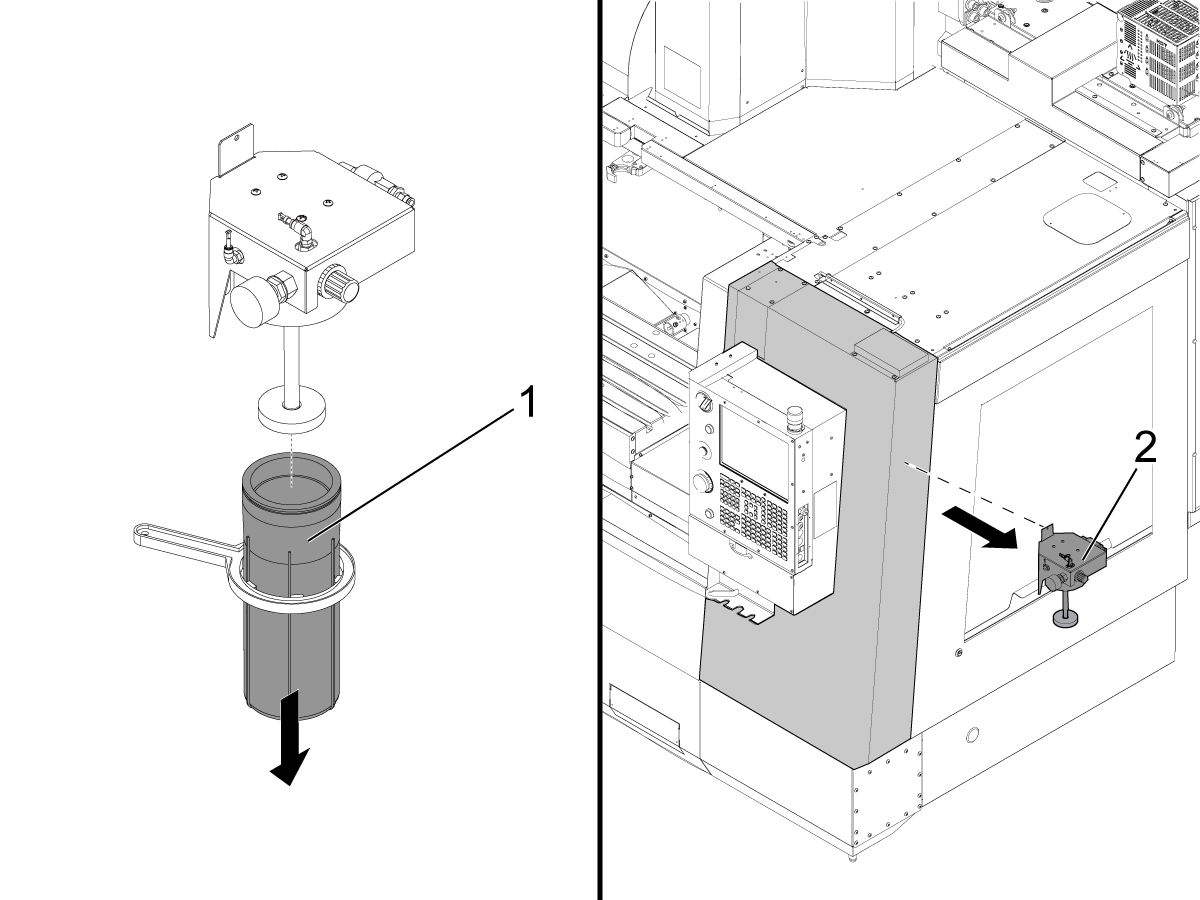
Remove these parts:

  • The reservoir bowl [1] from the oil-reservoir assembly for the MQL.
  • The oil hose [2].
  • The oil hose fitting [3].

2

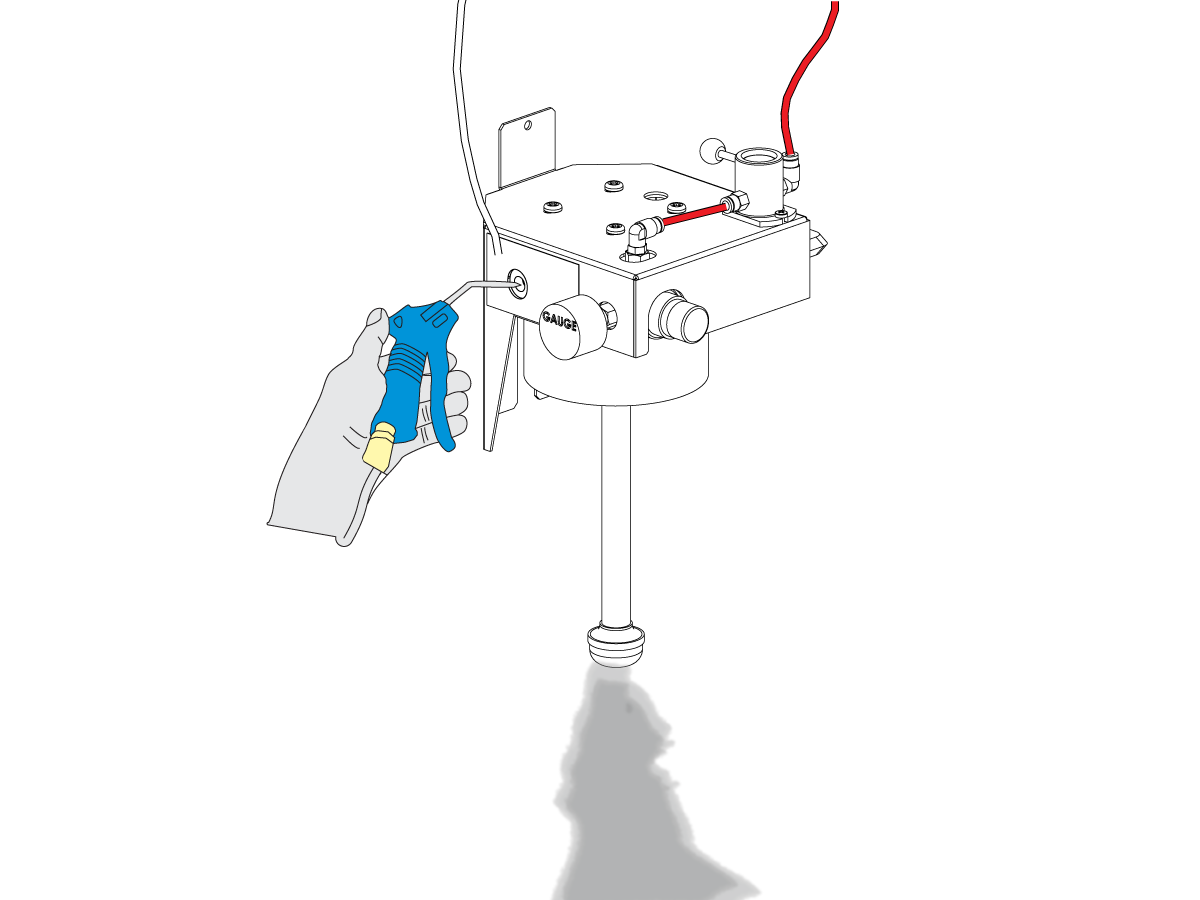
Blow all of the debris out of the filter. Use compressed air.

Note: Hold a towel under the reservoir. Catch the debris.

3

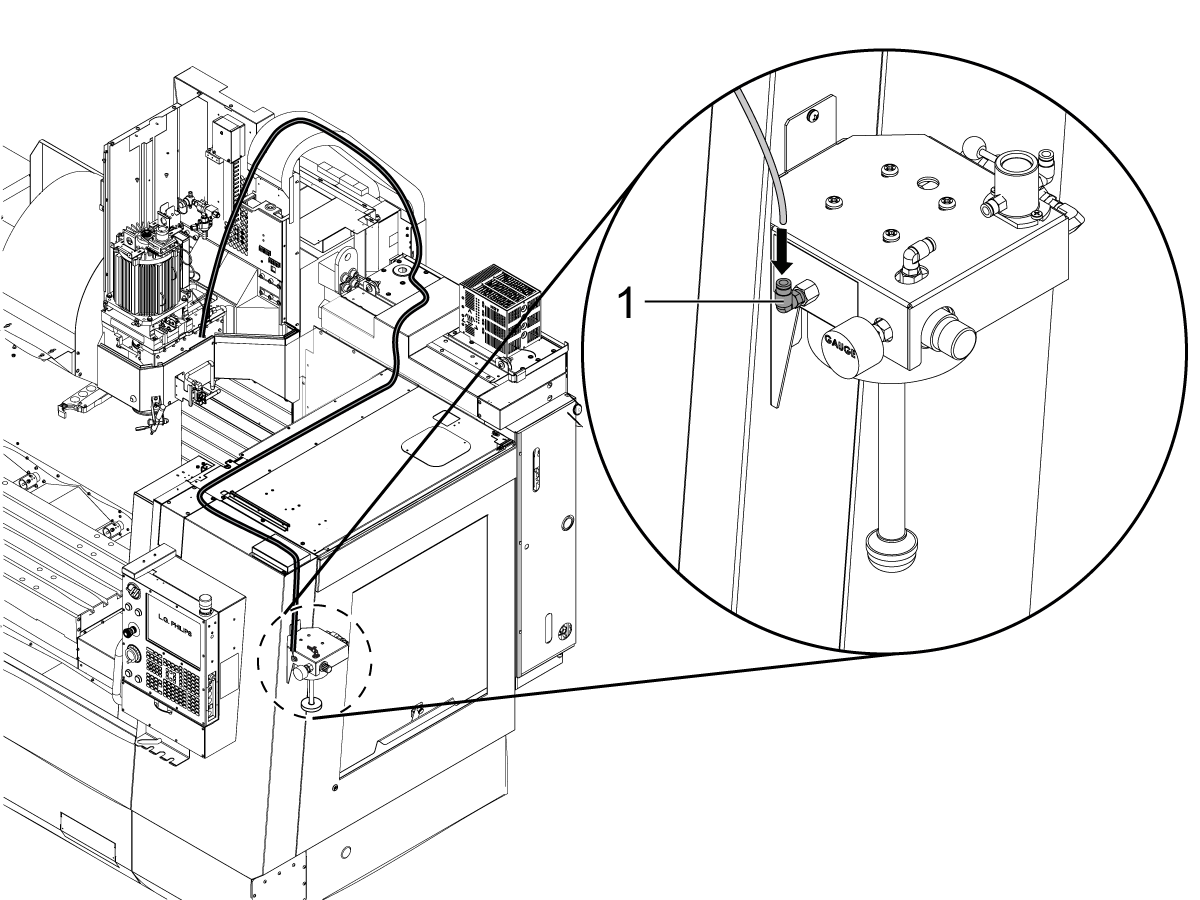
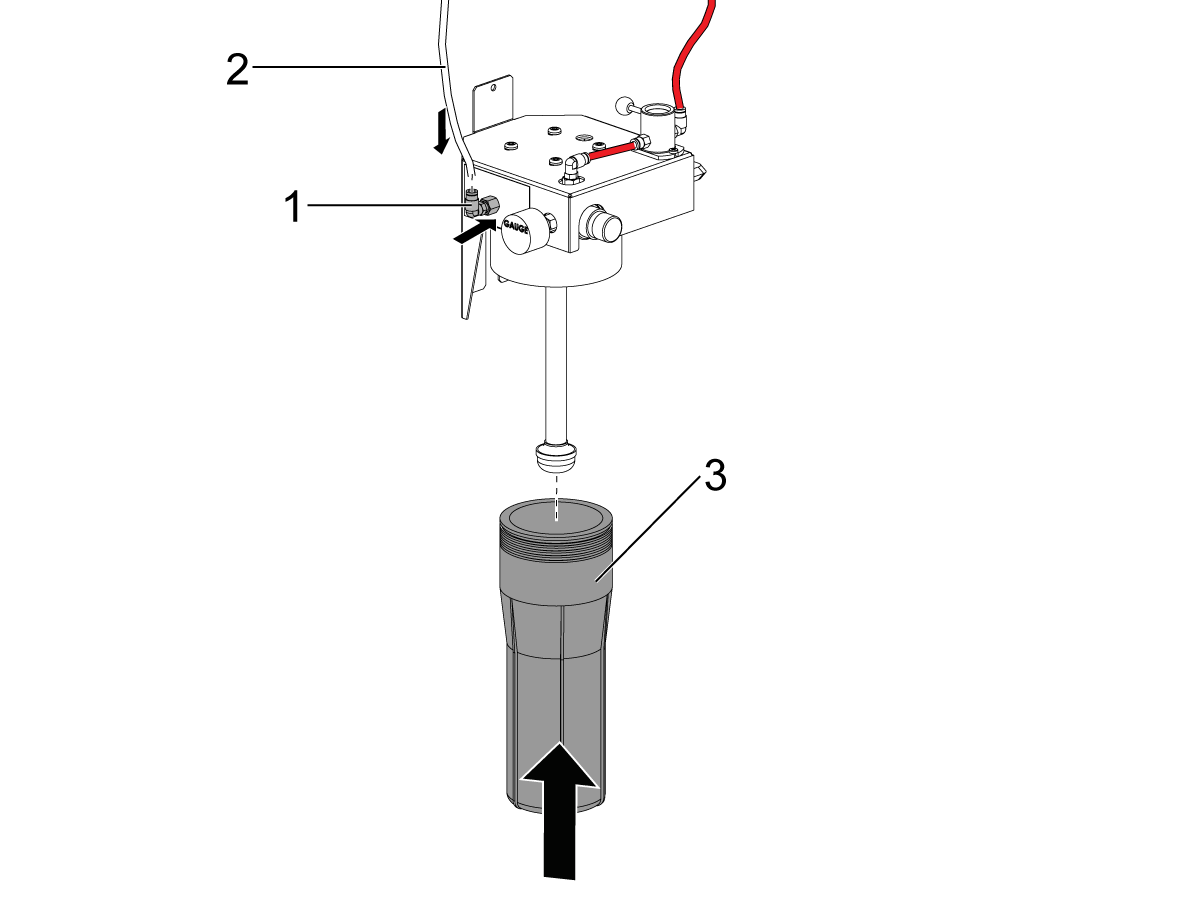
Install these parts:

  • The fitting [1] for the oil hose.
  • The oil hose [2].
  • The reservoir bowl [3] for the MQL assembly.

Make sure no air bubbles are in the oil hose: Do the Minimum-Quantity Lubrication - System Purge procedure in the next section.

MQL - System Purge

The Minimum-Quantity Lubrication (MQL) system supplies oil to the tool. The MQL system has tubes that supply the oil. Air can get into the tubes. This procedure shows you how to remove the air from the tubes.

Do this procedure at these times:

  1. Before you operate the system for the first time.
  2. After you try to operate the system with the oil reservoir empty.
  3. After you change fluids.

1

Fill the oil reservoir with MQL lubricant [1].

Install the reservoir [2] into MQL Reservoir assembly.

Caution: Only use lubricants that are non-toxic and specially made for MQL systems. Refer to the Lubricant Table for Haas Machine Components for recommended lubricants.

2

Find the atomizer needle valve [1]. Turn the needle valve counterclockwise (2) full turns from the closed position.

Operate this code in MDI mode:

M83;

Operate the MQL system [2] until no air is in the system. The mist can stop momentarily. This shows that air is in the system. If the mist does not stop, no air is in the system.

Push [RESET] to cancel the purge cycle.

3

Close the atomizer needle valve. Then open it (1/2) to (1) turn.

Do these steps to make sure the MQL system operates correctly: Hold a small piece of paper approximately 3 inches from the atomizer. Operate the program in Step 2. A round wet pattern shows that the MQL system is adjusted correctly.

Some oils have a higher viscosity. Oils with higher viscosity flow slowly. To make the oil flow correctly, adjust the needle valve.

Note: If the oil is not flowing through, remove the needle valve and its spring to clean it off and let it run until oil starts leaking through the needle valve hole. Put back the needle valve and its spring, and close it. Then open it (1/2) to (1) turn and try again.

Do not use more than the necessary quantity of oil. The necessary quantity prevents these problems:

  • Chips attach to the tool.
  • Chips attach to the workpiece.

4

If the pressure of the oil mist from the spray head is not sufficient, make sure no kinks are in the oil tube.

If no kinks are in the oil tube, the filter is possibly clogged. The filter is inside the reservoir. Refer to the Minimum Quantity Lubrication (MQL) - Filter Maintenance procedure.

Recently Updated

Minimum Quantity Lubrication (MQL) - Retrofit Kit


AD0540

Introduction

This procedure outlines how to upgrade a MQL system built before February 2021 to the current version.

This procedure applies to the following service kits:

  • 93-3518: MQL OIL RESERVOIR ASSEMBLY 2021 SVC KIT

Removal

1

Push [POWER OFF].

Set the main circuit breaker to the OFF position.

Lock the main circuit breaker. Use an approved lock with an approved safety tag.

Close the primary air valve. This stops the air supply to the machine.

2

Remove the oil reservoir [1] from the old assembly.

Disconnect the air and oil tubes from the assembly, then remove the rest of the MQL assembly [2] from the machine.

Installation

1

Remove the reservoir bowl [1] from the MQL oil reservoir assembly.

Attach the toggle valve [2] using the provided pemnuts [3]

Install the new MQL oil reservoir assembly [4].

2

Jog the axes to allow for complete access to all the hardware attaching the upper spindle head cover.

Remove the upper spindle head cover.

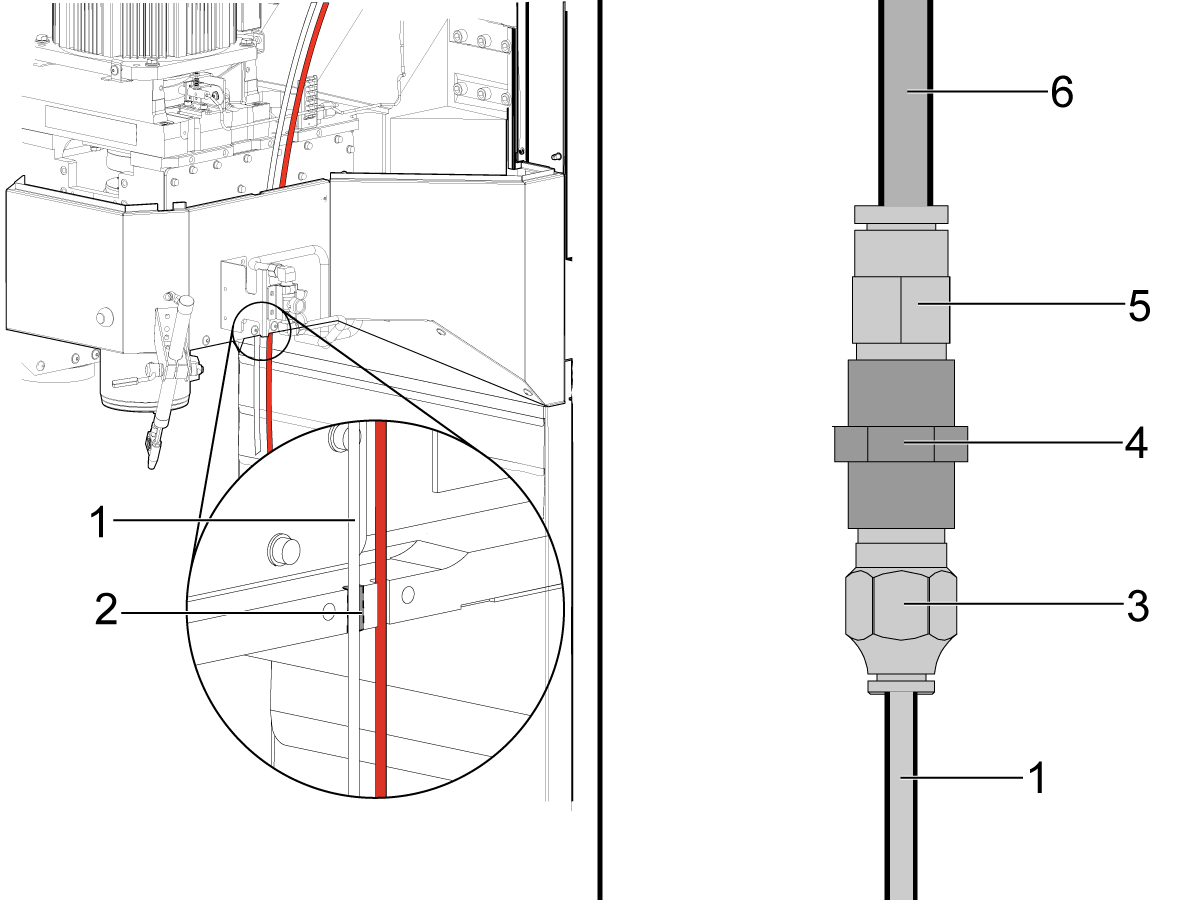
Use the 5/32 inch clear oil tube [1] from the original MQL assembly and make sure it is placed through the slot [2] on the spindle head casting.

Cut and remove the rest of the oil tube that is routed to the MQL reservoir. 

Connect the following fittings given in the kit as shown in the image:

  • 5/32 to 1/8 fitting [3]
  • 1/8 to 1/8 fitting [4]
  • 1/8 to 1/4 fitting [5]

Then connect the 5/32 inch oil tube [1] to the fitting [3] after it is feed through the slot [2].

Connect the 1/4 inch oil tube [6] that was given in the kit to the other side of the fitting [5].

 Note: Keep the fittings that connects the clear 1/4" and 5/32" tubes inside the spindle head cover.

3

Route the 1/4 inch oil tube from the connection made in the previous step to the MQL reservoir assembly as shown and connect it to the oil output port [1].

Install the upper cover for the spindle head.

4

Cut a piece of the red 1/4 inch tubing [3] that is routed from the lube panel.

Use the cut piece of the red tubing [1] to connect the valve and elbow fitting as shown. 

Connect the red tubing routed from the lube panel [3] to the air inlet port of the toggle valve [2] on the MQL reservoir assembly.

Start the AAG. Make sure that no leaks are in the system.

Note: Keep the toggle valve in the [OFF] position when the MQL is not in use.

MQL - System Purge

The Minimum-Quantity Lubrication (MQL) system supplies oil to the tool. The MQL system has tubes that supply the oil. Air can get into the tubes. This procedure shows you how to remove the air from the tubes.

Do this procedure at these times:

  1. Before you operate the system for the first time.
  2. After you try to operate the system with the oil reservoir empty.
  3. After you change fluids.

1

Fill the oil reservoir with MQL lubricant [1].

Install the reservoir [2] into MQL Reservoir assembly.

Caution: Only use lubricants that are non-toxic and specially made for MQL systems. Refer to the Lubricant Table for Haas Machine Components for recommended lubricants.

2

Find the atomizer needle valve [1]. Turn the needle valve counterclockwise (2) full turns from the closed position.

Operate this code in MDI mode:

M83;

Operate the MQL system [2] until no air is in the system. The mist can stop momentarily. This shows that air is in the system. If the mist does not stop, no air is in the system.

Push [RESET] to cancel the purge cycle.

3

Close the atomizer needle valve. Then open it (1/2) to (1) turn.

Do these steps to make sure the MQL system operates correctly: Hold a small piece of paper approximately 3 inches from the atomizer. Operate the program in Step 2. A round wet pattern shows that the MQL system is adjusted correctly.

Some oils have a higher viscosity. Oils with higher viscosity flow slowly. To make the oil flow correctly, adjust the needle valve.

Note: If the oil is not flowing through, remove the needle valve and its spring to clean it off and let it run until oil starts leaking through the needle valve hole. Put back the needle valve and its spring, and close it. Then open it (1/2) to (1) turn and try again.

Do not use more than the necessary quantity of oil. The necessary quantity prevents these problems:

  • Chips attach to the tool.
  • Chips attach to the workpiece.

4

If the pressure of the oil mist from the spray head is not sufficient, make sure no kinks are in the oil tube.

If no kinks are in the oil tube, the filter is possibly clogged. The filter is inside the reservoir. Refer to the Minimum Quantity Lubrication (MQL) - Filter Maintenance procedure.

Minimum-Quantity Lubrication

Component Primary Lubricant Alternate Lubricant Capacity Haas Part Number Safefy Data sheet

Minimum-Quantity Lubrication

Canola Oil

Recommended for all metal applications. (Not a Mobil product)

--

Minimum: 5 oz (0.15L)

Maximum: 28 oz (0.83L)

93-2364 Product page

Minimum-Quantity Lubrication

Tap Magic Eco-Oil Cutting Fluid

Recommended for all metal applications. (Not a Mobil product)

--

Minimum: 5 oz (0.15L)

Maximum: 28 oz (0.83L)

N/A N/A

Minimum-Quantity Lubrication

Ecocut Mikro Plus 20

Recommended for aluminum, cast iron, and steel applications. (Not a Mobil product)

--

Minimum: 5 oz (0.15L)

Maximum: 28 oz (0.83L)

N/A N/A

Minimum-Quantity Lubrication

Ultra Lube MQL Cutting Oil

General purpose cutting oil. (Not a Mobil product)

--

Minimum: 5 oz (0.15L)

Maximum: 28 oz (0.83L)

N/A N/A

Minimum-Quantity Lubrication

Dropsa MK Oil 150 20 Lt

Recommended for stainless steel, low-alloy steel, brass, aluminum, and copper. (Not a Mobil product)

--

Minimum: 5 oz (0.15L)

Maximum: 28 oz (0.83L)

N/A N/A

Recently Viewed Items

You Have No Recently Viewed Items Yet

Feedback
Haas Logo

Haas Delivered Price

This price includes shipping cost, export and import duties, insurance, and any other expenses incurred during shipping to a location in France agreed with you as a buyer. No other mandatory costs can be added to the delivery of a Haas CNC Product.

KEEP UP WITH THE LATEST HAAS TIPS AND TECHNOLOGY...

Sign up now!   

HAAS TOOLING ACCEPTS THE FOLLOWING:

  • Service & Support
  • Owners
  • Request Service
  • Operator Manuals
  • Haas Parts
  • Rotary Repair Request
  • Pre-Install Guides
  • Shopping Tools
  • Build & Price a New Haas
  • Available Inventory
  • The Haas Price List
  • CNCA Financing
  • About Haas
  • Accessibility Statement
  • DNSH Statement
  • Export Compliance
  • Careers
  • Certifications & Safety
  • Contact Us
  • History
  • Terms & Conditions
  • Haas Tooling Terms & Conditions
  • Privacy
  • Warranty
  • Haas Community
  • Haas Certification Program
  • Haas Motorsports
  • Gene Haas Foundation
  • Haas Technical Education Community
  • Events
  • Join the Conversation
  • Facebook
  • X
  • Flickr
  • YouTube
  • LinkedIn
  • Instagram
  • TikTok
© 2026 Haas Automation, Inc – CNC Machine Tools
This site is protected by reCAPTCHA and the Google Privacy Policy and Terms of Service apply.

2800 Sturgis Rd., Oxnard, CA 93030
Toll Free: (888) 817-4446 / Fax: 805-278-8554