My Haas Welcome,
!
Haas Tooling MyHaas/HaasConnect Sign In Register Haas Tooling MyHaas/HaasConnect Sign Out Welcome, My Machines Latest Activity My Quotes My Account My Users Sign Out
Find Your Distributor
  1. Select Language
    1. English
    2. Deutsch
    3. Español - ES
    4. Español - MX
    5. Français
    6. Italiano
    7. Português
    8. Český
    9. Dansk
    10. Nederlands
    11. Magyar
    12. Polski
    13. Svenska
    14. Türkçe
    15. 中文
    16. Suomi
    17. Norsk
    18. الإنجليزية
    19. български
    20. Hrvatski
    21. Ελληνικά
    22. Română
    23. Slovenský
    24. Slovenščina
    25. 한국어
    26. 日本語
    27. Українська
  • machines Main Menu
    • Vertical Mills
      Vertical Mills
      Vertical Mills View All
      • Vertical Mills
      • VF Series
      • Universal Machines
      • VR Series
      • VP-5 Prismatic
      • Pallet-Changing VMCs
      • Mini Mills
      • Mold Machines
      • High-Speed Drill Centers
      • Drill/Tap/ Mill Series
      • Toolroom Mills
      • Pocket Mill
      • Compact Mills
      • Gantry Series
      • SR Sheet Routers
      • Extra-Large VMC
      • Double-Column Mills
      • 3+2 Positioning Machines
    • Multi-Axis Solutions
      Multi-Axis Solutions
      Multi-Axis Solutions View All
      • Multi-Axis Solutions
      • Y-Axis Lathes
      • 5-Axis Mills
    • Lathes
      Lathes
      Lathes View All
      • Lathes
      • ST Series
      • Dual-Spindle
      • Box Way Series
      • Toolroom Lathes
      • Chucker Lathe
      • Pocket Lathe
      • Haas Bar Feeders
    • Horizontal Mills
      Horizontal Mills
      Horizontal Mills View All
      • Horizontal Mills
      • 50-Taper
      • 40-Taper
    • Rotaries & Indexers
      Rotaries & Indexers
      Rotaries & Indexers View All
      • Rotaries & Indexers
      • Rotary Tables
      • Indexers
      • 5-Axis Rotaries
      • Extra-Large Rotaries
    • Special Series
      Special Series
      Special Series View All
      • Special Series
      • EU_Series_Redirect
    • Automation Systems
      Automation Systems
      Automation Systems View All
      • Automation Systems
      • Mill Automation
      • Lathe Automation
      • Automatic Parts Loaders
      • Automation Models
    • Desktop Machines
      Desktop Machines
      Desktop Machines View All
      • Desktop Machines
      • Desktop Mill
      • Desktop Lathe
      • Control Simulator, Standard
      • Control Simulator, Premium
    • Shop Equipment
      Shop Equipment
      Shop Equipment View All
      • Shop Equipment
      • Knee Mill
      • Haas Manual Lathes
      • Haas Saws
    • Fabrication Machines
      Fabrication Machines
      Fabrication Machines View All
      • Fabrication Machines
      • Laser Cutting Machines
      • CNC Press Brakes
    • QUICK LINKS Special Series  Special Series 
      EU SERIES EU SERIES BUILD & PRICE | PRICE LIST BUILD & PRICE | PRICE LIST In-Stock Machines In-Stock Machines WHAT’S NEW WHAT’S NEW YOUR FIRST CNC YOUR FIRST CNC
      SHOPPING TOOLS
      • Build & Price a Haas
      • Price List
      • Available Inventory
      • CNCA Financing
      WANT TO TALK TO SOMEONE?

      A Haas Factory Outlet (HFO) can answer your questions, and walk you through your best options.

      CONTACT YOUR DISTRIBUTOR >
  • Options Main Menu
    • The Haas Control Value Option Packages
      Value Option Packages
      Value Option Packages View All
      • Value Option Packages
    • Product Image Spindles
      Spindles
      Spindles View All
      • Spindles
    • Product Image Tool Changers
      Tool Changers
      Tool Changers View All
      • Tool Changers
    • Product Image 4th- | 5th-Axis
      4th- | 5th-Axis
      4th- | 5th-Axis View All
      • 4th- | 5th-Axis
    • Product Image Turrets & Live Tooling
      Turrets & Live Tooling
      Turrets & Live Tooling View All
      • Turrets & Live Tooling
    • Product Image Probing
      Probing
      Probing View All
      • Probing
    • Haas Chip & Coolant Management Chip & Coolant Management
      Chip & Coolant Management
      Chip & Coolant Management View All
      • Chip & Coolant Management
    • The Haas Control The Haas Control
      The Haas Control
      The Haas Control View All
      • The Haas Control
    • Product Image Product Options
      Product Options
      Product Options View All
      • Product Options
    • Product Image Tooling & Fixturing
      Tooling & Fixturing
      Tooling & Fixturing View All
      • Tooling & Fixturing
    • Product Image Workholding
      Workholding
      Workholding View All
      • Workholding
    • Product Image 5-Axis Solutions
      5-Axis Solutions
      5-Axis Solutions View All
      • 5-Axis Solutions
      • 5 Easy Steps to 5-Axis
    • QUICK LINKS Special Series  Special Series 
      EU SERIES EU SERIES BUILD & PRICE | PRICE LIST BUILD & PRICE | PRICE LIST In-Stock Machines In-Stock Machines WHAT’S NEW WHAT’S NEW YOUR FIRST CNC YOUR FIRST CNC
      SHOPPING TOOLS
      • Build & Price a Haas
      • Price List
      • Available Inventory
      • CNCA Financing
      WANT TO TALK TO SOMEONE?

      A Haas Factory Outlet (HFO) can answer your questions, and walk you through your best options.

      CONTACT YOUR DISTRIBUTOR >
  • Why Haas Main Menu
      Discover the Haas Difference
    • Why Haas
    • MyHaas
    • Education Community
    • Industry 4.0
    • Haas Certification
    • Customer Testimonials
  • Service Main Menu
      Welcome to Haas Service
      SERVICE HOME Operator’s Manuals How-To Procedures Troubleshooting Guides Preventive Maintenance Haas Parts Haas Tooling Videos
  • Videos Main Menu
  • Main Menu
    • View All
    • View All
    • View All
    • View All
      • HTEC Curriculum Support
      • Haas Value Option Packages (VOP) Journey
    • View All
      • Haas 10 kg Cobot Package
      • Cobot Kits
      • DC-1 Drill Center
      • CNC Sales News
      • Do More With Your Haas
    • View All
    • View All
      • contact-us-test
      • 4 - AUTOMATION SYSTEMS
      • Carousel-V2
      • expert test
      • Demo_Day_Trident-test
      • Link Test
      • image-sale-tag-test
      • article-list-test
      • Haas 25 kg Robot Package
      • test-algolia-page
    • View All
    • View All
    • View All
    • View All
      • calc-test
    • View All
    • QUICK LINKS Special Series  Special Series 
      EU SERIES EU SERIES BUILD & PRICE | PRICE LIST BUILD & PRICE | PRICE LIST In-Stock Machines In-Stock Machines WHAT’S NEW WHAT’S NEW YOUR FIRST CNC YOUR FIRST CNC
      SHOPPING TOOLS
      • Build & Price a Haas
      • Price List
      • Available Inventory
      • CNCA Financing
      WANT TO TALK TO SOMEONE?

      A Haas Factory Outlet (HFO) can answer your questions, and walk you through your best options.

      CONTACT YOUR DISTRIBUTOR >
  • Haas Tooling Main Menu
  • Haas Service Parts Main Menu
My Haas Welcome,
!
Haas Tooling MyHaas/HaasConnect Sign In Register Haas Tooling MyHaas/HaasConnect Sign Out Welcome, My Machines Latest Activity My Quotes My Account My Users Sign Out
Find Your Distributor
  1. Select Language
    1. English
    2. Deutsch
    3. Español - ES
    4. Español - MX
    5. Français
    6. Italiano
    7. Português
    8. Český
    9. Dansk
    10. Nederlands
    11. Magyar
    12. Polski
    13. Svenska
    14. Türkçe
    15. 中文
    16. Suomi
    17. Norsk
    18. الإنجليزية
    19. български
    20. Hrvatski
    21. Ελληνικά
    22. Română
    23. Slovenský
    24. Slovenščina
    25. 한국어
    26. 日本語
    27. Українська
×

Search Results

Web Pages

Images

    • <
    • 1
    • >

Dual Action Parts Catcher - Installation - AD0427

Service Home How To Procedures Dual Action Parts Catcher - Installation - AD0427

Dual Action Parts Catcher - Installation - AD0427

- Jump to Section - 1. Introduction 2. Removal 3. Installation (8 steps) 4. Parts Catcher Door Installation (2 steps) Back to Top
Recently Updated Last updated: 04/16/2026

Dual Action Parts Catcher - Installation

Revision 1


AD0427

Revision B - 04/2026

Introduction

This procedure will show you how to install the Dual Action Parts Catcher on compatible lathes. 

Machine Requirenments:

  • Lathes with a flat door.
  • Software version 100.18.000.1020 or higher.

The following procedure applies to:

Machine Status Field Install Kit
ST-10/15 Upgrade from single action flat door parts catcher. Built 5/31/18 and later. 93-2944
Field Install Reboot Machine. Built 5/31/18 and later. 93-1000342
ST-20/25 Field Install Reboot Machine. Built 4/1/2019 and later.
93-1000343
ST-30/35 Field Install Reboot Machine. Built 6/1/2020 and later. 93-1000642

Removal

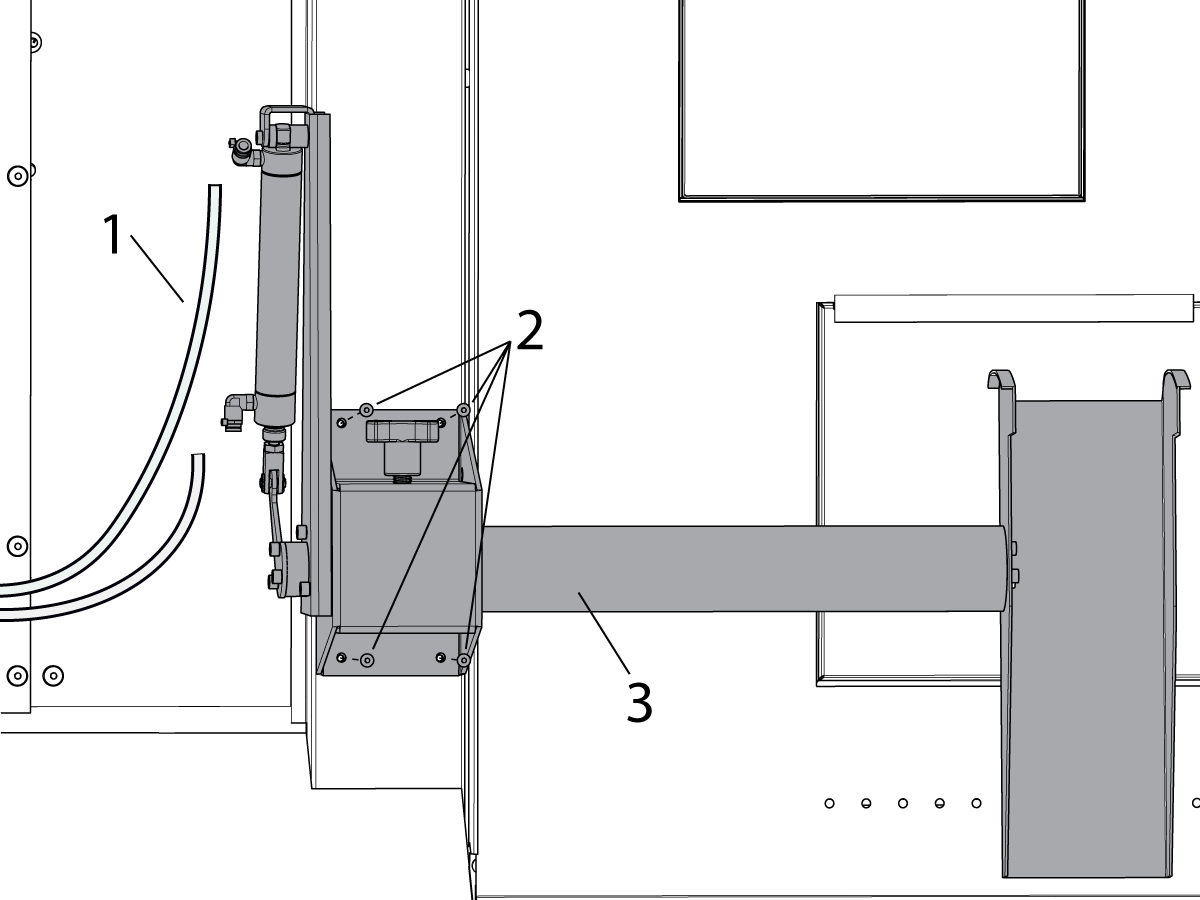
If updating from the previous design to the dual action parts catcher, you must remove the old system. Shut off the main air supply at the lube rack.

Remove the following items:

  • Air hoses [1]
  • (x4) mounting bolts [2]
  • Pcat assembly [3]

Discard the old hoses.

Installation

1

Download the Parts Catcher patch file from the HBC site and install it on the machine.

Turn off the main air supply at the lube rack.

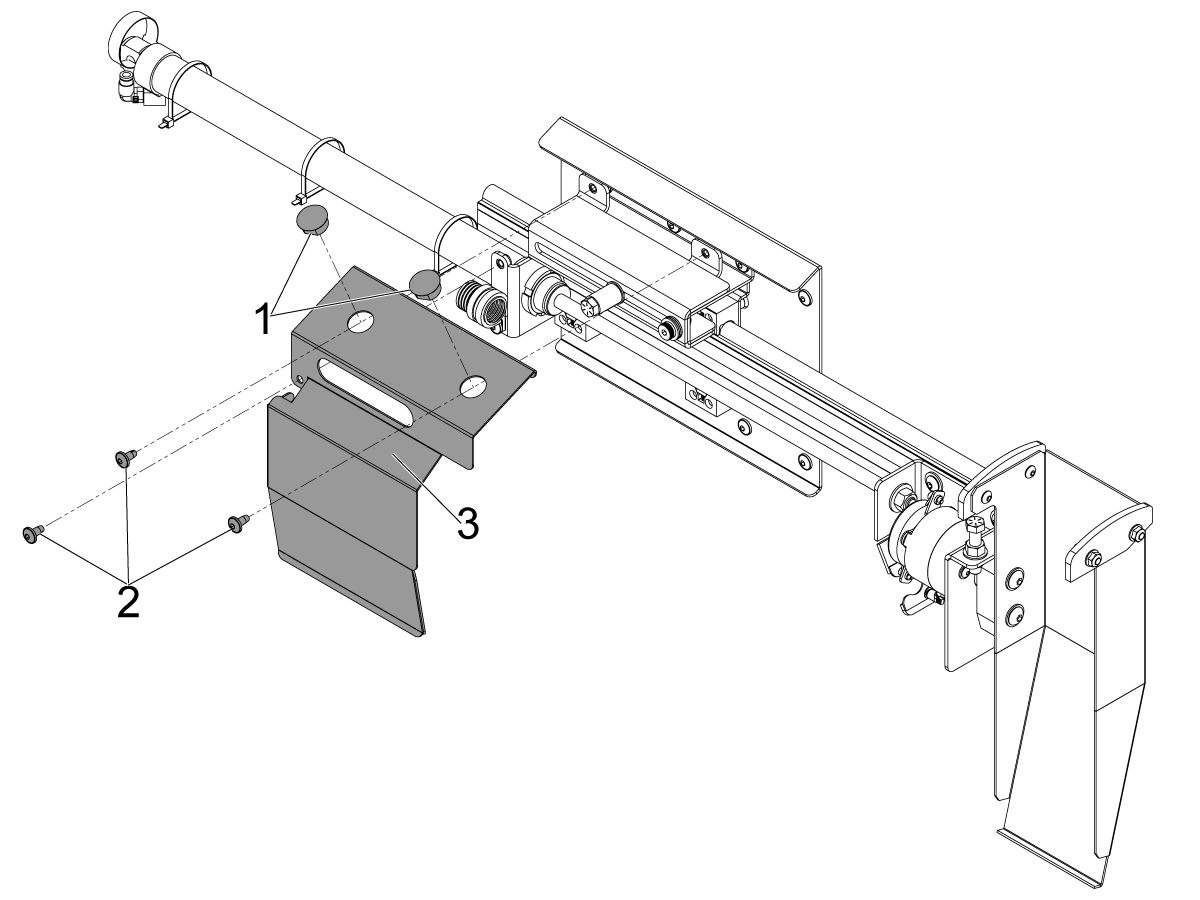
2

Remove the plastic plugs [1] from the P-CAT main cover.

Remove the (x3) machine screws [2] and the P-CAT main cover [3] from the P-CAT assembly.

3

ST-10/15/20/25 Mounting Location

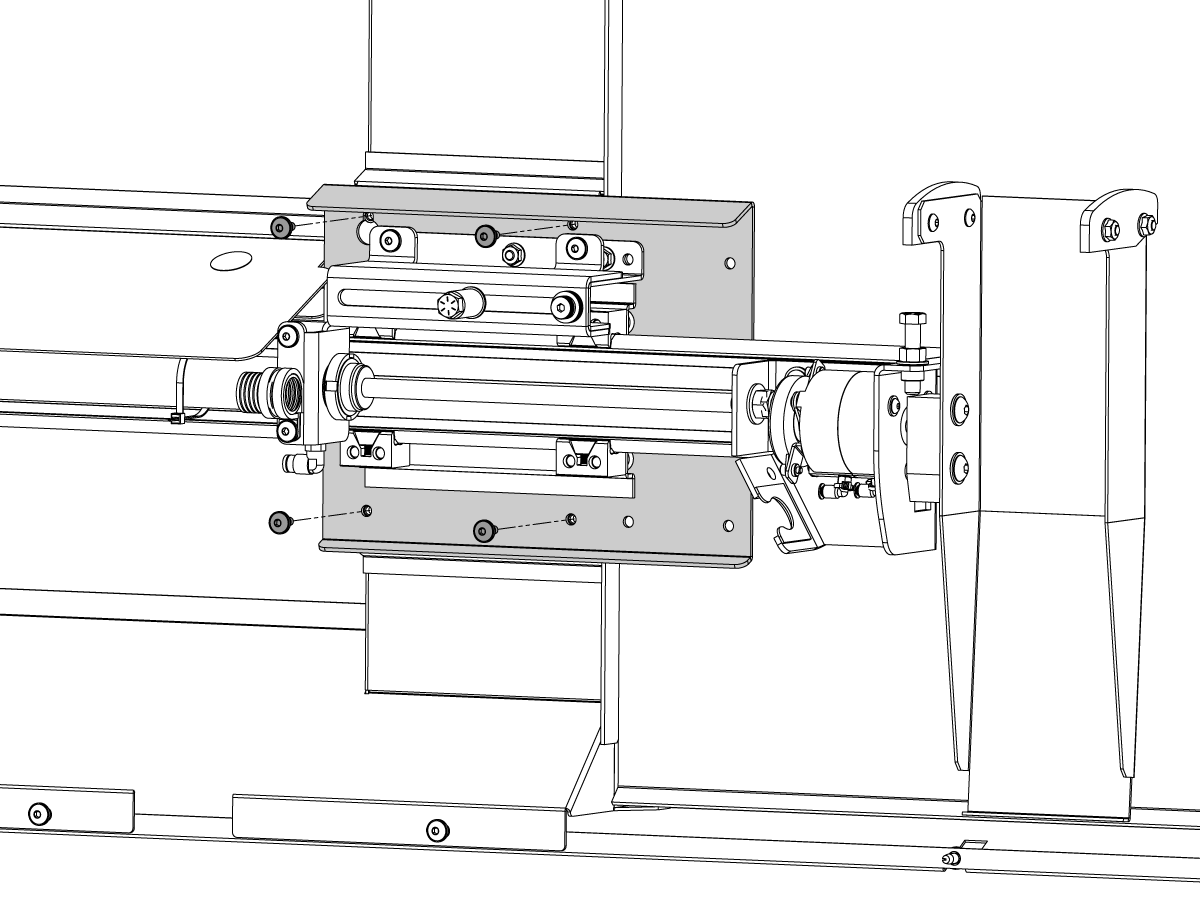
Bolt the P-CAT assembly to the machine enclosure using (x4) machine screws.

4

ST-30/35 Mounting Location

Bolt the P-CAT assembly to the machine enclosure using (4) machine screws.

5

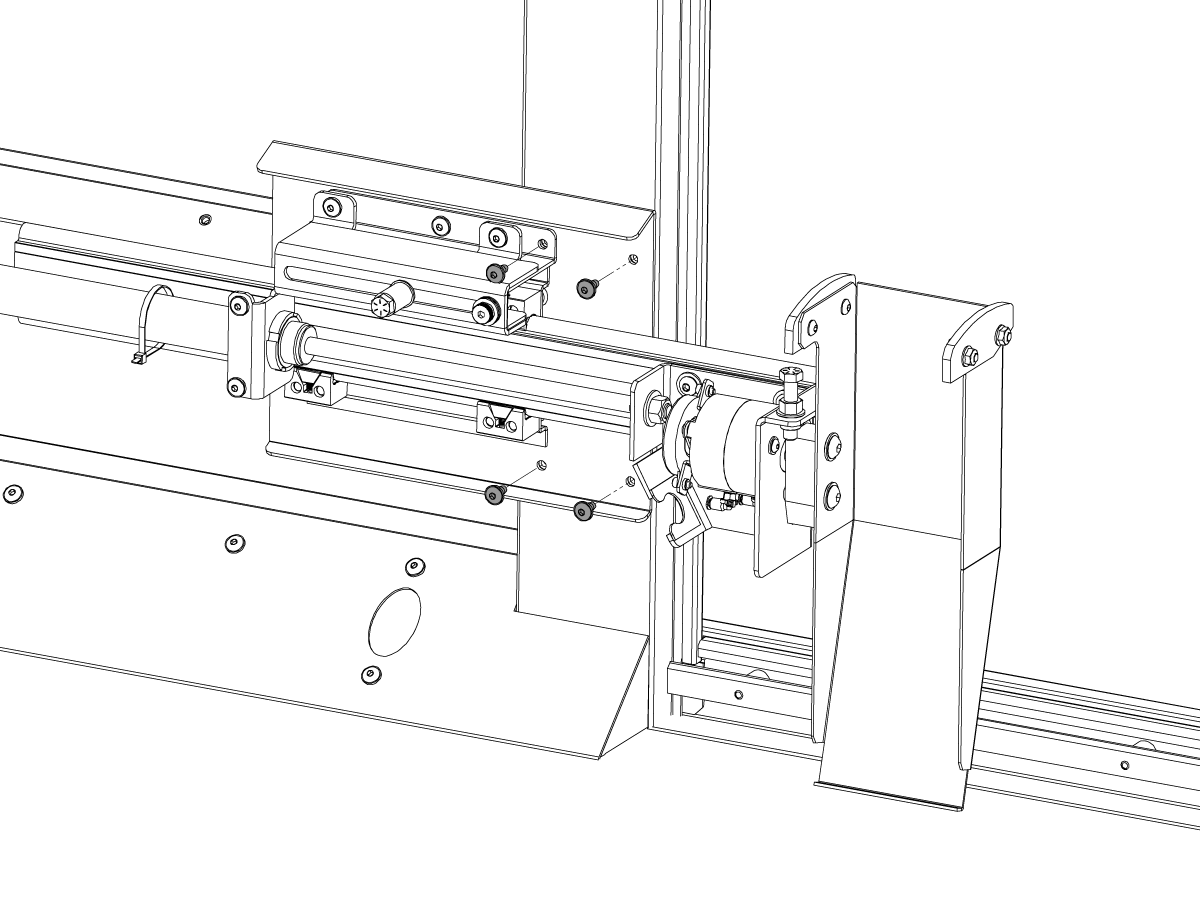
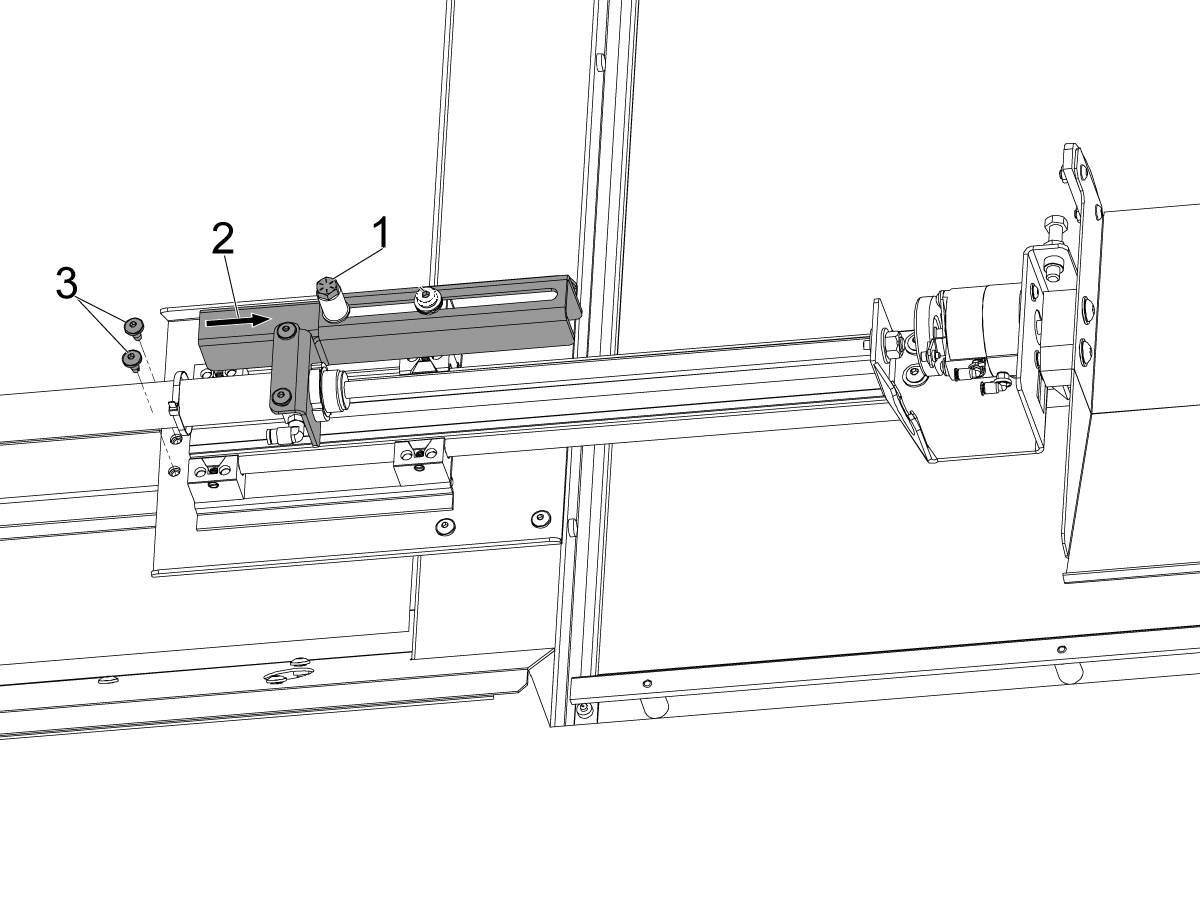
Slide the P-CAT pneumatic piston bracket toward the P-CAT chute.

Bolt the P-CAT assembly to the enclosure using (2) machine screws [3].

Loosen the P-CAT reach adjustment bolt [1].

Position the P-CAT pneumatic piston bracket so that the P-CAT chute is in the correct position to catch cut off parts when the P-CAT pneumatic piston is at maximum travel.

Tighten the adjustment bolt [1].

6

Updated

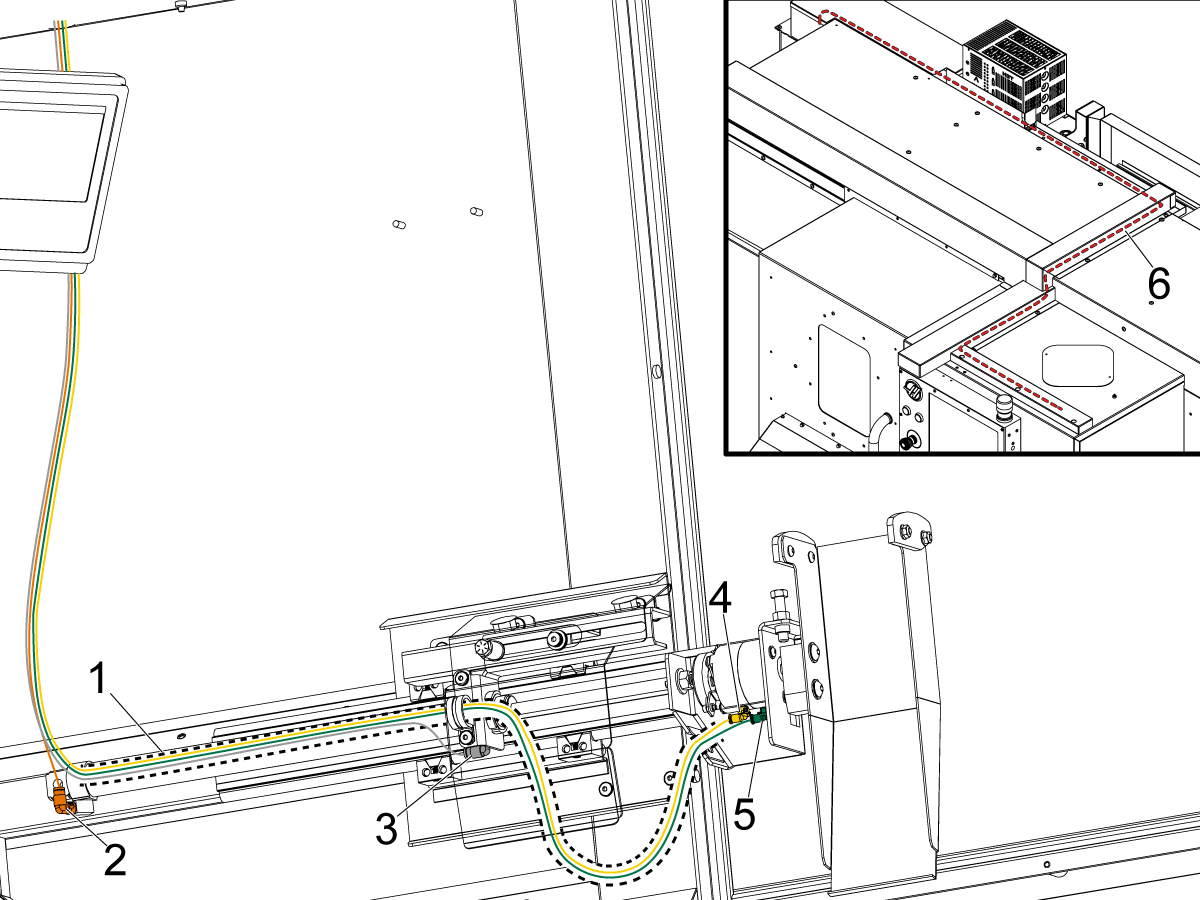
Route the cable carrier [1] from the P-CAT pneumatic rotary actuator to the end of the P-CAT extend pneumatic piston.  Secure with zip ties.

Route the 1/4 inch orange air hose through the cable carrier [1] to the push-to-connect fitting [2].

Route the 1/4 inch clear air hose under the cable carrier [1] and between the zip ties to the push-to-connect fitting [3].

Route the 5/32 inch clear air hoses through the cable carrier [1] to the push-to-connect fittings [4] [5].

Note: If both 5/32 inch clear air hoses are visually identical, mark both ends of one air line with a marker to help with identification.  

Reinstall the P-CAT main cover and plastic plugs

Remove the covers and route the hoses [6] through the cable channels on top of the machine back to the lube rack.

7

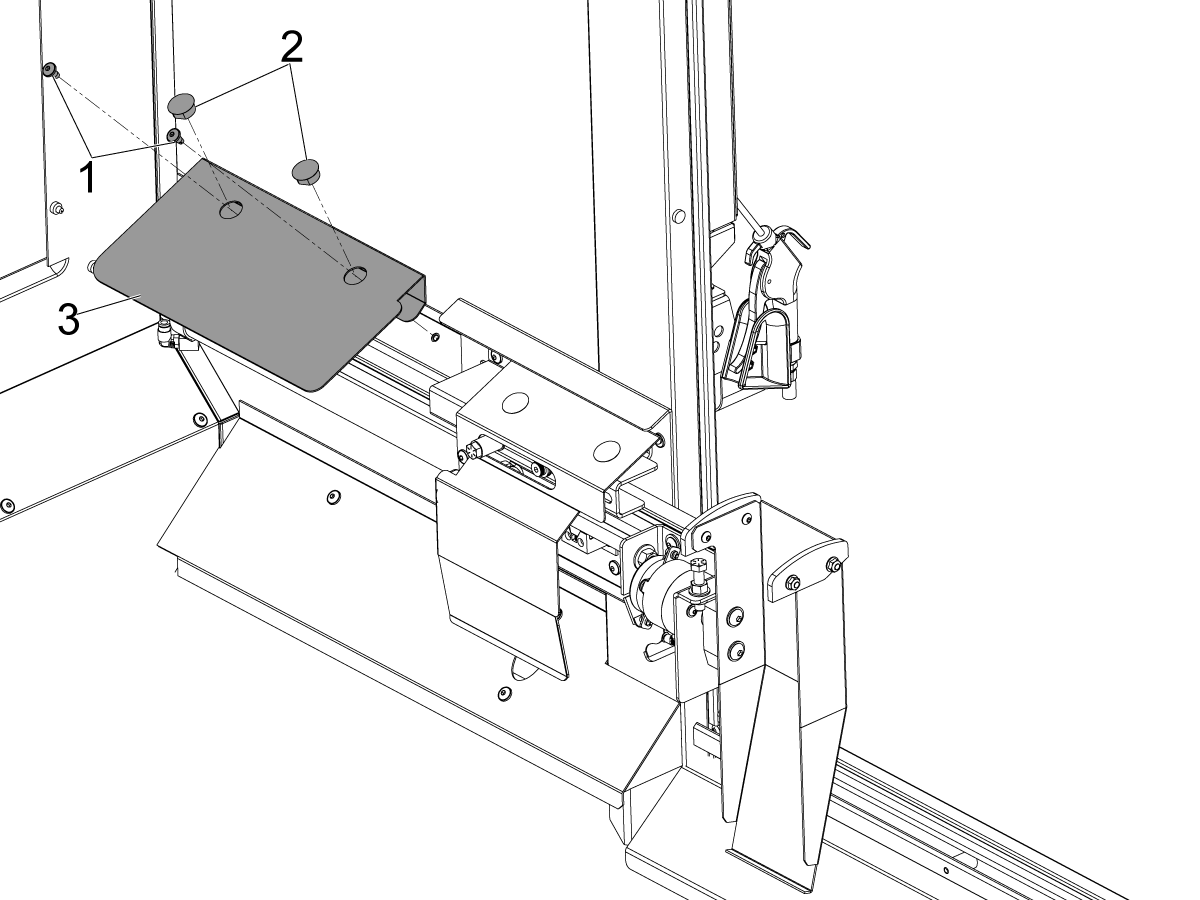
Install the P-CAT pneumatic cylinder cover [3] on the machine enclosure using (2) machine screws [1].

Install the plastic plugs [2] into the P-CAT pneumatic cylinder cover [3].

8

Updated

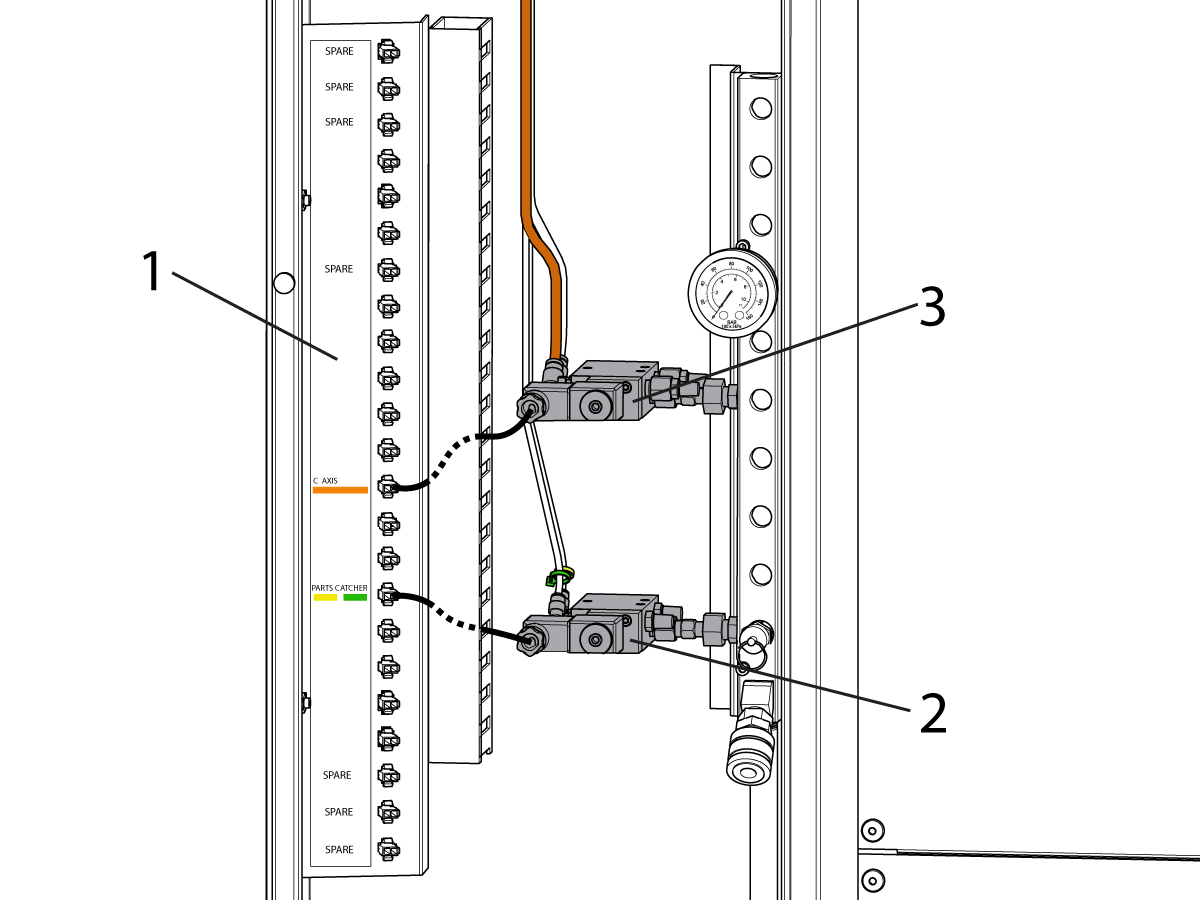
Route cable 33-0471 PCAT LUBE RACK CABLE from P50 on the I/O PCB to the lube rack.

Remove the connector bracket [1] and plug cable 33-0471 into the C AXIS port on the bracket. Re-install the bracket [1] with the old C AXIS plug stored behind it.

 Note: Cable 33-0471 is not needed for machines with a CAN Lube Panel and should not be installed.  The solenoid power cable can be connected directly to the CANBUS PCB in the lube panel.

Install the rotation solenoid [2] and plug it into the PARTS CATCHER plug.

Install the extension solenoid [3] and plug it into the C AXIS plug.

Plug the hoses into the correct color coded ports.

Parts Catcher Door Installation

1

Updated

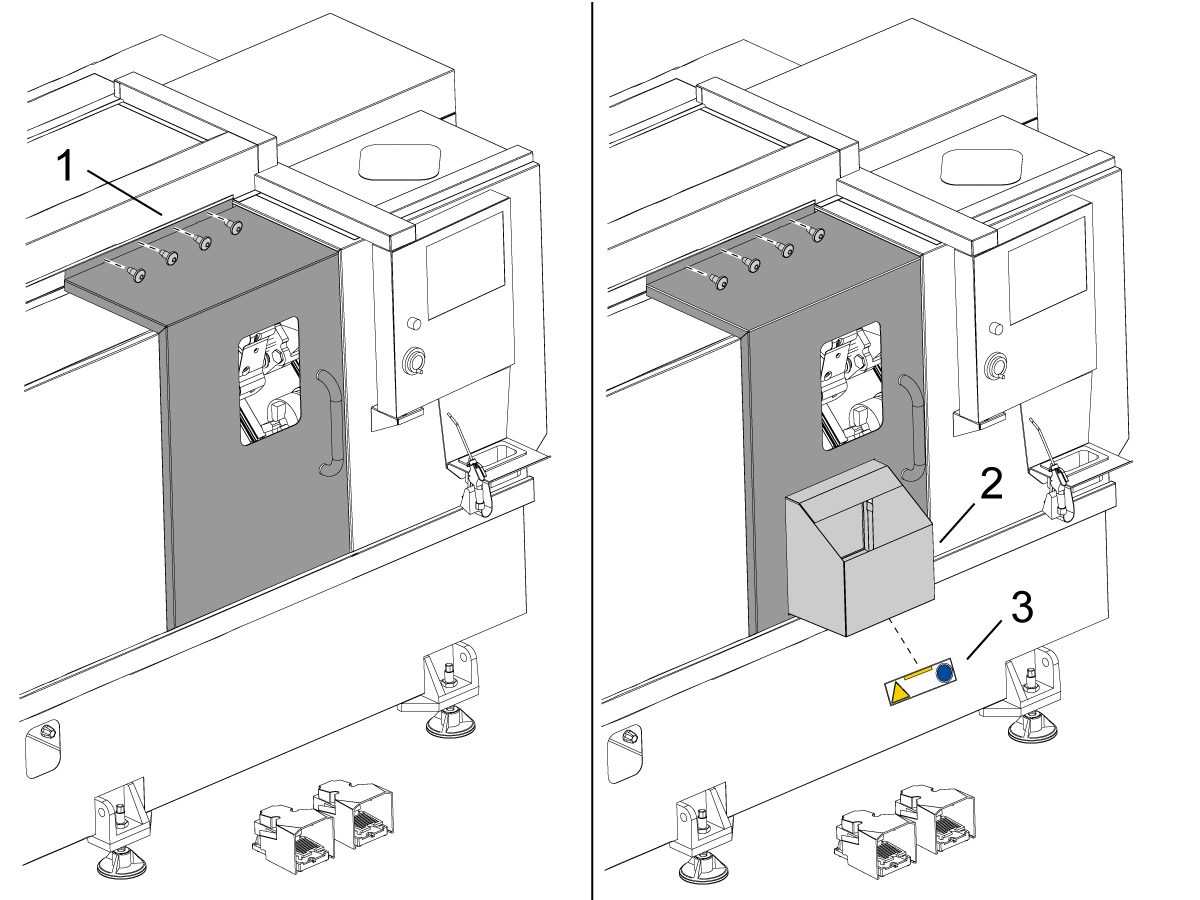
For a field install of the parts catcher, you must install the parts catcher door.

Fully open the operators door. 

Remove the top door skirt [1]  and front door skirt [2] by unbolting the (9x) sheet metal screws [3]. 

2

Updated

Unbolt the (4x) door header nuts [1].

Lean the door off the machine and remove it. Discard the old door.

Install the new door with parts bin [2] by aligning the lower rollers onto track.

Install the (x4) door header nuts [1].

Reinstall the front and upper door skirt. Position the skirt close to the door to minimize the gap.

Note: The skirt should not contact the inside of the door. To ensure the skirt is not rubbing on the door interior, slide the door open and closed to check for a smooth and quiet operation. Adjust by tightening the skirt in place.

Install the safety decal sticker [3] onto the parts bin [2].

Turn on the main air supply at the lube rack. Align and test the parts catcher.

Recently Viewed Items

You Have No Recently Viewed Items Yet

Feedback
Haas Logo

Haas Delivered Price

This price includes shipping cost, export and import duties, insurance, and any other expenses incurred during shipping to a location in France agreed with you as a buyer. No other mandatory costs can be added to the delivery of a Haas CNC Product.

KEEP UP WITH THE LATEST HAAS TIPS AND TECHNOLOGY...

Sign up now!   

HAAS TOOLING ACCEPTS THE FOLLOWING:

  • Service & Support
  • Owners
  • Request Service
  • Operator Manuals
  • Haas Parts

  • Rotary Repair Request
  • Pre-Install Guides
  • Shopping Tools
  • Build & Price a New Haas
  • Available Inventory
  • The Haas Price List
  • CNCA Financing
  • About Haas
  • Accessibility Statement
  • DNSH Statement
  • Export Compliance
  • Careers
  • Certifications & Safety
  • Contact Us
  • History
  • Terms & Conditions
  • Haas Tooling Terms & Conditions
  • Privacy
  • Warranty
  • Haas Community
  • Haas Certification Program
  • Haas Motorsports
  • Gene Haas Foundation
  • Haas Technical Education Community
  • Events
  • Join the Conversation
  • Facebook
  • X
  • Flickr
  • YouTube
  • LinkedIn
  • Instagram
  • TikTok
© 2026 Haas Automation, Inc – CNC Machine Tools

This site is protected by reCAPTCHA and the Google Privacy Policy and Terms of Service apply.

2800 Sturgis Rd., Oxnard, CA 93030
Toll Free: (888) 817-4446 / Fax: 805-278-8554