My Haas Welcome,
!
Haas Tooling MyHaas/HaasConnect Sign In Register Haas Tooling MyHaas/HaasConnect Sign Out Welcome, My Machines Latest Activity My Quotes My Account My Users Sign Out
Find Your Distributor
  1. Select Language
    1. English
    2. Deutsch
    3. Español - España
    4. Español - México
    5. Français
    6. Italiano
    7. Português
    8. Český
    9. Dansk
    10. Nederlands
    11. Magyar
    12. Polski
    13. Svenska
    14. Türkçe
    15. 中文
    16. Suomi
    17. Norsk
    18. الإنجليزية
    19. български
    20. Hrvatski
    21. Ελληνικά
    22. Română
    23. Slovenský
    24. Slovenščina
    25. 한국어
    26. 日本語
    27. Українська
  • machines Main Menu
    • Vertical Mills
      Vertical Mills
      Vertical Mills View All
      • Vertical Mills
      • VF Series
      • Universal Machines
      • VR Series
      • VP-5 Prismatic
      • Pallet-Changing VMCs
      • Mini Mills
      • Mold Machines
      • High-Speed Drill Centers
      • Drill/Tap/ Mill Series
      • Toolroom Mills
      • Pocket Mill
      • Compact Mills
      • Gantry Series
      • SR Sheet Routers
      • Extra-Large VMC
      • Double-Column Mills
      • 3+2 Positioning Machines
    • Multi-Axis Solutions
      Multi-Axis Solutions
      Multi-Axis Solutions View All
      • Multi-Axis Solutions
      • Y-Axis Lathes
      • 5-Axis Mills
    • Lathes
      Lathes
      Lathes View All
      • Lathes
      • ST Series
      • Dual-Spindle
      • Box Way Series
      • Toolroom Lathes
      • Chucker Lathe
      • Haas Bar Feeders
    • Horizontal Mills
      Horizontal Mills
      Horizontal Mills View All
      • Horizontal Mills
      • 50-Taper
      • 40-Taper
    • Rotaries & Indexers
      Rotaries & Indexers
      Rotaries & Indexers View All
      • Rotaries & Indexers
      • Rotary Tables
      • Indexers
      • 5-Axis Rotaries
      • Extra-Large Rotaries
    • Special Series
      Special Series
      Special Series View All
      • Special Series
      • EU_Series_Redirect
    • Automation Systems
      Automation Systems
      Automation Systems View All
      • Automation Systems
      • Mill Automation
      • Lathe Automation
      • Automatic Parts Loaders
      • Automation Models
    • Desktop Machines
      Desktop Machines
      Desktop Machines View All
      • Desktop Machines
      • Desktop Mill
      • Desktop Lathe
      • Control Simulator, Standard
      • Control Simulator, Premium
    • Shop Equipment
      Shop Equipment
      Shop Equipment View All
      • Shop Equipment
      • Knee Mill
      • Haas Manual Lathes
      • Haas Saws
    • Fabrication Machines
      Fabrication Machines
      Fabrication Machines View All
      • Fabrication Machines
      • Laser Cutting Machines
      • CNC Press Brakes
    • QUICK LINKS Special Series  Special Series 
      EU SERIES EU SERIES BUILD & PRICE | PRICE LIST BUILD & PRICE | PRICE LIST In-Stock Machines In-Stock Machines WHAT’S NEW WHAT’S NEW YOUR FIRST CNC YOUR FIRST CNC
      SHOPPING TOOLS
      • Build & Price a Haas
      • Price List
      • Available Inventory
      • CNCA Financing
      WANT TO TALK TO SOMEONE?

      A Haas Factory Outlet (HFO) can answer your questions, and walk you through your best options.

      CONTACT YOUR DISTRIBUTOR >
  • Options Main Menu
    • The Haas Control Value Option Packages
      Value Option Packages
      Value Option Packages View All
      • Value Option Packages
    • Product Image Spindles
      Spindles
      Spindles View All
      • Spindles
    • Product Image Tool Changers
      Tool Changers
      Tool Changers View All
      • Tool Changers
    • Product Image 4th- | 5th-Axis
      4th- | 5th-Axis
      4th- | 5th-Axis View All
      • 4th- | 5th-Axis
    • Product Image Turrets & Live Tooling
      Turrets & Live Tooling
      Turrets & Live Tooling View All
      • Turrets & Live Tooling
    • Product Image Probing
      Probing
      Probing View All
      • Probing
    • Haas Chip & Coolant Management Chip & Coolant Management
      Chip & Coolant Management
      Chip & Coolant Management View All
      • Chip & Coolant Management
    • The Haas Control The Haas Control
      The Haas Control
      The Haas Control View All
      • The Haas Control
    • Product Image Product Options
      Product Options
      Product Options View All
      • Product Options
    • Product Image Tooling & Fixturing
      Tooling & Fixturing
      Tooling & Fixturing View All
      • Tooling & Fixturing
    • Product Image Workholding
      Workholding
      Workholding View All
      • Workholding
    • Product Image 5-Axis Solutions
      5-Axis Solutions
      5-Axis Solutions View All
      • 5-Axis Solutions
      • 5 Easy Steps to 5-Axis
    • QUICK LINKS Special Series  Special Series 
      EU SERIES EU SERIES BUILD & PRICE | PRICE LIST BUILD & PRICE | PRICE LIST In-Stock Machines In-Stock Machines WHAT’S NEW WHAT’S NEW YOUR FIRST CNC YOUR FIRST CNC
      SHOPPING TOOLS
      • Build & Price a Haas
      • Price List
      • Available Inventory
      • CNCA Financing
      WANT TO TALK TO SOMEONE?

      A Haas Factory Outlet (HFO) can answer your questions, and walk you through your best options.

      CONTACT YOUR DISTRIBUTOR >
  • Why Haas Main Menu
      Discover the Haas Difference
    • Why Haas
    • MyHaas
    • Education Community
    • Industry 4.0
    • Haas Certification
    • Customer Testimonials
  • Service Main Menu
      Welcome to Haas Service
      SERVICE HOME Operator’s Manuals How-To Procedures Troubleshooting Guides Preventive Maintenance Haas Parts Haas Tooling Videos
  • Videos Main Menu
  • Main Menu
    • View All
    • View All
    • View All
    • View All
      • HTEC Curriculum Support
    • View All
      • Haas 10 kg Cobot Package
      • Cobot Kits
      • DC-1 Drill Center
      • CNC Sales News
      • Do More With Your Haas
    • View All
    • View All
      • contact-us-test
      • 4 - AUTOMATION SYSTEMS
      • Carousel-V2
      • expert test
      • Demo_Day_Trident-test
      • Link Test
      • image-sale-tag-test
      • article-list-test
      • Haas 25 kg Robot Package
    • View All
      • Choose Options
    • View All
    • View All
    • View All
    • View All
    • View All
      • calc-test
    • View All
    • QUICK LINKS Special Series  Special Series 
      EU SERIES EU SERIES BUILD & PRICE | PRICE LIST BUILD & PRICE | PRICE LIST In-Stock Machines In-Stock Machines WHAT’S NEW WHAT’S NEW YOUR FIRST CNC YOUR FIRST CNC
      SHOPPING TOOLS
      • Build & Price a Haas
      • Price List
      • Available Inventory
      • CNCA Financing
      WANT TO TALK TO SOMEONE?

      A Haas Factory Outlet (HFO) can answer your questions, and walk you through your best options.

      CONTACT YOUR DISTRIBUTOR >
  • Haas Tooling Main Menu
  • Haas Service Parts Main Menu

My Haas Welcome,
!
Haas Tooling MyHaas/HaasConnect Sign In Register Haas Tooling MyHaas/HaasConnect Sign Out Welcome, My Machines Latest Activity My Quotes My Account My Users Sign Out
Find Your Distributor
  1. Select Language
    1. English
    2. Deutsch
    3. Español - España
    4. Español - México
    5. Français
    6. Italiano
    7. Português
    8. Český
    9. Dansk
    10. Nederlands
    11. Magyar
    12. Polski
    13. Svenska
    14. Türkçe
    15. 中文
    16. Suomi
    17. Norsk
    18. الإنجليزية
    19. български
    20. Hrvatski
    21. Ελληνικά
    22. Română
    23. Slovenský
    24. Slovenščina
    25. 한국어
    26. 日本語
    27. Українська
×

Search Results

Web Pages

Images

    • <
    • 1
    • >

UMC Pallet Pool - Troubleshooting Guide - NGC - TG0153

Service Home UMC Pallet Pool - Troubleshooting Guide - NGC - TG0153

UMC Pallet Pool - Troubleshooting Guide - NGC - TG0153

- Jump to Cause - Back to Top

8.1 UMC Pallet Pool Troubleshooting

Recently Updated Last updated: 10/15/2025

UMC Pallet Pool - Troubleshooting Guide - NGC


TG0153

Revision F - 05/2026

Introduction

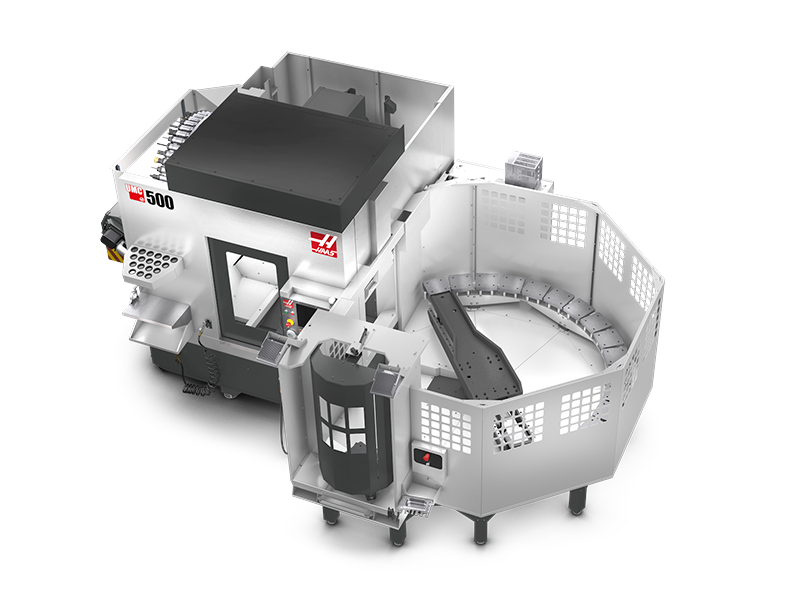
There are differences between the UMC Pallet Pool, the VMC Pallet Pool, and the EC Pallet Pool, please refer to this troubleshooting guide for issues regarding the UMC Pallet Pool (6/8/10/16/20 Station Pallet Pool options).

This pallet pool option can be installed on the following machine models:

  • UMC-500/SS
  • UMC-750/SS
  • UMC-1000/SS
  • UMC-1250/SS

The Next Generation software on the machine must be version 100.20.000.1110or higher.

The Pallet Pool option is not field installable.

The Pallet Pool has 2 servo axes. The PR axis rotates the Pallet Pool saddle and the PS axis extends and retracts the Pallet Pool saddle to load/unload the pallets.

Please refer to the UMC Installation Section or the HMC Installation Section in the Pallet Pool Service Manual for further information on how to install your respective machine. 

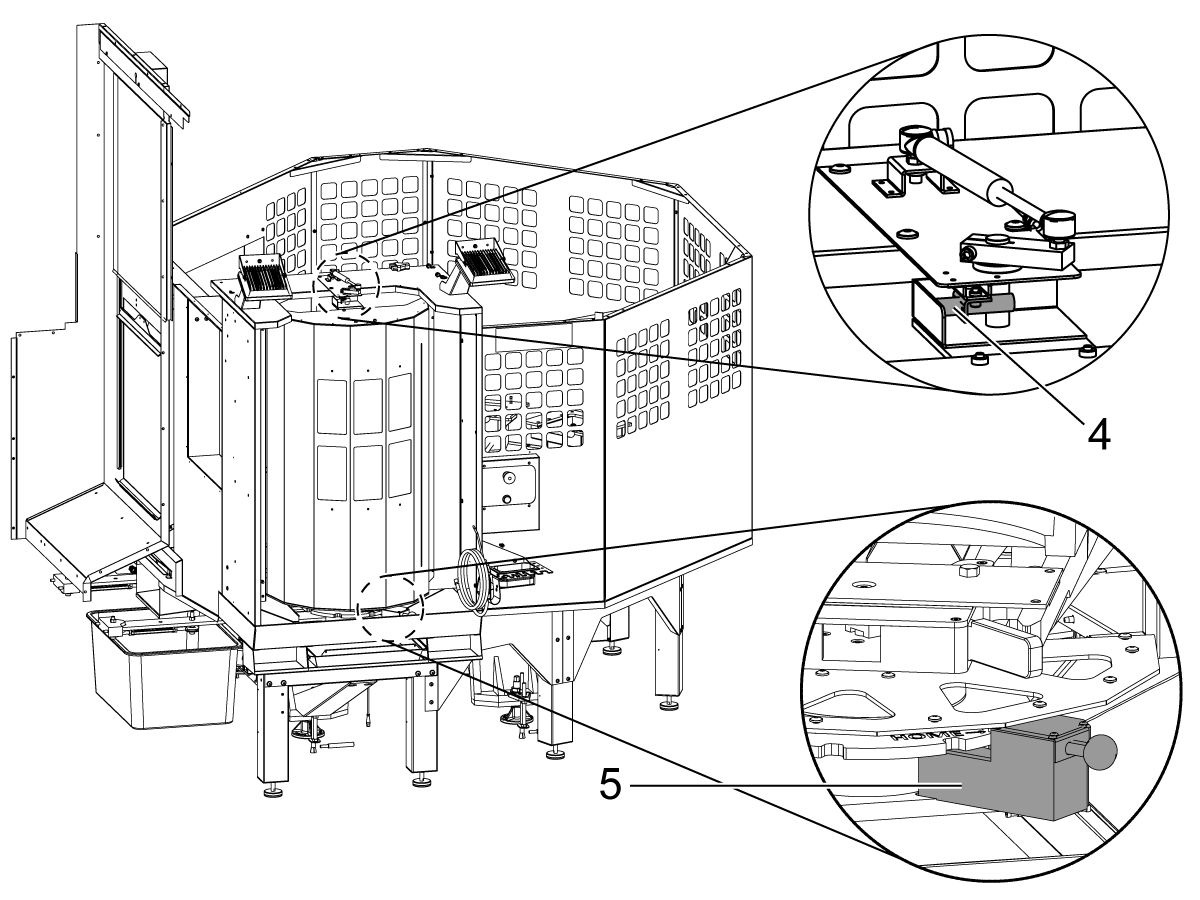
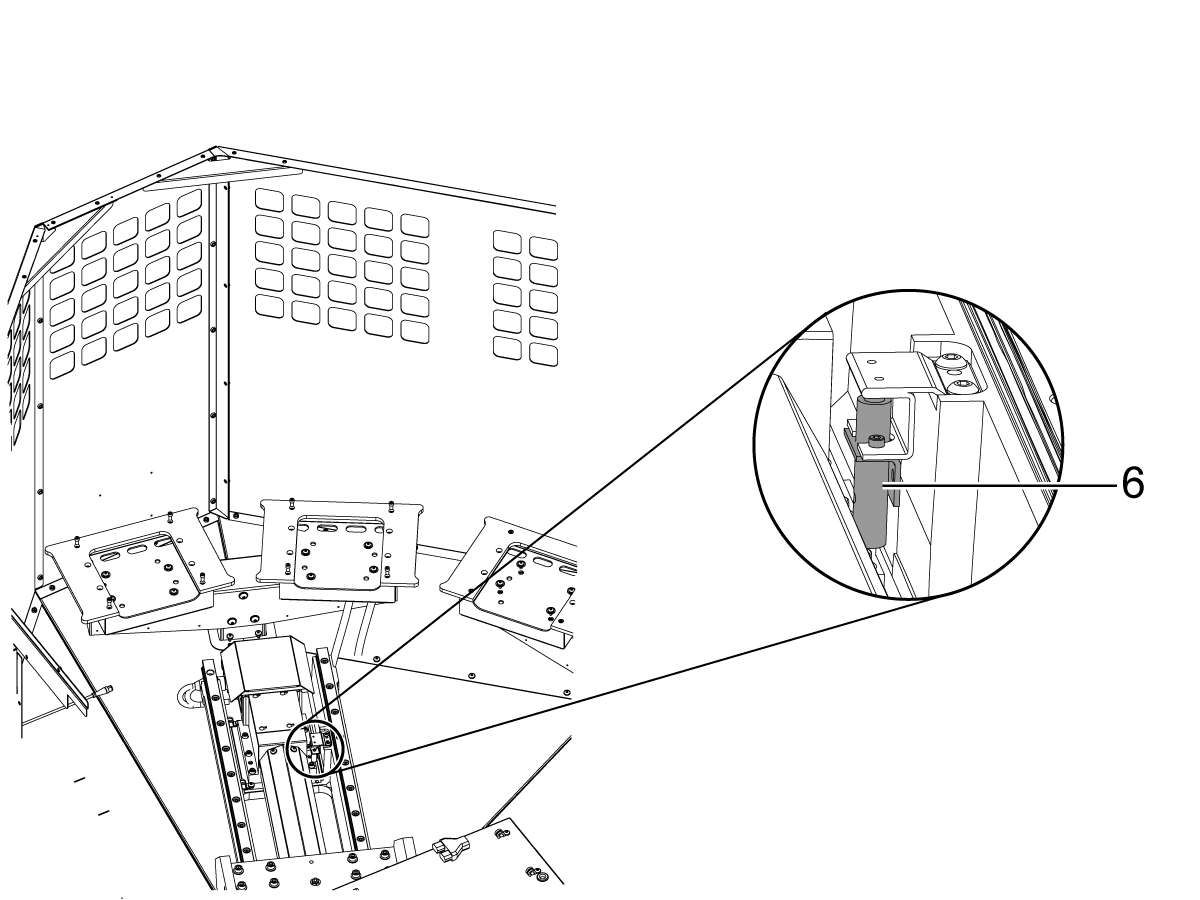
SENSORS

  1. PP Lifter Up
  2. PP Lifter Down
  3. PR Axis Home Switch
 
        4. PP Load Door Open
        5. PP Station Lock

        6. UMC Pallet Slide Home Switch

Note: EC-400 Pallet Slide Home Switch is found underneath the ballscrew.

Symptom Table

Symptom Possible Cause Corrective Action

Alarm 15.108 AXIS SERVO OVERLOAD

Alarm 15.103 AXIS SERVO ERROR TOO LARGE

Binding Transmission The amplifier could be having an issue driving the motor. If you have this problem, please contact our service department.

After zero returning the PS or PR axis, the following alarms are generated:

Alarm 15.103 AXIS SERVO ERROR TOO LARGE

Alarm 16.103 AXIS SERVO ERROR TOO LARGE

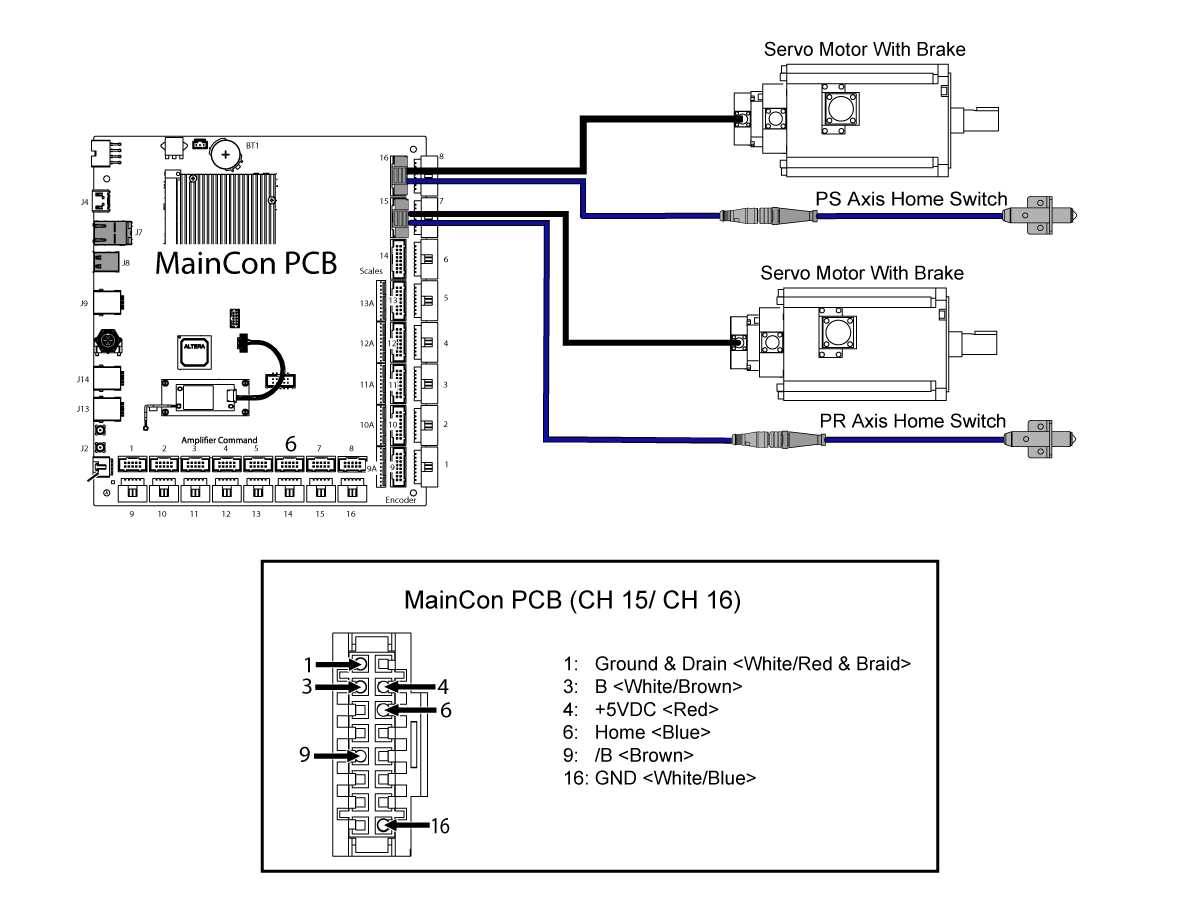
Faulty Home Sensor Go to the Diagnostics-MOCON tab, search for PR or PS axis home switch inputs. Manually trigger the PR or PS sensors to verify the bits change states from 0 to 1. If the bits do not change states, use the electrical diagram below to determine which component has failed.
Hydraulic oil leaks or sprays from the pallet locating pins during a pallet change.   Contact Haas Service.
Alarm 391  Feature Disabled  is generated commanding M180 & M181 The single switch auto window cannot be commanded independently.


Feature must be commanded by the pallet pool template. The customer needs to purchase an auto window install kit to get stand-alone functionality. Refer to AD documents that apply to your machine model.

DC/DT/DM/CM/MM/SMM/UMC-350 - Auto Window - Installation - AD0652


UMC Auto Window - Installation - AD0663


VMC - Auto Window - Installation - AD0669


Alarm 974 Pallet Pool Switch Fault Chips accumulated at sensors. Check the Pallet Lifter Down / Up sensors for chips and clean out any that are found. Recover Pallet Pool and try again. Use the illustrations to locate the sensors.
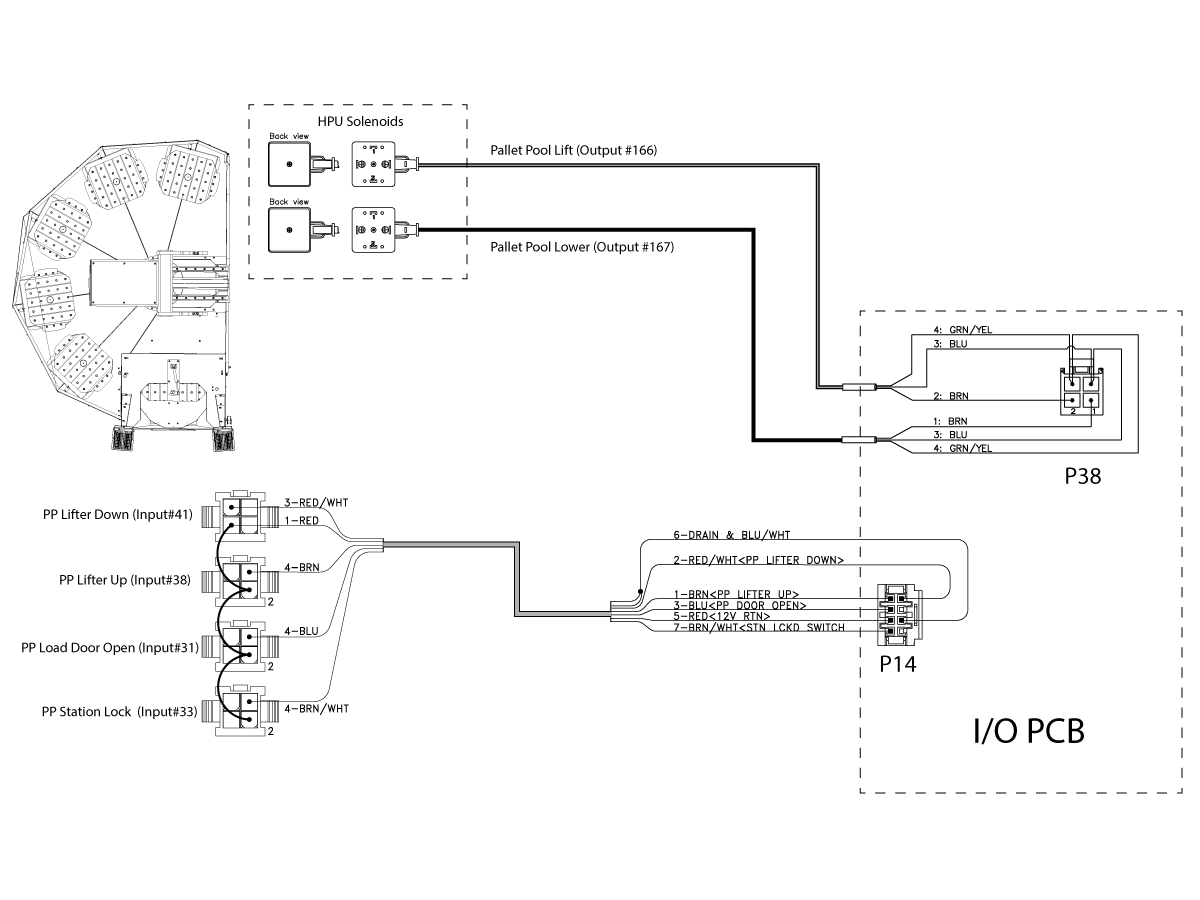
The pallet pool state proximity sensors are not triggering. Check the Pallet Lifter Down / Up sensor states and make sure the sensors are toggling when triggered. Use the Lifter UP/ Lifter Down I/O Status table below to determine the correct states of the sensor.
Alarm 975 Pallet Pool Lifter Down Time Out Chips accumulated at sensors. Check the Pallet Lifter Down / Up sensors for chips and clean out any that are found. Recover Pallet Pool and try again. Use the illustrations to locate the sensors.
The pallet pool state proximity sensors are not triggering.

Check the Pallet Lifter Down / Up sensor states and make sure the sensors are toggling when triggered. Use the Lifter UP/ Lifter Down I/O Status table below to determine the correct states of the sensor. 

Verify the Pallet Pool Status Cable (P/N 33-0427) is pinned correctly.  Use the Electrical Diagrams below.

Alarm 977 Pallet Pool Lifter Up Time Out Insufficient hydraulic pressure or fluid volume. Make sure the pump is turning on and building enough pressure to lift the Pallet Lifter.
Pallet Lifter was not unclamped. Check for any mechanical obstructions that are preventing the pallet lifter from rising.
Damage to the Pallet Pool up switch or wiring. Check the pallet lifter up and pallet lifter down sensors for proper operation. Use the Lifter UP/ Lifter Down I/O Status table below to determine the correct states of the sensor.
Alarm 9887 Pallet Pool Lifter is Up The Lifter is up when attempting to retrieve a pallet. Enter RECOVERY to attempt auto-recovery, or enter the recovery page to verify that the lifter is operational by commanding it up and down. Check PP Lifter Up (INPUT 38) and verify it is operating correctly. Use the Lifter UP/ Lifter Down I/O Status table below to determine the correct states of the sensor.
Alarm 9888 Pallet Pool Lifter is Down The lifter is down while either retrieving a pallet or placing a pallet. Enter RECOVERY to attempt auto-recovery. If auto-recovery fails, enter the recovery page to verify that the lifter is operational by commanding it up and down. Check  PP Lifter Down (INPUT 41) and verify it is operating correctly. Use the Lifter UP/ Lifter Down I/O Status table below to determine the correct states of the sensor.
Pallet pool is displaying the wrong amount of pallets. Parameter 740 Pallet Pool Max Pallet Count is set incorrectly Change Parameter 740 to the correct pallet count 
Pallet pool up & down solenoid are functioning inversely  Up & down solenoid cables are incorrectly labeled   Order 93-3268 or 93-3268, lower and lift solenoid cable kit for correctly labeled cables. 
Pallet Changer Clamp/Unclamp mechanism operates in reverse. The hydraulic lines are reversed. Check at both ends of the hydraulic lift cylinder and hydraulic power unit and verify that they are set correctly.
The pallet clamp/unclamp sensors are reversed. With a Pallet on the receiver.  Command the pallet to clamp and unclamp.  Go to I/O tab and verify that inputs 25 PALLET CHANGER PALLET UNCLMPED and 29 PALLET CHANGER PALLET CLAMPED toggle to the correct state.  Check the terminal block, check that they are connected correctly.
Alarm 9889 Pallet Pool Slider Door Open Timeout The slider door failed to open within the required time limit Verify there is nothing obstructing the door open switch.
Adjust the flag to the switch and make sure it toggles when in position.
Check to see if the solenoid is functioning properly.
Verify there is nothing obstructing the door open switch.
Alarm 9890 Pallet Pool Slider Door Close Timeout The slider door failed to close within the required time limit
Adjust the switch to the flag and make sure it toggles when in position
Check to see if the solenoid is functioning properly.
Alarm 9892 Pallet Pool Slider Door Not Open  The slider door was detected to be closed when it is expected to be open Check the area around the slider door for obstructions
Verify the correct switch is in the correct location
Alarm 9893 Pallet Pool Slider Door Open  The slider door was detected to be open when it is expected to be closed Check the area around the slider door for obstructions
Verify the correct switch is in the correct location
Pallet "Missing"  message appears on the pallet scheduler page whenever a pallet is loaded in the machine The clamp and unclamp switch are not adjusted correctly  Go to I/O tab and verify that inputs 25 PALLET CHANGER PALLET UNCLMPED, 29 PALLET CHANGER PALLET CLAMPED, and Output  44 PALLET CHANGER UNCLAMPED toggle to the correct state. Adjust the clamp/unclamp switches until they are in the correct state. 
Alarm 946 APC Pallet Clamp Timeout 
Alarm 15.165  PR-Axis Zero Return Margin is Too Small The machine may have shifted during shipping Redo the grid offsets and re-set the tool change offsets. For further instructions contact Haas Service for the internal procedure on how to do so.
Alarm 16.165  PS-Axis Zero Return Margin is Too Small The machine may have shifted during shipping Redo the grid offsets and re-set the tool change offsets. For further instructions contact Haas Service for the internal procedure on how to do so.
Machine is sounding clunky during the majority of the load and pick up cycles The machine may have shifted during shipping The tool change offsets will need to be adjusted. For further instructions contact Haas Service for the internal procedure on how to do so.
"No Pallet" message appears when selecting "Put away Load Station Pallet" and "Get highlighted Pallet" Parameter 2129 was not set to "PP_Shelf_ A" Use the USB Service key to go into Service Mode. Press [DIAGNOSTIC] Go to the PARAMETERS> Factory setting tab. Set the following factory settings value 2129[:] Pallet Loading Shelf = PP_Shelf_A.

For UMC-1250 Machines built before 8/2023:

Pallet's are not sitting flush on the pallet storage stations

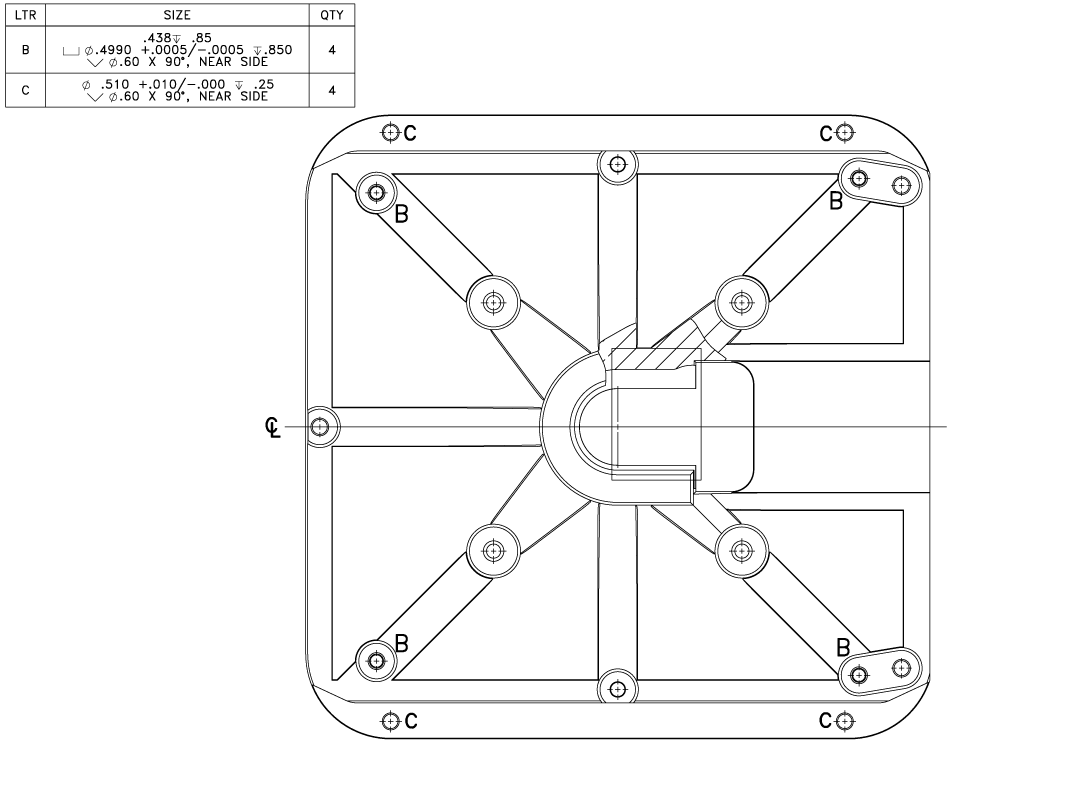
Diameter of the slip fit holes on the pallet is not correct. Refer to the UMC-1250 Pallet Slip Fit Hole Diameter section for further instructions.
Pallets not transitioning smoothly to/from forks to/from storage shelf during pick up and drop off Mechanical misalignment of shelf location  Refer to UMC-PP Fine Adjustment Drop Off and Pick Up section below to fine tune the pallet pool drop off and pick up on your machine.
The machine may have shifted during shipping
Setting 382 Disable Pallet Pool only has the "none" option available when going to enable/disable pallet pool. Parameter 2128 was set to 
"Not Installed".
Use the USB Service key to go into Service Mode. Press [DIAGNOSTIC] Go to the PARAMETERS> Factory setting tab. Set the following factory settings value 2128[:] Pallet Pool Type = HPU Lift for UMC-500/750/1000 or HPU Lift with Assist for UMC-1250.

Lifter Up/Lifter Down I/O Status

Machine State

PP Lifter Up

Input #38

PP Lifter Down

Input #41

PP Pallet Lift

Output #166

PP Pallet Lower

Output #167

Pallet Pool Lifter is Up 1 0 1 0
Pallet Pool Lifter is Down 0 1 0 1

Load Door I/O Status

Machine State

PP  Load Door Open

Input #31

PP Station Lock

Input #33

Door is closed and the station lock is at the home position 0 1
Door is open and the station lock is at the home position 1 1
Door is closed and the station lock is not at the home position 0 0

UMC-1250 Slip Fit Hole Diameter

Rework the holes labeled [B] and [C] to the size specified in the image.

UMC-PP Fine Adjusting Drop Off and Pick Up

1

This procedure is to fine adjust the UMC-PP pick up and drop off of the pallets onto each individual station. Repeat this procedure to align multiple stations.

If this machine was built before 05/2025, download the latest configuration file for your machine from HBC and update the machine's configuration file.

Note: If the individual shelf parameters were adjusted and a patch file was not created, the configuration update will set the changed values back to the factory settings. 

Important: When performing this procedure, change the dimensioning setting to MM using Setting 9.

2

Use the USB Service key to go into Service Mode.

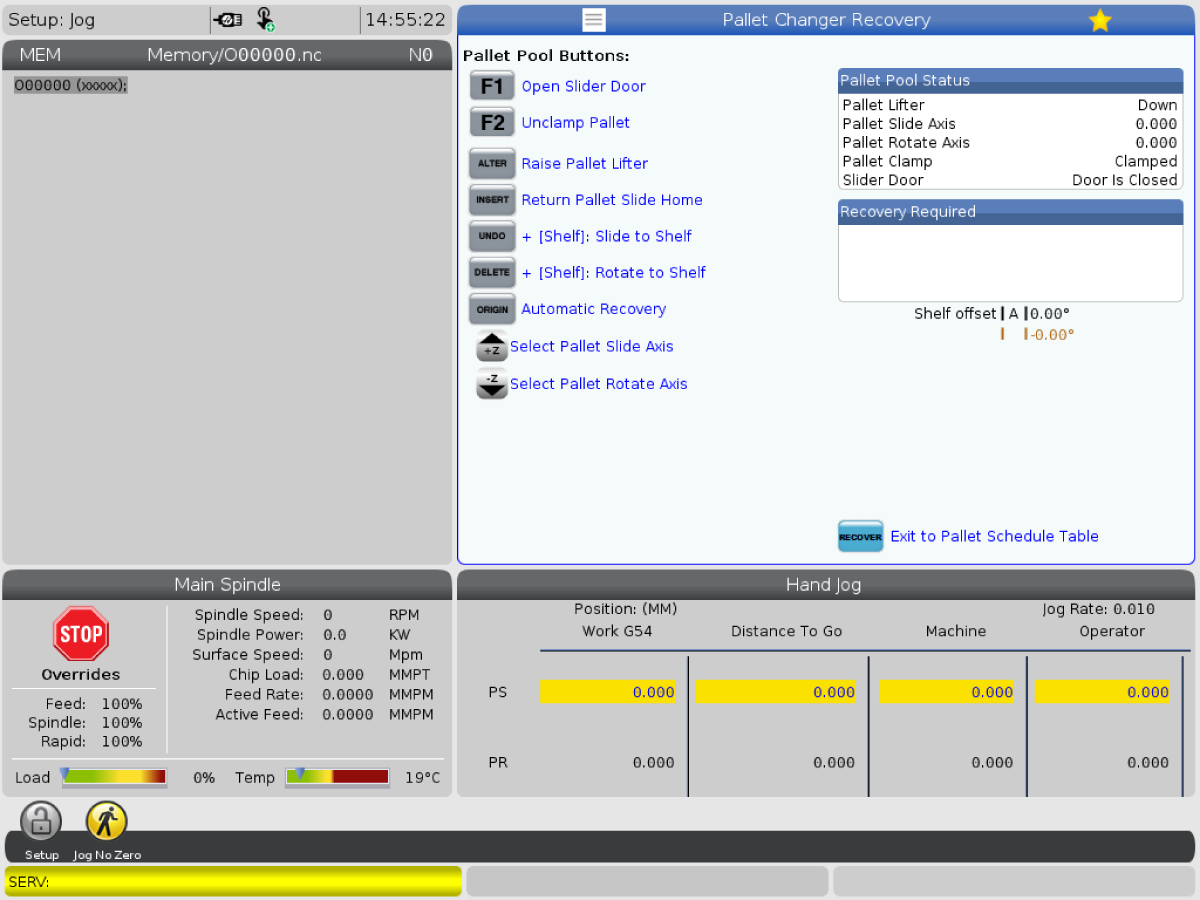
Enter pallet recovery page and press the letter of the station that needs adjustment then [DELETE] to rotate the pallet pool to the selected station. 

Press [-Z] or  [+Z] to select the Pallet Rotate Axis or Pallet Slide Axis

Use these axes to jog the ram into position to allow for smooth drop off and pick up from the station. 

Test the position by pressing [ALTER] to raise and lower the ram. 

Take note of the  Pallet Rotate Axis position and the Pallet Slide Axis position in the Pallet Pool Status box.

UMC Pallet Pool Tool Change Offset Basing Location
All UMC Pallet Pools Shelf A

3

When going to fine adjust the shelf location at which the tool change offset is based on, the individual shelf parameter should not be adjusted. The tool change offset for the the PR or PS should be adjusted. Refer to the table to determine which shelf that is based on the pallet pool model.

Once the pallet is adjusted where you want it at the tool change offset basing shelf, Press [DIAGNOSTIC] Go to the PARAMETERS> Factory setting tab.

Search 15.078 for the PR-Axis Tool Change Offset

Search 16.078 for the PS-Axis Tool Change Offset

Type in PR or PS then press [F2] to set the new tool change offset for that axis.

You will need to [ZERO RETURN] both the PR and PS axis after changing the tool change offset starting with the PS.

Note: Once this is done, the other shelves may need readjustment. Go through this procedure again skipping step 3 for each one of the shelves if needed.

4

Once a desired position is found, exit recovery by pressing [RECOVERY]. 

Press [DIAGNOSTIC] Go to the PARAMETERS> Factory setting tab.

Press [EMERGENCY STOP].

Type in SLIDE and press [F1].

Find the parameter that coincides with the station you are trying to adjust. 

Note:The parameter number for Slide Offset will be between 2130 and 2139, 2306 and 2313, or 2372 and 2379.

Once the parameter is found, highlight the desired parameter and press [F2].  Double check that the populated value matches the noted value from the recovery page.

5

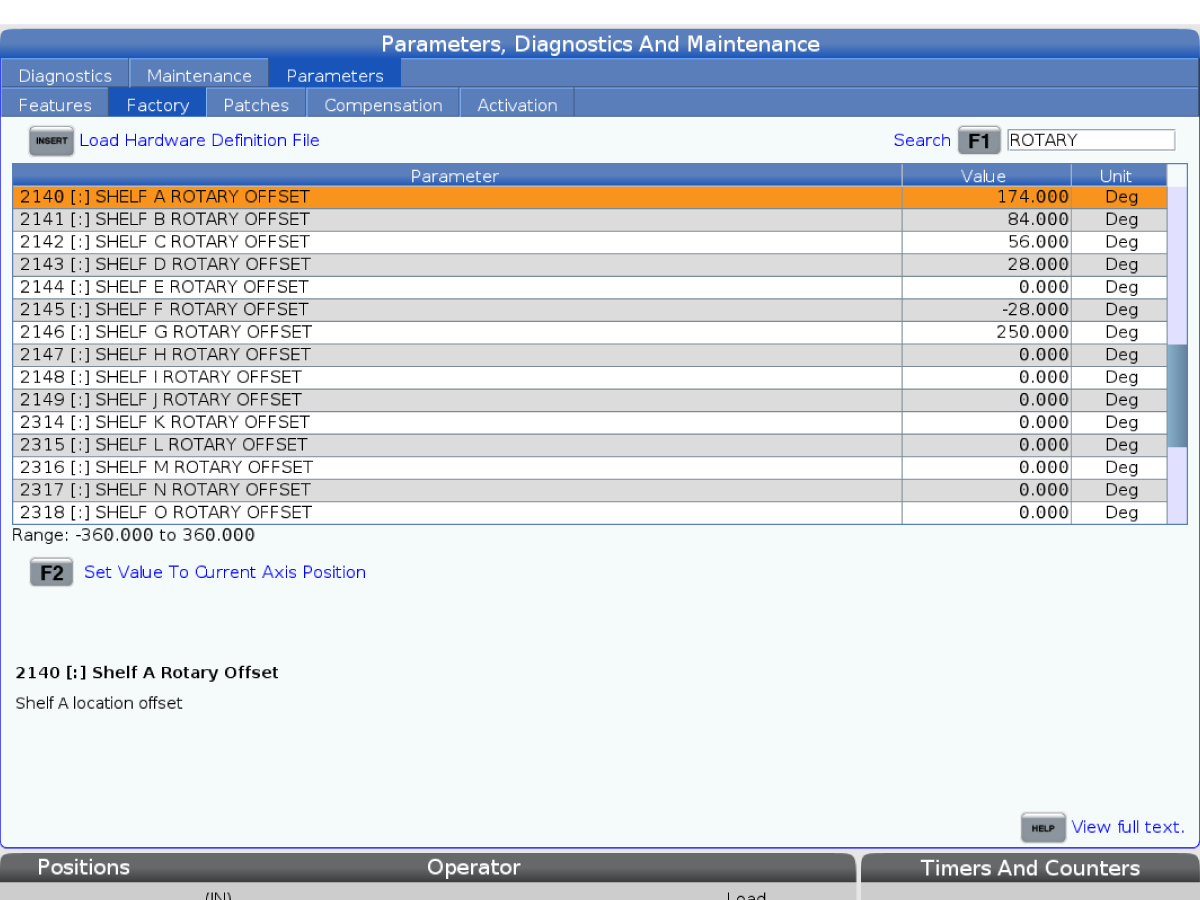
Type in ROTARY and press [F1].

Find the parameter that coincides with the station you are trying to adjust.

Note: The parameter number will be between 2140 and 2149, 2314 and 2321, or 2380 and 2387.

Once the parameter is found, highlight the desired parameter and press [F2].  Double check that the populated value matches the noted value from the recovery page.

Go back to the recovery page and move the pallet pool into a state where you will be able to zero return the PS and PR axes.

[ZERO RETURN] the PS and PR axis starting with PS.

Once that has been done, test the pick up and drop off of the station. 

Electrical Diagrams

Pallet Pool Input Status and Solenoid Output


PR/PS Switch and Servo Motor Connection to MainCon PCB

Recently Viewed Items

You Have No Recently Viewed Items Yet

Feedback
Haas Logo

Haas Delivered Price

This price includes shipping cost, export and import duties, insurance, and any other expenses incurred during shipping to a location in France agreed with you as a buyer. No other mandatory costs can be added to the delivery of a Haas CNC Product.

KEEP UP WITH THE LATEST HAAS TIPS AND TECHNOLOGY...

Sign up now!   

HAAS TOOLING ACCEPTS THE FOLLOWING:

  • Service & Support
  • Owners
  • Request Service
  • Operator Manuals
  • Haas Parts

  • Rotary Repair Request
  • Pre-Install Guides
  • Shopping Tools
  • Build & Price a New Haas
  • Available Inventory
  • The Haas Price List
  • CNCA Financing
  • About Haas
  • Accessibility Statement
  • DNSH Statement
  • Export Compliance
  • Careers
  • Certifications & Safety
  • Contact Us
  • History
  • Terms & Conditions
  • Haas Tooling Terms & Conditions
  • Privacy
  • Warranty
  • Haas Community
  • Haas Certification Program
  • Haas Motorsports
  • Gene Haas Foundation
  • Haas Technical Education Community
  • Events
  • Join the Conversation
  • Facebook
  • X
  • Flickr
  • YouTube
  • LinkedIn
  • Instagram
  • TikTok
© 2026 Haas Automation, Inc – CNC Machine Tools

This site is protected by reCAPTCHA and the Google Privacy Policy and Terms of Service apply.

2800 Sturgis Rd., Oxnard, CA 93030
Toll Free: (888) 817-4446 / Fax: 805-278-8554