My Haas Welcome,
!
Haas Tooling MyHaas/HaasConnect Sign In Register Haas Tooling MyHaas/HaasConnect Sign Out Welcome, My Machines Latest Activity My Quotes My Account My Users Sign Out
Find Your Distributor
  1. Select Language
    1. English
    2. Deutsch
    3. Español - ES
    4. Español - MX
    5. Français
    6. Italiano
    7. Português
    8. Český
    9. Dansk
    10. Nederlands
    11. Magyar
    12. Polski
    13. Svenska
    14. Türkçe
    15. 中文
    16. Suomi
    17. Norsk
    18. الإنجليزية
    19. български
    20. Hrvatski
    21. Ελληνικά
    22. Română
    23. Slovenský
    24. Slovenščina
    25. 한국어
    26. 日本語
    27. Українська
  • machines Main Menu
    • Vertical Mills
      Vertical Mills
      Vertical Mills View All
      • Vertical Mills
      • VF Series
      • Universal Machines
      • VR Series
      • VP-5 Prismatic
      • Pallet-Changing VMCs
      • Mini Mills
      • Mold Machines
      • High-Speed Drill Centers
      • Drill/Tap/ Mill Series
      • Toolroom Mills
      • Pocket Mill
      • Compact Mills
      • Gantry Series
      • SR Sheet Routers
      • Extra-Large VMC
      • Double-Column Mills
      • 3+2 Positioning Machines
    • Multi-Axis Solutions
      Multi-Axis Solutions
      Multi-Axis Solutions View All
      • Multi-Axis Solutions
      • Y-Axis Lathes
      • 5-Axis Mills
    • Lathes
      Lathes
      Lathes View All
      • Lathes
      • ST Series
      • Dual-Spindle
      • Box Way Series
      • Toolroom Lathes
      • Chucker Lathe
      • Pocket Lathe
      • Haas Bar Feeders
    • Horizontal Mills
      Horizontal Mills
      Horizontal Mills View All
      • Horizontal Mills
      • 50-Taper
      • 40-Taper
    • Rotaries & Indexers
      Rotaries & Indexers
      Rotaries & Indexers View All
      • Rotaries & Indexers
      • Rotary Tables
      • Indexers
      • 5-Axis Rotaries
      • Extra-Large Rotaries
    • Special Series
      Special Series
      Special Series View All
      • Special Series
      • EU_Series_Redirect
    • Automation Systems
      Automation Systems
      Automation Systems View All
      • Automation Systems
      • Mill Automation
      • Lathe Automation
      • Automatic Parts Loaders
      • Automation Models
    • Desktop Machines
      Desktop Machines
      Desktop Machines View All
      • Desktop Machines
      • Desktop Mill
      • Desktop Lathe
      • Control Simulator, Standard
      • Control Simulator, Premium
    • Shop Equipment
      Shop Equipment
      Shop Equipment View All
      • Shop Equipment
      • Knee Mill
      • Haas Manual Lathes
      • Haas Saws
    • Fabrication Machines
      Fabrication Machines
      Fabrication Machines View All
      • Fabrication Machines
      • Laser Cutting Machines
      • CNC Press Brakes
    • QUICK LINKS Special Series  Special Series 
      EU SERIES EU SERIES BUILD & PRICE | PRICE LIST BUILD & PRICE | PRICE LIST In-Stock Machines In-Stock Machines WHAT’S NEW WHAT’S NEW YOUR FIRST CNC YOUR FIRST CNC
      SHOPPING TOOLS
      • Build & Price a Haas
      • Price List
      • Available Inventory
      • CNCA Financing
      WANT TO TALK TO SOMEONE?

      A Haas Factory Outlet (HFO) can answer your questions, and walk you through your best options.

      CONTACT YOUR DISTRIBUTOR >
  • Options Main Menu
    • The Haas Control Value Option Packages
      Value Option Packages
      Value Option Packages View All
      • Value Option Packages
    • Product Image Spindles
      Spindles
      Spindles View All
      • Spindles
    • Product Image Tool Changers
      Tool Changers
      Tool Changers View All
      • Tool Changers
    • Product Image 4th- | 5th-Axis
      4th- | 5th-Axis
      4th- | 5th-Axis View All
      • 4th- | 5th-Axis
    • Product Image Turrets & Live Tooling
      Turrets & Live Tooling
      Turrets & Live Tooling View All
      • Turrets & Live Tooling
    • Product Image Probing
      Probing
      Probing View All
      • Probing
    • Haas Chip & Coolant Management Chip & Coolant Management
      Chip & Coolant Management
      Chip & Coolant Management View All
      • Chip & Coolant Management
    • The Haas Control The Haas Control
      The Haas Control
      The Haas Control View All
      • The Haas Control
    • Product Image Product Options
      Product Options
      Product Options View All
      • Product Options
    • Product Image Tooling & Fixturing
      Tooling & Fixturing
      Tooling & Fixturing View All
      • Tooling & Fixturing
    • Product Image Workholding
      Workholding
      Workholding View All
      • Workholding
    • Product Image 5-Axis Solutions
      5-Axis Solutions
      5-Axis Solutions View All
      • 5-Axis Solutions
      • 5 Easy Steps to 5-Axis
    • QUICK LINKS Special Series  Special Series 
      EU SERIES EU SERIES BUILD & PRICE | PRICE LIST BUILD & PRICE | PRICE LIST In-Stock Machines In-Stock Machines WHAT’S NEW WHAT’S NEW YOUR FIRST CNC YOUR FIRST CNC
      SHOPPING TOOLS
      • Build & Price a Haas
      • Price List
      • Available Inventory
      • CNCA Financing
      WANT TO TALK TO SOMEONE?

      A Haas Factory Outlet (HFO) can answer your questions, and walk you through your best options.

      CONTACT YOUR DISTRIBUTOR >
  • Why Haas Main Menu
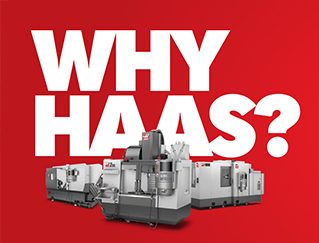
      Discover the Haas Difference
    • Why Haas
    • MyHaas
    • Education Community
    • Industry 4.0
    • Haas Certification
    • Customer Testimonials
  • Service Main Menu
      Welcome to Haas Service
      SERVICE HOME Operator’s Manuals How-To Procedures Troubleshooting Guides Preventive Maintenance Haas Parts Haas Tooling Videos
  • Videos Main Menu
  • Main Menu
    • View All
    • View All
    • View All
    • View All
      • HTEC Curriculum Support
      • Haas Value Option Packages (VOP) Journey
    • View All
      • Haas 10 kg Cobot Package
      • Cobot Kits
      • DC-1 Drill Center
      • CNC Sales News
      • Do More With Your Haas
    • View All
    • View All
      • contact-us-test
      • 4 - AUTOMATION SYSTEMS
      • Carousel-V2
      • expert test
      • Demo_Day_Trident-test
      • Link Test
      • image-sale-tag-test
      • article-list-test
      • Haas 25 kg Robot Package
      • test-algolia-page
    • View All
    • View All
    • View All
    • View All
      • calc-test
    • View All
    • QUICK LINKS Special Series  Special Series 
      EU SERIES EU SERIES BUILD & PRICE | PRICE LIST BUILD & PRICE | PRICE LIST In-Stock Machines In-Stock Machines WHAT’S NEW WHAT’S NEW YOUR FIRST CNC YOUR FIRST CNC
      SHOPPING TOOLS
      • Build & Price a Haas
      • Price List
      • Available Inventory
      • CNCA Financing
      WANT TO TALK TO SOMEONE?

      A Haas Factory Outlet (HFO) can answer your questions, and walk you through your best options.

      CONTACT YOUR DISTRIBUTOR >
  • Haas Tooling Main Menu
  • Haas Service Parts Main Menu
My Haas Welcome,
!
Haas Tooling MyHaas/HaasConnect Sign In Register Haas Tooling MyHaas/HaasConnect Sign Out Welcome, My Machines Latest Activity My Quotes My Account My Users Sign Out
Find Your Distributor
  1. Select Language
    1. English
    2. Deutsch
    3. Español - ES
    4. Español - MX
    5. Français
    6. Italiano
    7. Português
    8. Český
    9. Dansk
    10. Nederlands
    11. Magyar
    12. Polski
    13. Svenska
    14. Türkçe
    15. 中文
    16. Suomi
    17. Norsk
    18. الإنجليزية
    19. български
    20. Hrvatski
    21. Ελληνικά
    22. Română
    23. Slovenský
    24. Slovenščina
    25. 한국어
    26. 日本語
    27. Українська
×

Search Results

Web Pages

Images

    • <
    • 1
    • >

6 - VR - Operation

VR-Series Operator's Manual Supplement


  • 0 - VR - Table of Contents
  • 1 - VR - Introduction
  • 2 - VR - Legal Information
  • 3 - VR - Safety
  • 4 - VR - Installation
  • 5- VR - Control Icons
  • 6 - VR - Operation
  • 7 - VR - MRZP and Safe Zone
  • 8 - VR - G-Codes
  • 9 - VR - M-Codes
  • 10 - VR - Settings
  • 11 - VR - Maintenance
  • 12 - VR - Workholding

Go To :

  • 6.1 Power Up/Zero Return
  • 6.2 Restricted/Crash Zones
  • 6.3 Tool Loading
  • 6.4 Vector Jog
  • 6.5 VR-5AX Spindle Warm-up

6.1 Power Up / Zero Return

Power Up / Zero Return

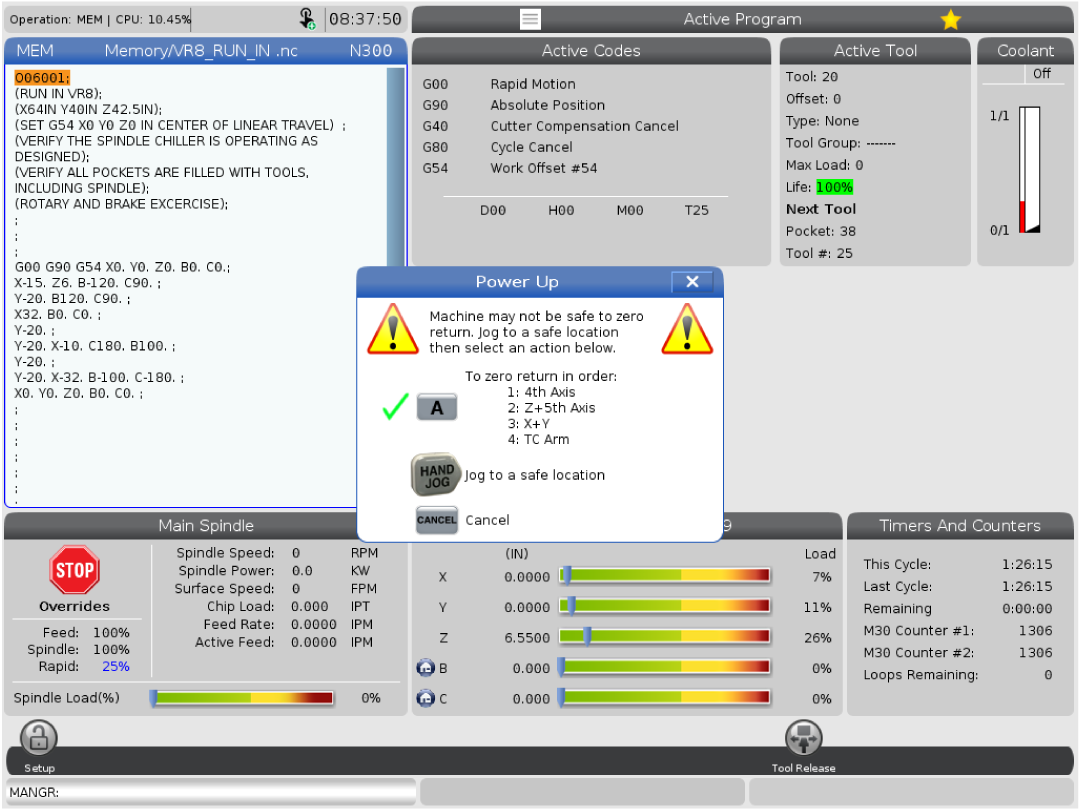
After the machine is powered on cycle the door and the [EMERGENCY STOP] button. Then press [POWER UP].

The zero return sequence follows as such:

  1. 4th Axis 
  2. Z + 5th Axis
  3. X+Y 
  4. TC Arm

WARNING: The zero return sequence will ignore safe zones, if there is a tool present in the tool holder it can crash on the sheet metal, table or double arm. 

6.2 Restricted/Crash Zones

Restricted Zones

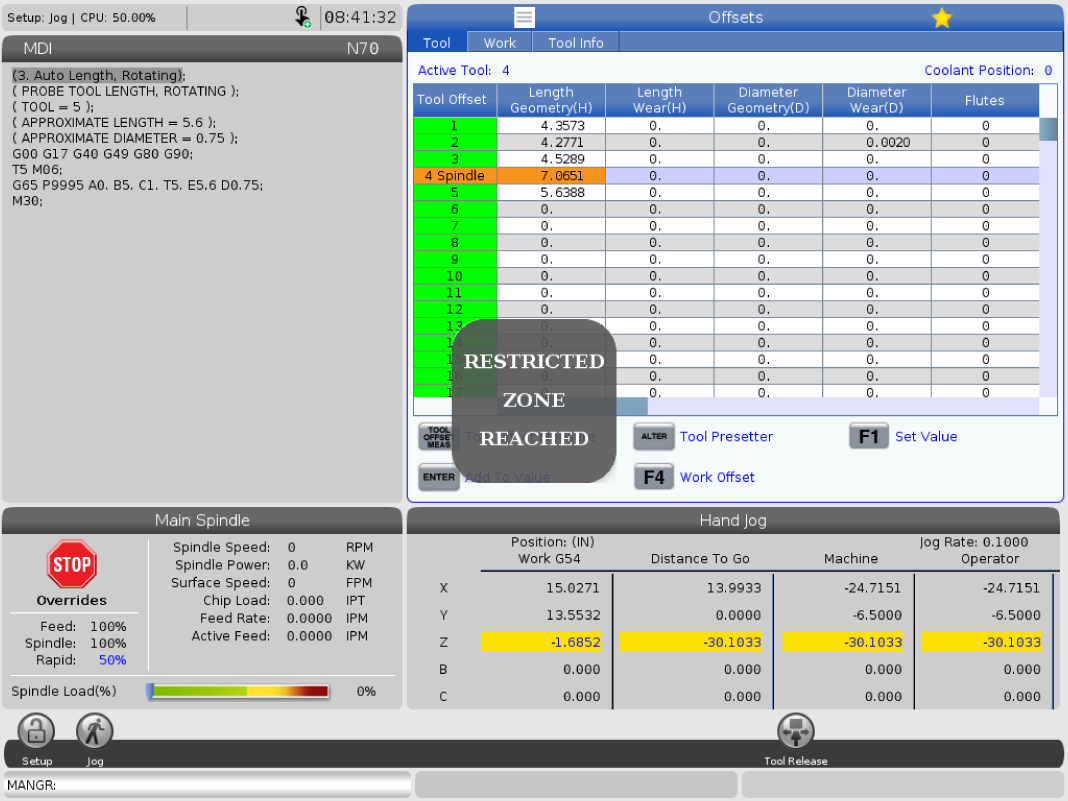
When safe zones are active there are limitations to certain axis movements to prevent crashes from occuring. The message box "RESTRICTED ZONE REACHED" will appear any time a user reaches these limits. 

If this message box appears in an area it should not, please re-calibrate Safe Zones.

If this issue persists please contact the Haas Service department. 

Safe Zones

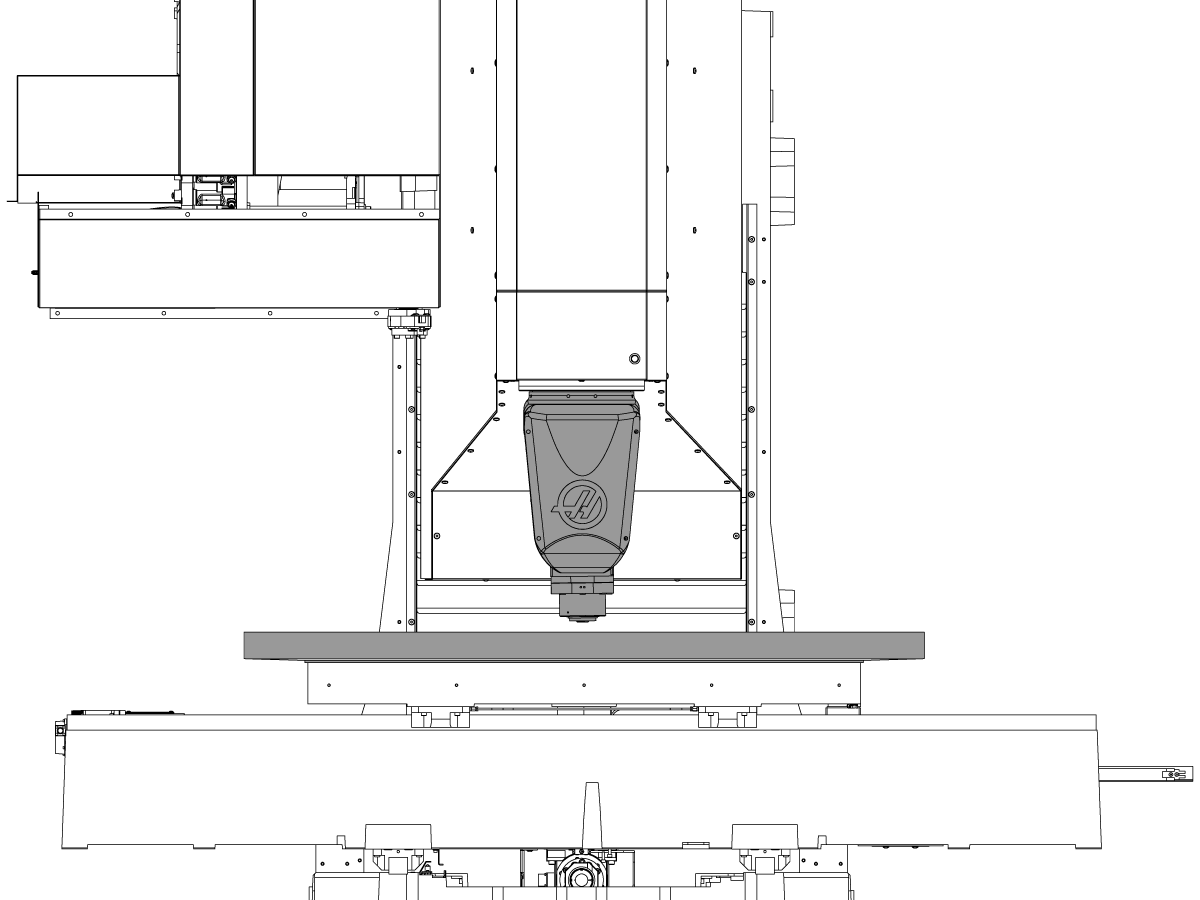
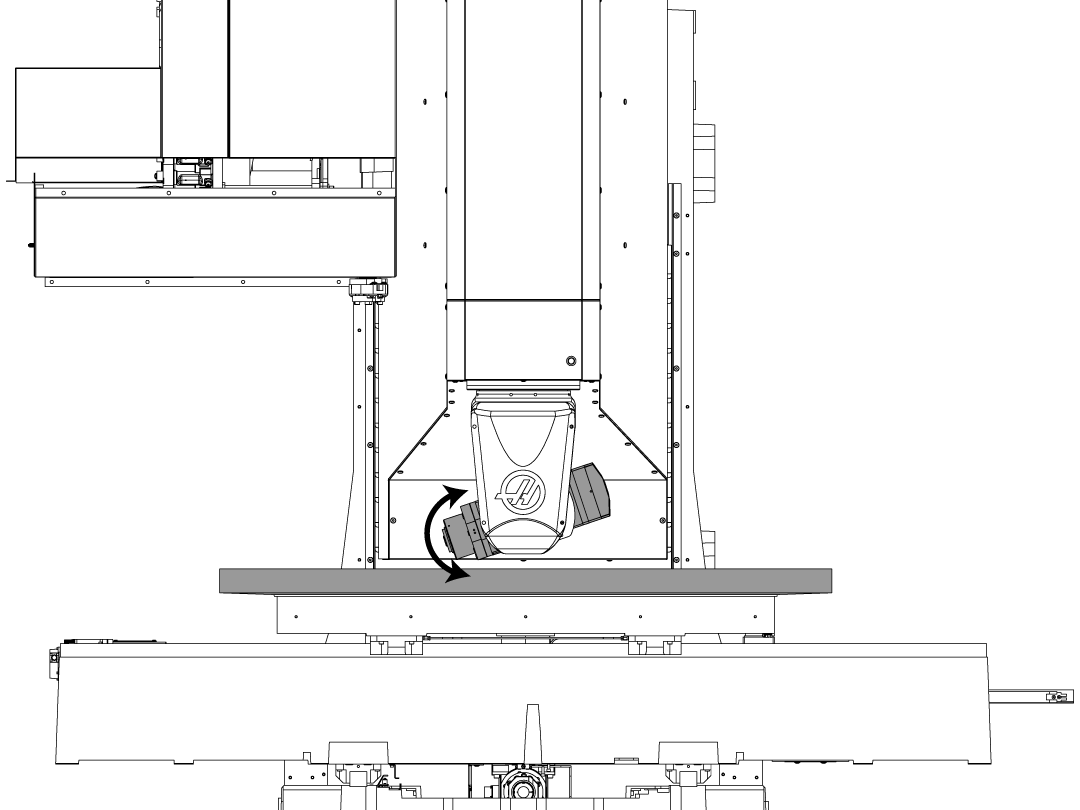
Max travels for the Z-axis are determined by the B position. 

The image shows the Z-max travel at B=0, the machine will be able to move to this position before registering a safe zone limit has been reached.

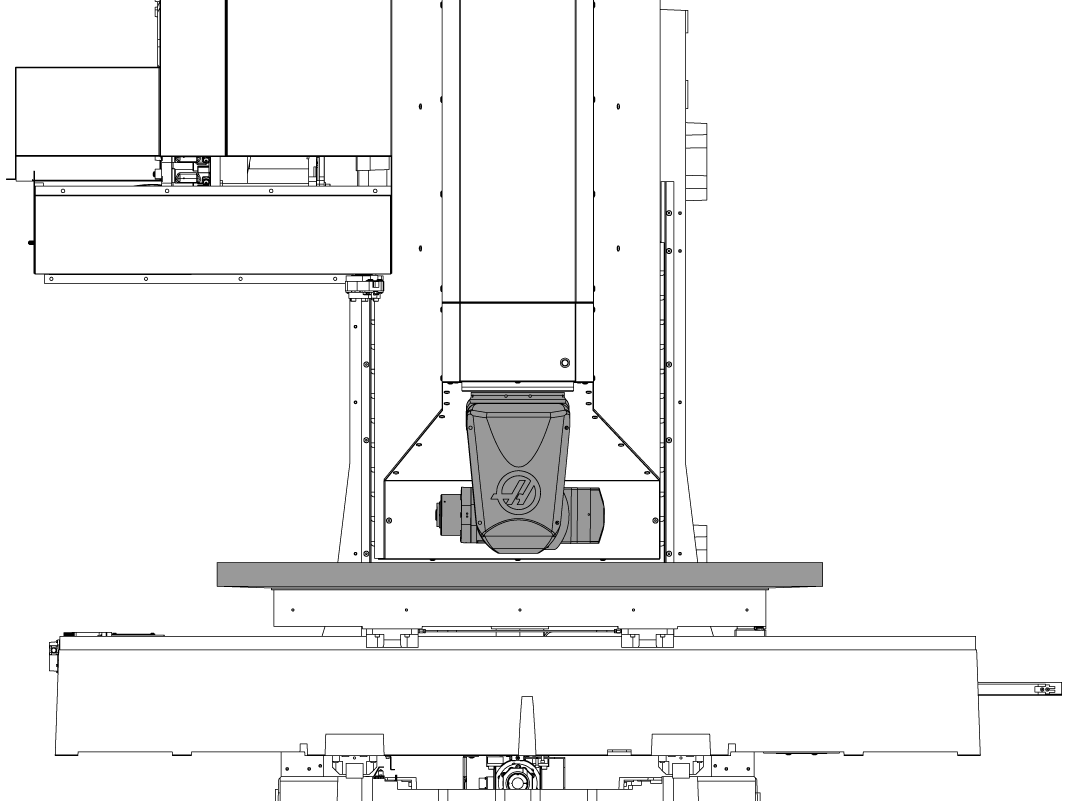
If B is rotated to its 90 degree position the Z-axis max travel  will change so that the B-axis casting does not crash into the table. 

The image showns the position where this max travel limit is located.

NOTE: All other movement is taken into consideration for safe zones, if the user tries to rotate the B-axis while in its max travel limit they will receive a restricted zone reached message.

Possible Crash Zones

The VR head can crash into the table at any non-zero position if the B-axis is commanded to move. 

A zero return sequence can cause the head to crash as it will rotate the B-axis first and ignore safe zones. 

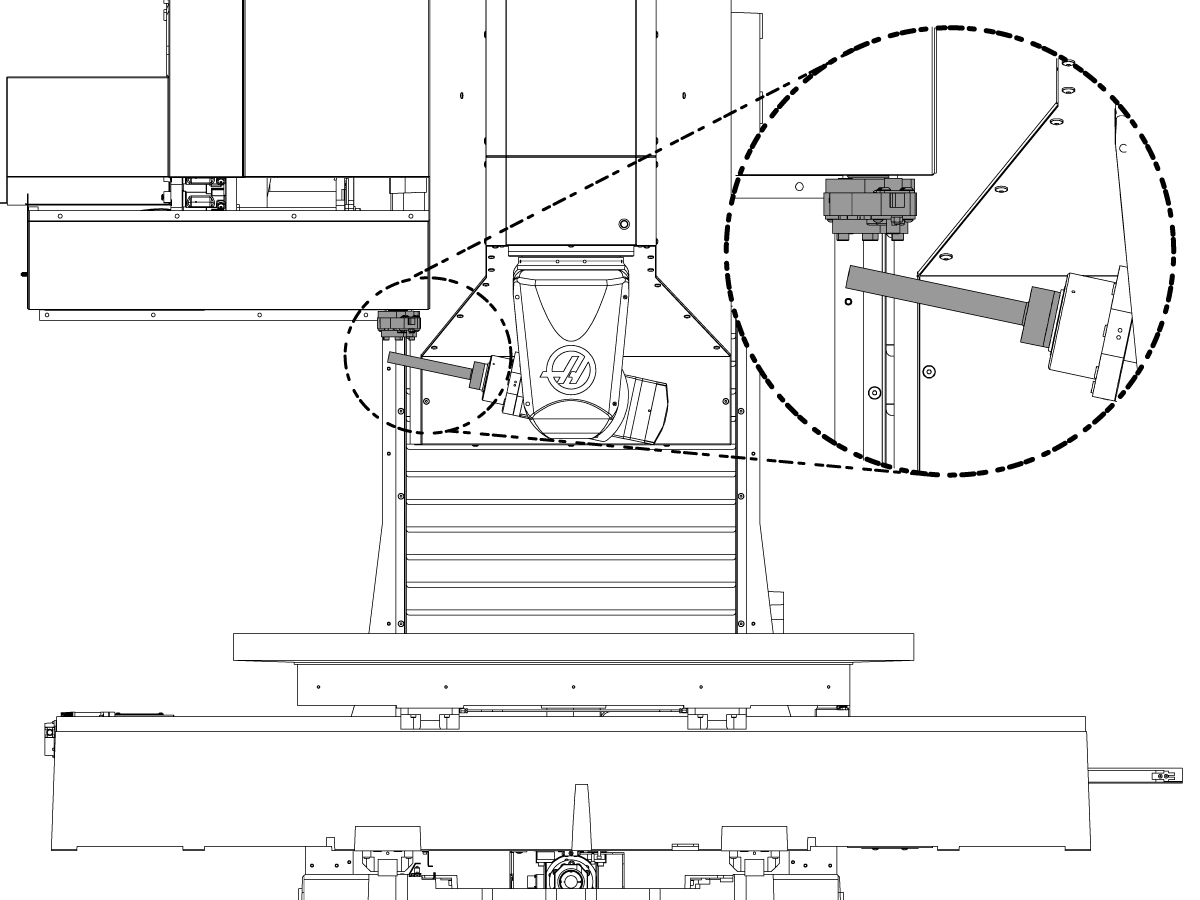
Another possible crash zone can occur when there is a long tool or a test bar in the spindle.

If tool height offsets are not correctly set or SETTING 408 is set to 1 the B-axis can rotate enough to crash into the double arm or sheet metal. 

NOTE: The machine will also crash during the initial machien zeroing as safe zone are ignored regardless of setting 408.

6.3 Tool Loading

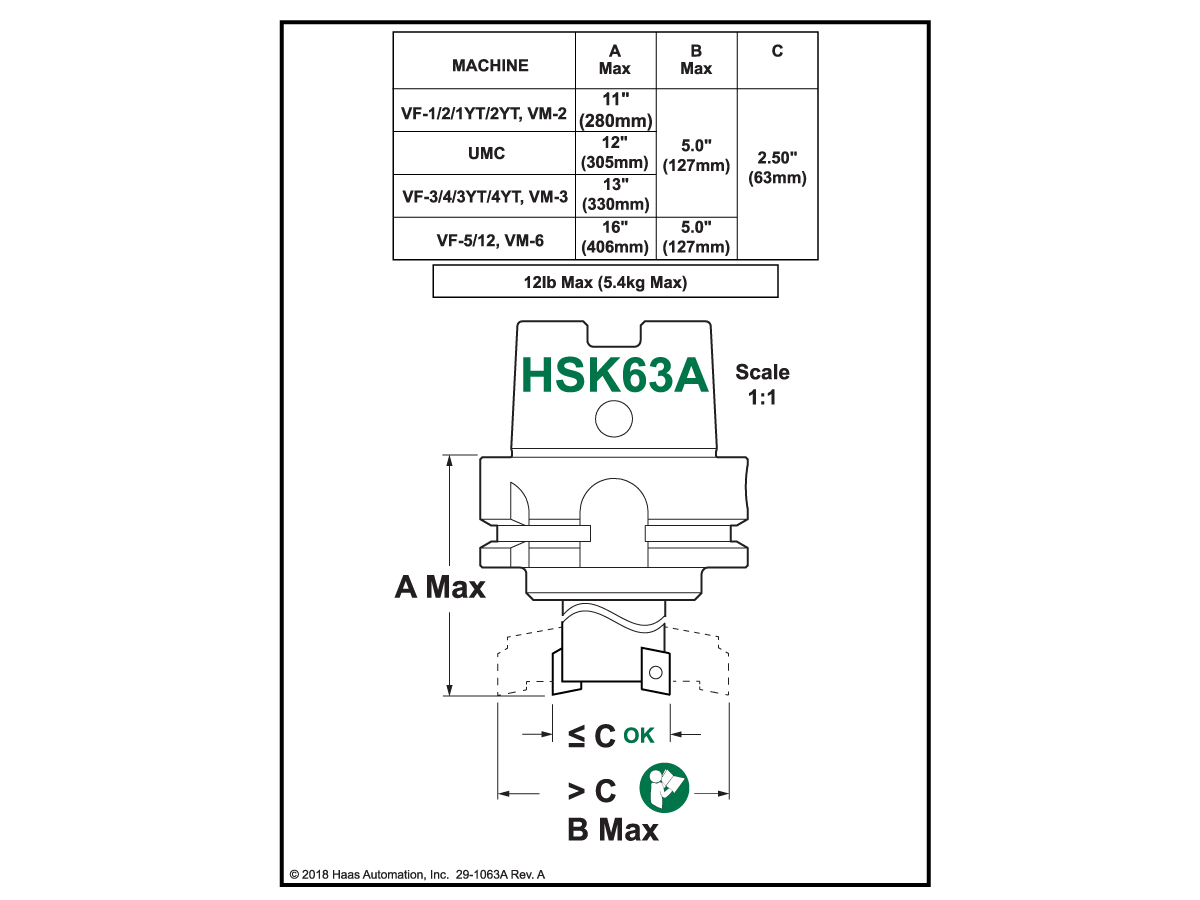
HSK63A - Tool Holder

The VR-Series uses HSK63A tool holders. All tools must be balanced to 20,000 RPM. Refer to the maintenance section for correct tool holder maintenance.

CAUTION: Never operate the spindle without a tool holder. The machine will generate Alarm 973 - FIXTURE CLAMP FAILURE.

CAUTION: Never leave a dirty or hot tool holder in the spindle overnight. This can cause the mating surfaces between the tool holder and the spindle to stick. Put a clean tool holder in the spindle at the end of the work day. The tool holder must be at room temperature, or it must be the HSK 63F Protective cone supplied by HSD.

Tool Loading

1

Press [MDI] and type [T] and the number of the tool you want to load. Press [ATC FWD] .

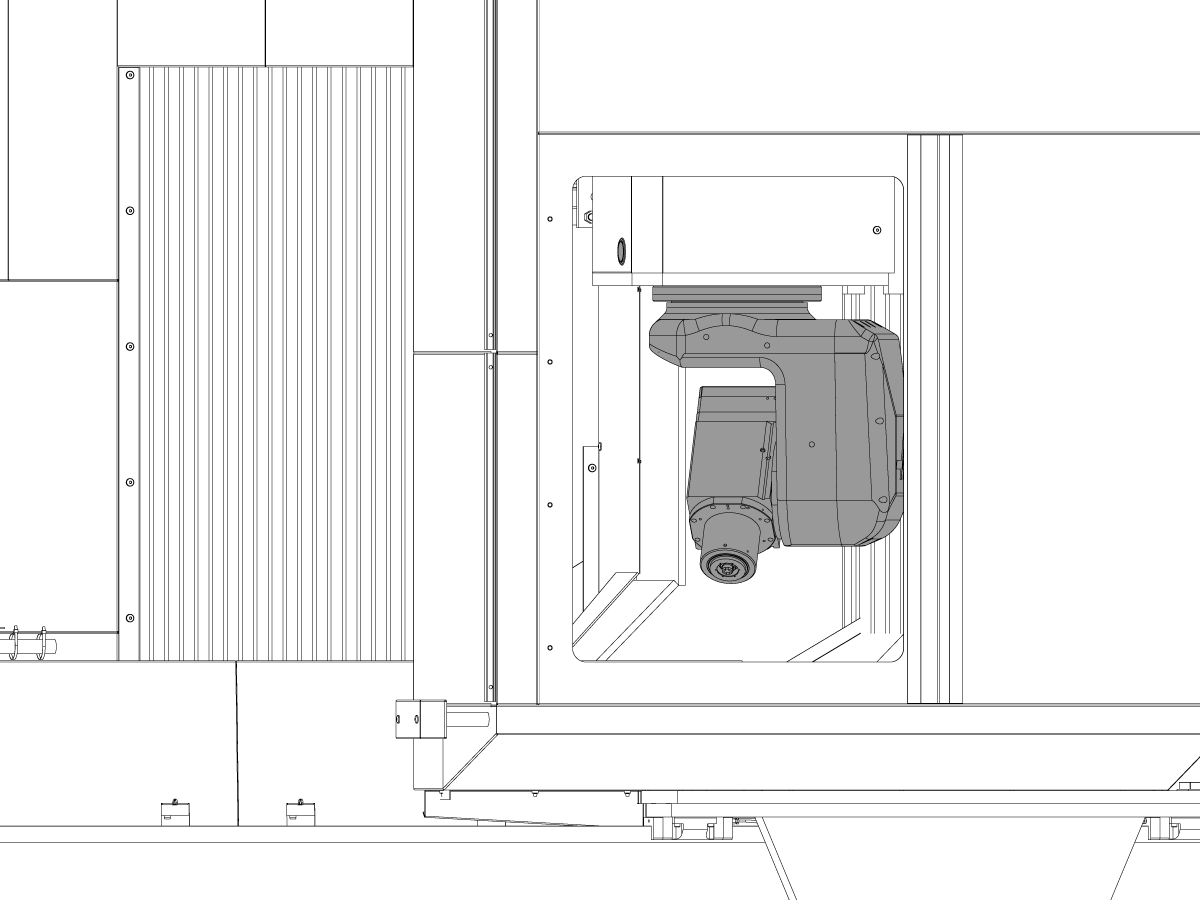
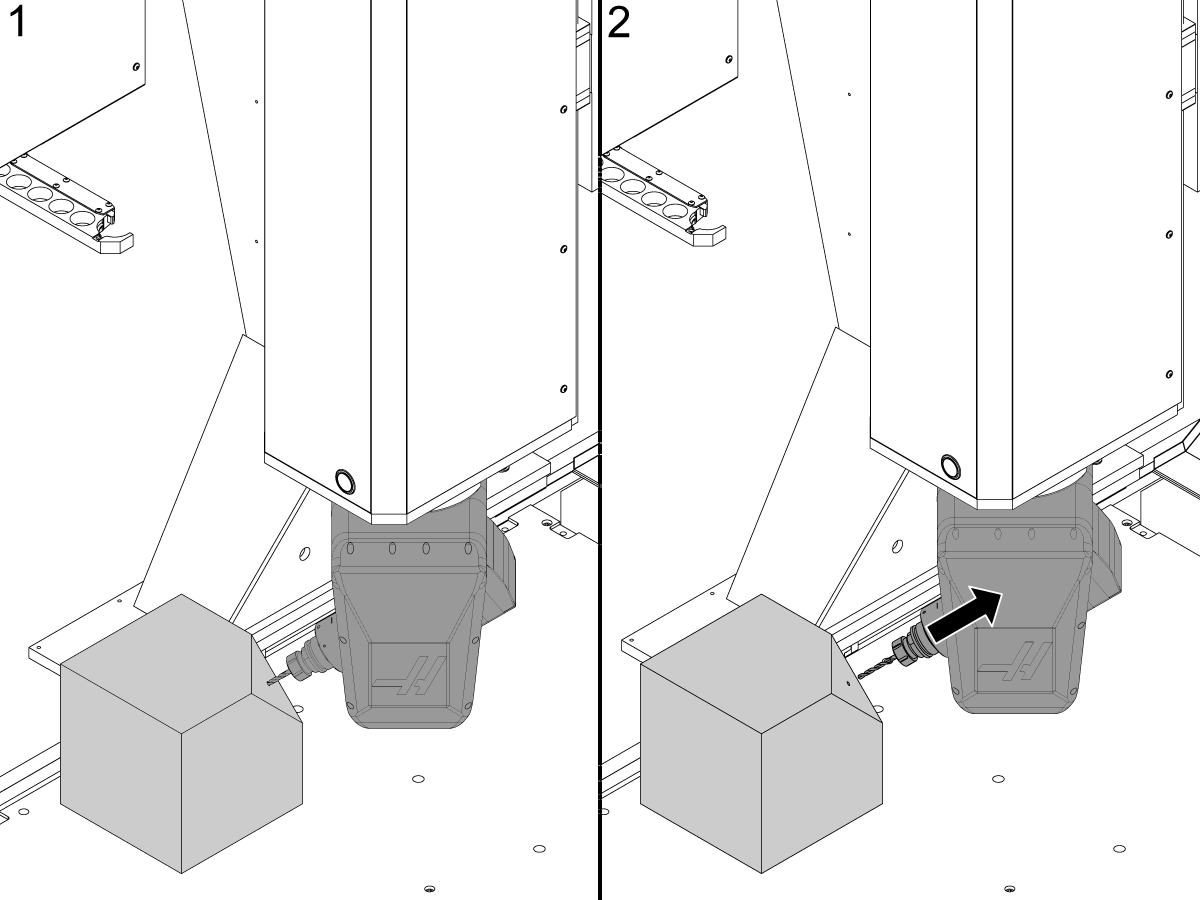
The second home feature can be used to quickly put the spindle into position to load tools.

To set the second home position jog the machine to the position shown in the figure below. Press [settings] and navigate to the User Positions tab. Select Second Home Position and press [F2] on each axis second home position setting.

Press the [Second home button] on the side a the pendant to send the spindle to the tool load position.

CAUTION: Second Home can crash the machine if there is an obstruction between the current spindle position and the second home position.

2

With the tool in your hand press and hold the [tool release] button located on the Z-Axis cover or pendant. Insert the tool into the spindle and release the [tool release] button.

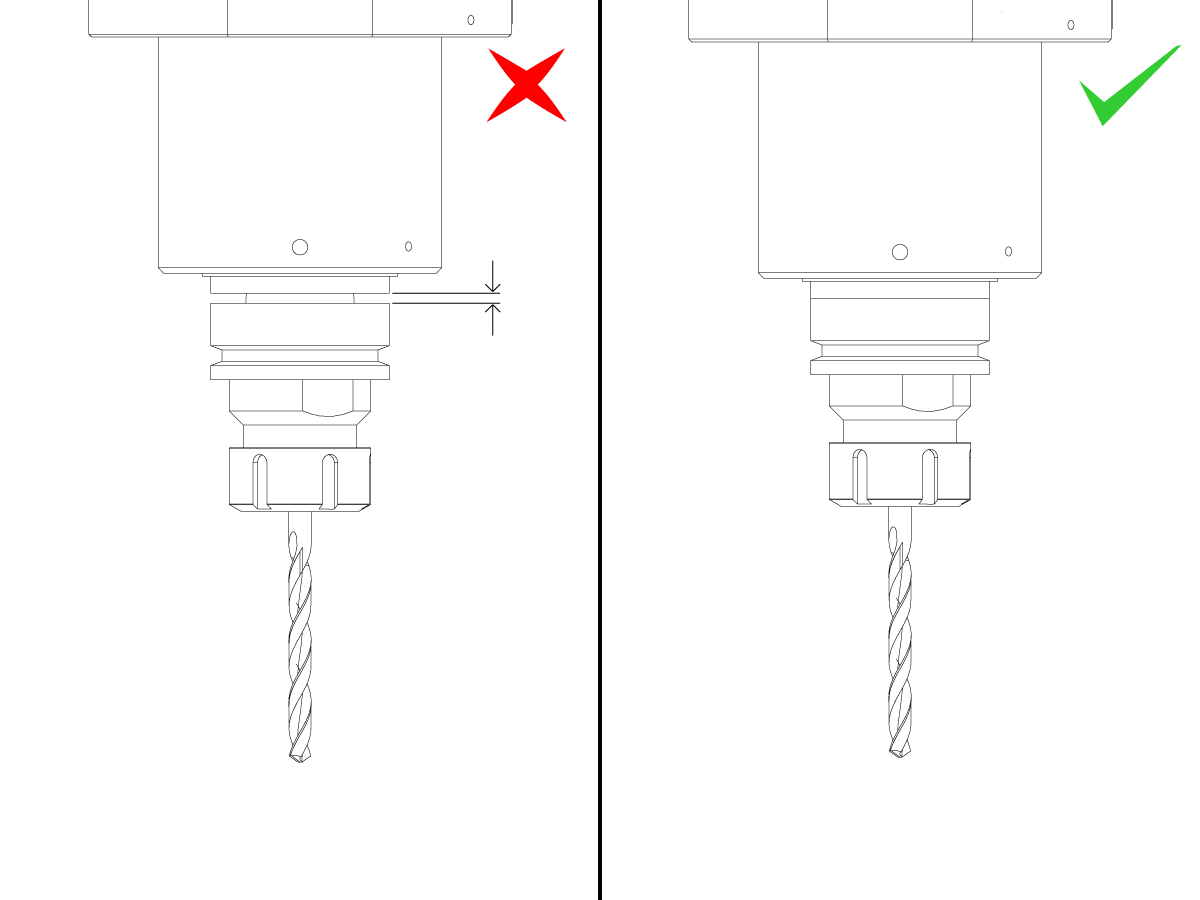
CAUTION: Make sure the tool is fully seated into the spindle so that the face of the tool holder mates flush with the spindle face. If the spindle clamps the tool holder prematurely there will be a gap between face of the tool holder and the spindle face. The spindle will not rotate, but a tool change can be commanded which will cause a tool change failure or the tool to be dropped.

Cycle the tool into the tool changer and repeat this process until all the tools necessary for your application are loaded.

6.4 Vector Jog

Recover a Tool After Power Loss

The Vector Jog feature allows the operator to jog the machine along the vector of the current spindle orientation. Vector jogging can be used at any time. It is especially useful for recovering a tool if the machine loses power while machining a part.

To recover a tool after power loss during machining press [power up] . The Zero Return popup will appear.

Type VJ and press [HANDLE JOG] . Jogging in the positive direction will move the tool away from the part along the current spindle vector. Jogging in the negative direction will move the tool towards the part along the current spindle vector.

The Tap Recovery feature will automatically make use of vector jogging to recover taps form non vertical holes.


6.5 VR-5AX Spindle Warm-up

Daily Warm-Up

Warning: The spindle must be warmed up using the following procedure everyday before use.

25% of Max Speed 5 minutes 

50% of Max Speed 4 minutes 

75% of Max Speed 4 minutes 

100% of Max Speed 2 minutes 

 Note: Spindle orientation can be vertical or horizontal during warm-up.

 Note: Each machine uses specific tool holders. All tools must be balanced to the maximum RPM of the machines spindle model. Tool holder type and RPM values can be found in the introduction of the HSK - Spindle - Troubleshooting Guide. Refer to the maintenance section for correct tool holder maintenance.

Caution: Never operate the spindle without a tool holder. The machine will generate Alarm 973 - FIXTURE CLAMP FAILURE.

Storage Warm-Up (4-month period)

 Warning: The spindle must be warmed up using the following procedure if it has been idle for at least 4 months.

25% of Max Speed 15 minutes 

50% of Max Speed 4 minutes 

75% of Max Speed 4 minutes 

100% of Max Speed 2 minutes 

 Note: Spindle orientation can be vertical or horizontal during warm-up.

 Note: Each machine uses specific tool holders. All tools must be balanced to the maximum RPM of the machines spindle model. Tool holder type and RPM values can be found in the introduction of the HSK - Spindle - Troubleshooting Guide. Refer to the maintenance section for correct tool holder maintenance.

 Caution: Never operate the spindle without a tool holder. The machine will generate Alarm 973 - FIXTURE CLAMP FAILURE.

Recently Viewed Items

You Have No Recently Viewed Items Yet

Feedback
Haas Logo

Haas Delivered Price

This price includes shipping cost, export and import duties, insurance, and any other expenses incurred during shipping to a location in France agreed with you as a buyer. No other mandatory costs can be added to the delivery of a Haas CNC Product.

KEEP UP WITH THE LATEST HAAS TIPS AND TECHNOLOGY...

Sign up now!   

HAAS TOOLING ACCEPTS THE FOLLOWING:

  • Service & Support
  • Owners
  • Request Service
  • Operator Manuals
  • Haas Parts

  • Rotary Repair Request
  • Pre-Install Guides
  • Shopping Tools
  • Build & Price a New Haas
  • Available Inventory
  • The Haas Price List
  • CNCA Financing
  • About Haas
  • Accessibility Statement
  • DNSH Statement
  • Export Compliance
  • Careers
  • Certifications & Safety
  • Contact Us
  • History
  • Terms & Conditions
  • Haas Tooling Terms & Conditions
  • Privacy
  • Warranty
  • Haas Community
  • Haas Certification Program
  • Haas Motorsports
  • Gene Haas Foundation
  • Haas Technical Education Community
  • Events
  • Join the Conversation
  • Facebook
  • X
  • Flickr
  • YouTube
  • LinkedIn
  • Instagram
  • TikTok
© 2026 Haas Automation, Inc – CNC Machine Tools

This site is protected by reCAPTCHA and the Google Privacy Policy and Terms of Service apply.

2800 Sturgis Rd., Oxnard, CA 93030
Toll Free: (888) 817-4446 / Fax: 805-278-8554