My Haas Welcome,
!
Haas Tooling MyHaas/HaasConnect Sign In Register Haas Tooling MyHaas/HaasConnect Sign Out Welcome, My Machines Latest Activity My Quotes My Account My Users Sign Out
Find Your Distributor
  1. Select Language
    1. English
    2. Deutsch
    3. Español - España
    4. Español - México
    5. Français
    6. Italiano
    7. Português
    8. Český
    9. Dansk
    10. Nederlands
    11. Magyar
    12. Polski
    13. Svenska
    14. Türkçe
    15. 中文
    16. Suomi
    17. Norsk
    18. الإنجليزية
    19. български
    20. Hrvatski
    21. Ελληνικά
    22. Română
    23. Slovenský
    24. Slovenščina
    25. 한국어
    26. 日本語
    27. Українська
  • machines Main Menu
    • Vertical Mills
      Vertical Mills
      Vertical Mills View All
      • Vertical Mills
      • VF Series
      • Universal Machines
      • VR Series
      • VP-5 Prismatic
      • Pallet-Changing VMCs
      • Mini Mills
      • Mold Machines
      • High-Speed Drill Centers
      • Drill/Tap/ Mill Series
      • Toolroom Mills
      • Pocket Mill
      • Compact Mills
      • Gantry Series
      • SR Sheet Routers
      • Extra-Large VMC
      • Double-Column Mills
      • 3+2 Positioning Machines
    • Multi-Axis Solutions
      Multi-Axis Solutions
      Multi-Axis Solutions View All
      • Multi-Axis Solutions
      • Y-Axis Lathes
      • 5-Axis Mills
    • Lathes
      Lathes
      Lathes View All
      • Lathes
      • ST Series
      • Dual-Spindle
      • Box Way Series
      • Toolroom Lathes
      • Chucker Lathe
      • Haas Bar Feeders
    • Horizontal Mills
      Horizontal Mills
      Horizontal Mills View All
      • Horizontal Mills
      • 50-Taper
      • 40-Taper
    • Rotaries & Indexers
      Rotaries & Indexers
      Rotaries & Indexers View All
      • Rotaries & Indexers
      • Rotary Tables
      • Indexers
      • 5-Axis Rotaries
      • Extra-Large Rotaries
    • Special Series
      Special Series
      Special Series View All
      • Special Series
      • EU_Series_Redirect
    • Automation Systems
      Automation Systems
      Automation Systems View All
      • Automation Systems
      • Mill Automation
      • Lathe Automation
      • Automatic Parts Loaders
      • Automation Models
    • Desktop Machines
      Desktop Machines
      Desktop Machines View All
      • Desktop Machines
      • Desktop Mill
      • Desktop Lathe
      • Control Simulator, Standard
      • Control Simulator, Premium
    • Shop Equipment
      Shop Equipment
      Shop Equipment View All
      • Shop Equipment
      • Knee Mill
      • Haas Manual Lathes
      • Haas Saws
    • Fabrication Machines
      Fabrication Machines
      Fabrication Machines View All
      • Fabrication Machines
      • Laser Cutting Machines
      • CNC Press Brakes
    • QUICK LINKS Special Series  Special Series 
      EU SERIES EU SERIES BUILD & PRICE | PRICE LIST BUILD & PRICE | PRICE LIST In-Stock Machines In-Stock Machines WHAT’S NEW WHAT’S NEW YOUR FIRST CNC YOUR FIRST CNC
      SHOPPING TOOLS
      • Build & Price a Haas
      • Price List
      • Available Inventory
      • CNCA Financing
      WANT TO TALK TO SOMEONE?

      A Haas Factory Outlet (HFO) can answer your questions, and walk you through your best options.

      CONTACT YOUR DISTRIBUTOR >
  • Options Main Menu
    • The Haas Control Value Option Packages
      Value Option Packages
      Value Option Packages View All
      • Value Option Packages
    • Product Image Spindles
      Spindles
      Spindles View All
      • Spindles
    • Product Image Tool Changers
      Tool Changers
      Tool Changers View All
      • Tool Changers
    • Product Image 4th- | 5th-Axis
      4th- | 5th-Axis
      4th- | 5th-Axis View All
      • 4th- | 5th-Axis
    • Product Image Turrets & Live Tooling
      Turrets & Live Tooling
      Turrets & Live Tooling View All
      • Turrets & Live Tooling
    • Product Image Probing
      Probing
      Probing View All
      • Probing
    • Haas Chip & Coolant Management Chip & Coolant Management
      Chip & Coolant Management
      Chip & Coolant Management View All
      • Chip & Coolant Management
    • The Haas Control The Haas Control
      The Haas Control
      The Haas Control View All
      • The Haas Control
    • Product Image Product Options
      Product Options
      Product Options View All
      • Product Options
    • Product Image Tooling & Fixturing
      Tooling & Fixturing
      Tooling & Fixturing View All
      • Tooling & Fixturing
    • Product Image Workholding
      Workholding
      Workholding View All
      • Workholding
    • Product Image 5-Axis Solutions
      5-Axis Solutions
      5-Axis Solutions View All
      • 5-Axis Solutions
      • 5 Easy Steps to 5-Axis
    • QUICK LINKS Special Series  Special Series 
      EU SERIES EU SERIES BUILD & PRICE | PRICE LIST BUILD & PRICE | PRICE LIST In-Stock Machines In-Stock Machines WHAT’S NEW WHAT’S NEW YOUR FIRST CNC YOUR FIRST CNC
      SHOPPING TOOLS
      • Build & Price a Haas
      • Price List
      • Available Inventory
      • CNCA Financing
      WANT TO TALK TO SOMEONE?

      A Haas Factory Outlet (HFO) can answer your questions, and walk you through your best options.

      CONTACT YOUR DISTRIBUTOR >
  • Why Haas Main Menu
      Discover the Haas Difference
    • Why Haas
    • MyHaas
    • Education Community
    • Industry 4.0
    • Haas Certification
    • Customer Testimonials
  • Service Main Menu
      Welcome to Haas Service
      SERVICE HOME Operator’s Manuals How-To Procedures Troubleshooting Guides Preventive Maintenance Haas Parts Haas Tooling Videos
  • Videos Main Menu
  • Main Menu
    • View All
    • View All
    • View All
    • View All
      • HTEC Curriculum Support
      • Haas Value Option Packages (VOP) Journey
    • View All
      • Haas 10 kg Cobot Package
      • Cobot Kits
      • DC-1 Drill Center
      • CNC Sales News
      • Do More With Your Haas
    • View All
    • View All
      • contact-us-test
      • 4 - AUTOMATION SYSTEMS
      • Carousel-V2
      • expert test
      • Demo_Day_Trident-test
      • Link Test
      • image-sale-tag-test
      • article-list-test
      • Haas 25 kg Robot Package
      • test-algolia-page
    • View All
    • View All
    • View All
    • View All
      • calc-test
    • View All
    • QUICK LINKS Special Series  Special Series 
      EU SERIES EU SERIES BUILD & PRICE | PRICE LIST BUILD & PRICE | PRICE LIST In-Stock Machines In-Stock Machines WHAT’S NEW WHAT’S NEW YOUR FIRST CNC YOUR FIRST CNC
      SHOPPING TOOLS
      • Build & Price a Haas
      • Price List
      • Available Inventory
      • CNCA Financing
      WANT TO TALK TO SOMEONE?

      A Haas Factory Outlet (HFO) can answer your questions, and walk you through your best options.

      CONTACT YOUR DISTRIBUTOR >
  • Haas Tooling Main Menu
  • Haas Service Parts Main Menu

My Haas Welcome,
!
Haas Tooling MyHaas/HaasConnect Sign In Register Haas Tooling MyHaas/HaasConnect Sign Out Welcome, My Machines Latest Activity My Quotes My Account My Users Sign Out
Find Your Distributor
  1. Select Language
    1. English
    2. Deutsch
    3. Español - España
    4. Español - México
    5. Français
    6. Italiano
    7. Português
    8. Český
    9. Dansk
    10. Nederlands
    11. Magyar
    12. Polski
    13. Svenska
    14. Türkçe
    15. 中文
    16. Suomi
    17. Norsk
    18. الإنجليزية
    19. български
    20. Hrvatski
    21. Ελληνικά
    22. Română
    23. Slovenský
    24. Slovenščina
    25. 한국어
    26. 日本語
    27. Українська
×

Search Results

Web Pages

Images

    • <
    • 1
    • >

6 - SR-Operation

SR - Operator / Service Manual


  • 1 - SR-Introduction
  • 2 - SR-Legal Information
  • 3 - SR-Safety
  • 4 - SR-Installation
  • 5 - SR-Control Icons
  • 6 - SR-Operation
  • 7 - SR-Programming
  • 8 - SR-G-Codes
  • 9 - SR-M-Codes
  • 10 - SR-Remote Jog Handle
  • 11 - SR-Settings
  • 12 - SR-Maintenance
  • 13 - SR-Troubleshooting

Go To :

  • 6.1 SR - Tool Offsets
  • 6.2 SR - P - Tool Offsets
  • 6.3 SR - Work Offsets
  • 6.4 SR - Vacuum Dust Extractor Control
  • 6.5 SR - P - Vacuum Table Control
  • 6.6 SR - P - Oil Mist
  • 6.7 Bump Sensor Function

6.1 Tool Offsets

Recently Updated

SR - Tool Offsets


Revision A - 08/2025

Introduction

This procedure will demonstrate how to do a tool change on a SR-3015 machine with tool length probing and work offsets.

Machine Compatibility:

  • SR-3015/4020 

Note : The diameter of the tool needs to be manually measured by the operator and entered in the tool offset page. 

Tool Offset

1

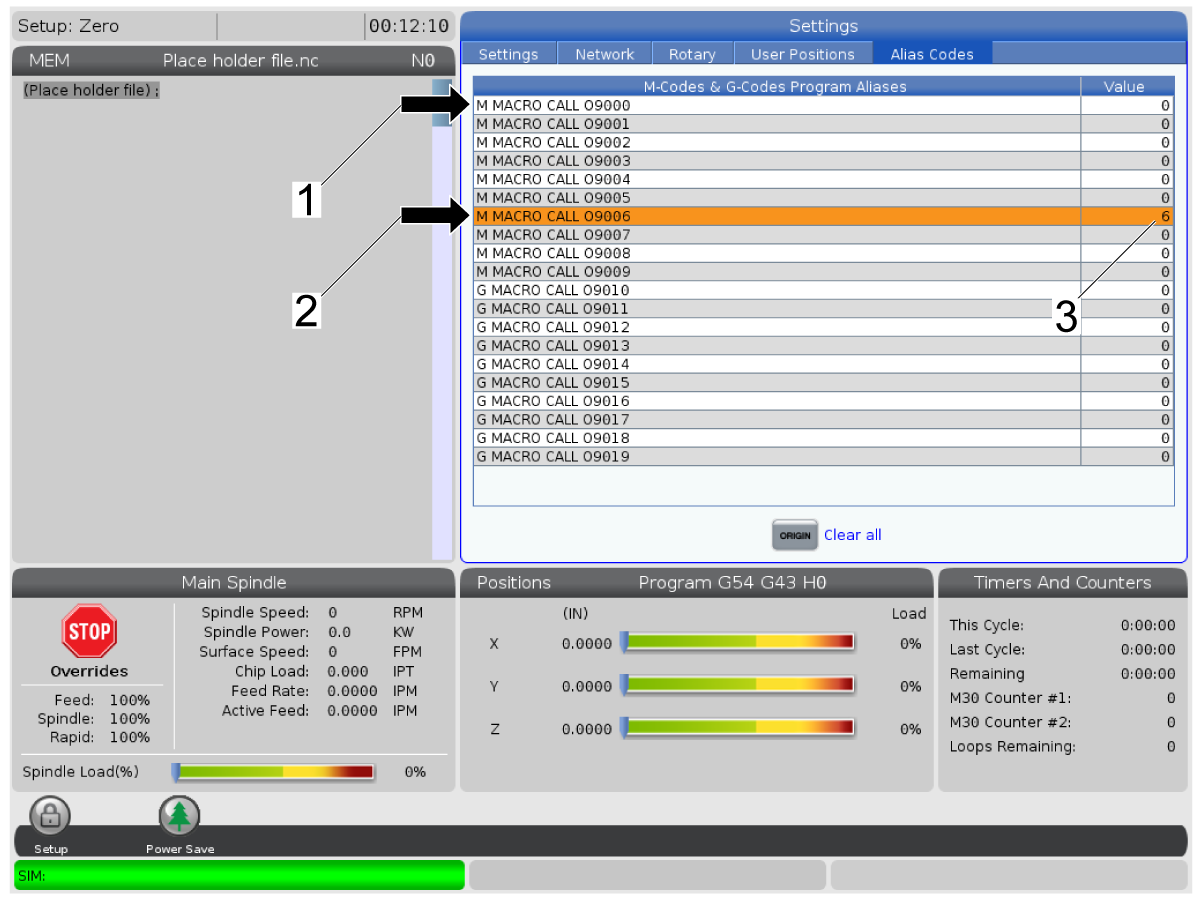
Navigate to the [Alias Codes] tab in settings and modify ONE of the following Program Aliases to have a value of 6 [3].

  • [1] M MACRO CALL 09000 (Tool change without probing)
  • [2] M MACRO CALL O9006 (Tool change with probing)

Warning : Do not set both values to 6. When M06 tool change is commanded the control will select 09006.

2

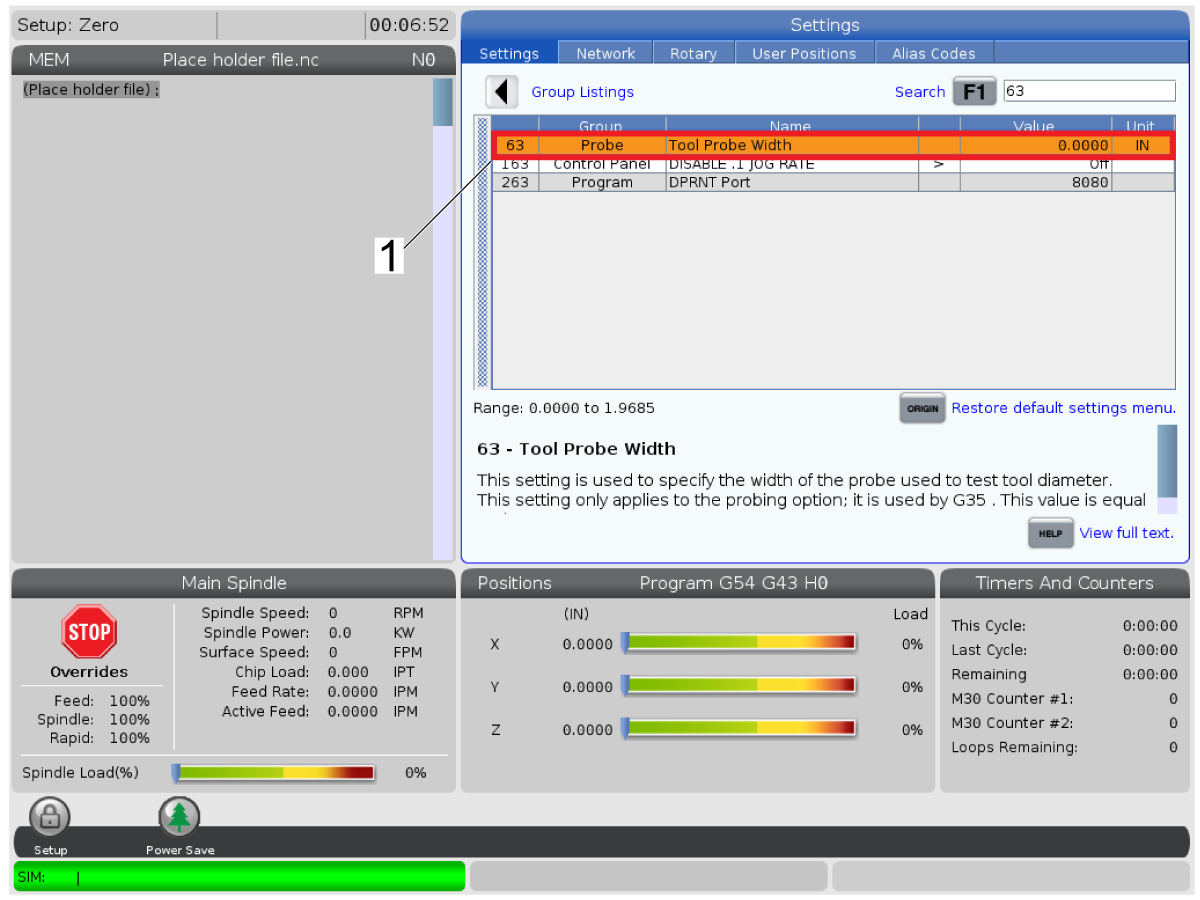
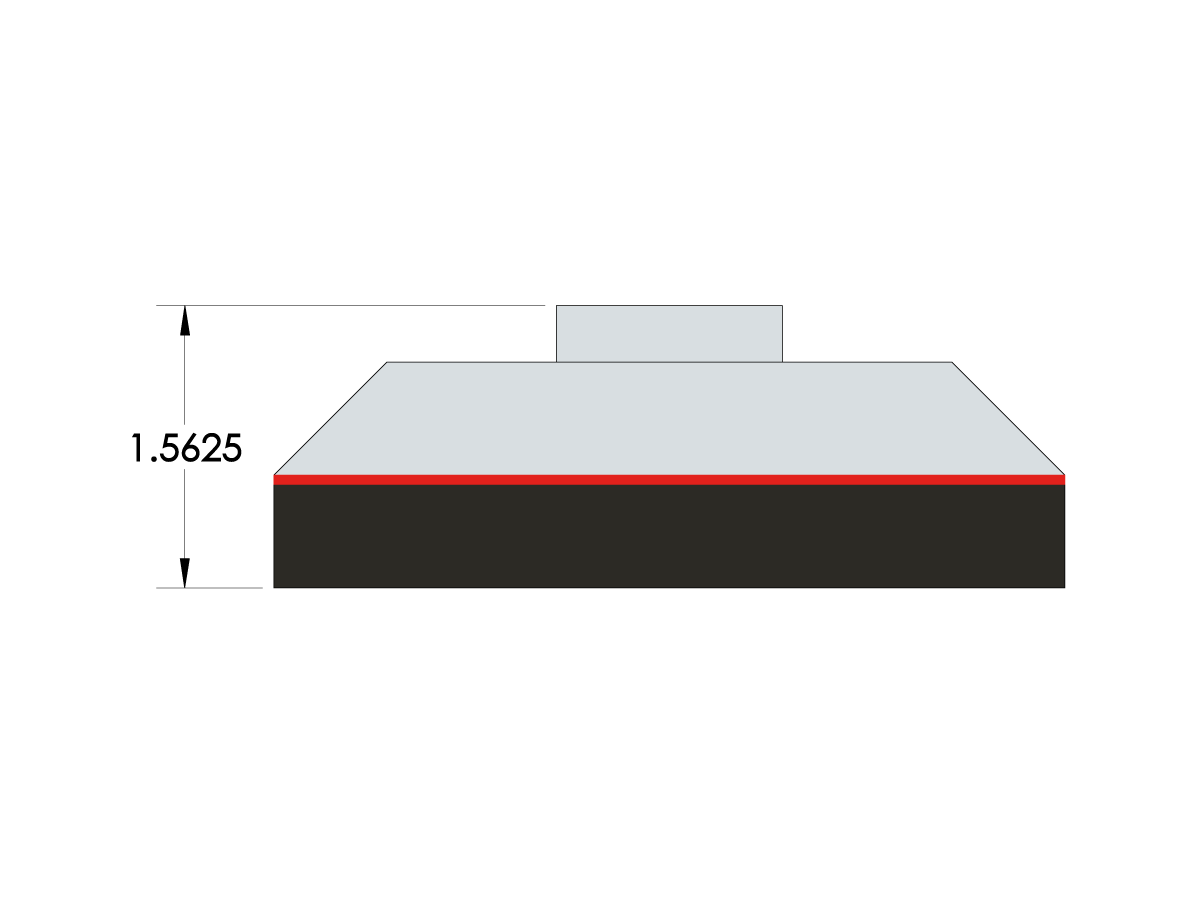
Measure the height of the tool probe from the base of it to the top enter it into Setting 63 [1].

Note : Ensure the top is not depressed by applying very light pressure. By default the value is 1.5625 in (39.6875 mm).

3

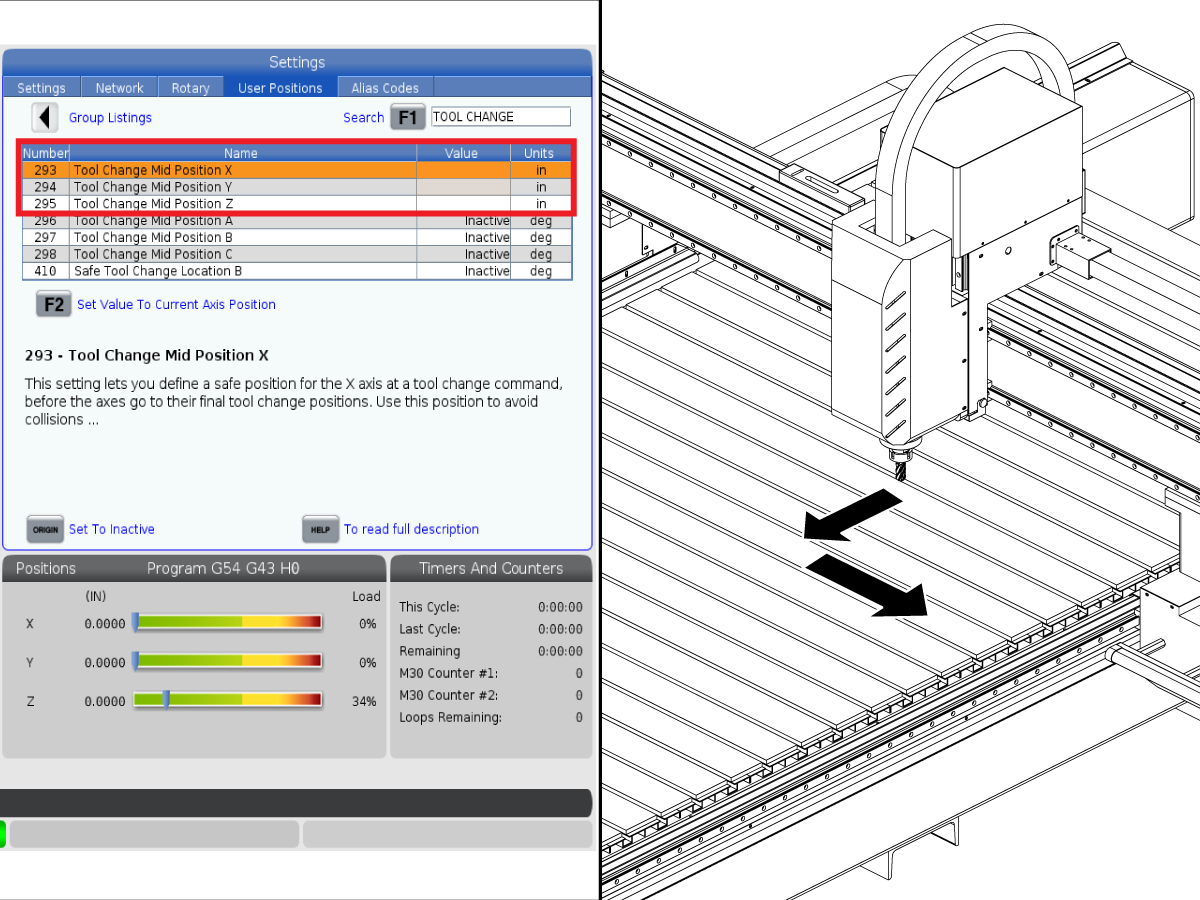
Set a Safe tool change location that is easy to reach and close to the operator using Settings 293, 294, and 295.

Note : Ensure that the tool change location has access to the table to be able to place the table probe.

4

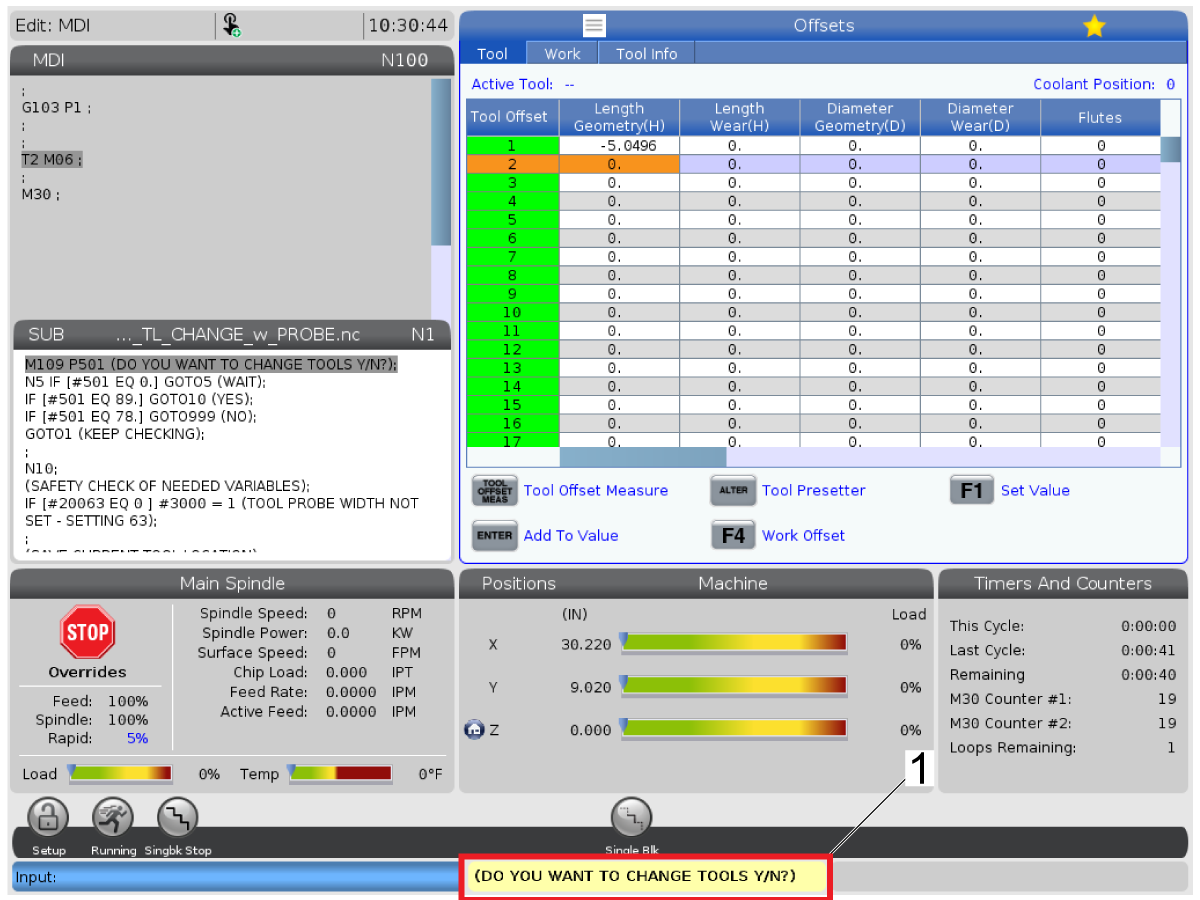
When M06 tool change is commanded the program will stop and ask if you would like to do a tool change (Y/N)? 

Type Y or N to proceed.

5

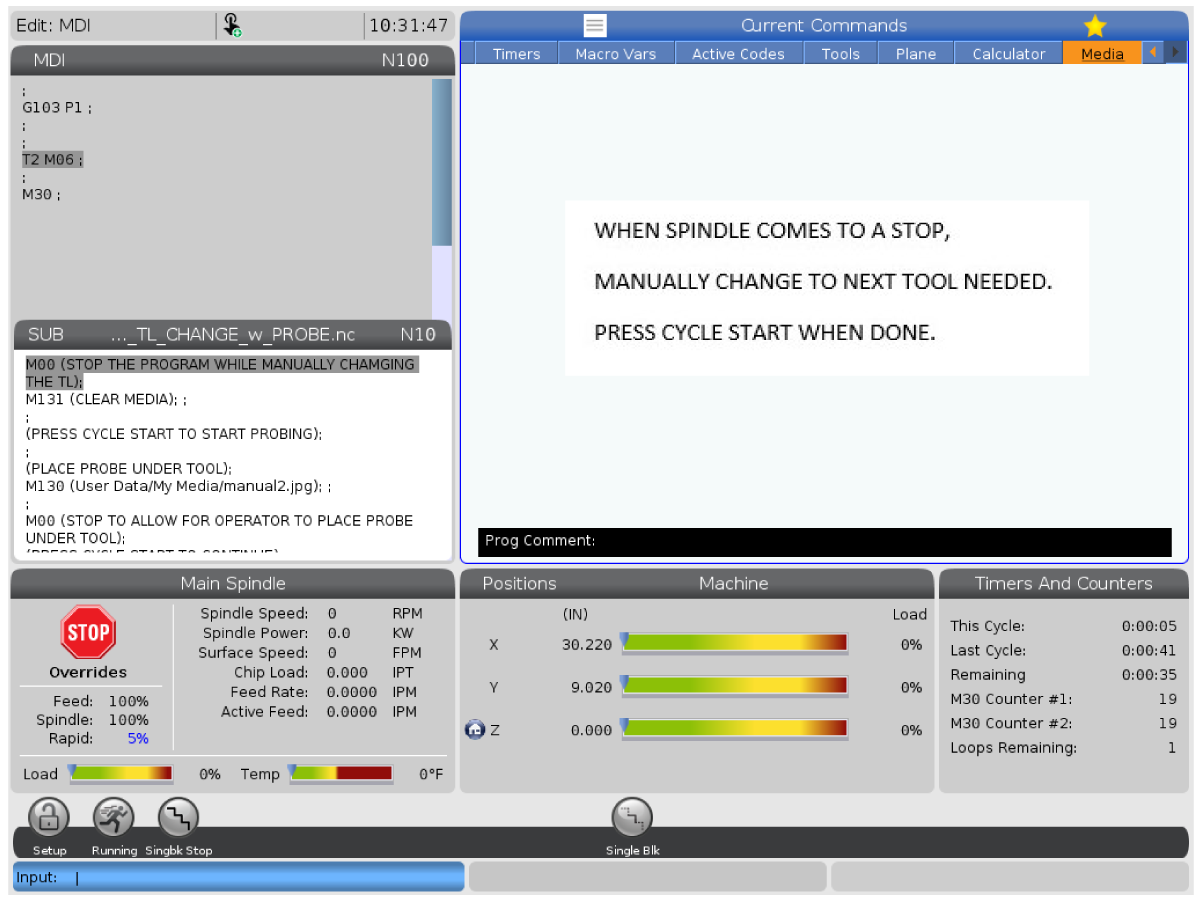
The spindle will stop to allow for a tool change. After changing the tool press [CYCLE START].

6

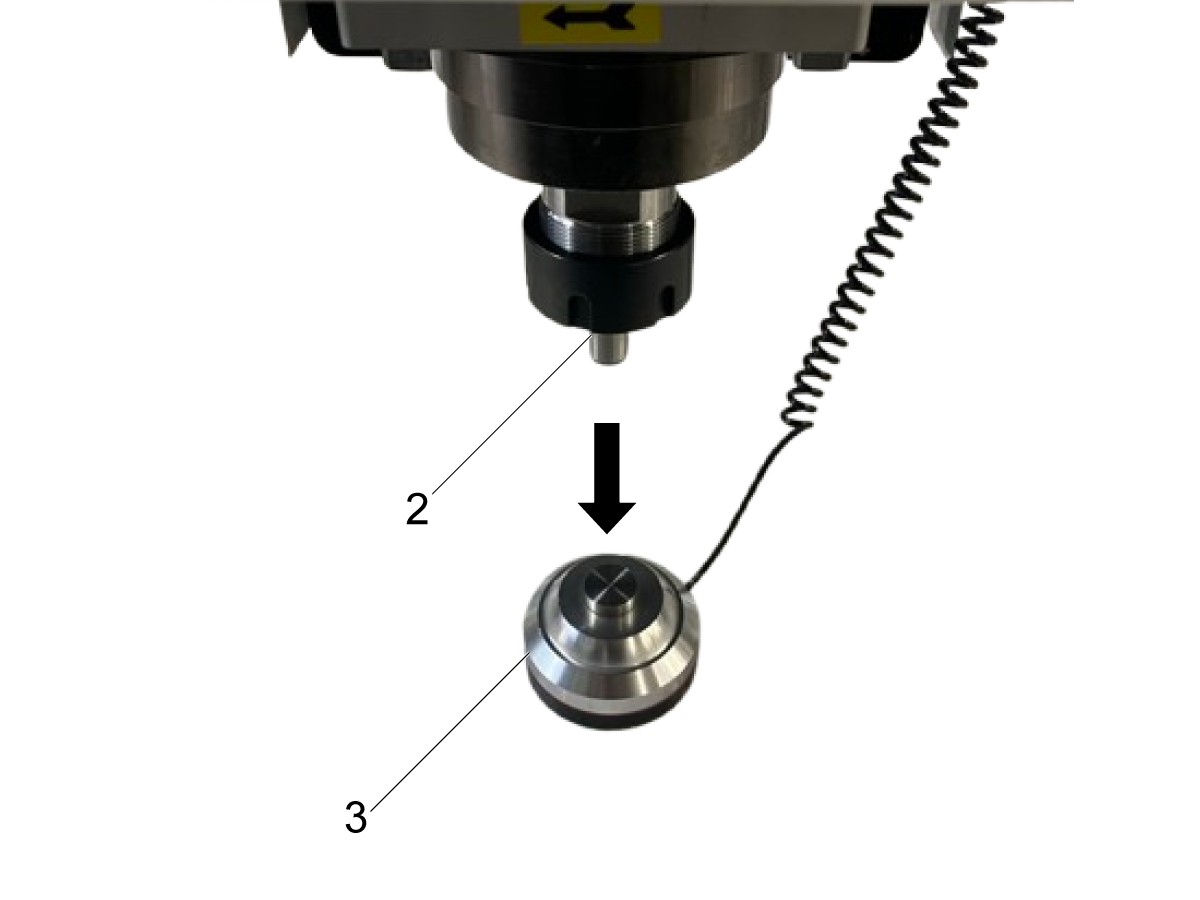
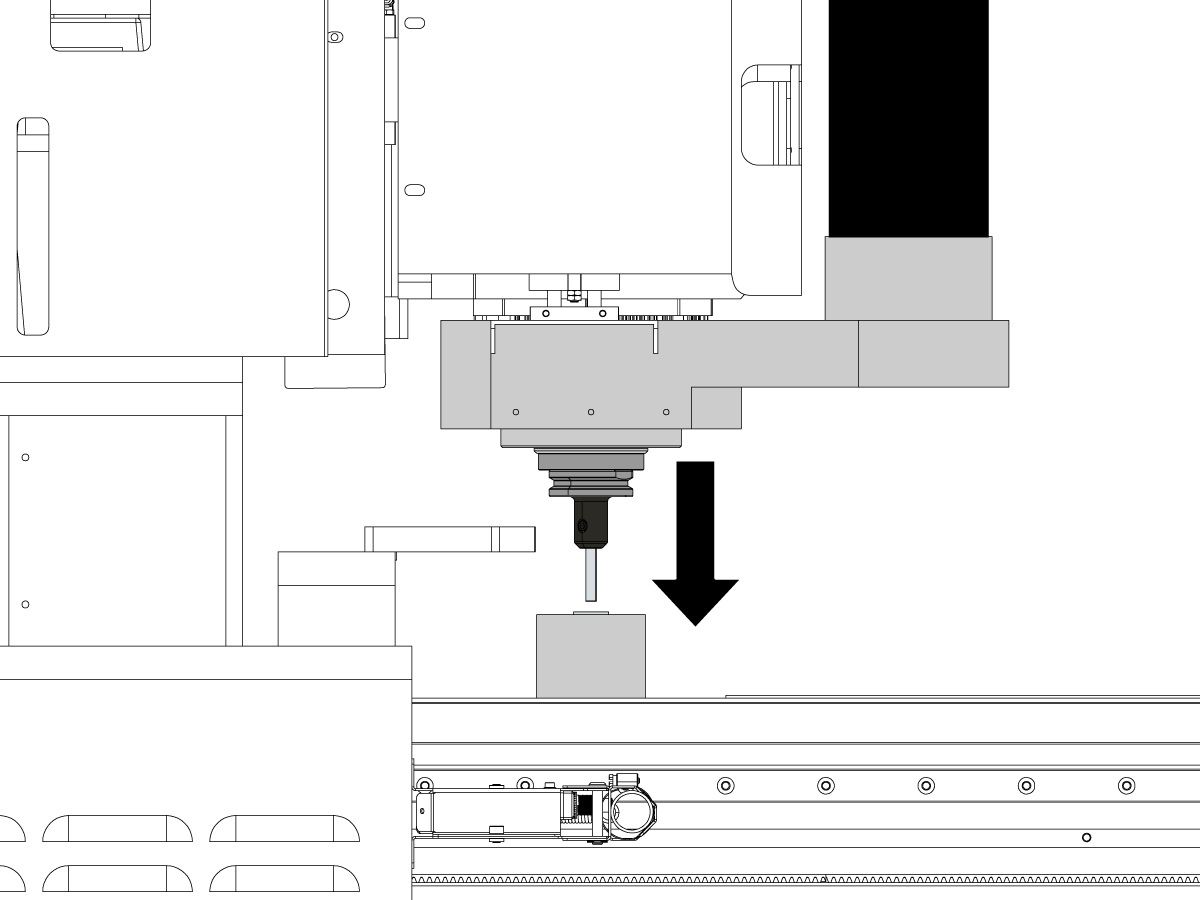
Place the table probe [3] directly under the tool [2] and press [CYCLE START].

Note : It is reccommended to start this routine at a rapid speed of 25% or slower [1] to be able to adjust the table probe position.

7

The control will prompt you to remove the table probe from and store in a safe location then press [CYCLE START].

6.2 SR - P - Tool Offsets

Recently Updated

SR - P - Tool Offsets


Revision A - 12/2025

Introduction

This procedure will demonstrate how to do a tool change on a SR-3015P machine with tool length probing

Note : The diameter of the tool needs to be manually measured by the operator and entered in the tool offset page.    

Machine Compatibility:

  • SR-3015P/4020P
  • Minimum software required for vps template probing is 100.25.001.1250. 

    Note: 
    If current software version is below 100.25.001.1250 please refer to Automatic Tool Length Probing via G-Code (Non-VPS Method) section.

Probe Calibration

1

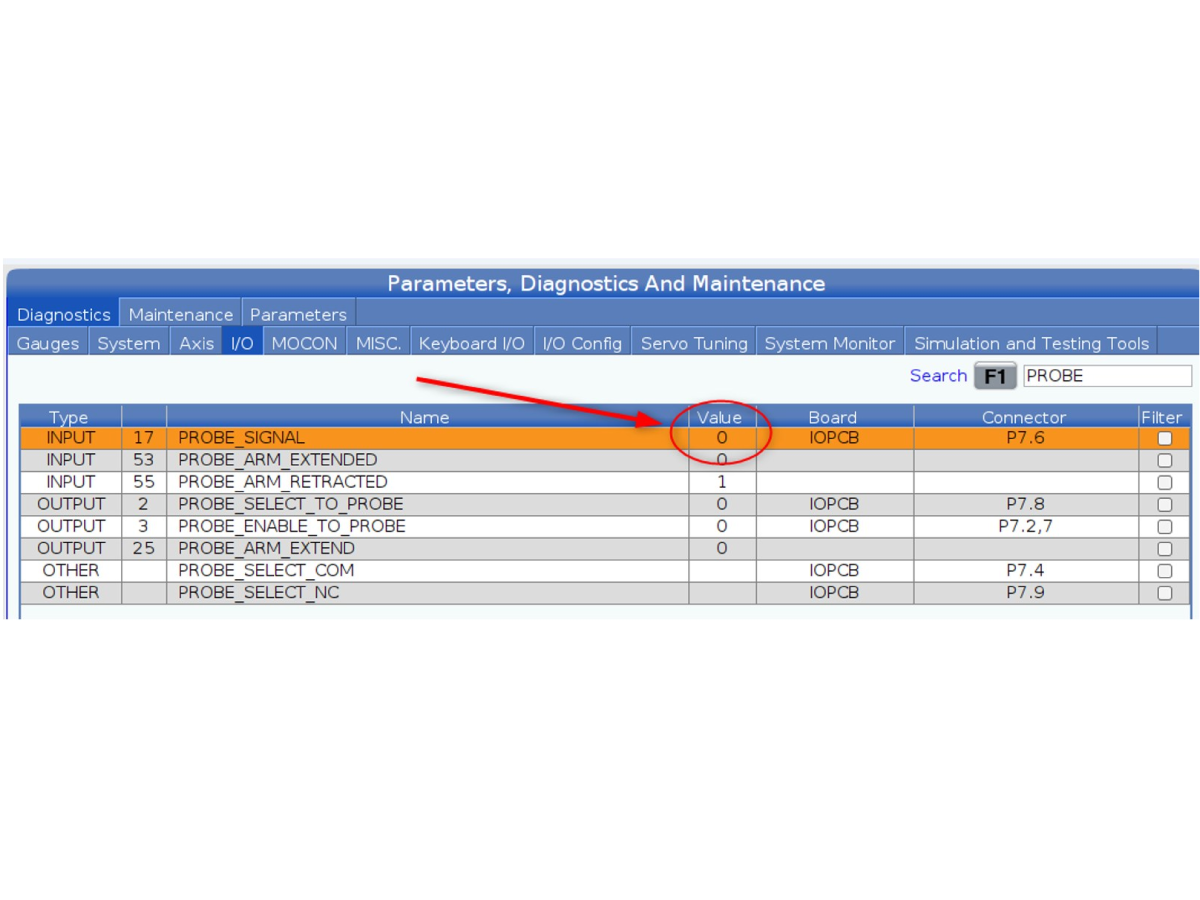
Prior to initiating the tool probe calibration sequence, confirm that the tool probe is correctly connected and operational. Access the I/O diagnostics page and search for the “PROBE_SIGNAL”.

Apply light pressure to the top of the tool probe and verify that the PROBE SIGNAL transitions from 0 to 1, indicating successful signal recognition. An audible beep should also be emitted, confirming that the tool probe is properly installed.

2

Insert a reference tool of known length into the spindle. Ensure the tool is clean and properly seated to maintain measurement integrity.

3

Navigate to the OFFSETS page and verify that the Length Geometry (H) value for the active tool is set to zero (0).

Note : Failure to zero the tools Length Geometry (H) may trigger a “Restricted Zone” error during tool probe calibration.

4

Manually jog the tool in the X and Y axes to align it as closely as possible with the center of the tool probe’s surface.

5

Jog the Z-axis downward until the tool tip is approximately 0.25 inches (6.35 mm) above the tool probe. Precision is not critical at this stage—proximity is sufficient.

6

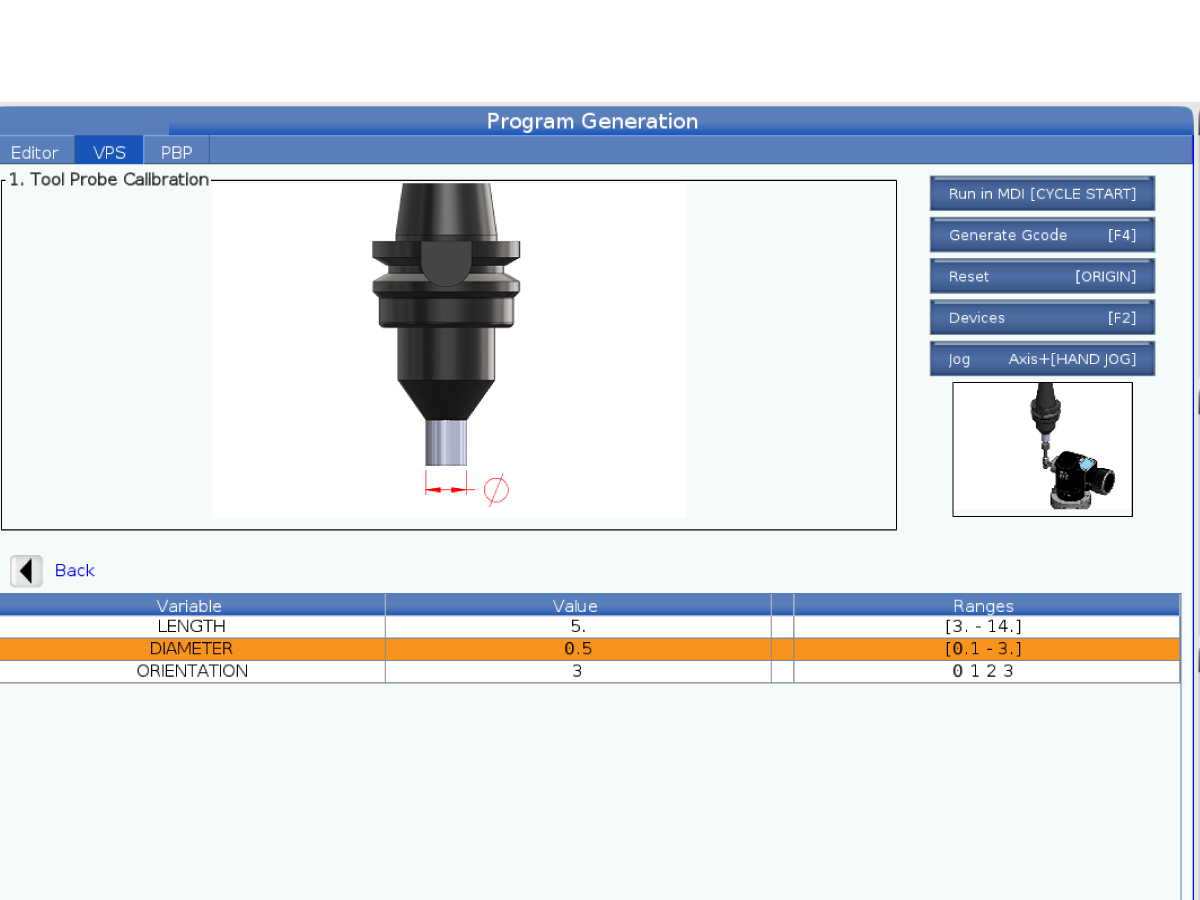
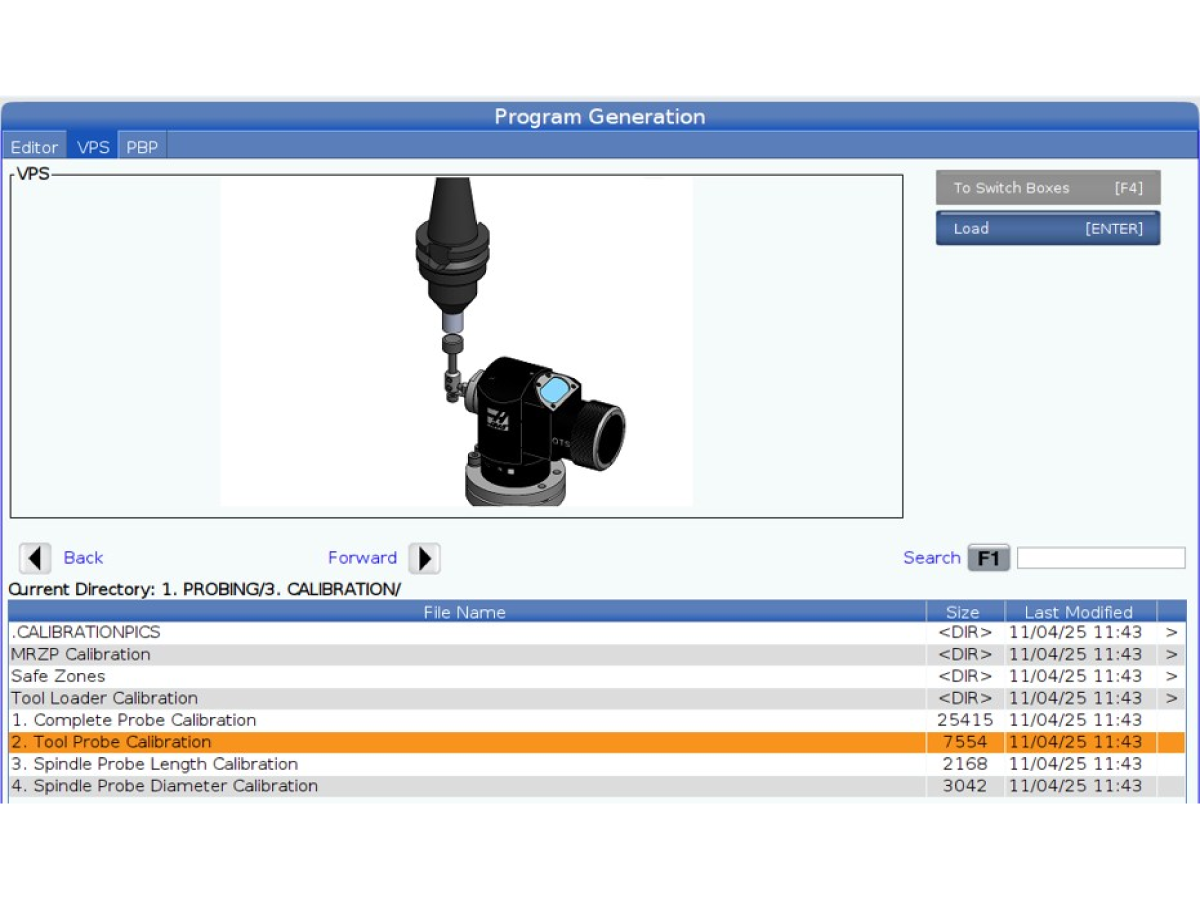
Navigate to the VPS template 2. TOOL PROBE CALIBRATION in the VPS directory 1.PROBING/3.CALIBRATION/

7

Enter the known tool length into the LENGTH field on the VPS template. This will be the length of the reference tool inserted into the spindle in step 2.

Note : Ensure that the reference tool’s diameter is smaller than the internal diameter of the tool probe’s protective housing to prevent interference during the calibration process.

8

Set the DIAMETER field to 0.05.

This value is retained for compatibility with systems that support side probing, although it is not utilized in the Sheet Router configuration.

9

Set the ORIENTATION parameter to 3, which corresponds to the standard vertical probing configuration used in this setup.

10

 Initiate the tool probe calibration routine by pressing Cycle Start. The CNC controller will command the spindle to incrementally lower the tool along the Z-axis until contact is made with the probe surface. Upon initial contact, an audible signal (beep) will confirm detection. The system will then perform multiple subsequent probing cycles at progressively reduced feed rates to refine the measurement and enhance calibration accuracy.

11

Upon successful completion of the tool probe calibration sequence, manually retract and remove the reference tool from the spindle. The tool probe is now configured and ready for tool length measurement operations. It is suitable for use with any tool whose diameter does not exceed the opening of the probe’s protective housing—this typically includes drills, taps, and most endmills.

Automatic Tool Length Probing via G-Code (Non-VPS Method)

This procedure outlines the direct method of the probe’s tool length measurement functionality via G-code, bypassing the use of VPS (Visual Programming System) templates.

Prerequisite: Ensure the probe has been successfully calibrated prior to executing this procedure. Failure to do so may result in inaccurate measurements or system errors.

G-Code Program (MDI or MEM Mode)

G00 G17 G40 G49 G80 G90;                                // Initialize a safe probing state

Tx M06;                                                                              // Tool change command

G65 P9995 A0. Bx. C2. Tx. Ex. D0.5;              // Custom macro call for probing

Macro Parameter Definitions:

  • A0. – Activates tool length measurement mode.
  • B1. – Specifies tool type:
    • 1 = Drill
    • 2 = Tap
    • 3 = Shell Mill (Not Supported)
    • 4 = End Mill
    • 5 = Spot Drill
    • 6 = Ball Nose
    • 7 = Probe (Not Supported)
  • C2. – Indicates non-rotating length measurement only.
  • Tx. – Tool number (must match the tool called in Tx M06).
  • Ex. – Estimated tool length (used for initial positioning).
  • D0.5 – Tool radius. (use default value of 0.5 on Sheet Routers)

Execution Steps:

  1. After entering the above G-code sequence, press CYCLE START to initiate the probing routine.
  2. The CNC controller will:
    • Load the specified tool.
    • Move the tool above the probe.
    • Begin the Z-axis probing cycle to determine the tool’s length.
  1. Upon completion, the measured tool length will be automatically updated in the TOOL OFFSET page.

6.2 Work Offsets

Recently Updated

SR - Work Offsets


Revision A - 08/2025

This procedure only applies to SR-3015/4020

Work Offsets

1

Place table probe on top of the work piece and start the single surface [1] probing routine. 

Important : If any of the other options are selected the machine will generate alarm 1010 (NOT SUPORTED) [2].

Note : The SR-3015 is only able to measure the Z-axis height offset of the work piece. X and Y axis positions need to be set manually.

2

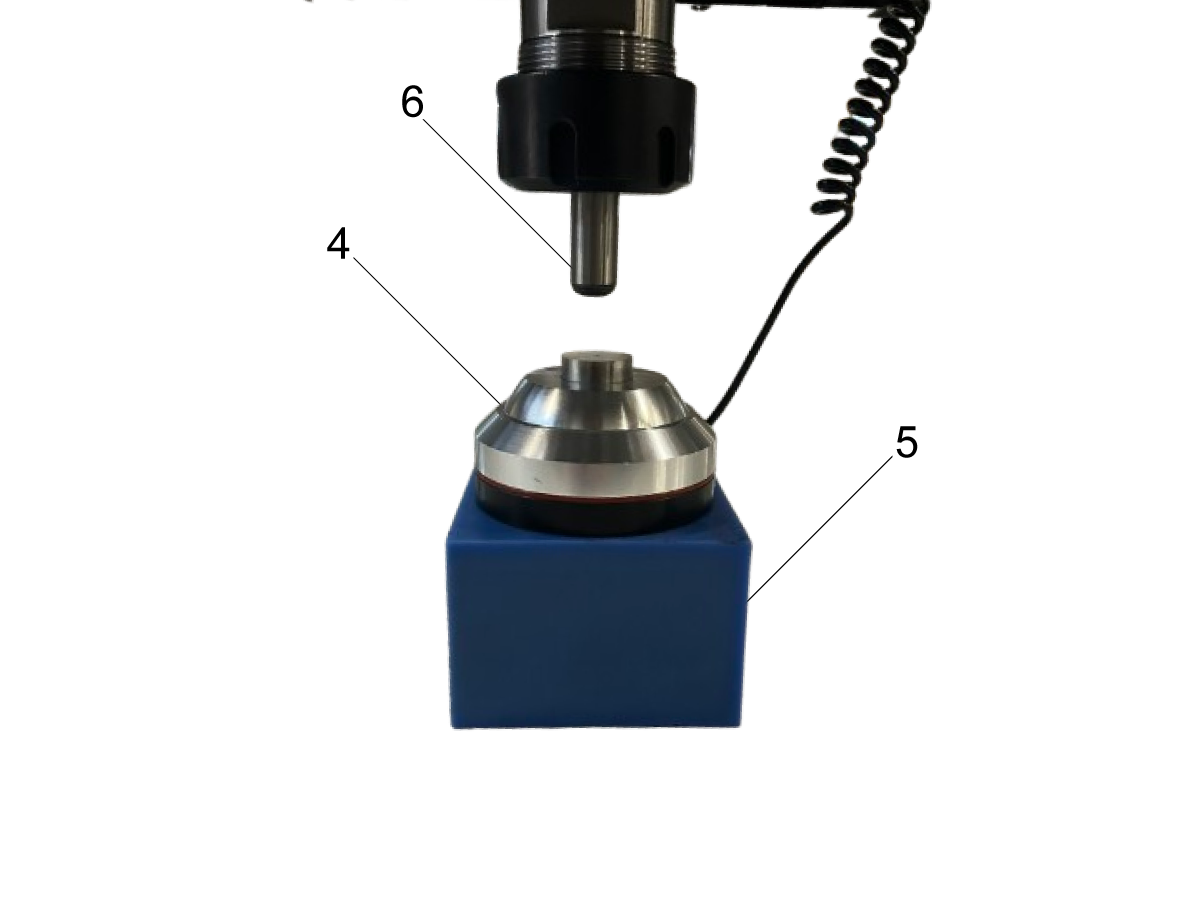
Select the desired work offset value [1] then ensure the selected axis [2] is set to Z or the machine will generate alarm 1010 (NOT SUPPORTED). Place the table probe [4] on top of the work piece [5] then jog the Z-axis down and press [CYCLE START].

6.3 Vacuum Dust Extractor Control

Recently Updated

SR - Vacuum Dust Extractor Control


Revision B - 06/2026

Vacuum Dust Extractor Control

The vacuum dust collector is controlled using m-codes. M164 will turn on the dust collector and M165 will turn off the dust collector.

Note : On P-versions of the SR machine the vacuum dust collector also actuates a shuttling brush head.

6.5 SR - P - Vacuum Table Control

Recently Updated

SR - P - Vacuum Table Control


Revision C - 03/2026

Introduction

Updated

The SR-3015/4020P relies primarily on vacuum based workholding for all the components on the table and is divided into sections. The SR-3015P's table is divided into 6 equal sections [1]. The SR-4020P is divided into 8 equal sections [2]. The vacuum sections are individually controlled using manual ball valves.

The Table Vacuum is controlled using M59P155 / M69P155.

Important : The vacuum generating pump is designed to be running continuously and should not be cycled on and off more than twice an hour.

Workholding

The SR-3015P/4020P vacuum table requires the use of a rubber gasket to hold down the work piece for machining. This gasket is a string that is provided with the machines and are cut to length depending on work piece size.

Note : Ensure the work piece is larger than the outlined gasket [2] all corners to create a strong seal.

The vacuum is generated through the illustrated ports [1]. Any workpiece that is placed on the table needs a vacuum port underneath it.

 If a large sheet is placed on the table then the gasket needs to be placed around the vacuum ports as illustrated.

6.4 SR - P - Oil Mist

Recently Updated

SR - P - Oil Mist


Revision A - 08/2025

Introduction

All SR - 3015P/4020P arrive with an integrated oil misting system for cutting lubrication.

This system can be adjsuted to be an air blast for chip exacuation or an oil misting system for cutter lubrication.

The Oil Blast option is controlled with M83/84

Refill Procedure

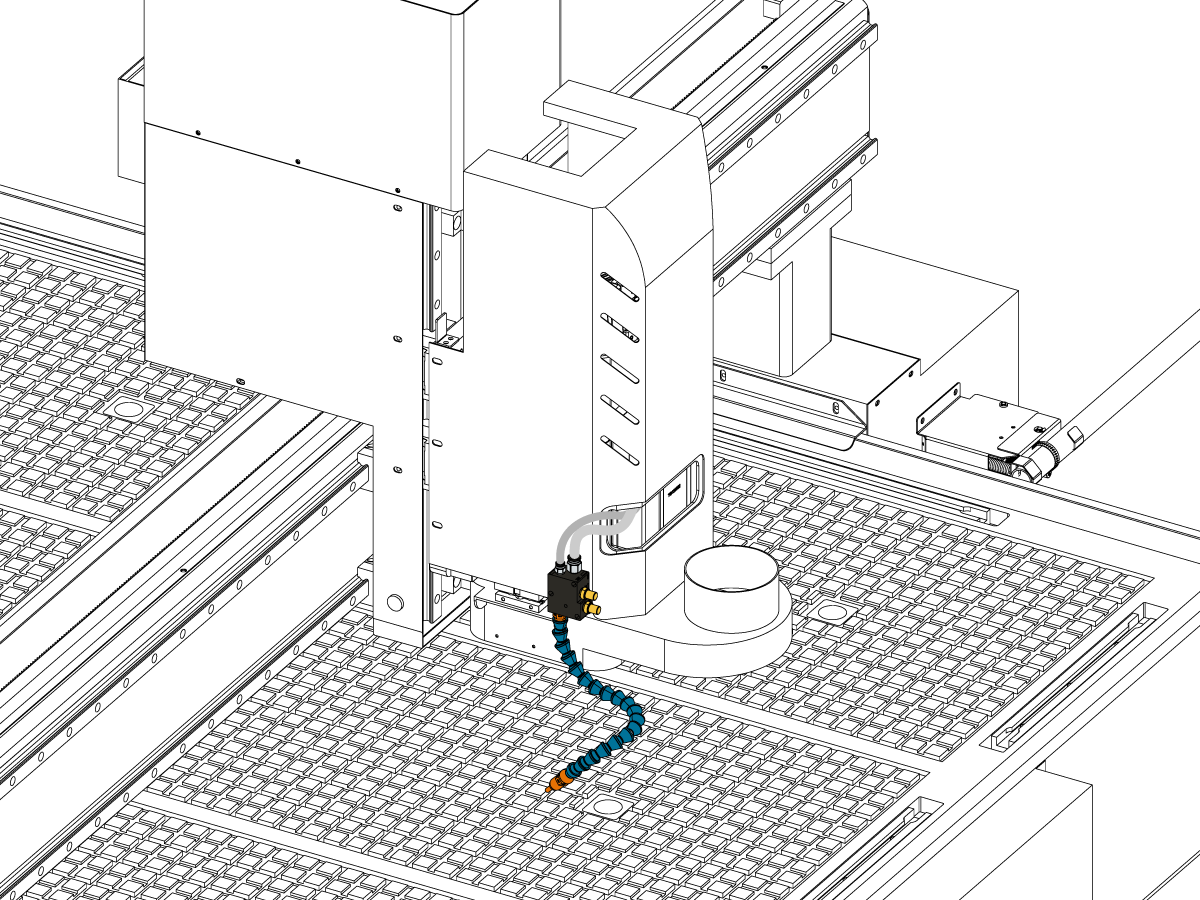
Locate the oil mist fluid level slot [1] on the machine. The fluid level might be low—verify it’s within the recommended range. Carefully remove the oil bottle [2] and refill the bottle with 93-2364 (1 Quart) or 93-4577 (1 Gallon) of approved canola oil. Use clean tools to avoid contamination.

6.6 Bump Sensor Function

Recently Updated

SR - Bump Sensor Function


Bump Sensor Function

The bump sensors on all SR models also function as door open switches. During initial machine start up the bump sensors need to be test via the cycle door prompt.

The operator needs to actuate one of the 4 bump sensors / switches to cycle the door and continue with the homing sequence.

Recently Viewed Items

You Have No Recently Viewed Items Yet

Feedback
Haas Logo

Haas Delivered Price

This price includes shipping cost, export and import duties, insurance, and any other expenses incurred during shipping to a location in France agreed with you as a buyer. No other mandatory costs can be added to the delivery of a Haas CNC Product.

KEEP UP WITH THE LATEST HAAS TIPS AND TECHNOLOGY...

Sign up now!   

HAAS TOOLING ACCEPTS THE FOLLOWING:

  • Service & Support
  • Owners
  • Request Service
  • Operator Manuals
  • Haas Parts
  • Rotary Repair Request
  • Pre-Install Guides
  • Shopping Tools
  • Build & Price a New Haas
  • Available Inventory
  • The Haas Price List
  • CNCA Financing
  • About Haas
  • Accessibility Statement
  • DNSH Statement
  • Export Compliance
  • Careers
  • Certifications & Safety
  • Contact Us
  • History
  • Terms & Conditions
  • Haas Tooling Terms & Conditions
  • Privacy
  • Warranty
  • Haas Community
  • Haas Certification Program
  • Haas Motorsports
  • Gene Haas Foundation
  • Haas Technical Education Community
  • Events
  • Join the Conversation
  • Facebook
  • X
  • Flickr
  • YouTube
  • LinkedIn
  • Instagram
  • TikTok
© 2026 Haas Automation, Inc – CNC Machine Tools

This site is protected by reCAPTCHA and the Google Privacy Policy and Terms of Service apply.

2800 Sturgis Rd., Oxnard, CA 93030
Toll Free: (888) 817-4446 / Fax: 805-278-8554