My Haas Welcome,
!
Haas Tooling MyHaas/HaasConnect Sign In Register Haas Tooling MyHaas/HaasConnect Sign Out Welcome, My Machines Latest Activity My Quotes My Account My Users Sign Out
Find Your Distributor
  1. Select Language
    1. English
    2. Deutsch
    3. Español - España
    4. Español - México
    5. Français
    6. Italiano
    7. Português
    8. Český
    9. Dansk
    10. Nederlands
    11. Magyar
    12. Polski
    13. Svenska
    14. Türkçe
    15. 中文
    16. Suomi
    17. Norsk
    18. الإنجليزية
    19. български
    20. Hrvatski
    21. Ελληνικά
    22. Română
    23. Slovenský
    24. Slovenščina
    25. 한국어
    26. 日本語
    27. Українська
  • machines Main Menu
    • Vertical Mills
      Vertical Mills
      Vertical Mills View All
      • Vertical Mills
      • VF Series
      • Universal Machines
      • VR Series
      • VP-5 Prismatic
      • Pallet-Changing VMCs
      • Mini Mills
      • Mold Machines
      • High-Speed Drill Centers
      • Drill/Tap/ Mill Series
      • Toolroom Mills
      • Pocket Mill
      • Compact Mills
      • Gantry Series
      • SR Sheet Routers
      • Extra-Large VMC
      • Double-Column Mills
      • 3+2 Positioning Machines
    • Multi-Axis Solutions
      Multi-Axis Solutions
      Multi-Axis Solutions View All
      • Multi-Axis Solutions
      • Y-Axis Lathes
      • 5-Axis Mills
    • Lathes
      Lathes
      Lathes View All
      • Lathes
      • ST Series
      • Dual-Spindle
      • Box Way Series
      • Toolroom Lathes
      • Chucker Lathe
      • Haas Bar Feeders
    • Horizontal Mills
      Horizontal Mills
      Horizontal Mills View All
      • Horizontal Mills
      • 50-Taper
      • 40-Taper
    • Rotaries & Indexers
      Rotaries & Indexers
      Rotaries & Indexers View All
      • Rotaries & Indexers
      • Rotary Tables
      • Indexers
      • 5-Axis Rotaries
      • Extra-Large Rotaries
    • Special Series
      Special Series
      Special Series View All
      • Special Series
      • EU_Series_Redirect
    • Automation Systems
      Automation Systems
      Automation Systems View All
      • Automation Systems
      • Mill Automation
      • Lathe Automation
      • Automatic Parts Loaders
      • Automation Models
    • Desktop Machines
      Desktop Machines
      Desktop Machines View All
      • Desktop Machines
      • Desktop Mill
      • Desktop Lathe
      • Control Simulator, Standard
      • Control Simulator, Premium
    • Shop Equipment
      Shop Equipment
      Shop Equipment View All
      • Shop Equipment
      • Knee Mill
      • Haas Manual Lathes
      • Haas Saws
    • Fabrication Machines
      Fabrication Machines
      Fabrication Machines View All
      • Fabrication Machines
      • Laser Cutting Machines
      • CNC Press Brakes
    • QUICK LINKS Special Series  Special Series 
      EU SERIES EU SERIES BUILD & PRICE | PRICE LIST BUILD & PRICE | PRICE LIST In-Stock Machines In-Stock Machines WHAT’S NEW WHAT’S NEW YOUR FIRST CNC YOUR FIRST CNC
      SHOPPING TOOLS
      • Build & Price a Haas
      • Price List
      • Available Inventory
      • CNCA Financing
      WANT TO TALK TO SOMEONE?

      A Haas Factory Outlet (HFO) can answer your questions, and walk you through your best options.

      CONTACT YOUR DISTRIBUTOR >
  • Options Main Menu
    • The Haas Control Value Option Packages
      Value Option Packages
      Value Option Packages View All
      • Value Option Packages
    • Product Image Spindles
      Spindles
      Spindles View All
      • Spindles
    • Product Image Tool Changers
      Tool Changers
      Tool Changers View All
      • Tool Changers
    • Product Image 4th- | 5th-Axis
      4th- | 5th-Axis
      4th- | 5th-Axis View All
      • 4th- | 5th-Axis
    • Product Image Turrets & Live Tooling
      Turrets & Live Tooling
      Turrets & Live Tooling View All
      • Turrets & Live Tooling
    • Product Image Probing
      Probing
      Probing View All
      • Probing
    • Haas Chip & Coolant Management Chip & Coolant Management
      Chip & Coolant Management
      Chip & Coolant Management View All
      • Chip & Coolant Management
    • The Haas Control The Haas Control
      The Haas Control
      The Haas Control View All
      • The Haas Control
    • Product Image Product Options
      Product Options
      Product Options View All
      • Product Options
    • Product Image Tooling & Fixturing
      Tooling & Fixturing
      Tooling & Fixturing View All
      • Tooling & Fixturing
    • Product Image Workholding
      Workholding
      Workholding View All
      • Workholding
    • Product Image 5-Axis Solutions
      5-Axis Solutions
      5-Axis Solutions View All
      • 5-Axis Solutions
      • 5 Easy Steps to 5-Axis
    • QUICK LINKS Special Series  Special Series 
      EU SERIES EU SERIES BUILD & PRICE | PRICE LIST BUILD & PRICE | PRICE LIST In-Stock Machines In-Stock Machines WHAT’S NEW WHAT’S NEW YOUR FIRST CNC YOUR FIRST CNC
      SHOPPING TOOLS
      • Build & Price a Haas
      • Price List
      • Available Inventory
      • CNCA Financing
      WANT TO TALK TO SOMEONE?

      A Haas Factory Outlet (HFO) can answer your questions, and walk you through your best options.

      CONTACT YOUR DISTRIBUTOR >
  • Why Haas Main Menu
      Discover the Haas Difference
    • Why Haas
    • MyHaas
    • Education Community
    • Industry 4.0
    • Haas Certification
    • Customer Testimonials
  • Service Main Menu
      Welcome to Haas Service
      SERVICE HOME Operator’s Manuals How-To Procedures Troubleshooting Guides Preventive Maintenance Haas Parts Haas Tooling Videos
  • Videos Main Menu
  • Main Menu
    • View All
    • View All
    • View All
    • View All
      • HTEC Curriculum Support
    • View All
      • Haas 10 kg Cobot Package
      • Cobot Kits
      • DC-1 Drill Center
      • CNC Sales News
      • Do More With Your Haas
    • View All
    • View All
      • contact-us-test
      • 4 - AUTOMATION SYSTEMS
      • Carousel-V2
      • expert test
      • Demo_Day_Trident-test
      • Link Test
      • image-sale-tag-test
      • article-list-test
      • Haas 25 kg Robot Package
    • View All
      • Choose Options
    • View All
    • View All
    • View All
    • View All
    • View All
      • calc-test
    • View All
    • QUICK LINKS Special Series  Special Series 
      EU SERIES EU SERIES BUILD & PRICE | PRICE LIST BUILD & PRICE | PRICE LIST In-Stock Machines In-Stock Machines WHAT’S NEW WHAT’S NEW YOUR FIRST CNC YOUR FIRST CNC
      SHOPPING TOOLS
      • Build & Price a Haas
      • Price List
      • Available Inventory
      • CNCA Financing
      WANT TO TALK TO SOMEONE?

      A Haas Factory Outlet (HFO) can answer your questions, and walk you through your best options.

      CONTACT YOUR DISTRIBUTOR >
  • Haas Tooling Main Menu
  • Haas Service Parts Main Menu

My Haas Welcome,
!
Haas Tooling MyHaas/HaasConnect Sign In Register Haas Tooling MyHaas/HaasConnect Sign Out Welcome, My Machines Latest Activity My Quotes My Account My Users Sign Out
Find Your Distributor
  1. Select Language
    1. English
    2. Deutsch
    3. Español - España
    4. Español - México
    5. Français
    6. Italiano
    7. Português
    8. Český
    9. Dansk
    10. Nederlands
    11. Magyar
    12. Polski
    13. Svenska
    14. Türkçe
    15. 中文
    16. Suomi
    17. Norsk
    18. الإنجليزية
    19. български
    20. Hrvatski
    21. Ελληνικά
    22. Română
    23. Slovenský
    24. Slovenščina
    25. 한국어
    26. 日本語
    27. Українська
×

Search Results

Web Pages

Images

    • <
    • 1
    • >

3 - SR-Safety

SR - Operator / Service Manual


  • 1 - SR-Introduction
  • 2 - SR-Legal Information
  • 3 - SR-Safety
  • 4 - SR-Installation
  • 5 - SR-Control Icons
  • 6 - SR-Operation
  • 7 - SR-Programming
  • 8 - SR-G-Codes
  • 9 - SR-M-Codes
  • 10 - SR-Remote Jog Handle
  • 11 - SR-Settings
  • 12 - SR-Maintenance
  • 13 - SR-Troubleshooting

Go To :

  • 3.1 General Safety Notes
  • 3.2 Read Before Operating
  • 3.3 Machine Limits
  • 3.4 Safety Decals
  • 3.5 Safety Edge Sensors

3.1 General Safety Notes

Safety Notes

CAUTION: Only authorized and trained personnel may operate this equipment. You must always act in accordance with the Operator's manual, safety decals, safety procedures, and instructions for safe machine operation. Untrained personnel present a hazard to themselves and the machine

IMPORTANT: Do not operate this machine until you have read all warnings, cautions, and instructions

CAUTION: The sample programs in this manual have been tested for accuracy, but they are for illustrative purposes only. The programs do not define tools, offsets, or materials. They do not describe workholding or other fixturing. If you choose to run a sample program on your machine, do so in Graphics mode. Always follow safe machining practices when you run an unfamiliar program. 

All CNC machines present hazards from rotating cutting tools, belts and pulleys, high voltage electricity, noise, and compressed air. When you use CNC machines and their components, you must always follow basic safety precautions to reduce the risk of personal injury and mechanical damage.

The work area must be adequately illuminated to allow clear view and safe operation of the machine. This includes the operator work area and all areas of the machine that might be accessed during maintenance or cleaning.Adequate illumination is the responsibility of the user.

Cutting tools, workholding and workpiece are beyond the scope and control of Haas Automation, Inc. Each of these potential hazards associated with it (sharp edges, heavy lifting considerations, chemical composition, etc) and it is the responsibility of the user to take appropriate action (PPE, training, etc).

Cleaning of the machine is required during normal use and prior to maintenance or repair. 

This operator’s manual is intended as a reference guide and is not to be the sole source of training. Complete operator training is available from the authorized Haas distributor.

Summary of Types of Operation for Haas Automation Machine Tools

Haas CNC Sheet routers are intended for cutting and shaping of materials. They are general purpose in nature and a list of all of those materials and types of cutting would never be complete. Almost all cutting and shaping is performed by a rotating tool mounted in a spindle. Rotation of the router is not required.

Operations of Haas Sheet Routers are separated into three areas. They are: Operations, Maintenance, and Service. Operations and Maintenance are intended to be performed by a trained and qualified machine operator. This Operator's Manual contains some of the information necessary to operate the machine. All other machine operations are to be considered Service. Service is only to be performed by specially trained service personnel.

Operation of this machine consists of the following:
  1. Machine Setup
    • Machine setup is done to initially set up the tools, offsets, and fixtures required to perform a repetitive function that later is called machine operation. Some machine setup functions can be done with the door open but are limited to “hold to run”.
  2. Machine operating in Automatic Mode
    • Automatic operation is initiated with Cycle-Start and can only be done with the doors closed.
  3. Operator loading and unloading of materials (parts)
    • Parts loading and unloading is what precedes and follows an automatic operation. This must be done with the doors open and all machine automatic motion is stopped when the door is open.

  4. Operator loading and unloading of cutting tools
    • Tool loading and unloading is done less often than setup. It is often required when a tool has become worn and must be replaced.

Maintenance only consists of the following:

  1. Adding lubricants
    • Adding lubricants for spindle and axes is required at regular intervals. These are often months or years in length. This is a normal operator function and is always done from a safe location outside of the work enclosure.
  2. Cleaning chips out of the machine
    • Cleaning out of chips is required at intervals dictated by the type of machining performed. This is a normal operator function. It is performed with the doors open and all of the machine operation is stopped.

Service only consists of the following:

  1. Repairing of a machine that is not operating correctly
    • Any machine that is not operating correctly requires service by factory trained personnel. This is never an operator function. It is not considered maintenance. Installation and service instructions are provided separately from the Operator’s Manual.
  2. Machine moving, unpacking, and installation
    • Haas machines are shipped to a user’s location almost ready to operate. They still require a trained service person to complete the installation. Installation and service instructions are provided separately from the Operator’s Manual.
  3. Machine packing
    • Machine packing for shipment requires the same packing material supplied by Haas in the original shipment. Packing requires a trained service person to complete the installation. Shipping instructions are provided separately from the Operator’s Manual.
  4. Decommission, dismantle and disposal
    • Machine is not expected to be disassembled for shipment; it can be moved in its entirety in the same manner in which it was installed. Machine can be returned to the manufacturer’s distributor for disposal; manufacturer accepts any/all components for recycling per Directive 2002/96/EC.
  5. End-of-life disposal
    • End-of-life disposal must conform to the laws and regulations in the region the machine is located. This is a jointly the responsibility of the owner and seller of the machine. The risk analysis does not address this phase.

Unattended Operation

Haas CNC machines are designed to operate unattended; however, your machining process may not be safe to operate unmonitored.

As it is the shop owner’s responsibility to set up the machine safely and use best practice machining techniques, it is also the owner’s responsibility to manage the progress of these methods. You must monitor your machining process to prevent damage, injury, or loss of life if a hazardous condition occurs.

For example, if there is the risk of fire due to the material machined, then you must install an appropriate fire suppression system to reduce the risk of harm to personnel, equipment, and the building. Contact a specialist to install monitoring tools before machines are allowed to run unattended.

It is especially important to select monitoring equipment that can immediately detect a problem and perform an appropriate action without human intervention.

3.2 Read Before Operating

Read Before Operating

DANGER: Do not enter the machining area any time the machine is in motion, or at any time that machine motion is possible. Severe injury or death may result. Motion is possible when the power is on and the machine is not in [EMERGENCY STOP].

Basic safety:

  • This machine can cause severe bodily injury. 
  • This machine is automatically controlled and may start at any time.
  • Consult your local safety codes and regulations before you operate the machine. Contact your dealer if you have questions about safety issues.
  • It is the machine owner’s responsibility to make sure that everyone who is involved in installing and operating the machine is fully acquainted with the operation and safety instructions provided with the machine, BEFORE they work with the machine. The ultimate responsibility for safety rests with the machine owner and the individuals who work with the machine. 
  • Use appropriate eye and ear protection when you operate the machine. 
  • Use appropriate gloves to remove processed material and to clean the machine. 

Electrical safety:

  • The electrical power must meet the required specifications. Attempting to run the machine from any other source can cause severe damage and will void the warranty. 
  • The electrical panel should be closed and the key and latches on the control cabinet should be secured at all times, except during installation and service. At those times, only qualified electricians should have access to the panel. When the main circuit breaker is on, there is high voltage throughout the electrical panel (including the circuit boards and logic circuits) and some components operate at high temperatures; therefore, extreme caution is required. Once the machine is installed, the control cabinet must be locked, with the key available only to qualified service personnel. 
  • Do not reset a circuit breaker until the reason for the fault is investigated and understood. Only Haas-trained service personnel should troubleshoot and repair Haas equipment. 
  • Do not press [POWER UP] on the control pendant before the machine is fully installed.

Operation Safety:

DANGER: To avoid injury verify that the spindle has stopped turning before approaching it. In the event of a loss of power the spindle will take much longer to coast to a stop.

  • Check for damaged parts and tools before you operate the machine. Any part or tool that is damaged should be properly repaired or replaced by authorized personnel. Do not operate the machine if any component does not appear to be functioning correctly.
  • Rotating cutting tools can cause severe injury. When a program runs, the spindle head can move rapidly at any time.
  • Improperly clamped parts machined at high speeds/feeds may be ejected. It is not safe to machine oversized or marginally clamped parts.

Recover from a jam or blockage:

  • Of a tool and material/part - press [RESET] to clear and displayed alarms. Jog the axis so the tool and material are clear.
  • Of the Automatic Tool Changer/tool and spindle - Press [RECOVER] and follow the on-screen instructions.
  • If the alarms do not reset or you are unable to clear a blockage, contact your Haas Factory Outlet (HFO) for assistance.


Follow these guidelines when you work with the machine:

  • Normal operation - Keep guards in place (for non-enclosed machines) while the machine operates. 
  • Part loading and unloading – An operator completes the task, and then presses [CYCLE START] (starting automatic motion). 
  • Machining job set-up – When set-up is complete, turn the set-up key to lock out set-mode and remove the key. 
  • Maintenance / Machine Cleaner– Press [EMERGENCY STOP] or [POWER OFF] on the machine beforehand.

Periodic inspection of machine safety features:

  • Press any of the Emergency Stop buttons to verify all motion is stopped and a 107 EMERGENCY STOP Alarm is displayed.
  • A monthly inspection of each Emergency Stop button should be performed.
  • Inspect bump sensors for proper fit and function.
  • Verify all sheet metal panels are in place.

3.3 Machine Limits

Machine Evrionmental Limits

This table list the environmental limits for safe operation:  

Environmental Limits (Indoor Use Only)

  Minimum Maximum
Operating Temperature 41 °F (5.0 °C) 122 °F (50.0 °C)
Storage Temperature -4 °F (-20.0 °C) 158 °F (70.0 °C)
Ambient Humidity 20% relative, non-condensing 90% relative, non-condensing
Altitude Sea Level 6,000 ft. (1,829 m)

CAUTION: Do not operate the machine in explosive atmospheres (explosive vapors and/ or particulate matter).

Machine Noise Limits

CAUTION: Take precautions to prevent hearing damage from machine/machining noise. Wear ear protection, change your application (tooling, spindle speed, axis speed, fixturing, programmed path) to reduce noise, or restrict access to machine area during cutting.

Typical noise levels at the operator’s position during normal operation are as follows:

  • A-Weighted sound pressure level measurements will be 69.4dB or lower.
  • C-Weighted instantaneous sound pressure levels will be 78.0dB or lower. 
  • LwA (sound power level A-weighted) will be 75.0dB or lower.

NOTE: Actual noise levels while cutting material are greatly affected by the user’s choice of material, cutting tools, speeds and feeds, workholding and other factors. These factors are application specific and are controlled by the user, not Haas Automation Inc

Spindle Safety Limit

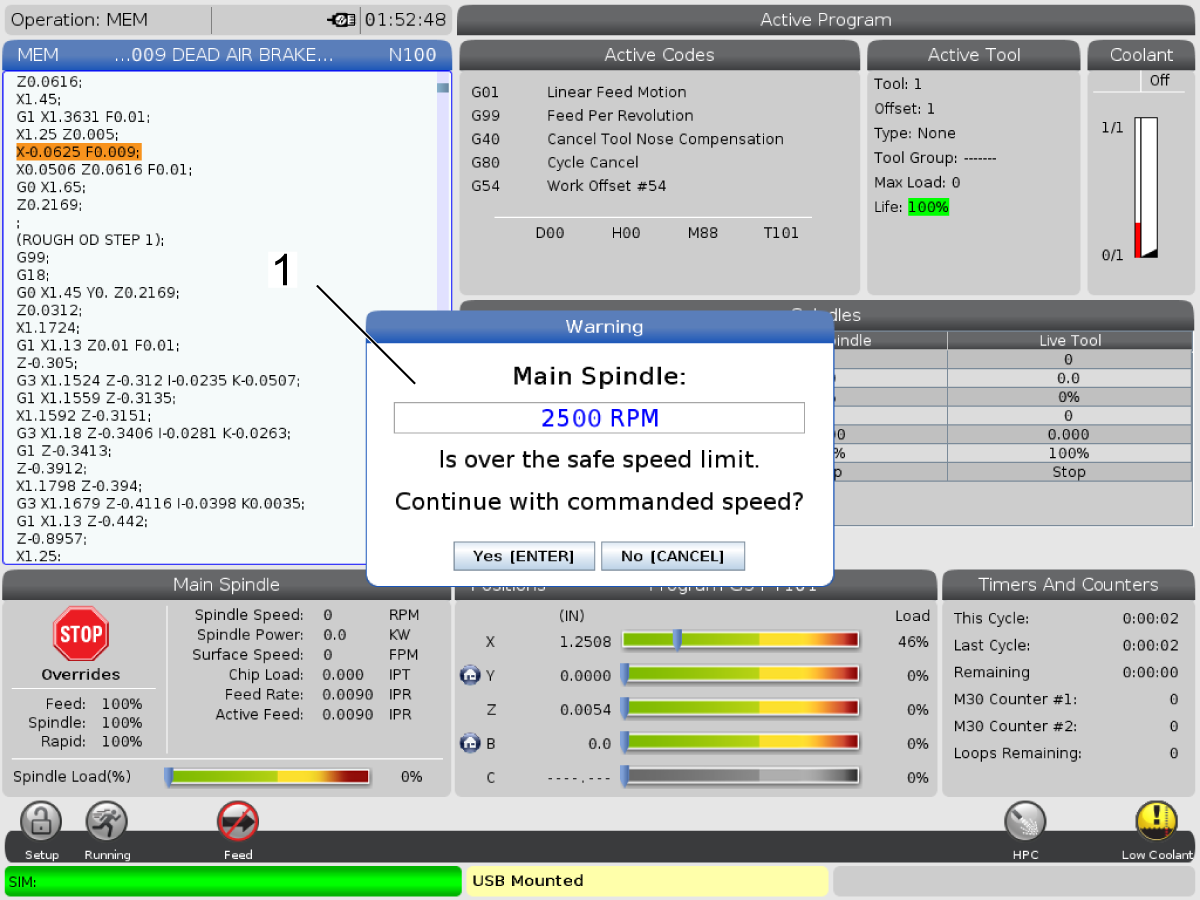
Starting in software version 100.19.000.1100 a spindle safety limit has been added to the control. 

This feature will display a warning message when the [FWD] or [REV] button is pressed and the previous commanded spindle speed is above the Spindle Maximum Manual Speed parameter. Press [ENTER] to go to the previous commanded spindle speed or press [CANCEL] to cancel the action. 

Machine / Spindle Option Spindle Maximum Manual Speed
Sheet Routers 18000

NOTE:  These values can not be changed.

3.4 Safety Decals

Safety Decals

The Haas factory puts decals on your machine to quickly communicate possible hazards. If decals become damaged or worn, or if you need additional decals to emphasize a particular safety point, contact your Haas Factory Outlet (HFO).

NOTE: Never alter or remove any safety decal or symbol.

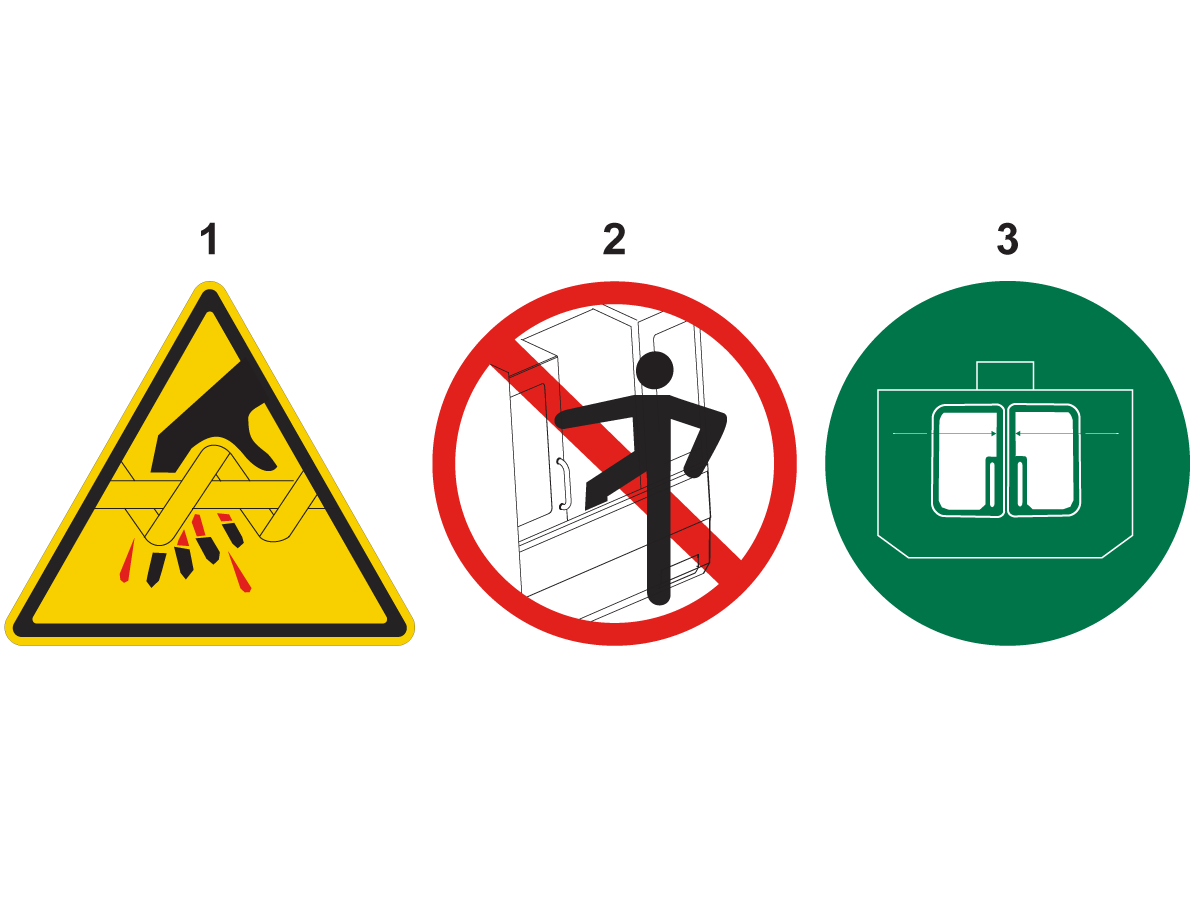
Be sure to familiarize yourself with the symbols on the safety decals. The symbols are designed to quickly tell you the type of information they give:

  • Yellow Triangle - Describes a hazard.
  • Red Circle with Slash-Through - Describes a prohibited action.
  • Green Circle - Describes a recommended action.
  • Black Circle - Gives information about machine or accessory operation.

Example Safety Decal Symbols: [1] Hazard Description, [2] Prohibited Action, [3] Recommended Action.

You may find other decals on your machine, depending on the model and options installed. Be sure to read and understand these decals.


Hazard Symbols - Yellow Triangles

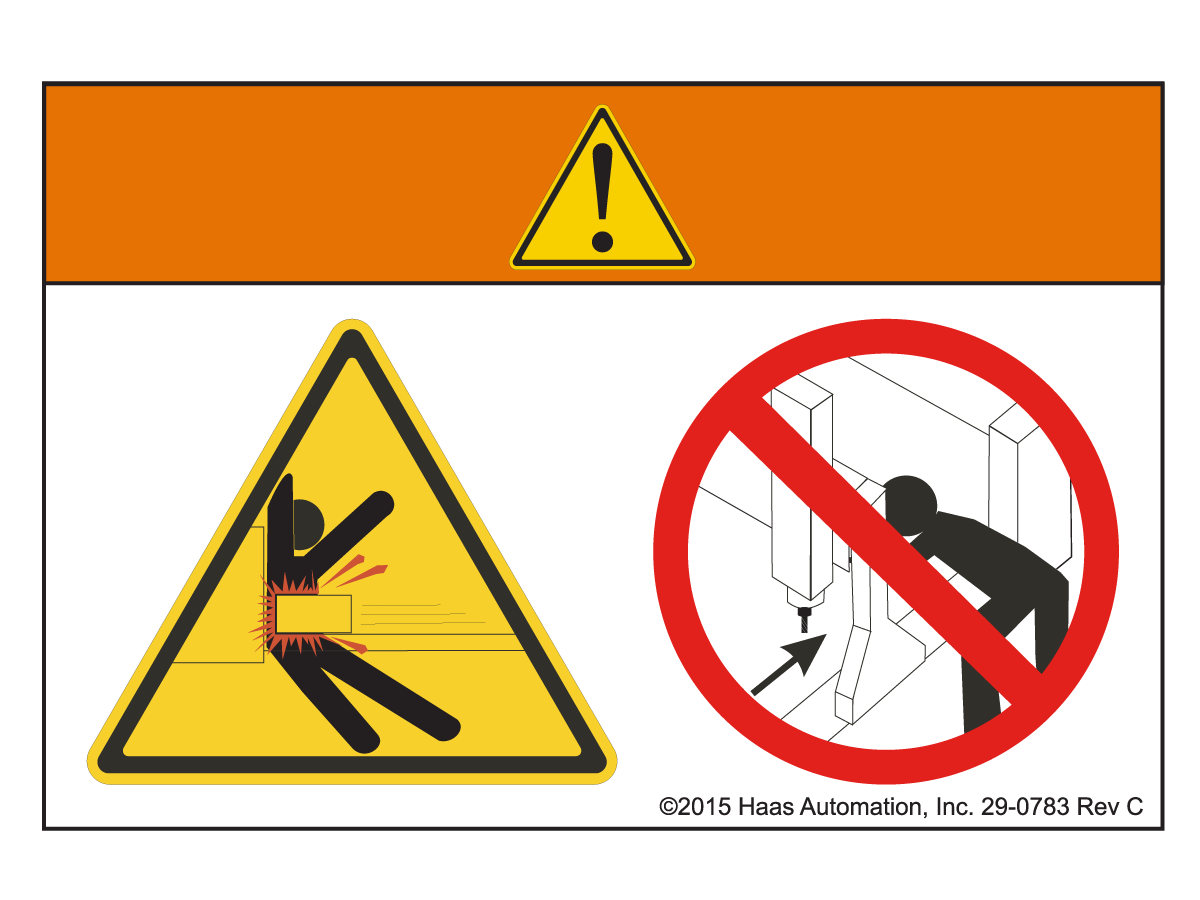
Moving parts can entangle, trap, crush, and cut.

Keep all parts of your body away from machine parts when they move, or whenever motion is possible. Motion is possible when the power is on and the machine is not in [EMERGENCY STOP].

Secure loose clothing, hair, etc.

Remember that automatically controlled devices can start at any time.

Do not touch rotating tools.

Keep all parts of your body away from machines parts when they move, or whenever motion is possible. Motion is possible when the power is on and the machine is not in [EMERGENCY STOP].

Sharp tools and chips can easily cut skin.

There are high voltage components on the machine that can cause electrical shock.

Always use care around high voltage components.

There are high voltage components on the machine that can cause arc flash, and electrical shock.

Take care to avoid opening electrical enclosures unless components are de-energized or proper personal protective equipment is worn. Arc flash ratings are on the nameplate.

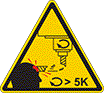
Long tools are dangerous, especially at spindle speeds higher than 5000 RPM. The tools can break and eject from the machine.

Remember that machine enclosures are intended to stop coolant and chips. Enclosures may not stop broken tools or thrown parts.

Always check your setup and tooling before you start machining.

Machining operations can create hazardous chips, dust, or mist. This is a function of the materials being cut, the metalworking fluid and cutting tools used, and the machining speeds/feeds.

It is up to the owner/operator of the machine to determine if personal protective equipment such as safety goggles or a respirator is required and also if a mist extraction system is needed.

Some models have a provision for connecting a mist extraction system. Always read and understand the Safety Data Sheets (SDS) for the workpiece material, the cutting tools, and the metalworking fluid.

Secure loose clothing, hair, jewelry, etc. Do not wear gloves around rotating machine components. You can be pulled into the machine, resulting in severe injury or death.

Automatic motion is possible when the power is on and the machine is not in [EMERGENCY STOP].

Prohibited Action Symbols - Red Circles with Slash-Through

Do not machine ceramics.

Do not attempt to load tools with the spindle dogs misaligned with the cutouts in the toolholder V-Flange.

Do not machine flammable materials.

Do not use flammable coolants.

Flammable materials in particulate or vapor form can become explosive.

The machine enclosures is not designed to contain explosions or extinguish fire.

Recommended Action Symbols - Green Circles

Always wear safety glasses or goggles when you are near a machine.

Airborne debris can cause eye damage.

Always wear hearing protection when you are near a machine.

Machine noise can exceed 70 dBA.

Make sure the spindle dogs are correctly aligned with the cutouts in the toolholder V-flange.

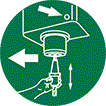
Note the location of the tool release button. Press this button only when you are holding the tool.

Some tools are very heavy. Handle these tools carefully; use both hands and have someone press the tool release button for you.

Other Safety Information

IMPORTANT: You may find other decals on your machine, depending on the model and options installed. Be sure to read and understand these decals.

3.5 Safety Edge Sensors

Recently Updated

SR - Safety Edge Sensors


Safety Edge Sensors

The SR- 3015 is equipped with safety edge sensors, located on the X-axis gantry.

The safety edge sensors are triggered by pressure from a collision with an obstacle.

When a safety edge sensor is triggered while the machine is running a program, the machine will feed hold and decelerate to a stop before the obstacle can be pushed by the gantry.

 DANGER : The safety edge sensors are not active when the machine is in handle jog mode. If the X-axis gantry is handle jogged into an obstacle the collision will not be detected by the safety edge sensors.

Recently Viewed Items

You Have No Recently Viewed Items Yet

Feedback
Haas Logo

Haas Delivered Price

This price includes shipping cost, export and import duties, insurance, and any other expenses incurred during shipping to a location in France agreed with you as a buyer. No other mandatory costs can be added to the delivery of a Haas CNC Product.

KEEP UP WITH THE LATEST HAAS TIPS AND TECHNOLOGY...

Sign up now!   

HAAS TOOLING ACCEPTS THE FOLLOWING:

  • Service & Support
  • Owners
  • Request Service
  • Operator Manuals
  • Haas Parts

  • Rotary Repair Request
  • Pre-Install Guides
  • Shopping Tools
  • Build & Price a New Haas
  • Available Inventory
  • The Haas Price List
  • CNCA Financing
  • About Haas
  • Accessibility Statement
  • DNSH Statement
  • Export Compliance
  • Careers
  • Certifications & Safety
  • Contact Us
  • History
  • Terms & Conditions
  • Haas Tooling Terms & Conditions
  • Privacy
  • Warranty
  • Haas Community
  • Haas Certification Program
  • Haas Motorsports
  • Gene Haas Foundation
  • Haas Technical Education Community
  • Events
  • Join the Conversation
  • Facebook
  • X
  • Flickr
  • YouTube
  • LinkedIn
  • Instagram
  • TikTok
© 2026 Haas Automation, Inc – CNC Machine Tools

This site is protected by reCAPTCHA and the Google Privacy Policy and Terms of Service apply.

2800 Sturgis Rd., Oxnard, CA 93030
Toll Free: (888) 817-4446 / Fax: 805-278-8554