My Haas Welcome,
!
Haas Tooling MyHaas/HaasConnect Sign In Register Haas Tooling MyHaas/HaasConnect Sign Out Welcome, My Machines Latest Activity My Quotes My Account My Users Sign Out
Find Your Distributor
  1. Select Language
    1. English
    2. Deutsch
    3. Español - ES
    4. Español - MX
    5. Français
    6. Italiano
    7. Português
    8. Český
    9. Dansk
    10. Nederlands
    11. Magyar
    12. Polski
    13. Svenska
    14. Türkçe
    15. 中文
    16. Suomi
    17. Norsk
    18. الإنجليزية
    19. български
    20. Hrvatski
    21. Ελληνικά
    22. Română
    23. Slovenský
    24. Slovenščina
    25. 한국어
    26. 日本語
    27. Українська
  • machines Main Menu
    • Vertical Mills
      Vertical Mills
      Vertical Mills View All
      • Vertical Mills
      • VF Series
      • Universal Machines
      • VR Series
      • VP-5 Prismatic
      • Pallet-Changing VMCs
      • Mini Mills
      • Mold Machines
      • High-Speed Drill Centers
      • Drill/Tap/ Mill Series
      • Toolroom Mills
      • Pocket Mill
      • Compact Mills
      • Gantry Series
      • SR Sheet Routers
      • Extra-Large VMC
      • Double-Column Mills
      • 3+2 Positioning Machines
    • Multi-Axis Solutions
      Multi-Axis Solutions
      Multi-Axis Solutions View All
      • Multi-Axis Solutions
      • Y-Axis Lathes
      • 5-Axis Mills
    • Lathes
      Lathes
      Lathes View All
      • Lathes
      • ST Series
      • Dual-Spindle
      • Box Way Series
      • Toolroom Lathes
      • Chucker Lathe
      • Pocket Lathe
      • Haas Bar Feeders
    • Horizontal Mills
      Horizontal Mills
      Horizontal Mills View All
      • Horizontal Mills
      • 50-Taper
      • 40-Taper
    • Rotaries & Indexers
      Rotaries & Indexers
      Rotaries & Indexers View All
      • Rotaries & Indexers
      • Rotary Tables
      • Indexers
      • 5-Axis Rotaries
      • Extra-Large Rotaries
    • Special Series
      Special Series
      Special Series View All
      • Special Series
      • EU_Series_Redirect
    • Automation Systems
      Automation Systems
      Automation Systems View All
      • Automation Systems
      • Mill Automation
      • Lathe Automation
      • Automatic Parts Loaders
      • Automation Models
    • Desktop Machines
      Desktop Machines
      Desktop Machines View All
      • Desktop Machines
      • Desktop Mill
      • Desktop Lathe
      • Control Simulator, Standard
      • Control Simulator, Premium
    • Shop Equipment
      Shop Equipment
      Shop Equipment View All
      • Shop Equipment
      • Knee Mill
      • Haas Manual Lathes
      • Haas Saws
    • Fabrication Machines
      Fabrication Machines
      Fabrication Machines View All
      • Fabrication Machines
      • Laser Cutting Machines
      • CNC Press Brakes
    • QUICK LINKS Special Series  Special Series 
      EU SERIES EU SERIES BUILD & PRICE | PRICE LIST BUILD & PRICE | PRICE LIST In-Stock Machines In-Stock Machines WHAT’S NEW WHAT’S NEW YOUR FIRST CNC YOUR FIRST CNC
      SHOPPING TOOLS
      • Build & Price a Haas
      • Price List
      • Available Inventory
      • CNCA Financing
      WANT TO TALK TO SOMEONE?

      A Haas Factory Outlet (HFO) can answer your questions, and walk you through your best options.

      CONTACT YOUR DISTRIBUTOR >
  • Options Main Menu
    • The Haas Control Value Option Packages
      Value Option Packages
      Value Option Packages View All
      • Value Option Packages
    • Product Image Spindles
      Spindles
      Spindles View All
      • Spindles
    • Product Image Tool Changers
      Tool Changers
      Tool Changers View All
      • Tool Changers
    • Product Image 4th- | 5th-Axis
      4th- | 5th-Axis
      4th- | 5th-Axis View All
      • 4th- | 5th-Axis
    • Product Image Turrets & Live Tooling
      Turrets & Live Tooling
      Turrets & Live Tooling View All
      • Turrets & Live Tooling
    • Product Image Probing
      Probing
      Probing View All
      • Probing
    • Haas Chip & Coolant Management Chip & Coolant Management
      Chip & Coolant Management
      Chip & Coolant Management View All
      • Chip & Coolant Management
    • The Haas Control The Haas Control
      The Haas Control
      The Haas Control View All
      • The Haas Control
    • Product Image Product Options
      Product Options
      Product Options View All
      • Product Options
    • Product Image Tooling & Fixturing
      Tooling & Fixturing
      Tooling & Fixturing View All
      • Tooling & Fixturing
    • Product Image Workholding
      Workholding
      Workholding View All
      • Workholding
    • Product Image 5-Axis Solutions
      5-Axis Solutions
      5-Axis Solutions View All
      • 5-Axis Solutions
      • 5 Easy Steps to 5-Axis
    • QUICK LINKS Special Series  Special Series 
      EU SERIES EU SERIES BUILD & PRICE | PRICE LIST BUILD & PRICE | PRICE LIST In-Stock Machines In-Stock Machines WHAT’S NEW WHAT’S NEW YOUR FIRST CNC YOUR FIRST CNC
      SHOPPING TOOLS
      • Build & Price a Haas
      • Price List
      • Available Inventory
      • CNCA Financing
      WANT TO TALK TO SOMEONE?

      A Haas Factory Outlet (HFO) can answer your questions, and walk you through your best options.

      CONTACT YOUR DISTRIBUTOR >
  • Why Haas Main Menu
      Discover the Haas Difference
    • Why Haas
    • MyHaas
    • Education Community
    • Industry 4.0
    • Haas Certification
    • Customer Testimonials
  • Service Main Menu
      Welcome to Haas Service
      SERVICE HOME Operator’s Manuals How-To Procedures Troubleshooting Guides Preventive Maintenance Haas Parts Haas Tooling Videos
  • Videos Main Menu
  • Main Menu
    • View All
    • View All
    • View All
    • View All
      • HTEC Curriculum Support
      • Haas Value Option Packages (VOP) Journey
    • View All
      • Haas 10 kg Cobot Package
      • Cobot Kits
      • DC-1 Drill Center
      • CNC Sales News
      • Do More With Your Haas
    • View All
    • View All
      • contact-us-test
      • 4 - AUTOMATION SYSTEMS
      • Carousel-V2
      • expert test
      • Demo_Day_Trident-test
      • Link Test
      • image-sale-tag-test
      • article-list-test
      • Haas 25 kg Robot Package
      • test-algolia-page
    • View All
    • View All
    • View All
    • View All
      • calc-test
    • View All
    • QUICK LINKS Special Series  Special Series 
      EU SERIES EU SERIES BUILD & PRICE | PRICE LIST BUILD & PRICE | PRICE LIST In-Stock Machines In-Stock Machines WHAT’S NEW WHAT’S NEW YOUR FIRST CNC YOUR FIRST CNC
      SHOPPING TOOLS
      • Build & Price a Haas
      • Price List
      • Available Inventory
      • CNCA Financing
      WANT TO TALK TO SOMEONE?

      A Haas Factory Outlet (HFO) can answer your questions, and walk you through your best options.

      CONTACT YOUR DISTRIBUTOR >
  • Haas Tooling Main Menu
  • Haas Service Parts Main Menu
My Haas Welcome,
!
Haas Tooling MyHaas/HaasConnect Sign In Register Haas Tooling MyHaas/HaasConnect Sign Out Welcome, My Machines Latest Activity My Quotes My Account My Users Sign Out
Find Your Distributor
  1. Select Language
    1. English
    2. Deutsch
    3. Español - ES
    4. Español - MX
    5. Français
    6. Italiano
    7. Português
    8. Český
    9. Dansk
    10. Nederlands
    11. Magyar
    12. Polski
    13. Svenska
    14. Türkçe
    15. 中文
    16. Suomi
    17. Norsk
    18. الإنجليزية
    19. български
    20. Hrvatski
    21. Ελληνικά
    22. Română
    23. Slovenský
    24. Slovenščina
    25. 한국어
    26. 日本語
    27. Українська
×

Search Results

Web Pages

Images

    • <
    • 1
    • >

5 - HBF - 12 - Operation

Haas Bar Feeder 12 - Operator's / Service Manual


  • 0 - HBF - 12 - Table of Contents
  • 1 - HBF - 12 - Introduction
  • 2 - HBF - 12 - Legal Information
  • 3 - HBF - 12 - Safety
  • 4 - HBF - 12 - Installation
  • 5 - HBF - 12 - Operation
  • 6 - HBF - 12 - Maintenance
  • 7 - HBF - 12 - Troubleshooting

Go To :

  • 5.1 HBF - 12 - Controller
  • 5.2 HBF - 12 - Control Screen
  • 5.3 HBF - 12 - Material Loading
  • 5.4 HBF - 12 - AVD Setup
  • 5.5 HBF - 12 - Enable Code

5.1 HBF - 12 - Controller

Recently Updated

HBF - 12 - Controller


Revision C - 04/2026

HBF - 12 - Hand Controller

  • Press buttons [11] + [16] for anti-vibration function (upper guide channel set closed)
  • Press [11] + [14] buttons to make the pusher move forward slowly.
  • Press [11] + [13] buttons to make the pusher move backward slowly.
  • Press [11] button for alarm clean-up.


Number Function
1 Emergency stop button (SB1)
2 Alarm Indicator
3 Bar end Indicator
4 Lathe chunk open signal 
5 Cycle start Indicator
6 Inching mode Indicator
7 Stop feeding Indicator
8 Backward start Indicator
9 Auto starts button (SB3)
10 Auto mode button (SB4) 
11 Manual mode button (SB8)
12 LED of home position (SR2)
13 Pusher backward button (SB9)
14 Pusher forward button (SB5)
15 Led of closing upper guide channel set (SR3)
16 Guide channel close button (SB6)
17 Led of opening upper guide channel set (SR3)
18 Guide channel open button (SB10)

HBF Hand Controller Demo Video

Updated

Bar Feeder Pendant Overview

Demonstrates the basic operation and controls of the bar feeder pendant.

5.2 HBF - 12 - Control Screen

Recently Updated

HBF - 12 - Control Screen


Revision A - 09/2025

Introduction

The Haas Bar Feeder 12 is equipped with a dedicated control screen that provides access to the following features:

  • User Parameters
  • Alarms
  • Factory Settings (view-only reference)

Note : This screen also has its own dedicated software available for download on HBC

  • User Parameters
  • Alarms
  • Factory Settings (view-only reference)

User Parameters

Parameter 1 Push Length

This setting controls the push length of the commanded parts.

Ensure this parameter is the total length [1] of the finish parts + cutting off tool width + material removed during facing operation = X.XX in   

Important : The HBF-12 is a push to stop system and requires a stopper for consistant bar pushes.

Note : Slow down distance [2] needs to be set to reduce impact on the bar stopper. 

Factory Settings:

1.0 inch

0.50 inch


Parameter 2 Push Force

Chuck Open Force : Reccomended setting is 45 kg (This value varies depending on material weight)

Chuck Close Force : Reccomended setting is 15 kg.

Factory Settings:

30lb 

15lb

Parameter 3 Push Length Error Detection (Fix type)

This is a safety parameter that can be set by the operator as a secondary safety function in the event that the bar stop (turret) is miss positioned.

If the bar travel is :

  • Too short (Alarm 9)
  • Too long (Alarm 10)

Factory Settings:

OFF

0 inch

0 inch

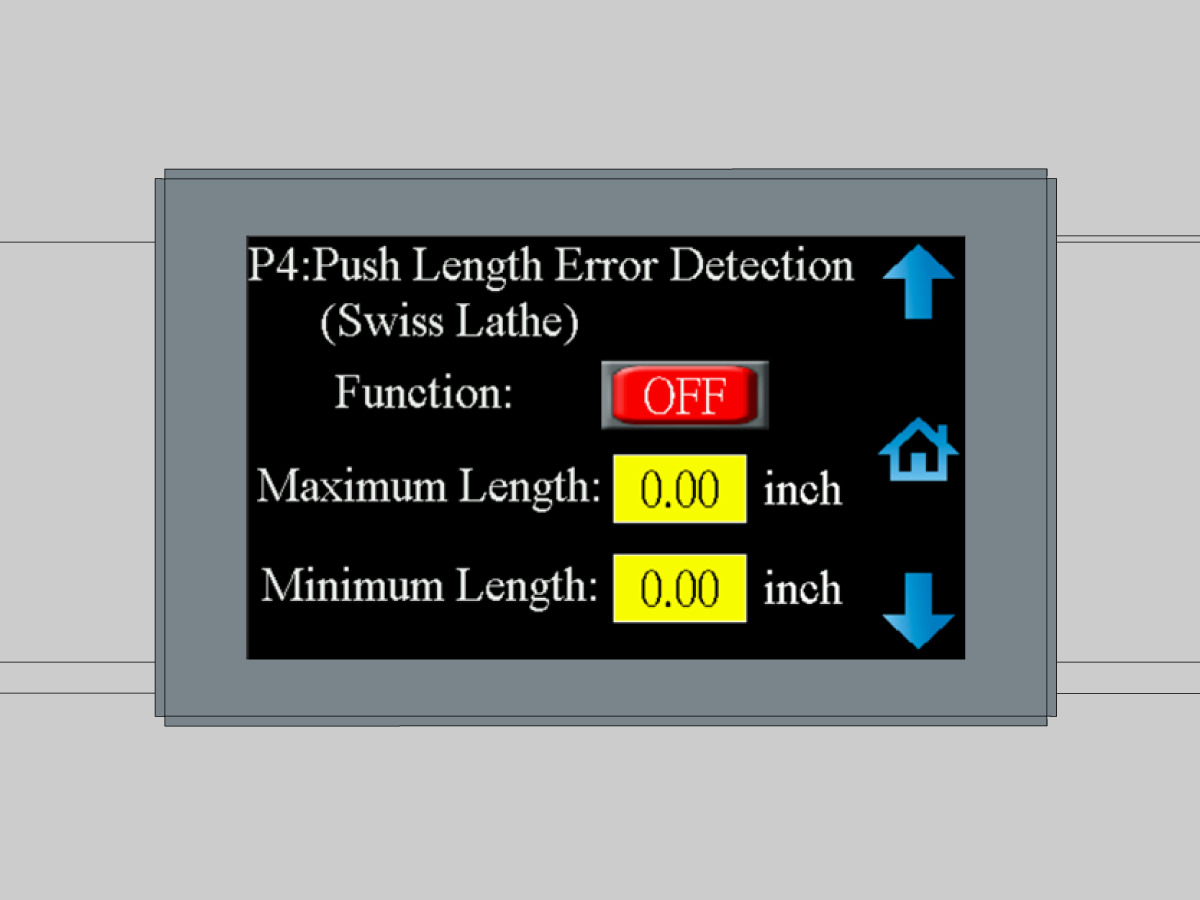
Parameter 4 Push Length Error Detection (Swiss type)

This is a safety parameter that can be set by the operator as a secondary safety function in the event the collect is closed too early or too late.

If the bar travel is :

  • Too short (Alarm 22)
  • Too long (Alarm 23)

Note : This parameter does not apply to Haas machines.

Factory Settings:

OFF

0 inch

0 inch

Parameter 5 Initial Push Position

[ON] Parameter allows the use of multiple different bar lengths without the need of changing initial push position [1].

[OFF] Parameter push distance is the distance to the bar stop (turret).

Factory Settings:

ON

63.50 inch

Parameter 6 1st Feed Position

This parameter controls the position of the where the trolley pushes the bar before the pushrod is engaged.

Ensure that the trolley push distance [1] is in between the collect of the pushrod and the clamping jaws to ensure correct engagement.

Slow down distance [2] is set to reduce the chance of bar overshoot. 4 in is the reccomended distance to alow the trolley to decelerate.

Push force [3] is reccomended to be set at 45 kg but varies according to raw material weight.

Factory Settings:

74.50 inch

5.0 inch

40.0 lb

Parameter 7 Bar end position

This parameter [1] is set by jogging the pushrod to the back of the collet and leaving a gap of 0.25 in (5 mm).

Factory Settings:

149.0 inch


Parameter 8 Oil Pump Shutoff

When the push rod position is greater than position setting [1], the hydraulic oil pump is shut off.

Note : The oil pump lubricates the jaws of the anti-vibration device when the work piece is spinning within it. The oil pump is not needed to lubricate the pushrod once it reaches the anti-vibration device.

Factory Settings:

 28.0 inch

Parameter 9 Anti Vibration Device Pusher Clearance

This parameter ensures the AVD jaws are not preventing the pushrod from advancing past it and adds additional support to the push rod as the material is being machined.

The AVD should open [1] when the pushrod collet is near AVD the jaws.

The AVD should clamp [2] when the pushrod collet is past the AVD jaws.

When this parameter is on the AVD behaves the same as the machine chuck. The AVD opens allowing the push rod to advance then clamps to support it during machining.

Factory Settings:

ON

90.39 inch

121 inch

Parameter 10 Spindle Anti Vibration Device (Not applicable to Haas machines)

This parameter ensures the SAVD wheels are not preventing the pushrod from advancing past it and adds additional support to the push rod as the material is being machined.

The SAVD should open [1] when the pushrod collect is near the it

The SAVD should clamp [2] when the pushrod collect is past the wheels.

When this parameter is on the SAVD behaves the same as the machine chuck. The SAVD opens allowing the push rod to advance then clamps to support it during machining.

Factory Settings:

OFF

0 inch

0 inch

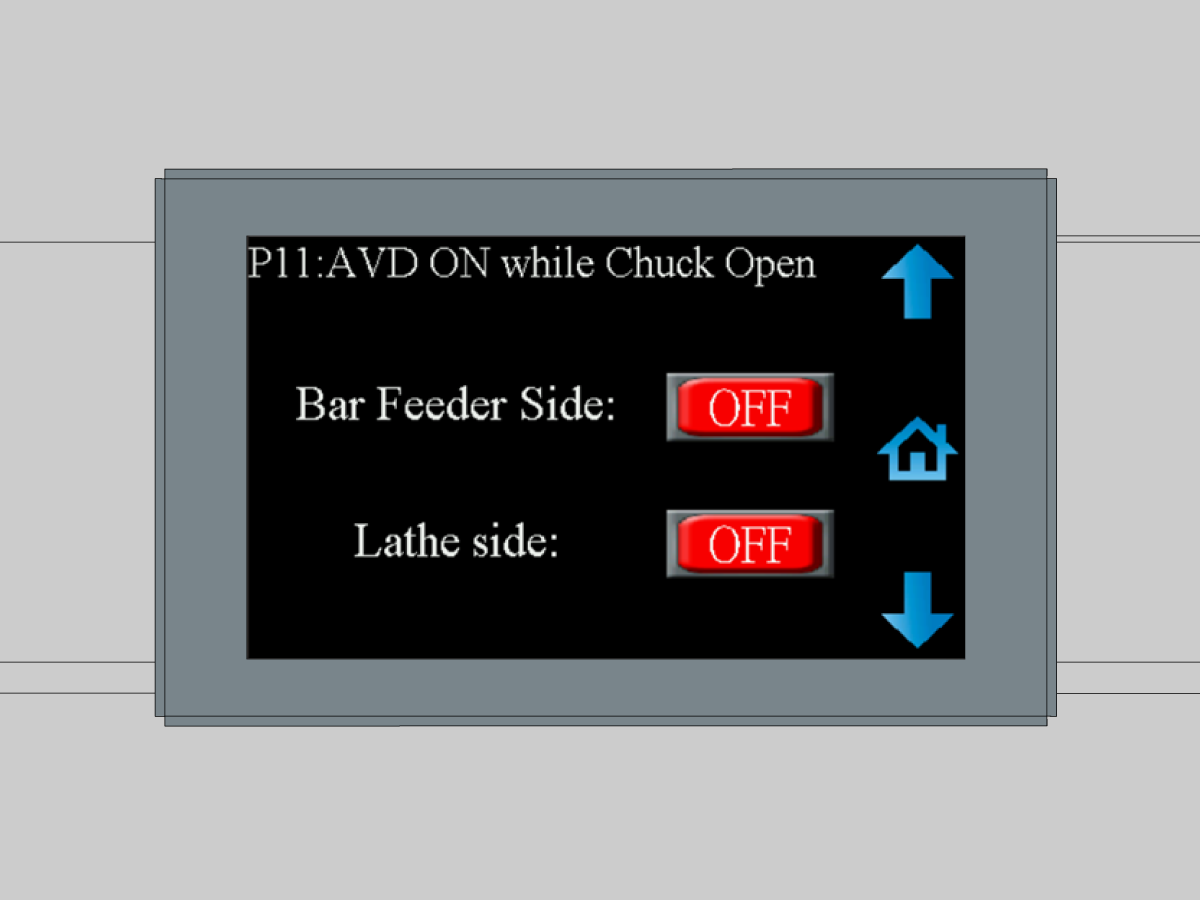
Parameter 11 AVD ON while Chuck Open

Bar Feeder Side : On/Off to enable or disable AVD

Lathe Side : On/Off to enable or disable SAVD (Not applicable to Haas Machines)

Factory Settings:

ON

OFF


Parameter 12 LED Bar Length Display

Function : On/Off to enable/disable bar length LED lights

Factory Settings:

ON

Alarms

Alarm 01 Remnant in chuck

Alarm 02 Failed to reach home position

Alarm 03 Remnant in pusher chuck

Alarm 04 Upper-guide-channel-open idle too long

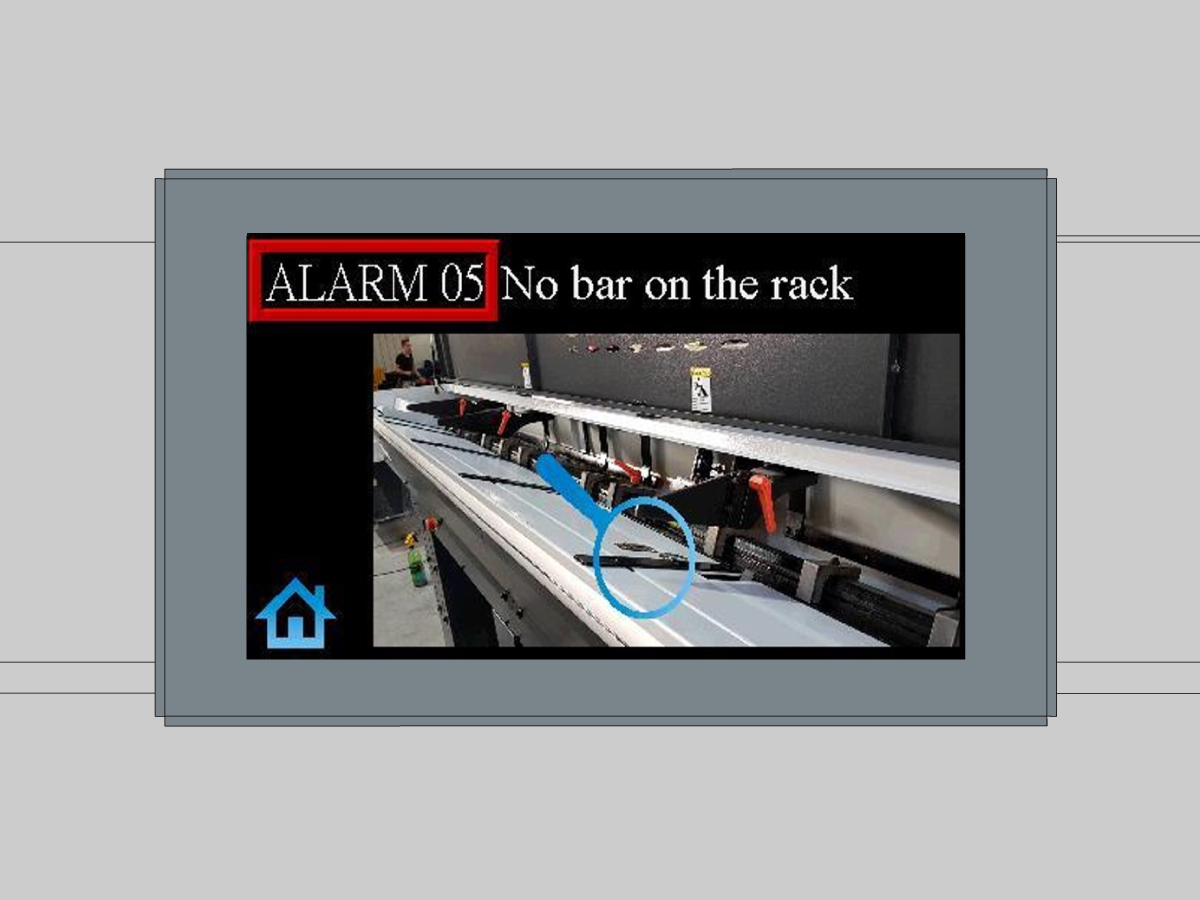
Alarm 05 No bar on the rack

Alarm 06 Chuck-open signal not received

Alarm 07 Low air pressure 

Alarm 08 Failed to load bar into chuck

Alarm 09 Workpiece underfeed

Alarm 10 Workpiece overfeed

Alarm 11 Lathe alarm

Alarm 12 Hood is open

Alarm 13 Upper guide channel sensor error (SR4)

Alarm 14 E-Stop Electrical Fault

Alarm 15 Servo Motor Fault

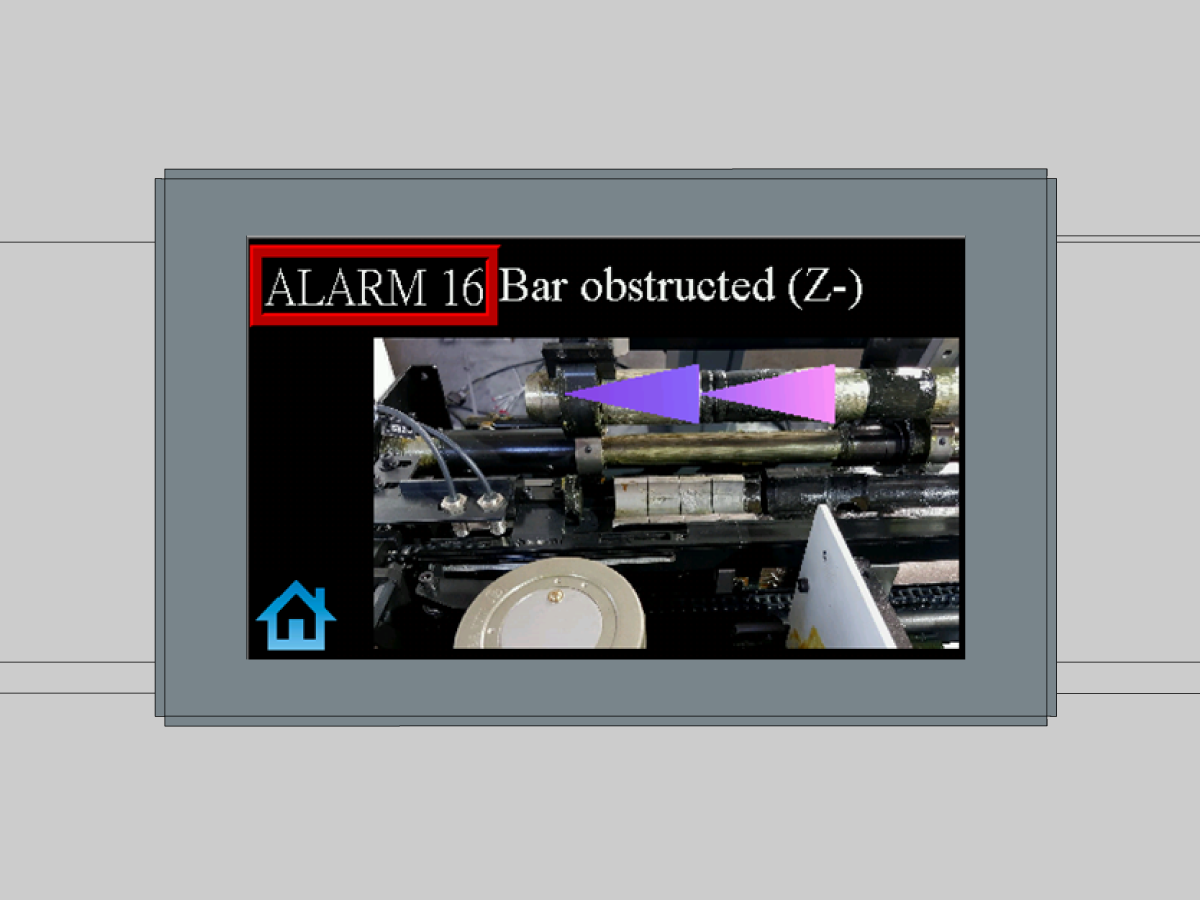
Alarm 16 Pusher motor slipping backwards

Alarm 17 Initial Push Position Sensor Fault (SR0)

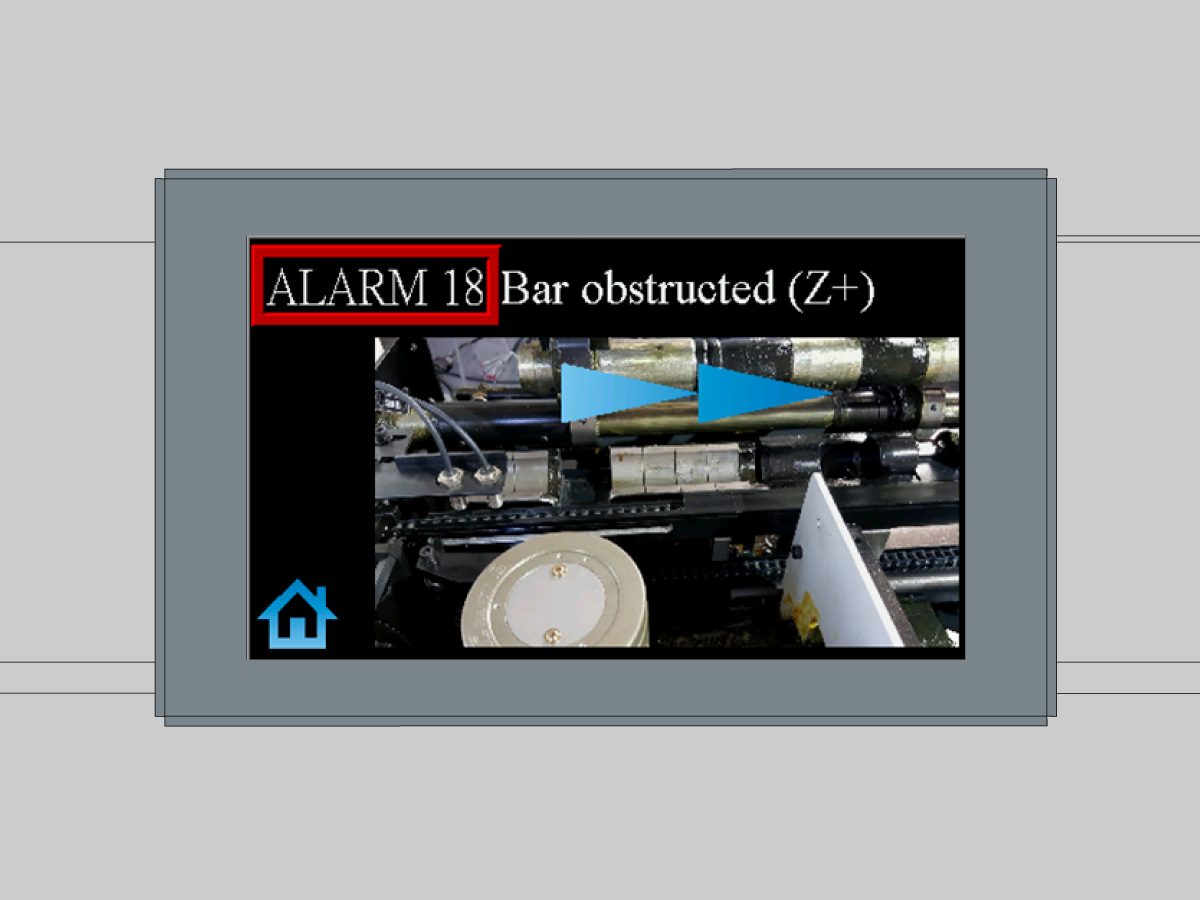
Alarm 18 Pusher motor slipping forwards

Alarm 19 Pusher fault with guide channel closed

Alarm 20 Cam cycle time alarm 

Alarm 21 Initial push position setting too small

Alarm 22 Chuck close and feed too short (swiss type) 

Alarm 23 Chuck close and feed too long (swiss type) 

Alarm 24 Initial push position mechanism error (SR0)

Alarm 25 Upper - guide - channel – close idle too long

Alarm 26 Bar feeder not in auto mode

Alarm 27 Pusher location over travel

NOTE: Only Haas Certified Service Technicians can log into this site. 

NOTE: HBF12 system parameters are factory-set and restricted to certified Haas service personnel. Authorized access is required to view or modify these parameters.

5.3 HBF - 12 - Material Loading

Recently Updated

HBF - 12 - Material Loading


Revision B - 04/2026

Material loading

1

The adjustable material support holds the bar stock at the correct height during bar feeder operation. This support helps stabilize the material and ensures proper alignment as the bar is fed into the machine. [1]

During the loading cycle, the material support lowers to allow a new bar to enter the feeder. At the same time, it prevents the remaining bars in the holding zone from feeding forward. Once the bar is loaded, the support returns to the set height to properly support the material during operation.

2

Use an Allen wrench to adjust the material support height. Turn the adjustment screw [1] while observing the indicator dial until it aligns with the desired bar stock diameter.

This is a mechanical system, the adjustment directly raises or lowers the support height. Once the correct position is set, no additional locking action is required.

Videos

Updated

Bar Feeder Load and Push Operation

Demonstrates how to load material into the bar feeder and initiate the push sequence.

Updated

Bar Removal

Walkthrough of removing a bar that is not fully fed through the system.

Updated

Bar Reload Operation

Demonstrates how the bar feeder removes the remnant and reloads a new bar.

5.4 HBF - 12 - AVD SETUP

Recently Updated

HBF - 12 - AVD Setup


Revision A - 04/2026

Introduction

1

The Anti-Vibration Device (AVD) on the bar feeder is used to stabilize the bar during operation and reduce vibration while feeding material into the machine. The AVD can be adjusted to accommodate bars of different diameters, helping maintain proper bar support and improving feeding accuracy.

Proper installation and adjustment of the AVD are important to ensure smooth bar movement and to minimize vibration during operation. This procedure outlines the installation and setup of the AVD components on the bar feeder.

2

Updated

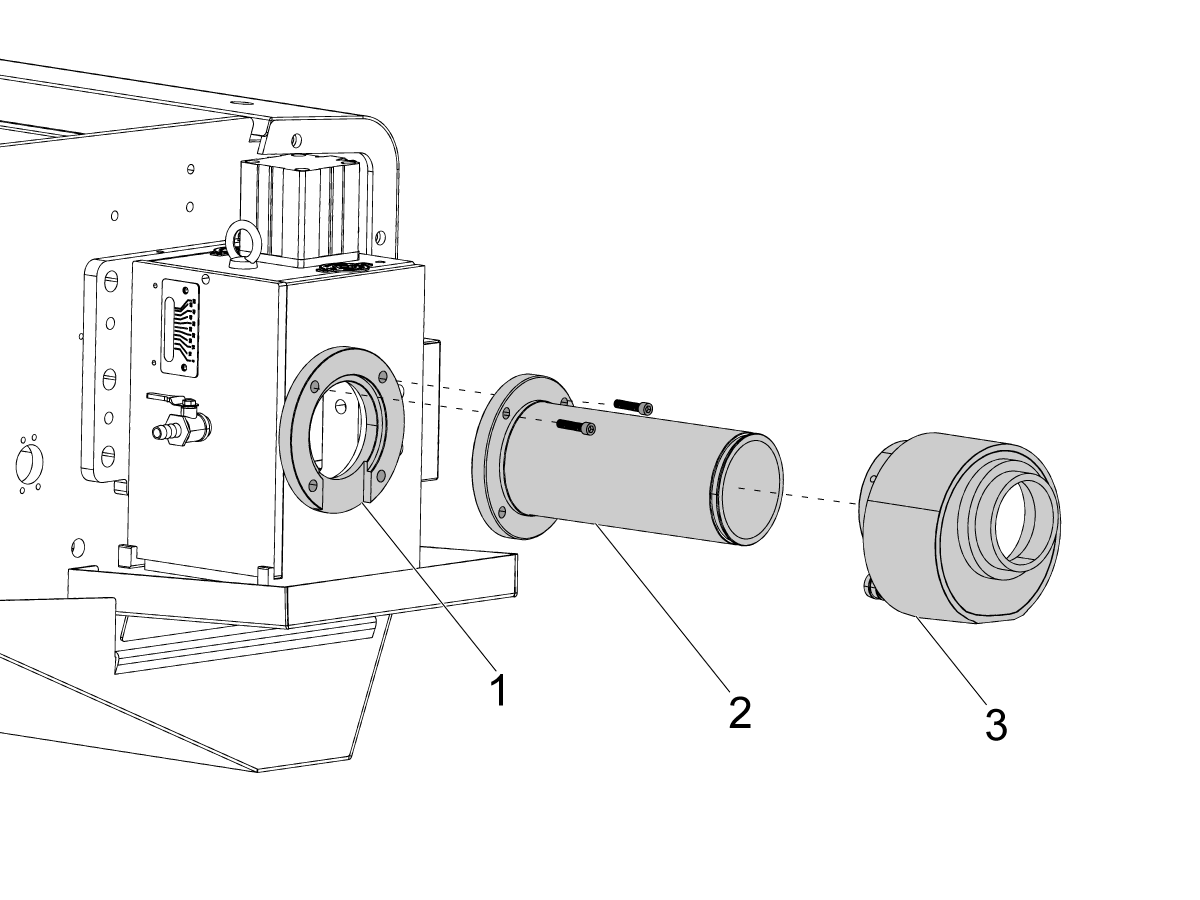
In order to adjust the AVD you must remove the AVD extension tube assembly.

3

To adjust the AVD, use the two screws located on the top of the device. Refer to the plaques on the AVD that indicate the directions for larger and smaller adjustments.

Closed Position Adjustment (Material Diameter): Actuate the AVD to the closed position. Slide the bar through the AVD and adjust the Material Dimension screw until the bar can no longer be rotated by hand. Then gradually relieve the adjustment by turning the screw counterclockwise in ¼-turn increments until the bar can rotate and slide freely. [1]

Open Position Adjustment (Limit): The open position is set by the pusher OD. Ensure the AVD is not actuated. Slide the pusher forward until its largest diameter is positioned within the AVD jaws. Adjust the Limit screw using the same method as above—tighten until rotation is restricted, then back off in ¼-turn increments until the pusher can move freely.

Note: Providing too much clearance will increase vibration. Setting the clearance too tight may cause the bar feeder to jam.

AVD Adjustment Videos

Updated

AVD Open Position Adjustment

Demonstrates setting the Anti-Vibration Device (AVD) to the open position based on the maximum outer diameter of the pusher.

Updated

AVD Closed Position Adjustment

Shows how to set the AVD closed position for the correct bar size.

5.5 HBF - 12 - Enable Code

Recently Updated

HBF - 12 - Enable Code


Revision A - 03/2026

Enable HBF12

NOTE: The Macros option must be enabled to run this procedure. This is a paid option and may not be installed on all machines. To verify if Macros is enabled, go to Parameters > Features and confirm that Macros is selected. If Macros is not enabled, refer to How to Enter Option Codes – AD0932 for instructions on loading option codes.

The HBF‑12 bar feeder uses G105 as its command interface. On Haas machines, G105 is aliased to a macro program stored in the control. Download the G105 Macro program and follow the procedure below to load it into the Haas Control.

O09010_G105_Barfeeder_12_Code

G105 Aliased Program Setup

1.     Load Program O9010 onto Haas Control and Press [F2] to copy it to Memory > 09000 folder.

2.      Navigate to Settings > Alias Codes

3.      Set G Macro Call O9010 to “105”

Part Counter Setup

1.      Navigate to Current Commands > Timers

2.      Set Macro Label #1 to “Part Count”

3.      Set Macro Assign #1 to “10200”

Barfeeder Operation Macro Var Setup

1.      Navigate to Current Commands > Macro Vars

2.      Set #10201 to your desired Max Part Count.

3.      Set #10203 to your Part+Cutoff Length. Using the terms of the current HBF, this would be your “D” value.

4.      Set #10206 to your desired Push Wait time. This value will vary and depends on the length of your push. If desired we can put together a table of recommended waits based on push length. 

Chuck Open Spindle Rotation Setting

1.      Navigate to Settings

2.      Type “283” then press [F1]

3.      Set Setting 283 to “500”. This setting must be set above 30 (what the g105 program currently uses) to allow the spindle to rotate when feeding a new bar in after a bar change, otherwise it will alarm. 

G105 Aliased Program

G105 [I n.nnn] [J n.nnn] [R nnnnn] [Q13]

This program accepts the address codes I, J, Q13, and R.

The I value sets the initial bar push length. The J value specifies the length of additional pushes that occur during the same part cycle. Both addresses assume the turret has been pre-positioned to act as a hard stop. When the program is executed, G105 moves the turret to the defined I or J position.

Warning: Because the turret is used as a hard stop, it is important that the I, J, and parameter #10203 values are set correctly. Any program using I and J addresses should be tested at 5% rapid before running at normal speeds.

The R address calls subprograms, similar to the P address used on the Haas Bar Feeder V2. For example, program 00005 would be called using: G105 R5

The Q13 syntax functions the same as on the Haas Bar Feeder V2. To conditionally call program 00005 at a new bar, use: G105 Q13 R5

This program is written for bar feeding into a hard stop to define the push length. When using a hard stop, the operator must change to the correct tool and position the turret before calling G105. The program runs until the maximum part count is reached or the bar feeder runs out of material.

Feedback

Recently Viewed Items

You Have No Recently Viewed Items Yet

Feedback
Haas Logo

Haas Delivered Price

This price includes shipping cost, export and import duties, insurance, and any other expenses incurred during shipping to a location in France agreed with you as a buyer. No other mandatory costs can be added to the delivery of a Haas CNC Product.

KEEP UP WITH THE LATEST HAAS TIPS AND TECHNOLOGY...

Sign up now!   

HAAS TOOLING ACCEPTS THE FOLLOWING:

  • Service & Support
  • Owners
  • Request Service
  • Operator Manuals
  • Haas Parts
  • Rotary Repair Request
  • Pre-Install Guides
  • Shopping Tools
  • Build & Price a New Haas
  • Available Inventory
  • The Haas Price List
  • CNCA Financing
  • About Haas
  • Accessibility Statement
  • DNSH Statement
  • Export Compliance
  • Careers
  • Certifications & Safety
  • Contact Us
  • History
  • Terms & Conditions
  • Haas Tooling Terms & Conditions
  • Privacy
  • Warranty
  • Haas Community
  • Haas Certification Program
  • Haas Motorsports
  • Gene Haas Foundation
  • Haas Technical Education Community
  • Events
  • Join the Conversation
  • Facebook
  • X
  • Flickr
  • YouTube
  • LinkedIn
  • Instagram
  • TikTok
© 2026 Haas Automation, Inc – CNC Machine Tools

This site is protected by reCAPTCHA and the Google Privacy Policy and Terms of Service apply.

2800 Sturgis Rd., Oxnard, CA 93030
Toll Free: (888) 817-4446 / Fax: 805-278-8554