My Haas Welcome,
!
Haas Tooling MyHaas/HaasConnect Sign In Register Haas Tooling MyHaas/HaasConnect Sign Out Welcome, My Machines Latest Activity My Quotes My Account My Users Sign Out
Find Your Distributor
  1. Select Language
    1. English
    2. Deutsch
    3. Español - ES
    4. Español - MX
    5. Français
    6. Italiano
    7. Português
    8. Český
    9. Dansk
    10. Nederlands
    11. Magyar
    12. Polski
    13. Svenska
    14. Türkçe
    15. 中文
    16. Suomi
    17. Norsk
    18. الإنجليزية
    19. български
    20. Hrvatski
    21. Ελληνικά
    22. Română
    23. Slovenský
    24. Slovenščina
    25. 한국어
    26. 日本語
    27. Українська
  • machines Main Menu
    • Vertical Mills
      Vertical Mills
      Vertical Mills View All
      • Vertical Mills
      • VF Series
      • Universal Machines
      • VR Series
      • VP-5 Prismatic
      • Pallet-Changing VMCs
      • Mini Mills
      • Mold Machines
      • High-Speed Drill Centers
      • Drill/Tap/ Mill Series
      • Toolroom Mills
      • Pocket Mill
      • Compact Mills
      • Gantry Series
      • SR Sheet Routers
      • Extra-Large VMC
      • Double-Column Mills
      • 3+2 Positioning Machines
    • Multi-Axis Solutions
      Multi-Axis Solutions
      Multi-Axis Solutions View All
      • Multi-Axis Solutions
      • Y-Axis Lathes
      • 5-Axis Mills
    • Lathes
      Lathes
      Lathes View All
      • Lathes
      • ST Series
      • Dual-Spindle
      • Box Way Series
      • Toolroom Lathes
      • Chucker Lathe
      • Pocket Lathe
      • Haas Bar Feeders
    • Horizontal Mills
      Horizontal Mills
      Horizontal Mills View All
      • Horizontal Mills
      • 50-Taper
      • 40-Taper
    • Rotaries & Indexers
      Rotaries & Indexers
      Rotaries & Indexers View All
      • Rotaries & Indexers
      • Rotary Tables
      • Indexers
      • 5-Axis Rotaries
      • Extra-Large Rotaries
    • Special Series
      Special Series
      Special Series View All
      • Special Series
      • EU_Series_Redirect
    • Automation Systems
      Automation Systems
      Automation Systems View All
      • Automation Systems
      • Mill Automation
      • Lathe Automation
      • Automatic Parts Loaders
      • Automation Models
    • Desktop Machines
      Desktop Machines
      Desktop Machines View All
      • Desktop Machines
      • Desktop Mill
      • Desktop Lathe
      • Control Simulator, Standard
      • Control Simulator, Premium
    • Shop Equipment
      Shop Equipment
      Shop Equipment View All
      • Shop Equipment
      • Knee Mill
      • Haas Manual Lathes
      • Haas Saws
    • Fabrication Machines
      Fabrication Machines
      Fabrication Machines View All
      • Fabrication Machines
      • Laser Cutting Machines
      • CNC Press Brakes
    • QUICK LINKS Special Series  Special Series 
      EU SERIES EU SERIES BUILD & PRICE | PRICE LIST BUILD & PRICE | PRICE LIST In-Stock Machines In-Stock Machines WHAT’S NEW WHAT’S NEW YOUR FIRST CNC YOUR FIRST CNC
      SHOPPING TOOLS
      • Build & Price a Haas
      • Price List
      • Available Inventory
      • CNCA Financing
      WANT TO TALK TO SOMEONE?

      A Haas Factory Outlet (HFO) can answer your questions, and walk you through your best options.

      CONTACT YOUR DISTRIBUTOR >
  • Options Main Menu
    • The Haas Control Value Option Packages
      Value Option Packages
      Value Option Packages View All
      • Value Option Packages
    • Product Image Spindles
      Spindles
      Spindles View All
      • Spindles
    • Product Image Tool Changers
      Tool Changers
      Tool Changers View All
      • Tool Changers
    • Product Image 4th- | 5th-Axis
      4th- | 5th-Axis
      4th- | 5th-Axis View All
      • 4th- | 5th-Axis
    • Product Image Turrets & Live Tooling
      Turrets & Live Tooling
      Turrets & Live Tooling View All
      • Turrets & Live Tooling
    • Product Image Probing
      Probing
      Probing View All
      • Probing
    • Haas Chip & Coolant Management Chip & Coolant Management
      Chip & Coolant Management
      Chip & Coolant Management View All
      • Chip & Coolant Management
    • The Haas Control The Haas Control
      The Haas Control
      The Haas Control View All
      • The Haas Control
    • Product Image Product Options
      Product Options
      Product Options View All
      • Product Options
    • Product Image Tooling & Fixturing
      Tooling & Fixturing
      Tooling & Fixturing View All
      • Tooling & Fixturing
    • Product Image Workholding
      Workholding
      Workholding View All
      • Workholding
    • Product Image 5-Axis Solutions
      5-Axis Solutions
      5-Axis Solutions View All
      • 5-Axis Solutions
      • 5 Easy Steps to 5-Axis
    • QUICK LINKS Special Series  Special Series 
      EU SERIES EU SERIES BUILD & PRICE | PRICE LIST BUILD & PRICE | PRICE LIST In-Stock Machines In-Stock Machines WHAT’S NEW WHAT’S NEW YOUR FIRST CNC YOUR FIRST CNC
      SHOPPING TOOLS
      • Build & Price a Haas
      • Price List
      • Available Inventory
      • CNCA Financing
      WANT TO TALK TO SOMEONE?

      A Haas Factory Outlet (HFO) can answer your questions, and walk you through your best options.

      CONTACT YOUR DISTRIBUTOR >
  • Why Haas Main Menu
      Discover the Haas Difference
    • Why Haas
    • MyHaas
    • Education Community
    • Industry 4.0
    • Haas Certification
    • Customer Testimonials
  • Service Main Menu
      Welcome to Haas Service
      SERVICE HOME Operator’s Manuals How-To Procedures Troubleshooting Guides Preventive Maintenance Haas Parts Haas Tooling Videos
  • Videos Main Menu
  • Main Menu
    • View All
    • View All
    • View All
    • View All
      • HTEC Curriculum Support
      • Haas Value Option Packages (VOP) Journey
    • View All
      • Haas 10 kg Cobot Package
      • Cobot Kits
      • DC-1 Drill Center
      • CNC Sales News
      • Do More With Your Haas
    • View All
    • View All
      • contact-us-test
      • 4 - AUTOMATION SYSTEMS
      • Carousel-V2
      • expert test
      • Demo_Day_Trident-test
      • Link Test
      • image-sale-tag-test
      • article-list-test
      • Haas 25 kg Robot Package
      • test-algolia-page
    • View All
    • View All
    • View All
    • View All
      • calc-test
    • View All
    • QUICK LINKS Special Series  Special Series 
      EU SERIES EU SERIES BUILD & PRICE | PRICE LIST BUILD & PRICE | PRICE LIST In-Stock Machines In-Stock Machines WHAT’S NEW WHAT’S NEW YOUR FIRST CNC YOUR FIRST CNC
      SHOPPING TOOLS
      • Build & Price a Haas
      • Price List
      • Available Inventory
      • CNCA Financing
      WANT TO TALK TO SOMEONE?

      A Haas Factory Outlet (HFO) can answer your questions, and walk you through your best options.

      CONTACT YOUR DISTRIBUTOR >
  • Haas Tooling Main Menu
  • Haas Service Parts Main Menu
My Haas Welcome,
!
Haas Tooling MyHaas/HaasConnect Sign In Register Haas Tooling MyHaas/HaasConnect Sign Out Welcome, My Machines Latest Activity My Quotes My Account My Users Sign Out
Find Your Distributor
  1. Select Language
    1. English
    2. Deutsch
    3. Español - ES
    4. Español - MX
    5. Français
    6. Italiano
    7. Português
    8. Český
    9. Dansk
    10. Nederlands
    11. Magyar
    12. Polski
    13. Svenska
    14. Türkçe
    15. 中文
    16. Suomi
    17. Norsk
    18. الإنجليزية
    19. български
    20. Hrvatski
    21. Ελληνικά
    22. Română
    23. Slovenský
    24. Slovenščina
    25. 한국어
    26. 日本語
    27. Українська
×

Search Results

Web Pages

Images

    • <
    • 1
    • >

4 - Haas Knee Mill - Operation

HKM - Knee Mill - Operators/Service Manual


  • 1 -Haas Knee Mill - Introduction
  • 2 - Haas Knee Mill - Safety
  • 3 - Haas Knee Mill - Installation
  • 4 - Haas Knee Mill - Operation
  • 5 - Haas Knee Mill - Maintenance
  • 6 - Haas Knee Mill - Troubleshooting

Go To :

  • 4.1 Knee Mill Operation
  • 4.2 Digital Read Out Operation
  • 4.3 Load/Unload Tools

4.1 Operation

Recently Updated

HKM-1 - Operation


Revision A - 10/2025

Introduction

This procedure demonstrates the function and operation of the Haas Knee MIll. 

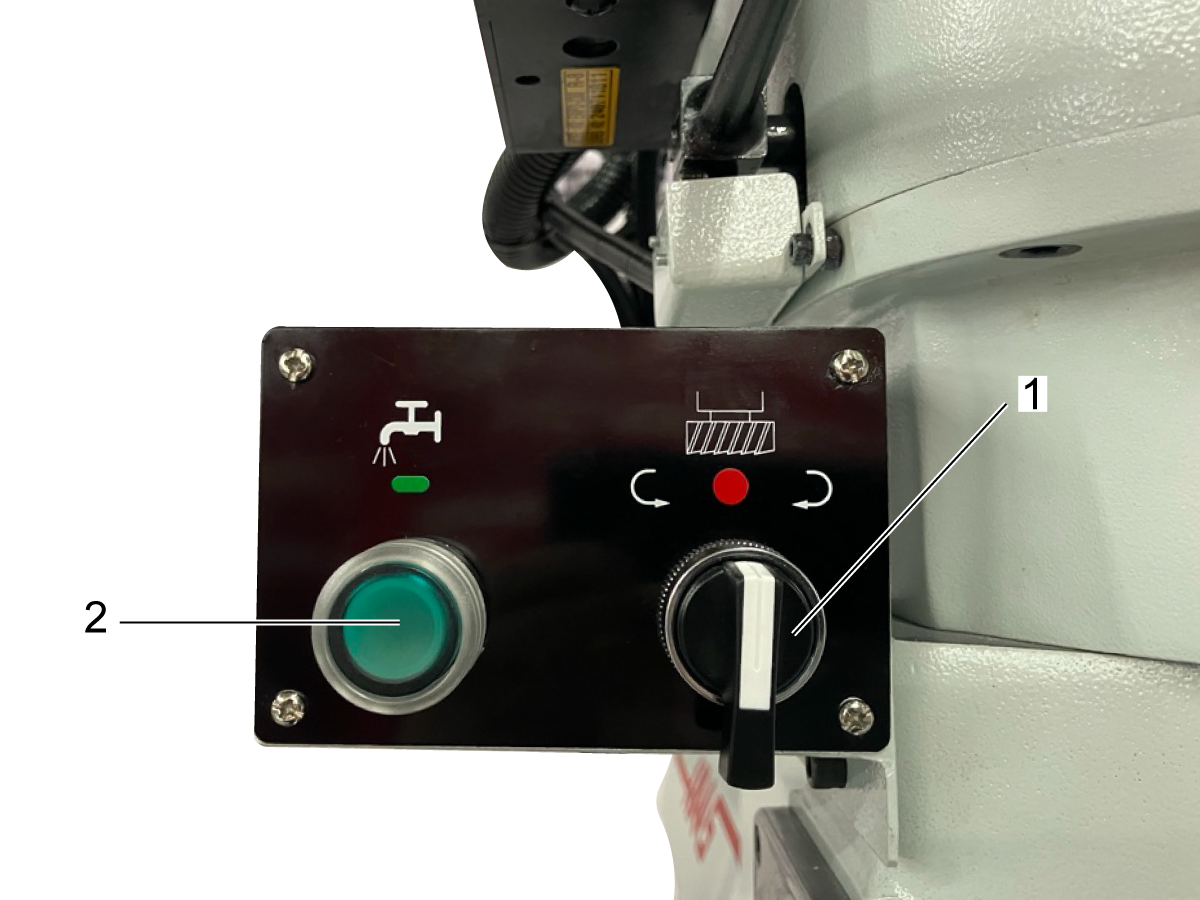
The spindle rotation switch initiates spindle movement.

In high gear, when turned to the left, the spindle will begin rotating counterclockwise. When turned to the right, it will begin rotating clockwise. 

In low gear, the spindle will rotate in the opposite direction.

The coolant button [2] starts coolant flow to the machine. Once pressed, coolant will begin flowing steadily until button is pressed again. 

Move spindle all the way up and lock in place.

Insert tooling in an appropriate collet into spindle head. Rotate collet until the keyseat aligns and the collet can be pushed up into the spindle head. 

Note: Use caution when handling tooling. 

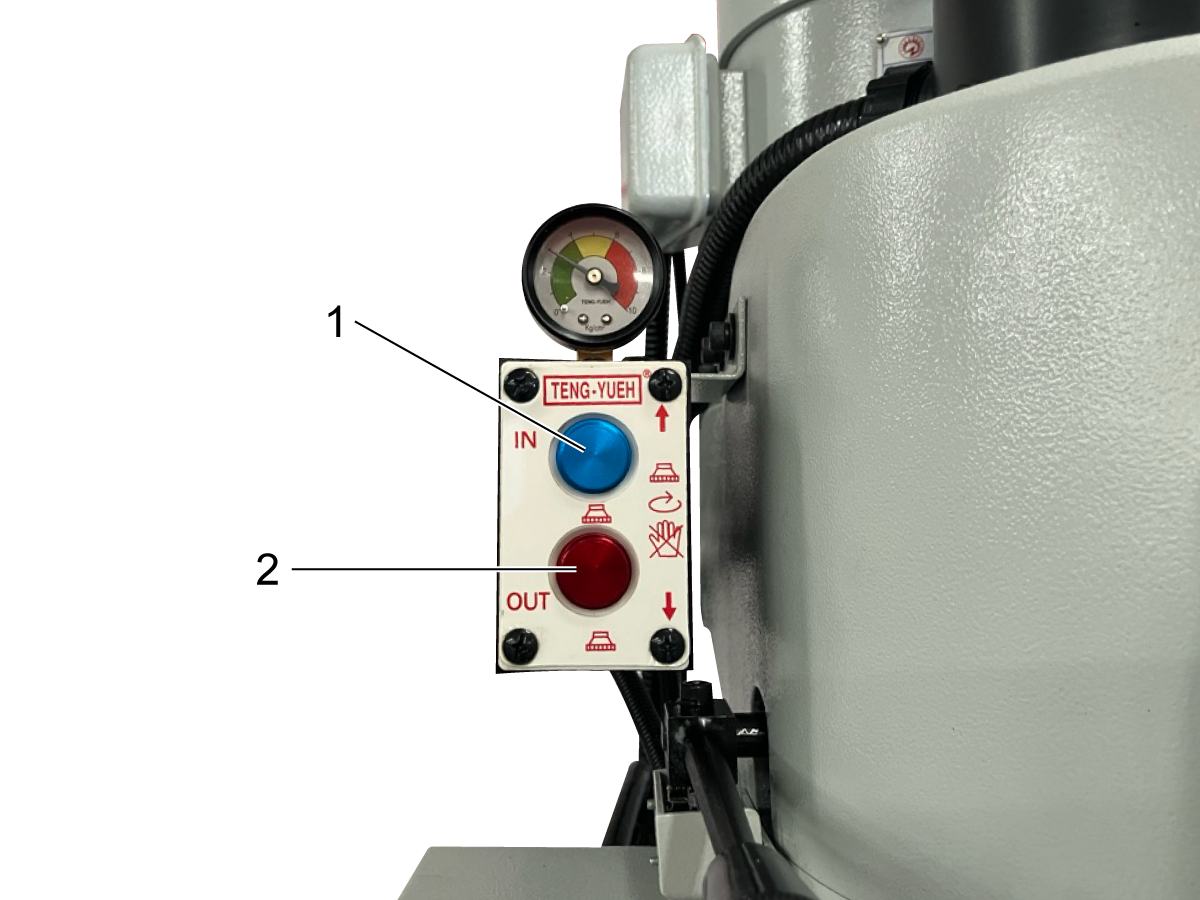
 Press and hold the tool IN button [1] to clamp tool with drawbar. 

Note: Do not touch tool while spindle is in motion. Spindle must come to a complete stop before changing tools. 

To remove tool, hold tool and collet in one hand and press and hold the tool OUT button [2].

Spindle Operation

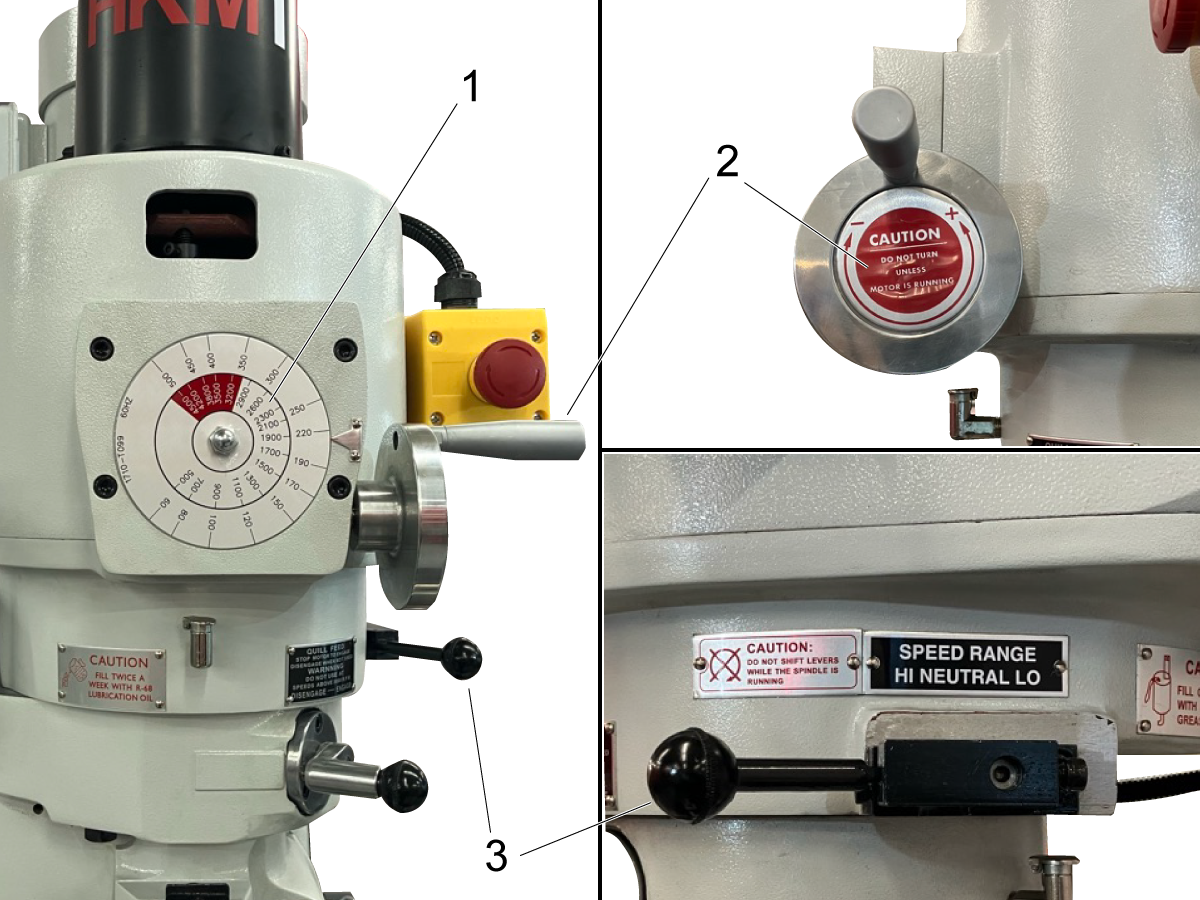
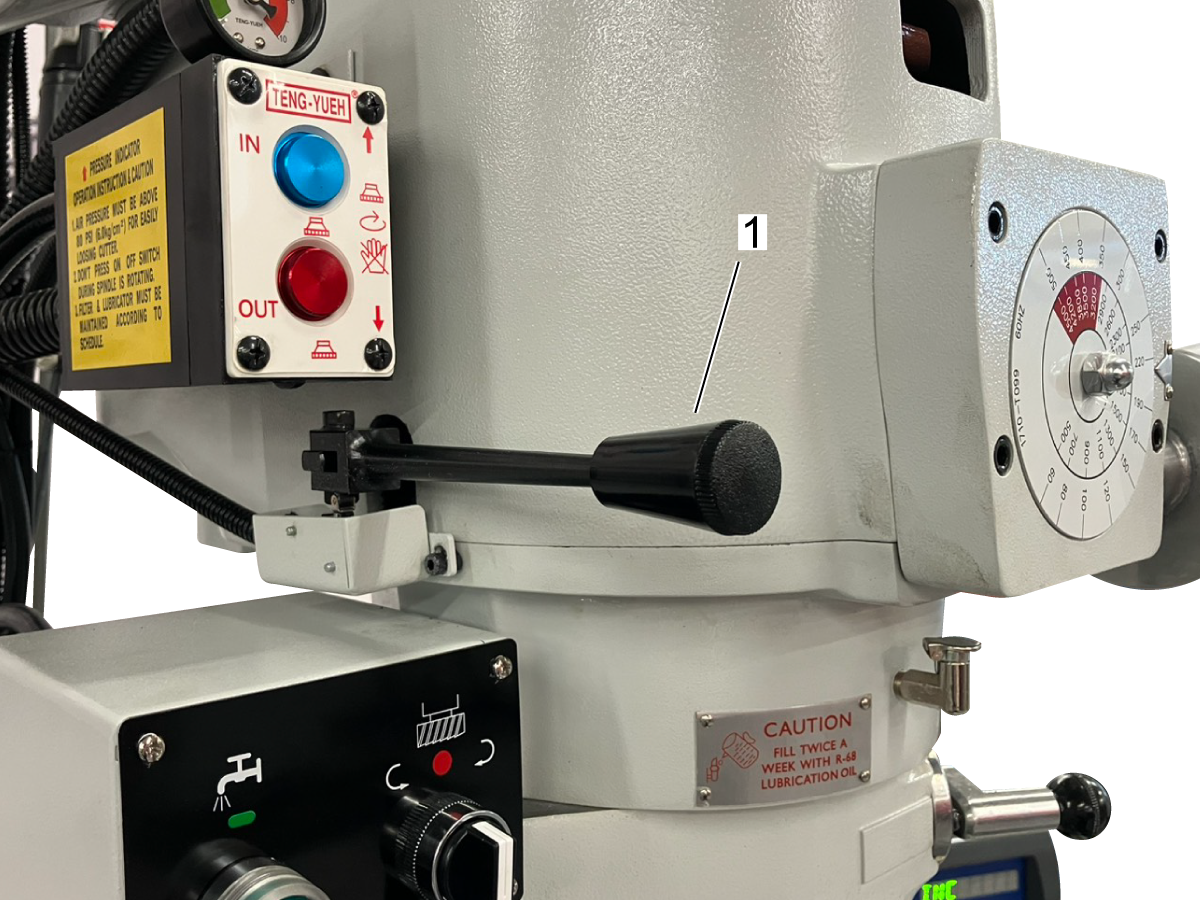
The spindle speed placard [1] denotes the RPM that the spindle is running at. The outer circle corresponds with low-range speeds, while the inner circle corresponds with high-range speeds. 

Speed change handwheel [2] can be used to change the spindle RPM. Crank the wheel at a moderate pace while changing speeds. Do not change speeds as fast as possible.

Note: Only use the speed change handwheel when the machine is running. Do not change speeds when spindle is stationary. 

The High-Low Speed Range lever [3] can be used to switch from high to low gear. If lever gets stuck when switching gears, rotate the spindle by hand to help guide it into place. 

Note: Only change the speed range when the spindle is stationary. Never change while the spindle is in motion.

The quill lock [1] can be tightened to lock the quill at a specified height. This is recommended for any operation that does not require changing the quill height. 

The quill feed handle [2] can be used to manually raise or lower the quill. When the handle is in an inconvenient position, it can be pulled off and re-adjusted. 

The spindle brake [1] can be pulled to stop movement of the spindle. Use the brake before interacting with the spindle (i.e to change a tool) or performing an operation that requires the machine to be stopped (like changing gears).

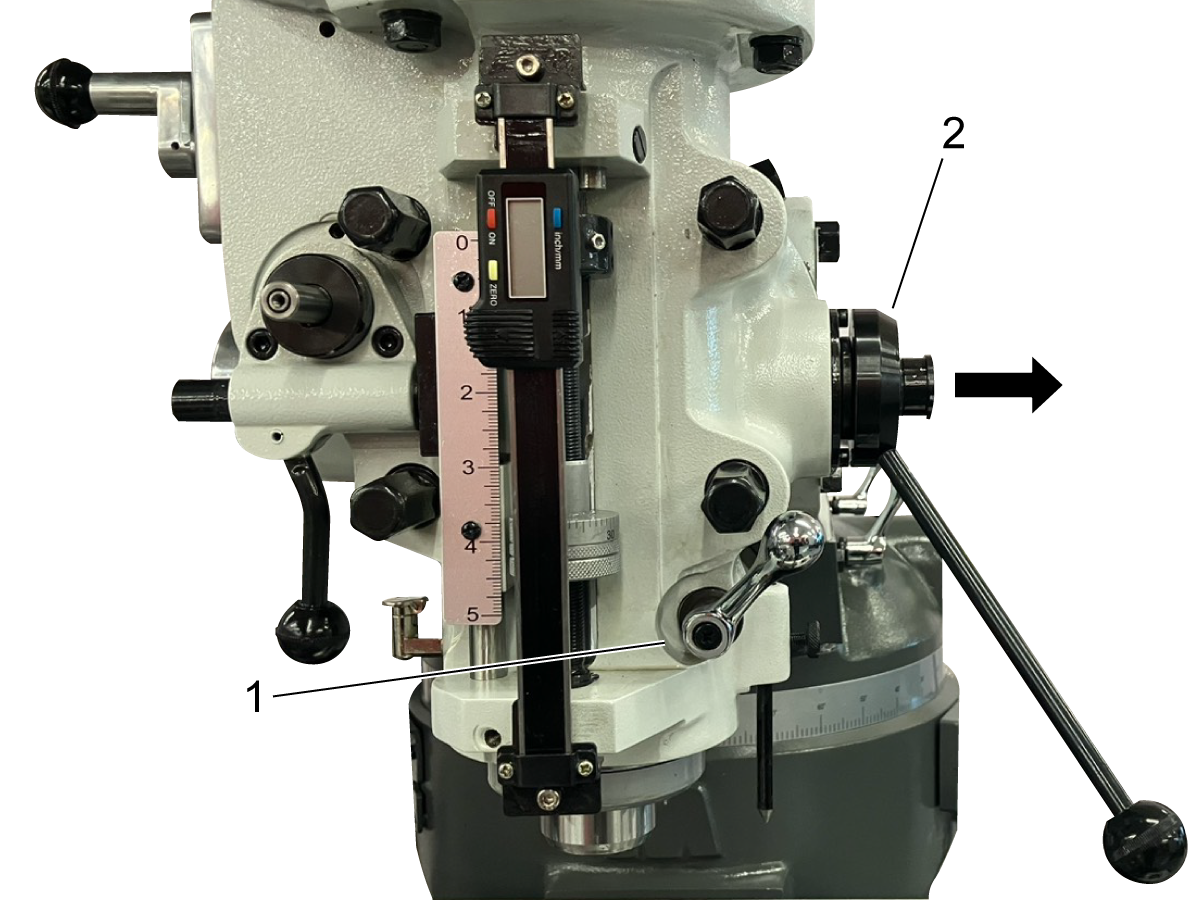
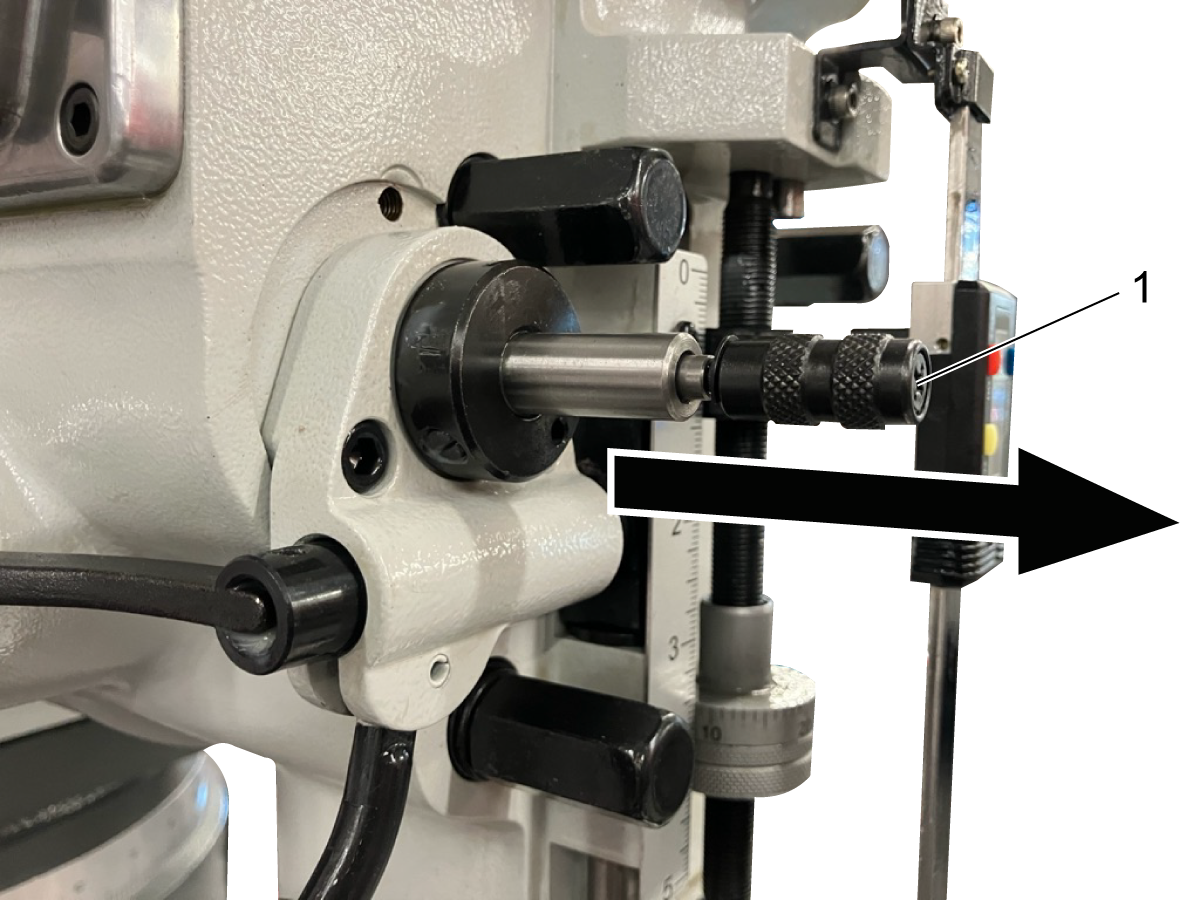
The micrometer knob [1] can be used in conjunction with the ruler attached to the front of the machine to set a precise stop location for the quill. 

When quill stop [2] impacts the knob, it will prevent the quill from traveling any further, allowing the user to complete multiple operations at the same depth. 


Quill Auto-Feed

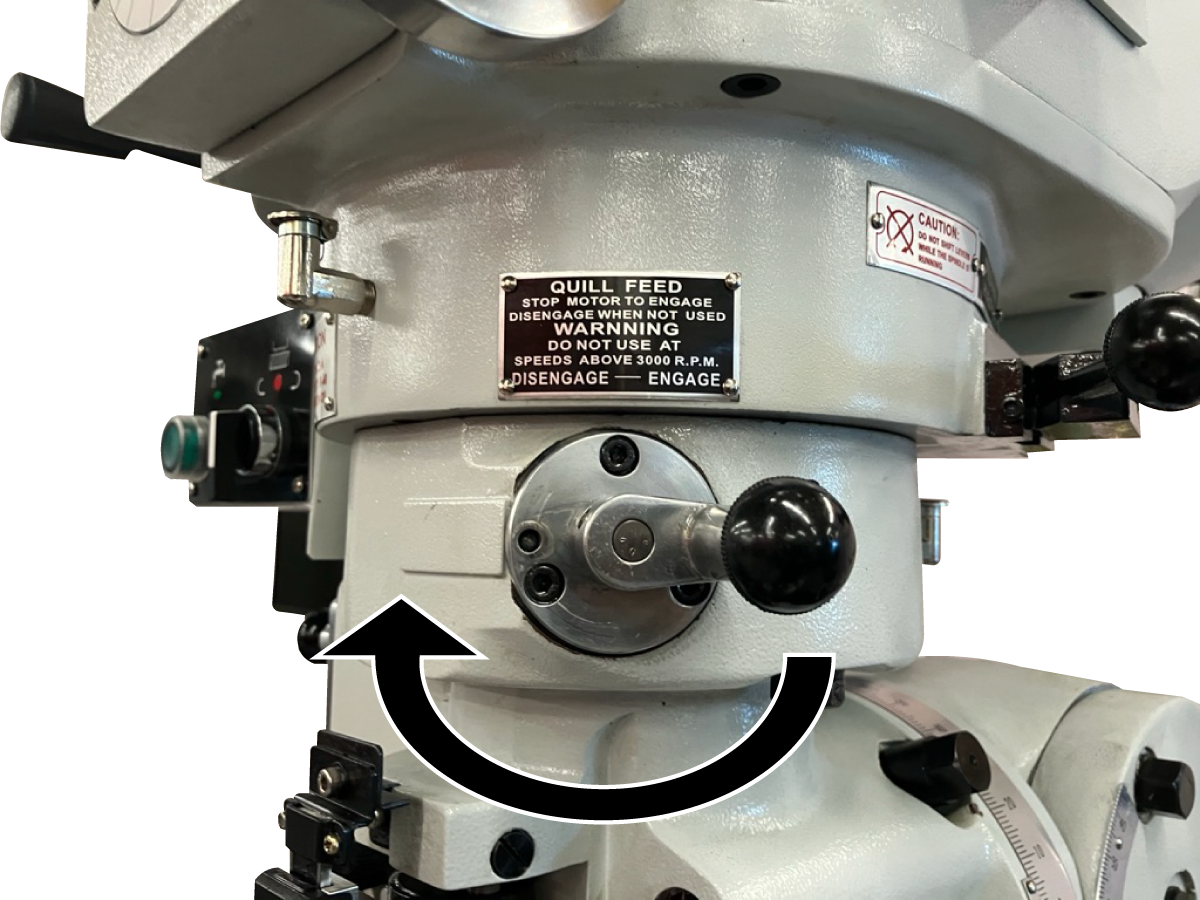
Quill auto-feed can be engaged by moving the quill feed lever to the engage position. Auto-feed should be disengaged whenever manual movement of the quill is desired. 


Note: If auto feed lever does not engage, rotate spindle by hand to help gears mesh.


The feed control lever [1] should be engaged to initiate spindle movement. The lever is pulled out to engage and pushed in to disengage.

The feed control overload clutch is designed to disengage the quill auto feed when the quill experiences too much pressure (such as when the quill stop impacts the micrometer nut). 


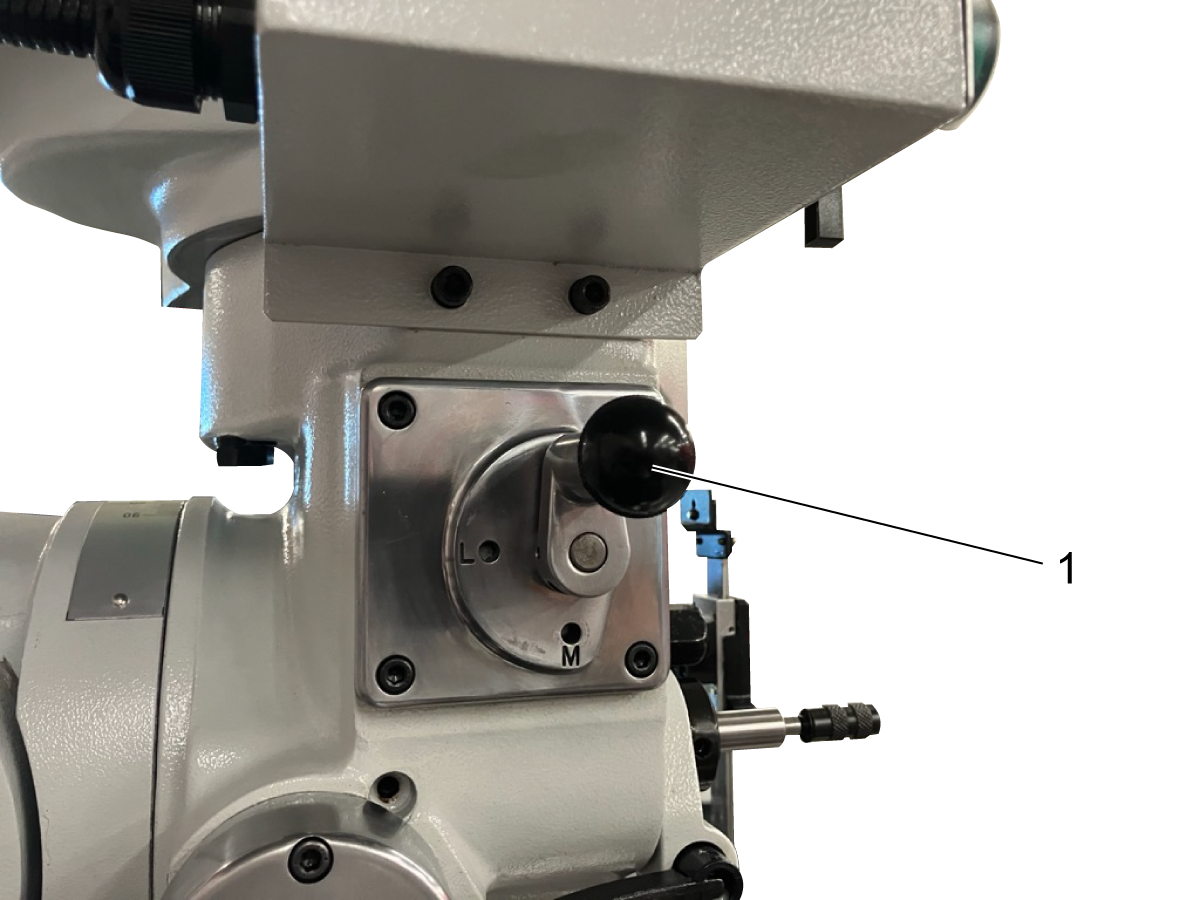
The feed rate lever [1] can be used to control the spindle feed rate. The feed rate is reliant on spindle RPM, as described below:

Feed          Rate (in. per rev.)         Rate (mm per rev.)            

H                            .006                                   0.15    

M                           .003                                   0.08

L                            .0015                                  0.04

Note: The feed rate should be changed with the quill auto-feed engaged and the spindle running


The feed direction plunger [1] can be used to control the direction of the quill auto-feed. 

When the plunger is pulled fully out, the quill will feed upwards. When it is fully depressed, the quill will feed downwards. 

Neutral is between the upwards and downwards positions. The plunger should be left in neutral when the auto-feed is not in use. 

The fine control handwheel [3] can be attached to the machine when more accurate movement of the spindle is desired. The quill auto-feed lever [1] and feed control lever [2]  must be engaged to use handwheel. The feed direction plunger should be in the neutral position. 

The handwheel can be removed when not in use. 

Power Table Feed

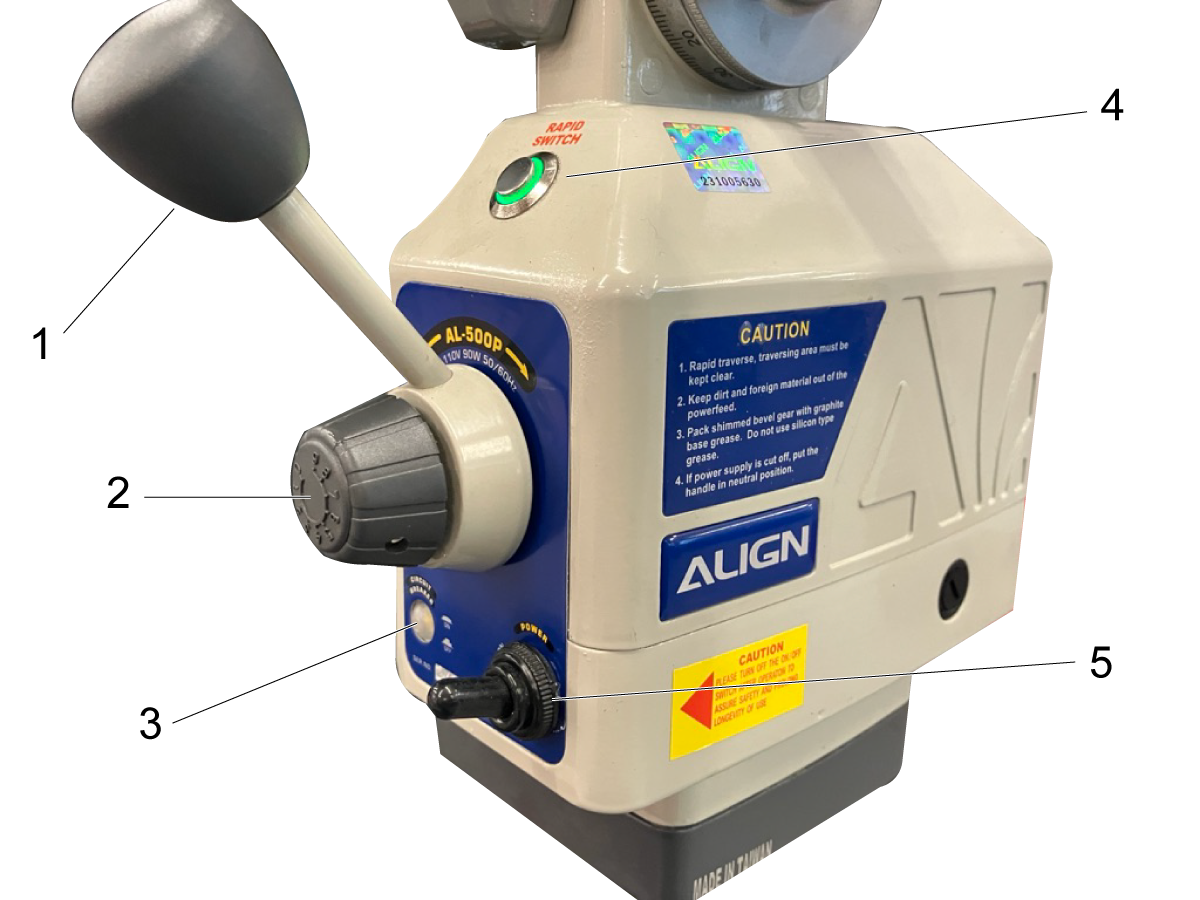
The components of the power feed table are as follows:

  • The direction control handle [1] which will initiate table movement when turned to the right or left. 
  • The speed control knob [2], which can be rotated to change the table feed rate. 
  • The circut breaker [3]. 
  • The power indicator [4], which lights up green to indicate the device is recieving power.
  • The power switch [5].

Machine Adjustments

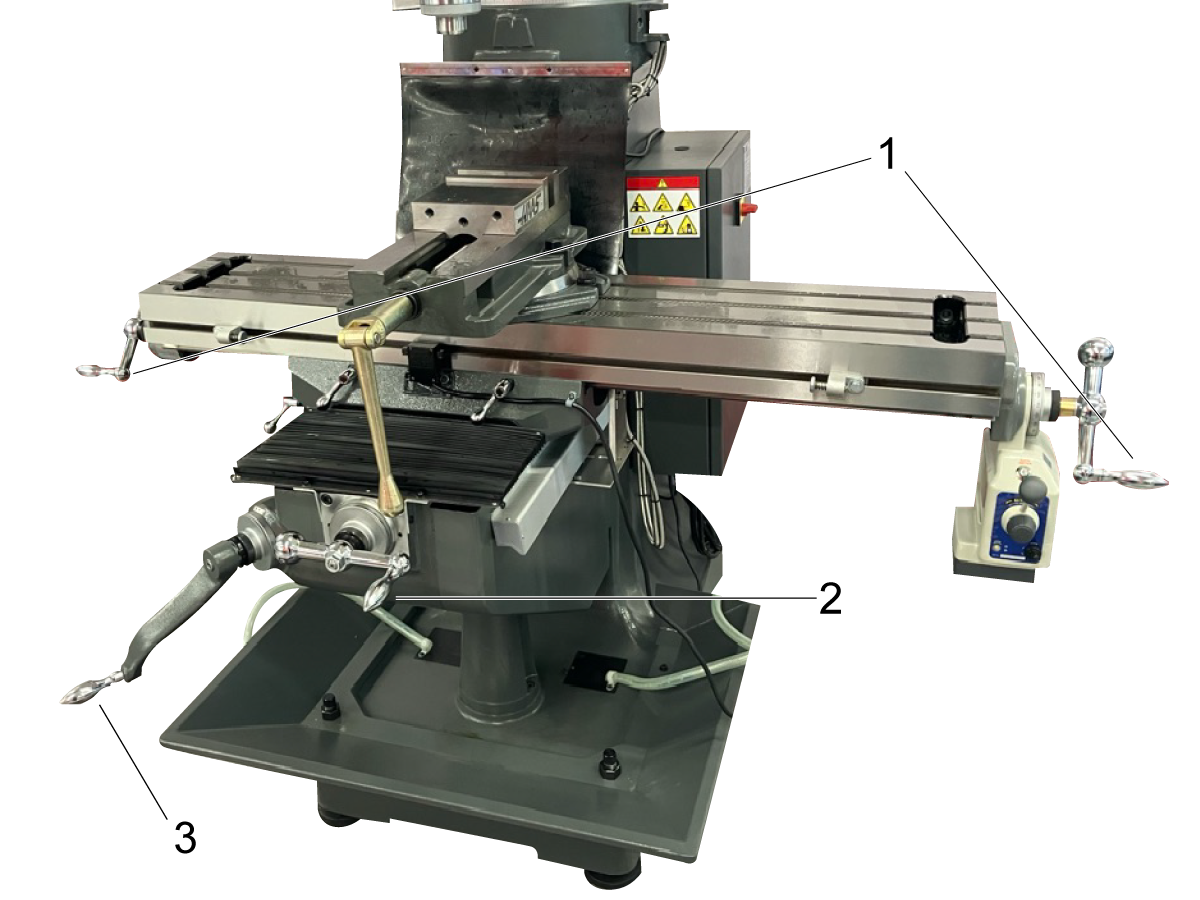
The table can be moved in the x-axis using the table handles [1]. The handles must be pushed towards the table to engage. 

The table can be moved in the y-axis using the saddle handle [2].

The table can be moved in the z-axis using the knee handle [3]. The knee handle is detachable and can be flipped out of the way when not in use. 

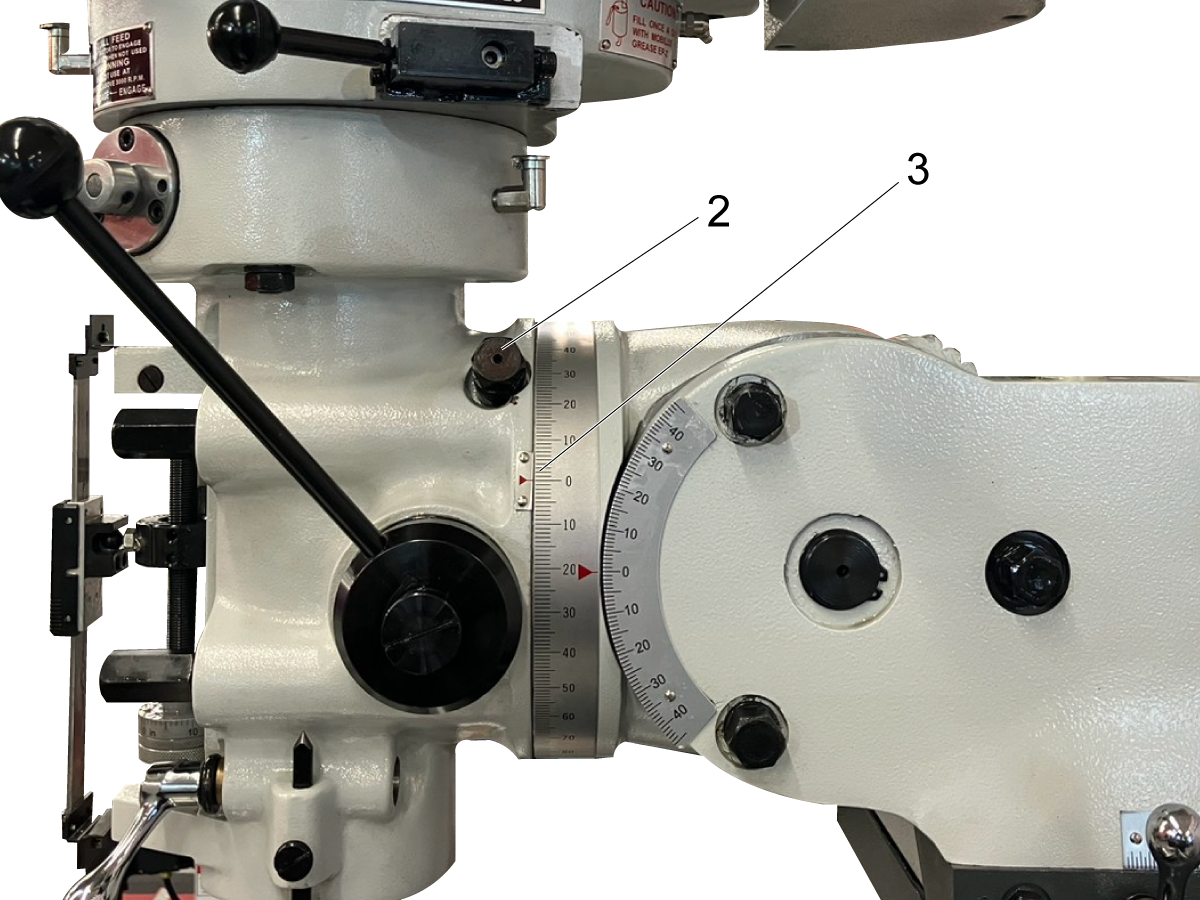
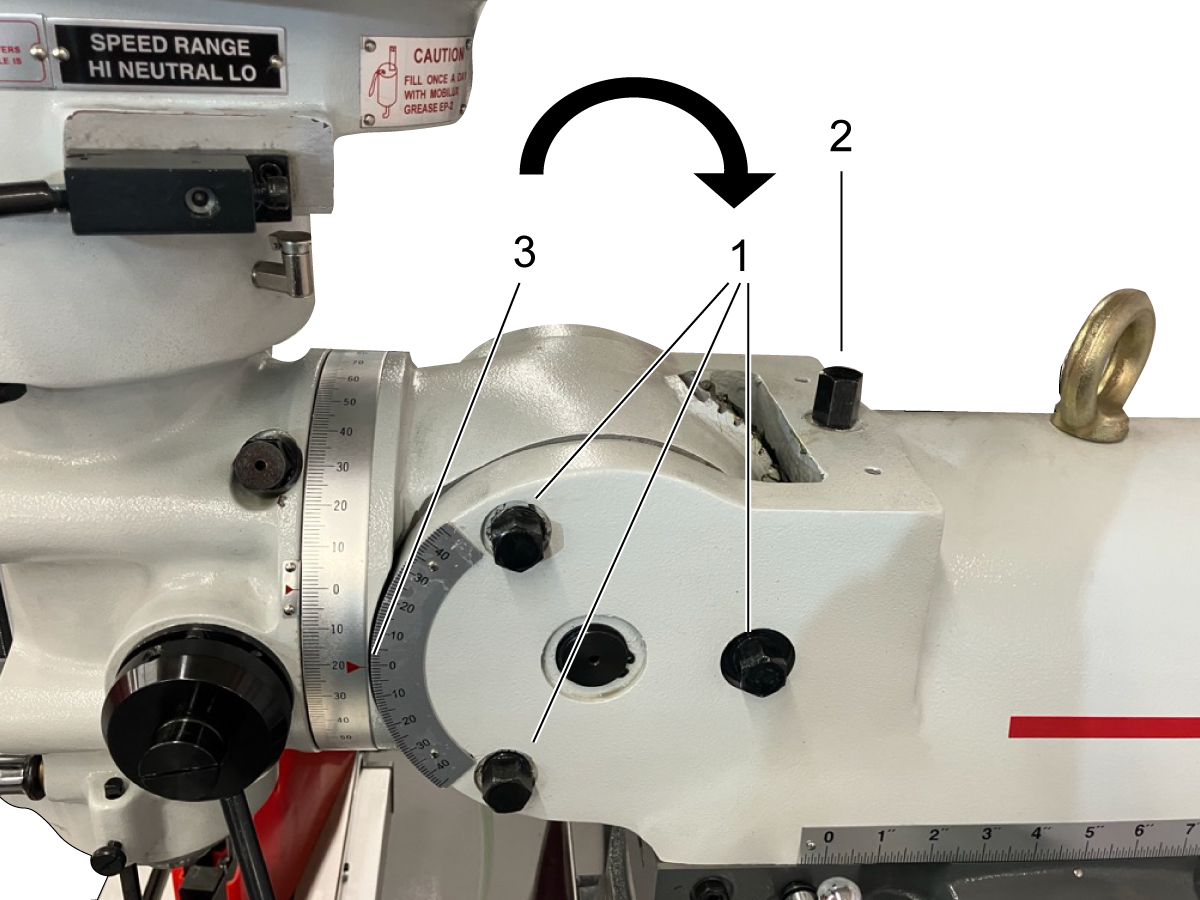
To adjust the roll of the head, loosen the four bolts [1] on the front face of the machine.

Note: Do not remove these bolts. 

Use the pivot bolt [2] to rotate the head until the angle indicator [3] reaches the desired value. Tighten the bolts [1].


To adjust the head pitch, loosen the three bolts behind the spindle head [1].

Note: Do not remove these bolts.

Use the pitch adjustment bolt [2] to rotate the head until the indicator reaches the desired angle [3].Tighten the bolts [1].


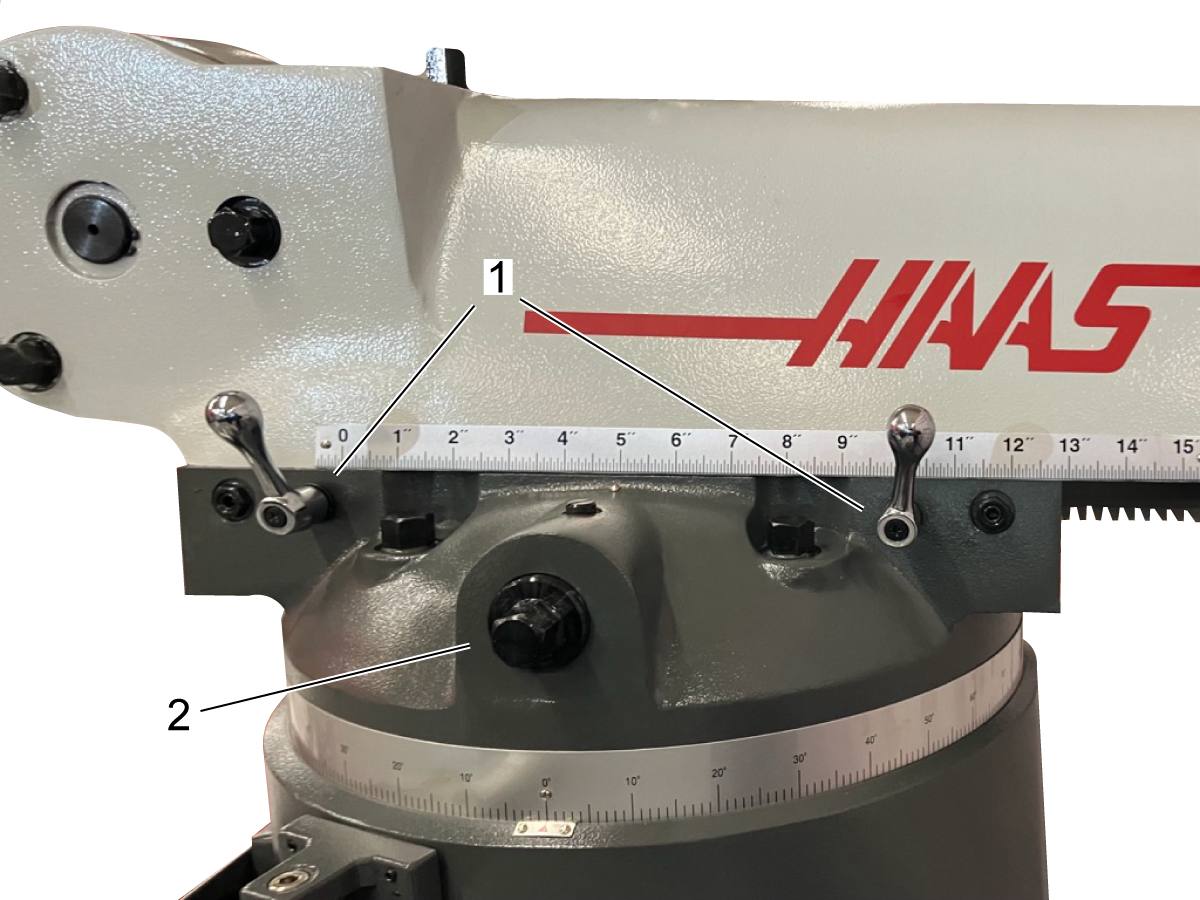
Loosen the ram locks [1]. Use the adjustment bolt [2] to move the ram to the desired position.  For heavy operations, the head should be positioned as close to the column as possible, for the best rigidity. 

Note: Do not remove the ram locks


To adjust the head yaw, loosen the four bolts [1] at the top of the column. Rotate the head until the indicator [2] reaches the desired angle. 

The table locks[1] can be engaged to prevent the movement of the x-axis. It is recommended to engage the table locks for any operations that don't require the movement of the x-axis. 

The saddle lock [2] can be engaged to prevent the movement of the y-axis. It is recommended to engage the saddle locks for any operations that don't require the movement of the x-axis. 

The knee locks [3] can be engages to prevent the movement of the knee. It is recommended to engage the knee locks for any operations that don't require movement of the knee. 

Note: Do not remove the axis locks
 

4.2 Digital Read-Out Operation

Recently Updated

HKM-1 - Digital Read Out Operation


Revision A - 10/2025

Introduction

This procedure demonstrates the function and operation of the Digital Read Out (DRO) on HKM-1. 

X and Y-Axis Readouts

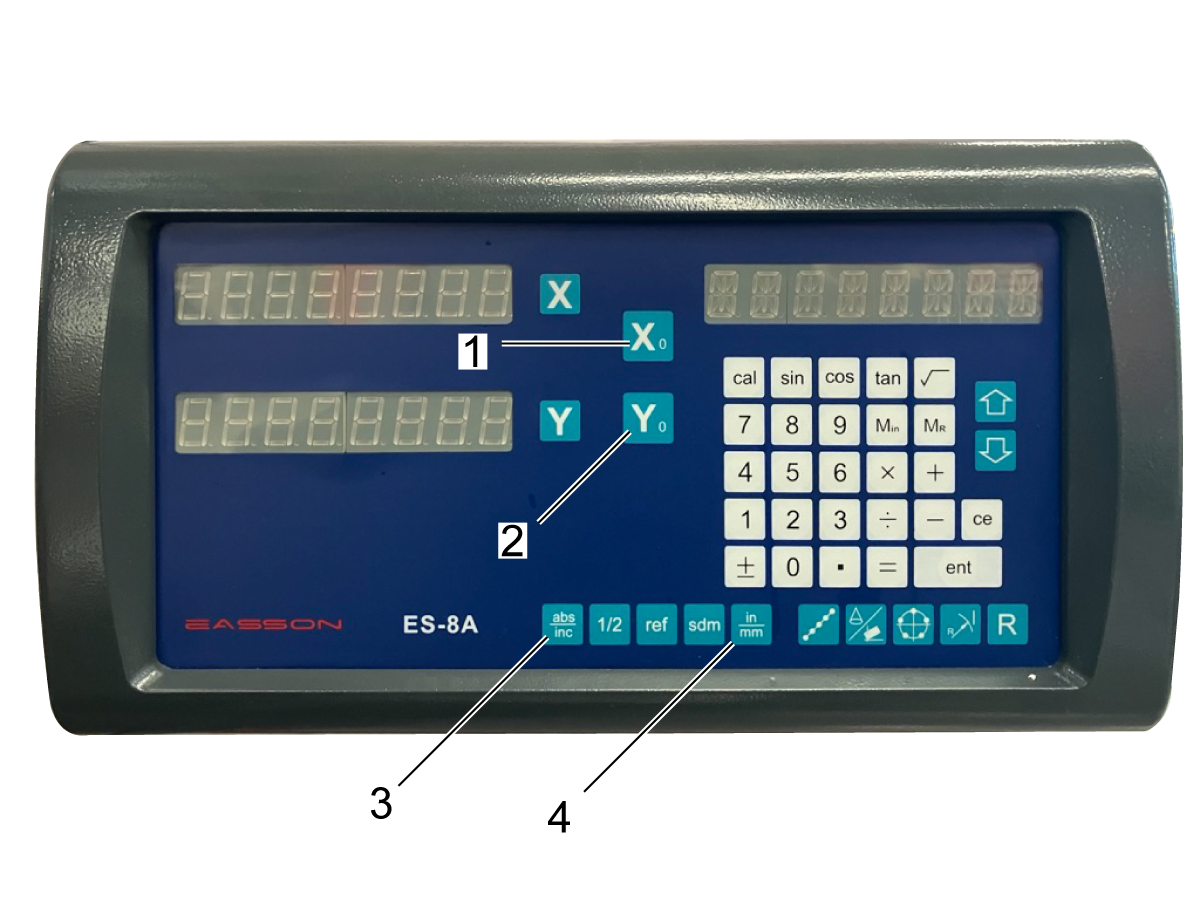
The Digital Read Out (DRO) indicates the position of the spindle on its screen. The basic functions of the DRO are documented below. For more information on complex functions of the DRO, see the ES-8A Digital Readout System Operation Manual.

ES-8A Digital Readout System Operation Manual

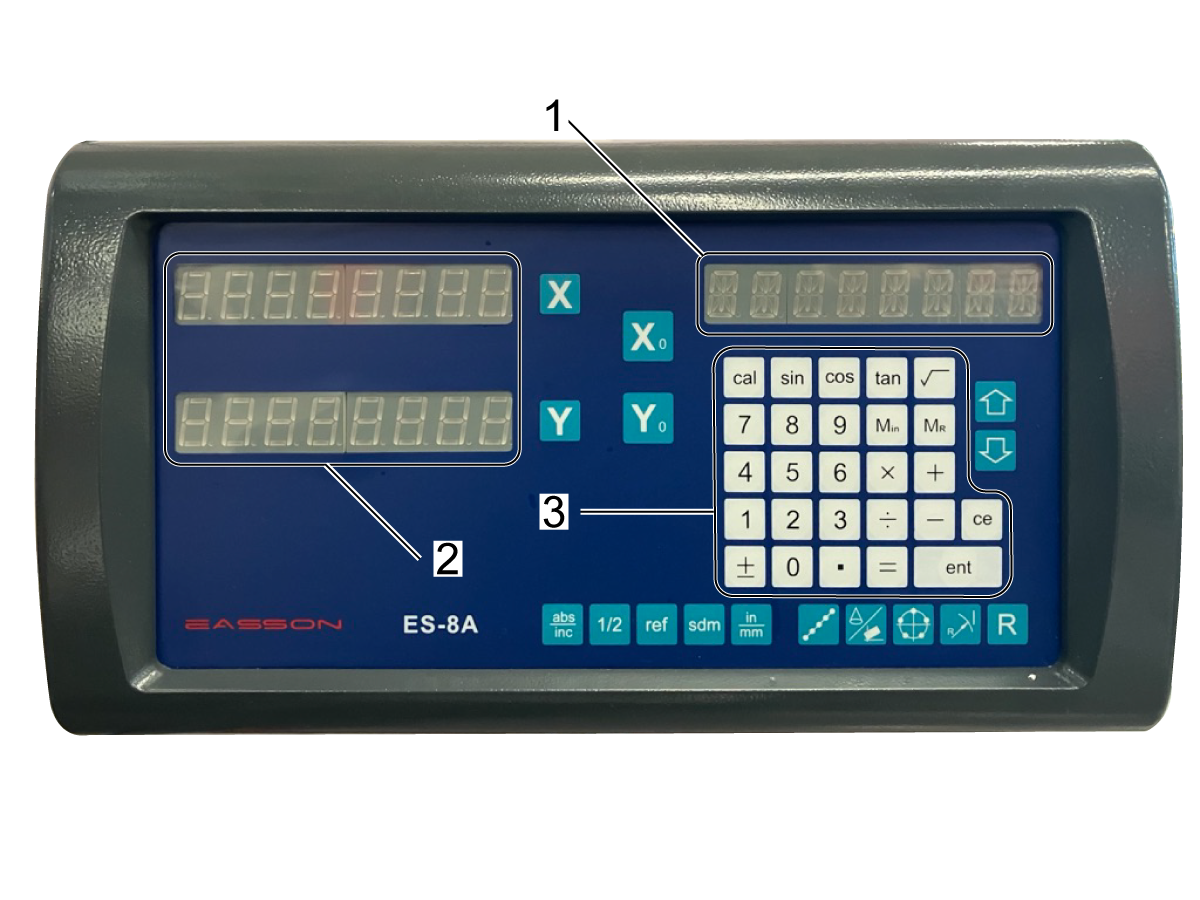
The top right readout [1] displays the DRO mode while in normal use, and displays the results of calculations while in calculator mode.

The left readouts [2] display the X and Y axis positions.

The keypad [3] functions as a calculator and numerical input. 


[X_0] [1] and [Y_0] [2] set the current position for the X and Y axes to zero. 

[ABS/INC] [3] switches between the absolute and incremental coordinate displays. 

[in/mm] [4] switches the DRO unites between inches and millimeters. 


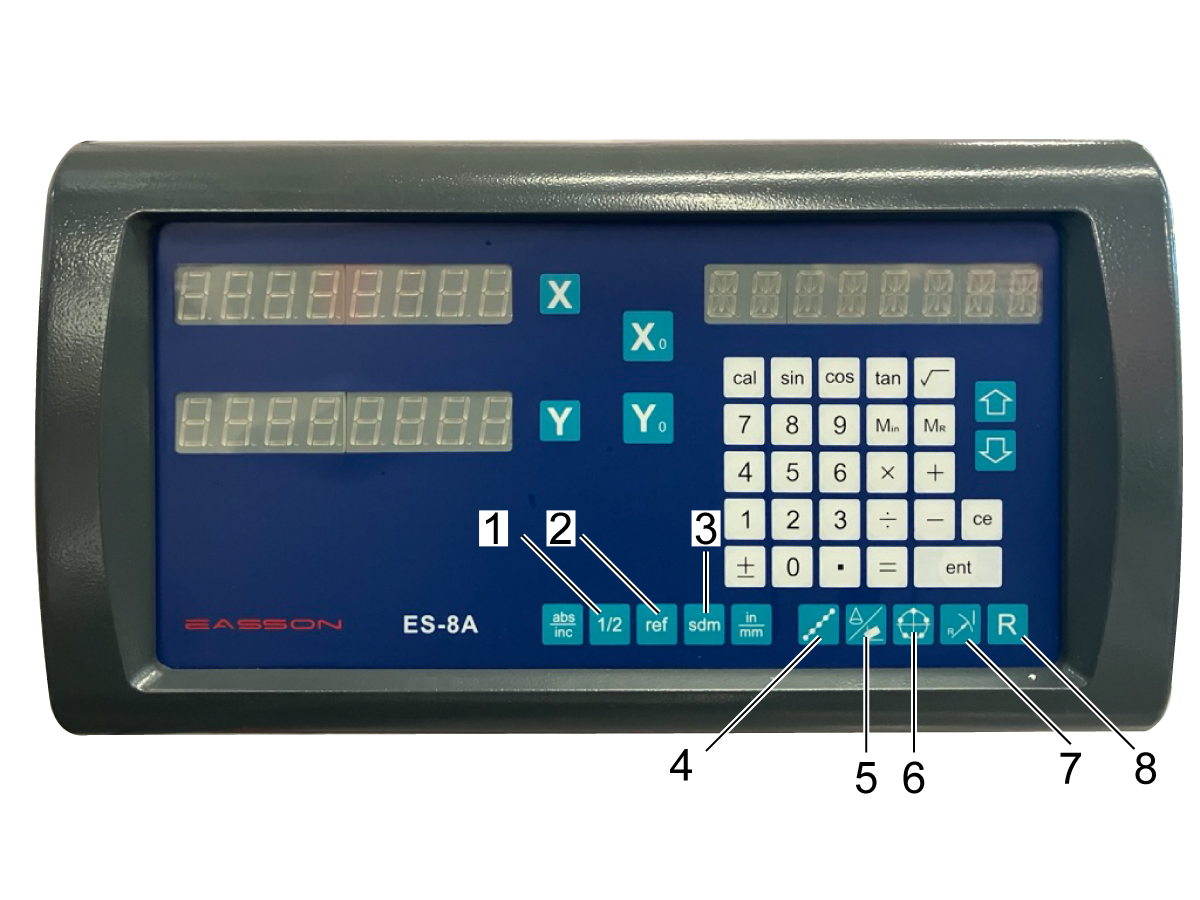
For more information on the complex functions of the remaining buttons, see the ES-8A Digital Readout System Operation Manual. Refer to the table below for button names and page number information. 

ES-8A Digital Readout System Operation Manual
Button Number Function Page(s)

1

Center Find 3
2 Datum Memory 20-23

3

Subdatum Function 12-19

4

Tool Positioning for Line of Holes 24-27
5 Inclined Angle Tool Positioning 28-32
6 Pitch Circle Diameter
33-37
7 Arc Machining 38-55
8 Simplified Arc Machining 55-65

Z-Axis Readout

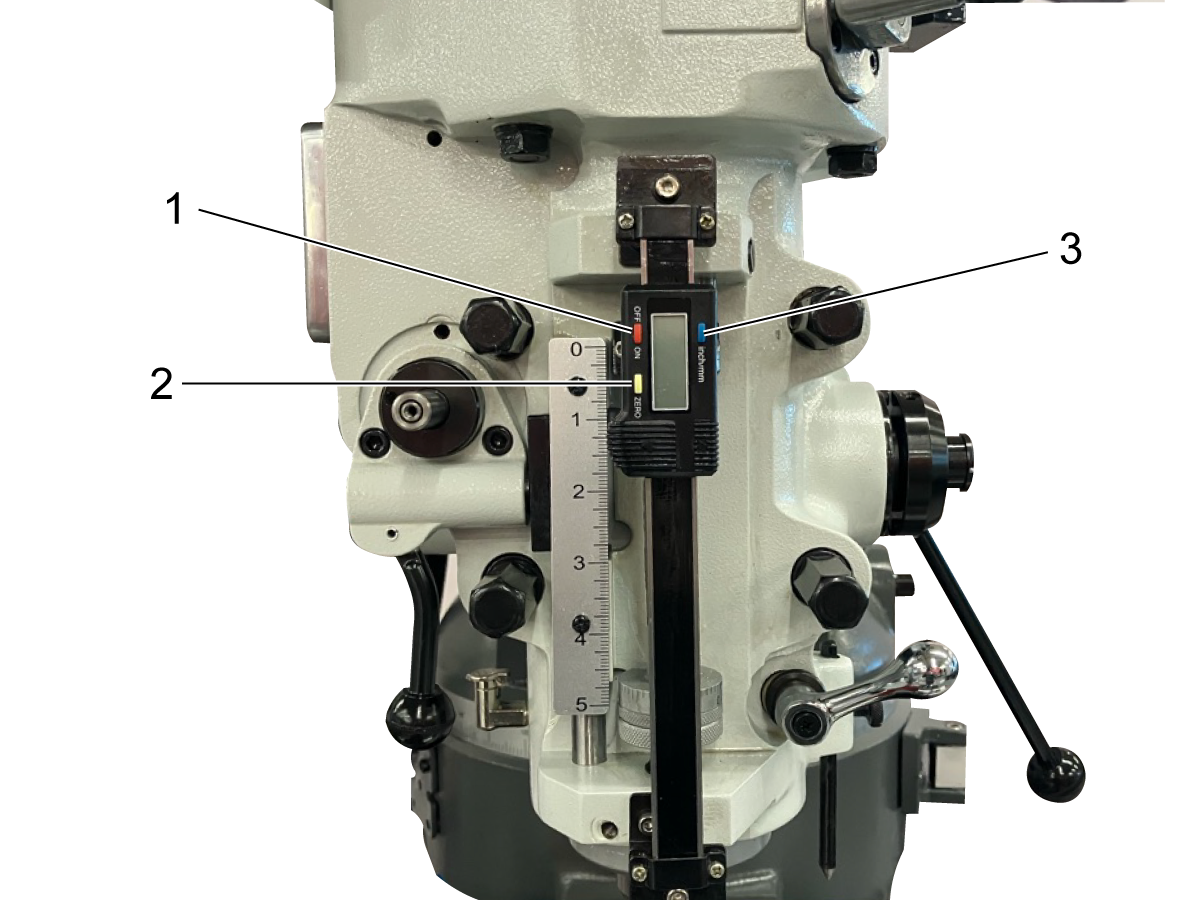
The Z-Axis readout is located on the front of the spindle. The function of the readout is as follows:

  • [OFF/ON] [1] turns the readout on and off
  • [ZERO] [2] sets the current position of the readout to zero
  • [IN/MM] [3] changes the units of the readout

4.3 Load/Unload Tools

Recently Updated

HKM-1 - Load/Unload Tools


Revision A - 10/2025

Introduction

This procedure demonstrates how to load and unload tools on the Haas Knee Mill. 

Load Tool

Select the smallest possible tool collet that fits your cutting tool.  Place the cutting tool in the collet. 

Adjust the position of the cutting tool. The end of the tool collet should be gripping the round shank above the threads [1]. Keep the stick-out of the cutting tool as short as possible to avoid vibration while the machine is running. 

Do not clamp the tool collet on the threads [2]. If your cutting tool has a groove, the collet should be clamped below the groove [3].


Move the spindle to the top of travel with the quill feed handle [1]. Lock the quill [2].

Insert tooling in an appropriate collet into spindle head. Rotate collet until the keyway [1] aligns inside the spindle and the collet can be pushed up into the spindle head. 

Note: Use caution when handling tooling. 


 Press and hold the tool IN button [1] to clamp tool with drawbar. 

Unload Tool

Move the spindle to the top of travel with the quill feed handle [1]. Lock the quill [2].

 Note: Do not touch tool while spindle is in motion. Spindle must come to a complete stop before changing tools. 

Note: Use caution when handling tooling. 

Hold the tool and collet in one hand. Press and hold the tool OUT button [1] to unclamp the tool.


Recently Viewed Items

You Have No Recently Viewed Items Yet

Feedback
Haas Logo

Haas Delivered Price

This price includes shipping cost, export and import duties, insurance, and any other expenses incurred during shipping to a location in France agreed with you as a buyer. No other mandatory costs can be added to the delivery of a Haas CNC Product.

KEEP UP WITH THE LATEST HAAS TIPS AND TECHNOLOGY...

Sign up now!   

HAAS TOOLING ACCEPTS THE FOLLOWING:

  • Service & Support
  • Owners
  • Request Service
  • Operator Manuals
  • Haas Parts
  • Rotary Repair Request
  • Pre-Install Guides
  • Shopping Tools
  • Build & Price a New Haas
  • Available Inventory
  • The Haas Price List
  • CNCA Financing
  • About Haas
  • Accessibility Statement
  • DNSH Statement
  • Export Compliance
  • Careers
  • Certifications & Safety
  • Contact Us
  • History
  • Terms & Conditions
  • Haas Tooling Terms & Conditions
  • Privacy
  • Warranty
  • Haas Community
  • Haas Certification Program
  • Haas Motorsports
  • Gene Haas Foundation
  • Haas Technical Education Community
  • Events
  • Join the Conversation
  • Facebook
  • X
  • Flickr
  • YouTube
  • LinkedIn
  • Instagram
  • TikTok
© 2026 Haas Automation, Inc – CNC Machine Tools

This site is protected by reCAPTCHA and the Google Privacy Policy and Terms of Service apply.

2800 Sturgis Rd., Oxnard, CA 93030
Toll Free: (888) 817-4446 / Fax: 805-278-8554