My Haas Welcome,
!
Haas Tooling MyHaas/HaasConnect Sign In Register Haas Tooling MyHaas/HaasConnect Sign Out Welcome, My Machines Latest Activity My Quotes My Account My Users Sign Out
Find Your Distributor
  1. Select Language
    1. English
    2. Deutsch
    3. Español - ES
    4. Español - MX
    5. Français
    6. Italiano
    7. Português
    8. Český
    9. Dansk
    10. Nederlands
    11. Magyar
    12. Polski
    13. Svenska
    14. Türkçe
    15. 中文
    16. Suomi
    17. Norsk
    18. الإنجليزية
    19. български
    20. Hrvatski
    21. Ελληνικά
    22. Română
    23. Slovenský
    24. Slovenščina
    25. 한국어
    26. 日本語
    27. Українська
  • machines Main Menu
    • Vertical Mills
      Vertical Mills
      Vertical Mills View All
      • Vertical Mills
      • VF Series
      • Universal Machines
      • VR Series
      • VP-5 Prismatic
      • Pallet-Changing VMCs
      • Mini Mills
      • Mold Machines
      • High-Speed Drill Centers
      • Drill/Tap/ Mill Series
      • Toolroom Mills
      • Pocket Mill
      • Compact Mills
      • Gantry Series
      • SR Sheet Routers
      • Extra-Large VMC
      • Double-Column Mills
      • 3+2 Positioning Machines
    • Multi-Axis Solutions
      Multi-Axis Solutions
      Multi-Axis Solutions View All
      • Multi-Axis Solutions
      • Y-Axis Lathes
      • 5-Axis Mills
    • Lathes
      Lathes
      Lathes View All
      • Lathes
      • ST Series
      • Dual-Spindle
      • Box Way Series
      • Toolroom Lathes
      • Chucker Lathe
      • Pocket Lathe
      • Haas Bar Feeders
    • Horizontal Mills
      Horizontal Mills
      Horizontal Mills View All
      • Horizontal Mills
      • 50-Taper
      • 40-Taper
    • Rotaries & Indexers
      Rotaries & Indexers
      Rotaries & Indexers View All
      • Rotaries & Indexers
      • Rotary Tables
      • Indexers
      • 5-Axis Rotaries
      • Extra-Large Rotaries
    • Special Series
      Special Series
      Special Series View All
      • Special Series
      • EU_Series_Redirect
    • Automation Systems
      Automation Systems
      Automation Systems View All
      • Automation Systems
      • Mill Automation
      • Lathe Automation
      • Automatic Parts Loaders
      • Automation Models
    • Desktop Machines
      Desktop Machines
      Desktop Machines View All
      • Desktop Machines
      • Desktop Mill
      • Desktop Lathe
      • Control Simulator, Standard
      • Control Simulator, Premium
    • Shop Equipment
      Shop Equipment
      Shop Equipment View All
      • Shop Equipment
      • Knee Mill
      • Haas Manual Lathes
      • Haas Saws
    • Fabrication Machines
      Fabrication Machines
      Fabrication Machines View All
      • Fabrication Machines
      • Laser Cutting Machines
      • CNC Press Brakes
    • QUICK LINKS Special Series  Special Series 
      EU SERIES EU SERIES BUILD & PRICE | PRICE LIST BUILD & PRICE | PRICE LIST In-Stock Machines In-Stock Machines WHAT’S NEW WHAT’S NEW YOUR FIRST CNC YOUR FIRST CNC
      SHOPPING TOOLS
      • Build & Price a Haas
      • Price List
      • Available Inventory
      • CNCA Financing
      WANT TO TALK TO SOMEONE?

      A Haas Factory Outlet (HFO) can answer your questions, and walk you through your best options.

      CONTACT YOUR DISTRIBUTOR >
  • Options Main Menu
    • The Haas Control Value Option Packages
      Value Option Packages
      Value Option Packages View All
      • Value Option Packages
    • Product Image Spindles
      Spindles
      Spindles View All
      • Spindles
    • Product Image Tool Changers
      Tool Changers
      Tool Changers View All
      • Tool Changers
    • Product Image 4th- | 5th-Axis
      4th- | 5th-Axis
      4th- | 5th-Axis View All
      • 4th- | 5th-Axis
    • Product Image Turrets & Live Tooling
      Turrets & Live Tooling
      Turrets & Live Tooling View All
      • Turrets & Live Tooling
    • Product Image Probing
      Probing
      Probing View All
      • Probing
    • Haas Chip & Coolant Management Chip & Coolant Management
      Chip & Coolant Management
      Chip & Coolant Management View All
      • Chip & Coolant Management
    • The Haas Control The Haas Control
      The Haas Control
      The Haas Control View All
      • The Haas Control
    • Product Image Product Options
      Product Options
      Product Options View All
      • Product Options
    • Product Image Tooling & Fixturing
      Tooling & Fixturing
      Tooling & Fixturing View All
      • Tooling & Fixturing
    • Product Image Workholding
      Workholding
      Workholding View All
      • Workholding
    • Product Image 5-Axis Solutions
      5-Axis Solutions
      5-Axis Solutions View All
      • 5-Axis Solutions
      • 5 Easy Steps to 5-Axis
    • QUICK LINKS Special Series  Special Series 
      EU SERIES EU SERIES BUILD & PRICE | PRICE LIST BUILD & PRICE | PRICE LIST In-Stock Machines In-Stock Machines WHAT’S NEW WHAT’S NEW YOUR FIRST CNC YOUR FIRST CNC
      SHOPPING TOOLS
      • Build & Price a Haas
      • Price List
      • Available Inventory
      • CNCA Financing
      WANT TO TALK TO SOMEONE?

      A Haas Factory Outlet (HFO) can answer your questions, and walk you through your best options.

      CONTACT YOUR DISTRIBUTOR >
  • Why Haas Main Menu
      Discover the Haas Difference
    • Why Haas
    • MyHaas
    • Education Community
    • Industry 4.0
    • Haas Certification
    • Customer Testimonials
  • Service Main Menu
      Welcome to Haas Service
      SERVICE HOME Operator’s Manuals How-To Procedures Troubleshooting Guides Preventive Maintenance Haas Parts Haas Tooling Videos
  • Videos Main Menu
  • Main Menu
    • View All
    • View All
    • View All
    • View All
      • HTEC Curriculum Support
      • Haas Value Option Packages (VOP) Journey
    • View All
      • Haas 10 kg Cobot Package
      • Cobot Kits
      • DC-1 Drill Center
      • CNC Sales News
      • Do More With Your Haas
    • View All
    • View All
      • contact-us-test
      • 4 - AUTOMATION SYSTEMS
      • Carousel-V2
      • expert test
      • Demo_Day_Trident-test
      • Link Test
      • image-sale-tag-test
      • article-list-test
      • Haas 25 kg Robot Package
      • test-algolia-page
    • View All
    • View All
    • View All
    • View All
      • calc-test
    • View All
    • QUICK LINKS Special Series  Special Series 
      EU SERIES EU SERIES BUILD & PRICE | PRICE LIST BUILD & PRICE | PRICE LIST In-Stock Machines In-Stock Machines WHAT’S NEW WHAT’S NEW YOUR FIRST CNC YOUR FIRST CNC
      SHOPPING TOOLS
      • Build & Price a Haas
      • Price List
      • Available Inventory
      • CNCA Financing
      WANT TO TALK TO SOMEONE?

      A Haas Factory Outlet (HFO) can answer your questions, and walk you through your best options.

      CONTACT YOUR DISTRIBUTOR >
  • Haas Tooling Main Menu
  • Haas Service Parts Main Menu

My Haas Welcome,
!
Haas Tooling MyHaas/HaasConnect Sign In Register Haas Tooling MyHaas/HaasConnect Sign Out Welcome, My Machines Latest Activity My Quotes My Account My Users Sign Out
Find Your Distributor
  1. Select Language
    1. English
    2. Deutsch
    3. Español - ES
    4. Español - MX
    5. Français
    6. Italiano
    7. Português
    8. Český
    9. Dansk
    10. Nederlands
    11. Magyar
    12. Polski
    13. Svenska
    14. Türkçe
    15. 中文
    16. Suomi
    17. Norsk
    18. الإنجليزية
    19. български
    20. Hrvatski
    21. Ελληνικά
    22. Română
    23. Slovenský
    24. Slovenščina
    25. 한국어
    26. 日本語
    27. Українська
×

Search Results

Web Pages

Images

    • <
    • 1
    • >

5 - Haas Knee Mill - Maintenance

HKM - Knee Mill - Operators/Service Manual


  • 1 -Haas Knee Mill - Introduction
  • 2 - Haas Knee Mill - Safety
  • 3 - Haas Knee Mill - Installation
  • 4 - Haas Knee Mill - Operation
  • 5 - Haas Knee Mill - Maintenance
  • 6 - Haas Knee Mill - Troubleshooting

Go To :

  • 5.1 Maintenance
  • 5.2 Replace Motor
  • 5.3 Replace Speed Change Belt
  • 5.4 Replace Timing Belt
  • 5.5 Adjust Backlash
  • 5.6 HKM-1 - Service Parts List
5.1 Maintenance

Recently Updated

HKM-1 - Maintenance


Revision B - 10/2025

Introduction

This section details the maintenence schedule for the HKM-1, as well as describing lubrication points and laying out a coolant refill procedure. For more information about common maintenence procedures, refer to the other sections of the maintenence chapter. 

Maintenance

Maintenance Item Interval

Check the oil level of the lubrication pump

Daily (or before use)
Check coolant level Daily (or before use)

Let machine idle for 3-5 minutes before operations

Daily (or before use)
Grease head Daily (or before use)

Clean work table 

Daily (end of workday)
Return sliding components to home position. Restore head to upright position. Daily (end of workday)
Remove tool from spindle Daily (end of workday)
Oil head Twice per week
Clean and oil linear guides. Check that work table moves smoothly in all directions.  Monthly
Check function of brakes and belts Quarterly
Check level of work table and alignment of head  Quarterly
Change lubrication oil Quarterly

Grease and Oil Head

1

Fill the thumb oil can [1] with 93-4575 SYNTHETIC GEAR/BEARING OIL 1GL/3.78L, 93-2365 SYNTHETIC GEAR/BEARING OIL 1QT/0.94L, or other ISO VG68 Oil. 

2

Use the oil can to fill the three ports [2] on the head of the machine. Fill the ports with 5-10 pumps of oil from the can (approximately 0.33 fl oz or 10 ml). 

Note: Do not overfill. Overfilling can cause leaks. 

3

The grease port [3] should be filled with 93-3891 GREASE MOBIL XHP 322 5% MOLY or other EP32 grease. 

5.2 Replace Motor

Recently Updated

HKM-1 - Replace Motor


Revision A - 10/2025

Introduction

This section describes how to replace the spindle motor on the HKM-1. 

Dismantle Motor

Start the motor and turn the speed dial to 2100 RPM.

1

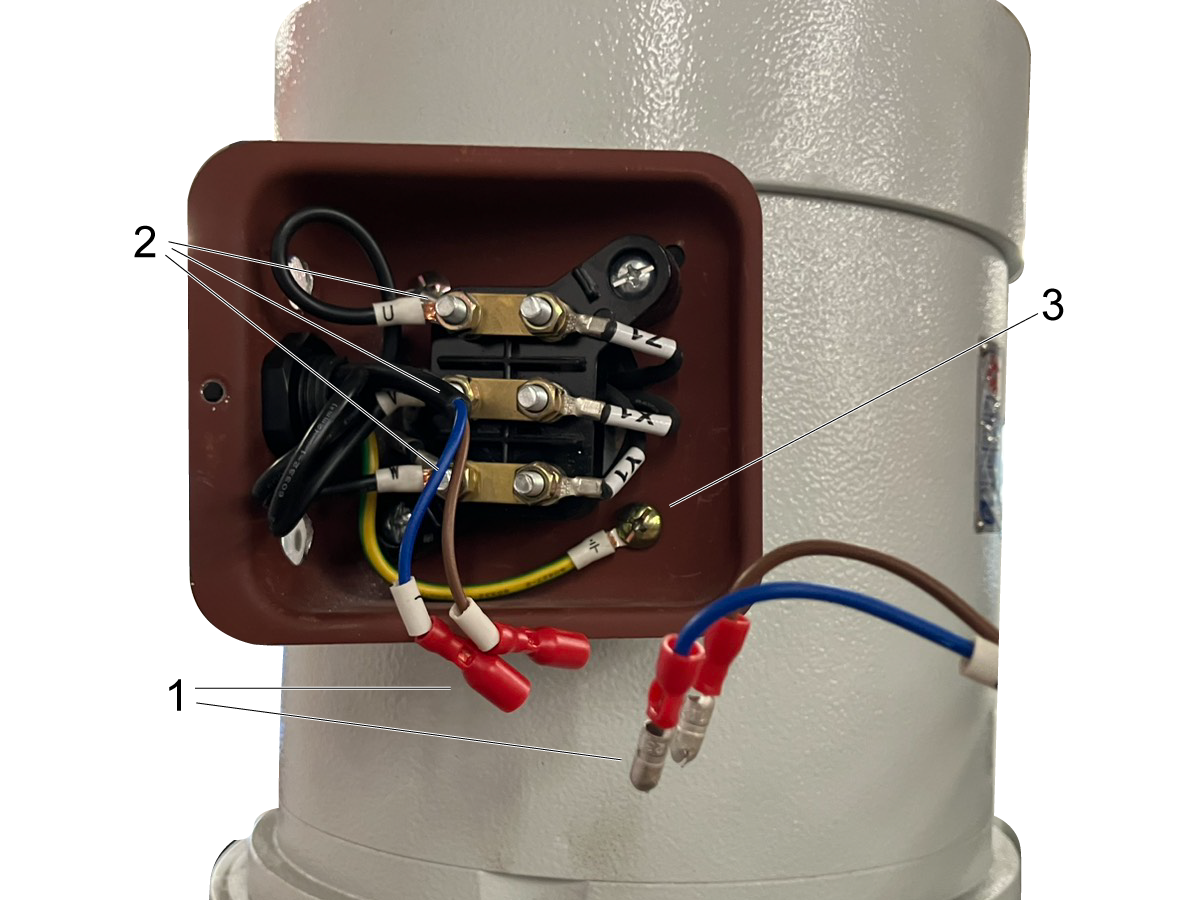
Switch off mill and unplug from power source. Remove junction box cover. Disconnect the brake switch wiring [1] and cables U, V and W [2]. Disconnect ground [3]. 

Pull conduit out of J-box. 


Note: Record the wiring configuration of your J-box. If it differs from the example given, disregard the example and re-wire according to your notes. 

2

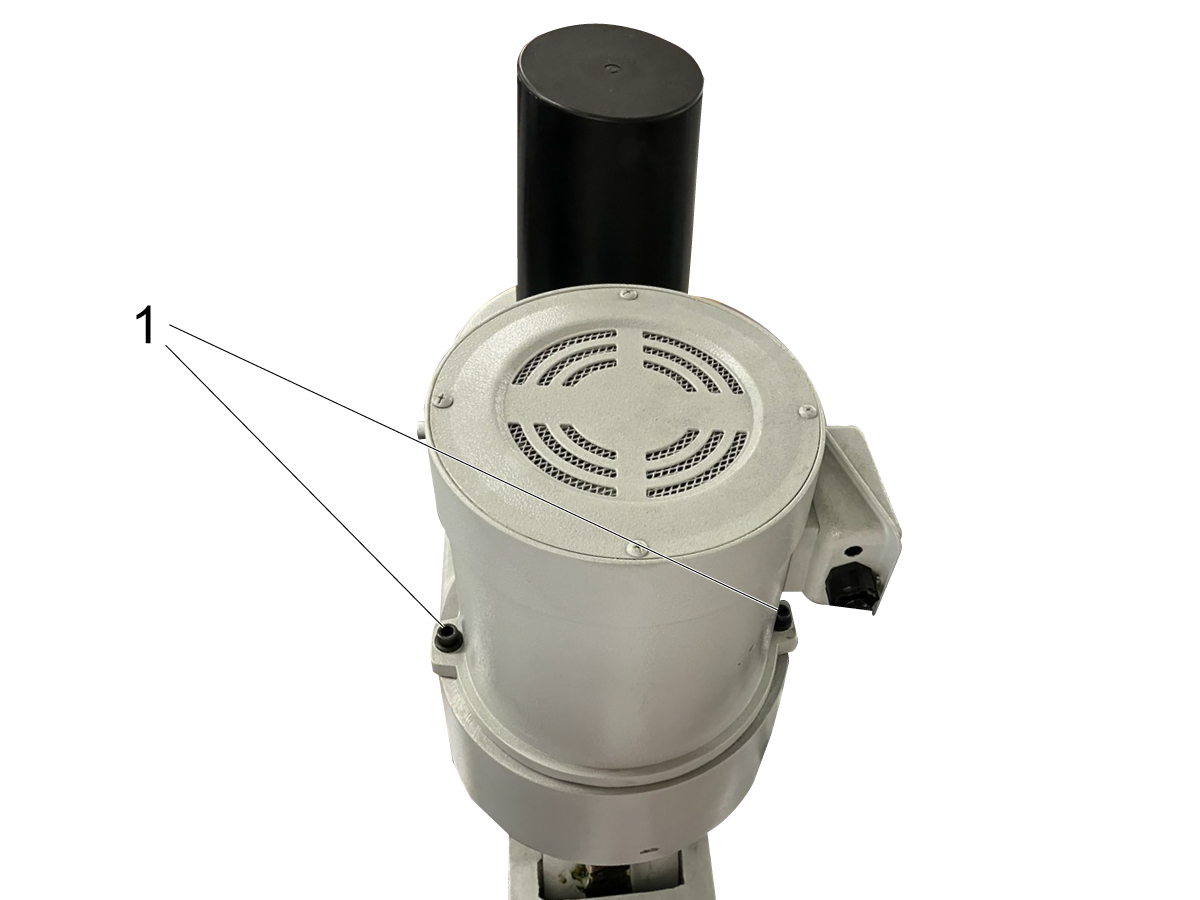
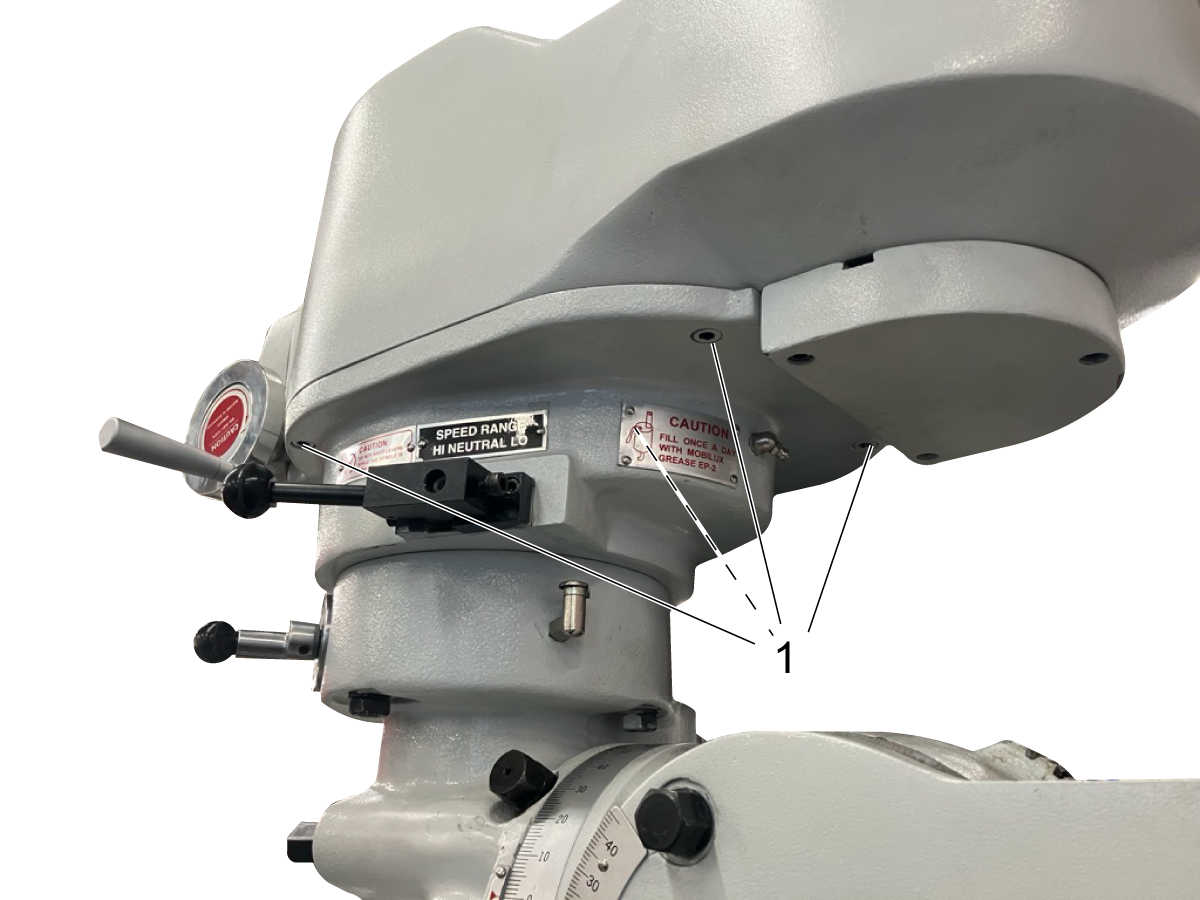
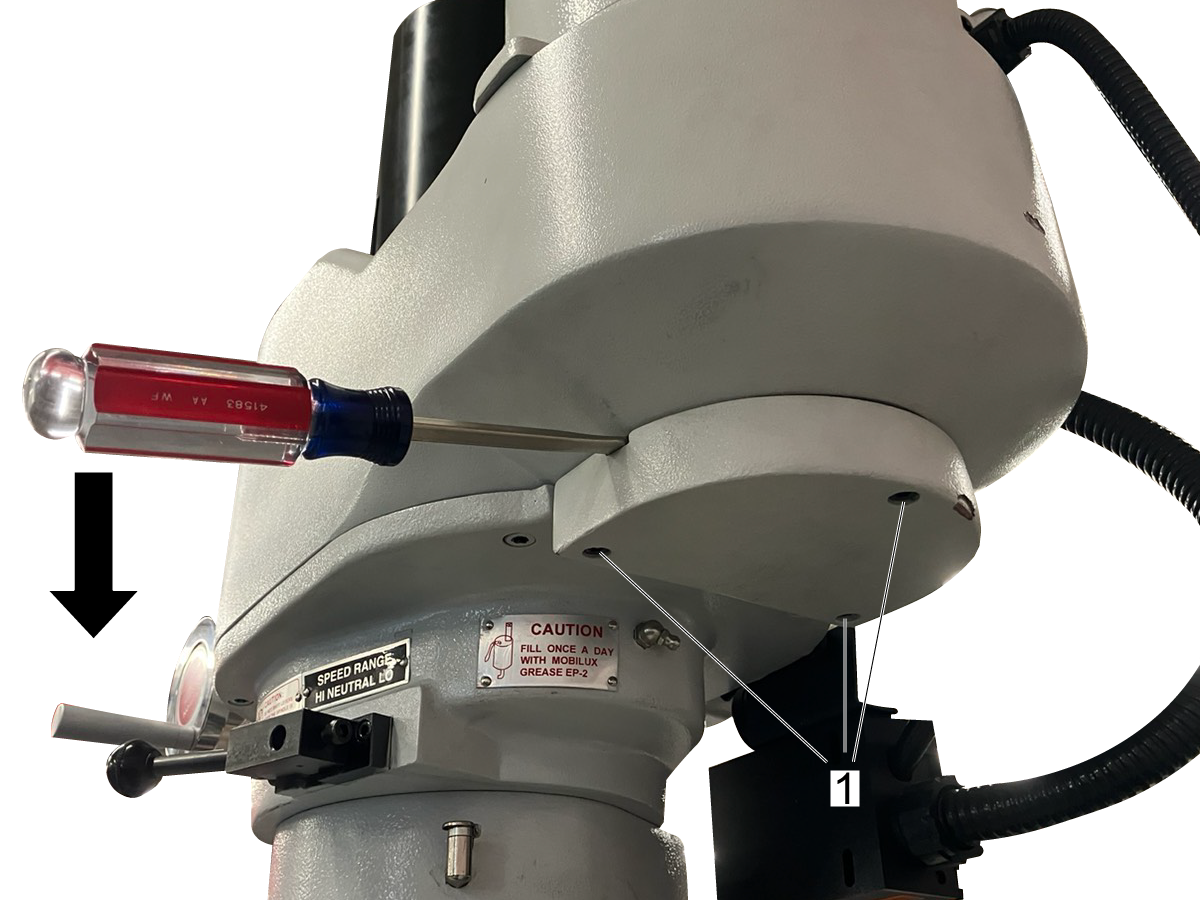
 Remove three bolts under bearing housing [1]. Insert a flathead screwdriver into each of the gaps in the bearing housing. Lever the bearing housing off of the bearing by pushing down on both screwdrivers at the same time. 

3

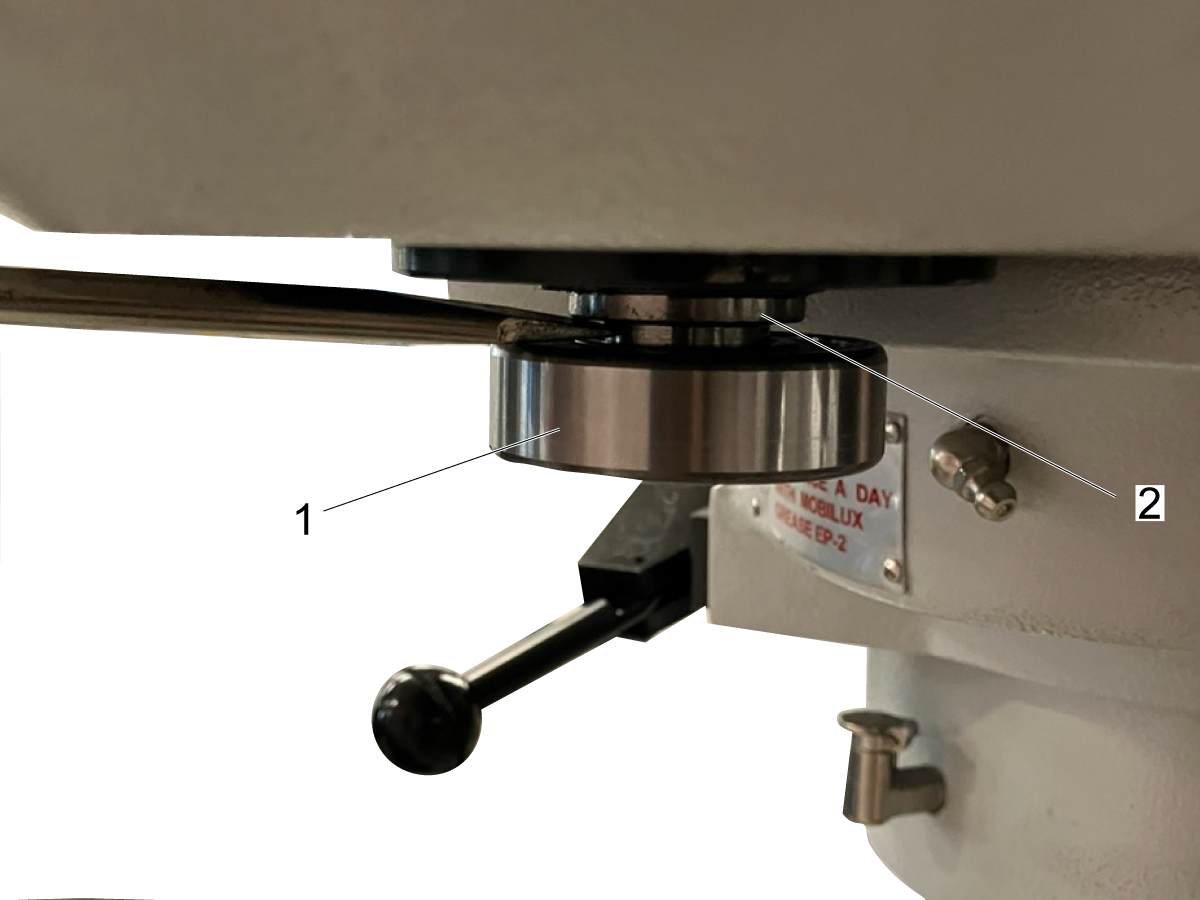
Use a flat head screwdriver to remove the bearing [1]. Lever the screwdriver against the slightly wider section of the motor shaft [2]. Levering it against the spring will not provide sufficient leverage. 

4

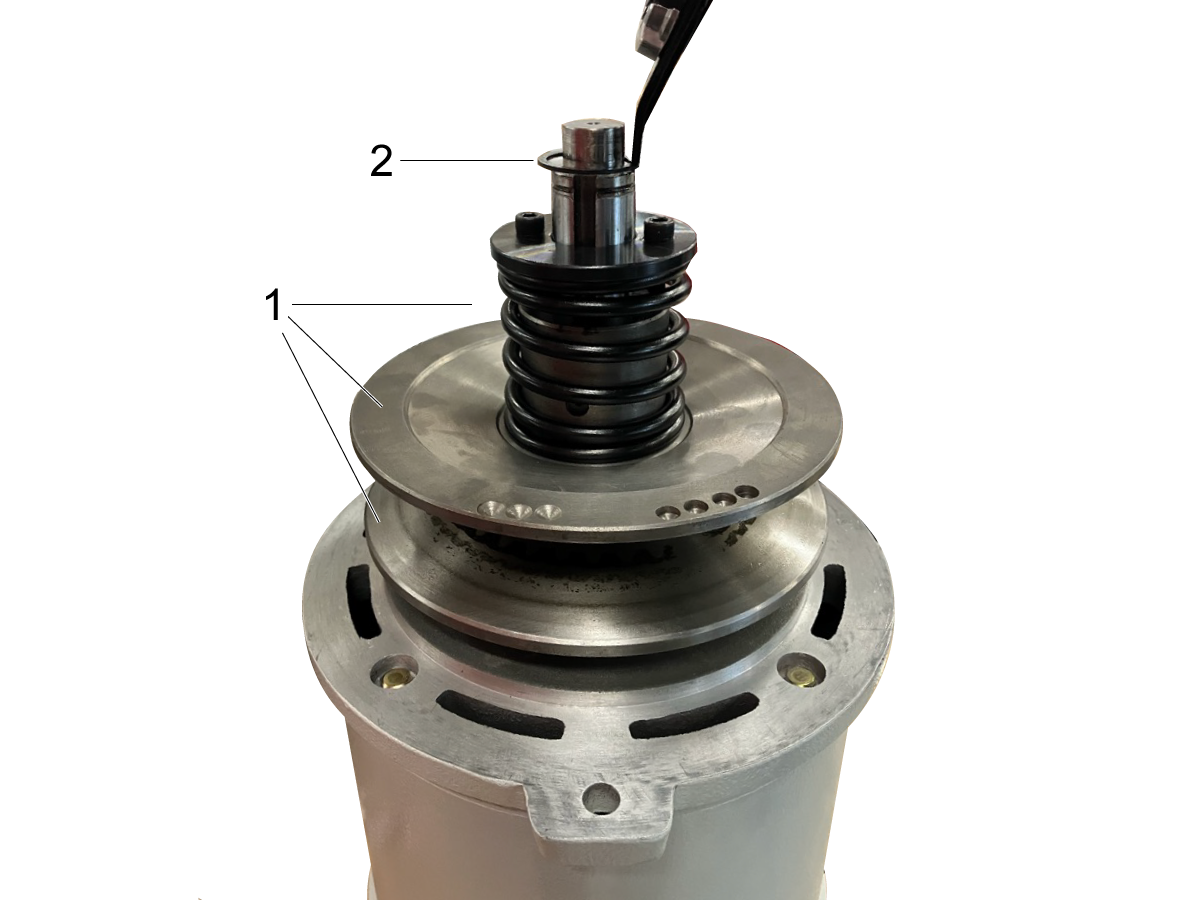
Use two M6 x 45 bolts [1] to tension the spring. Remove the snap ring [2] from the motor.

5

Remove the bolts on the motor [1]. Change the motor speed to 4200 RPM. 

Pull up to remove the motor. A second person may be helpful to guide the motor out of the casing and ensure that the belt does not get stuck on the shaft. 

Replace Motor

1

Place concave plates [1], tensioning spring, and snap ring [2] on motor shaft. 

2

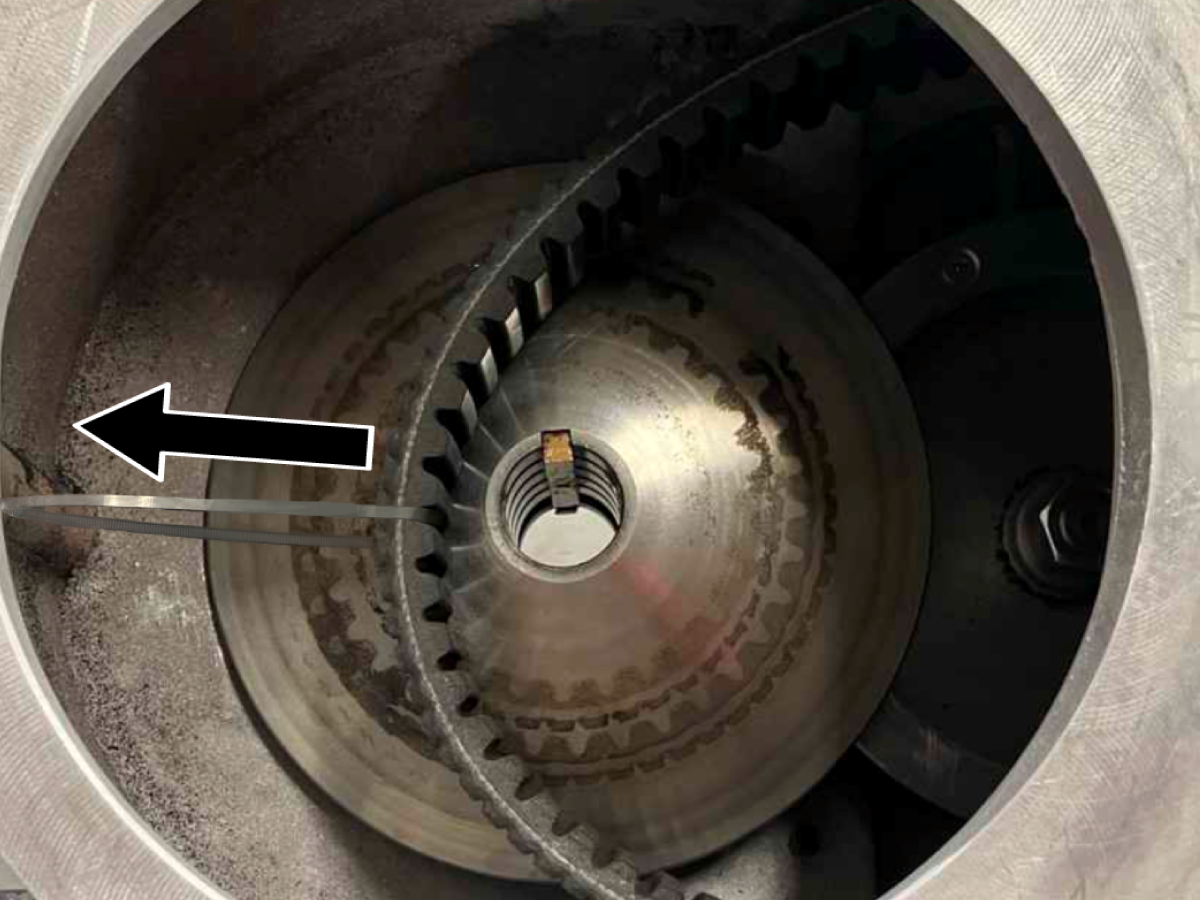
Loosely loop a zip tie around the speed change belt. Pull on speed change belt to create slack.

3

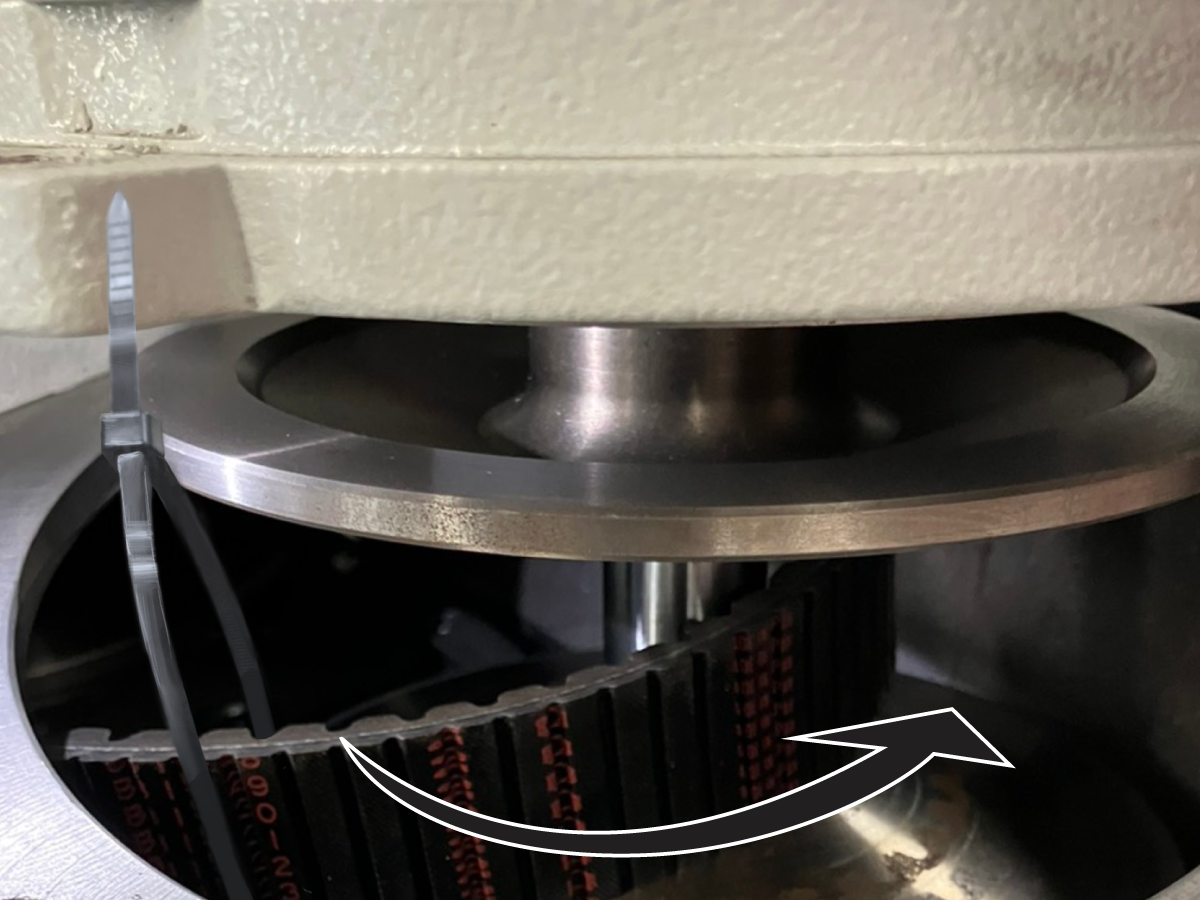
Lower motor to 1-2 inches above the motor casing. Use zip tie to pull belt up and around the bottom concave plate. 

Rotate motor shaft by hand while pulling the zip tie up and around in the same direction to ease belt in between concave plates.


4

Lower motor into casing. Snip and remove zip tie before setting motor down. Bolt motor into place [1].


5

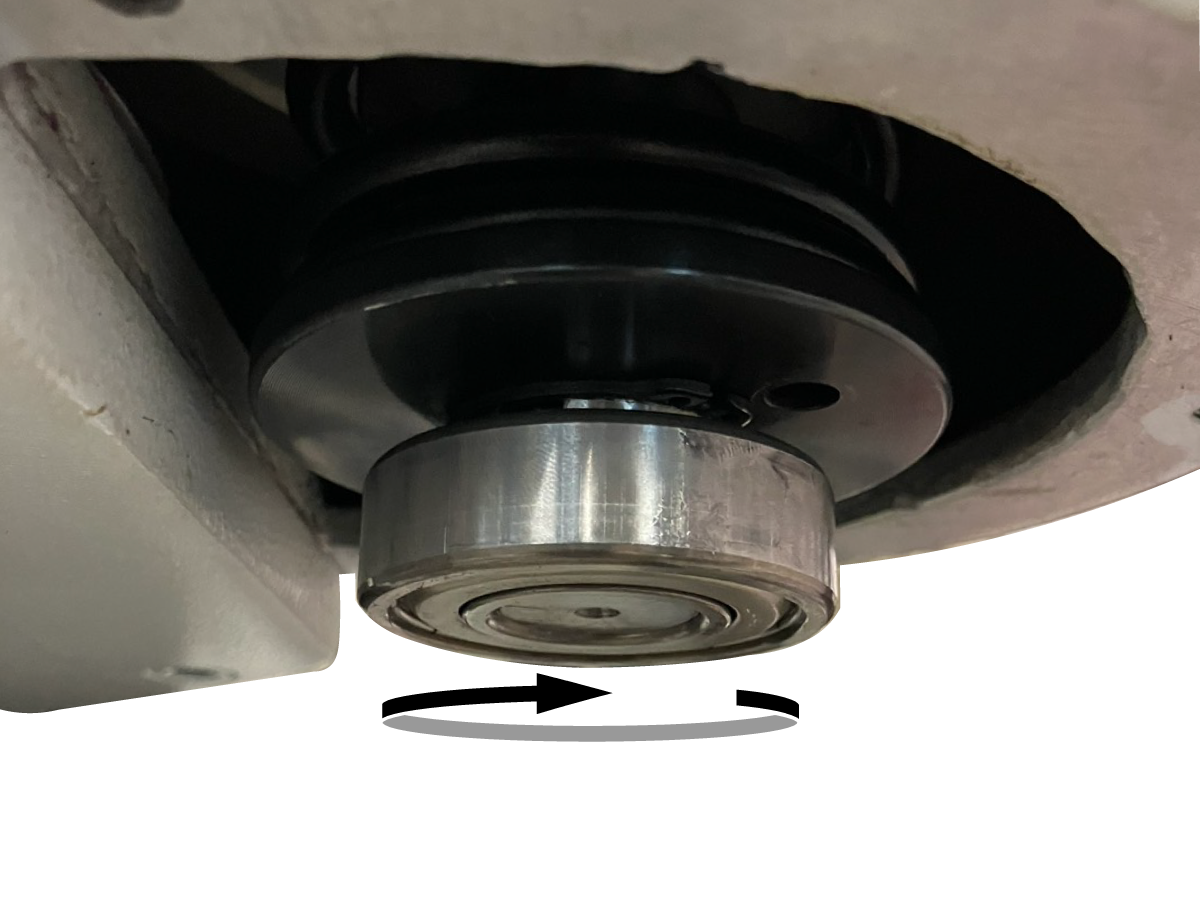
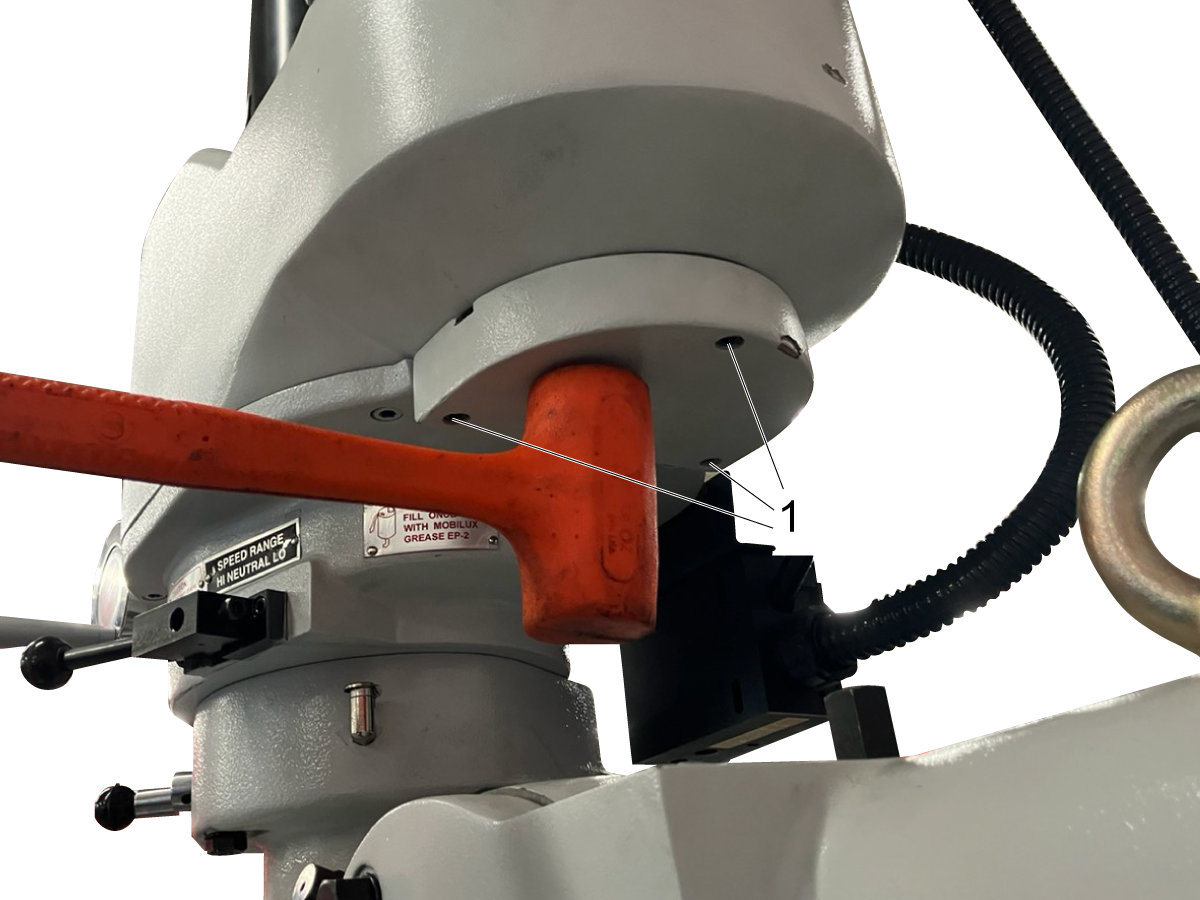
Remove bolts from speed change spring. With a rubber mallet, lightly hammer bearing into place on bottom of motor shaft. Rotate shaft continuously to ensure that bearing does not become crooked. 


6

Place wave ring in bearing housing. Push bearing housing into bearing, and lightly hammer with rubber mallet until bearing housing is within 0.5" of the motor casing. 

Continue to push housing onto bearing by incrementally tightening housing bolts [1].


7

Re-wire J-box.


Note: If the initial wiring of your J-box differs from the example, ignore the example and re-wire according to the initial wiring of your J-box. 

5.3 Replace Speed Change Belt

Recently Updated

HKM-1 - Replace Speed Change Belt


Introduction

This section describes how to replace the speed change belt on the HKM-1. 

Dismantle Motor

Start the motor and turn the speed dial to 2100 RPM.

1

Switch off mill and unplug from power source. Remove junction box cover. Disconnect the brake switch wiring [1] and cables U, V and W [2]. Disconnect ground [3]. 

Pull conduit out of J-box. 


Note: Record the wiring configuration of your J-box. If it differs from the example given, disregard the example and re-wire according to your notes. 

2

 Remove three bolts under bearing housing [1]. Insert a flathead screwdriver into each of the gaps in the bearing housing. Lever the bearing housing off of the bearing by pushing down on both screwdrivers at the same time. 

3

Use a flat head screwdriver to remove the bearing [1]. Lever the screwdriver against the slightly wider section of the motor shaft [2]. Levering it against the spring will not provide sufficient leverage. 

4

Use two M6 x 45 bolts [1] to tension the spring. Remove the snap ring [2] from the motor.

5

Remove the bolts on the motor [1]. Change the motor speed to 4200 RPM. 

Pull up to remove the motor. A second person may be helpful to guide the motor out of the casing and ensure that the belt does not get stuck on the shaft. 

Dismantle Speed Change Belt Assembly

1

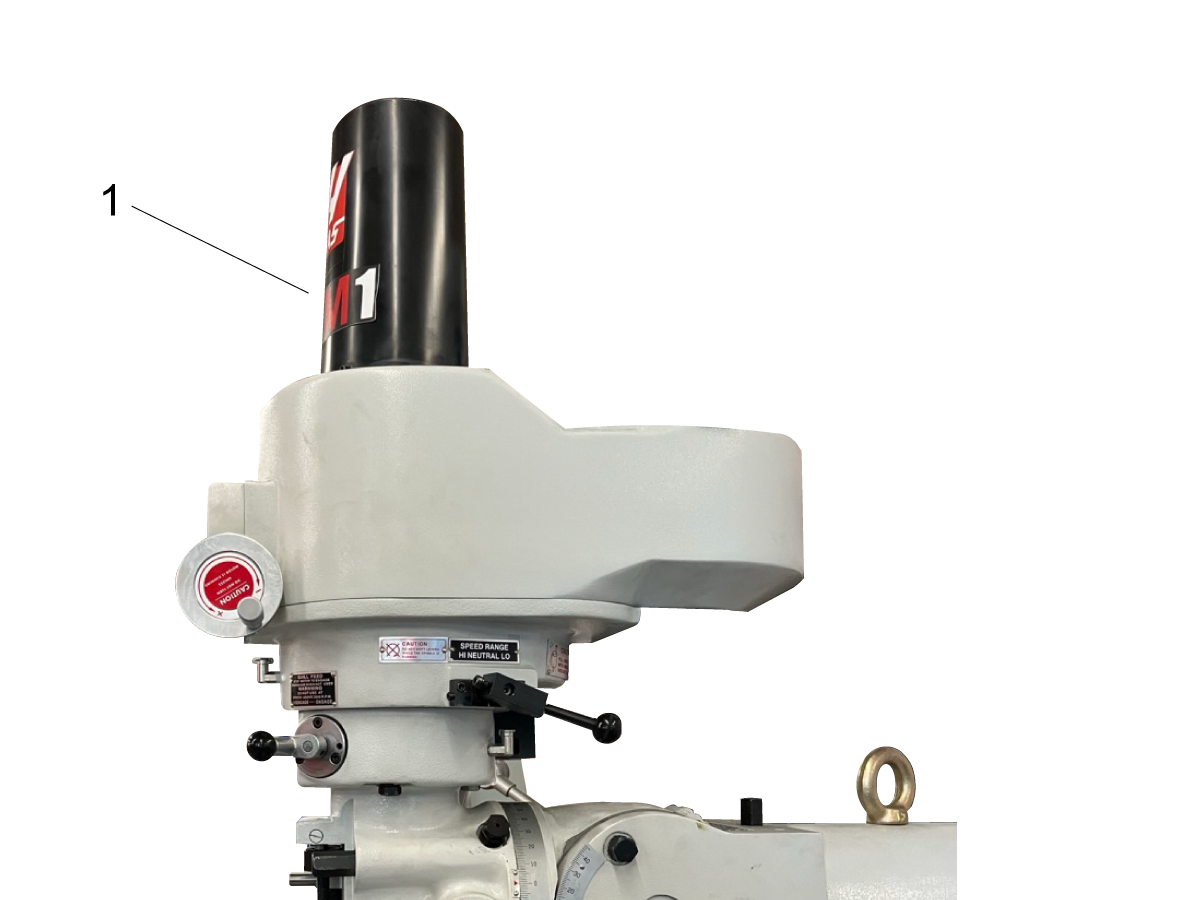
Remove drawbar cover [1].

2

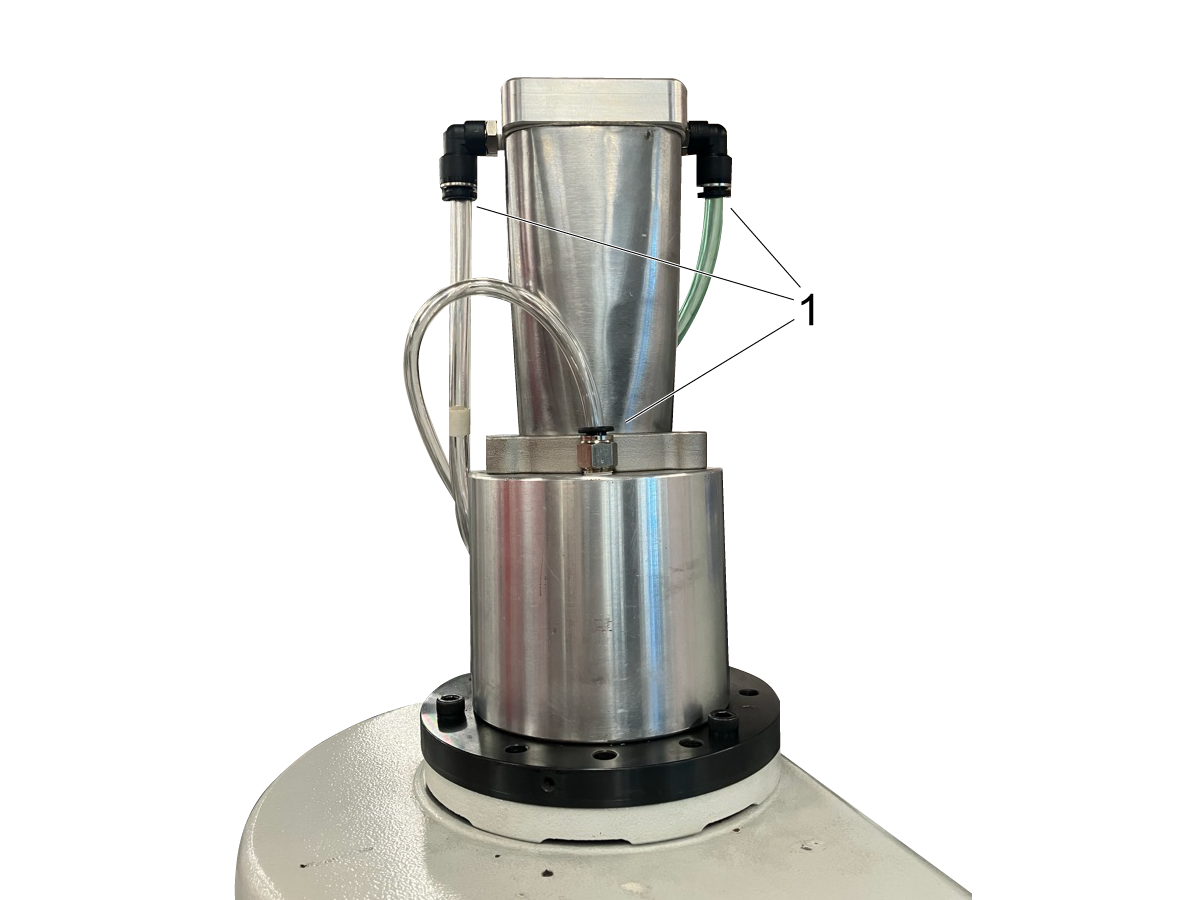
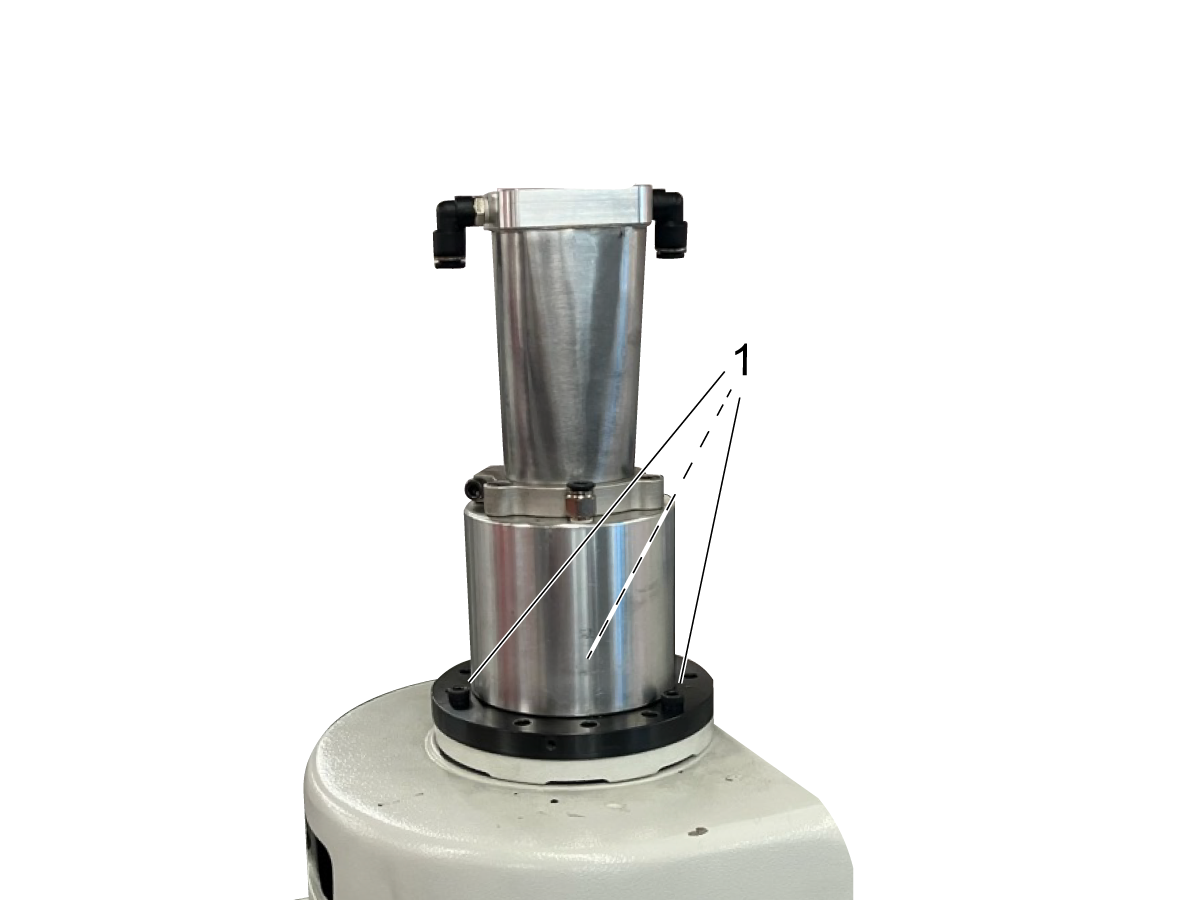
Disconnect pneumatic lines from drawbar actuator [1].

3

Unbolt drawbar actuation assembly [1].

4

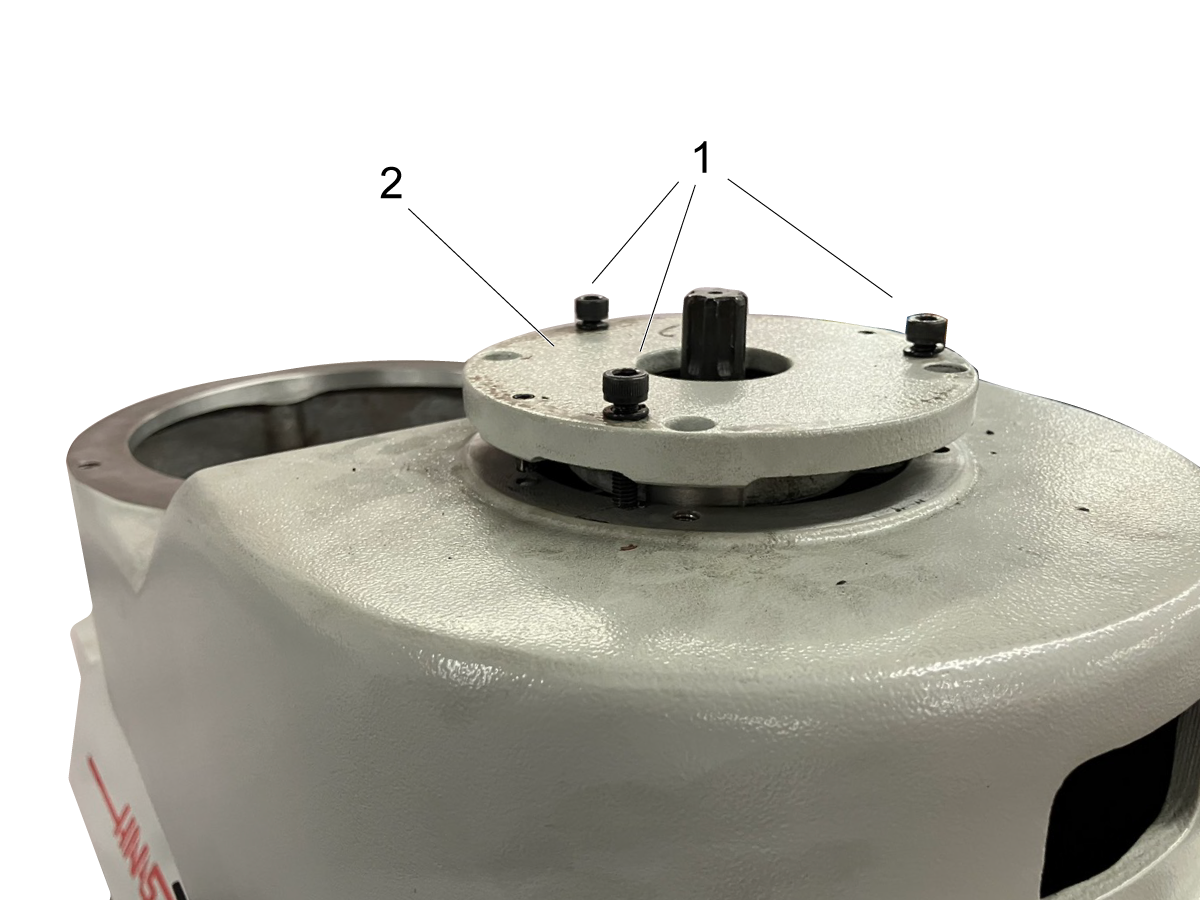
Insert bolts from drawbar actuation assembly into specified holes on the bearing housing. Tighten the bolts incrementally in a star pattern to lift the bearing housing pins [1]. Remove bearing housing [2].

5

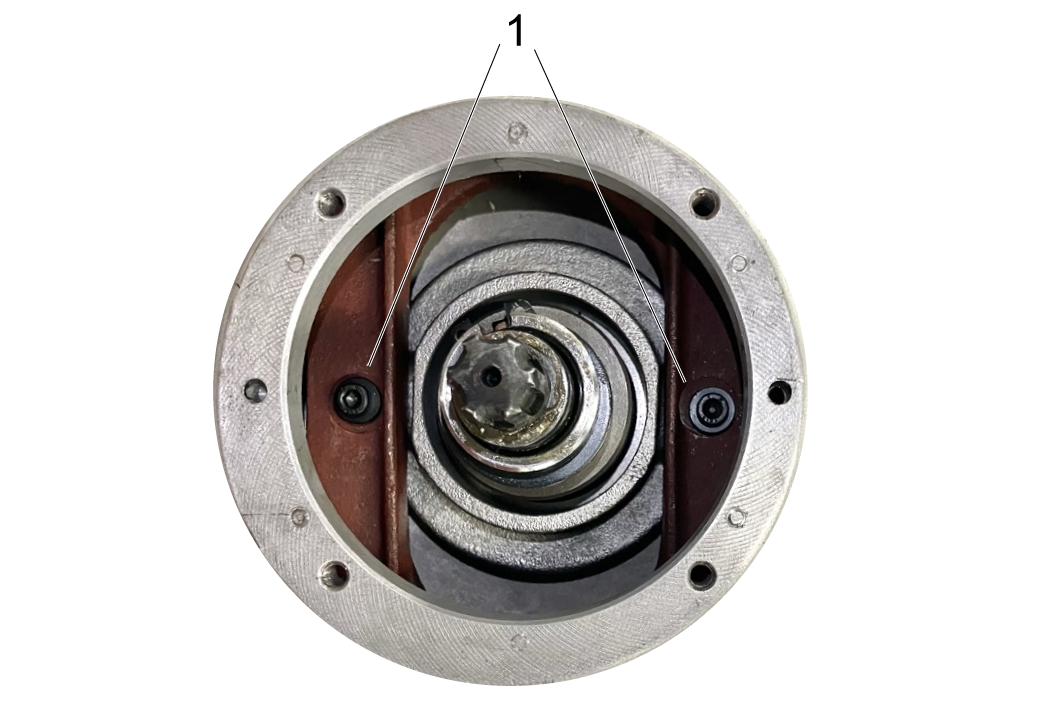
Remove bolts and bolt sleeves [1] from speed change bracket.

6

Remove bolts under gear housing [1]. Lift off gear housing. Speed change belt can now be removed and replaced. 


Rebuild Speed Change Assembly

1

Replace gear housing. Replace sleeves and bolts on speed change housing [1]. 


Using a screwdriver or other long tool, press upwards under the top concave plate to ensure that it is all the way at the top of the shaft. 

2

Replace bearing housing. Tighten bolts in a star pattern [1]. 

Replace drawbar actuator and pneumatic lines. 

Replace drawbar cover. For information on re-installing the motor, see Replace Motor section above. 

Replace Motor

1

Place concave plates [1], tensioning spring, and snap ring [2] on motor shaft. 

2

Loosely loop a zip tie around the speed change belt. Pull on speed change belt to create slack.

3

Lower motor to 1-2 inches above the motor casing. Use zip tie to pull belt up and around the bottom concave plate. 

Rotate motor shaft by hand while pulling the zip tie up and around in the same direction to ease belt in between concave plates.


4

Lower motor into casing. Snip and remove zip tie before setting motor down. Bolt motor into place [1].


5

Remove bolts from speed change spring. With a rubber mallet, lightly hammer bearing into place on bottom of motor shaft. Rotate shaft continuously to ensure that bearing does not become crooked. 


6

Place wave ring in bearing housing. Push bearing housing into bearing, and lightly hammer with rubber mallet until bearing housing is within 0.5" of the motor casing. 

Continue to push housing onto bearing by incrementally tightening housing bolts [1].


7

Re-wire J-box.


Note: If the initial wiring of your J-box differs from the example, ignore the example and re-wire according to the initial wiring of your J-box. 

5.4 Replace Timing Belt

Recently Updated

HKM-1 - Replace Timing Belt


Revision A - 10/2025

Introduction

This section describes how to replace the timing belt on the HKM-1. 

Dismantle Motor

Start the motor and turn the speed dial to 2100 RPM.

1

Switch off mill and unplug from power source. Remove junction box cover. Disconnect the brake switch wiring [1] and cables U, V and W [2]. Disconnect ground [3]. 

Pull conduit out of J-box. 


Note: Record the wiring configuration of your J-box. If it differs from the example given, disregard the example and re-wire according to your notes. 

2

 Remove three bolts under bearing housing [1]. Insert a flathead screwdriver into each of the gaps in the bearing housing. Lever the bearing housing off of the bearing by pushing down on both screwdrivers at the same time. 

3

Use a flat head screwdriver to remove the bearing [1]. Lever the screwdriver against the slightly wider section of the motor shaft [2]. Levering it against the spring will not provide sufficient leverage. 

4

Use two M6 x 45 bolts [1] to tension the spring. Remove the snap ring [2] from the motor.

5

Remove the bolts on the motor [1]. Change the motor speed to 4200 RPM. 

Pull up to remove the motor. A second person may be helpful to guide the motor out of the casing and ensure that the belt does not get stuck on the shaft. 

Dismantle Speed Change Belt Assembly

1

Remove drawbar cover [1].

2

Disconnect pneumatic lines from drawbar actuator [1].

3

Unbolt drawbar actuation assembly [1].

4

Insert bolts from drawbar actuation assembly into specified holes on the bearing housing. Tighten the bolts incrementally in a star pattern to lift the bearing housing pins [1]. Remove bearing housing [2].

5

Remove bolts and bolt sleeves [1] from speed change bracket.

6

Remove bolts under gear housing [1]. Lift off gear housing. Speed change belt can now be removed and replaced. 


Replace Timing Belt

1

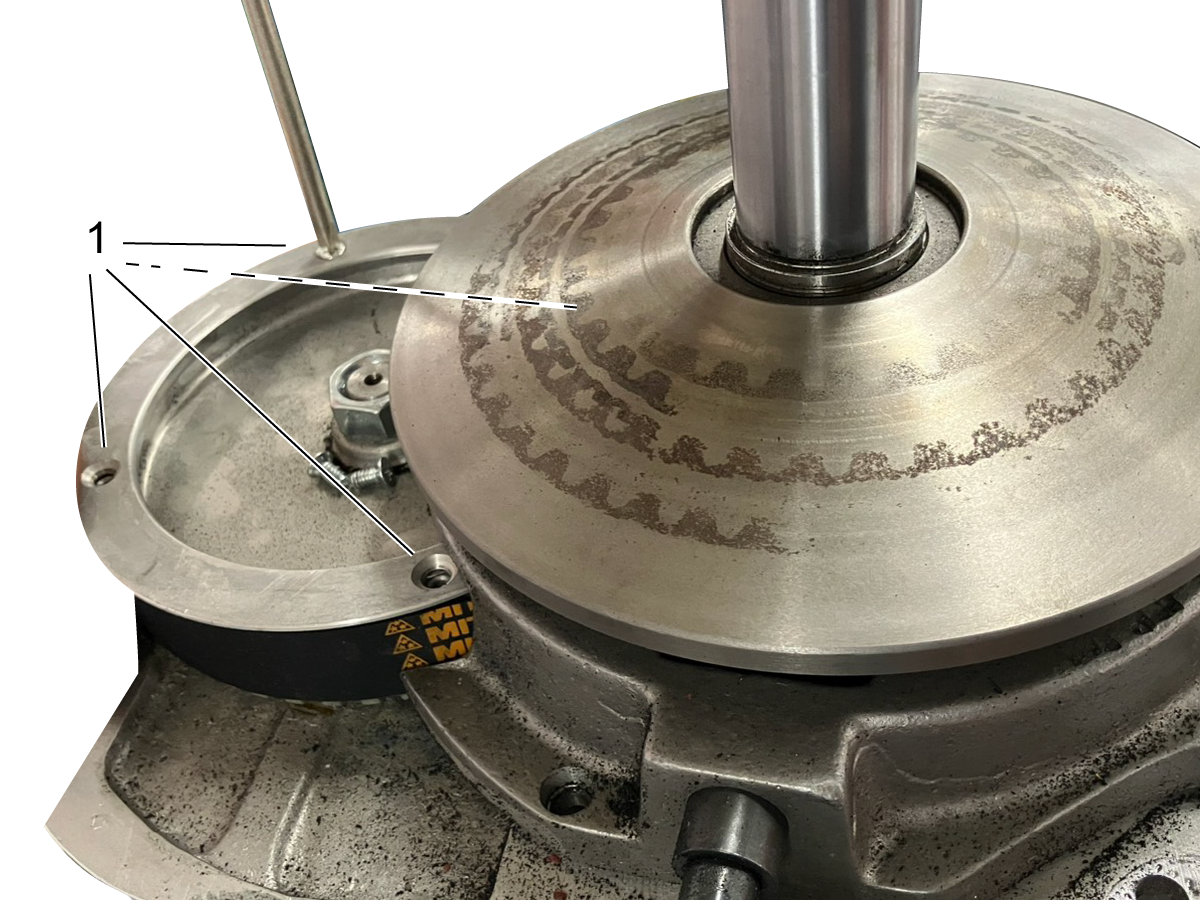
Remove top plate from timing gear [1]. Pull belt off of timing gear. 

2

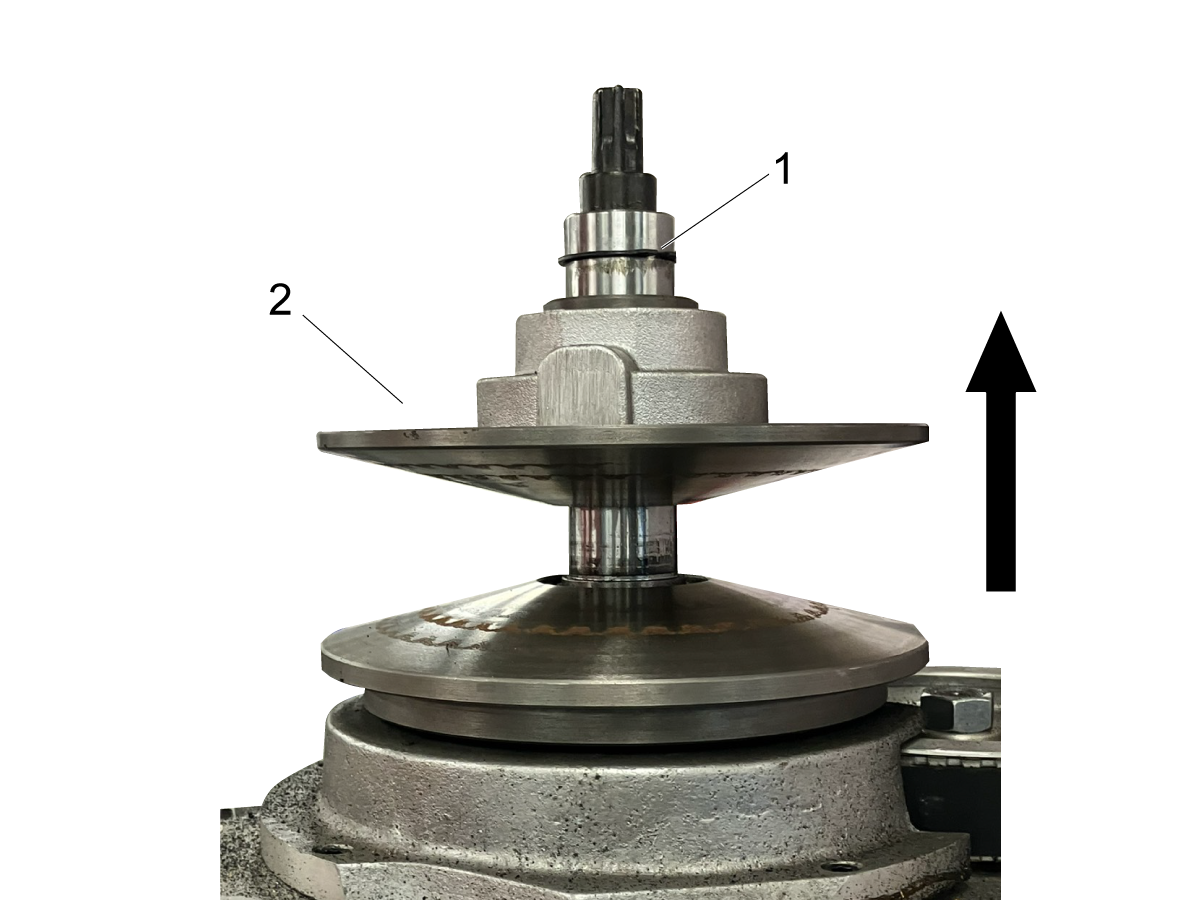
Remove snap ring from drawbar shaft [1]. Lift off top concave plate [2]. 

3

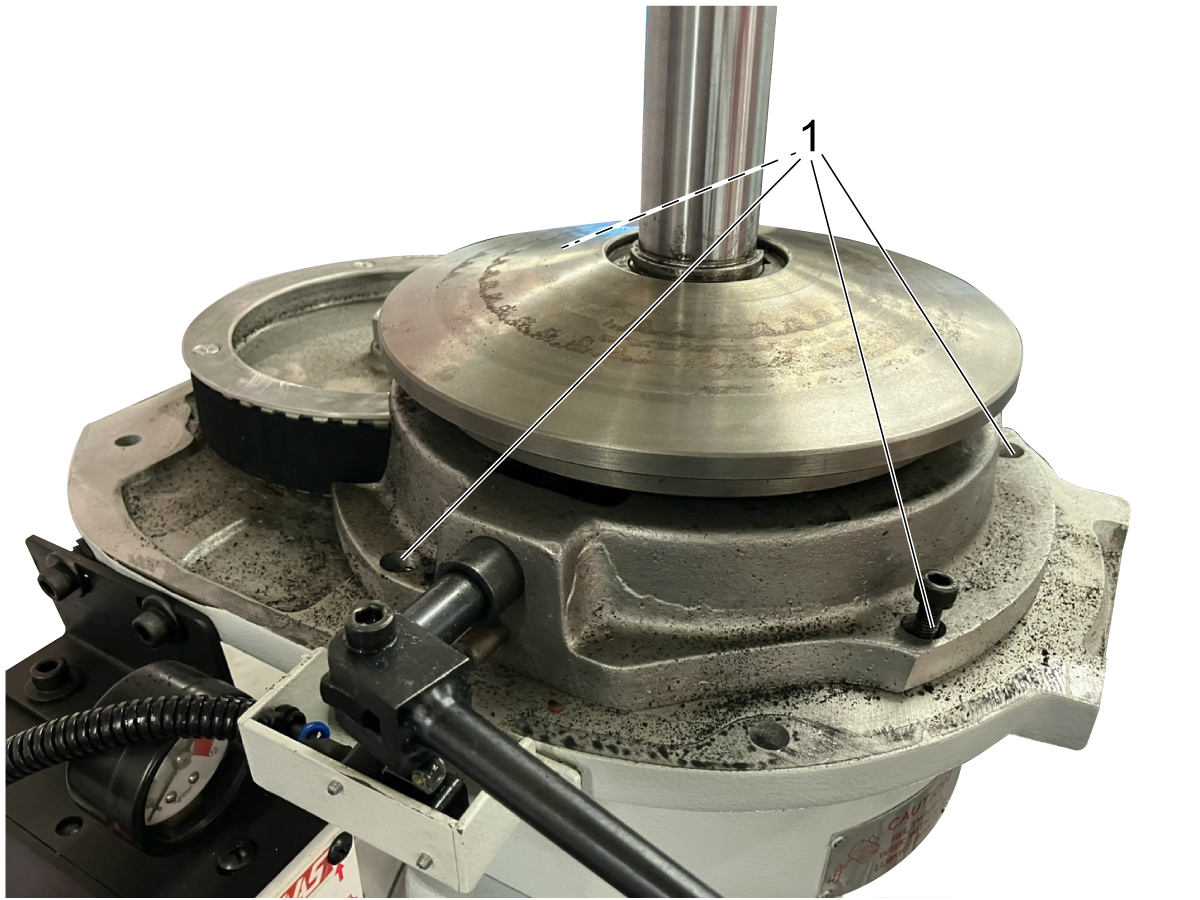
Unbolt brake housing [1] and lift off brake assembly. The timing belt may now be removed and replaced.

5.5 Adjust Backlash

Recently Updated

HKM-1 - Adjust Backlash


Revision A - 10/2025

Introduction

This section describes how to adjust the backlash on HKM-1. 

Adjust Y-Axis Lead Screw

1

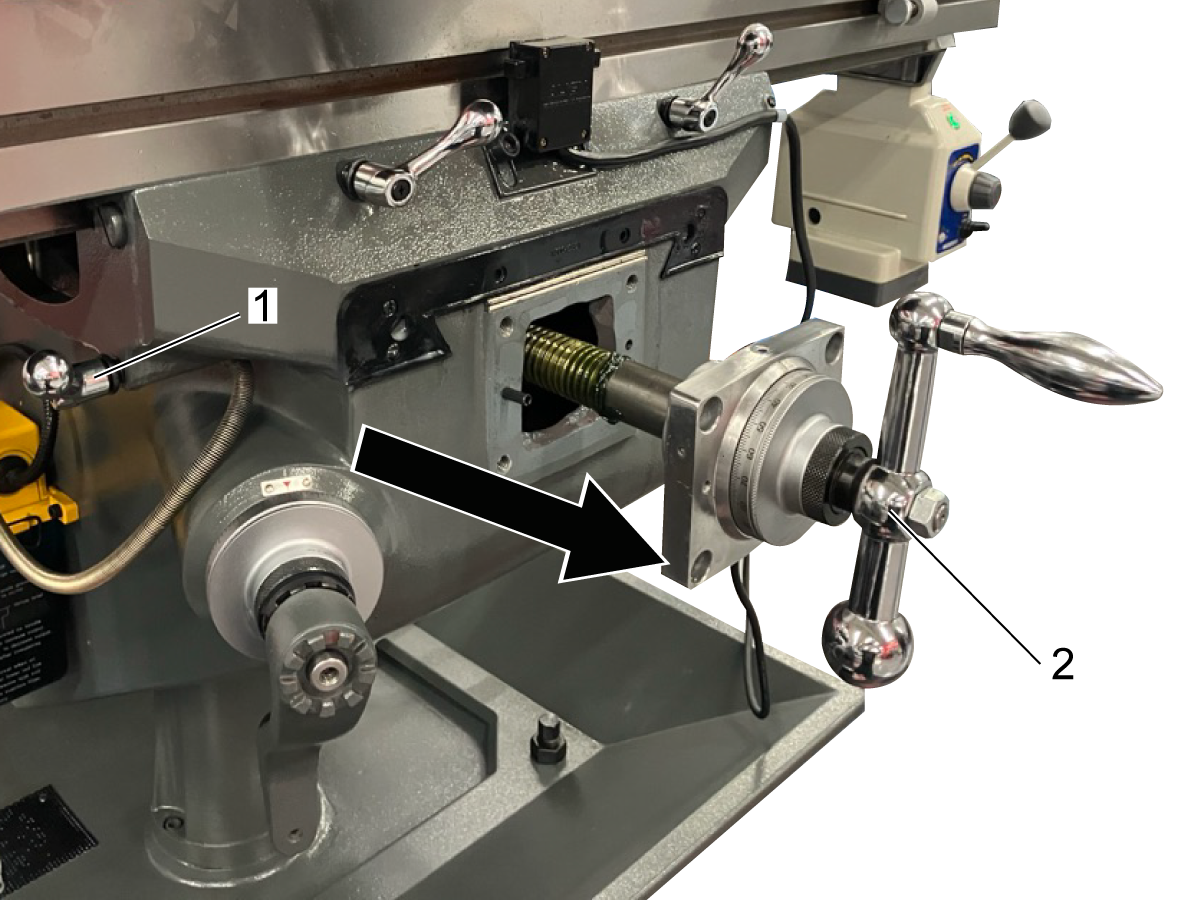
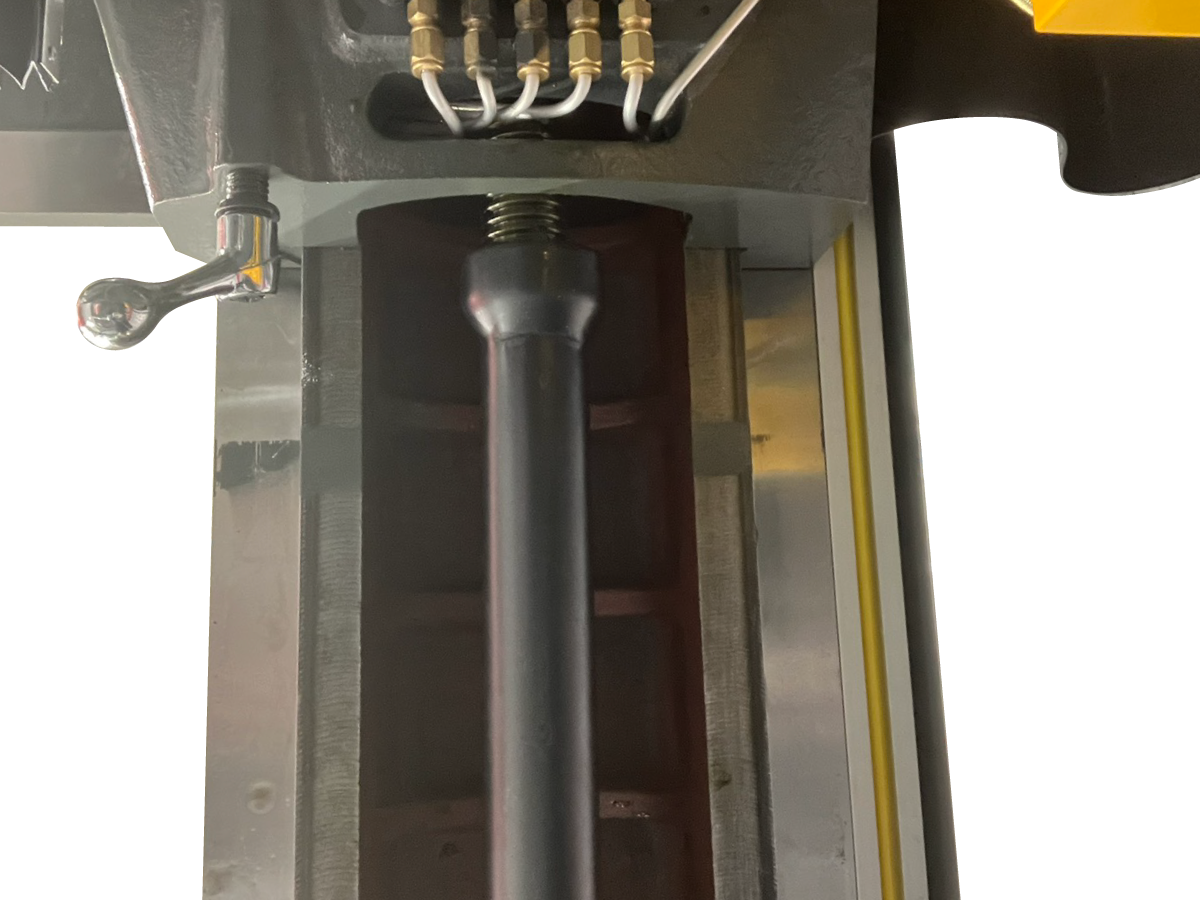
Remove two bolts on the table [1] and the front of the knee [2]. Remove the front way cover. 

2

 Turn the y-axis crank counterclockwise to move the saddle to the front of the knee.

Remove the four bolts [1] on the y-axis bearing bracket. 

3

Engage the Y-axis lock [1]. Turn the y-axis handle clockwise [2] while supporting the bearing braket. The pins will seperate from the saddle. 


4

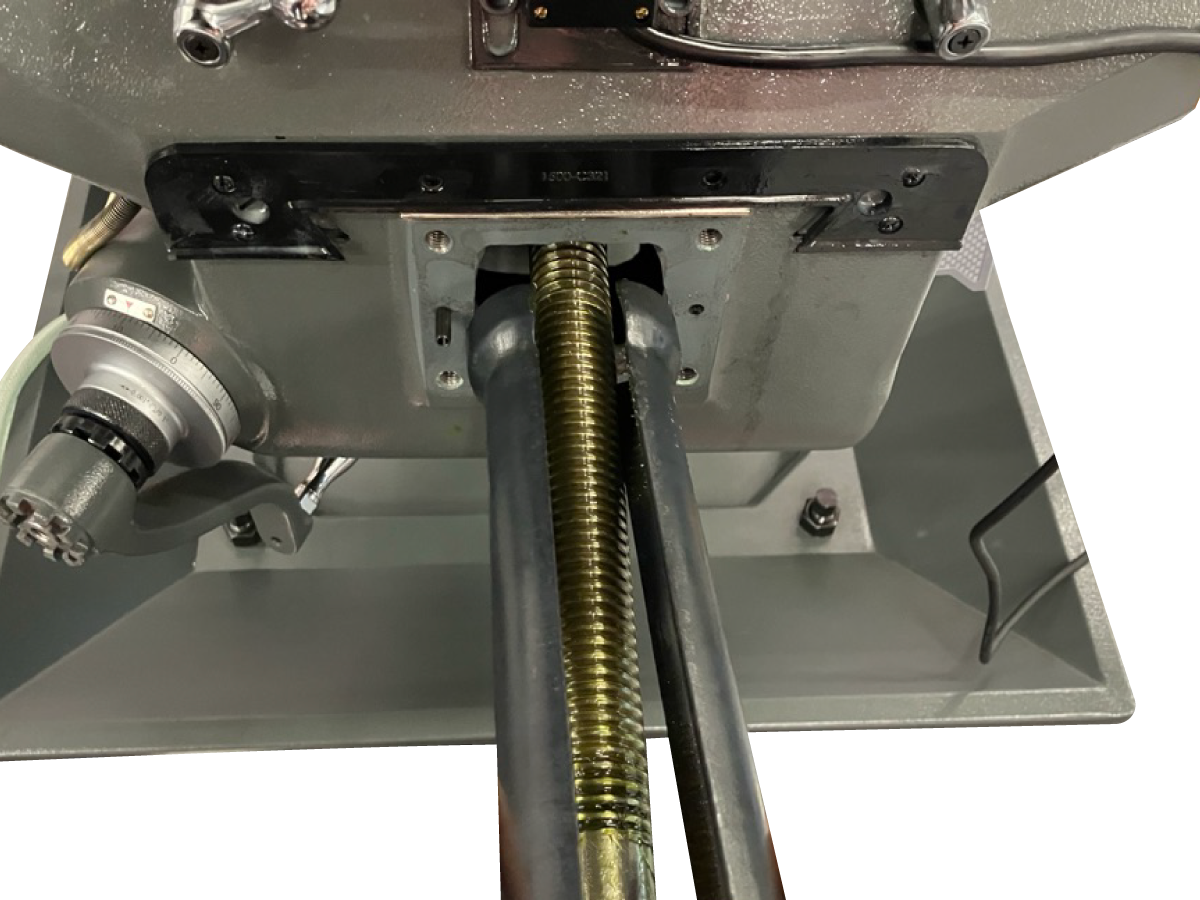
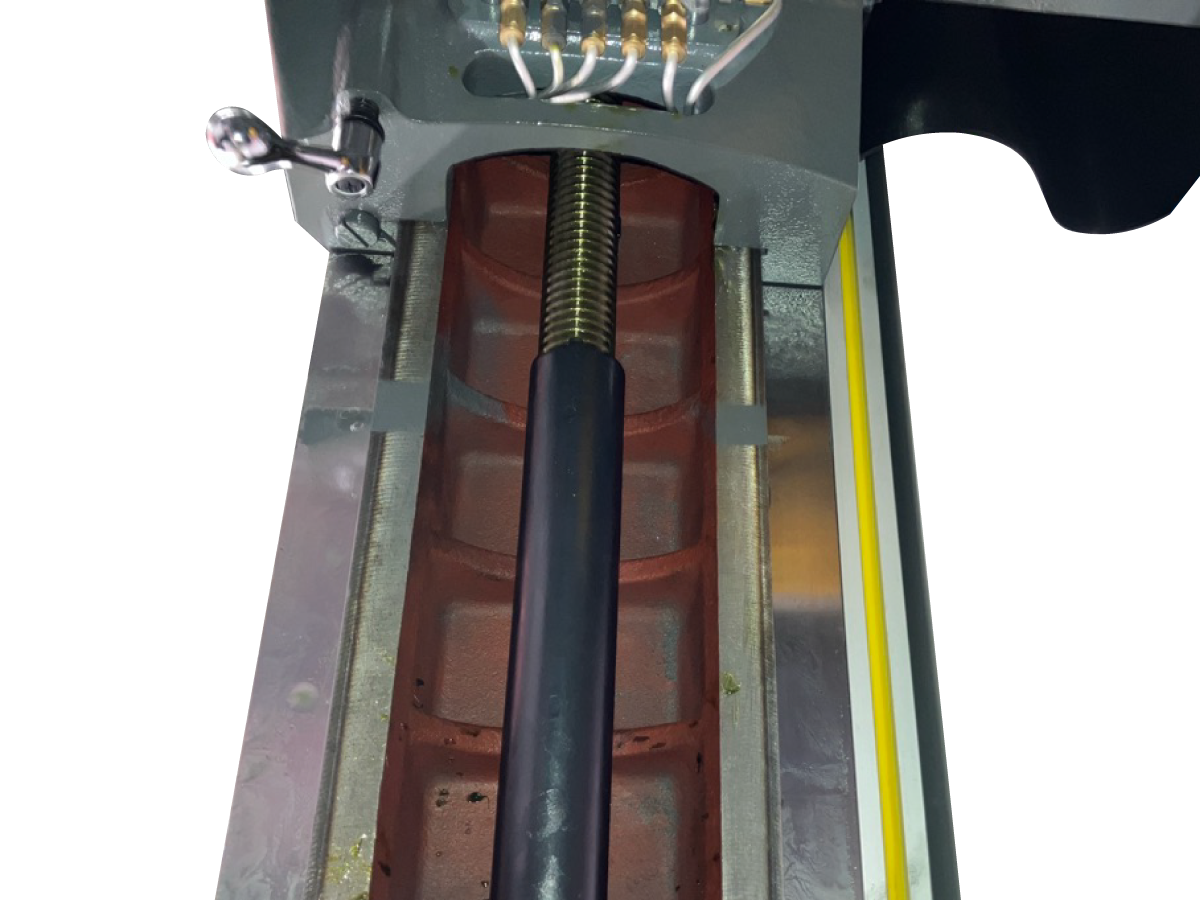
Extrude the ballscrew until the ballscrew adjustment tool can fit into the housing. Insert the larger side of the ballscrew adjustment tool into the saddle until it touches the lock nut. Rotate the adjustment tool around the ballscrew until both halves slide into the slots on the lock nut. 

Turn the adjustment tool once counterclockwise to loosen the lock nut. 

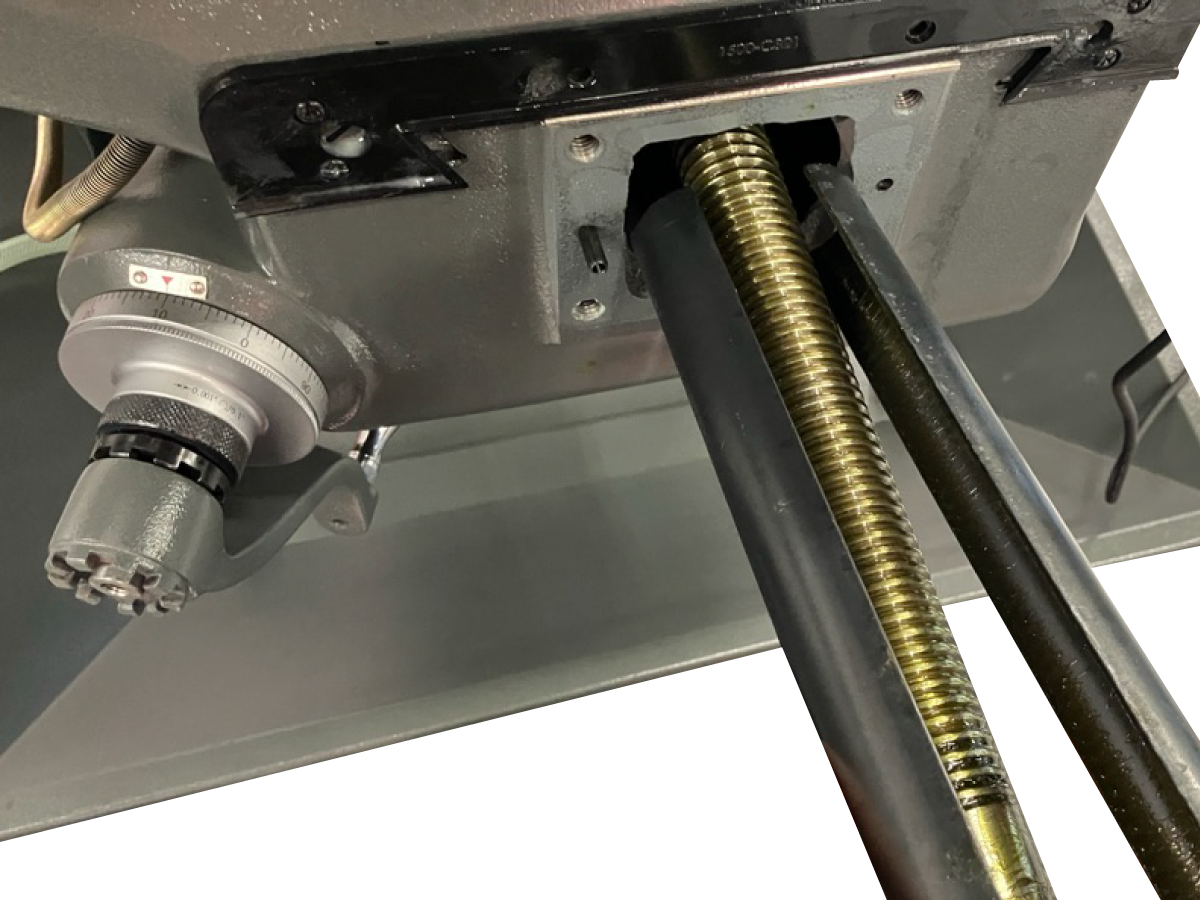
5

 Insert the smaller side of the lead screw adjustment tool into the saddle. Rotate the adjustment tool around the lead screw until both halves slide into the slots on the adjusting nut. 

Turn the adjustment tool to adjust the preload on the lead screw. Test the backlash by turning the axis handle. Adjust the preload until the backlash is between 0.003-0.005" (0.08 to .13 mm). Tighten the lock nut. 


6

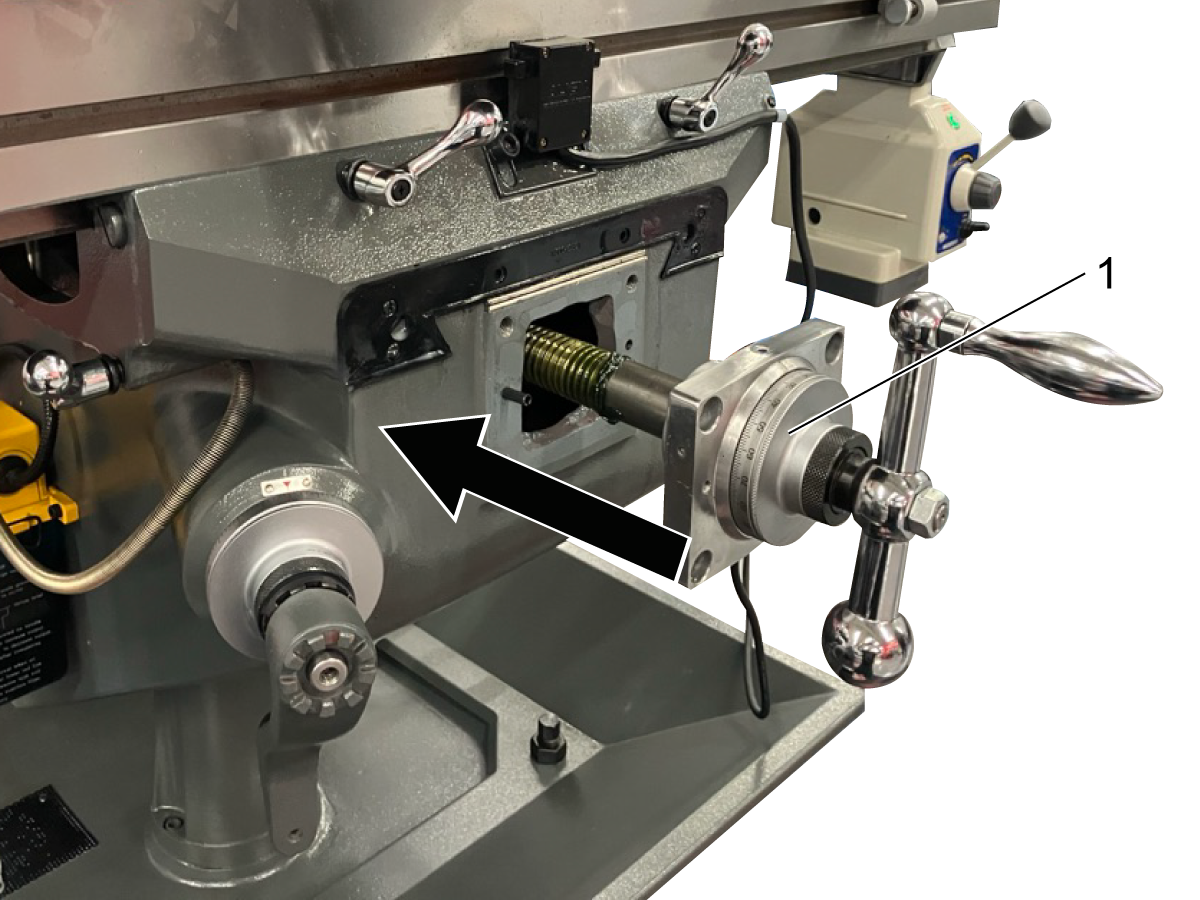
While supporting the y-axis bearing bracket [1], turn the y-axis handle counterclockwise to retract the lead screw. Re-install the bearing bracket and way cover.  


Adjust X-Axis Lead Screw

1

Move the table to the center of the y and x axes. Insert the larger end of the adjustment tool under the left side of the table. Rotate the tool once counterclockwise to loosen the lock nut. 

2

 Insert the smaller side of the lead screw adjustment tool into the saddle. Rotate the adjustment tool around the lead screw until both halves slide into the slots on the adjusting nut. 

Turn the adjustment tool to adjust the preload on the lead screw. Test the backlash by turning the axis handle. Adjust the preload until the backlash is between 0.003-0.005" (0.08 to .13 mm). 

Tighten the lock nut. 


5.6 HKM-1 Service Parts List
Recently Updated

HAAS Knee Mill - Service Parts List


Revision E - 03/2026

Introduction

The following section lists the service parts that are available to order for HKM-1. To order a part that is not included in this list, please view the exploded views below and contact Haas Service with the sub-assembly name and part number. 

For example, if a user plans to order a leveling pad for an HKM-1 machine, they should request Machine Body Assembly - Machine Body Unit Part #6. Other information, such as pictures of broken parts or informal names for parts, can also be included when additional context is needed.

HKM-1 Exploded Views
MACHINES Part Number Description
HKM-1 93-4884 BELT, VARIABLE SPEED HKM-1
93-4885 BELT, TIMING HKM-1
93-4886 BRAKE SHOES HKM-1
93-4887 BRAKE SHOE SPRING HKM-1
93-4888 QUILL CLOCK SPRING & COVER Z-AXIS HKM-1
93-5170 AIR REGULATOR BRACKET HKM-1
93-5590 AIR POWER DRAWBAR UNIT HKM-1
93-5583 POWER FEED X-AXIS HKM-1
93-5541 POWER FEED HKM-1
93-5539 BELT 38MM X 890MM HKM-1
93-5538 TIMING BELT HKM-1
93-5537 COOLANT PUMP MOTOR HKM-1
93-5865 SOLENOID AIR VALVE HKM-1
93-5866 LED WORK LIGHT ASSEMBLY HKM-1
93-5953 RAM UNIT TILT WORM GEAR HKM-1
93-5954 RAM UNIT SPRING PIN HKM-1
93-5955 HEAD ASSY WORM SHAFT HKM-1
93-5956 HEAD LEFT/RIGHT TILT WORM SHAFT HKM-1
93-5957 HEAD ASSY DOUBLE ROUND KEY HKM-1
93-6084 16A THERMAL OVERLOAD RELAY HKM-1
93-6085 HANDLE LEVER HKM-1
HKM-1 CE 93-5614 TABLE GUARD UNIT CE HKM-1
93-5613 SPINDLE GUARD UNIT CE HKM-1

Recently Viewed Items

You Have No Recently Viewed Items Yet

Feedback
Haas Logo

Haas Delivered Price

This price includes shipping cost, export and import duties, insurance, and any other expenses incurred during shipping to a location in France agreed with you as a buyer. No other mandatory costs can be added to the delivery of a Haas CNC Product.

KEEP UP WITH THE LATEST HAAS TIPS AND TECHNOLOGY...

Sign up now!   

HAAS TOOLING ACCEPTS THE FOLLOWING:

  • Service & Support
  • Owners
  • Request Service
  • Operator Manuals
  • Haas Parts
  • Rotary Repair Request
  • Pre-Install Guides
  • Shopping Tools
  • Build & Price a New Haas
  • Available Inventory
  • The Haas Price List
  • CNCA Financing
  • About Haas
  • Accessibility Statement
  • DNSH Statement
  • Export Compliance
  • Careers
  • Certifications & Safety
  • Contact Us
  • History
  • Terms & Conditions
  • Haas Tooling Terms & Conditions
  • Privacy
  • Warranty
  • Haas Community
  • Haas Certification Program
  • Haas Motorsports
  • Gene Haas Foundation
  • Haas Technical Education Community
  • Events
  • Join the Conversation
  • Facebook
  • X
  • Flickr
  • YouTube
  • LinkedIn
  • Instagram
  • TikTok
© 2026 Haas Automation, Inc – CNC Machine Tools
This site is protected by reCAPTCHA and the Google Privacy Policy and Terms of Service apply.

2800 Sturgis Rd., Oxnard, CA 93030
Toll Free: (888) 817-4446 / Fax: 805-278-8554