My Haas Welcome,
!
Haas Tooling MyHaas/HaasConnect Sign In Register Haas Tooling MyHaas/HaasConnect Sign Out Welcome, My Machines Latest Activity My Quotes My Account My Users Sign Out
Find Your Distributor
  1. Select Language
    1. English
    2. Deutsch
    3. Español - España
    4. Español - México
    5. Français
    6. Italiano
    7. Português
    8. Český
    9. Dansk
    10. Nederlands
    11. Magyar
    12. Polski
    13. Svenska
    14. Türkçe
    15. 中文
    16. Suomi
    17. Norsk
    18. الإنجليزية
    19. български
    20. Hrvatski
    21. Ελληνικά
    22. Română
    23. Slovenský
    24. Slovenščina
    25. 한국어
    26. 日本語
    27. Українська
  • machines Main Menu
    • Vertical Mills
      Vertical Mills
      Vertical Mills View All
      • Vertical Mills
      • VF Series
      • Universal Machines
      • VR Series
      • VP-5 Prismatic
      • Pallet-Changing VMCs
      • Mini Mills
      • Mold Machines
      • High-Speed Drill Centers
      • Drill/Tap/ Mill Series
      • Toolroom Mills
      • Pocket Mill
      • Compact Mills
      • Gantry Series
      • SR Sheet Routers
      • Extra-Large VMC
      • Double-Column Mills
      • 3+2 Positioning Machines
    • Multi-Axis Solutions
      Multi-Axis Solutions
      Multi-Axis Solutions View All
      • Multi-Axis Solutions
      • Y-Axis Lathes
      • 5-Axis Mills
    • Lathes
      Lathes
      Lathes View All
      • Lathes
      • ST Series
      • Dual-Spindle
      • Box Way Series
      • Toolroom Lathes
      • Chucker Lathe
      • Haas Bar Feeders
    • Horizontal Mills
      Horizontal Mills
      Horizontal Mills View All
      • Horizontal Mills
      • 50-Taper
      • 40-Taper
    • Rotaries & Indexers
      Rotaries & Indexers
      Rotaries & Indexers View All
      • Rotaries & Indexers
      • Rotary Tables
      • Indexers
      • 5-Axis Rotaries
      • Extra-Large Rotaries
    • Special Series
      Special Series
      Special Series View All
      • Special Series
      • EU_Series_Redirect
    • Automation Systems
      Automation Systems
      Automation Systems View All
      • Automation Systems
      • Mill Automation
      • Lathe Automation
      • Automatic Parts Loaders
      • Automation Models
    • Desktop Machines
      Desktop Machines
      Desktop Machines View All
      • Desktop Machines
      • Desktop Mill
      • Desktop Lathe
      • Control Simulator, Standard
      • Control Simulator, Premium
    • Shop Equipment
      Shop Equipment
      Shop Equipment View All
      • Shop Equipment
      • Knee Mill
      • Haas Manual Lathes
      • Haas Saws
    • Fabrication Machines
      Fabrication Machines
      Fabrication Machines View All
      • Fabrication Machines
      • Laser Cutting Machines
      • CNC Press Brakes
    • QUICK LINKS Special Series  Special Series 
      EU SERIES EU SERIES BUILD & PRICE | PRICE LIST BUILD & PRICE | PRICE LIST In-Stock Machines In-Stock Machines WHAT’S NEW WHAT’S NEW YOUR FIRST CNC YOUR FIRST CNC
      SHOPPING TOOLS
      • Build & Price a Haas
      • Price List
      • Available Inventory
      • CNCA Financing
      WANT TO TALK TO SOMEONE?

      A Haas Factory Outlet (HFO) can answer your questions, and walk you through your best options.

      CONTACT YOUR DISTRIBUTOR >
  • Options Main Menu
    • The Haas Control Value Option Packages
      Value Option Packages
      Value Option Packages View All
      • Value Option Packages
    • Product Image Spindles
      Spindles
      Spindles View All
      • Spindles
    • Product Image Tool Changers
      Tool Changers
      Tool Changers View All
      • Tool Changers
    • Product Image 4th- | 5th-Axis
      4th- | 5th-Axis
      4th- | 5th-Axis View All
      • 4th- | 5th-Axis
    • Product Image Turrets & Live Tooling
      Turrets & Live Tooling
      Turrets & Live Tooling View All
      • Turrets & Live Tooling
    • Product Image Probing
      Probing
      Probing View All
      • Probing
    • Haas Chip & Coolant Management Chip & Coolant Management
      Chip & Coolant Management
      Chip & Coolant Management View All
      • Chip & Coolant Management
    • The Haas Control The Haas Control
      The Haas Control
      The Haas Control View All
      • The Haas Control
    • Product Image Product Options
      Product Options
      Product Options View All
      • Product Options
    • Product Image Tooling & Fixturing
      Tooling & Fixturing
      Tooling & Fixturing View All
      • Tooling & Fixturing
    • Product Image Workholding
      Workholding
      Workholding View All
      • Workholding
    • Product Image 5-Axis Solutions
      5-Axis Solutions
      5-Axis Solutions View All
      • 5-Axis Solutions
      • 5 Easy Steps to 5-Axis
    • QUICK LINKS Special Series  Special Series 
      EU SERIES EU SERIES BUILD & PRICE | PRICE LIST BUILD & PRICE | PRICE LIST In-Stock Machines In-Stock Machines WHAT’S NEW WHAT’S NEW YOUR FIRST CNC YOUR FIRST CNC
      SHOPPING TOOLS
      • Build & Price a Haas
      • Price List
      • Available Inventory
      • CNCA Financing
      WANT TO TALK TO SOMEONE?

      A Haas Factory Outlet (HFO) can answer your questions, and walk you through your best options.

      CONTACT YOUR DISTRIBUTOR >
  • Why Haas Main Menu
      Discover the Haas Difference
    • Why Haas
    • MyHaas
    • Education Community
    • Industry 4.0
    • Haas Certification
    • Customer Testimonials
  • Service Main Menu
      Welcome to Haas Service
      SERVICE HOME Operator’s Manuals How-To Procedures Troubleshooting Guides Preventive Maintenance Haas Parts Haas Tooling Videos
  • Videos Main Menu
  • Main Menu
    • View All
    • View All
    • View All
    • View All
      • HTEC Curriculum Support
    • View All
      • Haas 10 kg Cobot Package
      • Cobot Kits
      • DC-1 Drill Center
      • CNC Sales News
      • Do More With Your Haas
    • View All
    • View All
      • contact-us-test
      • 4 - AUTOMATION SYSTEMS
      • Carousel-V2
      • expert test
      • Demo_Day_Trident-test
      • Link Test
      • image-sale-tag-test
      • article-list-test
      • Haas 25 kg Robot Package
    • View All
      • Choose Options
    • View All
    • View All
    • View All
    • View All
    • View All
      • calc-test
    • View All
    • QUICK LINKS Special Series  Special Series 
      EU SERIES EU SERIES BUILD & PRICE | PRICE LIST BUILD & PRICE | PRICE LIST In-Stock Machines In-Stock Machines WHAT’S NEW WHAT’S NEW YOUR FIRST CNC YOUR FIRST CNC
      SHOPPING TOOLS
      • Build & Price a Haas
      • Price List
      • Available Inventory
      • CNCA Financing
      WANT TO TALK TO SOMEONE?

      A Haas Factory Outlet (HFO) can answer your questions, and walk you through your best options.

      CONTACT YOUR DISTRIBUTOR >
  • Haas Tooling Main Menu
  • Haas Service Parts Main Menu

My Haas Welcome,
!
Haas Tooling MyHaas/HaasConnect Sign In Register Haas Tooling MyHaas/HaasConnect Sign Out Welcome, My Machines Latest Activity My Quotes My Account My Users Sign Out
Find Your Distributor
  1. Select Language
    1. English
    2. Deutsch
    3. Español - España
    4. Español - México
    5. Français
    6. Italiano
    7. Português
    8. Český
    9. Dansk
    10. Nederlands
    11. Magyar
    12. Polski
    13. Svenska
    14. Türkçe
    15. 中文
    16. Suomi
    17. Norsk
    18. الإنجليزية
    19. български
    20. Hrvatski
    21. Ελληνικά
    22. Română
    23. Slovenský
    24. Slovenščina
    25. 한국어
    26. 日本語
    27. Українська
×

Search Results

Web Pages

Images

    • <
    • 1
    • >

Haas Bar Feeder - Installation - CHC - AD0179

Service Home How To Procedures Haas Bar Feeder - Installation - CHC - AD0179

Haas Bar Feeder - Installation - CHC - AD0179

- Jump to Section - Back to Top

2.2 HAAS BAR FEEDER - Classic Haas Control Installation

Recently Updated Last updated: 02/05/2021

Haas Bar Feeder - Installation - CHC


AD0179

Applies to machines built from: April, 2015 to May, 2017

Introduction

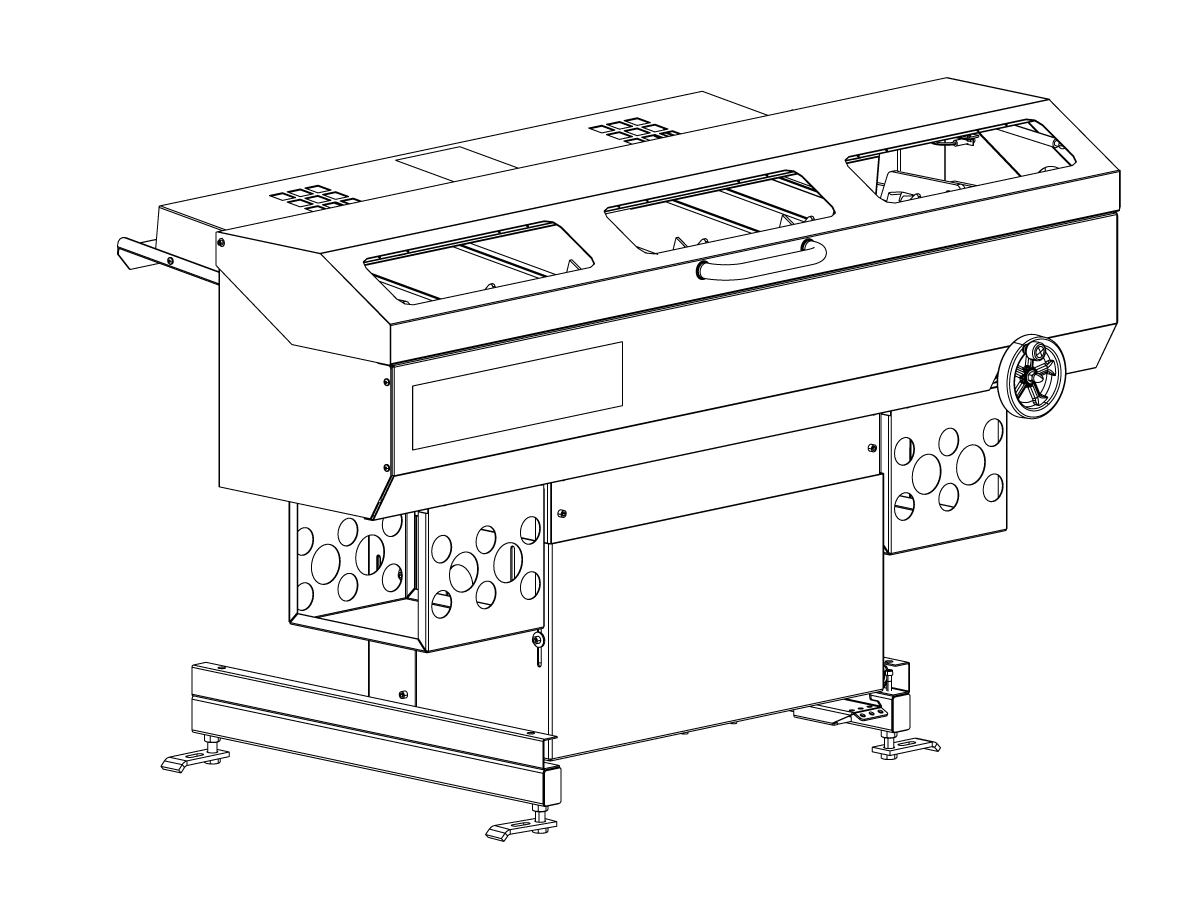
The Haas Bar Feeder is for ST10/15/20/25/30/35 and DS-30 lathes. It is not for ST-30/35 or DS-30 lathes with a gearbox. This procedure tells you how to install a bar feeder that was made after April, 2015 until May, 2017.

Prerequisites
  • Lathe software 11.22A or higher
  • Haas Bar Feeder installation kit
  • Liner guide adapter kit
  • Latest version of the Parameter Checker Program

 Note: Do not remove the red shipping brackets before the bar feeder installation.

 Note: Do not discard the anchor kit.

Haas Bar Feeder - Installation

1

Press [POWER OFF] on the lathe.

Set the main circuit breaker to the OFF position.

Lock the main circuit breaker. Use an approved lock with an approved safety tag.

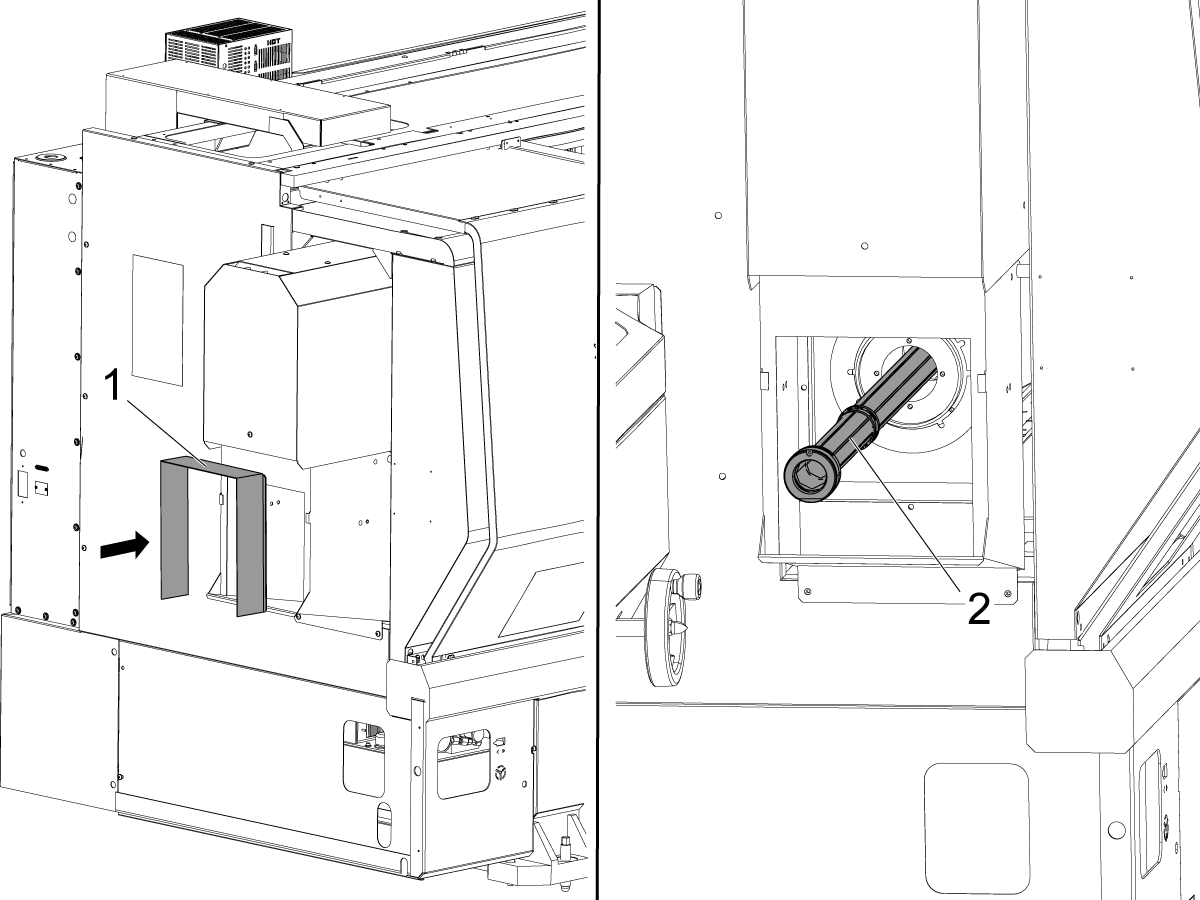
If the lathe is an ST-35, or if the machine was made before 11/1/2015, install the coolant collector extension [1] onto the lathe.

Attach the spindle liner adapter [2] to the spindle. Refer to Lathe - Extruded Spindle Liner - Adaptor Kit - Installation. If the lathe is an ST-35, refer to Lathe - ST-30/30Y Big Bore, ST-35/35Y - Spindle Liner Kit - Installation.

2

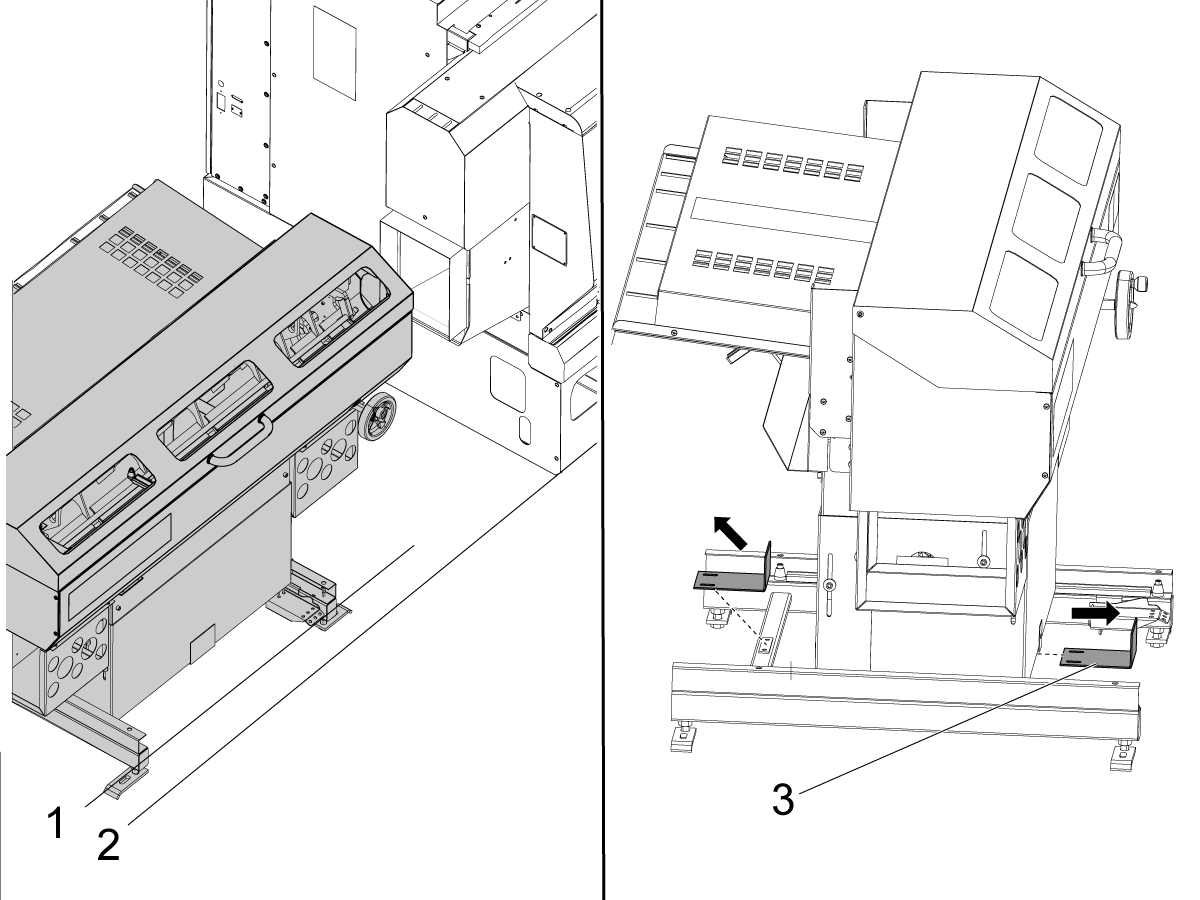
Put the bar feeder adjacent to the lathe.

Make sure the frame ends [1] are parallel to the front [2] of the lathe.

Remove the shipping brackets [3] from the frame of the bar feeder.

3

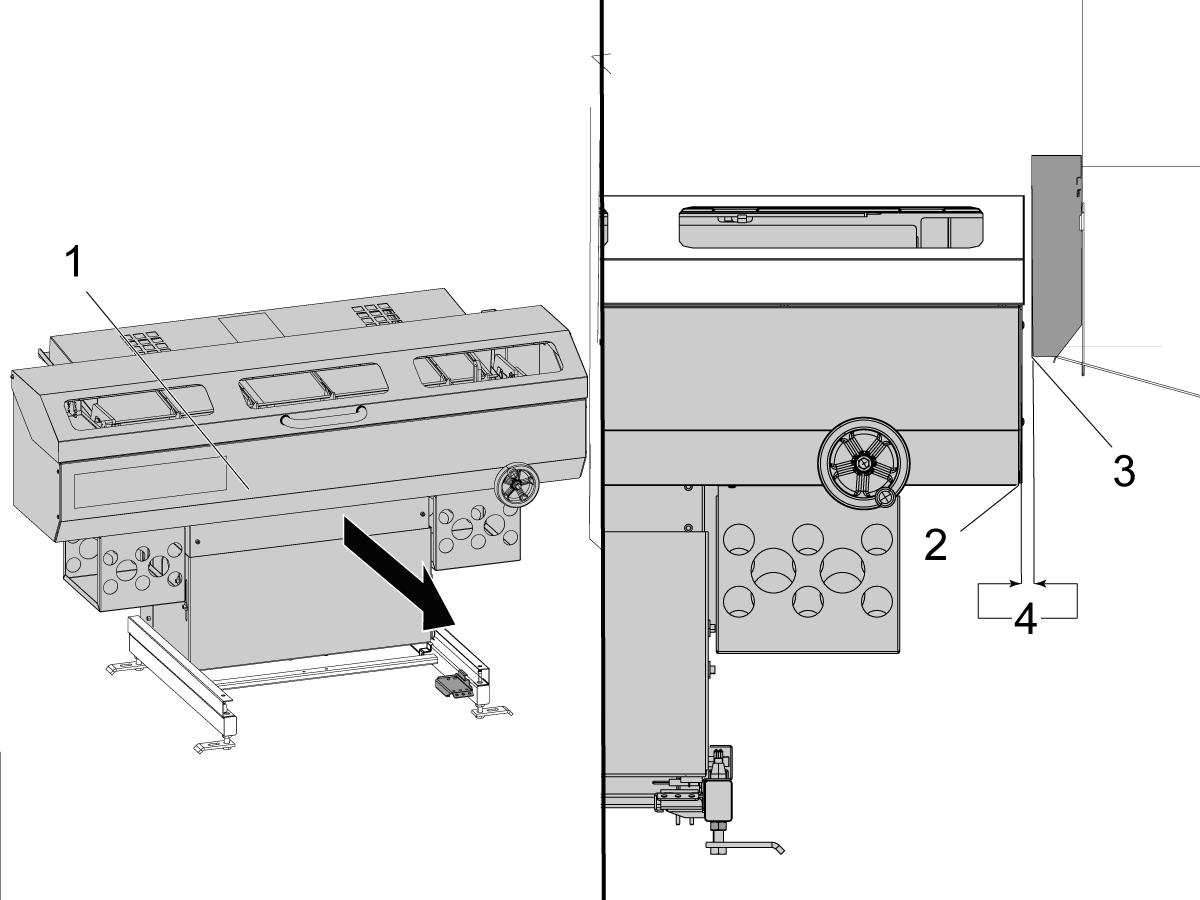
Pull the bar feeder [1] forward until it locks into position.

Find the end of the bar feeder [2].

If the lathe is an ST-35, find the end of the coolant-collector extension [3].

If the lathe is an ST-10, ST-15, ST-20, ST-25, ST-30, or DS-30, find the edge of the coolant collector.

Make sure that the space [4] between them is approximately 0.50" (13 mm).

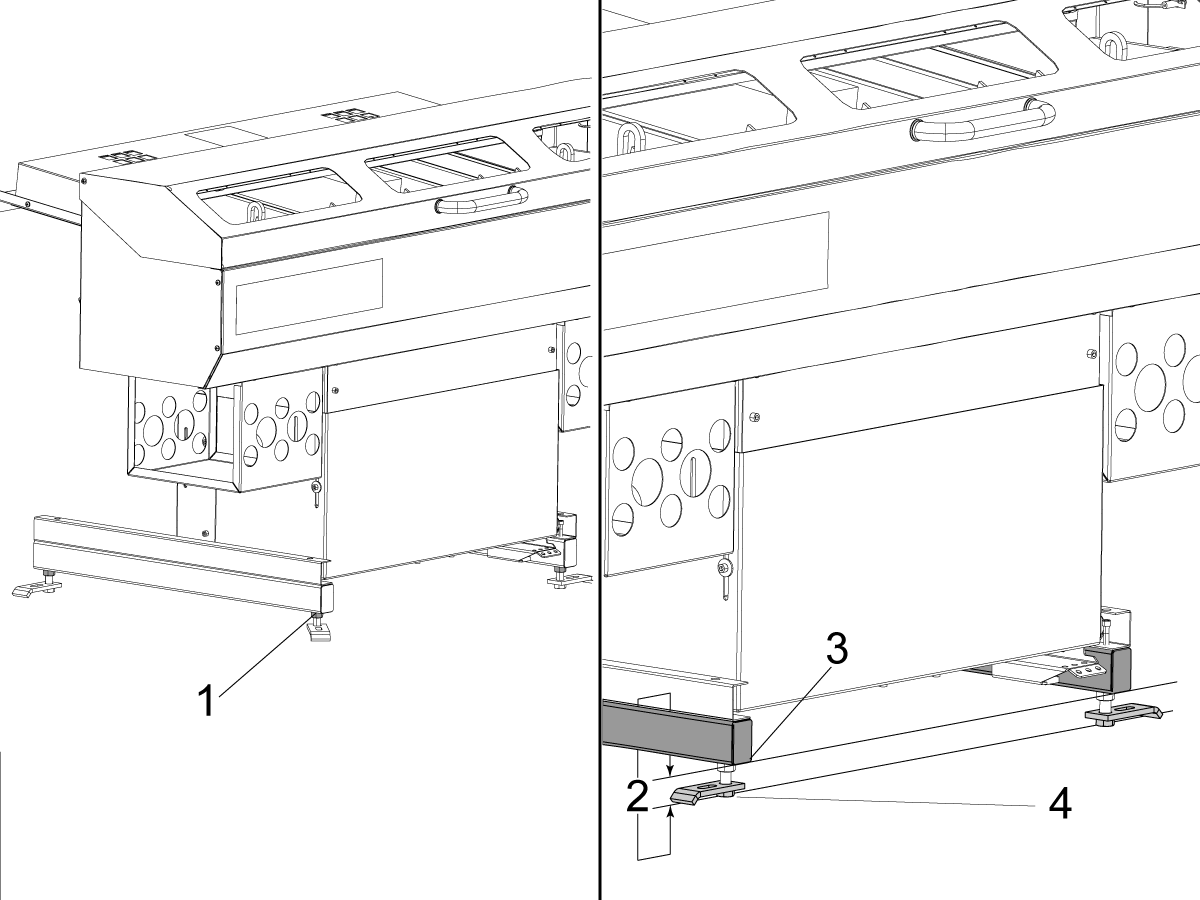
4

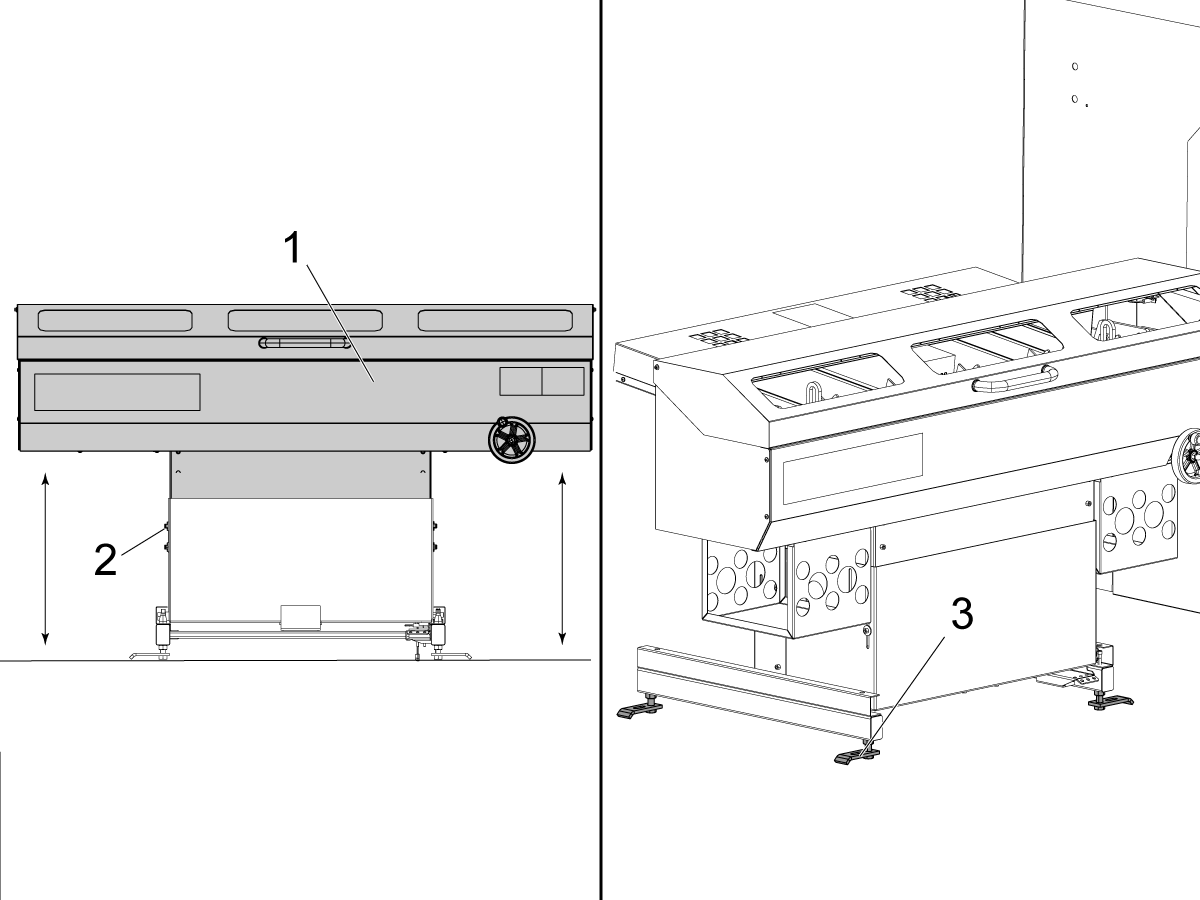
Find the (4) height adjustment screws [1].

Turn the screws [3] until the frame is 2.0" (51 mm) [2] above the floor [4].

Haas Bar Feeder - Electrical Installation

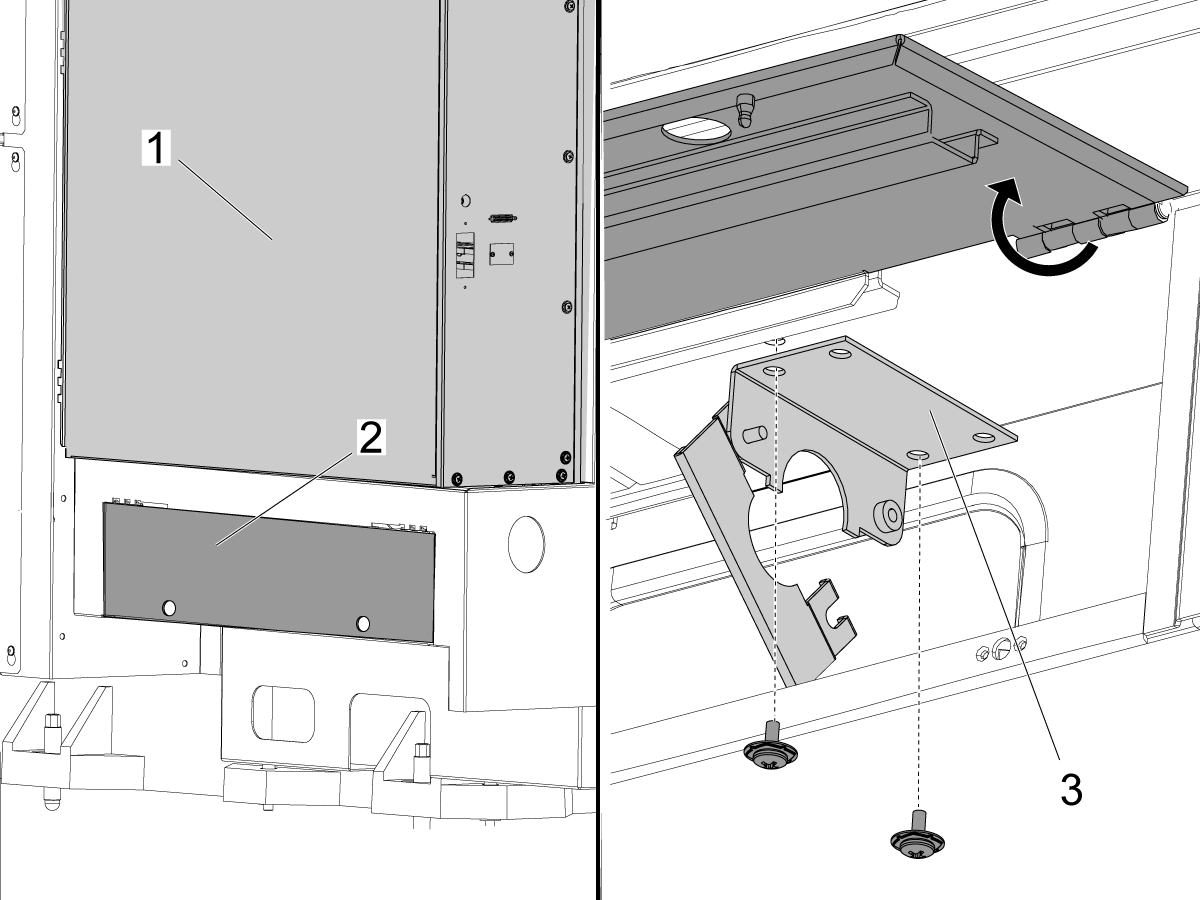
1

Find the access door [2] at the bottom of the control cabinet [1].

Open the access door.

Install the conduit bracket [3] to the bottom of the control cabinet.

Use (2) screws to attach the bracket.

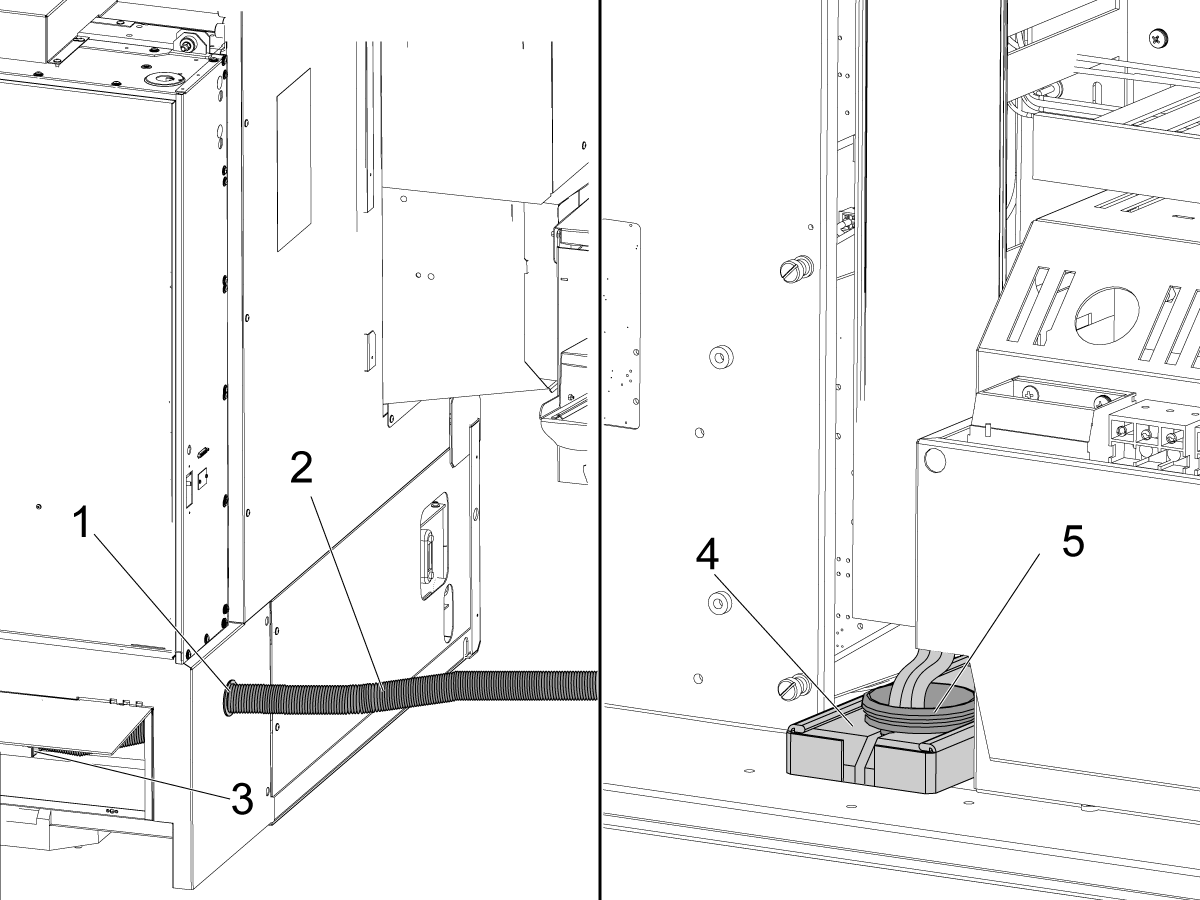
2

Find the cable conduit [2] under the bar feeder.

Put the cable conduit through the hole [1] in the side of the lathe enclosure.

 Note: Some lathes do not have the hole. If the lathe does not have a hole, make one with a 2.0" (51 mm) hole saw. No hole is necessary for the ST-10.

Put the conduit through the conduit bracket [3].

Push the conduit [5] up through the cable exit [4] in the bottom of the control cabinet.

3

Open the control cabinet.

 Danger: If the voltage indicator light is on, do not touch the electrical components. The high voltage in the control cabinet can kill you. Wait for the voltage indicator LED to go off fully.

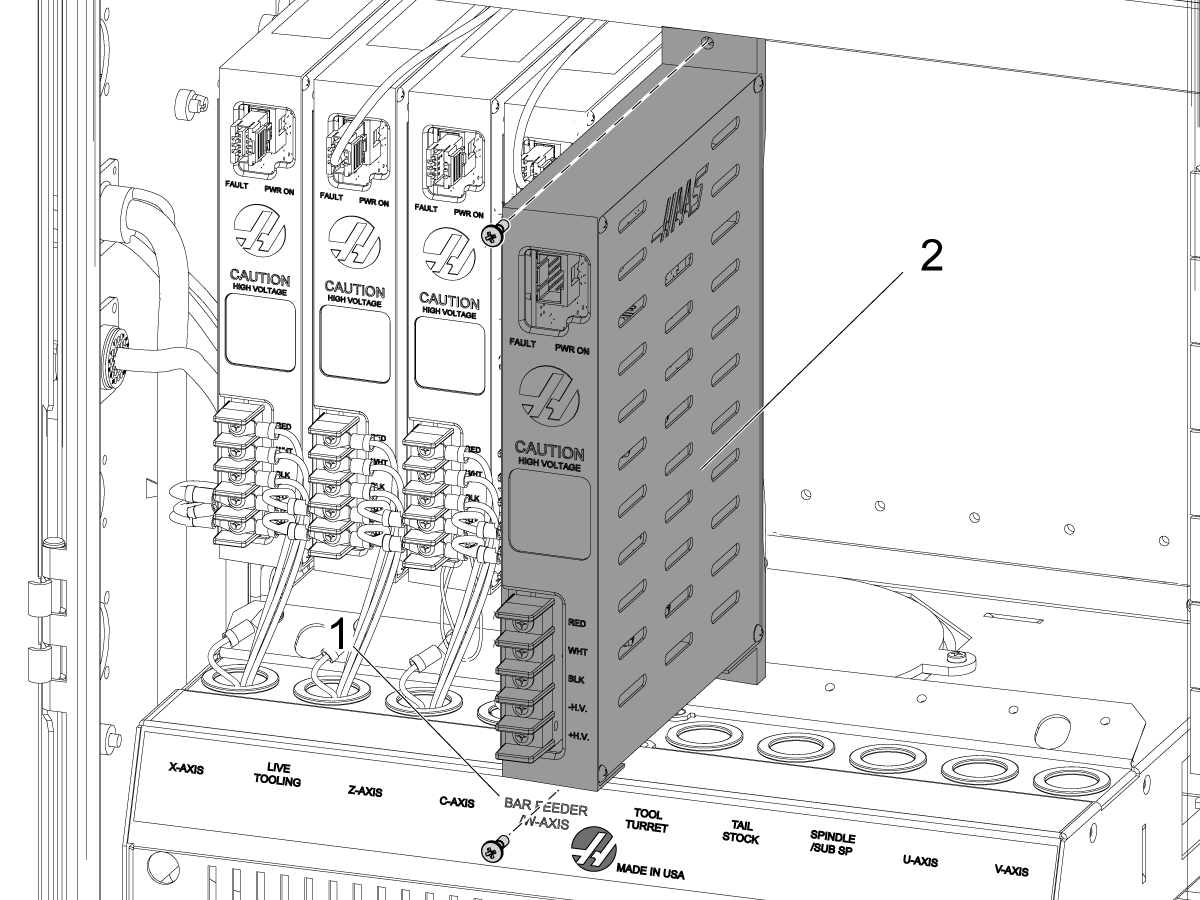
Find the location on the amplifier bank that has the "BAR FEEDER /W AXIS" label [1].

Install the 30-Amp servo amplifier [2], included with the bar feeder, into that location.

4

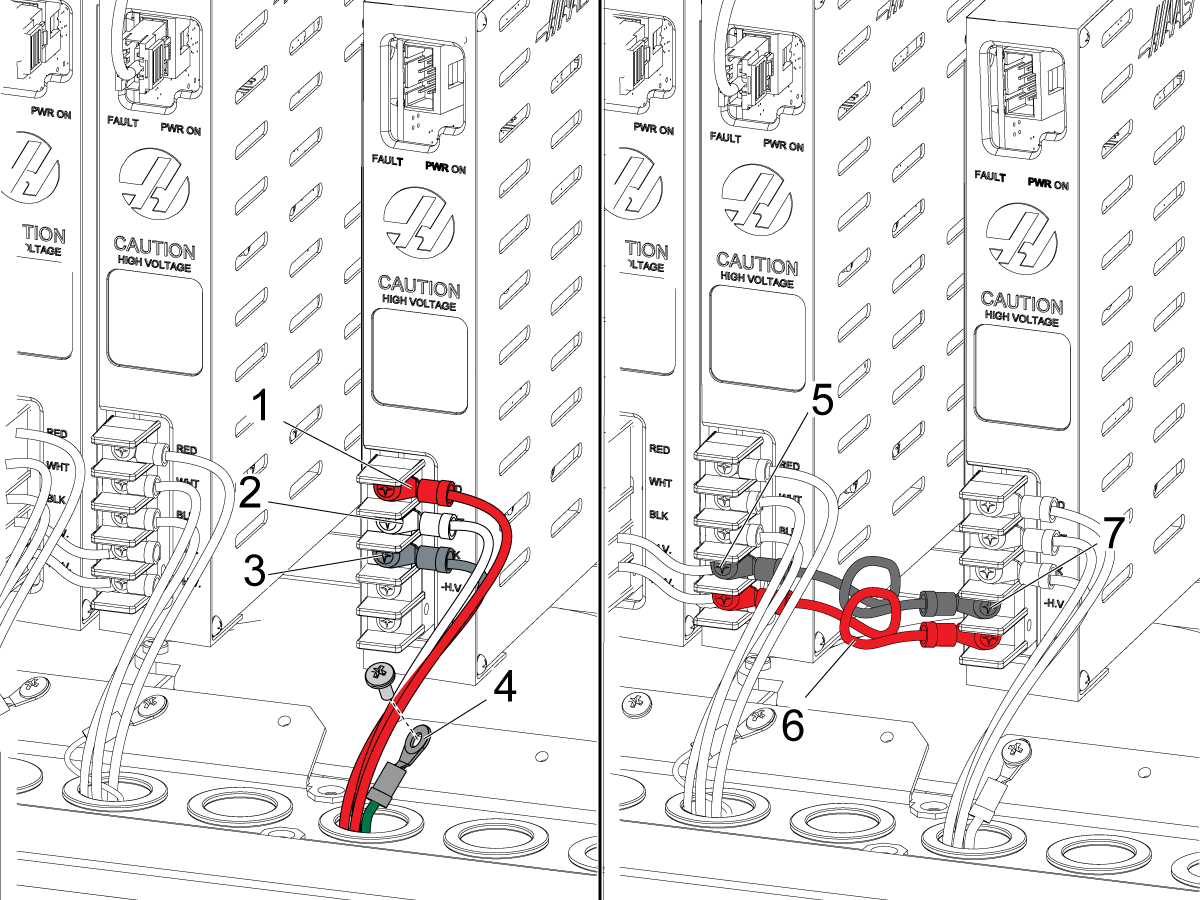
Find the (3) bar feeder power wires that come through the conduit.

Connect the power wires to the high voltage terminals:

  • red to RED [1]
  • white to WHT [2]
  • black to BLK [3]

Connect the ground wire [4] to the bracket for the amplifier fan.

Find the high-voltage terminals [5] on the nearest amplifier.

Find the high-voltage terminals [7] on the bar feeder 30-Amp amplifier.

Install the jumpers [6] from the installation kit between these terminals.

Connect the black wire to -H.V. Connect the red wire to +H.V.

5

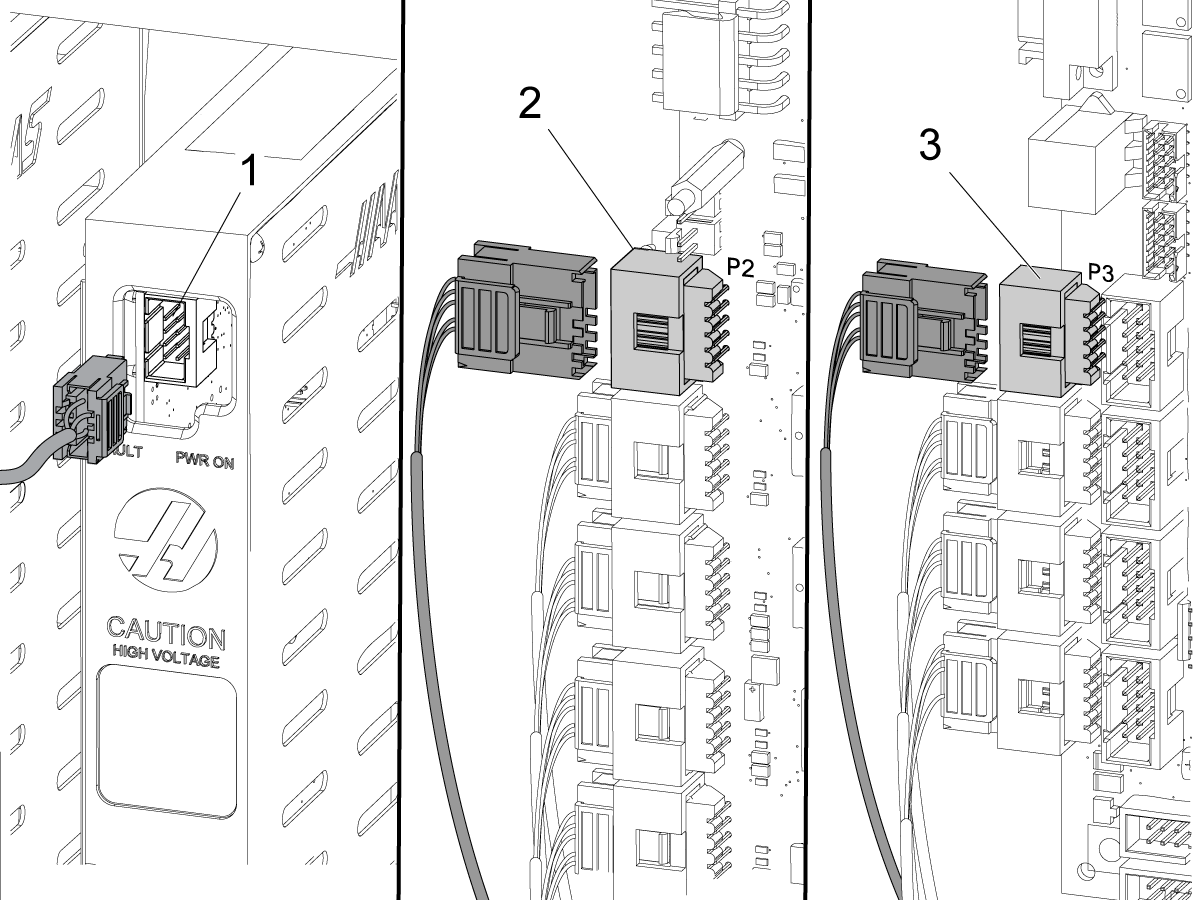
Connect the current command cable, included with the bar feeder, to the connector [1] at the top of the amplifier.

Connect the other end of the cable:

  • If the machine has a Y Axis, connect to P2 [2] on the Mocon PCB.
  • If the machine does not have a Y Axis, connect to P3 [3] on the Maincon PCB.

6

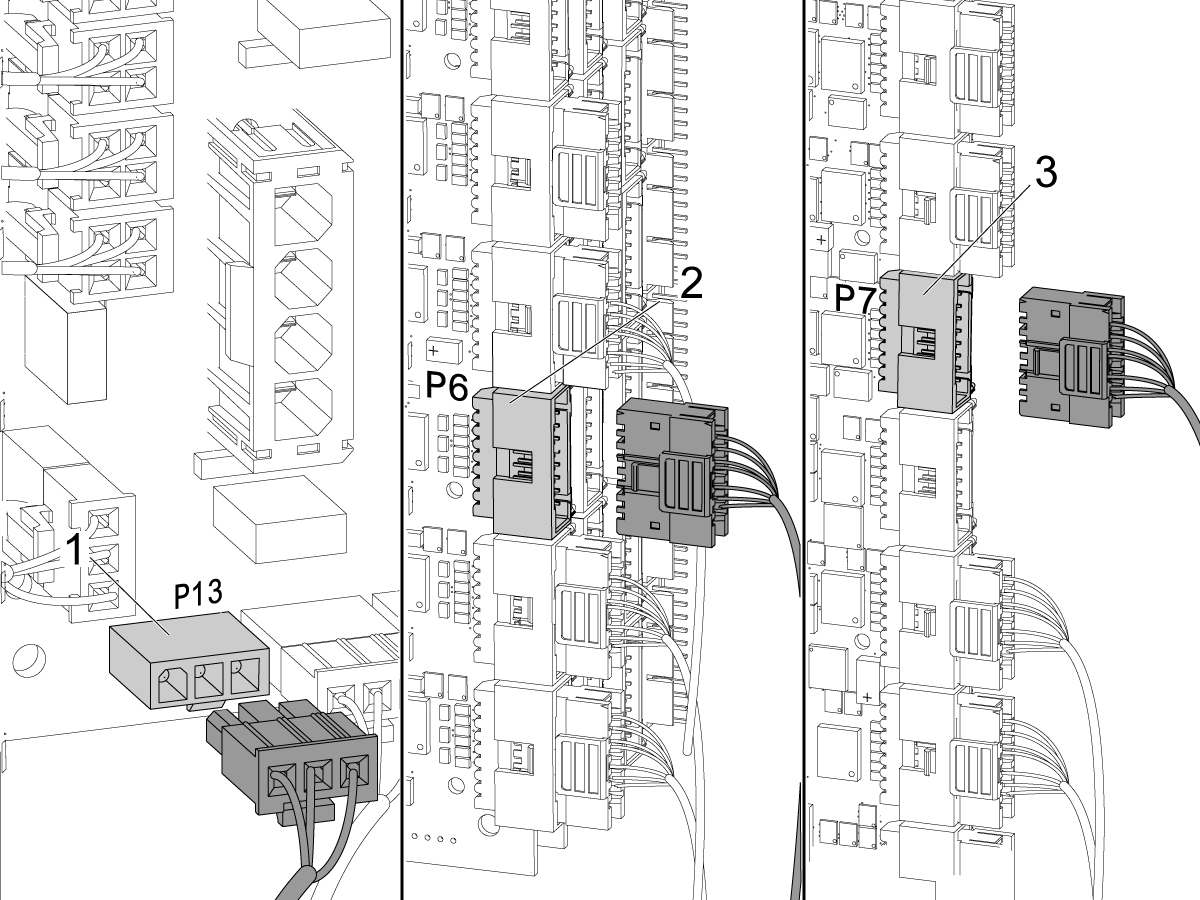
Find cable 90C in the conduit.

Connect cable 90C to P13 [1] on the PSUP PCB.

Install the cover for the PSUP PCB.

Find the servo motor cable in the conduit.

Connect the servo motor cable:

  • If the machine has a Y Axis, connect to P6 [2] on the Mocon PCB
  • If the machine does not have a Y Axis, connect to P7 [3] on the Maincon PCB

7

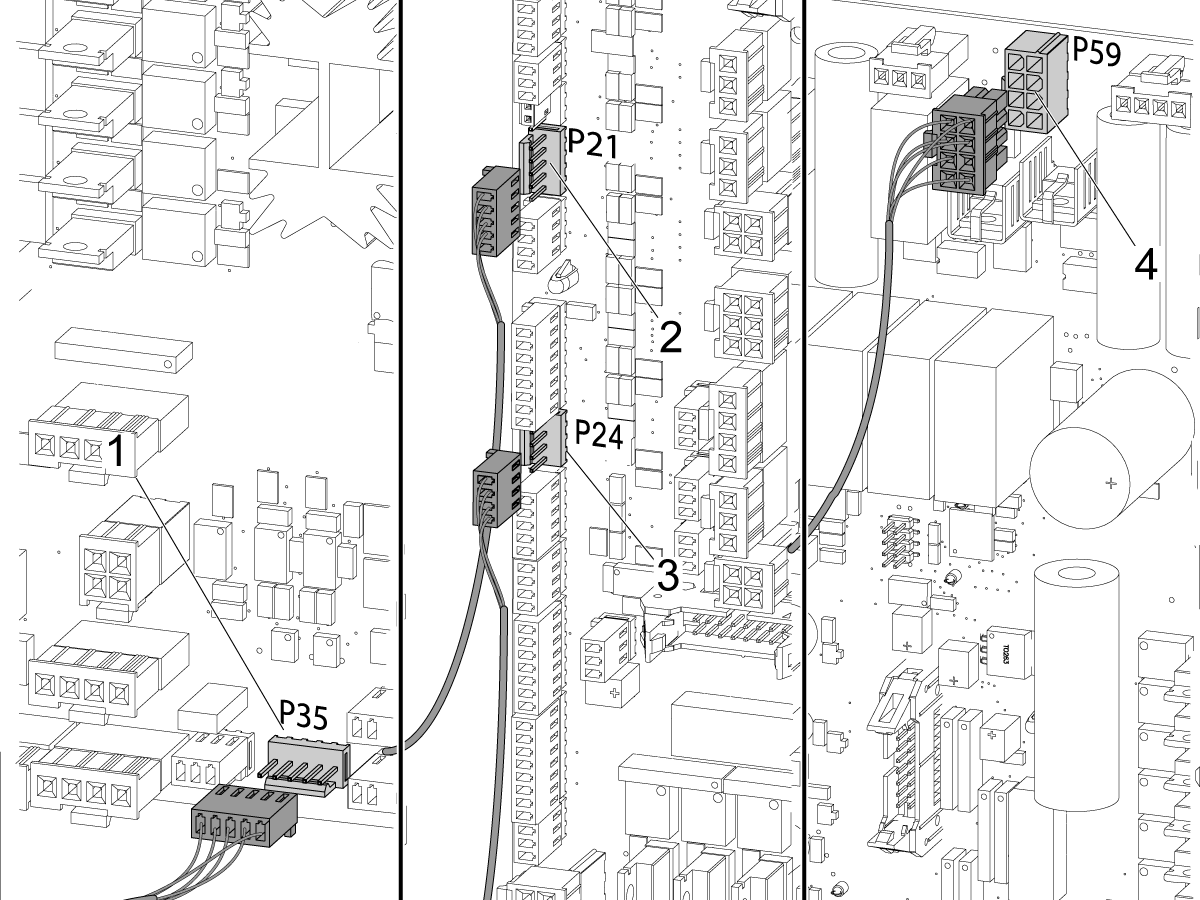
Connect these cables from the conduit to the I/O PCB:

  • Cable 200 long lead connector [1] to P35
  • Cable 240 to P21 [2]
  • Cable 440 to P24 [3]
  • Cable 810 to P59 [4]

Haas Barfeeder Configured for NGC

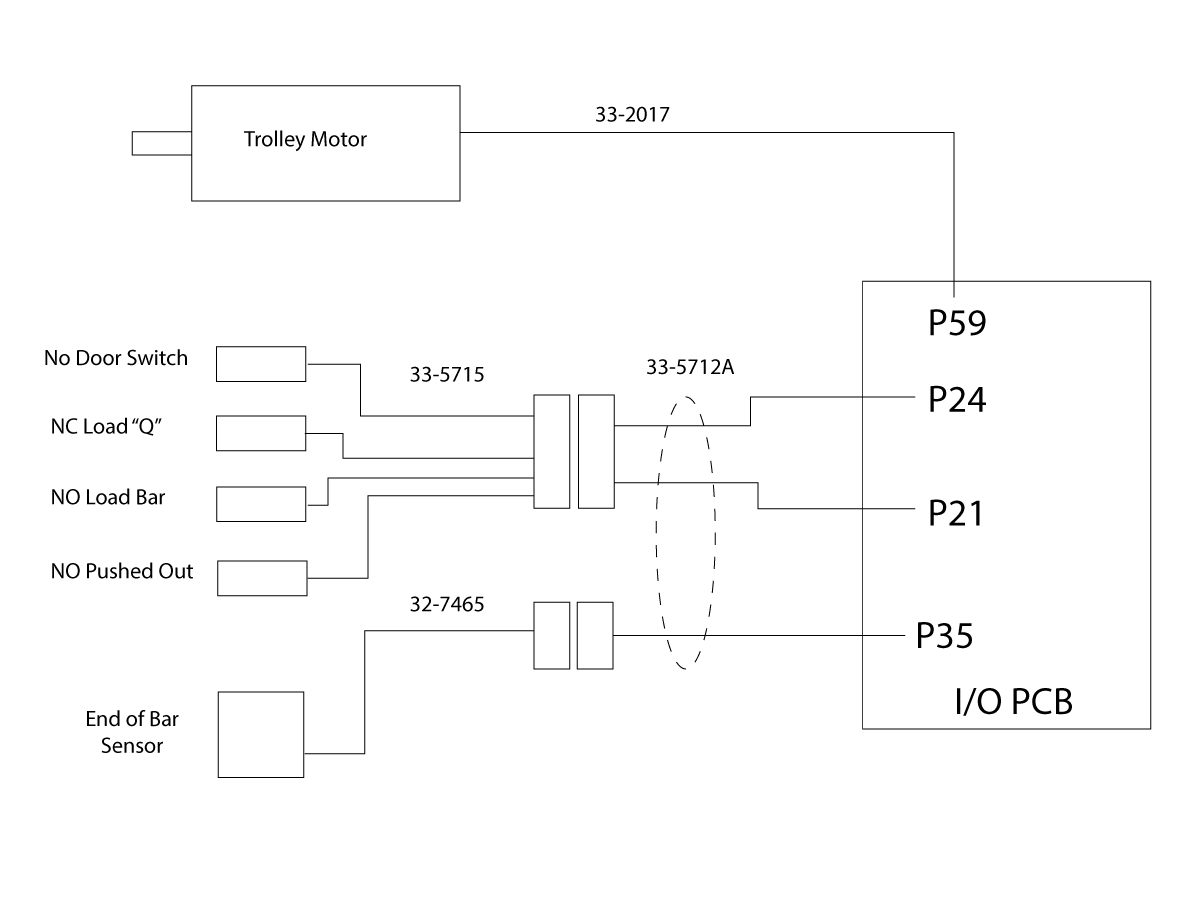
Do this section if your Haas Bar Feeder is configured for a Next Generation Control, if not skip this section.

1

Locate adapter P/N 33-5712A that came with the NGC Haas Bar Feeder, or that came with the 93-3500 service kit.

Connect the Bar Feeder Inputs cable P/N 32-5715 to the NGC to CHC adapter P/N 33-5712A.

Connect the End of Bar Sensor cable P/N 32-7465 to the NGC to CHC adapter P/N 32-5712A.

Connect the NGC to CHC adapter P/N 32-5712A to I/O PCB P24, P21, P35.

Connect dc motor cable P/N 33-2017 to I/O PCB P59.

Haas Bar Feeder - Alignment

1

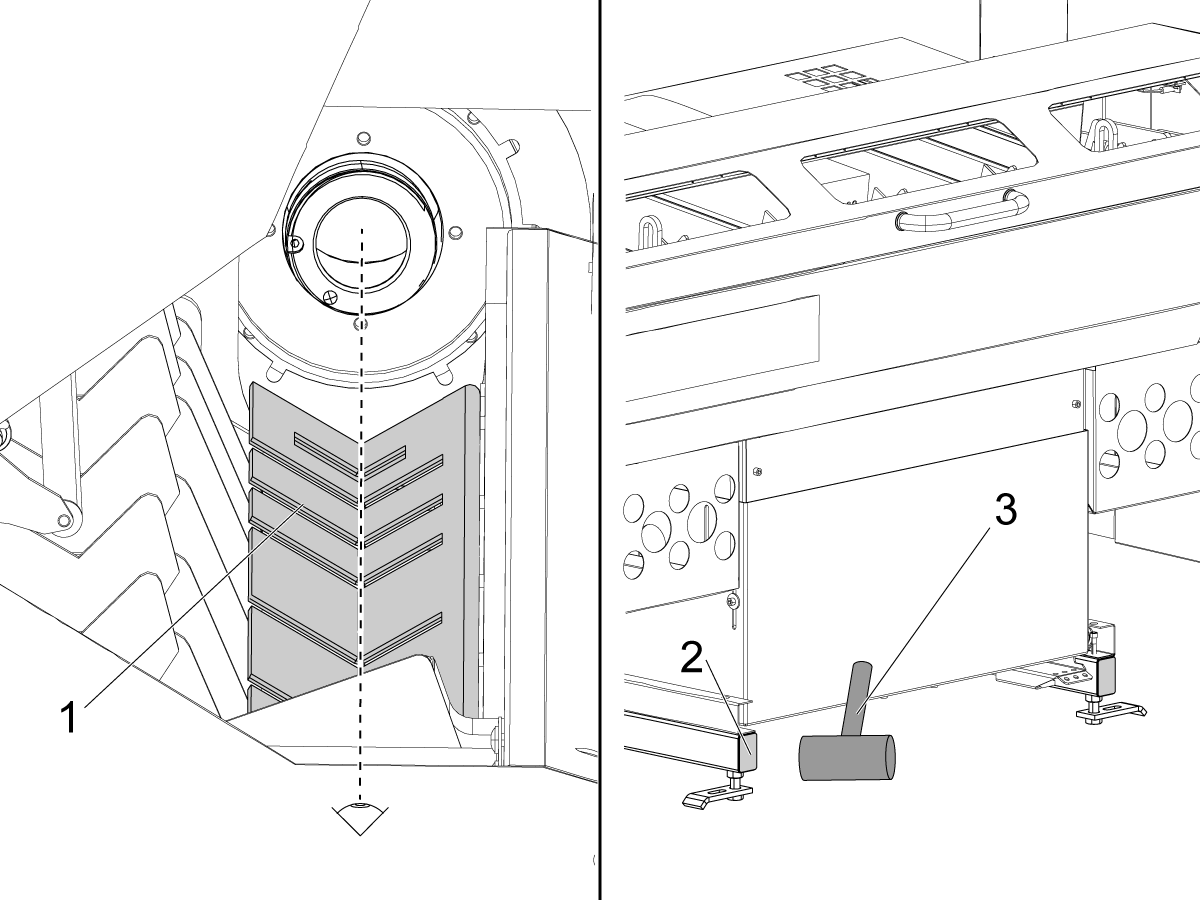
Look at the transfer table [1] on the bar feeder.

The groove in the transfer table aligns with the spindle adaptor.

Tap the frame ends [2] with a rubber mallet [3] to move the bar feeder.

2

Set the main circuit breaker to the ON position. Press [POWER ON].

The end of bar switch is calibrated at the factory. It is not necessary to run the G105 Q5 command.

Make sure to set these parameters.

  • Set parameter 734:30  BRFEED SP LK/SB EOB to 1.
  • Set parameter 390:3  V AXIS DISABLED to 0.

Press [PARAM/DGNOS]. Find the "Parameters" decal on the right rear panel of the bar feeder. Set these parameters to the values on the decal:

  • Parameter 415  TOOL CHANGE OFFSET
  • Parameter 611  BAR FEEDER TYPE
  • If you have software 11.25A or higher, do not use the value for parameter 409 from the decal.
    • Set parameter 409  V GRID OFFSET to -9000.
    • Set parameter 1119  V AXIS ZERO RETURN METHOD to 6.
  • If you have software 11.24 and lower, do not use the value for parameter 409 from the decal.
    • To set parameter 409 V GRID OFFSET do the Axis Grid Offset - Mill 13.14 or Higher and Lathe 6.11 or Higher procedure for the V-Axis.
    • Set parameter 1119  V AXIS ZERO RETURN METHOD to 0.

Make sure the values are correct for the other parameters. Use the Parameter Checker Program - Menu Option (7).

3

Operate this code in MDI mode:

G105 Q6

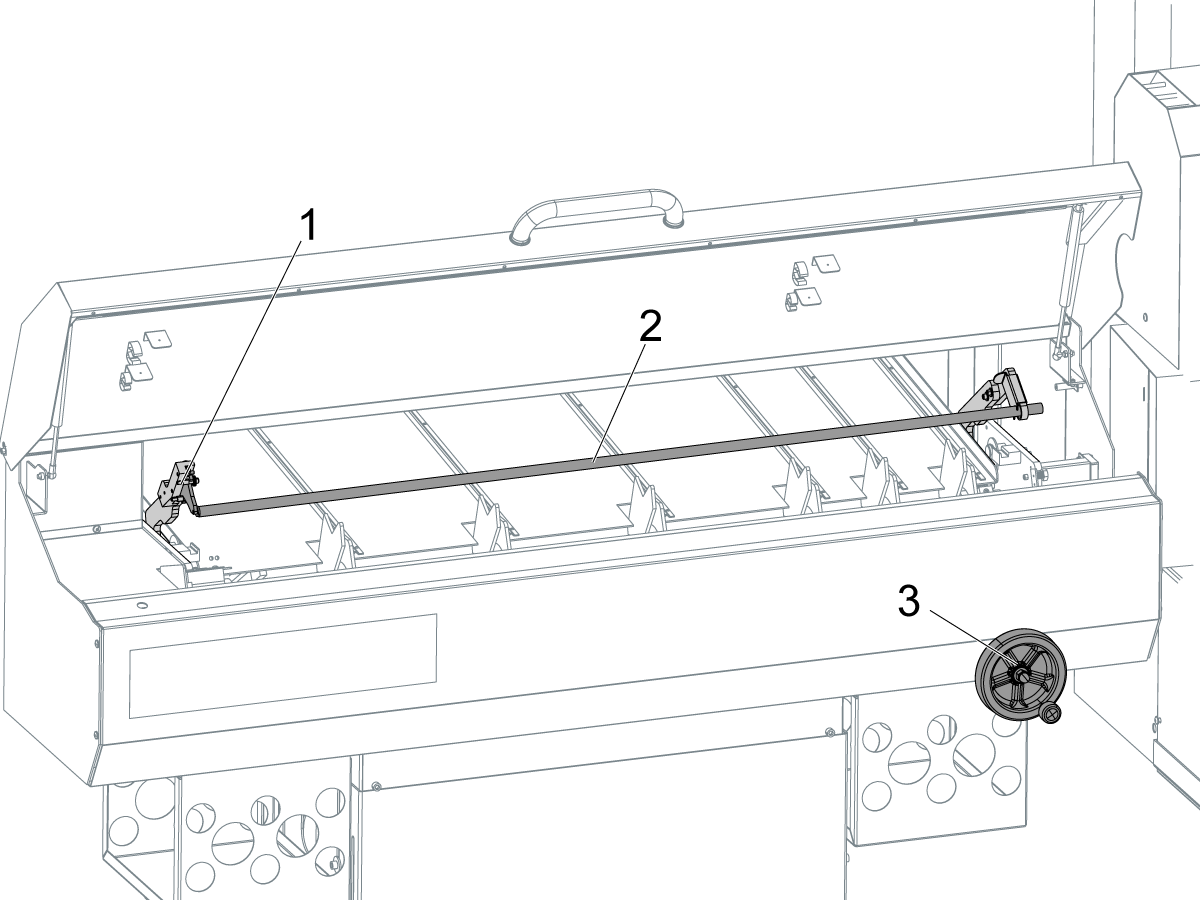
The push rod assembly [1] moves up.

Press [EMERGENCY STOP].

Install the 0.75" push rod [2].

Refer to the operator's manual for instructions to install the push rod.

Turn the adjustment wheel [3] for the transfer table until the table is at the bottom.

4

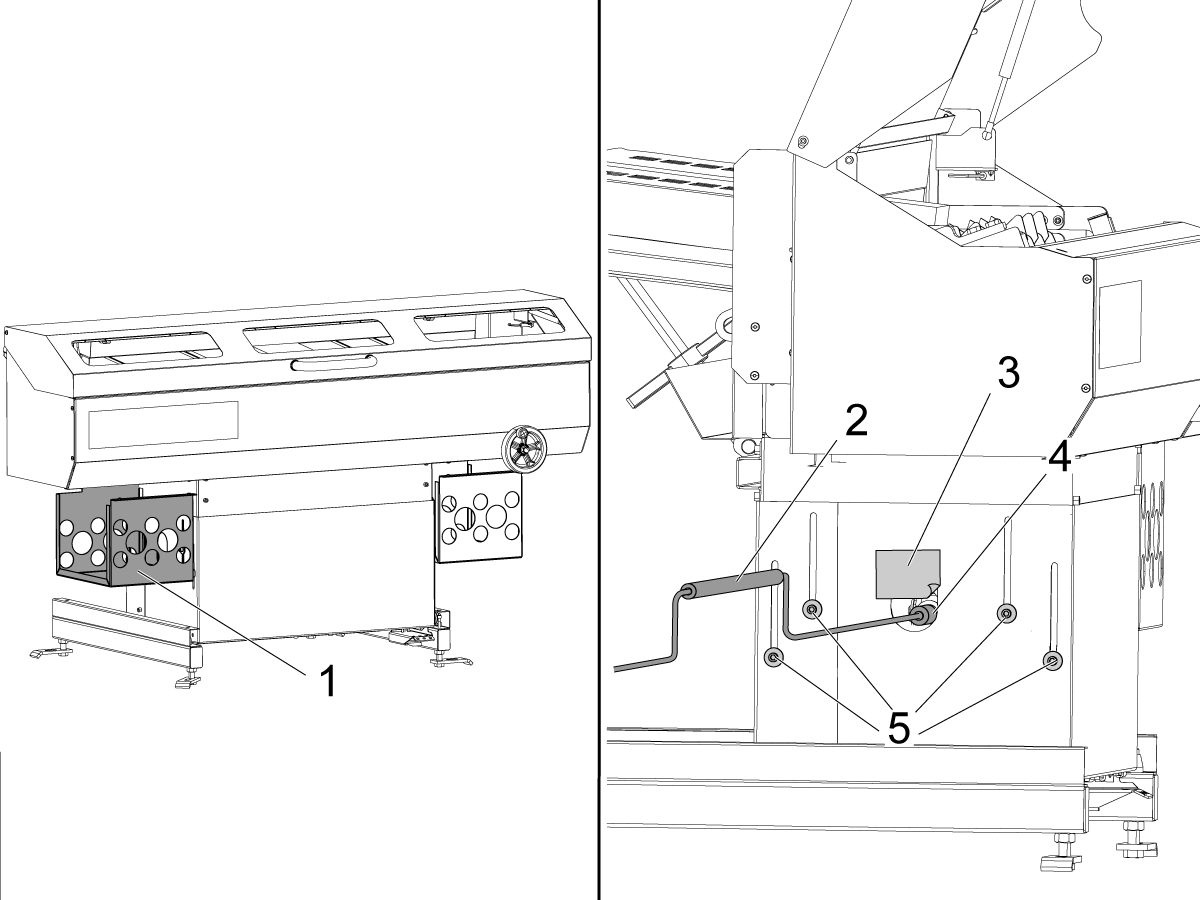
Remove the left-hand rack for the spindle liners.

Remove the sticker [3] from the socket hole [4] on the bar feeder.

Put the sticker above the socket hole.

Find the (8) cart screws [5].

Each side of the bar feeder has (4) screws.

Loosen the (8) screws.

Put the adjustment tool [2] into the socket.

5

Release the [EMERGENCY STOP].

Press [RESET] to stop each alarm.

Operate this code in MDI mode:

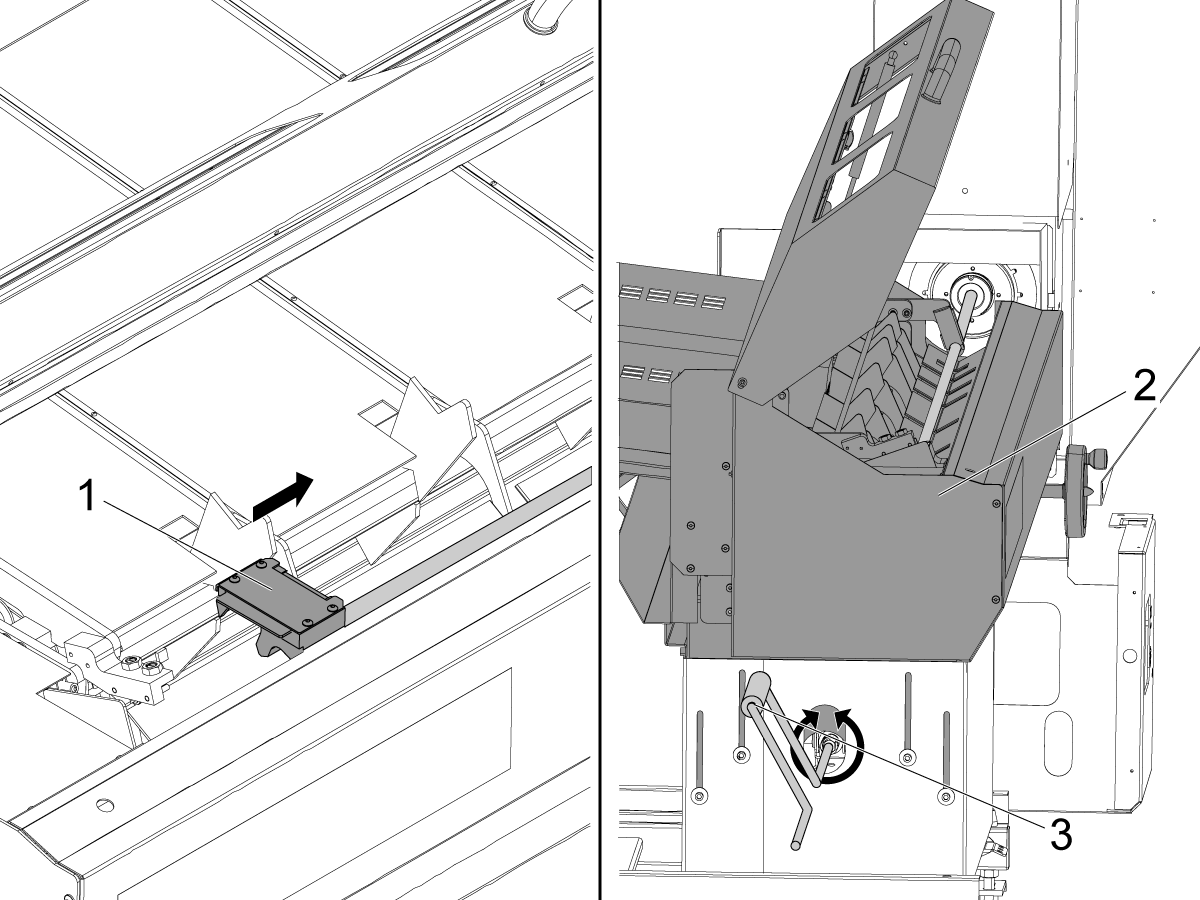
G105 Q7

The push rod assembly moves down.

Press [EMERGENCY STOP].

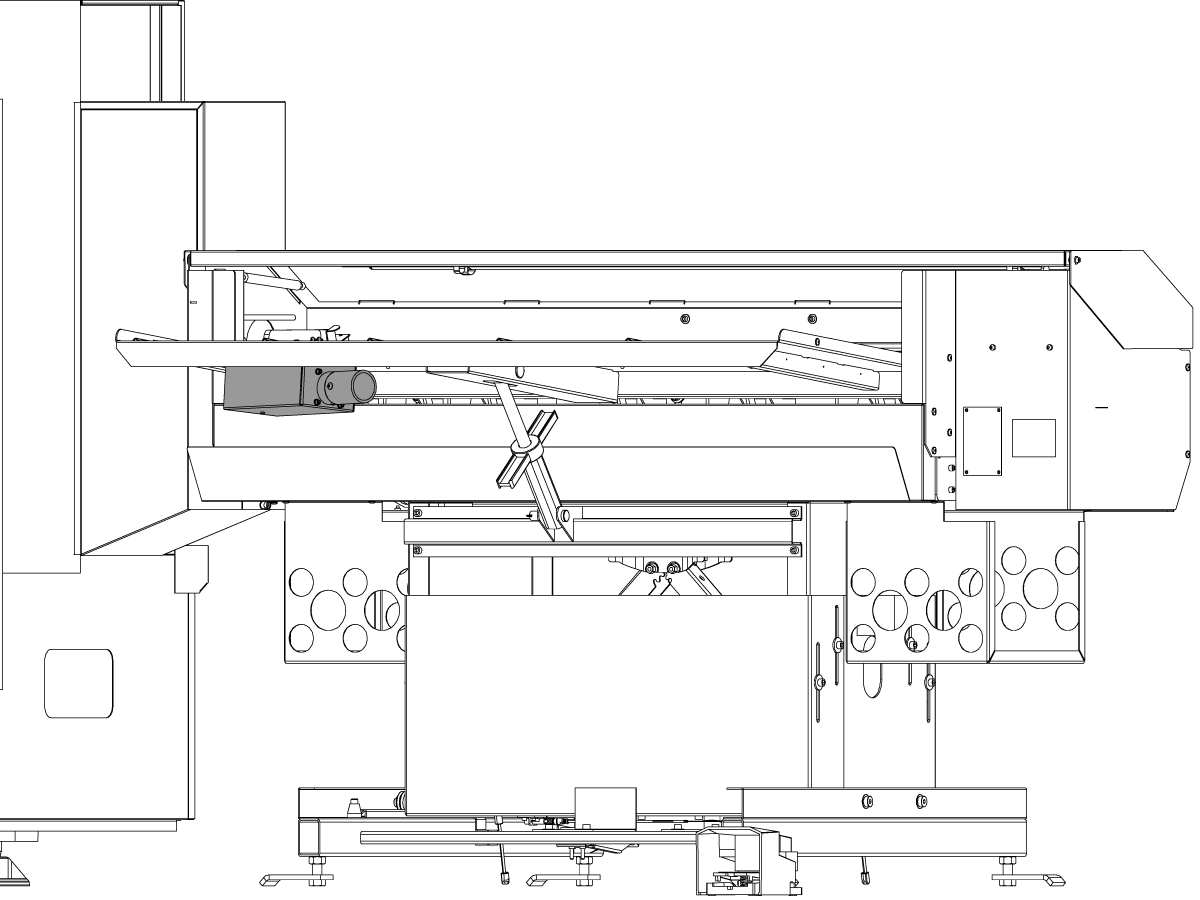
Use your hand to move the push rod actuator [1] toward the lathe.

Use the adjustment tool [3] to move the bar feeder [2] up or down until the push rod can go into the liner adaptor.

6

Make sure the enclosure [1] is level to the ground.

Tighten the (8) cart screws [2].

Remove the adjustment tool.

Replace the racks for the spindle liners.

Find the (4) height adjustment screws [3].

7

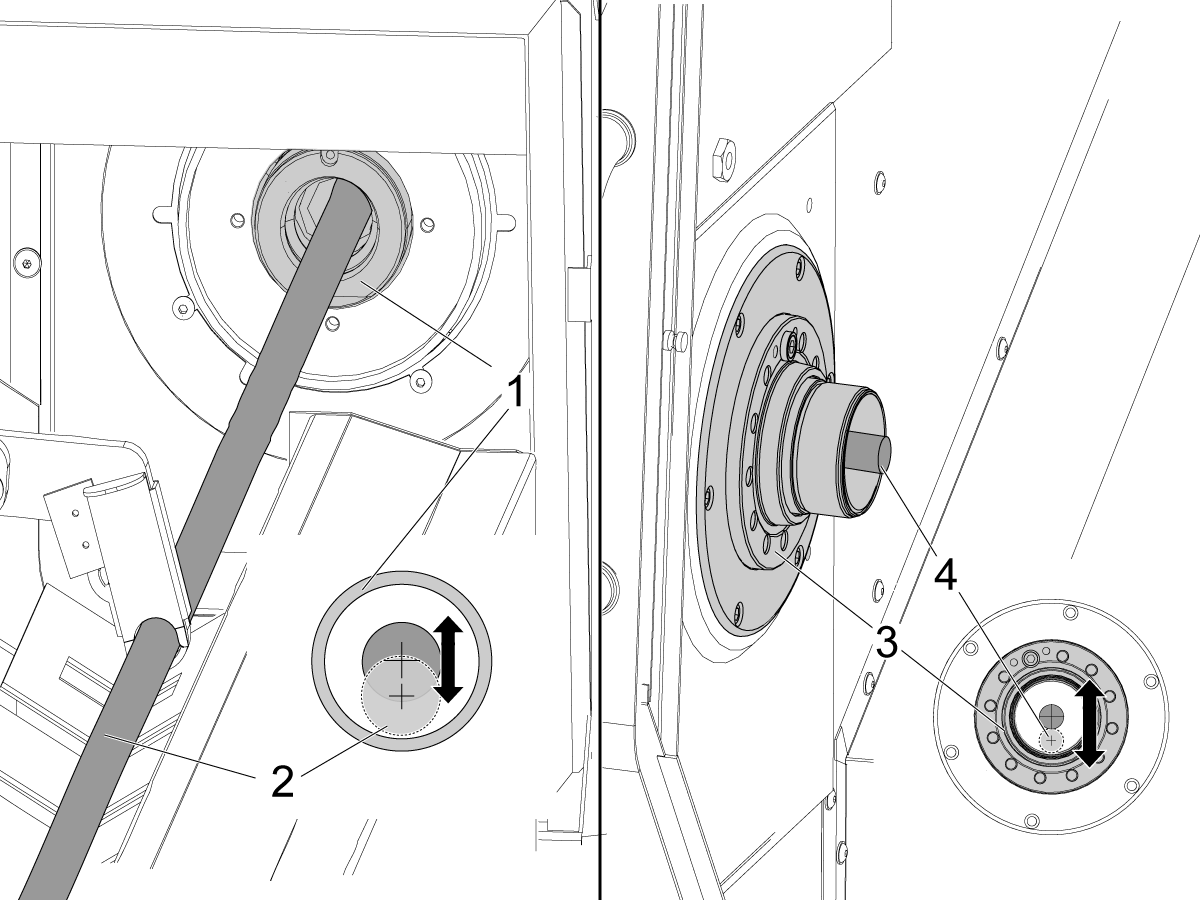
Look at where the push rod [2] goes into the spindle adapter [1].

Turn the (4) height adjustment screws until the center of the push rod aligns with the center of the adapter.

Look at where the push rod [4] goes out of the spindle [3].

Turn the (4) height adjustment screws until the center of the push rod aligns with the center of the spindle.

 Note: Gravity pulls the end of the push rod down a small distance.

Tap the frame ends with a rubber mallet to move the bar feeder from side-to-side, if necessary.

Return the push rod to its home position.

8

Step on the release pedal.

Push the bar feeder backward to the end of its travel.

If the bar feeder is correctly leveled, the gas shock holds the bar feeder in the rear location.

If the bar feeder must be aligned, adjust the rear feet until the bar feeder smoothly locks in the forward position and moves fully backward.

Haas Bar Feeder - Anchor Instructions

1

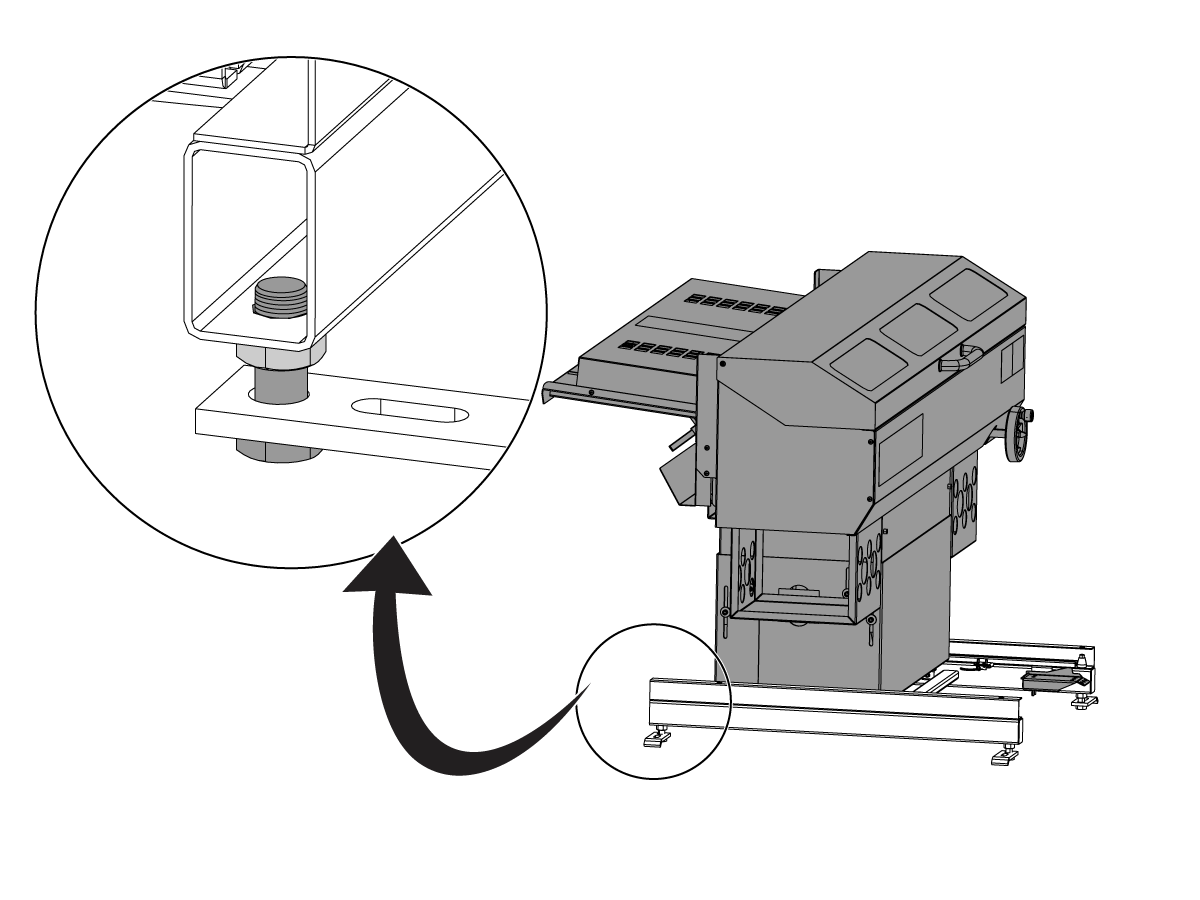
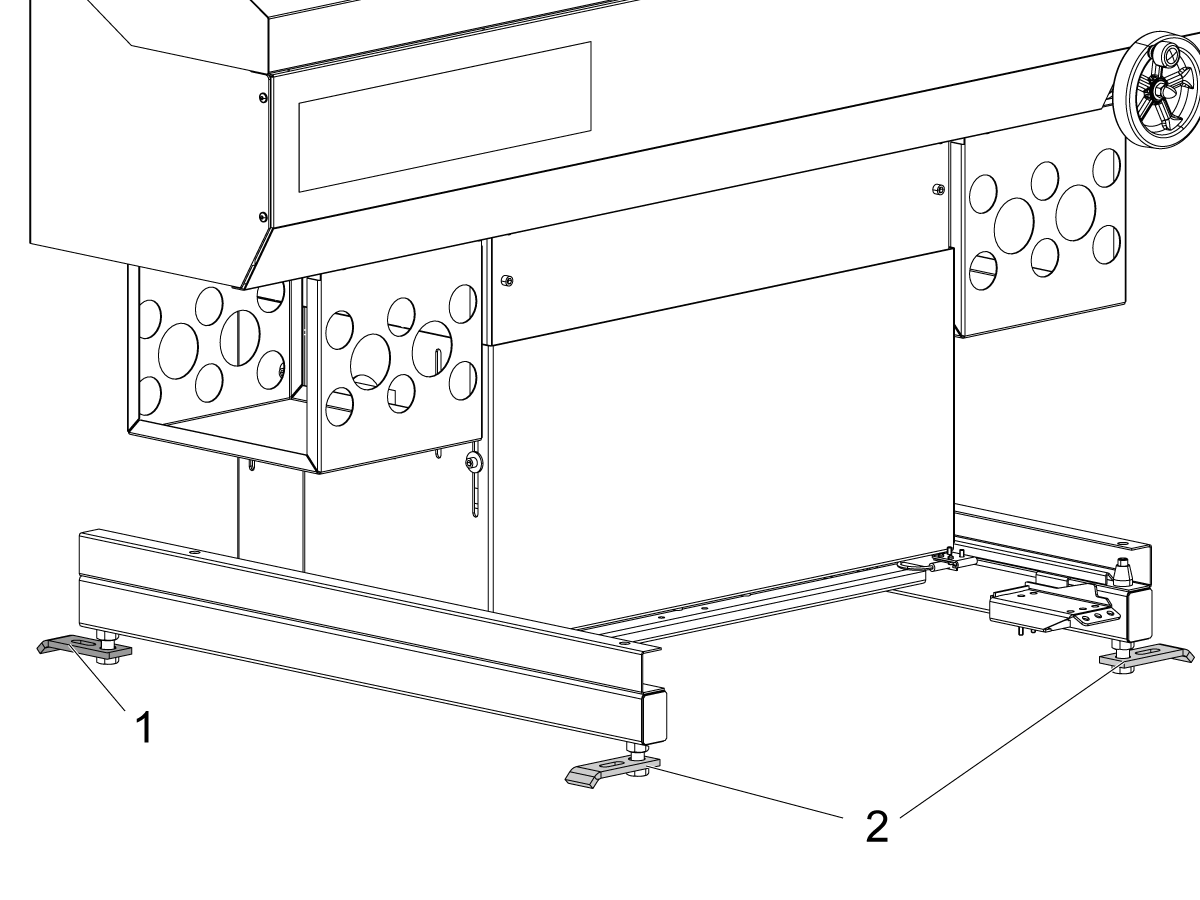
Turn the rear feet [1] until they are parallel to the bottom rails, as shown.

The front feet [2] must remain perpendicular to the bottom rails, as shown.

2

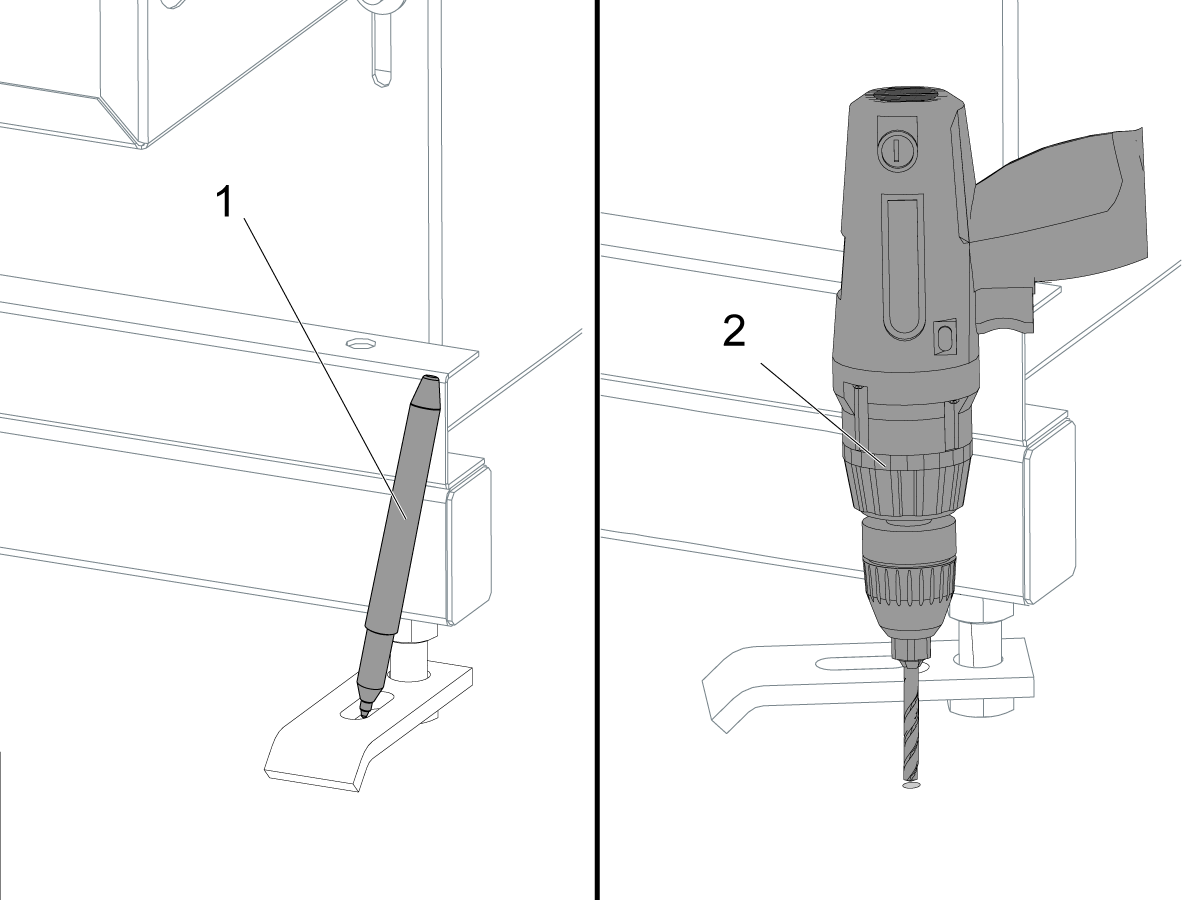
Use a pen [1] to put a mark on the floor at the location of each foot.

 Note: Turn the feet to the sides of the bar feeder to avoid a tripping hazard.

Drill [2] a Ø 0.50" (13 mm) hole in each mark.

Drill the hole to a depth of 2.0" (51 mm).

3

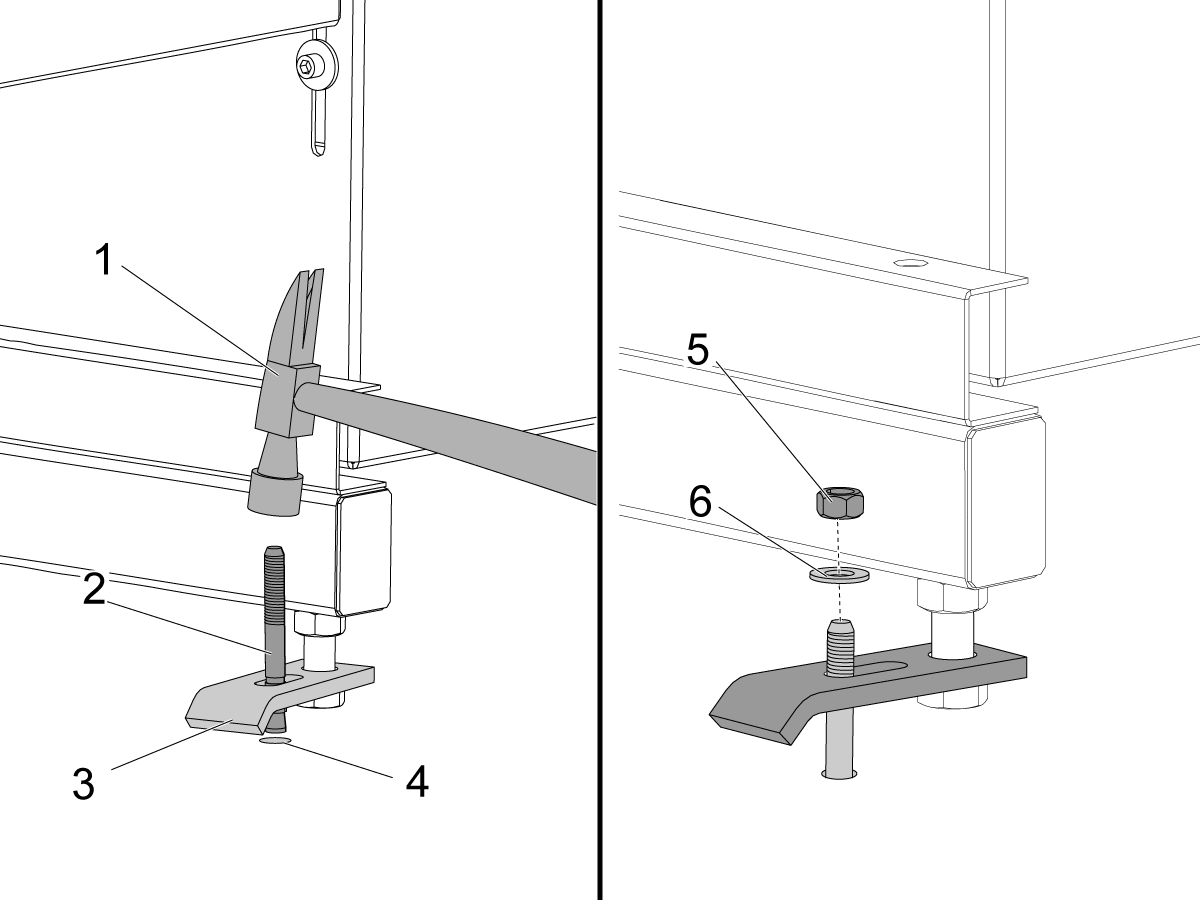
Put the foot [3] over the hole [4].

Put an anchor [2] into the hole.

Use a hammer [1] to tap the anchor.

Tap the anchor until it is at the bottom of the hole.

Put a washer [6] and a nut [5] on the bolt.

Torque each nut to 55 ft-lb (75 Nm).

Haas Bar Feeder Chamfer Machine Installation

1

Follow the Bar Feeder Chamfer Device procedure to install the Bar Feeder Chamfer Machine if equipped. 

Recently Viewed Items

You Have No Recently Viewed Items Yet

Feedback
Haas Logo

Haas Delivered Price

This price includes shipping cost, export and import duties, insurance, and any other expenses incurred during shipping to a location in France agreed with you as a buyer. No other mandatory costs can be added to the delivery of a Haas CNC Product.

KEEP UP WITH THE LATEST HAAS TIPS AND TECHNOLOGY...

Sign up now!   

HAAS TOOLING ACCEPTS THE FOLLOWING:

  • Service & Support
  • Owners
  • Request Service
  • Operator Manuals
  • Haas Parts
  • Rotary Repair Request
  • Pre-Install Guides
  • Shopping Tools
  • Build & Price a New Haas
  • Available Inventory
  • The Haas Price List
  • CNCA Financing
  • About Haas
  • Accessibility Statement
  • DNSH Statement
  • Export Compliance
  • Careers
  • Certifications & Safety
  • Contact Us
  • History
  • Terms & Conditions
  • Haas Tooling Terms & Conditions
  • Privacy
  • Warranty
  • Haas Community
  • Haas Certification Program
  • Haas Motorsports
  • Gene Haas Foundation
  • Haas Technical Education Community
  • Events
  • Join the Conversation
  • Facebook
  • X
  • Flickr
  • YouTube
  • LinkedIn
  • Instagram
  • TikTok
© 2026 Haas Automation, Inc – CNC Machine Tools
This site is protected by reCAPTCHA and the Google Privacy Policy and Terms of Service apply.

2800 Sturgis Rd., Oxnard, CA 93030
Toll Free: (888) 817-4446 / Fax: 805-278-8554