My Haas Welcome,
!
Haas Tooling MyHaas/HaasConnect Sign In Register Haas Tooling MyHaas/HaasConnect Sign Out Welcome, My Machines Latest Activity My Quotes My Account My Users Sign Out
Find Your Distributor
  1. Select Language
    1. English
    2. Deutsch
    3. Español - España
    4. Español - México
    5. Français
    6. Italiano
    7. Português
    8. Český
    9. Dansk
    10. Nederlands
    11. Magyar
    12. Polski
    13. Svenska
    14. Türkçe
    15. 中文
    16. Suomi
    17. Norsk
    18. الإنجليزية
    19. български
    20. Hrvatski
    21. Ελληνικά
    22. Română
    23. Slovenský
    24. Slovenščina
    25. 한국어
    26. 日本語
    27. Українська
  • machines Main Menu
    • Vertical Mills
      Vertical Mills
      Vertical Mills View All
      • Vertical Mills
      • VF Series
      • Universal Machines
      • VR Series
      • VP-5 Prismatic
      • Pallet-Changing VMCs
      • Mini Mills
      • Mold Machines
      • High-Speed Drill Centers
      • Drill/Tap/ Mill Series
      • Toolroom Mills
      • Pocket Mill
      • Compact Mills
      • Gantry Series
      • SR Sheet Routers
      • Extra-Large VMC
      • Double-Column Mills
      • 3+2 Positioning Machines
    • Multi-Axis Solutions
      Multi-Axis Solutions
      Multi-Axis Solutions View All
      • Multi-Axis Solutions
      • Y-Axis Lathes
      • 5-Axis Mills
    • Lathes
      Lathes
      Lathes View All
      • Lathes
      • ST Series
      • Dual-Spindle
      • Box Way Series
      • Toolroom Lathes
      • Chucker Lathe
      • Haas Bar Feeders
    • Horizontal Mills
      Horizontal Mills
      Horizontal Mills View All
      • Horizontal Mills
      • 50-Taper
      • 40-Taper
    • Rotaries & Indexers
      Rotaries & Indexers
      Rotaries & Indexers View All
      • Rotaries & Indexers
      • Rotary Tables
      • Indexers
      • 5-Axis Rotaries
      • Extra-Large Rotaries
    • Special Series
      Special Series
      Special Series View All
      • Special Series
      • EU_Series_Redirect
    • Automation Systems
      Automation Systems
      Automation Systems View All
      • Automation Systems
      • Mill Automation
      • Lathe Automation
      • Automatic Parts Loaders
      • Automation Models
    • Desktop Machines
      Desktop Machines
      Desktop Machines View All
      • Desktop Machines
      • Desktop Mill
      • Desktop Lathe
      • Control Simulator, Standard
      • Control Simulator, Premium
    • Shop Equipment
      Shop Equipment
      Shop Equipment View All
      • Shop Equipment
      • Knee Mill
      • Haas Manual Lathes
      • Haas Saws
    • Fabrication Machines
      Fabrication Machines
      Fabrication Machines View All
      • Fabrication Machines
      • Laser Cutting Machines
      • CNC Press Brakes
    • QUICK LINKS Special Series  Special Series 
      EU SERIES EU SERIES BUILD & PRICE | PRICE LIST BUILD & PRICE | PRICE LIST In-Stock Machines In-Stock Machines WHAT’S NEW WHAT’S NEW YOUR FIRST CNC YOUR FIRST CNC
      SHOPPING TOOLS
      • Build & Price a Haas
      • Price List
      • Available Inventory
      • CNCA Financing
      WANT TO TALK TO SOMEONE?

      A Haas Factory Outlet (HFO) can answer your questions, and walk you through your best options.

      CONTACT YOUR DISTRIBUTOR >
  • Options Main Menu
    • The Haas Control Value Option Packages
      Value Option Packages
      Value Option Packages View All
      • Value Option Packages
    • Product Image Spindles
      Spindles
      Spindles View All
      • Spindles
    • Product Image Tool Changers
      Tool Changers
      Tool Changers View All
      • Tool Changers
    • Product Image 4th- | 5th-Axis
      4th- | 5th-Axis
      4th- | 5th-Axis View All
      • 4th- | 5th-Axis
    • Product Image Turrets & Live Tooling
      Turrets & Live Tooling
      Turrets & Live Tooling View All
      • Turrets & Live Tooling
    • Product Image Probing
      Probing
      Probing View All
      • Probing
    • Haas Chip & Coolant Management Chip & Coolant Management
      Chip & Coolant Management
      Chip & Coolant Management View All
      • Chip & Coolant Management
    • The Haas Control The Haas Control
      The Haas Control
      The Haas Control View All
      • The Haas Control
    • Product Image Product Options
      Product Options
      Product Options View All
      • Product Options
    • Product Image Tooling & Fixturing
      Tooling & Fixturing
      Tooling & Fixturing View All
      • Tooling & Fixturing
    • Product Image Workholding
      Workholding
      Workholding View All
      • Workholding
    • Product Image 5-Axis Solutions
      5-Axis Solutions
      5-Axis Solutions View All
      • 5-Axis Solutions
      • 5 Easy Steps to 5-Axis
    • QUICK LINKS Special Series  Special Series 
      EU SERIES EU SERIES BUILD & PRICE | PRICE LIST BUILD & PRICE | PRICE LIST In-Stock Machines In-Stock Machines WHAT’S NEW WHAT’S NEW YOUR FIRST CNC YOUR FIRST CNC
      SHOPPING TOOLS
      • Build & Price a Haas
      • Price List
      • Available Inventory
      • CNCA Financing
      WANT TO TALK TO SOMEONE?

      A Haas Factory Outlet (HFO) can answer your questions, and walk you through your best options.

      CONTACT YOUR DISTRIBUTOR >
  • Why Haas Main Menu
      Discover the Haas Difference
    • Why Haas
    • MyHaas
    • Education Community
    • Industry 4.0
    • Haas Certification
    • Customer Testimonials
  • Service Main Menu
      Welcome to Haas Service
      SERVICE HOME Operator’s Manuals How-To Procedures Troubleshooting Guides Preventive Maintenance Haas Parts Haas Tooling Videos
  • Videos Main Menu
  • Main Menu
    • View All
    • View All
    • View All
    • View All
      • HTEC Curriculum Support
      • Haas Value Option Packages (VOP) Journey
    • View All
      • Haas 10 kg Cobot Package
      • Cobot Kits
      • DC-1 Drill Center
      • CNC Sales News
      • Do More With Your Haas
    • View All
    • View All
      • contact-us-test
      • 4 - AUTOMATION SYSTEMS
      • Carousel-V2
      • expert test
      • Demo_Day_Trident-test
      • Link Test
      • image-sale-tag-test
      • article-list-test
      • Haas 25 kg Robot Package
      • test-algolia-page
    • View All
    • View All
    • View All
    • View All
      • calc-test
    • View All
    • QUICK LINKS Special Series  Special Series 
      EU SERIES EU SERIES BUILD & PRICE | PRICE LIST BUILD & PRICE | PRICE LIST In-Stock Machines In-Stock Machines WHAT’S NEW WHAT’S NEW YOUR FIRST CNC YOUR FIRST CNC
      SHOPPING TOOLS
      • Build & Price a Haas
      • Price List
      • Available Inventory
      • CNCA Financing
      WANT TO TALK TO SOMEONE?

      A Haas Factory Outlet (HFO) can answer your questions, and walk you through your best options.

      CONTACT YOUR DISTRIBUTOR >
  • Haas Tooling Main Menu
  • Haas Service Parts Main Menu

My Haas Welcome,
!
Haas Tooling MyHaas/HaasConnect Sign In Register Haas Tooling MyHaas/HaasConnect Sign Out Welcome, My Machines Latest Activity My Quotes My Account My Users Sign Out
Find Your Distributor
  1. Select Language
    1. English
    2. Deutsch
    3. Español - España
    4. Español - México
    5. Français
    6. Italiano
    7. Português
    8. Český
    9. Dansk
    10. Nederlands
    11. Magyar
    12. Polski
    13. Svenska
    14. Türkçe
    15. 中文
    16. Suomi
    17. Norsk
    18. الإنجليزية
    19. български
    20. Hrvatski
    21. Ελληνικά
    22. Română
    23. Slovenský
    24. Slovenščina
    25. 한국어
    26. 日本語
    27. Українська
×

Search Results

Web Pages

Images

    • <
    • 1
    • >

BMT65/75 Turret - Live Tool Drive - Alignment

Service Home How To Procedures BMT65/75 Turret - Live Tool Drive - Alignment

BMT65/75 Turret - Live Tool Drive - Alignment

- Jump to Section - 1. Introduction 2. Live Tool Drive Shim Check (11 steps) 3. Live Tool Drive Spindle Orientation Offset (3 steps) Back to Top
Recently Updated Last updated: 04/02/2025

BMT65/75 Turret - Live Tool Drive - Alignment


Introduction

The following service video shows how to align the BMT Turret Live Drive system.

  NOTE:  This  service video is for reference only and does not replace the written procedure. 

Required tools:

  • Service USB Key
  • Dial indicator
  • T-0082 BMT65 ALIGNMENT INDICATOR HOLDER
  • T-0080 BMT65 MASTER ALIGNMENT BLOCK
  • T-0083 BMT65 OUTPUT SHAFT ALIGNMENT TOOL 
  • T-0160  BMT75 LT POCKET ALIGNMENT TOOL
  • T-0148 BMT75 LT OUTPUT SHAFT ALIGNMENT TOOL

Live Tool Drive Shim Check

1

Remove all driven tools from the turret.

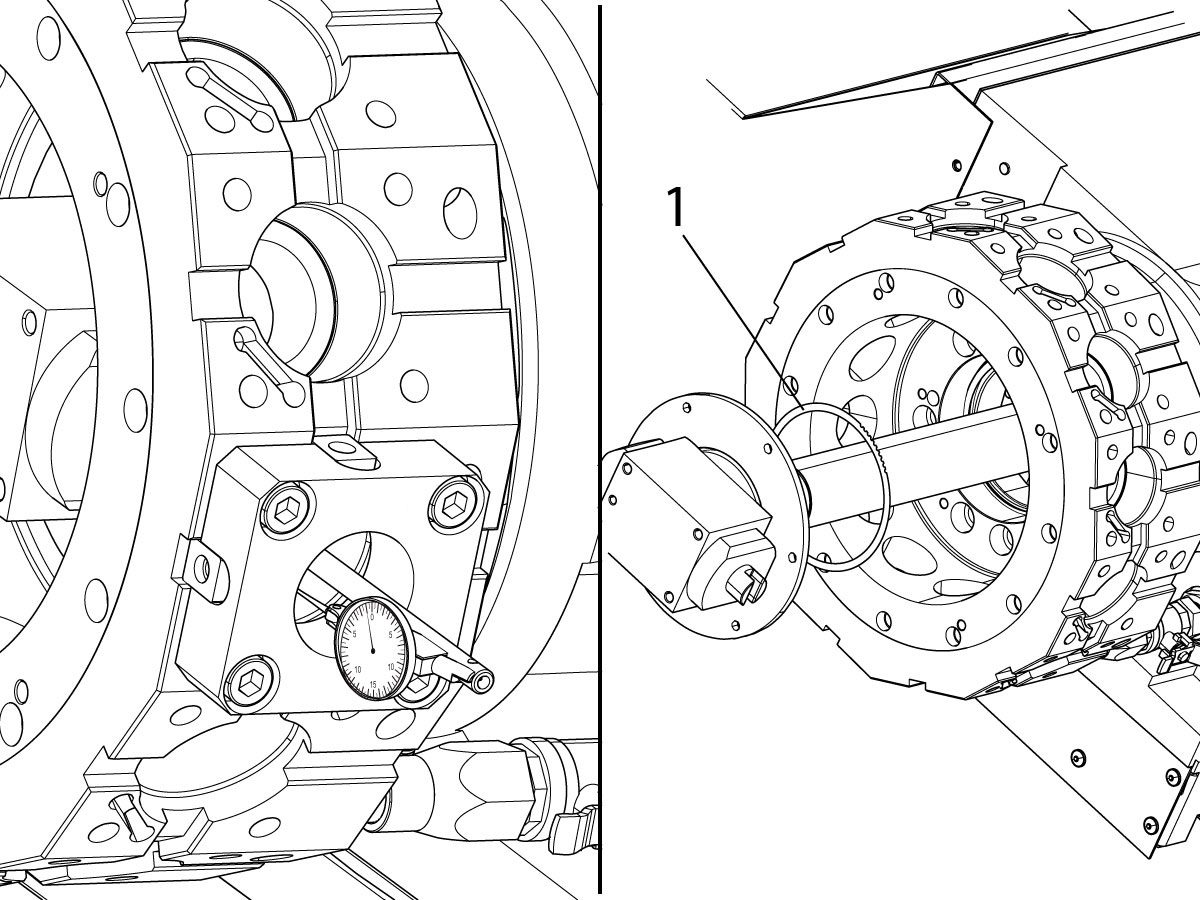
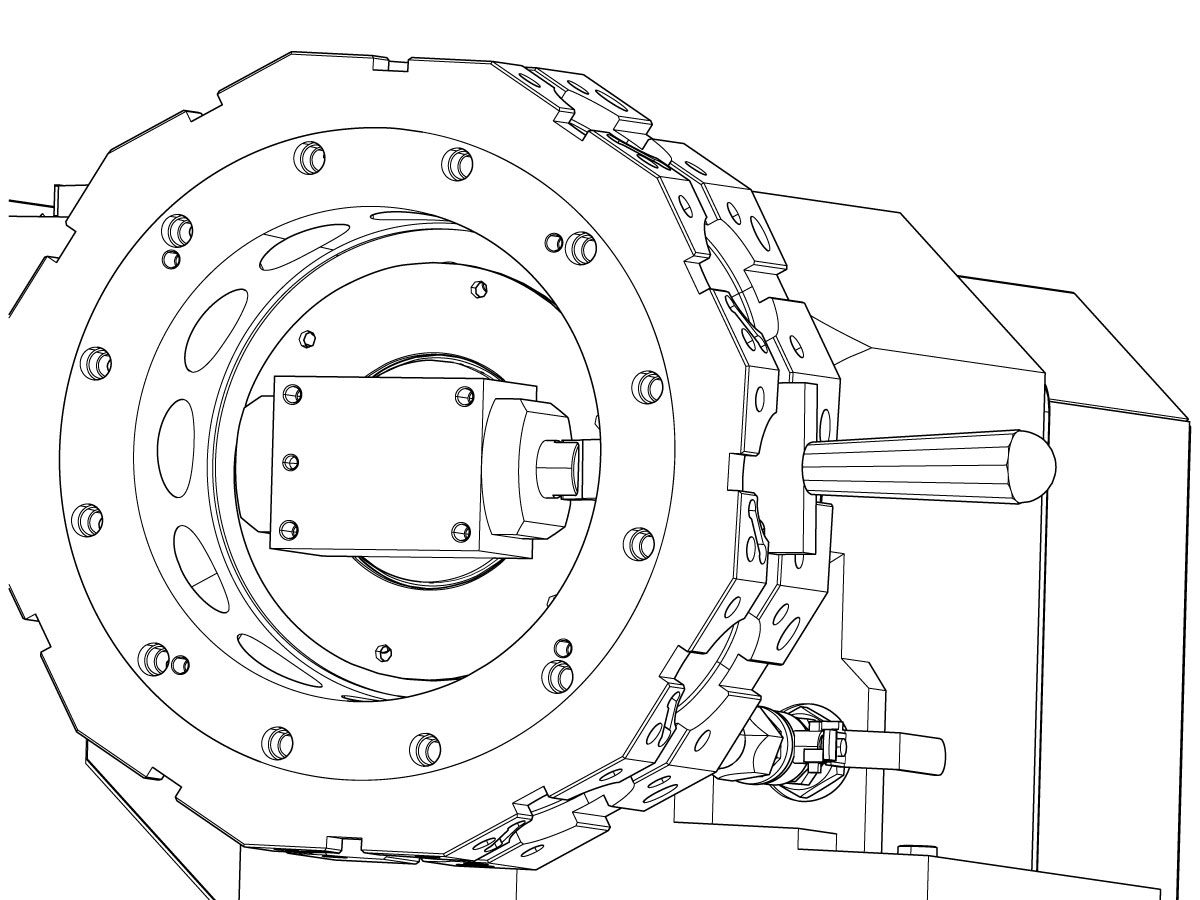
Install the T-0080 alignment block on tool #1 and T-0082 indicator base tool on the LT drive shaft.

Check the alignment in the Z axis.

If the indicator reading exceeds .002" then shims [1] will need to be added or removed.

If the alignment in Z is correct proceed to the BMT Live Tooling Drive Alignment section.

2

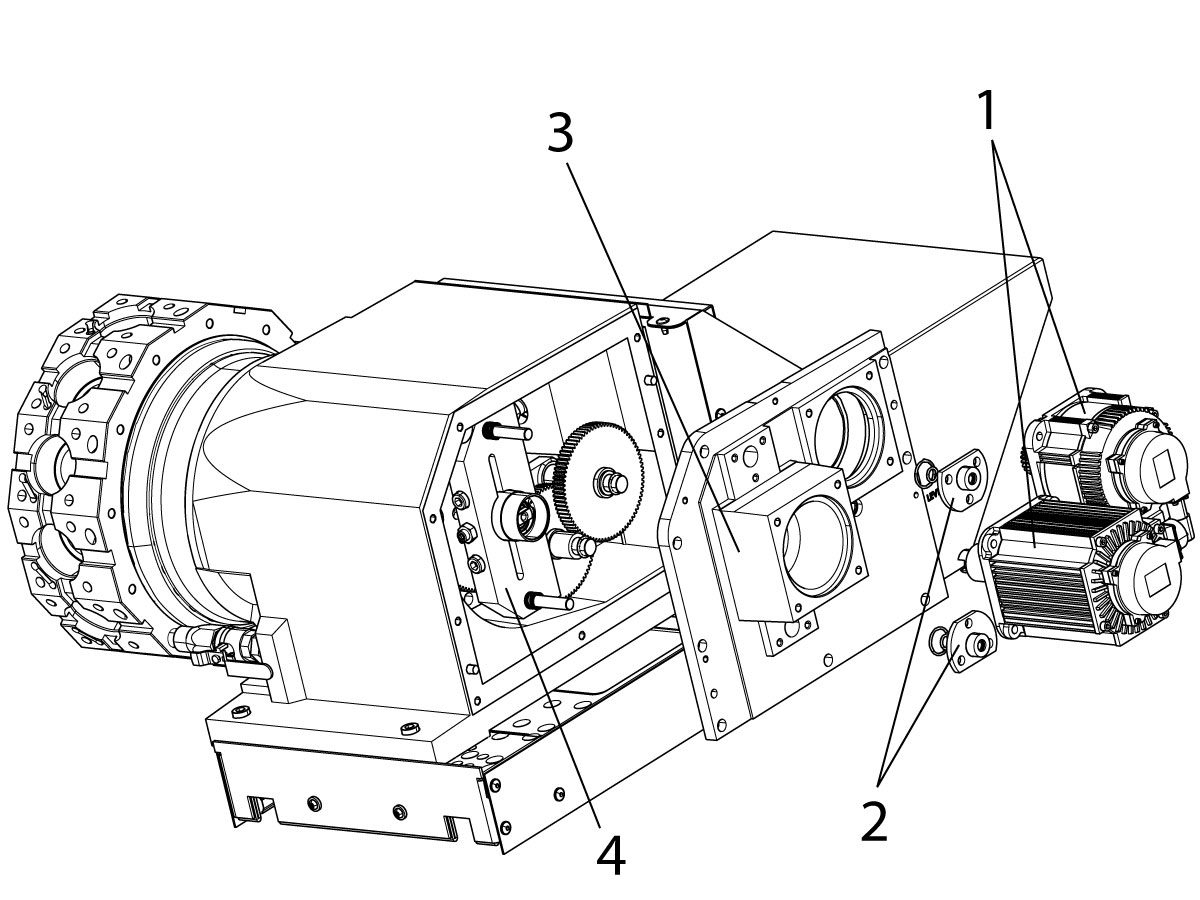
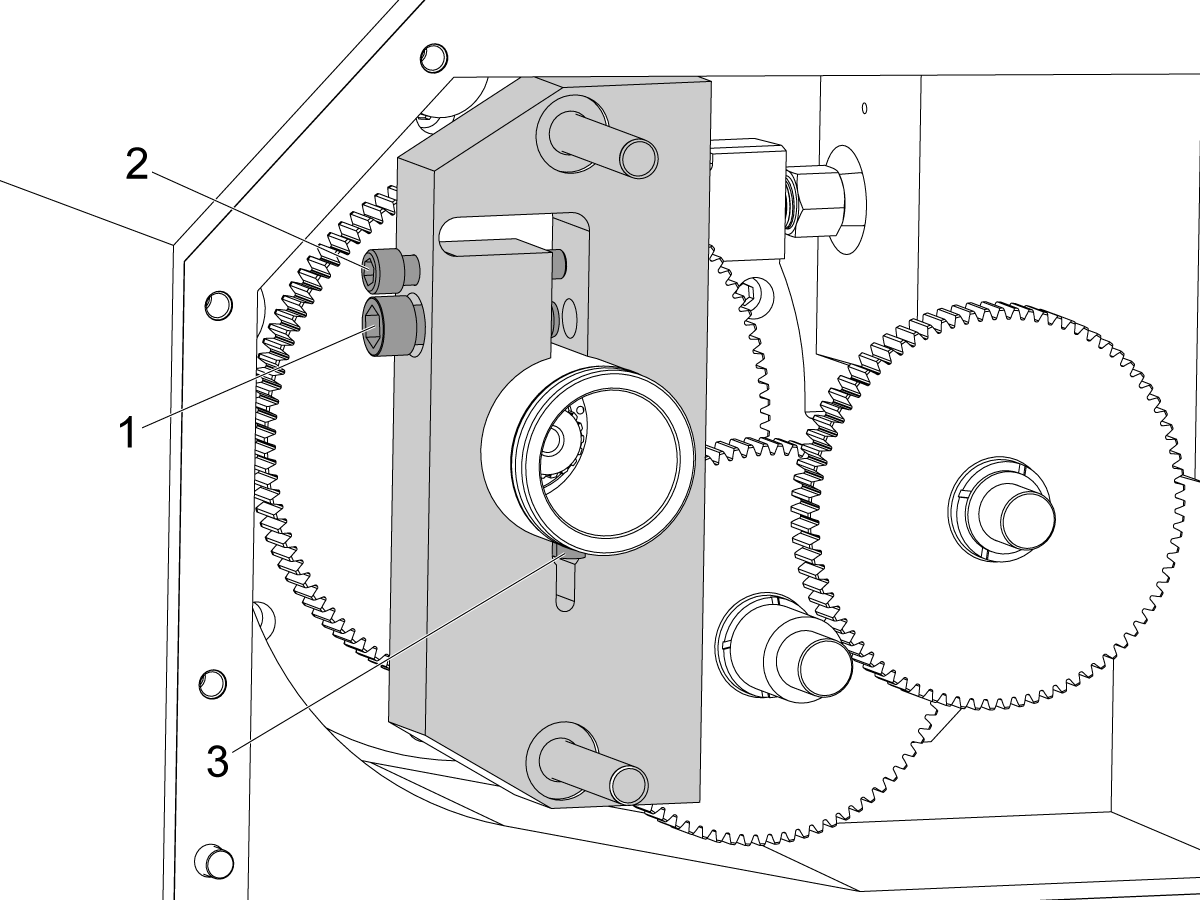
To adjust the shim size, remove the following items in this order:

  • The live tool and turret servo motors [1].
  • The top and bottom alignment bushings [2].
  • The rear turret gearbox cover [3] (Lubricant/oil will drain, place something under the gearbox to catch the lubricant/oil).

3

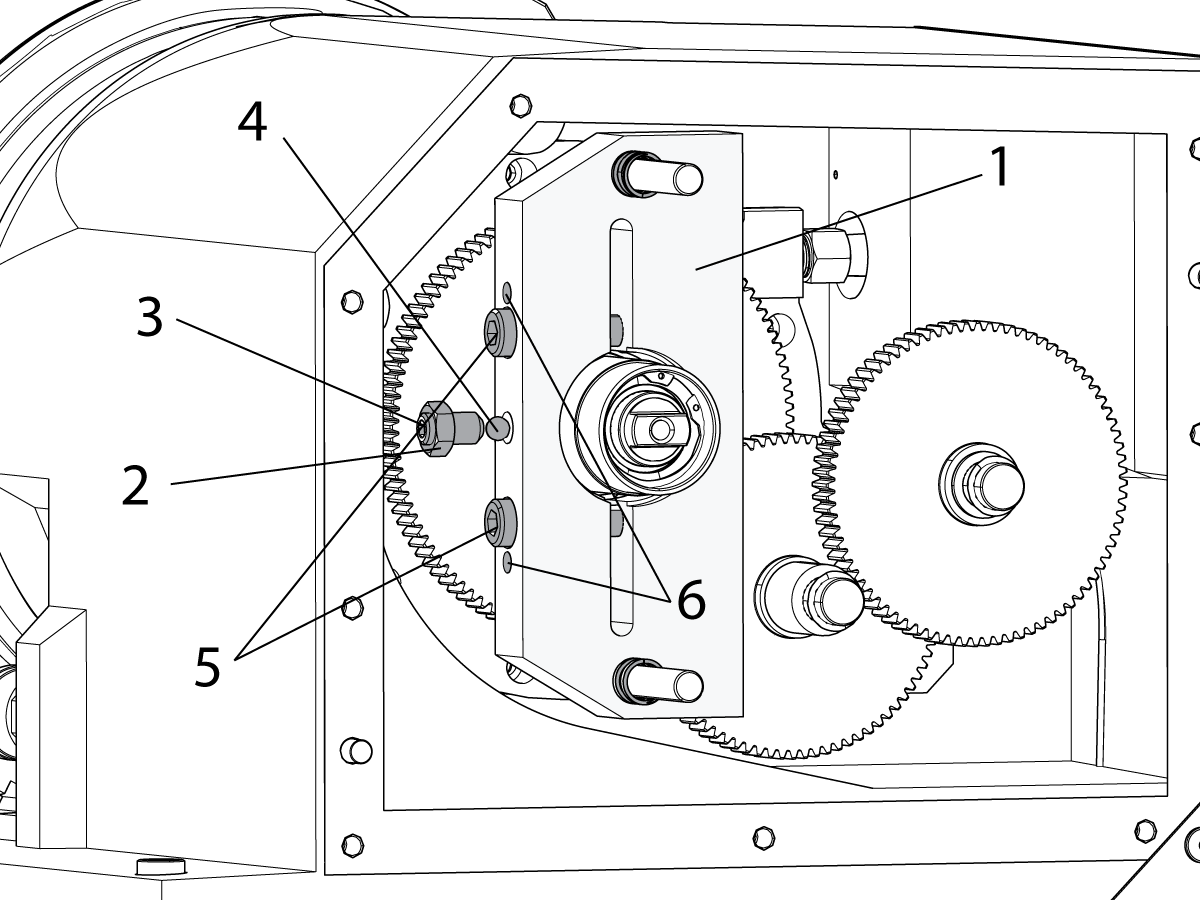
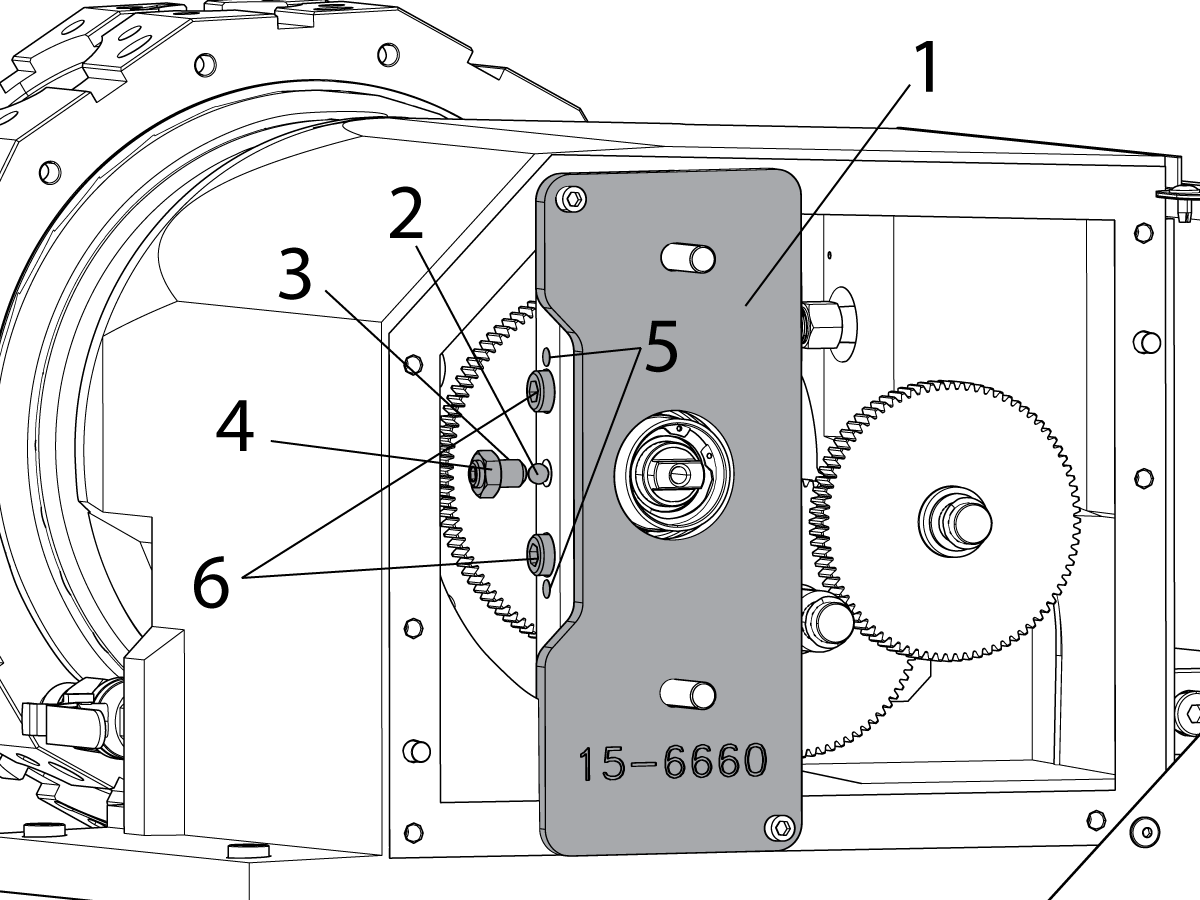
If equiped with live tooling, remove the torque arm [1] with a set screw and ball bearing in the following order:

  • Loosen the jam nut [2].
  • Remove the set screw [3] and steel ball [4].
  • Loosen the two clamp bolts [5].

 NOTE: If needed, install two 5/16-18 bolts in the jack screw holes [6] next to the clamp bolts. Apply just enough torque to spread the torque arm so it can slide off the torque tube.

 NOTE: In the event of a live tool crash the torque arm may be difficult to remove. A pulley puller may be used. If the torque arm still cannot be removed cut it off the torque tube with a grinder. If a grinder was used remove the gears from the turret housing, throughly clean them and the turret housing.

Remove the torque arm.

Remove the snap ring from the torque tube.

4

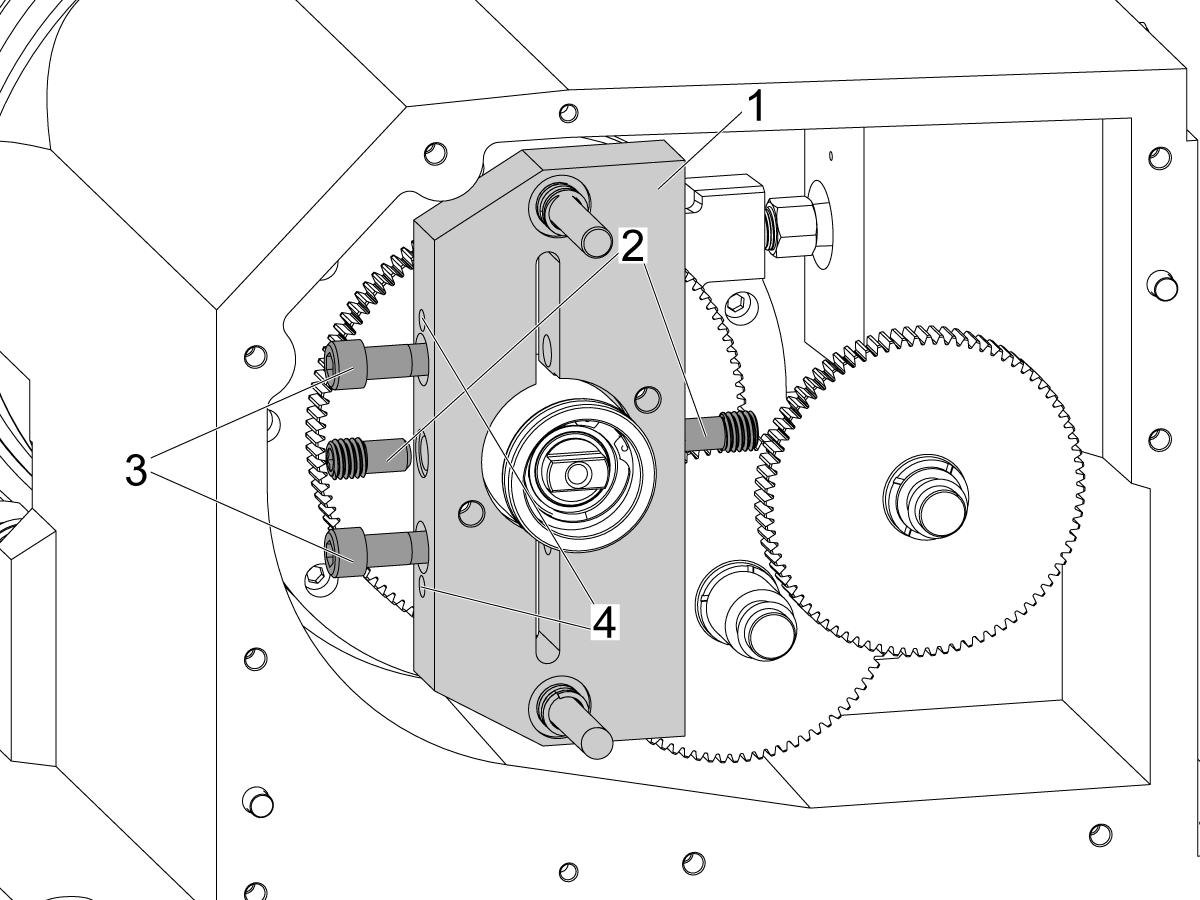
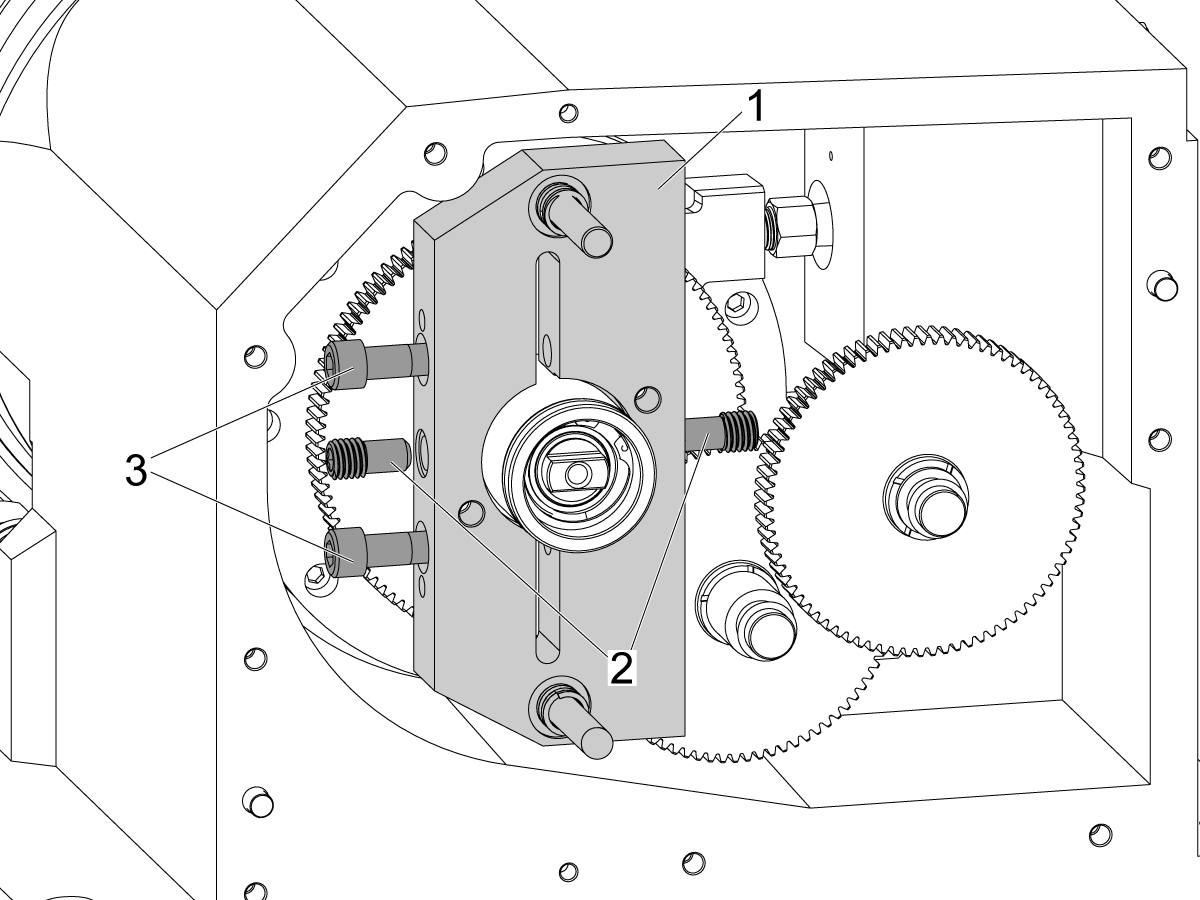
To remove the torque arm [1] with set screws, remove the following items in this order:

  • Remove the set screws [2]
  • Loosen the two clamp bolts [3].

Remove and discard the torque arm.

 NOTE: If the set screws are difficult to remove, use a blow torch to apply localized heat to the set screws to soften the loctite.

 NOTE: If needed, install two 5/16-18 bolts in the jack screw holes [4] next to the clamp bolts. Apply just enough torque to spread the torque arm so it can slide off the torque tube.

 NOTE: In the event of a live tool crash the torque arm may be difficult to remove. T-0133 BMT TORQUE ARM PULLER can be used or a pulley puller. If the torque arm still cannot be removed cut it off the torque tube with a grinder. If a grinder was used remove the gears from the turret housing and throughly clean them and the turret housing.

5

Torque arm with set screws:

T-0133 BMT TORQUE ARM PULLER is used to remove the torque arm from the torque tube.

Install the stop to the torque tube.

Install the puller to the torque arm and install the jack screw to the puller.

Tighten the jack screw to remove the torque arm from the torque tube.


6

To remove the torque arm with the keyway, remove the following items in this order:

  • Remove the clamp screw [1]
  • Install a 3/8-16 bolt[2] in the jack screw hole next to the clamp bolt. Apply just enough torque to spread the torque arm so it can slide off the torque tube.

 NOTE: In the event of a live tool crash the torque arm may be difficult to remove. A pulley puller may be used. If the torque arm still cannot be removed cut it off the torque tube with a grinder. If a grinder was used remove the gears from the turret housing, throughly clean them and the turret housing.

Remove the torque arm.

Remove the key[3] from the torque tube.

Remove the snap ring from the torque tube.

7

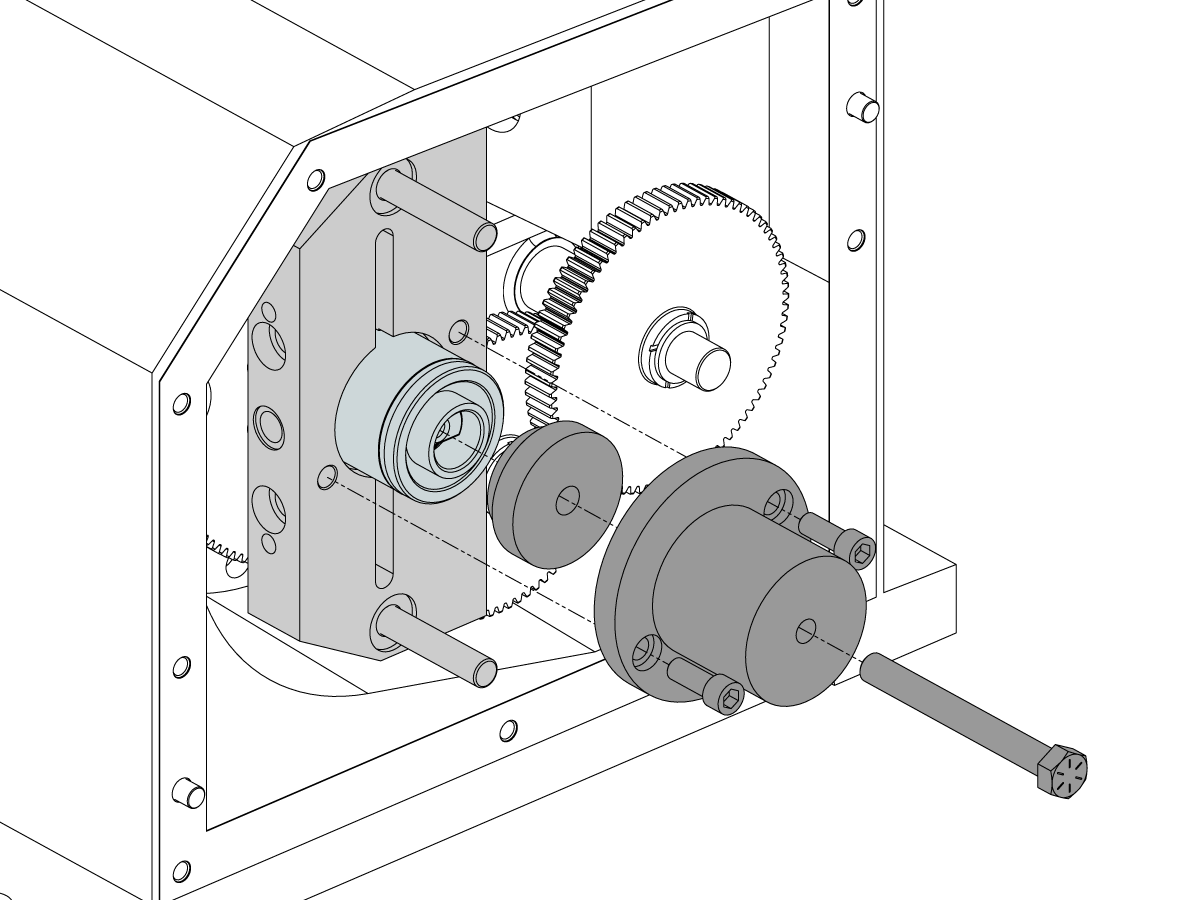
Remove the indicator base from the live tool drive.

Remove the (6) bolts from the retaining ring [1] and slide the live tooling drive [2] out of the turret.

Clean the bore and add or remove shims [3] as needed.

Note: Shim part numbers are 59-1563 through 59-1567.

Re-install the drive [2] and torque the (6) mounting bolts for the retaining ring [1].

Torque arm with set screw and ball bearing:

Install the snap ring on the torque tube and install the torque arm with springs. Install the steel ball and set screw with light torque to align the two pieces. Back off the set screw 1/8th of a turn to prevent binding in the next step.

Torque arm with set screws:

Install the torque arm with springs. Install the set screws with light torque to align the two pieces.

8

Torque arm with set screw and ball bearing:

Install the T-0081 preload tool [1] on the turret housing.

Remove the jack screws from the threaded holes [5].

Tighten the two clamp bolts [6] with 10 ft-lb of torque.

Tighten the set screw [3] with Loctite (blue 242) to 10 ft-lb of torque. Lock the jam nut [4] with 35 ft-lb of torque.

Tighten the two clamp bolts [6] with 80 ft-lb of torque.

Install the mag base tool on the drive and check the shim alignment. If needed repeat these steps to adjust the shim size.

If the alignment is correct remove the T-0081 preload tool [1]. Apply a thin layer of liquid grease to the torque arm pins and install the gearbox cover plate.

Install the alignment bushings.

9

Torque arm with set screws:

Tighten the set screws [2] with Blue Loctite and torque to 30 ft-lbs.

Install the two clamp bolts [3] with 80 ft-lb of torque.

Install the springs, rear turret gearbox cover and alignment bushings.

Install the mag base tool on the drive and check the shim alignment. If needed repeat these steps to adjust the shim size.

If the alignment is correct remove the gearbox cover plate. Apply a thin layer of liquid grease to the torque arm pins and install the gearbox cover plate.

10

Torque arm with the keyway:

  • Install the snap ring on the torque tube.
  • Install the key[3] to the torque tube.
  • Install a 3/8-16 bolt[2] in the jack screw hole next to the clamp bolt. Apply just enough torque to spread the torque arm so it can slide on the torque tube.
  • Seat the torque arm against the snap ring.
  • Install the clamp screw[1], torque to 80 ft-lbs.
  • Remove the jack screw.

Apply a thin layer of liquid grease to the torque arm pins and install the springs, rear turret gearbox cover and alignment bushings.

Install the mag base tool on the drive and check the shim alignment. If needed repeat the shim adjustment steps.

11

Install the live tool motor.

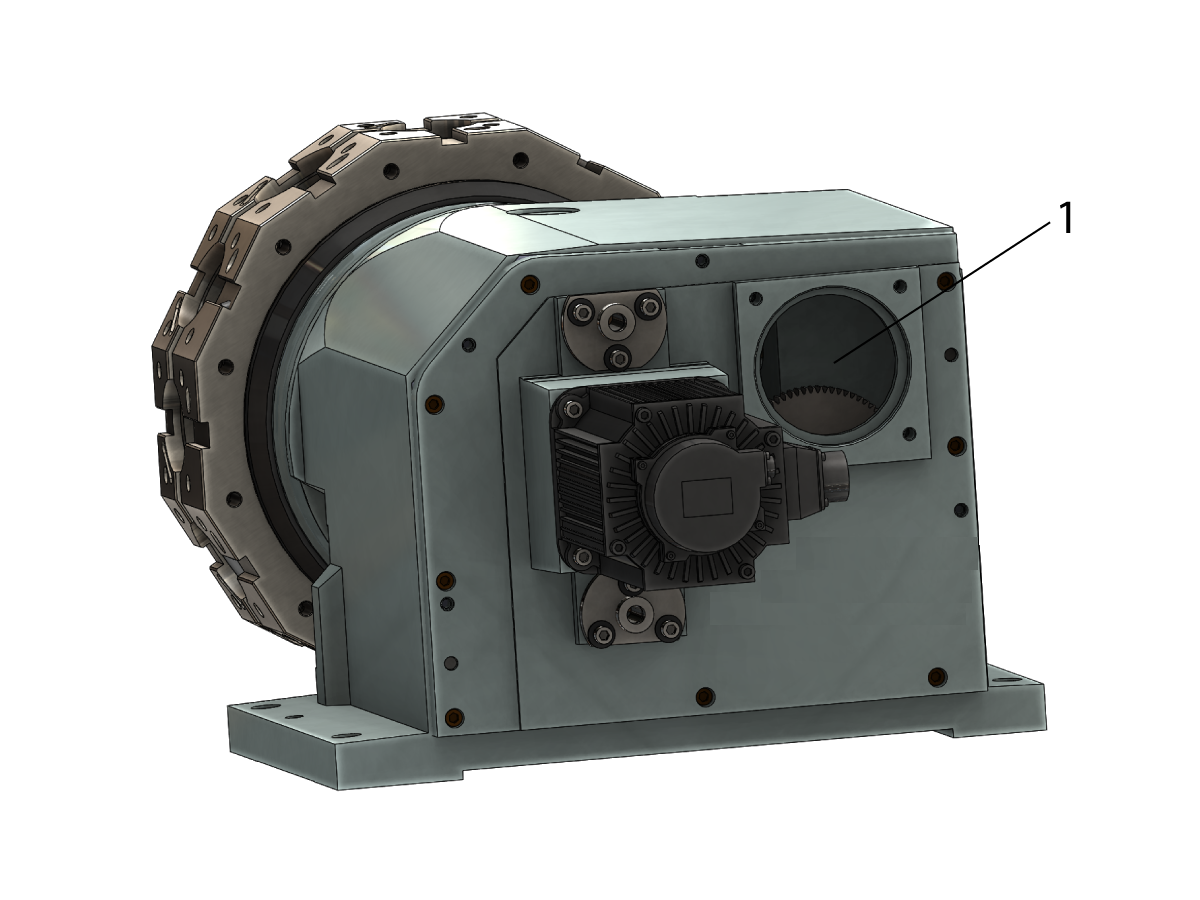
Refill the oil through the turret indexer motor mounting hole [1]. 

  • If machine is equipped with the live tooling, fill the turret gearbox with 2 quarts of 93-1933A.
  • If machine is not equipped with the live tooling, fill the turret gearbox with 3 quarts of the 93-1933A.

Install and enable the live tool and turret servo motors.

Note : It is reccomended to use a funnel to avoid spillage over other components

Live Tool Drive Spindle Orientation Offset

1

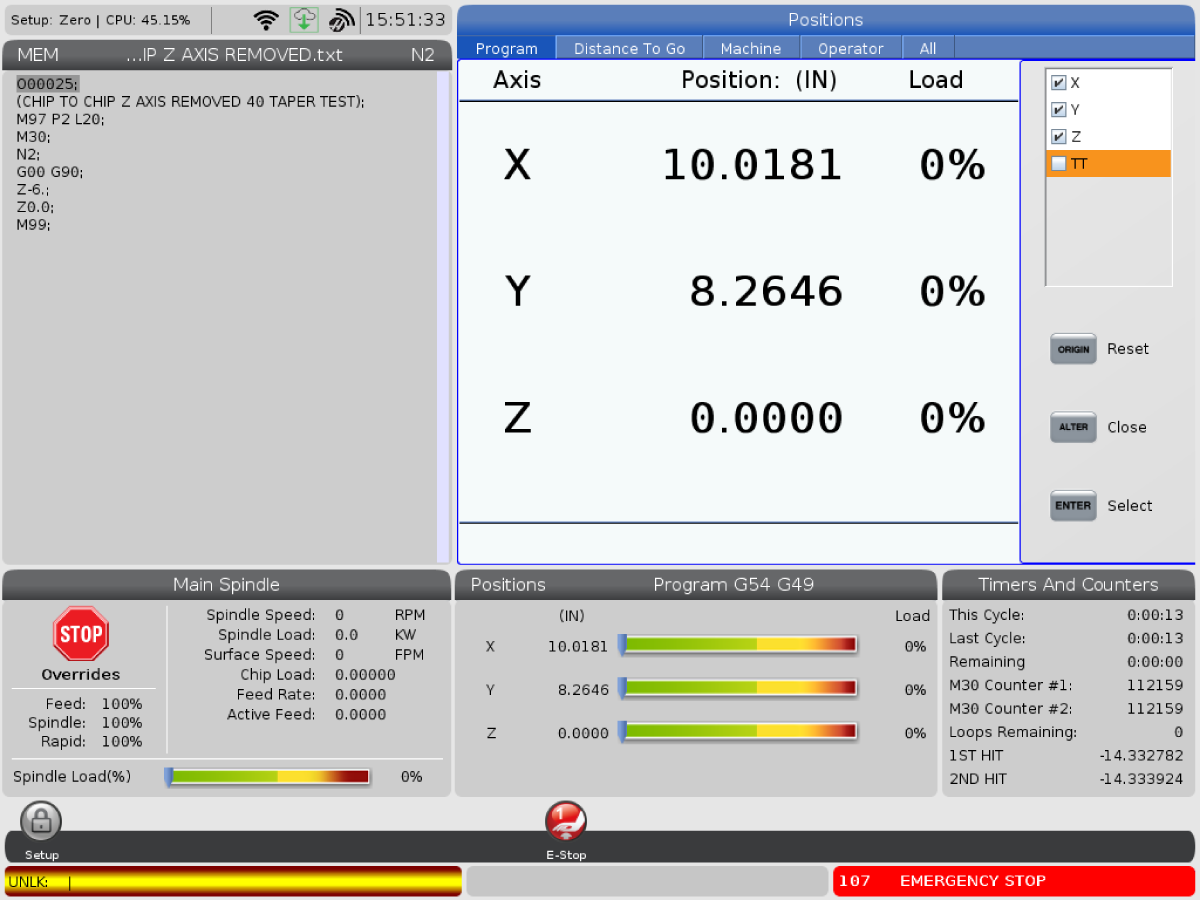
Change parameter 9.019 to FALSE. Make the axis visible on the display page by pressing ALTER then select the TT axis and press ENTER.

Remove any tooling that may be in the way and zero return the TT axis, ignore any alarms. Press DIAGNOSTICS to get to the FACTORY parameters tab. Type TT and press F4 to set the grid offset. Zero Return the TT axis.

In MDI command an M43 to unclamp the turret. Handle jog the TT axis until pocket 1 is in position, visually align the coolant nozzle. Press ESTOP and verify the turret is fully seated.

Press DIAGNOSTICS to get back to parameters. Type TT and press F2 to set the tool change offset.

Change parameter 9.019 to TRUE.

For CHC Machines follow the procedure below.

ST - Turret - Grid Offset/Tool Change Offset - Parameter 128/212

2

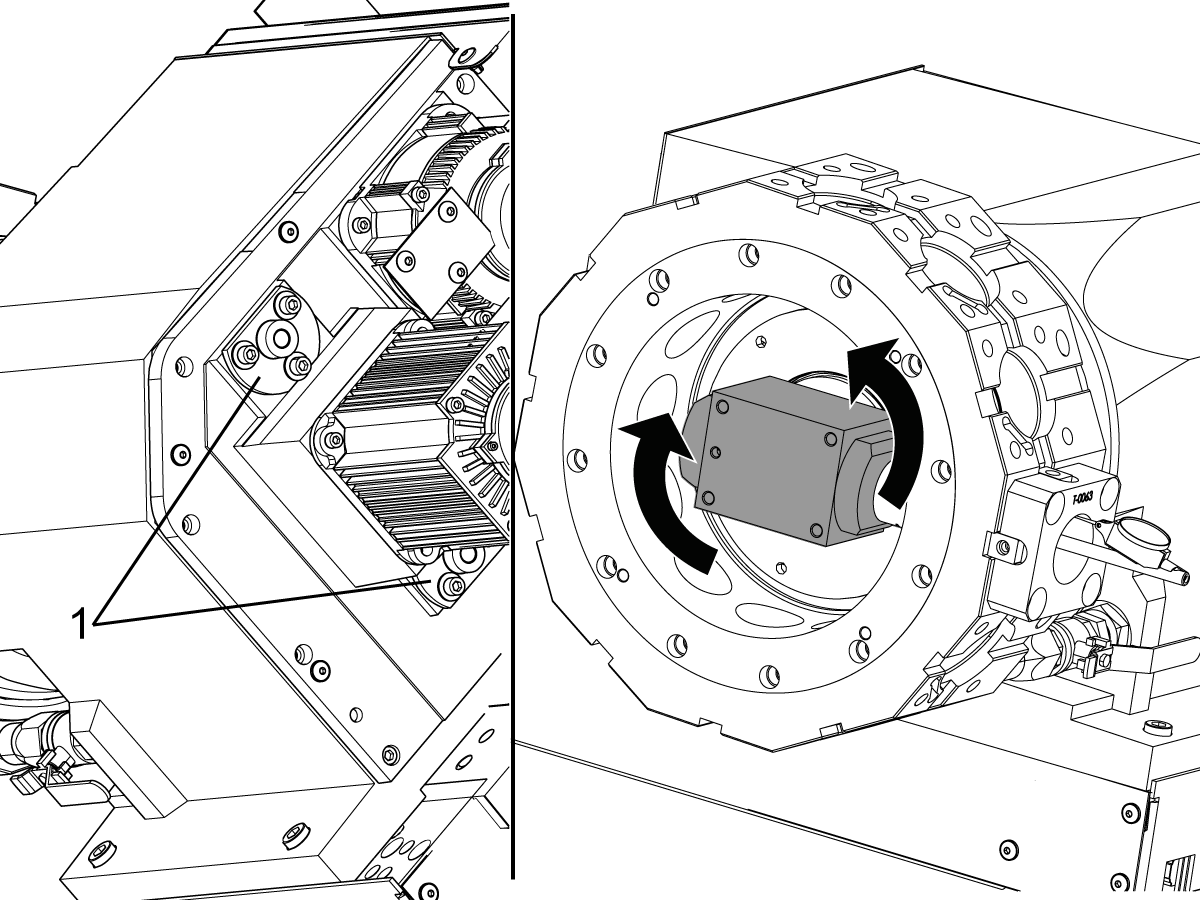
With the indicator base installed, T-0082, loosen the (6) bolts on the top and bottom alignment bushings [1].

Rotate the drive until the T.I.R. is less than .002".

Tighten the (6) bolts on the top and bottom alignment bushings [1] to lock the drive in position.

Verify the T.I.R. remains less than .002".

Remove the T-0080 and T-0082 / T-0160 alignment block and indicator base.

3

Insert the T-0083 / T-0148 output shaft alignment tool into the pocket.

Check the drive dog alignment with the tool in the vertical position.

For Classic Haas Control: Adjust parameter 487 TT Tool Change Offset to correct the alignment.

  • Press [ALARMS] key, type "DEBUG" and press [ENTER] to enter debug mode.
  • Switch to the position screen.
  • Press [F4] to activate the raw data box.
  • Highlight the "VAR" tab and press [ENTER].
  • Highlight the "AXES" tab and press [ENTER].
  • Flip the sign (if negative, make positive; if positive, make negative) on the TT-axis "PRIME ENC" position value and enter this value into PAR 487.
  • Press [ZERO RETURN], then [ALL].
  • Reinsert tool T-0065 / T-0148 into the vertical slots on the turret to verify that the output shaft is properly aligned.

For Next Generation Control:

  • Insert USB Service Key
  • Press [ALARMS] key, type "DEBUG" and press [ENTER] to enter debug mode.
  • Go to parameter 32.085 LT-Axis Spindle Orient Offset (SI Units)
  • Type "0" then press [ENTER] to set the rotation of the LT-axis back to origin
  • Press [Current Commands] key, go to "Live Tooling Spindle" then press [ENTER]
  • Go to "Live Tooling Orient" then press [F2] to zero the spindle axis
  • Insert the T-0083 / T-0148 output shaft alignment tool into the pocket and align the axis
  • Go back to 32.085 LT-Axis Spindle Orient Offset (SI Units) in parameters and type [LT] then press [F3] to set offset
  • Remove alignment tool and move output shaft out of alignment then repeat the "Live Tooling Orient" step to verify that the axis returns to the set alignment
  • Reinsert tool T-0065 / T-0148 into the vertical slots on the turret to verify that the output shaft is properly aligned.

Recently Viewed Items

You Have No Recently Viewed Items Yet

Feedback
Haas Logo

Haas Delivered Price

This price includes shipping cost, export and import duties, insurance, and any other expenses incurred during shipping to a location in France agreed with you as a buyer. No other mandatory costs can be added to the delivery of a Haas CNC Product.

KEEP UP WITH THE LATEST HAAS TIPS AND TECHNOLOGY...

Sign up now!   

HAAS TOOLING ACCEPTS THE FOLLOWING:

  • Service & Support
  • Owners
  • Request Service
  • Operator Manuals
  • Haas Parts
  • Rotary Repair Request
  • Pre-Install Guides
  • Shopping Tools
  • Build & Price a New Haas
  • Available Inventory
  • The Haas Price List
  • CNCA Financing
  • About Haas
  • Accessibility Statement
  • DNSH Statement
  • Export Compliance
  • Careers
  • Certifications & Safety
  • Contact Us
  • History
  • Terms & Conditions
  • Haas Tooling Terms & Conditions
  • Privacy
  • Warranty
  • Haas Community
  • Haas Certification Program
  • Haas Motorsports

  • Gene Haas Foundation
  • Haas Technical Education Community
  • Events

  • Join the Conversation
  • Facebook
  • X
  • Flickr
  • YouTube
  • LinkedIn
  • Instagram
  • TikTok
© 2026 Haas Automation, Inc – CNC Machine Tools

This site is protected by reCAPTCHA and the Google Privacy Policy and Terms of Service apply.

2800 Sturgis Rd., Oxnard, CA 93030
Toll Free: (888) 817-4446 / Fax: 805-278-8554