My Haas Welcome,
!
Haas Tooling MyHaas/HaasConnect Sign In Register Haas Tooling MyHaas/HaasConnect Sign Out Welcome, My Machines Latest Activity My Quotes My Account My Users Sign Out
Find Your Distributor
  1. Select Language
    1. English
    2. Deutsch
    3. Español - España
    4. Español - México
    5. Français
    6. Italiano
    7. Português
    8. Český
    9. Dansk
    10. Nederlands
    11. Magyar
    12. Polski
    13. Svenska
    14. Türkçe
    15. 中文
    16. Suomi
    17. Norsk
    18. الإنجليزية
    19. български
    20. Hrvatski
    21. Ελληνικά
    22. Română
    23. Slovenský
    24. Slovenščina
    25. 한국어
    26. 日本語
    27. Українська
  • machines Main Menu
    • Vertical Mills
      Vertical Mills
      Vertical Mills View All
      • Vertical Mills
      • VF Series
      • Universal Machines
      • VR Series
      • VP-5 Prismatic
      • Pallet-Changing VMCs
      • Mini Mills
      • Mold Machines
      • High-Speed Drill Centers
      • Drill/Tap/ Mill Series
      • Toolroom Mills
      • Pocket Mill
      • Compact Mills
      • Gantry Series
      • SR Sheet Routers
      • Extra-Large VMC
      • Double-Column Mills
      • 3+2 Positioning Machines
    • Multi-Axis Solutions
      Multi-Axis Solutions
      Multi-Axis Solutions View All
      • Multi-Axis Solutions
      • Y-Axis Lathes
      • 5-Axis Mills
    • Lathes
      Lathes
      Lathes View All
      • Lathes
      • ST Series
      • Dual-Spindle
      • Box Way Series
      • Toolroom Lathes
      • Chucker Lathe
      • Haas Bar Feeders
    • Horizontal Mills
      Horizontal Mills
      Horizontal Mills View All
      • Horizontal Mills
      • 50-Taper
      • 40-Taper
    • Rotaries & Indexers
      Rotaries & Indexers
      Rotaries & Indexers View All
      • Rotaries & Indexers
      • Rotary Tables
      • Indexers
      • 5-Axis Rotaries
      • Extra-Large Rotaries
    • Special Series
      Special Series
      Special Series View All
      • Special Series
      • EU_Series_Redirect
    • Automation Systems
      Automation Systems
      Automation Systems View All
      • Automation Systems
      • Mill Automation
      • Lathe Automation
      • Automatic Parts Loaders
      • Automation Models
    • Desktop Machines
      Desktop Machines
      Desktop Machines View All
      • Desktop Machines
      • Desktop Mill
      • Desktop Lathe
      • Control Simulator, Standard
      • Control Simulator, Premium
    • Shop Equipment
      Shop Equipment
      Shop Equipment View All
      • Shop Equipment
      • Knee Mill
      • Haas Manual Lathes
      • Haas Saws
    • Fabrication Machines
      Fabrication Machines
      Fabrication Machines View All
      • Fabrication Machines
      • Laser Cutting Machines
      • CNC Press Brakes
    • QUICK LINKS Special Series  Special Series 
      EU SERIES EU SERIES BUILD & PRICE | PRICE LIST BUILD & PRICE | PRICE LIST In-Stock Machines In-Stock Machines WHAT’S NEW WHAT’S NEW YOUR FIRST CNC YOUR FIRST CNC
      SHOPPING TOOLS
      • Build & Price a Haas
      • Price List
      • Available Inventory
      • CNCA Financing
      WANT TO TALK TO SOMEONE?

      A Haas Factory Outlet (HFO) can answer your questions, and walk you through your best options.

      CONTACT YOUR DISTRIBUTOR >
  • Options Main Menu
    • The Haas Control Value Option Packages
      Value Option Packages
      Value Option Packages View All
      • Value Option Packages
    • Product Image Spindles
      Spindles
      Spindles View All
      • Spindles
    • Product Image Tool Changers
      Tool Changers
      Tool Changers View All
      • Tool Changers
    • Product Image 4th- | 5th-Axis
      4th- | 5th-Axis
      4th- | 5th-Axis View All
      • 4th- | 5th-Axis
    • Product Image Turrets & Live Tooling
      Turrets & Live Tooling
      Turrets & Live Tooling View All
      • Turrets & Live Tooling
    • Product Image Probing
      Probing
      Probing View All
      • Probing
    • Haas Chip & Coolant Management Chip & Coolant Management
      Chip & Coolant Management
      Chip & Coolant Management View All
      • Chip & Coolant Management
    • The Haas Control The Haas Control
      The Haas Control
      The Haas Control View All
      • The Haas Control
    • Product Image Product Options
      Product Options
      Product Options View All
      • Product Options
    • Product Image Tooling & Fixturing
      Tooling & Fixturing
      Tooling & Fixturing View All
      • Tooling & Fixturing
    • Product Image Workholding
      Workholding
      Workholding View All
      • Workholding
    • Product Image 5-Axis Solutions
      5-Axis Solutions
      5-Axis Solutions View All
      • 5-Axis Solutions
      • 5 Easy Steps to 5-Axis
    • QUICK LINKS Special Series  Special Series 
      EU SERIES EU SERIES BUILD & PRICE | PRICE LIST BUILD & PRICE | PRICE LIST In-Stock Machines In-Stock Machines WHAT’S NEW WHAT’S NEW YOUR FIRST CNC YOUR FIRST CNC
      SHOPPING TOOLS
      • Build & Price a Haas
      • Price List
      • Available Inventory
      • CNCA Financing
      WANT TO TALK TO SOMEONE?

      A Haas Factory Outlet (HFO) can answer your questions, and walk you through your best options.

      CONTACT YOUR DISTRIBUTOR >
  • Why Haas Main Menu
      Discover the Haas Difference
    • Why Haas
    • MyHaas
    • Education Community
    • Industry 4.0
    • Haas Certification
    • Customer Testimonials
  • Service Main Menu
      Welcome to Haas Service
      SERVICE HOME Operator’s Manuals How-To Procedures Troubleshooting Guides Preventive Maintenance Haas Parts Haas Tooling Videos
  • Videos Main Menu
  • Main Menu
    • View All
    • View All
    • View All
    • View All
      • HTEC Curriculum Support
    • View All
      • Haas 10 kg Cobot Package
      • Cobot Kits
      • DC-1 Drill Center
      • CNC Sales News
      • Do More With Your Haas
    • View All
    • View All
      • contact-us-test
      • 4 - AUTOMATION SYSTEMS
      • Carousel-V2
      • expert test
      • Demo_Day_Trident-test
      • Link Test
      • image-sale-tag-test
      • article-list-test
      • Haas 25 kg Robot Package
    • View All
      • Choose Options
    • View All
    • View All
    • View All
    • View All
    • View All
      • calc-test
    • View All
    • QUICK LINKS Special Series  Special Series 
      EU SERIES EU SERIES BUILD & PRICE | PRICE LIST BUILD & PRICE | PRICE LIST In-Stock Machines In-Stock Machines WHAT’S NEW WHAT’S NEW YOUR FIRST CNC YOUR FIRST CNC
      SHOPPING TOOLS
      • Build & Price a Haas
      • Price List
      • Available Inventory
      • CNCA Financing
      WANT TO TALK TO SOMEONE?

      A Haas Factory Outlet (HFO) can answer your questions, and walk you through your best options.

      CONTACT YOUR DISTRIBUTOR >
  • Haas Tooling Main Menu
  • Haas Service Parts Main Menu

My Haas Welcome,
!
Haas Tooling MyHaas/HaasConnect Sign In Register Haas Tooling MyHaas/HaasConnect Sign Out Welcome, My Machines Latest Activity My Quotes My Account My Users Sign Out
Find Your Distributor
  1. Select Language
    1. English
    2. Deutsch
    3. Español - España
    4. Español - México
    5. Français
    6. Italiano
    7. Português
    8. Český
    9. Dansk
    10. Nederlands
    11. Magyar
    12. Polski
    13. Svenska
    14. Türkçe
    15. 中文
    16. Suomi
    17. Norsk
    18. الإنجليزية
    19. български
    20. Hrvatski
    21. Ελληνικά
    22. Română
    23. Slovenský
    24. Slovenščina
    25. 한국어
    26. 日本語
    27. Українська
×

Search Results

Web Pages

Images

    • <
    • 1
    • >

Coolant Chiller Installation Instructions - AD0468

Service Home How To Procedures Coolant Chiller - Installation - AD0468

Coolant Chiller - Installation - AD0468

- Jump to Section - Back to Top

7.1 Coolant Chiller - Installation

Recently Updated Last updated: 07/01/2021

Coolant Chiller - Installation


AD0468

Coolant Chiller Installation Video

The following video shows how to install the coolant chiller on VF and ST machines.

Note: This service video is for reference only and does not replace the written procedure.

Introduction

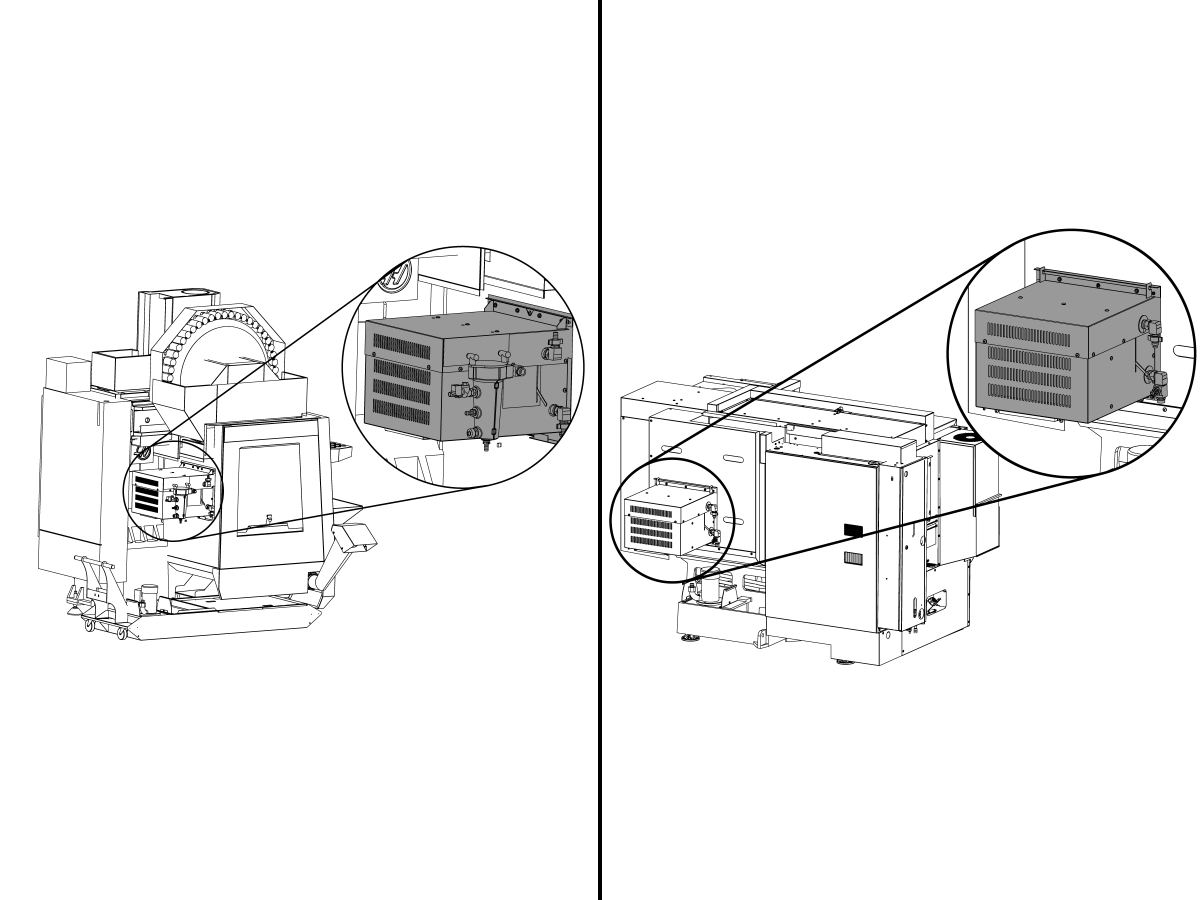
This procedure will show you how to install the Coolant Chiller option on a VF or ST machine.

Machine Compatibility

  • Next Generation Control
  • 100.19.000.1000 Software Version

This procedure applies to the following kits:

  • 93-1000011: COOLANT CHILLER FIELD INSTALL KIT
  • 93-1000490: COOLANT CHILLER FIELD INSTALL KIT ST

For instructions on how to operate the coolant chiller refer to:

Coolant Chiller - Operation

VF Coolant Chiller - Installation

Coolant Filter - Removal

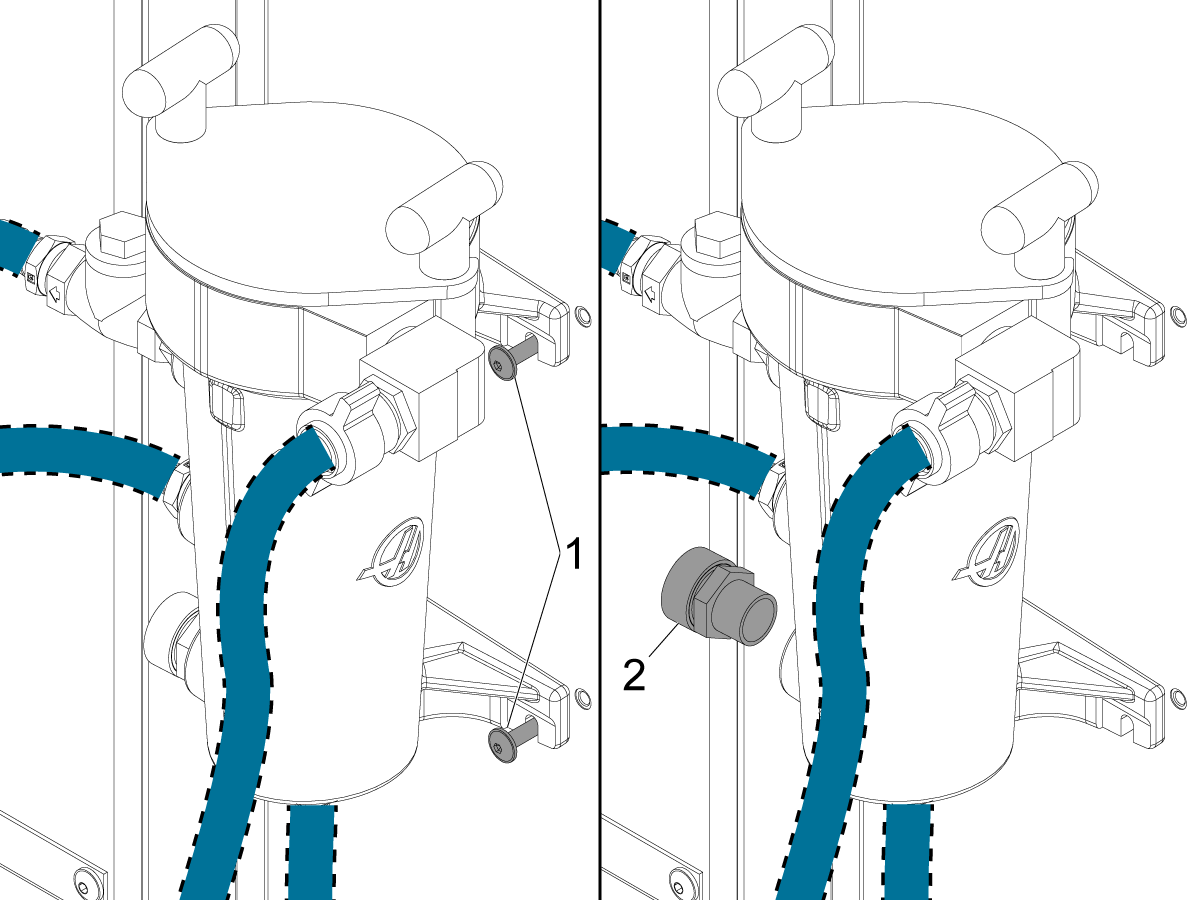
1

Remove the machine screws [1] that attach the coolant filter to the enclosure panel.

Remove the drain plug [2] and allow the coolant to drain from the filter into the coolant tank and discard the plug [2].

Reinstall the machine screws to prevent coolant leaks and disconnect all the coolant hoses from the coolant filter. 


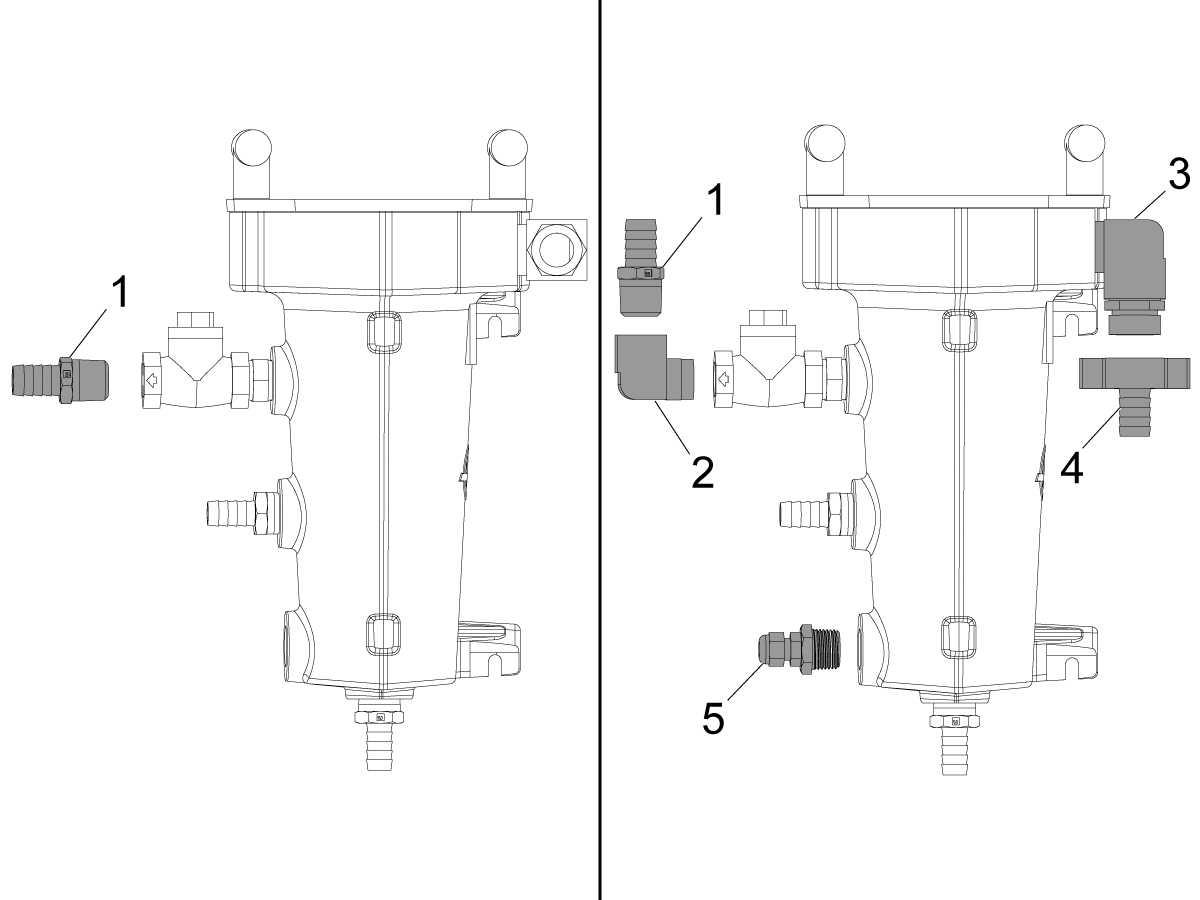
2

Remove the 1/2 NPT hose barb [1] and assemble the rest of the components as shown. 

  1. 1/2 NPT hose barb
  2. 1/2 brass 90 degree fitting
  3. 3/4 brass 90 degree fitting 
  4. Wing tip hose barb fitting
  5. Temperature sensor.

Coolant Chiller - Installation

1

VF-1/2/3/4/5

Secure the drill template to the enclosure in the location specified by the diagram. Use 5/16 drill bit to make holes using template.

Note:  For VF-2YT that have a stiffener on back panel use a spacer and longer bolts to mount.

For all models except those stated below, place drill template on right side [4] of the stiffener otherwise for the models stated below place on left side [3].

  • VF-3YT/50
  • VF-5/50XT
  • VF-5/50TR
  • VF-5/50

2

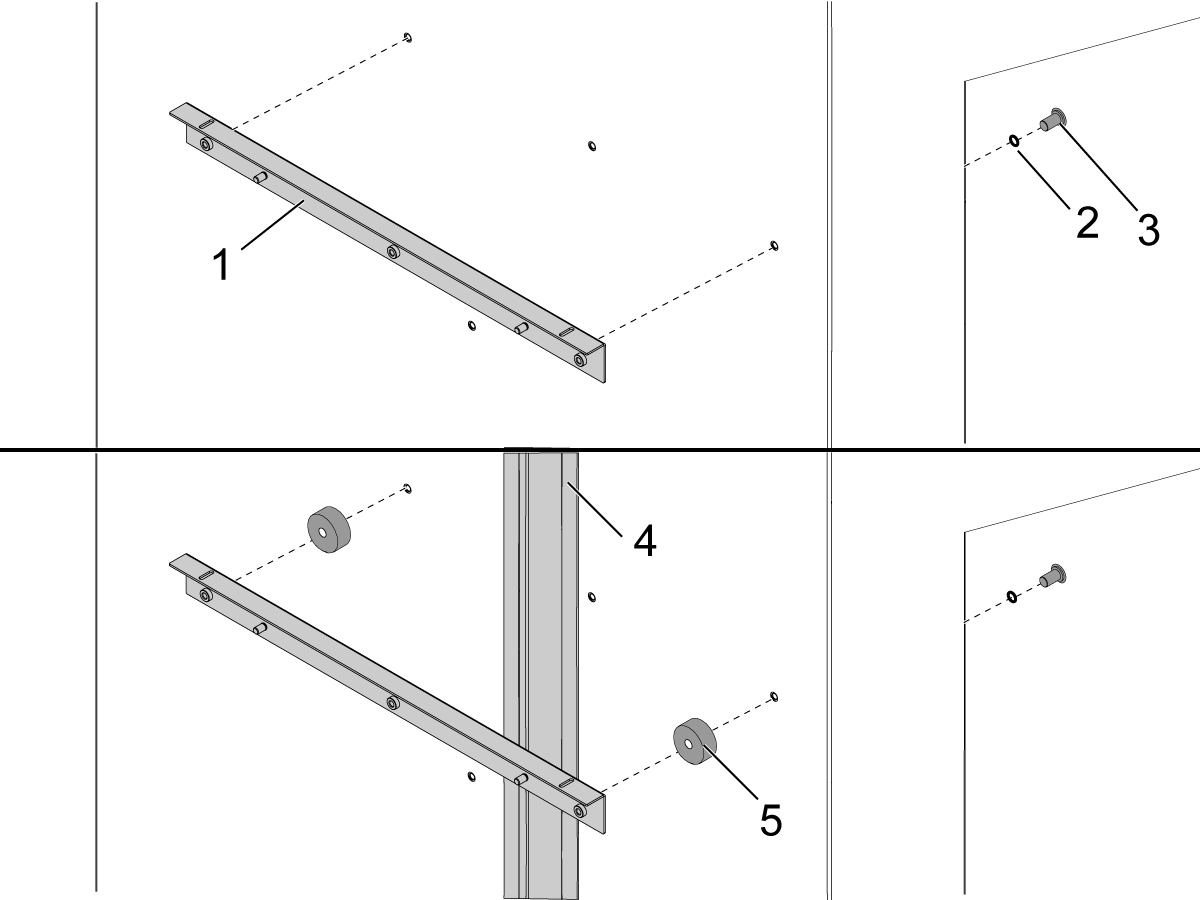
Align the upper bracket [1] with the upper three holes drilled in the enclosure panel using the template.

Raise the left side window and install the coolant chiller upper bracket [1] onto the enclosure panel using the sealing washers [2] and machine screws [3]. Do not fully tighten the machine screws.  Make sure the position of the upper bracket can still be adjusted by hand. 

 Note: For VM-2, VF-2YT and VF-2SSYT equipped with SMTC-50 and built before 01/2020. These machines have a stiffener [4] on the back panel that require a spacers.  Install the spacers [5] (P/N 59-1822) in between the back panel and the upper bracket.  Install the longer screws (P/N 40-1978) and washers (P/N 45-0184).

Do not fully tighten the machine screws.  Make sure the position of the upper bracket can still be adjusted by hand. 


3

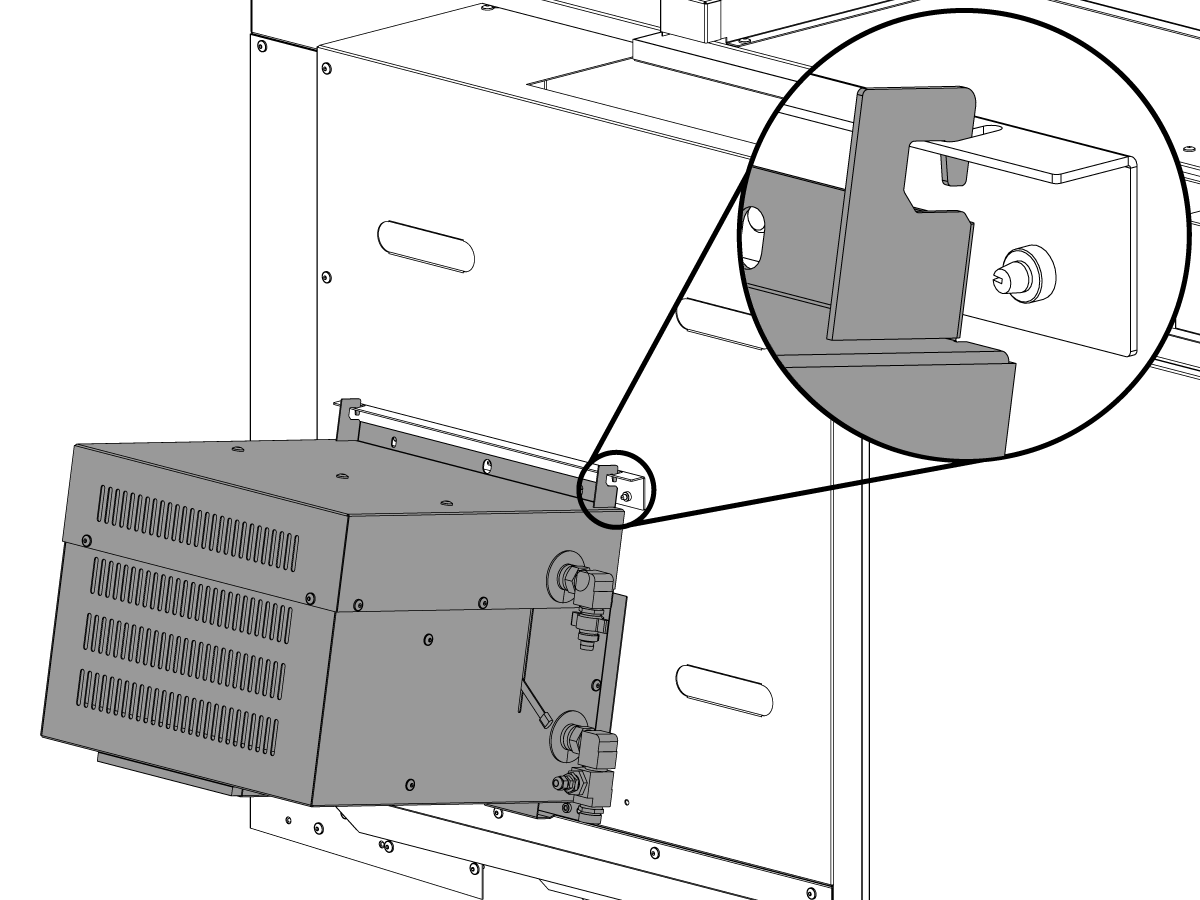
Use the hooks on the top of the coolant chiller to hang the coolant chiller from the upper bracket and put 2 machine screws in the bottom.


4

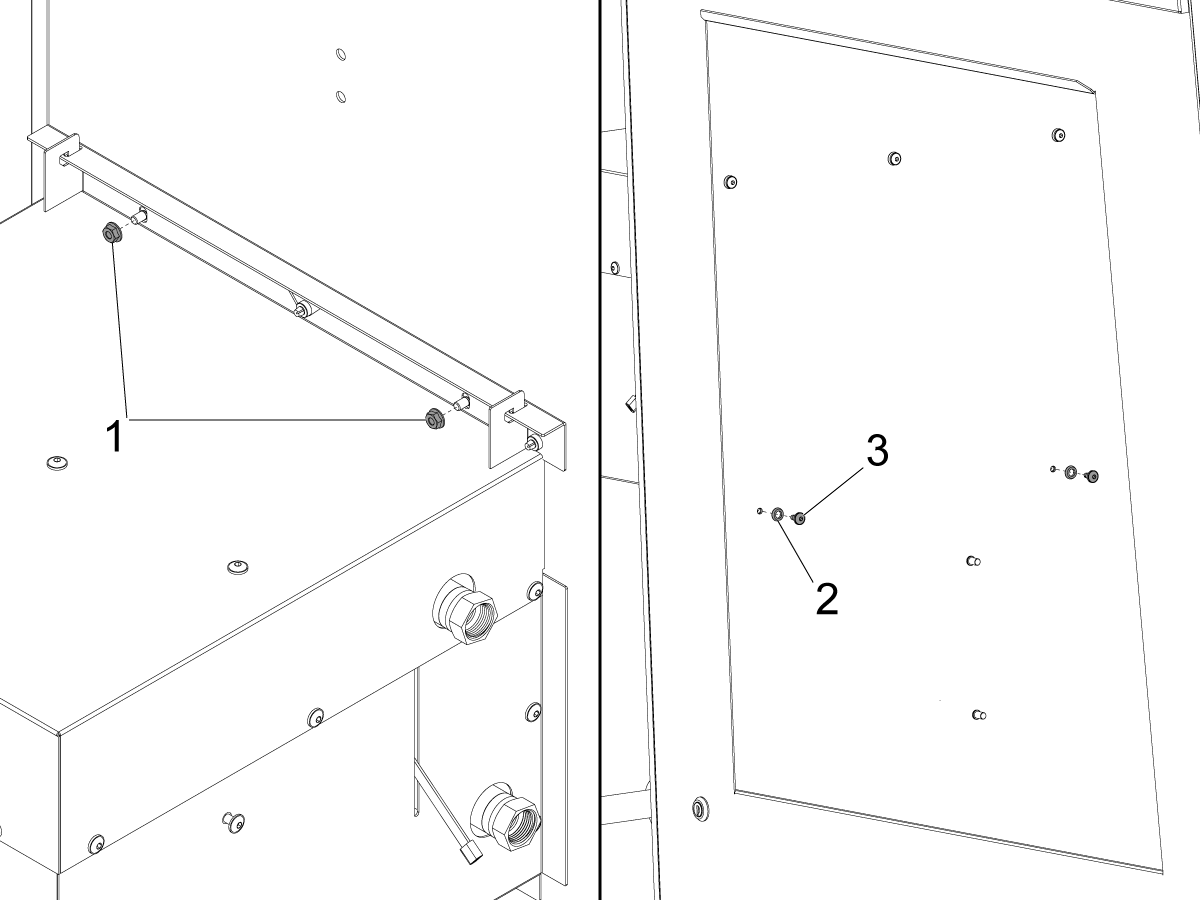
Install the hex nuts [1] onto the upper bracket.  

Align the coolant chiller with the lower two holes drilled in the enclosure panel using the template. Install sealing washers [2] and machine screws [3] onto the coolant chiller.

Tighten all the fasteners securing the upper bracket and coolant chiller.

 Note: For the VF-2YT that have a stiffener on the back panel install the spacers (P/N 59-1822) in between the back panel and the coolant chiller.  Use the longer screws (P/N 40-1978) and washers (P/N 45-0184).

VF - Coolant Filter - Installation

1

VF Machines with Coolant Filter

Install the screws until half of the threads are shown.

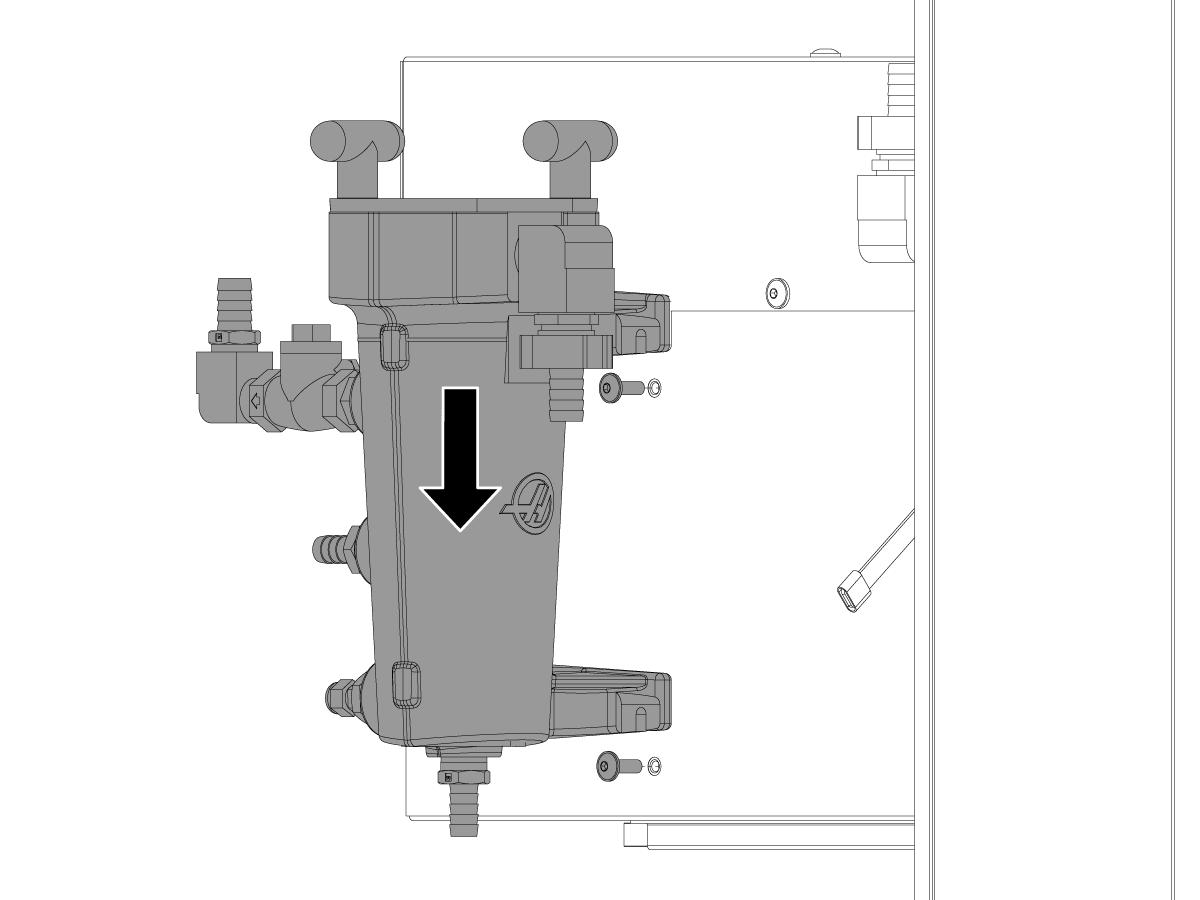
Slide the coolant filter assembly [2] onto the machine screws [1] and tighten.

Install hose caps onto all the barb fittings.

VF Machines with Coolant Filter

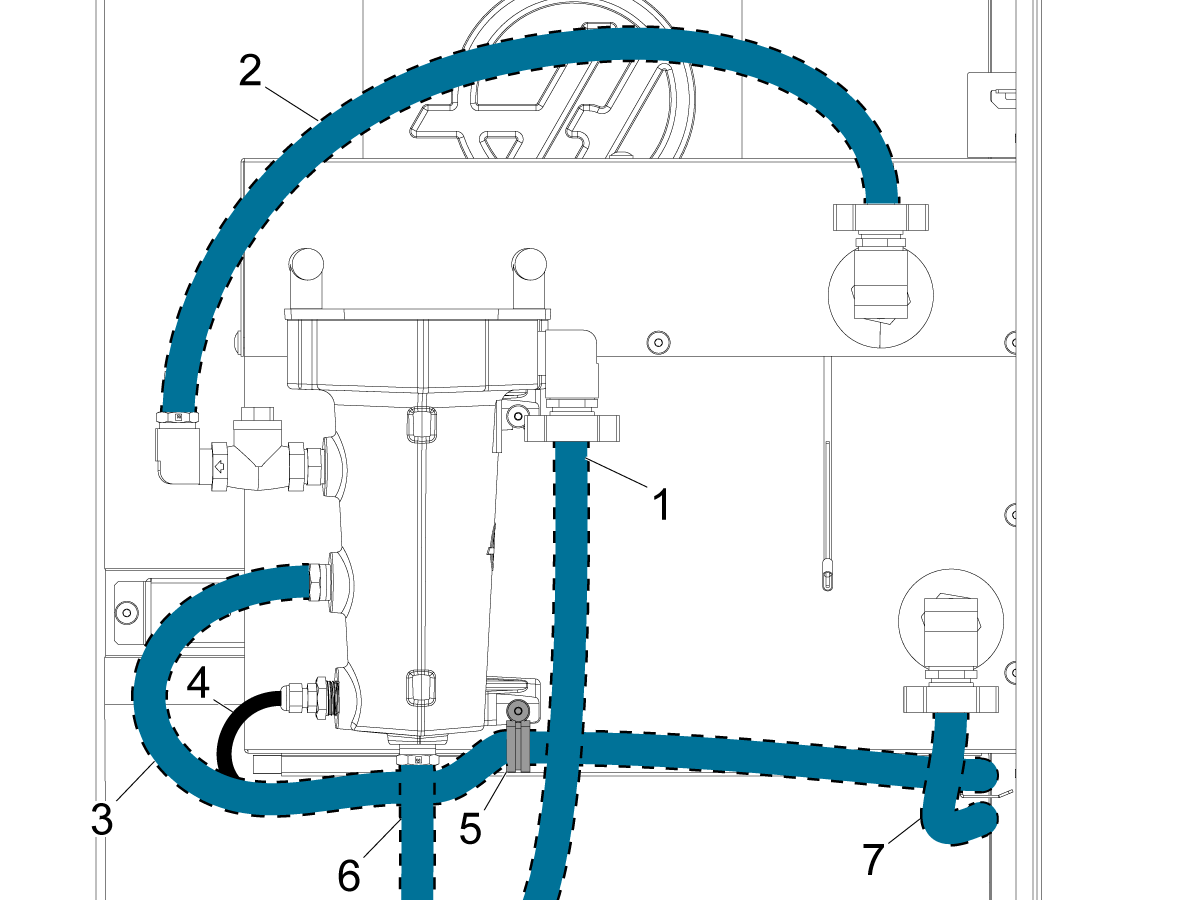
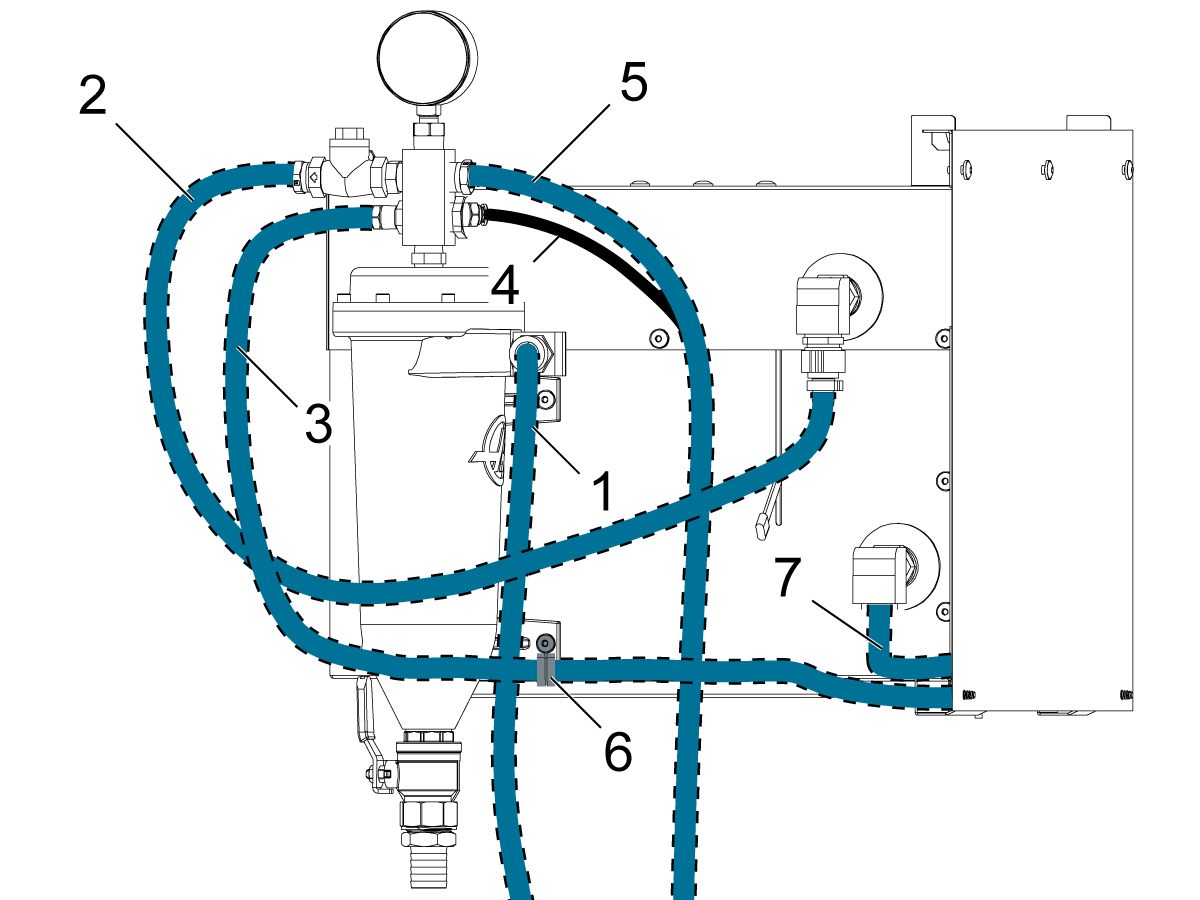
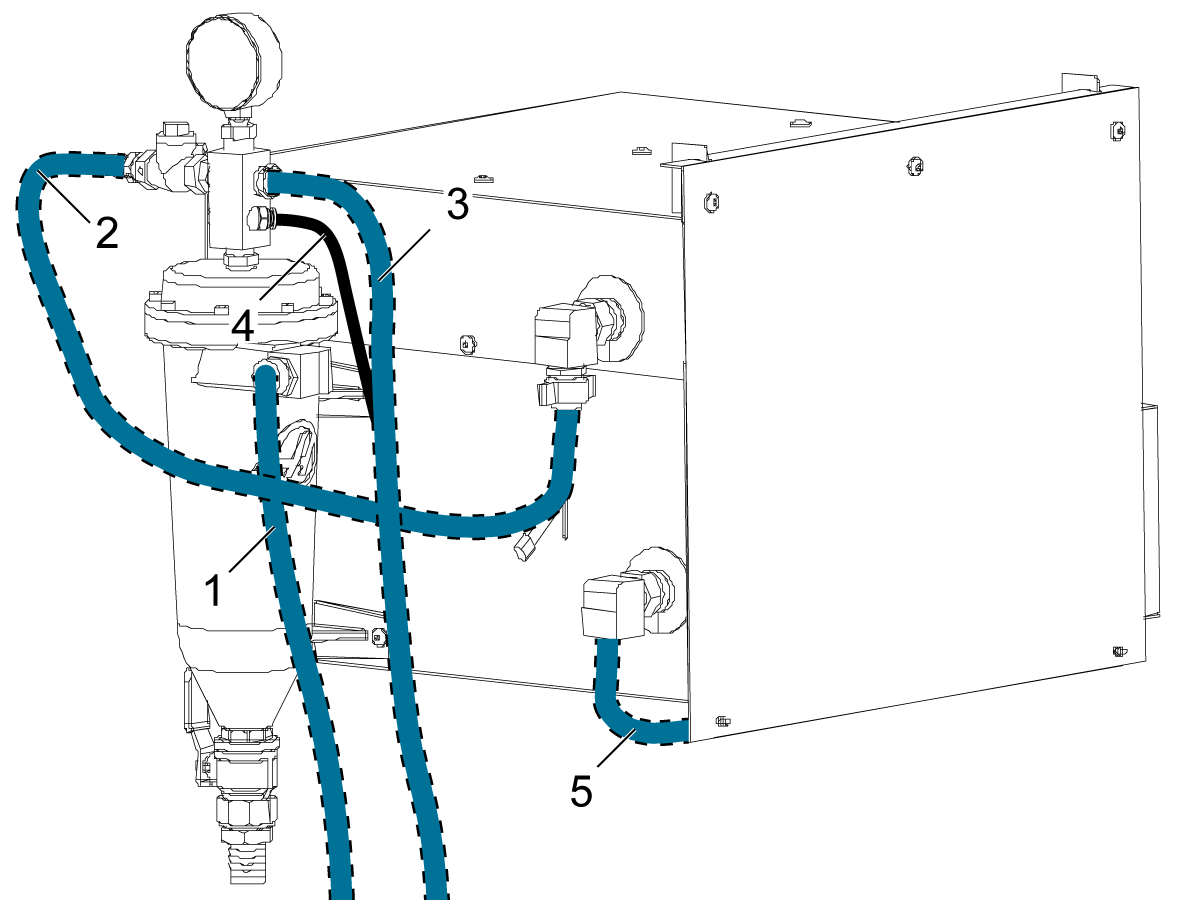
Route the coolant hoses as shown.  Secure the coolant hoses to the barb fittings with hose clamps.

If a coolant hose does not reach its barb fitting create a jumper hose using a double sided barb fitting.  Allow each hose some slack so it does not kink.

Route the coolant hose [1] from coolant pump to the filter assembly.

Route the coolant hose [2] from the filter assembly to the heat exchanger.

Route the coolant hose [3] from the waycover washdown to the filter assembly though the cable carriers under the coolant chiller. Secure the waycover washdown hose with a cable clamp [5].

Route the temperature sensor cable [4] along the waycover washdown hose.  Secure it to the waycover washdown hose between the sensor and the cable clamp using a zip tie.

Route the coolant hose [6] from the washdown spray nozzle to the filter assembly.

Route the coolant hose [7] from the flood coolant to the heat exchanger.

2

VF Machines with a Chip Separator Filter

Install the chip separator filter assembly using the screws [1] and tighten.

Install hose caps onto all the barb fittings.

VF Machines with Chip Separator Filter

Route the coolant hoses as shown.  Secure the coolant hoses to the barb fittings with hose clamps.

If a coolant hose does not reach its barb fitting create a jumper hose using a double sided barb fitting.  Allow each hose some slack so it does not kink.

Route the coolant hose [1] from coolant pump to the filter assembly.

Route the coolant hose [2] from the filter assembly to the heat exchanger.

Route the coolant hose [3] from the waycover washdown to the filter assembly though the cable carriers under the coolant chiller. Secure the waycover washdown hose with a cable clamp.

Route the temperature sensor cable [4] along the waycover washdown hose.  Secure it to the waycover washdown hose between the sensor and the cable clamp [6] using a zip tie.

Route the coolant hose [5] from the washdown spray nozzle to the filter assembly.

Route the coolant hose [7] from the flood coolant to the heat exchanger.

ST Coolant Chiller - Installation

1

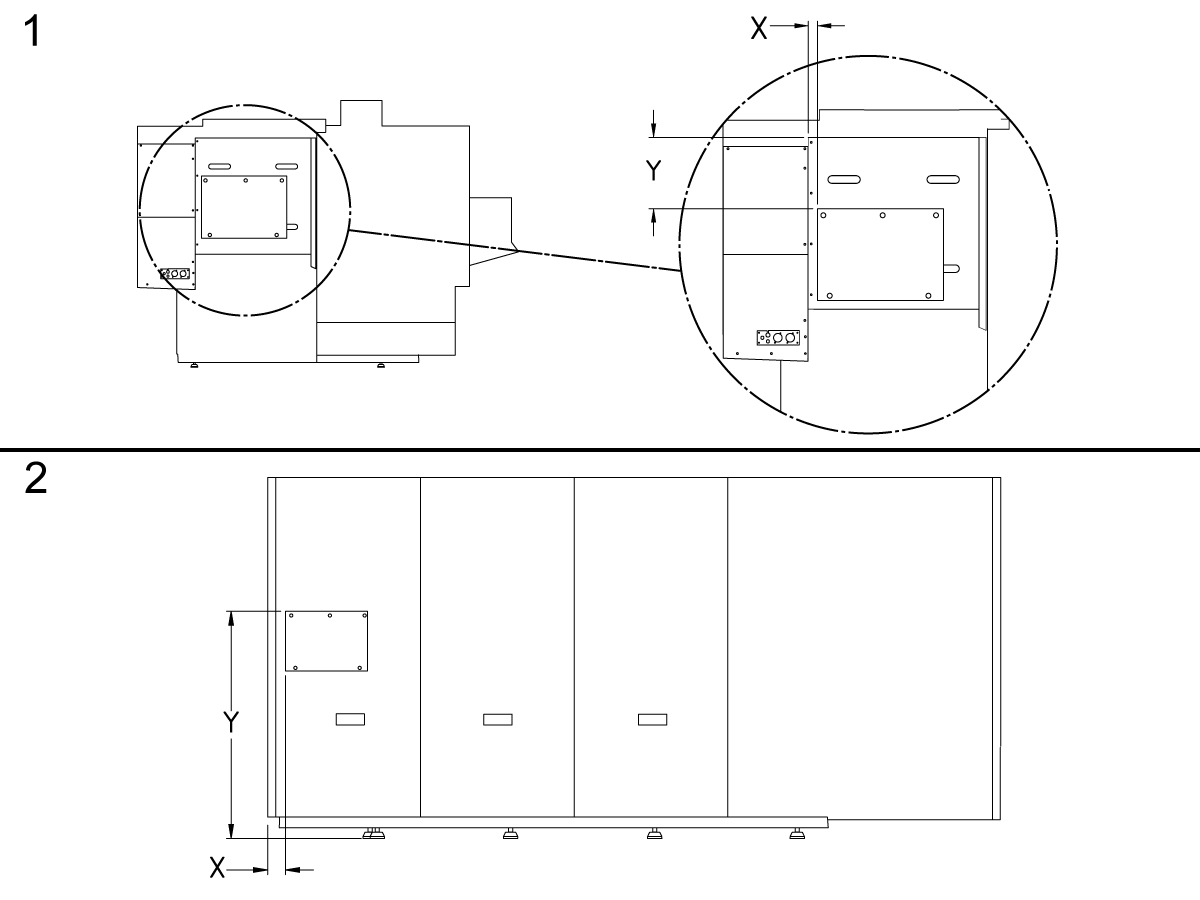
Secure the drill template to the enclosure in the location specified by the diagram. Make sure the template is flat on the enclosure. Use a 5/16 drill on the top 3 holes on the template. Use a 7/32 drill on the bottom 2 holes on the template. Deburr the holes after drilling.

ST-10/15 [1]

  • X = 2"
  • Y = 11"

ST-20/25/20L/25L/30/35/30L/35L [1]

  • X = 2"
  • Y = 19"

ST-40/45/40L/45L/50/55 [2]

  • X = 4"
  • Y = 60"

2

Remove the rear panel from the machine.

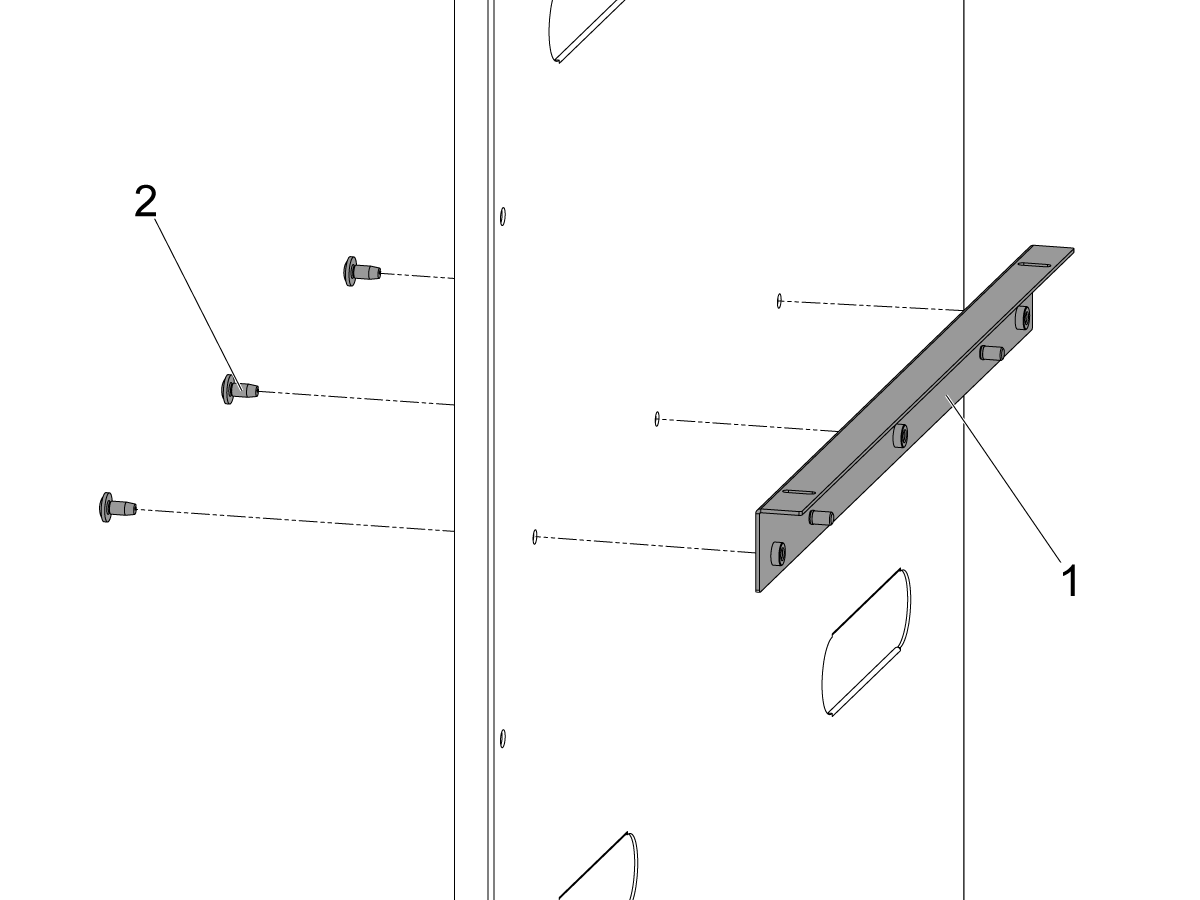
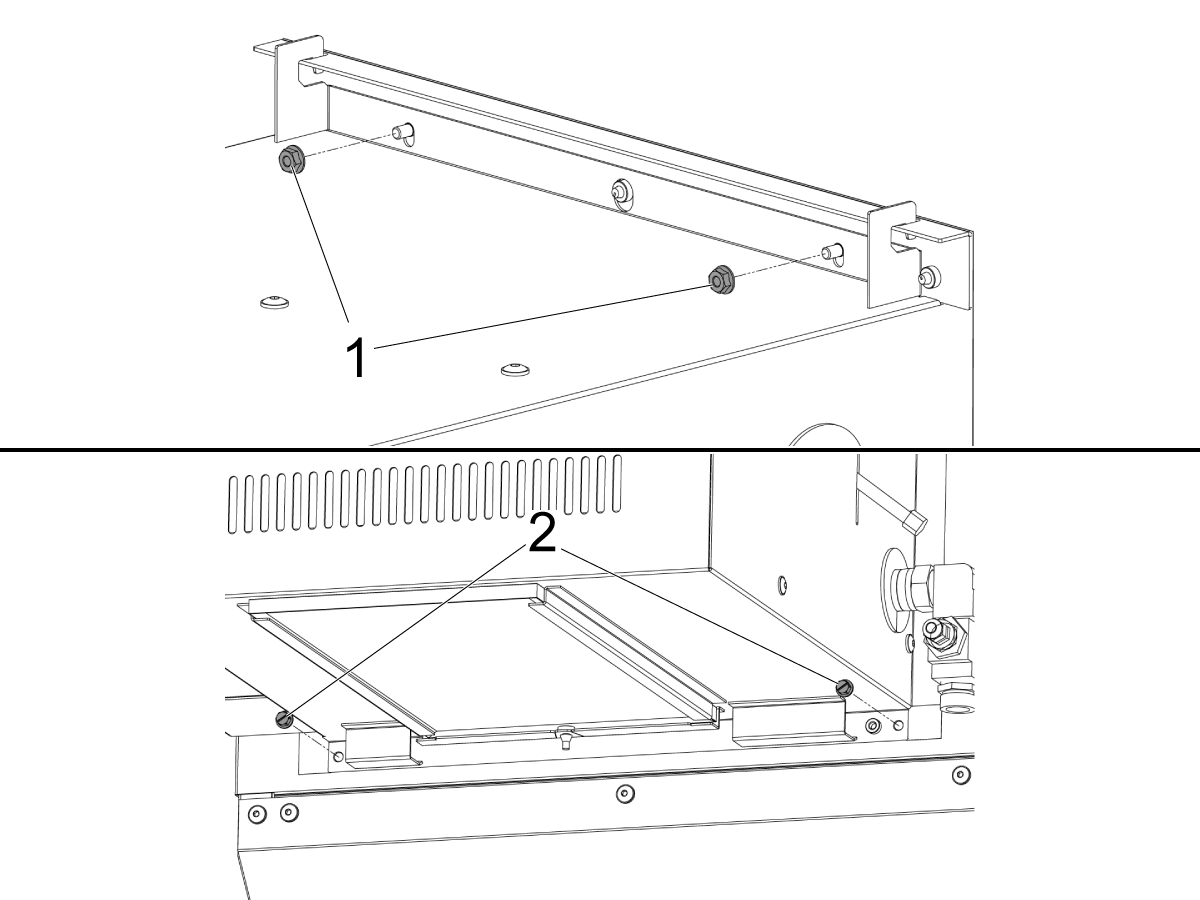
Install the bracket [1] with the upper three holes drilled in the enclosure panel with the button head screws[2].

Reinstall the rear panel to the machine.

3

Use the hooks on the top of the coolant chiller to hang the coolant chiller from the upper bracket.

4

Install the hex nuts [1] onto the upper bracket.  

Align the coolant chiller with the lower two holes drilled in the enclosure panel and install the self tapping screws [2].

5

Disconnect the coolant hose [1] from the coolant pump and connect it to the lower fitting on the coolant chiller.

Connect the hose [2] that was included with the coolant chiller kit to the upper fitting on the coolant chiller and the coolant pump.

6

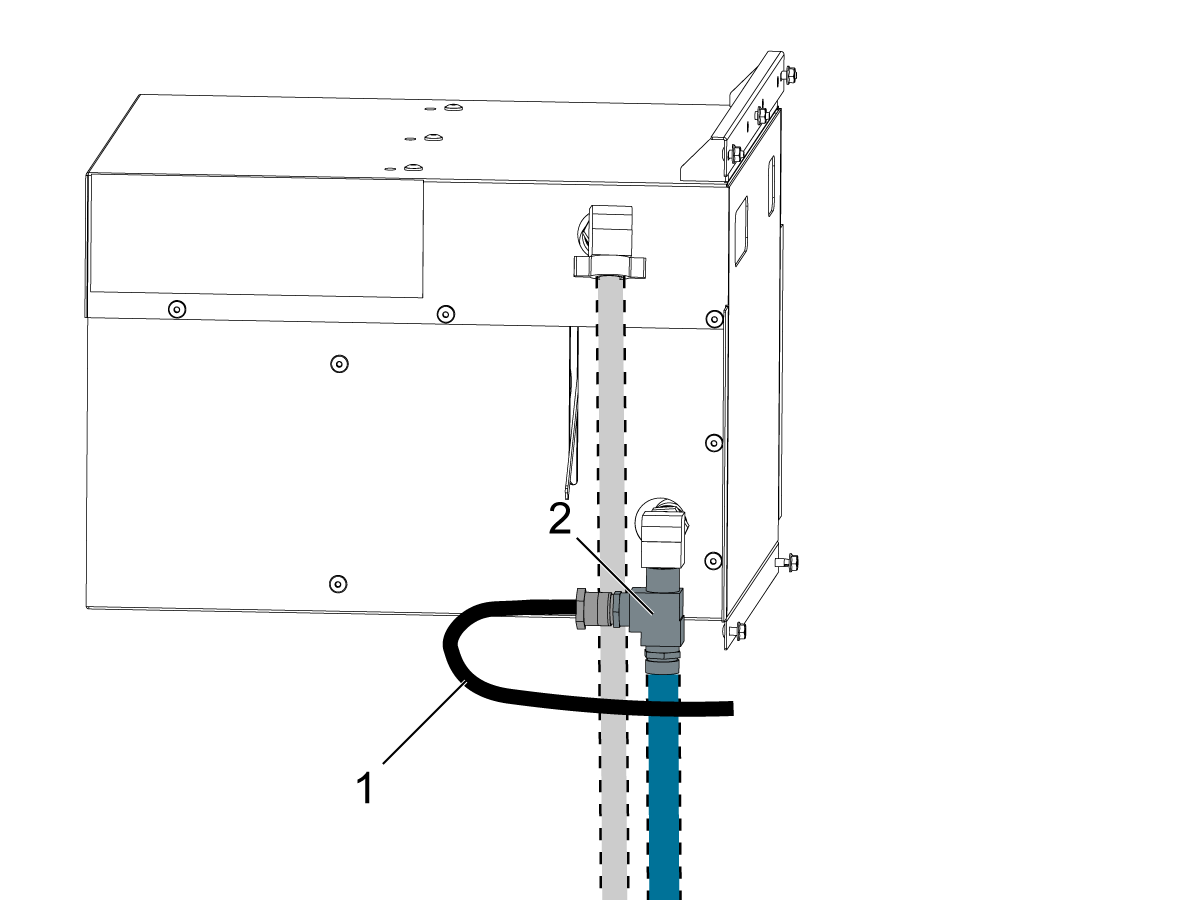
Connect the Temperature Sensor [1] to the NPT 3/4M Tee Fitting [2].

ST Coolant Filter - Installation

Machines Chip Filter Chip Separator
ST-20/25/Y 07/13/2024 - 07/19/2024 08/02/2024 - Present
ST-20/25/L/LY 04/19-2024 - 07/31/2024 09/05/2024 - Present
ST-28/Y 07/13/2024 - 07/31/2024 07/31/2024 - Present
ST-28L/Y 04/19/2024 - 07/31/2024 07/31/2024 - Present
ST-30/35/L/LY 06/26/2024 - 09/05/2024 07/31/2024 - Present
ST-30/35/Y 06/08/2023 - 07/19/2024 07/19/2024 - Present
DS-30Y 06/08/2023 - 07/19/2024 07/19/2024 - Present

1

ST Machines with Coolant Filter Pump

Install as shown, 1/2 of the threads should be engaged.

Slide the coolant filter assembly onto the machine screws and tighten.

Install hose caps onto all the barb fittings.

ST Machines with Coolant Filter Pump

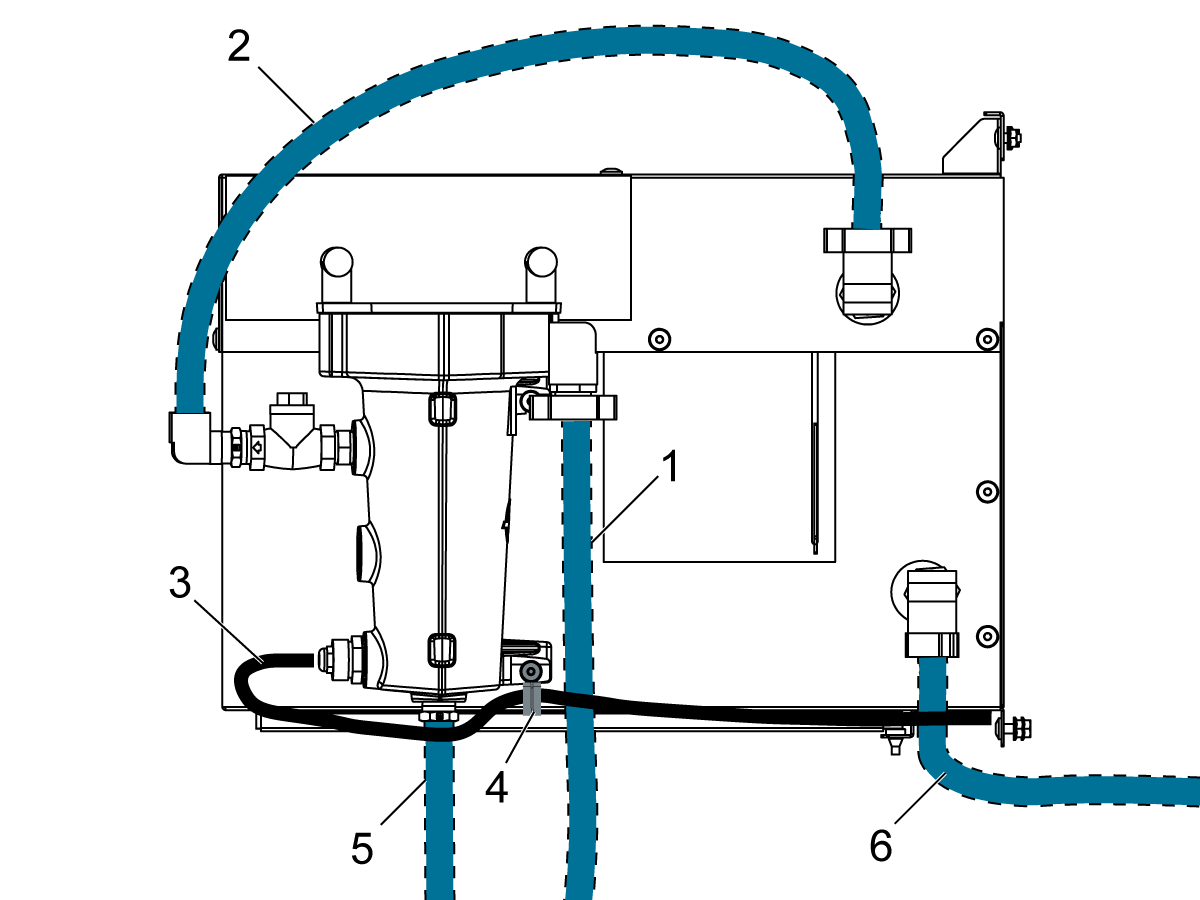
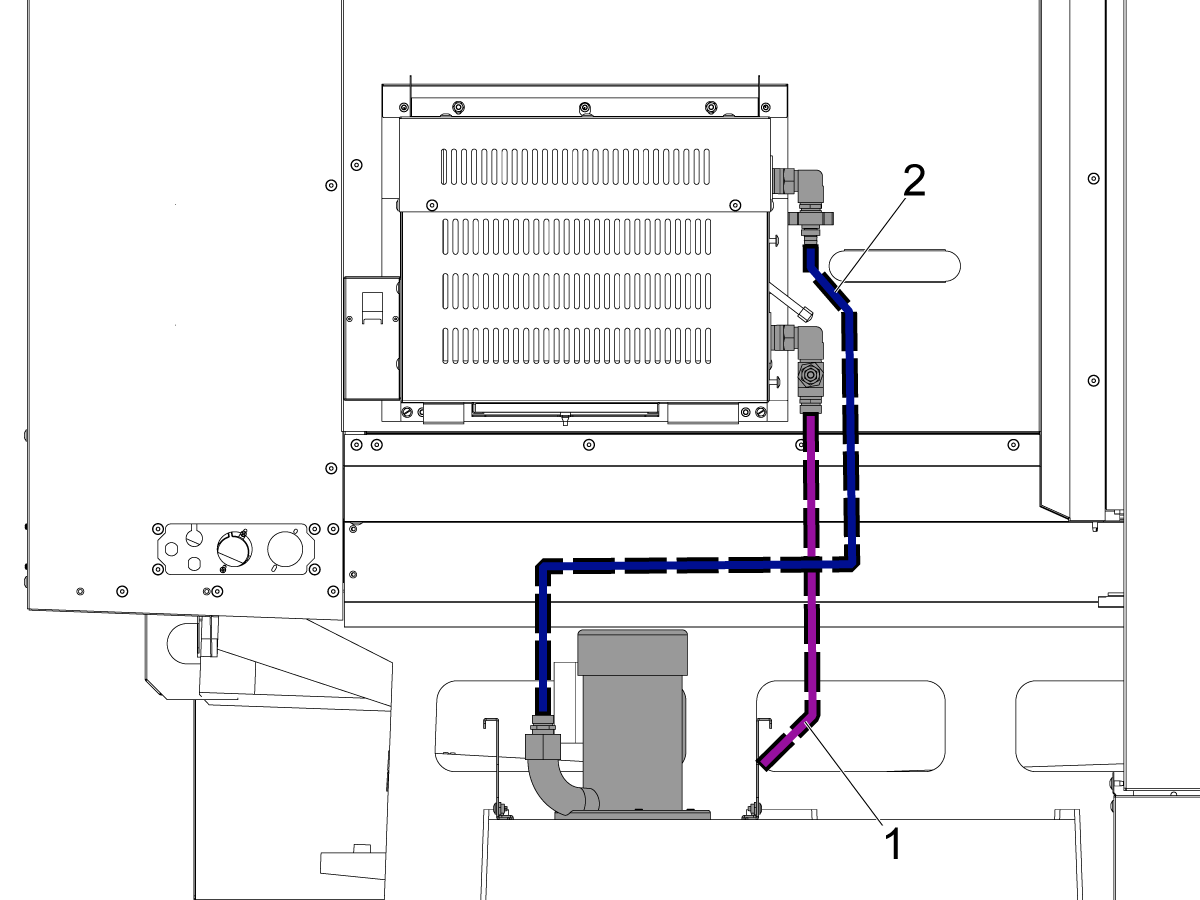
Route the coolant hoses as shown. Secure the coolant hoses to the barb fittings with hose clamps.

If a coolant hose does not reach its barb fitting create a jumper hose using a double sided barb fitting. Allow each hose some slack so it does not kink.

Route the coolant hose [1] from coolant pump to the filter assembly.

Route the coolant hose [2] from the filter assembly to the heat exchanger.

Route the temperature sensor cable [3].  Secure it with a cable clamp [4].

Route the coolant hose [5] from the washdown spray nozzle to the filter assembly.

Route the coolant hose [6] from the flood coolant to the heat exchanger.

2

ST Machines with Chip Separator Filter

Install the chip separator filter assembly using the screws [1] and tighten.

Install hose caps onto all the barb fittings.

ST Machines with Chip Separator Filter

Route the coolant hoses as shown.  Secure the coolant hoses to the barb fittings with hose clamps.

If a coolant hose does not reach its barb fitting create a jumper hose using a double sided barb fitting.  Allow each hose some slack so it does not kink.

Route the coolant hose [1] from coolant pump to the filter assembly.

Route the coolant hose [2] from the filter assembly to the heat exchanger.

Route the coolant hose [3] from the washdown spray nozzle to the filter assembly.

Route the temperature sensor cable [4] along the waycover washdown hose with a ziptie.

Route the coolant hose [5] from the flood coolant to the heat exchanger.

Electrical - Installation

Electrical Safety

Caution: When maintenance or repair is performed on CNC machines and their components, you must always follow basic safety precautions. This decreases the risk of injury and mechanical damage.

Push [POWER OFF].

Set the main circuit breaker to the [OFF] position.

Lock the main circuit breaker. Use an approved lock with an approved safety tag.

Danger: Before beginning any work inside the control cabinet the High Voltage indicator light on the 320V Power Supply / Vector Drive must be off for at least 5 minutes. If the voltage indicator light is on, do not touch the electrical components. The high voltage in the electrical cabinet can kill you. Some service procedures can be dangerous or life threatening. DO NOT attempt a procedure that you do not fully understand. If you have any doubts about performing a procedure contact your Haas Factory Outlet (HFO) and schedule a service visit.

1

Install the cabcool/coolant chiller power supply [1] onto the main transformer using the machine screws, lock washers, and washers.

Remove the sheet metal cover [2] from the main transformer.

Remove the red, white, and black power cables from the terminal block .

Install the red, white, and black power cables from the cabcool/coolant chiller power supply onto the terminal block.

Reinstall the removed red, white, and black power cables.

Reinstall the sheet metal cover [2].

Log in to the HBC site to download the latest configuration file.  Install the configuration file.

For instructions on how to operate the coolant chiller. Refer to: Coolant Chiller - Operation.

2

Power down the machine and set the main circuit breaker to [OFF].

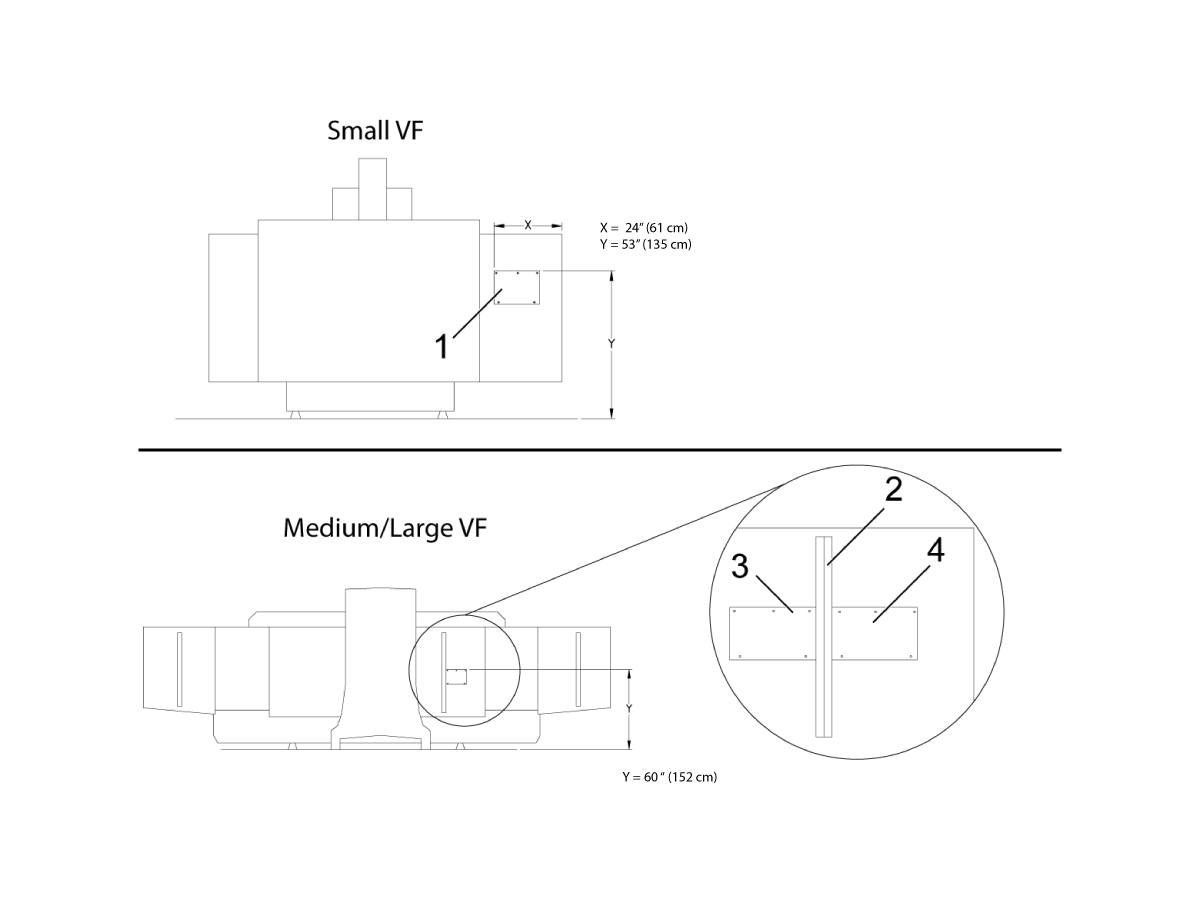
Small VF (not shown):

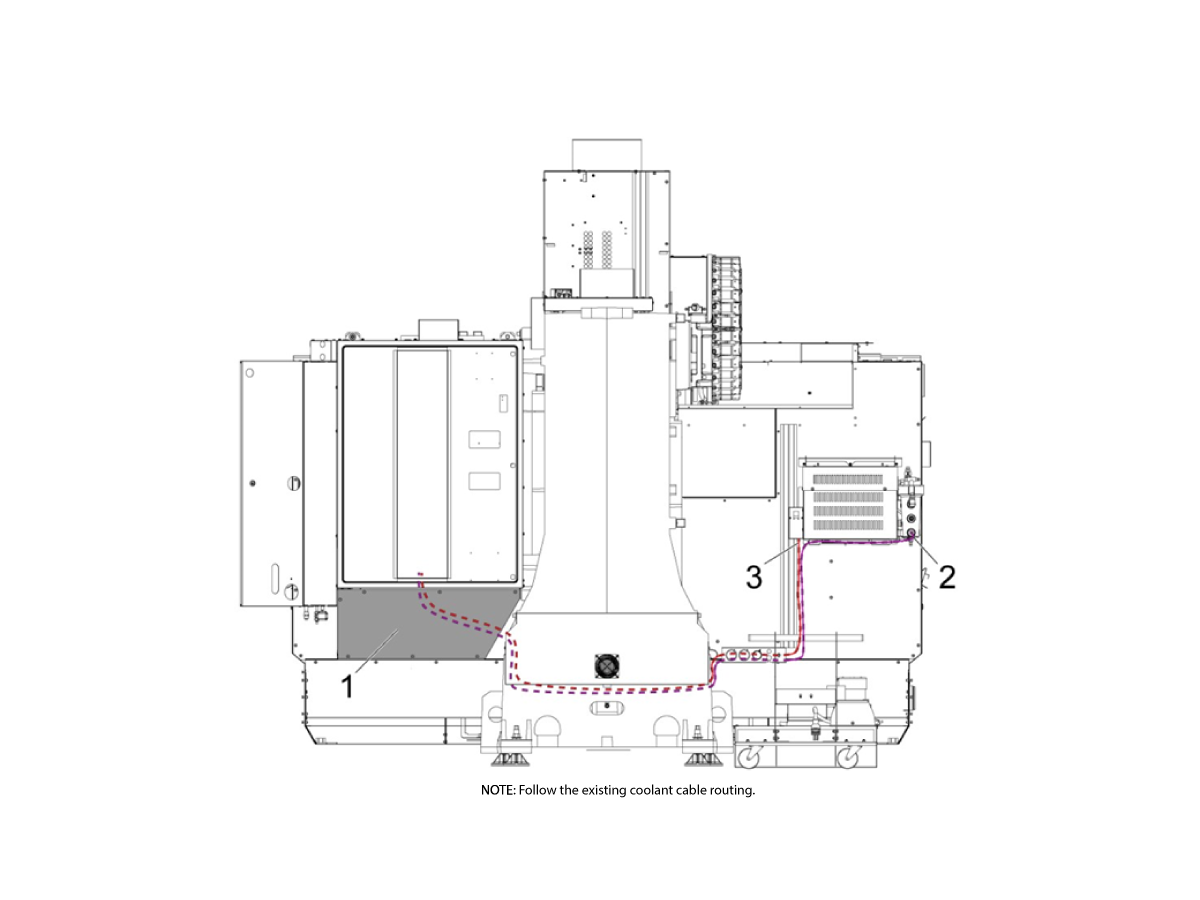
Route the temperature sensor [2] and power cable [3] through the casting, remove the enclosure panel located below the control cabinet, and route cables through it.

Medium / Large VF (shown):

Remove the enclosure panel [1] located below the control cabinet, remove coolant connector box and route temperature sensor cable [2] and coolant chiller power cable [3] through the back of the coolant connector box and through the base casting and up through the hole in the bottom of the control cabinet. 

For all:

Use the provided magnet and cable tie to secure the cables to the enclosure.

Inside the control cabinet route the temperature sensor cable through the cable carriers to I/O PCB plug P44.

Plug the coolant chiller power cable into the labeled outlet on the cabcool / coolant chiller power supply.

Coil any extra length of power or sensor cable under the control cabinet and fasten with a Velcro tie.

Reinstall the enclosure panel [1] for the small VF and reinstall the coolant connector box and enclosure panel [1] for medium/large VF.

3

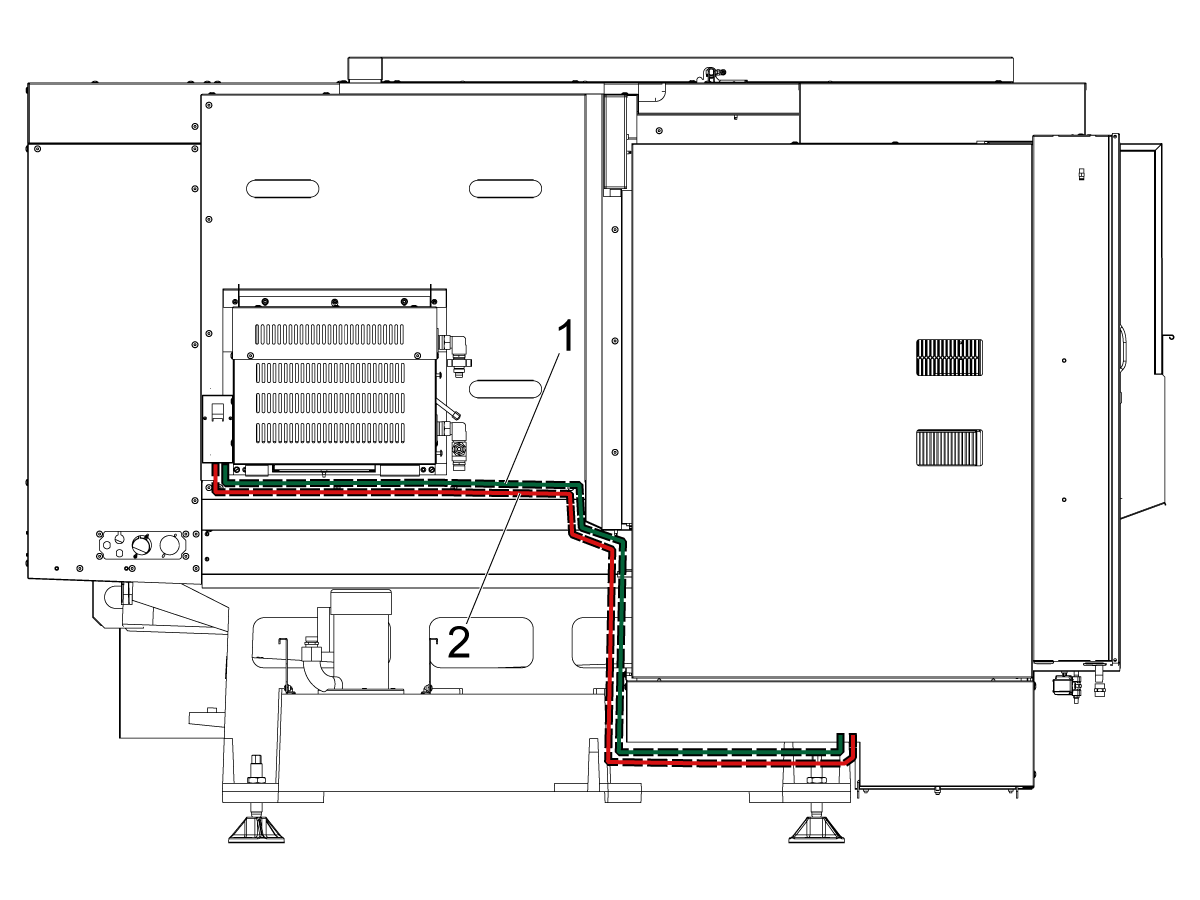
ST-10/15/20/25

Power down the machine and set the main circuit breaker to [OFF].

Route the temperature sensor cable [1] and power cable [2] under the coolant chiller in the cable channel to the control cabinet. Use the provided magnets and cable ties to secure the cables to the enclosure. The control cabinet skirt may need to be removed to route cables into the control cabinet.

Inside the control cabinet route the temperature sensor cable through the cable carriers to I/O PCB plug P44.

Plug the coolant chiller power cable into the labeled outlet on the cabcool/coolant chiller power supply. Coil any extra length of power or sensor cable under the control cabinet.

4

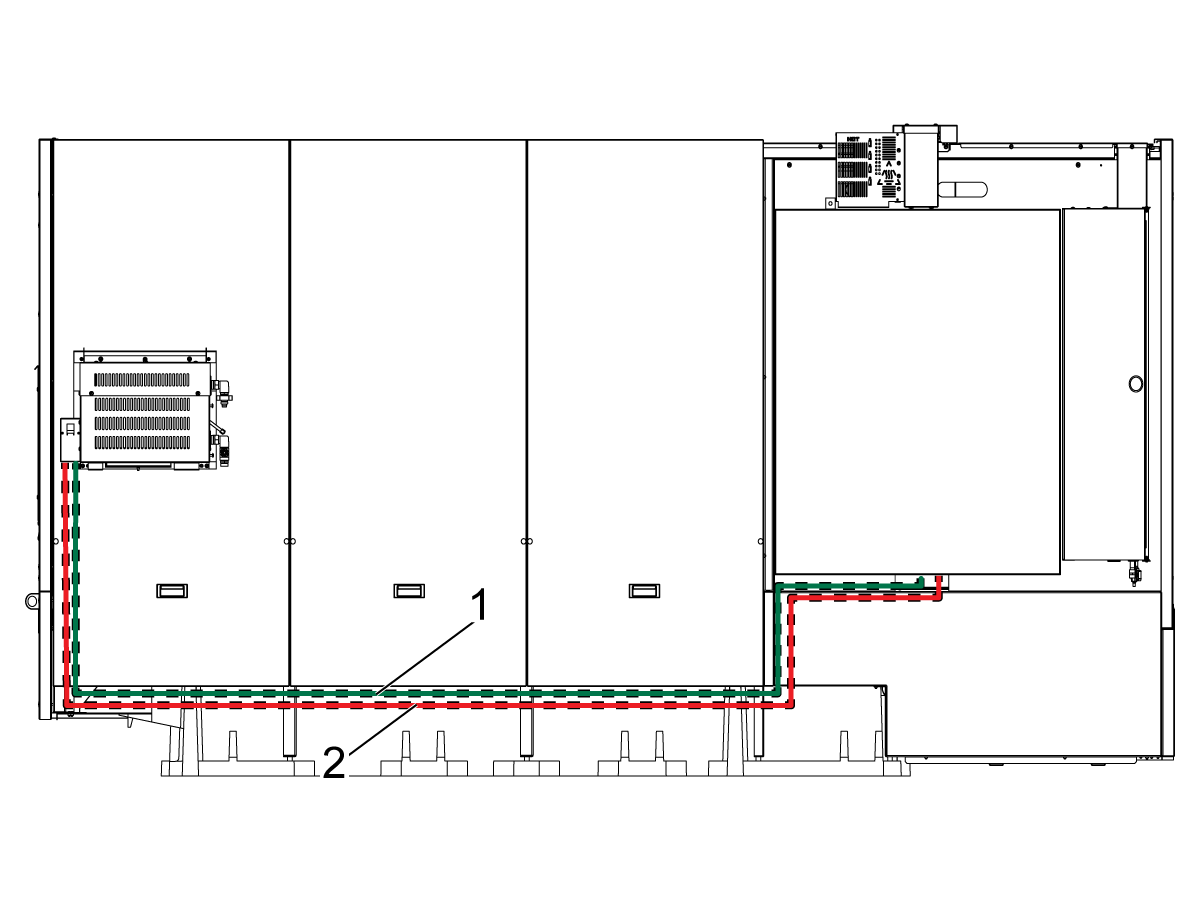
ST-40/45/40L/45L/50/55

Power down the machine and set the main circuit breaker to [OFF].

Route the temperature sensor cable [1] and power cable [2] under the coolant chiller in the cable channel to the control cabinet. Use the provided magnets and cable ties to secure the cables to the enclosure. The control cabinet skirt may need to be removed to route cables into the control cabinet.

Inside the control cabinet route the temperature sensor cable through the cable carriers to I/O PCB plug P44.

Plug the coolant chiller power cable into the labeled outlet on the cabcool/coolant chiller power supply. Coil any extra length of power or sensor cable under the control cabinet.

Coolant Chiller Activation

Turn on the machine.

Login to the HAAS SERVICE PORTAL.

Download the Coolant Chiller option configuration patch files.

Note: The option files will appear on the configuration download page after the Coolant CHiller Kit has been ordered.  If the option does not appear contact the service department.

Load the option configuration patch file to the control.  Refer to the NEXT GENERATION CONTROL - CONFIGURATION FILE - DOWNLOAD/LOAD procedure.

Test the Coolant Chiller

1

To test the coolant chiller. Press MDI and then COOLANT to turn on the coolant.

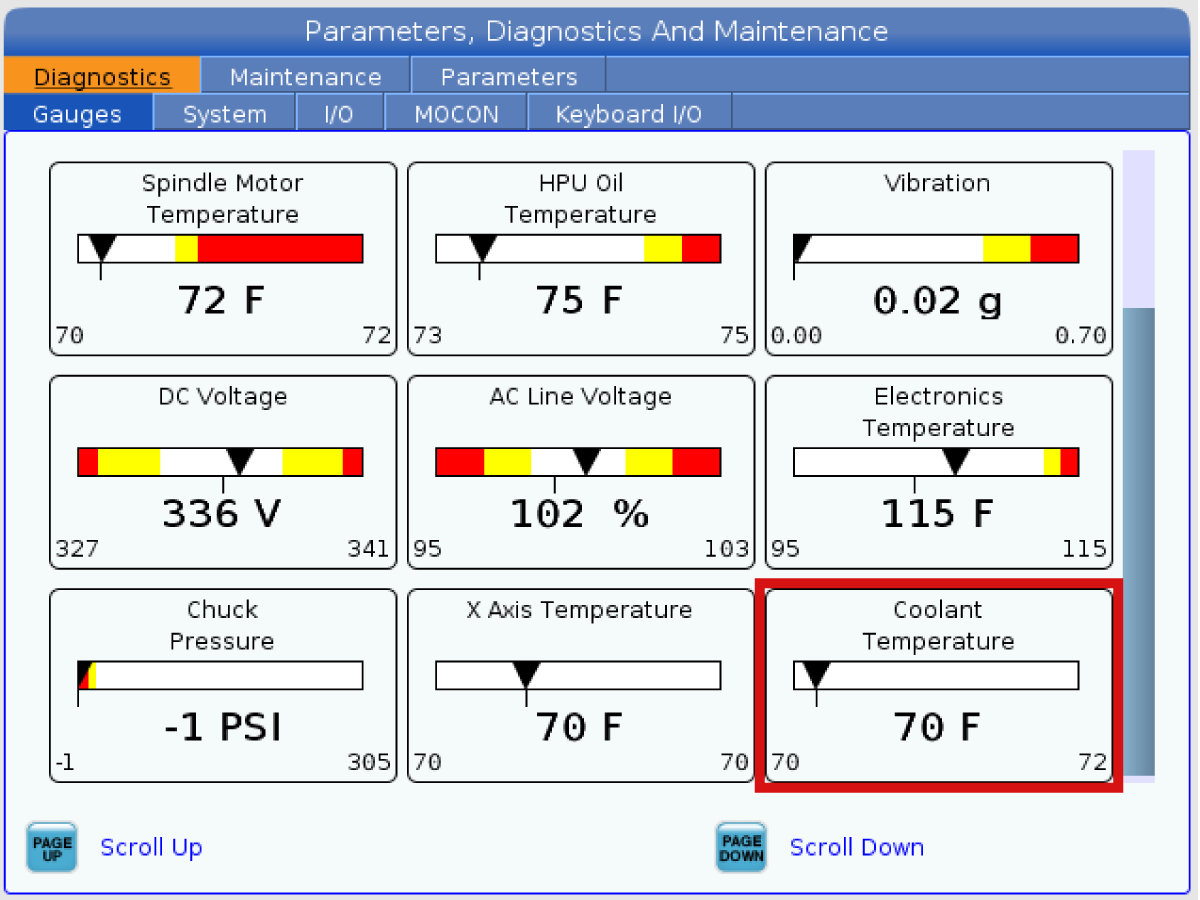
Let it run and navigate to Diagnostic > Gauges and check the coolant temperature on the Gauge page. The max rate of change is 1 degree per 10 minutes of coolant flow.

Recently Viewed Items

You Have No Recently Viewed Items Yet

Feedback
Haas Logo

Haas Delivered Price

This price includes shipping cost, export and import duties, insurance, and any other expenses incurred during shipping to a location in France agreed with you as a buyer. No other mandatory costs can be added to the delivery of a Haas CNC Product.

KEEP UP WITH THE LATEST HAAS TIPS AND TECHNOLOGY...

Sign up now!   

HAAS TOOLING ACCEPTS THE FOLLOWING:

  • Service & Support
  • Owners
  • Request Service
  • Operator Manuals
  • Haas Parts
  • Rotary Repair Request
  • Pre-Install Guides
  • Shopping Tools
  • Build & Price a New Haas
  • Available Inventory
  • The Haas Price List
  • CNCA Financing
  • About Haas
  • Accessibility Statement
  • DNSH Statement
  • Export Compliance
  • Careers
  • Certifications & Safety
  • Contact Us
  • History
  • Terms & Conditions
  • Haas Tooling Terms & Conditions
  • Privacy
  • Warranty
  • Haas Community
  • Haas Certification Program
  • Haas Motorsports
  • Gene Haas Foundation
  • Haas Technical Education Community
  • Events
  • Join the Conversation
  • Facebook
  • X
  • Flickr
  • YouTube
  • LinkedIn
  • Instagram
  • TikTok
© 2026 Haas Automation, Inc – CNC Machine Tools
This site is protected by reCAPTCHA and the Google Privacy Policy and Terms of Service apply.

2800 Sturgis Rd., Oxnard, CA 93030
Toll Free: (888) 817-4446 / Fax: 805-278-8554