My Haas Welcome,
!
Haas Tooling MyHaas/HaasConnect Sign In Register Haas Tooling MyHaas/HaasConnect Sign Out Welcome, My Machines Latest Activity My Quotes My Account My Users Sign Out
Find Your Distributor
  1. Select Language
    1. English
    2. Deutsch
    3. Español - España
    4. Español - México
    5. Français
    6. Italiano
    7. Português
    8. Český
    9. Dansk
    10. Nederlands
    11. Magyar
    12. Polski
    13. Svenska
    14. Türkçe
    15. 中文
    16. Suomi
    17. Norsk
    18. الإنجليزية
    19. български
    20. Hrvatski
    21. Ελληνικά
    22. Română
    23. Slovenský
    24. Slovenščina
    25. 한국어
    26. 日本語
    27. Українська
  • machines Main Menu
    • Vertical Mills
      Vertical Mills
      Vertical Mills View All
      • Vertical Mills
      • VF Series
      • Universal Machines
      • VR Series
      • VP-5 Prismatic
      • Pallet-Changing VMCs
      • Mini Mills
      • Mold Machines
      • High-Speed Drill Centers
      • Drill/Tap/ Mill Series
      • Toolroom Mills
      • Pocket Mill
      • Compact Mills
      • Gantry Series
      • SR Sheet Routers
      • Extra-Large VMC
      • Double-Column Mills
      • 3+2 Positioning Machines
    • Multi-Axis Solutions
      Multi-Axis Solutions
      Multi-Axis Solutions View All
      • Multi-Axis Solutions
      • Y-Axis Lathes
      • 5-Axis Mills
    • Lathes
      Lathes
      Lathes View All
      • Lathes
      • ST Series
      • Dual-Spindle
      • Box Way Series
      • Toolroom Lathes
      • Chucker Lathe
      • Haas Bar Feeders
    • Horizontal Mills
      Horizontal Mills
      Horizontal Mills View All
      • Horizontal Mills
      • 50-Taper
      • 40-Taper
    • Rotaries & Indexers
      Rotaries & Indexers
      Rotaries & Indexers View All
      • Rotaries & Indexers
      • Rotary Tables
      • Indexers
      • 5-Axis Rotaries
      • Extra-Large Rotaries
    • Special Series
      Special Series
      Special Series View All
      • Special Series
      • EU_Series_Redirect
    • Automation Systems
      Automation Systems
      Automation Systems View All
      • Automation Systems
      • Mill Automation
      • Lathe Automation
      • Automatic Parts Loaders
      • Automation Models
    • Desktop Machines
      Desktop Machines
      Desktop Machines View All
      • Desktop Machines
      • Desktop Mill
      • Desktop Lathe
      • Control Simulator, Standard
      • Control Simulator, Premium
    • Shop Equipment
      Shop Equipment
      Shop Equipment View All
      • Shop Equipment
      • Knee Mill
      • Haas Manual Lathes
      • Haas Saws
    • Fabrication Machines
      Fabrication Machines
      Fabrication Machines View All
      • Fabrication Machines
      • Laser Cutting Machines
      • CNC Press Brakes
    • QUICK LINKS Special Series  Special Series 
      EU SERIES EU SERIES BUILD & PRICE | PRICE LIST BUILD & PRICE | PRICE LIST In-Stock Machines In-Stock Machines WHAT’S NEW WHAT’S NEW YOUR FIRST CNC YOUR FIRST CNC
      SHOPPING TOOLS
      • Build & Price a Haas
      • Price List
      • Available Inventory
      • CNCA Financing
      WANT TO TALK TO SOMEONE?

      A Haas Factory Outlet (HFO) can answer your questions, and walk you through your best options.

      CONTACT YOUR DISTRIBUTOR >
  • Options Main Menu
    • The Haas Control Value Option Packages
      Value Option Packages
      Value Option Packages View All
      • Value Option Packages
    • Product Image Spindles
      Spindles
      Spindles View All
      • Spindles
    • Product Image Tool Changers
      Tool Changers
      Tool Changers View All
      • Tool Changers
    • Product Image 4th- | 5th-Axis
      4th- | 5th-Axis
      4th- | 5th-Axis View All
      • 4th- | 5th-Axis
    • Product Image Turrets & Live Tooling
      Turrets & Live Tooling
      Turrets & Live Tooling View All
      • Turrets & Live Tooling
    • Product Image Probing
      Probing
      Probing View All
      • Probing
    • Haas Chip & Coolant Management Chip & Coolant Management
      Chip & Coolant Management
      Chip & Coolant Management View All
      • Chip & Coolant Management
    • The Haas Control The Haas Control
      The Haas Control
      The Haas Control View All
      • The Haas Control
    • Product Image Product Options
      Product Options
      Product Options View All
      • Product Options
    • Product Image Tooling & Fixturing
      Tooling & Fixturing
      Tooling & Fixturing View All
      • Tooling & Fixturing
    • Product Image Workholding
      Workholding
      Workholding View All
      • Workholding
    • Product Image 5-Axis Solutions
      5-Axis Solutions
      5-Axis Solutions View All
      • 5-Axis Solutions
      • 5 Easy Steps to 5-Axis
    • QUICK LINKS Special Series  Special Series 
      EU SERIES EU SERIES BUILD & PRICE | PRICE LIST BUILD & PRICE | PRICE LIST In-Stock Machines In-Stock Machines WHAT’S NEW WHAT’S NEW YOUR FIRST CNC YOUR FIRST CNC
      SHOPPING TOOLS
      • Build & Price a Haas
      • Price List
      • Available Inventory
      • CNCA Financing
      WANT TO TALK TO SOMEONE?

      A Haas Factory Outlet (HFO) can answer your questions, and walk you through your best options.

      CONTACT YOUR DISTRIBUTOR >
  • Why Haas Main Menu
      Discover the Haas Difference
    • Why Haas
    • MyHaas
    • Education Community
    • Industry 4.0
    • Haas Certification
    • Customer Testimonials
  • Service Main Menu
      Welcome to Haas Service
      SERVICE HOME Operator’s Manuals How-To Procedures Troubleshooting Guides Preventive Maintenance Haas Parts Haas Tooling Videos
  • Videos Main Menu
  • Main Menu
    • View All
    • View All
    • View All
    • View All
      • HTEC Curriculum Support
    • View All
      • Haas 10 kg Cobot Package
      • Cobot Kits
      • DC-1 Drill Center
      • CNC Sales News
      • Do More With Your Haas
    • View All
    • View All
      • contact-us-test
      • 4 - AUTOMATION SYSTEMS
      • Carousel-V2
      • expert test
      • Demo_Day_Trident-test
      • Link Test
      • image-sale-tag-test
      • article-list-test
      • Haas 25 kg Robot Package
    • View All
      • Choose Options
    • View All
    • View All
    • View All
    • View All
    • View All
      • calc-test
    • View All
    • QUICK LINKS Special Series  Special Series 
      EU SERIES EU SERIES BUILD & PRICE | PRICE LIST BUILD & PRICE | PRICE LIST In-Stock Machines In-Stock Machines WHAT’S NEW WHAT’S NEW YOUR FIRST CNC YOUR FIRST CNC
      SHOPPING TOOLS
      • Build & Price a Haas
      • Price List
      • Available Inventory
      • CNCA Financing
      WANT TO TALK TO SOMEONE?

      A Haas Factory Outlet (HFO) can answer your questions, and walk you through your best options.

      CONTACT YOUR DISTRIBUTOR >
  • Haas Tooling Main Menu
  • Haas Service Parts Main Menu

My Haas Welcome,
!
Haas Tooling MyHaas/HaasConnect Sign In Register Haas Tooling MyHaas/HaasConnect Sign Out Welcome, My Machines Latest Activity My Quotes My Account My Users Sign Out
Find Your Distributor
  1. Select Language
    1. English
    2. Deutsch
    3. Español - España
    4. Español - México
    5. Français
    6. Italiano
    7. Português
    8. Český
    9. Dansk
    10. Nederlands
    11. Magyar
    12. Polski
    13. Svenska
    14. Türkçe
    15. 中文
    16. Suomi
    17. Norsk
    18. الإنجليزية
    19. български
    20. Hrvatski
    21. Ελληνικά
    22. Română
    23. Slovenský
    24. Slovenščina
    25. 한국어
    26. 日本語
    27. Українська
×

Search Results

Web Pages

Images

    • <
    • 1
    • >

Ballscrew - Troubleshooting Guide - TG0038

Service Home Ballscrew - Troubleshooting Guide - TG0038

Ballscrew - Troubleshooting Guide - TG0038

Jump to section Back to Top

7.5 Ballscrew Troubleshooting

Recently Updated Last updated: 10/09/2025

Ballscrew - Troubleshooting Guide


TG0038

Revision B - 08/2025

Introduction

Download and fill out the Ballscrew Inspection Report Checklist below before replacing any parts.

Ballscrew Inspection Report Checklist
Dual Ballscrew Inspection Report Checklist
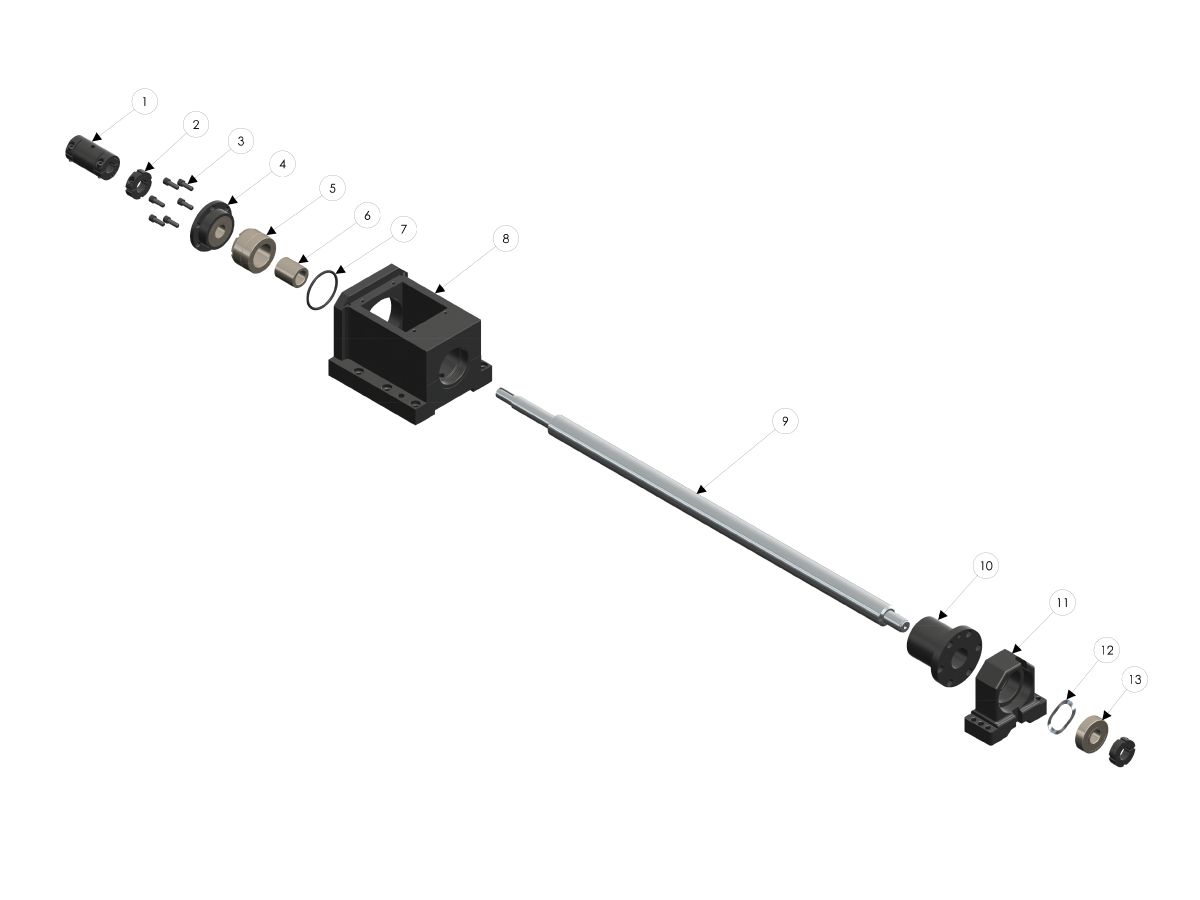
Exploded View:
 
  1. SOLID COUPLING
  2. BEARING LOCKNUT
  3. SHCS 1/4-20 X 3/4
  4. ANGULAR CONTACT BEARING
  5. BEARING FILLER
  6. SPACER
  7. O-RING
  8. MOTOR HOUSING
  9. BALL SCREW
  10. BALL NUT
  11. SUPPORT HOUSING
  12. WAVE WASHER
  13. DEEP GROOVE BEARING
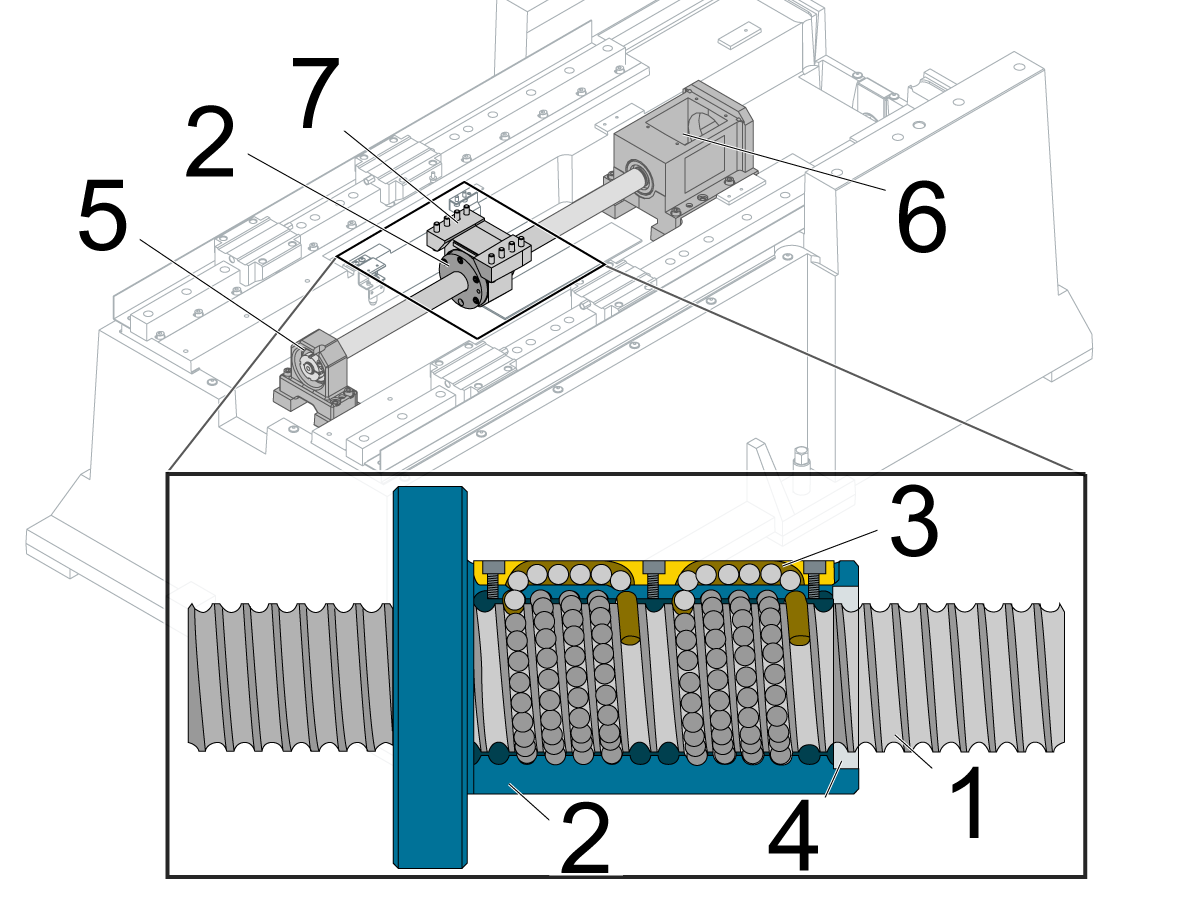
Main Components:
 
  1. Ballscrew
  2. Ballnut
  3. Balls circulate through the ballnut
  4. Wiper
  5. Support-bearing housing
  6. Motor housing
  7. Ballnut housing

Symptom Table

Symptom Possible Cause Corrective Action

Alarm 103 SERVO ERROR TOO LARGE

Alarm 104 SERVO ERROR TOO LARGE

Alarm 105 SERVO ERROR TOO LARGE

The axis motion is very rough when the axis is jogged.

There is unusual noise when the axis moves.

There is insufficient lubrication. Check the ballscrew for correct lubrication.
The ballscrew or ballnut is damaged. Check the ballscrew and ballnut for damage.
The ballscrew support bearings are damaged. Check the ballscrew support bearings for damage.
Ballscrew misalignment Ballscrew misalignment
Faulty power cable Check the Servo Motor - Troubleshooting Guide for further instructions on how to troubleshoot a faulty cable 
Misaligned ballscrew coupler

If the machine has been crashed the coupler may have moved out of alignment. Refer to the Coupler section of this procedure for more information on how to align a coupler.

NOTE: It is important to troubleshoot for a faulty cable before realigning the 

Alarm 108 AXIS SERVO OVERLOAD Ballscrew misalignment

Ballscrew misalignment

HSG-A 03/07/2023 

The cutting tool is not sharp or is damaged.  Install a new device or a new tool insert. 

The axis position does not repeat within specification.

Inconsistent accuracy, positioning, backlash.

There is insufficient lubrication, or the lubrication is contaminated. Check the ballscrew for correct lubrication.
The ballscrew or ballnut is damaged. Check the ballscrew and ballnut for damage.
The ballscrew coupling is damaged. Check the ballscrew coupling for damage.
There is excessive thermal growth. Correct your application
Dual ballscrew GM-2 is experiencing different and high loads during a movement on the X-axis and slave (F1)-axis. Machine may have moved during shipping 

Before taking any corrective action please verify the machine is experiencing the following behavior:

  • The loads on the X & F1 axis are compounding at different rates

Note: F1 axis may need to be made visible 

  • When the direction is reversed the loads switch on the two axis
  • When the E-stop is engaged the position of the two axis are not the same

If your machine is experiencing these issues please provide an inspection report and error report to Haas Service for analysis.

Please also complete the Dual Ballscrew Inspection Checklist located at the top of this document. Further instructions will be provided after analysis. 

HSG-A 03/07/2023 

Machine was built with grade 7 ballscrews and lead compensations are not set correctly 

For UMC-500/SS:

Bump noise when Zero Returning Y-axis with a load spike.

Incorrect bumper installed in the factory. Replace the Y-axis bumper with the updated version.

Ballscrew Alignment

IMPORTANT: Machines are currently equipped with either a hydraulic counterbalance system or an electric brake motor. Care must be taken, in either case, to avoid damaging the machine or severely injuring yourself. Heed all warnings and cautions, and read all the steps of the procedure before starting any alignment.

If the machine is equipped with a hydraulic counterbalance, a shaft stop block must be used to secure the spindle head. Do not move the spindle during ballscrew service.       

  • Machines with Counterbalances: Lower the spindle head to its lowest position. Install cylinder shaft stop. Handle jog axis up until the shaft stop blocks the axis.
  • Machines with Brake Motors: Brace the spindle head up with a 4” x 4” x 14” block of wood.
 
Checking Ball Screw Alignment
 
  • Observe Axis Servo load while Jogging axis is question through full travel.
  • A properly aligned Ball Screw will exhibit consistent servo loads throughout its travel.

If the servo load is not consistent, the following procedure should be used to align the Ball Screw:

  • Break loose then lightly snug the following Bolts:
  1. Nut Housing to axis in question Bolts (Saddle, Table, Spindle Head, Etc.)
  2. Ballscrew to Nut Housing Bolts
  3. Bearing support Bolts
  • Jog the Axis back and forth several times, then stop the axis at the bearing support and torque all bolts that were loosened
  • Jog the Axis through its entire travel observing for consistent servo load

Lubrication

Corrective Action:

Make sure there is a light coat of oil or grease on the surface of the ballscrew. If there is not, inspect the entire lubrication system for leaks and clogs, including all tubes, hoses, and fittings. Check for leaks on each axis: A leak at one axis will cause a lack of lubrication at a different axis. Check for oil or grease puddles to help locate the source of the leak.

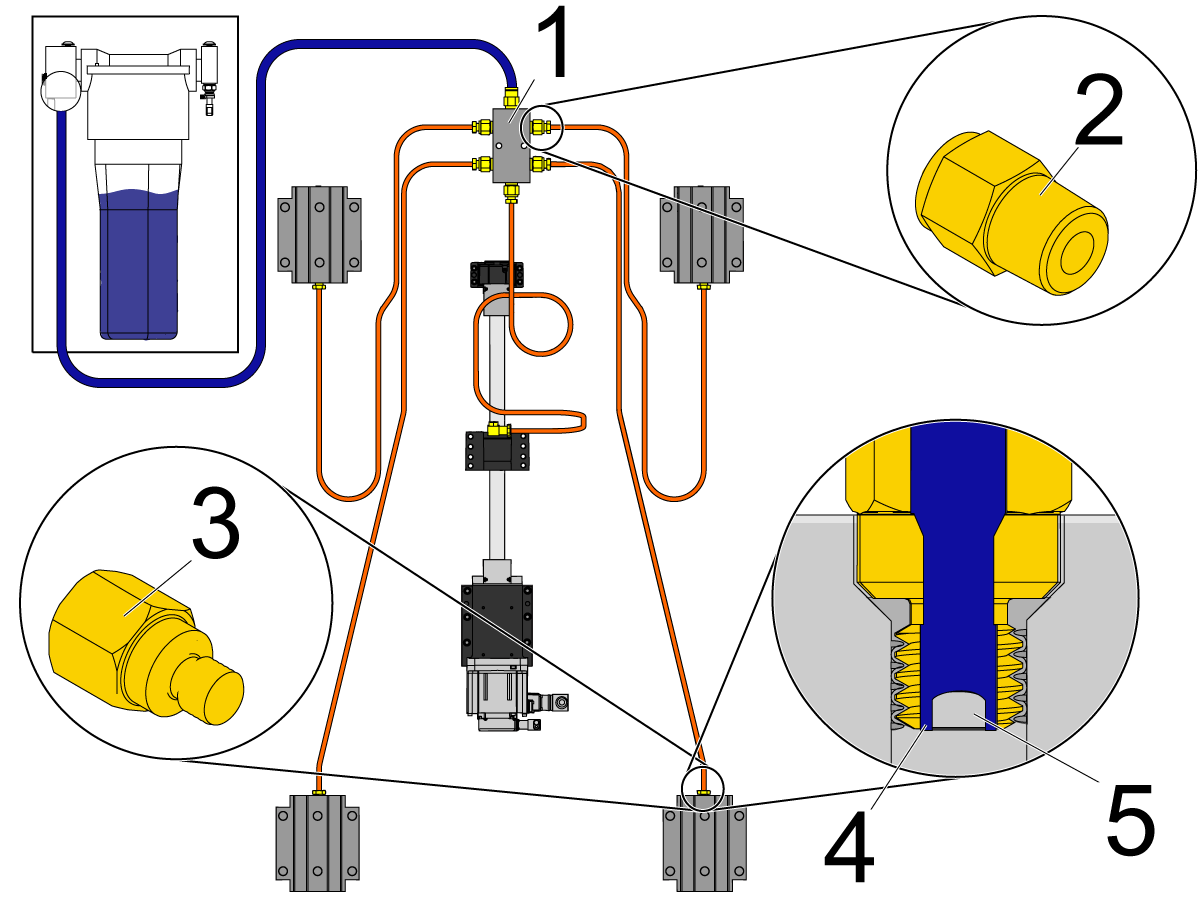
 Note: The Haas Liquid Grease lubrication system uses adapter fittings [2] in the axis manifolds [1]. The linear guide trucks and ballnuts use restrictor fittings [3]. The restrictor fitting has a gap [5] between the threads and the set screw [4]. This forces the manifold-fed grease to pass through the gap [4] to lubricate the axes.

Make sure the correct lubrication is used. Refer to Lubricant, Grease, and Sealant Tables for Haas Machine Components.

Ballscrew/Ballnut or Support Bearing

Corrective Action:

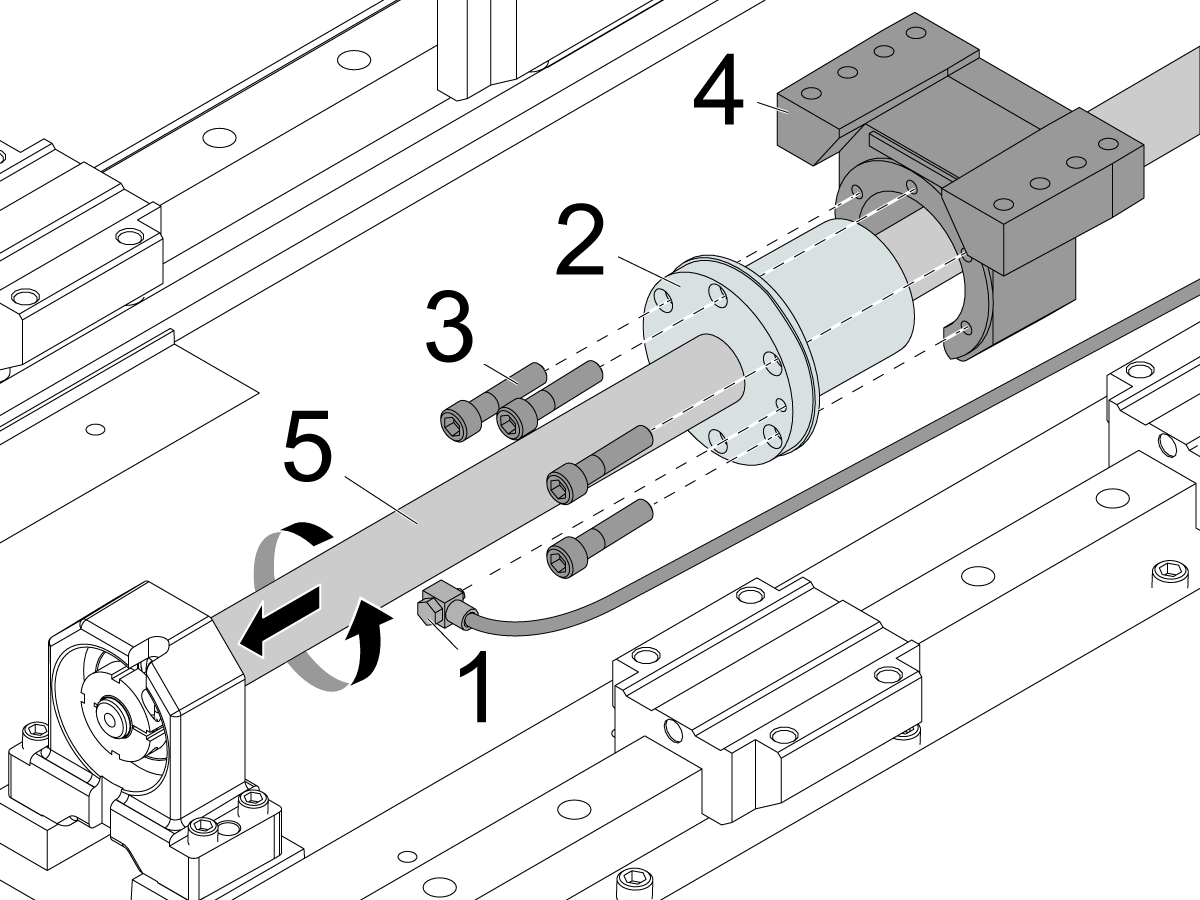
Disconnect the lubrication fitting [1] from the ballnut [2]. Remove the screws [3] that attach the ballnut [2] to the ballnut housing [4].

Ballscrew/Ballnut

Separate the ballnut [2] from the ballnut housing [4]. Rotate the ballnut [2] by hand and hold the ballscrew [5] so it does not rotate, and the ballnut [2] will move away from the ballnut housing [4].

The ballnut [2] should rotate smoothly. If there is resistance or if it binds, the ballscrew [5] and ballnut [2] are faulty.

Support Bearing

Rotate the ballscrew [5] by hand. If there is resistance or if it binds, the bearings are faulty. Remove the ballscrew [5] and check the support bearings and bearing pack to determine which components need to be replaced.

Coupler

IMPORTANT: Machines are currently equipped with either a hydraulic counterbalance system or an electric brake motor. Care must be taken, in either case, to avoid damaging the machine or severely injuring yourself. Heed all warnings and cautions, and read all the steps of the procedure before starting any alignment.

If the machine is equipped with a hydraulic counterbalance, a shaft stop block must be used to secure the spindle head. Do not move the spindle during ballscrew service.       

  • Machines with Counterbalances: Lower the spindle head to its lowest position. Install cylinder shaft stop. Handle jog axis up until the shaft stop blocks the axis.
  • Machines with Brake Motors: Brace the spindle head up with a 4” x 4” x 14” block of wood.

Corrective Action:

Refer to the Ballscrew Backlash Test procedure that is appropriate for your machine.

Power off and lock out the machine. Remove the necessary covers to access the axis with the problem. Remove the axis motor cover.

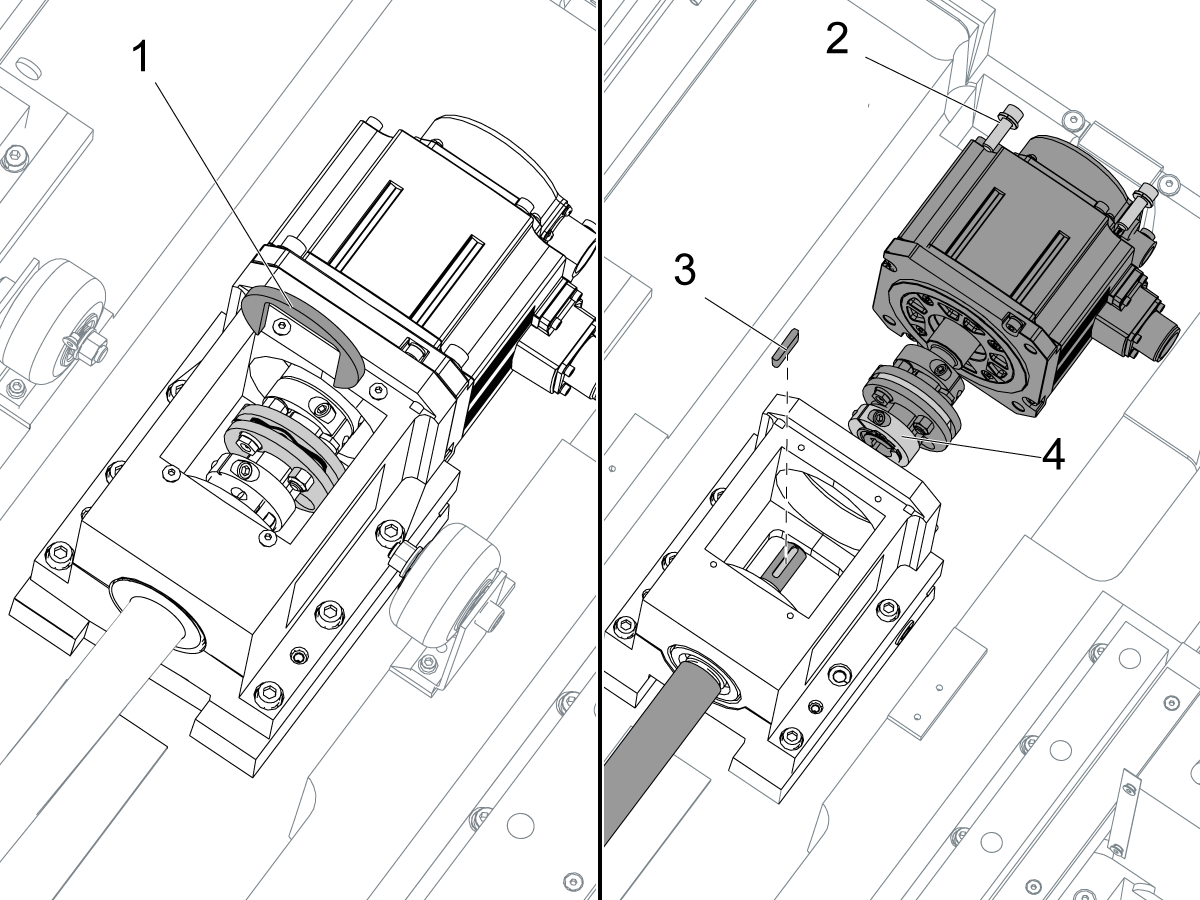
Install the coupler-installation tool [1] on the motor coupling. Turn the ballscrew so you can see the screw [4] for the motor-coupling clamp.

Remove the motor screws [2]. Loosen the screw [4] on the motor-coupling clamp. Remove the motor with the motor-coupling assembly. Remove the ballscrew key [3]. Inspect for damage or wear on the key or keyway.

 Note: If the axis motor is disconnected from the ballscrew, the grid offset and the work offset (such as G54) must be reset. Go to Axis Servo Motor - Set Grid Offset Parameter.

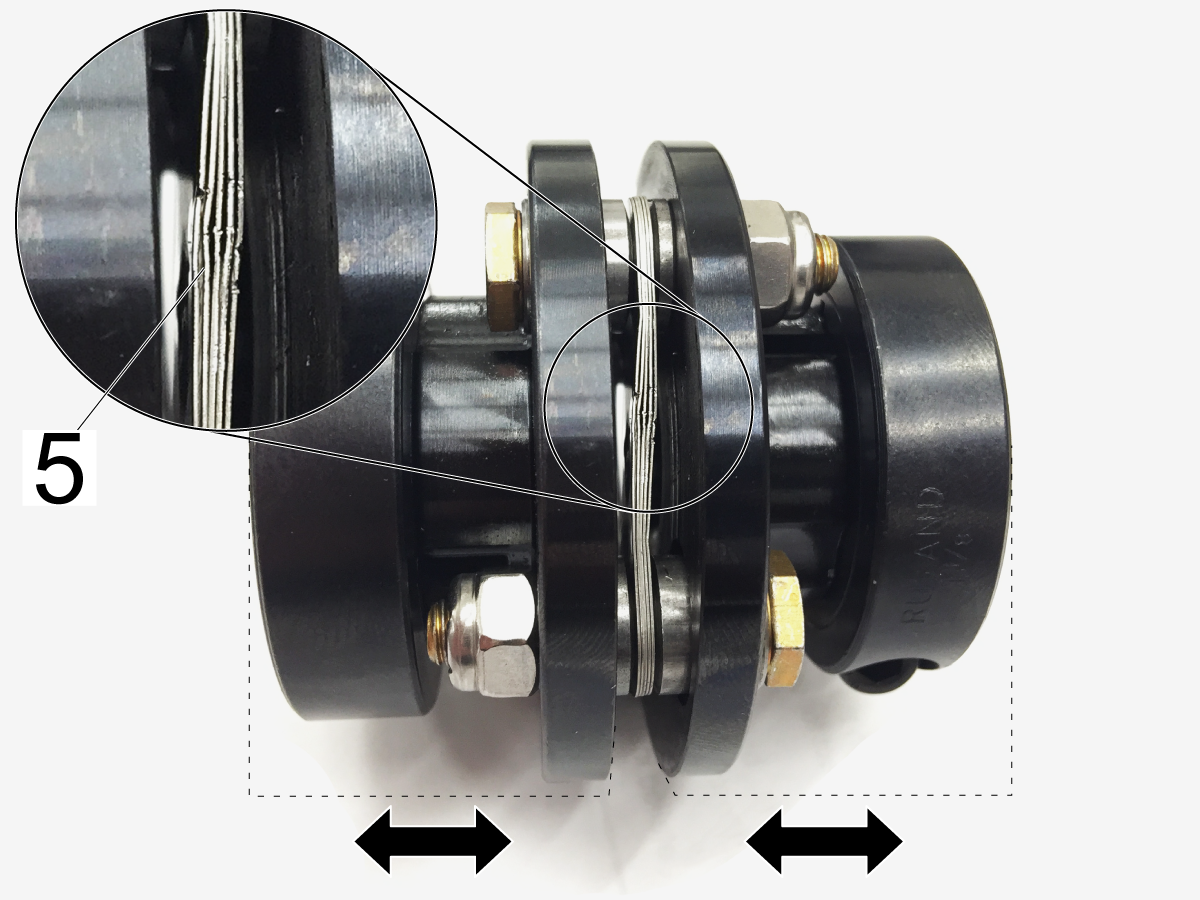
Make sure the flex pack [5] in the coupler is not damaged. It should be straight, and tightly compressed together.

 Note: If the axis motor is disconnected from the ballscrew, the grid offset and the work offset (such as G54) must be reset. Go to Axis Servo Motor - Set Grid Offset Parameter.

COUPLER ALIGNMENT:

To realign the coupler to the motor shaft install the mounting bolts loosely and float the motor in until the coupling slides from between both the motor shaft and ballscrew shaft easily. 

Torque the bolts down and verify the coupler still slides easily between the two shafts.

Torque the coupler pinch bolts to 15 ft-lbs.  

Thermal Growth

Corrective Action:

You must warm up the machine axes to bring the ballscrews to a normal temperature for operation. You can warm up the machine automatically by changing certain settings: Use either Settings 158-160 or Settings 109-112. Do not use both.

  • Settings 158-160: These settings can be set from -30 to +30 and will adjust the screw thermal compensation by -30% to +30%.
  • Settings 109-112: This (Setting 109) is the number of minutes (up to 300 minutes from power-up) during which the compensations specified in Settings 110-112 are applied.

 IMPORTANT: If your application involves moving a single axis repeatedly back and forth over a small area of the ballscrew, the ballnut will heat up the ballscrew and cause thermal expansion. It will also not lubricate correctly because of the short stroke.  Every few minutes, it is necessary to move 80% to 90% of the axis travel in order to cycle the grease throughout the ballnut. This is common on smaller machines with a smaller work envelope. 

For lathes: Go to the DIAGNOSTICS screen. Check the X Axis Temp. If the measurement fluctuates or has no value, you must inspect the thermal sensor on the ballnut.

Linear Scale Compensation (LSC)

This section applies to Machines with Dual Ballscrews.

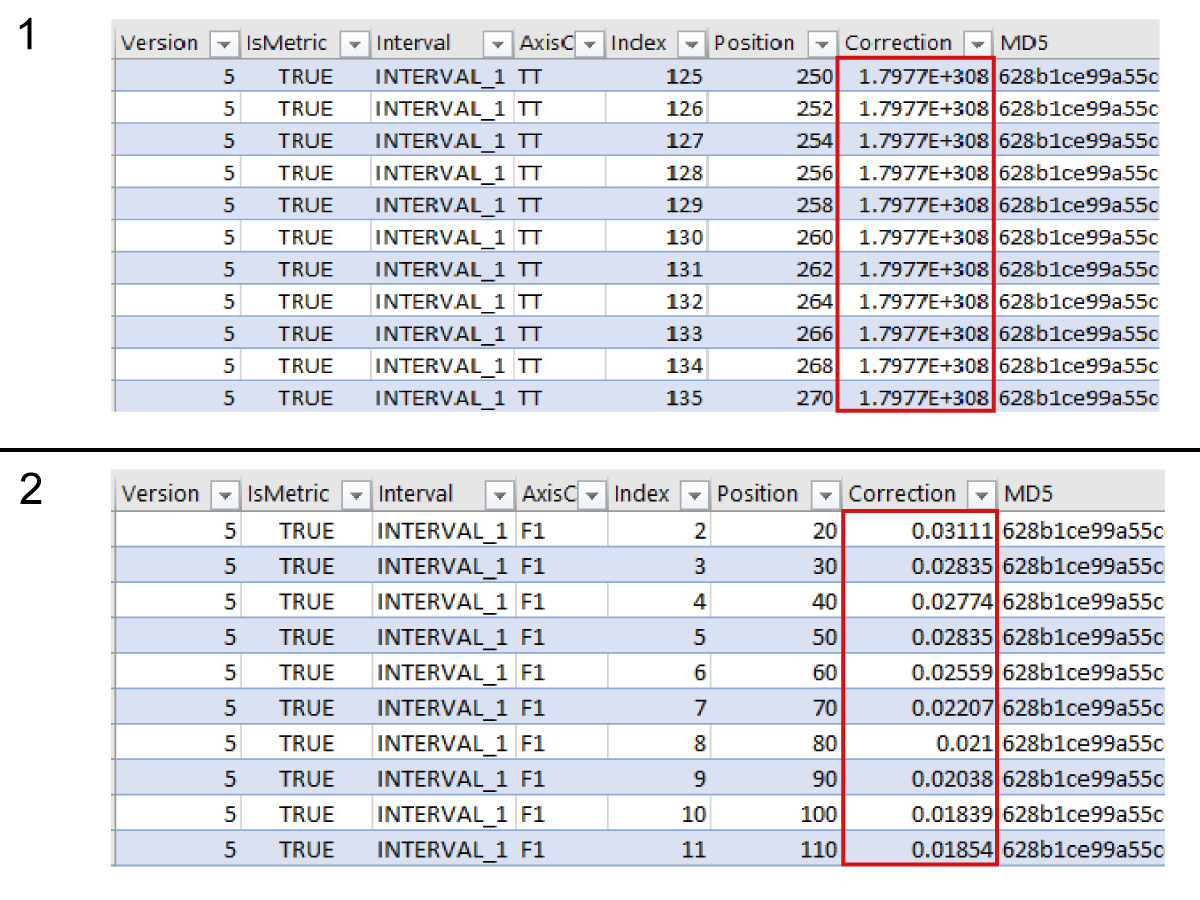
Open the LSC.LSCX file found in the Error report in a spreadsheet program.  Determine if axis compensation has been applied by looking at the correction column.

  • A value of 1.7977E+308 [1] or zero in the correction column means that there is no compensation.
  • Any other value [2] in the correction column means there is compensation.

 Note: Compensation values will vary between machines.

Recently Viewed Items

You Have No Recently Viewed Items Yet

Feedback
Haas Logo

Haas Delivered Price

This price includes shipping cost, export and import duties, insurance, and any other expenses incurred during shipping to a location in France agreed with you as a buyer. No other mandatory costs can be added to the delivery of a Haas CNC Product.

KEEP UP WITH THE LATEST HAAS TIPS AND TECHNOLOGY...

Sign up now!   

HAAS TOOLING ACCEPTS THE FOLLOWING:

  • Service & Support
  • Owners
  • Request Service
  • Operator Manuals
  • Haas Parts
  • Rotary Repair Request
  • Pre-Install Guides
  • Shopping Tools
  • Build & Price a New Haas
  • Available Inventory
  • The Haas Price List
  • CNCA Financing
  • About Haas
  • Accessibility Statement
  • DNSH Statement
  • Export Compliance
  • Careers
  • Certifications & Safety
  • Contact Us
  • History
  • Terms & Conditions
  • Haas Tooling Terms & Conditions
  • Privacy
  • Warranty
  • Haas Community
  • Haas Certification Program
  • Haas Motorsports
  • Gene Haas Foundation
  • Haas Technical Education Community
  • Events
  • Join the Conversation
  • Facebook
  • X
  • Flickr
  • YouTube
  • LinkedIn
  • Instagram
  • TikTok
© 2026 Haas Automation, Inc – CNC Machine Tools

This site is protected by reCAPTCHA and the Google Privacy Policy and Terms of Service apply.

2800 Sturgis Rd., Oxnard, CA 93030
Toll Free: (888) 817-4446 / Fax: 805-278-8554