My Haas Welcome,
!
Haas Tooling MyHaas/HaasConnect Sign In Register Haas Tooling MyHaas/HaasConnect Sign Out Welcome, My Machines Latest Activity My Quotes My Account My Users Sign Out
Find Your Distributor
  1. Select Language
    1. English
    2. Deutsch
    3. Español - España
    4. Español - México
    5. Français
    6. Italiano
    7. Português
    8. Český
    9. Dansk
    10. Nederlands
    11. Magyar
    12. Polski
    13. Svenska
    14. Türkçe
    15. 中文
    16. Suomi
    17. Norsk
    18. الإنجليزية
    19. български
    20. Hrvatski
    21. Ελληνικά
    22. Română
    23. Slovenský
    24. Slovenščina
    25. 한국어
    26. 日本語
    27. Українська
  • machines Main Menu
    • Vertical Mills
      Vertical Mills
      Vertical Mills View All
      • Vertical Mills
      • VF Series
      • Universal Machines
      • VR Series
      • VP-5 Prismatic
      • Pallet-Changing VMCs
      • Mini Mills
      • Mold Machines
      • High-Speed Drill Centers
      • Drill/Tap/ Mill Series
      • Toolroom Mills
      • Pocket Mill
      • Compact Mills
      • Gantry Series
      • SR Sheet Routers
      • Extra-Large VMC
      • Double-Column Mills
      • 3+2 Positioning Machines
    • Multi-Axis Solutions
      Multi-Axis Solutions
      Multi-Axis Solutions View All
      • Multi-Axis Solutions
      • Y-Axis Lathes
      • 5-Axis Mills
    • Lathes
      Lathes
      Lathes View All
      • Lathes
      • ST Series
      • Dual-Spindle
      • Box Way Series
      • Toolroom Lathes
      • Chucker Lathe
      • Haas Bar Feeders
    • Horizontal Mills
      Horizontal Mills
      Horizontal Mills View All
      • Horizontal Mills
      • 50-Taper
      • 40-Taper
    • Rotaries & Indexers
      Rotaries & Indexers
      Rotaries & Indexers View All
      • Rotaries & Indexers
      • Rotary Tables
      • Indexers
      • 5-Axis Rotaries
      • Extra-Large Rotaries
    • Special Series
      Special Series
      Special Series View All
      • Special Series
      • EU_Series_Redirect
    • Automation Systems
      Automation Systems
      Automation Systems View All
      • Automation Systems
      • Mill Automation
      • Lathe Automation
      • Automatic Parts Loaders
      • Automation Models
    • Desktop Machines
      Desktop Machines
      Desktop Machines View All
      • Desktop Machines
      • Desktop Mill
      • Desktop Lathe
      • Control Simulator, Standard
      • Control Simulator, Premium
    • Shop Equipment
      Shop Equipment
      Shop Equipment View All
      • Shop Equipment
      • Knee Mill
      • Haas Manual Lathes
      • Haas Saws
    • Fabrication Machines
      Fabrication Machines
      Fabrication Machines View All
      • Fabrication Machines
      • Laser Cutting Machines
      • CNC Press Brakes
    • QUICK LINKS Special Series  Special Series 
      EU SERIES EU SERIES BUILD & PRICE | PRICE LIST BUILD & PRICE | PRICE LIST In-Stock Machines In-Stock Machines WHAT’S NEW WHAT’S NEW YOUR FIRST CNC YOUR FIRST CNC
      SHOPPING TOOLS
      • Build & Price a Haas
      • Price List
      • Available Inventory
      • CNCA Financing
      WANT TO TALK TO SOMEONE?

      A Haas Factory Outlet (HFO) can answer your questions, and walk you through your best options.

      CONTACT YOUR DISTRIBUTOR >
  • Options Main Menu
    • The Haas Control Value Option Packages
      Value Option Packages
      Value Option Packages View All
      • Value Option Packages
    • Product Image Spindles
      Spindles
      Spindles View All
      • Spindles
    • Product Image Tool Changers
      Tool Changers
      Tool Changers View All
      • Tool Changers
    • Product Image 4th- | 5th-Axis
      4th- | 5th-Axis
      4th- | 5th-Axis View All
      • 4th- | 5th-Axis
    • Product Image Turrets & Live Tooling
      Turrets & Live Tooling
      Turrets & Live Tooling View All
      • Turrets & Live Tooling
    • Product Image Probing
      Probing
      Probing View All
      • Probing
    • Haas Chip & Coolant Management Chip & Coolant Management
      Chip & Coolant Management
      Chip & Coolant Management View All
      • Chip & Coolant Management
    • The Haas Control The Haas Control
      The Haas Control
      The Haas Control View All
      • The Haas Control
    • Product Image Product Options
      Product Options
      Product Options View All
      • Product Options
    • Product Image Tooling & Fixturing
      Tooling & Fixturing
      Tooling & Fixturing View All
      • Tooling & Fixturing
    • Product Image Workholding
      Workholding
      Workholding View All
      • Workholding
    • Product Image 5-Axis Solutions
      5-Axis Solutions
      5-Axis Solutions View All
      • 5-Axis Solutions
      • 5 Easy Steps to 5-Axis
    • QUICK LINKS Special Series  Special Series 
      EU SERIES EU SERIES BUILD & PRICE | PRICE LIST BUILD & PRICE | PRICE LIST In-Stock Machines In-Stock Machines WHAT’S NEW WHAT’S NEW YOUR FIRST CNC YOUR FIRST CNC
      SHOPPING TOOLS
      • Build & Price a Haas
      • Price List
      • Available Inventory
      • CNCA Financing
      WANT TO TALK TO SOMEONE?

      A Haas Factory Outlet (HFO) can answer your questions, and walk you through your best options.

      CONTACT YOUR DISTRIBUTOR >
  • Why Haas Main Menu
      Discover the Haas Difference
    • Why Haas
    • MyHaas
    • Education Community
    • Industry 4.0
    • Haas Certification
    • Customer Testimonials
  • Service Main Menu
      Welcome to Haas Service
      SERVICE HOME Operator’s Manuals How-To Procedures Troubleshooting Guides Preventive Maintenance Haas Parts Haas Tooling Videos
  • Videos Main Menu
  • Main Menu
    • View All
    • View All
    • View All
    • View All
      • HTEC Curriculum Support
      • Haas Value Option Packages (VOP) Journey
    • View All
      • Haas 10 kg Cobot Package
      • Cobot Kits
      • DC-1 Drill Center
      • CNC Sales News
      • Do More With Your Haas
    • View All
    • View All
      • contact-us-test
      • 4 - AUTOMATION SYSTEMS
      • Carousel-V2
      • expert test
      • Demo_Day_Trident-test
      • Link Test
      • image-sale-tag-test
      • article-list-test
      • Haas 25 kg Robot Package
      • test-algolia-page
    • View All
    • View All
    • View All
    • View All
      • calc-test
    • View All
    • QUICK LINKS Special Series  Special Series 
      EU SERIES EU SERIES BUILD & PRICE | PRICE LIST BUILD & PRICE | PRICE LIST In-Stock Machines In-Stock Machines WHAT’S NEW WHAT’S NEW YOUR FIRST CNC YOUR FIRST CNC
      SHOPPING TOOLS
      • Build & Price a Haas
      • Price List
      • Available Inventory
      • CNCA Financing
      WANT TO TALK TO SOMEONE?

      A Haas Factory Outlet (HFO) can answer your questions, and walk you through your best options.

      CONTACT YOUR DISTRIBUTOR >
  • Haas Tooling Main Menu
  • Haas Service Parts Main Menu

My Haas Welcome,
!
Haas Tooling MyHaas/HaasConnect Sign In Register Haas Tooling MyHaas/HaasConnect Sign Out Welcome, My Machines Latest Activity My Quotes My Account My Users Sign Out
Find Your Distributor
  1. Select Language
    1. English
    2. Deutsch
    3. Español - España
    4. Español - México
    5. Français
    6. Italiano
    7. Português
    8. Český
    9. Dansk
    10. Nederlands
    11. Magyar
    12. Polski
    13. Svenska
    14. Türkçe
    15. 中文
    16. Suomi
    17. Norsk
    18. الإنجليزية
    19. български
    20. Hrvatski
    21. Ελληνικά
    22. Română
    23. Slovenský
    24. Slovenščina
    25. 한국어
    26. 日本語
    27. Українська
×

Search Results

Web Pages

Images

    • <
    • 1
    • >

5 - HSF-325 - Troubleshooting

HSF-325 - Operator's/Service Manual


  • 1 - HSF-325 - Introduction
  • 2 - HSF-325 - Installation
  • 3 - HSF-325 - Operation
  • 4 - HSF-325 - Maintenance
  • 5 - HSF-325 - Troubleshooting

Go To :

  • 5.1 HSF-325 - Troubleshooting
  • 5.2 HSF-325 - Spare Parts List
5.1 HSF-325 - Troubleshooting

Introduction

The toolholder’s bore and the cutting tool must be thoroughly cleaned (use a cleaning cloth/rag to clean) to prevent the cutting tool from getting stuck.

During the heating procedure, if alarms E1, E2, E3, E4, or E5 appear on the LCD Display Window see the Symptom Table below for more information.

NOTE: This induction shrink fit machine generates heat during use, and must be operated in a well ventilated area. The machine should be placed in a clean, dry location, and protected from strong hits. DO NOT attempt to service your machine! If you are experiencing issues, contact your local HFO for service.

NOTE: For safety purposes, keep flammable materials away from this machine while in use.

Warning: Some parts are different between the 230V (US) and 400V (EU) versions of the HSF-325 Refer to the 5.2 HSF-325 - Spare Parts List section to make sure you are ordering the correct parts.

Symptom Table

Symptom Possible Cause Corrective Action
Error Code E1 Machine Heating Error Machine heating error.
Check the heating head connection.
Error Code E2 Heating Head Over Temperature Heating head over temperature. Allow a longer cooling period between heating tools.
The Heating Head Heat Sensor Failed Verify that the Heating Head isnt damaged. See the Heating Head Section below.
Error Code E3 3-Phase Power Supply Error 3-Phase incoming power is incorrect. Check incoming power wiring and phasing.
Error Code E4 No Toolholder in Heating Head No toolholder in heating head. Install a tool holder and lower the heating head to the correct height.
The CT2 Current Sensor 2 has failed. See the CT2 Current Sensor 2 section below.
The heating head height is not correct. See the HSF-325 Operation for more information. 
The tool Holder is too small.  If there is not enough steel in the heating head there will not be enough current induced in the induction coil. Tool holders that are either modified or designed for tools with shanks smaller than 3/8" (10mm) may be too small. 
Error Code E5 Machine Power Module Over Temperature Machine’s power module is over temperature. Allow a longer cooling period between heating toolholders.
CF1 Cooling Fan is not running. Check that the CF1 Cooling Fan runs when powered on.
Heating period too long. Only heat the tool long enough to install or remove and extend the cooling period if needed.
The IGBT Overheat Detect PCB failed. Verify that the IGBT Overheat Detect PCB isnt damaged. See IGBT Overheat Detect PCB section below.
Error Code E1 in Auto Mode and E4 in Manual Mode. The CT2 Sensor, GTS9000-4 PCB, or heating head failed.

Verify a toolholder is installed. Check that the heating head is connected correctly. Check that the heating head height is set correctly. Verify that the CT2 Current Sensor 2 isnt damaged. If Error Codes continue to generate, replace CT2 - Current Sensor 2. If the Error Codes continue, replace GTS9000-4 PCB. Order THERMAL PAD 4.8X2.4 RoHS W/4 MNTNG HOL when replacing GTS9000-4 PCB. If Error Codes continue to generate, replace the Heating Head assembly.

Refer to the 5.2 HSF-325 - Spare Parts List section for part numbers.

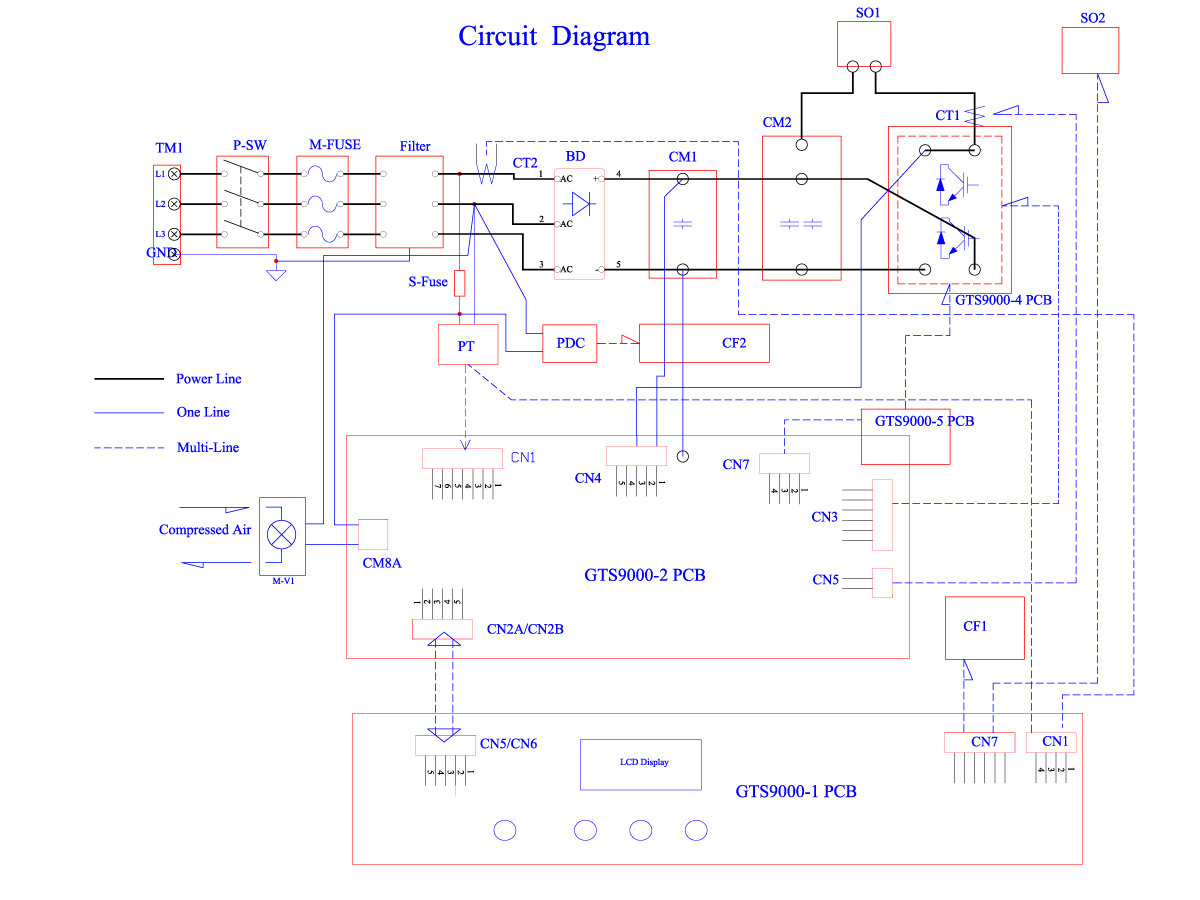
Electrical Diagram

Vendor ITEM DESCRIPTION
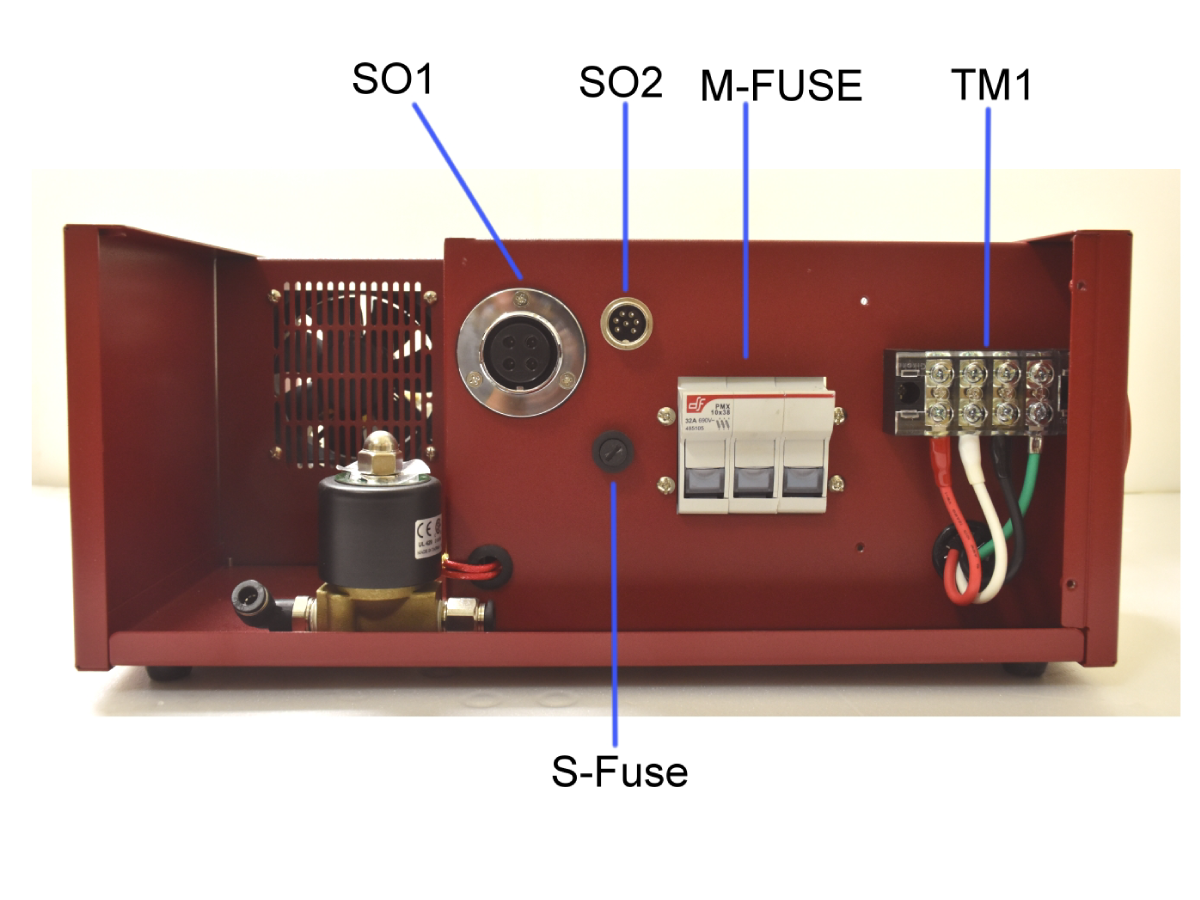
TM1 3 PHASE POWER INLET TERMINAL
P-SW POWER ON/OFF SWITCH
M-FUSE HSF-325 MAIN POWER FUSE HOLDER
FILTER EMI FILTER
BD 3 PHASE RECTIFIER
CM1 CAPACITOR MODULE 1
CM2 CAPACITOR MODULE 2
CT1 CURRENT SENSOR 1
CT2 CURRENT SENSOR 2
SO1 OUTPUT SOCKET TO HEATING HEAD
SO2 SOCKET TO HEATING HEAD CONNECTING
S-FUSE SUB FUSE HOLDER WITH 2.0 AMP FUSE
PT POWER TRANSFORMER FOR CONTROLLER
PDC AC/DC 12V POWER UNIT
CF1 COOLING FAN 1 FOR CONTROLLER COOLER
CF2 COOLING FAN 2 FOR IGBT COOLING
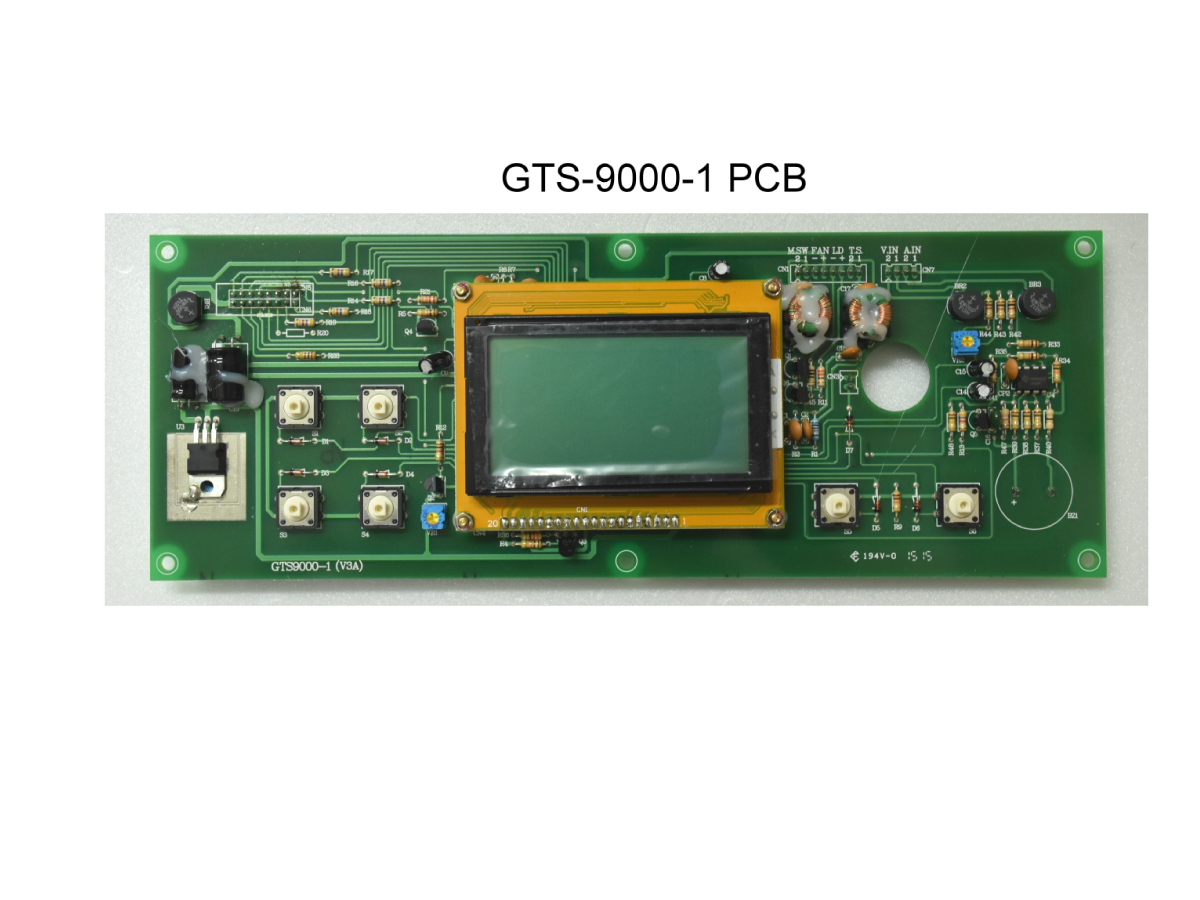
GTS9000-1 PCB PANEL CONTROL PCB WITH LCD MODULE
GTS9000-2 PCB MAIN CONTROLLER PCB 2
GTS9000-4 PCB GTS9000-4 PCB WITH IGBT MODULE
GTS9000-5 PCB IGBT OVERHEAT DETECT PCB
M-V1 ELECTROMAGNETIC VALVE

HSF-325 Component Back View

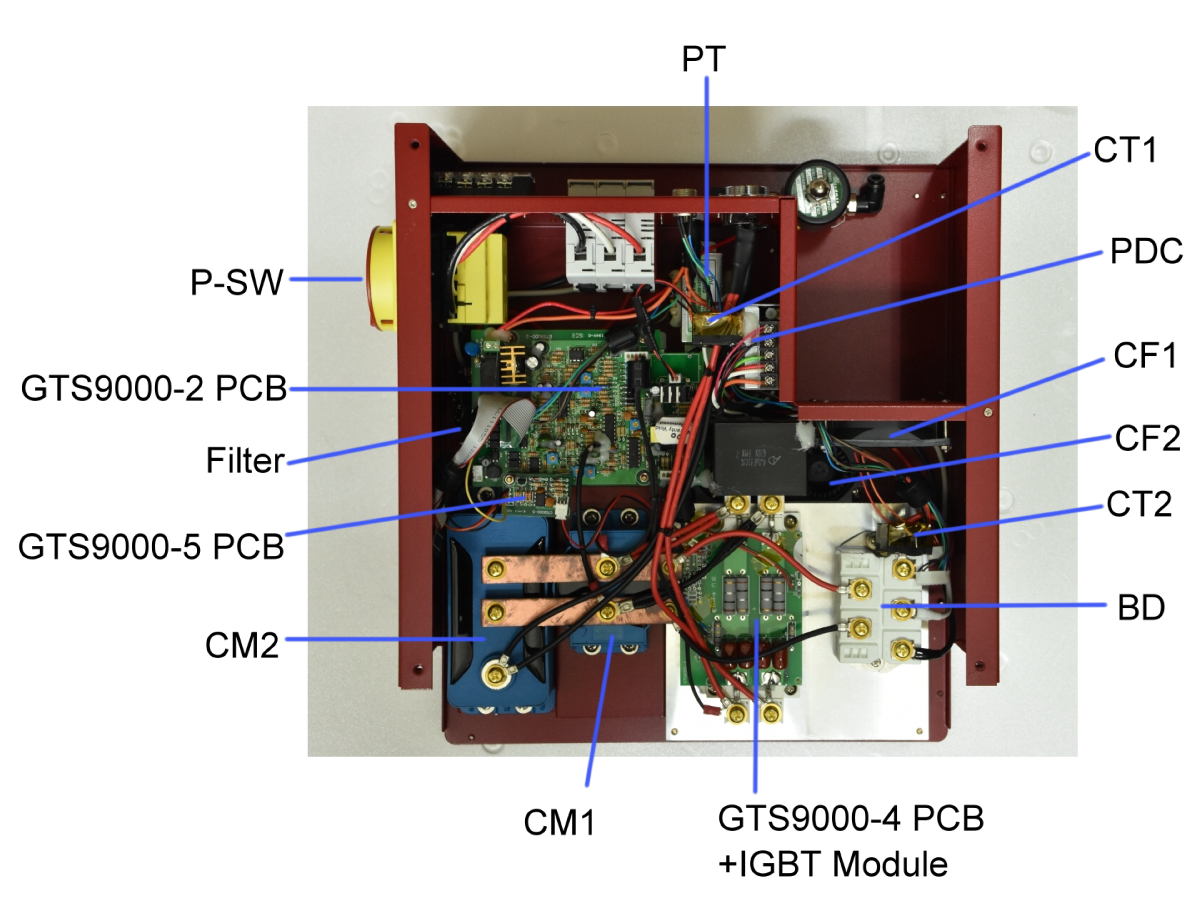
HSF-325 Component Top View

HSF-325 Component Top View

GTS9000-5 PCB - IGBT OVERHEAT DETECT PCB Replacement

If the Error Code E5 is generated at power up. Troubleshoot that the GTS9000-4 PCB WITH IGBT MODULE is functioning. Install a toolholder and lower the heating head to the correct height. Navigate to Manual Function and press the manual heating button on the heating head to see if the GTS9000-4 PCB WITH IGBT MODULE functions. If the toolholder is heated then the GTS9000-5 PCB needs to be inspected. This is the IGBT Overheat Detection and may have failed.

 Note: Refer to the 5.2 HSF-325 - Spare Parts List for part numbers.

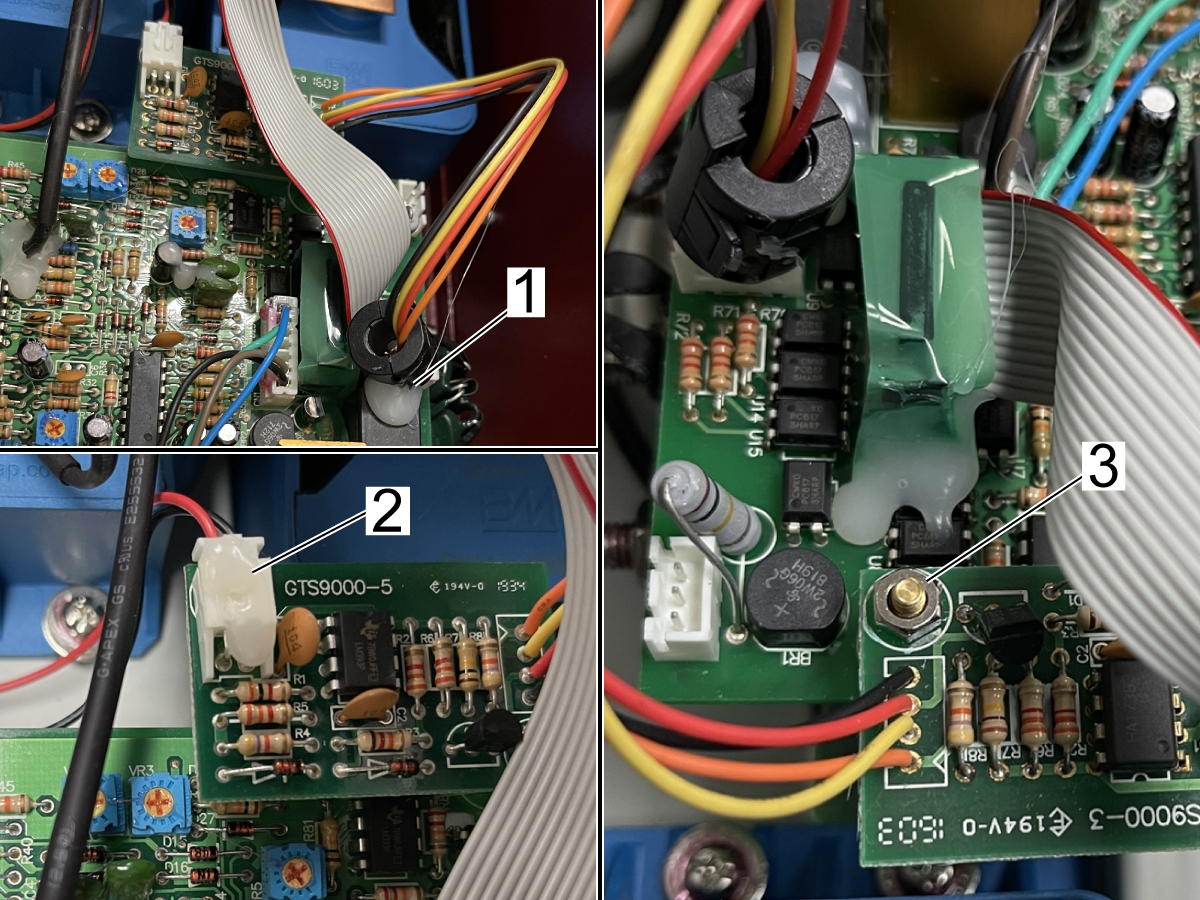
Use a xacto knife to cut the hot glue on the ferrite filter and unplug the cable[1] from GTS9000-5 PCB to the GTS9000-2 PCB.

Use a xacto knife to cut the hot glue on the connector[2] on GTS9000-5 PCB and unplug the cable.

Remove the standoff nut[3] and replace the PCB. Transfer the ferrite filter from the failed PCB to the replacement PCB.

Apply hot glue to the ferrite filter to secure it in place and the connector on GTS9000-5 PCB.

CT2 - Current Sensor 2 Replacement

If the Error Code E4 is generated when a tool is heated. Verify a toolholder is installed. Check that the heating head height is set correctly. Verify that the CT2 Current Sensor 2 isnt damaged. If Error Code E4 continues to generate, replace CT2 - Current Sensor 2.

 Note: Refer to the 5.2 HSF-325 - Spare Parts List for part numbers.

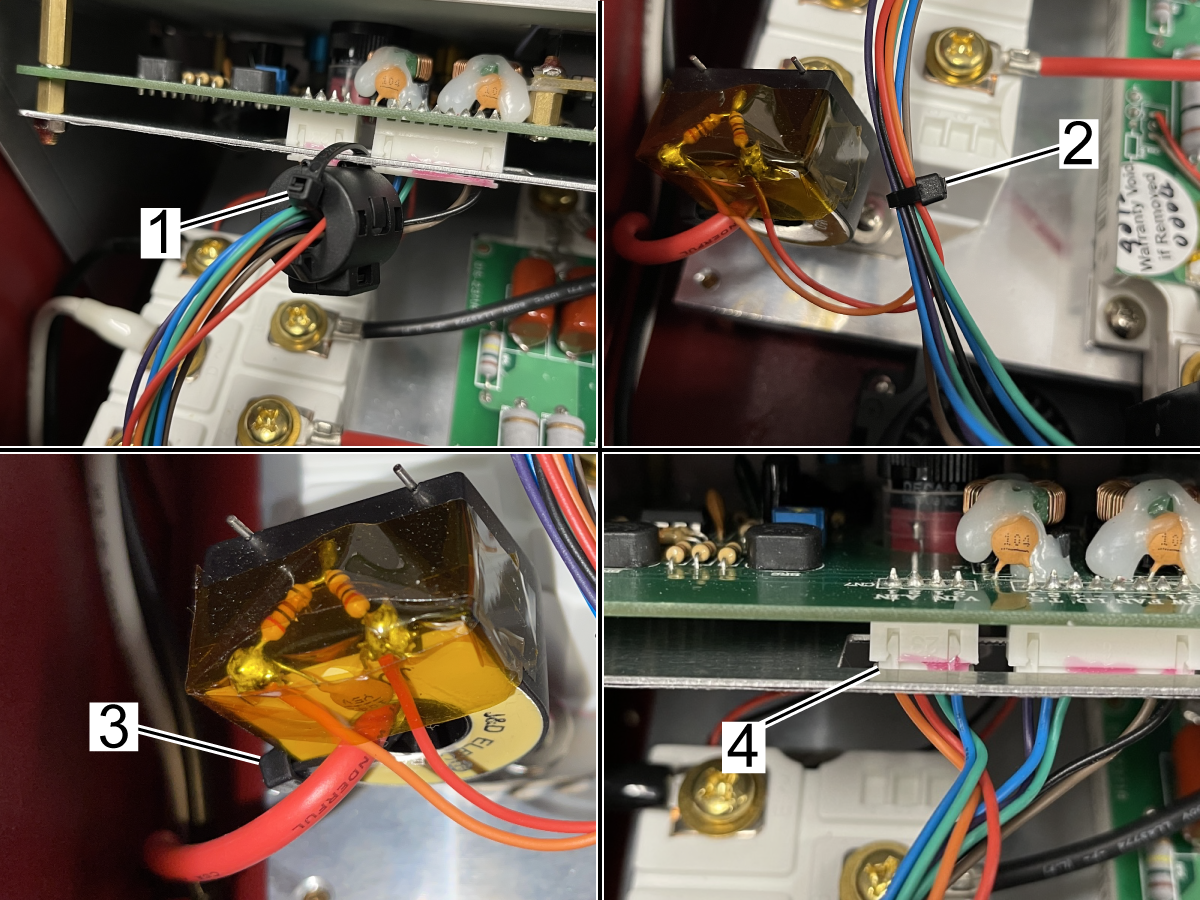
Remove the zipties from the ferrite filter[1], cable harness[2], and current sensor[3].

Unplug the cable[4] from GTS9000-1 PCB - PANEL CONTROL PCB WITH LCD MODULE.

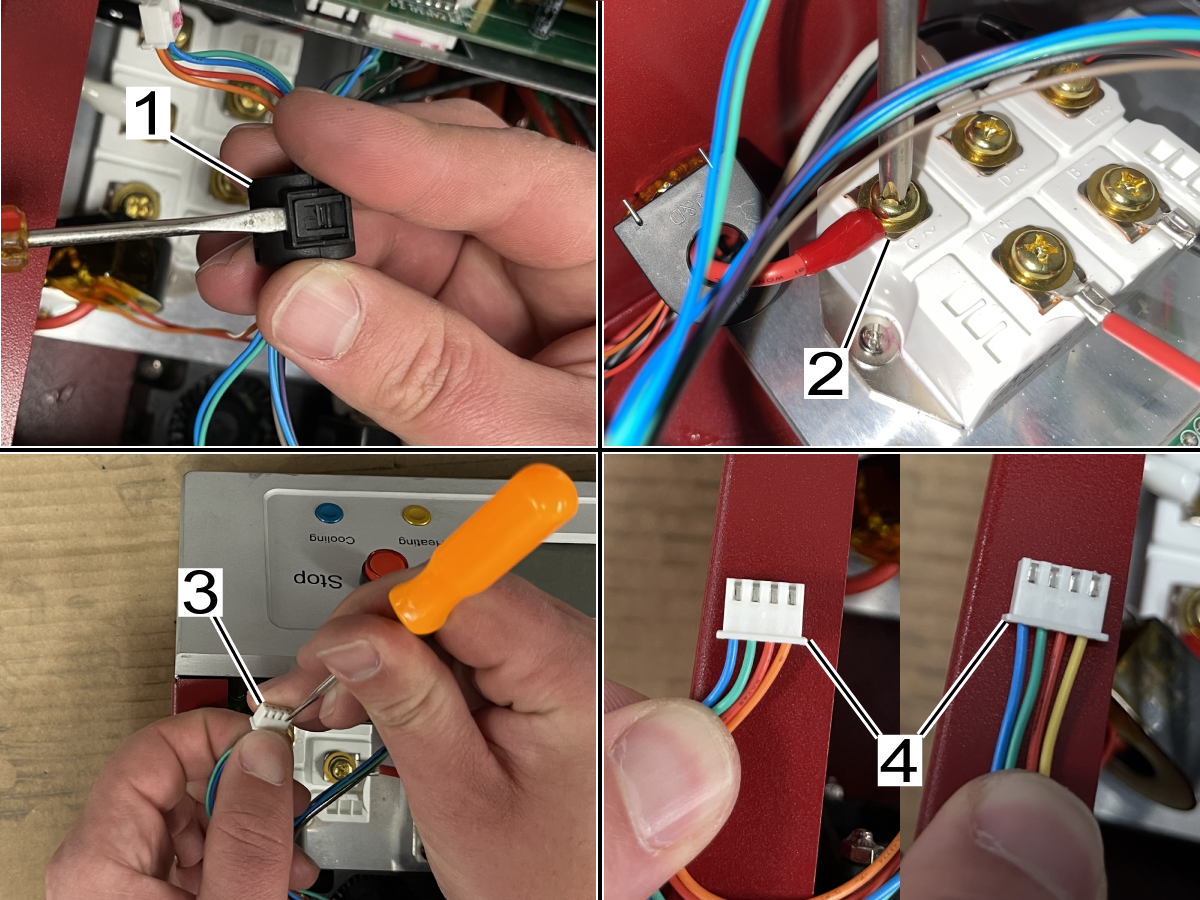
Remove the ferrite filter from the cable harness[1].

Remove the cable[2] from the BD - 3 PHASE RECTIFIER.

Use a pick to remove the red and orange cable from the connector[3].

Insert the red and yellow cable from the replacement CT2 - Current Sensor into the connector in the correct pinout[4].

Feed the cable through the CT2 - Current Sensor and secure to the BD - 3 PHASE RECTIFIER.

Reinstall the ferrite filter to the cable harness.

Replace the zipties to secure the ferrite filter, cable harness and CT2 - Current Sensor 2.

Heating Head Replacement

If the Error Code E2 is generated when selecting Auto Mode or without heating the tool. Error code E1 in auto mode and E4 in manual mode and the CT2 Sensor and GTS9000-4 IGBT Module has been replaced. Troubleshoot and visually inspect that the Heating Head Overheat Sensor has not failed or is damaged. Replace the failed Heat Head.

 Note: Refer to the 5.2 HSF-325 - Spare Parts List for part numbers.

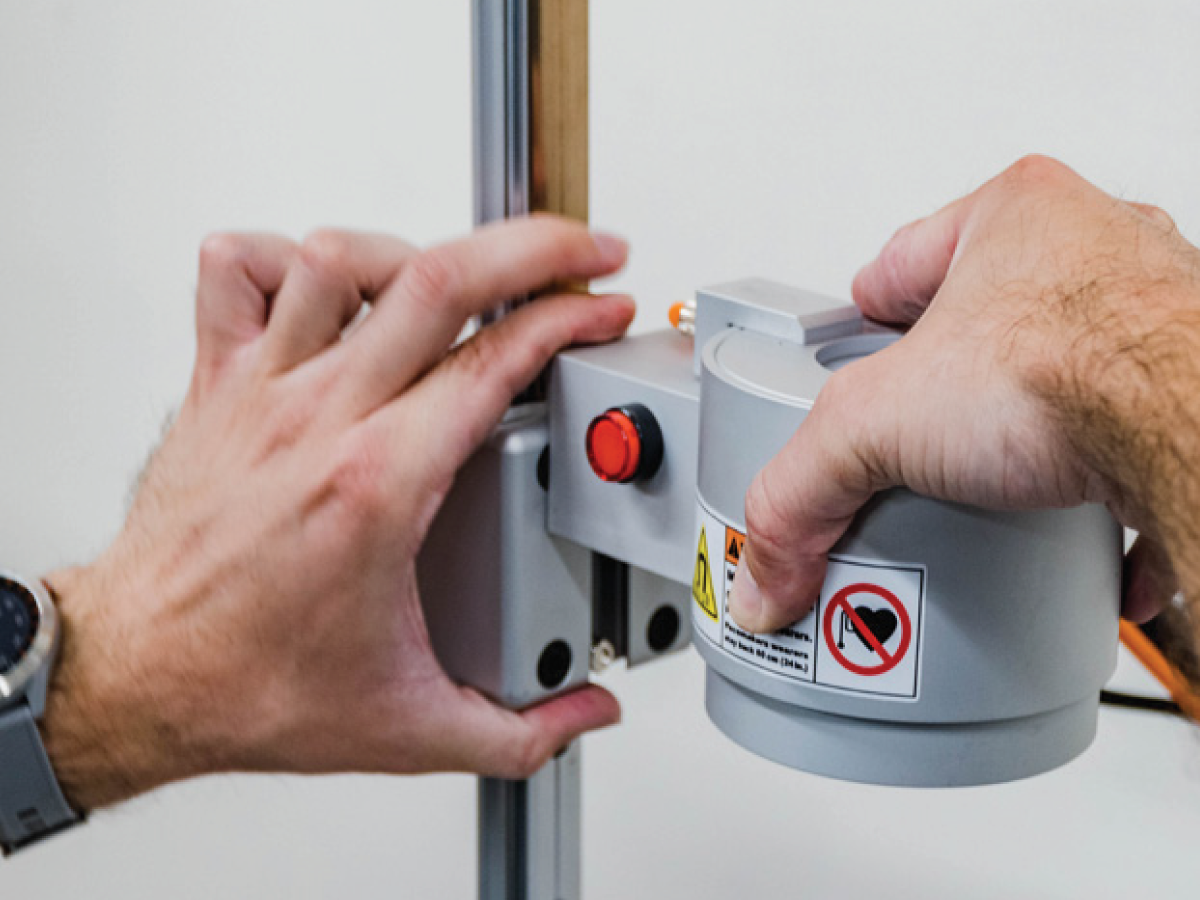
Disconnect the heating head cables and air line and remove the heating head from the guide rail.

Install the heating head assembly and connect the heating head cables and air line.

GTS9000-4 PCB Replacement

If Error Code E1 is generated when the tool is heated in Automatic Mode or Error Code E4 is generated when a tool is heated in Manual Mode. Verify a toolholder is installed. Check that the heating head is connected correctly. Check that the heating head height is set correctly. Verify that the CT2 Current Sensor 2 isnt damaged. If Error Codes continue to generate, replace CT2 - Current Sensor 2. If the Error Codes continue, replace GTS9000-4 PCB. Order THERMAL PAD 4.8X2.4 RoHS W/4 MNTNG HOL when replacing GTS9000-4 PCB. If Error Codes continue to generate, replace the Heating Head assembly.

 Note: Refer to the 5.2 HSF-325 - Spare Parts List for part numbers.

1

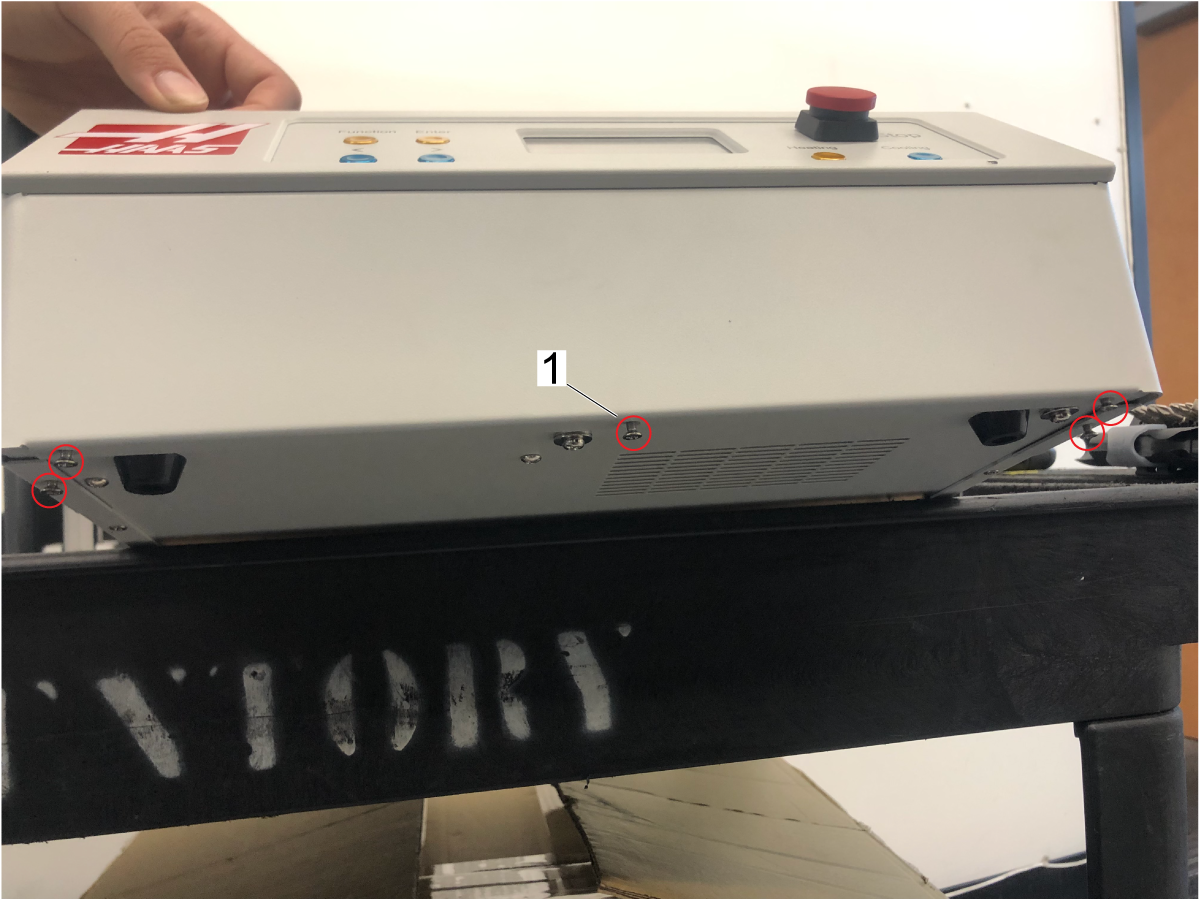
Remove the screws that hold the front panel from the bottom of the machine.

2

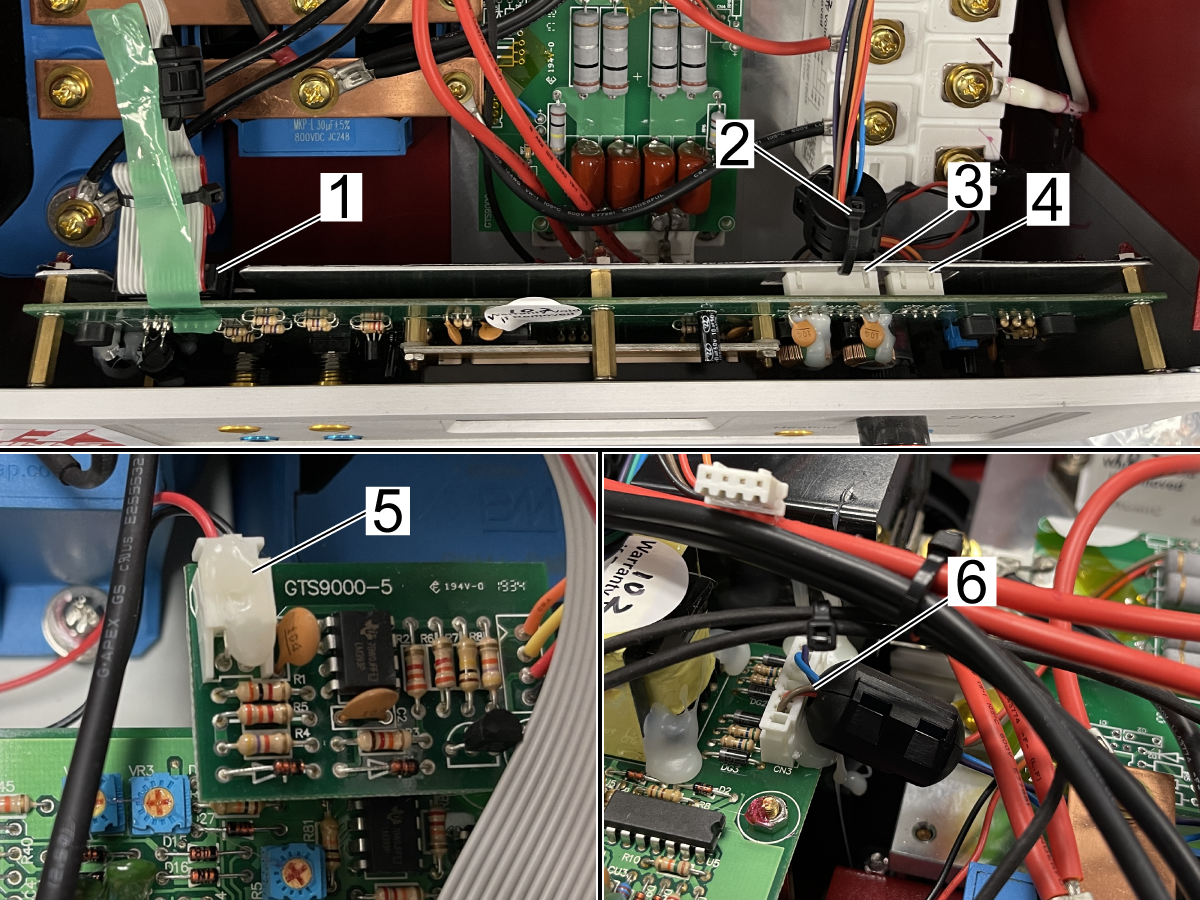
Remove tape[1] and zip-tie[2] and unplug the three cables[1,3,4] and slide out the front panel.

Use a xacto knife to cut the hot glue on the connector[5] on GTS9000-5 PCB and unplug the cable.

Use a xacto knife to cut the hot glue on the ferrite filter and unplug the cable[6] from GTS9000-2 PCB.

3

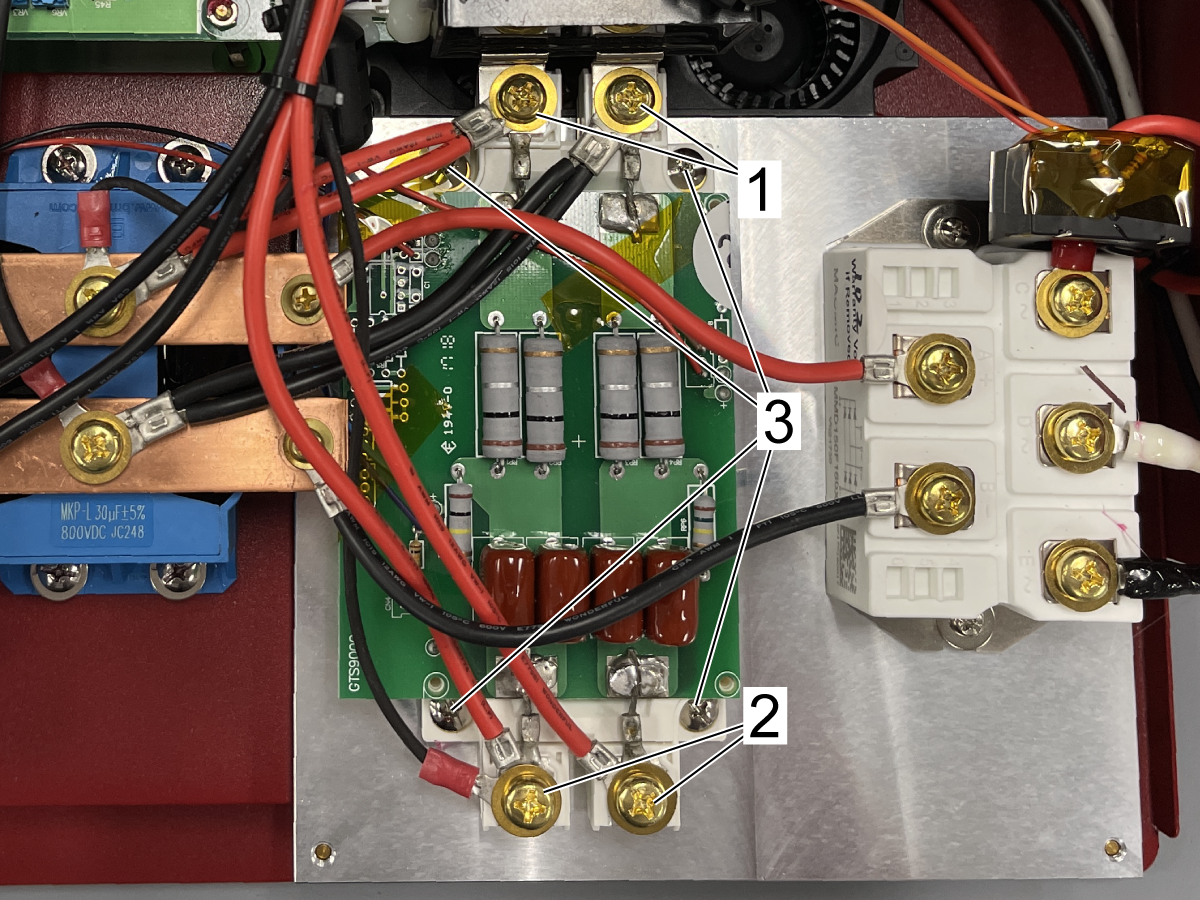
Disconnect the cables[1] from Capacitor Module 1 CM1 and cables[2] from Socket Ouptut 1 SO1.

Remove the GTS9000-4 PCB mounting screws[3] and remove the GTS9000-4 PCB.

4

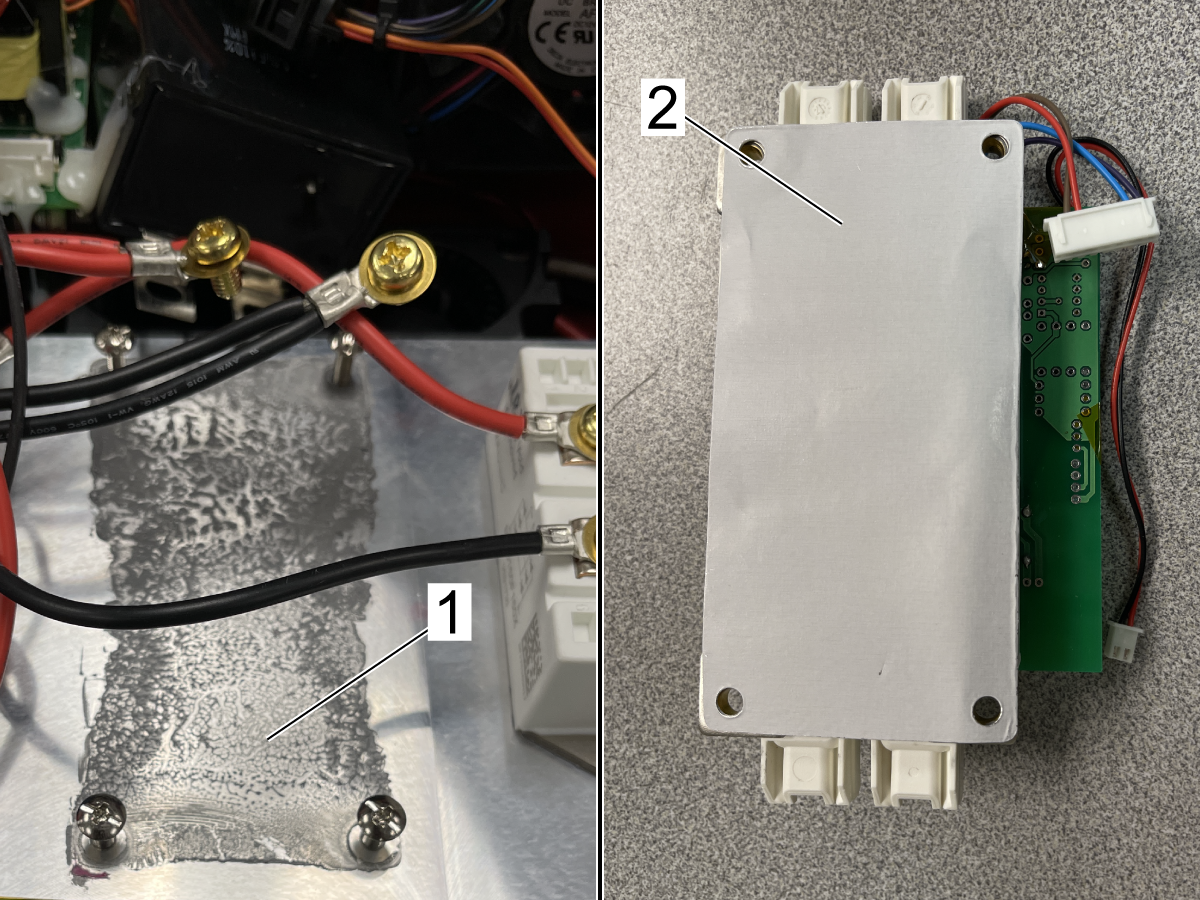
Clean the thermal paste off of the heat sink[1].

Discard the pink protective sheets and place 93-3733 THERMAL PAD on the GTS9000-4 PCB heat sink[2] with the holes aligned and install the replacement GTS9000-4 PCB. Torque the mounting hardware to 25 in-lbs and reinstall the disconnected cables to GTS9000-4 PCB.

Reinstall the disconnected cables and zip-tie/hot glue the connectors and ferrite filters in place.

Reinstall the front panel.

5.2 HSF-325 - Spare Parts List

Introduction

There are two versions of the HSF-325; one is 230V (09-0020), and the other is 400V (09-0036). Some of the service parts are interchangeable between the two versions and some are not. Review the tables below to verify the exact replacement part.

Spare Parts List For Both 230V and 400V

PART NUMBER Vendor ITEM DESCRIPTION
93-3338 M-FUSE HSF-325 MAIN POWER FUSE HOLDER
93-3341 S-FUSE HSF-325 SUB FUSE HOLDER
93-3342 CF1 HSF-325 CONTROLLER COOLING FAN
93-3343 CF2 HSF-325 IGBT COOLING FAN
93-3344 GTS9000-5 PCB HSF-325 IGBT OVERHEATING DETECT PCB
93-3345 M-V1 HSF-325 ELECTROMAGNETIC VALVE
93-3557 TM1 HSF-325 TM1 3-PHASE POWER INPUT
93-3558 FILTER HSF-325 EMI FILTER
93-3559 BD HSF-325 BD 3-PHASE RECTIFIER
93-3560 CM1 HSF-325 CAPACITOR MODULE CM1
93-3563 SO2 HSF-325 HEATING HEAD OUTPUT SOCKET SO2
93-3565 PDC HSF-325 PDC ACDC 12V POWER UNIT
93-3566 GTS9000-1
PCB
HSF-325 GTS9000-1 PANEL CONTROL PCB

Parts That Are Unique to 09-0020 (230V) or 09-0036 (400V)

PART NUMBERS for 09-0020 (230V) PART NUMBERS for 09-0036 (400V) Vendor ITEM DESCRIPTION
93-3337 93-4463 P-SW HSF-325 POWER ON/OFF SWITCH
93-3339 93-4471 CT1 HSF-325 CURRENT SENSOR 1
93-3340 93-4472 CT2 HSF-325 CURRENT SENSOR 2
93-3346 93-4476 L-Size Heating Head HSF-325 LARGE SIZE HEATING HEAD
93-3561 93-4484 CM2 HSF-325 CAPACITOR MODULE CM2
93-3562 93-4473 SO1 HSF-325 HEATING HEAD OUTPUT SOCKET SO1
93-3564 93-4474 PT HSF-325 PT POWER TRANSFORMER
93-3567 93-4475 GTS9000-2 PCB HSF-325 GTS9000-2 MAIN CONTROL PCB
93-3568 93-4470 GTS9000-4 PCB HSF-325 GTS9000-4 IGBT MODULE PCB
Feedback

Recently Viewed Items

You Have No Recently Viewed Items Yet

Feedback
Haas Logo

Haas Delivered Price

This price includes shipping cost, export and import duties, insurance, and any other expenses incurred during shipping to a location in France agreed with you as a buyer. No other mandatory costs can be added to the delivery of a Haas CNC Product.

KEEP UP WITH THE LATEST HAAS TIPS AND TECHNOLOGY...

Sign up now!   

HAAS TOOLING ACCEPTS THE FOLLOWING:

  • Service & Support
  • Owners
  • Request Service
  • Operator Manuals
  • Haas Parts
  • Rotary Repair Request
  • Pre-Install Guides
  • Shopping Tools
  • Build & Price a New Haas
  • Available Inventory
  • The Haas Price List
  • CNCA Financing
  • About Haas
  • Accessibility Statement
  • DNSH Statement
  • Export Compliance
  • Careers
  • Certifications & Safety
  • Contact Us
  • History
  • Terms & Conditions
  • Haas Tooling Terms & Conditions
  • Privacy
  • Warranty
  • Haas Community
  • Haas Certification Program
  • Haas Motorsports
  • Gene Haas Foundation
  • Haas Technical Education Community
  • Events
  • Join the Conversation
  • Facebook
  • X
  • Flickr
  • YouTube
  • LinkedIn
  • Instagram
  • TikTok
© 2026 Haas Automation, Inc – CNC Machine Tools

This site is protected by reCAPTCHA and the Google Privacy Policy and Terms of Service apply.

2800 Sturgis Rd., Oxnard, CA 93030
Toll Free: (888) 817-4446 / Fax: 805-278-8554