My Haas Welcome,
!
Haas Tooling MyHaas/HaasConnect Sign In Register Haas Tooling MyHaas/HaasConnect Sign Out Welcome, My Machines Latest Activity My Quotes My Account My Users Sign Out
Find Your Distributor
  1. Select Language
    1. English
    2. Deutsch
    3. Español - España
    4. Español - México
    5. Français
    6. Italiano
    7. Português
    8. Český
    9. Dansk
    10. Nederlands
    11. Magyar
    12. Polski
    13. Svenska
    14. Türkçe
    15. 中文
    16. Suomi
    17. Norsk
    18. الإنجليزية
    19. български
    20. Hrvatski
    21. Ελληνικά
    22. Română
    23. Slovenský
    24. Slovenščina
    25. 한국어
    26. 日本語
    27. Українська
  • machines Main Menu
    • Vertical Mills
      Vertical Mills
      Vertical Mills View All
      • Vertical Mills
      • VF Series
      • Universal Machines
      • VR Series
      • VP-5 Prismatic
      • Pallet-Changing VMCs
      • Mini Mills
      • Mold Machines
      • High-Speed Drill Centers
      • Drill/Tap/ Mill Series
      • Toolroom Mills
      • Pocket Mill
      • Compact Mills
      • Gantry Series
      • SR Sheet Routers
      • Extra-Large VMC
      • Double-Column Mills
      • 3+2 Positioning Machines
    • Multi-Axis Solutions
      Multi-Axis Solutions
      Multi-Axis Solutions View All
      • Multi-Axis Solutions
      • Y-Axis Lathes
      • 5-Axis Mills
    • Lathes
      Lathes
      Lathes View All
      • Lathes
      • ST Series
      • Dual-Spindle
      • Box Way Series
      • Toolroom Lathes
      • Chucker Lathe
      • Haas Bar Feeders
    • Horizontal Mills
      Horizontal Mills
      Horizontal Mills View All
      • Horizontal Mills
      • 50-Taper
      • 40-Taper
    • Rotaries & Indexers
      Rotaries & Indexers
      Rotaries & Indexers View All
      • Rotaries & Indexers
      • Rotary Tables
      • Indexers
      • 5-Axis Rotaries
      • Extra-Large Rotaries
    • Special Series
      Special Series
      Special Series View All
      • Special Series
      • EU_Series_Redirect
    • Automation Systems
      Automation Systems
      Automation Systems View All
      • Automation Systems
      • Mill Automation
      • Lathe Automation
      • Automatic Parts Loaders
      • Automation Models
    • Desktop Machines
      Desktop Machines
      Desktop Machines View All
      • Desktop Machines
      • Desktop Mill
      • Desktop Lathe
      • Control Simulator, Standard
      • Control Simulator, Premium
    • Shop Equipment
      Shop Equipment
      Shop Equipment View All
      • Shop Equipment
      • Knee Mill
      • Haas Manual Lathes
      • Haas Saws
    • Fabrication Machines
      Fabrication Machines
      Fabrication Machines View All
      • Fabrication Machines
      • Laser Cutting Machines
      • CNC Press Brakes
    • QUICK LINKS Special Series  Special Series 
      EU SERIES EU SERIES BUILD & PRICE | PRICE LIST BUILD & PRICE | PRICE LIST In-Stock Machines In-Stock Machines WHAT’S NEW WHAT’S NEW YOUR FIRST CNC YOUR FIRST CNC
      SHOPPING TOOLS
      • Build & Price a Haas
      • Price List
      • Available Inventory
      • CNCA Financing
      WANT TO TALK TO SOMEONE?

      A Haas Factory Outlet (HFO) can answer your questions, and walk you through your best options.

      CONTACT YOUR DISTRIBUTOR >
  • Options Main Menu
    • The Haas Control Value Option Packages
      Value Option Packages
      Value Option Packages View All
      • Value Option Packages
    • Product Image Spindles
      Spindles
      Spindles View All
      • Spindles
    • Product Image Tool Changers
      Tool Changers
      Tool Changers View All
      • Tool Changers
    • Product Image 4th- | 5th-Axis
      4th- | 5th-Axis
      4th- | 5th-Axis View All
      • 4th- | 5th-Axis
    • Product Image Turrets & Live Tooling
      Turrets & Live Tooling
      Turrets & Live Tooling View All
      • Turrets & Live Tooling
    • Product Image Probing
      Probing
      Probing View All
      • Probing
    • Haas Chip & Coolant Management Chip & Coolant Management
      Chip & Coolant Management
      Chip & Coolant Management View All
      • Chip & Coolant Management
    • The Haas Control The Haas Control
      The Haas Control
      The Haas Control View All
      • The Haas Control
    • Product Image Product Options
      Product Options
      Product Options View All
      • Product Options
    • Product Image Tooling & Fixturing
      Tooling & Fixturing
      Tooling & Fixturing View All
      • Tooling & Fixturing
    • Product Image Workholding
      Workholding
      Workholding View All
      • Workholding
    • Product Image 5-Axis Solutions
      5-Axis Solutions
      5-Axis Solutions View All
      • 5-Axis Solutions
      • 5 Easy Steps to 5-Axis
    • QUICK LINKS Special Series  Special Series 
      EU SERIES EU SERIES BUILD & PRICE | PRICE LIST BUILD & PRICE | PRICE LIST In-Stock Machines In-Stock Machines WHAT’S NEW WHAT’S NEW YOUR FIRST CNC YOUR FIRST CNC
      SHOPPING TOOLS
      • Build & Price a Haas
      • Price List
      • Available Inventory
      • CNCA Financing
      WANT TO TALK TO SOMEONE?

      A Haas Factory Outlet (HFO) can answer your questions, and walk you through your best options.

      CONTACT YOUR DISTRIBUTOR >
  • Why Haas Main Menu
      Discover the Haas Difference
    • Why Haas
    • MyHaas
    • Education Community
    • Industry 4.0
    • Haas Certification
    • Customer Testimonials
  • Service Main Menu
      Welcome to Haas Service
      SERVICE HOME Operator’s Manuals How-To Procedures Troubleshooting Guides Preventive Maintenance Haas Parts Haas Tooling Videos
  • Videos Main Menu
  • Main Menu
    • View All
    • View All
    • View All
    • View All
      • HTEC Curriculum Support
      • Haas Value Option Packages (VOP) Journey
    • View All
      • Haas 10 kg Cobot Package
      • Cobot Kits
      • DC-1 Drill Center
      • CNC Sales News
      • Do More With Your Haas
    • View All
    • View All
      • contact-us-test
      • 4 - AUTOMATION SYSTEMS
      • Carousel-V2
      • expert test
      • Demo_Day_Trident-test
      • Link Test
      • image-sale-tag-test
      • article-list-test
      • Haas 25 kg Robot Package
      • test-algolia-page
    • View All
    • View All
    • View All
    • View All
      • calc-test
    • View All
    • QUICK LINKS Special Series  Special Series 
      EU SERIES EU SERIES BUILD & PRICE | PRICE LIST BUILD & PRICE | PRICE LIST In-Stock Machines In-Stock Machines WHAT’S NEW WHAT’S NEW YOUR FIRST CNC YOUR FIRST CNC
      SHOPPING TOOLS
      • Build & Price a Haas
      • Price List
      • Available Inventory
      • CNCA Financing
      WANT TO TALK TO SOMEONE?

      A Haas Factory Outlet (HFO) can answer your questions, and walk you through your best options.

      CONTACT YOUR DISTRIBUTOR >
  • Haas Tooling Main Menu
  • Haas Service Parts Main Menu

My Haas Welcome,
!
Haas Tooling MyHaas/HaasConnect Sign In Register Haas Tooling MyHaas/HaasConnect Sign Out Welcome, My Machines Latest Activity My Quotes My Account My Users Sign Out
Find Your Distributor
  1. Select Language
    1. English
    2. Deutsch
    3. Español - España
    4. Español - México
    5. Français
    6. Italiano
    7. Português
    8. Český
    9. Dansk
    10. Nederlands
    11. Magyar
    12. Polski
    13. Svenska
    14. Türkçe
    15. 中文
    16. Suomi
    17. Norsk
    18. الإنجليزية
    19. български
    20. Hrvatski
    21. Ελληνικά
    22. Română
    23. Slovenský
    24. Slovenščina
    25. 한국어
    26. 日本語
    27. Українська
×

Search Results

Web Pages

Images

    • <
    • 1
    • >

3 - HSF-325 - Operation

HSF-325 - Operator's/Service Manual


  • 1 - HSF-325 - Introduction
  • 2 - HSF-325 - Installation
  • 3 - HSF-325 - Operation
  • 4 - HSF-325 - Maintenance
  • 5 - HSF-325 - Troubleshooting

Go To :

  • 3.1 Operation Instructions
  • 3.2 Operation Notices

3.1 Operation Instructions

HSF-325 Overview

Introduction

Before operation

  • Ensure you have a proper connection to the power source with proper ground wire.
  • Install the correct tool sleeve and an appropriate toolholder.
  • If needed, use one of the provided tool springs to set the length of the tool. Adjust the cutting tool to the appropriate length, and ensure the toolholder bore and the cutting tool are clean and free of oil (use a rag/cloth to remove oil residue).
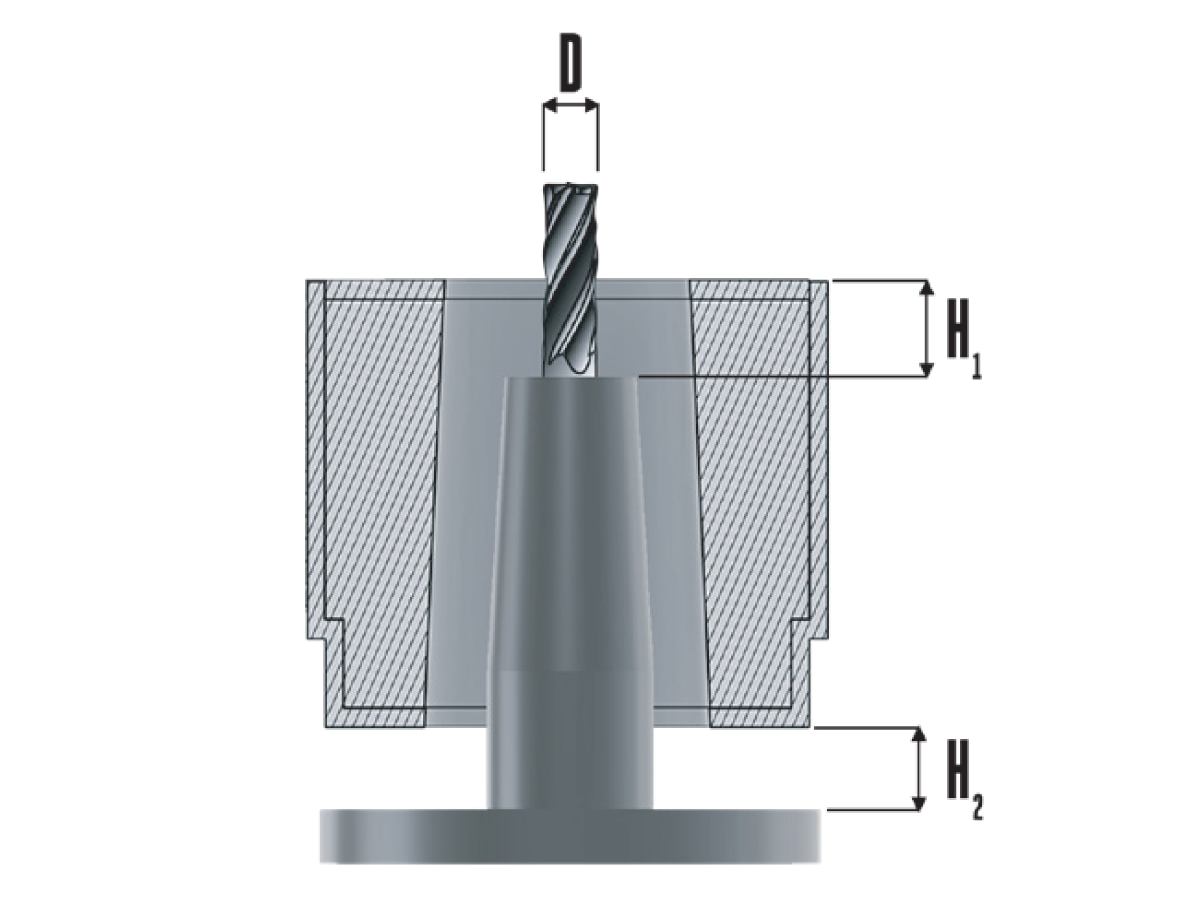
  • Lower the induction heating head over the clamping portion of the toolholder.

The tables below show the recommended heights, heating times, and cooling times. The height and time values may vary:

Diameter Height 1
>1" (25 mm) 1.00" (25 mm)
5/8" (16 mm) 0.250" (6 mm)
1/2" (13 mm) 0.375" (10 mm)
3/8" (10 mm) 0.625" (16 mm)
Make Sure Height 2 (H2) = 0.25" (6 mm) minimum
Recommended Heating Time
EM IN EM OUT
D Time (Sec) D Time (sec)
1-1/4" (32 mm) 5.0 1-1/4" (32 mm) 6.0
1" (25 mm) 8.0 1" (25 mm) 8.5
3/4" (19 mm) 7.5 3/4" (19 mm) 9.0
5/8" (16 mm) 6.5 5/8" (16 mm) 7.0
1/2" (13 mm) 6.0 1/2" (13 mm) 9.0
3/8" (10 mm) 6.0 3/8" (10 mm) 7.0
Recommended Cooling Time
EM IN EM OUT
D Time (Sec) D Time (sec)
1-1/4" (32 mm) 4.0 1-1/4" (32 mm) 4.5
1" (25mm) 6.0 1" (25mm) 6.0
3/4" (19 mm) 4.0 3/4" (19 mm) 5.0
5/8" (16 mm) 3.0 5/8" (16 mm) 3.5
1/2" (13 mm) 2.5 1/2" (13 mm) 3.0
3/8" (10 mm) 2.5 3/8" (10 mm) 3.0

Power On

1

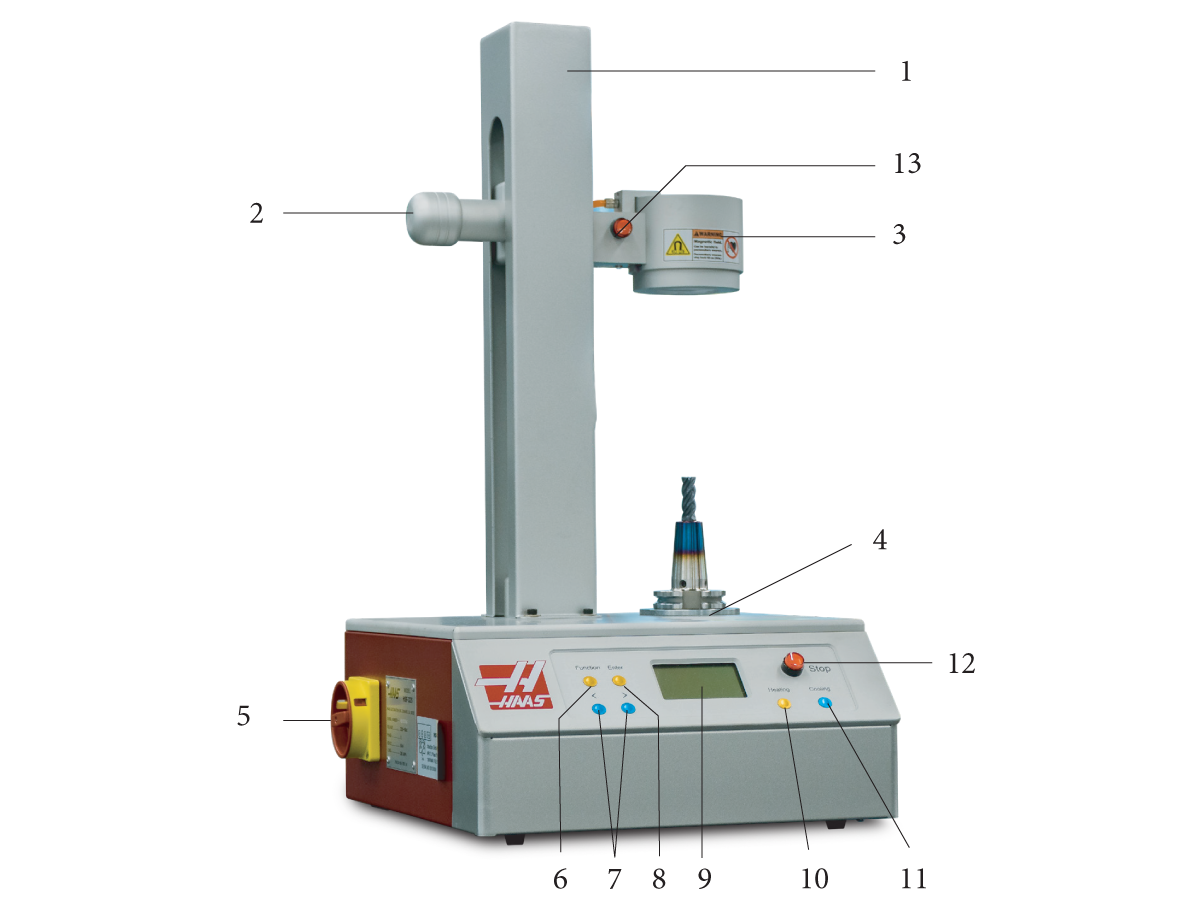
Turn on the Power Knob [5] to the On position.

2

Select the operating function

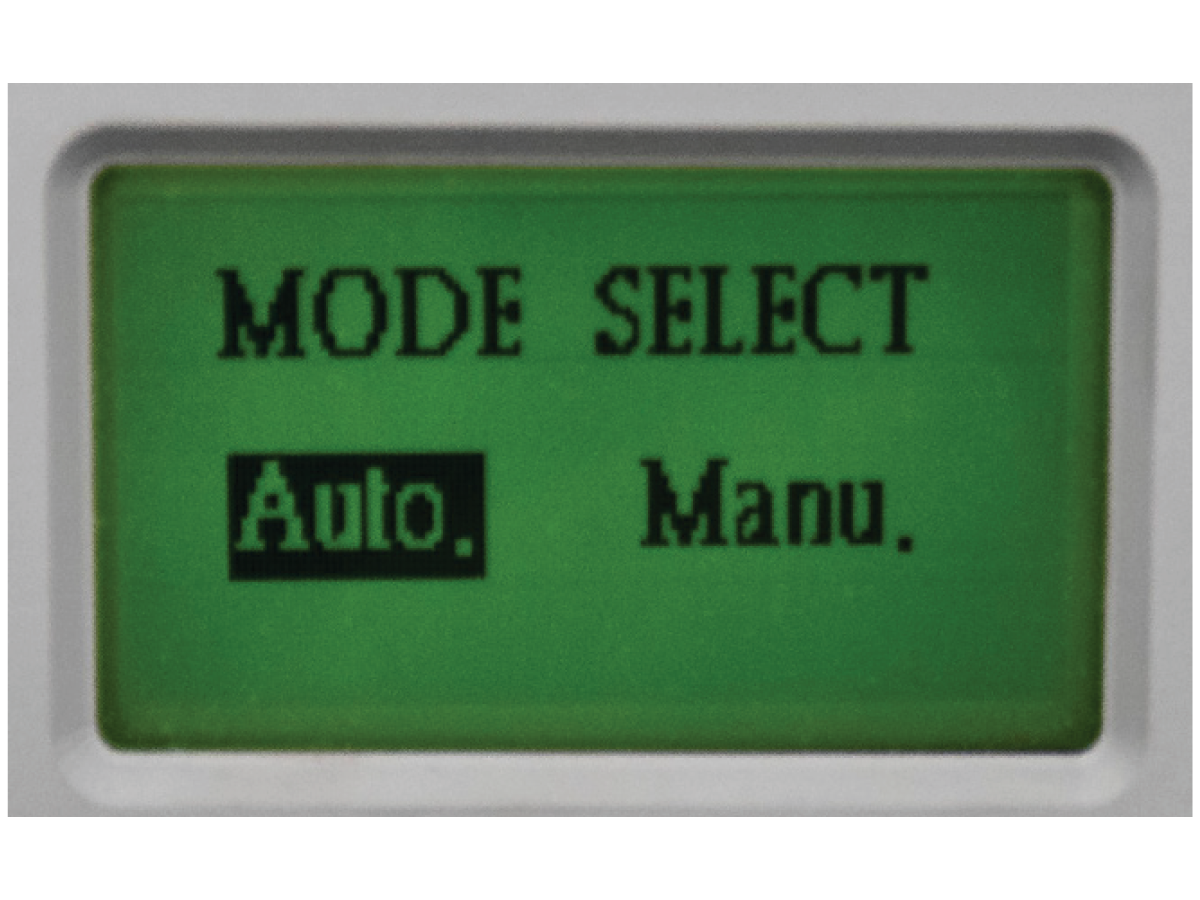
At startup, the machine will remain in standby until a mode is selected. Use the [ < > ] keys to select the Manual or Auto function, and then push the Enter key to select the highlighted function.

Manual Function

1

Manual Function:

In Manu. mode, push and hold the Manual Heating Button [13] to start heating. Heating will stop when the button is released. The red LED will turn on during heating, and the LCD display will count the heating time until the button is release, or after 10 seconds.

Push the Cooling key to start the air blast cooling; push the Stop button to turn off the air blast.

Notice: This machine has a fast heating capacity! The maximum recommended heating temperature is 400°C. Temperatures higher than 400°C may damage the toolholders.

Auto Function

1

Auto. Function:

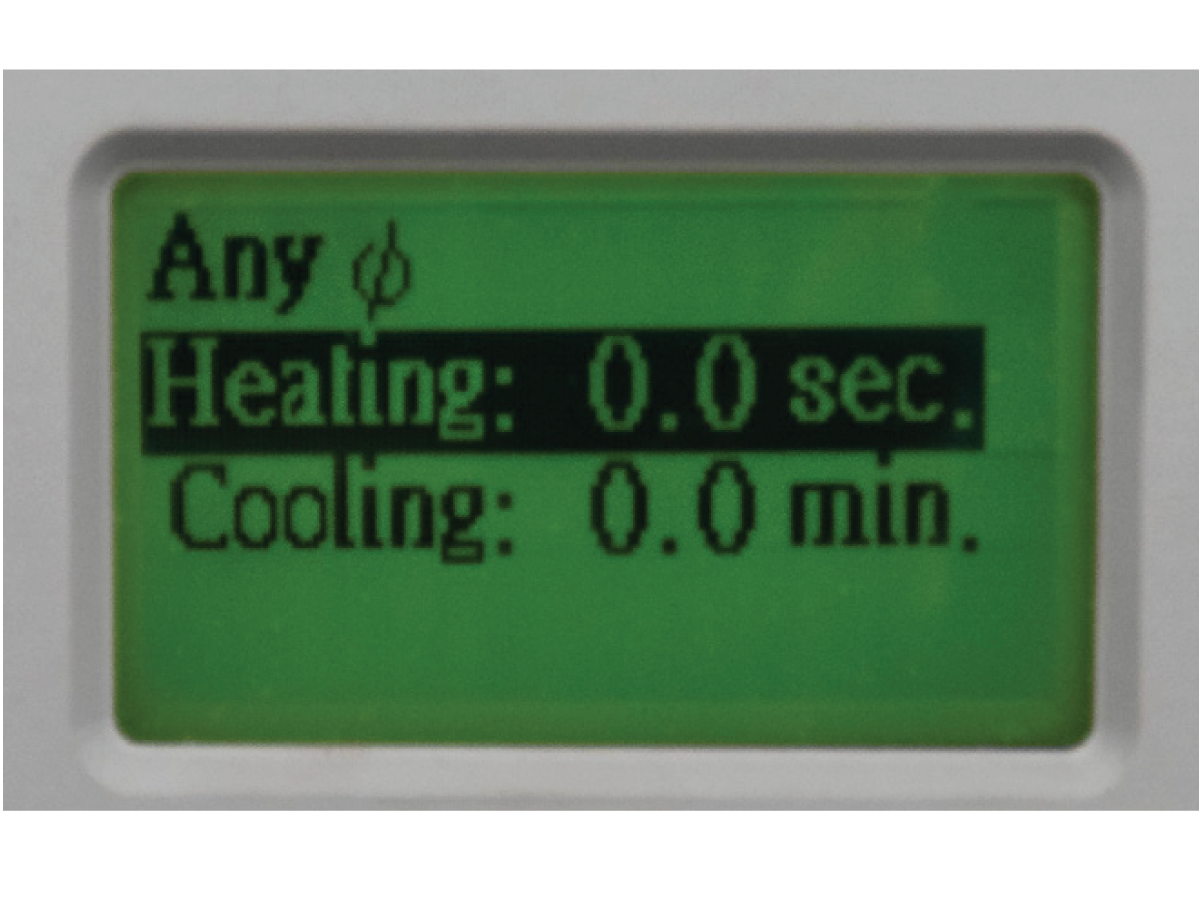
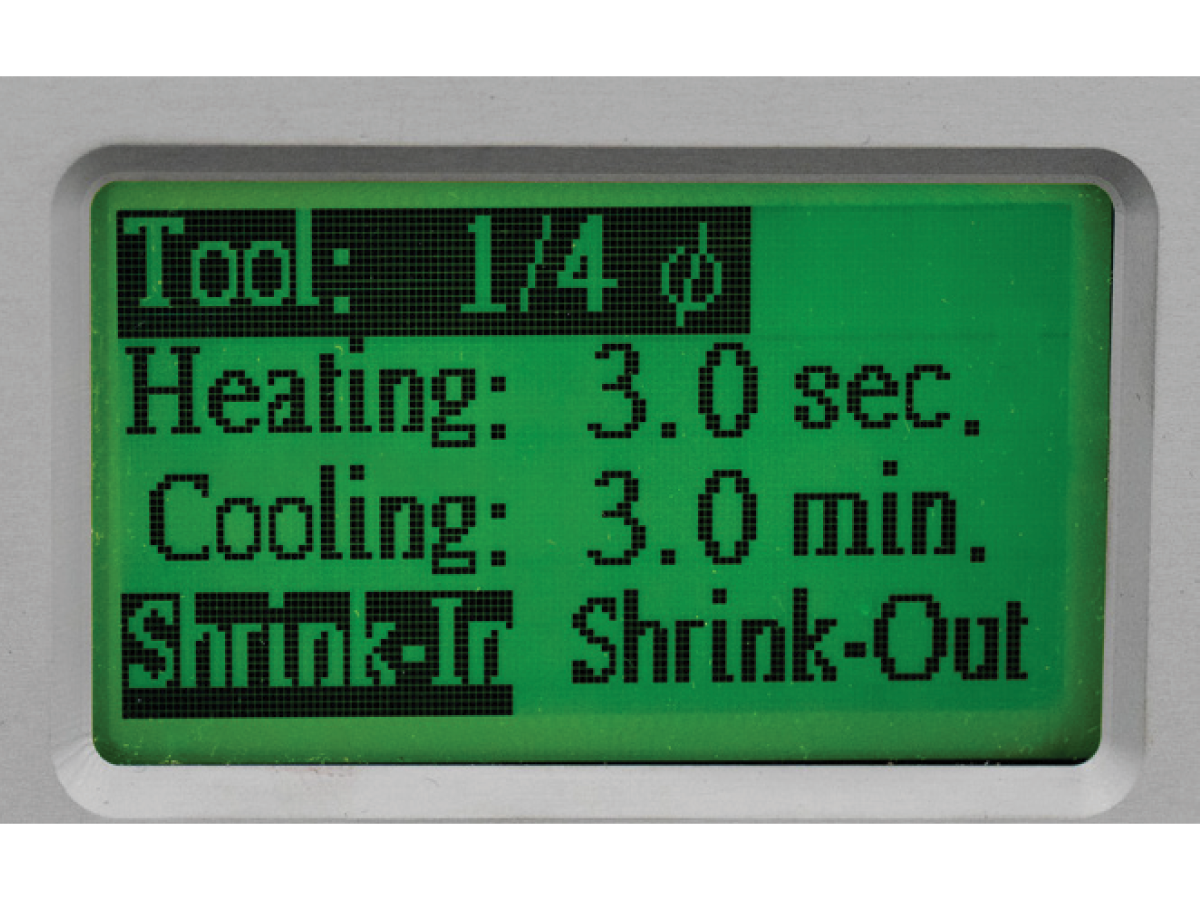
In Auto. mode, use the [ < > ] keys to create and select between settings for several different tools. Press the Enter key to switch between different settings (tool diameter, heating time, cooling time, shrink in and shrink out).

Use the [ < > ] keys to adjust the values for each setting. The machine will record and save the tool settings each time they are changed.

2

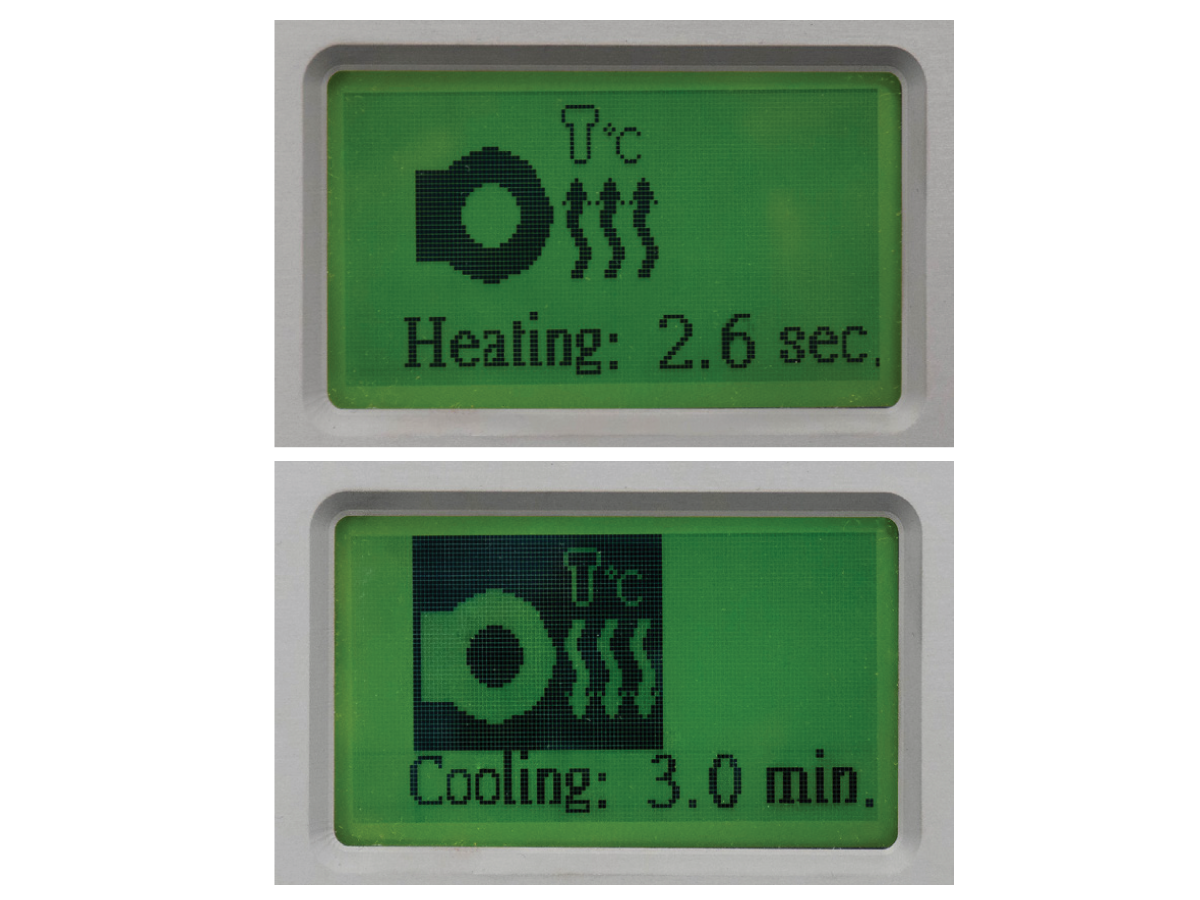
Push the Start key to start heating; it will stop after the set time is reached.

Once the heating cycle is complete, insert/remove the cutting tool. Push the Cooling key to start cooling; it will stop after the set time reached. Push the Stop switch to stop heating/cooling at any time.

3

The red LED on the Manual Heating Button will turn on during the heating period. The machine will record data every time the Manual Heating Button is pushed.

We recommend waiting 2 seconds after the heating period to insert the tool into the toolholder.

Notice: In addition to the Stop button, the Function key will turn off the heating cycle.

Notice: If you are not sure about the heating time, please refer to the recommended heating and cooling times in the tables provided.

Notice: After the heating procedure, if you are not sure whether the toolholder and cutting tool are cooled, please use the appropriate tools and safety equipment to remove the tools.

Notice: This machine has a fast heating capacity! The maximum recommended heating temperature is 400°C. Temperatures higher than 400°C may damage the toolholders. Please contact your toolholder supplier for detailed heating specifications.

Additional Information

1

The toolholder’s bore and the cutting tool must be thoroughly cleaned (use a cleaning rag to clean) to prevent the cutting tool from getting stuck.

2

During the heating procedure, if alarms E1, E2, E3, E4, or E5 appear on the LCD Display Window, the machine has experienced one of the following issues:

E1: Machine heating error. Please check heating head connection.

E2: Heating head over temperature.

E3: 3-phase power supply in error.

E4: No toolholder in heating head.

E5: Machine’s power module is over heated.

3

3. This induction shrink fit machine generates heat during use, and must be operated in a well ventilated area. The machine should be placed in a clean, dry location, and protected from strong hits. DO NOT attempt to service your machine! If you are experiencing issues, contact your local HFO for service.

4

For safety purposes, keep flammable materials away from this machine while in use.

Machine Specifications

1

Max. consumption power: 10,000 Watts.

2

Dimensions (W x D x H): 15" x 16" x 25.75" (380 x 405 x 655 mm).

3.2 Operation Notices

Operation Notices

1

To prevent damage to the machine, toolholders, and cutting tools, please read the manual carefully.

This machine uses induction heating, and the temperature of the toolholder being heated will rise rapidly according to the heating time! Please confirm the characteristics of your toolholders and cutting tools (material, external diameter, tolerances, etc.) to set accurate heating cycles, in order to prevent damage to your toolholders, and extend the life of the machine.

2

Stainless toolholders can easily damage the induction heating head. Stainless toolholders may still be used in this machine; however, due to their lower heating efficiency, they require more heat, which can cause the induction head to overheat during repeated operation.

The heating process should be monitored closely. If the heating head gets overheated, please stop operation temporarily until the heating head has cooled. Continuing operation while the head is overheated will damage the induction heating head.

3

DO NOT use high-speed steel (HSS) cutting tools in induction heating operations.

Due to the similar heating characteristics between the tool and the toolholder, it can be difficult or impossible to remove HSS cutting tools from steel toolholders.

4

It is very important to know the diametrical size of your toolholders and cutting tools.

The machine is designed to heat toolholders to a sufficient temperature to allow the cutting tools to shrink in/out (around 300°C).

If the temperature exceeds 350°C and the cutting tool still cannot be shrunk in/out of the toolholder, it is likely an issue with the toolholder geometry, or the grind tolerance of the cutting tool.

If the fit between the toolholder and cutting tool is too tight, it will be difficult to remove the cutting tool. If the fit between the toolholder and cutting tool is too loose, the tool is more likely to pull out of the holder during cutting operations. Please choose cutting tools with the appropriate precision.

Make sure to clean off any oil on the toolholder or cutting tool prior to use. The heating procedure will carbonize any residual oil and make it more difficult to remove the cutting tool. For cleaning off oil, we recommend using a clean rag/cloth or solvent tank.

5

Warning: DO NOT turn on the induction heating head without a toolholder present!

To prevent damage to the machine, do not turn on and heat up the induction head when a toolholder is not present. Prior to removing the toolholder during the heating procedure, please press STOP to turn off the machine, to avoid heating without an object present.

6

If the induction head is deformed or has turned a darker color (initially, it is white), this could be the result of the head producing too much heat (above 400°C).

Reduce the heating cycle, and service the head, as needed.

7

This machine uses a high-voltage power source. Do not dismantle and service this machine unless properly trained.

To ensure safe operation and reduce electromagnetic interference, make sure an appropriate ground wire is properly installed. If you are experiencing issues, contact your local HFO for service.

8

IMPORTANT: DO NOT approach or operate this machine if you are wearing a pacemaker or other device that can be affected by electromagnetism.

Feedback

Recently Viewed Items

You Have No Recently Viewed Items Yet

Feedback
Haas Logo

Haas Delivered Price

This price includes shipping cost, export and import duties, insurance, and any other expenses incurred during shipping to a location in France agreed with you as a buyer. No other mandatory costs can be added to the delivery of a Haas CNC Product.

KEEP UP WITH THE LATEST HAAS TIPS AND TECHNOLOGY...

Sign up now!   

HAAS TOOLING ACCEPTS THE FOLLOWING:

  • Service & Support
  • Owners
  • Request Service
  • Operator Manuals
  • Haas Parts
  • Rotary Repair Request
  • Pre-Install Guides
  • Shopping Tools
  • Build & Price a New Haas
  • Available Inventory
  • The Haas Price List
  • CNCA Financing
  • About Haas
  • Accessibility Statement
  • DNSH Statement
  • Export Compliance
  • Careers
  • Certifications & Safety
  • Contact Us
  • History
  • Terms & Conditions
  • Haas Tooling Terms & Conditions
  • Privacy
  • Warranty
  • Haas Community
  • Haas Certification Program
  • Haas Motorsports
  • Gene Haas Foundation
  • Haas Technical Education Community
  • Events
  • Join the Conversation
  • Facebook
  • X
  • Flickr
  • YouTube
  • LinkedIn
  • Instagram
  • TikTok
© 2026 Haas Automation, Inc – CNC Machine Tools

This site is protected by reCAPTCHA and the Google Privacy Policy and Terms of Service apply.

2800 Sturgis Rd., Oxnard, CA 93030
Toll Free: (888) 817-4446 / Fax: 805-278-8554