My Haas Welcome,
!
Haas Tooling MyHaas/HaasConnect Sign In Register Haas Tooling MyHaas/HaasConnect Sign Out Welcome, My Machines Latest Activity My Quotes My Account My Users Sign Out
Find Your Distributor
  1. Select Language
    1. English
    2. Deutsch
    3. Español - ES
    4. Español - MX
    5. Français
    6. Italiano
    7. Português
    8. Český
    9. Dansk
    10. Nederlands
    11. Magyar
    12. Polski
    13. Svenska
    14. Türkçe
    15. 中文
    16. Suomi
    17. Norsk
    18. الإنجليزية
    19. български
    20. Hrvatski
    21. Ελληνικά
    22. Română
    23. Slovenský
    24. Slovenščina
    25. 한국어
    26. 日本語
    27. Українська
  • machines Main Menu
    • Vertical Mills
      Vertical Mills
      Vertical Mills View All
      • Vertical Mills
      • VF Series
      • Universal Machines
      • VR Series
      • VP-5 Prismatic
      • Pallet-Changing VMCs
      • Mini Mills
      • Mold Machines
      • High-Speed Drill Centers
      • Drill/Tap/ Mill Series
      • Toolroom Mills
      • Pocket Mill
      • Compact Mills
      • Gantry Series
      • SR Sheet Routers
      • Extra-Large VMC
      • Double-Column Mills
      • 3+2 Positioning Machines
    • Multi-Axis Solutions
      Multi-Axis Solutions
      Multi-Axis Solutions View All
      • Multi-Axis Solutions
      • Y-Axis Lathes
      • 5-Axis Mills
    • Lathes
      Lathes
      Lathes View All
      • Lathes
      • ST Series
      • Dual-Spindle
      • Box Way Series
      • Toolroom Lathes
      • Chucker Lathe
      • Pocket Lathe
      • Haas Bar Feeders
    • Horizontal Mills
      Horizontal Mills
      Horizontal Mills View All
      • Horizontal Mills
      • 50-Taper
      • 40-Taper
    • Rotaries & Indexers
      Rotaries & Indexers
      Rotaries & Indexers View All
      • Rotaries & Indexers
      • Rotary Tables
      • Indexers
      • 5-Axis Rotaries
      • Extra-Large Rotaries
    • Special Series
      Special Series
      Special Series View All
      • Special Series
      • EU_Series_Redirect
    • Automation Systems
      Automation Systems
      Automation Systems View All
      • Automation Systems
      • Mill Automation
      • Lathe Automation
      • Automatic Parts Loaders
      • Automation Models
    • Desktop Machines
      Desktop Machines
      Desktop Machines View All
      • Desktop Machines
      • Desktop Mill
      • Desktop Lathe
      • Control Simulator, Standard
      • Control Simulator, Premium
    • Shop Equipment
      Shop Equipment
      Shop Equipment View All
      • Shop Equipment
      • Knee Mill
      • Haas Manual Lathes
      • Haas Saws
    • Fabrication Machines
      Fabrication Machines
      Fabrication Machines View All
      • Fabrication Machines
      • Laser Cutting Machines
      • CNC Press Brakes
    • QUICK LINKS Special Series  Special Series 
      EU SERIES EU SERIES BUILD & PRICE | PRICE LIST BUILD & PRICE | PRICE LIST In-Stock Machines In-Stock Machines WHAT’S NEW WHAT’S NEW YOUR FIRST CNC YOUR FIRST CNC
      SHOPPING TOOLS
      • Build & Price a Haas
      • Price List
      • Available Inventory
      • CNCA Financing
      WANT TO TALK TO SOMEONE?

      A Haas Factory Outlet (HFO) can answer your questions, and walk you through your best options.

      CONTACT YOUR DISTRIBUTOR >
  • Options Main Menu
    • The Haas Control Value Option Packages
      Value Option Packages
      Value Option Packages View All
      • Value Option Packages
    • Product Image Spindles
      Spindles
      Spindles View All
      • Spindles
    • Product Image Tool Changers
      Tool Changers
      Tool Changers View All
      • Tool Changers
    • Product Image 4th- | 5th-Axis
      4th- | 5th-Axis
      4th- | 5th-Axis View All
      • 4th- | 5th-Axis
    • Product Image Turrets & Live Tooling
      Turrets & Live Tooling
      Turrets & Live Tooling View All
      • Turrets & Live Tooling
    • Product Image Probing
      Probing
      Probing View All
      • Probing
    • Haas Chip & Coolant Management Chip & Coolant Management
      Chip & Coolant Management
      Chip & Coolant Management View All
      • Chip & Coolant Management
    • The Haas Control The Haas Control
      The Haas Control
      The Haas Control View All
      • The Haas Control
    • Product Image Product Options
      Product Options
      Product Options View All
      • Product Options
    • Product Image Tooling & Fixturing
      Tooling & Fixturing
      Tooling & Fixturing View All
      • Tooling & Fixturing
    • Product Image Workholding
      Workholding
      Workholding View All
      • Workholding
    • Product Image 5-Axis Solutions
      5-Axis Solutions
      5-Axis Solutions View All
      • 5-Axis Solutions
      • 5 Easy Steps to 5-Axis
    • QUICK LINKS Special Series  Special Series 
      EU SERIES EU SERIES BUILD & PRICE | PRICE LIST BUILD & PRICE | PRICE LIST In-Stock Machines In-Stock Machines WHAT’S NEW WHAT’S NEW YOUR FIRST CNC YOUR FIRST CNC
      SHOPPING TOOLS
      • Build & Price a Haas
      • Price List
      • Available Inventory
      • CNCA Financing
      WANT TO TALK TO SOMEONE?

      A Haas Factory Outlet (HFO) can answer your questions, and walk you through your best options.

      CONTACT YOUR DISTRIBUTOR >
  • Why Haas Main Menu
      Discover the Haas Difference
    • Why Haas
    • MyHaas
    • Education Community
    • Industry 4.0
    • Haas Certification
    • Customer Testimonials
  • Service Main Menu
      Welcome to Haas Service
      SERVICE HOME Operator’s Manuals How-To Procedures Troubleshooting Guides Preventive Maintenance Haas Parts Haas Tooling Videos
  • Videos Main Menu
  • Main Menu
    • View All
    • View All
    • View All
    • View All
      • HTEC Curriculum Support
      • Haas Value Option Packages (VOP) Journey
    • View All
      • Haas 10 kg Cobot Package
      • Cobot Kits
      • DC-1 Drill Center
      • CNC Sales News
      • Do More With Your Haas
    • View All
    • View All
      • contact-us-test
      • 4 - AUTOMATION SYSTEMS
      • Carousel-V2
      • expert test
      • Demo_Day_Trident-test
      • Link Test
      • image-sale-tag-test
      • article-list-test
      • Haas 25 kg Robot Package
      • test-algolia-page
    • View All
    • View All
    • View All
    • View All
      • calc-test
    • View All
    • QUICK LINKS Special Series  Special Series 
      EU SERIES EU SERIES BUILD & PRICE | PRICE LIST BUILD & PRICE | PRICE LIST In-Stock Machines In-Stock Machines WHAT’S NEW WHAT’S NEW YOUR FIRST CNC YOUR FIRST CNC
      SHOPPING TOOLS
      • Build & Price a Haas
      • Price List
      • Available Inventory
      • CNCA Financing
      WANT TO TALK TO SOMEONE?

      A Haas Factory Outlet (HFO) can answer your questions, and walk you through your best options.

      CONTACT YOUR DISTRIBUTOR >
  • Haas Tooling Main Menu
  • Haas Service Parts Main Menu
My Haas Welcome,
!
Haas Tooling MyHaas/HaasConnect Sign In Register Haas Tooling MyHaas/HaasConnect Sign Out Welcome, My Machines Latest Activity My Quotes My Account My Users Sign Out
Find Your Distributor
  1. Select Language
    1. English
    2. Deutsch
    3. Español - ES
    4. Español - MX
    5. Français
    6. Italiano
    7. Português
    8. Český
    9. Dansk
    10. Nederlands
    11. Magyar
    12. Polski
    13. Svenska
    14. Türkçe
    15. 中文
    16. Suomi
    17. Norsk
    18. الإنجليزية
    19. български
    20. Hrvatski
    21. Ελληνικά
    22. Română
    23. Slovenský
    24. Slovenščina
    25. 한국어
    26. 日本語
    27. Українська
×

Search Results

Web Pages

Images

    • <
    • 1
    • >

14 - SB Series - Options Programming

SB - Series - Operator's / Service Manual


  • 0 - SB Series - Table of Contents
  • 1 - SB Series - Introduction
  • 2 - SB Series - Legal Information
  • 3 - SB Series - Safety
  • 4 - SB Series - Control Pendant
  • 5 - SB Series - Control Display
  • 6 - SB Series - Device Manager
  • 7 - SB Series - TouchScreen Feature
  • 8 - SB Series - Installation
  • 9 - SB Series - Part Setup
  • 10 - SB Series - Control Icons
  • 11 - SB Series - Operation
  • 12 - SB Series - Programming
  • 13 - SB Series - Macros
  • 14 - SB Series - Options Programming
  • 15 - SB Series - Probing
  • 16 - SB Series - Remote Jog Handle
  • 17 - SB Series - G-Codes
  • 18 - SB Series - M-Codes
  • 19 - SB Series - Settings
  • 20 - SB Series - Maintenance
  • 21 - SB Series - Tow-along Tailstock
  • 22. SB-Series - Steady Rest
  • 23 - SB Series - Troubleshooting

Go To :

  • 14.1 Automatic Tool Presetter (ATP)
  • 14.2 C-Axis

14.1 Automatic Tool Presetter (ATP)

Automatic Tool Presetter (ATP)

The Automatic Tool Presetter increases part accuracy and setup consistency, while reducing setup times by up to 50%. The system features easy-to-use automatic and manual modes of operation, with a user-friendly interface for quick, conversational-style programming.

  • Automatic, manual, and tool-breakage-detection operations.
  • Increases tool setting accuracy and consistency.
  • Conversational-style templates for easy tool-setting operations.
  • No macro programming required.
  • Outputs G-code to MDI, where it may be edited, or transferred into a program.

Follow the link or video below to Align, Test, and Calibrate the ATP.

Automatic Tool Presetter (ATP) - Alignment - Test - Calibration
Calibrate the Automatic Tool Probe (ATP) on Your Lathe

ATP - Manually Probe Tool Offsets

1

Warning: To manually probe a tool on the ATP, the tool must be fed into the probe stylus by holding the axis direction button and not the Hand Jog Wheel. The jog rate must be set to .001 or the tool offset measured may not be accurate.

Make sure that the ATP arm does not hit parts of the machine.

Push [CURRENT COMMANDS].

Select the Devices tab

Select the Mechanisms tab

Highlight Probe Arm

Push [F2] to lower the ATP arm.

2

Make sure a turning-stick tool is installed in the turret.

Make sure the pocket faces the spindle.

Jog the X and Z Axes to the center of the probe stylus to probe to X Geometry.

Make sure that you have distance of .125 inches between the tool tip and probe stylus.

3

Push [OFFSET] and navigate to the TOOL Offset tab .

Select the Tool Row that the tool offset will be measured.

Clear the tool offset value for both X Geometry and Z Geometry by pressing [0]. Push [F1]. This clears the Offset value.

If you get a warning message [1], Push [Y] to select YES.

Press [HANDLE JOG] and press [.001/1.].

Push and hold [-X] until the stick tool touches the probe.

 Note: You hear a beep sound when the stick tool touches the tool probe.

The tool offset will populate X Geometry.

Jog the X Axis away from the ATP arm.

4

Jog the X and Z Axes to the center of the probe stylus to probe the Z Geometry.

Make sure that you have distance of .125 inches between the tool tip and probe stylus.

Press [HANDLE JOG] and press [.001/1.].

Push and hold [-Z] until the stick tool touches the probe.

 Note: You hear a beep sound when the stick tool touches the tool probe.

The tool offset will populate Z Geometry.

Jog the Z Axis away from the ATP arm.

14.2 C-Axis

C-Axis

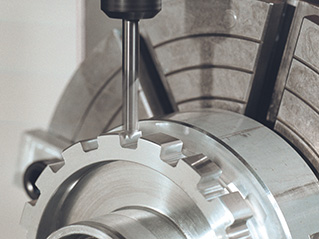
The C Axis provides high-precision, bi-directional spindle motion that is fully interpolated with X and/or Z motion. You can command spindle speeds from 0.01 to 60 RPM.

C-Axis operation is dependent on the mass, diameter and length of the workpiece and/or the workholding (chuck). Contact the Haas Applications Department if any unusually heavy, large diameter, or long configuration is used.

Cartesian to Polar Transformation (G112)

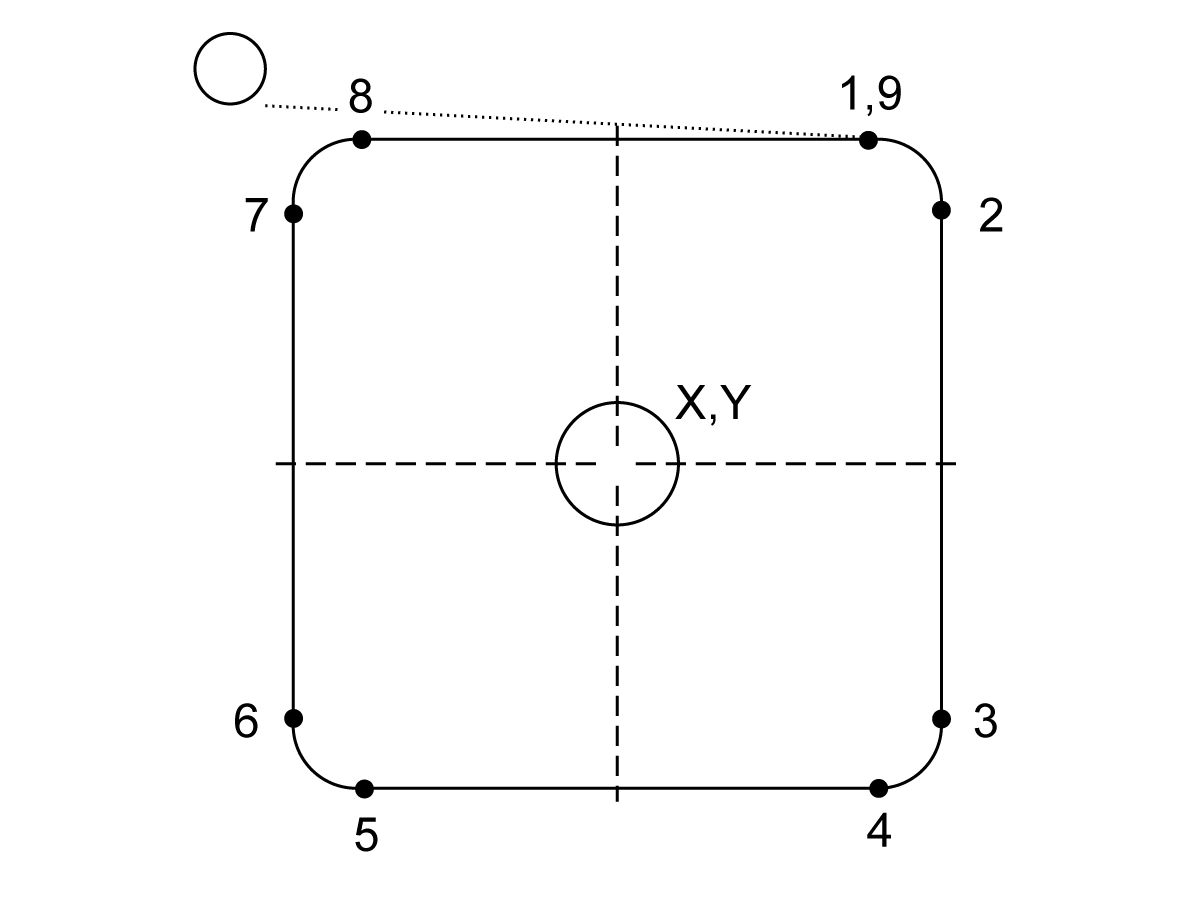
The G112 XY to XC coordinate interpolation feature lets you program subsequent blocks in Cartesian XY coordinates, which the control automatically converts to polar XC coordinates. While it is active, the control uses the G17 XY for G01 linear XY strokes and G02 and G03 for circular motion. G112 also converts X, Y position commands into rotary C-Axis and linear X-axis moves.

Cartesian to Polar coordinate programming greatly reduces the amount of code required to command complex moves. Normally a straight line would require many points to define the path, however, in Cartesian, only end points are necessary. This feature allows face machining programming in the Cartesian coordinate system.

C-Axis Programming Notes

Note: Programmed moves should always position the tool centerline.

Tool paths should never cross the spindle centerline. If necessary re-orient the program so the cut does not go over the center of the part. Cuts that must cross spindle center can be accomplished with two parallel passes on either side of spindle center.

Cartesian to Polar conversion is a modal command. Refer to Chapter 16 for more information on modal G-codes.

The G112 code is intended to be used with a Lathe using the C-axis and Live Tooling to program cutter anywhere along a non-rotating part.

The G112 code allows 3-D contouring using the X, Y, and Z axes. The tool centerline programing (G40) and cutter diameter compensation (G41/G42) are available with G112. They are also available for a tool in any of the three plane selection (G17, G18, G19).

A Lathe with Y-axis can use G112 and it can be useful to extend the range of travel of the live tool all the way across a part.

Circular motion (G02 and G03) in any of the three planes (G17, G18, G19) are also available with G112.

Since the spindle is not turning in G112, “feed per inch” (G98) must be selected.

Once G112 is active, all motions are programmed with XYZ and C cannot be used.

All X values are in radius when using G112.

Example Program:

o51120 (CARTESIAN TO POLAR INTERPOLATION) ;
(G54 X0 Y0 is at the center of rotation);
(Z0 is on face of the part) ;
(T1 is an end mill) ;
(BEGIN PREPARATION BLOCKS) ;
T101 (Select tool and offset 1) ;
G00 G20 G40 G80 G97 G99 (Safe startup) ;
G17 (Call XY plane) ;
G98 (Feed per min) ;
P1500 M133 (Live tool CW at 1500 RPM) ;
G00 G54 X2.35 C0. Z0.1 (Rapid to 1st position) ;
G112 (XY to XC interpretation);
M08 (Coolant on) ;
(BEGIN CUTTING BLOCKS) ;
G0 X-.75 Y.5 ;
G01 Z0 F10.;
G01 X0.45 (Point 1) ;
G02 X0.5 Y0.45 R0.05 (Point 2) ;
G01 Y-0.45 (Point 3) ;
G02 X0.45 Y-0.5 R0.05 (Point 4) ;
G01 X-0.45 (Point 5) ;
G02 X-0.5 Y-0.45 R0.05 (Point 6) ;
G01 Y0.45 (Point 7) ;
G02 X-0.45 Y0.5 R0.05 (Point 8) ;
G01 X0.45 Y.6 (Point 9) ;
G00 Z0.1 (Rapid retract);
(BEGIN COMPLETION BLOCKS) ;
G113 (Cancel G112) ;
M135 (Live tool off) ;
G18 (Return to XZ plane) ;
G00 G53 X0 M09 (X home, coolant off) ;
G53 Z0 (Z home) ;
M30 (End program) ;

C-Axis Cartesian Interpolation

Cartesian coordinate commands are interpreted into movements of the linear axis (turret movements) and spindle movements (rotation of the workpiece).

The lathe automatically engages/disengages the C-Axis when the axis is commanded or jogged.

When not using G112, Setting 102 - Diameter is used to calculate the feed rate.

C-Axis incremental moves are possible using the H address code as shown in this example:

G0 C90. (C-Axis moves to 90. deg.) ;
H-10. (C-Axis moves to 80. deg. from the previous 90 deg position) ; 

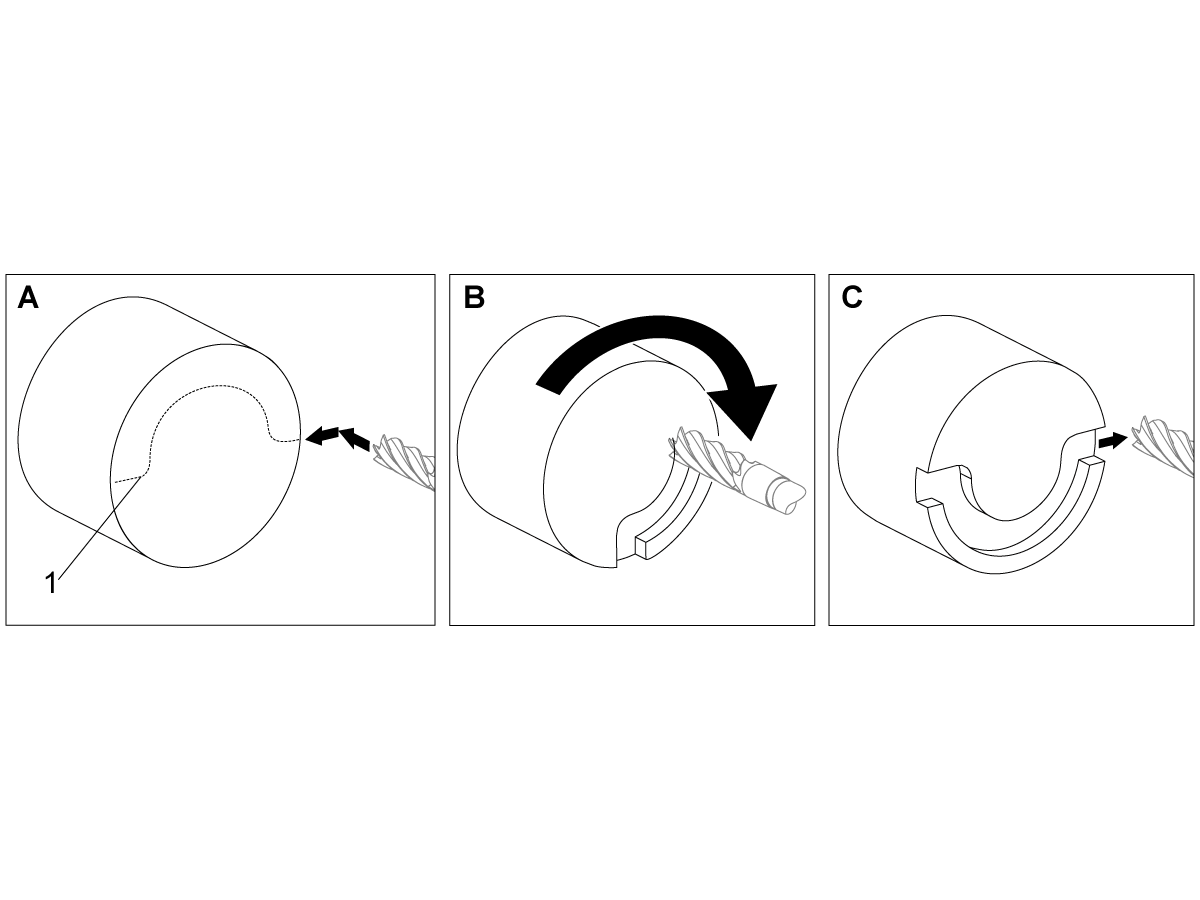
Cartesian Interpolation Example 1. [1] Projected Cutting Path [A] The endmill feeds 1" into the workpiece on one side. [B] The C Axis turns 180 degrees to cut the arc shape. [C] The endmill feeds 1" out of the workpiece.

o51121 (CARTESIAN INTERPOLATION EX 1) ;
(G54 X0 Y0 is at the center of rotation) ;
(Z0 is on face of the part) ;
(T1 is an end mill) ;
(BEGIN PREPARATION BLOCKS) ;
T101 (Select tool and offset 1) ;
G00 G18 G20 G40 G80 G99 (Safe startup) ;
G98 (Feed per min) ;
G00 G54 X2. C90 Z0.1 (Rapid to 1st position) ;
P1500 M133 (Live tool CW at 1500 RPM) ;
M08 (Coolant on) ;
(BEGIN CUTTING BLOCKS) ;
G01 Z-0.1 F6.0 (Feed to Z depth) ;
X1.0 (Feed to Position 2) ;
C180. F10.0 (Rotate to cut arc) ;
X2.0 (Feed back to Position 1 ) ;
(BEGIN COMPLETION BLOCKS) ;
G00 Z0.5 M09 (Rapid retract, coolant off) ;
M135 (Live tool off) ;
G18 (Return to XZ plane) ;
G53 X0 Y0 (X & Y home) ;
G53 Z0 (Z home) ;
M30 (End program) ;

Example Program:

o51122 (CARTESIAN INTERPOLATION EX 2);
(G54 X0 Y0 is at the center of rotation) ;
(Z0 is on face of the part) ;
(T1 is a drill) ;
(BEGIN PREPARATION BLOCKS) ;
T101 (Select tool and offset 1) ;
G00 G18 G20 G40 G80 G99 (Safe startup) ;
G19 (Call YZ plane) ; G98 (Feed per min) ;
G00 G54 X3.25 C0. Y0. Z0.25 ;
(Rapid to 1st position) ;
P1500 M133 (Live tool CW at 1500 RPM) ;
M08 (Coolant on) ;
G00 Z-0.75 (Rapid to Z depth) ;
(BEGIN CUTTING BLOCKS) ;
G75 X1.5 I0.25 F6. (Begin G75 on 1st hole) ;
G00 C180. (Rotate C axis to new position) ;
G75 X1.5 I0.25 F6. (Begin G75 on 2nd hole) ;
G00 C270. (Rotate C axis to new position) ;
G75 X1.5 I0.25 F6. (Begin G75 on 3rd hole) ;
(BEGIN COMPLETION BLOCKS) ;
G00 Z0.25 M09 (Rapid retract, coolant off) ;
M135 (Live tool off) ;
G18 (Return to XZ plane) ;
G53 X0 (X home) ;
G53 Z0 (Z home) ;
M30 (End program) ;

Feedback

Recently Viewed Items

You Have No Recently Viewed Items Yet

Feedback
Haas Logo

Haas Delivered Price

This price includes shipping cost, export and import duties, insurance, and any other expenses incurred during shipping to a location in France agreed with you as a buyer. No other mandatory costs can be added to the delivery of a Haas CNC Product.

KEEP UP WITH THE LATEST HAAS TIPS AND TECHNOLOGY...

Sign up now!   

HAAS TOOLING ACCEPTS THE FOLLOWING:

  • Service & Support
  • Owners
  • Request Service
  • Operator Manuals
  • Haas Parts
  • Rotary Repair Request
  • Pre-Install Guides
  • Shopping Tools
  • Build & Price a New Haas
  • Available Inventory
  • The Haas Price List
  • CNCA Financing
  • About Haas
  • Accessibility Statement
  • DNSH Statement
  • Export Compliance
  • Careers
  • Certifications & Safety
  • Contact Us
  • History
  • Terms & Conditions
  • Haas Tooling Terms & Conditions
  • Privacy
  • Warranty
  • Haas Community
  • Haas Certification Program
  • Haas Motorsports
  • Gene Haas Foundation
  • Haas Technical Education Community
  • Events
  • Join the Conversation
  • Facebook
  • X
  • Flickr
  • YouTube
  • LinkedIn
  • Instagram
  • TikTok
© 2026 Haas Automation, Inc – CNC Machine Tools

This site is protected by reCAPTCHA and the Google Privacy Policy and Terms of Service apply.

2800 Sturgis Rd., Oxnard, CA 93030
Toll Free: (888) 817-4446 / Fax: 805-278-8554