My Haas Welcome,
!
Haas Tooling MyHaas/HaasConnect Sign In Register Haas Tooling MyHaas/HaasConnect Sign Out Welcome, My Machines Latest Activity My Quotes My Account My Users Sign Out
Find Your Distributor
  1. Select Language
    1. English
    2. Deutsch
    3. Español - ES
    4. Español - MX
    5. Français
    6. Italiano
    7. Português
    8. Český
    9. Dansk
    10. Nederlands
    11. Magyar
    12. Polski
    13. Svenska
    14. Türkçe
    15. 中文
    16. Suomi
    17. Norsk
    18. الإنجليزية
    19. български
    20. Hrvatski
    21. Ελληνικά
    22. Română
    23. Slovenský
    24. Slovenščina
    25. 한국어
    26. 日本語
    27. Українська
  • machines Main Menu
    • Vertical Mills
      Vertical Mills
      Vertical Mills View All
      • Vertical Mills
      • VF Series
      • Universal Machines
      • VR Series
      • VP-5 Prismatic
      • Pallet-Changing VMCs
      • Mini Mills
      • Mold Machines
      • High-Speed Drill Centers
      • Drill/Tap/ Mill Series
      • Toolroom Mills
      • Pocket Mill
      • Compact Mills
      • Gantry Series
      • SR Sheet Routers
      • Extra-Large VMC
      • Double-Column Mills
      • 3+2 Positioning Machines
    • Multi-Axis Solutions
      Multi-Axis Solutions
      Multi-Axis Solutions View All
      • Multi-Axis Solutions
      • Y-Axis Lathes
      • 5-Axis Mills
    • Lathes
      Lathes
      Lathes View All
      • Lathes
      • ST Series
      • Dual-Spindle
      • Box Way Series
      • Toolroom Lathes
      • Chucker Lathe
      • Pocket Lathe
      • Haas Bar Feeders
    • Horizontal Mills
      Horizontal Mills
      Horizontal Mills View All
      • Horizontal Mills
      • 50-Taper
      • 40-Taper
    • Rotaries & Indexers
      Rotaries & Indexers
      Rotaries & Indexers View All
      • Rotaries & Indexers
      • Rotary Tables
      • Indexers
      • 5-Axis Rotaries
      • Extra-Large Rotaries
    • Special Series
      Special Series
      Special Series View All
      • Special Series
      • EU_Series_Redirect
    • Automation Systems
      Automation Systems
      Automation Systems View All
      • Automation Systems
      • Mill Automation
      • Lathe Automation
      • Automatic Parts Loaders
      • Automation Models
    • Desktop Machines
      Desktop Machines
      Desktop Machines View All
      • Desktop Machines
      • Desktop Mill
      • Desktop Lathe
      • Control Simulator, Standard
      • Control Simulator, Premium
    • Shop Equipment
      Shop Equipment
      Shop Equipment View All
      • Shop Equipment
      • Knee Mill
      • Haas Manual Lathes
      • Haas Saws
    • Fabrication Machines
      Fabrication Machines
      Fabrication Machines View All
      • Fabrication Machines
      • Laser Cutting Machines
      • CNC Press Brakes
    • QUICK LINKS Special Series  Special Series 
      EU SERIES EU SERIES BUILD & PRICE | PRICE LIST BUILD & PRICE | PRICE LIST In-Stock Machines In-Stock Machines WHAT’S NEW WHAT’S NEW YOUR FIRST CNC YOUR FIRST CNC
      SHOPPING TOOLS
      • Build & Price a Haas
      • Price List
      • Available Inventory
      • CNCA Financing
      WANT TO TALK TO SOMEONE?

      A Haas Factory Outlet (HFO) can answer your questions, and walk you through your best options.

      CONTACT YOUR DISTRIBUTOR >
  • Options Main Menu
    • The Haas Control Value Option Packages
      Value Option Packages
      Value Option Packages View All
      • Value Option Packages
    • Product Image Spindles
      Spindles
      Spindles View All
      • Spindles
    • Product Image Tool Changers
      Tool Changers
      Tool Changers View All
      • Tool Changers
    • Product Image 4th- | 5th-Axis
      4th- | 5th-Axis
      4th- | 5th-Axis View All
      • 4th- | 5th-Axis
    • Product Image Turrets & Live Tooling
      Turrets & Live Tooling
      Turrets & Live Tooling View All
      • Turrets & Live Tooling
    • Product Image Probing
      Probing
      Probing View All
      • Probing
    • Haas Chip & Coolant Management Chip & Coolant Management
      Chip & Coolant Management
      Chip & Coolant Management View All
      • Chip & Coolant Management
    • The Haas Control The Haas Control
      The Haas Control
      The Haas Control View All
      • The Haas Control
    • Product Image Product Options
      Product Options
      Product Options View All
      • Product Options
    • Product Image Tooling & Fixturing
      Tooling & Fixturing
      Tooling & Fixturing View All
      • Tooling & Fixturing
    • Product Image Workholding
      Workholding
      Workholding View All
      • Workholding
    • Product Image 5-Axis Solutions
      5-Axis Solutions
      5-Axis Solutions View All
      • 5-Axis Solutions
      • 5 Easy Steps to 5-Axis
    • QUICK LINKS Special Series  Special Series 
      EU SERIES EU SERIES BUILD & PRICE | PRICE LIST BUILD & PRICE | PRICE LIST In-Stock Machines In-Stock Machines WHAT’S NEW WHAT’S NEW YOUR FIRST CNC YOUR FIRST CNC
      SHOPPING TOOLS
      • Build & Price a Haas
      • Price List
      • Available Inventory
      • CNCA Financing
      WANT TO TALK TO SOMEONE?

      A Haas Factory Outlet (HFO) can answer your questions, and walk you through your best options.

      CONTACT YOUR DISTRIBUTOR >
  • Why Haas Main Menu
      Discover the Haas Difference
    • Why Haas
    • MyHaas
    • Education Community
    • Industry 4.0
    • Haas Certification
    • Customer Testimonials
  • Service Main Menu
      Welcome to Haas Service
      SERVICE HOME Operator’s Manuals How-To Procedures Troubleshooting Guides Preventive Maintenance Haas Parts Haas Tooling Videos
  • Videos Main Menu
  • Main Menu
    • View All
    • View All
    • View All
    • View All
      • HTEC Curriculum Support
      • Haas Value Option Packages (VOP) Journey
    • View All
      • Haas 10 kg Cobot Package
      • Cobot Kits
      • DC-1 Drill Center
      • CNC Sales News
      • Do More With Your Haas
    • View All
    • View All
      • contact-us-test
      • 4 - AUTOMATION SYSTEMS
      • Carousel-V2
      • expert test
      • Demo_Day_Trident-test
      • Link Test
      • image-sale-tag-test
      • article-list-test
      • Haas 25 kg Robot Package
      • test-algolia-page
    • View All
    • View All
    • View All
    • View All
      • calc-test
    • View All
    • QUICK LINKS Special Series  Special Series 
      EU SERIES EU SERIES BUILD & PRICE | PRICE LIST BUILD & PRICE | PRICE LIST In-Stock Machines In-Stock Machines WHAT’S NEW WHAT’S NEW YOUR FIRST CNC YOUR FIRST CNC
      SHOPPING TOOLS
      • Build & Price a Haas
      • Price List
      • Available Inventory
      • CNCA Financing
      WANT TO TALK TO SOMEONE?

      A Haas Factory Outlet (HFO) can answer your questions, and walk you through your best options.

      CONTACT YOUR DISTRIBUTOR >
  • Haas Tooling Main Menu
  • Haas Service Parts Main Menu

My Haas Welcome,
!
Haas Tooling MyHaas/HaasConnect Sign In Register Haas Tooling MyHaas/HaasConnect Sign Out Welcome, My Machines Latest Activity My Quotes My Account My Users Sign Out
Find Your Distributor
  1. Select Language
    1. English
    2. Deutsch
    3. Español - ES
    4. Español - MX
    5. Français
    6. Italiano
    7. Português
    8. Český
    9. Dansk
    10. Nederlands
    11. Magyar
    12. Polski
    13. Svenska
    14. Türkçe
    15. 中文
    16. Suomi
    17. Norsk
    18. الإنجليزية
    19. български
    20. Hrvatski
    21. Ελληνικά
    22. Română
    23. Slovenský
    24. Slovenščina
    25. 한국어
    26. 日本語
    27. Українська
×

Search Results

Web Pages

Images

    • <
    • 1
    • >

Communication With External Devices - DPRNT

Service Home How To Procedures Communication With External Device - DPRNT
Recently Updated Last updated: 02/16/2026

Communication With External Device - DPRNT


Communication With External Device - DPRNT

- Jump to Section - 1. Introduction 2. CONFIGURE DPRINT for output (3 steps) Back to Top

Introduction

Communication With External Devices - DPRNT[ ]

Macros allow additional capabilities to communicate with peripheral devices. For example, with user provided devices, you can digitize parts, provide runtime inspection reports, or synchronize controls. The commands provided for this are POPEN, DPRNT[ ], and PCLOS.

Communication Preparatory Commands

POPEN and PCLOS are not required on the Haas machine. It has been included so that programs from different controls can be sent to the Haas control.  

CONFIGURE DPRINT for output

1

NGC controls are not equipped with RS232 port, to provide similar functionality DPRINT statements can be sent over TCP network.  DRPINT statements can also be saved in a file

Setting 261 specifies location of the output: Disabled, File, TCP port

If “File” is selected setting 262 specifies the file location (folder).  Setting 262 value is set via ListProg [F3] option.  The output file name is DPRNT.OUT.  The file is in UTF-8 format, The default value for this setting is “User Data” folder.

If “TCP port” is selected use setting 263 specified TCP port. To stream DPRINT output over TCP networks NGC control implements TCP server.  To receive the output any terminal program that supports TCP communication can be used. 

The examples include PUTTY (http://www.chiark.greenend.org.uk/~sgtatham/putty/download.html), TerraTerm (https://ttssh2.osdn.jp/index.html.en).  There are many others.


2

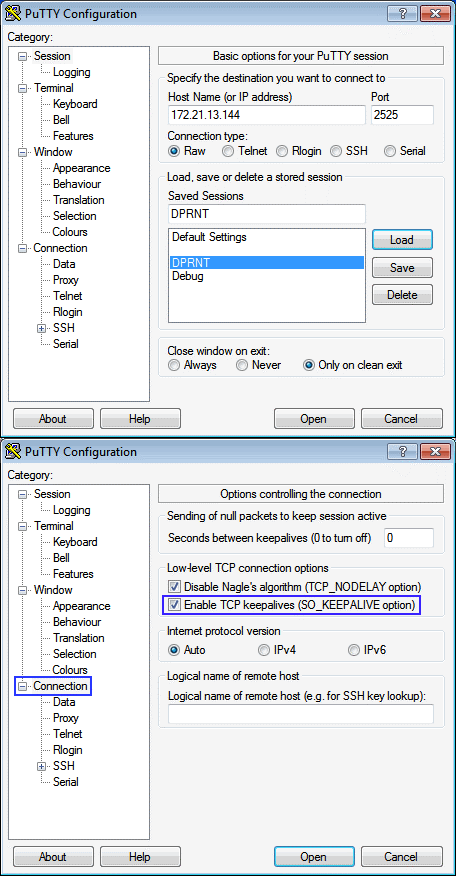
To set up a TCP connection, setting 261 must be set to “TCP Port” and setting 263 must be set to the port number you wish to connect to in order to receive DPRNT messages.

As an example, to establish a connection using Putty:

  1. Enter the IP address of the machine along with the Port number previously chosen for Setting 263.
  2. Select the Connection type “Raw” or “Telnet”
  3. Press Open to open the connection.

These options can be saved in Putty as a “Saved Session” for subsequent connections. If the connection is not remaining open for as long as desired, make sure that “Enable TCP keepalives” is selected in the “Connection” options.

3

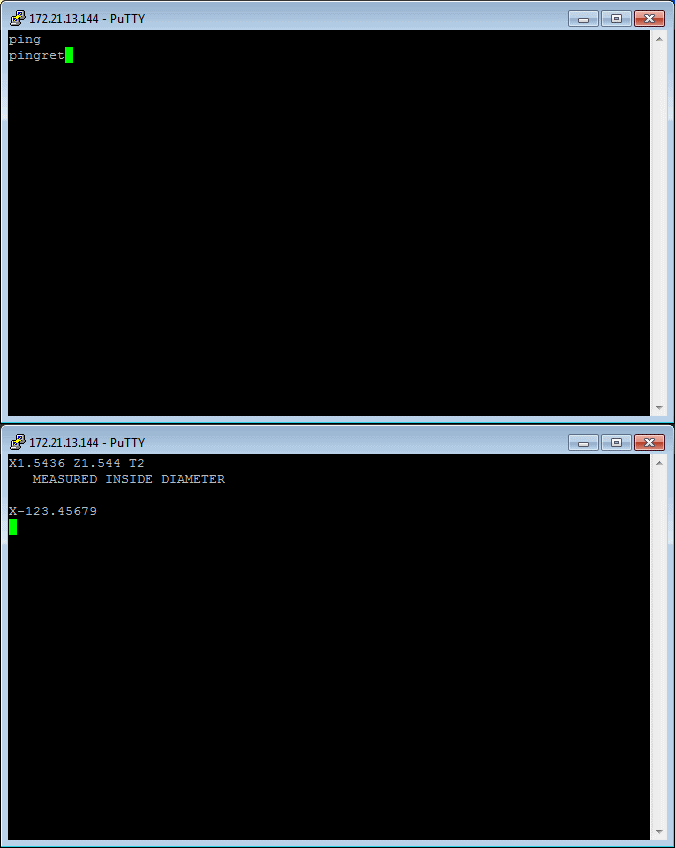
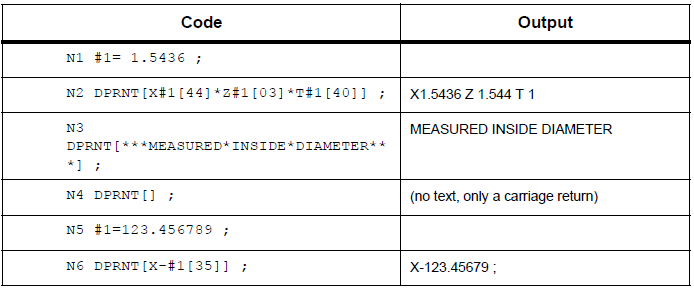
To verify that connection is active enter “ping” in the Putty terminal may be used to test the connection as the machine will send a “pingret” if the connection is active. Below is a sample output obtained from running the code in the DPRNT format example table. Up to 5 simultaneous connections may be established at any given time.

Formatted Output

The DPRNT statement allows the programmer to send formatted text to the serial port. Any text and any variable can be printed to the serial port. The form of the DPRNT statement is

as follows: DPRNT [<text> <#nnnn[wf]>... ] ;

DPRNT must be the only command in the block. In the previous example, <text> is any character from A to Z or the letters (+,-, /,*, ., ?, and the space). When an asterisk is output, it is converted to a space. The <#nnnn[wf]> is a variable followed by a format. The variable number can be any macro variable. The format [wf] is required and consists of two digits within square brackets. Remember that macro variables are real numbers with a whole part and a fractional part. The first digit in the format designates the total places reserved in the output for the whole part. The second digit designates the total places reserved for the fractional part.

WF: The total places reserved for output cannot be equal to zero or greater that eight. For example this formats are not valid: [00] [54] [45] [36]

NGC: NGC can use any number from 0-9 for both whole and fractional parts

A decimal point is printed out between the whole part and the fractional part. The fractional part is rounded to the least significant place. When zero places are reserved for the fractional part, then no decimal point is printed out. Trailing zeros are printed if there is a fractional part. At least one place is reserved for the whole part, even when a zero is used.

If the value of the whole part has fewer digits than have been reserved, then leading spaces are output. If the value of the whole part has more digits than has been reserved, then the field is expanded so that these numbers are printed.

A carriage return is sent out after every DPRNT block.


Execution

DPRNT statements are executed at block interpretation time. DPRNT statements are executed at look-ahead time.  This means that the programmer must be careful about where the DPRNT statements appear in the program, particularly if the intent is to print out.

G103 is useful for limiting look-ahead. If you wanted to limit look-ahead interpretation to one block, you would include this command at the start of your program: This causes the control to look ahead (2) blocks.

G103 P1 ;

To cancel the look-ahead limit, change the command to G103 P0.   G103 cannot be used when cutter compensation is active.

Editing

Improperly structured or improperly placed macro statements will generate an alarm. Be careful when editing expressions; brackets must be balanced. The DPRNT[ ] function can be edited much like a comment. It can be deleted, moved as a whole item, or individual items within the bracket can be edited. Variable references and format expressions must be altered as a whole entity. If you wanted to change [24] to [44], place the cursor so that [24] is highlighted, enter [44] and press [ENTER]. Remember, you can use the [HANDLE JOG] control to maneuver through long DPRNT[ ] expressions. Addresses with expressions can be somewhat confusing. In this case, the alphabetic address stands alone. For instance, this block contains an address expression in X:

G01 G90 X [COS [90]] Y3.0 (CORRECT) ;

Here, the X and brackets stand-alone and are individually editable items. It is possible, through editing, to delete the entire expression and replace it with a floating-point constant.

G01 G90 X 0 Y3.0 (WRONG) ;

The above block will result in an alarm at runtime. The correct form looks as follows:

G01 G90 X0 Y3.0 (CORRECT) ;

NOTE: There is no space between the X and the Zero (0). REMEMBER when you see an alpha character standing alone it is an address expression.

Recently Viewed Items

You Have No Recently Viewed Items Yet

Feedback
Haas Logo

Haas Delivered Price

This price includes shipping cost, export and import duties, insurance, and any other expenses incurred during shipping to a location in France agreed with you as a buyer. No other mandatory costs can be added to the delivery of a Haas CNC Product.

KEEP UP WITH THE LATEST HAAS TIPS AND TECHNOLOGY...

Sign up now!   

HAAS TOOLING ACCEPTS THE FOLLOWING:

  • Service & Support
  • Owners
  • Request Service
  • Operator Manuals
  • Haas Parts
  • Rotary Repair Request
  • Pre-Install Guides
  • Shopping Tools
  • Build & Price a New Haas
  • Available Inventory
  • The Haas Price List
  • CNCA Financing
  • About Haas
  • Accessibility Statement
  • DNSH Statement
  • Export Compliance
  • Careers
  • Certifications & Safety
  • Contact Us
  • History
  • Terms & Conditions
  • Haas Tooling Terms & Conditions
  • Privacy
  • Warranty
  • Haas Community
  • Haas Certification Program
  • Haas Motorsports
  • Gene Haas Foundation
  • Haas Technical Education Community
  • Events
  • Join the Conversation
  • Facebook
  • X
  • Flickr
  • YouTube
  • LinkedIn
  • Instagram
  • TikTok
© 2026 Haas Automation, Inc – CNC Machine Tools

This site is protected by reCAPTCHA and the Google Privacy Policy and Terms of Service apply.

2800 Sturgis Rd., Oxnard, CA 93030
Toll Free: (888) 817-4446 / Fax: 805-278-8554