My Haas Welcome,
!
Haas Tooling MyHaas/HaasConnect Sign In Register Haas Tooling MyHaas/HaasConnect Sign Out Welcome, My Machines Latest Activity My Quotes My Account My Users Sign Out
Find Your Distributor
  1. Select Language
    1. English
    2. Deutsch
    3. Español - España
    4. Español - México
    5. Français
    6. Italiano
    7. Português
    8. Český
    9. Dansk
    10. Nederlands
    11. Magyar
    12. Polski
    13. Svenska
    14. Türkçe
    15. 中文
    16. Suomi
    17. Norsk
    18. الإنجليزية
    19. български
    20. Hrvatski
    21. Ελληνικά
    22. Română
    23. Slovenský
    24. Slovenščina
    25. 한국어
    26. 日本語
    27. Українська
  • machines Main Menu
    • Vertical Mills
      Vertical Mills
      Vertical Mills View All
      • Vertical Mills
      • VF Series
      • Universal Machines
      • VR Series
      • VP-5 Prismatic
      • Pallet-Changing VMCs
      • Mini Mills
      • Mold Machines
      • High-Speed Drill Centers
      • Drill/Tap/ Mill Series
      • Toolroom Mills
      • Pocket Mill
      • Compact Mills
      • Gantry Series
      • SR Sheet Routers
      • Extra-Large VMC
      • Double-Column Mills
      • 3+2 Positioning Machines
    • Multi-Axis Solutions
      Multi-Axis Solutions
      Multi-Axis Solutions View All
      • Multi-Axis Solutions
      • Y-Axis Lathes
      • 5-Axis Mills
    • Lathes
      Lathes
      Lathes View All
      • Lathes
      • ST Series
      • Dual-Spindle
      • Box Way Series
      • Toolroom Lathes
      • Chucker Lathe
      • Haas Bar Feeders
    • Horizontal Mills
      Horizontal Mills
      Horizontal Mills View All
      • Horizontal Mills
      • 50-Taper
      • 40-Taper
    • Rotaries & Indexers
      Rotaries & Indexers
      Rotaries & Indexers View All
      • Rotaries & Indexers
      • Rotary Tables
      • Indexers
      • 5-Axis Rotaries
      • Extra-Large Rotaries
    • Special Series
      Special Series
      Special Series View All
      • Special Series
      • EU_Series_Redirect
    • Automation Systems
      Automation Systems
      Automation Systems View All
      • Automation Systems
      • Mill Automation
      • Lathe Automation
      • Automatic Parts Loaders
      • Automation Models
    • Desktop Machines
      Desktop Machines
      Desktop Machines View All
      • Desktop Machines
      • Desktop Mill
      • Desktop Lathe
      • Control Simulator, Standard
      • Control Simulator, Premium
    • Shop Equipment
      Shop Equipment
      Shop Equipment View All
      • Shop Equipment
      • Knee Mill
      • Haas Manual Lathes
      • Haas Saws
    • Fabrication Machines
      Fabrication Machines
      Fabrication Machines View All
      • Fabrication Machines
      • Laser Cutting Machines
      • CNC Press Brakes
    • QUICK LINKS Special Series  Special Series 
      EU SERIES EU SERIES BUILD & PRICE | PRICE LIST BUILD & PRICE | PRICE LIST In-Stock Machines In-Stock Machines WHAT’S NEW WHAT’S NEW YOUR FIRST CNC YOUR FIRST CNC
      SHOPPING TOOLS
      • Build & Price a Haas
      • Price List
      • Available Inventory
      • CNCA Financing
      WANT TO TALK TO SOMEONE?

      A Haas Factory Outlet (HFO) can answer your questions, and walk you through your best options.

      CONTACT YOUR DISTRIBUTOR >
  • Options Main Menu
    • The Haas Control Value Option Packages
      Value Option Packages
      Value Option Packages View All
      • Value Option Packages
    • Product Image Spindles
      Spindles
      Spindles View All
      • Spindles
    • Product Image Tool Changers
      Tool Changers
      Tool Changers View All
      • Tool Changers
    • Product Image 4th- | 5th-Axis
      4th- | 5th-Axis
      4th- | 5th-Axis View All
      • 4th- | 5th-Axis
    • Product Image Turrets & Live Tooling
      Turrets & Live Tooling
      Turrets & Live Tooling View All
      • Turrets & Live Tooling
    • Product Image Probing
      Probing
      Probing View All
      • Probing
    • Haas Chip & Coolant Management Chip & Coolant Management
      Chip & Coolant Management
      Chip & Coolant Management View All
      • Chip & Coolant Management
    • The Haas Control The Haas Control
      The Haas Control
      The Haas Control View All
      • The Haas Control
    • Product Image Product Options
      Product Options
      Product Options View All
      • Product Options
    • Product Image Tooling & Fixturing
      Tooling & Fixturing
      Tooling & Fixturing View All
      • Tooling & Fixturing
    • Product Image Workholding
      Workholding
      Workholding View All
      • Workholding
    • Product Image 5-Axis Solutions
      5-Axis Solutions
      5-Axis Solutions View All
      • 5-Axis Solutions
      • 5 Easy Steps to 5-Axis
    • QUICK LINKS Special Series  Special Series 
      EU SERIES EU SERIES BUILD & PRICE | PRICE LIST BUILD & PRICE | PRICE LIST In-Stock Machines In-Stock Machines WHAT’S NEW WHAT’S NEW YOUR FIRST CNC YOUR FIRST CNC
      SHOPPING TOOLS
      • Build & Price a Haas
      • Price List
      • Available Inventory
      • CNCA Financing
      WANT TO TALK TO SOMEONE?

      A Haas Factory Outlet (HFO) can answer your questions, and walk you through your best options.

      CONTACT YOUR DISTRIBUTOR >
  • Why Haas Main Menu
      Discover the Haas Difference
    • Why Haas
    • MyHaas
    • Education Community
    • Industry 4.0
    • Haas Certification
    • Customer Testimonials
  • Service Main Menu
      Welcome to Haas Service
      SERVICE HOME Operator’s Manuals How-To Procedures Troubleshooting Guides Preventive Maintenance Haas Parts Haas Tooling Videos
  • Videos Main Menu
  • Main Menu
    • View All
    • View All
    • View All
    • View All
      • HTEC Curriculum Support
    • View All
      • Haas 10 kg Cobot Package
      • Cobot Kits
      • DC-1 Drill Center
      • CNC Sales News
      • Do More With Your Haas
    • View All
    • View All
      • contact-us-test
      • 4 - AUTOMATION SYSTEMS
      • Carousel-V2
      • expert test
      • Demo_Day_Trident-test
      • Link Test
      • image-sale-tag-test
      • article-list-test
      • Haas 25 kg Robot Package
    • View All
      • Choose Options
    • View All
    • View All
    • View All
    • View All
    • View All
      • calc-test
    • View All
    • QUICK LINKS Special Series  Special Series 
      EU SERIES EU SERIES BUILD & PRICE | PRICE LIST BUILD & PRICE | PRICE LIST In-Stock Machines In-Stock Machines WHAT’S NEW WHAT’S NEW YOUR FIRST CNC YOUR FIRST CNC
      SHOPPING TOOLS
      • Build & Price a Haas
      • Price List
      • Available Inventory
      • CNCA Financing
      WANT TO TALK TO SOMEONE?

      A Haas Factory Outlet (HFO) can answer your questions, and walk you through your best options.

      CONTACT YOUR DISTRIBUTOR >
  • Haas Tooling Main Menu
  • Haas Service Parts Main Menu

My Haas Welcome,
!
Haas Tooling MyHaas/HaasConnect Sign In Register Haas Tooling MyHaas/HaasConnect Sign Out Welcome, My Machines Latest Activity My Quotes My Account My Users Sign Out
Find Your Distributor
  1. Select Language
    1. English
    2. Deutsch
    3. Español - España
    4. Español - México
    5. Français
    6. Italiano
    7. Português
    8. Český
    9. Dansk
    10. Nederlands
    11. Magyar
    12. Polski
    13. Svenska
    14. Türkçe
    15. 中文
    16. Suomi
    17. Norsk
    18. الإنجليزية
    19. български
    20. Hrvatski
    21. Ελληνικά
    22. Română
    23. Slovenský
    24. Slovenščina
    25. 한국어
    26. 日本語
    27. Українська
×

Search Results

Web Pages

Images

    • <
    • 1
    • >

Dual Zero Point Ready - Installation - UMC - AD0950

Service Home How To Procedures Dual Zero Point Ready - Installation - UMC - AD0950

Dual Zero Point Ready - Installation - UMC - AD0950

- Jump to Section - Back to Top

2.2 UMC Zero Point Receiver - Installation

Recently Updated Last updated: 03/13/2026

Dual Zero Point Ready - Installation - UMC


AD0950

Revision A - 03/2026

Introduction

The dual zero point ready installation only needs to be done on machines that are ordering the 30kg RPL to be added to an existing machine. 

Note: For machines purchased with an RPL, the dual zero point ready is already installed on the machine. Skip this section if the machine already has the dual zero point ready kit installed.

This procedure applies to the following kits:

  • 93-1001309 - Dual Zero Point Ready Kit UMC-1000
  • 93-1001310 - Dual Zero Point Ready Kit UMC-750   
  • 93-1001311 - Dual Zero Point Ready Kit UMC-500

The corresponding machine kit below will also need to be ordered to be able to do this procedure:

  • 93-1001269 - RPL-30KG READY KIT UMC-500
  • 93-1001270 - RPL-30KG READY KIT UMC-750
  • 93-1001271 - RPL-30KG READY KIT UMC-1000

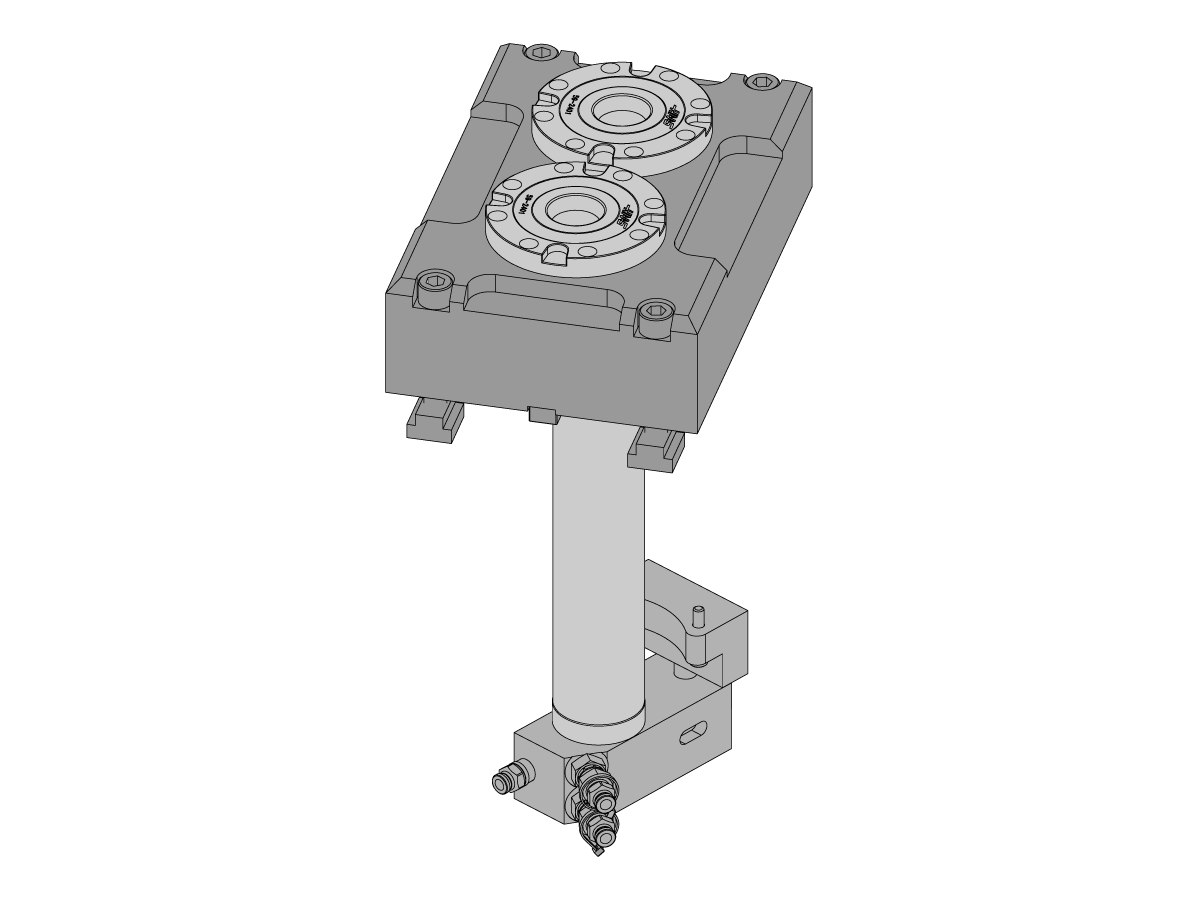
The purpose of the dual zero point ready kit is to allow for the pneumatics to be routed to the dual zero point clamp through the body of the tilt rotary. Installing this involves removing the platter and rotating the machine B-axis. Make sure this is possible before starting this procedure.

Note: The Robot Pallet Loader option also requires an auto window option to be installed. Refer to the UMC Auto Window - Installation - AD0663 to order and install this option on your machine.

Note: The only difference between these kits is the bottom cover panel for the TRT body on the different size machines.

UMC Dual Zero Point Ready - Installation

1

Start by assembling the pneumatic manifold [1] that goes inside the C-body of the machine.

Attach each of the 2 ORB6M NPT 1/4" steel fittings [2] to a Brass 1/4" push connect fitting [3]. Once done, install each set of fittings onto the angeled ports on the manifold.

Tighten the last Brass 1/4" fitting [4] to the side port on the manifold.  

Install the 4 O-Ring 2-212 [5] into the grooves of the manifold. 

2

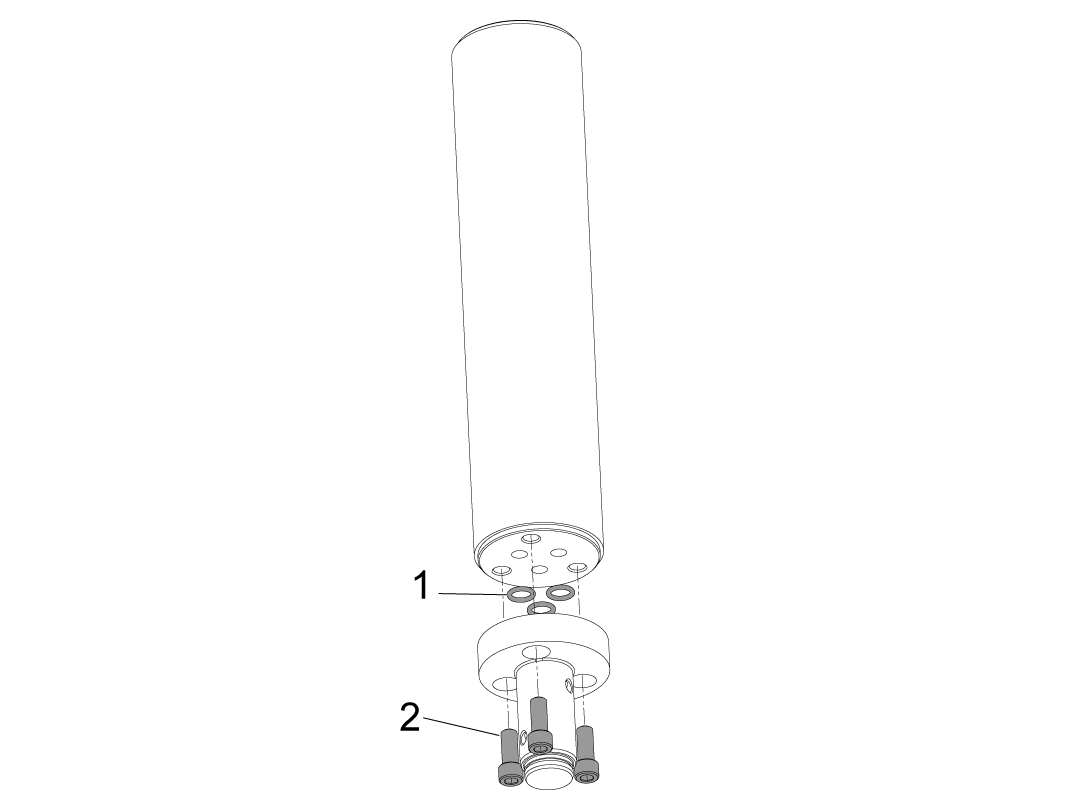
Connect the 3 Port Rotary Union Shaft to the 3 Port Rotary Union Shaft Extension using [2] SHCS 1/4-20 X 5/8 make sure the O-Ring 2-011 [1] are seated in the cavities of the shaft.

Torque the bolts to their required specs.


3

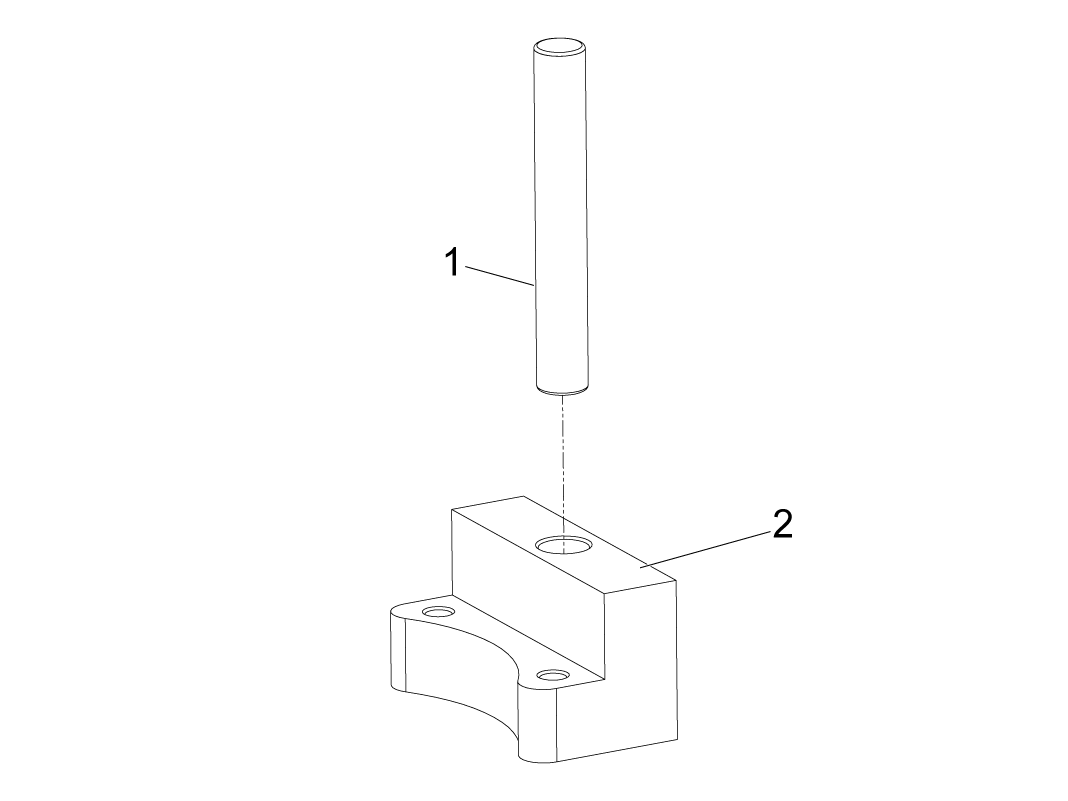
Press the dowel pin [1] into the anti-rotation block [2] until it bottoms out. 

4

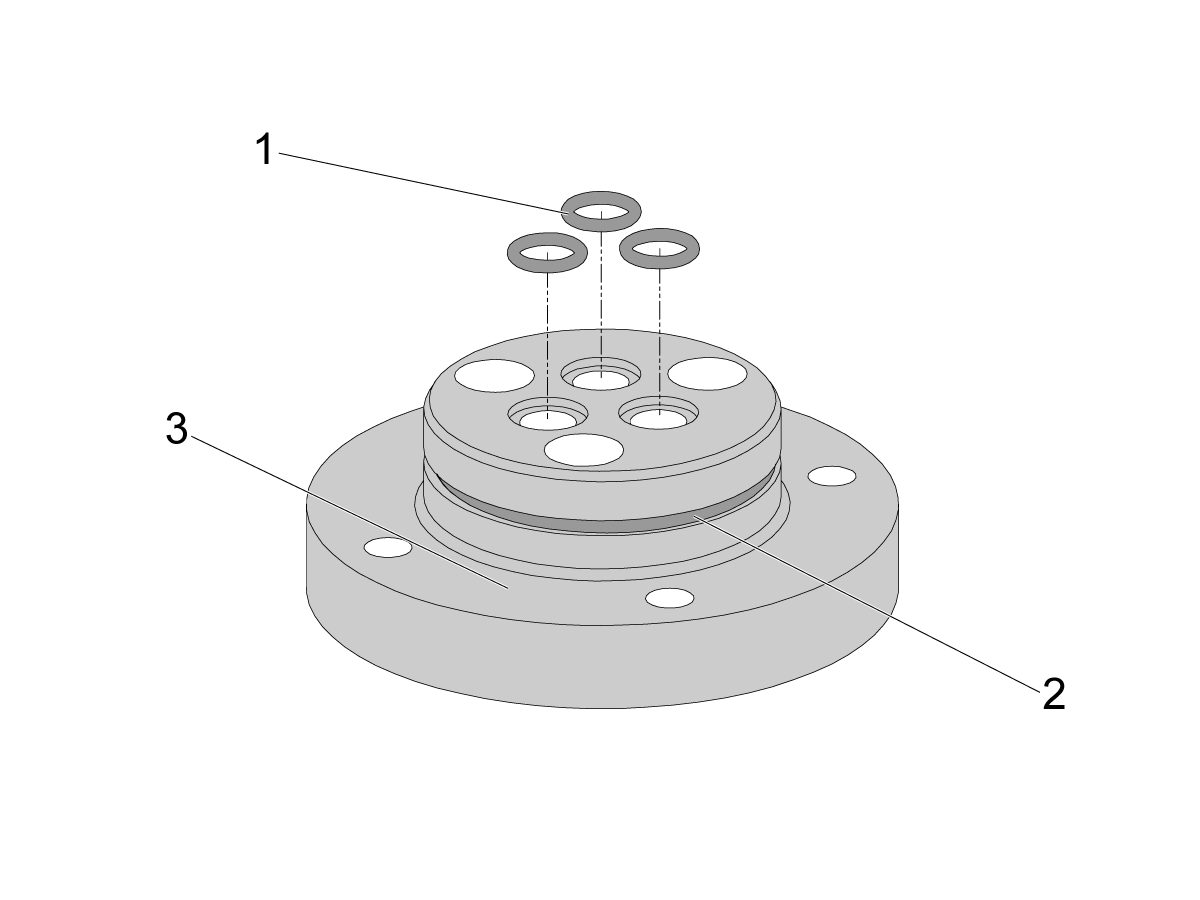
Assemble the platter coupler [3] by placing the O-rings in position.

Place 3 of the 2-011 O-Rings [1] on the air ports shown in the image.

Place the larger 2-031 O-Ring [2] onto the middle groove of the coupler.

5

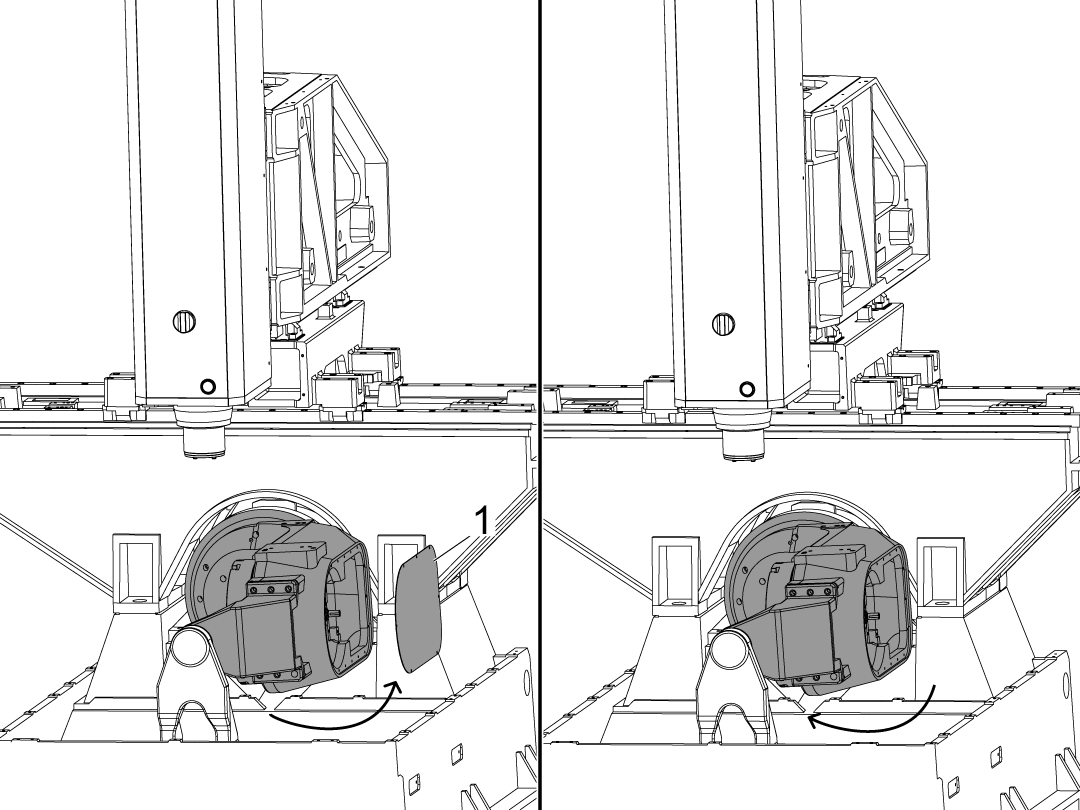
Rotate the B-axis +90 degrees and remove the cover [1]. Return the B-axis to its original position at 0 degrees.

This cover will be replaced by the cover included in the zero point ready field install kit.

6

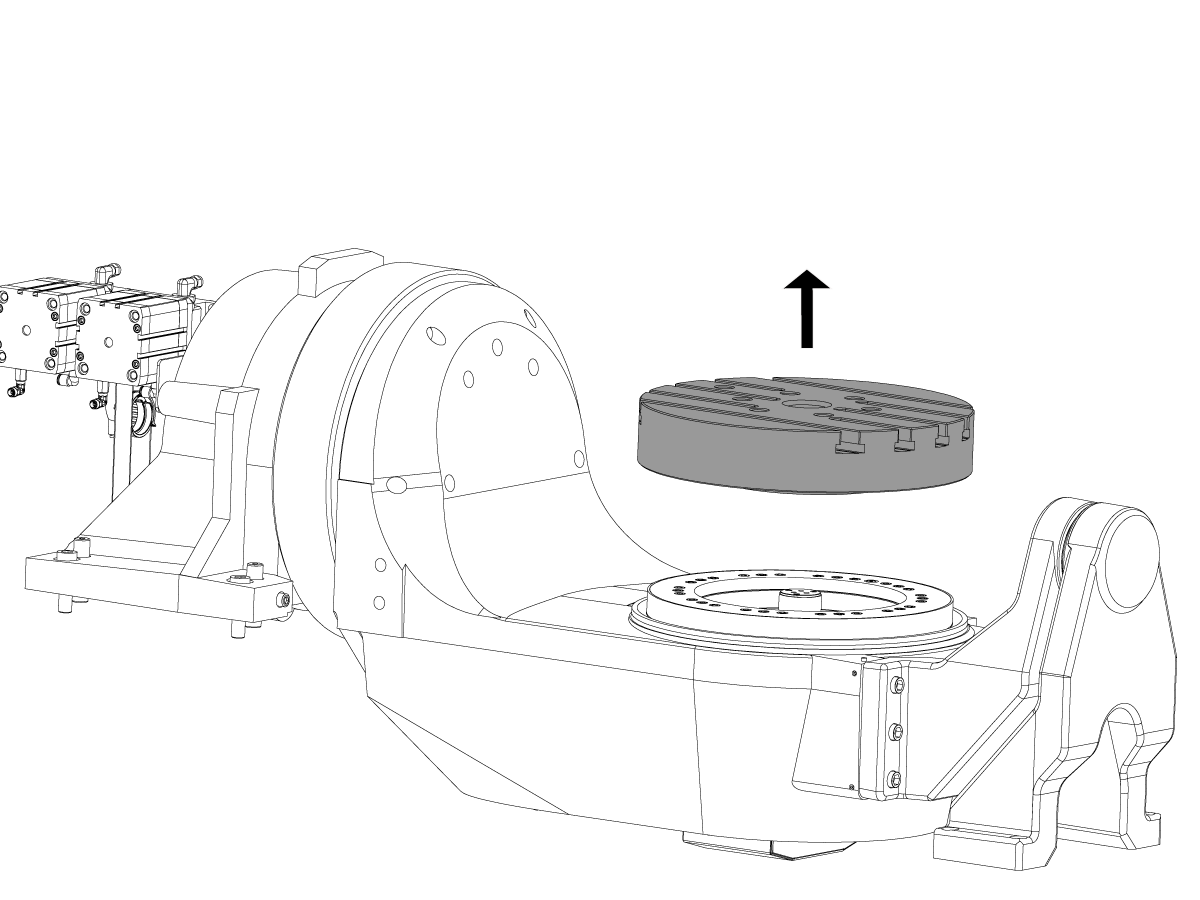
Remove the platter by following the removal section of the UMC C-Axis Platter Replacement linked below.

 WARNING: IF YOU DO NOT DEPRESSURIZE THE SYSTEM BEFORE REMOVING THE PLATTER YOU CAN PERMANENTLY DAMAGE THE BRAKE BY REMOVING THE PLATTER.

UMC C-Axis Platter Replacement
UMC Rotary Unit – Weight Reference Guide

7

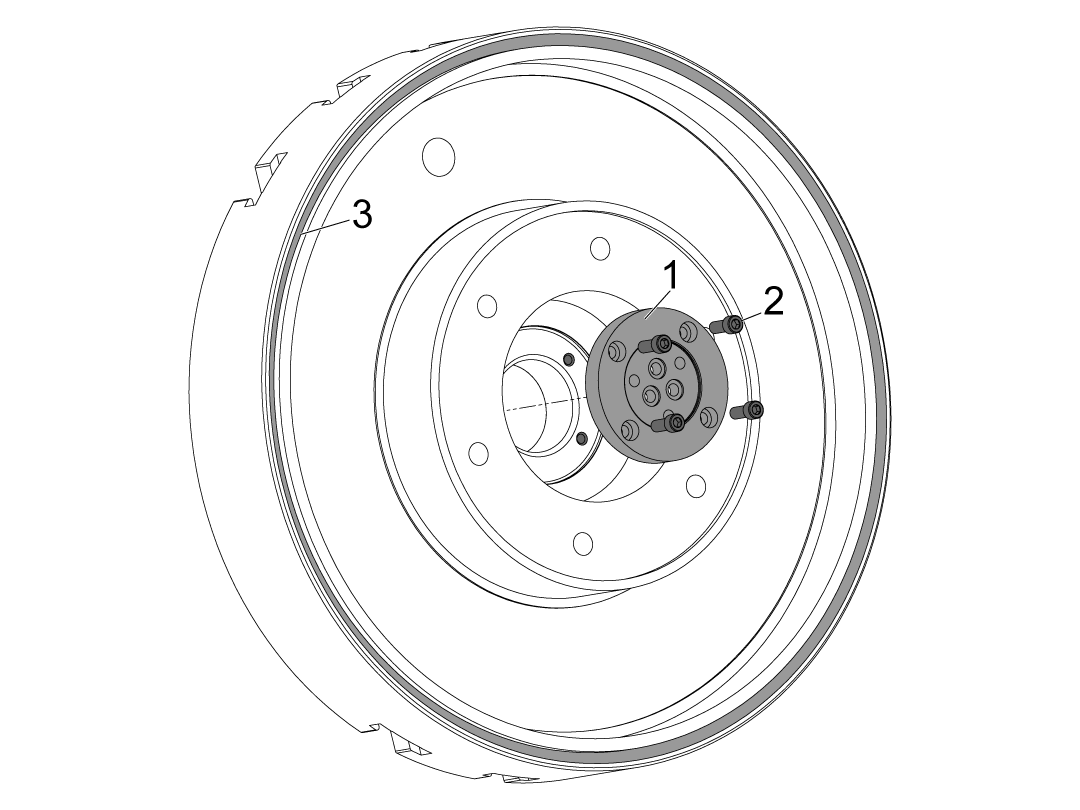
Place the platter on a bench and bolt the coupler [1] to the platter using SHCS 1/4-20 X 5/8 [2].

While the platter is on the bench insert the felt strip included in the kit in the groove [3]

NOTE: If the UMC is not exchanging platters reuse the felt strip already in the groove. 

Torque the bolts to their required specs.

8

Install the coupler onto the shaft assembly [1] by using 1/4-20 X 1 1/4 bolts [3]. Make sure the O-Rings 2-011 [2] are in the cavaties of the shaft and not where the bolts attach.

Torque the bolts to their required specs.

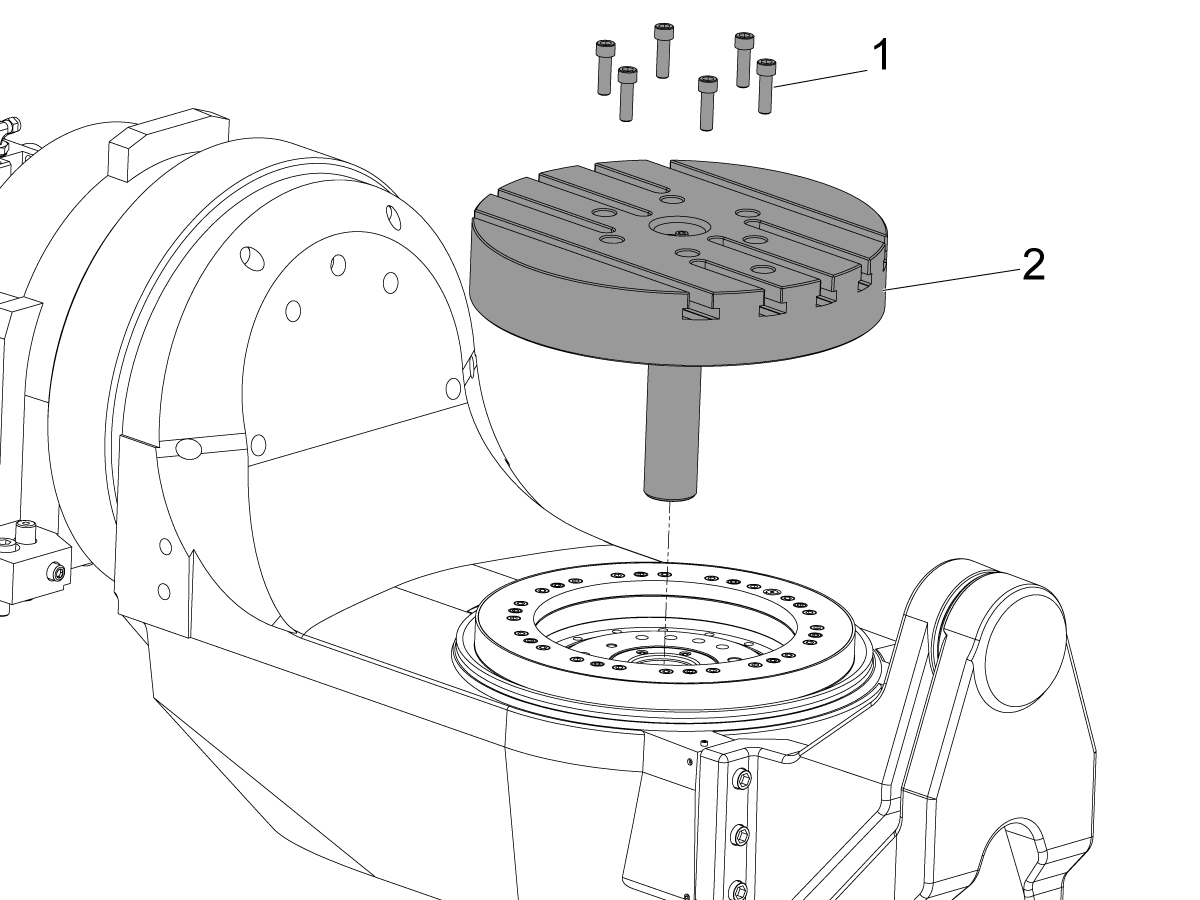
9

Install the coupler and platter assembly [2] back onto the rotary using M12 bolts [1].

Tighten the bolts, but do not torque them down yet.

Follow the installation section of the UMC C-Axis Platter Replacement linked below for the full instruction on how to correctly re-install the platter.

UMC C-Axis Platter Replacement

10

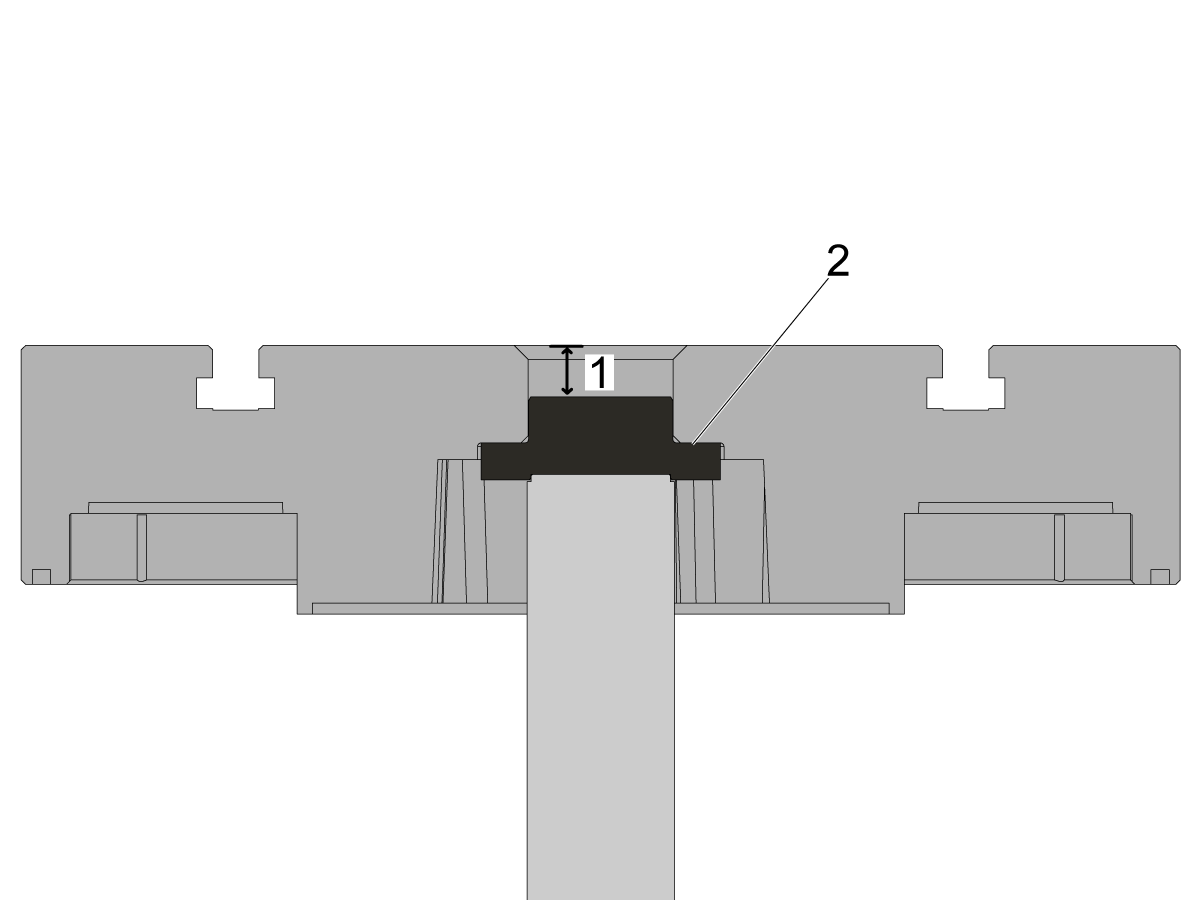
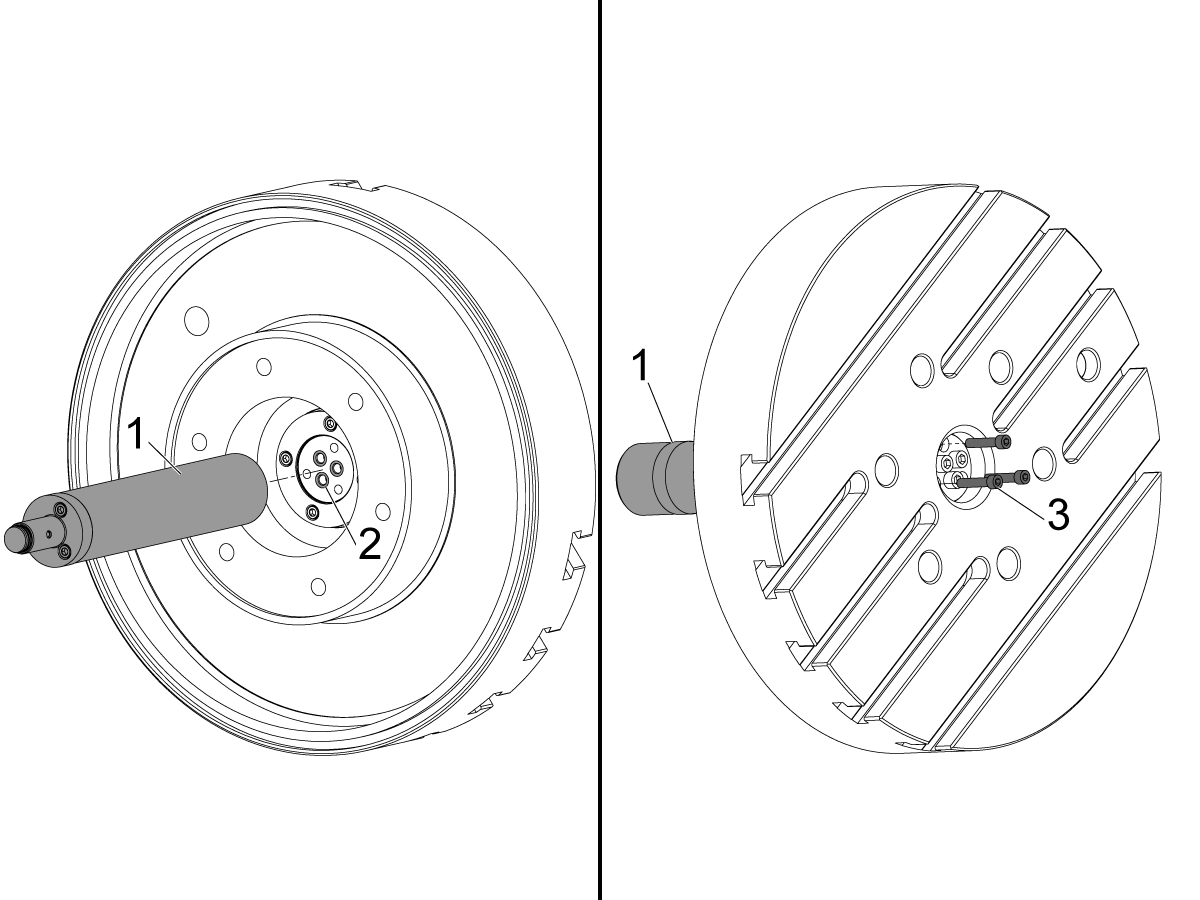
Place 3 2-011 O-Rings [3] into the top of the coupler through the center bore in the platter.

The receiver is held in position by 4 T-nuts that are placed in the T-slots of the platter.

Use the 4 four bolts to fasten the pallet receiver [1] to the T-nuts [2]. 

Note: The spud is not shown in the image but should be located into the center bore in the platter. Make sure the ports on the spud align with the ports in the coupler when installing the dual zero point onto the platter.

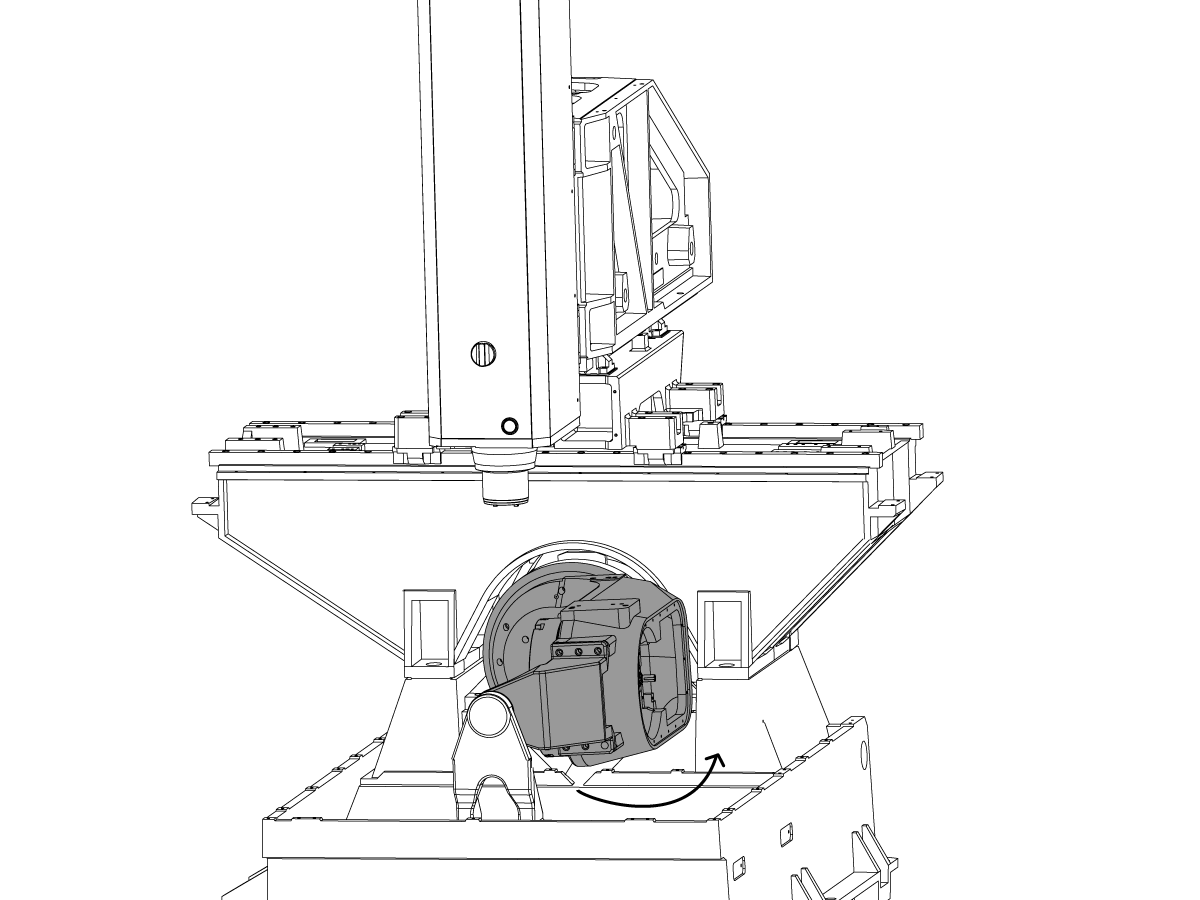
11

Rotate the B-axis 90 degrees [1].

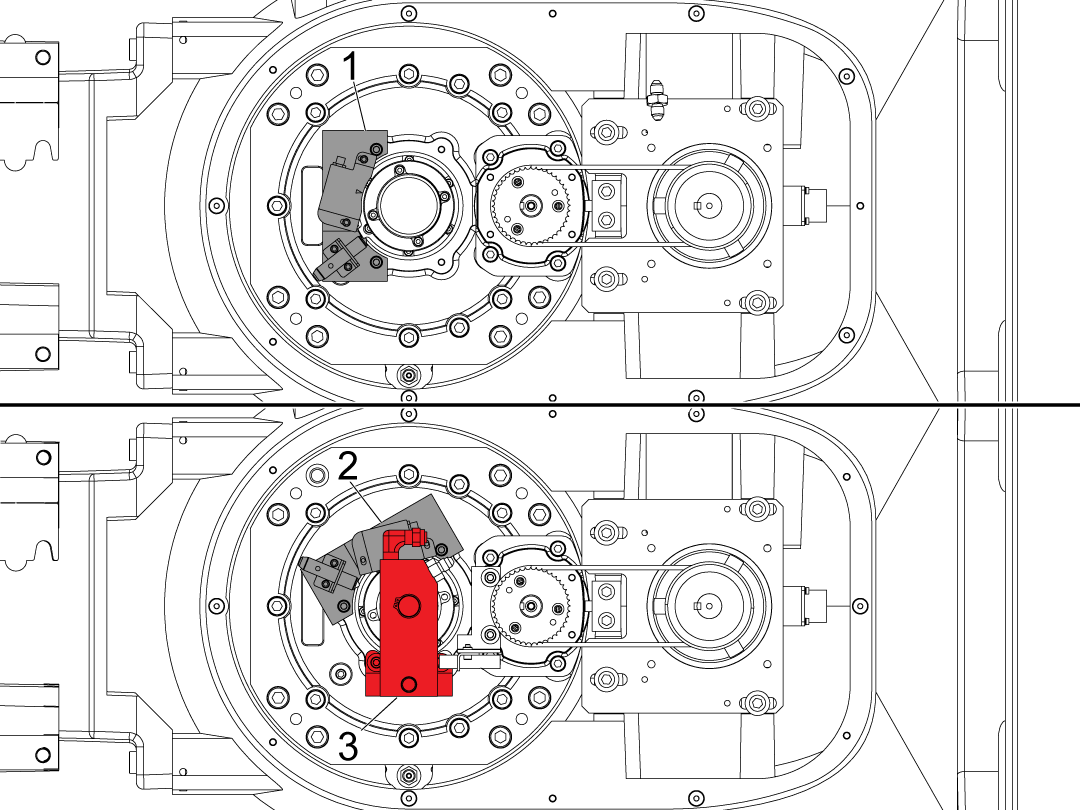
12

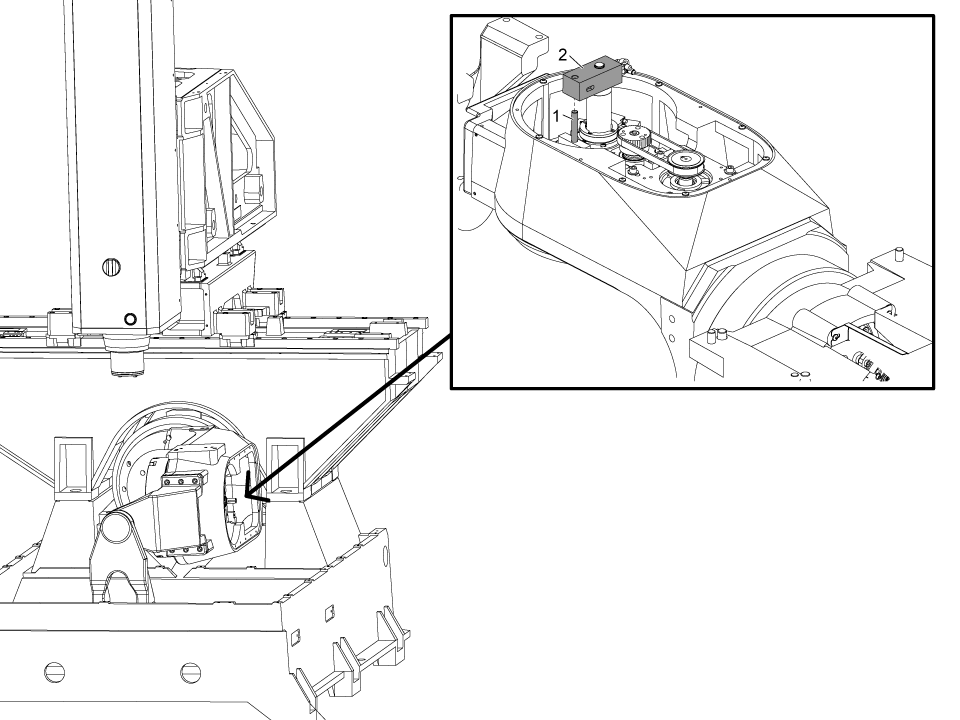
Attach the anti-rotation block [3] to the gearbox using the M6 bolts [4].

If the read head is in configuration [1] you will need to clock it to position [2]  this will require you to redo the compensations on the machine.

If the read head is in configuration [2] the compensations will not need to be redone.

Torque the bolts to their required specs.

Please contact service about borrowing a swivel checker.

13

Install the manifold assembly [2] from step 1 by inserting the anti-rotation dowel pin [1] into the pneumatic manifold.

14

After installing the shaft assembly to the pneumatic manifold make sure to install the snap ring [2] to the shaft groove [1].

Note: If the groove for the snap ring is not visible on the shaft, then some bolts may not be fully tightened, or the dowel pin needs to be pressed further into the manifold.

15

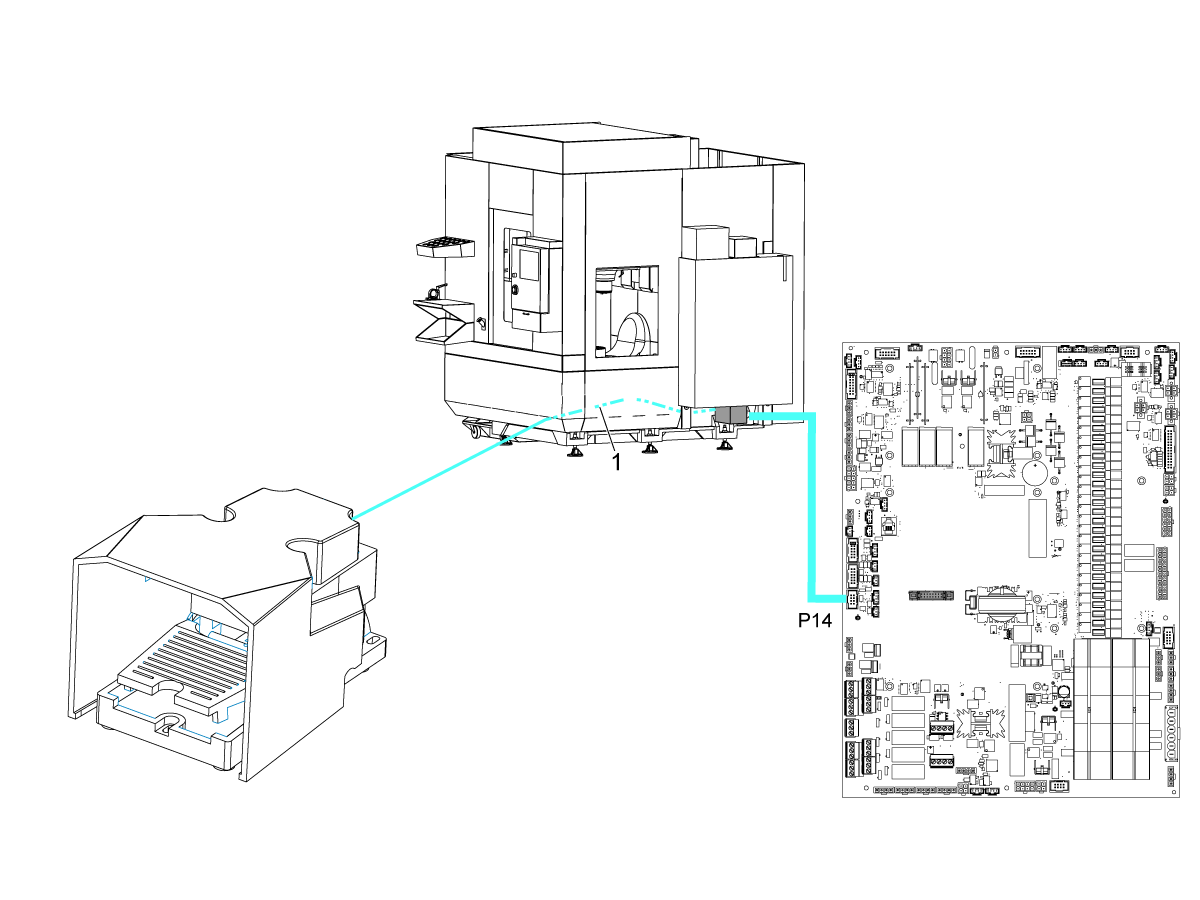
Install the foot pedal cable [1] to P14 on the I/O board.

From there route the cable to the hole of the front skirt of the machine. 

Connect the foot pedal to the cable [1] coming from the front skirt of the machine. 

Note: If there is already a foot pedal cable connected to P14 make sure it is cable 32-1303. This has additional cables going to P14 for the robot load station.

Lube Panel - Installation

1

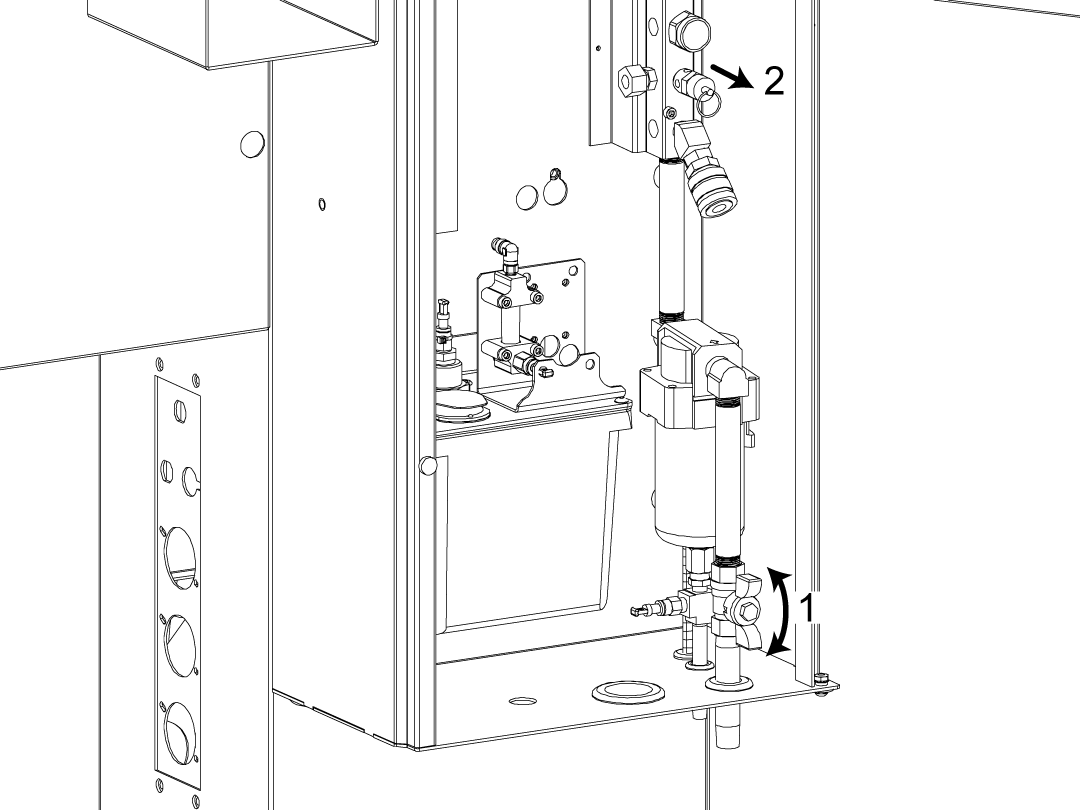
Close the air valve [1] at the bottom of the lube cabinet.

Bleed the remaining air out of the manifold by pulling on the air release [2]. Make sure the gauge on the manifold reads zero.

2

Updated

Install the elbow fitting [1] directly into the air manifold on the front face as shown in the image. 

Install the FITG COMP 3/8 X 1/4 MNPT BR STR [2] onto the manifold. This will allow you to then install the SOLENOID ASSY LS/AIR BLAST ZERO POINT [3]. 

Once installed, connect the SOLENOID ASSY LS/AIR BLAST ZERO POINT  to the Pallet Air Blast spot on lube panel solenoid bracket.

3

Install the Air Booster on the back of the machine using the magnets to attach it.

Hose and Cable Routing

1

Route the zero point air lines through the black conduit that routes through the center bore and to the work holding manifold.

Route the opposite ends of the zero point air lines [1] to the Air Booster. 

Note: Make sure the hoses for the zero point are high pressure hoses.

Route the opposite end of the pallet air blast line [2] to the top of the lube cabinet. 

2

Pull the hoses through the B-axis body and to the pneumatic manifold as shown.

Use the velcro-ties [1] and cable clamps to neatly route the cables to the pneumatic manifold.

3

The unclamp hose denoted in green  [1] goes to the fittings as shown.

The clamp hose denoted in red [2] goes to the fitting as shown.

The air blast hose denoted in light gray [3] goes to the fitting as shown.

4

Connect the green hose to the unclamp port [1] of the solenoid denoted with a green zip tie on it.

Connect the red hose to the clamp port [2] of the solenoid denoted with a red zip tie on it.


5

Connect the air booster to the manifold [1] using the included HOSE 1/4 OD PE RED HIGH PRESSURE.

Connect the clear hose [2] for the Pallet Air Blast to the SOLENOID ASSY LS/AIR BLAST ZERO POINT.

6

Updated

This step is for machines with non-CAN lube panel:

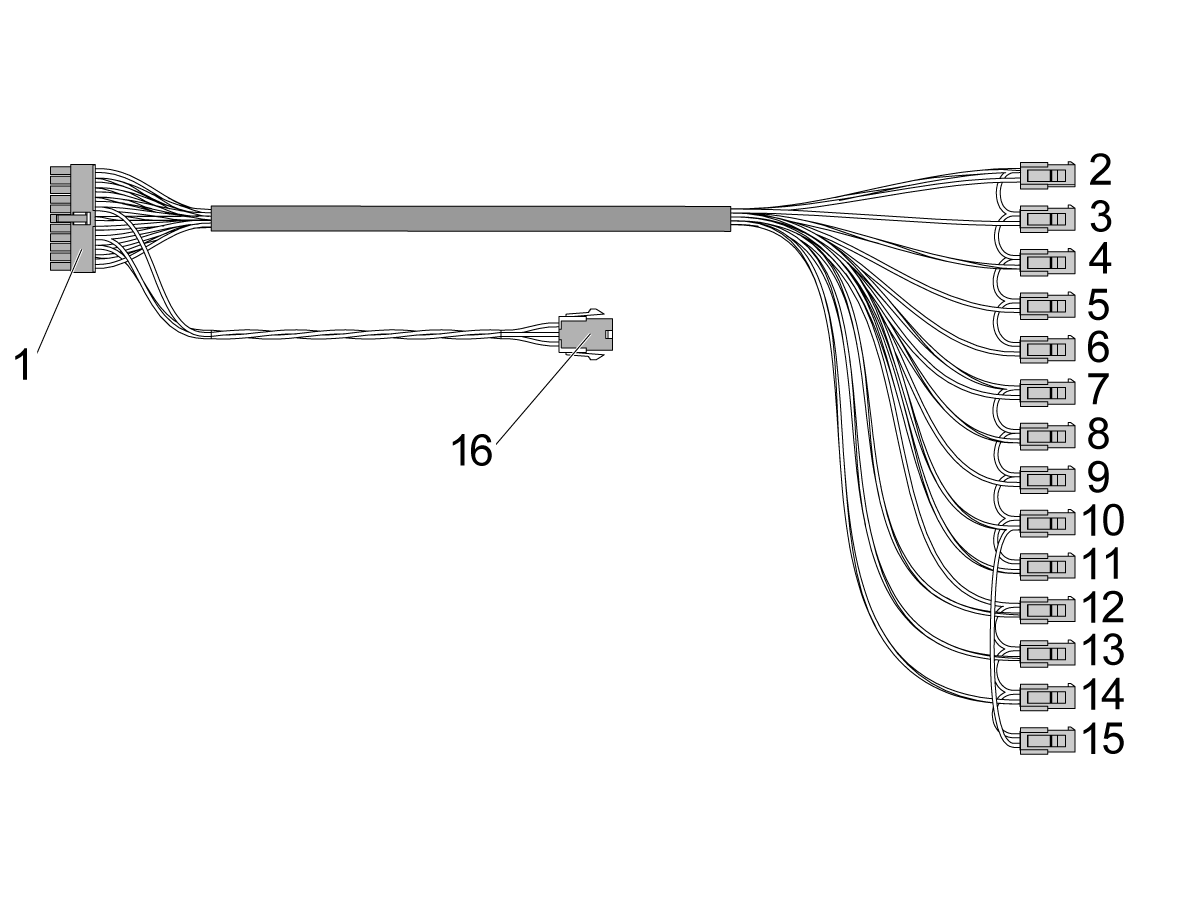
Connect cable 33-1532 - Air Lube Solenoid cable to P35 on the IO PCB with the connector with the pigtail for Pallet Unclamp [16].

Route the cable to the lube panel to make the following connections to all the solenoid power cables. The color for each connector is listed:

[2] PulseJet Solenoid - White and Violet

[3] Auto Door  - Gray

[4] TRP Unclamp  - Yellow and Black

[5] Spindle Air - Violet

[6] Spindle Lube - White

[7] Min Lube Grease - White and Red

[8] Open Door Interlock - White and Brown

[9] Auto Air Gun (AAG) - Red

[10] TSC Purge - White and Orange and Yellow jumper to TAB Air [15]

[11] SMTC Pocket U/D - White and Black

[12] UMC Auto Window - White and Yellow

[13] Purge Solenoid - White and Gray

[14] Pallet Air Blast - White and Green

[15] Tool Air Blast Air (TAB) Yellow jumper from TSC Purge [10]

7

Connect cable 33-1307 CBL AIR VISE PRESS SWS PP ROBOT21FT to the pressure sensor as shown. 

Route the cable back to the I/O board and plug this into P13 using the adapter cable provided in the kit.

Note: The pressure sensor should be on the fitting where the red hose is connected. This sensor makes sure the zero point is clamped.

8

Connect cable 33-1306 to P36 [5] on the IO PCB. Connect the coolant refill to the pigtail if needed.

Route the other end directly to the Air Booster.

Connect the V-1 end [1] to the solenoid going to the zero point in the machine [4].

Connect the V-2 end [2] to the solenoid going to the load station zero point [3].

9

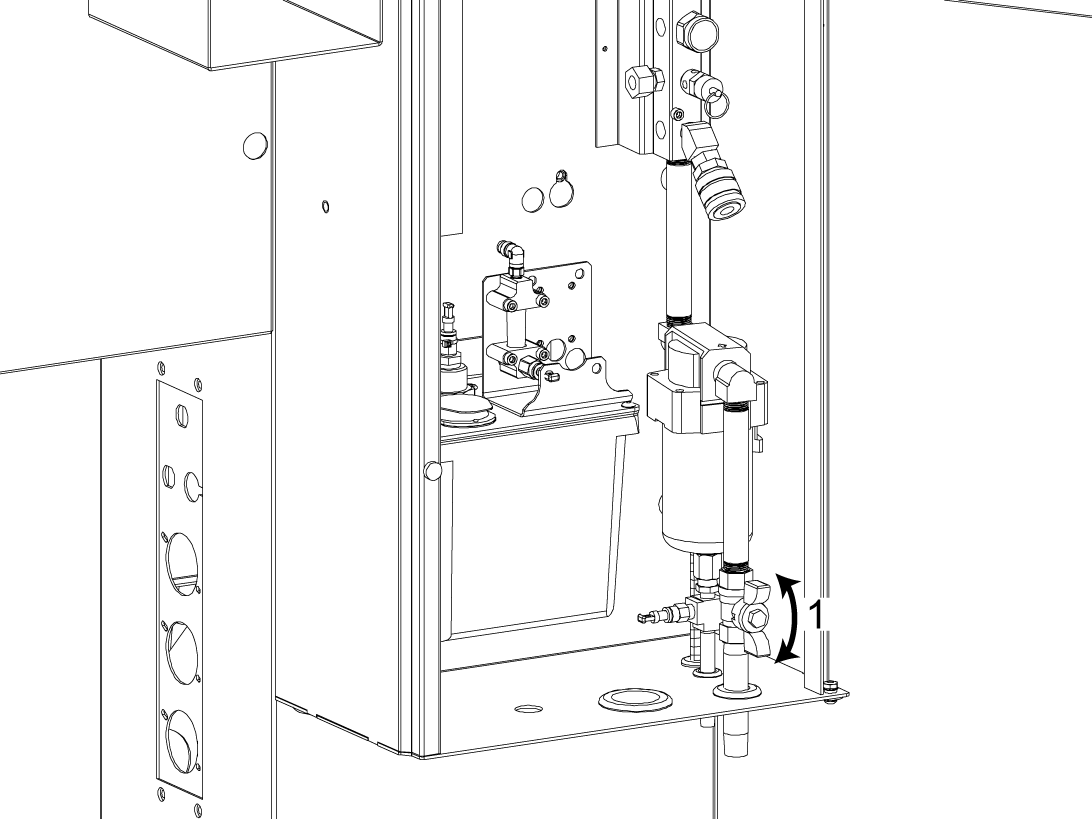
Re-introduce air to the manifold by turning the valve [1].

Check for leaks and tighten fittings as needed. 

10

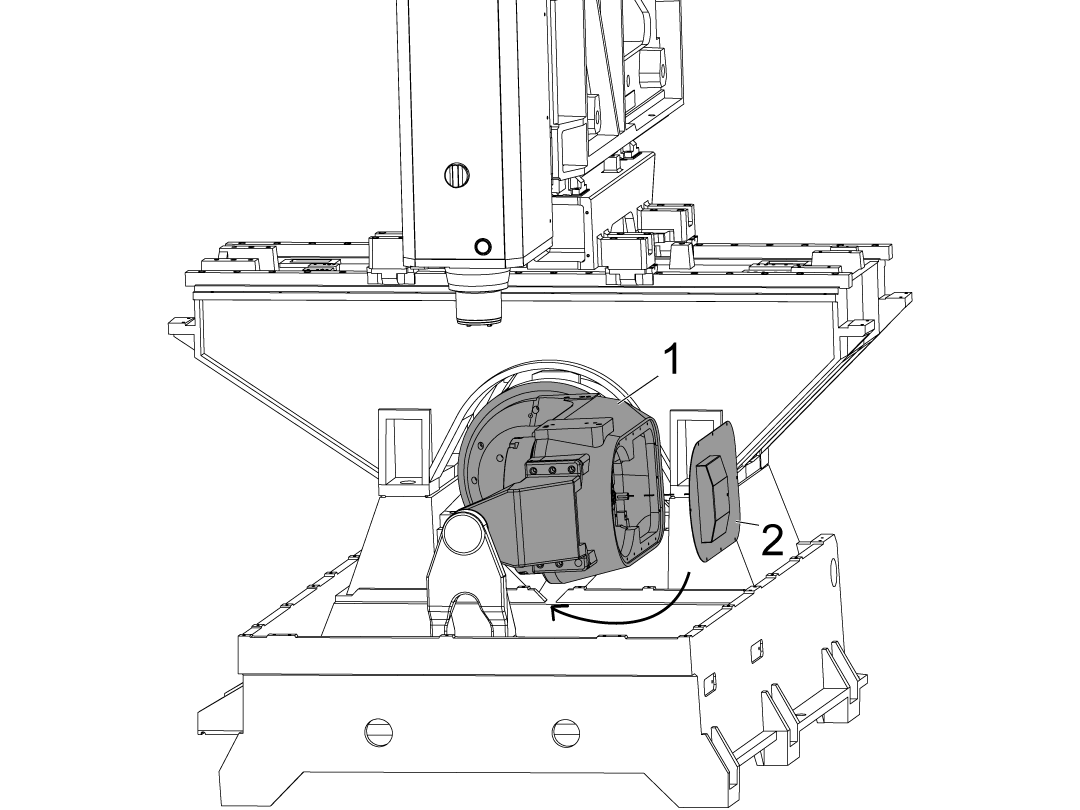
Reinstall the new cover [2] and return the rotary [1] to 0 degrees on the B axis.

Update Configuration Files

If this is a field installation, the configuration file will need to be updated to implement the necessary parameters. 

Visit HBC.HAASCNC.COM to download the latest configuration file.

Note: Only Haas Certified Service technicians can log into this website.

Load the configuration patch file to the control. Refer to the NEXT GENERATION CONTROL - CONFIGURATION FILE - DOWNLOAD/LOAD procedure. 


Zero Point Receiver - MRZP

1

After installing the Zero Point Receiver, MRZP needs to be done to account for the change in pallet height compared to the platter.

Assemble the zero point MRZP pallet [1].

Press the dowel pin [2] into the MRZP pallet.

Install the zero point pull stud [3] using the M10x20 SHCS [4].

Mount the MRZP artifact [5] to the zero point MRZP pallet using the 2 SHCS [6].

2

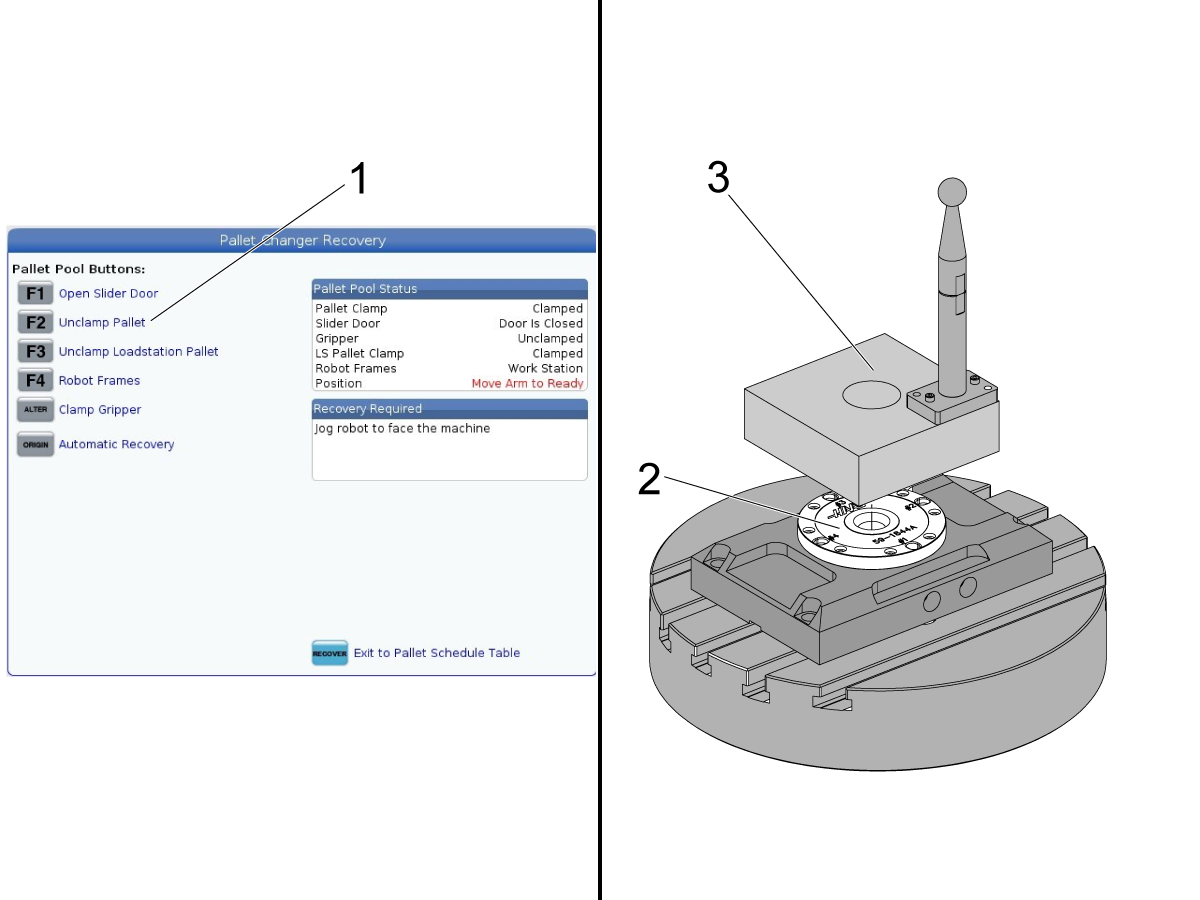
Go to the Recovery Page. Press [F2] [1] to unclamp the zero point pallet receiver [2] inside the machine.

Place the MRZP pallet assembly [3] with the artifact in the receiver. Make sure the dowel pin is aligned in the correct position.

Clamp the zero point receiver by pressing [F2] again.

Exit recovery and continue with doing MRZP. Refer to the UMC - MRZP and Safe zones page for more information on how to do MRZP.

Note: The center bore in the zero point calibration pallet can also be used for probing. The diameter of the center bore is 2 inches.

Zero Point Ready - Testing

1

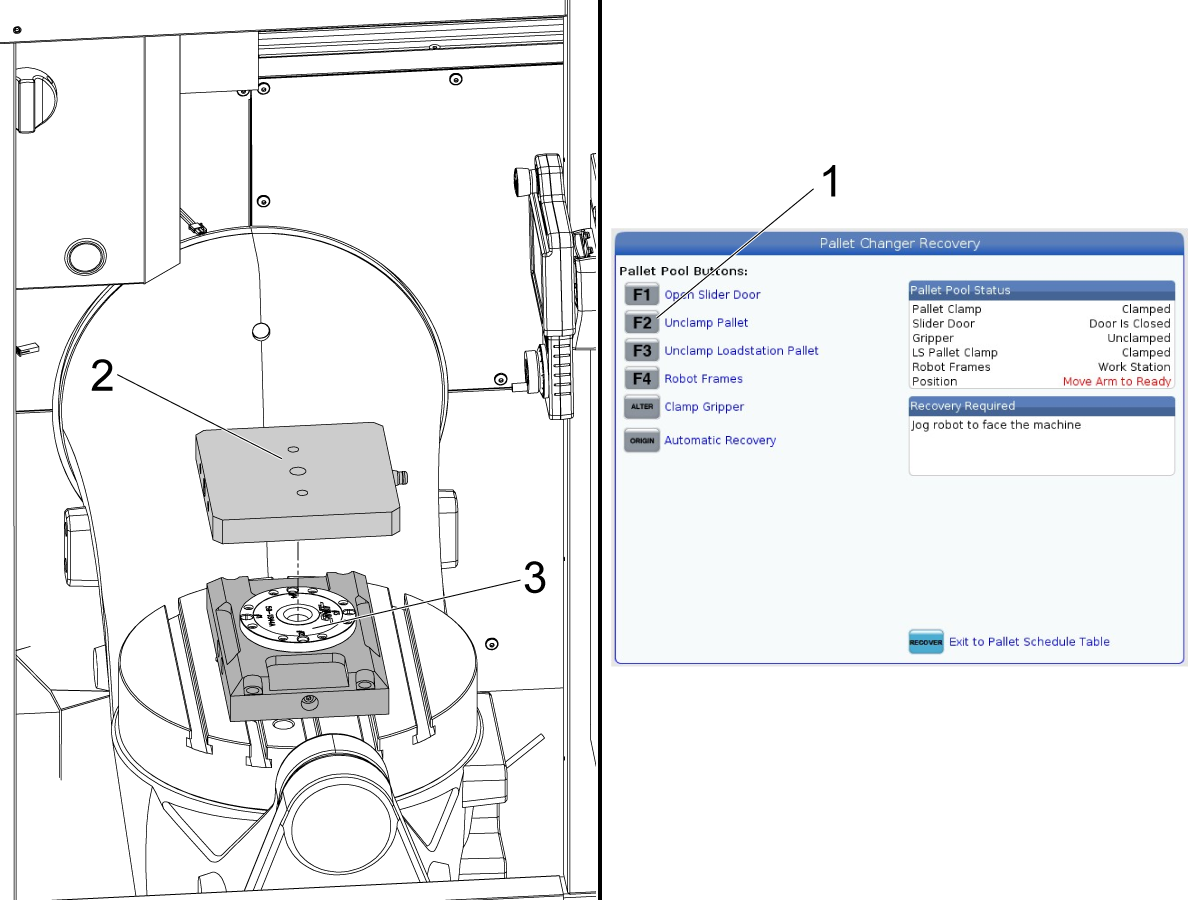
To test the clamp and unclamp of the zero point ready kit go to the Pallet Changer Recovery page.

Press [F2] [1] to unclamp the zero point pallet. 

Place a pallet [2] into the zero point receiver [3].

Note: Make sure that pallet is oriented correctly so that the dowel pin aligns with the zero point receiver.

Press [F2] again to clamp the zero point pallet.

Verify that the pallet is clamped to the receiver and that no alarms are generated.

Recently Viewed Items

You Have No Recently Viewed Items Yet

Feedback
Haas Logo

Haas Delivered Price

This price includes shipping cost, export and import duties, insurance, and any other expenses incurred during shipping to a location in France agreed with you as a buyer. No other mandatory costs can be added to the delivery of a Haas CNC Product.

KEEP UP WITH THE LATEST HAAS TIPS AND TECHNOLOGY...

Sign up now!   

HAAS TOOLING ACCEPTS THE FOLLOWING:

  • Service & Support
  • Owners
  • Request Service
  • Operator Manuals
  • Haas Parts
  • Rotary Repair Request
  • Pre-Install Guides
  • Shopping Tools
  • Build & Price a New Haas
  • Available Inventory
  • The Haas Price List
  • CNCA Financing
  • About Haas
  • Accessibility Statement
  • DNSH Statement
  • Export Compliance
  • Careers
  • Certifications & Safety
  • Contact Us
  • History
  • Terms & Conditions
  • Haas Tooling Terms & Conditions
  • Privacy
  • Warranty
  • Haas Community
  • Haas Certification Program
  • Haas Motorsports
  • Gene Haas Foundation
  • Haas Technical Education Community
  • Events
  • Join the Conversation
  • Facebook
  • X
  • Flickr
  • YouTube
  • LinkedIn
  • Instagram
  • TikTok
© 2026 Haas Automation, Inc – CNC Machine Tools
This site is protected by reCAPTCHA and the Google Privacy Policy and Terms of Service apply.

2800 Sturgis Rd., Oxnard, CA 93030
Toll Free: (888) 817-4446 / Fax: 805-278-8554