My Haas Welcome,
!
Haas Tooling MyHaas/HaasConnect Sign In Register Haas Tooling MyHaas/HaasConnect Sign Out Welcome, My Machines Latest Activity My Quotes My Account My Users Sign Out
Find Your Distributor
  1. Select Language
    1. English
    2. Deutsch
    3. Español - España
    4. Español - México
    5. Français
    6. Italiano
    7. Português
    8. Český
    9. Dansk
    10. Nederlands
    11. Magyar
    12. Polski
    13. Svenska
    14. Türkçe
    15. 中文
    16. Suomi
    17. Norsk
    18. الإنجليزية
    19. български
    20. Hrvatski
    21. Ελληνικά
    22. Română
    23. Slovenský
    24. Slovenščina
    25. 한국어
    26. 日本語
    27. Українська
  • machines Main Menu
    • Vertical Mills
      Vertical Mills
      Vertical Mills View All
      • Vertical Mills
      • VF Series
      • Universal Machines
      • VR Series
      • VP-5 Prismatic
      • Pallet-Changing VMCs
      • Mini Mills
      • Mold Machines
      • High-Speed Drill Centers
      • Drill/Tap/ Mill Series
      • Toolroom Mills
      • Pocket Mill
      • Compact Mills
      • Gantry Series
      • SR Sheet Routers
      • Extra-Large VMC
      • Double-Column Mills
      • 3+2 Positioning Machines
    • Multi-Axis Solutions
      Multi-Axis Solutions
      Multi-Axis Solutions View All
      • Multi-Axis Solutions
      • Y-Axis Lathes
      • 5-Axis Mills
    • Lathes
      Lathes
      Lathes View All
      • Lathes
      • ST Series
      • Dual-Spindle
      • Box Way Series
      • Toolroom Lathes
      • Chucker Lathe
      • Haas Bar Feeders
    • Horizontal Mills
      Horizontal Mills
      Horizontal Mills View All
      • Horizontal Mills
      • 50-Taper
      • 40-Taper
    • Rotaries & Indexers
      Rotaries & Indexers
      Rotaries & Indexers View All
      • Rotaries & Indexers
      • Rotary Tables
      • Indexers
      • 5-Axis Rotaries
      • Extra-Large Rotaries
    • Special Series
      Special Series
      Special Series View All
      • Special Series
      • EU_Series_Redirect
    • Automation Systems
      Automation Systems
      Automation Systems View All
      • Automation Systems
      • Mill Automation
      • Lathe Automation
      • Automatic Parts Loaders
      • Automation Models
    • Desktop Machines
      Desktop Machines
      Desktop Machines View All
      • Desktop Machines
      • Desktop Mill
      • Desktop Lathe
      • Control Simulator, Standard
      • Control Simulator, Premium
    • Shop Equipment
      Shop Equipment
      Shop Equipment View All
      • Shop Equipment
      • Knee Mill
      • Haas Manual Lathes
      • Haas Saws
    • Fabrication Machines
      Fabrication Machines
      Fabrication Machines View All
      • Fabrication Machines
      • Laser Cutting Machines
      • CNC Press Brakes
    • QUICK LINKS Special Series  Special Series 
      EU SERIES EU SERIES BUILD & PRICE | PRICE LIST BUILD & PRICE | PRICE LIST In-Stock Machines In-Stock Machines WHAT’S NEW WHAT’S NEW YOUR FIRST CNC YOUR FIRST CNC
      SHOPPING TOOLS
      • Build & Price a Haas
      • Price List
      • Available Inventory
      • CNCA Financing
      WANT TO TALK TO SOMEONE?

      A Haas Factory Outlet (HFO) can answer your questions, and walk you through your best options.

      CONTACT YOUR DISTRIBUTOR >
  • Options Main Menu
    • The Haas Control Value Option Packages
      Value Option Packages
      Value Option Packages View All
      • Value Option Packages
    • Product Image Spindles
      Spindles
      Spindles View All
      • Spindles
    • Product Image Tool Changers
      Tool Changers
      Tool Changers View All
      • Tool Changers
    • Product Image 4th- | 5th-Axis
      4th- | 5th-Axis
      4th- | 5th-Axis View All
      • 4th- | 5th-Axis
    • Product Image Turrets & Live Tooling
      Turrets & Live Tooling
      Turrets & Live Tooling View All
      • Turrets & Live Tooling
    • Product Image Probing
      Probing
      Probing View All
      • Probing
    • Haas Chip & Coolant Management Chip & Coolant Management
      Chip & Coolant Management
      Chip & Coolant Management View All
      • Chip & Coolant Management
    • The Haas Control The Haas Control
      The Haas Control
      The Haas Control View All
      • The Haas Control
    • Product Image Product Options
      Product Options
      Product Options View All
      • Product Options
    • Product Image Tooling & Fixturing
      Tooling & Fixturing
      Tooling & Fixturing View All
      • Tooling & Fixturing
    • Product Image Workholding
      Workholding
      Workholding View All
      • Workholding
    • Product Image 5-Axis Solutions
      5-Axis Solutions
      5-Axis Solutions View All
      • 5-Axis Solutions
      • 5 Easy Steps to 5-Axis
    • QUICK LINKS Special Series  Special Series 
      EU SERIES EU SERIES BUILD & PRICE | PRICE LIST BUILD & PRICE | PRICE LIST In-Stock Machines In-Stock Machines WHAT’S NEW WHAT’S NEW YOUR FIRST CNC YOUR FIRST CNC
      SHOPPING TOOLS
      • Build & Price a Haas
      • Price List
      • Available Inventory
      • CNCA Financing
      WANT TO TALK TO SOMEONE?

      A Haas Factory Outlet (HFO) can answer your questions, and walk you through your best options.

      CONTACT YOUR DISTRIBUTOR >
  • Why Haas Main Menu
      Discover the Haas Difference
    • Why Haas
    • MyHaas
    • Education Community
    • Industry 4.0
    • Haas Certification
    • Customer Testimonials
  • Service Main Menu
      Welcome to Haas Service
      SERVICE HOME Operator’s Manuals How-To Procedures Troubleshooting Guides Preventive Maintenance Haas Parts Haas Tooling Videos
  • Videos Main Menu
  • Main Menu
    • View All
    • View All
    • View All
    • View All
      • HTEC Curriculum Support
      • Haas Value Option Packages (VOP) Journey
    • View All
      • Haas 10 kg Cobot Package
      • Cobot Kits
      • DC-1 Drill Center
      • CNC Sales News
      • Do More With Your Haas
    • View All
    • View All
      • contact-us-test
      • 4 - AUTOMATION SYSTEMS
      • Carousel-V2
      • expert test
      • Demo_Day_Trident-test
      • Link Test
      • image-sale-tag-test
      • article-list-test
      • Haas 25 kg Robot Package
      • test-algolia-page
    • View All
    • View All
    • View All
    • View All
      • calc-test
    • View All
    • QUICK LINKS Special Series  Special Series 
      EU SERIES EU SERIES BUILD & PRICE | PRICE LIST BUILD & PRICE | PRICE LIST In-Stock Machines In-Stock Machines WHAT’S NEW WHAT’S NEW YOUR FIRST CNC YOUR FIRST CNC
      SHOPPING TOOLS
      • Build & Price a Haas
      • Price List
      • Available Inventory
      • CNCA Financing
      WANT TO TALK TO SOMEONE?

      A Haas Factory Outlet (HFO) can answer your questions, and walk you through your best options.

      CONTACT YOUR DISTRIBUTOR >
  • Haas Tooling Main Menu
  • Haas Service Parts Main Menu

My Haas Welcome,
!
Haas Tooling MyHaas/HaasConnect Sign In Register Haas Tooling MyHaas/HaasConnect Sign Out Welcome, My Machines Latest Activity My Quotes My Account My Users Sign Out
Find Your Distributor
  1. Select Language
    1. English
    2. Deutsch
    3. Español - España
    4. Español - México
    5. Français
    6. Italiano
    7. Português
    8. Český
    9. Dansk
    10. Nederlands
    11. Magyar
    12. Polski
    13. Svenska
    14. Türkçe
    15. 中文
    16. Suomi
    17. Norsk
    18. الإنجليزية
    19. български
    20. Hrvatski
    21. Ελληνικά
    22. Română
    23. Slovenský
    24. Slovenščina
    25. 한국어
    26. 日本語
    27. Українська
×

Search Results

Web Pages

Images

    • <
    • 1
    • >

Automatic Tool Presetter (ATP) - Troubleshooting Guide - TG0031

Service Home Automatic Tool Presetter (ATP) - Troubleshooting Guide - TG0031

Automatic Tool Presetter (ATP) - Troubleshooting Guide - TG0031

- Jump to Cause - 1. Introduction 2. Symptom Table 3. Calibration 4. Dampener Replacement 5. Repeatability Test (3 steps) 6. Gear Sector Back to Top
Recently Updated Last updated: 10/09/2025

Automatic Tool Presetter (ATP) - Troubleshooting Guide


TG0031

Revision C - 09/2025

Introduction

The Automatic Tool Presetter increases part accuracy and setup consistency. The system features the following:

  • Automatic, manual, and tool-breakage-detection operations
  • Conversational-style templates for easy tool-setting operations
  • No macro programming required for operation
  • Outputs G-code to MDI, where it may be edited, or transferred into a program
  • Includes User-Definable Macros option
  • Includes Haas Visual Part Programming System

Machine Requirements:

  • Non-compact ATP [1]
  • Compact ATP [2]

Symptom Table

Symptom Possible Cause Corrective Action
The tool probe does not beep/activate. The macros are corrupted. Reload the macros
Incorrect measurements. The probe is not calibrated. Calibrate the probe. See Calibration section below for more information.
Compact ATP built before June 22, 2023 Only: The tool probe deploys and retracts slowly.  The actuator's dampener is too strong.  Replace the stronger dampener with weaker dampener 59-2164. See Dampener Replacement section below for more information.  Note: This does not apply to the ST-40 and ST-45 compact ATPs. 
Alarm 808 AUTOMATIC PROBE ARM FAULT The probe arm failed to extend or retract. Check for tools or parts in machining area that block motion of probe arm. Check for sufficient air pressure and volume. Check probe arm mechanism for broken parts, damaged air lines, or broken electrical connections.
Alarm 809 PROBE ARM SWITCH FAULT The switch signals indicated both switches simultaneously or one of the switches indicates an unexpected position. Check the switches and trip flags for damage and the switch wiring for damage.
Alarm 9159 SPINDLE MOTION REQUESTED WHILE PROBE ARM EXTENDED The probe arm is extended. Retract the probe arm. If the probe arm is retracted, troubleshoot the probe arm position switches.
Alarm 9974 PARTS CATCHER WILL COLLIDE WITH PROBE ARM The probe arm is extended. Retract the probe arm. If the probe arm is retracted, troubleshoot the probe arm position switches.
Alarm 9976 PROBE ARM WILL COLLIDE WITH PARTS CATCHER The parts catcher is extended. Retract the parts catcher. If the parts catcher is retracted, troubleshoot the parts catcher position switches.
Macro Alarm 1081 ILLEGAL TOOL OFFSET NUMBER T Tool offset ‘T0' is not allowed. If using the ‘T’ input on the cycle call line check the value is not zero (0), otherwise this alarm may occur if no tool or tool offset was selected in the MDI mode before running the cycle. Caution: Make sure the turret is safely away from the probe stylus before indexing the turret. 
Macro Alarm 1082 ILLEGAL TOOL NOSE VECTOR H Only vector numbers 1 to 8 are allowed. Check and correct the ‘H’ input if used, or the ‘T’ address on the tool offset page.
Macro Alarm 1083 INPUTS C H1 – H4 MIXED Can not use a cutter using the ‘C’ input with a corner vector H1–H4 specified. Edit the program to not set a cutter using the ‘C’ input with a corner vector H1–H4 specified. 
Macro Alarm 1091 FORMAT ERROR An input has been omitted from the command line or when two inputs have been mixed. Edit the program and restart from the beginning. Refer to the macro programming section of the Renishaw Manual for the relevant inputs required.
Macro Alarm 1092 PROBE OPEN The stylus is in contact with the surface before the skip move begins. Return to reference and edit the part program. If the stylus remains in an open (triggered) condition during any part of the cycle, the PROBE OPEN alarm is raised. Check that the stylus is not in contact with the surface or check to see whether vibration is causing it to unseat during a move. The alarm may also be raised at the start of a macro if the probe system is in error (a probe open signal condition is forced by the Renishaw interface). Check to make sure that the probe system is switched on in time before a skip move begins. A program dwell may be required. Check that the status LED on the interface is changing state when the stylus is deflected. If this does not happen, contact the supplier of the system for assistance.
Macro Alarm 1093 PROBE FAIL The expected surface is not contacted within the overtravel of the probe. Check the program and edit where necessary. Check that the probe stylus has been calibrated on the machine. Check that the status LED on the interface is changing state when the stylus is deflected. If this does not happen, contact the supplier of the system for assistance. 
Macro Alarm 1099 PROBE FAIL The tool length error exceeds the programmed Mm tolerance. The programmed value must be half the total tolerance.
Probe Arm fails repeatability ATP spur gear was not clocked correctly with regards to the rotary actuator. Refer to the ATP Repeatability Test section below. 
Excessive gear sector movement Refer to Gear Sector section below
Inconsistent air pressure during arm deployment Add an air regulator before the ATP actuation solenoid. Regulate the air pressure to 80 psi or lower.
ATP arm deploys too violently
ATP bounces when coming down to do tool touch offs Refer to ATP Internal Hardware.

Calibration

Corrective Action:

The ATP needs to be calibrated anytime a stylus has been replaced or if the CNC control generates alarms during probe routines. Follow the ATP CALIBRATION procedure for calibrating the ATP.

Dampener Replacement

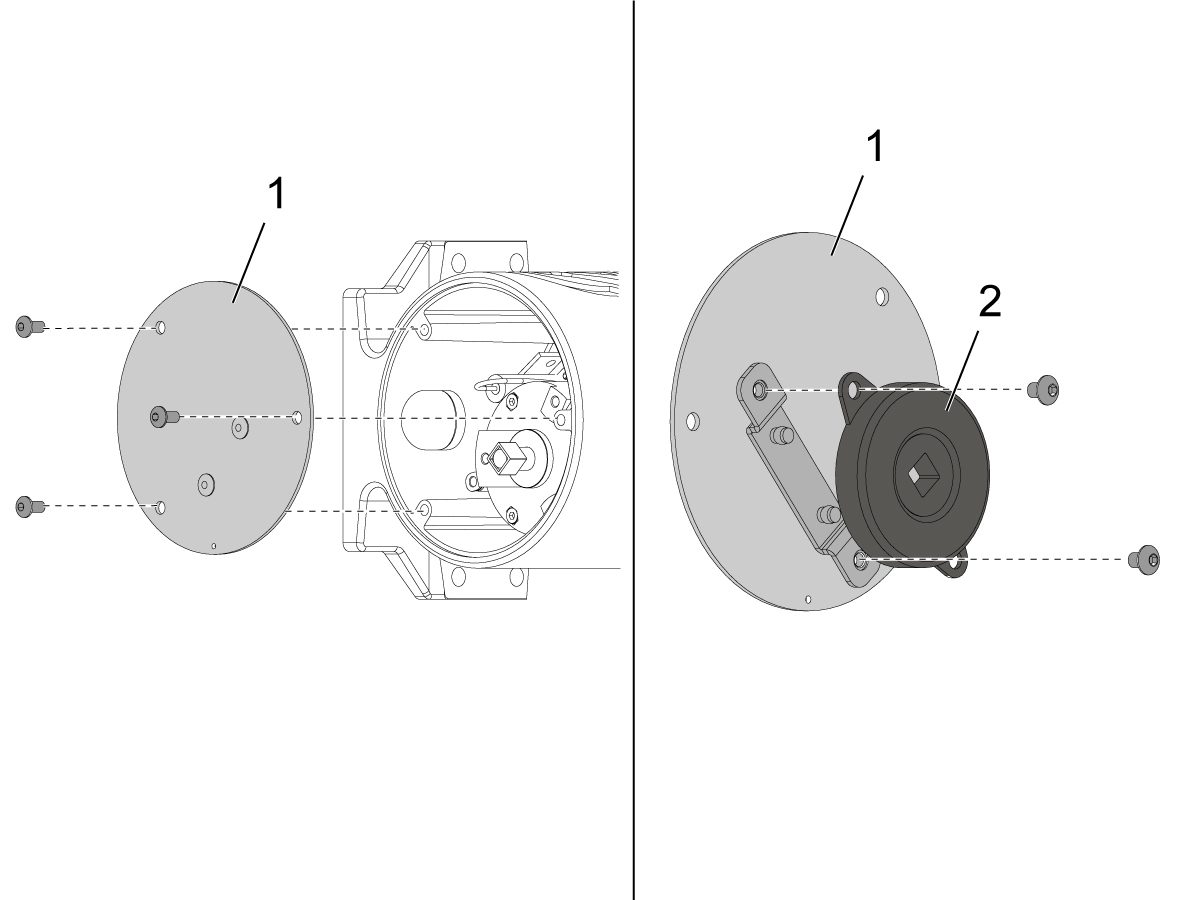
Remove the (x3) screws around the back ATP cover [1] .

NOTE: To make ATP cover removal easier, use a strong magnet to remove the cover. 

On the inside of the ATP cover [1], remove the screws securing the dampener disk [2].

Install new dampener disk [2] on the ATP cover [1].

Install the ATP cover [1] back on the ATP base by mating the dampener [2] with the actuator shaft first.

Deploy and retract the ATP to make sure it works. 

Repeatability Test

1

Check X-axis Repeatability

Press [FEED HOLD] while the probe is in the down position using M104.

Jog the turret with the turning stick in the active pocket 1 near the probe.

Hand Jog in .001" increments in the X-axis direction until the probe beeps.

2

Go to the [OFFSET] screen and record the value for pocket 1 on your traveler sheet.

Back the turret away from the probe.

Put the probe in the up position with M105 or RESET.

Put the probe back down again with M104.

Touch the tool off on the probe again in the X-axis direction.

Record the offset for pocket 1.

NOTE: Do this a total of 5 times for the X-axis measurement.

3

Check Z-axis Repeatability

Perform the repeatability test used on the X-axis for the Z-axis direction 5 times.

Readings cannot exceed 0.002" from each other.

If the probe does not repeat the readings and your machine was built before 09/06/2024, then refer to Automatic Tool Presetter - Installation - NGC - AD0434 to order a new ATP kit for your machine. Then refer to ATP - Probe Replacement - AD0632 to see the replacement procedure. 

Machines experiencing the repeatability issue that were built after 09/06/24, refer to the Automatic Tool Presetter (ATP) - Alignment - Test - Calibration.

NOTE: If you continue to have issues with repeatability problems, please contact Haas Service for assistance.

Gear Sector

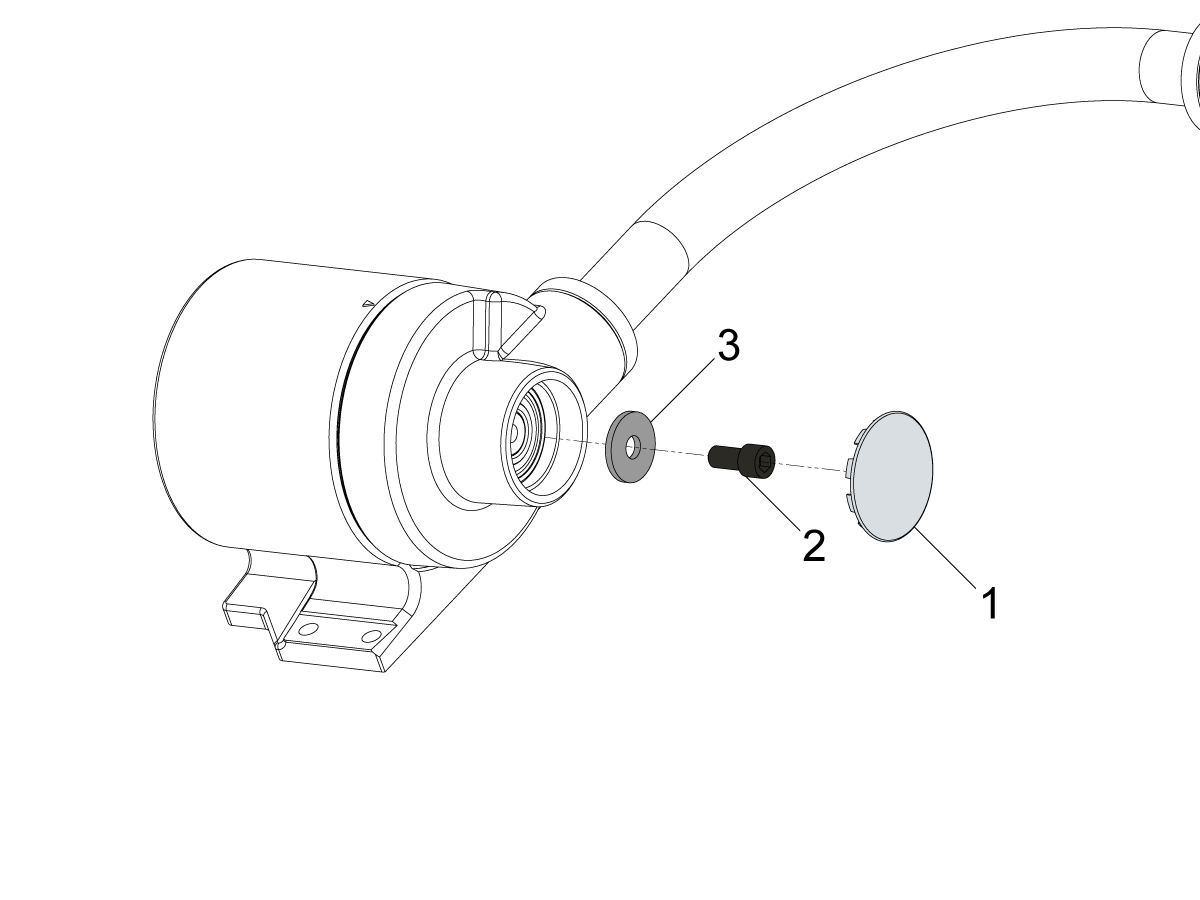
Remove the bearing cover [1] from the ATP assembly then remove the bolt [2[ and washer [1].

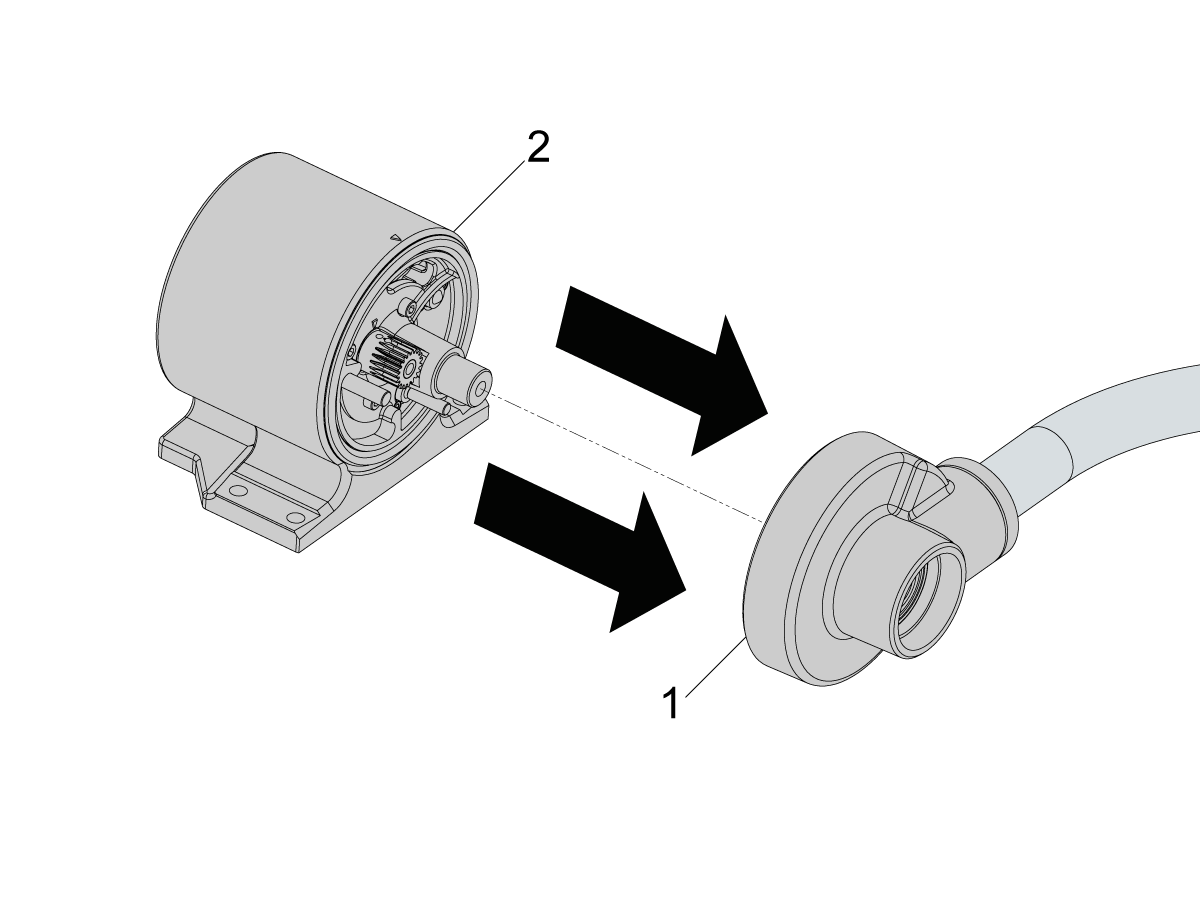
Gently pry and remove the arm and cap [1] from the base of the ATP assembly [2].

Note : Ensure that there is sufficient wire slack for the ATP probe before separating the two halves.

Ensure that the sector gear [3] does not have play and verify that bolts [1] and [2] are torqued to 30 in-lbs.

Important : During reassembly ensure that the actuator is clocked correctly so that play is minimized.

Note : Ensure that the air line to the actuator are disconnected 

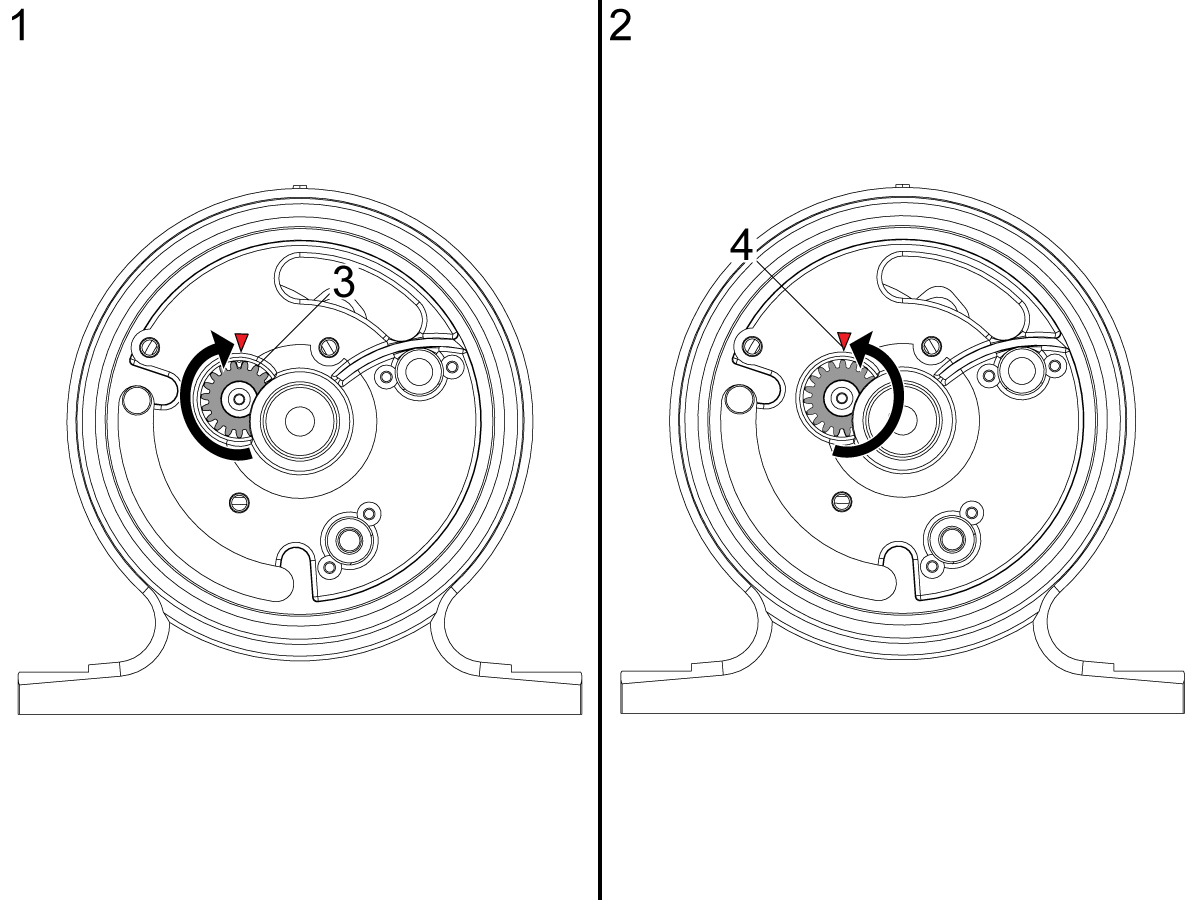
  1. Rotate the actuator shaft [3] Clockwise until it stops.
  2. Rotate the actuator shaft Counter-Clockwise slightly so that the land of the next tooth aligns with the mark.

Recently Viewed Items

You Have No Recently Viewed Items Yet

Feedback
Haas Logo

Haas Delivered Price

This price includes shipping cost, export and import duties, insurance, and any other expenses incurred during shipping to a location in France agreed with you as a buyer. No other mandatory costs can be added to the delivery of a Haas CNC Product.

KEEP UP WITH THE LATEST HAAS TIPS AND TECHNOLOGY...

Sign up now!   

HAAS TOOLING ACCEPTS THE FOLLOWING:

  • Service & Support
  • Owners
  • Request Service
  • Operator Manuals
  • Haas Parts
  • Rotary Repair Request
  • Pre-Install Guides
  • Shopping Tools
  • Build & Price a New Haas
  • Available Inventory
  • The Haas Price List
  • CNCA Financing
  • About Haas
  • Accessibility Statement
  • DNSH Statement
  • Export Compliance
  • Careers
  • Certifications & Safety
  • Contact Us
  • History
  • Terms & Conditions
  • Haas Tooling Terms & Conditions
  • Privacy
  • Warranty
  • Haas Community
  • Haas Certification Program
  • Haas Motorsports
  • Gene Haas Foundation
  • Haas Technical Education Community
  • Events
  • Join the Conversation
  • Facebook
  • X
  • Flickr
  • YouTube
  • LinkedIn
  • Instagram
  • TikTok
© 2026 Haas Automation, Inc – CNC Machine Tools

This site is protected by reCAPTCHA and the Google Privacy Policy and Terms of Service apply.

2800 Sturgis Rd., Oxnard, CA 93030
Toll Free: (888) 817-4446 / Fax: 805-278-8554