My Haas Welcome,
!
Haas Tooling MyHaas/HaasConnect Sign In Register Haas Tooling MyHaas/HaasConnect Sign Out Welcome, My Machines Latest Activity My Quotes My Account My Users Sign Out
Find Your Distributor
  1. Select Language
    1. English
    2. Deutsch
    3. Español - España
    4. Español - México
    5. Français
    6. Italiano
    7. Português
    8. Český
    9. Dansk
    10. Nederlands
    11. Magyar
    12. Polski
    13. Svenska
    14. Türkçe
    15. 中文
    16. Suomi
    17. Norsk
    18. الإنجليزية
    19. български
    20. Hrvatski
    21. Ελληνικά
    22. Română
    23. Slovenský
    24. Slovenščina
    25. 한국어
    26. 日本語
    27. Українська
  • machines Main Menu
    • Vertical Mills
      Vertical Mills
      Vertical Mills View All
      • Vertical Mills
      • VF Series
      • Universal Machines
      • VR Series
      • VP-5 Prismatic
      • Pallet-Changing VMCs
      • Mini Mills
      • Mold Machines
      • High-Speed Drill Centers
      • Drill/Tap/ Mill Series
      • Toolroom Mills
      • Pocket Mill
      • Compact Mills
      • Gantry Series
      • SR Sheet Routers
      • Extra-Large VMC
      • Double-Column Mills
      • 3+2 Positioning Machines
    • Multi-Axis Solutions
      Multi-Axis Solutions
      Multi-Axis Solutions View All
      • Multi-Axis Solutions
      • Y-Axis Lathes
      • 5-Axis Mills
    • Lathes
      Lathes
      Lathes View All
      • Lathes
      • ST Series
      • Dual-Spindle
      • Box Way Series
      • Toolroom Lathes
      • Chucker Lathe
      • Haas Bar Feeders
    • Horizontal Mills
      Horizontal Mills
      Horizontal Mills View All
      • Horizontal Mills
      • 50-Taper
      • 40-Taper
    • Rotaries & Indexers
      Rotaries & Indexers
      Rotaries & Indexers View All
      • Rotaries & Indexers
      • Rotary Tables
      • Indexers
      • 5-Axis Rotaries
      • Extra-Large Rotaries
    • Special Series
      Special Series
      Special Series View All
      • Special Series
      • EU_Series_Redirect
    • Automation Systems
      Automation Systems
      Automation Systems View All
      • Automation Systems
      • Mill Automation
      • Lathe Automation
      • Automatic Parts Loaders
      • Automation Models
    • Desktop Machines
      Desktop Machines
      Desktop Machines View All
      • Desktop Machines
      • Desktop Mill
      • Desktop Lathe
      • Control Simulator, Standard
      • Control Simulator, Premium
    • Shop Equipment
      Shop Equipment
      Shop Equipment View All
      • Shop Equipment
      • Knee Mill
      • Haas Manual Lathes
      • Haas Saws
    • Fabrication Machines
      Fabrication Machines
      Fabrication Machines View All
      • Fabrication Machines
      • Laser Cutting Machines
      • CNC Press Brakes
    • QUICK LINKS Special Series  Special Series 
      EU SERIES EU SERIES BUILD & PRICE | PRICE LIST BUILD & PRICE | PRICE LIST In-Stock Machines In-Stock Machines WHAT’S NEW WHAT’S NEW YOUR FIRST CNC YOUR FIRST CNC
      SHOPPING TOOLS
      • Build & Price a Haas
      • Price List
      • Available Inventory
      • CNCA Financing
      WANT TO TALK TO SOMEONE?

      A Haas Factory Outlet (HFO) can answer your questions, and walk you through your best options.

      CONTACT YOUR DISTRIBUTOR >
  • Options Main Menu
    • The Haas Control Value Option Packages
      Value Option Packages
      Value Option Packages View All
      • Value Option Packages
    • Product Image Spindles
      Spindles
      Spindles View All
      • Spindles
    • Product Image Tool Changers
      Tool Changers
      Tool Changers View All
      • Tool Changers
    • Product Image 4th- | 5th-Axis
      4th- | 5th-Axis
      4th- | 5th-Axis View All
      • 4th- | 5th-Axis
    • Product Image Turrets & Live Tooling
      Turrets & Live Tooling
      Turrets & Live Tooling View All
      • Turrets & Live Tooling
    • Product Image Probing
      Probing
      Probing View All
      • Probing
    • Haas Chip & Coolant Management Chip & Coolant Management
      Chip & Coolant Management
      Chip & Coolant Management View All
      • Chip & Coolant Management
    • The Haas Control The Haas Control
      The Haas Control
      The Haas Control View All
      • The Haas Control
    • Product Image Product Options
      Product Options
      Product Options View All
      • Product Options
    • Product Image Tooling & Fixturing
      Tooling & Fixturing
      Tooling & Fixturing View All
      • Tooling & Fixturing
    • Product Image Workholding
      Workholding
      Workholding View All
      • Workholding
    • Product Image 5-Axis Solutions
      5-Axis Solutions
      5-Axis Solutions View All
      • 5-Axis Solutions
      • 5 Easy Steps to 5-Axis
    • QUICK LINKS Special Series  Special Series 
      EU SERIES EU SERIES BUILD & PRICE | PRICE LIST BUILD & PRICE | PRICE LIST In-Stock Machines In-Stock Machines WHAT’S NEW WHAT’S NEW YOUR FIRST CNC YOUR FIRST CNC
      SHOPPING TOOLS
      • Build & Price a Haas
      • Price List
      • Available Inventory
      • CNCA Financing
      WANT TO TALK TO SOMEONE?

      A Haas Factory Outlet (HFO) can answer your questions, and walk you through your best options.

      CONTACT YOUR DISTRIBUTOR >
  • Why Haas Main Menu
      Discover the Haas Difference
    • Why Haas
    • MyHaas
    • Education Community
    • Industry 4.0
    • Haas Certification
    • Customer Testimonials
  • Service Main Menu
      Welcome to Haas Service
      SERVICE HOME Operator’s Manuals How-To Procedures Troubleshooting Guides Preventive Maintenance Haas Parts Haas Tooling Videos
  • Videos Main Menu
  • Main Menu
    • View All
    • View All
    • View All
    • View All
      • HTEC Curriculum Support
    • View All
      • Haas 10 kg Cobot Package
      • Cobot Kits
      • DC-1 Drill Center
      • CNC Sales News
      • Do More With Your Haas
    • View All
    • View All
      • contact-us-test
      • 4 - AUTOMATION SYSTEMS
      • Carousel-V2
      • expert test
      • Demo_Day_Trident-test
      • Link Test
      • image-sale-tag-test
      • article-list-test
      • Haas 25 kg Robot Package
    • View All
      • Choose Options
    • View All
    • View All
    • View All
    • View All
    • View All
      • calc-test
    • View All
    • QUICK LINKS Special Series  Special Series 
      EU SERIES EU SERIES BUILD & PRICE | PRICE LIST BUILD & PRICE | PRICE LIST In-Stock Machines In-Stock Machines WHAT’S NEW WHAT’S NEW YOUR FIRST CNC YOUR FIRST CNC
      SHOPPING TOOLS
      • Build & Price a Haas
      • Price List
      • Available Inventory
      • CNCA Financing
      WANT TO TALK TO SOMEONE?

      A Haas Factory Outlet (HFO) can answer your questions, and walk you through your best options.

      CONTACT YOUR DISTRIBUTOR >
  • Haas Tooling Main Menu
  • Haas Service Parts Main Menu

My Haas Welcome,
!
Haas Tooling MyHaas/HaasConnect Sign In Register Haas Tooling MyHaas/HaasConnect Sign Out Welcome, My Machines Latest Activity My Quotes My Account My Users Sign Out
Find Your Distributor
  1. Select Language
    1. English
    2. Deutsch
    3. Español - España
    4. Español - México
    5. Français
    6. Italiano
    7. Português
    8. Český
    9. Dansk
    10. Nederlands
    11. Magyar
    12. Polski
    13. Svenska
    14. Türkçe
    15. 中文
    16. Suomi
    17. Norsk
    18. الإنجليزية
    19. български
    20. Hrvatski
    21. Ελληνικά
    22. Română
    23. Slovenský
    24. Slovenščina
    25. 한국어
    26. 日本語
    27. Українська
×

Search Results

Web Pages

Images

    • <
    • 1
    • >

Haas Liquid Grease - Troubleshooting Guide - TG0079

Service Home Haas Liquid Grease - Troubleshooting Guide - TG0079

Haas Liquid Grease - Troubleshooting Guide - TG0079

Jump to Section Back to Top
Recently Updated Last updated: 10/14/2025

Haas Liquid Grease - Troubleshooting Guide


TG0079

HLG - Purge Clogged Lines - How To Video

Introduction

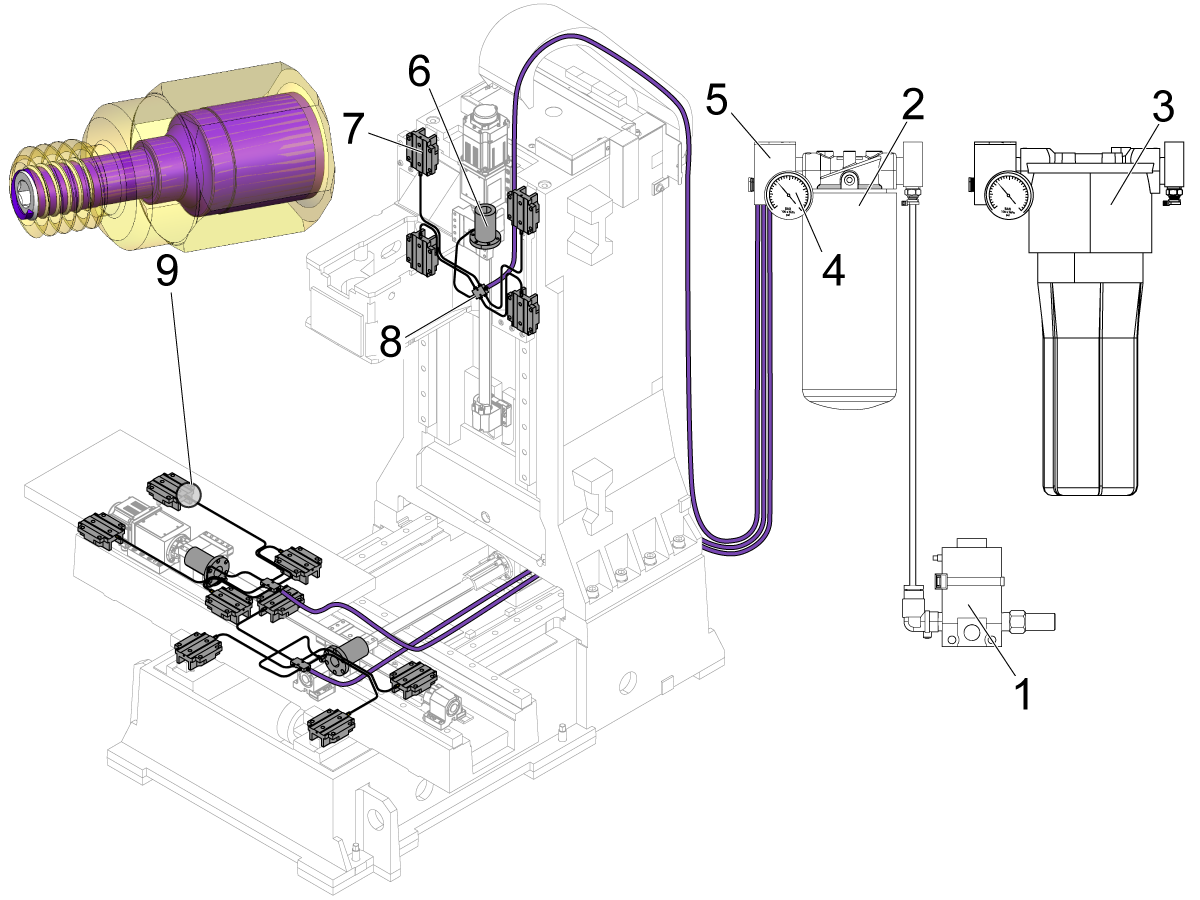
  1. Axis-Lube Air Solenoid
  2. Metal Canister Grease Reservoir
  3. Plastic Canister Grease Reservoir
  4. Air Pressure Gauge
  5. Grease Manifold
  6. Ballnut
  7. Linear Guide Truck
  8. Axis Grease Manifold
  9. Orifice Fitting - grease flows in a helical shape around a set screw and oversize drilled thread. Do not remove the set screw from the orifice fitting.
  10. Pressure Sensor: 4 PSI switch, normally open (not shown, located behind (5) )

System Operation Overview

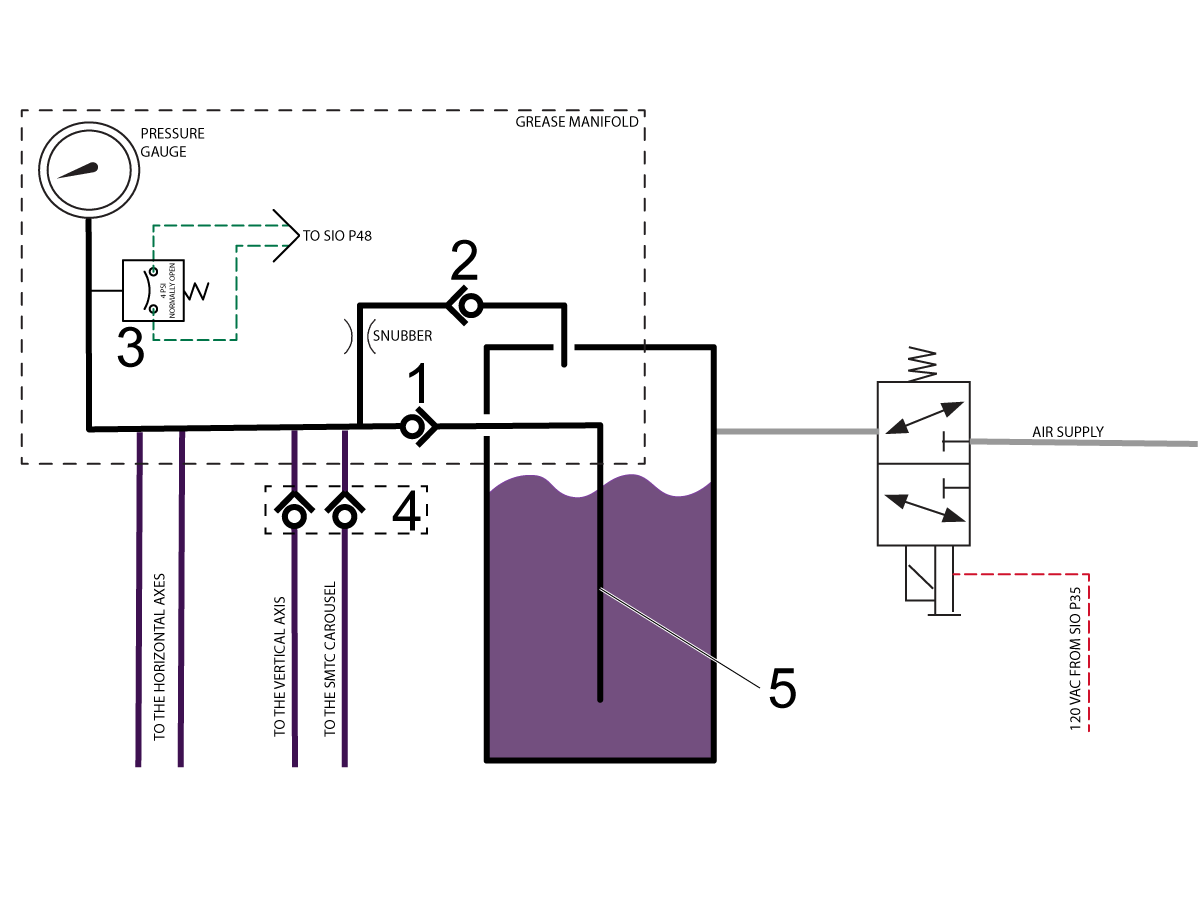
The Haas Liquid Grease (HLG) system utilizes shop air pressure to pressurize the HLG reservoir via a 120VAC solenoid. Both components are located inside the air/lube cabinet

The lubrication cycle will be initiated when:

  1. The axes have been in motion for the time specified in Setting 277 (6 hours by default).
  2. The machine has been idle for 24 hours (specified in Parameter 1401).
  3. If the user presses [F2] while in the LUBE MAINTENANCE section of the DIAGNOSTIC display.

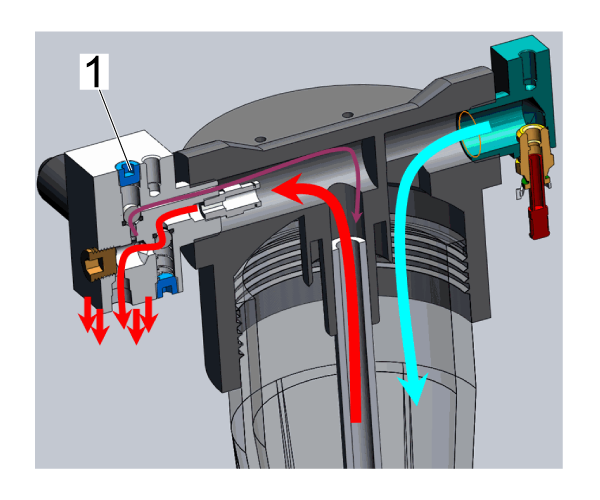
The HLG manifold has two internal check valves [1] and [2]; internal snubber before the check valve [2]; the pressure gauge and the 4 PSI normally open pressure switch [3]. There are multiple lubrication lines coming out of the grease manifold depending on the machine type and configuration. The lubrication lines that are routed above the air/grease pump will have a check valve [4] at the grease manifold to prevent the grease from draining from the lines back to the reservoir between the lubrication cycles.

When a lubrication cycle is commanded, the solenoid applies air pressure to the grease reservoir for 3 seconds (specified in Parameter 2027), which forces the grease to move up the grease pick-up tube [5] and into the grease manifold. The grease flows through the lubrication lines to the lubrication points where it gets pushed through the restrictors into the components that require the lubrication (ballscrew, linear guides pads, etc). Once the cycle ends, the pressure from the grease reservoir is vented to the atmosphere, the check valve [1] traps the pressurized grease in the manifold and the grease will start to flow through the snubber and the check valve [2] back to the grease canister until the pressure in the manifold drops to 0 PSI.

During the lubrication cycle the control monitors the pressure in the lubrication manifold in order to detect a failure of the lubrication system.

When the solenoid is commanded to turn on, the control begins to monitor the status of the pressure switch [3]. The switch is expected to close within 3 seconds (specified in Parameter 1374) from the moment that the solenoid was commanded ON. Once the pressure is detected it is expected to stay for at least 15 seconds (specified in Parameter 1375). If all of the above statements were satisfied during the cycle then the lubrication cycle is considered successful.

If pressure in the system was not detected within 3 seconds (specified in the Parameter 1374) the control will stop monitoring the pressure and display the “Low Lube” warning icon until the next lube cycle. If such a condition was detected for 5 consecutive lube cycles, then the control will generate the Alarm 2073 AXIS LUBRICATION PRESSURE NOT DETECTED. The alarm will not be generated during a program execution, it will only be generated after the program execution ends or after pressing a [RESET] button.

If the pressure in the system drops below 4 PSI before 15 seconds (specified in Parameter 1375), the control will display “Low Lube” warning icon until the next lube cycle. If such a condition is detected for the next 4 consecutive lube cycles (5 total cycles) the control will generate the Alarm 2075 AXIS LUBRICATION RESERVOIR IS EMPTY. The alarm will not be generated during a program execution. It will be generated after the program execution ends or after pressing a [RESET] button.

Symptom Table

Symptom Possible Cause Corrective Action
Alarm 2082 RESIDUAL PRESSURE DETECTED PRIOR TO AXIS LUBRICATION CYCLE Clogged orifices, lube lines, or manifolds. Inspect all orifices, lube lines, fittings, and manifolds for clogs/debris.  Refer to Haas Liquid Grease - Purge Clogged Lines  procedure. 

Alarm 2073 AXIS LUBRICATION PRESSURE NOT DETECTED


Alarm 2075 AXIS LUBRICATION RESERVOIR EMPTY


The grease is low or empty. Refill the grease. Refer to Axis Lubrication System - Grease Reservoir - Haas Liquid Grease - Refill procedure.

Always make sure you replace the grease with Haas Liquid Grease or an approved alternative. The emergency substitute can still generate alarms.

There is no check valve on the vertical axis grease tube. Make sure there is a check valve on the grease tube of the vertical axis if there was any air in the tube.
There is a problem with the grease manifold. Inspect the grease manifold, lube lines, and fittings.
There is a problem with the pressure switch for the axis grease. Inspect the pressure switch for the axis grease and check the software version.
There is a problem with the axis-lube air solenoid. Inspect the axis-lube air solenoid.
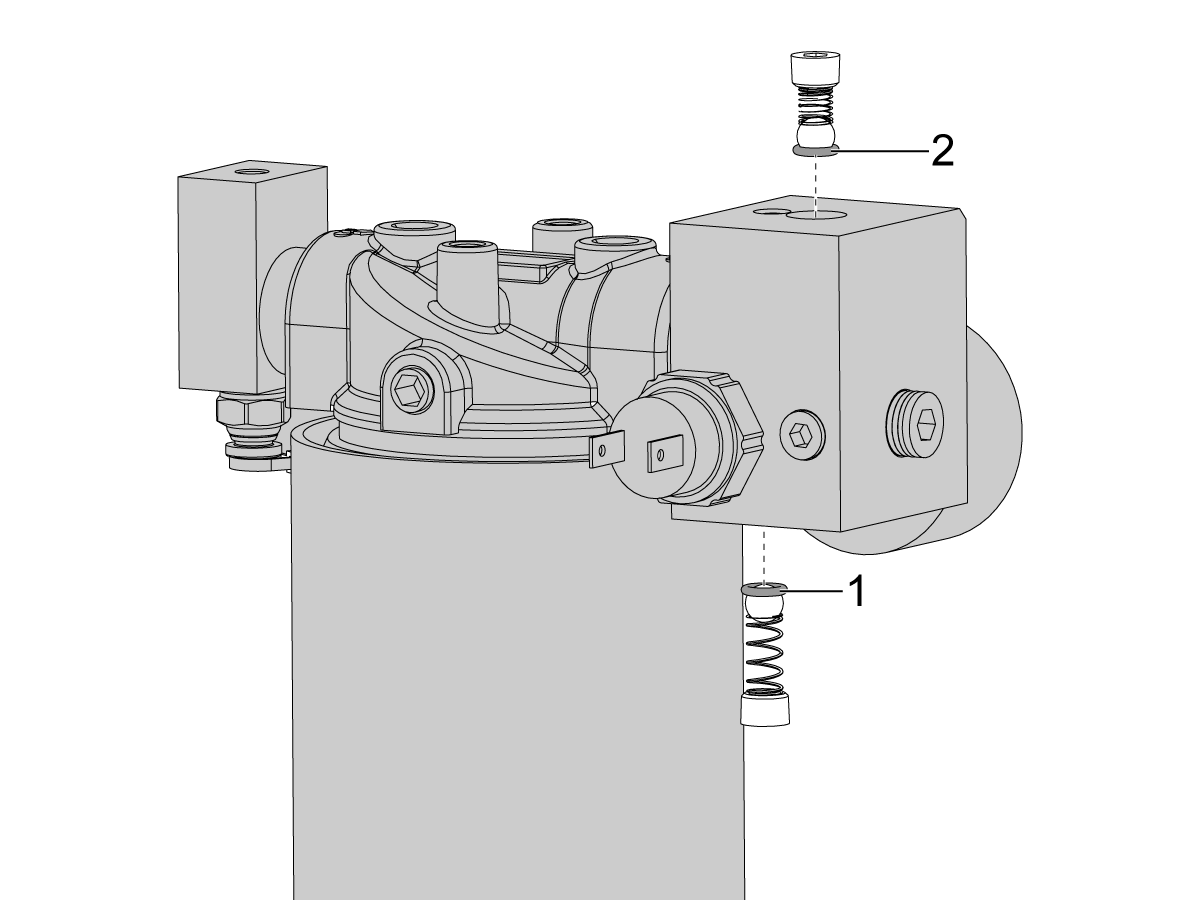
Check Valve O-rings are not seated properly inside the grease manifold assembly. Use the image in the Check Valve O-rings section to verify the o-rings are seated properly.
Grease canister is empty but no alarms are generated and the pressure gauge is holding pressure Clogged orifices, lube lines, or manifolds. Inspect all orifices, lube lines, fittings, and manifolds for clogs/debris. Blow out with air, flush with Syngear 1150, replace parts that cannot be unclogged as necessary. Upgrade the mesh filter in the pick-up tube from the previous 40 mesh filter to the new 80 mesh filter.
Machine does not appear to be using grease as much as expected

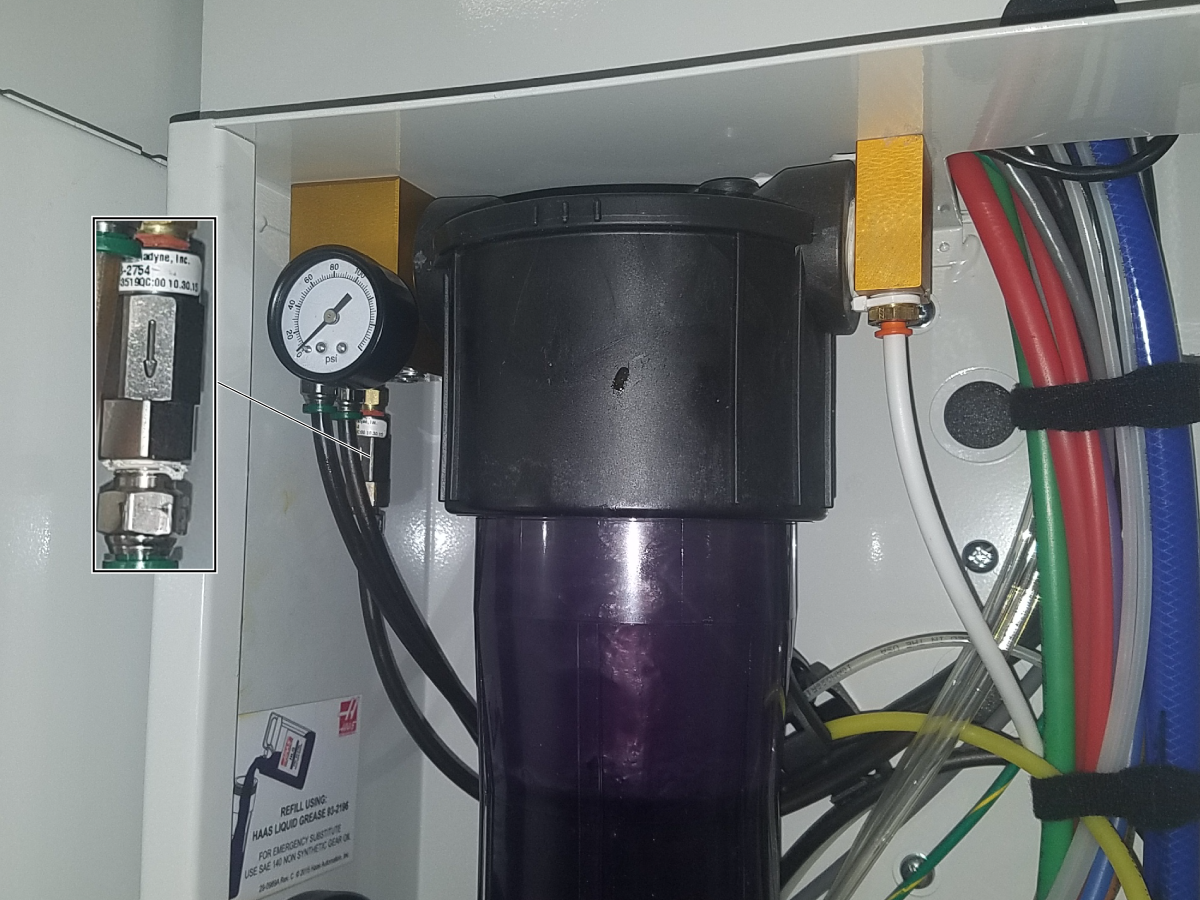
Vertical Axis Check Valve

Corrective Action: Check for the presence of a check valve on the grease tube of the vertical axis.

If there is air in this tube or no grease, install the check valve (P/N: 58-2754) to this port on the manifold. Make sure the arrow is pointing down as shown in the image.

The machine does an Axis Lubrication cycle every 24 hours of axis feed time. In some cases it is possible that the machine can go a prolonged period of time without an Axis Lubrication cycle. If this happens and the machine's Z-Axis grease tube does not have a check valve, the grease may come back down the tube. When the machine does its next lubrication cycle, only air gets pushed through the tube. The horizontal axes get lubricated correctly while the vertical axis only gets air. Over time this damages the vertical axis ballscrew, linear guides, and trucks.

The check valve on the grease tube of the vertical axis prevents the grease from coming back down the tube. Install a check valve if the machine does not have one.

Check Valve O-rings

Verify that the check valve o-rings [1] & [2] are seated properly.

Grease Manifold

Corrective Action: Inspect the grease manifold.

Follow these steps to make sure the grease manifold operates correctly.

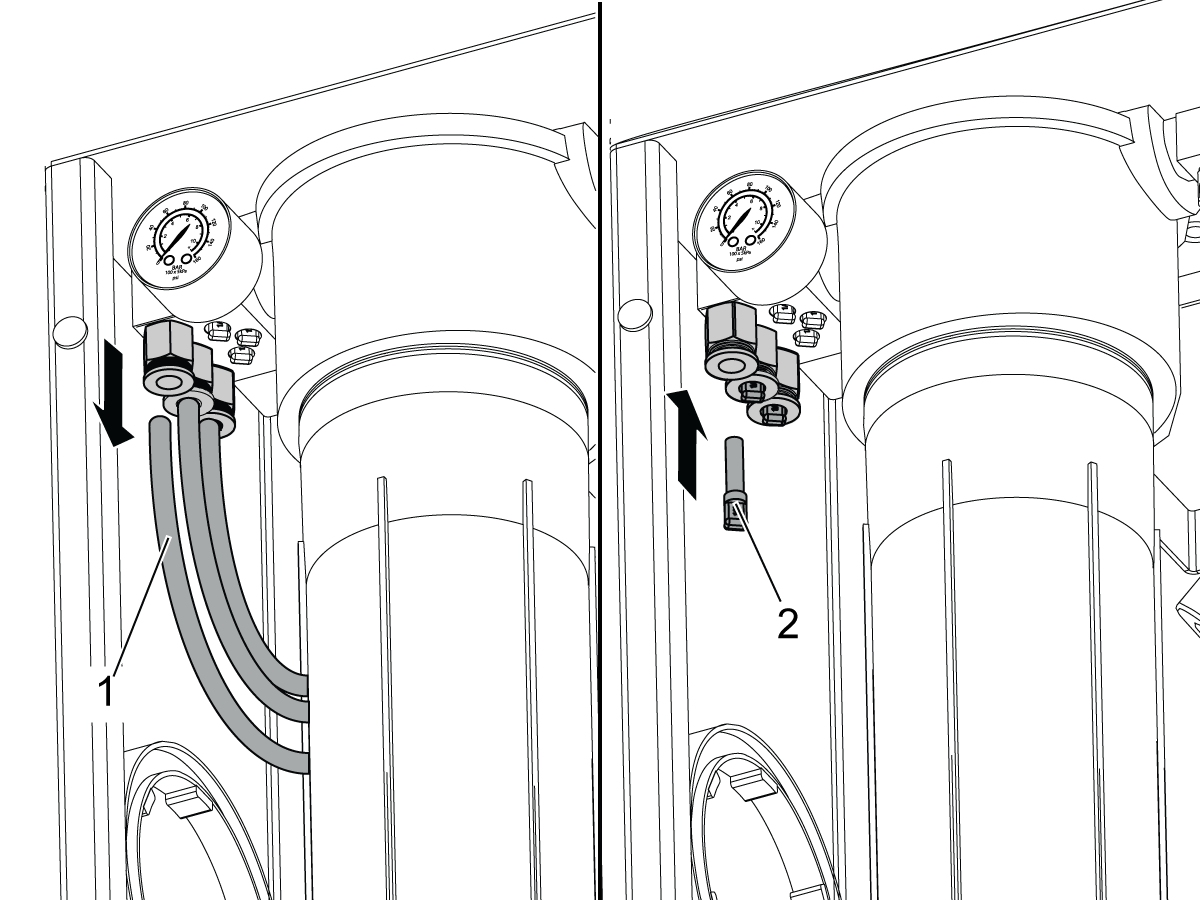
Disconnect all of the axis-grease tubes [1] from the grease-pressure manifold and connect a plug [2] (P/N: 58-1365) to each connector on the manifold.

Do the Axis Lubrication Test. If the Check-Lube icon shows, the grease manifold is faulty. Replace the grease manifold.

If the Check-Lube icon does not show follow these steps.

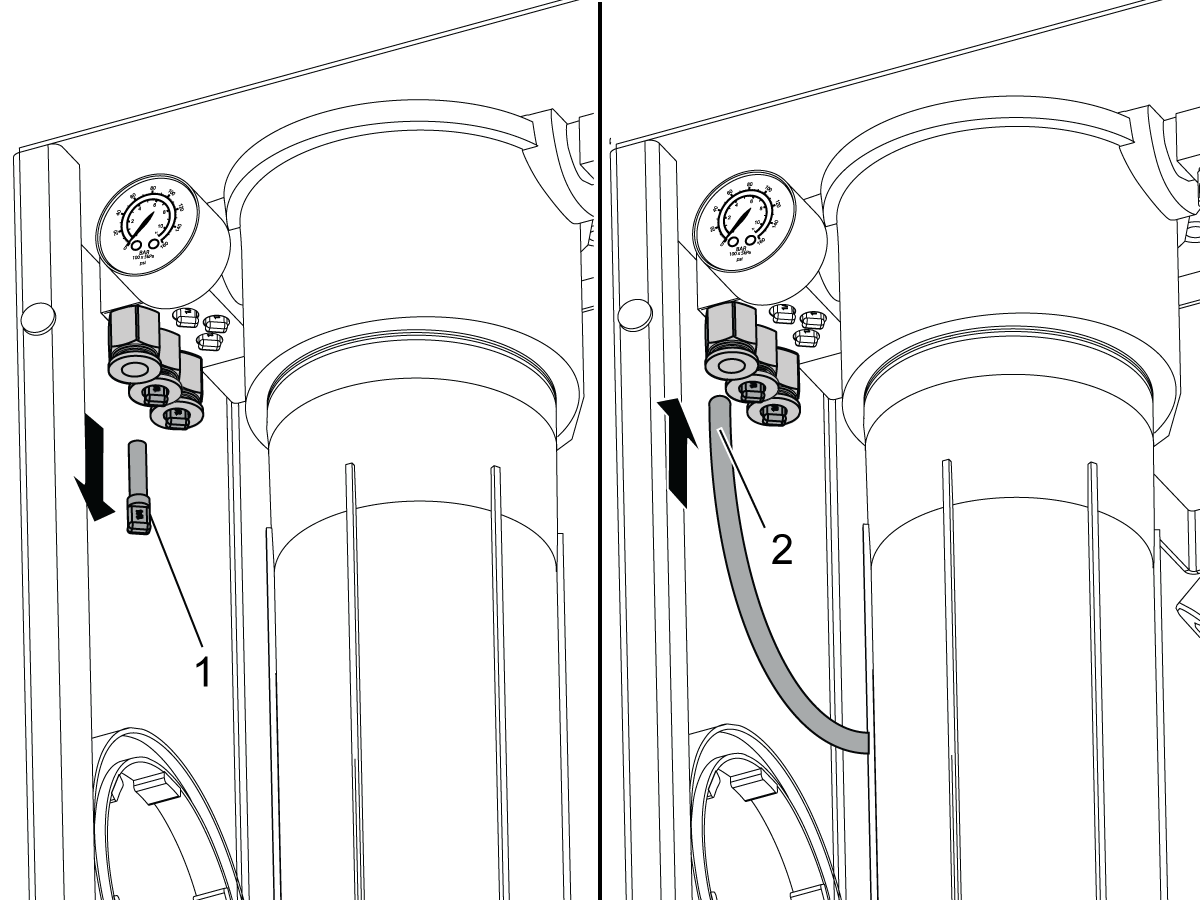
Disconnect the plug [1] from the grease manifold and connect the axis-grease tube [2].

Do the Axis Lubrication Test. If the Check-Lube icon shows, there is a leak in that axis. Examine the entire length of tube and associated fittings and manifolds and fix the leak.

Repeat this test with the other axes.

Pressure Switch

Corrective Action: Inspect the pressure switch for the axis grease.

Machines with the Next Generation Control:

Check the software version on the machine. The machine must have software version 100.16.000.1020 or higher. Update the machine software if necessary.

Do the Axis Lubrication Test and monitor INPUT 68, LOW_AXIS_GREASE_PRESSURE in the I/O tab in Diagnostics.

Machines with the Classic Haas Control:

Do the Axis Lubrication Test and monitor the Ax Grease Press. input in the I/O tab.

If the input changes from a 1 to a 0, the pressure switch operates correctly.

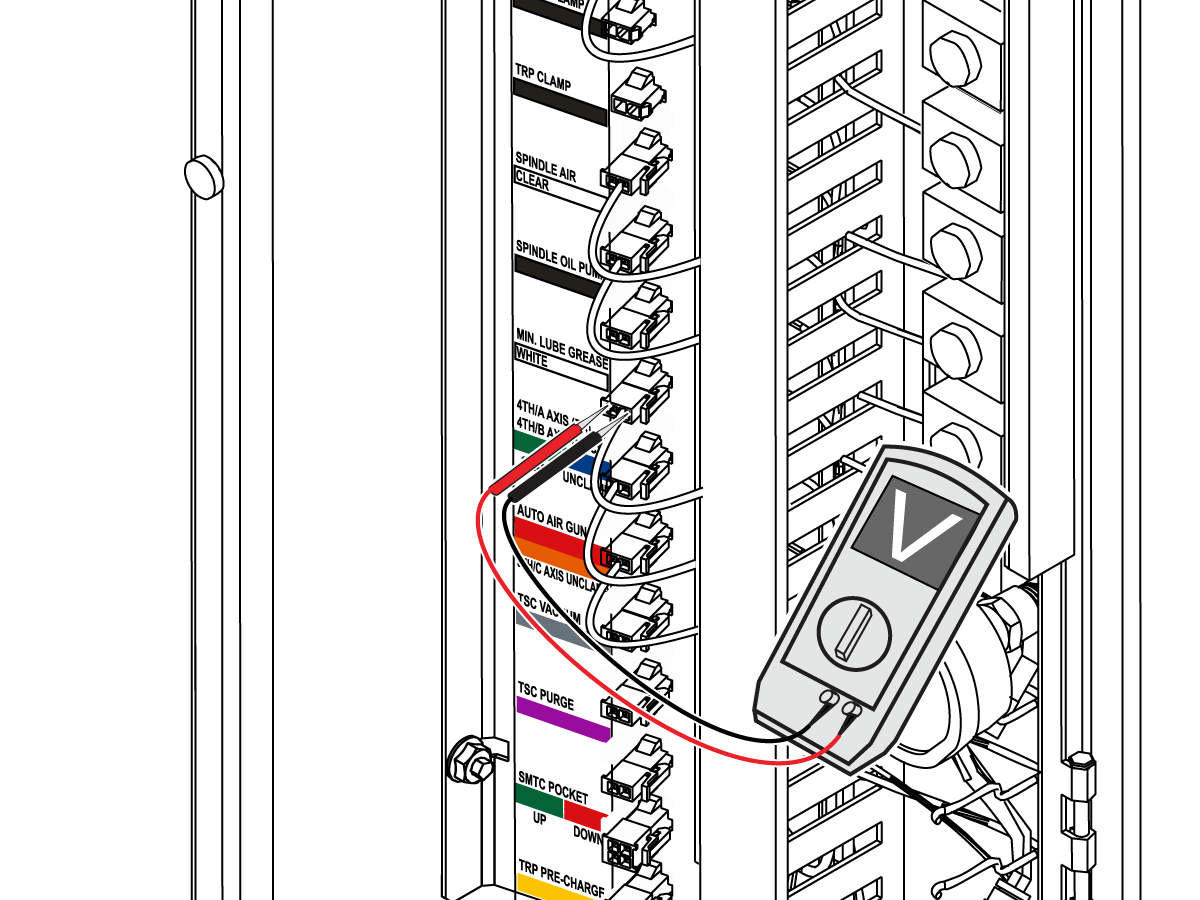
If it does not, disconnect the cables from the pressure switch and use a jumper to connect them as shown. The pressure switch is behind the grease manifold. If the input changes from a 1 to a 0, the pressure switch is faulty. Replace the pressure switch.

 Note: If the grease reservoir is empty or has been recently refilled, warnings/alarms 2073 and 2075 can occur until the axis lubrication system purges some air from the system.

Axis-Lube Air Solenoid

Corrective Action: Inspect the axis-lube air solenoid.

Do the Axis Lubrication Test and make sure the voltage to the min. lube solenoid is 120 VAC.

 Note: Do not measure the voltage with the min. lube grease solenoid disconnected from the connector.

Refer to the I/O PCB - Troubleshooting Guide (Classic Haas Control) to troubleshoot the I/O PCB.

Refer to the Solenoid Troubleshooting Guide to troubleshoot the solenoid.

If the solenoid is not activating when commanded, check for:

  • the connector being in the correct location.
  • loose or broken wires.
  • air coming out of the solenoid without the tube connected.
  • firm solenoid cable connection at the I/O board.

Clogging and Contamination

Clearing A Clog
  • Inspect linear guides and ball screws for fresh grease
  • If there doesn't appear to be grease, move to the orifices
  • Ensure there is enough grease in the canister to run a test
  • Disconnect the orifices from the linear guide pads and manually & continuously fire the solenoid
  • If no grease comes out of the orifice they are likely clogged
  • Remove the orifices from the copper lines and inspect the copper lines for clogs
  • Fire the solenoid again with the orifices removed
  • If no grease exits the lines there could be a clog in one of the manifolds
  • Go to the lube cabinet and disconnect the plastic tube for the axis you are testing
  • Blow pressurized shop air into the tube and see if this will clear the clog
  • If the clog does not clear refer to the Haas Liquid Grease - Purge Clogged Lines procedure.

Eliminating Contamination

  • If you were able to clear a clog just by using air pressure and did not replace any copper lines or manifolds, you may have contamination in the lines that could cause a new clog in the future.
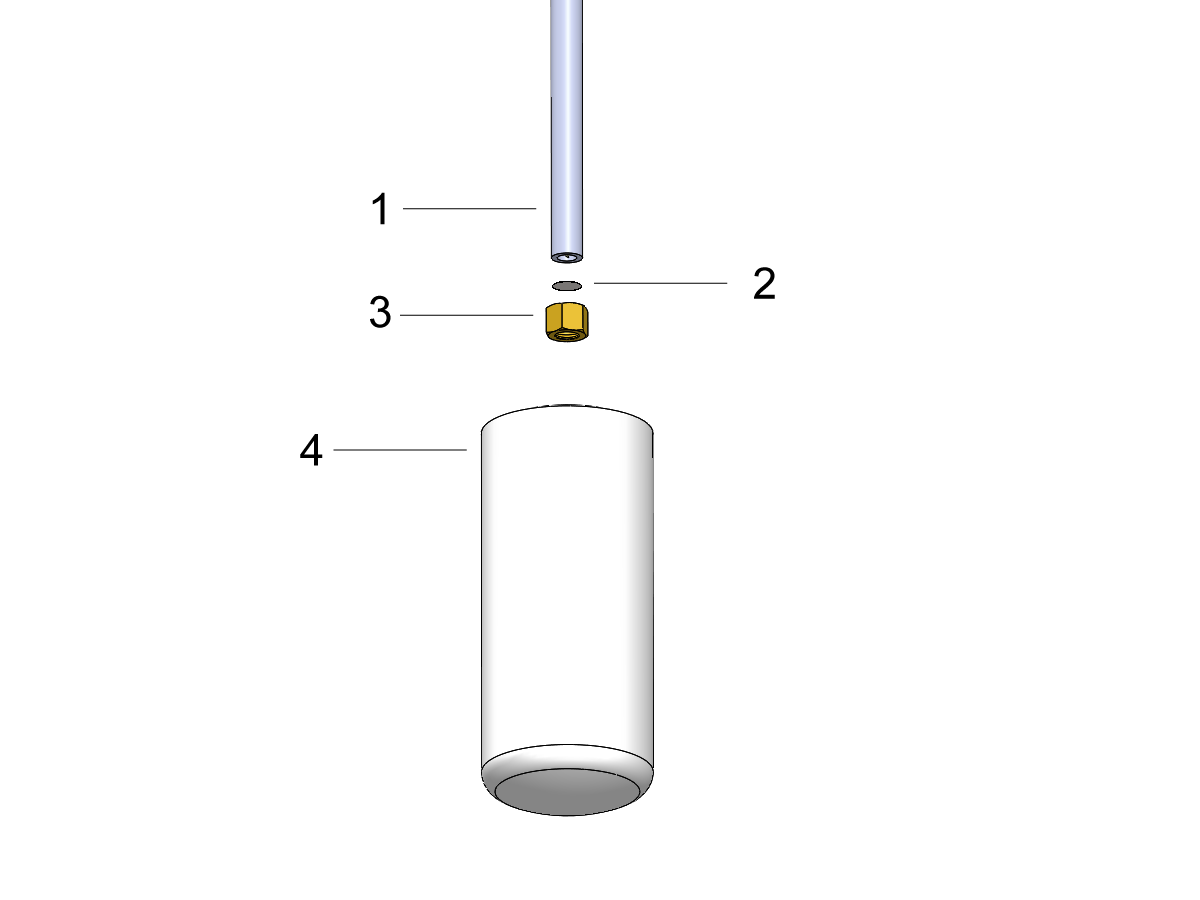
  • Check for contamination in the pick-up tube within the canister assembly [1]
    • Un-screw the grease canister [4]
    • Remove the brass fitting [3] that holds the mesh screen [2] in the pick-up tube and clean with a rag and alcohol
    • Dry with compressed air
    • Replace the mesh screen with a new finer 80 mesh screen provided in our service kit (P/N 58-1993A)  [2]
    • Re-install the fitting and screen
  • To ensure a new clog does not occur, flush the lines without the orifices installed with Syngear SH1150 oil (93-2626)
  • Install new orifices
  • Re-fill can with Haas Liquid Grease or Syngear SH1150 oil
  • Prime the lines and run as usual

Recently Viewed Items

You Have No Recently Viewed Items Yet

Feedback
Haas Logo

Haas Delivered Price

This price includes shipping cost, export and import duties, insurance, and any other expenses incurred during shipping to a location in France agreed with you as a buyer. No other mandatory costs can be added to the delivery of a Haas CNC Product.

KEEP UP WITH THE LATEST HAAS TIPS AND TECHNOLOGY...

Sign up now!   

HAAS TOOLING ACCEPTS THE FOLLOWING:

  • Service & Support
  • Owners
  • Request Service
  • Operator Manuals
  • Haas Parts

  • Rotary Repair Request
  • Pre-Install Guides
  • Shopping Tools
  • Build & Price a New Haas
  • Available Inventory
  • The Haas Price List
  • CNCA Financing
  • About Haas
  • Accessibility Statement
  • DNSH Statement
  • Export Compliance
  • Careers
  • Certifications & Safety
  • Contact Us
  • History
  • Terms & Conditions
  • Haas Tooling Terms & Conditions
  • Privacy
  • Warranty
  • Haas Community
  • Haas Certification Program
  • Haas Motorsports
  • Gene Haas Foundation
  • Haas Technical Education Community
  • Events
  • Join the Conversation
  • Facebook
  • X
  • Flickr
  • YouTube
  • LinkedIn
  • Instagram
  • TikTok
© 2026 Haas Automation, Inc – CNC Machine Tools

This site is protected by reCAPTCHA and the Google Privacy Policy and Terms of Service apply.

2800 Sturgis Rd., Oxnard, CA 93030
Toll Free: (888) 817-4446 / Fax: 805-278-8554