My Haas Welcome,
!
Haas Tooling MyHaas/HaasConnect Sign In Register Haas Tooling MyHaas/HaasConnect Sign Out Welcome, My Machines Latest Activity My Quotes My Account My Users Sign Out
Find Your Distributor
  1. Select Language
    1. English
    2. Deutsch
    3. Español - España
    4. Español - México
    5. Français
    6. Italiano
    7. Português
    8. Český
    9. Dansk
    10. Nederlands
    11. Magyar
    12. Polski
    13. Svenska
    14. Türkçe
    15. 中文
    16. Suomi
    17. Norsk
    18. الإنجليزية
    19. български
    20. Hrvatski
    21. Ελληνικά
    22. Română
    23. Slovenský
    24. Slovenščina
    25. 한국어
    26. 日本語
    27. Українська
  • machines Main Menu
    • Vertical Mills
      Vertical Mills
      Vertical Mills View All
      • Vertical Mills
      • VF Series
      • Universal Machines
      • VR Series
      • VP-5 Prismatic
      • Pallet-Changing VMCs
      • Mini Mills
      • Mold Machines
      • High-Speed Drill Centers
      • Drill/Tap/ Mill Series
      • Toolroom Mills
      • Pocket Mill
      • Compact Mills
      • Gantry Series
      • SR Sheet Routers
      • Extra-Large VMC
      • Double-Column Mills
      • 3+2 Positioning Machines
    • Multi-Axis Solutions
      Multi-Axis Solutions
      Multi-Axis Solutions View All
      • Multi-Axis Solutions
      • Y-Axis Lathes
      • 5-Axis Mills
    • Lathes
      Lathes
      Lathes View All
      • Lathes
      • ST Series
      • Dual-Spindle
      • Box Way Series
      • Toolroom Lathes
      • Chucker Lathe
      • Haas Bar Feeders
    • Horizontal Mills
      Horizontal Mills
      Horizontal Mills View All
      • Horizontal Mills
      • 50-Taper
      • 40-Taper
    • Rotaries & Indexers
      Rotaries & Indexers
      Rotaries & Indexers View All
      • Rotaries & Indexers
      • Rotary Tables
      • Indexers
      • 5-Axis Rotaries
      • Extra-Large Rotaries
    • Special Series
      Special Series
      Special Series View All
      • Special Series
      • EU_Series_Redirect
    • Automation Systems
      Automation Systems
      Automation Systems View All
      • Automation Systems
      • Mill Automation
      • Lathe Automation
      • Automatic Parts Loaders
      • Automation Models
    • Desktop Machines
      Desktop Machines
      Desktop Machines View All
      • Desktop Machines
      • Desktop Mill
      • Desktop Lathe
      • Control Simulator, Standard
      • Control Simulator, Premium
    • Shop Equipment
      Shop Equipment
      Shop Equipment View All
      • Shop Equipment
      • Knee Mill
      • Haas Manual Lathes
      • Haas Saws
    • Fabrication Machines
      Fabrication Machines
      Fabrication Machines View All
      • Fabrication Machines
      • Laser Cutting Machines
      • CNC Press Brakes
    • QUICK LINKS Special Series  Special Series 
      EU SERIES EU SERIES BUILD & PRICE | PRICE LIST BUILD & PRICE | PRICE LIST In-Stock Machines In-Stock Machines WHAT’S NEW WHAT’S NEW YOUR FIRST CNC YOUR FIRST CNC
      SHOPPING TOOLS
      • Build & Price a Haas
      • Price List
      • Available Inventory
      • CNCA Financing
      WANT TO TALK TO SOMEONE?

      A Haas Factory Outlet (HFO) can answer your questions, and walk you through your best options.

      CONTACT YOUR DISTRIBUTOR >
  • Options Main Menu
    • The Haas Control Value Option Packages
      Value Option Packages
      Value Option Packages View All
      • Value Option Packages
    • Product Image Spindles
      Spindles
      Spindles View All
      • Spindles
    • Product Image Tool Changers
      Tool Changers
      Tool Changers View All
      • Tool Changers
    • Product Image 4th- | 5th-Axis
      4th- | 5th-Axis
      4th- | 5th-Axis View All
      • 4th- | 5th-Axis
    • Product Image Turrets & Live Tooling
      Turrets & Live Tooling
      Turrets & Live Tooling View All
      • Turrets & Live Tooling
    • Product Image Probing
      Probing
      Probing View All
      • Probing
    • Haas Chip & Coolant Management Chip & Coolant Management
      Chip & Coolant Management
      Chip & Coolant Management View All
      • Chip & Coolant Management
    • The Haas Control The Haas Control
      The Haas Control
      The Haas Control View All
      • The Haas Control
    • Product Image Product Options
      Product Options
      Product Options View All
      • Product Options
    • Product Image Tooling & Fixturing
      Tooling & Fixturing
      Tooling & Fixturing View All
      • Tooling & Fixturing
    • Product Image Workholding
      Workholding
      Workholding View All
      • Workholding
    • Product Image 5-Axis Solutions
      5-Axis Solutions
      5-Axis Solutions View All
      • 5-Axis Solutions
      • 5 Easy Steps to 5-Axis
    • QUICK LINKS Special Series  Special Series 
      EU SERIES EU SERIES BUILD & PRICE | PRICE LIST BUILD & PRICE | PRICE LIST In-Stock Machines In-Stock Machines WHAT’S NEW WHAT’S NEW YOUR FIRST CNC YOUR FIRST CNC
      SHOPPING TOOLS
      • Build & Price a Haas
      • Price List
      • Available Inventory
      • CNCA Financing
      WANT TO TALK TO SOMEONE?

      A Haas Factory Outlet (HFO) can answer your questions, and walk you through your best options.

      CONTACT YOUR DISTRIBUTOR >
  • Why Haas Main Menu
      Discover the Haas Difference
    • Why Haas
    • MyHaas
    • Education Community
    • Industry 4.0
    • Haas Certification
    • Customer Testimonials
  • Service Main Menu
      Welcome to Haas Service
      SERVICE HOME Operator’s Manuals How-To Procedures Troubleshooting Guides Preventive Maintenance Haas Parts Haas Tooling Videos
  • Videos Main Menu
  • Main Menu
    • View All
    • View All
    • View All
    • View All
      • HTEC Curriculum Support
      • Haas Value Option Packages (VOP) Journey
    • View All
      • Haas 10 kg Cobot Package
      • Cobot Kits
      • DC-1 Drill Center
      • CNC Sales News
      • Do More With Your Haas
    • View All
    • View All
      • contact-us-test
      • 4 - AUTOMATION SYSTEMS
      • Carousel-V2
      • expert test
      • Demo_Day_Trident-test
      • Link Test
      • image-sale-tag-test
      • article-list-test
      • Haas 25 kg Robot Package
      • test-algolia-page
    • View All
      • Choose Options
    • View All
    • View All
    • View All
    • View All
    • View All
      • calc-test
    • View All
    • QUICK LINKS Special Series  Special Series 
      EU SERIES EU SERIES BUILD & PRICE | PRICE LIST BUILD & PRICE | PRICE LIST In-Stock Machines In-Stock Machines WHAT’S NEW WHAT’S NEW YOUR FIRST CNC YOUR FIRST CNC
      SHOPPING TOOLS
      • Build & Price a Haas
      • Price List
      • Available Inventory
      • CNCA Financing
      WANT TO TALK TO SOMEONE?

      A Haas Factory Outlet (HFO) can answer your questions, and walk you through your best options.

      CONTACT YOUR DISTRIBUTOR >
  • Haas Tooling Main Menu
  • Haas Service Parts Main Menu

My Haas Welcome,
!
Haas Tooling MyHaas/HaasConnect Sign In Register Haas Tooling MyHaas/HaasConnect Sign Out Welcome, My Machines Latest Activity My Quotes My Account My Users Sign Out
Find Your Distributor
  1. Select Language
    1. English
    2. Deutsch
    3. Español - España
    4. Español - México
    5. Français
    6. Italiano
    7. Português
    8. Český
    9. Dansk
    10. Nederlands
    11. Magyar
    12. Polski
    13. Svenska
    14. Türkçe
    15. 中文
    16. Suomi
    17. Norsk
    18. الإنجليزية
    19. български
    20. Hrvatski
    21. Ελληνικά
    22. Română
    23. Slovenský
    24. Slovenščina
    25. 한국어
    26. 日本語
    27. Українська
×

Search Results

Web Pages

Images

    • <
    • 1
    • >

Spindle Non-Contact Encoder (NCE) - Troubleshooting Guide - NGC - TG0136

Service Home Spindle Non-Contact Encoder (NCE) - Troubleshooting Guide - NGC - TG0136

Spindle Non-Contact Encoder (NCE) - Troubleshooting Guide - NGC - TG0136

Jump to Section 1. Introduction 2. Non-Contact Encoder Troubleshooting 3. Symptom Table 4. Main Processor/Encoder Cable 5. Non-Contact Encoder Read Head Grounding 6. Non-Contact Encoder - Identification 7. Mill Encoder Ring to Read Head Alignment 8. Replace Alignment Bracket 9. Lathe Encoder Ring to Read Head Alignment 10. Ferrite Filters on Vector Drive 11. Non-Contact Encoder Cable Connection (1 step) 12. Spindle Encoder Cable Rubbing 13. Electrical Diagram Back to Top
Recently Updated Last updated: 02/20/2026

Spindle Non-Contact Encoder (NCE) - Troubleshooting Guide - NGC

Revision 2


TG0136

Revision B - 2/2026

Introduction

Encoders are used on Haas Machines to give feedback to the control about the direction and speed of the spindle. A Haas machine will alarm if any of the encoder signals are lost or are not responding to machine inputs. If the encoder is not generating an alarm it does not usually need to be replaced. Use this guide to troubleshoot spindle encoder related symptoms and alarms.


 Note: This  service video is for reference only and does not replace the written procedure.

Non-Contact Encoder Troubleshooting

Download and fillout the Non Contact Encoder Inspection Report Checklist below before replacing any parts.

Non Contact Encoder Inspection Report Checklist

 Note: This  service video is for reference only and does not replace the written procedure.

Symptom Table

Symptom / Alarms Possible Cause Corrective Action

The Spindle Motor Does Not Turn, and The Load Meter Stays at Maximum.

The Wye-Delta contactors are not operating correctly. Command a spindle speed of 50 RPM, make sure the Wye contactor engages, if not refer to the Wye-Delta Contactor - Troubleshooting Guide - NGC
The Spindle Turns at The Low RPM and The Load Meter Stays Near The Maximum Encoder Alignment is not correct Inspect the Radial runout, the encoder gapping and the axial position of the read head relative to the encoder ring.  See the Encoder Ring to Read Head Alignment section below.

Alarm 4.9918 S (SPINDLE) SERIAL ENCODER INTERNAL DATA ERROR

Alarm 4.9922 S (SPINDLE) MOTION CHANNEL FAULT DETECTED

Alarm 4.9923 S (SPINDLE) SOFTWARE DETECTED ENCODER FAULT

Alarm 4.9930 S (SPINDLE) SERIAL ENCODER POOR COMMUNICATION

Alarm 4.9959 S (SPINDLE) SERIAL ENCODER DISCONNECT

The encoder machine software is outdated.

Alarm is obsolete 

New alarm for encoder faults updated in software. Update to latest version 100.21.000.1130 or Higher;

Added Alarms 9719 and 9720 for Encoder Fault Detection on Mocon Primary and Secondary Axes.

Alarm 4.9719  S (SPINDLE) ENCODER SERIAL FAULT

Alarm Subcode (0x1) Encoder Data Fault  = (Alarm 9918 SERIAL ENCODER INTERNAL DATA ERROR)

Loose encoder cable connection. The encoder cable is damaged.
Inspect the Radial runout, the encoder gapping and the axial position of the read head relative to the encoder ring.  See the Encoder Ring to Read Head Alignment section below.
The encoder read-head is not grounded correctly. See the Non-Contact Encoder Read Head Grounding section below.
TSC union carbides are worn out and no longer parallel which flexes the read-head away from the ring. Replace the compensating union.
The encoder cable connection has been contaminated. See the Non-Contact Encoder Cable Connection section below.
 Contamination at connection joint between 33-1168A & 32-1168A cable assemblies (GM-Series Only). If 33-1168A and 32-1168A require to be replaced due to contamination then replace with 32-1190.  

NOTE:
 Replacement cable will come with connection made and heat Shrink around the connectors.

Alarm 4.9719 S (SPINDLE) ENCODER SERIAL FAULT

Alarm Subcode (0x2) Encoder Internal Axis Fault 1 = (Alarm 9922 MOTION CHANNEL FAULT DETECTED)

The motion channel has reported an internal fault of a type that is not recognized by the control.

Power cycle machine. If issue persists, taken error report (Shift F3) and email to Haas Service

Alarm 4.9719 S (SPINDLE) ENCODER SERIAL FAULT

Alarm Subcode (0x3) Encoder Internal Axis Fault 2 =  (Alarm 9923 SOFTWARE DETECTED ENCODER FAULT)

Software has reported an internal fault of a type that is not recongnized by the control. Power cycle machine. If issue persists, taken error report (Shift F3) and email to Haas Service

Alarm 4.9719 S (SPINDLE) ENCODER SERIAL FAULT

Alarm Subcode (0x4) Encoder CRC Fault =  (Alarm 9930 SERIAL ENCODER POOR COMMUNICATION)

The spindle encoder cable (M8) metal threaded ferrule is not connected to the cable shield. Look at the spindle encoder cable M8 connector. Replace the encoder cable if the metal ferrule is not connected to the cable shield.
Loose encoder cable connection. The encoder cable is damaged. Check the encoder cable and connection. See the Main Processor/Encoder Cable section below.
The encoder read-head is not grounded correctly. See the Non-Contact Encoder Read Head Grounding section below.
The encoder cable is missing the ferrite filter.

Make sure the spindle encoder cable has a ferrite filter installed.

The Non Contact Encoder mounting plate is poorly grounded. Verify that the NCE mounting plate is grounded.  If the alarm is intermittent check that the mounting plate is made out of steel, if the mounting plate is made out of aluminium contact the service department for the part number to upgrade to steel..
The encoder cable connection has been contaminated. See the Non-Contact Encoder Cable Connection section below.

Contamination at connection joint between 33-1168A & 32-1168A cable assemblies (GM-Series Only)

NOTE: This does not apply to GM-5AX machines

Verify if 33-1168A and 32-1168A require to be replaced due to contamination, if they are determined to be contaminated then replace them with 32-1190.  NOTE: Replacement cable will come with connection made and heat Shrink around the connectors.

NOTE: For information on troubleshooting GM-5AX encoders please refer to the H-5AX Spindle Head Troubleshooing Guide.

Alarm 4.9719 S (SPINDLE) ENCODER SERIAL FAULT

Alarm Subcode (0x5) Encoder Cable Fault =  (Alarm 9959 SERIAL ENCODER DISCONNECT)

Loose encoder cable connection. The encoder cable is damaged. Check the encoder cable and connection. See the Main Processor/Encoder Cable section below.
The encoder cable connection has been contaminated. See the Non-Contact Encoder Cable Connection section below.
contamination at connection joint between 33-1168A & 32-1168A cable assemblies (GM-Series Only) If 33-1168A and 32-1168A require to be replaced due to contamination then replace with 32-1190.  NOTE: Replacement cable will come with connection made and heat Shrink around the connectors.
Alarm 4.103 S (SPINDLE) AXIS SERVO ERROR TOO LARGE Encoder Alignment is not correct Inspect the Radial runout, the encoder gapping and the axial position of the read head relative to the encoder ring.  See the Encoder Ring to Read Head Alignment section below.
The encoder ring is damaged. Use a magnetic field viewer card to check the encoder ring. These can be found online. See the Non-Contact troubleshooting video.
The encoder cable connection has been contaminated. See the Non-Contact Encoder Cable Connection section below.
 contamination at connection joint between 33-1168A & 32-1168A cable assemblies (GM-Series Only) If 33-1168A and 32-1168A require to be replaced due to contamination then replace with 32-1190.  NOTE: Replacement cable will come with connection made and heat Shrink around the connectors.
Alarm 4.153 SP-AXIS ZERO CHANNEL MISSING
Encoder Alignment is not correct Inspect the Radial runout, the encoder gapping and the axial position of the read head relative to the encoder ring.  See the Encoder Ring to Read Head Alignment section below.
The encoder ring is damaged. Use a magnetic field viewer card to check the encoder ring. These can be found online. See the Non-Contact troubleshooting video.
The encoder cable connection has been contaminated. See the Non-Contact Encoder Cable Connection section below.
Alarm 4.182 S (SPINDLE) AXIS ENCODER CABLE FAULT The Vector Drive cables are missing the ferrite filter or wrong filters installed. The Vector Drive should have no ferrite filter on the ground cable at Vector Drive terminal, one small ferrite filter over the White and Black Regen cable to the Vector Drive terminals. One large ferrite filter over the motor output cables to the Vector terminals.  See the Ferrite Filters on Vector Drive section below.
Vector Drive ground cable is routed in the large ferrite filter Vector Drive should have no ferrite filter on the ground cable at terminal 8. See the Ferrite Filters on Vector Drive section below.
contamination at connection joint between 33-1168A & 32-1168A cable assemblies (GM-Series Only) If 33-1168A and 32-1168A require to be replaced due to contamination then replace with 32-1190.  NOTE: Replacement cable will come with connection made and heat Shrink around the connectors.
Spindle encoder cable has broke due to rubbing against the spindle belt Replace the cable, add a cable clamp, and zip tie to move the cable out of the spindle belt path. See Spindle Encoder Cable Rubbing section for further information. 
Alarm 4.116 S (SPINDLE) SPINDLE ORIENTATION FAULT Encoder Alignment is not correct Inspect the Radial runout, the encoder gapping and the axial position of the read head relative to the encoder ring.  See the Encoder Ring to Read Head Alignment section below.
Positioning error are occurring  Check the spindle encoder cable to see if it is damaged from rubbing against the spindle belt. Replace the cable, add a cable clamp, and zip tie to move the cable out of the spindle belt path. See Spindle Encoder Cable Rubbing section for further information. 
Alarm 4.153 SP-AXIS ZERO CHANNEL MISSING and/or Alarm 4.103 S (SPINDLE) AXIS SERVO ERROR TOO LARGE The encoder ring is damaged due to contact with the ring head (VF-Series 50T Only). See the Non-Contact Encoder Cable Connection section below.

Main Processor/Encoder Cable

Corrective Action:

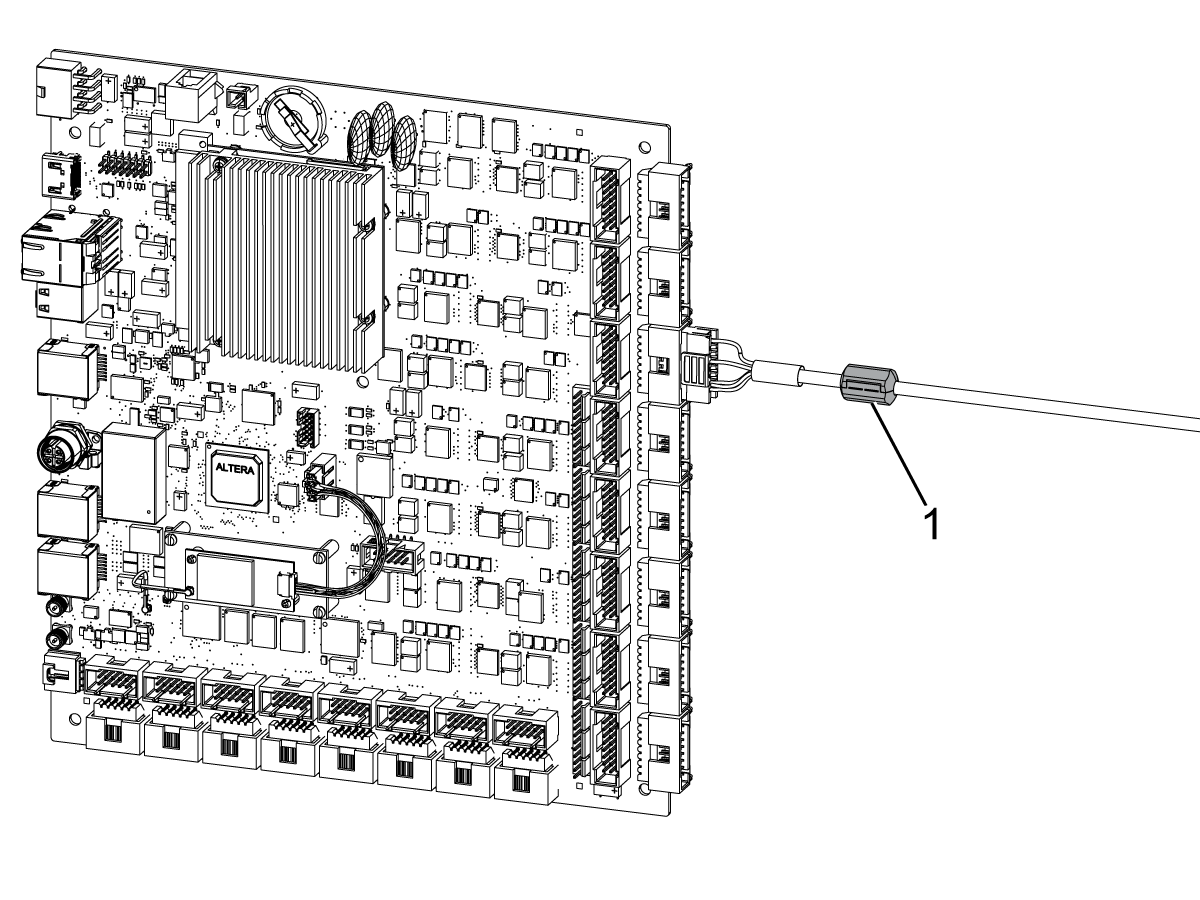
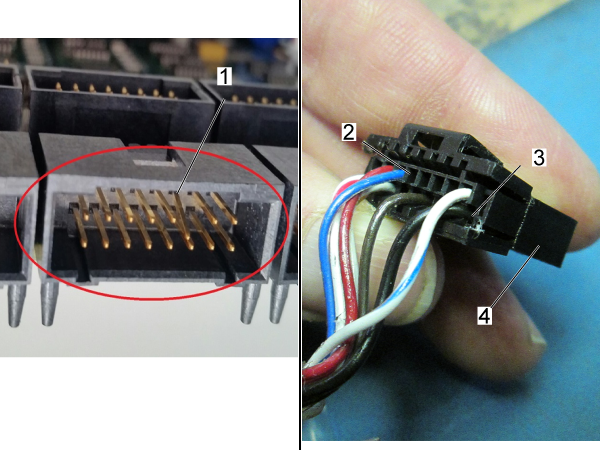
Examine the connector [1] on the Maincon PCB. Make sure it is not damaged.

Examine the cable. Look for signs of damage or stiffness. The connector [4] has two housings [2,3] for the cable pins.

Measure the resistance on the encoder cable from leg to leg, and from leg to ground. Make sure each measurement results in an open connection.

Make sure the cable is firmly connected at both ends. Reseat both connections. Make sure the cable is installed in the correct connector at the Maincon PCB.

Non-Contact Encoder Read Head Grounding

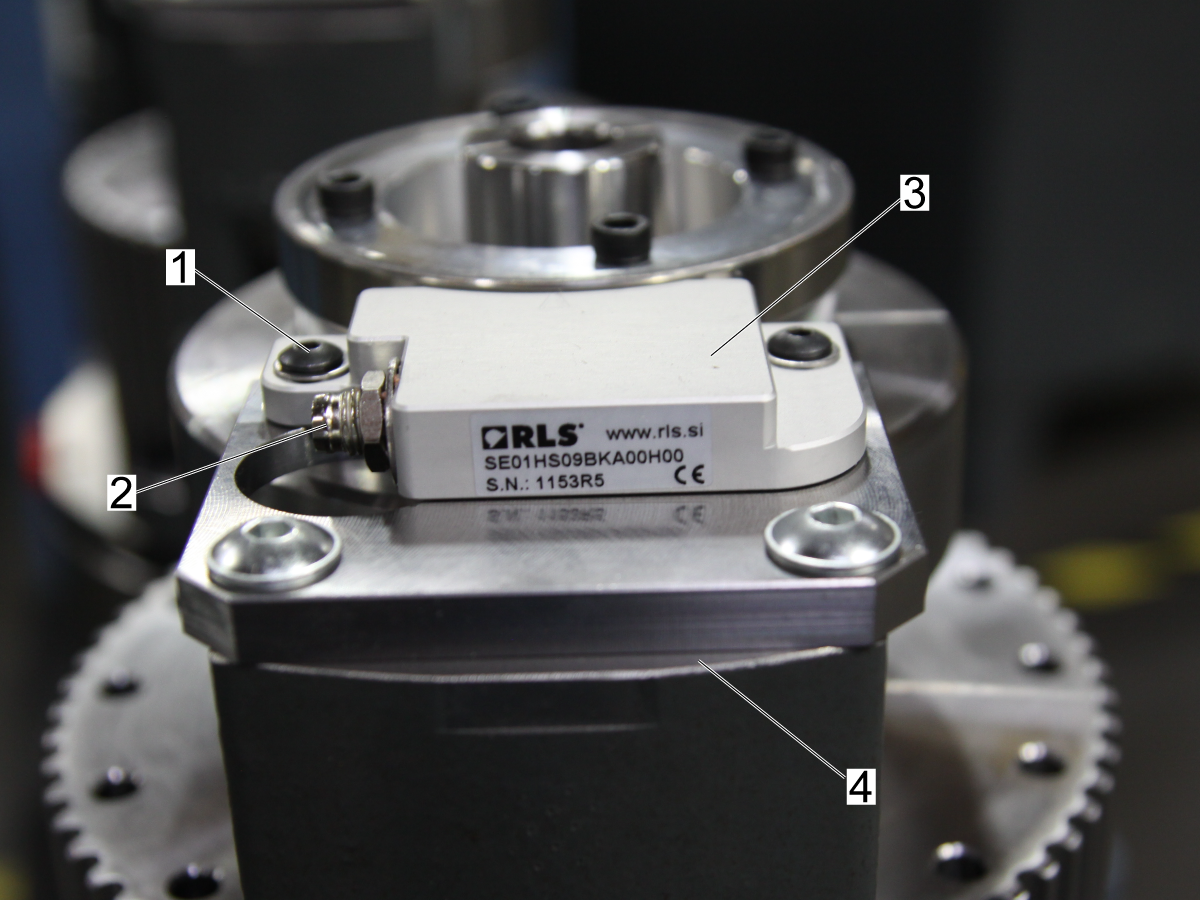
Read Head and Casting

  1. Disconnect the cable from the encoder read head.
  2. Use a multimeter and check the continuity between the read-head screw and the casting.
  3. If there is little or no continuity:
  • make sure the grounding cable to the spindle head casting is secured.
  • make sure the mounting screws are making contact with bare metal and not the anodized layer.

Connector Case and Read Head

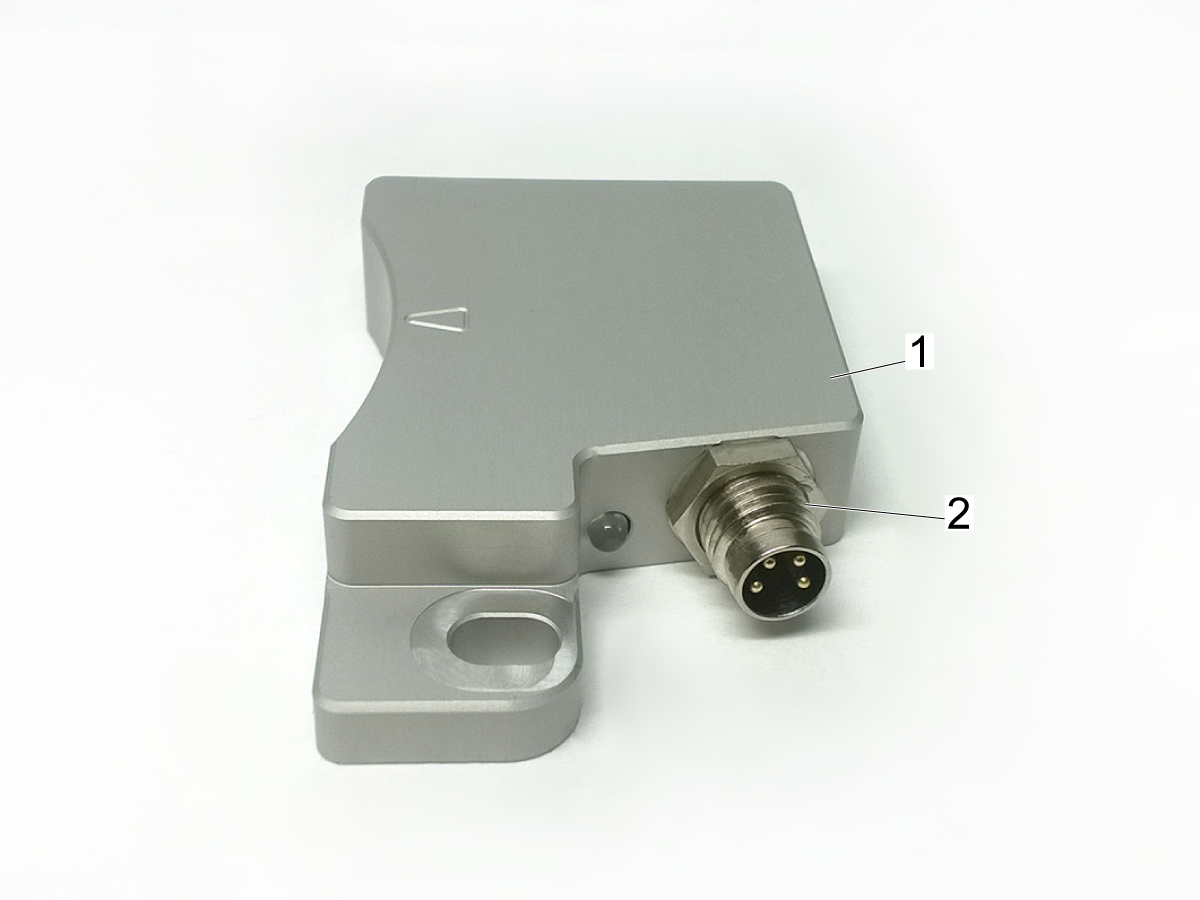
  1. Check the continuity between the read head connector case [2] and the read head [1].
  2. If there is little or no continuity:
  • remove the jamnut from the M8 connector and install an M8 internal star washer onto the connector.
  • install and tighten the jamnut over the M8 star washer and install the read-head back onto the mounting bracket.

Non-Contact Encoder - Identification

Generation 1 and Generation 2 non-contact encoders are not compatible, and will not communicate with each other. If you are upgrading from a Generation 1 NCE to a Generation 2 NCE, the read head and encoder ring will both need to be replaced. 

Generation 2 non-contact encoders can be identified by the pigtail cable attached to the side of the read head [1]. Generation 1 encoders do not have this cable. 

Mill Encoder Ring to Read Head Alignment

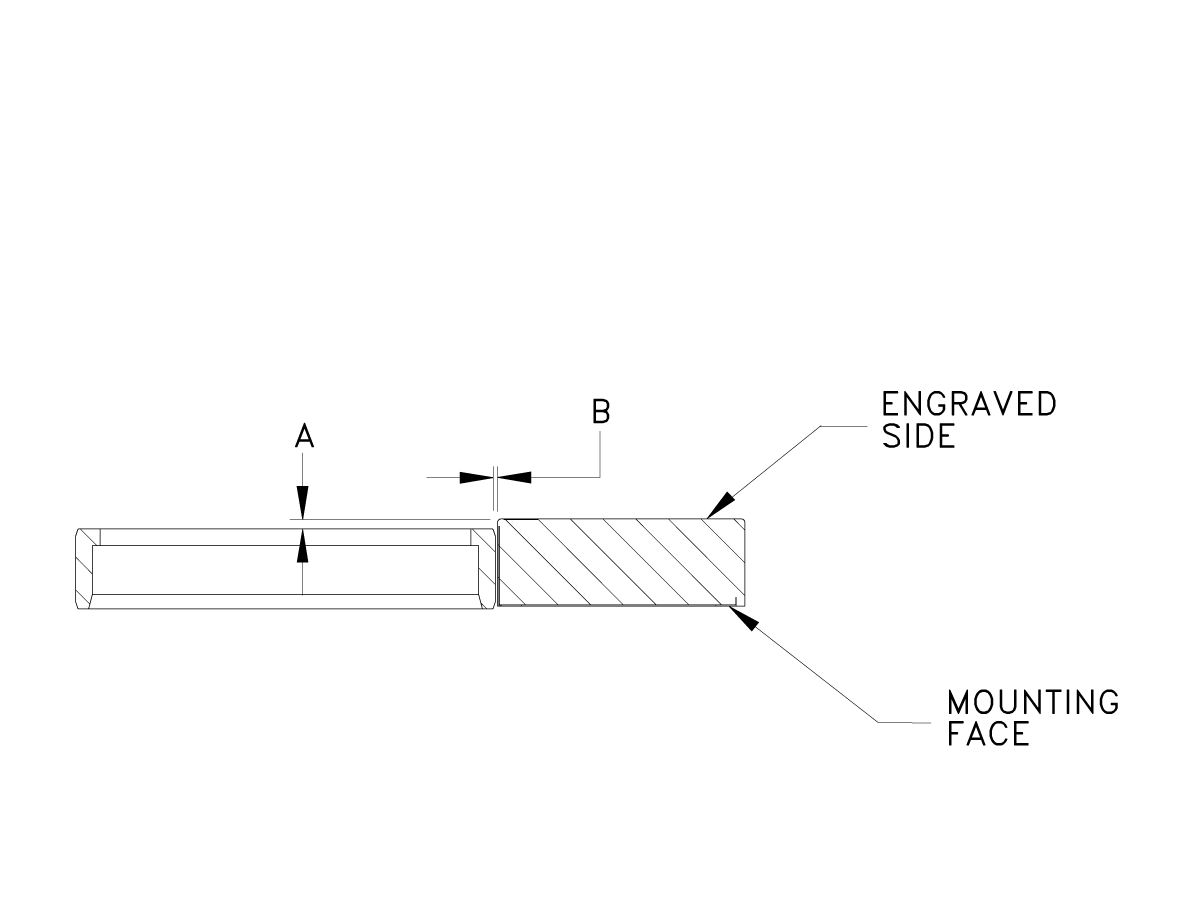
Generation 2 Alignment: Proper alignment of the read head to the encoder ring is critical.  Check that the axial alignment and running gap of the encoder ring are correct.

[A] 0.000 +/- 0.045

[B] 0.012 + 0.008 - 0.004


 Note: If the read head and encoder cannot be aligned, the alignment bracket may need to be replaced. See Replace Alignment Bracket below. 

Note: For Generation 1 encoders, use the chart below. 

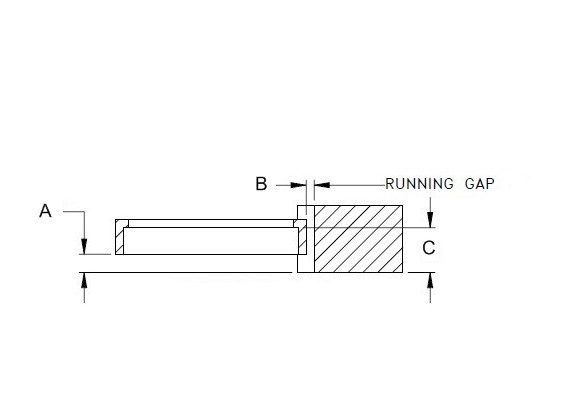
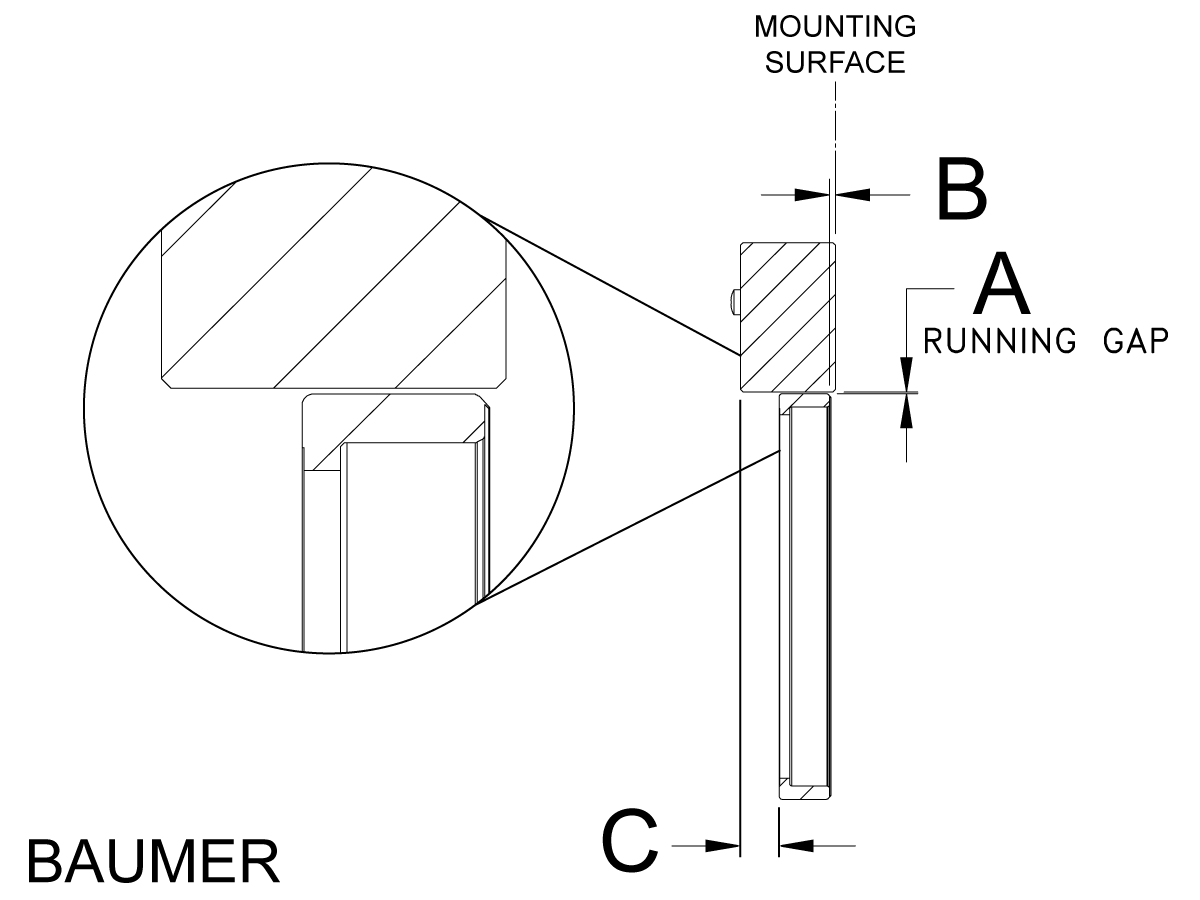
Generation 1 Alignment: Proper alignment of the read head to the encoder ring is critical. The alignment will vary based on the brand of encoder.  Use the chart provided to make sure the encoder ring and read head are properly aligned.

VENDOR                               RLS                                    BAUMER

A                              0.020" +0.020 / -0.039                 0.0453" +/- 0.019

B                              0.0118" +0.0079 / -0.0039           0.0118" +/- 0.0039

C                                           0.362"                                     0.360"

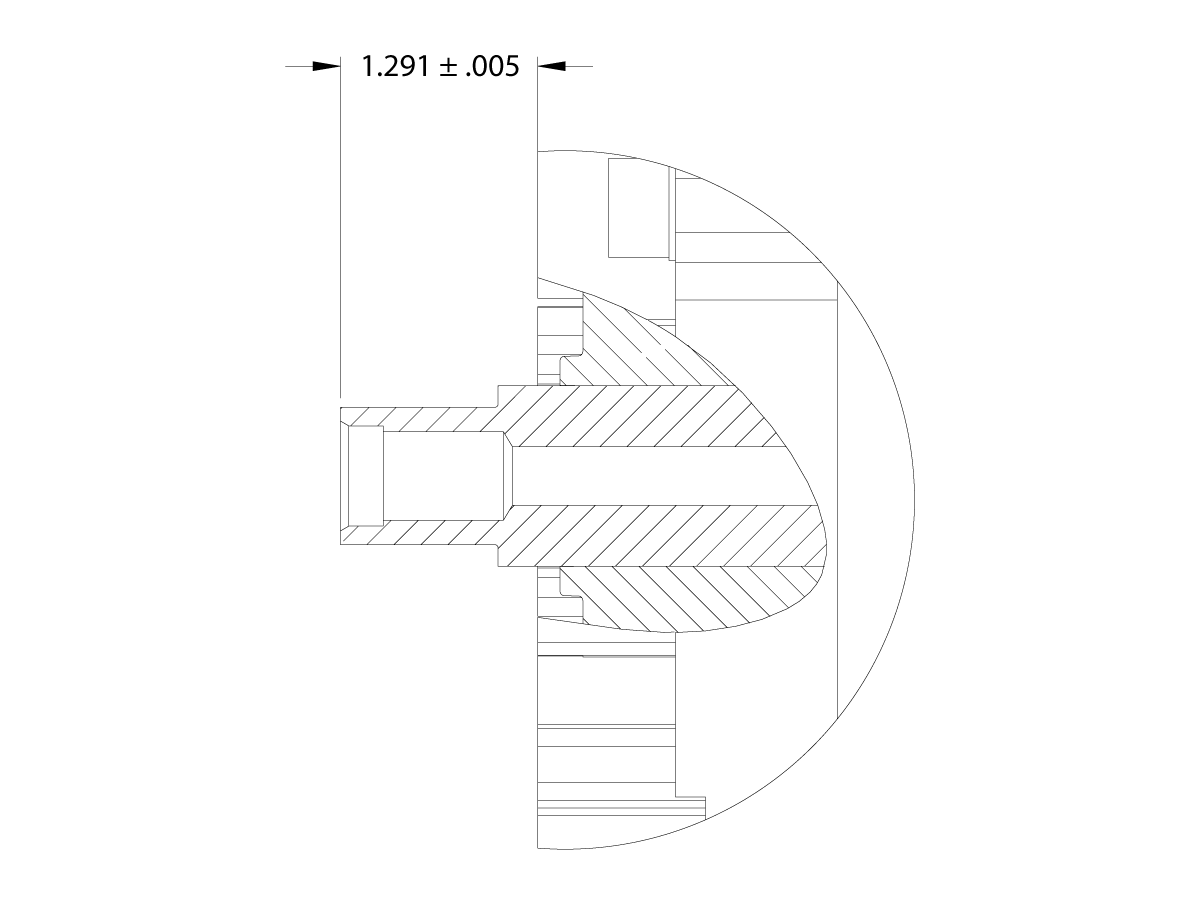
Incorrect installation of the spindle may axially misalign the motor shaft.  Measure the distance from the top of the motor shaft to the top of the motor TSC mounting hole surfaces.  It should be 1.291 ± .005.

If the shaft is axially misaligned the spindle motor must be replaced.

Replace Alignment Bracket

Updated

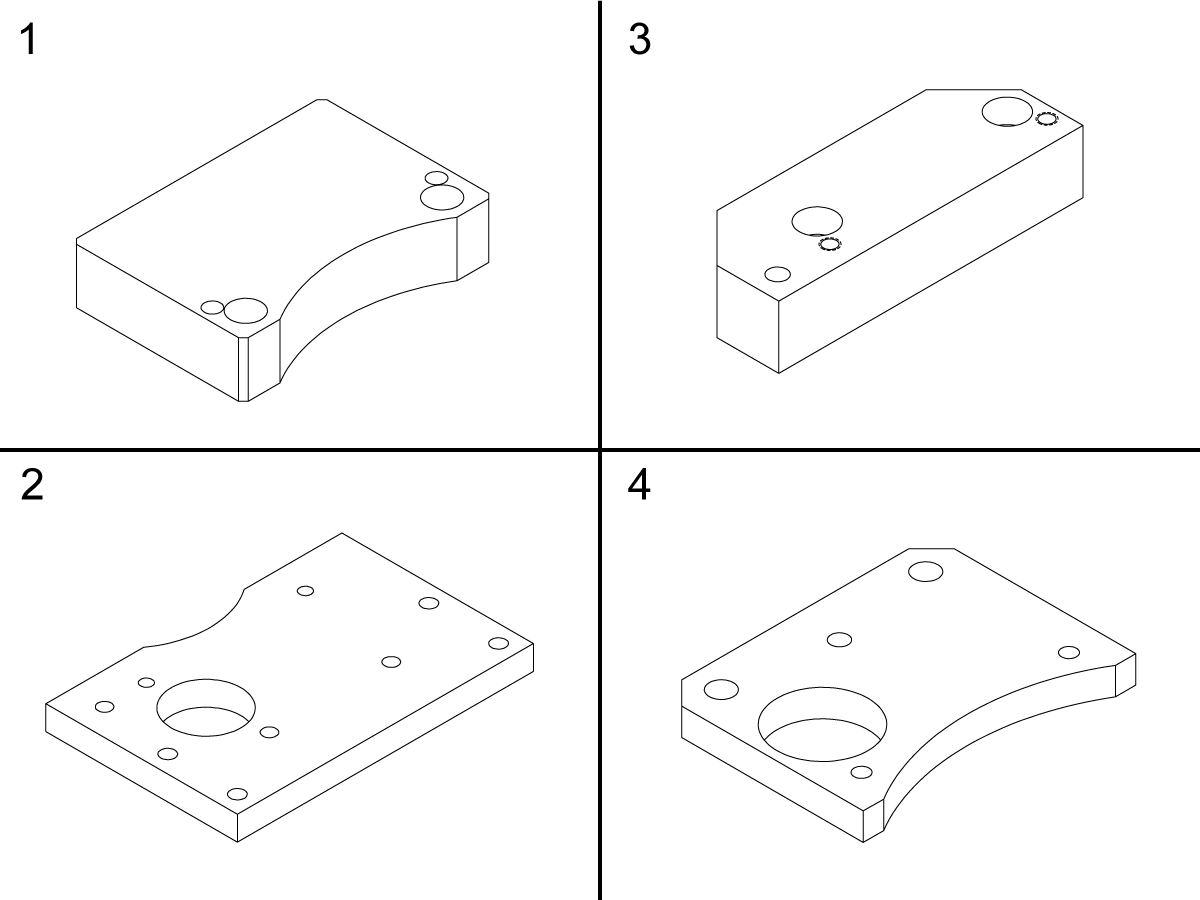
If the read head and encoder cannot be aligned, the alignment bracket may need to be replaced.

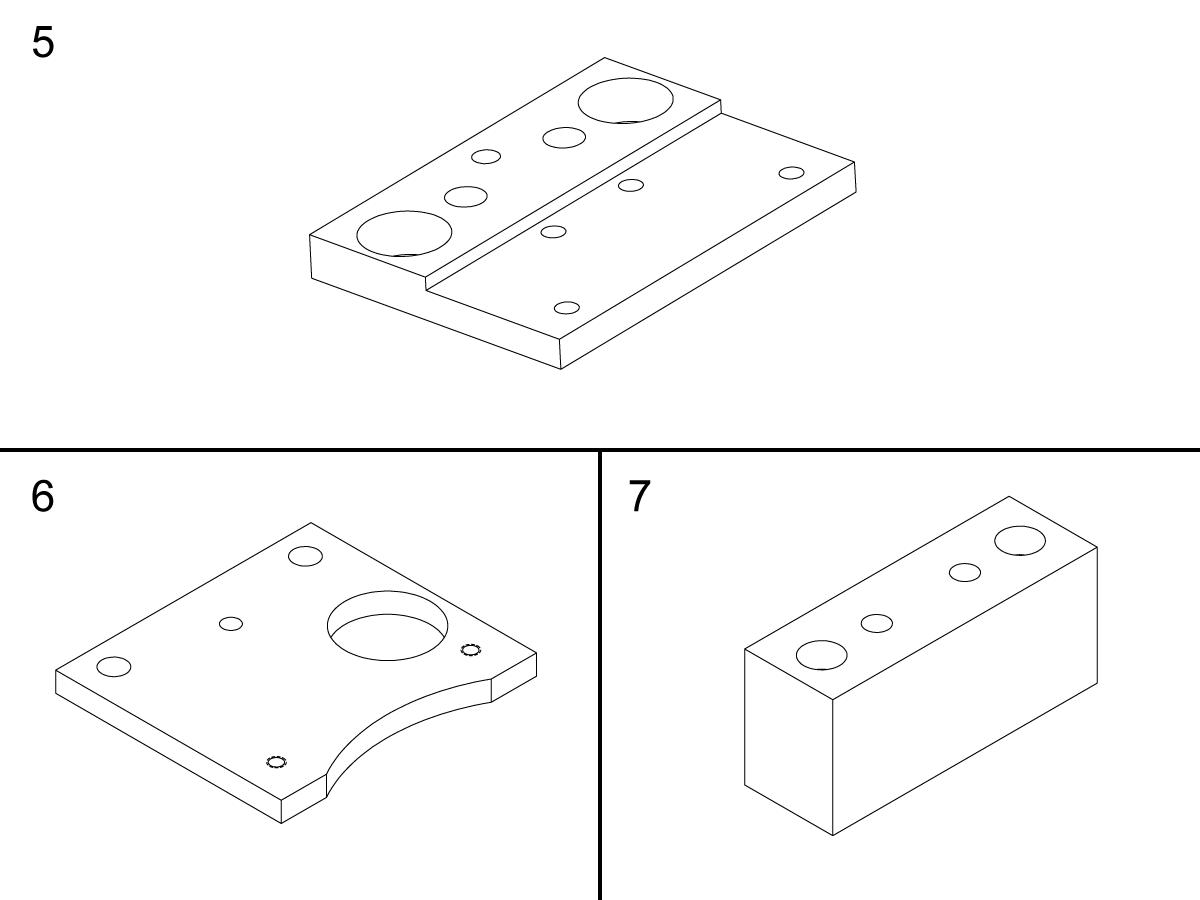
If your machine uses 20-6639 MOUNT READ HEAD NCE 3" DT KTR [1], order part 20-6639A MOUNT READ HEAD NCE 3" DT KTR.

If your machine uses 20-6944A NCE READ HEAD MOUNT 40T INLINE [2], order part 20-6944B NCE READ HEAD MOUNT, 40T INLINE.

If your machine uses 20-7960A NCE READ HEAD MOUNT, DT 20K, ST [3], order part 20-7960B MOUNT READ HEAD NCE 2" GEN2 20K.

If your machine uses 20-6596A NCE READ HEAD MOUNT, 50T SPINDL [4], order part 20-6596B MOUNT READ HEAD NCE 3" GEN2 50T. 


Updated

If your ST-28/30/35 uses 20-8301 NCE READ HEAD MOUNT TL, ST [5], order part 20-11055 MNT READ HEAD NCE3" ST-28/30/35

If your ST-15/20 uses 20-8301 NCE READ HEAD MOUNT TL, ST [5], order part 20-11056 MNT READ HEAD NCE3" ST-15/20

If your machine uses 20-7669 NCE READ HEAD MOUNT ST-40/45 GB [6], order part 20-7669A NCE READ HEAD MOUNT ST-40/45 GB

If your machine uses 20-7328A NCE READ HEAD SPACER, TL  [7], order part 20-7328C SPACER READ HEAD NCE 2" GEN2 TL


Lathe Encoder Ring to Read Head Alignment

Proper alignment of the read head to the encoder ring is critical. The alignment will vary based on the brand of encoder. Use the chart provided to make sure the encoder ring and read head are properly aligned.

        VENDOR                                 RLS

               A                    0.0118" +0.0079 / -0.0039

               B                       0.0591" +0.059 / -0.019

               C                                    (0.0197")

IMPORTANT: If C for RLS 2" or 3" NCE is over 0.0197" you will need to order a new NCE read head mount:

If machine currently uses 20-7328A NCE READ HEAD SPACER, TL, then order:

  • 20-7328C SPACER READ HEAD NCE 2" GEN 2 TL

If machine currently uses 20-7669 NCE READ HEAD MOUNT, ST-40/50 GBOX, then order:

  • 20-7669A NCE READ HEAD MOUNT ST-40/45 GBOX GEN 2

NOTE: For ST-15/20/28/30/35 machines, see ST-15/20/28/30/35 - Non-Contact Encoder Ring - Replacement

Proper alignment of the read head to the encoder ring is critical. The alignment will vary based on the brand of encoder. Use the chart provided to make sure the encoder ring and read head are properly aligned.

        VENDOR                                 BAUMER

               A                                0.0118" +/-0.004

               B                                 0.045" +/-0.019

               C                                        (0.305")


Ferrite Filters on Vector Drive

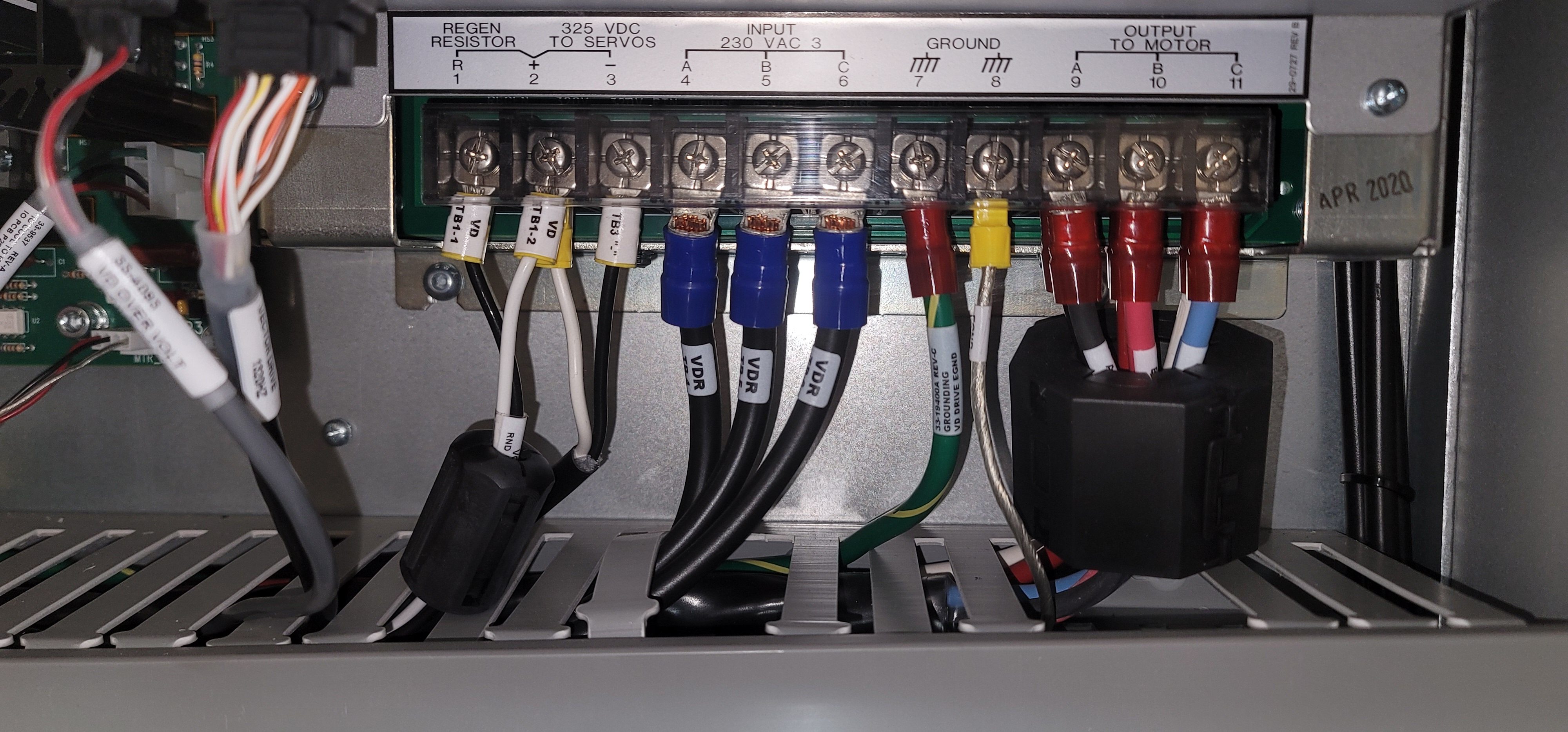
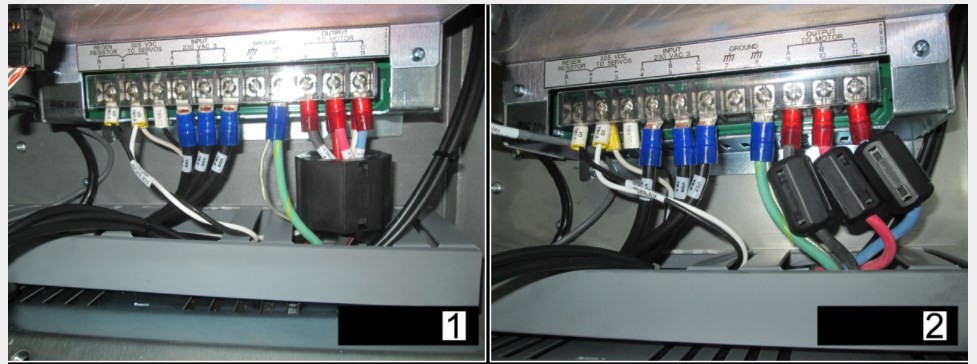
Incorrect placement of the ferrite filter or incorrect ferrite filters can result in the control reading the Z-pulse as 2 or 3 different pulses or none. This causes the control to think the communication between the spindle encoder and processor has been lost, making the machine to alarm.

Top image shows the correct installation of the ferrite filters on the vector drive.

One ferrite filter on the Black and White cables from the Regen terminals 1 and 2 with one large ferrite filter on the motor leads at terminals 9, 10 and 11. making sure ground in out side of the Ferrite filter.

Lower image show two examples of incorrect installation of ferrite filters.

Image 1 : Large ferrite filter over motor leads at terminals 9, 10 and 11. with no ferrite filter on the regen cable at terminals 1 and 2

Image 2: No ferrite filter on the regen cable at terminals 1 and 2 and three small ferrite filters on the motor leads at terminals 9, 10 and 11.


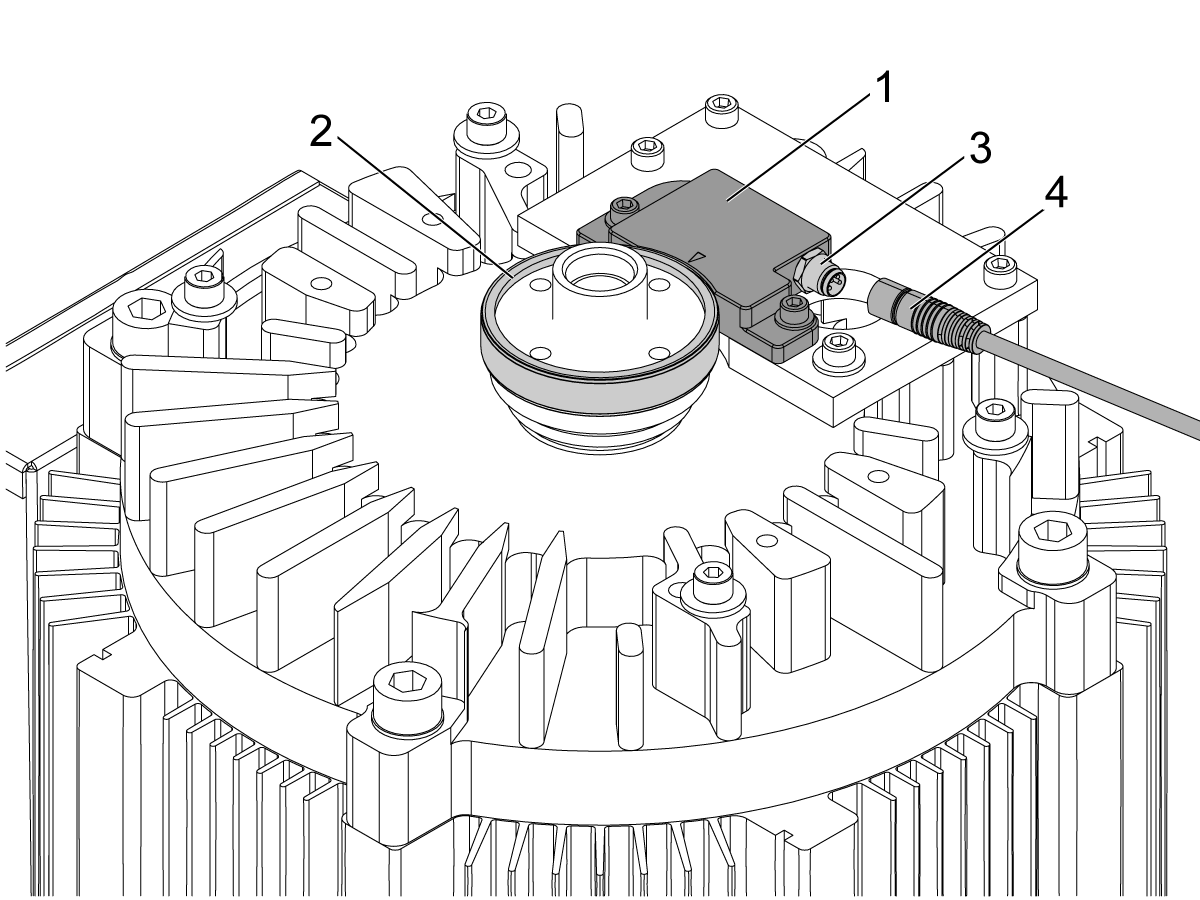
Non-Contact Encoder Cable Connection

1

Follow the steps below to clean the encoder cable connection:

  1. Power [OFF] the control.
  2. Remove the spindle head cover. 
  3. Wipe down the read head [1] and ring [2] to prevent any chips and coolant from entering the exposed connectors.
  4. Disconnect the encoder cable [4] from the connection [3] on the read head and spray WD40 in both connectors to displace any coolant.
  5. Apply dielectric grease on the read head connector.
  6. Slowly push and rotate the connector nut so that you don't force the pins apart during this re-attachment process.
  7. Power [ON]  the control and test spindle for previous spindle encoder alarms.

Spindle Encoder Cable Rubbing

This section only applies to machines built after 2020 and before the time frames listed below:

ST-10 built before 2/17/2022
ST-15 built before 2/15/2022
ST-20/25 built before 4/4/2022
ST-20L/25L built before 10/10/2022
ST-30 built before 10/10/2022
ST-30L built before 11/16/2022

Order and install 59-2042 CABLE CLAMP 11/16 RICHCO SPNW-11 in the location shown in the image. Using a zip tie move the cable out of the path of the spindle belt, the cable will not be able to go in the cable clamp as it is not long enough to reach. 

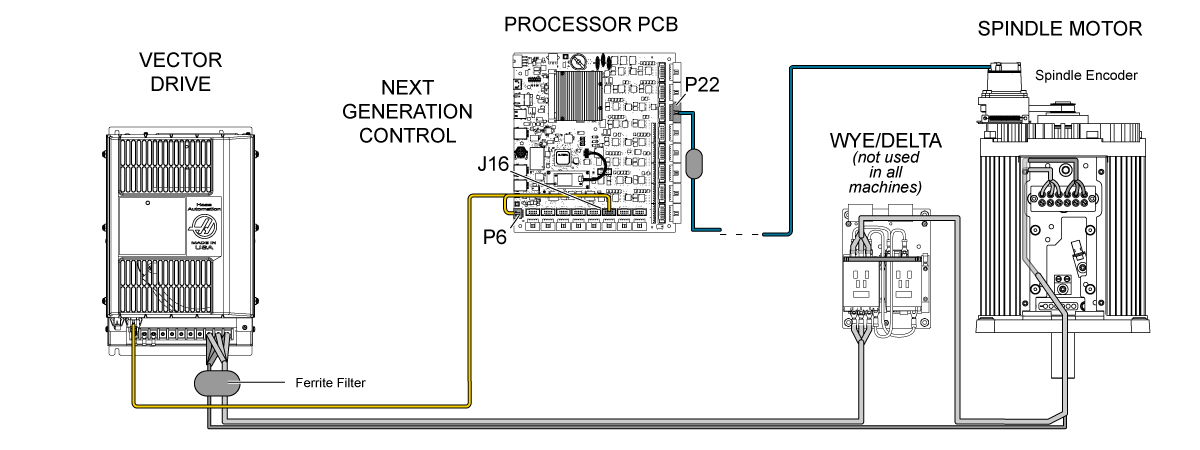
Electrical Diagram

Recently Viewed Items

You Have No Recently Viewed Items Yet

Feedback
Haas Logo

Haas Delivered Price

This price includes shipping cost, export and import duties, insurance, and any other expenses incurred during shipping to a location in France agreed with you as a buyer. No other mandatory costs can be added to the delivery of a Haas CNC Product.

KEEP UP WITH THE LATEST HAAS TIPS AND TECHNOLOGY...

Sign up now!   

HAAS TOOLING ACCEPTS THE FOLLOWING:

  • Service & Support
  • Owners
  • Request Service
  • Operator Manuals
  • Haas Parts
  • Rotary Repair Request
  • Pre-Install Guides
  • Shopping Tools
  • Build & Price a New Haas
  • Available Inventory
  • The Haas Price List
  • CNCA Financing
  • About Haas
  • Accessibility Statement
  • DNSH Statement
  • Export Compliance
  • Careers
  • Certifications & Safety
  • Contact Us
  • History
  • Terms & Conditions
  • Haas Tooling Terms & Conditions
  • Privacy
  • Warranty
  • Haas Community
  • Haas Certification Program
  • Haas Motorsports
  • Gene Haas Foundation
  • Haas Technical Education Community
  • Events
  • Join the Conversation
  • Facebook
  • X
  • Flickr
  • YouTube
  • LinkedIn
  • Instagram
  • TikTok
© 2026 Haas Automation, Inc – CNC Machine Tools

This site is protected by reCAPTCHA and the Google Privacy Policy and Terms of Service apply.

2800 Sturgis Rd., Oxnard, CA 93030
Toll Free: (888) 817-4446 / Fax: 805-278-8554