My Haas Welcome,
!
Haas Tooling MyHaas/HaasConnect Sign In Register Haas Tooling MyHaas/HaasConnect Sign Out Welcome, My Machines Latest Activity My Quotes My Account My Users Sign Out
Find Your Distributor
  1. Select Language
    1. English
    2. Deutsch
    3. Español - ES
    4. Español - MX
    5. Français
    6. Italiano
    7. Português
    8. Český
    9. Dansk
    10. Nederlands
    11. Magyar
    12. Polski
    13. Svenska
    14. Türkçe
    15. 中文
    16. Suomi
    17. Norsk
    18. الإنجليزية
    19. български
    20. Hrvatski
    21. Ελληνικά
    22. Română
    23. Slovenský
    24. Slovenščina
    25. 한국어
    26. 日本語
    27. Українська
  • machines Main Menu
    • Vertical Mills
      Vertical Mills
      Vertical Mills View All
      • Vertical Mills
      • VF Series
      • Universal Machines
      • VR Series
      • VP-5 Prismatic
      • Pallet-Changing VMCs
      • Mini Mills
      • Mold Machines
      • High-Speed Drill Centers
      • Drill/Tap/ Mill Series
      • Toolroom Mills
      • Pocket Mill
      • Compact Mills
      • Gantry Series
      • SR Sheet Routers
      • Extra-Large VMC
      • Double-Column Mills
      • 3+2 Positioning Machines
    • Multi-Axis Solutions
      Multi-Axis Solutions
      Multi-Axis Solutions View All
      • Multi-Axis Solutions
      • Y-Axis Lathes
      • 5-Axis Mills
    • Lathes
      Lathes
      Lathes View All
      • Lathes
      • ST Series
      • Dual-Spindle
      • Box Way Series
      • Toolroom Lathes
      • Chucker Lathe
      • Pocket Lathe
      • Haas Bar Feeders
    • Horizontal Mills
      Horizontal Mills
      Horizontal Mills View All
      • Horizontal Mills
      • 50-Taper
      • 40-Taper
    • Rotaries & Indexers
      Rotaries & Indexers
      Rotaries & Indexers View All
      • Rotaries & Indexers
      • Rotary Tables
      • Indexers
      • 5-Axis Rotaries
      • Extra-Large Rotaries
    • Special Series
      Special Series
      Special Series View All
      • Special Series
      • EU_Series_Redirect
    • Automation Systems
      Automation Systems
      Automation Systems View All
      • Automation Systems
      • Mill Automation
      • Lathe Automation
      • Automatic Parts Loaders
      • Automation Models
    • Desktop Machines
      Desktop Machines
      Desktop Machines View All
      • Desktop Machines
      • Desktop Mill
      • Desktop Lathe
      • Control Simulator, Standard
      • Control Simulator, Premium
    • Shop Equipment
      Shop Equipment
      Shop Equipment View All
      • Shop Equipment
      • Knee Mill
      • Haas Manual Lathes
      • Haas Saws
    • Fabrication Machines
      Fabrication Machines
      Fabrication Machines View All
      • Fabrication Machines
      • Laser Cutting Machines
      • CNC Press Brakes
    • QUICK LINKS Special Series  Special Series 
      EU SERIES EU SERIES BUILD & PRICE | PRICE LIST BUILD & PRICE | PRICE LIST In-Stock Machines In-Stock Machines WHAT’S NEW WHAT’S NEW YOUR FIRST CNC YOUR FIRST CNC
      SHOPPING TOOLS
      • Build & Price a Haas
      • Price List
      • Available Inventory
      • CNCA Financing
      WANT TO TALK TO SOMEONE?

      A Haas Factory Outlet (HFO) can answer your questions, and walk you through your best options.

      CONTACT YOUR DISTRIBUTOR >
  • Options Main Menu
    • The Haas Control Value Option Packages
      Value Option Packages
      Value Option Packages View All
      • Value Option Packages
    • Product Image Spindles
      Spindles
      Spindles View All
      • Spindles
    • Product Image Tool Changers
      Tool Changers
      Tool Changers View All
      • Tool Changers
    • Product Image 4th- | 5th-Axis
      4th- | 5th-Axis
      4th- | 5th-Axis View All
      • 4th- | 5th-Axis
    • Product Image Turrets & Live Tooling
      Turrets & Live Tooling
      Turrets & Live Tooling View All
      • Turrets & Live Tooling
    • Product Image Probing
      Probing
      Probing View All
      • Probing
    • Haas Chip & Coolant Management Chip & Coolant Management
      Chip & Coolant Management
      Chip & Coolant Management View All
      • Chip & Coolant Management
    • The Haas Control The Haas Control
      The Haas Control
      The Haas Control View All
      • The Haas Control
    • Product Image Product Options
      Product Options
      Product Options View All
      • Product Options
    • Product Image Tooling & Fixturing
      Tooling & Fixturing
      Tooling & Fixturing View All
      • Tooling & Fixturing
    • Product Image Workholding
      Workholding
      Workholding View All
      • Workholding
    • Product Image 5-Axis Solutions
      5-Axis Solutions
      5-Axis Solutions View All
      • 5-Axis Solutions
      • 5 Easy Steps to 5-Axis
    • QUICK LINKS Special Series  Special Series 
      EU SERIES EU SERIES BUILD & PRICE | PRICE LIST BUILD & PRICE | PRICE LIST In-Stock Machines In-Stock Machines WHAT’S NEW WHAT’S NEW YOUR FIRST CNC YOUR FIRST CNC
      SHOPPING TOOLS
      • Build & Price a Haas
      • Price List
      • Available Inventory
      • CNCA Financing
      WANT TO TALK TO SOMEONE?

      A Haas Factory Outlet (HFO) can answer your questions, and walk you through your best options.

      CONTACT YOUR DISTRIBUTOR >
  • Why Haas Main Menu
      Discover the Haas Difference
    • Why Haas
    • MyHaas
    • Education Community
    • Industry 4.0
    • Haas Certification
    • Customer Testimonials
  • Service Main Menu
      Welcome to Haas Service
      SERVICE HOME Operator’s Manuals How-To Procedures Troubleshooting Guides Preventive Maintenance Haas Parts Haas Tooling Videos
  • Videos Main Menu
  • Main Menu
    • View All
    • View All
    • View All
    • View All
      • HTEC Curriculum Support
      • Haas Value Option Packages (VOP) Journey
    • View All
      • Haas 10 kg Cobot Package
      • Cobot Kits
      • DC-1 Drill Center
      • CNC Sales News
      • Do More With Your Haas
    • View All
    • View All
      • contact-us-test
      • 4 - AUTOMATION SYSTEMS
      • Carousel-V2
      • expert test
      • Demo_Day_Trident-test
      • Link Test
      • image-sale-tag-test
      • article-list-test
      • Haas 25 kg Robot Package
      • test-algolia-page
    • View All
    • View All
    • View All
    • View All
      • calc-test
    • View All
    • QUICK LINKS Special Series  Special Series 
      EU SERIES EU SERIES BUILD & PRICE | PRICE LIST BUILD & PRICE | PRICE LIST In-Stock Machines In-Stock Machines WHAT’S NEW WHAT’S NEW YOUR FIRST CNC YOUR FIRST CNC
      SHOPPING TOOLS
      • Build & Price a Haas
      • Price List
      • Available Inventory
      • CNCA Financing
      WANT TO TALK TO SOMEONE?

      A Haas Factory Outlet (HFO) can answer your questions, and walk you through your best options.

      CONTACT YOUR DISTRIBUTOR >
  • Haas Tooling Main Menu
  • Haas Service Parts Main Menu
My Haas Welcome,
!
Haas Tooling MyHaas/HaasConnect Sign In Register Haas Tooling MyHaas/HaasConnect Sign Out Welcome, My Machines Latest Activity My Quotes My Account My Users Sign Out
Find Your Distributor
  1. Select Language
    1. English
    2. Deutsch
    3. Español - ES
    4. Español - MX
    5. Français
    6. Italiano
    7. Português
    8. Český
    9. Dansk
    10. Nederlands
    11. Magyar
    12. Polski
    13. Svenska
    14. Türkçe
    15. 中文
    16. Suomi
    17. Norsk
    18. الإنجليزية
    19. български
    20. Hrvatski
    21. Ελληνικά
    22. Română
    23. Slovenský
    24. Slovenščina
    25. 한국어
    26. 日本語
    27. Українська
×

Search Results

Web Pages

Images

    • <
    • 1
    • >

13. DC-Series - Spindle Chiller

DC-Series Operator's/Service Manual


  • 0. DC-Series - Table of Contents
  • 1. DC-Series - Introduction
  • 2. DC-Series - Legal Information
  • 3. DC-Series - Safety
  • 4. DC-Series - Installation
  • 5. DC-Series - Operation / Tool Changer
  • 6. DC-Series - Control Icons
  • 7. DC-Series - Programming
  • 8. DC-Series - G-Codes
  • 10. DC-Series - M-Codes
  • 10. DC-Series - Settings
  • 11. DC-Series - Maintenance
  • 13. DC-Series - Spindle Chiller
  • 13. DC-Series - Spindle
  • 14. DC-Series - Spindle Motor

Go To :

  • 13.1. DC-Series - Spindle Chiller Operation
  • 13.2. DC-Series - Spindle Chiller Maintenance
  • 13.3. DC-Series - Spindle Chiller Troubleshooting

13.1. DC-Series - Spindle Chiller Operation

Introduction

The DC-1 comes with a spindle chiller unit located next to the control on the back of the machine. This spindle chiller helps regulate the temperature of the spindle. This section provides operation information specific to the spindle chiller.

View Parameters

The spindle chiller is automatically powered on when the spindle is operated, or when a tool change occurs. The power button on the front of the spindle chiller does not need to be changed.

The spindle chiller uses a parameter based system to determine how much cooling needs to be done. These parameters are set in the factory and should not be altered. If the Haas control is showing alarm 9003 - Low Spindle Coolant Chiller Oil Flow then refer to the troubleshooting section of this chapter before altering parameter values.

1

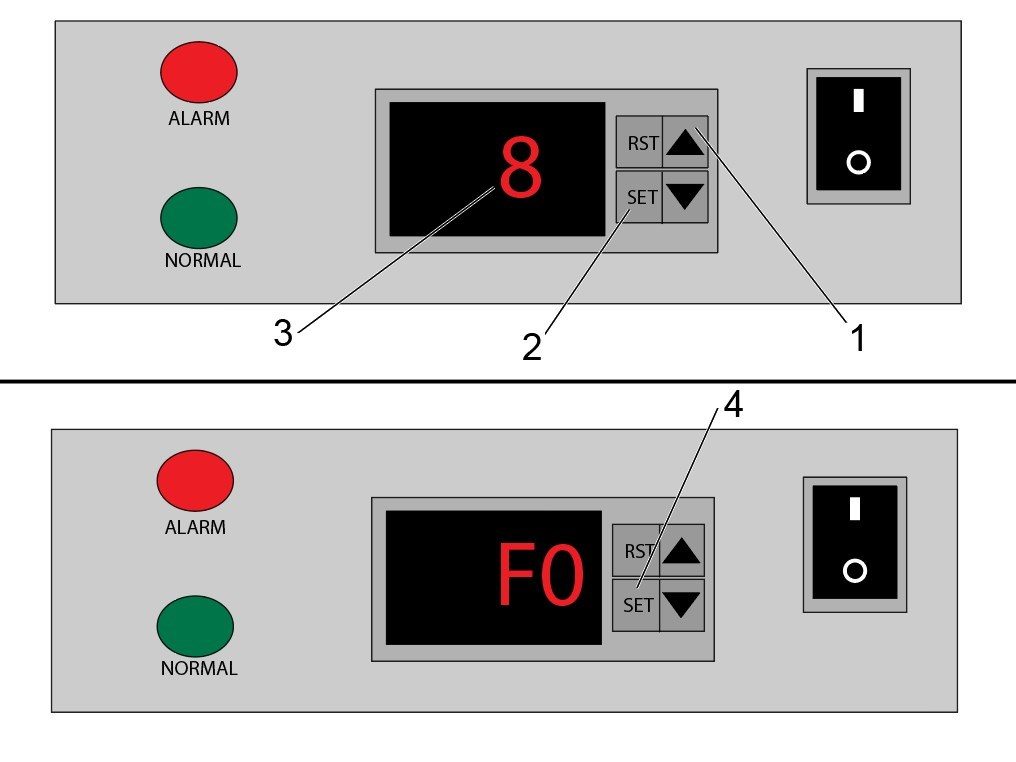
To view the parameter values on the spindle chiller, follow these steps:

  1. Press and hold the [UP] arrow [1] on the chiller control.
  2. Press and hold the [SET] button [2] while still holding the up arrow. There needs to be about a half second delay between pressing the [UP] arrow and the [SET] button in order to access the parameters.
  3. Hold these buttons until the display on the chiller shows a "0". Press the arrow keys untill the display shows "8" [3] as shown in the top image and then press the [SET] button to navigate into the parameters page.
  4. Once in the parameters page, you can press the arrow keys to navigate to diferent paramters. Each parameter has a value that can be accessed by pressing the [SET] button.

2

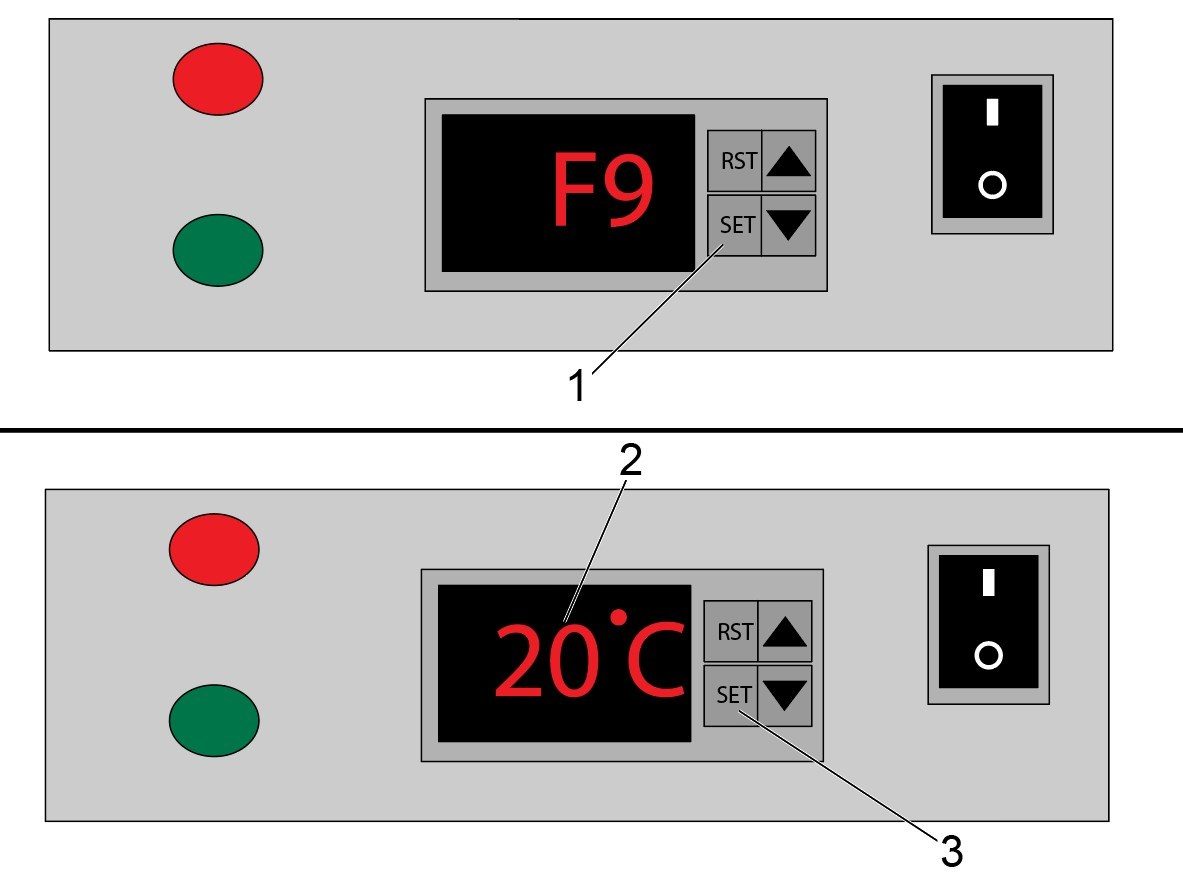
This image shows and example of accessing parameters and setting the values. 

After entering the parameters page and navigating to F9 using the arrow keys, press the [SET] button [1] to view the current parameter value. The value will appear on the display [2] and the value can be changed using the arrows. To set the new value press the [SET] button [3] again.

Note: Parameter values should not be changed from their factory set values. The parameter F9 should be set to 20 degrees celsius.

Note: Parameters are labeled F0-F9. Refer to the table below for an explanation of the parameters.

Parameter Functions

This table lists the parameters that can be accessed as well as their function and factory set value.

Important: These parameters should not be altered from the factory set point. This table is provided for troubleshooting information to return the spindle chiller to its factory condition.

Parameter Name Function Value Set in Factory
F0 Sets the temperature that the spindle chiller will try to keep the fluid at 25.0 Celsius
F1 Sets the allowed difference between the chiller fluid temperature and the ambient temperature 0.0 Celsius
F2 Sets the allowed temperature difference between the fluid going to spindle vs. fluid returning from spindle 3.0 Celsius
F3 Sets the method of temperature control 0
F4 Sets the temperature threshold above the set point for the low temperature alarm 20.0 Celsius
F5 Sets the temperature threshold above the set point for the high temperature alarm 15.0 Celsius
F6 Sets the temperature threshold for the high ambient temperature alarm 45.0 Celsius
F7 Password value 8
F8 Sets the maximum allowed chiller fluid temperature 30.0 Celsius
F9 Sets the minimum allowed chiller fluid temperature 20.0 Celsius

13.2. DC-Series - Spindle Chiller Maintenance

Introduction

This section provides details about the maintenance required for the DC-1 spindle chiller. 

Spindle Chiller 
Maintenance Item Interval
Inspect Fluid Tank Level.
Daily
Fill Fluid Tank. As Required
Clean Air Inlet Filter.
Weekly
Inspect/Clean Air Outlets.
Weekly

DC-Series Spindle Chiller Maintenance

1

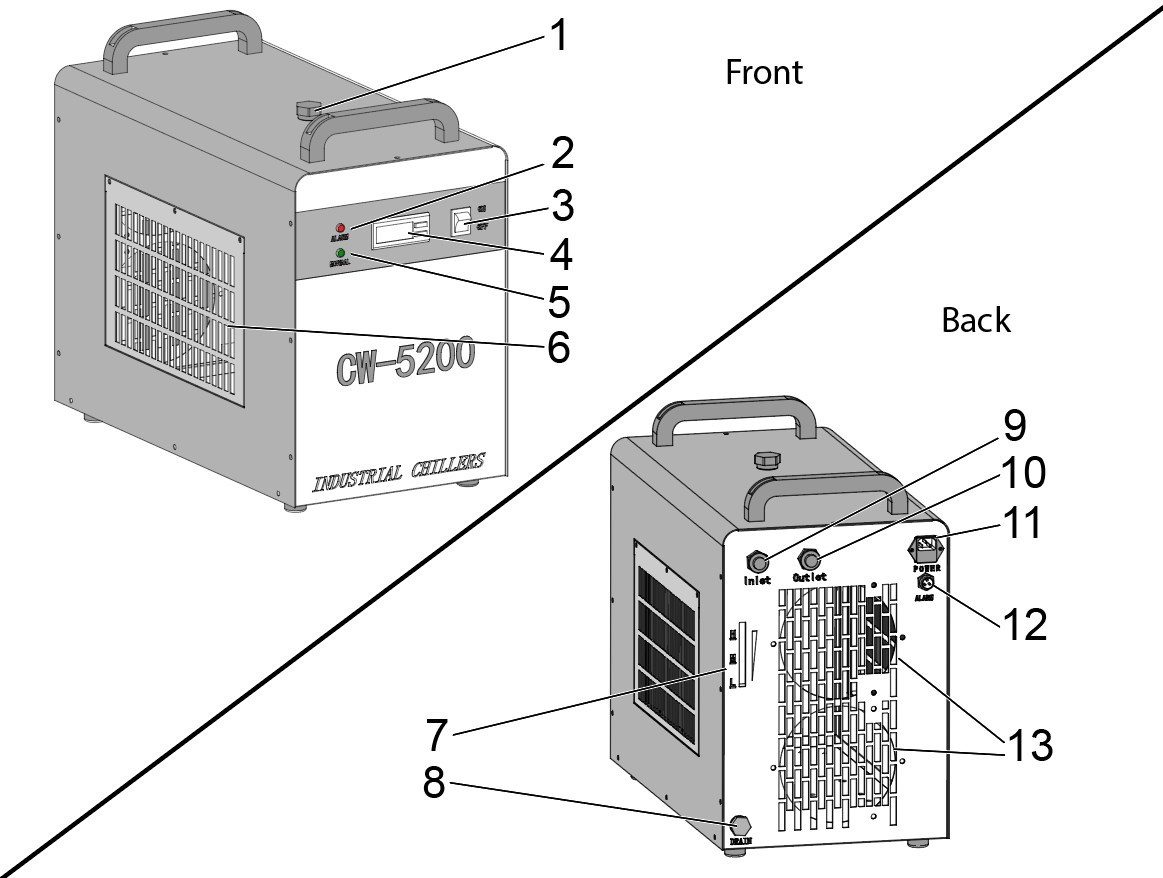
This image shows the key components of the Spindle Chiller:

Front of Chiller:

  • Temperature Control
  • Flow Indicators
  • Air Inlet Filter

Back of Chiller:

  • Fluid Tank Inlet
  • Alarm Terminal
  • Cooling Inlet/Outlet
  • Fluid Level Gauge
  • Air Outlets

2

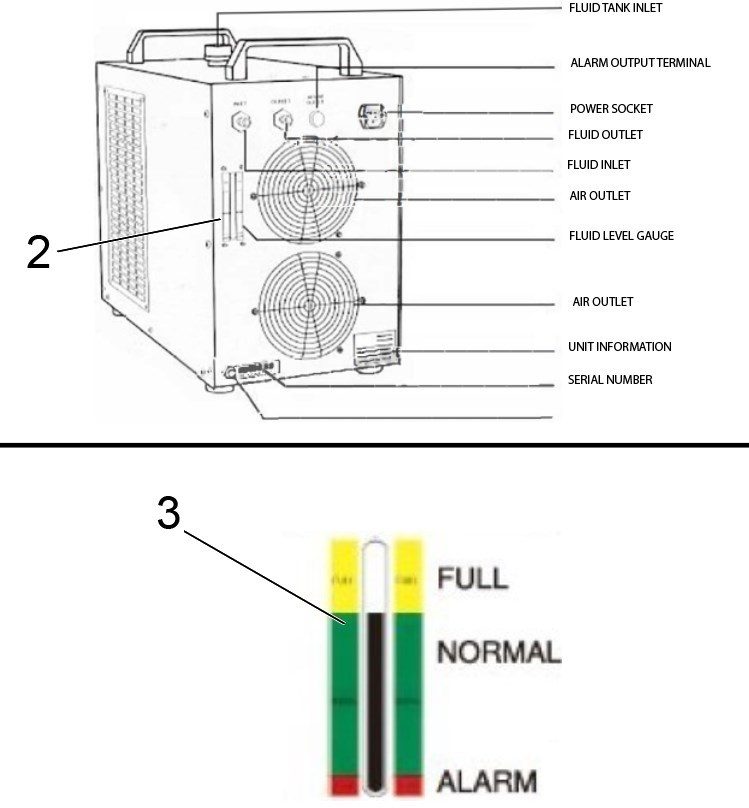
Inspect the fluid tank level by looking at the fluid level gauge located on the back of the spindle chiller [2]. To add fluid to the tank, remove the cap to the inlet at the top of the unit, and fill the tank with a mixture of 30% ethylene glycol and 70% dionized water until the gauge reads the level is at the top of the NORMAL [3] or at the FULL level.

3

To clean the air inlet filter, remove the grate to gain access to the filter unit. From there, remove the filter screen so that any dust or debris can be picked out of the filter. If necessary, wash the filter using water to get rid of contaminants. 

4

Make sure that the air outlets are clear of dust and debris. It is also recommended to allow a clear area of 12 inches directly behind the air outlet vents. This will allow for proper air circulation in the system.

13.3. DC-Series - Spindle Chiller Troubleshooting

Introduction

This section provides troubleshooting information regarding the DC-1 spindle chiller. There are details about how to troubleshoot flow alarms.

DC Spindle Chiller - Symptom Table

If the spindle chiller is not working properly, the Haas control will show alarm 9003 - Low Spindle Coolant Chiller Oil Flow. This alarm is generated as a result of several possible symptoms. See the symptom table below for symptoms and recommended troubleshooting. 

This symptom table also includes potential alarm codes that could appear on the spindle chiller display. These are ambient and fluid temperature alarms.

Important: Changing parameter values should only be done in extreme cases. Make sure to perform all other troubleshooting and maintenance to try and clear the spindle chiller alarms.

Symptom Possible Cause Solution
Alarm 9003 is active on Haas Control. The flow alarm indicator on the front of the spindle chiller is on. (Red LED is on)  There is something blocking the circulation of chiller fluid. There is something blocking the chiller fluid from returning to the spindle chiller. Make sure that there are no leaks coming from the fittings on the back of the spindle chiller. Check underneath the spindle head cover sheet metal and verify that there is no leaks coming from the fittings on the spindle head casting for the spindle chiller.
There is a low amount of chiller fluid in the spindle chiller tank.  Make sure that there is no leaks coming from the chiller unit, or from the fluid lines that deliver chiller fluid to the spindle. After fixing any leaks that caused the chiller fluid level to drop, fill the tank with a mixture of 30% Dowfrost and 70% deionized water. Refer to the maintenance section on the DC-Series spindle chiller for more information on how to fill the tank.
The pump is not working properly.  Replace the spindle chiller pump. 
The flow sensor is faulty and not functioning. Check to make sure that there is circulation in the spindle chiller fluid lines. If there is flow in the lines, you can hold the fluid lines and feel the vibrations caused by the fluid flow. If you can detect flow, but the alarm indicator is on, replace the flow sensor.
Alarm 9003 is active on Haas Control, but the normal flow indicator on the front of the spindle chiller is on. (Green LED is on) The alarm signal cable could be damaged or not functioning. Inspect the spindle chiller alarm cable. Check for damage on both connectors and for damage along the length of the cable. If no damage can be seen on the cable remove the alarm cable from the spindle chiller unit. Use a voltmeter to check for continuity between pins H1 and H3 of the alarm connector. If there is continuity, then there are no alarms coming from the spindle chiller unit. See procedure below for where to check continuity.
The flow alarm indicator (Red LED) is slowly lighting up and the spindle chiller display is briefly flashes. Both then turn off and this cycle repeats. The IO PCB is leaking voltage to the spindle chiller even when the spindle chiller is not being powered on. This is expected behavior for the DC-Series spindle chiller. The spindle chiller will function properly when commanded to turn on. See the section below DC Spindle Chiller Behavior
Spindle chiller display shows E1 message The ambient temperature is above the maximum ambient temperature parameter. The maximum ambient temperature parameter is set to 45 degrees Celsius in the factory. This is parameter F6. See the operation page of this chapter to see factory set parameter values. If the ambient temperature is above 45 degrees Celsius (113 Fahrenheit), see the operation page about adjusting parameter values. If the ambient temperature is below 45 Celsius, check the parameter value and replace the ambient temperature sensor.
Spindle chiller display shows E2 message The fluid temperature is above the maximum fluid temperature parameter. The maximum chiller fluid temperature is set by parameter F5 and is set to 15 degrees Celsius in the factory. Clean the air intake filters to allow for proper ventilation. Make sure that the chiller fluid mixture has the right proportions. The chiller fluid should be 30% Dowfrost 70% deionized water. See the maintenance section for draining the chiller fluid. See the operation page for setting parameter values if needed.
Spindle chiller display shows E3 message The chiller fluid temperature is below the minimum fluid temperature parameter. The minimum chiller fluid temperature is set by parameter F4 and is set to 20 degrees Celsius in the factory. Make sure that the chiller fluid mixture has the right proportions. The chiller fluid should be 30% Dowfrost 70% deionized water.  See the maintenance section for draining the chiller fluid. See the operation page for setting parameter values if needed.
Spindle chiller display shows E4 message The ambient temperature sensor is failing. Replace the ambient temperature sensor.
Spindle chiller display shows E5 message The chiller fluid temperature sensor is failing. Replace the chiller fluid temperature sensor.

DC Spindle Chiller Flow Alarm Output

1

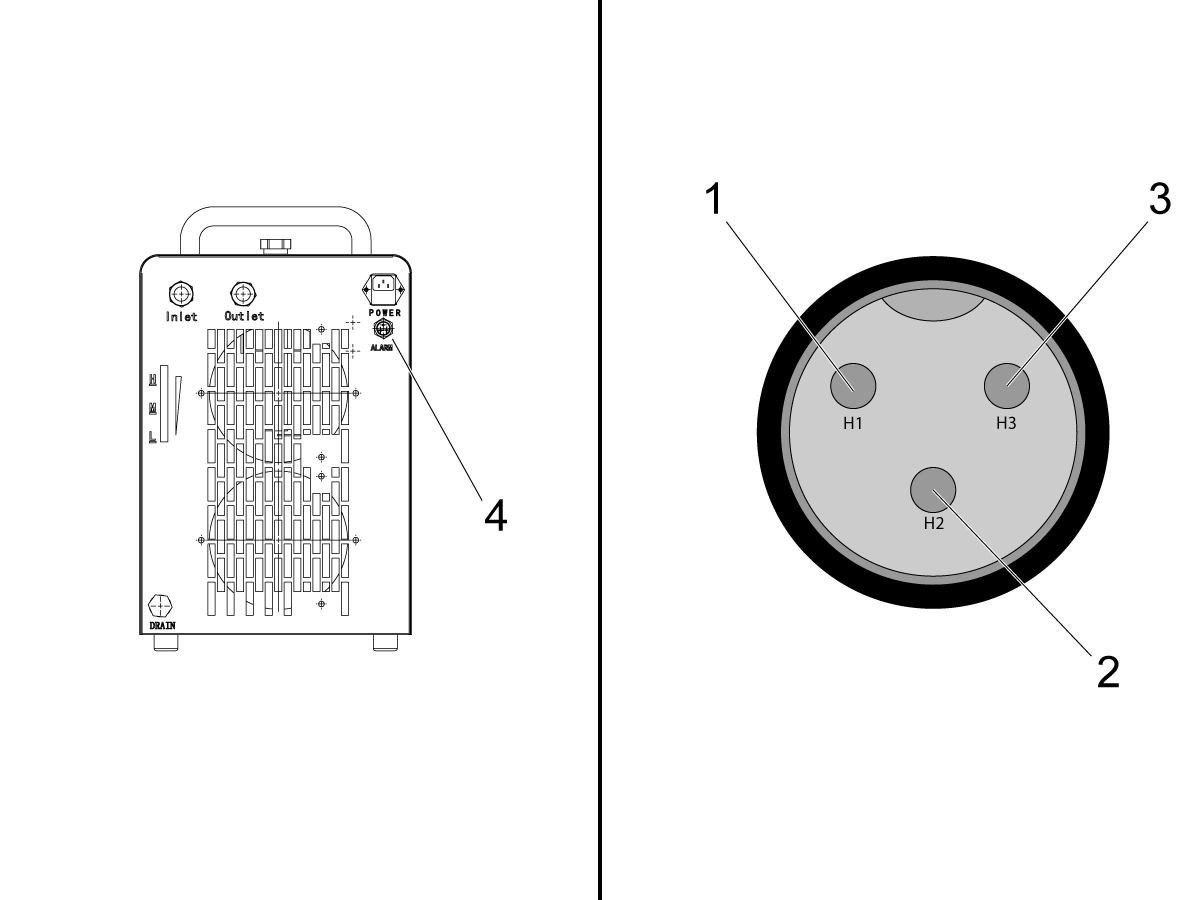
To check for continuity between 2 pins on the alarm connector, remove the spindle chiller connector to the alarm cable [4]. The connector on the spindle chiller [4] has 3 pins as shown in the image.

If there is no alarm being outputted by the spindle chiller, then there will be between pin H1 [1] and H3 [2].

Take a volt meter and set it to resistance mode.

Then touch one lead to pin H1 [1] and the other lead to pin H3 [3]. The volt meter display will show near zero resistance if there is continuity. 

If there is no continuity between H1 and H2, check if there is continuity between H1 [1] and H2 [2]. Continuity between H1 and H2 indicates an alarm is being outputted by the spindle chiller.

If this is the case, continue troubleshooting to determine the source of the alarm. 

Spindle Chiller Electrical Schematic

1

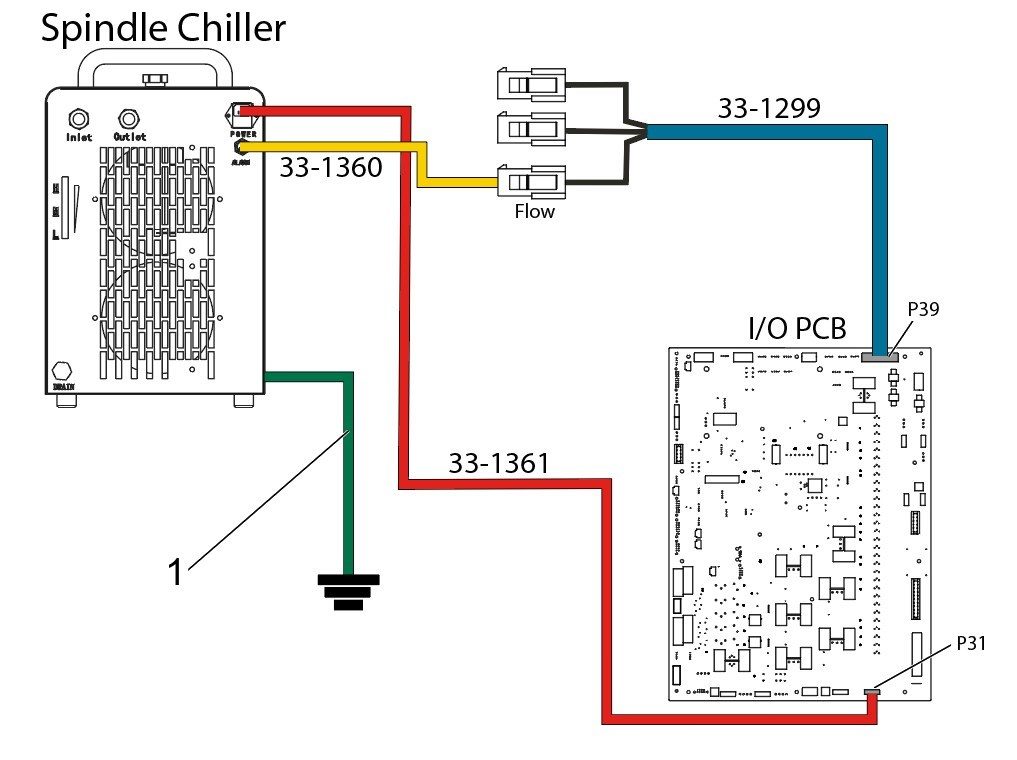
There are 3 cables that go from the spindle chiller to the control cabinet:

  • Ground cable [1] - From spindle chiller to control cabinet chassis
  • Flow alarm cable 33-1360 - From alarm port to cable 33-1299 which is connected to P39 on the I/O PCB.
  • Power cable 33-1361 - From power socket to P31 on the I/O PCB.

Important: The alarm cable from the spindle chiller needs to be connected to the SPINDL FLOW connector of 33-1299. This cable has 3 connectors, only the connector labeled SPINDL FLOW should be used.

Recently Viewed Items

You Have No Recently Viewed Items Yet

Feedback
Haas Logo

Haas Delivered Price

This price includes shipping cost, export and import duties, insurance, and any other expenses incurred during shipping to a location in France agreed with you as a buyer. No other mandatory costs can be added to the delivery of a Haas CNC Product.

KEEP UP WITH THE LATEST HAAS TIPS AND TECHNOLOGY...

Sign up now!   

HAAS TOOLING ACCEPTS THE FOLLOWING:

  • Service & Support
  • Owners
  • Request Service
  • Operator Manuals
  • Haas Parts
  • Rotary Repair Request
  • Pre-Install Guides
  • Shopping Tools
  • Build & Price a New Haas
  • Available Inventory
  • The Haas Price List
  • CNCA Financing
  • About Haas
  • Accessibility Statement
  • DNSH Statement
  • Export Compliance
  • Careers
  • Certifications & Safety
  • Contact Us
  • History
  • Terms & Conditions
  • Haas Tooling Terms & Conditions
  • Privacy
  • Warranty
  • Haas Community
  • Haas Certification Program
  • Haas Motorsports
  • Gene Haas Foundation
  • Haas Technical Education Community
  • Events
  • Join the Conversation
  • Facebook
  • X
  • Flickr
  • YouTube
  • LinkedIn
  • Instagram
  • TikTok
© 2026 Haas Automation, Inc – CNC Machine Tools

This site is protected by reCAPTCHA and the Google Privacy Policy and Terms of Service apply.

2800 Sturgis Rd., Oxnard, CA 93030
Toll Free: (888) 817-4446 / Fax: 805-278-8554