My Haas Welcome,
!
Haas Tooling MyHaas/HaasConnect Sign In Register Haas Tooling MyHaas/HaasConnect Sign Out Welcome, My Machines Latest Activity My Quotes My Account My Users Sign Out
Find Your Distributor
  1. Select Language
    1. English
    2. Deutsch
    3. Español - España
    4. Español - México
    5. Français
    6. Italiano
    7. Português
    8. Český
    9. Dansk
    10. Nederlands
    11. Magyar
    12. Polski
    13. Svenska
    14. Türkçe
    15. 中文
    16. Suomi
    17. Norsk
    18. الإنجليزية
    19. български
    20. Hrvatski
    21. Ελληνικά
    22. Română
    23. Slovenský
    24. Slovenščina
    25. 한국어
    26. 日本語
    27. Українська
  • machines Main Menu
    • Vertical Mills
      Vertical Mills
      Vertical Mills View All
      • Vertical Mills
      • VF Series
      • Universal Machines
      • VR Series
      • VP-5 Prismatic
      • Pallet-Changing VMCs
      • Mini Mills
      • Mold Machines
      • High-Speed Drill Centers
      • Drill/Tap/ Mill Series
      • Toolroom Mills
      • Pocket Mill
      • Compact Mills
      • Gantry Series
      • SR Sheet Routers
      • Extra-Large VMC
      • Double-Column Mills
      • 3+2 Positioning Machines
    • Multi-Axis Solutions
      Multi-Axis Solutions
      Multi-Axis Solutions View All
      • Multi-Axis Solutions
      • Y-Axis Lathes
      • 5-Axis Mills
    • Lathes
      Lathes
      Lathes View All
      • Lathes
      • ST Series
      • Dual-Spindle
      • Box Way Series
      • Toolroom Lathes
      • Chucker Lathe
      • Haas Bar Feeders
    • Horizontal Mills
      Horizontal Mills
      Horizontal Mills View All
      • Horizontal Mills
      • 50-Taper
      • 40-Taper
    • Rotaries & Indexers
      Rotaries & Indexers
      Rotaries & Indexers View All
      • Rotaries & Indexers
      • Rotary Tables
      • Indexers
      • 5-Axis Rotaries
      • Extra-Large Rotaries
    • Special Series
      Special Series
      Special Series View All
      • Special Series
      • EU_Series_Redirect
    • Automation Systems
      Automation Systems
      Automation Systems View All
      • Automation Systems
      • Mill Automation
      • Lathe Automation
      • Automatic Parts Loaders
      • Automation Models
    • Desktop Machines
      Desktop Machines
      Desktop Machines View All
      • Desktop Machines
      • Desktop Mill
      • Desktop Lathe
      • Control Simulator, Standard
      • Control Simulator, Premium
    • Shop Equipment
      Shop Equipment
      Shop Equipment View All
      • Shop Equipment
      • Knee Mill
      • Haas Manual Lathes
      • Haas Saws
    • Fabrication Machines
      Fabrication Machines
      Fabrication Machines View All
      • Fabrication Machines
      • Laser Cutting Machines
      • CNC Press Brakes
    • QUICK LINKS Special Series  Special Series 
      EU SERIES EU SERIES BUILD & PRICE | PRICE LIST BUILD & PRICE | PRICE LIST In-Stock Machines In-Stock Machines WHAT’S NEW WHAT’S NEW YOUR FIRST CNC YOUR FIRST CNC
      SHOPPING TOOLS
      • Build & Price a Haas
      • Price List
      • Available Inventory
      • CNCA Financing
      WANT TO TALK TO SOMEONE?

      A Haas Factory Outlet (HFO) can answer your questions, and walk you through your best options.

      CONTACT YOUR DISTRIBUTOR >
  • Options Main Menu
    • The Haas Control Value Option Packages
      Value Option Packages
      Value Option Packages View All
      • Value Option Packages
    • Product Image Spindles
      Spindles
      Spindles View All
      • Spindles
    • Product Image Tool Changers
      Tool Changers
      Tool Changers View All
      • Tool Changers
    • Product Image 4th- | 5th-Axis
      4th- | 5th-Axis
      4th- | 5th-Axis View All
      • 4th- | 5th-Axis
    • Product Image Turrets & Live Tooling
      Turrets & Live Tooling
      Turrets & Live Tooling View All
      • Turrets & Live Tooling
    • Product Image Probing
      Probing
      Probing View All
      • Probing
    • Haas Chip & Coolant Management Chip & Coolant Management
      Chip & Coolant Management
      Chip & Coolant Management View All
      • Chip & Coolant Management
    • The Haas Control The Haas Control
      The Haas Control
      The Haas Control View All
      • The Haas Control
    • Product Image Product Options
      Product Options
      Product Options View All
      • Product Options
    • Product Image Tooling & Fixturing
      Tooling & Fixturing
      Tooling & Fixturing View All
      • Tooling & Fixturing
    • Product Image Workholding
      Workholding
      Workholding View All
      • Workholding
    • Product Image 5-Axis Solutions
      5-Axis Solutions
      5-Axis Solutions View All
      • 5-Axis Solutions
      • 5 Easy Steps to 5-Axis
    • QUICK LINKS Special Series  Special Series 
      EU SERIES EU SERIES BUILD & PRICE | PRICE LIST BUILD & PRICE | PRICE LIST In-Stock Machines In-Stock Machines WHAT’S NEW WHAT’S NEW YOUR FIRST CNC YOUR FIRST CNC
      SHOPPING TOOLS
      • Build & Price a Haas
      • Price List
      • Available Inventory
      • CNCA Financing
      WANT TO TALK TO SOMEONE?

      A Haas Factory Outlet (HFO) can answer your questions, and walk you through your best options.

      CONTACT YOUR DISTRIBUTOR >
  • Why Haas Main Menu
      Discover the Haas Difference
    • Why Haas
    • MyHaas
    • Education Community
    • Industry 4.0
    • Haas Certification
    • Customer Testimonials
  • Service Main Menu
      Welcome to Haas Service
      SERVICE HOME Operator’s Manuals How-To Procedures Troubleshooting Guides Preventive Maintenance Haas Parts Haas Tooling Videos
  • Videos Main Menu
  • Main Menu
    • View All
    • View All
    • View All
    • View All
      • HTEC Curriculum Support
    • View All
      • Haas 10 kg Cobot Package
      • Cobot Kits
      • DC-1 Drill Center
      • CNC Sales News
      • Do More With Your Haas
    • View All
    • View All
      • contact-us-test
      • 4 - AUTOMATION SYSTEMS
      • Carousel-V2
      • expert test
      • Demo_Day_Trident-test
      • Link Test
      • image-sale-tag-test
      • article-list-test
      • Haas 25 kg Robot Package
    • View All
      • Choose Options
    • View All
    • View All
    • View All
    • View All
    • View All
      • calc-test
    • View All
    • QUICK LINKS Special Series  Special Series 
      EU SERIES EU SERIES BUILD & PRICE | PRICE LIST BUILD & PRICE | PRICE LIST In-Stock Machines In-Stock Machines WHAT’S NEW WHAT’S NEW YOUR FIRST CNC YOUR FIRST CNC
      SHOPPING TOOLS
      • Build & Price a Haas
      • Price List
      • Available Inventory
      • CNCA Financing
      WANT TO TALK TO SOMEONE?

      A Haas Factory Outlet (HFO) can answer your questions, and walk you through your best options.

      CONTACT YOUR DISTRIBUTOR >
  • Haas Tooling Main Menu
  • Haas Service Parts Main Menu

My Haas Welcome,
!
Haas Tooling MyHaas/HaasConnect Sign In Register Haas Tooling MyHaas/HaasConnect Sign Out Welcome, My Machines Latest Activity My Quotes My Account My Users Sign Out
Find Your Distributor
  1. Select Language
    1. English
    2. Deutsch
    3. Español - España
    4. Español - México
    5. Français
    6. Italiano
    7. Português
    8. Český
    9. Dansk
    10. Nederlands
    11. Magyar
    12. Polski
    13. Svenska
    14. Türkçe
    15. 中文
    16. Suomi
    17. Norsk
    18. الإنجليزية
    19. български
    20. Hrvatski
    21. Ελληνικά
    22. Română
    23. Slovenský
    24. Slovenščina
    25. 한국어
    26. 日本語
    27. Українська
×

Search Results

Web Pages

Images

    • <
    • 1
    • >

Compact APL - Troubleshooting Guide - TG0052

Service Home Compact APL - Troubleshooting Guide - TG0052

Compact APL - Troubleshooting Guide - TG0052

- Jump to Cause - Back to Top

9.3 Compact APL Troubleshooting Guide

Recently Updated Last updated: 10/10/2025

Compact APL - Troubleshooting Guide


TG0052

Revision A - 12/2025

Introduction

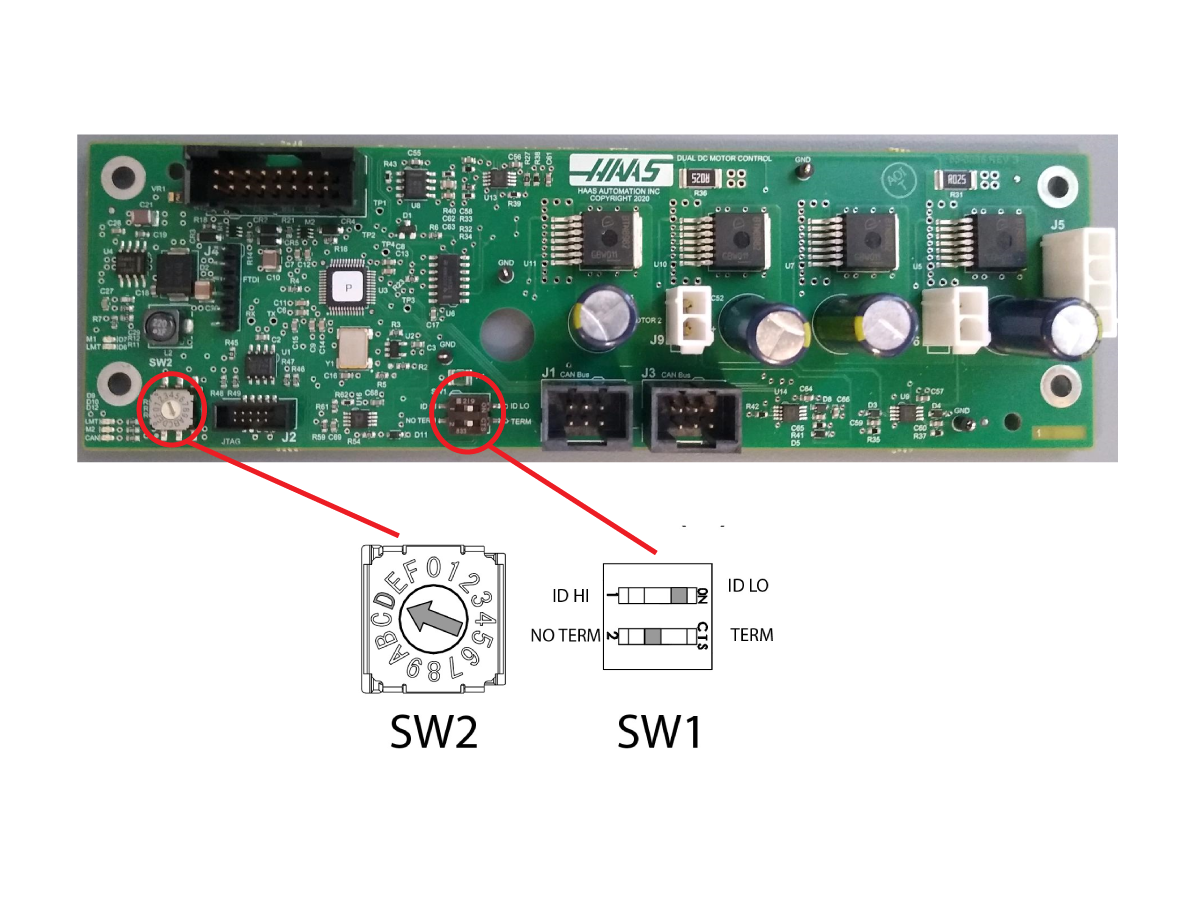
Controller Area Network (CAN) is a robust vehicle bus standard designed to allow microcontrollers and devices to communicate with each other. This method is used to create satellite nodes grouped by function that can be expanded on without changing the core electronics.

  • Each board has a node ID selection switch [SW2] that must be set correctly.
  • Devices are connected in Daisy Chain.
  • Each board has a termination switch [SW1] that much be set correctly.

Note: The last device on the chain needs to be terminated.

Node ID Selection

Device Node ID Factory Setting
IO Board 3 N/A
CAN Autodoor 13 (D on selector) 9013.001
CAN Electric Vise 11 (B on selector) 9011.001
CAN Lube Panel 5 9005.001
CAN Spindle Head 7 9007.001
Legacy CAN Autodoor 9 9009.001
Compact APL 15 (F on the selector) 9015.001
Active Ballscrew Compensation 20 (4 on the selector) 9020.001

Symptom Table

Alarm / CAN code

Possible Cause Corrective Action

Alarm 9105: IO BOARD COMMAND EXECUTION FAILURE

The machine outputs the following alarms with this alarm:

  • 2001.003: EMERGENCY STOP SWITCH ERROR
  • 2002: OPERATOR'S PENDANT EMERGENCY STOP SWITCH ERROR
  • 120: LOW AIR PRESSURE OR FLOW
Outdated main I/O firmware.

Updated the main I/O firmware to the latest version.

Refer to the Firmware Update procedure.

Alarm 17.9920/18.9920: POSITION ERROR TOO LARGE Electrical connections to the C-APL AV or AU servo amplifiers may be swapped.
Reference the C-APL electrical schematic below.
Alarm 9899: IOPCB CAN FAULT and/ or 9105: IO BOARD COMMAND EXECUTION FAILURE The CAN node I/O Configuration is incorrect. Update the I/O configuration via the I/O Config tab.
The incorrect CAN node is enabled. Verify that Factory Settings 9000.001 -> 9031.001 are set correctly. Only active nodes should be enabled.
The CAN PCB does not have power. Verify that the Low Volt Power supply is supplying power to the CAN PCB.
The CAN node Communication cable is disconnected. Power down machine for at least a minute. Verify all CAN communication cables are connected correctly.
The CAN Module ID Selector is incorrect. Power down machine for at least a minute. Set ID selector correctly. Power up machine.
The CAN Modules have incorrect termination. Power down machine for at least a minute. Verify that only last node in the chain is terminated. Power up machine.
The CAN Node needs to be reset. Disable CAN Node via 9000.001 -> 9031.001. If the machine recovers (I/O page isn’t “X”) after disabling a particular node, try to enable the node again.
Alarm 9798: IOPCB CAN FCT CRC MISMATCH A test of the internal CRC for the Factory Config Table (FCT) located on one of the CAN devices does not match the CRC for the machines FCT. This can happen due to power failure at a critical time or after replacement of a CAN board attached to the I/O board
  1. Press [POWER OFF].
  2. Put the USB memory device into the control.

    Note: The USB memory device must contain your Haas Control Key and the correct configuration files.

  3. Press [POWER ON].
  4. Press [DIAGNOSTIC].
  5. Go to I/O Config in the Diagnostics tab.
  6. Press [F3] to Update Config Table.
  7. Press [RESET] to continue. If the alarm does not clear, cycle the machine power.

The Main CRC and the Factory CRC are now the same.


Alarm 9704: CAN NODE INVALID COMMAND FOR MOTOR 1

CAN code [0x41]

Motor was commanded on in both directions simultaneously. If using Macro programming, verify G-Code is not turning on both outputs.

Alarm 9706: CAN NODE COMMANDED CURRENT OUT OF RANGE

CAN code [0x43]

Outdated CAN Board firmware. Update the CAN Board latest CAN firmware.

Alarm 9707: CAN NODE INVALID MAX VOLTAGE

CAN code [0x44]

Alarm 9708: CAN NODE MOTOR 1 SHORT DETECTED

CAN code [0x81]

Cable Failure Replace the motor cable.
Board Failure Replace the Autodoor/Evise board. 
Motor Failure Replace the motor.
Alarm 9700: CAN BUS OFF ERROR Poor connection Verify CAN Bus Connetors are fully seated and termination resistor set correctly.
Short circuit on CAN Bus

Use multimeter to diagnose short circuit:

  1. Power down machine
  2. Disconnect all nodes
  3. Reconnect nodes one at a time while measuring resistance between CAN lines and 12V and Ground on the connectors
  4. Replace the node that results in a short circuit

Note: It should be 60 ohm between CAN-H and CAN-L

Alarm 9701: CAN NODE LOST COMMUNICATION WITH IO

CAN code [0x01]

Old IO firmware. Load I/O firmware 4.09 or greater.
Poor connection  Verify CAN Bus Connectors are fully seated and termination resistor set correctly.
Alarm 9702: IO LOST COMMUNICATION WITH CAN NODE

CAN code [0x30]

I/O mapping missing node Verify in I/O Config tab that the node is mapped. Get the latest configuration from portal.
Incorrect node enabled Verify that Factory settings 9000.001 - 9031.001 are only set to true for the nodes that are installed in the machine.
Node ID set incorrectly on node Select correct node ID on ID selection switch. Reboot the machine.
Node lost power Use a multimeter to verify that the node has power. Replace the power supply if necessary.
Poor connection Verify that the CAN Bus Connectors are fully seated and that the termination resistor set correctly.

Alarm 9703: 
INTERNAL FAULT
 
Node Fatal alarm. Firmware has a non-recoverable alarm. Cycle node enable (90nn.001) or update config table in I/O page. The machine may need to be rebooted.
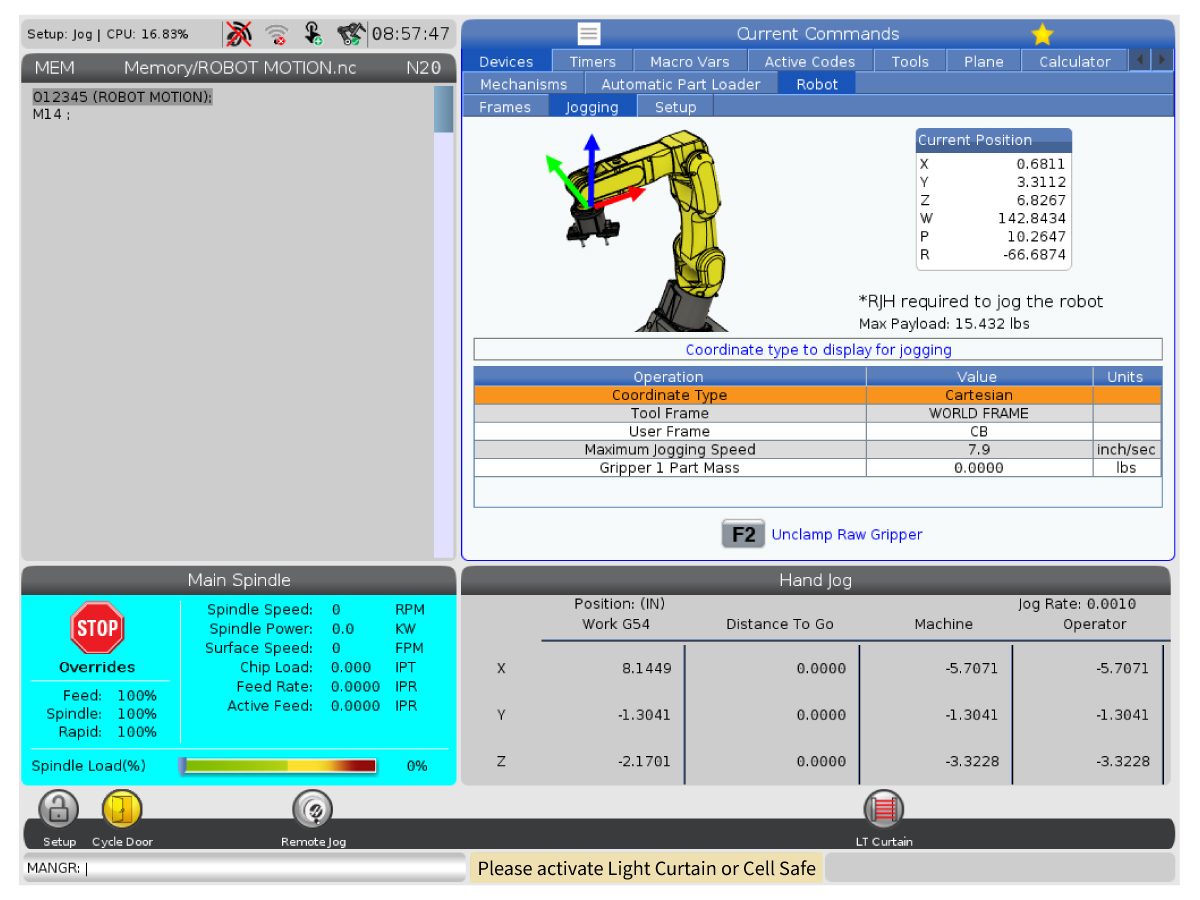
When trying to run the machine a yellow warning message appears saying "Please activate Light Curtain or Cell Safe". The correct safety parameter kit has not been applied to the machine. Order the corresponding Front Automation Safety or Side Automation Safety kits (93-1000997 or 93-1000996) and re-upload the configuration files from HBC.
AU axis noisy when the APL moves AU axis coupler not attached correctly. Realign the coupler to the motor and ballscrew. Reset the grid offset once this is done.
AU axis coupler is fractured.  The AU axis coupler will need to be replaced. Once the new coupler has been replaced and aligned, reset the grid offset for the AU axis.

Electrical Diagrams

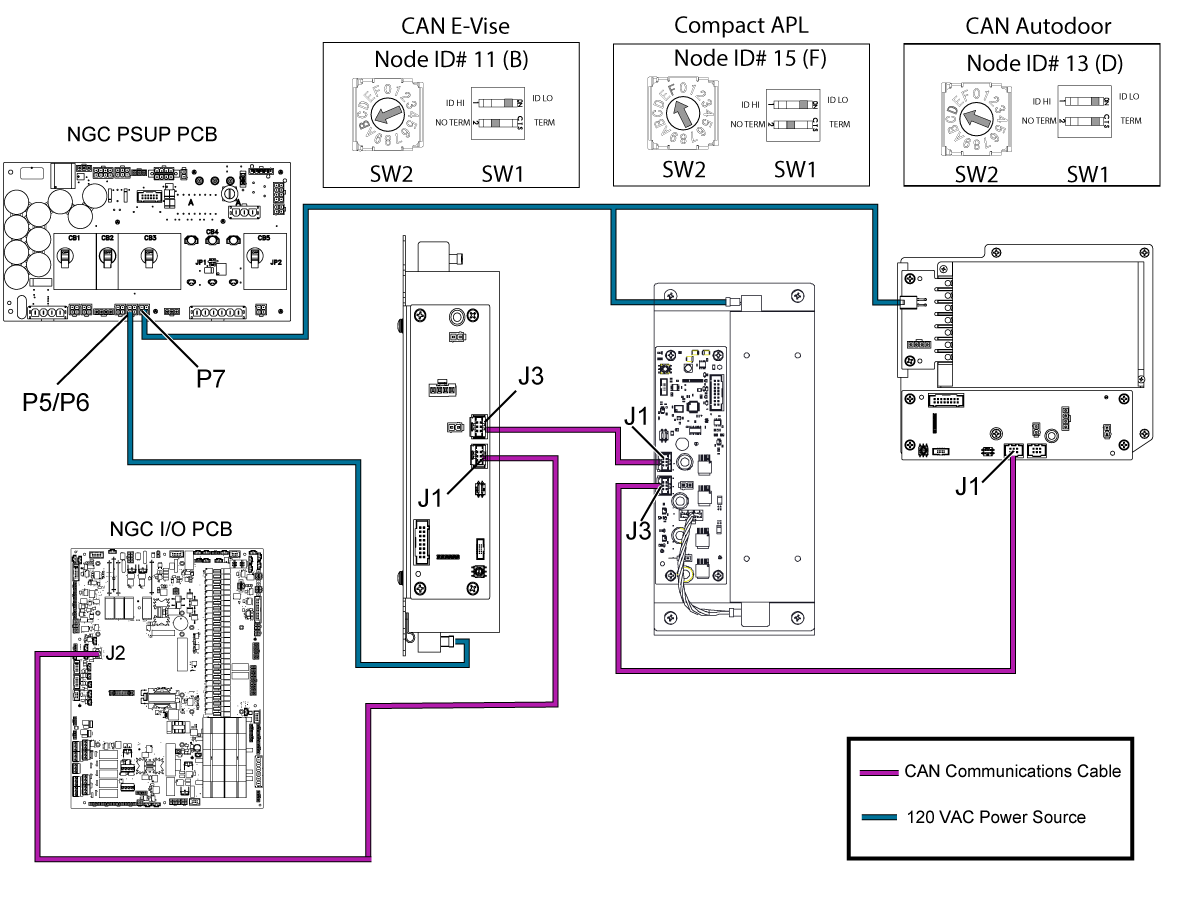
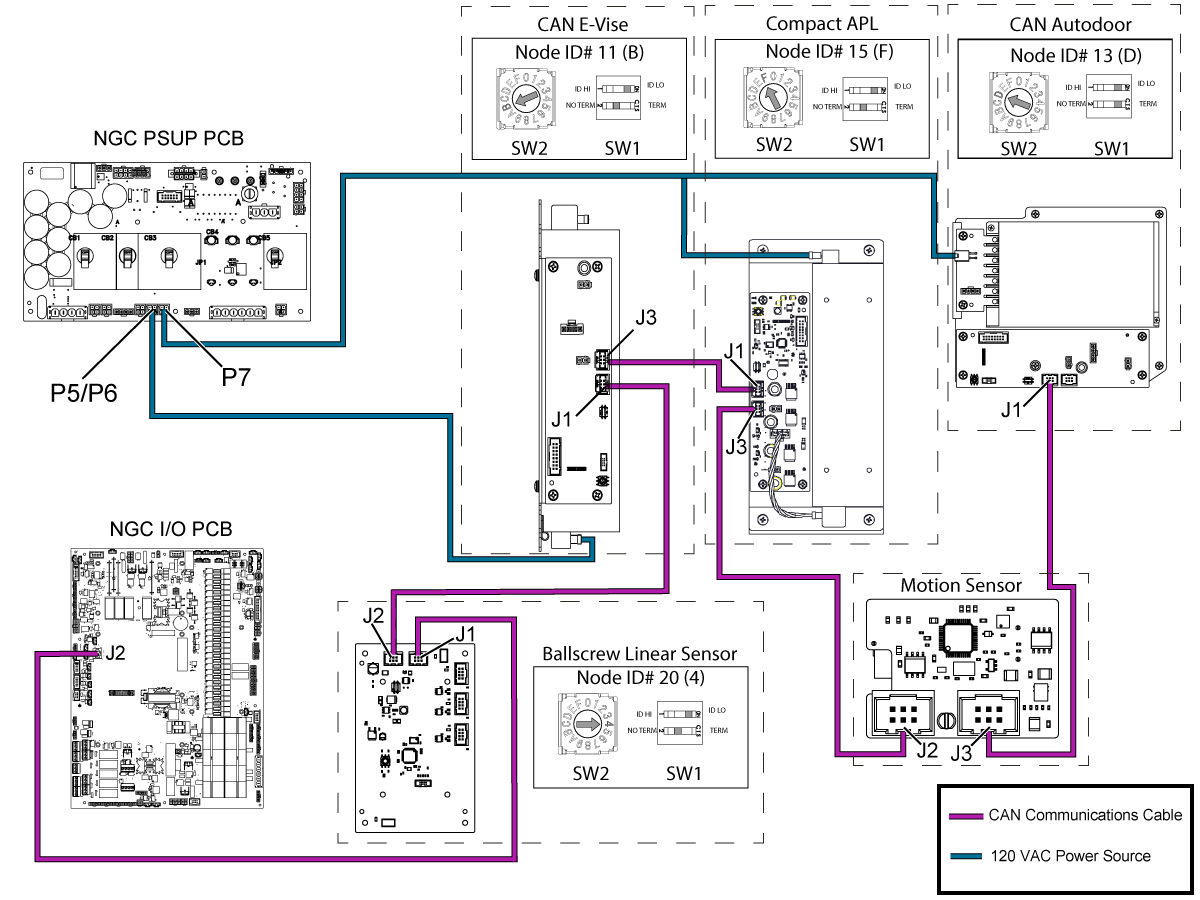
Compact APL Electrical Schematic


CAN Bus sequence when a machine has a CAN E-Vise, Compact APL, and CAN Autodoor.


CAN Bus sequence when a machine has Active Ballscrew Compensation, CAN E-Vise, Compact APL, Motion Sensor, and CAN Autodoor.

Related Content

I/O Troubleshooting
Smart CAN Autodoor TSG
CAN Lube Panel and Spindle Head TSG
DIagnostic Data
Firmware Update
CAN Bus Systems TSG

Recently Viewed Items

You Have No Recently Viewed Items Yet

Feedback
Haas Logo

Haas Delivered Price

This price includes shipping cost, export and import duties, insurance, and any other expenses incurred during shipping to a location in France agreed with you as a buyer. No other mandatory costs can be added to the delivery of a Haas CNC Product.

KEEP UP WITH THE LATEST HAAS TIPS AND TECHNOLOGY...

Sign up now!   

HAAS TOOLING ACCEPTS THE FOLLOWING:

  • Service & Support
  • Owners
  • Request Service
  • Operator Manuals
  • Haas Parts
  • Rotary Repair Request
  • Pre-Install Guides
  • Shopping Tools
  • Build & Price a New Haas
  • Available Inventory
  • The Haas Price List
  • CNCA Financing
  • About Haas
  • Accessibility Statement
  • DNSH Statement
  • Export Compliance
  • Careers
  • Certifications & Safety
  • Contact Us
  • History
  • Terms & Conditions
  • Haas Tooling Terms & Conditions
  • Privacy
  • Warranty
  • Haas Community
  • Haas Certification Program
  • Haas Motorsports
  • Gene Haas Foundation
  • Haas Technical Education Community
  • Events
  • Join the Conversation
  • Facebook
  • X
  • Flickr
  • YouTube
  • LinkedIn
  • Instagram
  • TikTok
© 2026 Haas Automation, Inc – CNC Machine Tools

This site is protected by reCAPTCHA and the Google Privacy Policy and Terms of Service apply.

2800 Sturgis Rd., Oxnard, CA 93030
Toll Free: (888) 817-4446 / Fax: 805-278-8554