My Haas Welcome,
!
Haas Tooling MyHaas/HaasConnect Sign In Register Haas Tooling MyHaas/HaasConnect Sign Out Welcome, My Machines Latest Activity My Quotes My Account My Users Sign Out
Find Your Distributor
  1. Select Language
    1. English
    2. Deutsch
    3. Español - España
    4. Español - México
    5. Français
    6. Italiano
    7. Português
    8. Český
    9. Dansk
    10. Nederlands
    11. Magyar
    12. Polski
    13. Svenska
    14. Türkçe
    15. 中文
    16. Suomi
    17. Norsk
    18. الإنجليزية
    19. български
    20. Hrvatski
    21. Ελληνικά
    22. Română
    23. Slovenský
    24. Slovenščina
    25. 한국어
    26. 日本語
    27. Українська
  • machines Main Menu
    • Vertical Mills
      Vertical Mills
      Vertical Mills View All
      • Vertical Mills
      • VF Series
      • Universal Machines
      • VR Series
      • VP-5 Prismatic
      • Pallet-Changing VMCs
      • Mini Mills
      • Mold Machines
      • High-Speed Drill Centers
      • Drill/Tap/ Mill Series
      • Toolroom Mills
      • Pocket Mill
      • Compact Mills
      • Gantry Series
      • SR Sheet Routers
      • Extra-Large VMC
      • Double-Column Mills
      • 3+2 Positioning Machines
    • Multi-Axis Solutions
      Multi-Axis Solutions
      Multi-Axis Solutions View All
      • Multi-Axis Solutions
      • Y-Axis Lathes
      • 5-Axis Mills
    • Lathes
      Lathes
      Lathes View All
      • Lathes
      • ST Series
      • Dual-Spindle
      • Box Way Series
      • Toolroom Lathes
      • Chucker Lathe
      • Haas Bar Feeders
    • Horizontal Mills
      Horizontal Mills
      Horizontal Mills View All
      • Horizontal Mills
      • 50-Taper
      • 40-Taper
    • Rotaries & Indexers
      Rotaries & Indexers
      Rotaries & Indexers View All
      • Rotaries & Indexers
      • Rotary Tables
      • Indexers
      • 5-Axis Rotaries
      • Extra-Large Rotaries
    • Special Series
      Special Series
      Special Series View All
      • Special Series
      • EU_Series_Redirect
    • Automation Systems
      Automation Systems
      Automation Systems View All
      • Automation Systems
      • Mill Automation
      • Lathe Automation
      • Automatic Parts Loaders
      • Automation Models
    • Desktop Machines
      Desktop Machines
      Desktop Machines View All
      • Desktop Machines
      • Desktop Mill
      • Desktop Lathe
      • Control Simulator, Standard
      • Control Simulator, Premium
    • Shop Equipment
      Shop Equipment
      Shop Equipment View All
      • Shop Equipment
      • Knee Mill
      • Haas Manual Lathes
      • Haas Saws
    • Fabrication Machines
      Fabrication Machines
      Fabrication Machines View All
      • Fabrication Machines
      • Laser Cutting Machines
      • CNC Press Brakes
    • QUICK LINKS Special Series  Special Series 
      EU SERIES EU SERIES BUILD & PRICE | PRICE LIST BUILD & PRICE | PRICE LIST In-Stock Machines In-Stock Machines WHAT’S NEW WHAT’S NEW YOUR FIRST CNC YOUR FIRST CNC
      SHOPPING TOOLS
      • Build & Price a Haas
      • Price List
      • Available Inventory
      • CNCA Financing
      WANT TO TALK TO SOMEONE?

      A Haas Factory Outlet (HFO) can answer your questions, and walk you through your best options.

      CONTACT YOUR DISTRIBUTOR >
  • Options Main Menu
    • The Haas Control Value Option Packages
      Value Option Packages
      Value Option Packages View All
      • Value Option Packages
    • Product Image Spindles
      Spindles
      Spindles View All
      • Spindles
    • Product Image Tool Changers
      Tool Changers
      Tool Changers View All
      • Tool Changers
    • Product Image 4th- | 5th-Axis
      4th- | 5th-Axis
      4th- | 5th-Axis View All
      • 4th- | 5th-Axis
    • Product Image Turrets & Live Tooling
      Turrets & Live Tooling
      Turrets & Live Tooling View All
      • Turrets & Live Tooling
    • Product Image Probing
      Probing
      Probing View All
      • Probing
    • Haas Chip & Coolant Management Chip & Coolant Management
      Chip & Coolant Management
      Chip & Coolant Management View All
      • Chip & Coolant Management
    • The Haas Control The Haas Control
      The Haas Control
      The Haas Control View All
      • The Haas Control
    • Product Image Product Options
      Product Options
      Product Options View All
      • Product Options
    • Product Image Tooling & Fixturing
      Tooling & Fixturing
      Tooling & Fixturing View All
      • Tooling & Fixturing
    • Product Image Workholding
      Workholding
      Workholding View All
      • Workholding
    • Product Image 5-Axis Solutions
      5-Axis Solutions
      5-Axis Solutions View All
      • 5-Axis Solutions
      • 5 Easy Steps to 5-Axis
    • QUICK LINKS Special Series  Special Series 
      EU SERIES EU SERIES BUILD & PRICE | PRICE LIST BUILD & PRICE | PRICE LIST In-Stock Machines In-Stock Machines WHAT’S NEW WHAT’S NEW YOUR FIRST CNC YOUR FIRST CNC
      SHOPPING TOOLS
      • Build & Price a Haas
      • Price List
      • Available Inventory
      • CNCA Financing
      WANT TO TALK TO SOMEONE?

      A Haas Factory Outlet (HFO) can answer your questions, and walk you through your best options.

      CONTACT YOUR DISTRIBUTOR >
  • Why Haas Main Menu
      Discover the Haas Difference
    • Why Haas
    • MyHaas
    • Education Community
    • Industry 4.0
    • Haas Certification
    • Customer Testimonials
  • Service Main Menu
      Welcome to Haas Service
      SERVICE HOME Operator’s Manuals How-To Procedures Troubleshooting Guides Preventive Maintenance Haas Parts Haas Tooling Videos
  • Videos Main Menu
  • Main Menu
    • View All
    • View All
    • View All
    • View All
      • HTEC Curriculum Support
    • View All
      • Haas 10 kg Cobot Package
      • Cobot Kits
      • DC-1 Drill Center
      • CNC Sales News
      • Do More With Your Haas
    • View All
    • View All
      • contact-us-test
      • 4 - AUTOMATION SYSTEMS
      • Carousel-V2
      • expert test
      • Demo_Day_Trident-test
      • Link Test
      • image-sale-tag-test
      • article-list-test
      • Haas 25 kg Robot Package
    • View All
      • Choose Options
    • View All
    • View All
    • View All
    • View All
    • View All
      • calc-test
    • View All
    • QUICK LINKS Special Series  Special Series 
      EU SERIES EU SERIES BUILD & PRICE | PRICE LIST BUILD & PRICE | PRICE LIST In-Stock Machines In-Stock Machines WHAT’S NEW WHAT’S NEW YOUR FIRST CNC YOUR FIRST CNC
      SHOPPING TOOLS
      • Build & Price a Haas
      • Price List
      • Available Inventory
      • CNCA Financing
      WANT TO TALK TO SOMEONE?

      A Haas Factory Outlet (HFO) can answer your questions, and walk you through your best options.

      CONTACT YOUR DISTRIBUTOR >
  • Haas Tooling Main Menu
  • Haas Service Parts Main Menu

My Haas Welcome,
!
Haas Tooling MyHaas/HaasConnect Sign In Register Haas Tooling MyHaas/HaasConnect Sign Out Welcome, My Machines Latest Activity My Quotes My Account My Users Sign Out
Find Your Distributor
  1. Select Language
    1. English
    2. Deutsch
    3. Español - España
    4. Español - México
    5. Français
    6. Italiano
    7. Português
    8. Český
    9. Dansk
    10. Nederlands
    11. Magyar
    12. Polski
    13. Svenska
    14. Türkçe
    15. 中文
    16. Suomi
    17. Norsk
    18. الإنجليزية
    19. български
    20. Hrvatski
    21. Ελληνικά
    22. Română
    23. Slovenský
    24. Slovenščina
    25. 한국어
    26. 日本語
    27. Українська
×

Search Results

Web Pages

Images

    • <
    • 1
    • >

Vector Drive - Troubleshooting Guide - CHC - TG0157

Service Home Vector Drive - Troubleshooting Guide - CHC - TG0157
Recently Updated Last updated: 10/15/2025

Vector Drive - Troubleshooting Guide - CHC


TG0157

Vector Drive - Troubleshooting Guide - CHC - TG0157

- Jump to Cause - 1. Vector Drive Troubleshooting Video 2. Introduction 3. Electrical Safety 4. Symptom Table 5. Short Circuit Inspection 6. Regen Load 7. DC BUSS 8. Cooling Fan 9. Incoming AC Voltage 10. Unbalance Output Inspection 11. Electrical Diagram Back to Top

Vector Drive Troubleshooting Video

Introduction

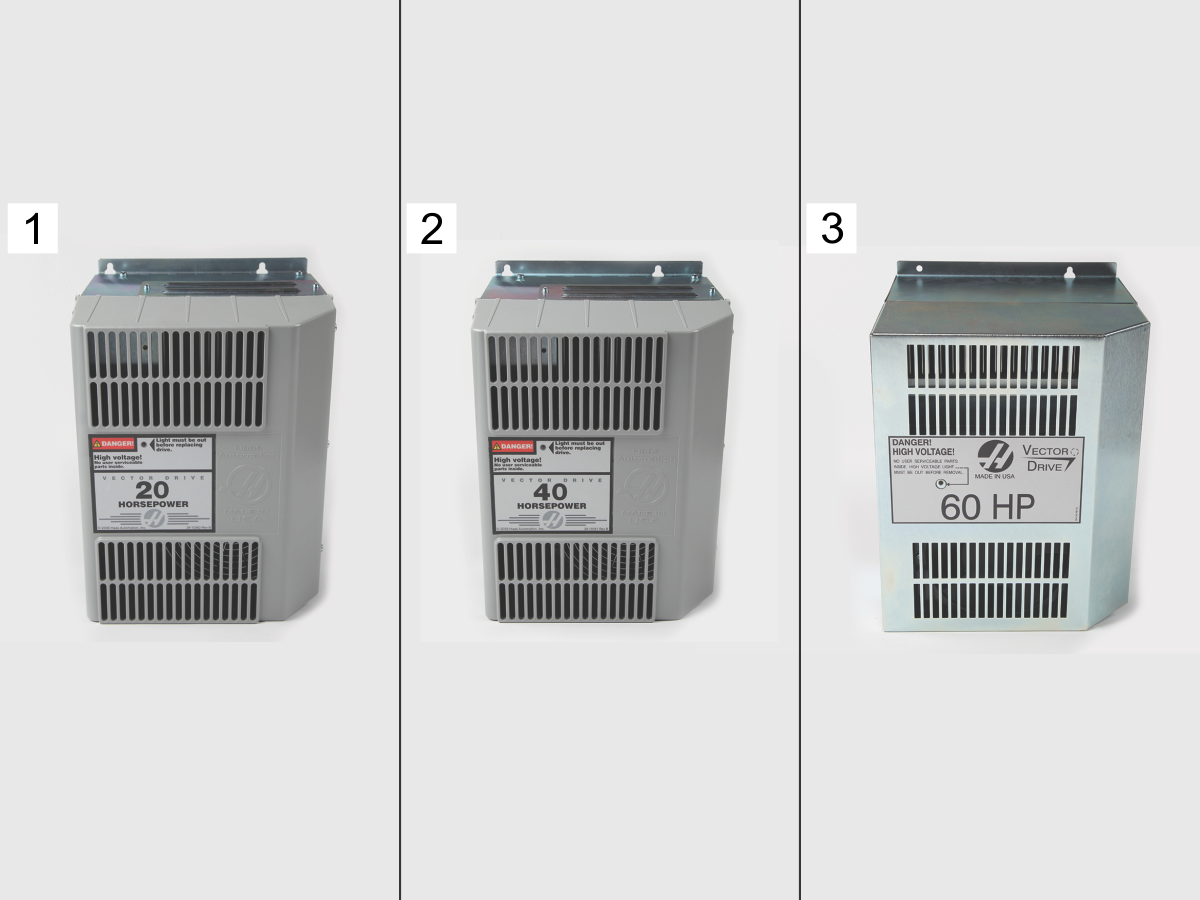
The Haas Vector drive is the source of power for the spindle motor and the servo amplifiers. There are three sizes of Haas Vector drives: 20HP [1], 40HP [2] and 60HP [3].

Electrical Safety

 DANGER: Working with the electrical services required for CNC machines is extremely hazardous and can result in serious injury or death.

Before connecting line wires to the CNC:

  • Turn off all power to the machine at the source.
  • Perform a Lockout-Tagout (LOTO) procedure to ensure the power remains off during service.
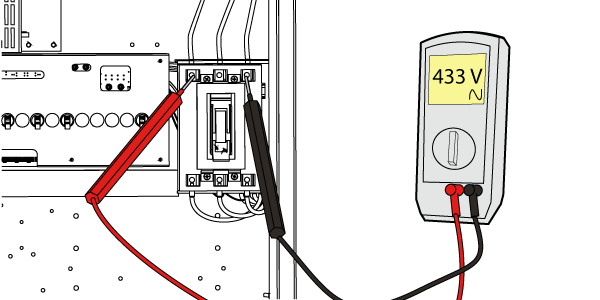
  • Verify that power has been disconnected by using an AC voltage detector on all incoming lines.

If you are uncertain about how to safely disconnect power or perform LOTO procedures:

  • Do not proceed.
  • Contact qualified personnel or obtain appropriate assistance before continuing.

Failure to follow these precautions may result in electrical shock, equipment damage, or fatal injury.

 Danger: Before beginning any work inside the control cabinet, verify that the High Voltage indicator light on the 320V Power Supply / Vector Drive has been off for a minimum of five (5) minutes. This waiting period ensures that residual voltage has dissipated and reduces the risk of electric shock.

Certain service procedures involve high-risk electrical components and may pose serious injury or fatality hazards. Technicians must not attempt any procedure unless they have a complete understanding of the steps involved and the associated risks.

If there is any uncertainty regarding a procedure, contact your Haas Factory Outlet (HFO) to arrange for a qualified service technician.

Symptom Table

Symptom Possible Causes Corrective Action

Alarm 123 SPINDLE DRIVE FAULT and

Alarm 993 SHORT CIRCUIT

Alarm 2040 VECTOR DRIVE OR SPINDLE-AMPLIFIER SHORT CIRCUIT

The vector drive detected a short circuit. Inspect the Vector Drive and the Wye-Delta contactors for a short circuit. For Delta-Wye Contactor Troubleshooting refer to: Wye-Delta Contactor - Troubleshooting Guide - CHC. See the Vector Drive short-circuit inspection section below.

Alarm 123 SPINDLE DRIVE FAULT

Alarm 292 HIGH VOLTAGE POWER SUPPLY FAULT

Alarm 160 LOW INCOMING LINE VOLTAGE

There is a problem with the DC Bus. Compare the measured DC voltage to the Diagnostic page. See the DC BUSS section below.

Alarm 123 SPINDLE DRIVE FAULT

Alarm 292 HIGH VOLTAGE POWER SUPPLY FAULT

Alarm 160 LOW INCOMING LINE VOLTAGE

at power on.
The vector drive J3 connector inserted upside down. The old style Vector Drive J3 connector does not have ribs and can be accidentally inserted upside down. This could damage the pins. Correctly inserted, the latch faces away from the Vector drive.

Alarm 292 HIGH VOLTAGE POWER SUPPLY FAULT

Alarm 647 REGEN LOAD SHORTED

There is a problem with the REGEN. Measure the resistance across the REGEN leads. See the Regen Load section below.
Alarm 648 DC BUS SHORTED There is a problem with the REGEN circuit on the vector drive. Check the regen circuit on the vector drive. See the Regen Load section below.

Alarm 292 HIGH VOLTAGE POWER SUPPLY FAULT and

Alarm 200 HIGH VOLTAGE POWER SUPPLY OVER–TEMPERATURE

Alarm 2038 VECTOR DRIVE OR SPINDLE AMPLIFIER–OVER TEMPERATURE

There is a problem with the vector drive cooling fan. Inspect the cooling fan. See the Cooling Fan section below.

Alarm 292 HIGH VOLTAGE POWER SUPPLY FAULT Alarm 444 REGEN REMAINED ON TOO LONG

There is a problem with the incoming AC power. Measure the incoming voltage to the machine. See the Incoming AC Voltage section below.
The Machine Fails to Maintain Spindle Orientation. The vector drive output is unbalanced. Measure voltage outputs across the vector drive terminals. See the Unbalance Output Inspection section below.
The wye contactor has a loose connection on the buss bar or jumper cables. Inspect the wye-delta assembly for loose connections.

Alarm 119 OVERVOLTAGE

Alarm 292 HIGH VOLTAGE POWER SUPPLY FAULT

The incoming voltage to the machine is too high. The check incoming voltage and transformer taps.
The vector drive over voltage cable is not plugged in or defective. Disconnect the 970 cable from connector J1 on the vector drive. Inspect the J1 connector pins and the pins on the 970 cable for damage. Make sure that the cable is connected to the correct I/O PCB location.
  • I/O PCB: P11
The parameters are incorrect. Check the correct value of the following parameters:
  • 57:29 INV BUSS PWR FAULT
  • 712 VD/Mini P.S. TYPE

Short Circuit Inspection

Corrective Action:

Inspect the spindle motor cables. Make sure the spindle motor cables are not contaminated or pinched.

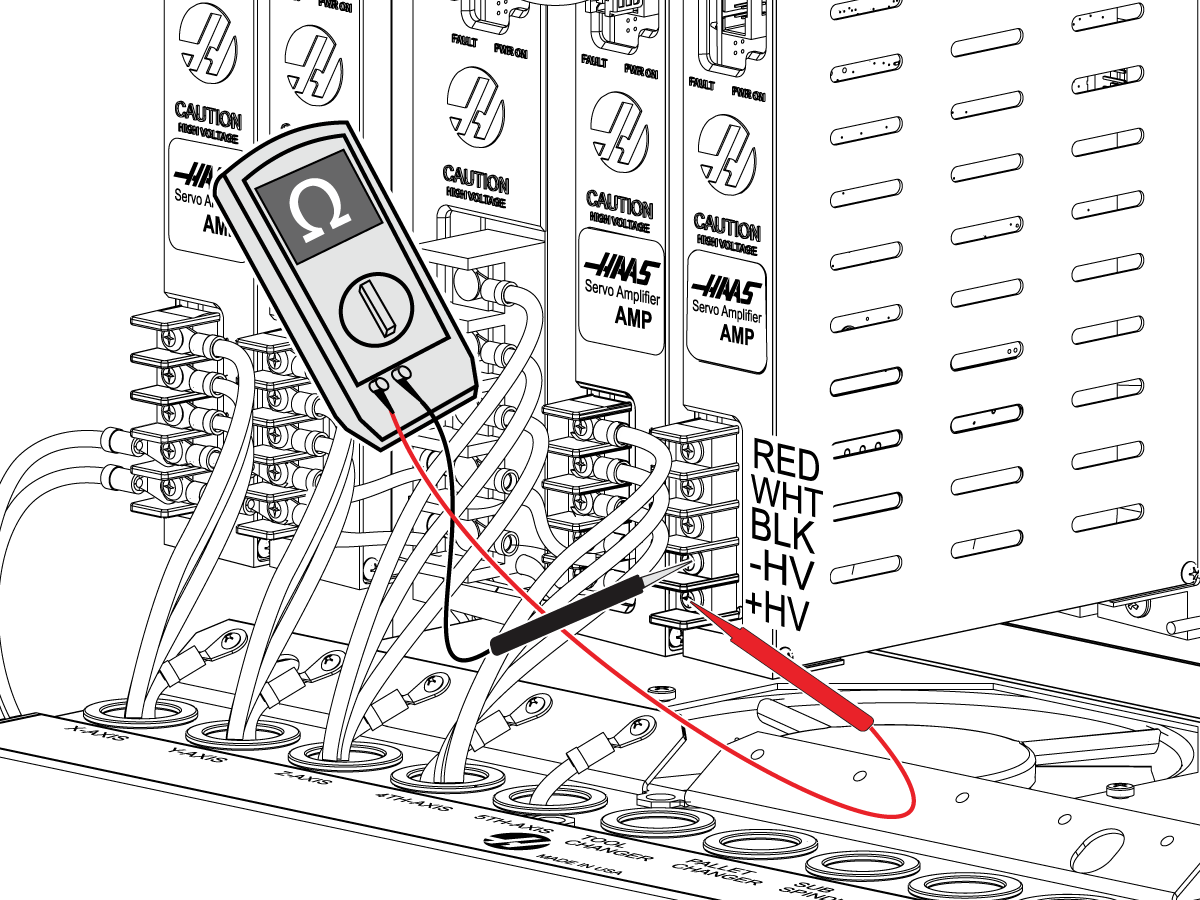
Inspect the vector drive. Disconnect all the vector drive terminals and do the following tests:

Set your meter to Ohms test mode.

  • Put the black lead on chassis with the red lead measure terminals 4 (A), 5 (B) and 6 (C).

If the meter does not show OPEN (O.L) the vector drive is damaged.

Set your meter to Ohms test mode.

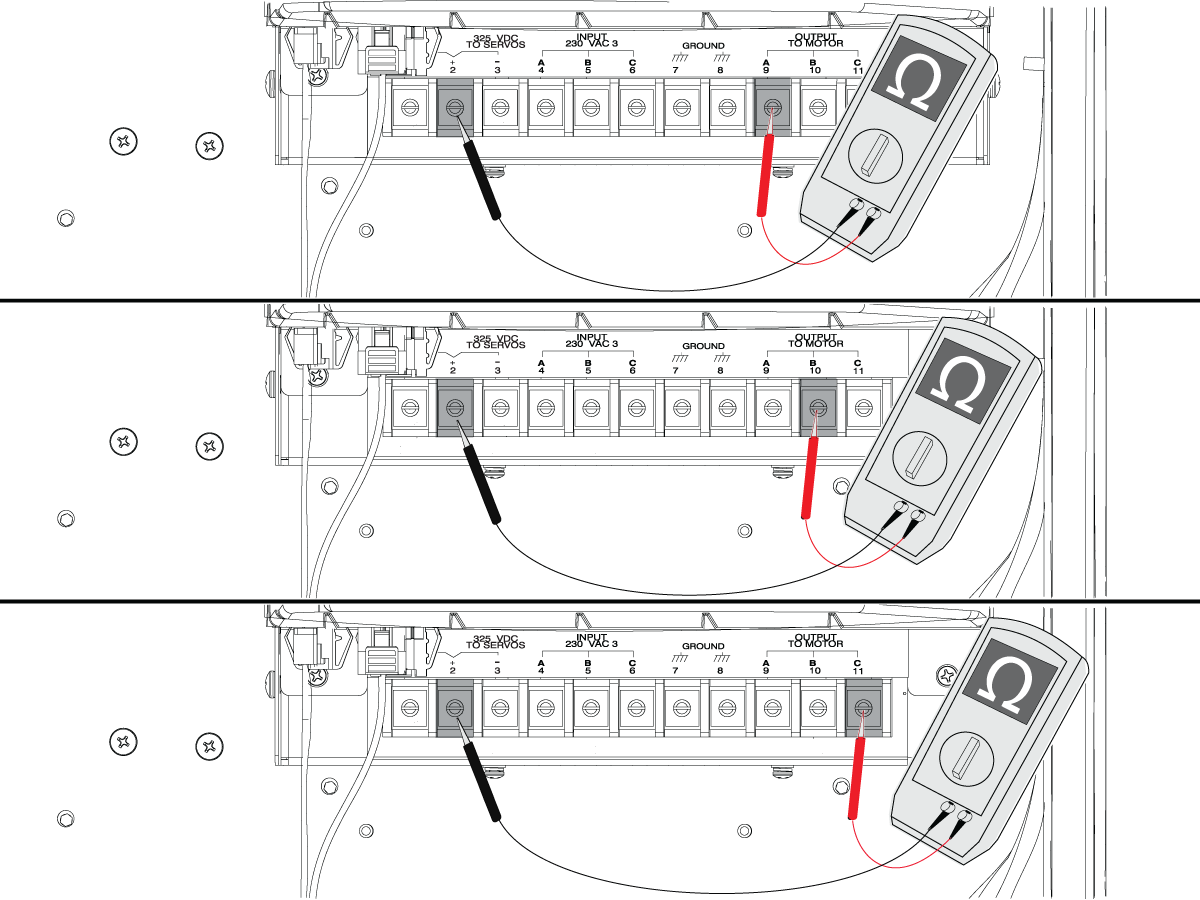
  • Put the black lead on terminal 2 (+) with the red lead measure the motor output terminals 9 (A), 10 (B) and 11 (C).

The meter should show high resistance readings typically in the Kilo or Mega ohms or O.L.  If the meter reads very low resistance the Vector drive is damaged.

Note: If the meter shows O.L this indicates an open circuit and there is no short between the terminals.

Set your meter to Ohms test mode.

  • Put the black lead on terminal 3 (-) with the red lead measure the motor output terminals 9 (A), 10 (B) and 11 (C).

The meter should show high resistance readings typically in the Kilo or Mega ohms or O.L.  If the meter reads very low resistance the Vector Drive is damaged.

Note: If the meter how O.L this indicates an open circuit and there is no short between the terminals.

Set your meter to Ohms test mode.

  • Put the black lead on terminal 3 (-) with the red lead measure terminal 1 (R).

If your meter reads less than 100k ohms, the vector drive is damaged.

Regen Load

Corrective Action:

Press [POWER OFF]. If the vector drive voltage indicator light is on, do not touch the electrical components. The high voltage in the control cabinet can kill you. Wait for the voltage indicator LED on the vector drive to go off completely.

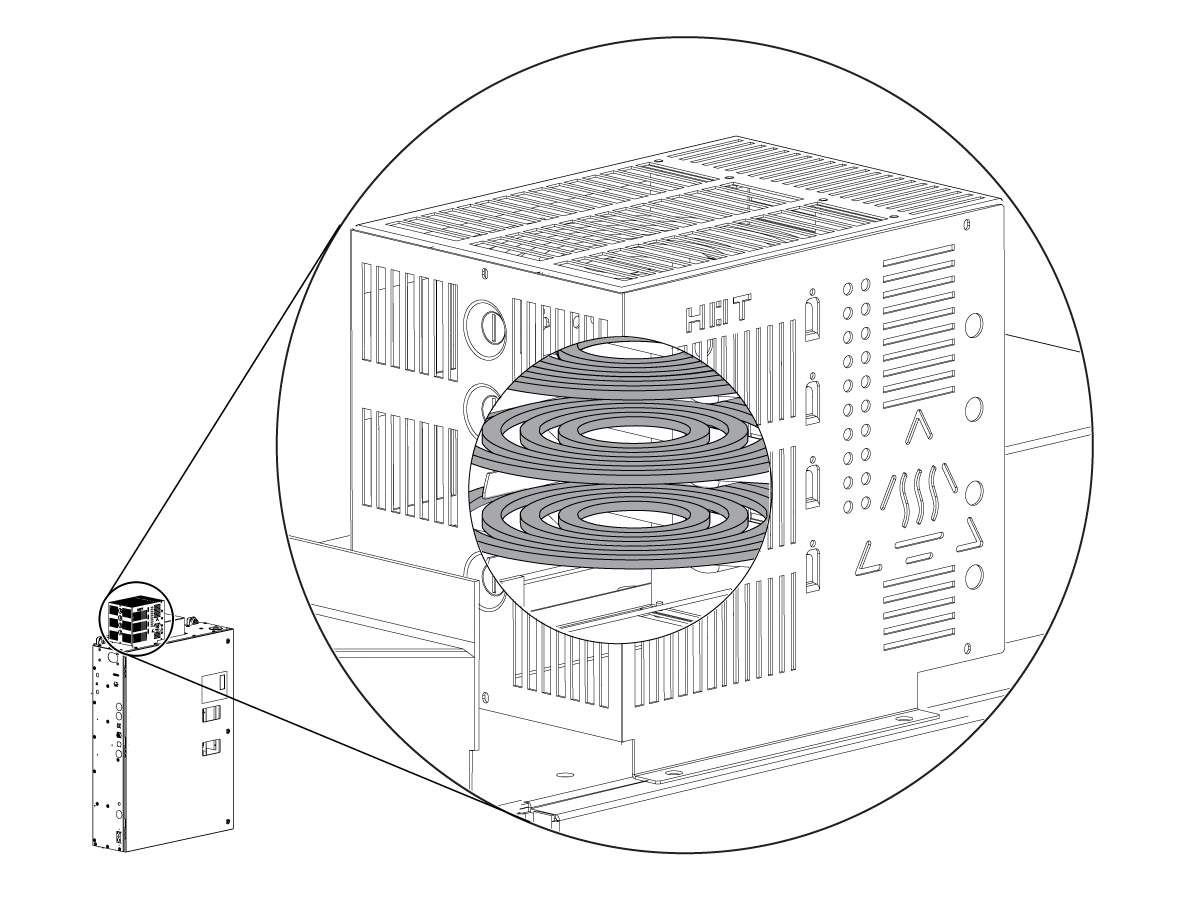
Disconnect the REGEN load leads from the vector drive at terminals 1 and 2. Measure the resistance across the leads. The reading must be as follows:

  • 2-resistor box: between 9.5 and 12.5 ohms.
  • 3-resistor box: between 6.3 and 8.3 ohms ohms. (As shown in the illustration.)
  • 4-resistor box: between 4.6 and 6.6 ohms.

If the REGEN loads are within specification, there can be a problem with the vector drive. Measure the resistance across terminals 1 and 3 on the vector drive.

 Note: A good drive will read a high resistance across 1 and 3 (somewhere in the Kilo ohm range). A short circuit indicates a faulty vector drive.

DC BUSS

Corrective Action:

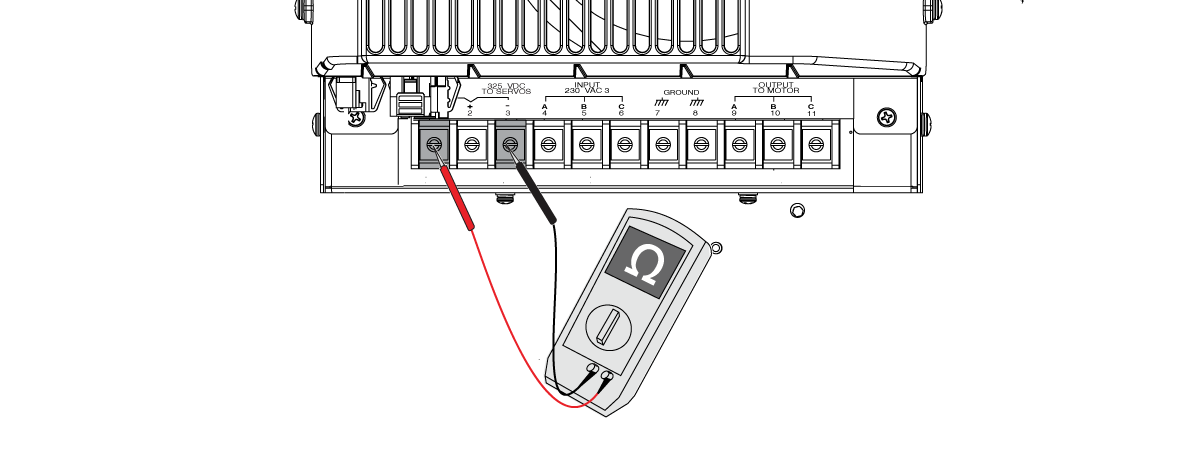
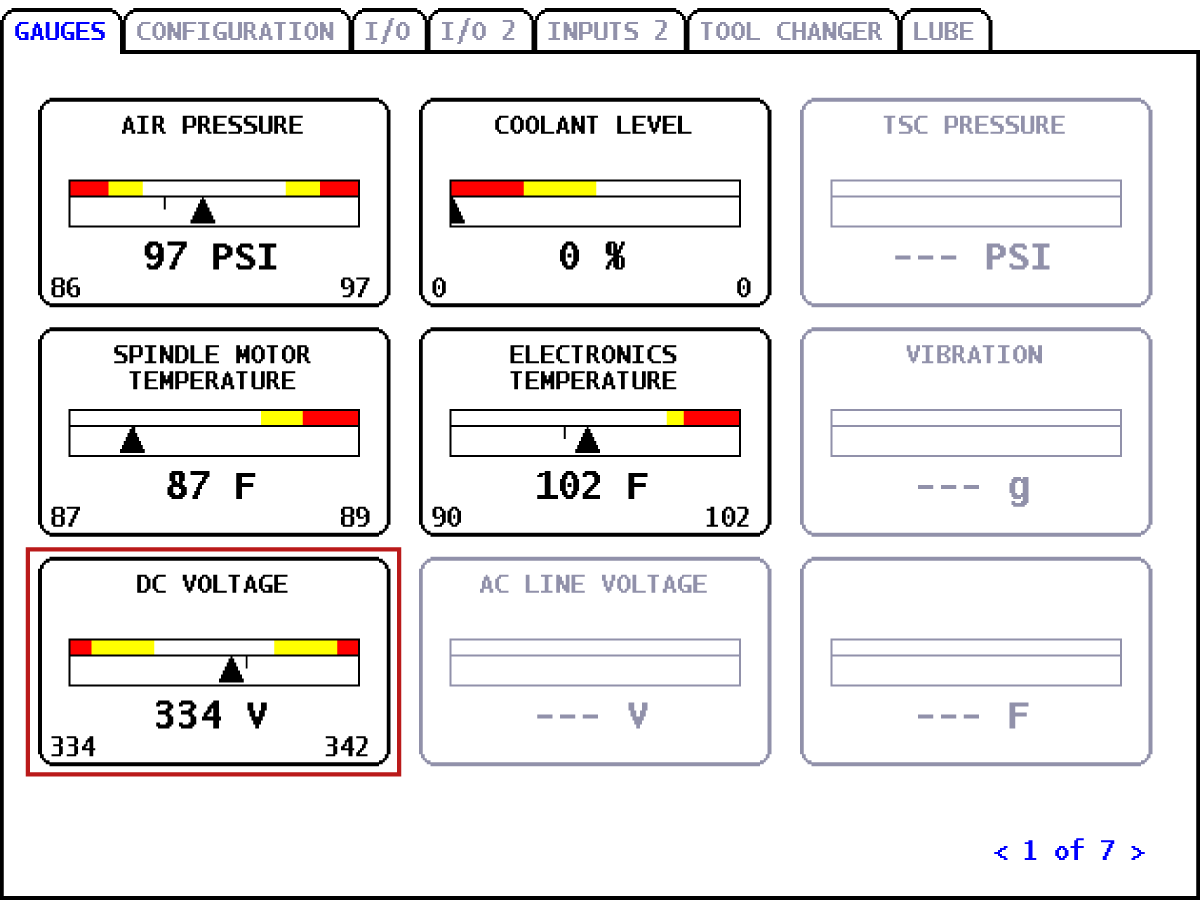
Press [POWER ON]. Measure the DC voltage between terminals 2 and 3 on the vector drive. Compare the measured voltage with the DC VOLTAGE on the diagnostics page on the control. The readings must match +-2%.

If the readings do not match, the problem can be:

  • A bad connection on the 640C cable. Make sure there is a tight connection on the J3 connector on the Vector Drive and the P17 connector on the Maincon/Mocon.
  • A faulty Vector Drive if you have incorrect voltage at P17.
  • A faulty Maincon/Mocon if you have the correct voltage on the 640C cable at the P17 connector of the Maincon/Mocon. There is 0.01 VDC for every 1 VDC Bus. For example, 320 VDC must show 3.2VDC.

Disconnect the DC Bus cables from terminals 2 and 3 on the vector drive. Power on the machine. Monitor the DC VOLTAGE on the diagnostics page of the control.

  • If the DC Bus goes back to the nominal value, there is a short in one of the servo amplifiers. A low resistance or a short is a sign of a faulty servo amplifier.
  • If the readings match and the alarm continues, the problem is a faulty vector drive.

Cooling Fan

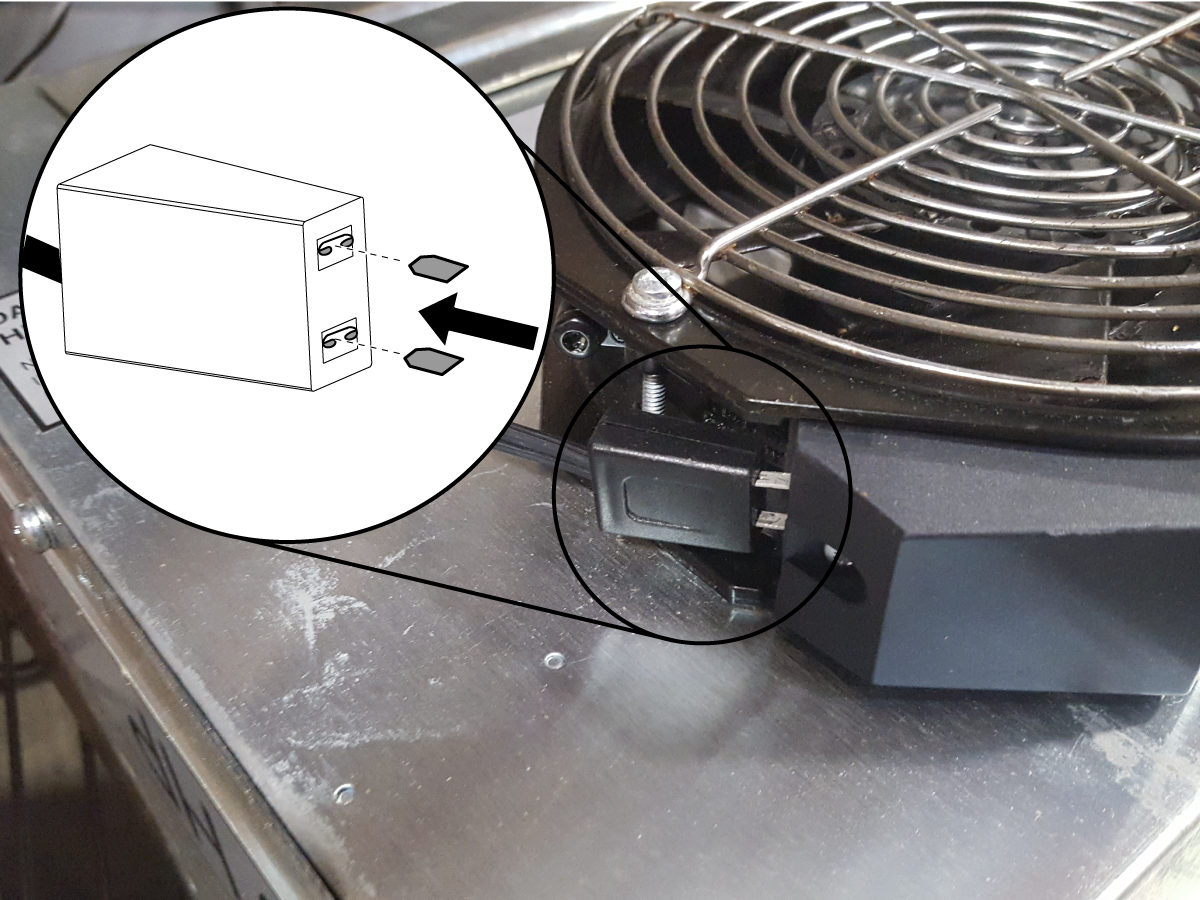
Inspect the spindle fan cable connection.  Make sure both spade connectors are properly going into the female connector.

Corrective Action:

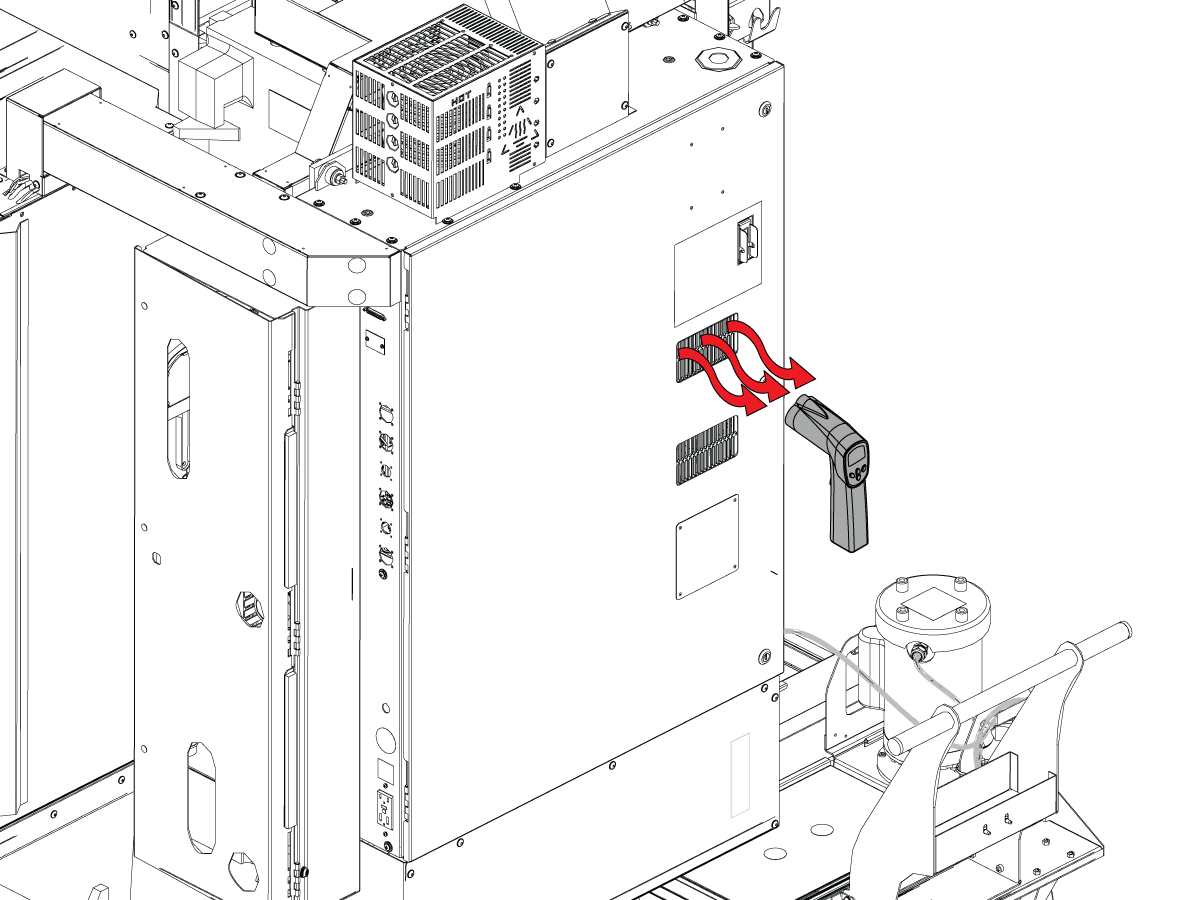
An over-temperature alarm is generated when the vector drive's heat-sink reaches 90°C. The cooling fan must turn ON when the heat-sink temperature reaches 50°C. The cooling fan must turn OFF as the heat-sink cools down.

Measure the temperature of the vector drive's heat-sink through the exhaust vents when this alarm occurs. If the temperature is above 60°C and the fan is not ON, the vector drive has a faulty cooling fan. Replace the cooling fan.

Incoming AC Voltage

Corrective Action:

Measure the incoming voltage to the machine. Make sure that the incoming voltage is within the range of the transformer’s tap. Move the lines to the correct tap if needed.

Unbalance Output Inspection

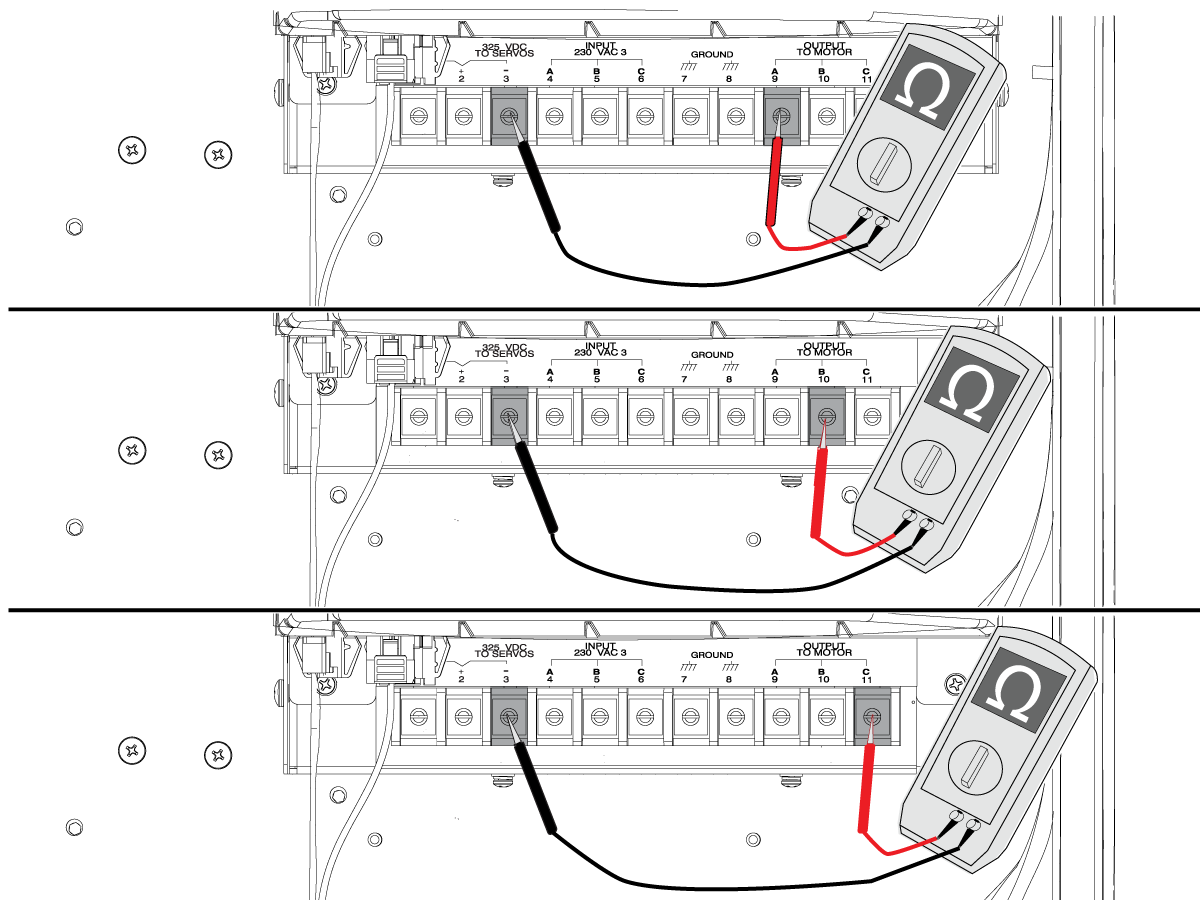
Corrective Action: Disconnect the motor cables at the vector drive. Push [POWER ON]. Push [RESET] to clear any alarms. Use a multimeter to measure the DC voltage across the following terminals on the vector drive (see the illustration):

  • 3 and 9
  • 3 and 10
  • 3 and 11

The voltage measured must be approximately half of the DC Buss in all three readings.

IMPORTANT: If any of the voltage readings is 0V or 330V, then this is a sign of an unbalanced output from the vector drive.  DO NOT REPLACE THE VECTOR DRIVE IF THE ABOVE CONDITIONS ARE NOT MET.

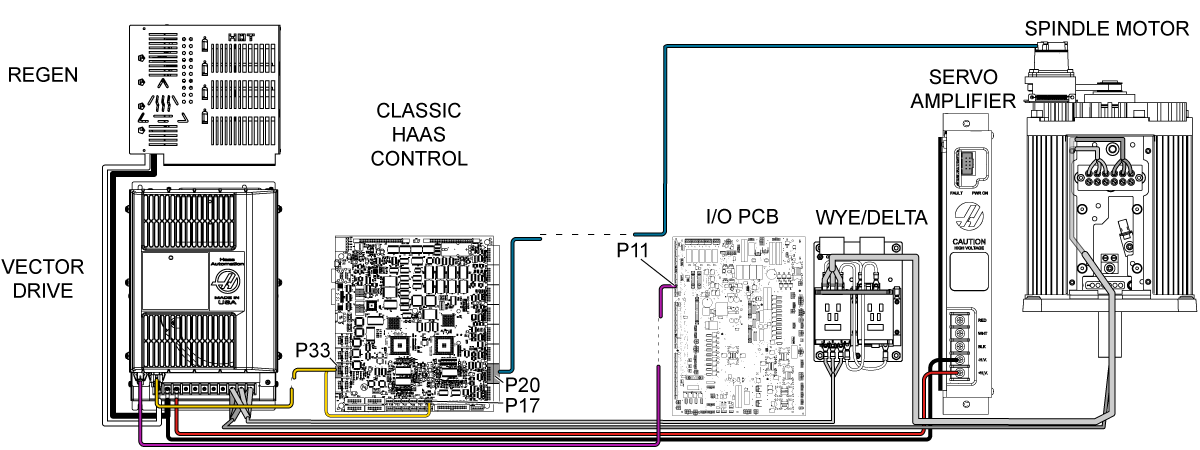
Electrical Diagram

Recently Viewed Items

You Have No Recently Viewed Items Yet

Feedback
Haas Logo

Haas Delivered Price

This price includes shipping cost, export and import duties, insurance, and any other expenses incurred during shipping to a location in France agreed with you as a buyer. No other mandatory costs can be added to the delivery of a Haas CNC Product.

KEEP UP WITH THE LATEST HAAS TIPS AND TECHNOLOGY...

Sign up now!   

HAAS TOOLING ACCEPTS THE FOLLOWING:

  • Service & Support
  • Owners
  • Request Service
  • Operator Manuals
  • Haas Parts
  • Rotary Repair Request
  • Pre-Install Guides
  • Shopping Tools
  • Build & Price a New Haas
  • Available Inventory
  • The Haas Price List
  • CNCA Financing
  • About Haas
  • Accessibility Statement
  • DNSH Statement
  • Export Compliance
  • Careers
  • Certifications & Safety
  • Contact Us
  • History
  • Terms & Conditions
  • Haas Tooling Terms & Conditions
  • Privacy
  • Warranty
  • Haas Community
  • Haas Certification Program
  • Haas Motorsports
  • Gene Haas Foundation
  • Haas Technical Education Community
  • Events
  • Join the Conversation
  • Facebook
  • X
  • Flickr
  • YouTube
  • LinkedIn
  • Instagram
  • TikTok
© 2026 Haas Automation, Inc – CNC Machine Tools

This site is protected by reCAPTCHA and the Google Privacy Policy and Terms of Service apply.

2800 Sturgis Rd., Oxnard, CA 93030
Toll Free: (888) 817-4446 / Fax: 805-278-8554