My Haas Welcome,
!
Haas Tooling MyHaas/HaasConnect Sign In Register Haas Tooling MyHaas/HaasConnect Sign Out Welcome, My Machines Latest Activity My Quotes My Account My Users Sign Out
Find Your Distributor
  1. Select Language
    1. English
    2. Deutsch
    3. Español - España
    4. Español - México
    5. Français
    6. Italiano
    7. Português
    8. Český
    9. Dansk
    10. Nederlands
    11. Magyar
    12. Polski
    13. Svenska
    14. Türkçe
    15. 中文
    16. Suomi
    17. Norsk
    18. الإنجليزية
    19. български
    20. Hrvatski
    21. Ελληνικά
    22. Română
    23. Slovenský
    24. Slovenščina
    25. 한국어
    26. 日本語
    27. Українська
  • machines Main Menu
    • Vertical Mills
      Vertical Mills
      Vertical Mills View All
      • Vertical Mills
      • VF Series
      • Universal Machines
      • VR Series
      • VP-5 Prismatic
      • Pallet-Changing VMCs
      • Mini Mills
      • Mold Machines
      • High-Speed Drill Centers
      • Drill/Tap/ Mill Series
      • Toolroom Mills
      • Pocket Mill
      • Compact Mills
      • Gantry Series
      • SR Sheet Routers
      • Extra-Large VMC
      • Double-Column Mills
      • 3+2 Positioning Machines
    • Multi-Axis Solutions
      Multi-Axis Solutions
      Multi-Axis Solutions View All
      • Multi-Axis Solutions
      • Y-Axis Lathes
      • 5-Axis Mills
    • Lathes
      Lathes
      Lathes View All
      • Lathes
      • ST Series
      • Dual-Spindle
      • Box Way Series
      • Toolroom Lathes
      • Chucker Lathe
      • Haas Bar Feeders
    • Horizontal Mills
      Horizontal Mills
      Horizontal Mills View All
      • Horizontal Mills
      • 50-Taper
      • 40-Taper
    • Rotaries & Indexers
      Rotaries & Indexers
      Rotaries & Indexers View All
      • Rotaries & Indexers
      • Rotary Tables
      • Indexers
      • 5-Axis Rotaries
      • Extra-Large Rotaries
    • Special Series
      Special Series
      Special Series View All
      • Special Series
      • EU_Series_Redirect
    • Automation Systems
      Automation Systems
      Automation Systems View All
      • Automation Systems
      • Mill Automation
      • Lathe Automation
      • Automatic Parts Loaders
      • Automation Models
    • Desktop Machines
      Desktop Machines
      Desktop Machines View All
      • Desktop Machines
      • Desktop Mill
      • Desktop Lathe
      • Control Simulator, Standard
      • Control Simulator, Premium
    • Shop Equipment
      Shop Equipment
      Shop Equipment View All
      • Shop Equipment
      • Knee Mill
      • Haas Manual Lathes
      • Haas Saws
    • Fabrication Machines
      Fabrication Machines
      Fabrication Machines View All
      • Fabrication Machines
      • Laser Cutting Machines
      • CNC Press Brakes
    • QUICK LINKS Special Series  Special Series 
      EU SERIES EU SERIES BUILD & PRICE | PRICE LIST BUILD & PRICE | PRICE LIST In-Stock Machines In-Stock Machines WHAT’S NEW WHAT’S NEW YOUR FIRST CNC YOUR FIRST CNC
      SHOPPING TOOLS
      • Build & Price a Haas
      • Price List
      • Available Inventory
      • CNCA Financing
      WANT TO TALK TO SOMEONE?

      A Haas Factory Outlet (HFO) can answer your questions, and walk you through your best options.

      CONTACT YOUR DISTRIBUTOR >
  • Options Main Menu
    • The Haas Control Value Option Packages
      Value Option Packages
      Value Option Packages View All
      • Value Option Packages
    • Product Image Spindles
      Spindles
      Spindles View All
      • Spindles
    • Product Image Tool Changers
      Tool Changers
      Tool Changers View All
      • Tool Changers
    • Product Image 4th- | 5th-Axis
      4th- | 5th-Axis
      4th- | 5th-Axis View All
      • 4th- | 5th-Axis
    • Product Image Turrets & Live Tooling
      Turrets & Live Tooling
      Turrets & Live Tooling View All
      • Turrets & Live Tooling
    • Product Image Probing
      Probing
      Probing View All
      • Probing
    • Haas Chip & Coolant Management Chip & Coolant Management
      Chip & Coolant Management
      Chip & Coolant Management View All
      • Chip & Coolant Management
    • The Haas Control The Haas Control
      The Haas Control
      The Haas Control View All
      • The Haas Control
    • Product Image Product Options
      Product Options
      Product Options View All
      • Product Options
    • Product Image Tooling & Fixturing
      Tooling & Fixturing
      Tooling & Fixturing View All
      • Tooling & Fixturing
    • Product Image Workholding
      Workholding
      Workholding View All
      • Workholding
    • Product Image 5-Axis Solutions
      5-Axis Solutions
      5-Axis Solutions View All
      • 5-Axis Solutions
      • 5 Easy Steps to 5-Axis
    • QUICK LINKS Special Series  Special Series 
      EU SERIES EU SERIES BUILD & PRICE | PRICE LIST BUILD & PRICE | PRICE LIST In-Stock Machines In-Stock Machines WHAT’S NEW WHAT’S NEW YOUR FIRST CNC YOUR FIRST CNC
      SHOPPING TOOLS
      • Build & Price a Haas
      • Price List
      • Available Inventory
      • CNCA Financing
      WANT TO TALK TO SOMEONE?

      A Haas Factory Outlet (HFO) can answer your questions, and walk you through your best options.

      CONTACT YOUR DISTRIBUTOR >
  • Why Haas Main Menu
      Discover the Haas Difference
    • Why Haas
    • MyHaas
    • Education Community
    • Industry 4.0
    • Haas Certification
    • Customer Testimonials
  • Service Main Menu
      Welcome to Haas Service
      SERVICE HOME Operator’s Manuals How-To Procedures Troubleshooting Guides Preventive Maintenance Haas Parts Haas Tooling Videos
  • Videos Main Menu
  • Main Menu
    • View All
    • View All
    • View All
    • View All
      • HTEC Curriculum Support
      • Haas Value Option Packages (VOP) Journey
    • View All
      • Haas 10 kg Cobot Package
      • Cobot Kits
      • DC-1 Drill Center
      • CNC Sales News
      • Do More With Your Haas
    • View All
    • View All
      • contact-us-test
      • 4 - AUTOMATION SYSTEMS
      • Carousel-V2
      • expert test
      • Demo_Day_Trident-test
      • Link Test
      • image-sale-tag-test
      • article-list-test
      • Haas 25 kg Robot Package
      • test-algolia-page
    • View All
      • Choose Options
    • View All
    • View All
    • View All
    • View All
    • View All
      • calc-test
    • View All
    • QUICK LINKS Special Series  Special Series 
      EU SERIES EU SERIES BUILD & PRICE | PRICE LIST BUILD & PRICE | PRICE LIST In-Stock Machines In-Stock Machines WHAT’S NEW WHAT’S NEW YOUR FIRST CNC YOUR FIRST CNC
      SHOPPING TOOLS
      • Build & Price a Haas
      • Price List
      • Available Inventory
      • CNCA Financing
      WANT TO TALK TO SOMEONE?

      A Haas Factory Outlet (HFO) can answer your questions, and walk you through your best options.

      CONTACT YOUR DISTRIBUTOR >
  • Haas Tooling Main Menu
  • Haas Service Parts Main Menu

My Haas Welcome,
!
Haas Tooling MyHaas/HaasConnect Sign In Register Haas Tooling MyHaas/HaasConnect Sign Out Welcome, My Machines Latest Activity My Quotes My Account My Users Sign Out
Find Your Distributor
  1. Select Language
    1. English
    2. Deutsch
    3. Español - España
    4. Español - México
    5. Français
    6. Italiano
    7. Português
    8. Český
    9. Dansk
    10. Nederlands
    11. Magyar
    12. Polski
    13. Svenska
    14. Türkçe
    15. 中文
    16. Suomi
    17. Norsk
    18. الإنجليزية
    19. български
    20. Hrvatski
    21. Ελληνικά
    22. Română
    23. Slovenský
    24. Slovenščina
    25. 한국어
    26. 日本語
    27. Українська
×

Search Results

Web Pages

Images

    • <
    • 1
    • >

3 - HSF-450 - Operation

HSF-450 - Operator's/Service Manual


  • 1 - HSF-450 - Introduction
  • 2 - HSF-450 - Installation
  • 3 - HSF-450 - Operation
  • 4 - HSF-450 - Maintenance
  • 5 - HSF-450 - Troubleshooting

Go To :

  • 3.1 Operation Instructions
  • 3.2 Operation Cautions and Warnings

3.1 Operation Instructions

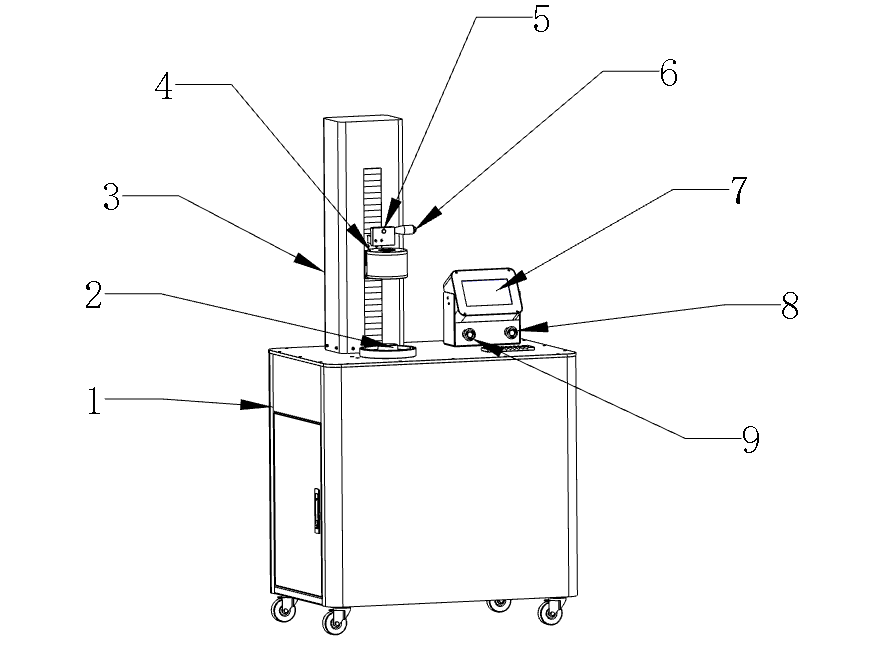
HSF-450 Overview

HSF-450 (Shrink Fit Machine)

  1.  Main Body
  2.  Tool Sleeve
  3.  Up/Down Guide Rail and Cover
  4.  Induction Heating Head
  5.  Height Adjustment Button
  6.  Handle
  7.  Operation Panel
  8.  Emergency Stop Switch
  9.  Water Pump Switch

Operation Instructions

1

Turn on the power switch on the back of the machine [1]. Press the Tool coolant pump switch [2]; the button should light up green.

2

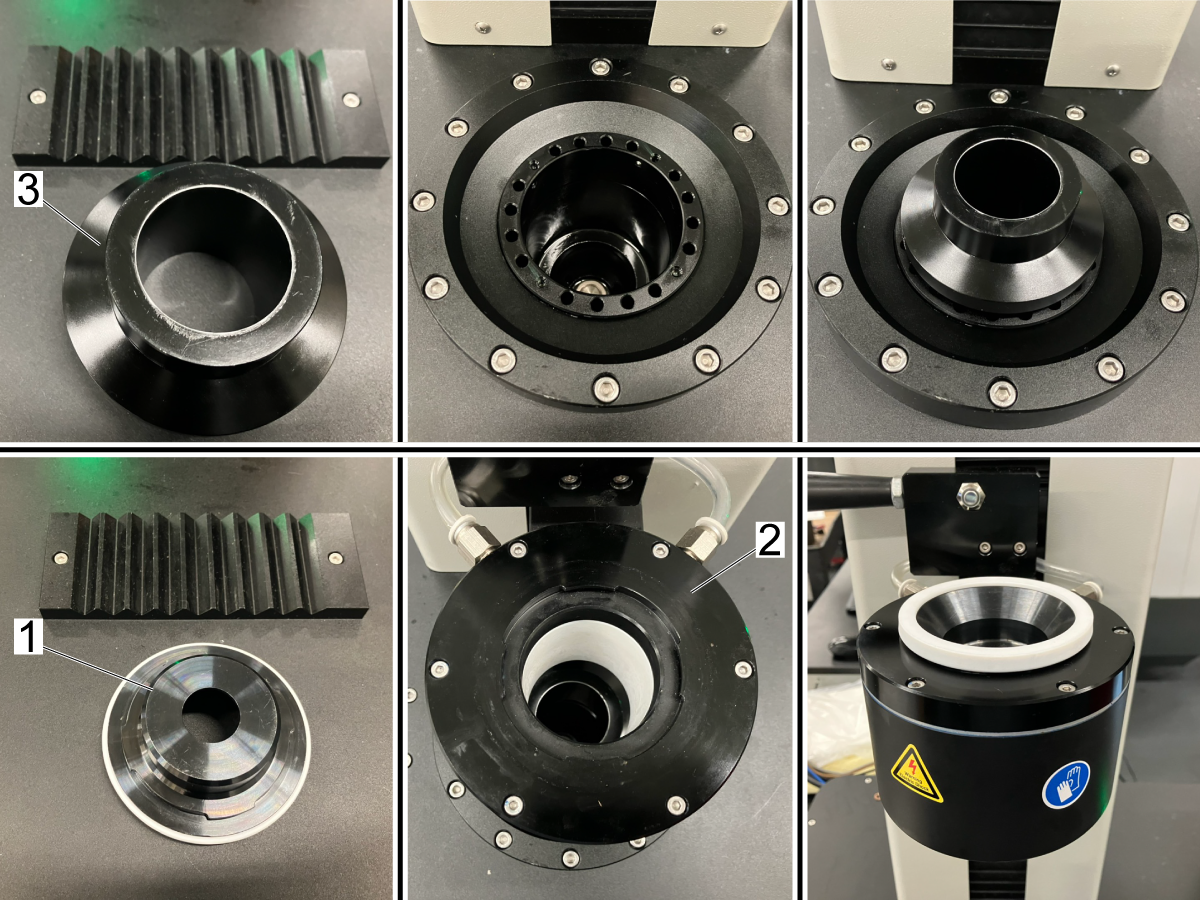
Install the correct size tool heating sleeve [1] on the heating head [2], according to the installed tool ID. (Total of six sizes range from Ø.118 inches - Ø1.260 inches (Ø3mm - Ø32mm).

Install the correct size tool holder sleeve [3] according to the tool holder used. 

    Available sizes: 

  • ISO30
  • ISO40
  • ISO50
  • HSK63A

3

Press the heating head positioning release button [1] and position the heating head [2] with the heating head handle [3]. The heating head should be placed around the tool holder clamping area. The distance from the face of the tool holder to the bottom of the tool disc should be about 0.4 inches (10 mm).

On the operation panel, select the type of tool holder and the diameter of the tool holder's bore. Select either the default parameters or the user parameters. If user parameters are selected, update the parameters for the current tool and holder.

Select the type of tool holder [4], either TE or TES. This defines the point angle of the tool holder. Tooling suppliers should specify this as the SIG angle. 

Select the bore size [5] of the tool holder. This will be the same as the diameter of the tool. 


4

The manufacturer sets default parameters [1], and user parameters [2] are custom set values. 

Select "Loading Knife" or "Taking Knife" [3]. "Loading Knife" is for installing a cutting tool, and "Taking Knife" is for removing a cutting tool. Tap the button to switch between these options.

Warning: Heat resistant gloves must be worn while installing or removing a tool and handling it after it has been heated. Not wearing heat resistant gloves will cause burns. 

Install tool: Press the Heating button [4]. When the heating time is "0," insert the cutting tool quickly. (Hold the cutting tool for a few seconds when installing the tool holder without a set screw).

Remove the tool: Press the Heating button [4]. When the countdown is about 3 seconds, you need to clamp or hold the tool and lift it slightly until the countdown is 0 seconds, and the cutting tool can be removed. 

5

Once the heating cycle has finished, and the cutting tool has been removed or installed, click the "Cooling" button [1] to cool the tool holder.

The HSF-450 will first blow air onto the tool holder to cool the holder down, so less steam is produced when coolant is sprayed. 

Once the "Drying before Cooling" [2] count down reaches "0," the tool will be retracted into the cylinder, and coolant will be sprayed onto it.

When the "Cooling Time" timer [3] reaches "0," the coolant will stop.

Then the “Drying after Cooling” [4] timer will start. The tool will be blasted with air to remove any coolant.

Use an air hose to remove any excess coolant and press the up arrow [5] to have the tool rise up the cylinder.

Warning: The tool will still be hot after the cooling process. Use heat resistant gloves when handling the tool.

Warning: Only the tool holder will be cooled when unloading tools. The cutting tool will be extremely hot after removal and should be placed in a safe area. The air hose can be used to cool cutting tools after they have been removed. 

6

To set the time, press the time in the bottom right of the screen [1]. This will open the time setting menu. Enter the time using the number pad in the menu. 

The HSF-450 uses the following format [HH]:[MM]:[SS] [YYYY]-[MM]-[DD] to show the date.

Adjust Coolant Valve

1

The coolant system has a valve [1] that can be turned counterclockwise to increase coolant pressure and clockwise to decrease pressure. 

Operators Interface

Operation Panel Menu Selection: Switch between the heat shrink page, Operation Instructions, and Operations Precautions.

Tool Holder Type: Select the white box to select the tool holder type pop-up menu.

Tool Size: Select the white box to select the Tool Size pop-up menu.

Parameter Selection: The default parameters are set at the factory and cannot be changed. The operator sets user parameters and can be saved for future use.

Heating Time: The default parameter cannot be changed. When the user parameter is selected, you can click the white box, enter the heating time value on the pop-up keyboard, then click the save button to save the parameter for the next use.

Cooling Parameters: The default parameters cannot be changed. When the user parameter is selected, you can click the white box, input the value on the pop-up keyboard, then click the save button to save the parameter for the next use.

Status Line: +1: Indicates the total number of workpieces to be heated.

Emergency Stop, Over Temperature, and Over Current: If these Icons are displayed with black text, the HSF-450 is operating correctly.

If one or more of these are displayed in yellow, then the HSF-450 is experiencing that issue. For example, if “over temperature” is shown in yellow, the HSF-450 has overheated.

Set time: Click the time area to set the display time on the pop-up keyboard.

3.2 Operation Cautions and Warnings

Operation Notices

There are safety risks for operators. Follow the safety instructions and operating specifications to avoid the following hazards:

  •     Electric Shock
  •     Burns
  •     Damage to Equipment, Tools, and Tool Holders

Safety Instructions

  • The shrink fit machine uses a 3-phase 208/240V power supply. For details, please refer to “1.2: Specifications”. Before the equipment is powered on, the power cord's voltage and current capacity must meet the electrical specifications.
  • The power cord must be firmly connected and grounded. A ground failure will create the risk of electric shock to the operator.
  • The external power supply must be connected to the air switch.
  • To prevent electric shock hazards from lightning, disconnect the power supply during thunderstorms.
  • When the equipment is cleaned, maintained, repaired, or not used for a long time, the unit must be unplugged.

Warning: There may still be residual voltage (current) after the device is powered off. Wait five minutes before working on any internal components.

  • All electrodes are potentially dangerous. Do not touch the live parts. Operators must ensure that their clothes and body are dry and must not work in a humid environment. 
  • Wear protective shoes when operating the machine.
  • When loading and unloading the cutting tool, the operator must wear protective gloves to avoid being burned.  

Any metal object close to the induction range of the heating head will be quickly heated to a high temperature. Therefore, it is not safe to wear metal jewelry such as rings, necklaces, and bracelets while the machine is being used.

  • People with pacemakers and other metal objects in their bodies must stay away from the shrink fit machine. They should contact the manufacturer of the devices to determine how far they need to be from the machine while it is being operated. 
  • Do not use the machine with damaged or removed safety devices.

Qualified Operator

The HSF-450 should not be operated without proper training. Only trained professionals and technicians may operate the HSF-450. It is the operator's responsibility to prevent the equipment from causing harm to other personnel and objects.

Working Environment

This HSF-450 needs a well-ventilated area for proper heat dissipation during use. Do not block the air inlet and outlet of the device. 

1. Avoid placing the HSF-450 in areas with.

  • Sunlight, near heat sources, and large temperature changes.
  • High humidity.
  • Excessive dust.
  • Unstable/Uneven foundation

2. Environmental Requirements

  • Environment temperature: 23°F~40°F (-5℃~40℃).
  • Relative humidity: ≤85%.
  • Installation space: 2 meters x 1.5 meters.

3. Pressure source requirements

  • Air pressure 75 to 87 PSI (0.5 to 0.6 MPA).
  • Dew point temperature: lower than 1°F (-17℃).
  • Requires clean air, no moisture or oil mist.

4. Cooling water requirements

  • Machine coolant mixed to manufacturer's specifications.

5. Power system requirements:

  • The power supply and electrical cable must support 3-phase 208/240V 15A 50/60Hz. More information can be found in “1.2: Specifications”.
  • Do not turn on the power to the HSF-450 before the electrical cable is connected.
  • The power supply must be turned off when the equipment is not used for a long time.

Tool Safety

Wear heat resistant gloves when handling the tool holder or cutting tools to avoid accidental burns.

 Caution:

  • Tools must have an H7 grind or lower. Tools with H8 grind and higher may come out of their tool holders while machining. 
  • Unevenness, scratches, bumps, and improper laser labels on cutting tools will affect the heat expansion.
  • Do not use any flammable or explosive cleaning products during the heating process.
  • Clean the bore of the tool holder before loading to avoid residual chips and cutting fluid on the tool shank. The residual oily substance of the tool holder may be burned during the heating process.

Tips & Tricks: When a shrink fit tool holder won’t be used for a long time, spray the tool holder with anti-rust oil.

Shrink Fit Tool Safety

  • Do not start the heating process without a tool holder loaded and the heating head properly in place.
  • When the heating is over, immediately start the cooling process. This prevents heat radiation from the tool and tool holder from damaging the heating head. 
  • If the cutting tool is not installed or removed within the set time, let the tool holder cool down completely before trying again. Immediate reheating is not recommended. Continuous heating may cause damage to the tool holder and heating head.
  • If the cutting tool still cannot be installed or removed, it may be caused by the following reasons:
  1. Incorrect setting parameters of shrink fit machine
  2. Improper tool shank diameter
  3. Damaged tool shank
  4. Carbon deposit in clamping hole

The heating time cannot exceed 20 seconds, heating for a long time will cause the heating head to overheat. When the heating head overheats, the machine will shut down until the machine cools. 

Recently Viewed Items

You Have No Recently Viewed Items Yet

Feedback
Haas Logo

Haas Delivered Price

This price includes shipping cost, export and import duties, insurance, and any other expenses incurred during shipping to a location in France agreed with you as a buyer. No other mandatory costs can be added to the delivery of a Haas CNC Product.

KEEP UP WITH THE LATEST HAAS TIPS AND TECHNOLOGY...

Sign up now!   

HAAS TOOLING ACCEPTS THE FOLLOWING:

  • Service & Support
  • Owners
  • Request Service
  • Operator Manuals
  • Haas Parts
  • Rotary Repair Request
  • Pre-Install Guides
  • Shopping Tools
  • Build & Price a New Haas
  • Available Inventory
  • The Haas Price List
  • CNCA Financing
  • About Haas
  • Accessibility Statement
  • DNSH Statement
  • Export Compliance
  • Careers
  • Certifications & Safety
  • Contact Us
  • History
  • Terms & Conditions
  • Haas Tooling Terms & Conditions
  • Privacy
  • Warranty
  • Haas Community
  • Haas Certification Program
  • Haas Motorsports
  • Gene Haas Foundation
  • Haas Technical Education Community
  • Events
  • Join the Conversation
  • Facebook
  • X
  • Flickr
  • YouTube
  • LinkedIn
  • Instagram
  • TikTok
© 2026 Haas Automation, Inc – CNC Machine Tools

This site is protected by reCAPTCHA and the Google Privacy Policy and Terms of Service apply.

2800 Sturgis Rd., Oxnard, CA 93030
Toll Free: (888) 817-4446 / Fax: 805-278-8554