My Haas Welcome,
!
Haas Tooling MyHaas/HaasConnect Sign In Register Haas Tooling MyHaas/HaasConnect Sign Out Welcome, My Machines Latest Activity My Quotes My Account My Users Sign Out
Find Your Distributor
  1. Select Language
    1. English
    2. Deutsch
    3. Español - España
    4. Español - México
    5. Français
    6. Italiano
    7. Português
    8. Český
    9. Dansk
    10. Nederlands
    11. Magyar
    12. Polski
    13. Svenska
    14. Türkçe
    15. 中文
    16. Suomi
    17. Norsk
    18. الإنجليزية
    19. български
    20. Hrvatski
    21. Ελληνικά
    22. Română
    23. Slovenský
    24. Slovenščina
    25. 한국어
    26. 日本語
    27. Українська
  • machines Main Menu
    • Vertical Mills
      Vertical Mills
      Vertical Mills View All
      • Vertical Mills
      • VF Series
      • Universal Machines
      • VR Series
      • VP-5 Prismatic
      • Pallet-Changing VMCs
      • Mini Mills
      • Mold Machines
      • High-Speed Drill Centers
      • Drill/Tap/ Mill Series
      • Toolroom Mills
      • Pocket Mill
      • Compact Mills
      • Gantry Series
      • SR Sheet Routers
      • Extra-Large VMC
      • Double-Column Mills
      • 3+2 Positioning Machines
    • Multi-Axis Solutions
      Multi-Axis Solutions
      Multi-Axis Solutions View All
      • Multi-Axis Solutions
      • Y-Axis Lathes
      • 5-Axis Mills
    • Lathes
      Lathes
      Lathes View All
      • Lathes
      • ST Series
      • Dual-Spindle
      • Box Way Series
      • Toolroom Lathes
      • Chucker Lathe
      • Haas Bar Feeders
    • Horizontal Mills
      Horizontal Mills
      Horizontal Mills View All
      • Horizontal Mills
      • 50-Taper
      • 40-Taper
    • Rotaries & Indexers
      Rotaries & Indexers
      Rotaries & Indexers View All
      • Rotaries & Indexers
      • Rotary Tables
      • Indexers
      • 5-Axis Rotaries
      • Extra-Large Rotaries
    • Special Series
      Special Series
      Special Series View All
      • Special Series
      • EU_Series_Redirect
    • Automation Systems
      Automation Systems
      Automation Systems View All
      • Automation Systems
      • Mill Automation
      • Lathe Automation
      • Automatic Parts Loaders
      • Automation Models
    • Desktop Machines
      Desktop Machines
      Desktop Machines View All
      • Desktop Machines
      • Desktop Mill
      • Desktop Lathe
      • Control Simulator, Standard
      • Control Simulator, Premium
    • Shop Equipment
      Shop Equipment
      Shop Equipment View All
      • Shop Equipment
      • Knee Mill
      • Haas Manual Lathes
      • Haas Saws
    • Fabrication Machines
      Fabrication Machines
      Fabrication Machines View All
      • Fabrication Machines
      • Laser Cutting Machines
      • CNC Press Brakes
    • QUICK LINKS Special Series  Special Series 
      EU SERIES EU SERIES BUILD & PRICE | PRICE LIST BUILD & PRICE | PRICE LIST In-Stock Machines In-Stock Machines WHAT’S NEW WHAT’S NEW YOUR FIRST CNC YOUR FIRST CNC
      SHOPPING TOOLS
      • Build & Price a Haas
      • Price List
      • Available Inventory
      • CNCA Financing
      WANT TO TALK TO SOMEONE?

      A Haas Factory Outlet (HFO) can answer your questions, and walk you through your best options.

      CONTACT YOUR DISTRIBUTOR >
  • Options Main Menu
    • The Haas Control Value Option Packages
      Value Option Packages
      Value Option Packages View All
      • Value Option Packages
    • Product Image Spindles
      Spindles
      Spindles View All
      • Spindles
    • Product Image Tool Changers
      Tool Changers
      Tool Changers View All
      • Tool Changers
    • Product Image 4th- | 5th-Axis
      4th- | 5th-Axis
      4th- | 5th-Axis View All
      • 4th- | 5th-Axis
    • Product Image Turrets & Live Tooling
      Turrets & Live Tooling
      Turrets & Live Tooling View All
      • Turrets & Live Tooling
    • Product Image Probing
      Probing
      Probing View All
      • Probing
    • Haas Chip & Coolant Management Chip & Coolant Management
      Chip & Coolant Management
      Chip & Coolant Management View All
      • Chip & Coolant Management
    • The Haas Control The Haas Control
      The Haas Control
      The Haas Control View All
      • The Haas Control
    • Product Image Product Options
      Product Options
      Product Options View All
      • Product Options
    • Product Image Tooling & Fixturing
      Tooling & Fixturing
      Tooling & Fixturing View All
      • Tooling & Fixturing
    • Product Image Workholding
      Workholding
      Workholding View All
      • Workholding
    • Product Image 5-Axis Solutions
      5-Axis Solutions
      5-Axis Solutions View All
      • 5-Axis Solutions
      • 5 Easy Steps to 5-Axis
    • QUICK LINKS Special Series  Special Series 
      EU SERIES EU SERIES BUILD & PRICE | PRICE LIST BUILD & PRICE | PRICE LIST In-Stock Machines In-Stock Machines WHAT’S NEW WHAT’S NEW YOUR FIRST CNC YOUR FIRST CNC
      SHOPPING TOOLS
      • Build & Price a Haas
      • Price List
      • Available Inventory
      • CNCA Financing
      WANT TO TALK TO SOMEONE?

      A Haas Factory Outlet (HFO) can answer your questions, and walk you through your best options.

      CONTACT YOUR DISTRIBUTOR >
  • Why Haas Main Menu
      Discover the Haas Difference
    • Why Haas
    • MyHaas
    • Education Community
    • Industry 4.0
    • Haas Certification
    • Customer Testimonials
  • Service Main Menu
      Welcome to Haas Service
      SERVICE HOME Operator’s Manuals How-To Procedures Troubleshooting Guides Preventive Maintenance Haas Parts Haas Tooling Videos
  • Videos Main Menu
  • Main Menu
    • View All
    • View All
    • View All
    • View All
      • HTEC Curriculum Support
    • View All
      • Haas 10 kg Cobot Package
      • Cobot Kits
      • DC-1 Drill Center
      • CNC Sales News
      • Do More With Your Haas
    • View All
    • View All
      • contact-us-test
      • 4 - AUTOMATION SYSTEMS
      • Carousel-V2
      • expert test
      • Demo_Day_Trident-test
      • Link Test
      • image-sale-tag-test
      • article-list-test
      • Haas 25 kg Robot Package
    • View All
      • Choose Options
    • View All
    • View All
    • View All
    • View All
    • View All
      • calc-test
    • View All
    • QUICK LINKS Special Series  Special Series 
      EU SERIES EU SERIES BUILD & PRICE | PRICE LIST BUILD & PRICE | PRICE LIST In-Stock Machines In-Stock Machines WHAT’S NEW WHAT’S NEW YOUR FIRST CNC YOUR FIRST CNC
      SHOPPING TOOLS
      • Build & Price a Haas
      • Price List
      • Available Inventory
      • CNCA Financing
      WANT TO TALK TO SOMEONE?

      A Haas Factory Outlet (HFO) can answer your questions, and walk you through your best options.

      CONTACT YOUR DISTRIBUTOR >
  • Haas Tooling Main Menu
  • Haas Service Parts Main Menu

My Haas Welcome,
!
Haas Tooling MyHaas/HaasConnect Sign In Register Haas Tooling MyHaas/HaasConnect Sign Out Welcome, My Machines Latest Activity My Quotes My Account My Users Sign Out
Find Your Distributor
  1. Select Language
    1. English
    2. Deutsch
    3. Español - España
    4. Español - México
    5. Français
    6. Italiano
    7. Português
    8. Český
    9. Dansk
    10. Nederlands
    11. Magyar
    12. Polski
    13. Svenska
    14. Türkçe
    15. 中文
    16. Suomi
    17. Norsk
    18. الإنجليزية
    19. български
    20. Hrvatski
    21. Ελληνικά
    22. Română
    23. Slovenský
    24. Slovenščina
    25. 한국어
    26. 日本語
    27. Українська
×

Search Results

Web Pages

Images

    • <
    • 1
    • >

50T - Gearbox - Troubleshooting Guide - CHC - TG0016

Service Home 50T - Gearbox - Troubleshooting Guide - CHC - TG0016
Recently Updated Last updated: 10/08/2025

50T - Gearbox - Troubleshooting Guide - CHC


TG0016

50T - Gearbox - Troubleshooting Guide - CHC - TG0016

- Jump to Cause - 1. Introduction 2. Gearbox Assembly Diagram 3. Gearbox Lubrication Diagrams 4. 50T - Gearbox - Orifice Vented - Lubrication 5. 50T - Gearbox Anti-Siphon Solenoid - Lubrication 6. Flow Switch Relocation - 50T - Gearbox - Orifice Vented 7. Symptom Table 8. Solenoid/Orifice Upgrade (2 steps) 9. Low Ambient Shop Temperature 10. Oil Level 11. Oil Flow Switch 12. Oil Pressure Switch 13. Oil Level Switch 14. Oil Filter 15. Oil-Pump Motor 16. Wye/Delta Contactor 17. Excessive Gearbox Noise 18. Encoder Pulley/Belt 19. Gearbox Back to Top

Introduction

Download and fill out the Gearbox Inspection Report Checklist below before replacing any parts.

Gearbox Inspection Report Checklist

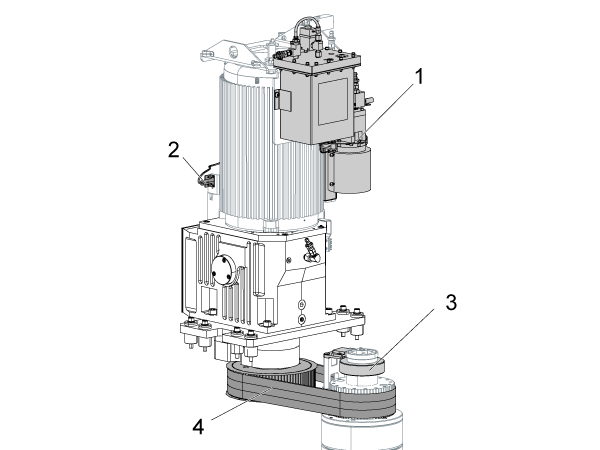
Gearbox Assembly Diagram

50-taper Gearbox

  1. Gearbox oil pump
  2. High/low gear proximity sensors or mechanical switches
  3. Spindle encoder
  4. Spindle drive belts

Gearbox Lubrication Diagrams

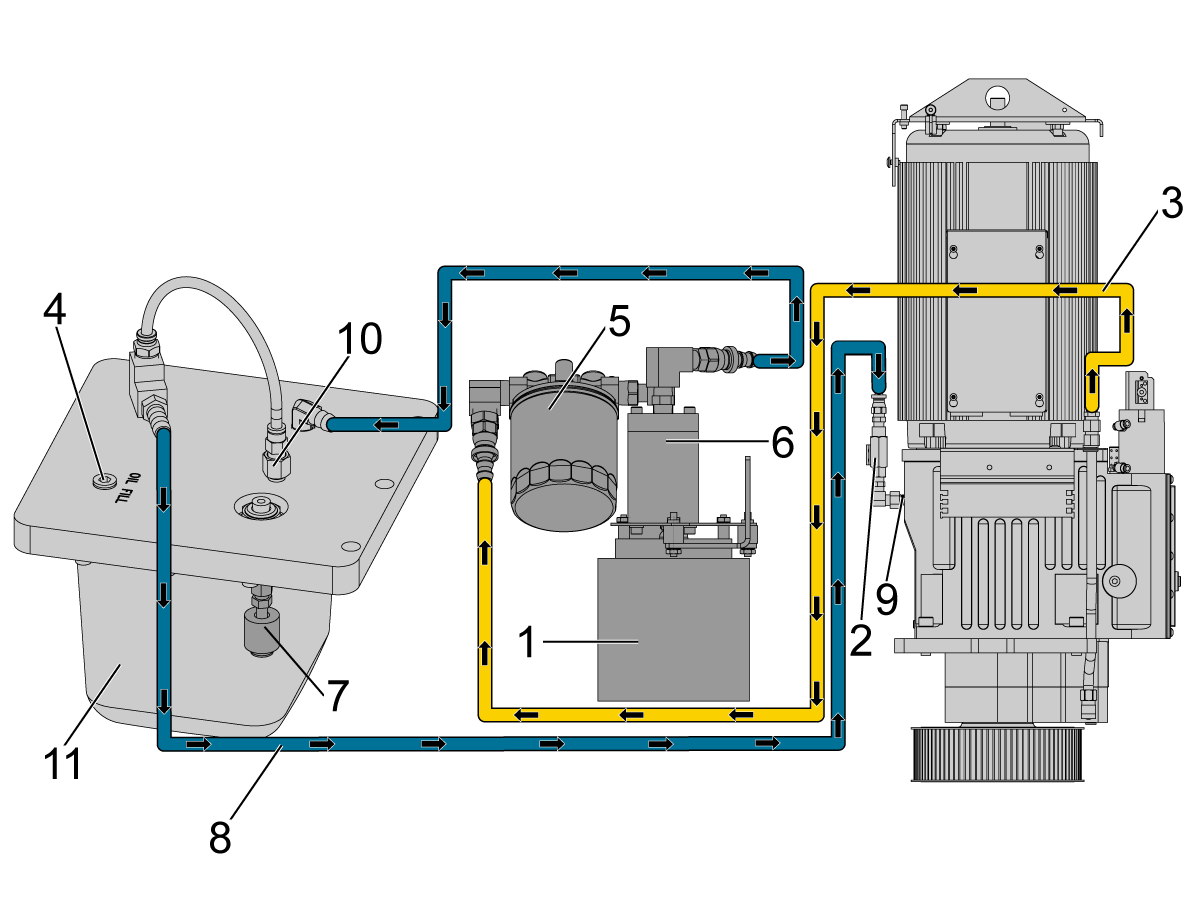
50T - Gearbox - Orifice Vented - Lubrication

50-taper spindle:

  • Oil-pump motor [1]
  • Oil Flow Switch [2]
  • Scavenge Line [3]
  • Oil Fill Hole Plug[4]
  • Oil Filter [5]
  • Oil Pump [6]
  • Oil Level Switch [7]
  • Lubrication Tube [8]
  • Oil Nozzle [9]
  • Orifice [10]
  • Oil Reservoir [11]

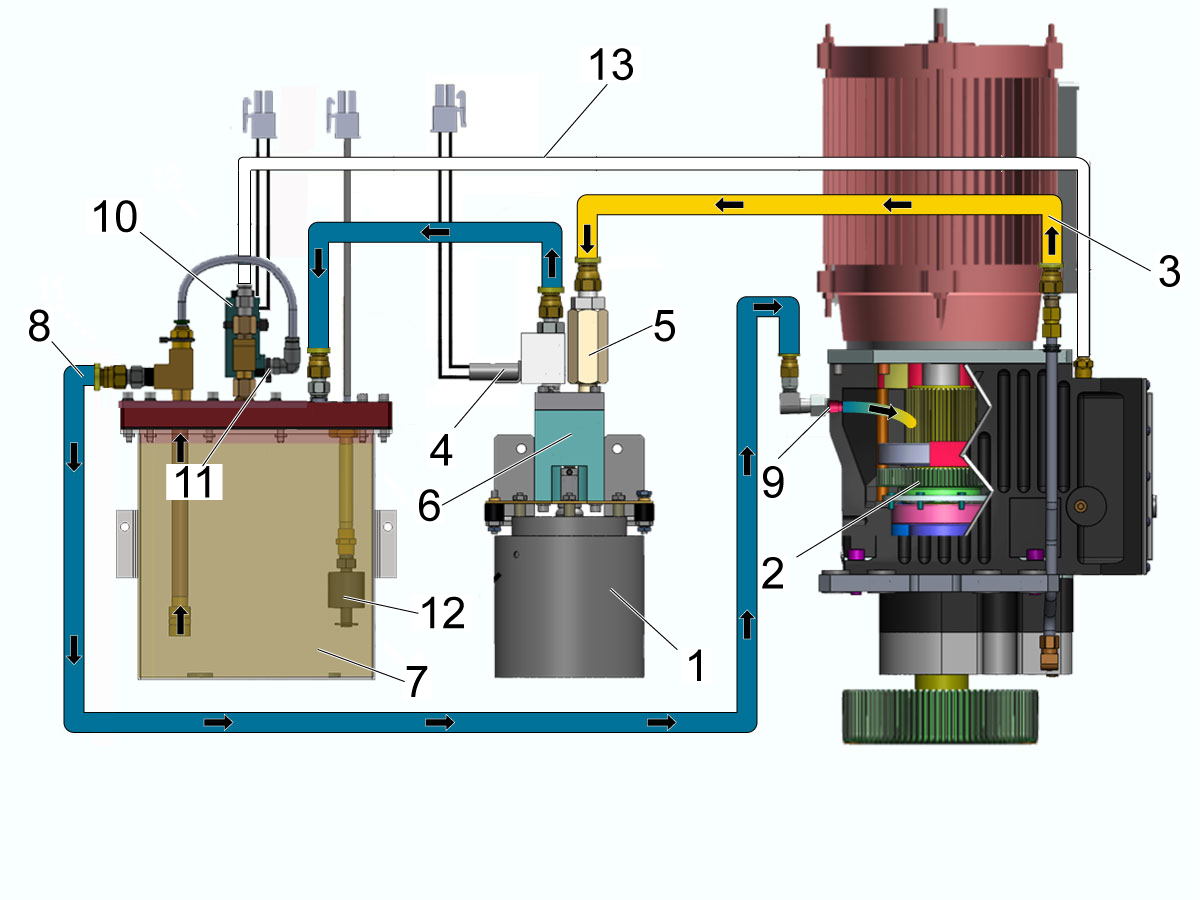
50T - Gearbox Anti-Siphon Solenoid - Lubrication

Anti-Siphon Solenoid Lubrication Components:

  • Oil-pump motor [1].
  • Gearbox [2].
  • Scavenge Line [3].
  • Oil Flow Sensor [4].
  • Filter [5].
  • Oil Pump [6].
  • Reservoir [7].
  • Lubrication Tube [8].
  • Oil Nozzle [9].
  • Anti-siphon Solenoid [10].
  • Vent Restrictor Orifice [11].
  • Oil Level Switch [12].
  • Air Vent [13]
Anti-Siphon Solenoid - Explanation 
 
  • Solenoid activates and closes the vent [13].
  • Pump pressurizes the system and allows oil to flow through.
  • When the pump stops the solenoid deactivates and the vent opens up and allows air to flow from the gearbox.
  • This allows bubbles/air into the output line [8] and breaks the natural siphon that would otherwise drain all the oil into the gearbox which will leak out of the main output shaft on to of the pulley.

Flow Switch Relocation - 50T - Gearbox - Orifice Vented

If the machine is generating alarms 179 (CHC MILL) LOW GEARBOX OIL PRESSURE or 2012 LOW GEARBOX OIL FLOW. Or if the machine generates LOW GEAR BOX OIL FLOW LOW GEAR BOX OIL LEVEL warnings.

Troubleshoot the gearbox.

If the gearbox continues to alarm after troubleshooting and it is configured with the flow switch at the input of the gearbox and an orifice on the oil reservoir. Perform the flow switch relocation.

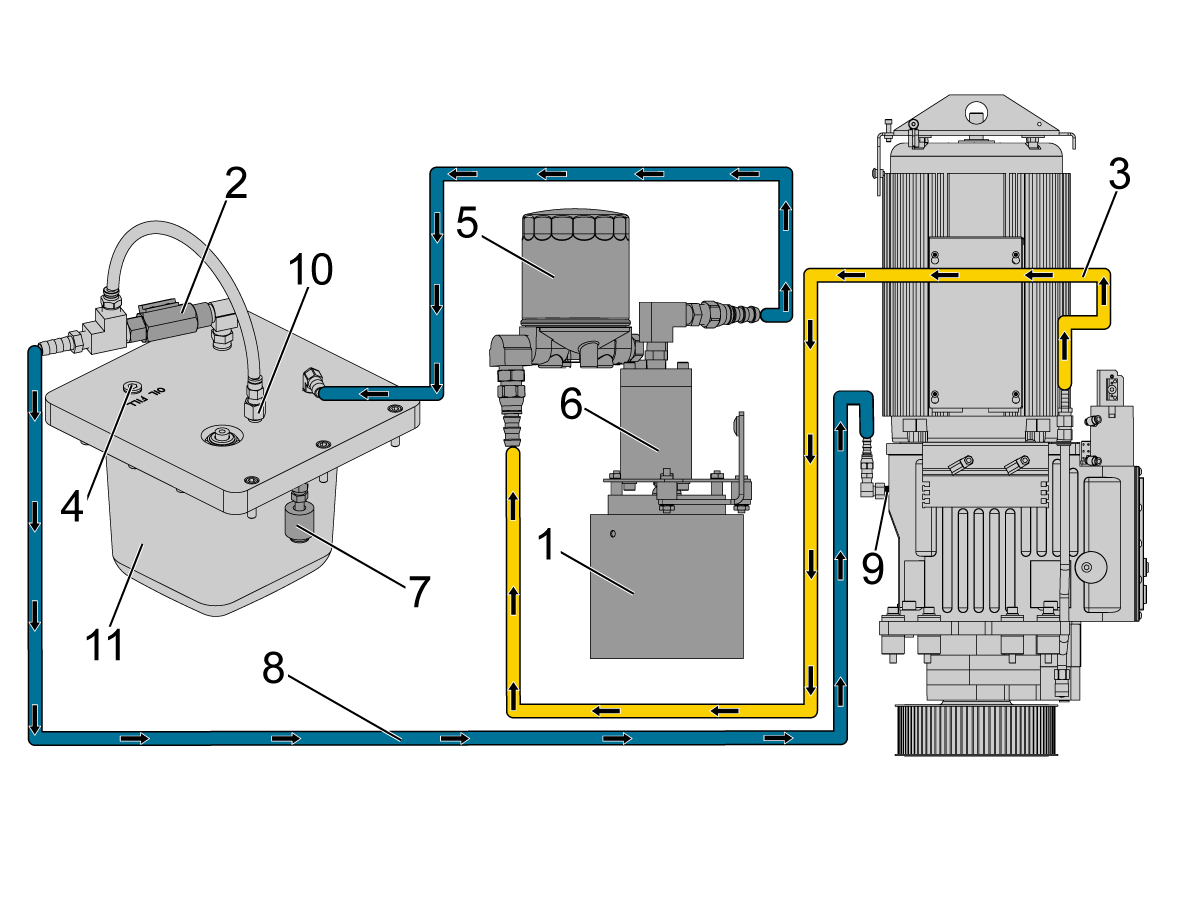
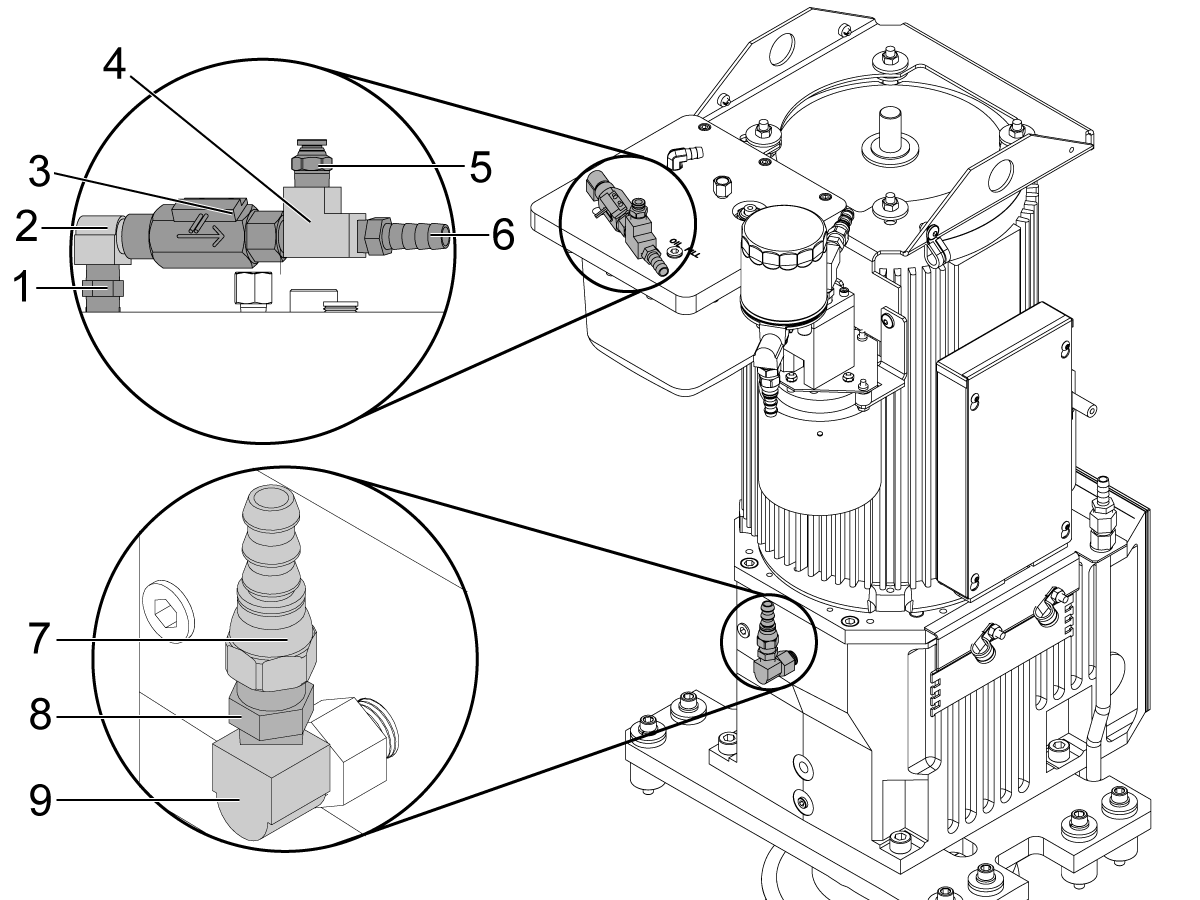
Relocate the pressure switch and fittings according to the schematics.This relocation requires changing the order of the fittings and adding
PN: 58-3618. Rotate the oil filter so it is upside down.

 Note: Shorten the vent hose. Adjust the switch sensor so it is to the left, opposite of flow.

50-taper spindle:

  • Oil-pump motor [1]
  • Oil Flow Switch [2]
  • Scavenge Line [3]
  • Oil Fill Hole Plug[4]
  • Oil Filter [5]
  • Oil Pump [6]
  • Oil Level Switch [7]
  • Lubrication Tube [8]
  • Oil Nozzle [9]
  • Orifice [10]
  • Oil Reservoir [11]

Part Number Callouts:

  • [1] - PN: 58-3691
  • [2] - PN: 58-3618 (Needs to be ordered)
  • [3] - PN: 59-1652
  • [4] - PN: 58-3001
  • [5] - PN: 58-1349
  • [6] - PN: 58-2259
  • [7] - PN: 58-1441
  • [8] - PN: 58-0039
  • [9] - PN: 58-3618

Symptom Table

Symptom Possible Cause Corrective Action

Alarm 117 HIGH GEAR FAULT

Alarm 118 LOW GEAR FAULT

Alarm 2060 GEAR SWITCH FAULT

Insufficient air volume. Make sure that air supply meets the requirements, and check for leaks.
The high or low gear status sensor is faulty. Troubleshoot the sensors.
The high or low gear solenoid is faulty. Troubleshoot the solenoid.
Damaged gearbox. Make sure the gearbox shifts when applying air to it.
Shift dampener installed. Remove the shift dampener.
Alarm 126 GEARBOX FAULT Low shop temperature. (only in the morning) Warm up machine.
Shift dampener installed. Remove the shift dampener.
Alarm 179 (MILL) Alarm 923 (Lathe)  LOW GEARBOX OIL PRESSURE The oil level is low. Fix the leaks and refill with oil. After adding oil power cycle the machine to tirgger oil level measurment.  Overfilling the gearbox with oil will cause it to leak.
There is a clog in the oil-pump inlet screen. Clean the oil-pump inlet screen.
There is a problem with the oil flow sensor or pressure switch. Troubleshoot the oil flow sensor or pressure switch.
The oil-pump motor does not receive power. Troubleshoot the oil-pump motor.
There is a problem with the oil-pump motor gears or coupler. Inspect the gears or coupler.
Anti-Siphon solenoid not working. (See solenoid/orifice replacement below for reference) Remove the solenoid and .01 and .03 orifices, replace with a new hose, .02 orifice and a muffler needs to be installed on the housing. 
Orifices getting clogged causing a leak. Blow air through the orifices to unclog, 
The oil flow is low at startup of the spindle. On machines built with the flow switch at the input of the gearbox and an orifice on the oil reservoir. Perform the flow switch relocation.
Alarm 2011 LOW GEARBOX OIL LEVEL The oil level is low. Fix the leaks and refill with oil.
Oil level switch is faulty. Troubleshoot the oil level switch.
Anti-Siphon solenoid not working. See Solenoid/Orifice Upgrade section below.
Orifices getting clogged causing a leak. Blow air through the orifices to unclog, 
Alarm 2012 LOW GEARBOX OIL FLOW The oil level is low. Fix the leaks and refill with oil.
There is a clog in the oil-pump inlet screen. Clean the inlet screen.
There is a problem with the oil flow switch. Troubleshoot the oil flow switch.
The oil-pump motor does not receive power. Troubleshoot the oil-pump motor.
There is a problem with the oil-pump motor gears or coupler. Inspect the gears or coupler.
Faulty P-Tech oil pump If the machine was manufactured before August of 2019 and the gearbox oil pump is a P-Tech P/N TTM-0669, replace the oil pump.  Note:  Do not replace the P-Tech pump if the P/N does not match the one mentioned above.
Anti-Siphon solenoid not working. See Solenoid/Orifice Upgrade section below.
Orifices getting clogged causing a leak. Blow air through the orifices to unclog, 
The oil flow is low at startup of the spindle. On machines built with the flow switch at the input of the gearbox and an orifice on the oil reservoir. Perform the flow switch relocation.
Noisy Gearbox The oil level is low. Fix the leaks and refill with oil.
The drive belts are worn or incorrectly adjusted. Set the belt tension.
The encoder feedback is faulty. See the Excessive Gearbox Noise section below.
Damaged or worn out encoder pulley or encoder belt. Inspect the encoder pulley.
Run-out or play within the encoder. Check for runout or play.
The gears are damaged. Perform a vibration analysis.
Noisy Gearbox after a Gearbox replacement. The gearbox may need to be broken in. Write a program to run the gearbox on high at 50% max RPM for 2 hours and then to run the gearbox on low at 50% max RPM for another 2 hours.
High Load Bad connection at the Wye/Delta contactor. Troubleshoot Wye/Delta assembly.
Incorrect value for parameter 150. Verify parameter 150 using the gearbox installation procedures.
Gearbox Oil Leaks through the the main output shaft. Anti-Siphon solenoid not working. See Solenoid/Orifice Upgrade section below.

Solenoid/Orifice Upgrade

1

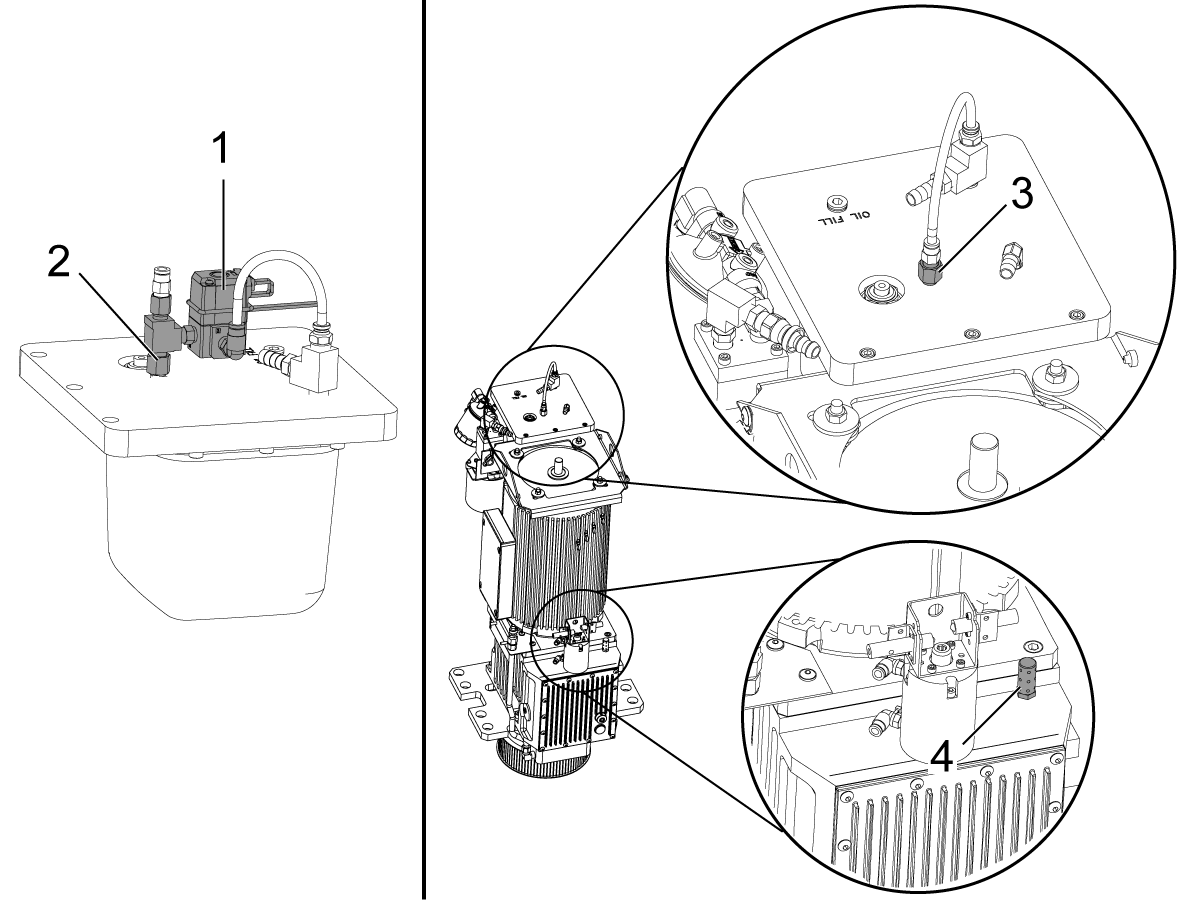
Remove the solenoid [1] and the 0.010" and 0.03." orifices [2] from the oil tank assembly, and replace them with a 0.020" orifice [3] P/N 58-0297.

Install a muffler [4] P/N 58-1861 on the gearbox housing as shown on the image. 

Note: If the gearbox was equipped with a antisiphon solenoid there was a hose going to this port on the housing. 

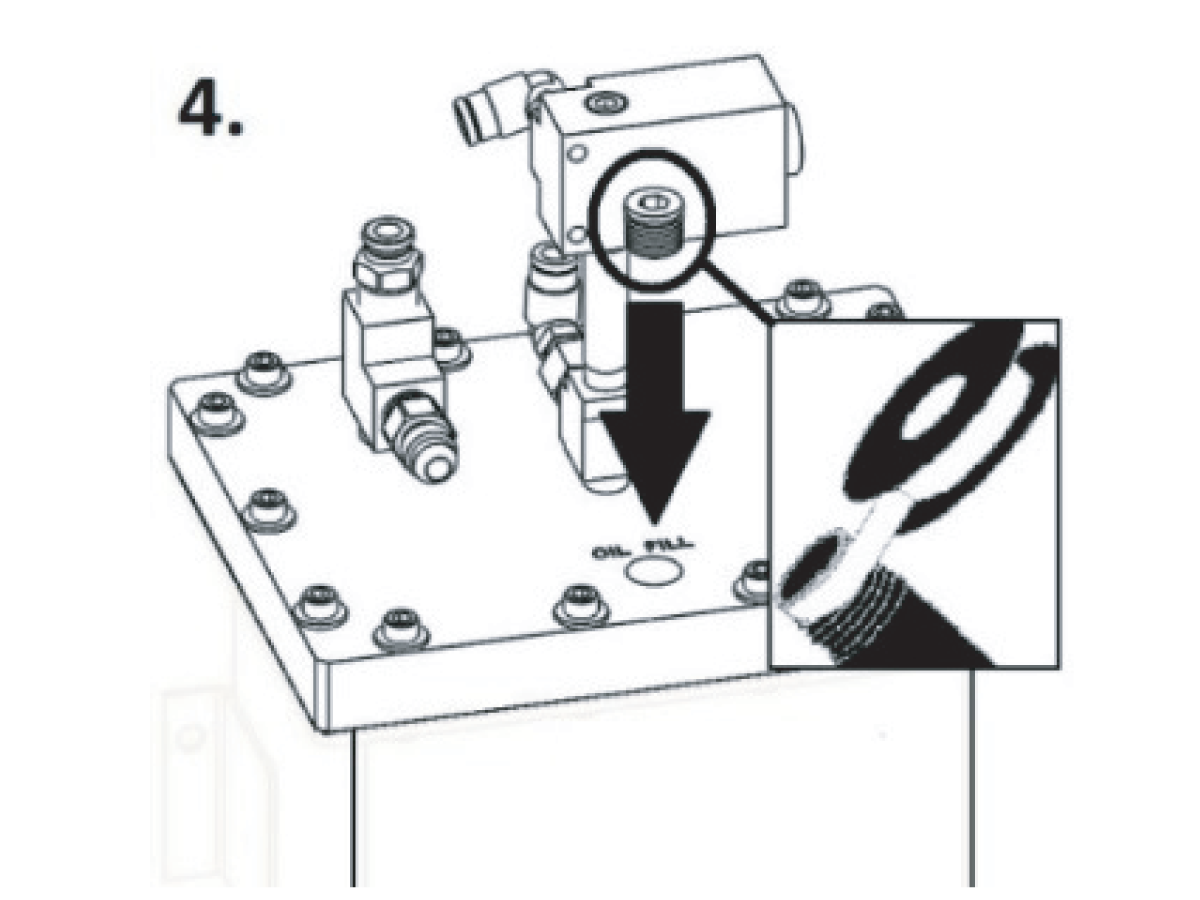
Follow the instuctions on the reservoir decal to refill the tank.

2

PRESSURIZED OIL TANK (5PSI) FILL/TOP-OFF INSTRUCTIONS

1. Remove the fill plug and set aside.

2. Run the oil pump for one minute in MDI M59 P1107; for CHC machines.

3. If necessary, fill tank to top of fill plug with Mobil SHC627 or Mobil 1 15W-50.

4. Replace the fill plug securely and clean off all oil residue.

5. Run the spindle for 10 minutes and check for oil leaks; repair as necessary.


Low Ambient Shop Temperature

Corrective Action:

Warm up the machine by running the spindle at high speed for 10 minutes to warm up the gearbox housing and the oil.

Oil Level

Note: After adding oil to the gearbox power cycle the machine to trigger the oil level measurment.  Adding too much oil will cause the gearbox to leak.

Corrective Action:

  • Fix the leaks.
  • Fill/Top off oil.

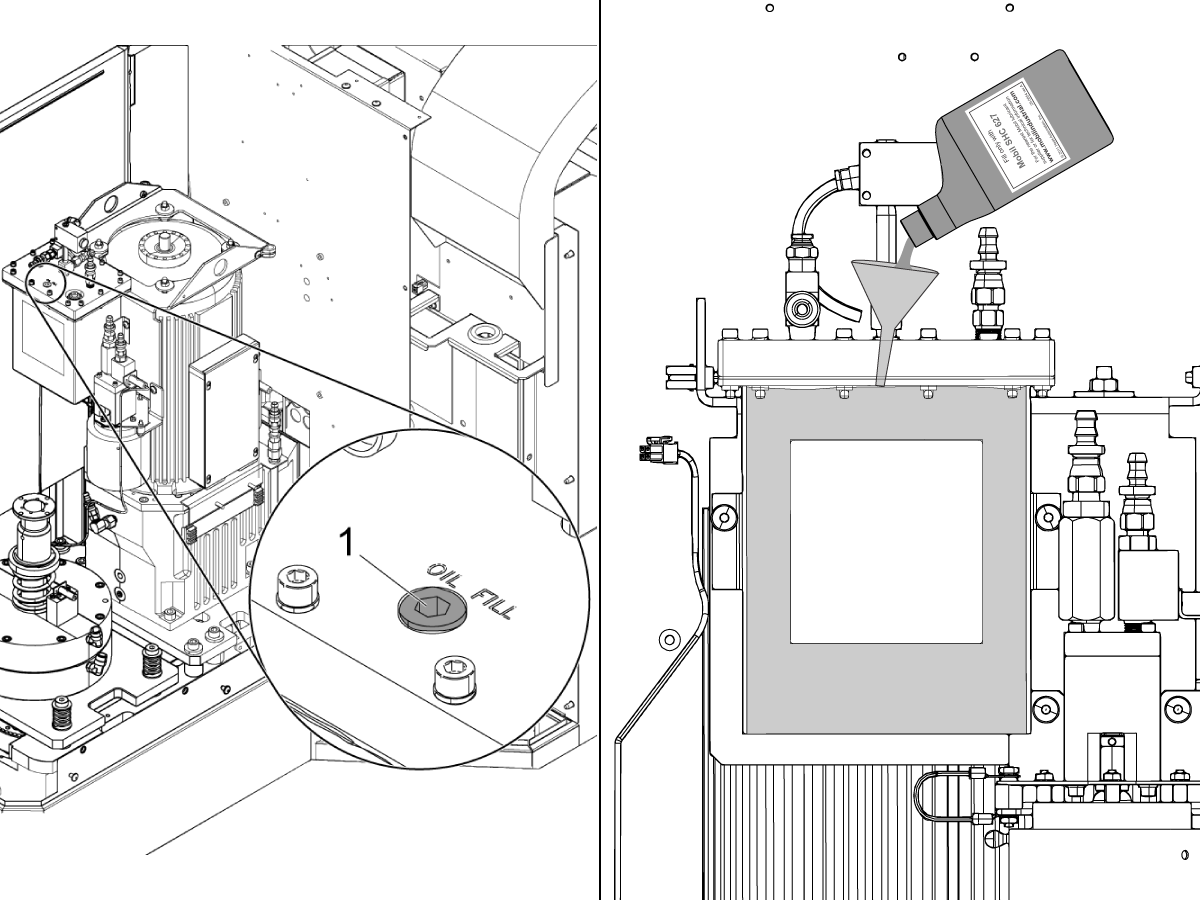
50 Taper Gearbox:

  1. Remove fill plug and set aside.
  2. Run spindle at 500 RPM for apprx. one minute then stop.
  3. If necessary, fill tank to top of fill plug with Mobil SHC627 or Mobil 1 15W-50.
  4. Replace fill plug securely and clean off all oil residue.

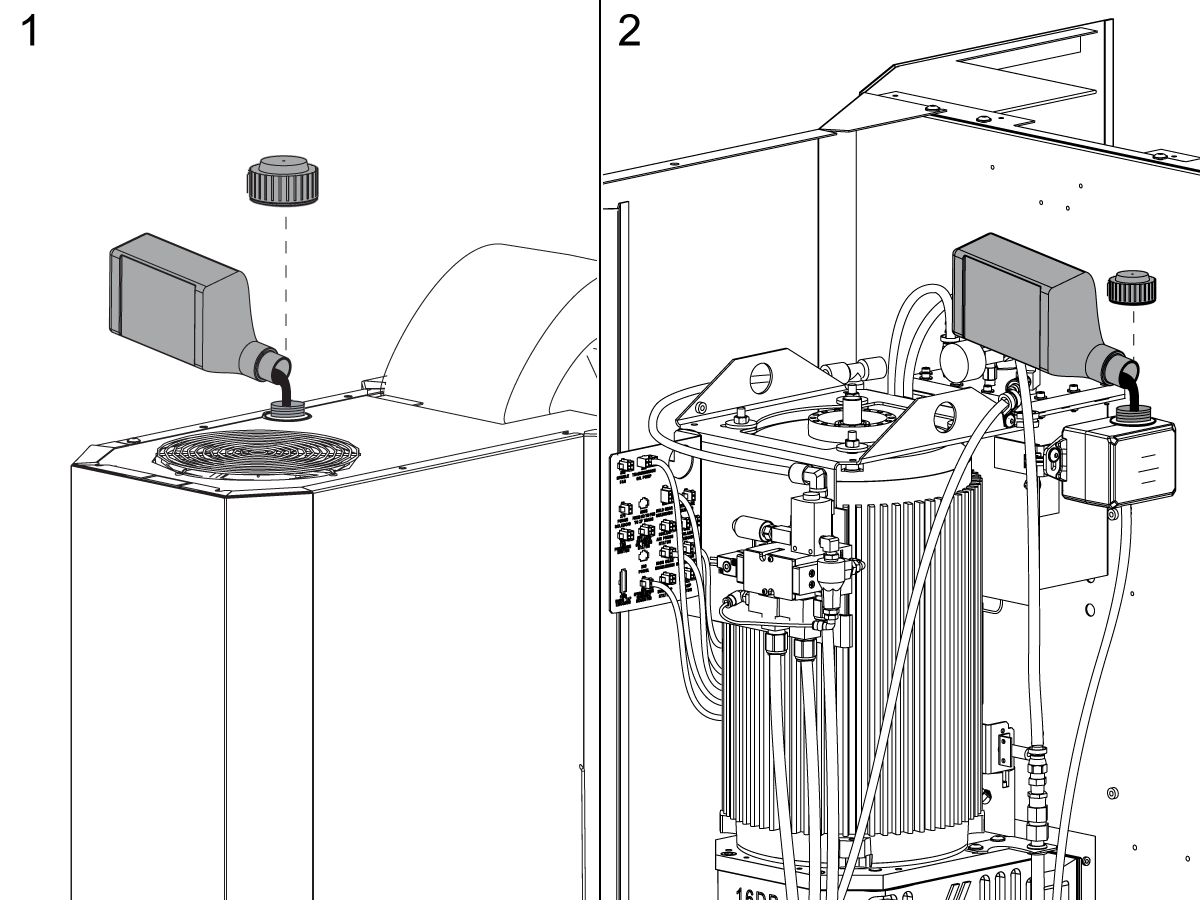
Machines with a reservoir: Add 17 oz (500 ml) of Mobil SHC 627 transmission oil to the reservoir. Some machines have the reservoir near the spindle fan [1]. Other machines have the reservoir mounted on the sump tank [2]. Remove the spindle head covers to get access to it.

 Caution: Do not add more than 500 ml of oil at a time. The plastic reservoir wil completely empty the oil into the gearbox.

Oil Flow Switch

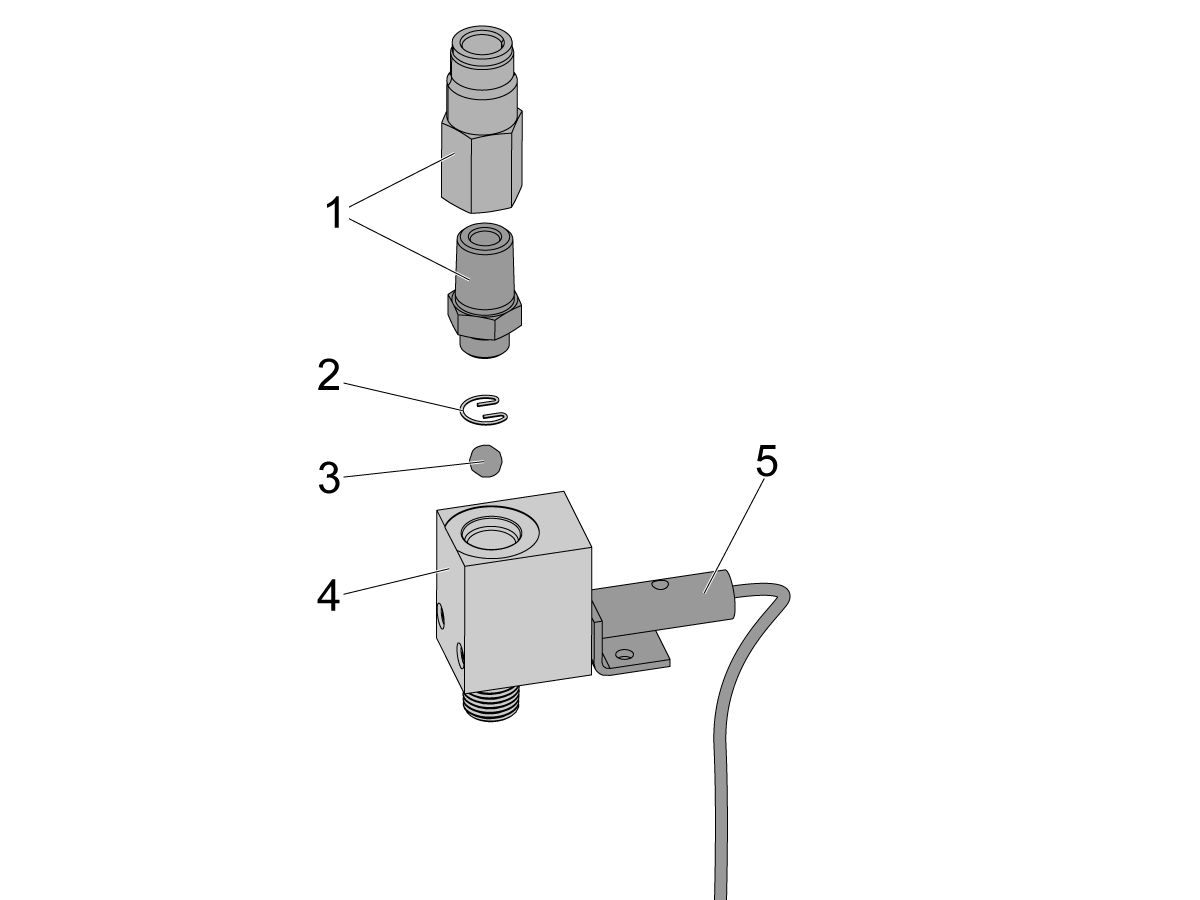
Proximity Senor Oil Flow Switch:
  1. Fittings
  2. Retention clip
  3. Steel ball
  4. Oil flow sensor housing
  5. Proximity sensor

Corrective Action:

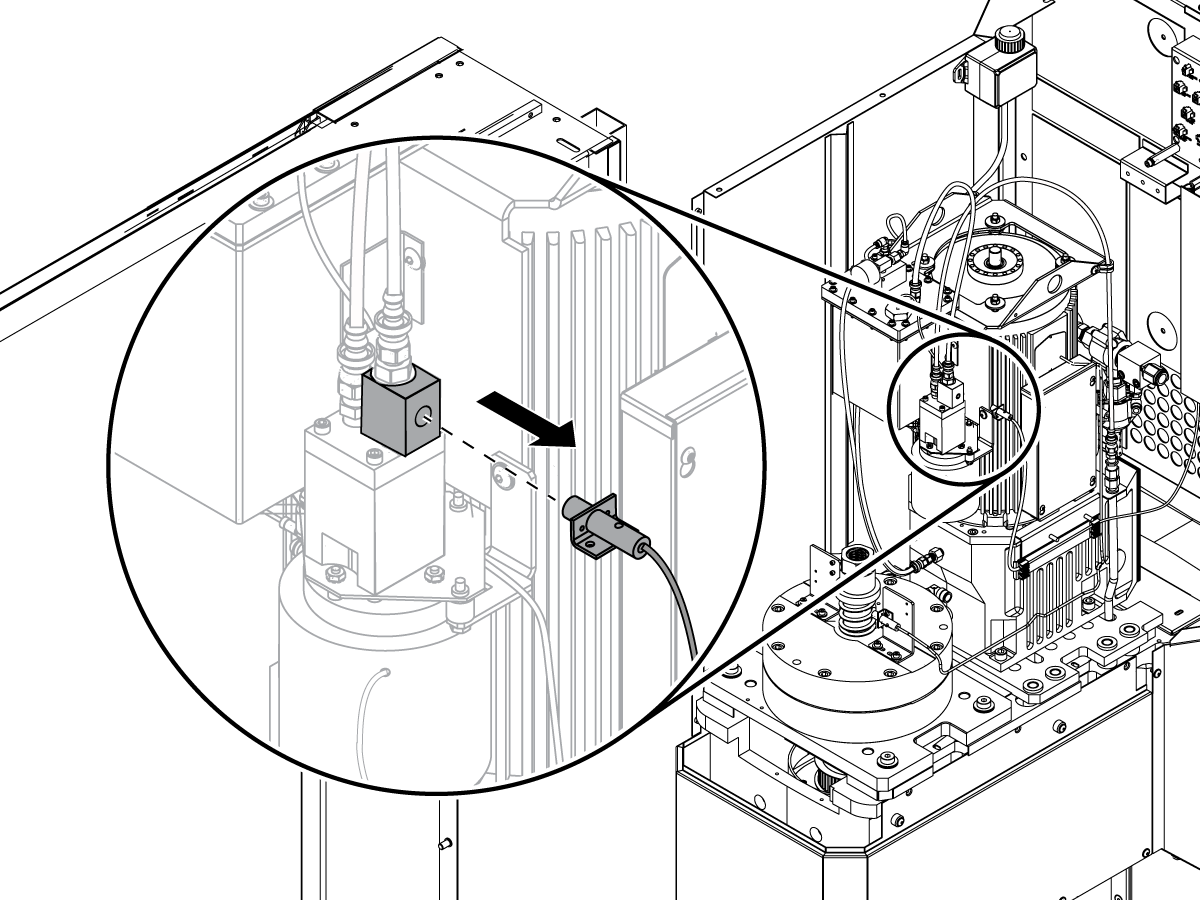
Remove the oil flow sensor from the oil-pump assembly. Use a screw driver to manually operate the switch. Navigate to the I/O tab in DIAGNOSTICS. Make sure the diagnostic bit for Low Lube Press. changes from 0 to 1.

 Note: The name of this diagnostic bit in older software versions is Low GB Oil Flow.

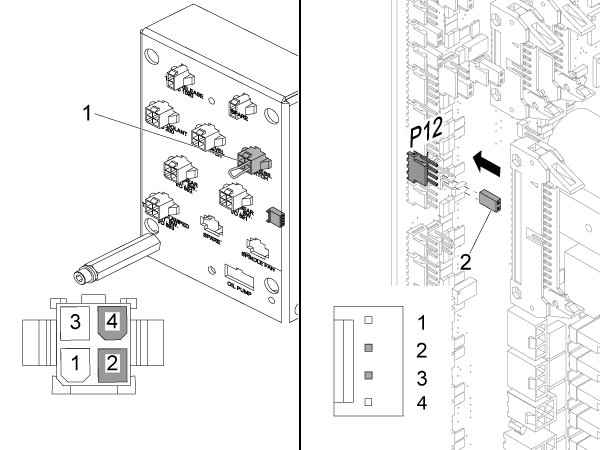
If the diagnostic bit for Low Lube Press. does not change from 0 to 1, disconnect the oil flow sensor from the connector bracket. Put an electrical jumper across the (2) pins in the connector for the oil flow sensor [1]. Make sure the diagnostic bit for Low Lube Press. changes from 0 to 1. If the input changes, the oil flow proximity sensor is faulty.

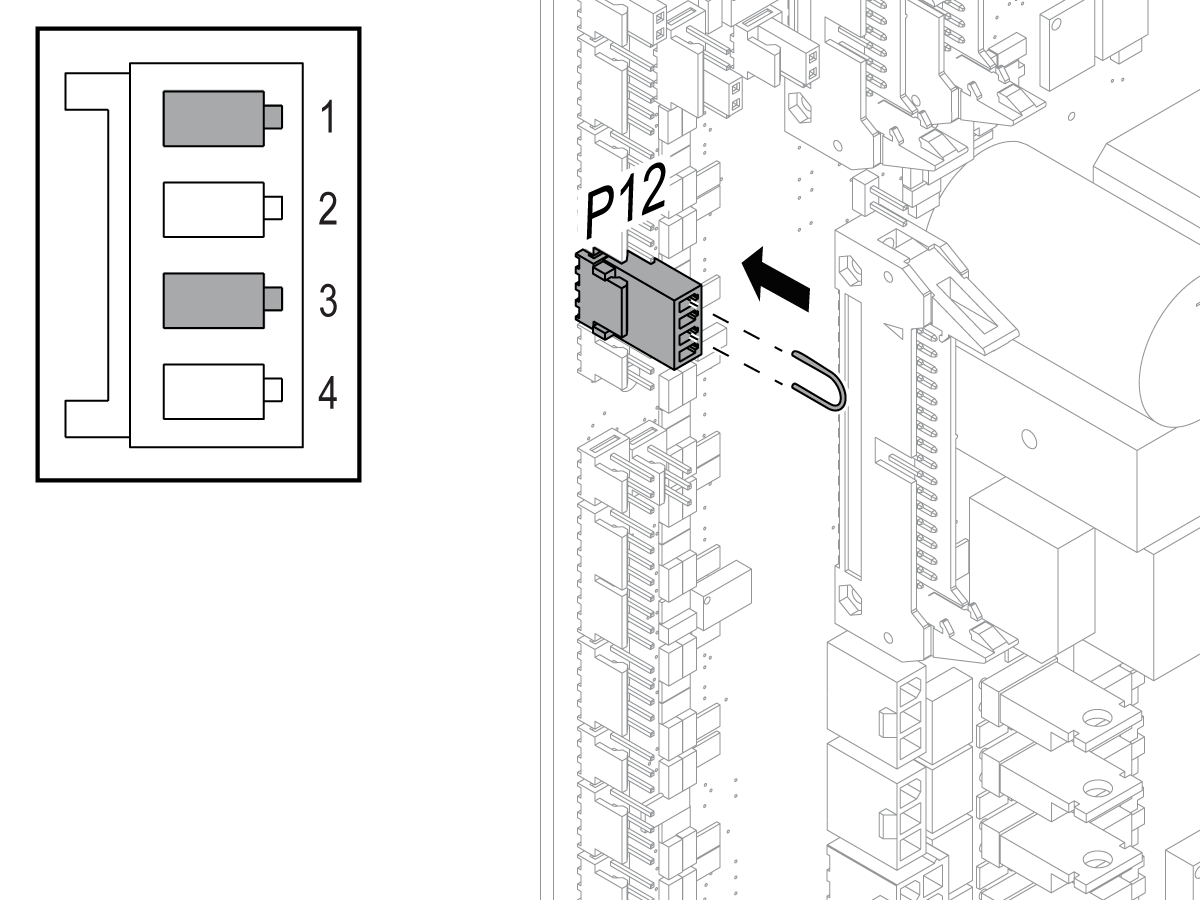
If the diagnostic bit for Low Lube Press. does not change from 0 to 1, disconnect the cable from the P12 connector [2] on the I/O PCB. Put an electrical jumper across pins 2 and 3 of the P12 connector. Make sure the diagnostic bit for Low Lube Press. changes from 0 to 1. If the input changes, the 950 cable is defective. If the input does not change, troubleshoot the I/O PCB.

Oil Pressure Switch

Corrective Action:

Make sure the pressure switch connection is clean and well seated.

Use a voltmeter to check the continuity of the pressure switch when the pump is running. If the switch is open (O.L.) when there is pressure in the system, replace it.

Check the pressure switch with a voltmeter when the pump is running. If the switch is open (O.L.) when there is pressure in the system, replace it.

Oil Level Switch

Corrective Action:

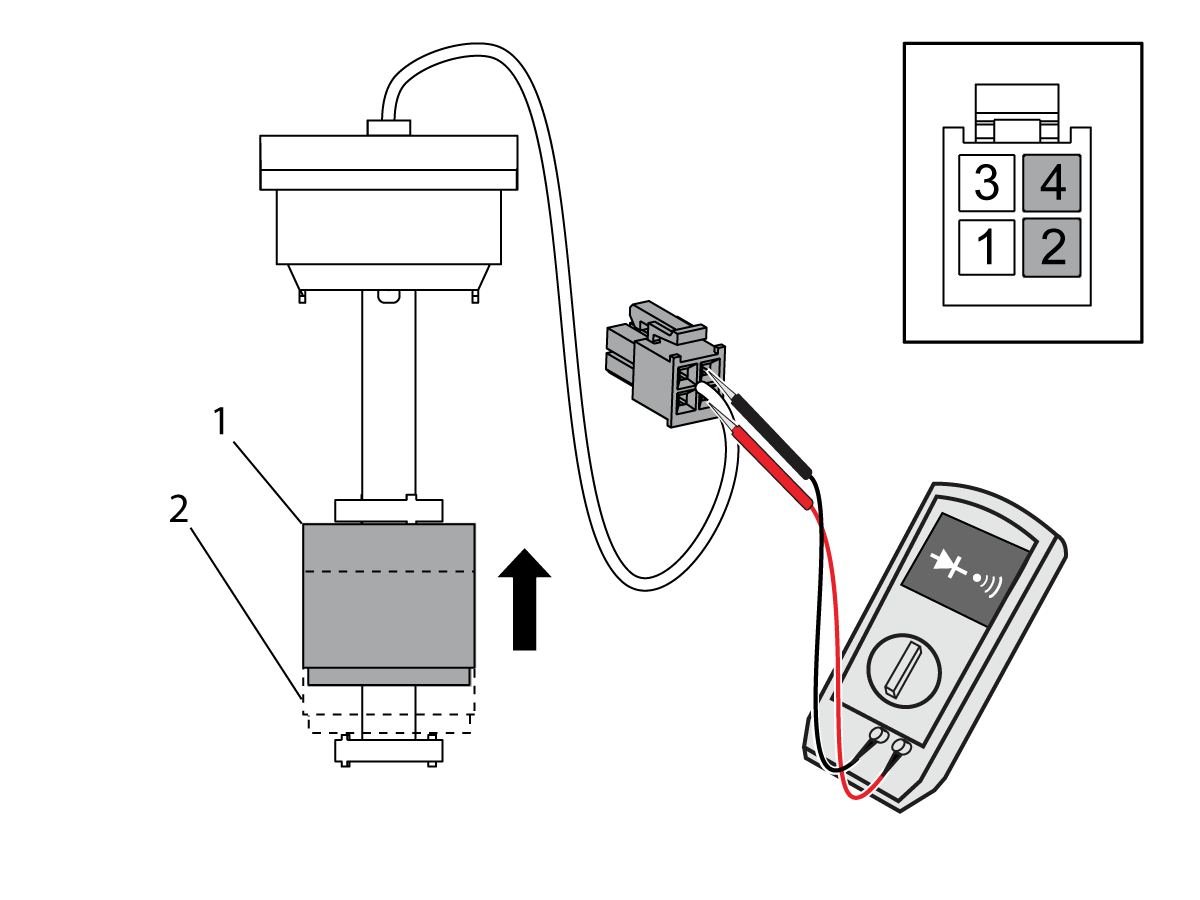
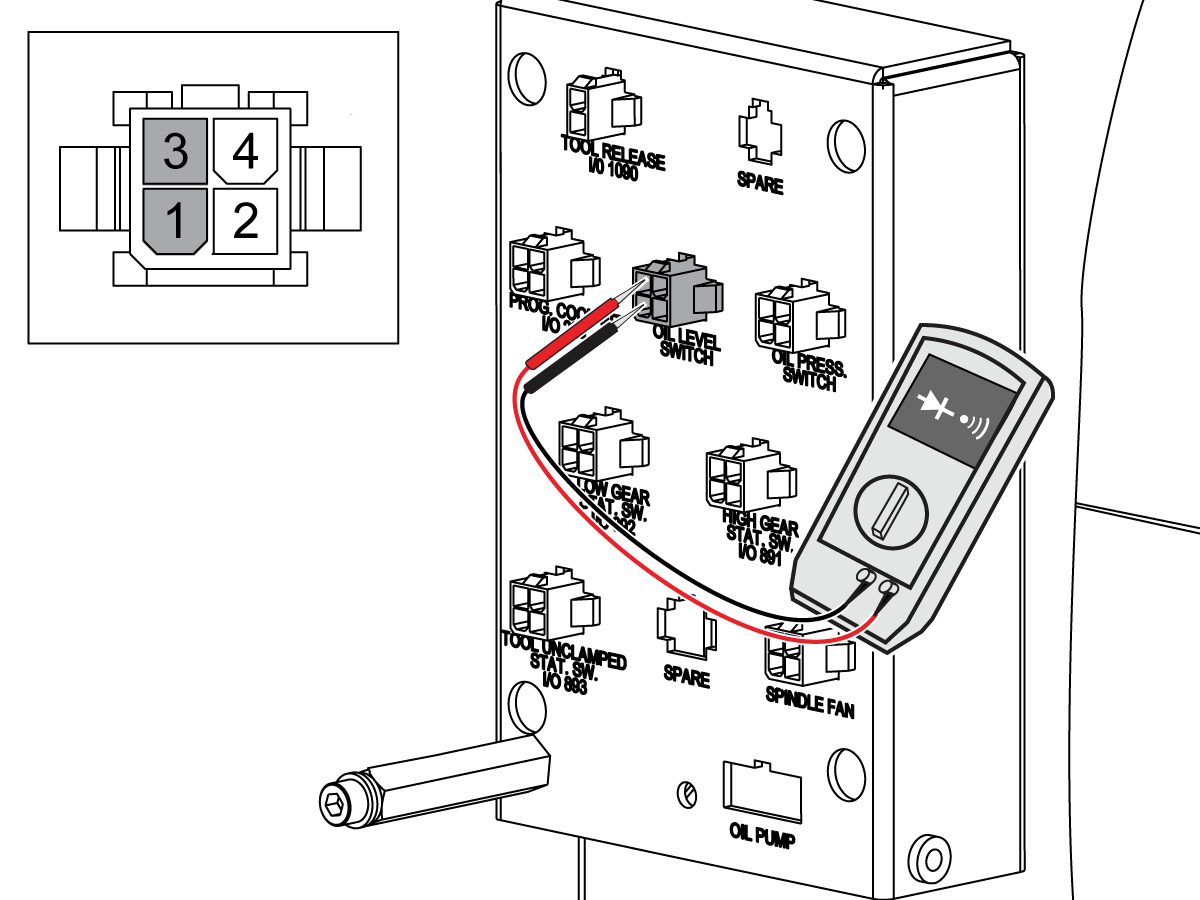
Remove the oil-level switch from the gearbox. While you move the float from position [2] to position [1], measure for continuity across pins 2 and 4 of the connector for the oil-level switch.The oil-level switch operates correctly when:

  • There is not continuity when the magnet is at position [2].
  • There is continuity when the magnet is at position [1].

Replace the oil-level switch if it does not operate correctly.

Disconnect the 950 cable from the P12 connector on the I/O PCB. Measure for continuity across pins 1 and 3 of the connector for the oil-level switch on the 950 cable. If there is continuity, there is a short circuit in the 950 cable. Replace the cable.

Put an electrical jumper across pins 1 and 3 of the P12 connector. Press [PARAM/DGNOS] twice. Navigate to the I/O tab. Make sure the diagnostic bit for Low GB Oil Level changes from 1 to 0. If the input does not change, troubleshoot the I/O PCB.

Oil Filter

Corrective Action:

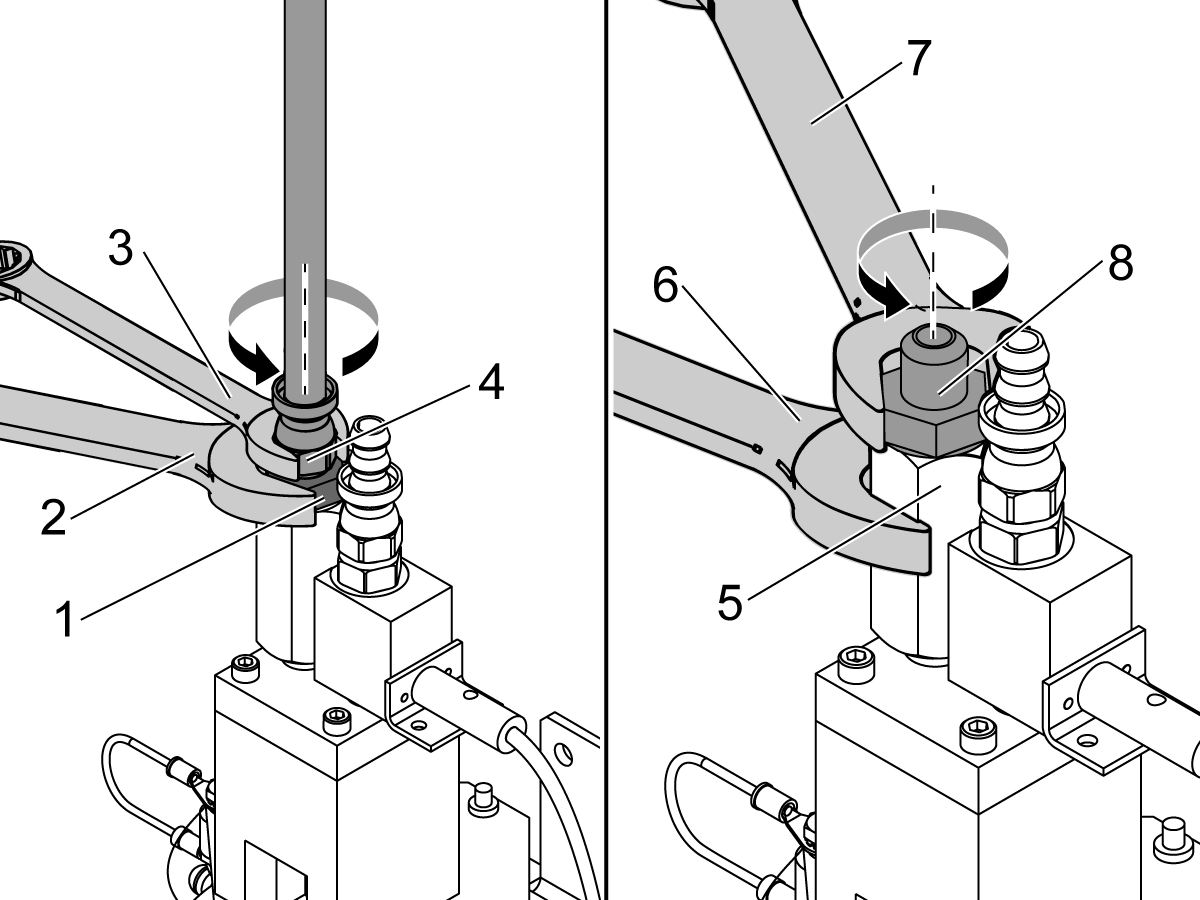
Put a wrench [2] on the straight male-fitting [1] to make sure it does not move. With another wrench [3], turn the hose and the barbed fitting [4] counterclockwise to remove them.

Put a wrench [6] on the inlet-screen housing [5] to make sure it does not move. With another wrench [7], turn the straight male-fitting [8] counterclockwise to remove it.

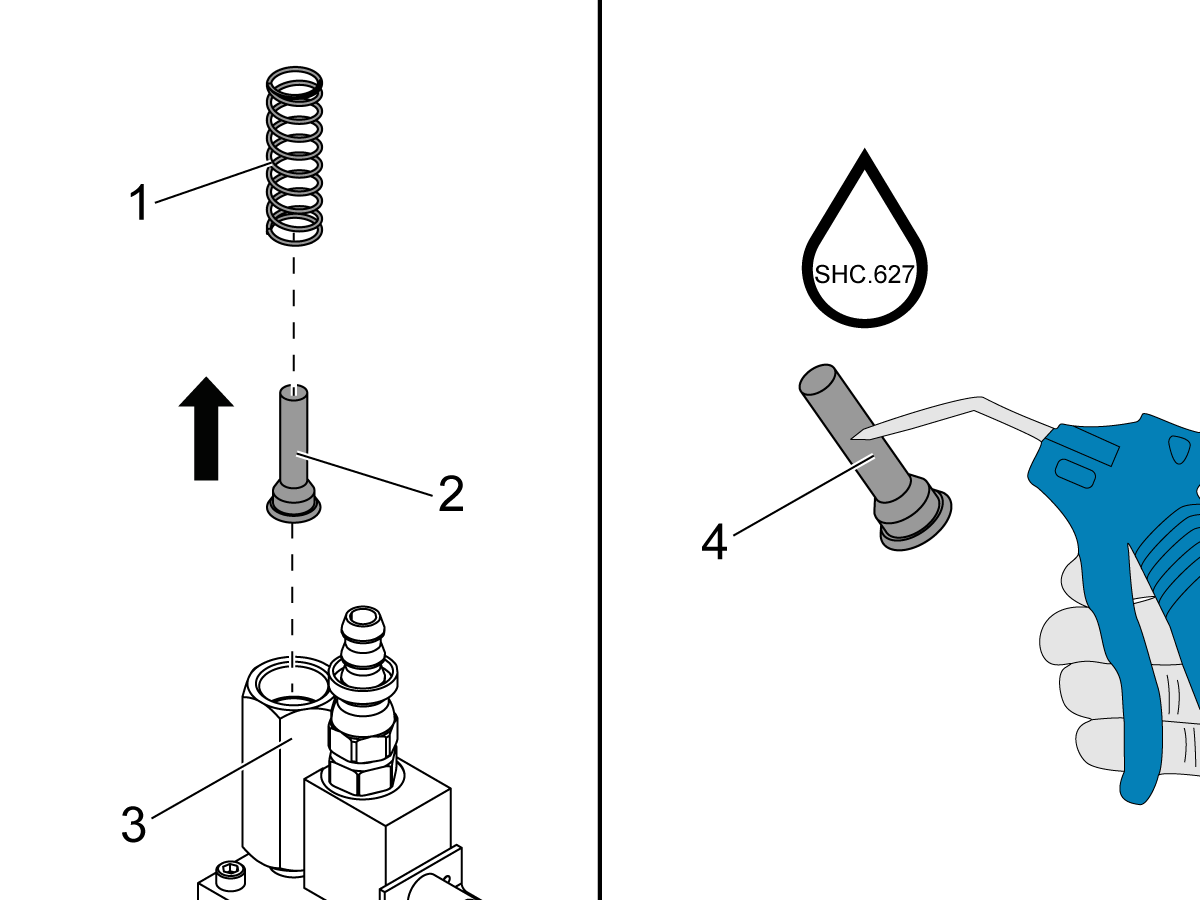
Remove the spring [1] and the inlet screen [2] from the inlet-screen housing [3]. Clean the inlet screen [4]. Reinstall the inlet screen.

Oil-Pump Motor

Corrective Action: Troubleshoot the oil-pump motor.

Command the spindle to operate.

 Note: There is a voltage output to the gearbox oil pump when the spindle operates.

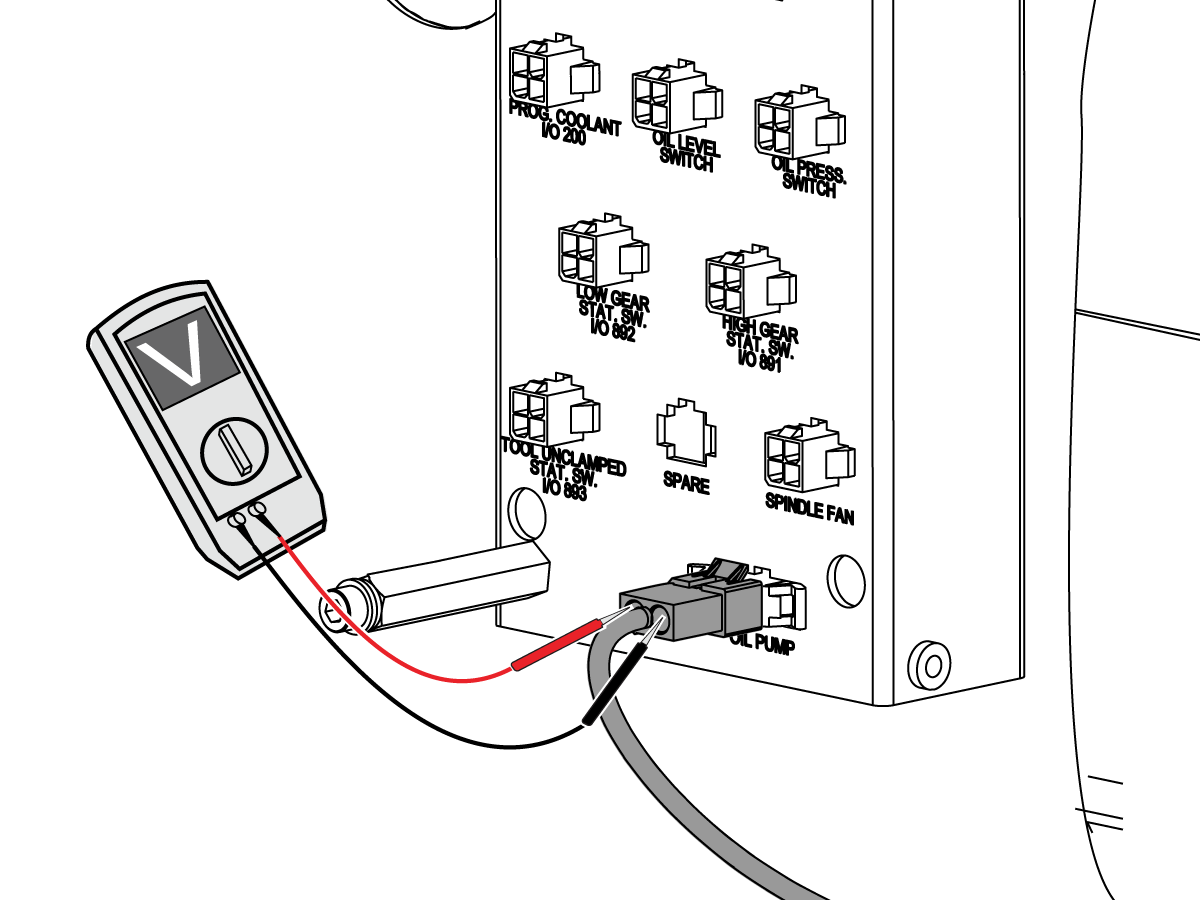
Monitor the motor fan on the gearbox oil pump. If the motor fan on the gearbox oil pump does not operate, make sure the oil pump receives the correct voltage. Use a multimeter with needle-tip probes to measure the voltage across the cable connector for the gearbox oil pump.

 Note: Do not measure the voltage with the oil pump cable disconnected from the 300A cable.

The measured voltage must be 120 VAC. If the voltage is correct and the pump does not operate, go to Section 6.

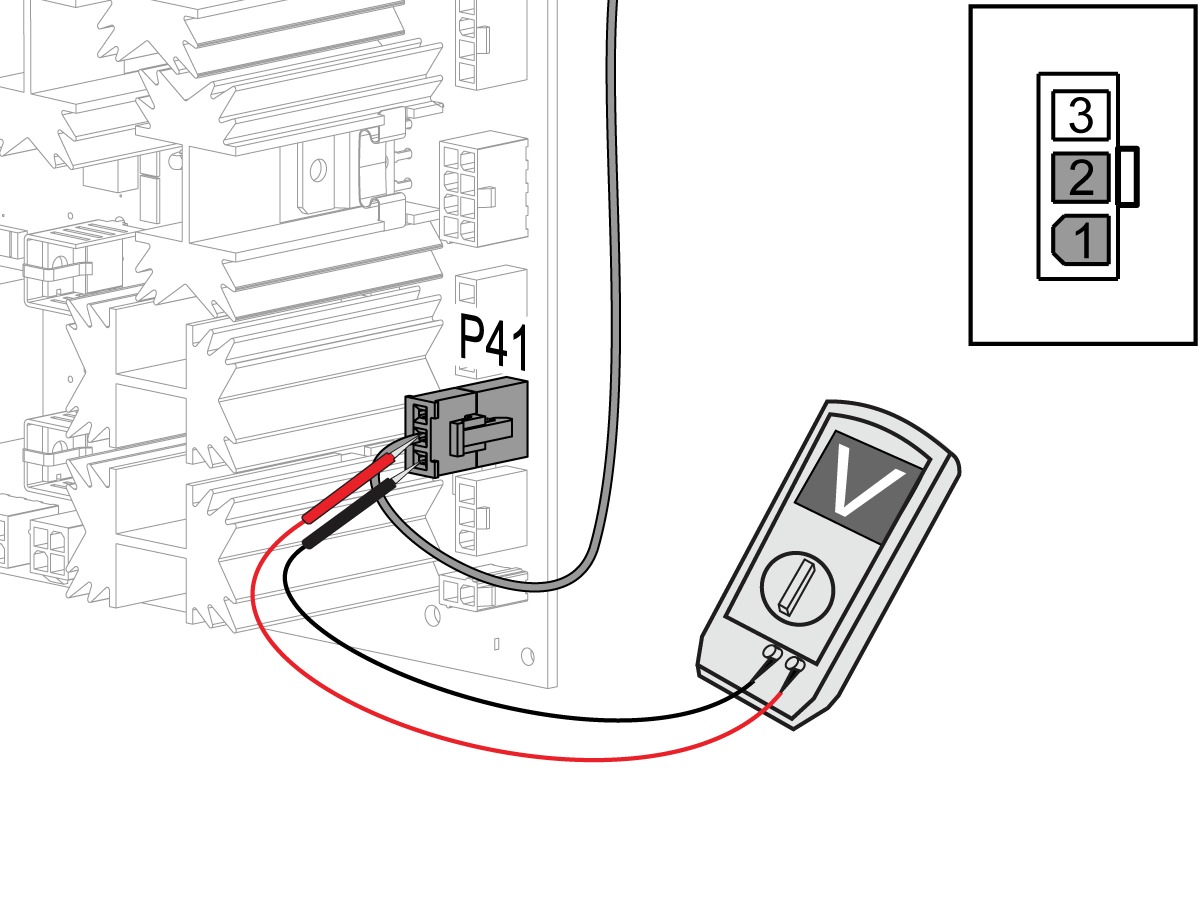
If the voltage is not correct, make sure the voltage output from the I/O PCB is correct. Use a multimeter with needle tip test probes to measure the voltage between pin 1 and pin 2 on the 300A-cable connector at P41 (Classic Haas Control) or P32 (Next Generation Control) on the I/O PCB.

 Note: Do not measure the voltage with the 300A cable disconnected from the P41 connector on the I/O PCB.

The measured voltage must be 120 VAC. If the measured voltage is correct, the 300A cable is defective. If there is no voltage output, refer to these troubleshooting guides:

  • CHC - I/O PCB - Troubleshooting Guide

Wye/Delta Contactor

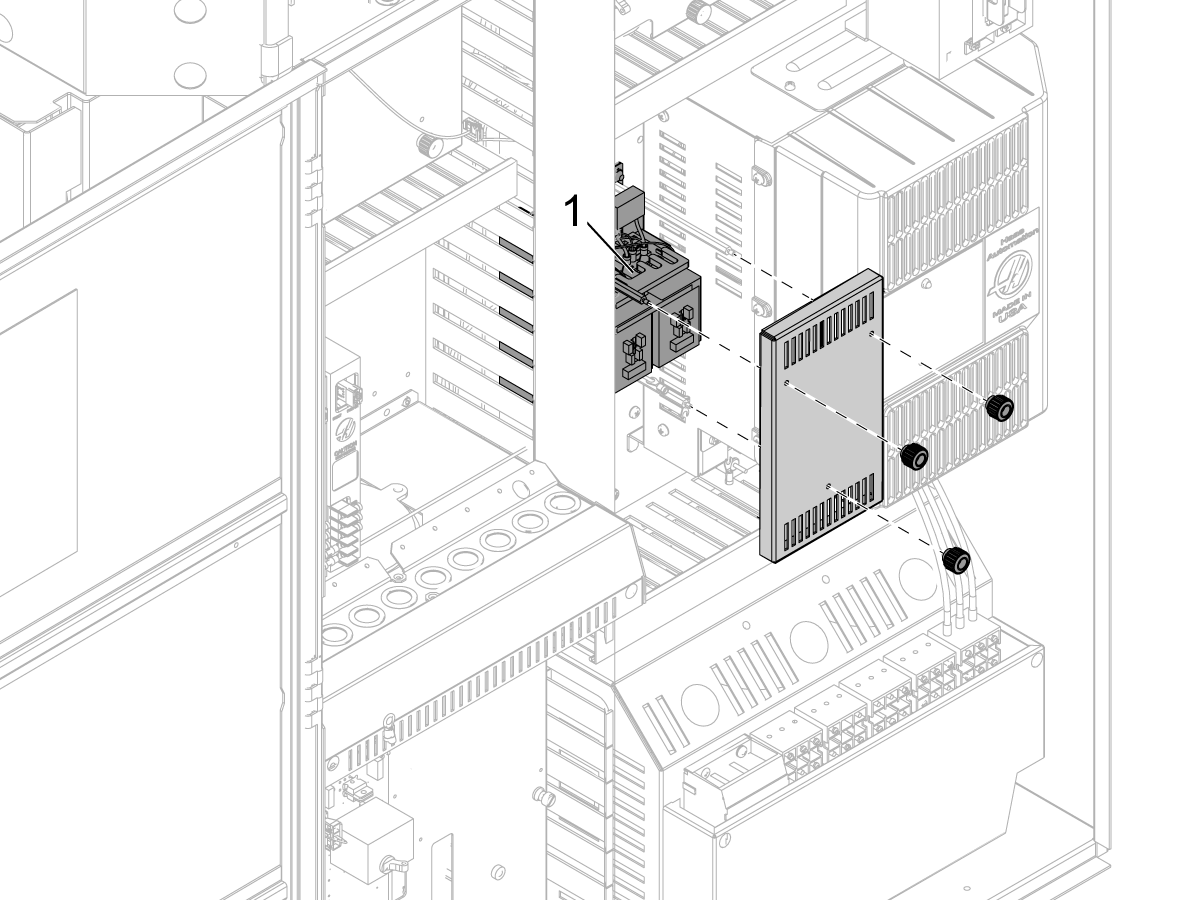
A worn contactor can send unreliable power to the gearbox motor, which can cause a high load. Check the connections at the Wye/Delta contactor. Make sure the terminals are tight.

Corrective Action:

Refer to Wye-Delta Contactor - Troubleshooting Guide to troubleshoot the Wye/Delta connectors.

Excessive Gearbox Noise

Corrective Action:

Determine if the problem is mechanical or electrical by commanding the spindle rpm where the noise is heard and then turning off the power.

If the noise goes away this means that the cause of the noise may be the encoder feedback.   

Damaged gears in the gearbox can cause excessive noise. Contact your local HFO for a vibration analysis to see if the gears are damaged.

Encoder Pulley/Belt

Corrective Action:

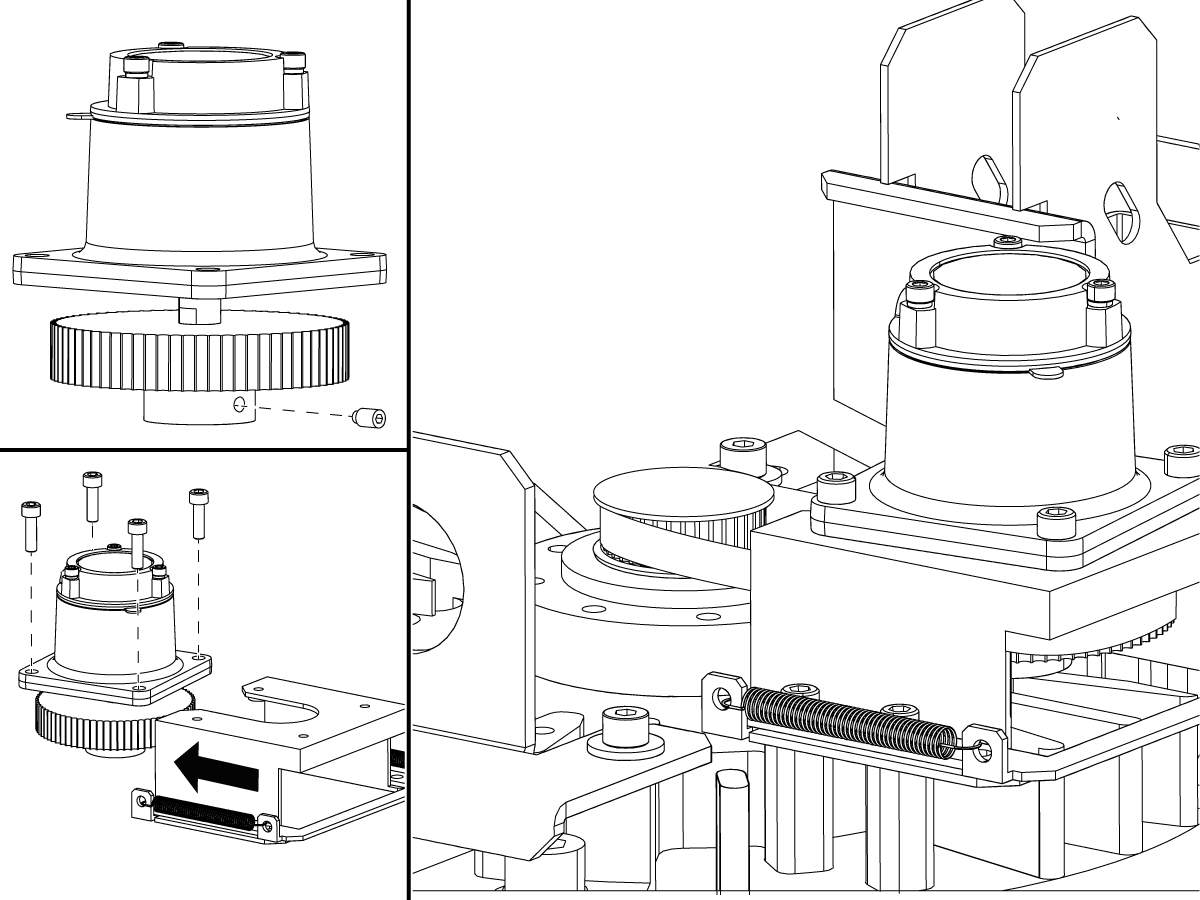
Shafted encoders (top) - Check the encoder pulley and belt for damage or wear.

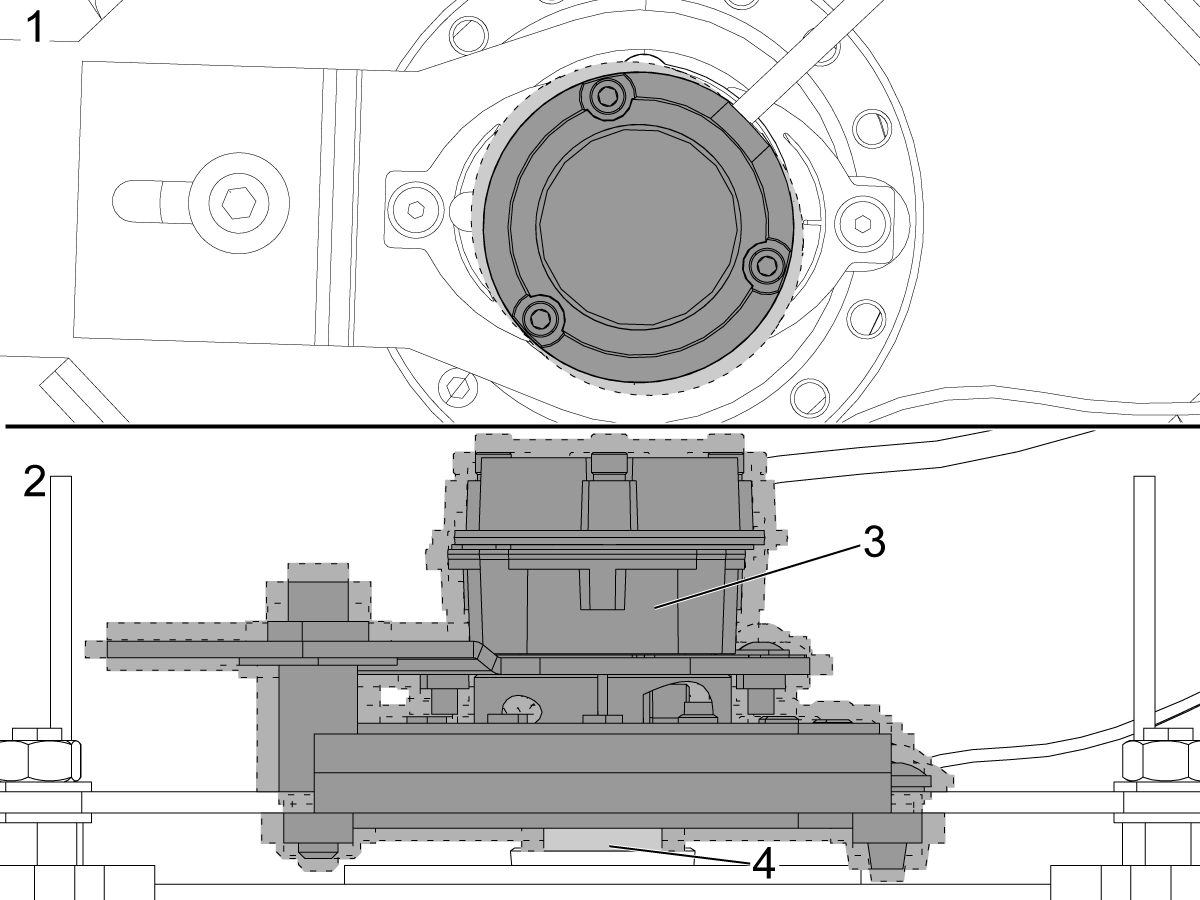
“Hubbed” style encoders (bottom) - Use an indicator to check for run-out [1] or play [2] within the encoder and between the encoder [3] and motor shaft [4] (“Hubbed” style encoders mount directly to the gearbox or spindle motor). The runout is not to exceed 0.002".

Refer to the procedure applicable to your machine to set the spindle orientation after you have installed an encoder:

  • CHC - Side-Mount Tool Changer - Set Parameter 257 - Spindle Orientation Offset
  • CHC - Umbrella Tool Changer - Set Parameter 257 - Spindle Orientation Offset

Gearbox

Corrective Action:

Manually actuate the High/Low gear solenoid and slowly turn the spindle by hand. The gearbox should shift and the Hi Gear and Low Gear bits on the diagnostic page should change state.

If the gearbox does not shift, it may have internal damage.

If the gearbox shifts, refer to these troubleshooting guides for the high and low gear solenoids and the I/O PCB.

  • Solenoid - Troubleshooting Guide
  • CHC - I/O PCB - Troubleshooting Guide

Recently Viewed Items

You Have No Recently Viewed Items Yet

Feedback
Haas Logo

Haas Delivered Price

This price includes shipping cost, export and import duties, insurance, and any other expenses incurred during shipping to a location in France agreed with you as a buyer. No other mandatory costs can be added to the delivery of a Haas CNC Product.

KEEP UP WITH THE LATEST HAAS TIPS AND TECHNOLOGY...

Sign up now!   

HAAS TOOLING ACCEPTS THE FOLLOWING:

  • Service & Support
  • Owners
  • Request Service
  • Operator Manuals
  • Haas Parts
  • Rotary Repair Request
  • Pre-Install Guides
  • Shopping Tools
  • Build & Price a New Haas
  • Available Inventory
  • The Haas Price List
  • CNCA Financing
  • About Haas
  • Accessibility Statement
  • DNSH Statement
  • Export Compliance
  • Careers
  • Certifications & Safety
  • Contact Us
  • History
  • Terms & Conditions
  • Haas Tooling Terms & Conditions
  • Privacy
  • Warranty
  • Haas Community
  • Haas Certification Program
  • Haas Motorsports
  • Gene Haas Foundation
  • Haas Technical Education Community
  • Events
  • Join the Conversation
  • Facebook
  • X
  • Flickr
  • YouTube
  • LinkedIn
  • Instagram
  • TikTok
© 2026 Haas Automation, Inc – CNC Machine Tools
This site is protected by reCAPTCHA and the Google Privacy Policy and Terms of Service apply.

2800 Sturgis Rd., Oxnard, CA 93030
Toll Free: (888) 817-4446 / Fax: 805-278-8554