My Haas Welcome,
!
Haas Tooling MyHaas/HaasConnect Sign In Register Haas Tooling MyHaas/HaasConnect Sign Out Welcome, My Machines Latest Activity My Quotes My Account My Users Sign Out
Find Your Distributor
  1. Select Language
    1. English
    2. Deutsch
    3. Español - España
    4. Español - México
    5. Français
    6. Italiano
    7. Português
    8. Český
    9. Dansk
    10. Nederlands
    11. Magyar
    12. Polski
    13. Svenska
    14. Türkçe
    15. 中文
    16. Suomi
    17. Norsk
    18. الإنجليزية
    19. български
    20. Hrvatski
    21. Ελληνικά
    22. Română
    23. Slovenský
    24. Slovenščina
    25. 한국어
    26. 日本語
    27. Українська
  • machines Main Menu
    • Vertical Mills
      Vertical Mills
      Vertical Mills View All
      • Vertical Mills
      • VF Series
      • Universal Machines
      • VR Series
      • VP-5 Prismatic
      • Pallet-Changing VMCs
      • Mini Mills
      • Mold Machines
      • High-Speed Drill Centers
      • Drill/Tap/ Mill Series
      • Toolroom Mills
      • Pocket Mill
      • Compact Mills
      • Gantry Series
      • SR Sheet Routers
      • Extra-Large VMC
      • Double-Column Mills
      • 3+2 Positioning Machines
    • Multi-Axis Solutions
      Multi-Axis Solutions
      Multi-Axis Solutions View All
      • Multi-Axis Solutions
      • Y-Axis Lathes
      • 5-Axis Mills
    • Lathes
      Lathes
      Lathes View All
      • Lathes
      • ST Series
      • Dual-Spindle
      • Box Way Series
      • Toolroom Lathes
      • Chucker Lathe
      • Haas Bar Feeders
    • Horizontal Mills
      Horizontal Mills
      Horizontal Mills View All
      • Horizontal Mills
      • 50-Taper
      • 40-Taper
    • Rotaries & Indexers
      Rotaries & Indexers
      Rotaries & Indexers View All
      • Rotaries & Indexers
      • Rotary Tables
      • Indexers
      • 5-Axis Rotaries
      • Extra-Large Rotaries
    • Special Series
      Special Series
      Special Series View All
      • Special Series
      • EU_Series_Redirect
    • Automation Systems
      Automation Systems
      Automation Systems View All
      • Automation Systems
      • Mill Automation
      • Lathe Automation
      • Automatic Parts Loaders
      • Automation Models
    • Desktop Machines
      Desktop Machines
      Desktop Machines View All
      • Desktop Machines
      • Desktop Mill
      • Desktop Lathe
      • Control Simulator, Standard
      • Control Simulator, Premium
    • Shop Equipment
      Shop Equipment
      Shop Equipment View All
      • Shop Equipment
      • Knee Mill
      • Haas Manual Lathes
      • Haas Saws
    • Fabrication Machines
      Fabrication Machines
      Fabrication Machines View All
      • Fabrication Machines
      • Laser Cutting Machines
      • CNC Press Brakes
    • QUICK LINKS Special Series  Special Series 
      EU SERIES EU SERIES BUILD & PRICE | PRICE LIST BUILD & PRICE | PRICE LIST In-Stock Machines In-Stock Machines WHAT’S NEW WHAT’S NEW YOUR FIRST CNC YOUR FIRST CNC
      SHOPPING TOOLS
      • Build & Price a Haas
      • Price List
      • Available Inventory
      • CNCA Financing
      WANT TO TALK TO SOMEONE?

      A Haas Factory Outlet (HFO) can answer your questions, and walk you through your best options.

      CONTACT YOUR DISTRIBUTOR >
  • Options Main Menu
    • The Haas Control Value Option Packages
      Value Option Packages
      Value Option Packages View All
      • Value Option Packages
    • Product Image Spindles
      Spindles
      Spindles View All
      • Spindles
    • Product Image Tool Changers
      Tool Changers
      Tool Changers View All
      • Tool Changers
    • Product Image 4th- | 5th-Axis
      4th- | 5th-Axis
      4th- | 5th-Axis View All
      • 4th- | 5th-Axis
    • Product Image Turrets & Live Tooling
      Turrets & Live Tooling
      Turrets & Live Tooling View All
      • Turrets & Live Tooling
    • Product Image Probing
      Probing
      Probing View All
      • Probing
    • Haas Chip & Coolant Management Chip & Coolant Management
      Chip & Coolant Management
      Chip & Coolant Management View All
      • Chip & Coolant Management
    • The Haas Control The Haas Control
      The Haas Control
      The Haas Control View All
      • The Haas Control
    • Product Image Product Options
      Product Options
      Product Options View All
      • Product Options
    • Product Image Tooling & Fixturing
      Tooling & Fixturing
      Tooling & Fixturing View All
      • Tooling & Fixturing
    • Product Image Workholding
      Workholding
      Workholding View All
      • Workholding
    • Product Image 5-Axis Solutions
      5-Axis Solutions
      5-Axis Solutions View All
      • 5-Axis Solutions
      • 5 Easy Steps to 5-Axis
    • QUICK LINKS Special Series  Special Series 
      EU SERIES EU SERIES BUILD & PRICE | PRICE LIST BUILD & PRICE | PRICE LIST In-Stock Machines In-Stock Machines WHAT’S NEW WHAT’S NEW YOUR FIRST CNC YOUR FIRST CNC
      SHOPPING TOOLS
      • Build & Price a Haas
      • Price List
      • Available Inventory
      • CNCA Financing
      WANT TO TALK TO SOMEONE?

      A Haas Factory Outlet (HFO) can answer your questions, and walk you through your best options.

      CONTACT YOUR DISTRIBUTOR >
  • Why Haas Main Menu
      Discover the Haas Difference
    • Why Haas
    • MyHaas
    • Education Community
    • Industry 4.0
    • Haas Certification
    • Customer Testimonials
  • Service Main Menu
      Welcome to Haas Service
      SERVICE HOME Operator’s Manuals How-To Procedures Troubleshooting Guides Preventive Maintenance Haas Parts Haas Tooling Videos
  • Videos Main Menu
  • Main Menu
    • View All
    • View All
    • View All
    • View All
      • HTEC Curriculum Support
    • View All
      • Haas 10 kg Cobot Package
      • Cobot Kits
      • DC-1 Drill Center
      • CNC Sales News
      • Do More With Your Haas
    • View All
    • View All
      • contact-us-test
      • 4 - AUTOMATION SYSTEMS
      • Carousel-V2
      • expert test
      • Demo_Day_Trident-test
      • Link Test
      • image-sale-tag-test
      • article-list-test
      • Haas 25 kg Robot Package
    • View All
      • Choose Options
    • View All
    • View All
    • View All
    • View All
    • View All
      • calc-test
    • View All
    • QUICK LINKS Special Series  Special Series 
      EU SERIES EU SERIES BUILD & PRICE | PRICE LIST BUILD & PRICE | PRICE LIST In-Stock Machines In-Stock Machines WHAT’S NEW WHAT’S NEW YOUR FIRST CNC YOUR FIRST CNC
      SHOPPING TOOLS
      • Build & Price a Haas
      • Price List
      • Available Inventory
      • CNCA Financing
      WANT TO TALK TO SOMEONE?

      A Haas Factory Outlet (HFO) can answer your questions, and walk you through your best options.

      CONTACT YOUR DISTRIBUTOR >
  • Haas Tooling Main Menu
  • Haas Service Parts Main Menu

My Haas Welcome,
!
Haas Tooling MyHaas/HaasConnect Sign In Register Haas Tooling MyHaas/HaasConnect Sign Out Welcome, My Machines Latest Activity My Quotes My Account My Users Sign Out
Find Your Distributor
  1. Select Language
    1. English
    2. Deutsch
    3. Español - España
    4. Español - México
    5. Français
    6. Italiano
    7. Português
    8. Český
    9. Dansk
    10. Nederlands
    11. Magyar
    12. Polski
    13. Svenska
    14. Türkçe
    15. 中文
    16. Suomi
    17. Norsk
    18. الإنجليزية
    19. български
    20. Hrvatski
    21. Ελληνικά
    22. Română
    23. Slovenský
    24. Slovenščina
    25. 한국어
    26. 日本語
    27. Українська
×

Search Results

Web Pages

Images

    • <
    • 1
    • >

8M DC Autodoor - Troubleshooting Guide - NGC - TG0019

Service Home 8M DC Autodoor - Troubleshooting Guide - NGC - TG0019

8M DC Autodoor - Troubleshooting Guide - NGC - TG0019

Jump to Section Back to Top

9.2 8M Autodoor - Troubleshooting

Recently Updated Last updated: 10/08/2025

8M DC Autodoor - Troubleshooting Guide - NGC


TG0019

Introduction

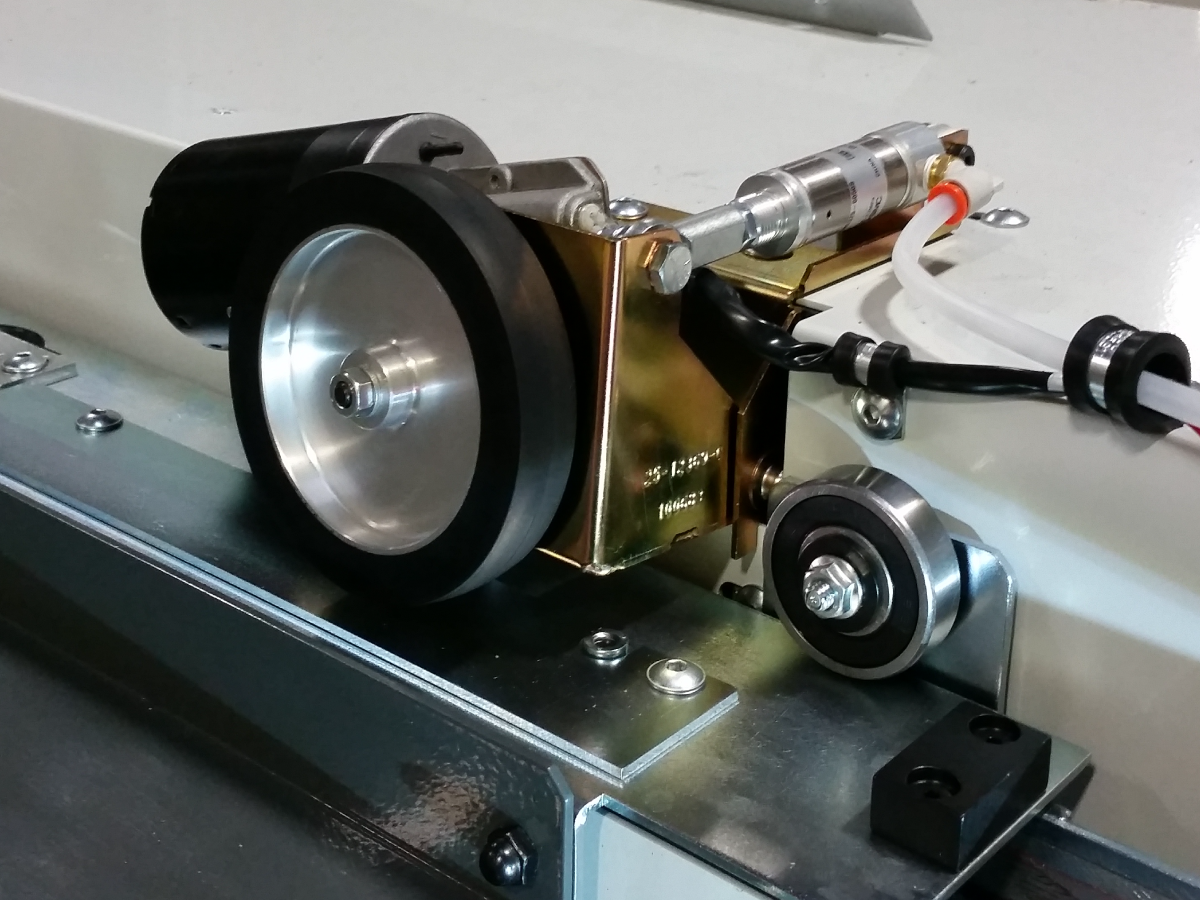
The DC Auto Door uses a pneumatic cylinder to push the drive wheel onto the door.

A 12 volt motor drives the wheel CW and CCW to open or close the door.

The machine uses a timer to open the door(s) (P1404/ P2229,P2230) and the door closed sensor to stop the motor when closing the door(s).

An internal spring in the cylinder raises the assembly up when the solenoid shuts off.

Symptom Table

Symptom Possible Cause Corrective Action
Alarm 548 DOOR M CODES NOT ALLOWED The machine does not have a cell safe signal or the light curtain is not enabled. The Mill M80/M81 and Lathe M85/M86 M-codes work only while the machine receives a cell-safe signal from a robot or if it has a light curtain installed. For more information refer to Robot Integration Aid - NGC reference document.
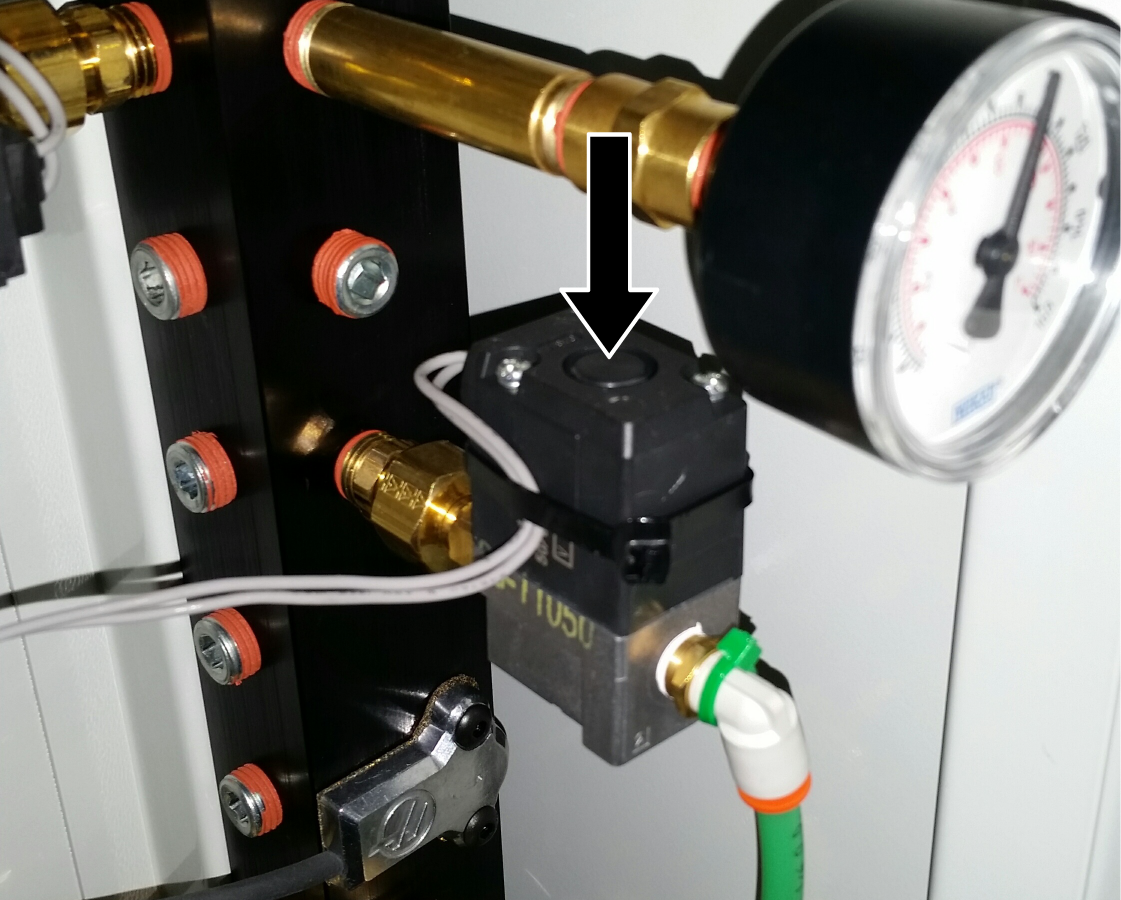
Auto Door not engaging, wheel is turning. There is a problem with the solenoid or contamination in the cylinder. Troubleshoot the solenoid, inspect the air hose and cylinder.
Auto Door engages but wheels do not turn. The Door or the DC motors are jammed. If the DC motors are jammed it will cause the 12VDC power supply to shut down.  Verify that the Door or  DC motors are not jammed.
There is a problem with the auto door 12VDC power supply. Check the AD power supply, 120 VAC input, 12 VDC output.  The power output can drop if the power supply senses a large load,  this is normal.  Check for door jams or binding in the motors.
There is a problem with the 8M PCB. Inspect the relays and connections.
The IO.xml configuration file is not mapped correctly. This can happen if the auto door was field installed, or after a software update.  The IO.xml file may not have the output mapped correctly, call Haas Service.
The door does not fully open. Chip build up in the door rollers or coolant contamination on the auto door wheel. Clean the chips away from the door rollers. Clean the coolant from the auto door wheel.
Setting 131 Auto Door is On. 
When pressing the Auto Door button on the side of the pendant,
or
when commanding a M80 on MDI.
A message "Feature Disabled" appears on the screen or alarm 548 DOOR M CODES NOT ALLOWED.
The parameter 823 [823:] Auto Door Type is set to 0. Make sure parameter 823 [823:] Auto Door Type is set correctly:

5 = Single DC Motor Auto Door
6= Dual DC Motor Auto Door

Input Voltage Inspection

Corrective Action:

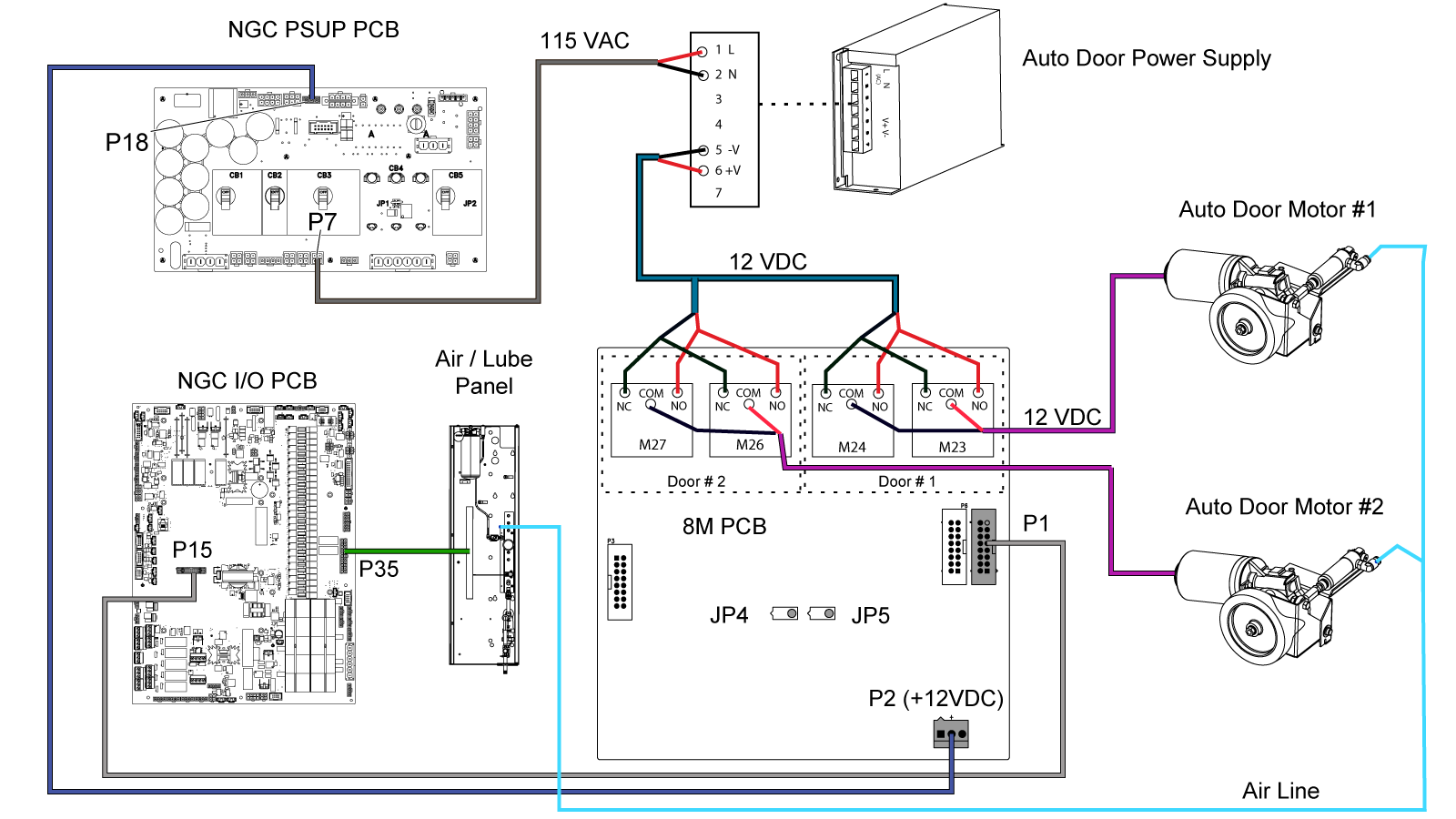
Measure the voltage on the AD power supply [1]. Verify the 120 VAC input and 12 VDC output.

Measure the voltage at P2 on the 8M PCB [2]. Use a multimeter with needle-tip probes. The voltage must be 12 VDC.

 Note: Do not measure the voltage with the cable disconnected.

If the voltage is not correct, measure the voltage at P35 for CHC or P18 for NGC on the PDIST PCB. The voltage must be 12 VDC. If the voltage is correct, cable 860 is at fault. If the voltage is not correct, troubleshoot the PDIST PCB.

If the voltages are correct and 12 VDC is going to the motor but it does not rotate, the motor may have failed. The motor should read 6-12 Ohms of resistance.

Relay Inspection

Corrective Action:

Refer to 8M PCB - Troubleshooting Guide

Solenoid

After an auto door is field installed, or after a software update. The IO.xml file may not have the output mapped correctly, call Haas Service.

Auto Door Settings / Parameters

Note: The following parameters ae not to be changed and should only be used as reference

Setting Description Usage
131 AUTODOOR This setting enables/disables the auto door

Factory Setting Parameters

Parameter Description Usage
1404 AUTO DOOR OPEN HOLD TIME (MS) (Single Door) This specifies the time that the DC motor is on to open the door.
2229 DC MOTOR LEFT DOOR OPEN TIME (Double Door) Specifies time for high speed motion of left door.
2230 DC MOTOR RIGHT DOOR OPEN TIME (Double Door) Specifies time for high speed motion of right door.
2194 Enble Front Door Fully Open Switch (Single Door) Enables checking of front door fully open switch at end of door sequence, behavior is unaffected otherwise
2195 Enable Right Door Fully Open Switch (Double Door) Enables checking of right door fully open switch at end of door sequence, behavior is unaffected otherwise
2196 Enable Left Door Full Open Switch (Double Door) Enables checking of left door fully open switch at end of door sequence, behavior is unaffected otherwise

Configuration Paramters

Parameter Description Usage
251 AUTO DOOR OPEN ERROR TIME This specifies the time allowed for the motor to run to open the door. After this an alarm is generated.
823 AUTO DOOR TYPE The auto door type (type 5 = single DC motor autodoor, type 6 = dual DC motor auto door)
1405 AUTO DOOR CLOSE HOLD TIME (MS) This specifies the time that the DC motor remains on after the door closed switch is sensed.
2091 WHEELS CONTACT DELAY Used to ensure motors are fully engaged with the track before driving the motors.
2092 WHEELS RELEASE DELAY Used to ensure motors have fully stopped before disengaging motors from track.

Classic Haas Control Parameters

Note: These parameters are only available on a Classic Haas Control with Lathe software version 11.26 or higher.

Parameter Description Usage
1406 AUTO DOOR OPEN OUTPUT The auto door open M-code relay output number.
1407 AUTO DOOR CLOSE OUTPUT The auto door close M-code relay output number.
1408 AUTO DOOR ENABLE OUTPUT The auto door engage solenoid output number.
1409 AUTO DOOR OPEN INPUT This parameter is not used. There is no door open switch, the control looks at parameter 1404 time to open the door.

Autodoor Sequences

Open Sequence with Door Fully Open Switch

  1. Turn on the relay to engage friction wheel.
  2. Wait for timer P2091.
  3. Turn off the door motor close relay; turn on door motor open relay.
  4. Wait for door open, (P1404/ P2229, P2230).
  5. Turn off door motor open relay.
  6. Wait for timer P2092.
  7. Turn off friction wheel engage relay.

Open Sequence without Door Fully Open Switch

  1. Turn on the relay to engage friction wheel.
  2. Wait for timer P2091.
  3. Turn off the door motor close relay; turn on door motor open relay.
  4. Wait for Door Fully Opened switch signal (P2194/ P2195, P2196).
  5. If Door Fully Opened switch is not detected before opening time  expires (P1404 / P2229,2230), alarm (when open automatically)
  6. Turn off door motor open relay.
  7. Wait for timer P2092.
  8. Turn off friction wheel engage relay.

Close Sequence

  1. Turn on friction wheel engage relay.
  2. Wait for timer P2091.
  3. Turn off door motor open relay; turn on door motor close relay.
  4. Wait for door closed switch signal.
  5. If door switch is not detected before P251 expires, alarm (when closed automatically)
  6. Wait for timer P1405.
  7. Turn off door motor close relay.
  8. Allow program execution to resume, if applicable.
  9. Wait for timer P2092.
  10. Turn off friction wheel engage relay.

Electrical Diagrams

Recently Viewed Items

You Have No Recently Viewed Items Yet

Feedback
Haas Logo

Haas Delivered Price

This price includes shipping cost, export and import duties, insurance, and any other expenses incurred during shipping to a location in France agreed with you as a buyer. No other mandatory costs can be added to the delivery of a Haas CNC Product.

KEEP UP WITH THE LATEST HAAS TIPS AND TECHNOLOGY...

Sign up now!   

HAAS TOOLING ACCEPTS THE FOLLOWING:

  • Service & Support
  • Owners
  • Request Service
  • Operator Manuals
  • Haas Parts
  • Rotary Repair Request
  • Pre-Install Guides
  • Shopping Tools
  • Build & Price a New Haas
  • Available Inventory
  • The Haas Price List
  • CNCA Financing
  • About Haas
  • Accessibility Statement
  • DNSH Statement
  • Export Compliance
  • Careers
  • Certifications & Safety
  • Contact Us
  • History
  • Terms & Conditions
  • Haas Tooling Terms & Conditions
  • Privacy
  • Warranty
  • Haas Community
  • Haas Certification Program
  • Haas Motorsports
  • Gene Haas Foundation
  • Haas Technical Education Community
  • Events
  • Join the Conversation
  • Facebook
  • X
  • Flickr
  • YouTube
  • LinkedIn
  • Instagram
  • TikTok
© 2026 Haas Automation, Inc – CNC Machine Tools

This site is protected by reCAPTCHA and the Google Privacy Policy and Terms of Service apply.

2800 Sturgis Rd., Oxnard, CA 93030
Toll Free: (888) 817-4446 / Fax: 805-278-8554