My Haas Welcome,
!
Haas Tooling MyHaas/HaasConnect Sign In Register Haas Tooling MyHaas/HaasConnect Sign Out Welcome, My Machines Latest Activity My Quotes My Account My Users Sign Out
Find Your Distributor
  1. Select Language
    1. English
    2. Deutsch
    3. Español - ES
    4. Español - MX
    5. Français
    6. Italiano
    7. Português
    8. Český
    9. Dansk
    10. Nederlands
    11. Magyar
    12. Polski
    13. Svenska
    14. Türkçe
    15. 中文
    16. Suomi
    17. Norsk
    18. الإنجليزية
    19. български
    20. Hrvatski
    21. Ελληνικά
    22. Română
    23. Slovenský
    24. Slovenščina
    25. 한국어
    26. 日本語
    27. Українська
  • machines Main Menu
    • Vertical Mills
      Vertical Mills
      Vertical Mills View All
      • Vertical Mills
      • VF Series
      • Universal Machines
      • VR Series
      • VP-5 Prismatic
      • Pallet-Changing VMCs
      • Mini Mills
      • Mold Machines
      • High-Speed Drill Centers
      • Drill/Tap/ Mill Series
      • Toolroom Mills
      • Pocket Mill
      • Compact Mills
      • Gantry Series
      • SR Sheet Routers
      • Extra-Large VMC
      • Double-Column Mills
      • 3+2 Positioning Machines
    • Multi-Axis Solutions
      Multi-Axis Solutions
      Multi-Axis Solutions View All
      • Multi-Axis Solutions
      • Y-Axis Lathes
      • 5-Axis Mills
    • Lathes
      Lathes
      Lathes View All
      • Lathes
      • ST Series
      • Dual-Spindle
      • Box Way Series
      • Toolroom Lathes
      • Chucker Lathe
      • Pocket Lathe
      • Haas Bar Feeders
    • Horizontal Mills
      Horizontal Mills
      Horizontal Mills View All
      • Horizontal Mills
      • 50-Taper
      • 40-Taper
    • Rotaries & Indexers
      Rotaries & Indexers
      Rotaries & Indexers View All
      • Rotaries & Indexers
      • Rotary Tables
      • Indexers
      • 5-Axis Rotaries
      • Extra-Large Rotaries
    • Special Series
      Special Series
      Special Series View All
      • Special Series
      • EU_Series_Redirect
    • Automation Systems
      Automation Systems
      Automation Systems View All
      • Automation Systems
      • Mill Automation
      • Lathe Automation
      • Automatic Parts Loaders
      • Automation Models
    • Desktop Machines
      Desktop Machines
      Desktop Machines View All
      • Desktop Machines
      • Desktop Mill
      • Desktop Lathe
      • Control Simulator, Standard
      • Control Simulator, Premium
    • Shop Equipment
      Shop Equipment
      Shop Equipment View All
      • Shop Equipment
      • Knee Mill
      • Haas Manual Lathes
      • Haas Saws
    • Fabrication Machines
      Fabrication Machines
      Fabrication Machines View All
      • Fabrication Machines
      • Laser Cutting Machines
      • CNC Press Brakes
    • QUICK LINKS Special Series  Special Series 
      EU SERIES EU SERIES BUILD & PRICE | PRICE LIST BUILD & PRICE | PRICE LIST In-Stock Machines In-Stock Machines WHAT’S NEW WHAT’S NEW YOUR FIRST CNC YOUR FIRST CNC
      SHOPPING TOOLS
      • Build & Price a Haas
      • Price List
      • Available Inventory
      • CNCA Financing
      WANT TO TALK TO SOMEONE?

      A Haas Factory Outlet (HFO) can answer your questions, and walk you through your best options.

      CONTACT YOUR DISTRIBUTOR >
  • Options Main Menu
    • The Haas Control Value Option Packages
      Value Option Packages
      Value Option Packages View All
      • Value Option Packages
    • Product Image Spindles
      Spindles
      Spindles View All
      • Spindles
    • Product Image Tool Changers
      Tool Changers
      Tool Changers View All
      • Tool Changers
    • Product Image 4th- | 5th-Axis
      4th- | 5th-Axis
      4th- | 5th-Axis View All
      • 4th- | 5th-Axis
    • Product Image Turrets & Live Tooling
      Turrets & Live Tooling
      Turrets & Live Tooling View All
      • Turrets & Live Tooling
    • Product Image Probing
      Probing
      Probing View All
      • Probing
    • Haas Chip & Coolant Management Chip & Coolant Management
      Chip & Coolant Management
      Chip & Coolant Management View All
      • Chip & Coolant Management
    • The Haas Control The Haas Control
      The Haas Control
      The Haas Control View All
      • The Haas Control
    • Product Image Product Options
      Product Options
      Product Options View All
      • Product Options
    • Product Image Tooling & Fixturing
      Tooling & Fixturing
      Tooling & Fixturing View All
      • Tooling & Fixturing
    • Product Image Workholding
      Workholding
      Workholding View All
      • Workholding
    • Product Image 5-Axis Solutions
      5-Axis Solutions
      5-Axis Solutions View All
      • 5-Axis Solutions
      • 5 Easy Steps to 5-Axis
    • QUICK LINKS Special Series  Special Series 
      EU SERIES EU SERIES BUILD & PRICE | PRICE LIST BUILD & PRICE | PRICE LIST In-Stock Machines In-Stock Machines WHAT’S NEW WHAT’S NEW YOUR FIRST CNC YOUR FIRST CNC
      SHOPPING TOOLS
      • Build & Price a Haas
      • Price List
      • Available Inventory
      • CNCA Financing
      WANT TO TALK TO SOMEONE?

      A Haas Factory Outlet (HFO) can answer your questions, and walk you through your best options.

      CONTACT YOUR DISTRIBUTOR >
  • Why Haas Main Menu
      Discover the Haas Difference
    • Why Haas
    • MyHaas
    • Education Community
    • Industry 4.0
    • Haas Certification
    • Customer Testimonials
  • Service Main Menu
      Welcome to Haas Service
      SERVICE HOME Operator’s Manuals How-To Procedures Troubleshooting Guides Preventive Maintenance Haas Parts Haas Tooling Videos
  • Videos Main Menu
  • Main Menu
    • View All
    • View All
    • View All
    • View All
      • HTEC Curriculum Support
      • Haas Value Option Packages (VOP) Journey
    • View All
      • Haas 10 kg Cobot Package
      • Cobot Kits
      • DC-1 Drill Center
      • CNC Sales News
      • Do More With Your Haas
    • View All
    • View All
      • contact-us-test
      • 4 - AUTOMATION SYSTEMS
      • Carousel-V2
      • expert test
      • Demo_Day_Trident-test
      • Link Test
      • image-sale-tag-test
      • article-list-test
      • Haas 25 kg Robot Package
      • test-algolia-page
    • View All
    • View All
    • View All
    • View All
      • calc-test
    • View All
    • QUICK LINKS Special Series  Special Series 
      EU SERIES EU SERIES BUILD & PRICE | PRICE LIST BUILD & PRICE | PRICE LIST In-Stock Machines In-Stock Machines WHAT’S NEW WHAT’S NEW YOUR FIRST CNC YOUR FIRST CNC
      SHOPPING TOOLS
      • Build & Price a Haas
      • Price List
      • Available Inventory
      • CNCA Financing
      WANT TO TALK TO SOMEONE?

      A Haas Factory Outlet (HFO) can answer your questions, and walk you through your best options.

      CONTACT YOUR DISTRIBUTOR >
  • Haas Tooling Main Menu
  • Haas Service Parts Main Menu
My Haas Welcome,
!
Haas Tooling MyHaas/HaasConnect Sign In Register Haas Tooling MyHaas/HaasConnect Sign Out Welcome, My Machines Latest Activity My Quotes My Account My Users Sign Out
Find Your Distributor
  1. Select Language
    1. English
    2. Deutsch
    3. Español - ES
    4. Español - MX
    5. Français
    6. Italiano
    7. Português
    8. Český
    9. Dansk
    10. Nederlands
    11. Magyar
    12. Polski
    13. Svenska
    14. Türkçe
    15. 中文
    16. Suomi
    17. Norsk
    18. الإنجليزية
    19. български
    20. Hrvatski
    21. Ελληνικά
    22. Română
    23. Slovenský
    24. Slovenščina
    25. 한국어
    26. 日本語
    27. Українська
×

Search Results

Web Pages

Images

    • <
    • 1
    • >

Servo Amplifier - Troubleshooting Guide - CHC - TG0124

Service Home Servo Amplifier - Troubleshooting Guide - CHC - TG0124
Recently Updated Last updated: 10/14/2025

Servo Amplifier - Troubleshooting Guide - CHC


TG0124

Servo Amplifier - Troubleshooting Guide - CHC - TG0124

Jump to Section 1. Introduction 2. Electrical Safety 3. Symptom Table 4. Mechanical Blockage 5. Amplifier Short Circuit Inspection 6. Servo Motor Short Circuit Inspection 7. Review the Part Program 8. Low Voltage Inspection 9. Cooling Fan 10. Electrical Diagram Back to Top

Introduction

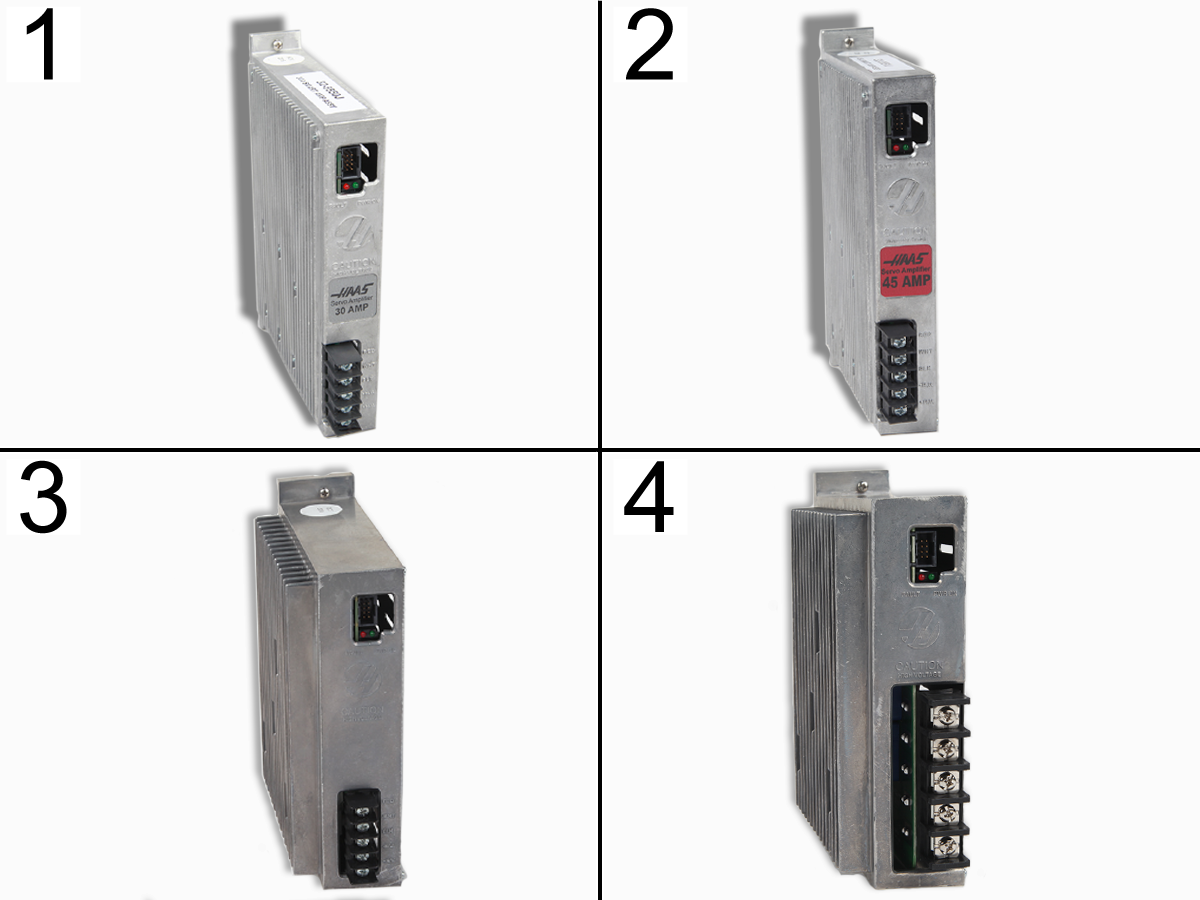
There are four versions of Haas amplifiers. 30A [1], 45A [2], 60A [3], and 90A [4]. All four operate the same way.

Smart Amplifier assemblies are powered from the 320 VDC Bus from the Vector Drive assembly or Minimill Power Supply. They each have a red LED FAULT light, and a green LED POWER ON light to show the status of the amplifier.

Electrical Safety

 DANGER: Working with the electrical services required for CNC machines is extremely hazardous and can result in serious injury or death.

Before connecting line wires to the CNC:

  • Turn off all power to the machine at the source.
  • Perform a Lockout-Tagout (LOTO) procedure to ensure the power remains off during service.
  • Verify that power has been disconnected by using an AC voltage detector on all incoming lines.

If you are uncertain about how to safely disconnect power or perform LOTO procedures:

  • Do not proceed.
  • Contact qualified personnel or obtain appropriate assistance before continuing.

Failure to follow these precautions may result in electrical shock, equipment damage, or fatal injury.

 Danger: Before beginning any work inside the control cabinet, verify that the High Voltage indicator light on the 320V Power Supply / Vector Drive has been off for a minimum of five (5) minutes. This waiting period ensures that residual voltage has dissipated and reduces the risk of electric shock.

Certain service procedures involve high-risk electrical components and may pose serious injury or fatality hazards. Technicians must not attempt any procedure unless they have a complete understanding of the steps involved and the associated risks.

If there is any uncertainty regarding a procedure, contact your Haas Factory Outlet (HFO) to arrange for a qualified service technician.

Symptom Table

Symptom Possible Cause Corrective Action

Alarms 161-164 AXIS DRIVE FAULT

Alarm 993 AMPLIFIER SHORT CIRCUIT

Alarm 2040 VECTOR DRIVE OR SPINDLE AMPLIFIER-SHORT CIRCUIT

Amplifier detected a short. Check cables for contamination or damage.
The amplifier has a internal short circuit. Do the Amplifier Short Circuit Inspection section.

Note: If a short-circuit is found, inspect the cable and motor for a short circuit before installing a new amplifier.

Alarms 161-164 AXIS DRIVE FAULT and Alarm 986 CALIBRATION FAULT The machine booted up before the amplifier calibration cycle finished Press [Reset] to clear the alarm and continue to use the machine. Refer to HBC-N-02/27/2025 for more details on this issue.
Amplifier internal calibration. Check the command cable from the Maincon / Mocon PCB to amplifier. Check the 320 VDC voltage to amplifiers.
Alarms 161-164 AXIS DRIVE FAULT and Alarm 992 AMPLIFIER OVER CURRENT Axis mechanical blockage. Axis mechanical blockage.
Alarms 161-164 AXIS DRIVE FAULT and Alarm 994 AMPLIFIER OVER LOAD Incorrect application. Change speed and check for tool damage.
Axis mechanical blockage. Remove Blockage.
Incorrect Low Voltage Input supply to Maincon or Amplifier. See the Low Voltage Inspection section.
Alarms 161-164 AXIS DRIVE FAULT and Alarm 991 AMPLIFIER OVER TEMPERATURE Problem with the cooling fan. Check cooling fan.
Alarm 991 AMPLIFIER OVER TEMPERATURE. The Maincon/Mocon axis channel is defective, or there is a broken pin on the connector. Remove the encoder/drive cables from the Maincon/Mocon PCB axis channel. Inspect the connectors pins. Test the axis on a different Maincon/Mocon channel, if the problem goes away there is a problem with the axis channel.

Mechanical Blockage

Corrective Action:

Make sure the axis has a clear path of travel. Tools, part fixtures, or workpieces that are too large can crash into the machine enclosure.

Look at the machine's alarm history. Overload alarms followed by over current alarms are a sign of a crash.

Look at the machine enclosure, spindle and tooling for damage. Damage to the tooling, fixtures and enclosure are signs of a crash.

If there are no signs of a crash, inspect the ballscrew and linear guides. They must move or turn freely by hand.

Amplifier Short Circuit Inspection

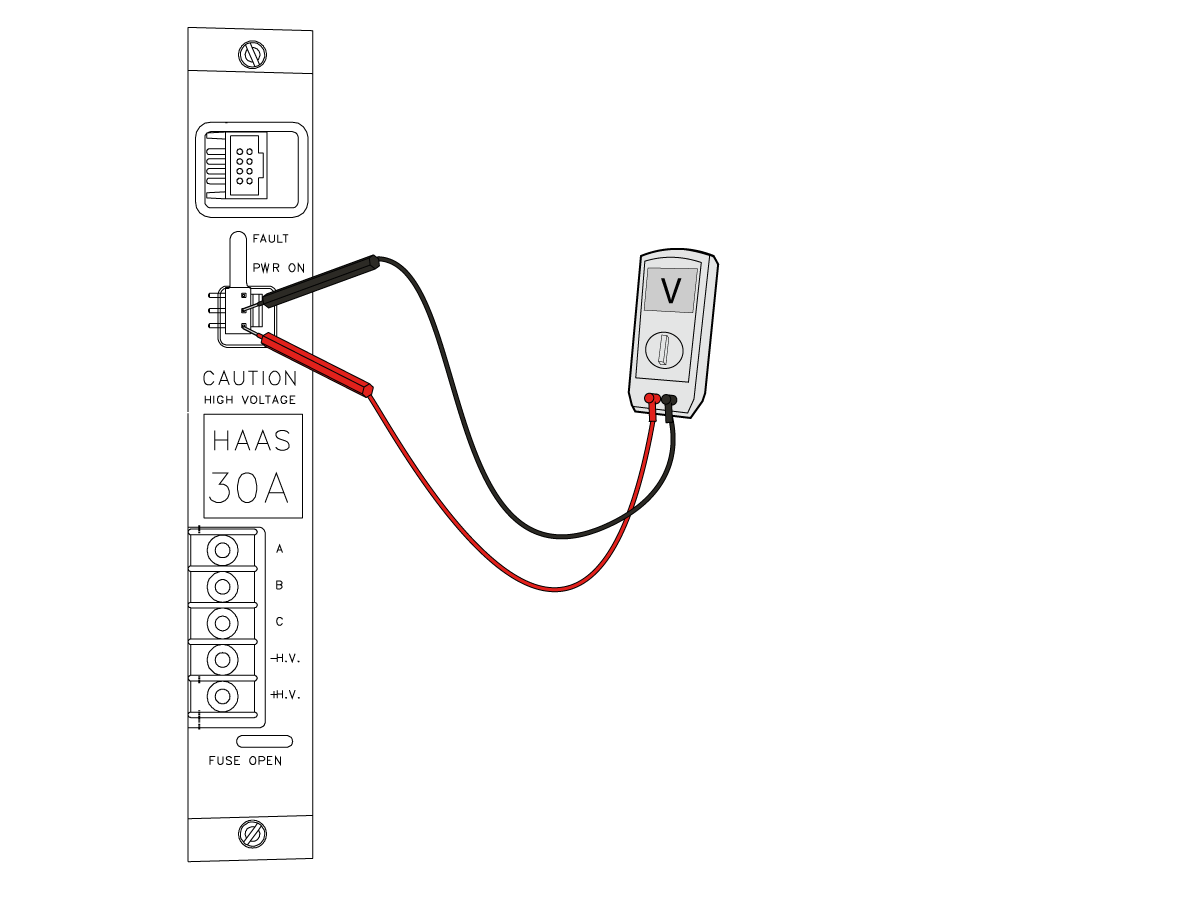
Check the amplifier for a short. Power off the machine. Disconnect the cables for the axis servo motor at the amplifier that generates the alarm.

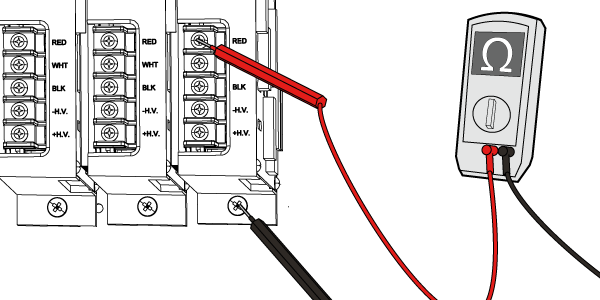
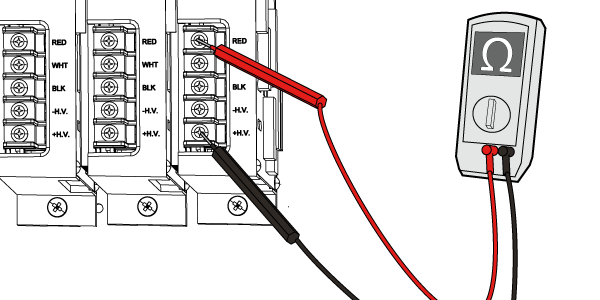
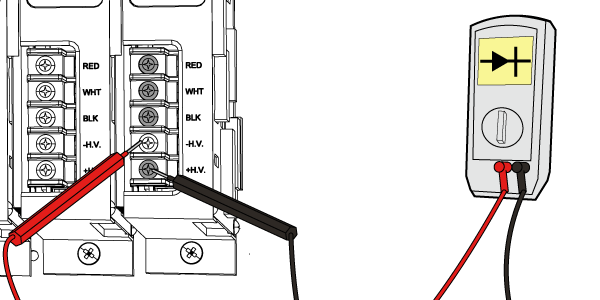
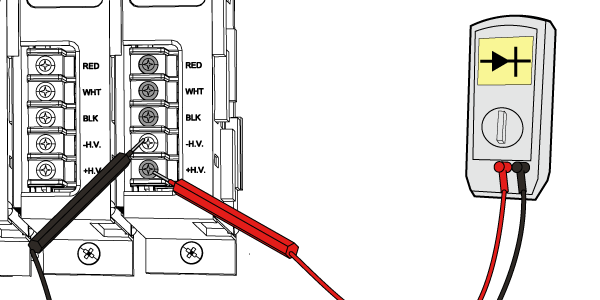
Place MultiMeter Leads Here Instructions

Set the meter to ohms, and take the following readings:

Ground screw to RED, WHT, and BLK terminals

If the meter does not show open (o.l) the amplifier is damaged.

Set the meter to Ohms, and take the following readings:

Black lead on HV (+) and Red lead to HV (-), RED, WHT, and BLK terminals.

The meter should show high resistance readings typically in the Kilo or Mega ohms.  If the meter reads very low resistance the amplifier is damaged.

Set the meter to diode test mode, and take the following readings:

Red lead on HV (-) and black lead to HV (+), RED, WHT, and BLK terminals

If the meter does not show a voltage drop ranging from 0.2 to 0.8 volts the amplifier is damaged.

Set the meter to diode test mode, and take the following readings:

Black lead on HV (-) and red lead to HV (+), RED, WHT, and BLK terminals

If the meter does not an open circuit (O.L) the amplifier is damaged.

Servo Motor Short Circuit Inspection

Corrective Action:

Check the cables for a short: Make sure the axis servo motor cables are not contaminated or pinched. Contaminated or pinched cables can cause a short. Replace the cables if necessary.

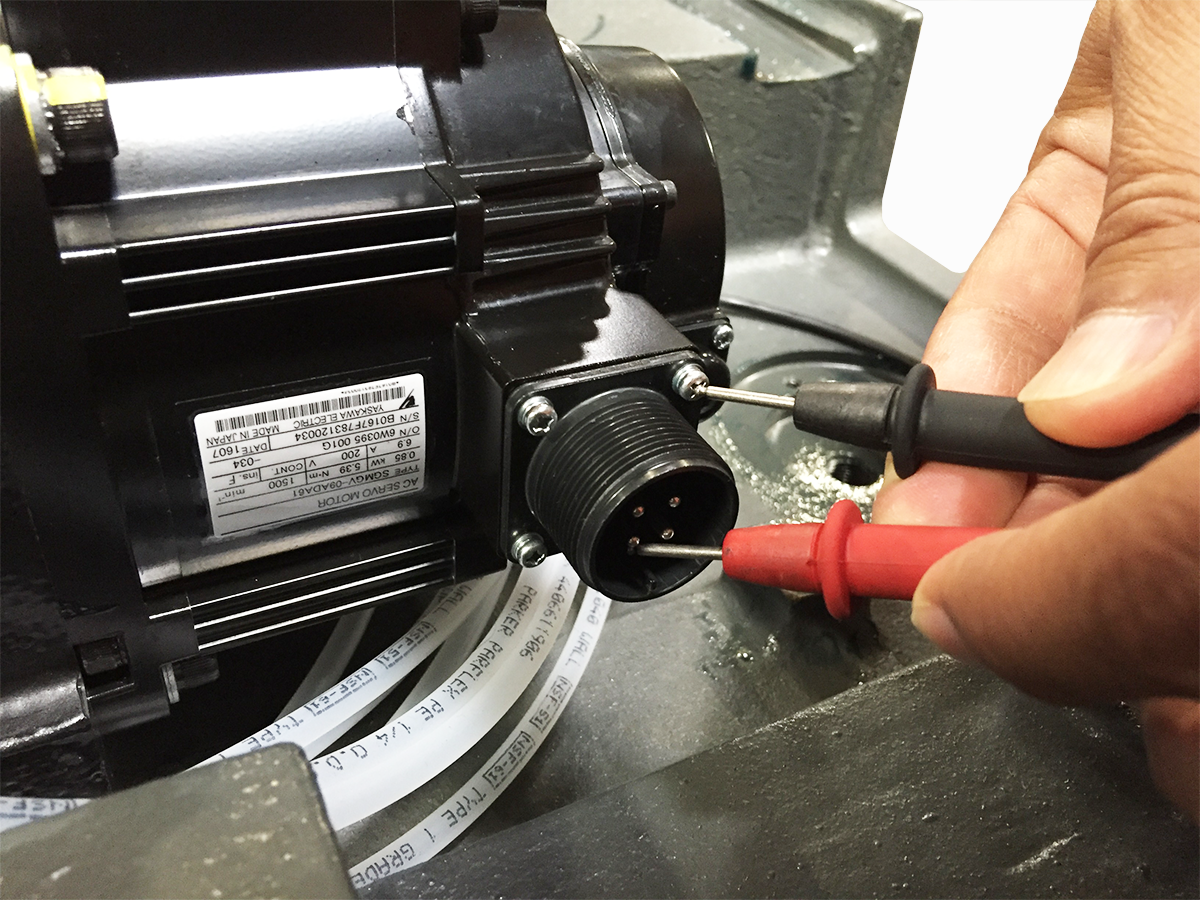
Inspect the servo motor. Disconnect and inspect the power cable connector at the motor. Make sure that there is no coolant contamination. Coolant contamination can cause this alarm and damage the amplifier. Measure the resistance from the pins labeled A, B and C at the motor connector to chassis ground.

  • The reading should show an open circuit.
  • If there is not open resistance, the servo motor is at fault.

Review the Part Program

Corrective Action:

The machine load is too high. Decrease the feeds to decrease the machine load. Examine the cutting tool for damage.

Test the axis that generates the alarm. Write a program in MDI to move the axis. If any movement at any feed rate causes the alarm, then the servo amplifier is at fault.

Low Voltage Inspection

Non Smart Amplifiers Low Voltage Input.

Non Smart Amplifiers - Use a low voltage power supply module to supply +12/-12VDC to the amplifier.  This voltage is critical to the correct operation of this amplifier.

With the power on, using a volt meter set to DC carefully measure acrross Yellow/Black and White/Black.

  • Yellow = +12VDC
  • White = -12VD
  • Black = Ground

Use the table below for the correct voltage range.

Mocon/Maincon Low Voltage Input

Corrective Action:

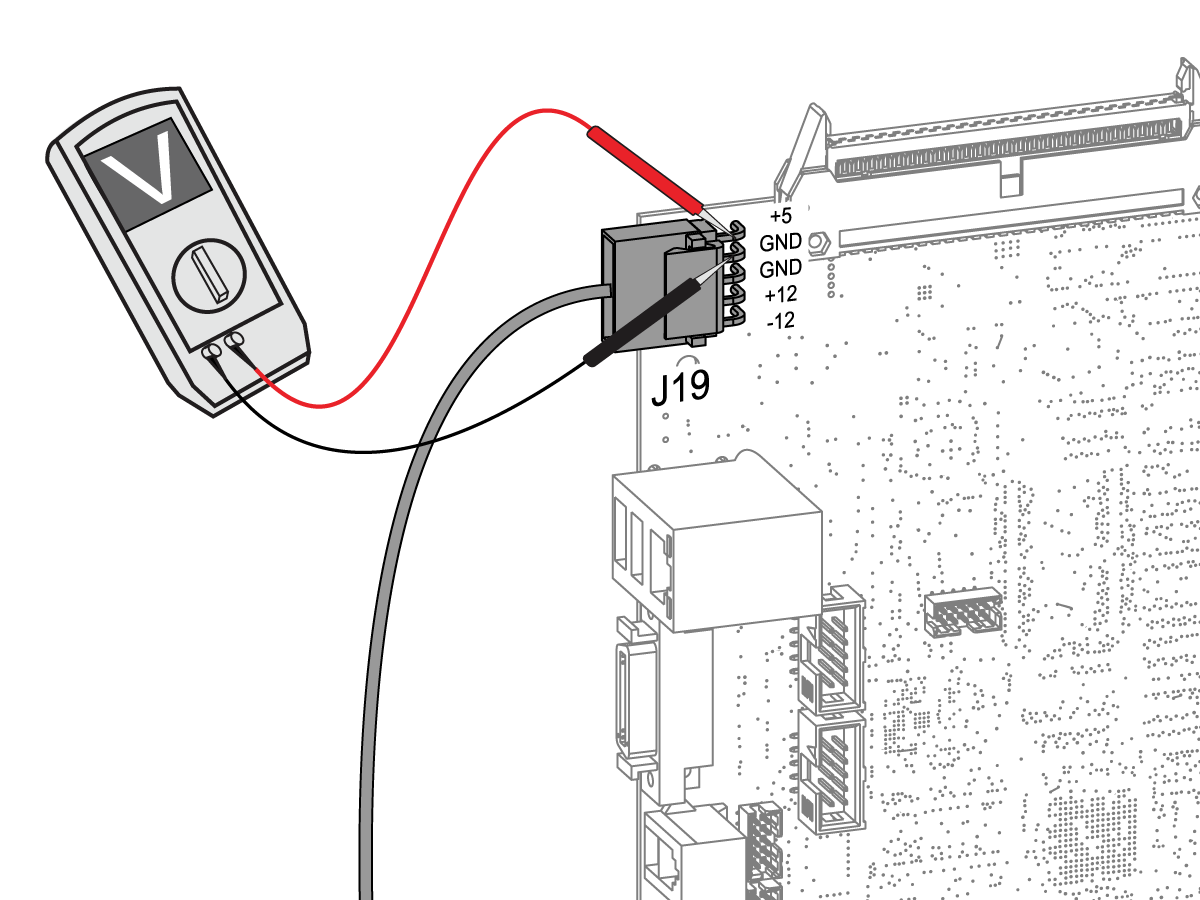
Measure the low voltage power supply voltage levels at the Maincon or Mocon PCB. Make sure you do not short or cross your multimeter pins.

Cycle power to the machine. If the fault stays, then the amplifier is faulty.

If every axis amplifier in the machine generates the alarm at the same time, and the low voltage power supply is correct, then the Maincon or Mocon PCB may be at fault.

Pins Correct Voltage
+5 and GND +4.90 to +5.20 V dc
+12 and GND +11.85 to +12.50 V dc
-12 and GND -11.85 to -12.50 V dc

Cooling Fan

Corrective Action:

 Note: The maximum temperature for safe operation of Haas CNC machines is 122 °F (50 °C). The amplifier over temperature sensor will trigger at 195 °F (90 °C).

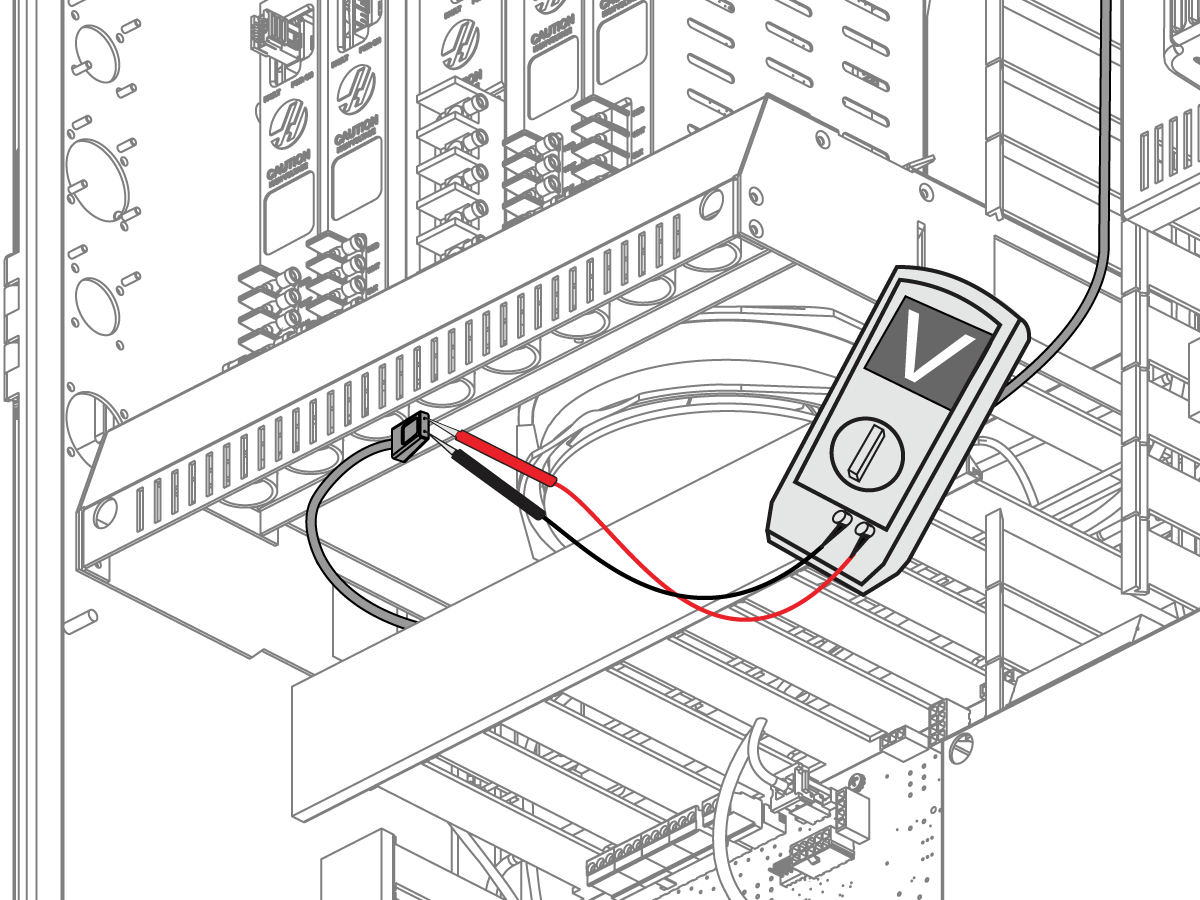
Make sure the cooling fan for the servo amplifiers operates correctly.

If the fan does not operate correctly, measure the voltage it receives. Disconnect the cable from the cooling fan. Measure the voltage between the leads of the cable. The correct voltage 120 VAC.

  • If the cable has the correct voltage, the cooling fan is defective.

Electrical Diagram

Recently Viewed Items

You Have No Recently Viewed Items Yet

Feedback
Haas Logo

Haas Delivered Price

This price includes shipping cost, export and import duties, insurance, and any other expenses incurred during shipping to a location in France agreed with you as a buyer. No other mandatory costs can be added to the delivery of a Haas CNC Product.

KEEP UP WITH THE LATEST HAAS TIPS AND TECHNOLOGY...

Sign up now!   

HAAS TOOLING ACCEPTS THE FOLLOWING:

  • Service & Support
  • Owners
  • Request Service
  • Operator Manuals
  • Haas Parts

  • Rotary Repair Request
  • Pre-Install Guides
  • Shopping Tools
  • Build & Price a New Haas
  • Available Inventory
  • The Haas Price List
  • CNCA Financing
  • About Haas
  • Accessibility Statement
  • DNSH Statement
  • Export Compliance
  • Careers
  • Certifications & Safety
  • Contact Us
  • History
  • Terms & Conditions
  • Haas Tooling Terms & Conditions
  • Privacy
  • Warranty
  • Haas Community
  • Haas Certification Program
  • Haas Motorsports
  • Gene Haas Foundation
  • Haas Technical Education Community
  • Events
  • Join the Conversation
  • Facebook
  • X
  • Flickr
  • YouTube
  • LinkedIn
  • Instagram
  • TikTok
© 2026 Haas Automation, Inc – CNC Machine Tools

This site is protected by reCAPTCHA and the Google Privacy Policy and Terms of Service apply.

2800 Sturgis Rd., Oxnard, CA 93030
Toll Free: (888) 817-4446 / Fax: 805-278-8554