My Haas Welcome,
!
Haas Tooling MyHaas/HaasConnect Sign In Register Haas Tooling MyHaas/HaasConnect Sign Out Welcome, My Machines Latest Activity My Quotes My Account My Users Sign Out
Find Your Distributor
  1. Select Language
    1. English
    2. Deutsch
    3. Español - España
    4. Español - México
    5. Français
    6. Italiano
    7. Português
    8. Český
    9. Dansk
    10. Nederlands
    11. Magyar
    12. Polski
    13. Svenska
    14. Türkçe
    15. 中文
    16. Suomi
    17. Norsk
    18. الإنجليزية
    19. български
    20. Hrvatski
    21. Ελληνικά
    22. Română
    23. Slovenský
    24. Slovenščina
    25. 한국어
    26. 日本語
    27. Українська
  • machines Main Menu
    • Vertical Mills
      Vertical Mills
      Vertical Mills View All
      • Vertical Mills
      • VF Series
      • Universal Machines
      • VR Series
      • VP-5 Prismatic
      • Pallet-Changing VMCs
      • Mini Mills
      • Mold Machines
      • High-Speed Drill Centers
      • Drill/Tap/ Mill Series
      • Toolroom Mills
      • Pocket Mill
      • Compact Mills
      • Gantry Series
      • SR Sheet Routers
      • Extra-Large VMC
      • Double-Column Mills
      • 3+2 Positioning Machines
    • Multi-Axis Solutions
      Multi-Axis Solutions
      Multi-Axis Solutions View All
      • Multi-Axis Solutions
      • Y-Axis Lathes
      • 5-Axis Mills
    • Lathes
      Lathes
      Lathes View All
      • Lathes
      • ST Series
      • Dual-Spindle
      • Box Way Series
      • Toolroom Lathes
      • Chucker Lathe
      • Haas Bar Feeders
    • Horizontal Mills
      Horizontal Mills
      Horizontal Mills View All
      • Horizontal Mills
      • 50-Taper
      • 40-Taper
    • Rotaries & Indexers
      Rotaries & Indexers
      Rotaries & Indexers View All
      • Rotaries & Indexers
      • Rotary Tables
      • Indexers
      • 5-Axis Rotaries
      • Extra-Large Rotaries
    • Special Series
      Special Series
      Special Series View All
      • Special Series
      • EU_Series_Redirect
    • Automation Systems
      Automation Systems
      Automation Systems View All
      • Automation Systems
      • Mill Automation
      • Lathe Automation
      • Automatic Parts Loaders
      • Automation Models
    • Desktop Machines
      Desktop Machines
      Desktop Machines View All
      • Desktop Machines
      • Desktop Mill
      • Desktop Lathe
      • Control Simulator, Standard
      • Control Simulator, Premium
    • Shop Equipment
      Shop Equipment
      Shop Equipment View All
      • Shop Equipment
      • Knee Mill
      • Haas Manual Lathes
      • Haas Saws
    • Fabrication Machines
      Fabrication Machines
      Fabrication Machines View All
      • Fabrication Machines
      • Laser Cutting Machines
      • CNC Press Brakes
    • QUICK LINKS Special Series  Special Series 
      EU SERIES EU SERIES BUILD & PRICE | PRICE LIST BUILD & PRICE | PRICE LIST In-Stock Machines In-Stock Machines WHAT’S NEW WHAT’S NEW YOUR FIRST CNC YOUR FIRST CNC
      SHOPPING TOOLS
      • Build & Price a Haas
      • Price List
      • Available Inventory
      • CNCA Financing
      WANT TO TALK TO SOMEONE?

      A Haas Factory Outlet (HFO) can answer your questions, and walk you through your best options.

      CONTACT YOUR DISTRIBUTOR >
  • Options Main Menu
    • The Haas Control Value Option Packages
      Value Option Packages
      Value Option Packages View All
      • Value Option Packages
    • Product Image Spindles
      Spindles
      Spindles View All
      • Spindles
    • Product Image Tool Changers
      Tool Changers
      Tool Changers View All
      • Tool Changers
    • Product Image 4th- | 5th-Axis
      4th- | 5th-Axis
      4th- | 5th-Axis View All
      • 4th- | 5th-Axis
    • Product Image Turrets & Live Tooling
      Turrets & Live Tooling
      Turrets & Live Tooling View All
      • Turrets & Live Tooling
    • Product Image Probing
      Probing
      Probing View All
      • Probing
    • Haas Chip & Coolant Management Chip & Coolant Management
      Chip & Coolant Management
      Chip & Coolant Management View All
      • Chip & Coolant Management
    • The Haas Control The Haas Control
      The Haas Control
      The Haas Control View All
      • The Haas Control
    • Product Image Product Options
      Product Options
      Product Options View All
      • Product Options
    • Product Image Tooling & Fixturing
      Tooling & Fixturing
      Tooling & Fixturing View All
      • Tooling & Fixturing
    • Product Image Workholding
      Workholding
      Workholding View All
      • Workholding
    • Product Image 5-Axis Solutions
      5-Axis Solutions
      5-Axis Solutions View All
      • 5-Axis Solutions
      • 5 Easy Steps to 5-Axis
    • QUICK LINKS Special Series  Special Series 
      EU SERIES EU SERIES BUILD & PRICE | PRICE LIST BUILD & PRICE | PRICE LIST In-Stock Machines In-Stock Machines WHAT’S NEW WHAT’S NEW YOUR FIRST CNC YOUR FIRST CNC
      SHOPPING TOOLS
      • Build & Price a Haas
      • Price List
      • Available Inventory
      • CNCA Financing
      WANT TO TALK TO SOMEONE?

      A Haas Factory Outlet (HFO) can answer your questions, and walk you through your best options.

      CONTACT YOUR DISTRIBUTOR >
  • Why Haas Main Menu
      Discover the Haas Difference
    • Why Haas
    • MyHaas
    • Education Community
    • Industry 4.0
    • Haas Certification
    • Customer Testimonials
  • Service Main Menu
      Welcome to Haas Service
      SERVICE HOME Operator’s Manuals How-To Procedures Troubleshooting Guides Preventive Maintenance Haas Parts Haas Tooling Videos
  • Videos Main Menu
  • Main Menu
    • View All
    • View All
    • View All
    • View All
      • HTEC Curriculum Support
      • Haas Value Option Packages (VOP) Journey
    • View All
      • Haas 10 kg Cobot Package
      • Cobot Kits
      • DC-1 Drill Center
      • CNC Sales News
      • Do More With Your Haas
    • View All
    • View All
      • contact-us-test
      • 4 - AUTOMATION SYSTEMS
      • Carousel-V2
      • expert test
      • Demo_Day_Trident-test
      • Link Test
      • image-sale-tag-test
      • article-list-test
      • Haas 25 kg Robot Package
      • test-algolia-page
    • View All
    • View All
    • View All
    • View All
      • calc-test
    • View All
    • QUICK LINKS Special Series  Special Series 
      EU SERIES EU SERIES BUILD & PRICE | PRICE LIST BUILD & PRICE | PRICE LIST In-Stock Machines In-Stock Machines WHAT’S NEW WHAT’S NEW YOUR FIRST CNC YOUR FIRST CNC
      SHOPPING TOOLS
      • Build & Price a Haas
      • Price List
      • Available Inventory
      • CNCA Financing
      WANT TO TALK TO SOMEONE?

      A Haas Factory Outlet (HFO) can answer your questions, and walk you through your best options.

      CONTACT YOUR DISTRIBUTOR >
  • Haas Tooling Main Menu
  • Haas Service Parts Main Menu

My Haas Welcome,
!
Haas Tooling MyHaas/HaasConnect Sign In Register Haas Tooling MyHaas/HaasConnect Sign Out Welcome, My Machines Latest Activity My Quotes My Account My Users Sign Out
Find Your Distributor
  1. Select Language
    1. English
    2. Deutsch
    3. Español - España
    4. Español - México
    5. Français
    6. Italiano
    7. Português
    8. Český
    9. Dansk
    10. Nederlands
    11. Magyar
    12. Polski
    13. Svenska
    14. Türkçe
    15. 中文
    16. Suomi
    17. Norsk
    18. الإنجليزية
    19. български
    20. Hrvatski
    21. Ελληνικά
    22. Română
    23. Slovenský
    24. Slovenščina
    25. 한국어
    26. 日本語
    27. Українська
×

Search Results

Web Pages

Images

    • <
    • 1
    • >

Single-Stage Coolant Pump - Troubleshooting Guide - NGC - TG0138

Service Home Single-Stage Coolant Pump - Troubleshooting Guide - NGC - TG0138

Single-Stage Coolant Pump - Troubleshooting Guide - NGC - TG0138

- Jump to Cause - Back to Top

3.6 Single-Stage Coolant - Troubleshooting

Recently Updated Last updated: 10/30/2025

Single Stage - Coolant Pump - Troubleshooting Guide - NGC


TG0138

Revision A - 12/2025

Download and fill out the coolant pump Inspection Report Checklist below before replacing any parts.

Coolant pump Inspection Report Checklist

Introduction

The following service video shows how to troubleshoot a standard flood coolant pump

NOTE: This video is for reference only and does not replace the written procedure.

This troubleshooting guide applies to both 1-Phase and 3-Phase pumps.

In this image, the following components are shown.

  1. Coolant Pump Motor
  2. Coolant Outlet
  3. Pump Body
  4. Impeller Cap
  5. Impeller

NOTE: For troubleshooting information on the coolant float sensor, refer to the Coolant Level Float Sensor - Troubleshooting Guide for more information. 

NOTE: Coolant Pumps with  PN: 30-14261 (1HP, 3-Phase without VFD) will follow the same installation process for non-VFD applications across all machines, with the exception of VF's VP-5, VM's, ST/DS, and UMC's.

ID0013 Coolant Pump Inspection Report Checklist requires the pump's serial number to be completed. 

The serial number can be found on the side of the pump [1] in the box labeled serial number [2]

Symptom Table

Symptom Possible Cause Corrective Action
Machine with Variable Frequency Drive - The coolant takes too long to flow out the nozzles or Pcool. The variable frequency drive has an incorrect acceleration parameter value. Refer to the Coolant VFD - Troubleshooting Guide.
Noisy pump or cavitation Poor Coolant flow through enclosure Remove chip buildup.
Low Coolant Level Fill coolant tank.
Impeller contamination, or impeller damage Inspect impeller for damage or debris. Clean impeller or order kit 93-2609 to replace impeller. Follow Impeller Replacement Procedure to replace. 
Motor bearing failure. Rotate the shaft by hand
Low coolant flow. Poor Coolant flow through enclosure Remove chip buildup.
Low coolant level in coolant tank Fill coolant tank.
Impeller contamination, or impeller damage Refer to the Coolant Pump Impeller Damage/Contamination section below to check the impeller in the pump.
Filter or pump intake blockage. Clean filter, check pump intake for blockage.
Pump intake or coolant output hose blockage Remove coolant check-valve and coolant output hose blockage.
Coolant nozzle blockage Remove blockage from coolant nozzles
The coolant pump is not building pressure. The motor shaft may be slipping due to the coupling not being fastened all the way. Thoroughly inspect the pump assembly and verify the motor shaft coupling is fastened down all the way.
No coolant flow and coolant circuit breaker did not trip. Setting 32 COOLANT OVERRIDE is set to IGNORE. Set Setting 32 COOLANT OVERRIDE to NORMAL.
Coolant pump motor does not receive voltage. See the No Voltage at the Pump Motor section below.
Incorrect power phasing - pump motor is running backward. Correct phasing
Impeller contamination or damage Refer to the Coolant Pump Impeller Damage/Contamination section below to check the impeller in the pump.
No coolant flow and the coolant circuit breaker tripped. Coolant pump motor short to ground. Measure coolant pump motor resistance to ground.
(Single-phase machines only), Alarm 552 TRIPPED CIRCUIT BREAKER occurs when the coolant pump gets commanded to turn on.

Note: The circuit breaker did not tripped.

The 240 VAC input cable connected to the PSUP at P11 is not correct. Verify the cable pinout for the cable that connects from the main circuit breaker to the PSUP at P11.  Refer to Incorrectly pinned power cable (Single-Phase) section.
Alarm 552 TRIPPED CIRCUIT BREAKER Refer to: Next Generation Control - Power Distribution PCB and PFDM - Troubleshooting Guide.  
Coolant leaking from machine enclosure onto floor. This applies to ST-20 reboot enclosures only. The grommet that seals the Sub-Spindle Hydraulic Union drain line fails to seal due to the hose pulling on the grommet. Install the ST-20 Sub-Spindle Hose Routing Retrofit Kit Part Number: 93-3127. This reroutes the drain hose and clamps the hose limiting the movement and ability to pull on the grommet. Follow the Installation Guide to retrofit your machine.

Alarm 9823 Coolant VFD Fault

Alarm 9824 Shower Coolant VFD Fault

There is a problem with the Coolant / Shower VFD. Refer to the Coolant VFD - Troubleshooting Guide.
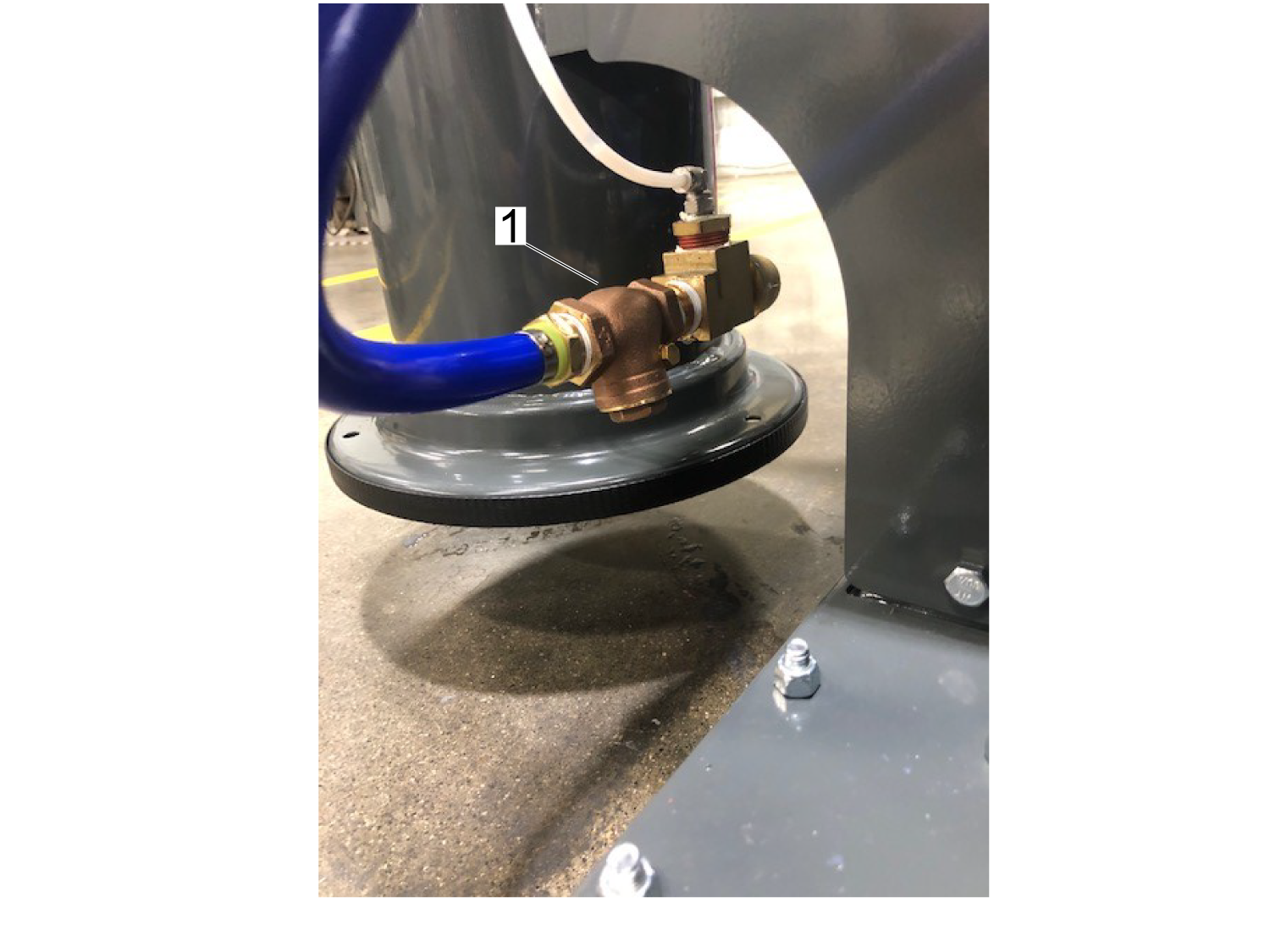
Coolant pump with an Aux filter is splashing on the floor when pump is commanded off When pump is commanded to stop coolant left over in the line returns through the pump and splashes into the tank.

Install a check valve on the output side of the aux filter to stop the coolant from returning and splashing. Please refer to Aux Filter Check Valve section for installation.

Please contact Haas Service if a check valve is installed to the output of the aux filter.

Motor hums when commanded to turn on

Note: For pumps dated DEC-2019 to FEB-2020

Coolant pump start capacitor failed.

Refer to the Coolant Pump - Start Capacitor - Replacement procedure.
Turns slowly, drawing higher than normal current and eventually trips the breaker
Turns backwards
Alarm 9823 COOLANT VFD FAULT The flood coolant pump has seized up. Refer to the Coolant Pump Impeller Damage/Contamination section below to check the impeller in the pump.

Alarm 552 TRIPPED CIRCUIT

BREAKER 

and

The CB3 on the PSUP PCB has tripped on machines without a VFD.

The 5/8" coolant hose leaks at the fittings or the hose pops off the fittings. The 5/8" Hose Clamp[1] PN: 59-1524 installed on the coolant hose is oversized and does not clamp the hose correctly. Replace the oversized hose clamp with PN: 59-2107 HOSE CLAMP EAR 20.1 - 23.3 MM. Use a Crimping Tool to secure the new hose clamp.

Poor coolant flow through enclosure

Remove all chips from the the auger trough [1], and the coolant return drain [2].

Remove chips from the coolant tank. Excessive chips in the coolant tank reduce the amount of coolant the tank can store. Watch the video Machine Tool Coolant - Cleaning Your Tank - Video.

Fill the coolant tank. Watch the video Standard Coolant – Simplified - Filling your Tank … and More.

Make sure the coolant level sensor operates correctly.

Coolant Pump Impeller Damage/Contamination

Remove the impeller cap [1] from the bottom of the pump. Remove the screw that connects the impeller [2] to the shaft. Steel impellers have left-hand threads [3].

Carefully remove and clean the impeller [2]. Check for wear, damage, or cracking of the impeller [2].

If the impeller is damaged or cracked, order a replacement impeller, service part 93-2609. Follow Impeller Replacement Procedure to replace. 

Rotate the coolant pump shaft by hand. If the shaft does not turn freely, the motor bearings are damaged.

Install the impeller [2]. Rotate the coolant pump shaft by hand, and make sure the impeller does not rub on the pump body [4]. If the impeller rubs against the pump body, install shims between the impeller [2] and the coolant pump shaft. Install the impeller cap [1]. If the impeller [2] rubs against the impeller cap [1], remove one shim at a time until it does not rub.

There are several filters that keep chips out of the coolant pump. Refer to Section 3 for filter maintenance information.

Aux Filter Check Valve Install

Place the check valve [1] on the outlet side of the auxiliary filter as shown.

NOTE: Please contact Haas Service if this is done. 

Filter or pump blockage

Clean or replace the filter element. Check the area around the coolant pump intake for chips.

  1. Auxiliary Filter - The bag filters in Auxiliary Filter tanks need to be cleaned or replaced. The Auxiliary Filter is an option. Your machine might not have this option.
  2. Standard Filter - Standard Filters need to be cleaned.

Disconnect both ends of the coolant hoses. Remove any kinks. In the opposite direction of the coolant flow, blow air through the hoses to remove any chips. If you find chips in the hoses, check the coolant nozzles and washdown hoses for chip buildup. Connect the coolant hoses.

Remove chips from the basket filter in the coolant tank. For maintenance instructions, refer to the Coolant Tank ‑ Maintenance procedure.

Check valve blockage (Coolant filter and Haas Chip Seperator)

Remove the coolant check-valve. Check it for blockage [1]. Make sure the trap door opens and closes freely. If the trap door does not close, coolant flows back into the tank. This delays the flow of coolant by a few seconds.

Disconnect both ends of the coolant hoses. Remove any kinks. In the opposite direction of the coolant flow, blow air through the hoses to remove any chips. If you find chips in the hoses, check the coolant nozzles and washdown hoses for chip buildup. Connect the coolant hoses.

Coolant nozzle blockage

Remove and clean the coolant nozzles.

Cycle the pump power to flush the coolant lines.

Make sure the coolant tank is free of chips and contamination.

Defective pump

  1. Disconnect the pump cable from the machine.
  2. With a ohm-meter measure each leg tab to the ground tab.

     Note: The ground tab has a bent. The example shown is a 3-phase pump with 4 tabs (L1, L2, L3 + Ground), single phase pumps have 3 tabs (L1, L2 + Ground).

    • If all the legs test open (O.L) to the ground tab then the pump and cable do not have a short circuit, see the next section.
    • If the motor cable leads [3] indicate a short, remove the motor cable cover and disconnect the cable from the motor.
  3. Measure the motor cable leads [5] to ground [6] terminal screw or chassis. If any lead tests short, the pump is at fault. If none of the leads [5] test short, the cable is at fault.
  4. If all the leads test OK, check the coolant pump for binding that could cause an over amperage condition.

No voltage at pump motor

  1. First inspect the pump motor for a short circuit see section Defective Pump.
  2. Make sure the coolant pump cable is connected to the machine.

     Important: Do not disconnect the coolant pump from the machine, doing this test without a load will give you false readings.

  3. Remove the pump motor cover and locate the white, black, red wires for 3-phase motor or white and black for a single-phase.
  4. Verify that coolant circuit breaker is set to on and setting 32 COOLANT OVERRIDE is set to NORMAL.
  5. Press the [COOLANT] button to turn on the coolant pump.
  6. Measure the voltage at the motor from lead to lead [1]. The reading must be 240 VAC. The motor shown is a 3-phase motor.
    • If you read 240 VAC, the coolant pump motor is damaged.
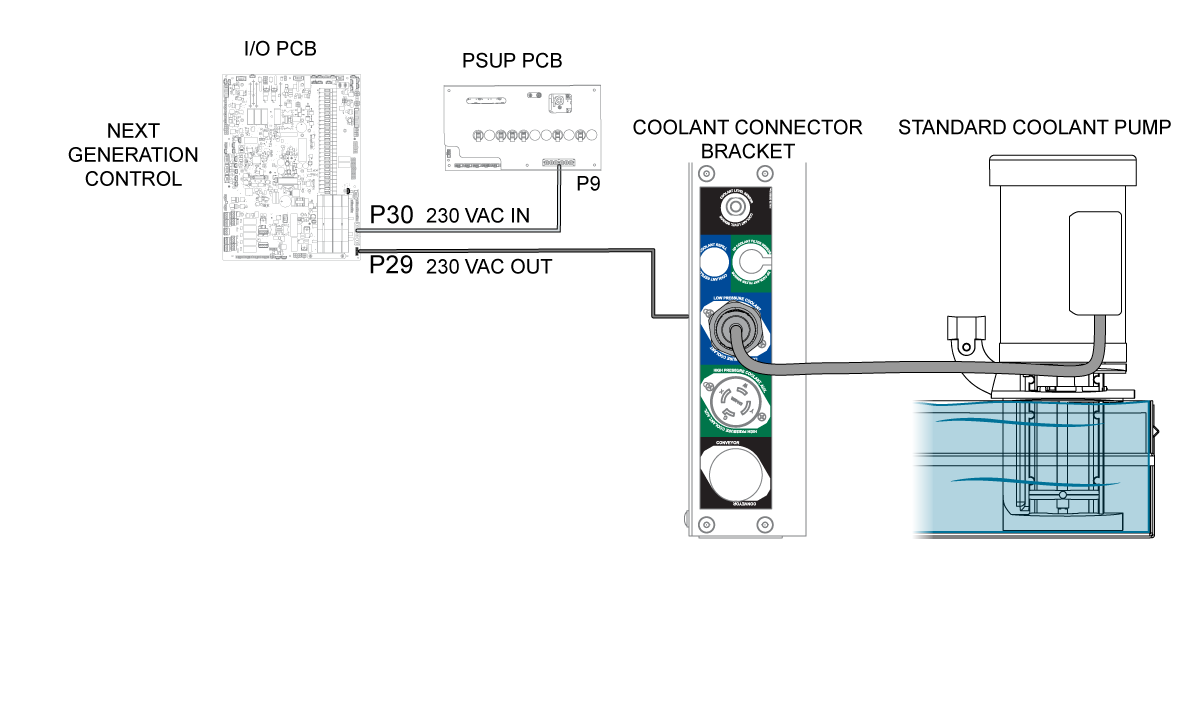
    • If you do not read 240 VAC, check at the I/O PCB coolant output. If there is still no voltage check the 240 VAC source from the PSUP PCB to I/O PCB.

Incorrect phasing

The power supply PCB has a phase detect with neon indicators on the top center portion of the board. Make sure that the electrical power is phased correctly:

  • Green Light: The incoming power is phased correctly.
  • Orange Light: The incoming power is incorrectly phased.
  • Both Lights: A phase is missing (there is a loose cable in the system).

If the electrical power is phased incorrectly:

Set the main circuit breaker to the OFF position.

Lock the main circuit breaker. Use an approved lock with an approved safety tag.

Swap the #74 and #75 incoming power cables at the main transformer.

Incorrectly pinned power cable (Single-Phase)

Correct the pinnout on cable P/N 33-0197C, PSUP P11 (NGC).

The cable should match the drawing shown.

Coolant Hose Clamp Failure

Problem: The 5/8" coolant hose leaks at the fittings or the hose pops off the fittings.

Cause: The 5/8" Hose Clamp[1] PN: 59-1524 installed on the coolant hose is oversized and does not clamp the hose correctly.

Solution: Replace the oversized hose clamp with PN: 59-2107 HOSE CLAMP EAR 20.1 - 23.3 MM. Use a Crimping Tool to secure the new hose clamp.

Electrical Diagrams

Use this electrical diagram for coolant pumps that are being driven by the I/O PCB.


Recently Viewed Items

You Have No Recently Viewed Items Yet

Feedback
Haas Logo

Haas Delivered Price

This price includes shipping cost, export and import duties, insurance, and any other expenses incurred during shipping to a location in France agreed with you as a buyer. No other mandatory costs can be added to the delivery of a Haas CNC Product.

KEEP UP WITH THE LATEST HAAS TIPS AND TECHNOLOGY...

Sign up now!   

HAAS TOOLING ACCEPTS THE FOLLOWING:

  • Service & Support
  • Owners
  • Request Service
  • Operator Manuals
  • Haas Parts
  • Rotary Repair Request
  • Pre-Install Guides
  • Shopping Tools
  • Build & Price a New Haas
  • Available Inventory
  • The Haas Price List
  • CNCA Financing
  • About Haas
  • Accessibility Statement
  • DNSH Statement
  • Export Compliance
  • Careers
  • Certifications & Safety
  • Contact Us
  • History
  • Terms & Conditions
  • Haas Tooling Terms & Conditions
  • Privacy
  • Warranty
  • Haas Community
  • Haas Certification Program
  • Haas Motorsports
  • Gene Haas Foundation
  • Haas Technical Education Community
  • Events
  • Join the Conversation
  • Facebook
  • X
  • Flickr
  • YouTube
  • LinkedIn
  • Instagram
  • TikTok
© 2026 Haas Automation, Inc – CNC Machine Tools

This site is protected by reCAPTCHA and the Google Privacy Policy and Terms of Service apply.

2800 Sturgis Rd., Oxnard, CA 93030
Toll Free: (888) 817-4446 / Fax: 805-278-8554